Omron IPC Machine Controller Industrial Panel PC / Industrial Box PC. Software User’s Manual (Industrial PC Platform NY-series) - page 10
6 Programming
z
Connecting line
The straight horizontal lines that connect the bus bar and the configuration elements are called con-
necting lines. Connecting lines can be either TRUE or FALSE and can transfer the power flow from
the left to the right.
z
Inputs
Inputs are placed along the connecting line to receive the power flow and operate accordingly.
There are several different types of inputs and, depending on their specifications, they will either
transfer the power flow from the left to the right or prevent the power flow from passing through.
When an input transfers the power flow to the right, the connecting line to the right of the input will
become TRUE. If the power flow is inhibited, the connecting line to the right of the input will remain
FLASE. For detailed specifications on inputs, refer to the NY-series Instructions Reference Manual
(Cat. No. W560).
z
Output
Outputs are placed along the connecting line to receive the power flow and operate accordingly. An
output writes the TRUE or FALSE value to a variable. There are different types of outputs. For
detailed specifications on outputs, refer to the NY-series Instructions Reference Manual (Cat. No.
W560).
z
Functions and Function Blocks
Functions and function blocks are placed along the connecting line to receive the power flow and
operate accordingly. For detailed instruction specifications, refer to the NY-series Instructions Refer-
ence Manual (Cat. No. W560).
Order of Execution for Ladder Diagrams
Inputs, outputs, functions, and function blocks are executed when they receive the power flow. The
order of execution for a ladder diagram is from top to bottom. Elements at the same level are executed
from left to right.
Ladder Diagram Completion
A ladder diagram is executed in order from top to bottom. When the execution reaches the very bottom,
the process is completed. However, the process will also end if an END or RETURN instruction is
encountered at any point during the process. No processes after those instructions are executed.
Controlling Execution of Ladder Diagrams
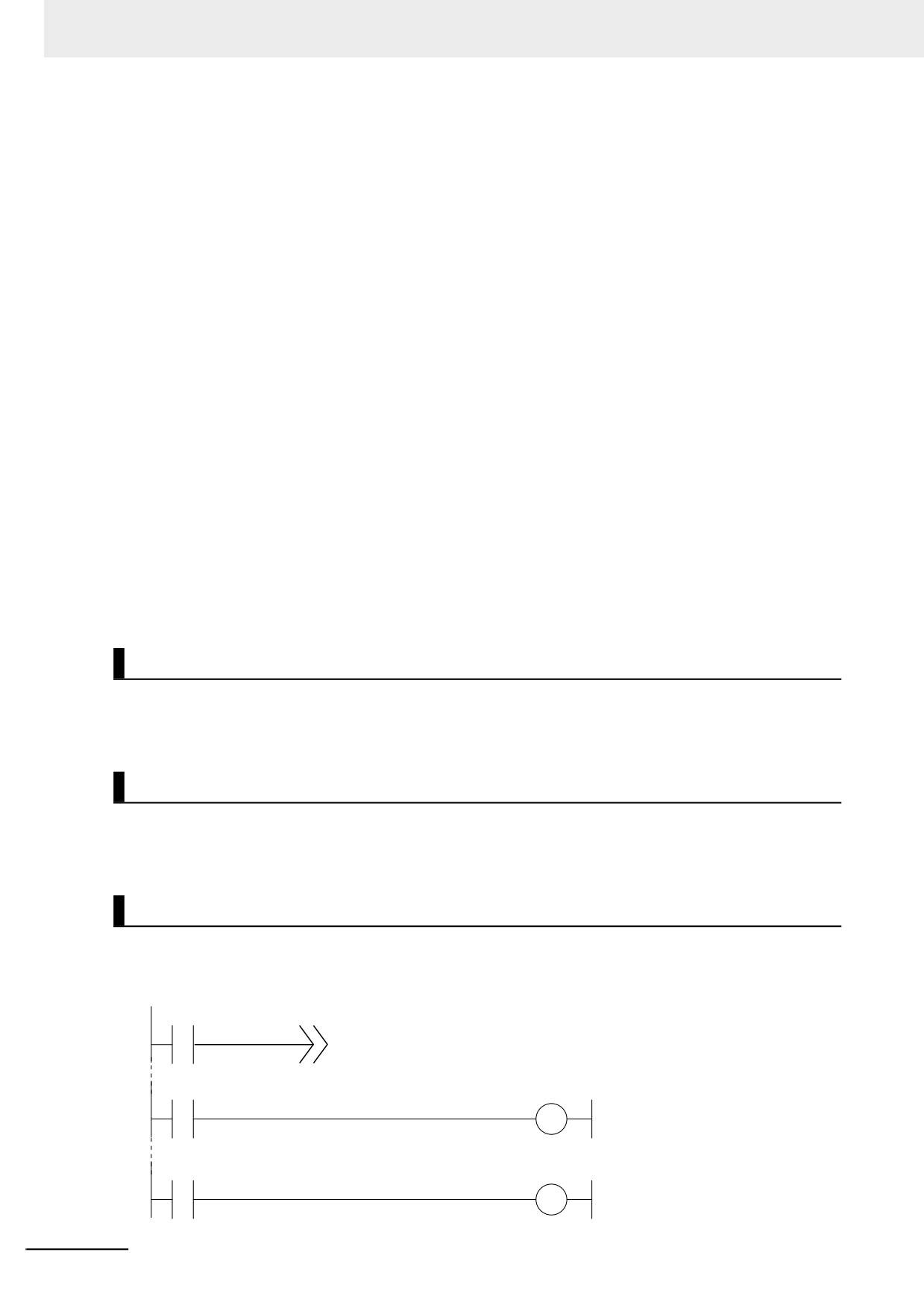
Ladder diagrams are generally executed from top to bottom, but you can use execution control instruc-
tions to change the execution order. In the following example, when the value of program input a
changes to TRUE, execution will move to the point labeled ‘ExceptionProcessing.’
Input a
Label: ExceptionProcessing
Input b
Input c
Label: ExceptionProcessing
Input d
Input e
6-92
6 Programming
Connecting Functions and Function Blocks in a Ladder Diagram
z Connection Configurations
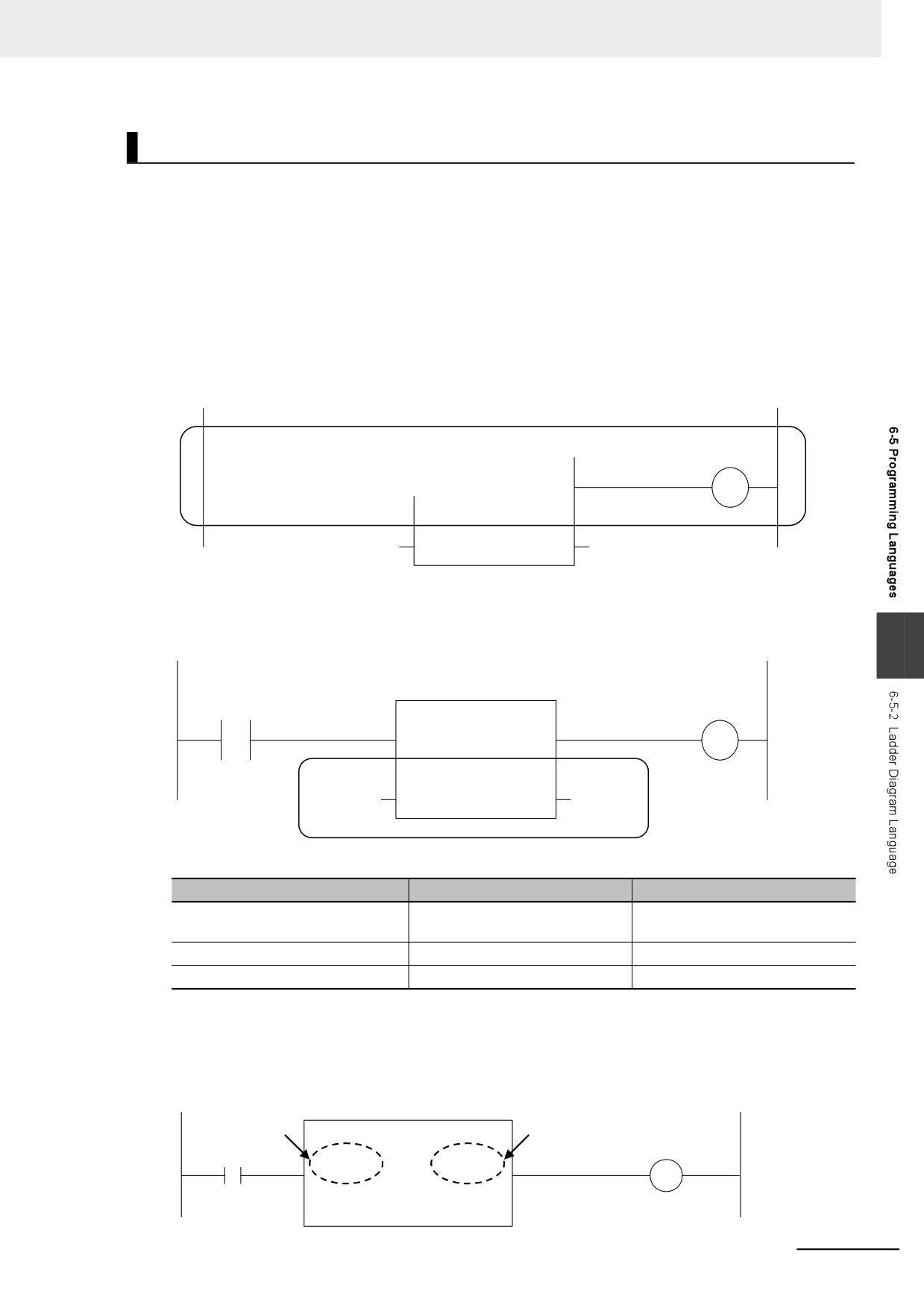
You use the following two types of connections for functions or function blocks.
1) Power Flow Input and Output
In a ladder diagram, the line that connects an input variable of a function or function block and the
left bus bar indicates a BOOL input and the line that connects an output variable to the right bus bar
indicates a BOOL output.
Example:
Inputs are connected in the power flow that connects to the left bus bar. Outputs are connected in
the power flow that connects to the right bus bar.
x1
FB
y2
IN1
OUT1
x2
IN2
OUT2
y2
2) Parameter Inputs and Parameter Outputs
In a ladder diagram, parameter inputs and outputs are specified when the input and output variables
of a function or function block are not connected to the left and right bus bars.
6
x1
FB
y2
IN1
OUT1
x2
IN2
OUT2
y2
As shown below, you can specify either variables or constants for input and output parameters.
Function/function block variables
Input parameters
Output parameters
Input variables
You can specify variables or con-
---
stants.
Output variables
---
You can specify only variables.
In-out variables
You can specify only variables.
You can specify only variables.
z
Number of BOOL Variables
At least one BOOL variable each is required for the input and the output (such as EN and ENO) of a
function or function block.
Example:
BOOL variable
BOOL variable
MyFB
(BOOL)
(BOOL)
IN
Q
(INT)
Val_In
6-93
6 Programming
z
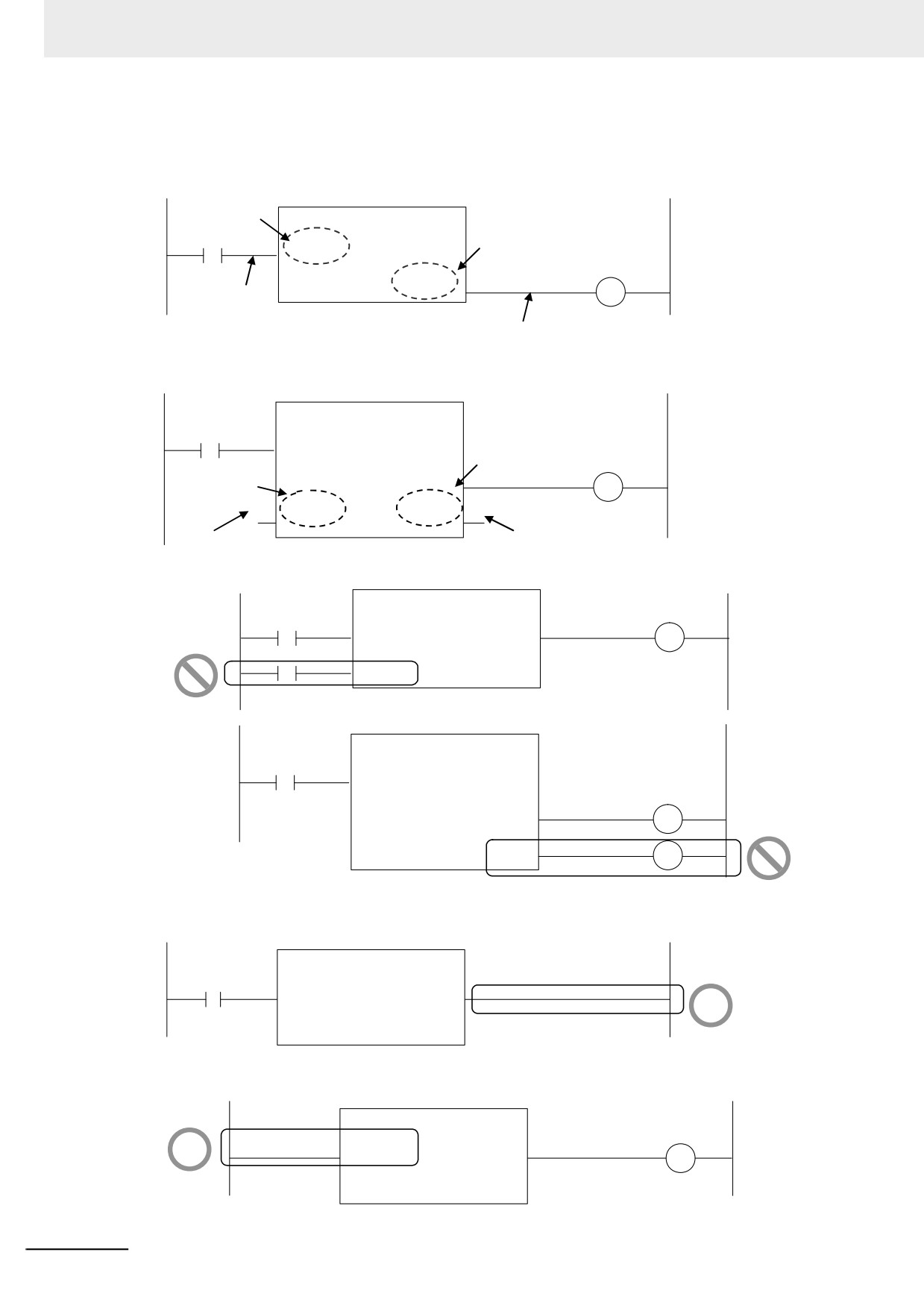
Connections Based on the BOOL Variable Positions
The top BOOL variables are connected to the left and right bus bars. In other words, they become
the power flow input and power flow output.
Top BOOL
variable
MyFB
(BOOL)
(INT)
Top BOOL variable
IN
Val_Out
(INT)
(BOOL)
Val_In
Q
Power flow
Power flow
There is only one power flow input and one power flow output for each function or function block. All
other BOOL variables that are not at the top are for parameter inputs and parameter outputs.
MyFB
(BOOL)
(INT)
IN1
Val_Out
BOOL variable that is not
BOOL variable
(INT)
(BOOL)
at the top
that is not at the
Val_In
Q1
top
(BOOL)
(BOOL)
a
b
IN2
Q2
Parameter output
Parameter input
You cannot connect multiple BOOL variables to the left bus bar or the right bus bar as shown below.
RS
(BOOL)
(BOOL)
Set
Q1
NG
(BOOL)
Reset1
MyFB
(BOOL)
(INT)
IN
Val_Out
(INT)
(BOOL)
Val_In
Q1
NG
(BOOL)
Q2
You do not have to connect an OUT instruction to the right bus bar. You can connect the function or
function block directly.
MyFB
OK
(BOOL)
(BOOL)
IN
Q
(INT)
Val_In
A LD instruction is not necessarily required. You can also connect directly to the left bus bar.
OK
MyFB
(BOOL)
(BOOL)
IN
Q
(INT)
Val_In
6-94
6 Programming
z
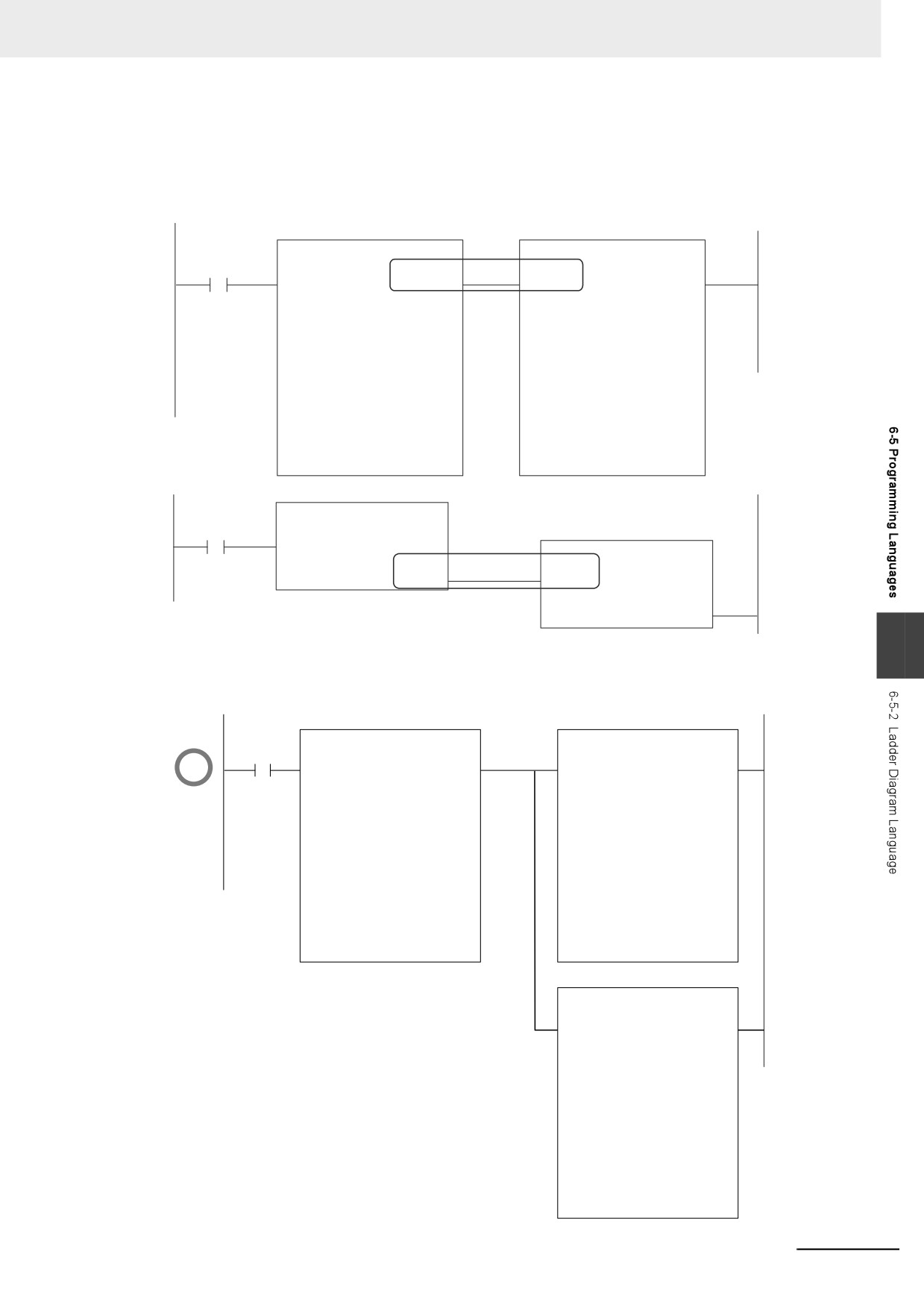
Cascade Connections
Cascade connections in which the output of a function or function block is connected to the input of
another function or function block are allowed only for power flow outputs and inputs.
Example:
CIPRead
CIPRead
GO
(BOOL)
(BOOL)
(BOOL)
(BOOL)
Execute
Done
Execute
Done
(BOOL)
(BOOL)
(BOOL)
(BOOL)
Handle
Busy
Handle
Busy
(BOOL)
(BOOL)
(BOOL)
(BOOL)
SrcDat
Error
SrcDat
Error
(BOOL)
(BOOL)
(BOOL)
(BOOL)
Size
ErrorID
Size
ErrorID
(BOOL)
(BOOL)
DstDat
DstDat
(BOOL)
(BOOL)
ErrorIDEx
ErrorIDEx
(BOOL)
(BOOL)
RcvSize
RcvSize
MyFB
(BOOL)
(INT)
IN
Val_Out
MyFB
(INT)
(BOOL)
(BOOL)
(INT)
Val_In
Q
IN
Val_Out
(INT)
(BOOL)
Val_In
Q
6
You can branch the power flow output.
Example:
OK
CIPRead
CIPRead
GO
(BOOL)
(BOOL)
(BOOL)
(BOOL)
Execute
Done
Execute
Done
(BOOL)
(BOOL)
(BOOL)
(BOOL)
Handle
Busy
Handle
Busy
(BOOL)
(BOOL)
(BOOL)
(BOOL)
SrcDat
Error
SrcDat
Error
(BOOL)
(BOOL)
(BOOL)
(BOOL)
Size
ErrorID
Size
ErrorID
(BOOL)
(BOOL)
DstDat
DstDat
(BOOL)
(BOOL)
ErrorIDEx
ErrorIDEx
(BOOL)
(BOOL)
RecvSize
RecvSize
CIPRead
(BOOL)
(BOOL)
Execute
Done
(BOOL)
(BOOL)
Handle
Busy
(BOOL)
(BOOL)
SrcDat
Error
(BOOL)
(BOOL)
Size
ErrorID
(BOOL)
DstDat
(BOOL)
ErrorIDEx
(BOOL)
RecvSize
6-95
6 Programming
Restriction
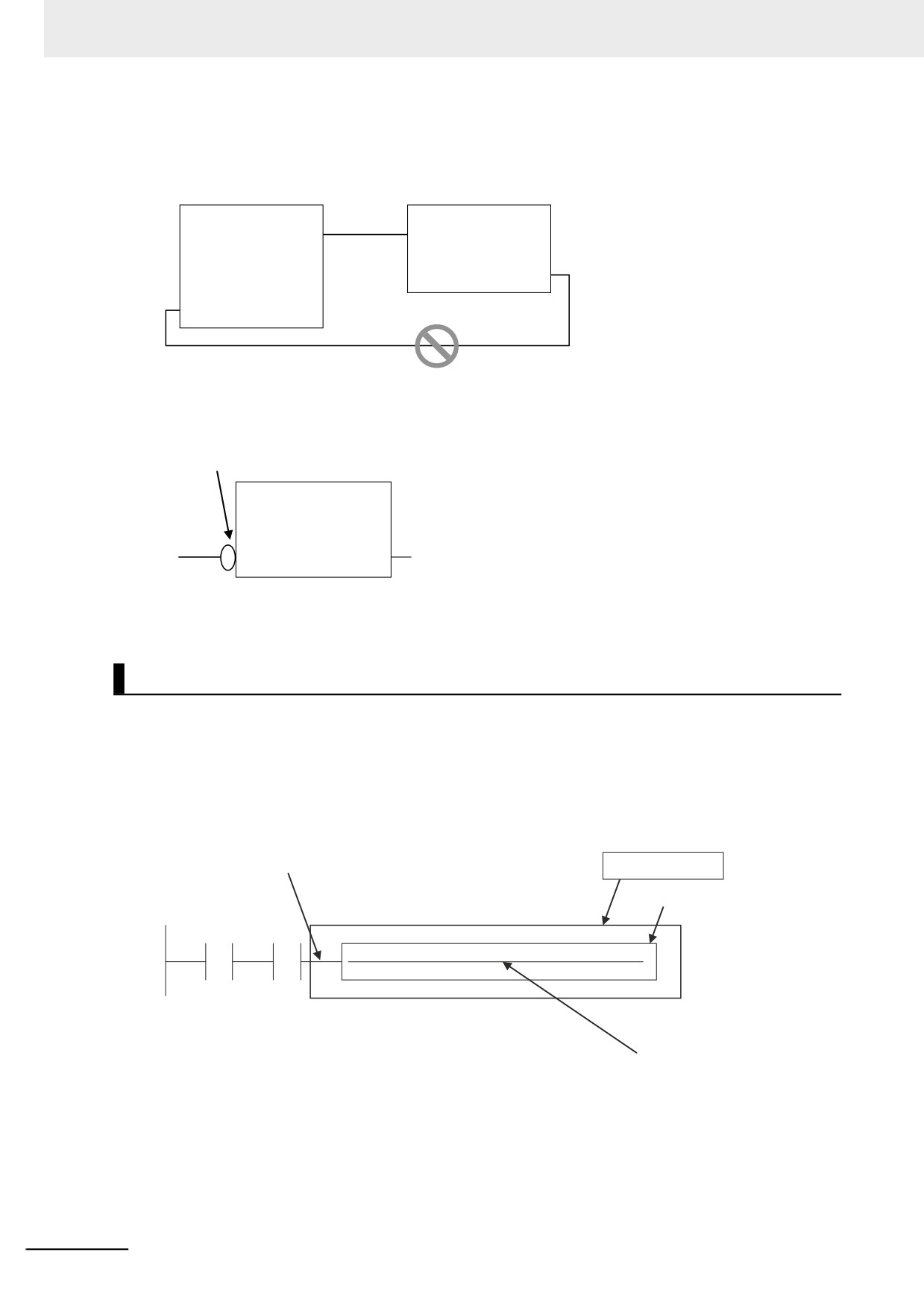
• You cannot create closed loops or intersect connecting lines.
Example:
FB1
FB2
EN
ENO
EN
ENO
IN1
OUT1
IN
OUT
IN2
OUT2
NG
No closed loops
z Reversing Inputs
You can reverse the value of a BOOL input variable when you input it to an instruction.
NOT input
FB
(BOOL)
(BOOL)
IN
Q
TRUE→FALSE
FALSE→TRUE
Inline ST
z Introduction
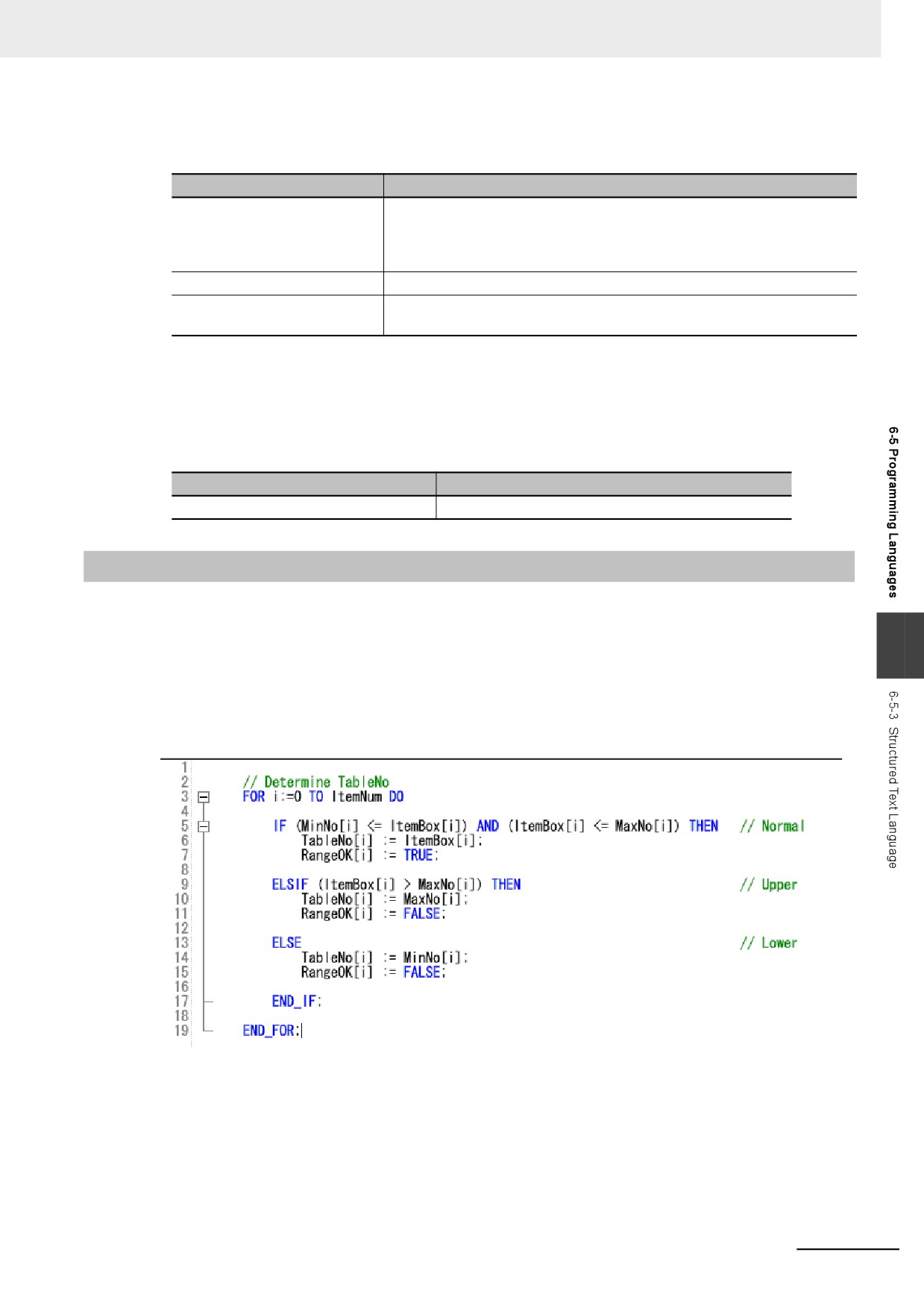
Inline ST is a ladder diagram programming element in which you can write ST language code in a
box called an inline ST box (a blank text input area) within a ladder diagram. This allows you to eas-
ily code numeric data processing and text string processing within ladder diagrams. The connecting
line to an inline ST box becomes its execution condition. The ST code inside of the box is executed
based on that connecting line. Refer to the following figure.
Execution Condition for Inline ST
Inline ST
Inline ST box
i1
i2
taiseki := 4.0 * 3.14 * radius *radius * radius / 3.0;
Enter the ST language code here.
Inline ST is treated as a rung element in a ladder diagram. Therefore, unlike functions and function
blocks, they have no input, output, or in-out variables.
z Restrictions for Inline ST
You can write ST language code in inline ST boxes.
6-96
6 Programming
z Execution Conditions for Inline ST
The execution conditions for inline ST are shown in the following table.
Status
Operation
TRUE execution condition
Operation follows the execution condition. You can use the execution con-
dition at any point in the power flow (e.g., you can connect the inline ST
directly to the left bus bar). To specify a change to TRUE or a change to
FALSE, specify it for an input in the execution condition.
FALSE execution condition
Nothing is done.
Resetting in a master control
Nothing is done.
region
z Scope of Variables in Inline ST
The scope of variables that you can access from inline ST is the same as the POU of the ladder dia-
gram that contains the inline ST.
z Restrictions for Inline ST
Item
Description
Number of inline ST boxes per rung
1
6-5-3
Structured Text Language
The ST (structured text) language is a high-level language code for industrial controls (mainly PLCs)
defined by the IEC 61131-3 standard. The standard control statements, operators, and functions make
6
the ST language ideal for mathematical processing that is difficult to write in ladder diagrams. The fea-
tures of ST are described below.
• Loop constructs and control constructs such as IF THEN ELSE are provided.
• You can write programs like high-level languages such as C, and you can include comments to make
the program easy to read.
6-97
6 Programming
Structure of ST
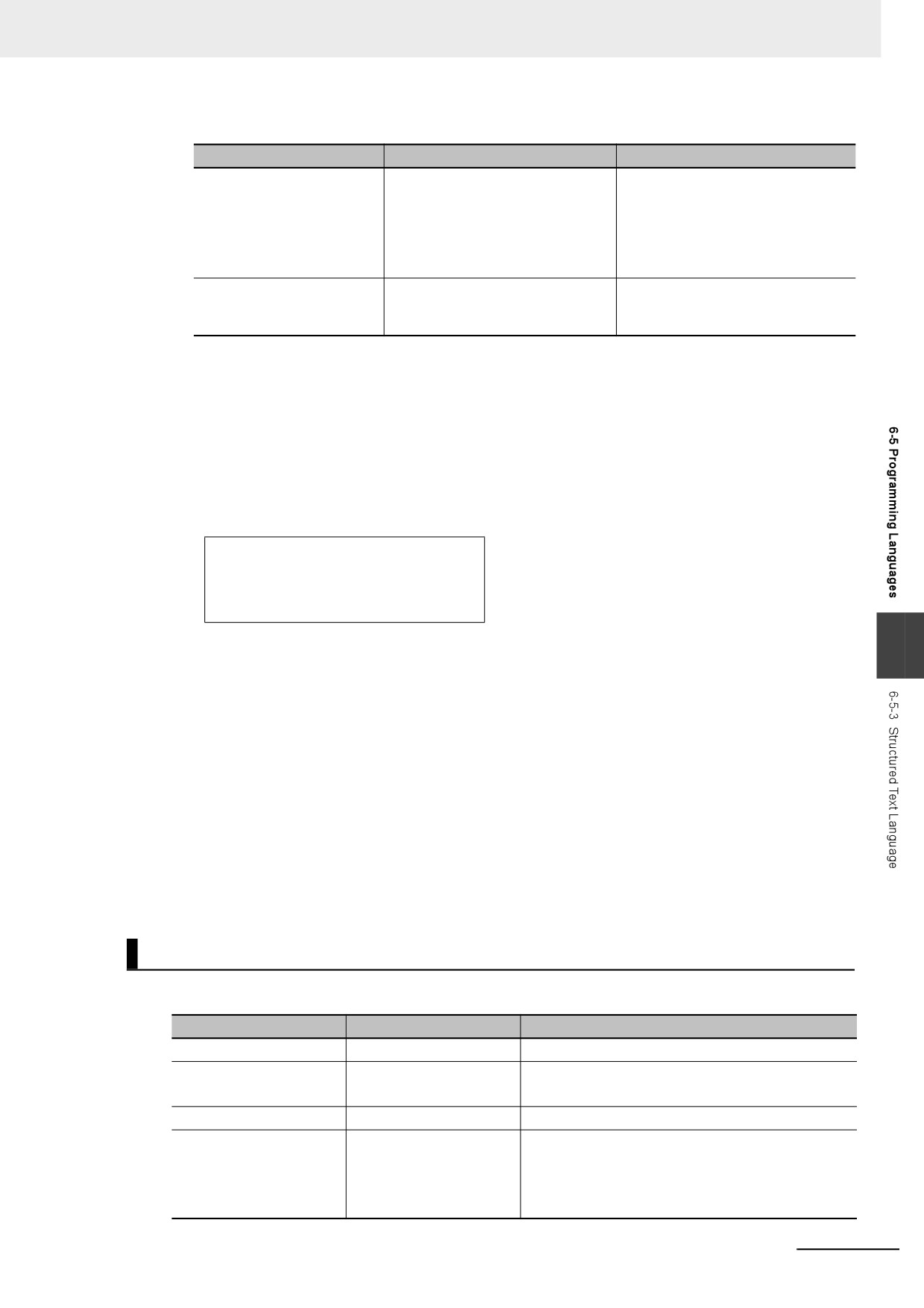
ST code consists of one or more statements. One statement is the equivalent of one process. State-
ments are executed from top to bottom, one line at a time, until the process is completed. Statements
are made up of keywords and expressions. A keyword is a symbol or string that expresses assignment
or execution control. An expression is a code that calculates a value from variables, constants, function
return values, and/or a combination of those, along with various operators. A statement represents a
process that completes by itself. Expressions form a statement by using a combination of values and
keywords.
Example of an Assignment Statement:
Assignment
Variables Operators Constant Return value of function
keyword
Comment
A:= B
+
100
* ABC (10, 20) ; (*Assign A to B + 100 * ABC (10, 20)*)
Expression
Example of an IF Construct:
IF keyword
IF keyword
IF D = E + 100 * DEF(10,20) THEN
Expression
(*TRUE if D and E+100*DEF(10,20) are equal, otherwise FALSE*)
G := H ;
Statement
IF keyword
END_IF ;
ST Language Expressions
z Statement Separators
• Statements must end with a single-byte semicolon (;). Statements are not considered complete
with only a carriage return at the end. This allows you to write long statements across multiple
lines.
• One statement must end with one single-byte semicolon (;). In the following example, the IF con-
struct contains a single assignment statement. Each statement must be ended with a single-byte
semicolon (;).
IF A=B THEN
Assignment
C := D;
IF construct
statement
END_IF;
z Comment
• You can write comments in your program to make the code easier to understand.
• Statements written as comments are not executed.
6-98
6 Programming
• The two methods to insert comments are described below.
Comment notation
Examples
Remarks
Enclose the comment in sin-
(* Commenting out multiple lines
This type of comment can span over
gle-byte parenthesis and
multiple lines. Comments cannot be
IF ErrCode = 3 THEN
asterisks, for example,
nested.
Value := 1000;
“(*This is a comment*)”.
END_IF;
down to here. *)
Begin the comment with two
// Comment
You can comment out only single
forward slashes (//) and end
lines.
// A := SIN(X)^2;
it with a carriage return.
z
Spaces, Carriage Returns, and Tabs
• You can place any number of spaces, carriage returns, and tabs in your code at any location. This
allows you to add spaces or tabs before statements and carriage returns between operators/key-
words and expressions in order to make your code easier to read.
• Always enter a token separator, such as a space, carriage return, or tab, between operators/key-
words and variables.
Example: The square boxes indicate where you must insert a token separator, such as a space,
carriage return, or tab.
IF A>0 THEN X:=10;
ELSE
X:=0;
END_IF;
6
z
Lowercase/Uppercase, Single-byte/double-byte Characters
• Operators, keywords, and variable names are not case sensitive.
• Operators, keywords, and variable names must always be in single-byte characters. A syntax
error will occur if you input double-byte characters.
z
Variables and Prohibited Characters
Refer to 6-3-12 Restrictions on Variable Names and Other Program-related Names for restrictions
on variable names.
z
Text Strings
Refer to 6-3-12 Restrictions on Variable Names and Other Program-related Names for restrictions
on text strings.
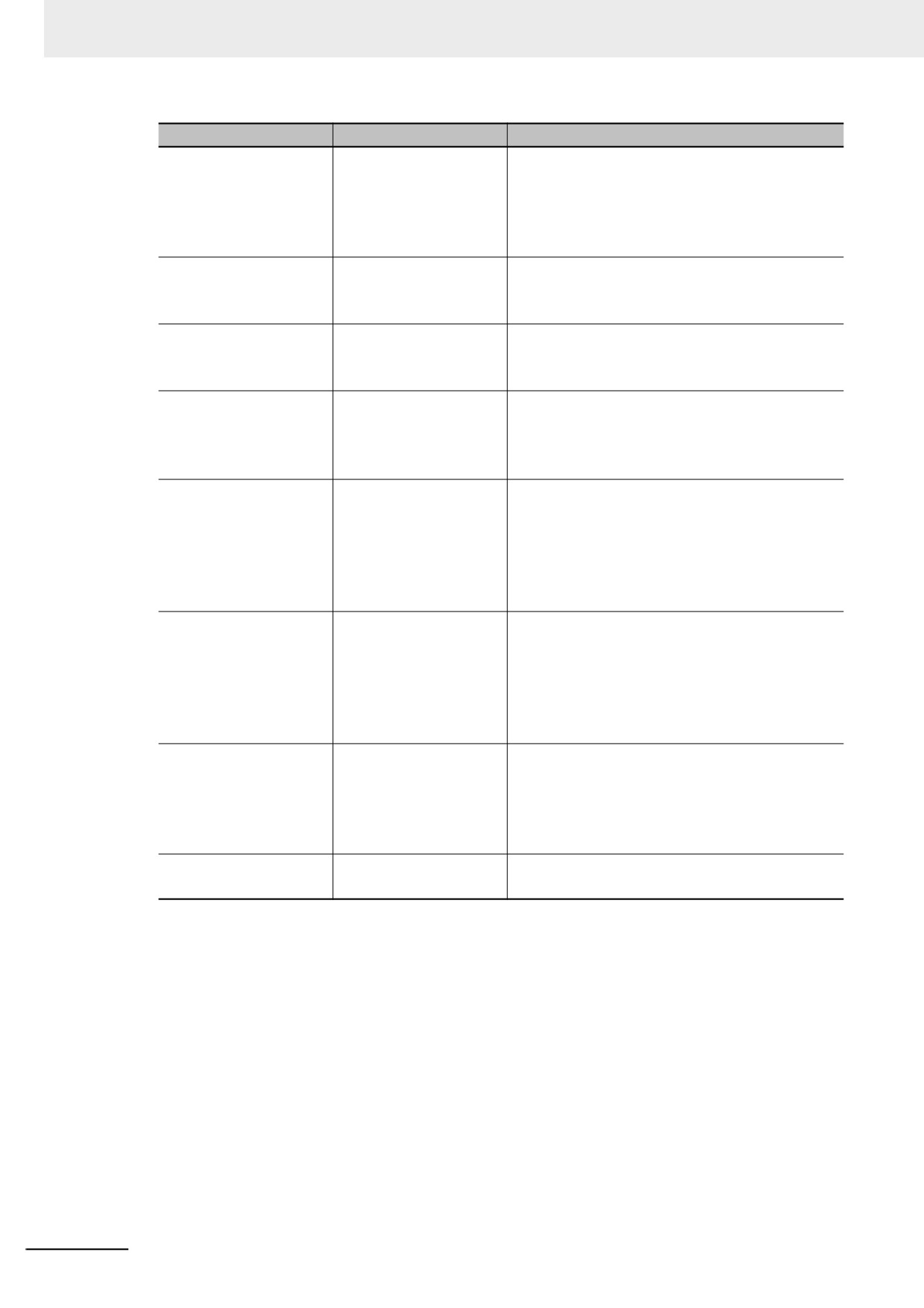
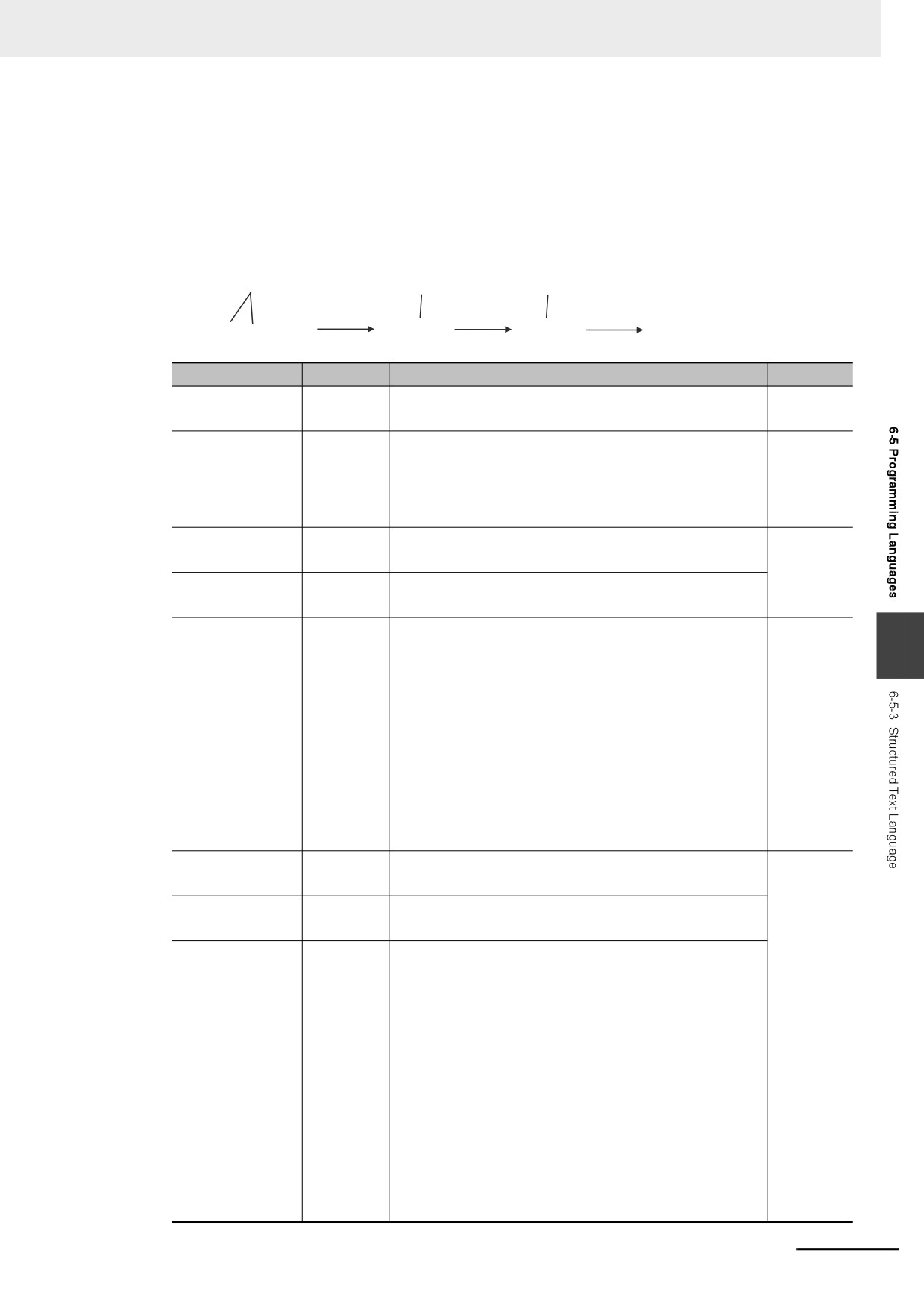
ST Keywords and Operators
z Statement Keywords
Keyword
Meaning
Example
:=
Assignment
d := 10;
Calling functions and
FBname(para1 := 10, para2 := 20);
function blocks
Refer to Function Block Calls on page 6-121.
RETURN
Return
IF
If
IF d < e THEN f := 1;
ELSIF d = e THEN f :=2;
ELSE f := 3;
END_IF;
6-99
6 Programming
Keyword
Meaning
Example
CASE
Case
CASE f OF
1: g :=11;
2: g :=12;
ELSE g :=0;
END_CASE;
FOR
For
FOR i: = 100 TO 1 BY -1 DO
Val[ i ] := i;
END_FOR;
WHILE
While
WHILE Val < MaxVal DO
Val := Val + 1;
END_WHILE;
REPEAT
Repeat
REPEAT
Val := Val + 1;
UNTIL( Val > 4 )
END_REPEAT;
EXIT
Exit the loop.
FOR i := 1 TO 100 DO
FOR j := 1 TO 10 DO
IF Val[ i, j ]>100 THEN EXIT;
END_IF;
END_FOR;
END_FOR;
;
Empty statement
Val[ i ] := i
; (* Empty statement *)
WHILE(Var <>0) DO
; (* Empty statement *)
END_WHILE;
(* Text *)
Comments
(* Commenting out multiple lines
IF MyFun (ErrorCode) = 3
THEN ReturnValue := GetDetail();
END_IF;
down to here. *)
//Text
Comment
A := SIN( X ) ^ 2 + COS ( Y ) ^2 + 10;
// A := SIN( X ) ^ 2 + COS ( Y ) ^2 + 5;
6-100
6 Programming
z
Operators
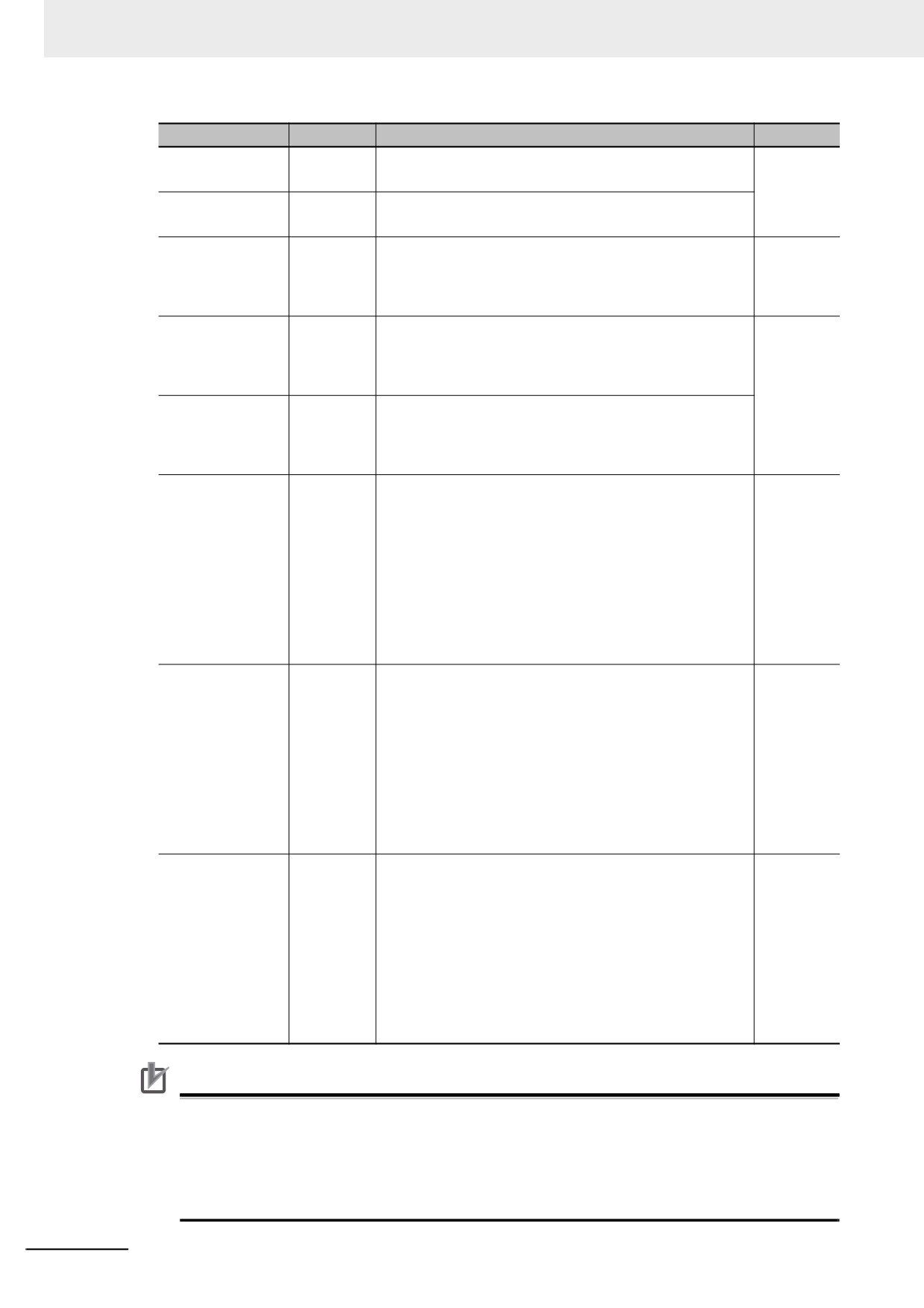
The following table gives the operators and their order of priority.
If operators with different priorities are mixed in one expression, the operators with the highest prior-
ities are executed first. You can use up to 64 operators in one expression.
Example: X:=(1+2)−3*4; In this case, variable X is assigned a value of −9.
1. The operation in
2. The multiplication
3. The subtraction
parentheses (priority
(priority of 5) is
(priority of 6) is
of 1) is performed.
performed.
performed.
(1+2)−3*4
3−3*4
3−12
−9
Operation
Operator
Notation example and evaluated value
Priority
Parentheses
()
(1+2)*(3+4)
1
Value: 21
Function/function
FUN1( FUN2( Var2A, Var2B), Var1B)
2
block call
When function and function block calls are nested, the
function or function block at the lower level is called first. In
the above example, FUN2 is executed first, and then FUN1
is executed.
Sign
+, −
+100
3
−100
NOT
NOT
NOT TRUE
Value: FALSE
Exponent
**
-2**2
4
6
Value: 4
A minus sign is given priority over an exponent operator.
Therefore, -2**2 in the above example is the same as (-
2)**2, so the value is 4.
2**3**2
Value: 64
If there is more than one exponent operator, calculations
are performed for them left to right. Therefore, 2**3**2 in
the above example is the same as (2**3)**2, so the value is
64.
Multiplication
100*200
5
Value: 20,000
Division
/
100/200
Value: 0.5
Remainder
MOD
10 MOD 7
Value: 3
−17 MOD 6
Value: −5
−17 MOD (−6)
Value: −5
17 MOD 6
Value: 5
17 MOD (−6)
Value: 5
6-101
6 Programming
Operation
Operator
Notation example and evaluated value
Priority
Addition
+
100+200
6
Value: 300
Subtraction
−
100-200
Value: −100
Comparison
<, >, <=, >=
100<200
7
If the comparison result is TRUE, the value is set to TRUE.
Otherwise, the value is set to FALSE. In the above exam-
ple, 100 is less than 200, so the value is TRUE.
Matches
=
100=200
8
If the two values match, the value is set to TRUE. Other-
wise, the value is set to FALSE. In the above example, 100
does not equal 200, so the value is FALSE.
Does not match
< >
100<>200
If the two values do not match, the value is set to TRUE.
Otherwise, the value is set to FALSE. In the above exam-
ple, 100 does not equal 200, so the value is TRUE.
Logical AND
AND,&
Applies 1-bit AND logic to all bits.
9
The results of 1-bit AND logic are as follows:
0 AND 0 = 0
0 AND 1 = 0
1 AND 0 = 0
1 AND 1 = 1
0101 AND 1100
Value: 0100
Logical exclusive
XOR
Applies 1-bit exclusive OR logic to all bits.
10
OR
The results of 1-bit exclusive OR logic are as follows:
0 XOR 0 = 0
0 XOR 1 = 1
1 XOR 0 = 1
1 XOR 1 = 0
0101 XOR 1100
Value: 1001
Logical OR
OR
Applies 1-bit OR logic to all bits.
11
The results of 1-bit OR logic are as follows:
0 OR 0 = 0
0 OR 1 = 1
1 OR 0 = 1
1 OR 1 = 1
0101 OR 1100
Value: 1101
Precautions for Correct Use
The intended operation may not occur if a function is nested under itself. Always separate the
functions into different statements as shown below.
Example of incorrect notation: out := MyFunc( In1:=x1, In2:=MyFunc( In1:=x2, In2:=x3 ) );
Example of correct notation: tmp := MyFunc( In1:=x2, In2:=x3 );
out := MyFunc( In1:=x1, In2:=tmp );
6-102
6 Programming
Precautions for Correct Use
The order of priority for operators is sometimes different for different standards and manufactur-
ers. Special attention is necessary for the priority of exponent operators. We therefore recom-
mend that you use parentheses to ensure that calculations are performed in the intended order.
Example: For X:= -2**3**4; we recommend that you use the following expression:
X:= ((-2)**3)**4;.
Additional Information
Calculations are performed based on the data types. For example, the result of calculations with
integer data will be integer data. Therefore, if the expression A/B is calculated with INT variables
A = 3 and B = 2, the result would not be 1.5 because all values after the decimal point are trun-
cated. In this case, the expression (A/B)*2 would evaluate to 2 instead of 3.
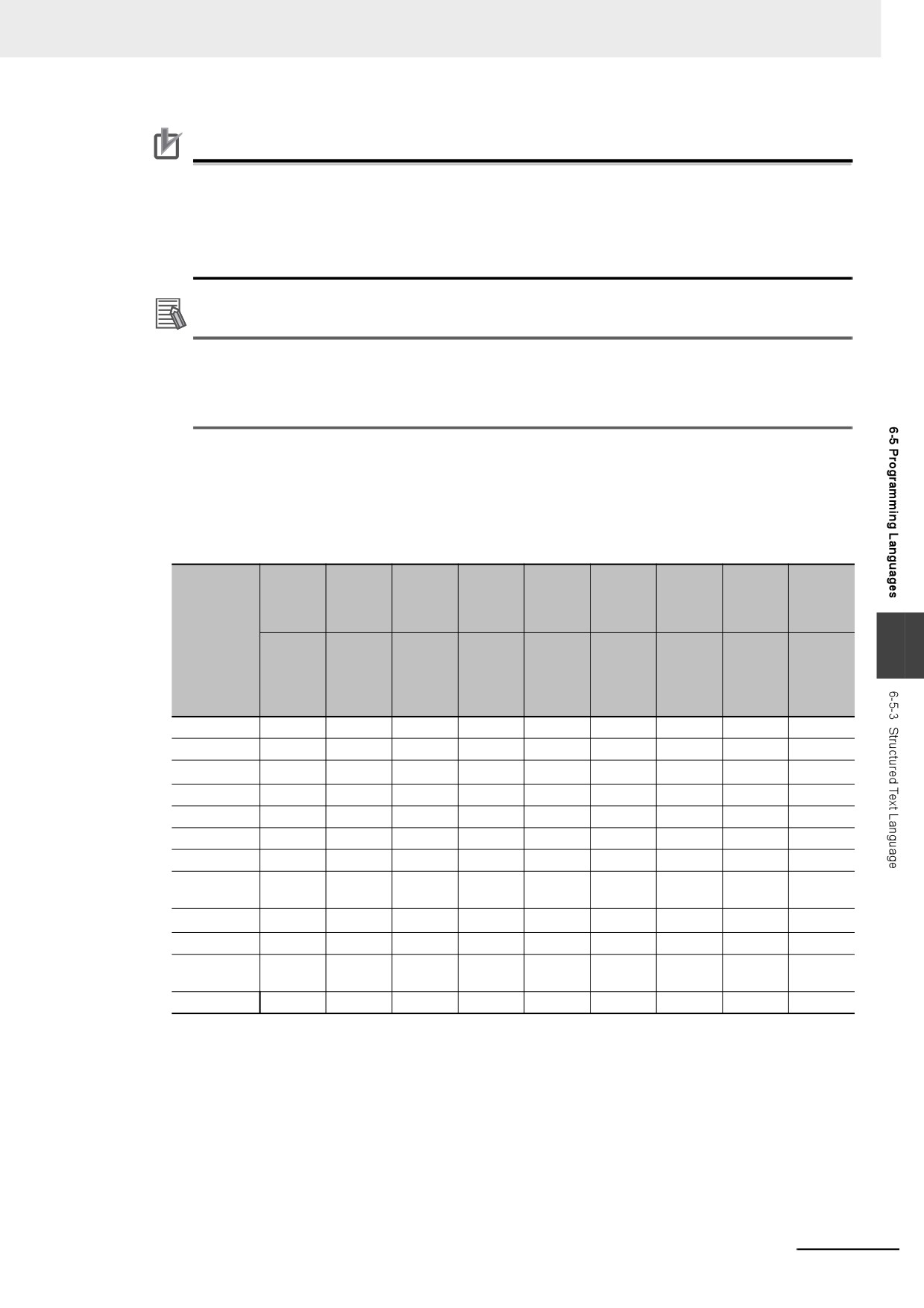
z
Data Types for Operator Operands
If all the operands for an operator have the same data type, any data type given as “Supported” in
the following table can be set as operands. However, if an operand with a different data type is set
for the operator, an implicit cast is required. Refer to Implicit Casts on page 6-127 for details on
implicit casting.
Argu-
Compar-
Posi-
Assign-
Numeric
Modulo-
Equality
Logic
ment
Power
ison
tive/neg-
ment
opera-
division
opera-
opera-
setting
operator
opera-
ative
operator
tors
operator
tors
tors
operator
tors
signs
Data type
NOT
6
+
<
AND
:=
−
<=
=
+
:=
MOD
**
&
=>
>=
<>
−
OR
/
>
XOR
Boolean
OK
OK
---
---
---
---
OK
OK
---
Bit string
OK
OK
---
---
---
---
OK
OK
---
Integer
OK
OK
OK
OK
OK*1
OK
OK
---
OK
Real number
OK
OK
OK
---
OK
OK
OK
---
OK
Duration
OK
OK
---
---
---
---
---
---
OK
Date
OK
OK
---
---
---
---
---
---
---
Time of day
OK
OK
---
---
---
---
---
---
---
Date and
OK
OK
---
---
---
---
---
---
---
time
Text string
OK
OK
---
---
---
---*2
---*2
---
---
Enumeration
OK
OK
---
---
---
---
OK
---
---
Structure par-
OK
OK
---
---
---
---
---
---
---
ent
Array parent
OK
OK
---
---
---
---
---
---
---
OK: Possible
---: A building error will occur.
*1
Integer variables are calculated as real number variables even if they set as operands. If a rounding error is
included in the result of calculations, the result may not be an intended value because all values after the dec-
imal point are truncated. Use the EXPT and TO_** (Integer Conversion Group) instructions together to round
values after the decimal point.
Example: TO_INT(EXPT(X,Y))
*2
Do not use operators to compare text string variables. Use instructions (such as EQascii) instead.
6-103
6 Programming
ST Language Statements
z
Assignment
Overview:
This statement assigns the right side (i.e., the value of the expression) to the left side (i.e., the vari-
able).
Reserved Words:
:=
Combination of a colon (:) and an equals sign (=)
Statement Structure:
<variable>:=<expression>;
<variable>:=<variable>;
<variable>:=<constant>;
Application:
Use this statement to assign a value to a variable. For example, use it to set initial values or to store
the results of a calculation.
Description:
This statement assigns (or stores) the <expression_value> to the <variable>.
Example:
Example 1: The following statement assigns the result of the expression X+1 to variable A.
A:=X+1;
Example 2: The following statement assigns the value of variable B to variable A.
A:=B;
Example 3: The following statement assigns a value of 10 to variable A.
A:=10;
Precautions:
• Either the source data type must match the destination data type, or the combination of data types
must allow implicit casting. A building error will occur if you do not use this notation.
• If the value that is assigned is STRING data, make the size of the destination STRING variable
larger than that of the source string. Otherwise, an error will occur.
• For STRING variables, assignment is allowed if the size of left-hand variable is greater than the
size of the text string stored in right-hand variable.
Example:
Assignment is allowed in the following case.
• Variable Table:
Variable
Data type
Size
name
Var1
STRING
10
Var2
STRING
20
• User Program:
Var2 :='ABC';
6-104
6 Programming
Var1 := Var2;
You cannot make assignments to union variables. You must make the assignments to individual
members of the unions.
z
RETURN
Overview:
The following actions occur depending on where the ST statement is used.
ST
The ST program is ended during operation and the next program is executed.
ST in a Function Inside a Function Block Instance
The function or function block is ended during operation and the next instruction after the calling
instruction is executed.
Inline ST
The POU that contains inline ST with a RETURN statement is ended.
Reserved Words:
RETURN
Statement Structure:
RETURN;
Application:
6
Use this statement to force the current program, function, or function block to end.
z
IF with One Condition
Overview:
The construct executes the specified statement when a condition is met. If the condition is not met,
another statement is executed. The following expressions are used to specify whether the condition
is met.
TRUE: The condition is met.
FALSE: The condition is not met.
Reserved Words:
IF, THEN, (ELSE), END_IF
Note You can omit ELSE.
Construct Structure:
IF <condition_expression> THEN
<statement_1>;
ELSE
<statement_2>;
END_IF;
6-105
6 Programming
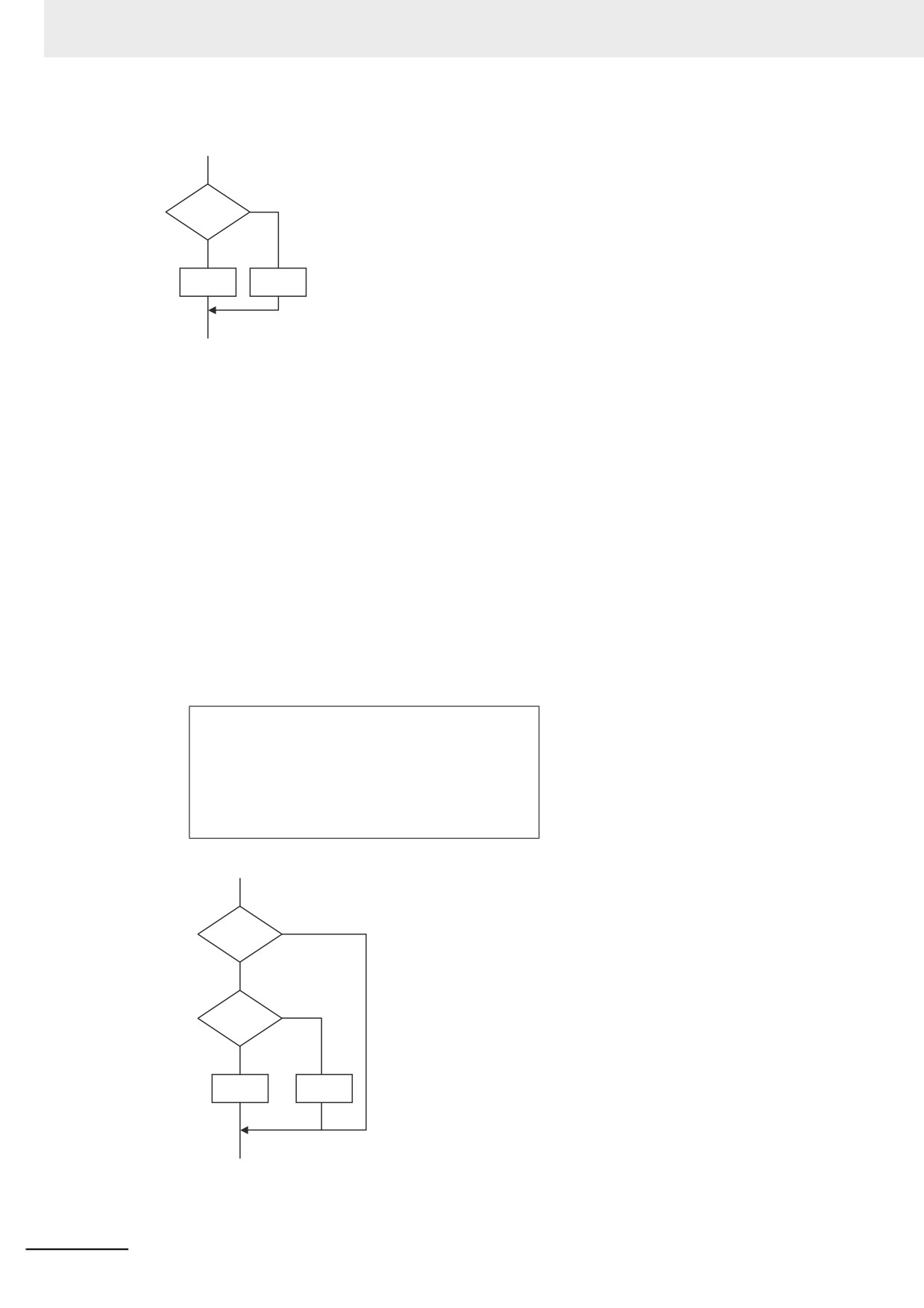
Process Flow Diagram:
Condition
FALSE
expression
TRUE
Statement 1
Statement 2
Application:
Use this construct to perform one of two processes depending on evaluation of a condition (condi-
tion expression).
Description:
If <condition_expression> is TRUE, <statement_1> is executed.
If <condition_expression> is FALSE, <statement_2> is executed.
Precautions:
• IF must always be used together with END_IF.
• Write a statement that evaluates to TRUE or FALSE (for example IF A>10) or a BOOL variable
(for example IF A) for the condition expression.
• You can write <statement_1> and <statement_2> on multiple lines. Separate statements with a
semicolon (;).
Example: Another IF Statement before <statement_1>
IF <condition_expression_1> THEN
IF <condition_expression_2> THEN
<statement_1>;
ELSE
<statement_2>;
END_IF;
END_IF;
Process Flow Diagram:
Condition
FALSE
expression 1
TRUE
Condition
FALSE
expression 2
TRUE
Statement 1
Statement 2
ELSE corresponds to the previous THEN statement, as shown above.
• You can execute more than one statement for both <statement_1> and <statement_2>. Separate
statements with a semicolon (;).
6-106
6 Programming
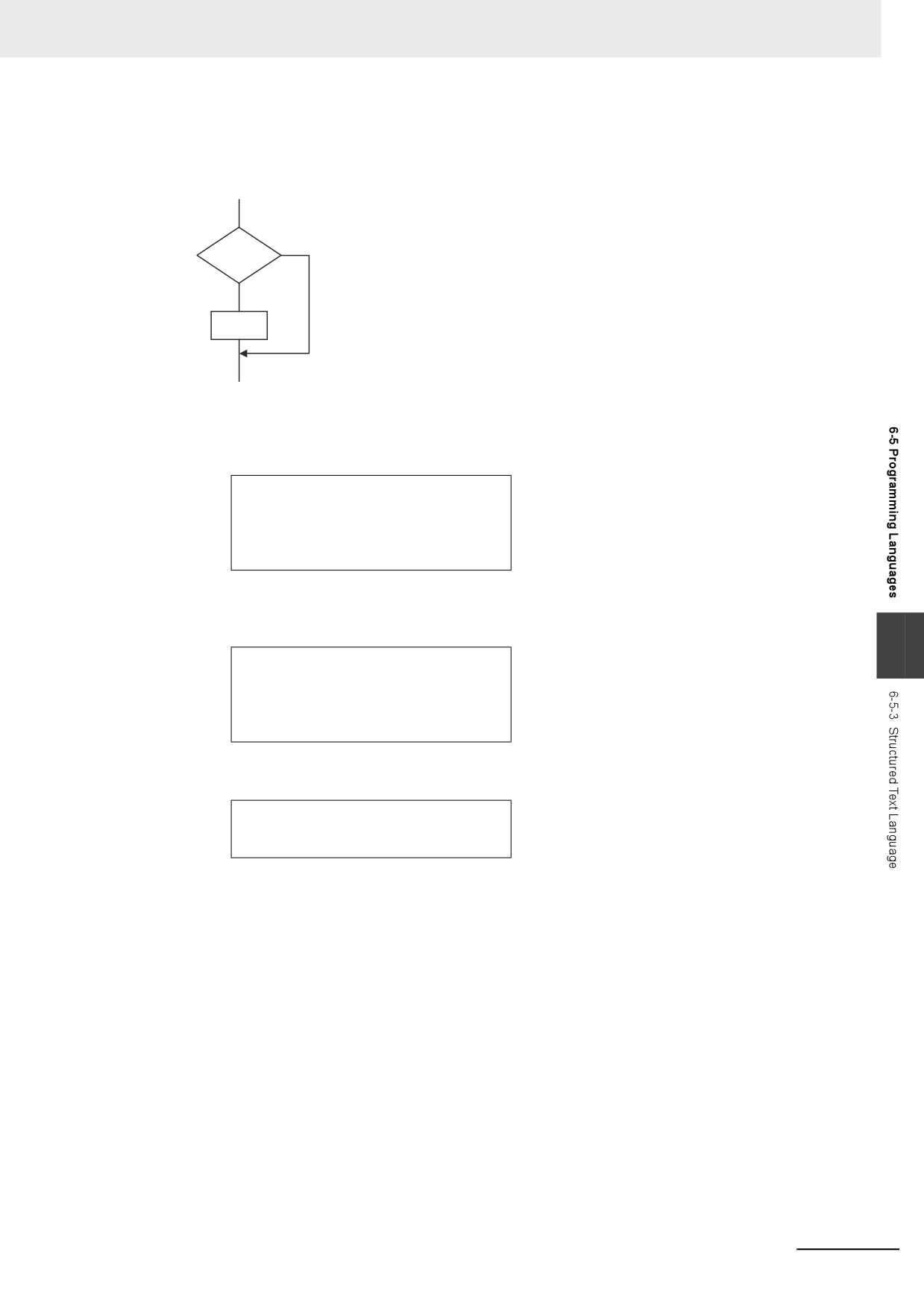
• You can omit the ELSE statement. If it is omitted, nothing is executed when <condition_expres-
sion> is FALSE.
Process Flow Diagram:
FALSE
Condition
TRUE
Statement
Example:
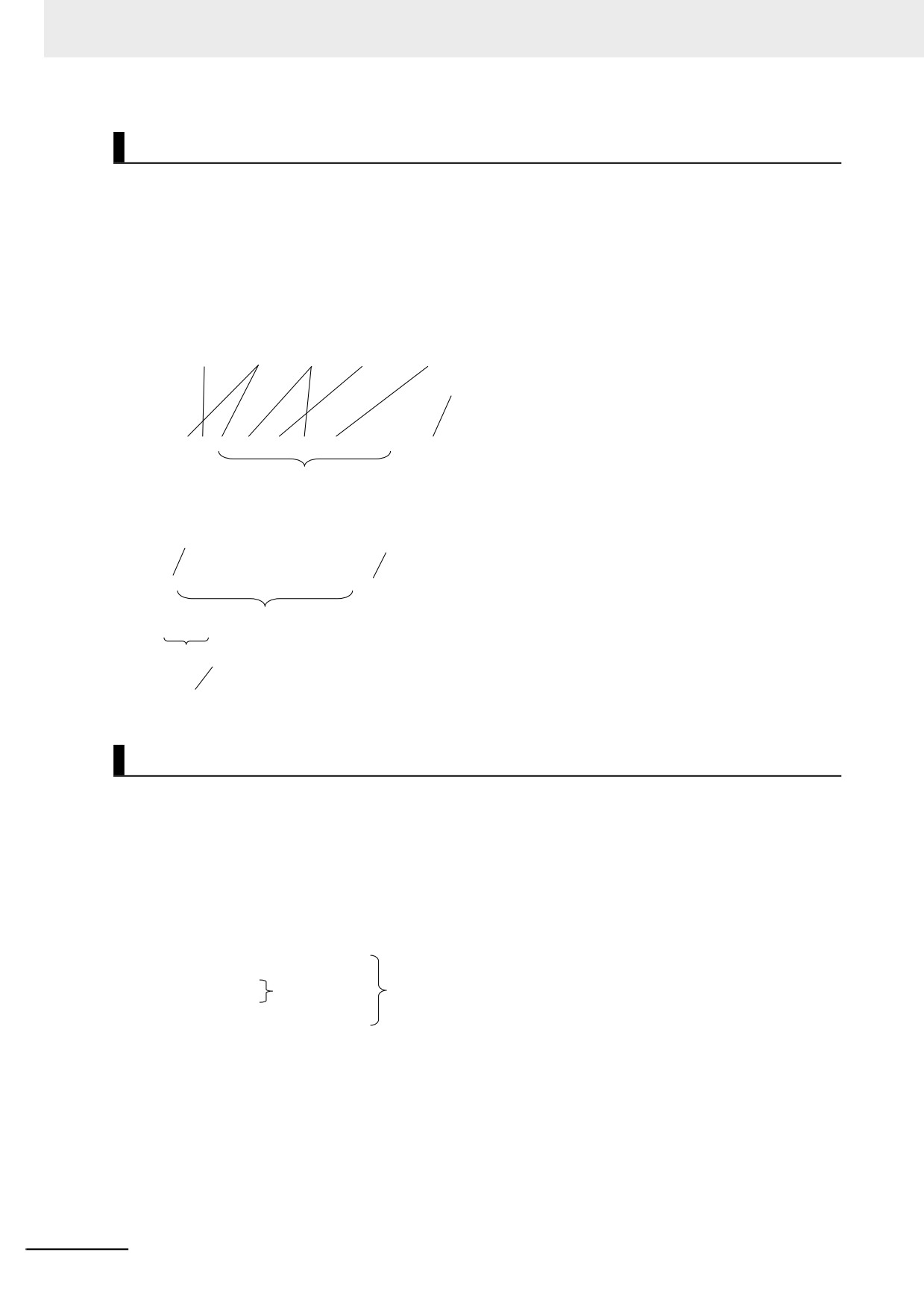
Example 1: A value of 10 is assigned to variable X when the statement A > 0 is TRUE. A value
of 0 is assigned to variable X when the statement A > 0 is FALSE.
IF A>0 THEN
X:=10;
ELSE
X:=0;
END_IF;
Example 2: A value of 10 is assigned to variable X and a value of 20 is assigned to variable Y
when the statements A > 0 and B > 1 are both TRUE. A value of 0 is assigned to
variable X and variable Y when the statements A > 0 and B > 1 are both FALSE.
6
IF A>0 AND B>1 THEN
X:=10;Y:=20;
ELSE
X:=0;Y:=0;
END_IF;
Example 3: A value of 10 is assigned to variable X when the BOOL variable A is TRUE. A value
of 0 is assigned to variable X when variable A is FALSE.
IF A THEN X:=10;
ELSE X:=0;
END_IF;
z
IF with Multiple Conditions
Overview:
The construct executes the specified statement when a condition is met. If a condition is not met but
another condition is met, another statement is executed. If neither condition is met, another state-
ment is executed.
The following expressions are used to specify whether the condition is met.
TRUE: The condition is met.
FALSE: The condition is not met.
Reserved Words:
IF, THEN, ELSIF, (ELSE), END_IF
Note You can omit ELSE.
6-107
6 Programming
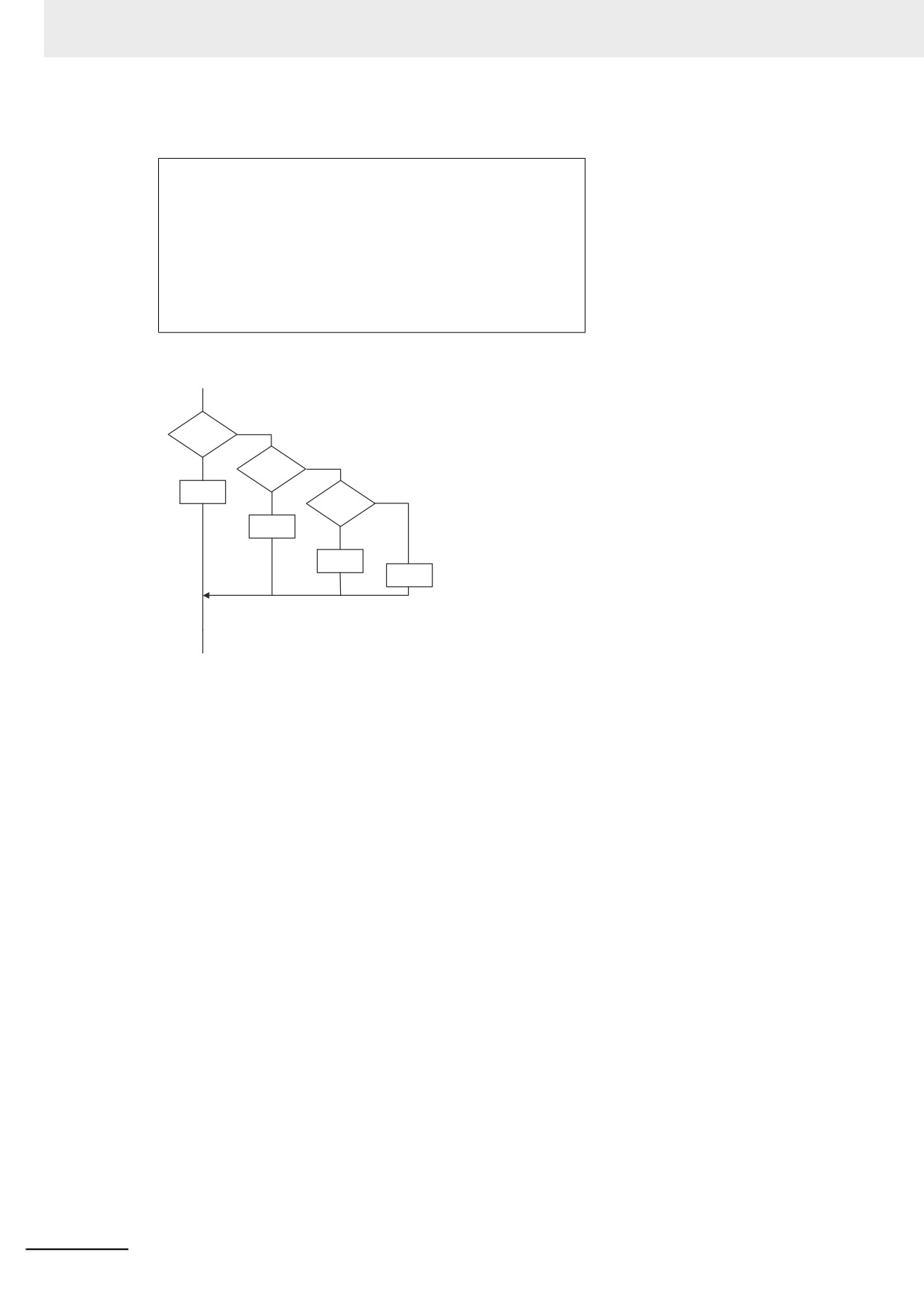
Construct Structure:
IF <condition_expression_1> THEN <statement_1>;
ELSIF <condition_expression_2> THEN <statement_2>;
ELSIF <condition_expression_3> THEN <statement_3>;
·
·
·
ELSIF <condition_expression_n> THEN <statement_n>;
ELSE<statement_m>;
END_IF;
Process Flow Diagram:
Condition
FALSE
expression 1
Condition
FALSE
TRUE
expression 2
Statement 1
TRUE
Condition
FALSE
expression 3
Statement 2
TRUE
Statement 3
Statement m
6-108
6 Programming
Application:
Use this construct to perform a process depending on evaluation of multiple conditions (condition
expressions).
Description:
If <condition_expression_1> is TRUE, <statement_1> is executed.
If
<condition_expression_1> is FALSE and
<condition_expression_2> is TRUE, then
<statement_2> is executed.
If
<condition_expression_2> is FALSE and
<condition_expression_3> is TRUE, then
<statement_3> is executed.
·
·
·
If <condition_expression_n> is TRUE, <statement_n> is executed.
If none of the conditions is TRUE, <statement_m> is executed.
Precautions:
• IF must always be used together with END_IF.
• Write statements that can be TRUE or FALSE for the condition expressions. Example: IF(A>10)
You can also specify BOOL variables (including functions that return a BOOL value) for the condi-
tion expressions instead of an actual expression. In that case, when the variable is TRUE, the
evaluated result is TRUE and when the variable is FALSE, evaluated result is FALSE.
• You can write any of the statements on multiple lines. Separate statements with a semicolon (;).
• You can omit the ELSE statement. If it is omitted, and none of the conditions produces a match,
nothing is done.
6
Example:
A value of 10 is assigned to variable X when the statement A > 0 is TRUE.
A value of 1 is assigned to variable X when the statement A > 0 is FALSE and statement B = 1 is
TRUE.
A value of 2 is assigned to variable X when the statement A > 0 is FALSE and statement B = 2 is
TRUE.
If none of the conditions is TRUE, a value of 0 is assigned to the variable X.
IF A>0 THEN X:=10;
ELSIF B=1 THEN X:=1;
ELSIF B=2 THEN X:=2;
ELSE X:=0;
END_IF;
6-109
6 Programming
z CASE
Overview:
This construct executes a statement that corresponds to an integer set value that matches the value
of an integer expression.
Reserved Words:
CASE
Construct Structure:
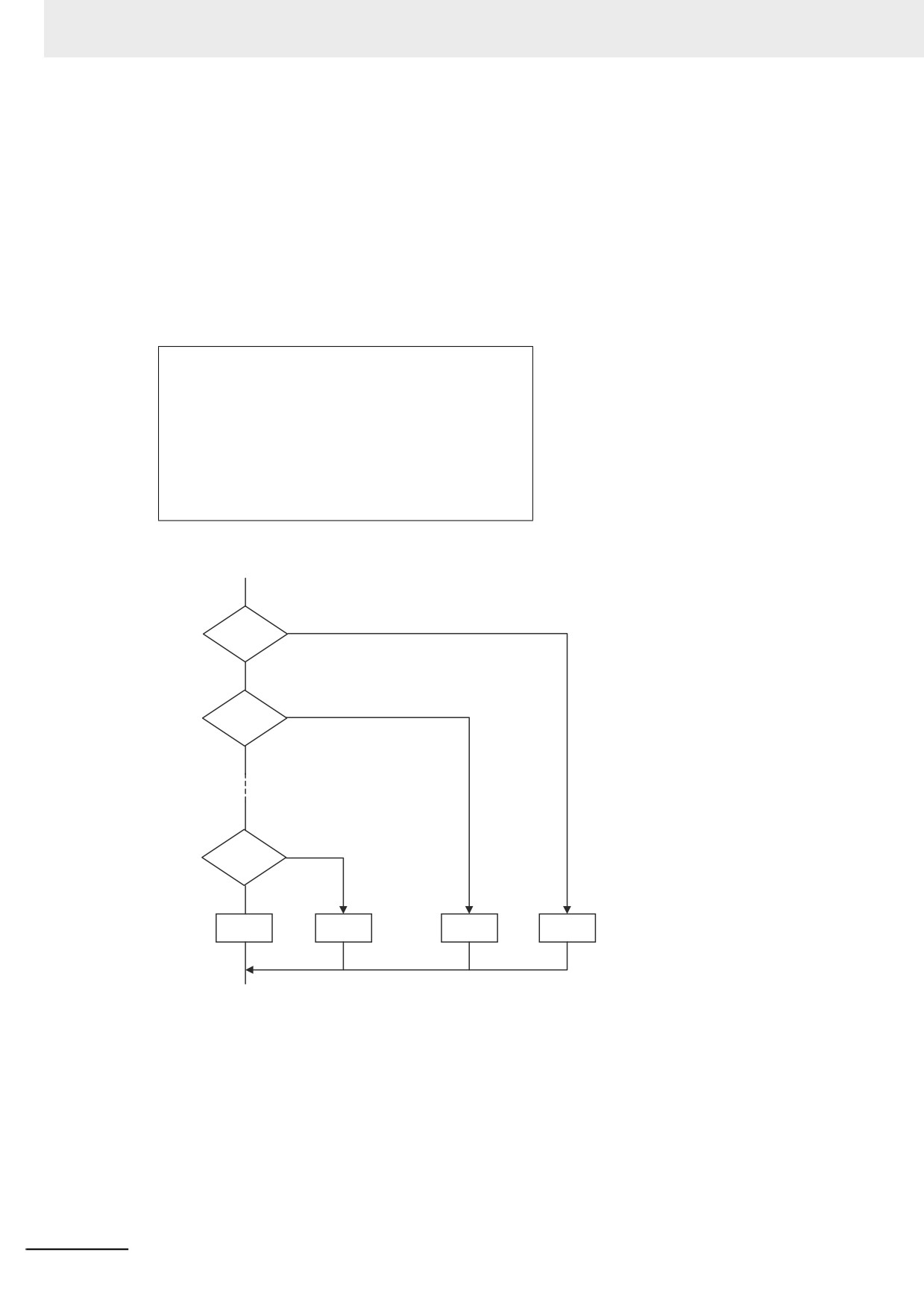
CASE <integer_expression> OF
<integer_expression_value_1>:<statement_1>;
<integer_expression_value_2>:<statement_2>;
·
·
·
<integer_expression_value_n>:<statement_n>;
ELSE<statement_m>;
END_CASE;
Process Flow Diagram:
Equal to
Yes
value 1?
No
Yes
Equal to
value 2?
No
Yes
Equal to
value n?
No
Statement m
Statement n
Statement 2
Statement 1
6-110
6 Programming
Application:
Use this construct to perform different actions based on the value of an integer.
Description:
If <integer_expression> matches <integer_expression_value_n>, <statement_n> is executed.
If <integer_expression> does not match any of the integer values, <statement_m> is executed.
Precautions:
•
CASE must always be used together with END_CASE.
•
Use one of the following for the <integer_expression>:
• An integer or enumeration variable (example: abc)
• An integer expression (example abc+def)
• A function that returns an integer value (example: xyz())
•
You can write any of the statements on multiple lines. Separate statements with a semicolon (;).
•
To specify OR logic of multiple integers for <integer_expression_value_n>, separate the values
with commas. To specify a continuous range of integers, separate the start integer and the end
integer with two periods (..).
Example 1: You can specify a condition for a specific integer value, or the same condition for
multiple integer values.
CASE A OF
1: X:=1;
A value of 1 is assigned to variable X when variable A is 1.
2: X:=2;
A value of 2 is assigned to variable X when variable A is 2.
3: X:=3;
A value of 3 is assigned to variable X when variable A is 3.
6
ELSE
If none of the values is matched, a value of 0 is assigned to
X:=0;
the variable X.
END_CASE;
CASE A OF
1: X:=1;
A value of 1 is assigned to variable X when variable A is 1.
2,5: X:=2;
A value of 2 is assigned to variable X when variable A is 2 or 5.
6..10: X:=3;
A value of 3 is assigned to variable X when variable A is between 6 and 10.
A value of 4 is assigned to variable X when variable A is 11, 12,
11,12,15..20: X:=4;
or between 15 and 20.
ELSE
X:=0;
If none of the values is matched, a value of 0 is assigned to the
END_CASE;
variable X.
Example 2: You can give an integer variable, integer expression, integer function return value,
enumeration variable, or enumeration function return value for the <integer_expres-
sion>. An example is shown below.
• Example for an Integer Enumeration Variable
CASE ColorVar OF
RED:
X := 0;
BLUE:
X := 1;
ELSE
X := 2;
END_CASE;
6-111
6 Programming
• Example for an Integer Expression
CASE (a1 + a2) OF
0:
X := 0;
1:
X := 1;
ELSE
X := 2;
END_CASE;
• Example of an Integer Enumeration Function Return Value
CASE FUN( ) OF
0:
Branches depending on the return value of FUN( ).
X := 10;
1:
X := 11;
ELSE
X := 12;
END_CASE;
Data Types That You Can Use in CASE Constructs
Classification
Data type
<integer_expression>
Integers
Supported.
Basic data types
Boolean, bit string, real, duration, date, time
Not supported.
of day, date and time, or text string data
Arrays
Not supported.
Data type specifica-
Array specifications
Supported for integers and enu-
tions
Elements
merations only.
Structures
Not supported.
Structures
Supported for integers and enu-
Members
merations only.
Derivative data types
Unions
Not supported.
Unions
Supported for integers and enu-
Members
merations only.
Enumerations
Supported.
z
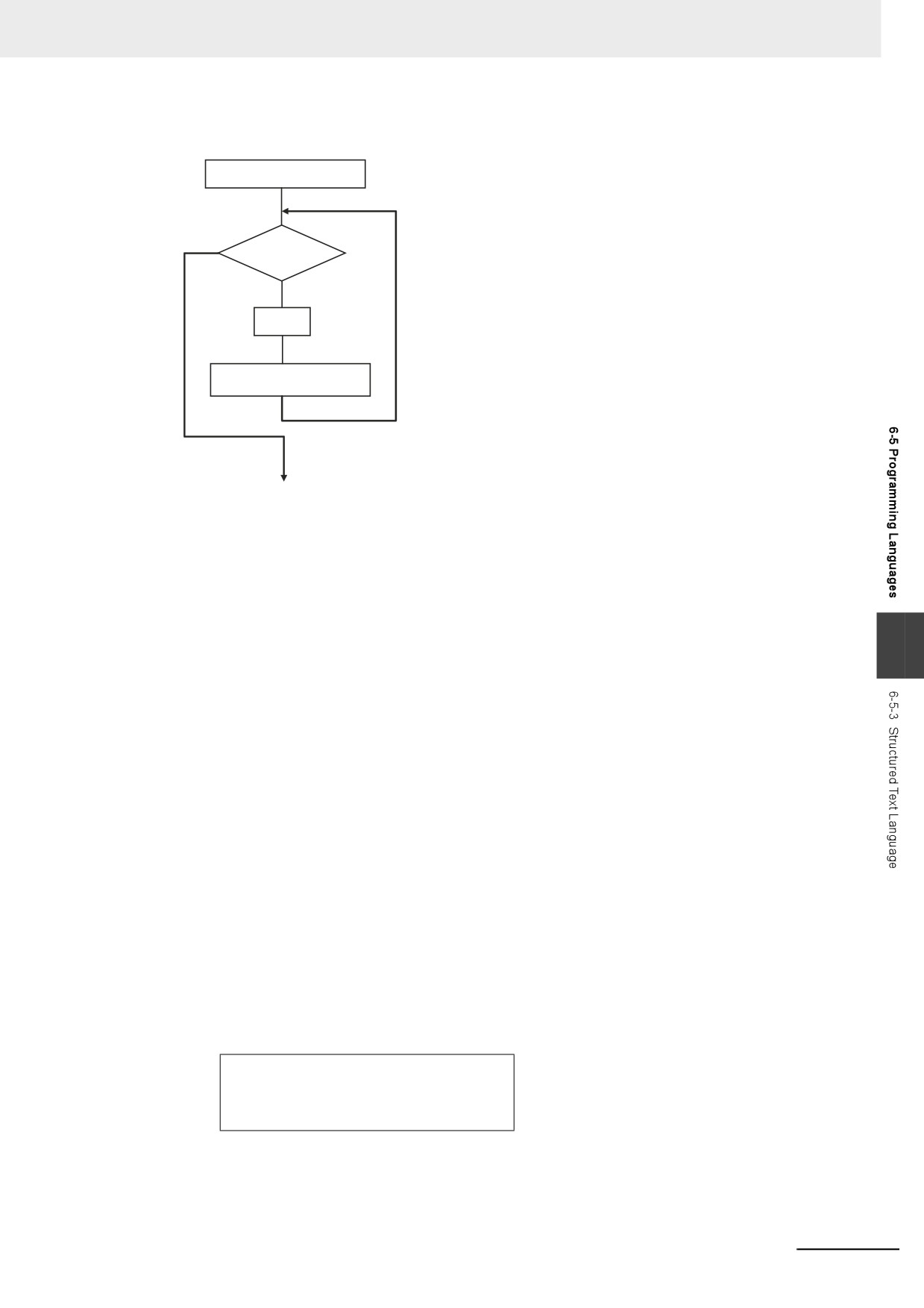
FOR
Overview:
This construct repeatedly executes the same statements until a variable (called the FOR variable)
changes from one value to another value.
The following expressions are used to specify whether the condition is met.
TRUE: The condition is met.
FALSE: The condition is not met.
Reserved Words:
FOR, TO, (BY), DO, END_FOR
Note You can omit BY.
Construct Structure:
FOR <FOR_variable>:= <initial_value> TO <end_value> BY <increment/decrement> DO
<statement>;
END_FOR;
6-112
6 Programming
Process Flow Diagram:
FOR variable = Initial value
TRUE
FOR variable >
end value?
Repeated
FALSE
Statement
FOR variable +
Increment/decrement value
End
Application:
Use this construct when you know in advance how many times you want to repeat a process.
This type of repeat construct is particularly effective to specify each element of an array variable
based on the value of a FOR variable.
Description:
6
A decision is made based on the evaluation of <initial_value>, <end_value>, and <increment/decre-
ment>.
When <FOR_variable> is <initial_value>, <statement> is executed.
After execution, the value of <increment/decrement> is added to <FOR_variable> and <statement>
is executed again if <FOR_variable> is less than the value of the <end_value>.
After execution, the value of <increment/decrement> is added to <FOR_variable> and <statement>
is executed again if <FOR_variable> is less than the value of the <end_value>.
This process is repeated.
The loop ends when <FOR_variable> > <end_value>.
If <increment/decrement> is negative, the directions of the comparison symbols in the above state-
ments are reversed.
Precautions:
• If the FOR variable is signed, <increment/decrement> can be a negative number.
• FOR must always be used together with END_FOR.
• The FOR variable becomes the end value plus increment/decrement after execution of the pro-
cess is completed for the end value. This ends the FOR construct.
Example: When the FOR construct is completed in the following ST statements, the value of i is
101.
FOR i:=0 TO 100 DO
X[i]:=0;
END_FOR;
// Here, i is 101.
6-113

6 Programming
•
Do not write code that directly modifies the FOR variable inside the FOR construct. Unintended
operation may result.
Example:
FOR i:=0 TO 100 BY 1 DO
X[i]:=0;
i:=i+INT#5;
END_FOR;
•
You can write any of the statements on multiple lines. Separate statements with a semicolon (;).
•
You can omit BY<increment/decrement>. If it is omitted, the statement is executed with an incre-
ment value of 1.
•
You can specify an integer (SINT, INT, DINT, LINT, USINT, UINT, UDINT, or ULINT) variable or
integer value for the <initial_value>,<end_value>, and <increment/decrement>. You can also
specify a function that returns an integer value.
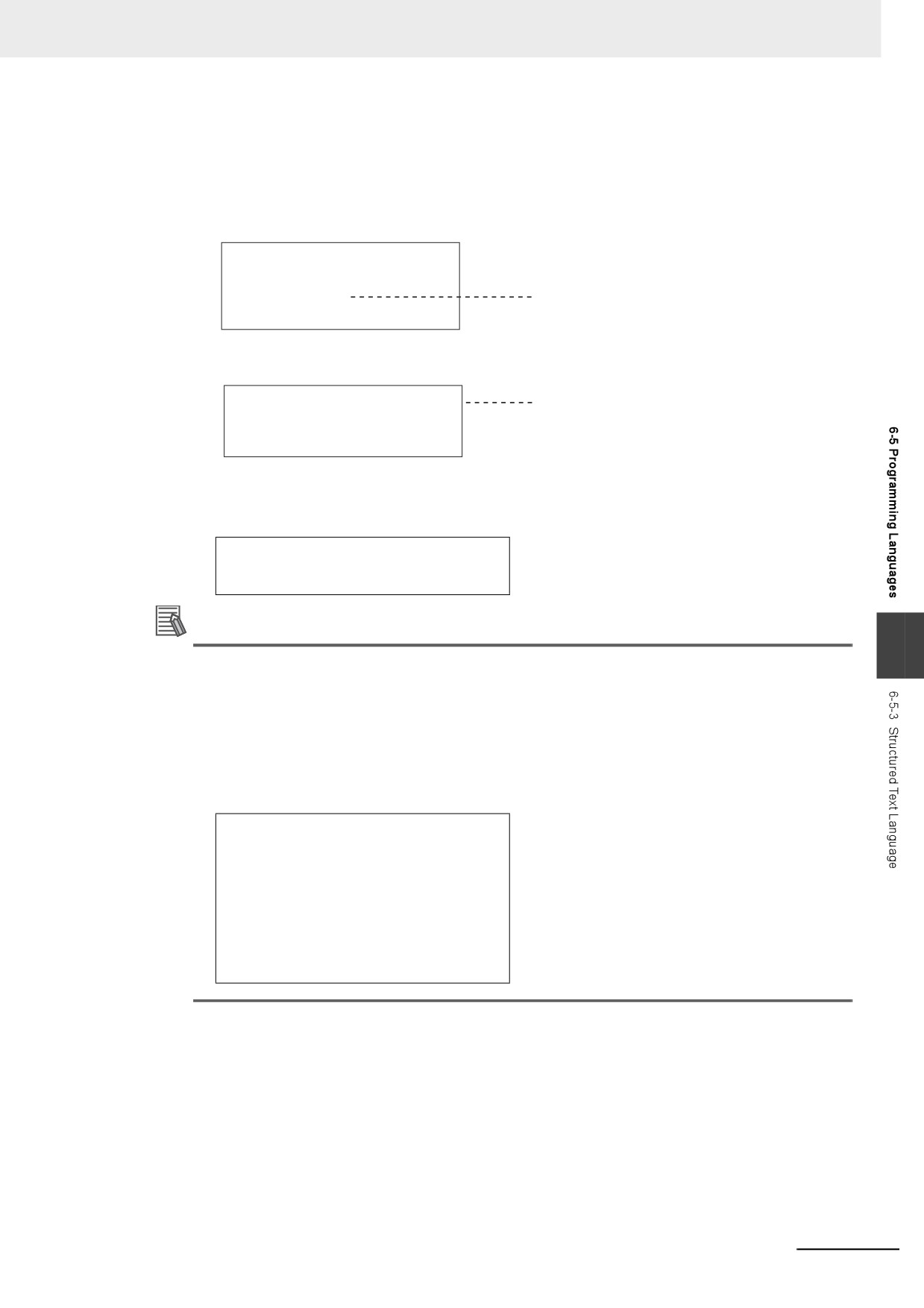
Example 1: A value of 100 is assigned to array variable elements SP[n]. The FOR variable is
variable n, the initial value is 0, the end value is 50, and the increment is 5.
FOR n := 0 TO 50 BY 5 DO
SP[n] := 100;
END_FOR;
Example 2: The total of elements DATA[1] through DATA[50] of array variable elements DATA[n]
is calculated and the result is assigned to the variable SUM.
IF a THEN
FOR n := 0 TO 50 BY 1 DO
DATA[n]:= 1 ;
END_FOR;
FOR n := 0 TO 50 BY 1 DO
SUM:= SUM + DATA[n] ;
END_FOR;
a:=FALSE;
END_IF;
Example 3: The maximum and minimum values of elements DATA[1] through DATA[50] of array
variable elements DATA[n] are found. The maximum value is assigned to the MAX
variable, and the minimum value is to the MIN variable. The value of DATA[n] is
from 0 to 1,000.
MAX :=0;
MIN :=1000;
FOR n :=1 TO 50 BY 1 DO
IF DATA[n] > MAX THEN
MAX :=DATA[n];
END_IF;
IF DATA[n] < MAX THEN
MIN :=DATA[n];
END_IF;
END_FOR;
6-114
6 Programming
•
If the total execution time of the statements in the FOR construct from when the FOR variable is
incremented/decremented from the initial value until it reaches the end value exceeds the task
period, a Task Period Exceeded error occurs.
• When the FOR Variable Cannot Logically Reach the End Value
Example:
FOR i := 0 TO 100 BY 1 DO
intArray[i] := i;
i
:= INT#50;
An infinite loop occurs and results in a Task
END_FOR;
Period Exceeded error.
Example:
FOR i := 0 TO 100 BY 0 DO
An infinite loop occurs and results in a Task
;
Period Exceeded error.
END_FOR;
• When an Overflow or Underflow Occurs Because the FOR Variable Exceeds the End Value
Example:
FOR i := 0 TO 254 BY 2 DO
INTArray[i] := i;
END_FOR;
Additional Information
6
You can specify arithmetic expressions for <end_value> and <increment/decrement>.
However, the evaluation is performed for <end_value> or <increment/decrement> only before
the execution of FOR loop operation. The values of <end_value> and <increment/decrement>
do not change after the FOR loop operation is started.
For example, in the following case, the value of <end_value> is 10 and <increment/decrement>
is
3. Even after the FOR loop operation is started and the values of variable A and C are
changed, the value of <end_value> is still 10 and <increment/decrement> is still 3.
A := INT#1;
B := INT#2;
C := INT#10;
FOR i := 0 TO C BY A+B DO
INTArray[i] := i;
A := B + i;
C := C + i;
END_FOR;
6-115
6 Programming
Data Types That You Can Use in FOR Constructs
<FOR_variable>, <initial_value>,
Classification
Data type
<end_value>, and <increment
/decrement>*1
Boolean, bit string, real, duration, date,
Not supported.
time of day, date and time, or text string
Basic data types
data
Integers
Supported.
Arrays
Not supported.
Data type specifica-
Array specifications
Supported for integers and enumera-
tions
Elements
tions only.*2
Structures
Not supported.
Structures
Supported for integers and enumera-
Members
tions only.*2
Derivative data types
Unions
Not supported.
Unions
Members
Not supported.
Enumerations
Supported.*2
*1
You must use the same data type for the <FOR_variable>, <end_value> and <increment/decrement>. Other-
wise, an error occurs when the program is built on the Sysmac Studio.
*2
You cannot use enumerations for <FOR_variable>, <end_value> and <increment/decrement>.
z
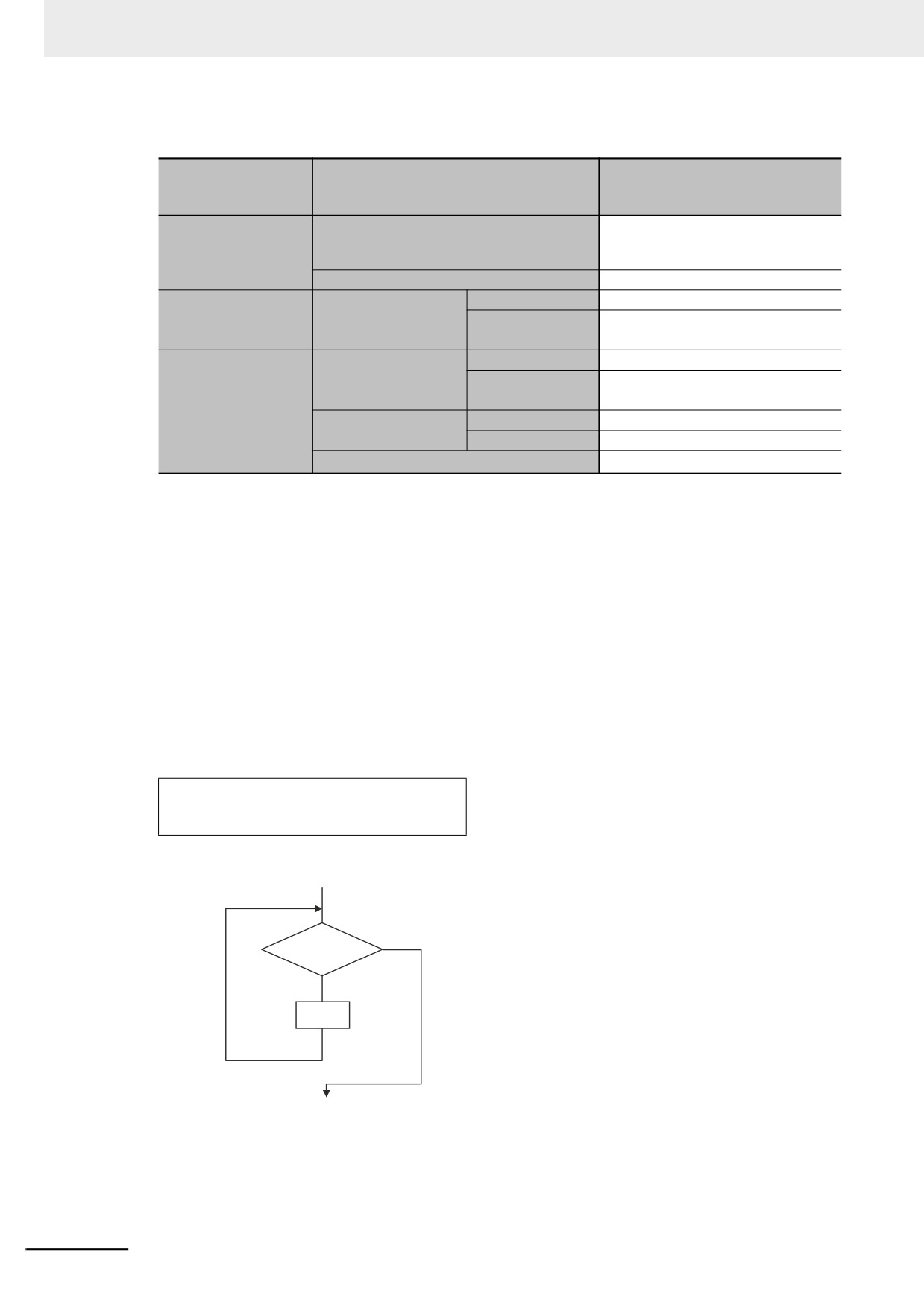
WHILE
Overview:
This construct repeatedly executes the specified statements as long as a condition expression is
TRUE.
Reserved Words:
WHILE, DO, END_WHILE
Construct Structure:
WHILE <condition_expression> DO
<statement>;
END_WHILE;
Process Flow Diagram:
Repeated
Condition
FALSE
expression
TRUE
Statement
End
6-116
6 Programming
Application:
Use this type of repeat construct when you do not know how many times to repeat a process (i.e.,
when you do not know how many times based on the condition) and you want to repeat a process
for as long as a certain condition is met. You can also use this type of repeat construct to execute a
process only when a condition expression is TRUE (pre-evaluation repeat construct).
Description:
The <condition_expression> is evaluated before <statement> is executed.
If
<condition_expression> is TRUE, <statement> is executed. Then the <condition_expression> is
evaluated again. This process is repeated.
If the <condition_expression> is FALSE, <statement> is not executed and the <condition_expres-
sion> is no longer evaluated.
Precautions:
•
WHILE must always be used together with END_WHILE.
•
If the <condition_expression> is FALSE before <statement> is executed, the WHILE construct is
exited and <statement> is not executed.
•
You can write <statement_1> and <statement_2> on multiple lines. Separate statements with a
semicolon (;).
•
You can execute more than one statement for <statement>. Separate statements with a semicolon (;).
•
You can also specify a BOOL variable (including functions that return a BOOL value) for the con-
dition expressions instead of an actual expression.
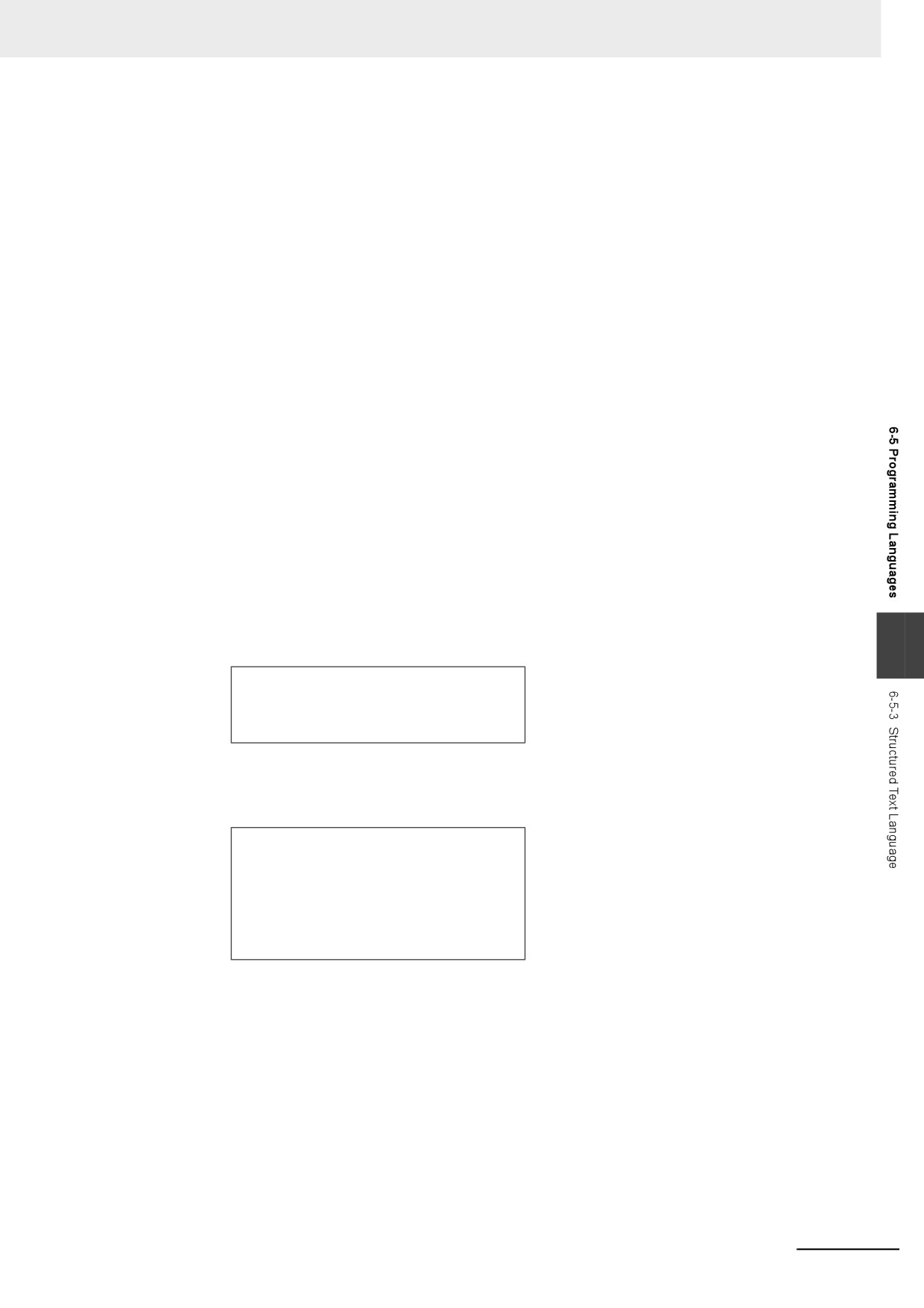
Example:
Example 1: The first multiple of 7 that exceeds 1,000 is calculated and assigned to variable A.
6
A := 0;
WHILE A <= 1000 DO
A := A+INT#7;
END_WHILE;
Example 2: The value of variable X is doubled if X is less than 3,000 and the value is assigned
to array variable element DATA[1]. Next, the value of X is doubled again and the
value is assigned to the array variable element DATA[2]. This process is repeated.
n := 1;
X := 1;
WHILE X < 3000 DO
X:= X*INT#10#2;
DATA[n]:= X;
n := n+INT#1;
END_WHILE;
•
If you do not write correct condition expressions, the program execution time increases and may
cause a Task Period Exceeded error.
Example:
boolVar := TRUE;
WHILE boolVar DO
intVar := intVar + INT#1;
END_WHILE;
6-117
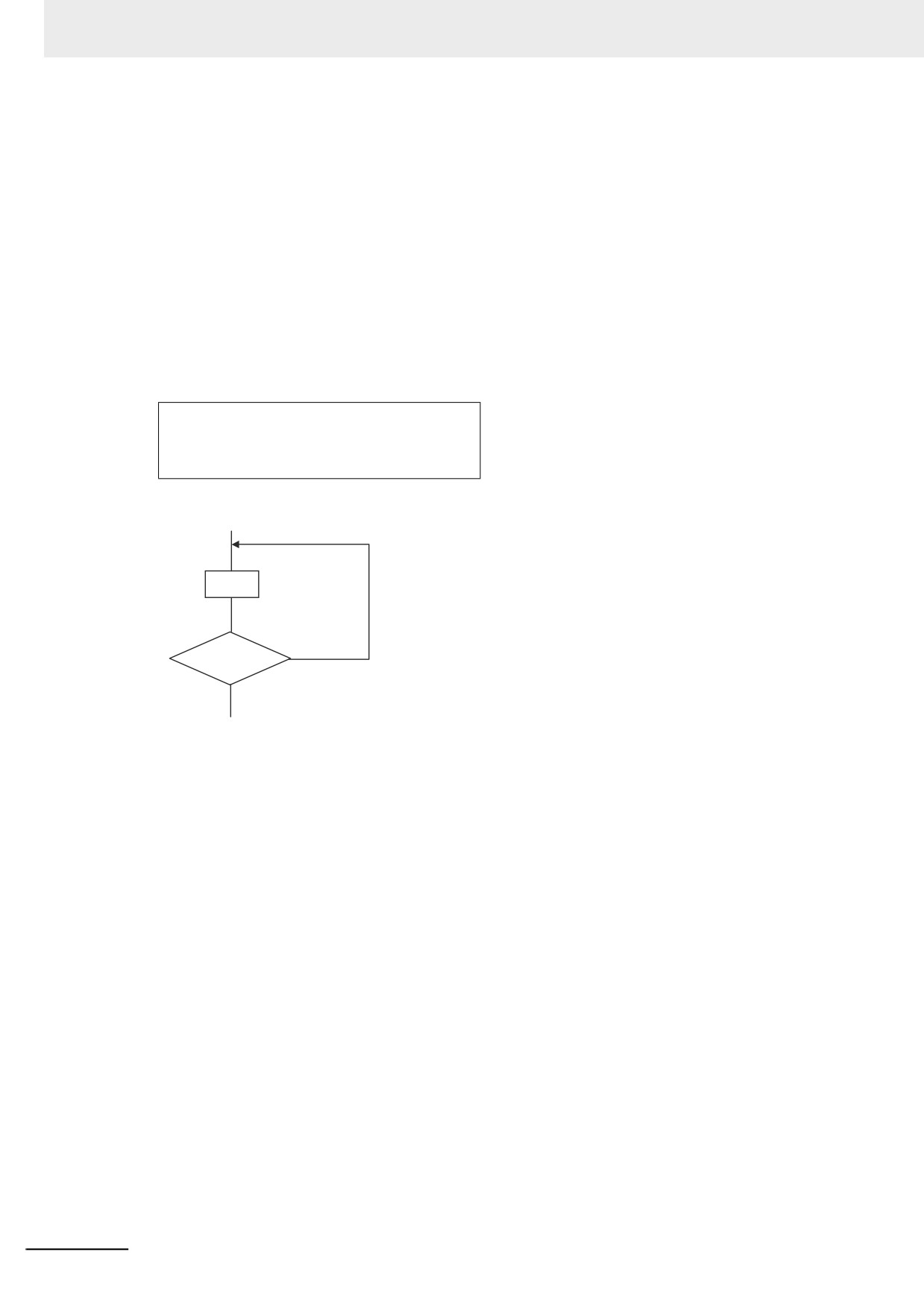
6 Programming
z REPEAT
The following expressions are used to specify whether the condition is met.
TRUE: The condition is met.
FALSE: The condition is not met.
Overview:
This construct repeatedly executes one or more statements until a condition expression is TRUE.
Reserved Words:
REPEAT, UNTIL, END_ REPEAT
Construct Structure:
REPEAT
<statement>;
UNTIL <condition_expression>
END_REPEAT;
Process Flow Diagram:
Statement
Repeated
Condition
FALSE
expression
TRUE
End
Application:
Use this type of repeat construct when you do not know how many times to repeat a process (i.e.,
when you do not know how many times based on the condition) and you want to repeat a process
for as long as a certain condition is met after processing. Use this type of repeat construct to deter-
mine repeat execution based on the result of the execution of a process (post-evaluation repeat
construct).
Description:
First, <statement> is executed unconditionally. Then the <condition_expression> is evaluated.
If <condition_expression> is FALSE, <statement> is executed.
If
<condition_expression> is TRUE, <statement> is not executed and the REPEAT construct is
exited.
Precautions:
• REPEAT must always be used together with END_REPEAT.
• Even if the <condition_expression> is TRUE before <statement> is executed, <statement> is exe-
cuted.
In other words, <statement> is always executed at least one time.
•
<statement> can contain multiple lines of code for the statement. Separate statements with a
semicolon (;).
• You can also specify a BOOL variable (including functions that return a BOOL value) for the con-
dition expressions instead of an actual expression.
6-118
6 Programming
Example:
Example 1: Numbers from 1 to 10 are added and the values are assigned to the variable TOTAL.
A := 1;
TOTAL := 0;
REPEAT
TOTAL := TOTAL + A;
A := A+INT#1;
UNTIL A>10
END_REPEAT;
• If you do not write correct condition expressions, the program execution time increases and may
cause a Task Period Exceeded error.
Example:
intVar := INT#1;
REPEAT
intVar := intVar + INT#1;
UNTIL intVar = INT#0
END_REPEAT;
6
6-119

6 Programming
z
EXIT
Overview:
Use this statement only inside a repeat construct (FOR construct, WHILE construct, or REPEAT
construct) to exit the repeat construct.
Use this statement inside an IF construct to exit from the repeat construct when a condition is met.
Reserved Words:
EXIT
Construct Structure (e.g., in an IF Construct):
FOR (WHILE, REPEAT) <statement>
·
·
·
IF <condition_expression> THEN EXIT;
END_IF;
·
·
·
END_FOR (WHILE, REPEAT);
Application:
Use EXIT to end a repeating process before the end condition is met.
Description (e.g., in an IF Construct):
If the <condition_expression> is TRUE, the repeat construct (FOR construct, WHILE construct, or
REPEAT construct) is ended and all code inside the repeat construct after the EXIT statement is
ignored.
Note 1
You can also specify a BOOL variable instead of an expression for the condition expressions.
2
Even if the <condition_expression> is TRUE before <statement> is executed, <statement> is executed.
Example:
Variable n is repeatedly incremented by 1 from 1 to 50 while the value of n is added to array vari-
able elements DATA[n]. However, if DATA[n] exceeds 100, the repeat construct is exited.
IF A THEN
DATA[3] :=98;
FOR n := 1; TO 50 BY 1 DO
DATA[n] := DATA[n] + n;
IF DATA[n] > 100 THEN EXIT;
END_IF;
END_FOR;
A :=FALSE;
END_IF;
6-120
6 Programming
z
Function Block Calls
Overview:
This statement calls a function block.
Reserved Words: None
Statement Structure:
Give the argument specifications (to pass the values of the specified variables to the input variables
of the called function block) and the return value specification (to specify the variable that will
receive the value of the output variable of the called function block) in parenthesis after the instance
name of the function block. There are two methods of writing this statement, as shown in (1) and (2)
below. We recommend method 1 for program readability.
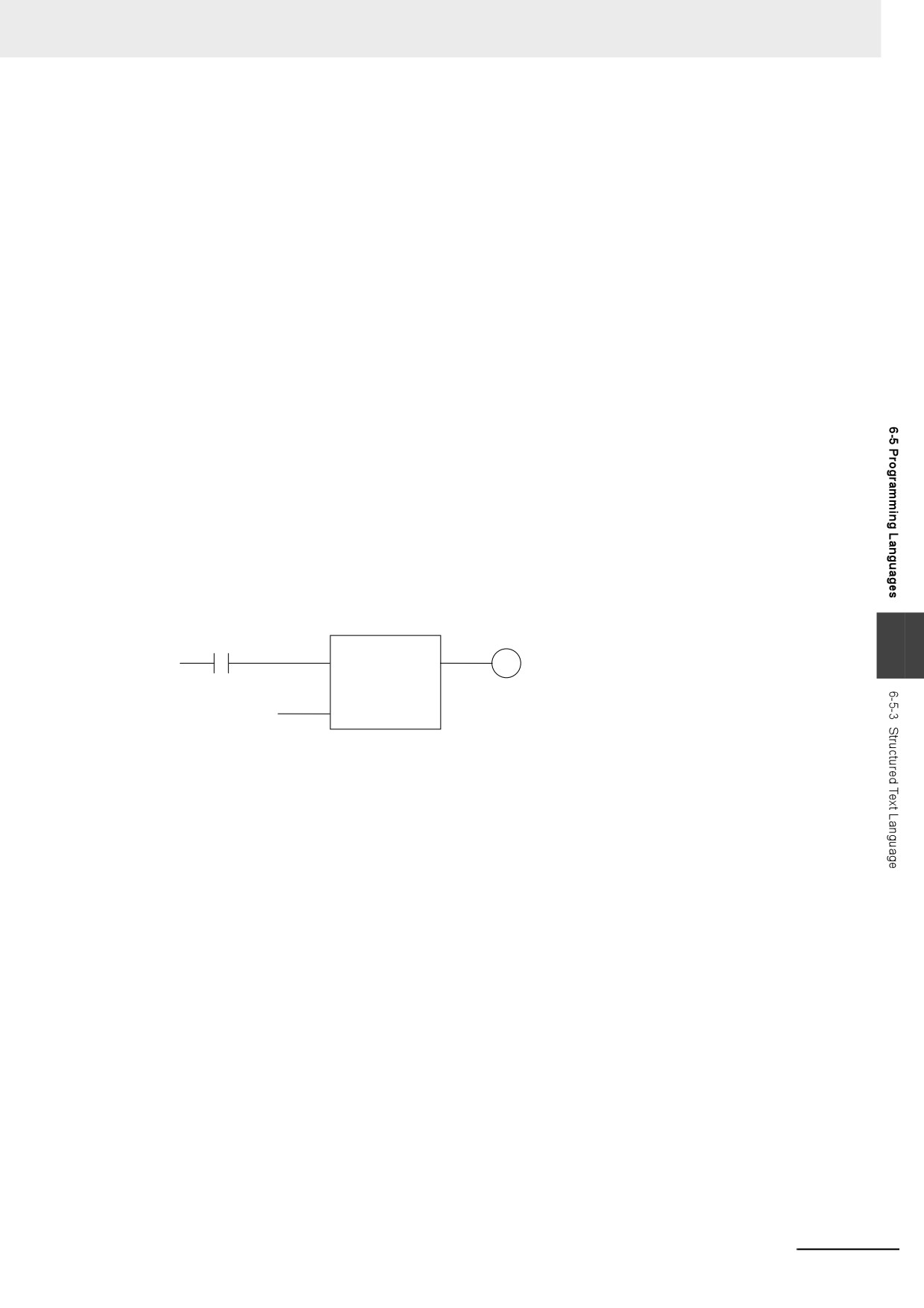
Notation Method 1:
Give both the variable names of the called function block and the parameter names of the calling POU.
ABC(A:=x1, B:=x2, C=>y1);
ABC: Function block instance name
A and B: Input or in-out variable names of called function block
x1 and x2: Input or in-out parameter of calling POU (can be a constant)
C: Output variable of called function block
y1: Output parameter of calling POU
• Ladder Diagram Expression
ABC
y1
x1
MyFB
6
A
C
x2
B
• You can give the arguments and return values in any order.
• You can omit the input variable names and input parameter names. If you omit these names, the
values assigned to the input variables for the previous call are assigned to the input variables
again. If this is the first time that the function block is called, the input variables are set to their ini-
tial values.
• You can omit the output variables and output parameters. If they are omitted, the value of the out-
put variable is not assigned to anything.
6-121
6 Programming
Notation Method 2:
Omit the variable names of the called function block and give the parameter names of the calling
POU.
ABC(x1, x2, y1);
ABC: Function block instance name
A and B: Omitted. (Input or in-out variable of called function block)
x1 and x2: Input or in-out parameter of calling POU (can be a constant)
C: Omitted. (Output variable of called function block or constant)
y1: Output parameter of calling POU
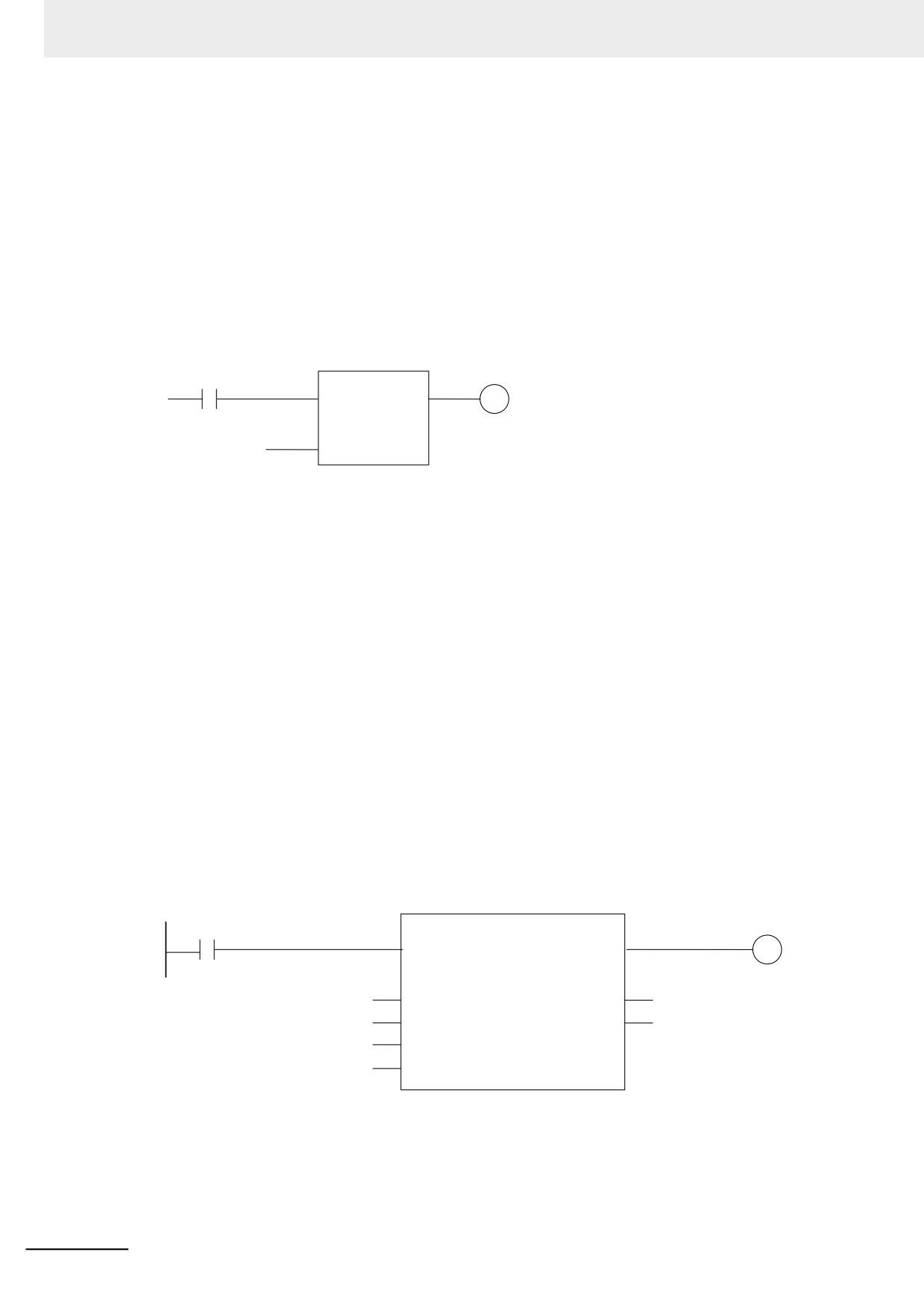
• Ladder Diagram Expression
ABC
y1
x1
MyFB
A
C
x2
B
• The order of parameters is based on the function block definition. The order is the same as the
local variable definition for the function block, from top to bottom.
Application:
This statement calls a function block.
Example
• Programming
Notation 1
ChangeFixToFloat(Execute:=Exe,Data32_1:=FixPointData1, Data32_2:=FixPointData2,
NoOfDigit_1:=FixPointPos1,
NoOfDigit_2:=FixPointPos2,OK=>Done,Double_1=>RealData1,
Double_2=>RealData2);
Notation 2
ChangeFixToFloat(Exe, FixPointData1, FixPointData2, FixPointPos1, FixPointPos2,
Done, RealData1, RealData2);
• Ladder Diagram Expression
ChangeFixToFloat
Exe
ConvData32ToDouble
Done
Execute
OK
FixPointData1
Data32_1
Double_1
RealData1
FixPointData2
Data32_2
Double_2
RealData2
FixPointPos1
NoOfDigit_1
FixPointPos2
NoOfDigit_2
6-122