Omron IPC Machine Controller Industrial Panel PC / Industrial Box PC. Software User’s Manual (Industrial PC Platform NY-series) - page 9
6 Programming
6-3-8
Variable Attributes
This section describes the variable attributes other than the Data Type.
Variable Name
The variable name is used to identify the variable. Each variable in a POU must have a unique name.
However, you can declare local variables with the same variable name in different POUs. These are
treated as two separate variables.
Refer to 6-3-12 Restrictions on Variable Names and Other Program-related Names for restrictions on
variable names.
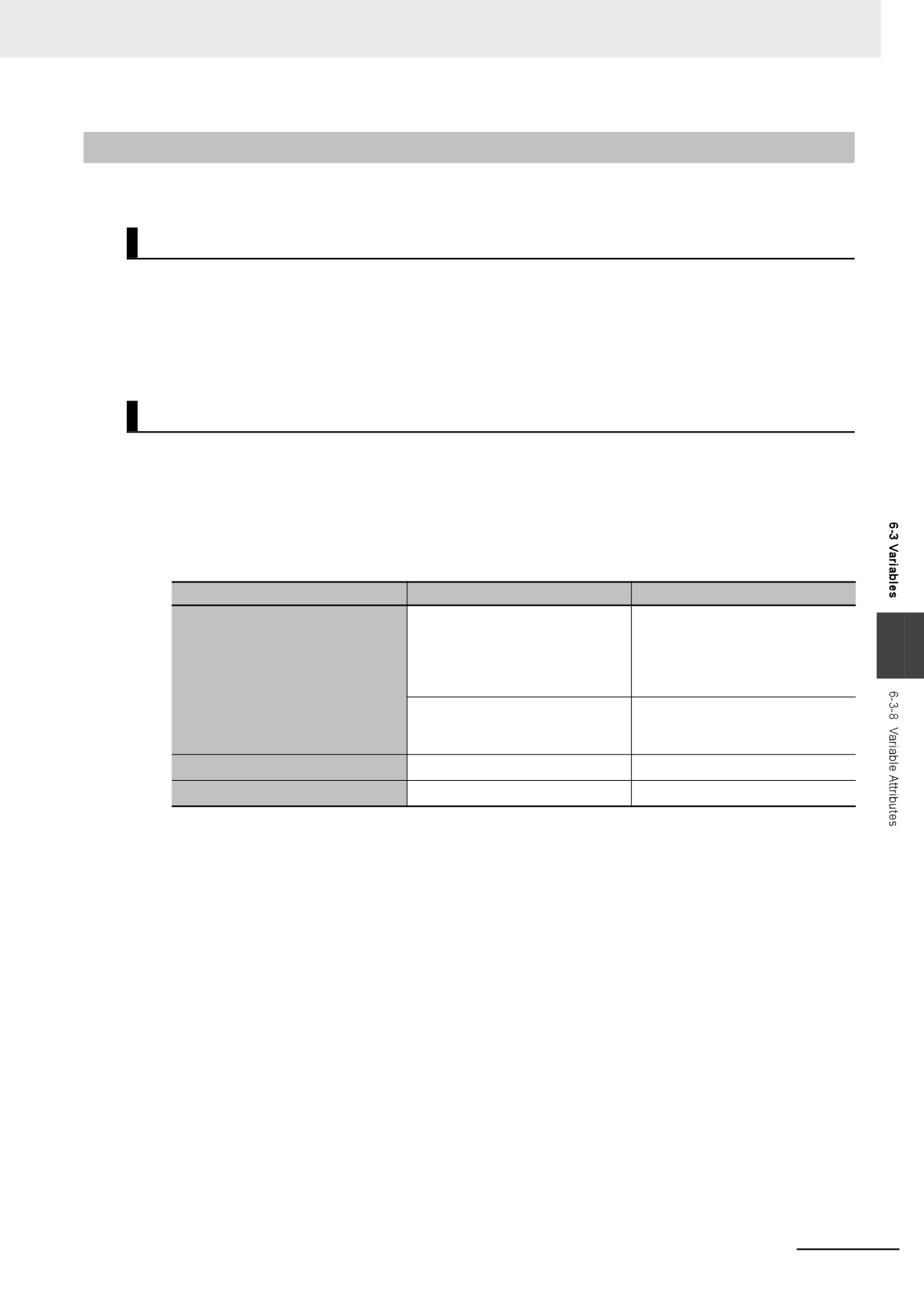
AT Specification
Use the AT specification attribute to specify a device variable to an I/O port for the NX Unit or EtherCAT
slave. When you assign a variable to an I/O port, they are automatically given an AT specification inter-
nally.
z Displaying AT Specifications
An AT specification is displayed in the Allocated Address Box of the variable table or the I/O Map.
Type of variable
Displays in the AT field.
Example
For NX Units on EtherCAT Slave
ECAT://node#[10.15]/Input1
Terminals:
6
ECAT://node#[node_ad-
Device variables for EtherCAT
dress.NX_Unit_num-
slaves
ber]/[I/O_port_name]
Other device variables:
ECAT://node#1/Input1
ECAT://node#[node_ad-
dress]/[I/O_port_name]
Axis Variables
MC://_MC_AX[]
MC://_MC_AX[1]
Axes Group Variables
MC://_MC_GRP[]
MC://_MC_GR[1]
*1
These system-defined variables are available only for the NX-series CPU Unit.
z Variables for Which You Can Set AT Specifications
AT specifications are made separately for each variable. Set them for all elements and members of
array, structure, and union variables.
6-61
6 Programming
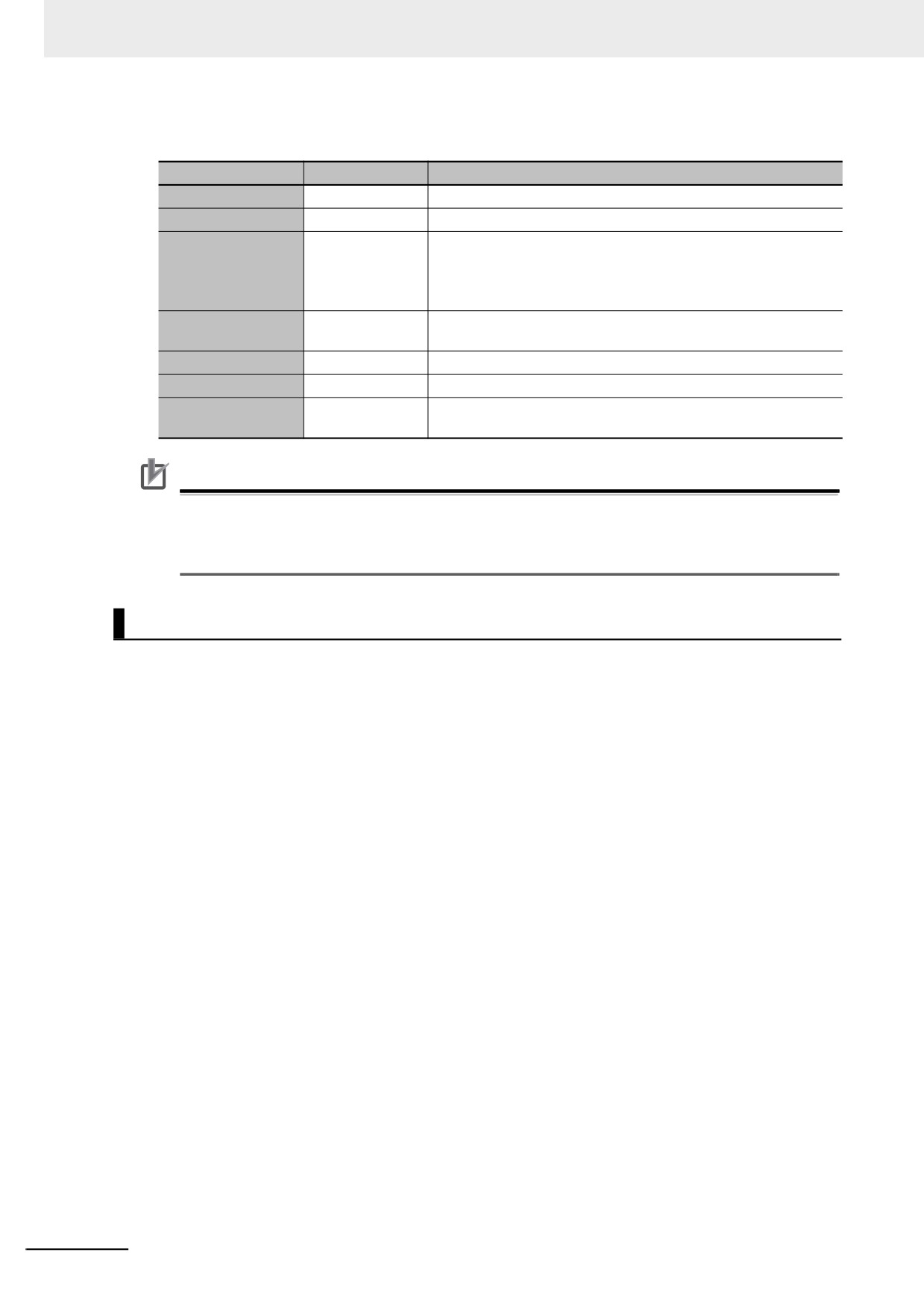
z Attributes of Variables with AT Specifications
Specification
Remarks
Name
Supported.
Data Type
Supported.
Supported.
The setting of the Retain attribute agrees with the attribute of the
memory where the address is assigned.
Retain
All of I/O ports for NX Units and EtherCAT slaves are not
retained.
Supported.
Set the initial value setting to None if you want to use the memory
Initial Value
value as it is.
Constant
Supported.
You cannot write to a constant with an instruction.
Network Publish
Supported.
Not supported.
(You can specify the Edge attribute only for function block input
Edge
variables.)
Precautions for Correct Use
You can assign the same address to more than one variable. However, this is not recommended
as it reduces readability and makes the program more difficult to debug. If you do this, set an ini-
tial value for only one of the variables. If you set a different initial value for each individual vari-
able, the initial value is not stable.
Retain
Use the Retain attribute to specify whether a variable should retain its value in the following cases.
• When power is turned ON after power interruption
• When the operating mode is changed
• When a major fault level Controller error occurs
If the Retain attribute is not set, the value of the variable is reset to its initial value in the above situa-
tions.
You can specify the Retain attribute when you need to retain the data that is stored in a variable (such
as the manufacturing quantities) even after the power to the Controller is turned OFF.
z Conditions Required to Enable the Retain Attribute
An AT specification is retained in a non-volatile memory if a UPS is connected to the Industrial PC
and the Industrial PC is normally shut down.
Refer to 2-8 Shutdown on page 2-30 for details on shutdown.
z Using Initial Values for Retain Variables
When you download the user program, select the Clear the present values of variables with Retain
attribute Check Box.
6-62
6 Programming
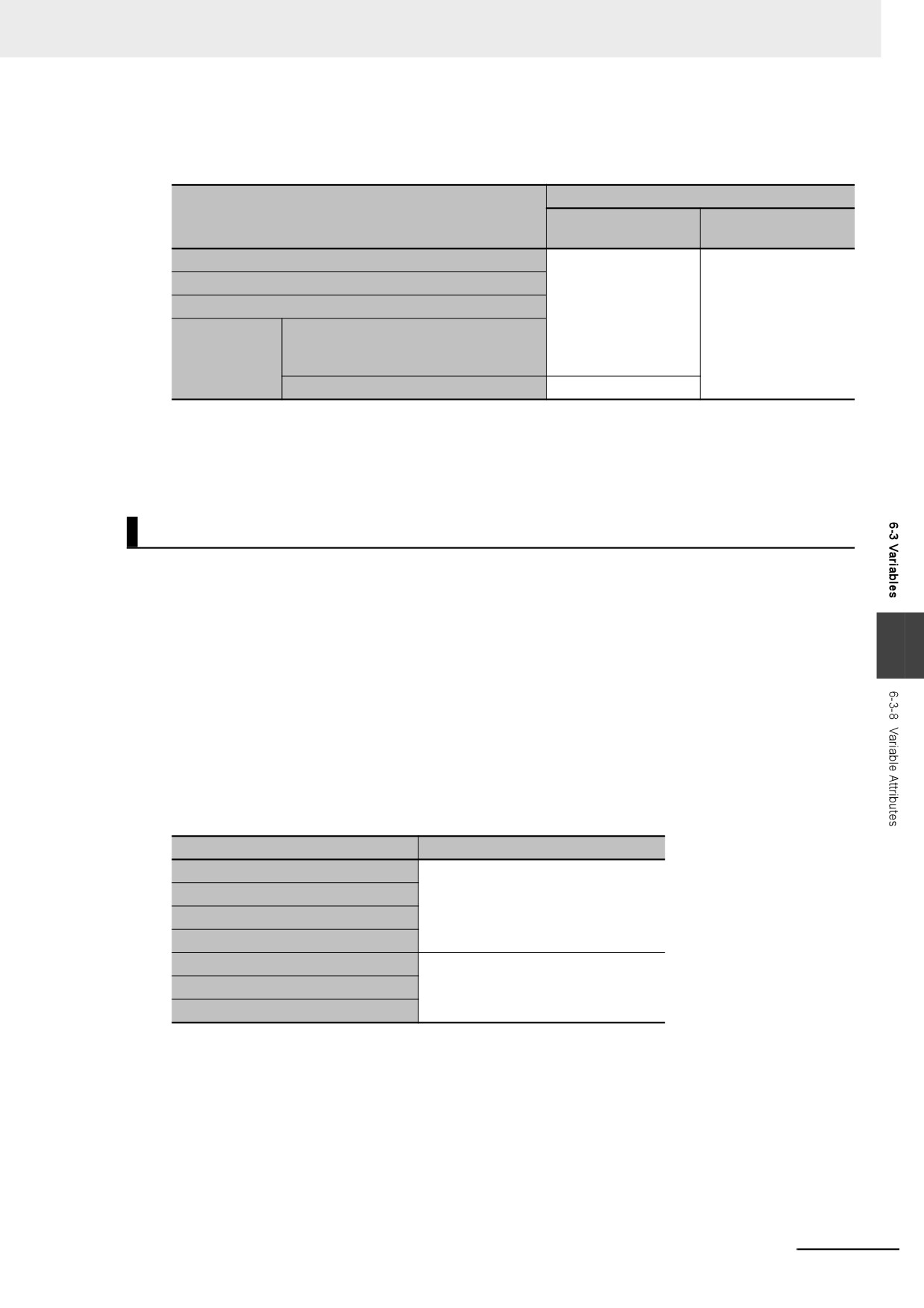
z Operation with and without the Retain Attribute
The following table shows when variable values are retained or not.
Values of variables
Case
Retain attribute spec-
Retain attribute not
ified
specified
When power is turned ON after power interruption
Retained.
Not retained.
When the operating mode is changed
When a major fault level Controller error occurs
When the Clear the present values of
When you
variables with Retain attribute Check
download the
Box is selected.
user program
When the check box is not selected.
Not retained.
z Variables for Which You Can Specify the Retain Attribute
AT specifications are made separately for each variable. Set them for all elements and members of
array, structure, and union variables.
Initial Value
The variable is set to the initial value in the following situations.
• When power is turned ON
• When changing between RUN mode and PROGRAM mode
• When you select the Clear the present value of variables with Retain attribute Check Box, and down-
6
load the user program
• When a major fault level Controller error occurs
You can set an initial value for a variable in advance so that you do not have to write a program to initial-
ize all of the variables. For example, you can preset data such as a recipe as initial values. You do not
have to set any initial values.
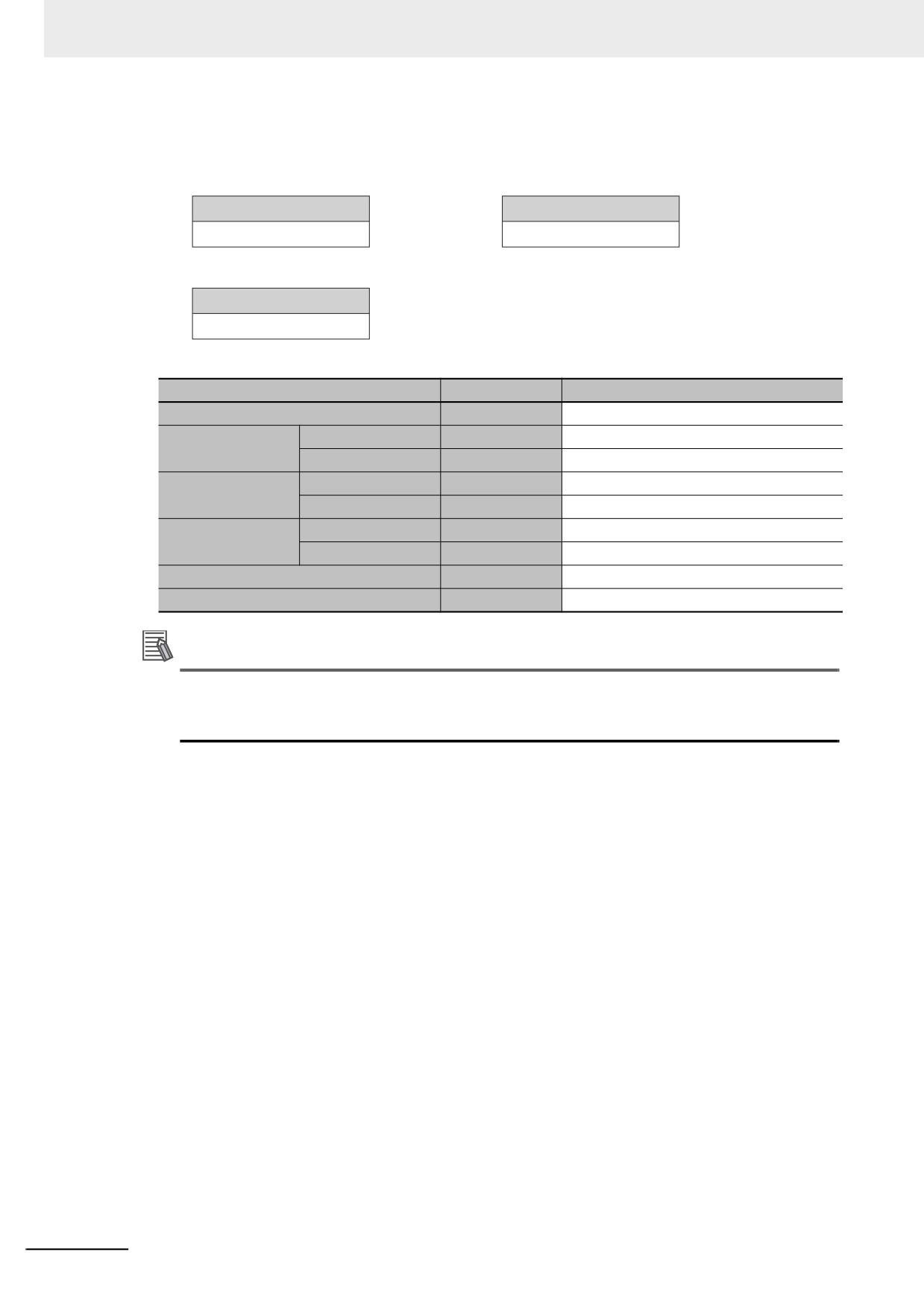
z Types of Variables That Can Have Initial Values
You can set initial values for only some types of variables. A list is provided below.
Type of variable
Initial Value
Global variables
Supported.
Internal variables
Input variables
Output variables
Return values of functions
Not supported.
In-out variables
External variables
6-63
6 Programming
z
Enabling an Initial Value
You can specify whether a variable has an initial value when you create the variable.
Initial Value Specified
Initial value
Initial value
Or
(Blank)
3.14
No Initial Value Specified
Initial value
None
The following table shows the variables for which you can set an initial value.
Type
Example
Enabling an Initial Value
Basic data type variables
aaa
Supported.
Arrays
bbb
Supported.
Array variables
Elements
bbb[2]
Not supported.
Structures
ddd
Supported.
Structure variables
Members
ddd.xxx
Not supported.
Unions
eee
Not supported (initial values are always 0).
Union variables
Members
eee.word
Initial values are always 0.
Enumerated variables
ccc
Supported.
POU instances
instance
Not supported.
Additional Information
Some Basic I/O Units have more than one access method for the same I/O port, such as bit
string data and BOOL data. If you use initial values for this type of I/O port, set the initial values
for one of the access types to None.
z
When Initial Values Are Set
The initial value is assigned to the variable at the following times.
• When power is turned ON
• When the operating mode changes from PROGRAM to RUN mode or from RUN to PROGRAM
mode
• When you select the Clear the present value of variables with Retain attribute Check Box, and
download the user program
• When a major fault level Controller error occurs
6-64
6 Programming
z
When the Initial Value Specification Is Left Blank
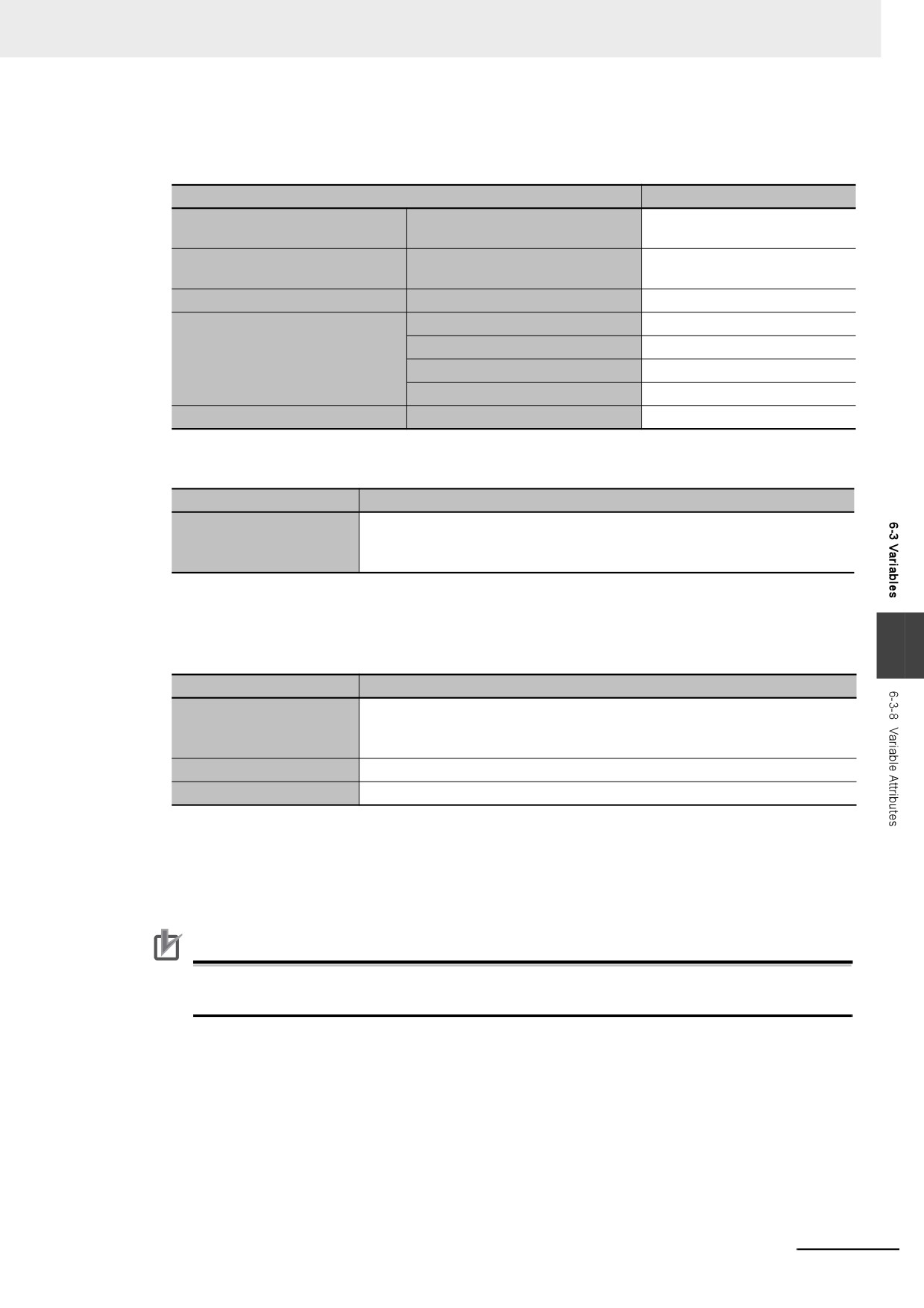
The following initial values are used for variables for which the initial value specification is left blank.
Data type
Default initial value
BOOL, BYTE, WORD, DWORD,
0
Boolean and bit strings
and LWORD
SINT, INT, DINT, LINT, USINT,
0
Integers
UINT, UDINT, and ULINT
Real numbers
REAL and LREAL
0.0
TIME
T#0S
Durations, dates, times of day,
DATE
D#1970-01-01
and dates and times
TIME_OF_DAY
TOD#00:00:00
DATE_AND_TIME
DT#1970-01-01-00:00:00
Text strings
STRING
‘ ‘(blank character)
z
Initial Value of Array Variables
Data type
Initial value specifications
• You can specify an initial value for each element.
Array specifications
• To specify initial values, you must specify a value or leave the specification
blank for each element.
z
Initial Values for Derivative Data Types
You do not specify an initial value for the data type itself. You set an initial value for each individual
variable.
6
Data type
Initial value specifications
• You can specify an initial value for each member.
Structures
• To specify initial values, you must specify a value or leave the specification
blank for each element.
Unions
• Initial values cannot be specified. Always zero.
Enumerations
• Initial values can be specified.
z
Variables That Do Not Apply Initial Values
For the following variables, initial values are not applied when the power is turned ON, and the val-
ues before the power interruption are retained.
• Variables with Retain attribute
Precautions for Correct Use
If a UPS is not connected to the Industrial PC or the Industrial PC is not normally shut down, the
above variables are also initialized.
6-65
6 Programming
Constant
If you specify the Constant attribute, the value of the variable cannot be written by any instructions, ST
operators, or CIP message communications. Setting the Constant attribute will prevent any program
from overwriting the variable. The values of variables with a Constant attribute cannot be written from
instructions after the initial value is set. If there is an instruction in a POU that attempts to write a value
to a variable with the Constant attribute, an error will occur when the user program is compiled.
z
Operation
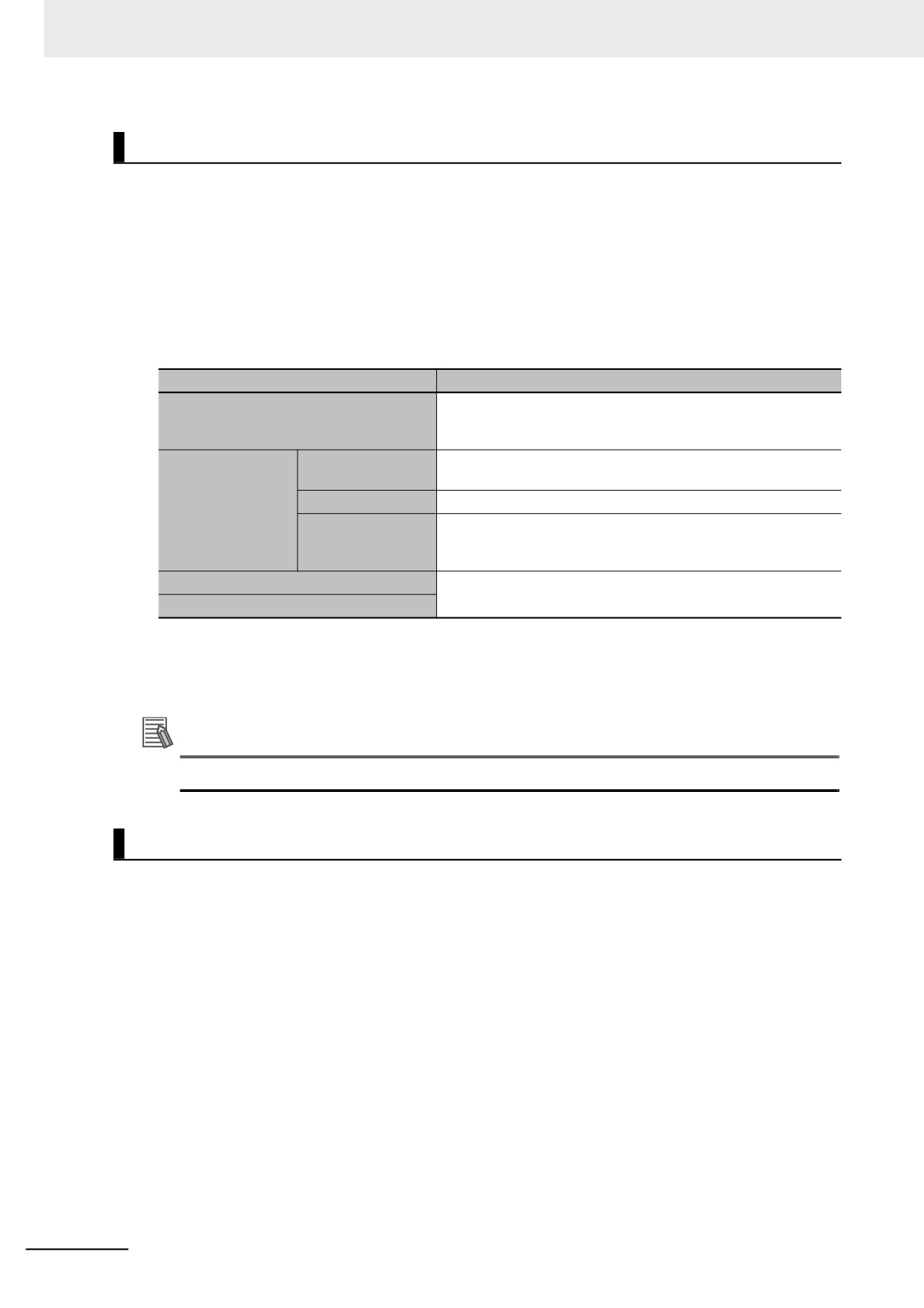
If there is an instruction or operator in a POU that attempts to write a value to a variable with the
Constant attribute, the following operations will occur.
Source
Operation for attempts to write the value
An error is detected during the program check. The Sysmac
User program
Studio checks the program when it is built. A building error
occurs at that time.
Writing from Sys-
Not supported.
mac Studio
CIP messages
A command error occurs.
Communications
An error occurs when a tag data link starts. The tag data link will
Tag data links
continue to operate. However, the values of variables with the
Constant attribute are not written.
Input refreshing from slaves and Units
An error does not occur and the value is written.
Forced refreshing
z
Range for Constant Attribute Specification
The Constant attribute is specified separately for each variable. Set them for all elements and mem-
bers of array, structure, and union variables.
Additional Information
You cannot write to variables with the Constant attribute from the user program.
Network Publish
The Network Publish attribute allows a variable to be read/written from external devices (other Control-
lers, host computers, etc.) through CIP message communications or tag data links. If this attribute is not
set, you can read/write the variable from the Controller that declared the variable and external devices
(other Controllers, host computers, etc.) cannot read/write that variable.
Variables that have been published to the network are called network variables.
6-66
6 Programming
z Network Publish Specifications
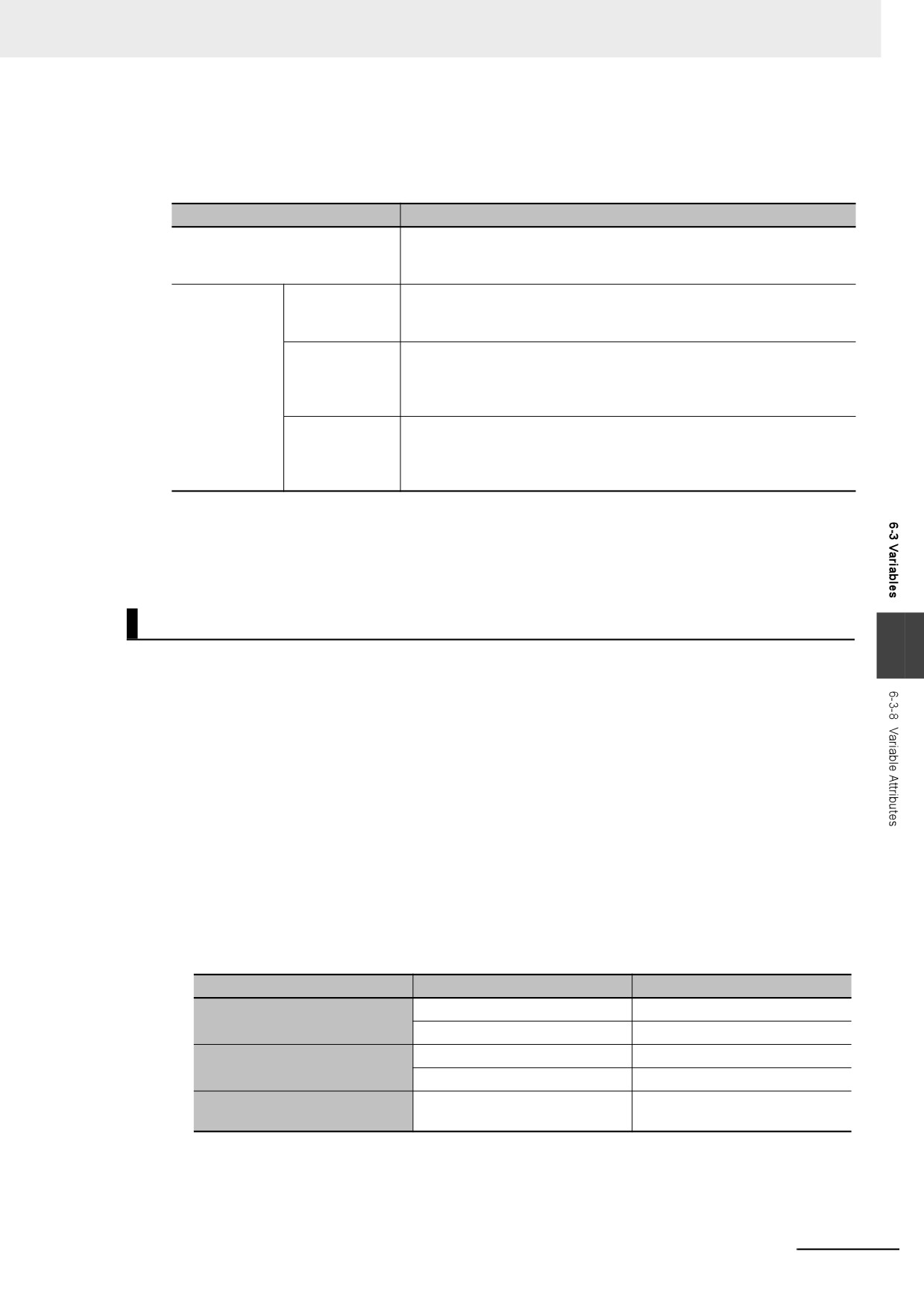
There are three specifications for publishing variables to the network: Publish Only, Input, and Out-
put. The specifications are given in the following table.
Network Publish
Specifications
Do not publish
You cannot access a variable with this attribute from external devices.
However, Support Software can still access the variable regardless of
this setting.
Publish
Publish Only
You can access a variable with this attribute from external devices
through CIP communications. Tag data links are not possible for vari-
ables with this attribute setting.
Input
You can access a variable with this attribute from external devices
through CIP communications or a tag data link. For tag data links, this
will be a variable for data input (from another Controller to the local Con-
troller).
Output
You can access a variable with this attribute from external devices
through CIP communications or a tag data link. For tag data links, this
will be a variable for data output (from the local Controller to another
Controller).
z Ranges for Published to the Network
The Network publish attribute is specified separately for each variable. Set them for all elements and
members of array, structure, and union variables.
Edge
6
The Edge attribute makes the variable pass TRUE to a function block when a BOOL variable changes
from FALSE to TRUE or from TRUE to FALSE. You can specify the Edge attribute only for BOOL input
variables to function blocks.
z Application
Use the Edge attribute when you want the function block to accept the input only when the input
parameter changes from FALSE to TRUE or from TRUE to FALSE. For example, you can use this
attribute when you want to execute the function block any time there is a change detected in an
input parameter.
z Operation
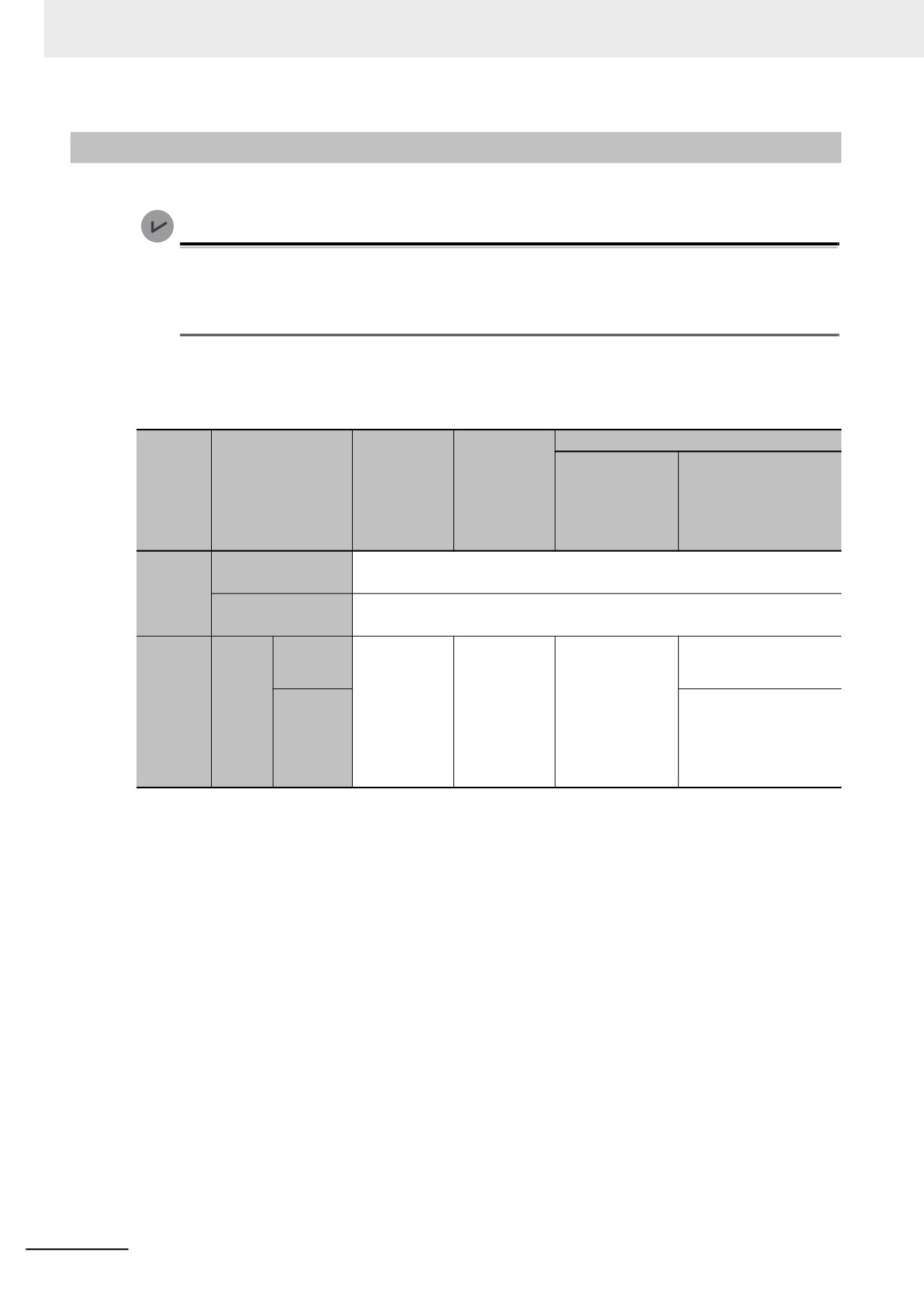
• If you specify a change to TRUE, the input variable changes to TRUE only when the input param-
eter connected to that input variable changes from FALSE to TRUE.
• If you specify a change to FALSE, the input variable changes to TRUE only when the input param-
eter changes from TRUE to FALSE.
Specification
Value of input parameter
Value of variable
FALSE to TRUE
TRUE
Change to TRUE
Other
FALSE
TRUE to FALSE
TRUE
Change to FALSE
Other
FALSE
---
Changes according to the input
None
parameter value.
6-67
6 Programming
6-3-9
Changes to Variables for Status Changes
This section describes the changes to the values of variables for status changes of the Controller.
Version Information
With the combination of a Controller with unit version 1.14 or later and Sysmac Studio version
1.18 or higher, you can set the operations when the operating mode changes or when download-
ing according to the setting of the _DeviceOutHoldCfg (Device Output Hold Configuration) sys-
tem-defined variable.
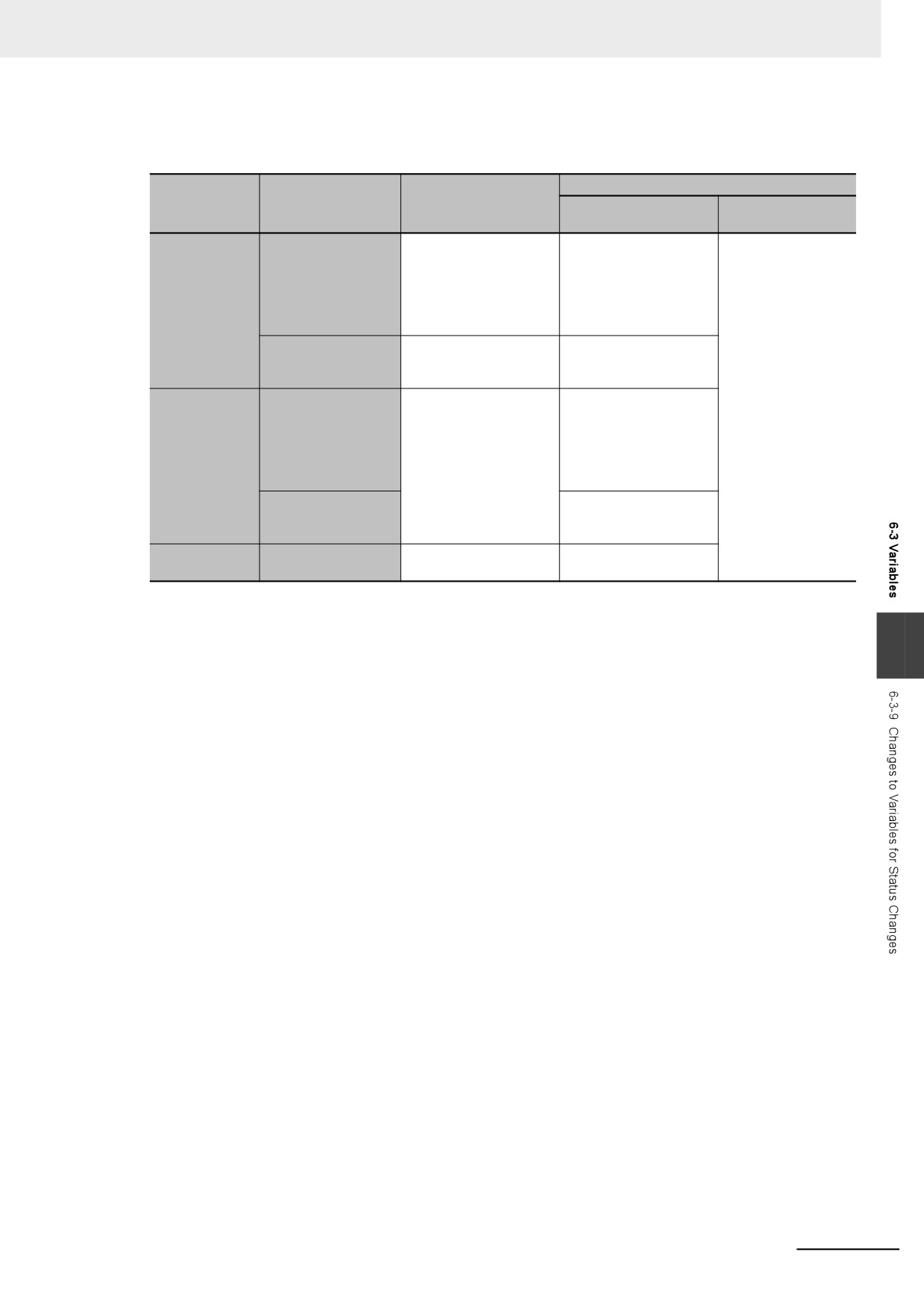
The values of variables in the Controller will change as shown in the following table when the power is
turned ON, when the operating mode changes, or when downloading.
After downloading
When the Clear
Retain
When operat-
the present val-
When power is
attribute
Type of variable
ing mode
ues of variables
When the check box is
turned ON
of variable
changes
with Retain attri-
not selected.
bute Check Box is
selected.
User-defined vari-
• If initial values are set, the variables change to the initial values.
ables
• If initial values are not set (None), the variables change to 16#00.*1
Non-retain
Device variables for
• If initial values are set, the variables change to the initial values.
EtherCAT slaves*2
• If initial values are not set (None), the variables change to 16#00.*1
Retain
No change
No change (i.e.,
• If initial values are
The values from before the
condition
(retains value
the values in
set, the variables
download are retained.
is met.
*3
before power
RUN mode are
change to the ini-
User-
interruption).
retained).
tial values.
• If initial values are set,
defined
• If initial values are
Retain
Retain
the variables change to
vari-
not set (None),
condition
the initial values.
ables
the variables
is not
• If initial values are not set
change to
met.*3
(None), the variables
16#00.*1
change to 16#00.*1
*1
Values other than 16#00 may be used depending on the data type. For details, refer to When the Initial Value
Specification Is Left Blank on page 6-65.
*2
Device outputs are retained even when the operating mode changes or when downloading if the device output
hold configuration is set to enable (16#A5A5) in the _DeviceOutHoldCfg (Device Output Hold Configuration)
system-defined variable. Refer to Device Output Hold Configurations on page 6-70 for the device output hold
configuration.
*3
Refer to Retain Condition on page 6-71 for the retain conditions.
6-68
6 Programming
The values of variables in the Controller will change as shown in the following table when a major fault
level Controller error occurs, or during online editing.
During online editing
Retain attribute
When a major fault level
Type of variable
Variable added to a POU
Variable in a POU for
of variable
Controller error occurs
for online editing.
online editing.
• If initial values are set,
• If initial values are set,
No change
the variables change to
the variables change to
User-defined vari-
the initial values.
the initial values.
ables and device vari-
• If initial values are not
• If initial values are not
ables
Non-retain
set, the variables
set, the variables
change to 16#00.
change to 16#00.
CIO and Work mem-
16#00
No change
ory areas for CJ-
series Units
No change (retains value
• If initial values are set,
before error).
the variables change to
User-defined vari-
the initial values.
ables and device vari-
• If initial values are not
ables
Retain
set, the variables
change to 16#00.
Holding, DM, and EM
No change
memory areas for CJ-
series Units
Forced refreshing
Cleared.
No change
Others
status
6
6-69
6 Programming
Device Output Hold Configurations
You can set the operations when the operating mode changes or when downloading according to the
setting of the _DeviceOutHoldCfg (Device Output Hold Configuration) system-defined variable.
If the device output hold configuration is set to disable (other than 16#A5A5), device outputs will
change as given in 6-3-9 Changes to Variables for Status Changes.
Device outputs are retained even when the operating mode changes or when downloading if the device
output hold configuration is set to enable (16#A5A5).
Device output hold configuration
Status
Disable (other than 16#A5A5)
Enable (16#A5A5)
When the operating mode
Variables are initialized.
Values of variables are retained.
is changed
When downloaded
I/O refreshing is stopped and variables
I/O refreshing is executed and values of
are initialized after downloading.
variables are retained after downloading.
z
Device Outputs for Hold Configurations
The following gives the device outputs for device output hold configuration.
• Device variables for EtherCAT slaves
z
Conditions To Retain Device Outputs When Downloading
There are restrictions on the changeable items as the conditions to retain device outputs when
downloading. The following table gives the items for which device outputs can be retained even if
items are changed.
Item
EtherCAT
Backup Parameter Settings of EtherCAT slaves
I/O Map
Variable Name
Variable Comment
Variable Type
Event Settings
Task Settings
Program Assignment Settings
Programming - POUs
Program
Section
Internal/ External Variable
Function
Function Block
Programming - Data
Data Type
Global Variable
EtherNet/IP Connection Settings
If items other than those given in the above table are changed and downloaded, device outputs are
not retained.
Also, in the Synchronization Window of the Sysmac Studio, select the check box for the Do not
transfer the following. (All items are not transferred.) - CJ-series Special Unit parameters and
EtherCAT slave backup parameters. If you do not select the check box, device outputs are not
retained.
6-70
6 Programming
Perform the following procedure if you want to retain device outputs, and change EtherCAT slave
backup parameters.
1 Change the user program only and download it.
2 Select the slave in the EtherCAT Tab Page.
3 Click the Edit Backup Parameter Settings Button in the Slave Parameter Settings Area on the
right of the network configuration.
4 Click the Transfer to Slave Button in the Edit Backup Parameter Settings Tab Page.
If you execute Transfer to Slave, the slave is restarted after the data is transferred. In this case, device
outputs of the slave are not retained. However, device outputs are retained for the slave that the data is
not transferred.
z Related System-defined Variables
The system-defined variables that are related to the operation when system-defined variables are
used to back up data are shown below. Refer to A-4 Specifications for Individual System-defined
Variables for details on system-defined variables.
Variable
Meaning
Function
Data type
R/W
_DeviceOutHoldCfg
Device Output Hold
It is 16#A5A5 if you retain the target device output
WORD
RW
Configuration
when the operating mode is changed or when
downloaded.
In the case other than 16#A5A5, the target device
output is initialized when the operating mode is
changed or when downloaded.
_DeviceOutHoldStatus
Device Output Hold
It is TRUE if the target device output is retained
BOOL
R
6
Status
when the operating mode is changed or when
downloaded.
When the device output hold configuration is other
than 16#A5A5, or when a major fault level
Controller error occurs, the target device output is
initialized and changes to FALSE.
Retain Condition
Retain condition indicates that all of the following conditions are met both before and after the down-
load.
• The variable name is the same.
• The data type (name) is the same.
• The Retain attribute is set to retain the value of the variable.
Refer to Values of Retain Variables After New Creations or Changes of POU Names on page 6-71 for
the value of a variable with a Retain attribute after its POU name is changed. Also refer to Variable
Values When Data Types of Retained Variables Are Changed on page 6-75 for the value of a variable
when its data type is changed.
Values of Retain Variables After New Creations or Changes of POU
Names
When you download a project that you created with the Sysmac Studio to a Controller, the Controller
treats it with a POU name that is different from the POU name displayed on the Sysmac Studio. Even if
the POU name is the same as the one displayed on the Sysmac Studio, the Controller may treat it as a
different POU.
6-71
6 Programming
This section describes how the Controller treats POU names and the values of local variables with a
Retain attribute when POU names are changed or newly created on the Sysmac Studio and
downloaded.
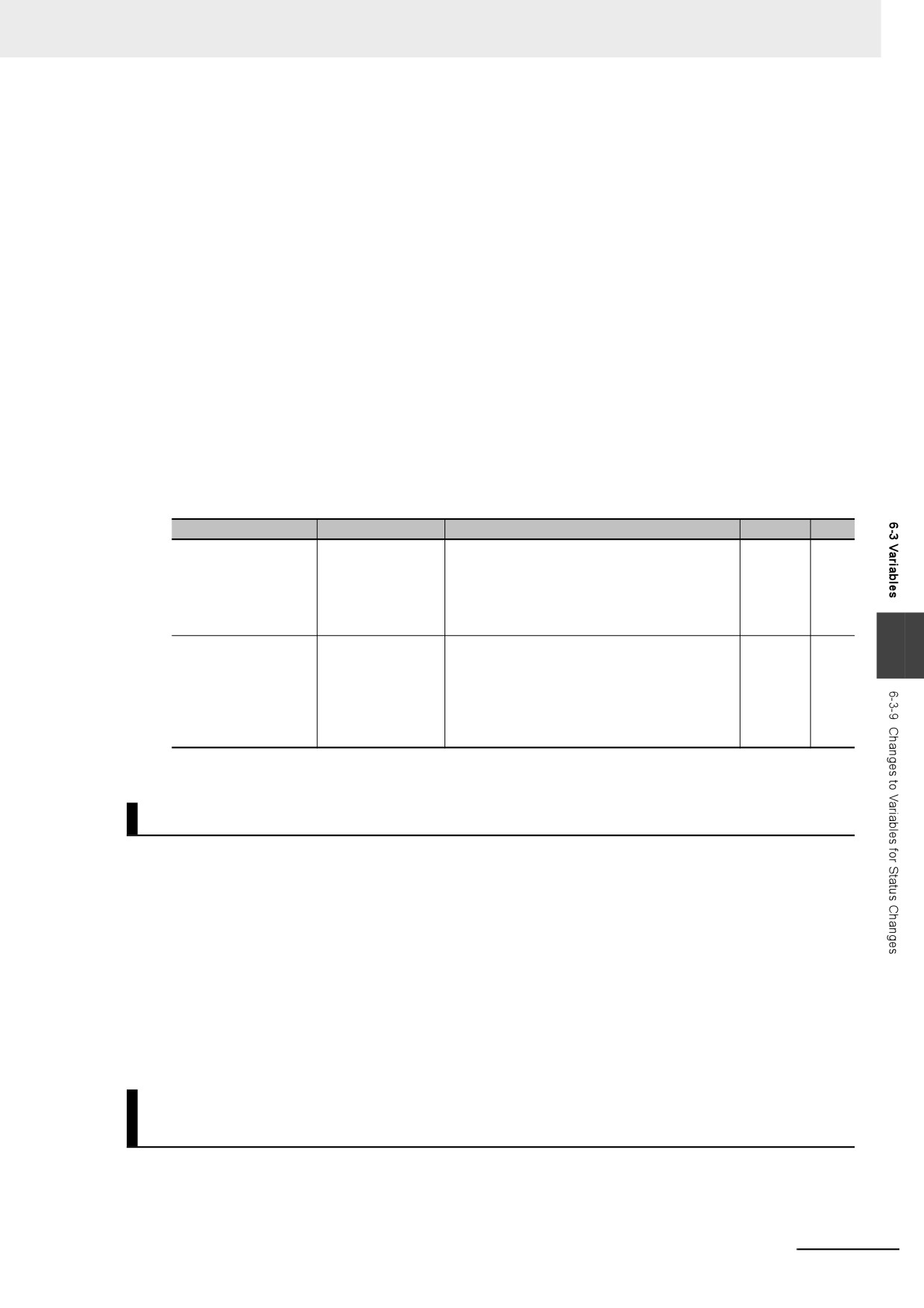
z Before an Operation with the Sysmac Studio
A project, named Poject_A, which was created with the Sysmac Studio is downloaded to a Control-
ler. The Poject_A contains POU_A in which a local variable VarA is contained.
Assume the POU that is displayed as POU_A on the Sysmac Studio is treated as POU_XXX on the
Controller. Also, assume the present value of the local variable VarA on the Controller is changed to
20.
On the Sysmac Studio
Download
On the Controller
Project name:
Project_A
Project name:
Project_A
POU name:
POU_A
POU name:
POU_XXX
Variable name:
VarA
Variable name:
VarA
Initial value of VarA:
0
Present value of VarA:
20
z After Changing a POU Name
The POU name and the present value of the local variable VarA do not change on the Controller
even after you change the POU name from POU_A to POU_B on the Sysmac Studio and download
it.
On the Sysmac Studio
Download
On the Controller
Project name:
Project_A
Project name:
Project_A
POU name:
POU_B
POU name:
POU_XXX
Variable name:
VarA
Variable name:
VarA
Initial value of VarA:
0
Present value of VarA:
20
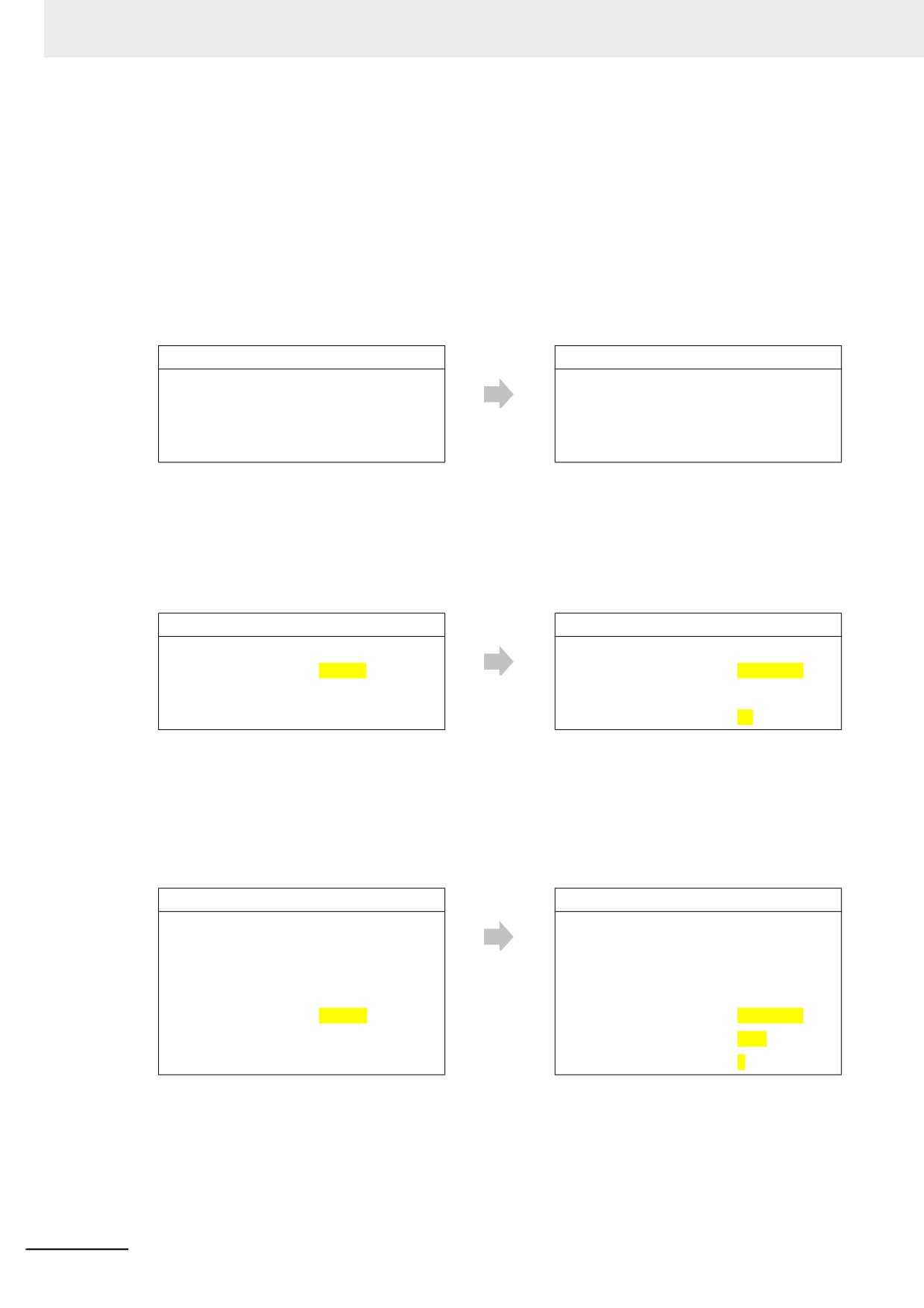
z After Creating a New POU
When you create a new POU, POU_C, for a local variable on the Sysmac Studio and download it,
the Controller treats it as a new POU, POU_YYY, and as a new local variable VarA.
Therefore, the value of the new local variable VarA is the initial value, 0.
On the Sysmac Studio
Download
On the Controller
Project name:
Project_A
Project name:
Project_A
POU name:
POU_A
POU name:
POU_XXX
Variable name:
VarA
Variable name:
VarA
Initial value of VarA:
0
Present value of VarA:
20
POU name:
POU_C
POU name:
POU_YYY
Variable name:
VarA
Variable name:
VarA
Initial value of VarA:
0
Present value of VarA:
0
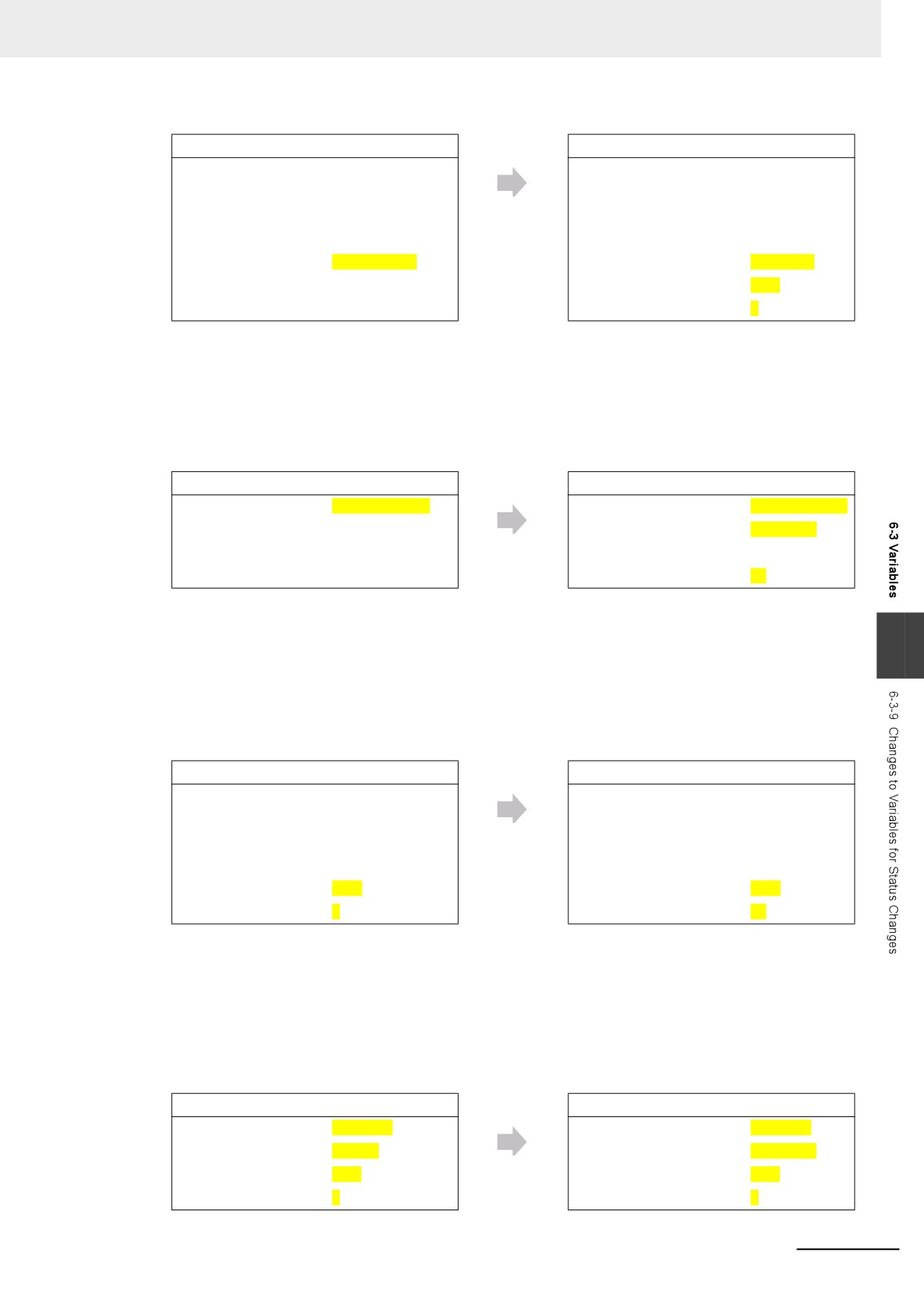
z After Copying a POU Name
When you copy a POU, POU_A, to create a POU_A_copy on the Sysmac Studio and download it,
the Controller treats it as a new POU, POU_ZZZ, and as a new local variable VarA.
Therefore, the value of the new local variable VarA is the initial value, 0.
6-72
6 Programming
On the Sysmac Studio
Download
On the Controller
Project name:
Project_A
Project name:
Project_A
POU name:
POU_A
POU name:
POU_XXX
Variable name:
VarA
Variable name:
VarA
Initial value of VarA:
0
Present value of VarA:
20
POU name:
POU_A_copy
POU name:
POU_ZZZ
Variable name:
VarA
Variable name:
VarA
Initial value of VarA:
0
Present value of VarA:
0
z
When Copying an Exported Project File
The POU name and the present value of the local variable VarA do not change on the Controller
even after you copy the Project_A to create the Project_A_copy on the Sysmac Studio and down-
load it.
On the Sysmac Studio
Download
On the Controller
Project name:
Project_A_copy
Project name:
Project_A_copy
POU name:
POU_A
POU name:
POU_XXX
Variable name:
VarA
Variable name:
VarA
Initial value of VarA:
0
Present value of VarA:
20
The present value of the local variable VarB does not change on the Controller if you create a local
6
variable VarB that was nonexistent in the Project_A when the Project_A was copied, add VarB to the
Project_A and download it while you add a local variable VarB of the same definition to the Pro-
ject_A_copy and download it.
In the same manner, the present value of the local variable VarB does not change on the Controller
if you copy the local VarB from the Project_A or merge the variable table.
On the Sysmac Studio
Download
On the Controller
Project name:
Project_A_copy
Project name:
Project_A_copy
POU name:
POU_A
POU name:
POU_XXX
Variable name:
VarA
Variable name:
VarA
Initial value of VarA:
0
Present value of VarA:
20
Variable name:
VarB
Variable name:
VarB
Initial value of VarB:
0
Present value of VarB:
50
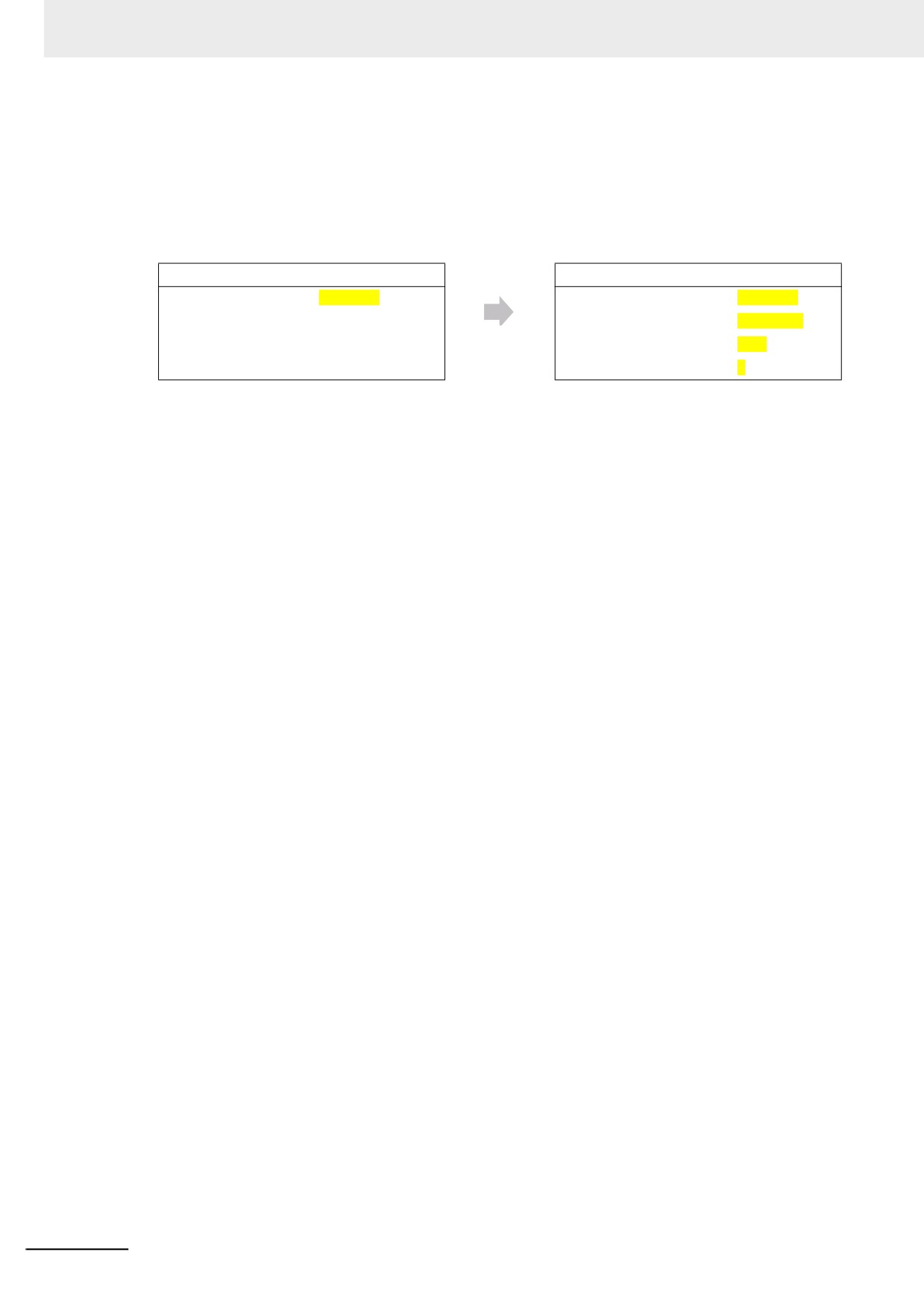
z When Adding a POU of the Same Name to Another Project
When you create Project_B which has a POU, POU_A, that is the same name as the POU in the
Project_A on the Sysmac Studio and download it, the Controller treats it as a new POU, POU_YYY,
and as a new local variable VarA. Therefore, the value of the new local variable VarA is the initial
value, 0.
On the Sysmac Studio
Download
On the Controller
Project name:
Project_B
Project name:
Project_B
POU name:
POU_A
POU name:
POU_YYY
Variable name:
VarA
Variable name:
VarA
Initial value of VarA:
0
Present value of VarA:
0
6-73
6 Programming
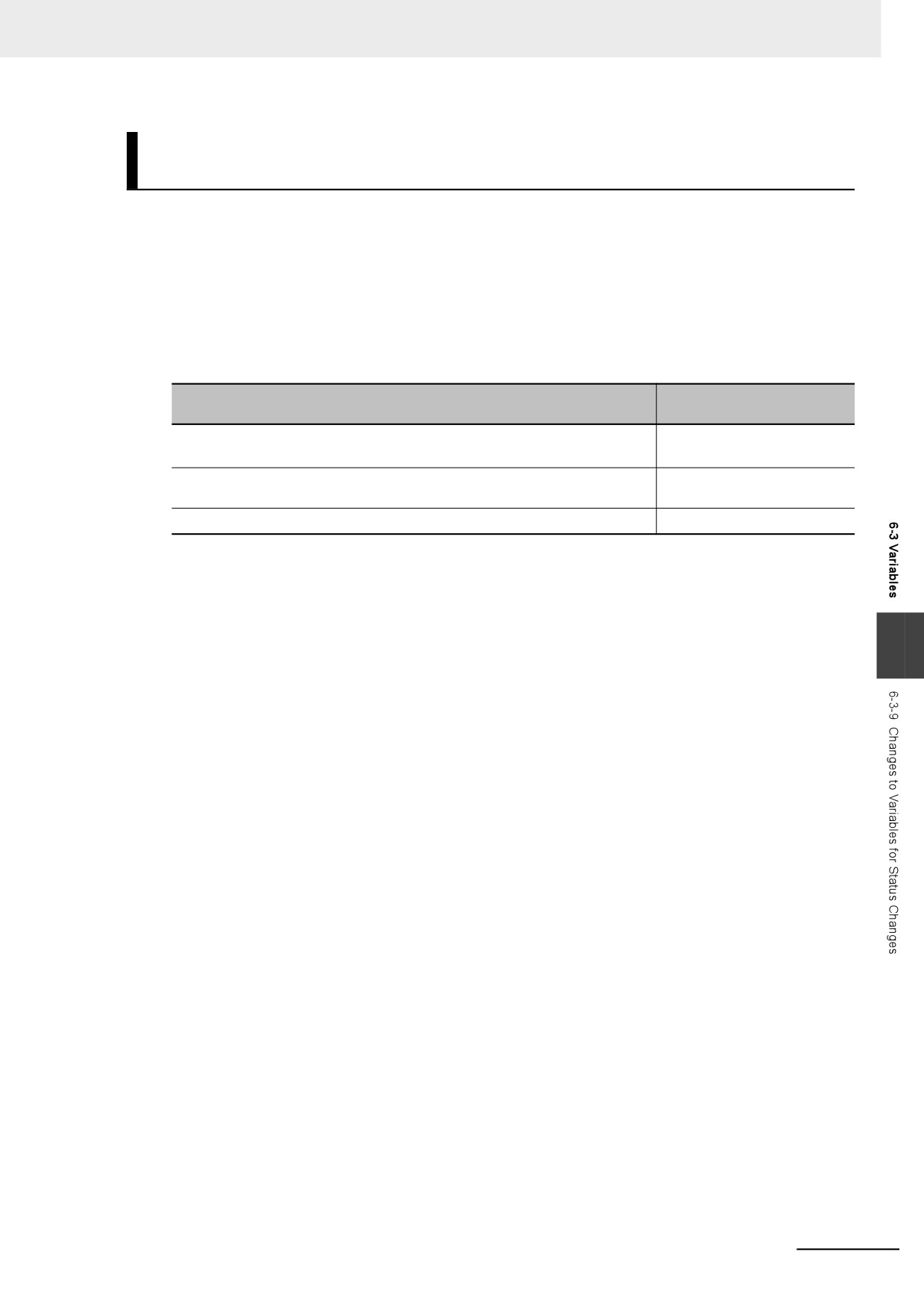
z When Copying a POU from Another Project to Original Project
When you create Project_B on the Sysmac Studio, copy and past POU_A from the Project_A to Pro-
ject_B, and download it, the Controller treats it as a new POU, POU_YYY, and as a new local vari-
able VarA. Therefore, the value of the new local variable VarA is the initial value, 0.
On the Sysmac Studio
Download
On the Controller
Project name:
Project_B
Project name:
Project_B
POU name:
POU_A
POU name:
POU_YYY
Variable name:
VarA
Variable name:
VarA
Initial value of VarA:
0
Present value of VarA:
0
6-74
6 Programming
Variable Values When Data Types of Retained Variables Are
Changed
This section describes how the Controller treats the variable values when the data types of variables
with a Retain attribute are changed on the Sysmac Studio and the present values of variables with a
Retain attribute are restored, transferred, or downloaded.
z Operation and Variable Values
There are two patterns in the way how the variables with a Retain attribute are treated. The table
below shows the relationship between the operations and treatment patterns.
Treatment pattern of vari-
Operation
able value
• Restoring with Sysmac Studio Controller backups
Pattern 1
• Restoring with SD Memory Card backups
• Restoring with variable and memory backup functions on the Sysmac Stu-
Pattern 2
dio
• Downloading from the Sysmac Studio
Pattern 2
The following section gives further description on the treatments of pattern 1 and 2 for each data type.
6
6-75
6 Programming
z
Changes in Basic Data Types
Assume the variables before changes on the Sysmac Studio are defined as in below.
Variable name
Data type
AT specification
ABC
INT
---
DEF
INT
%D100
Assume the Retain attribute of each variable is set to retain, and the following present values are
given.
Variable/memory
Present value
ABC
10
DEF
20
Assume the following present values are given for the memory used for CJ-series Units, DM100 and
DM101.
Variable/memory
Present value
D100
20
D101
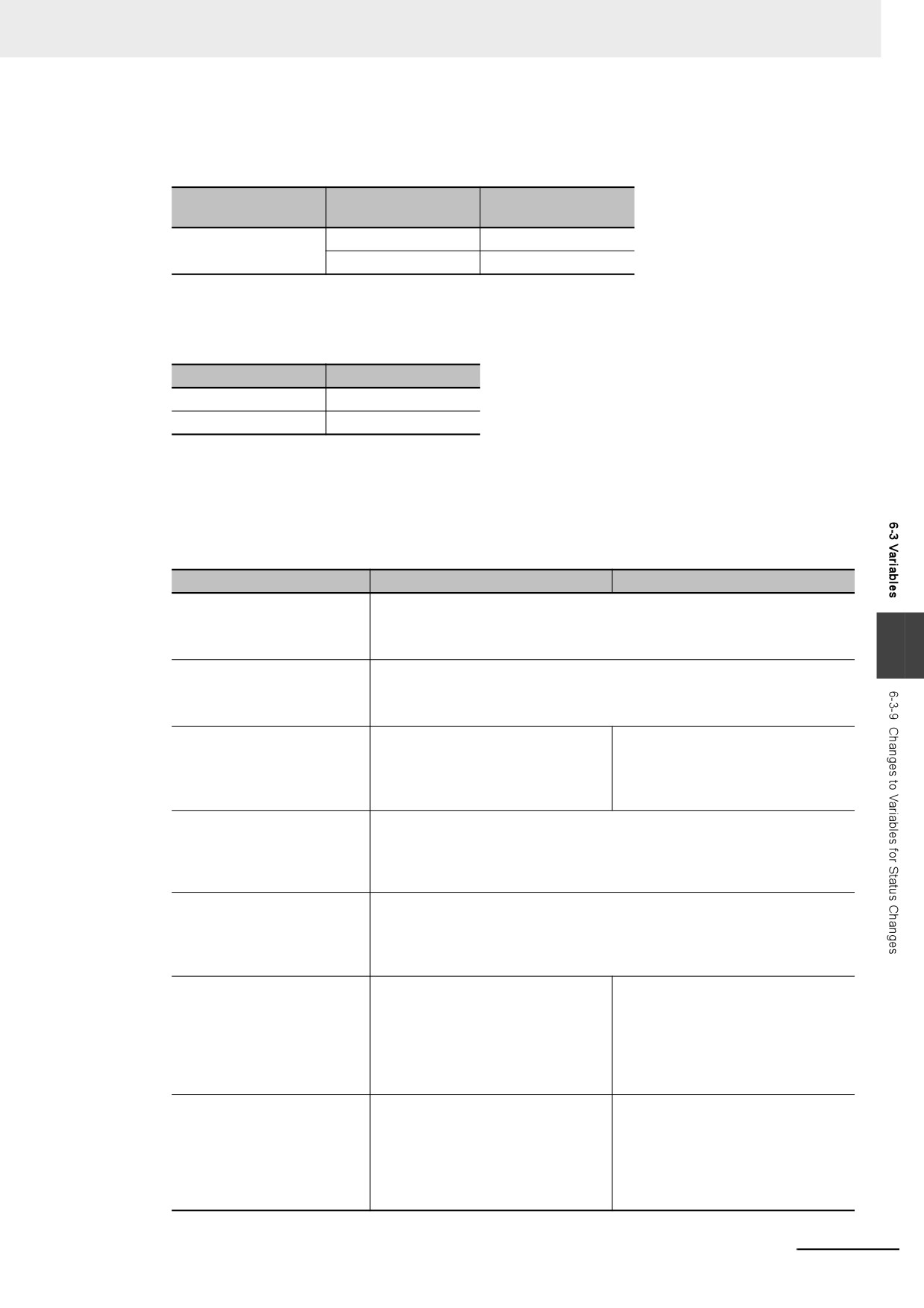
50
The relationship between changes in the data types and how the controller treats the variables are
given below.
Change description
Pattern 1
Pattern 2
No change
The variable value is retained.
ABC = 10
DEF = 20
Changing the variable name
The variable value will be the initial value.
from ABC to GHI
GHI = Initial value
Changing the data type of the
The variable value will be the initial value.
variable ABC from INT to
ABC = Initial value
DINT
Changing the Retain attribute
The variable value will be the initial value.*1
of the variable ABC to Non-
ABC = Initial value
retain
Changing the AT specifica-
The variable value will be the value of the AT specification.
tion of the variable DEF from
DEF = 50
D100 to D101 *2
Deleting the AT specification
The variable value will be the initial value.
of the variable DEF
DEF = Initial value
*1
The variable value will be the initial value when the Retain attribute of the variable is changed from Non-
retain to Retain.
*2
This is an example that the memory used for CJ-series Units is specified for AT specification. You cannot
use the memory used for CJ-series Units in the NY-series Controller. Therefore, only use this example as a
reference if you change the basic data types.
6-76
6 Programming
z
Changes in a Structure
Assume the structure before changes on the Sysmac Studio is defined as in below.
Data type of the
Data type name
Member
member
STR_1
x
INT
y
INT
Assume the data type of the variable ABC is STR_1, the Retain attribute is set to retain, and the
members have the following present values.
Member
Present value
ABC.x
100
ABC.y
-200
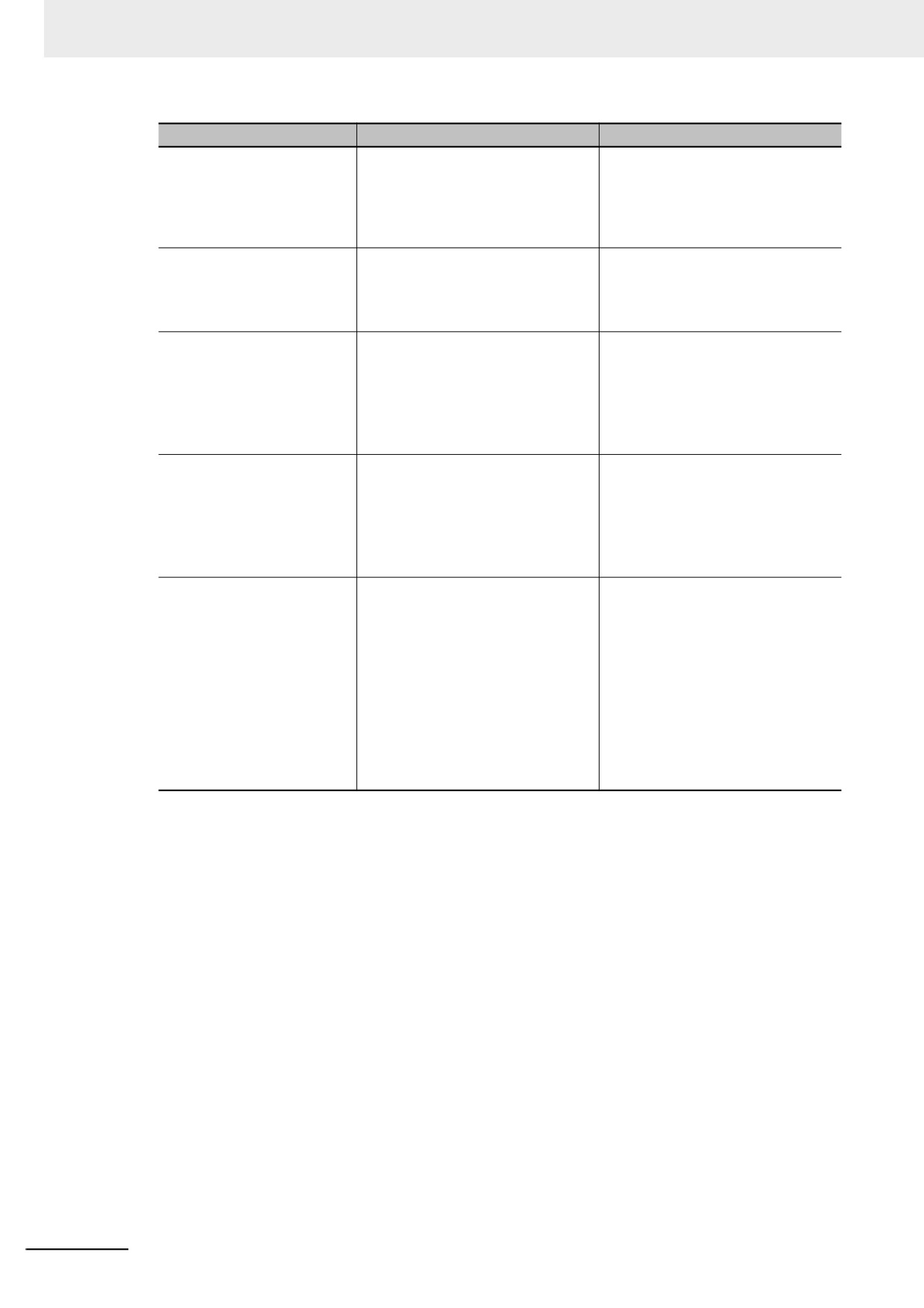
The relationship between changes in the data types and how the controller treats the variables are
given below.
If the condition applies both to retain and to change to the initial value, the variable value changes to
the initial value.
Change description
Pattern 1
Pattern 2
No change
The member value is retained.
ABC.x = 100
ABC.y = -200
6
Changing the variable name
The member value will be the initial value.
from ABC to DEF
DEF.x = Initial value
DEF.y = Initial value
Changing the member x to x1
The member value is retained.
The value of the changed member
will be the initial value.
ABC.x1 = 100
ABC.x1 = Initial value
ABC.y = -200
ABC.y = -200
Changing the data type of the
The member value is retained.
member x from INT to
ABC.x = WORD#16#0064 (= 100)
WORD*1
ABC.y = -200
(Same data size)
Changing the data type of the
The member value is retained. The absolute value and sign will change
member y from INT to UINT*1
because the changed member is directly assigned.
(Same data size. Changing
ABC.x = 100
from signed to unsigned)
ABC.y = 65336
Changing the data type of the
The member value will be the initial
The member value is retained. The sign
member y from INT to DINT*1
value.
of the changed member is expanded
while the absolute value and sign do not
(Expanding data size)
ABC.x = Initial value
change.
ABC.y = Initial value
ABC.x = 100
ABC.y = -200
Changing the data type of the
The member value will be the initial
The member value is retained. The sign
member y from INT to
value.
of the changed member is expanded
UDINT*1
and the absolute value and sign change.
ABC.x = Initial value
(Expanding data size, and
ABC.x = 100
ABC.y = Initial value
changing from signed to
ABC.y = 4294967096
unsigned)
6-77
6 Programming
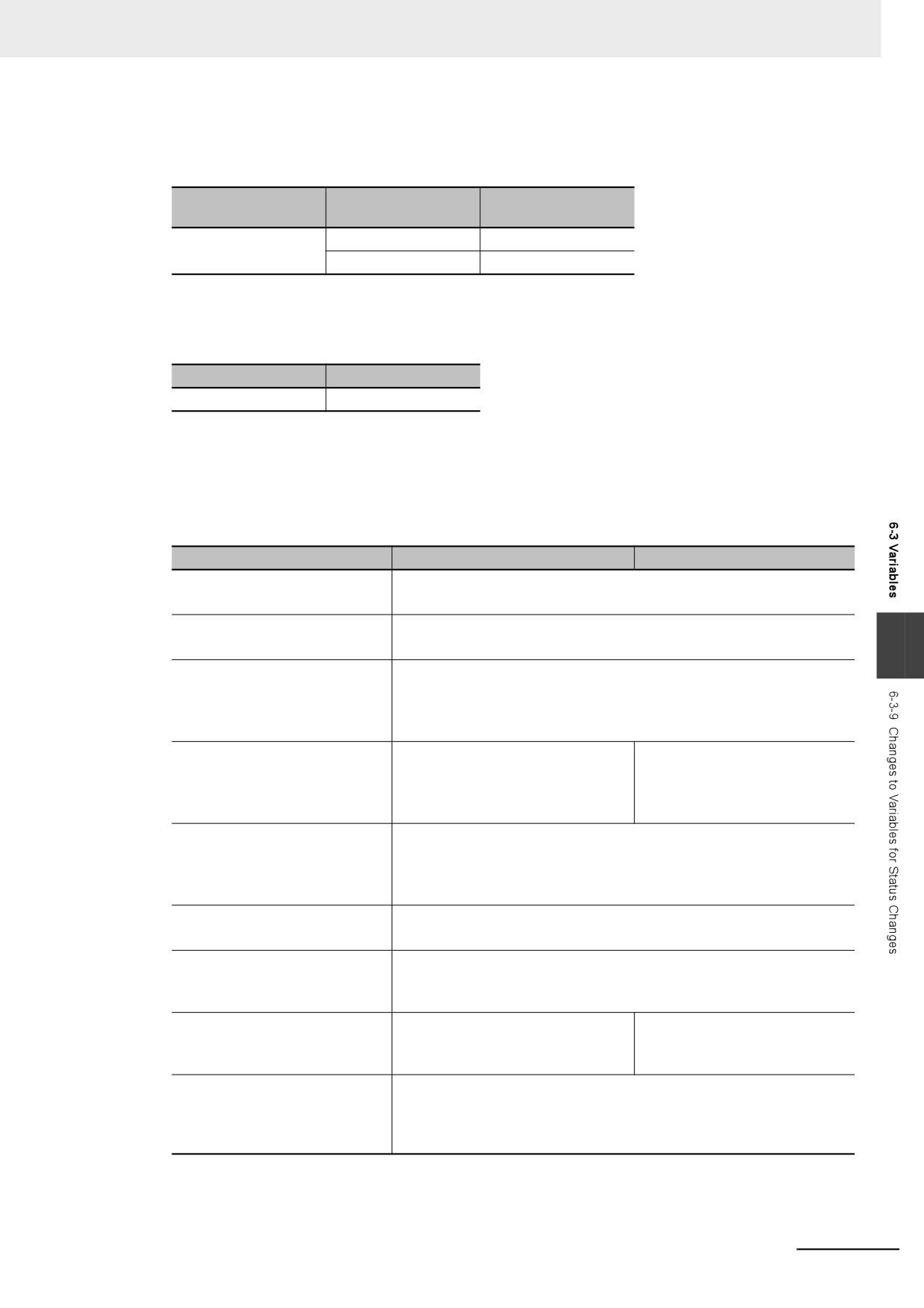
Change description
Pattern 1
Pattern 2
Changing the data type of the
The member value will be the initial
The value of the member whose data
member y from INT to SINT*1
value.
size is decreased will be the initial
value.
(Decreasing data size)
ABC.x = Initial value
ABC.x = 100
ABC.y = Initial value
ABC.y = Initial value
Changing the member x to y
The member value is retained incor-
The member value is retained.
and the member y to x
rectly.
ABC.y = -200
ABC.y = 100
ABC.x = 100
ABC.x = -200
Adding the member z of INT
The member value will be the initial
The value of the existing member is
after the member y
value.* 2
retained. The value of the added
member will be the initial value.
ABC.x = Initial value
ABC.x = 100
ABC.y = Initial value
ABC.y = -200
ABC.z = Initial value
ABC.z = Initial value
Adding the member z of INT
The member value will be the initial
The value of the existing member is
between the member x and
value.* 2
retained. The value of the added
the member y
member will be the initial value.
ABC.x = Initial value
ABC.x = 100
ABC.z = Initial value
ABC.z = Initial value
ABC.y = Initial value
ABC.y = -200
Changing the number of array
The member value will be the initial
The value of the existing member is
elements for the member x
value.* 2
retained. The value of the member
from 1 to 3
whose number of array elements
ABC.x[0] = Initial value
was changed will be retained from
ABC.x[1] = Initial value
the top, and the value of the
ABC.x[2] = Initial value
expanded member will be the initial
value.
ABC.y = Initial value
ABC.x[0] = 100
ABC.x[1] = Initial value
ABC.x[2] = Initial value
ABC.y = -200
*1
Implicit casting applies for changes in data types. Refer to Implicit Casts on page 6-127 for details on
implicit casting.
*2
You can retain the value of the existing member if you upload the variable value before downloading and
then download the variable value after downloading.
6-78
6 Programming
z
Changes in a Union
Assume the union before changes on the Sysmac Studio is defined as in below.
Data type of the
Data type name
Member
member
UNI_1
x
WORD
y
DWORD
Assume the data type of the variable ABC is UNI_1, the Retain attribute is set to retain, and the
members have the following present values.
Member
Present value
ABC
WORD#16#0100
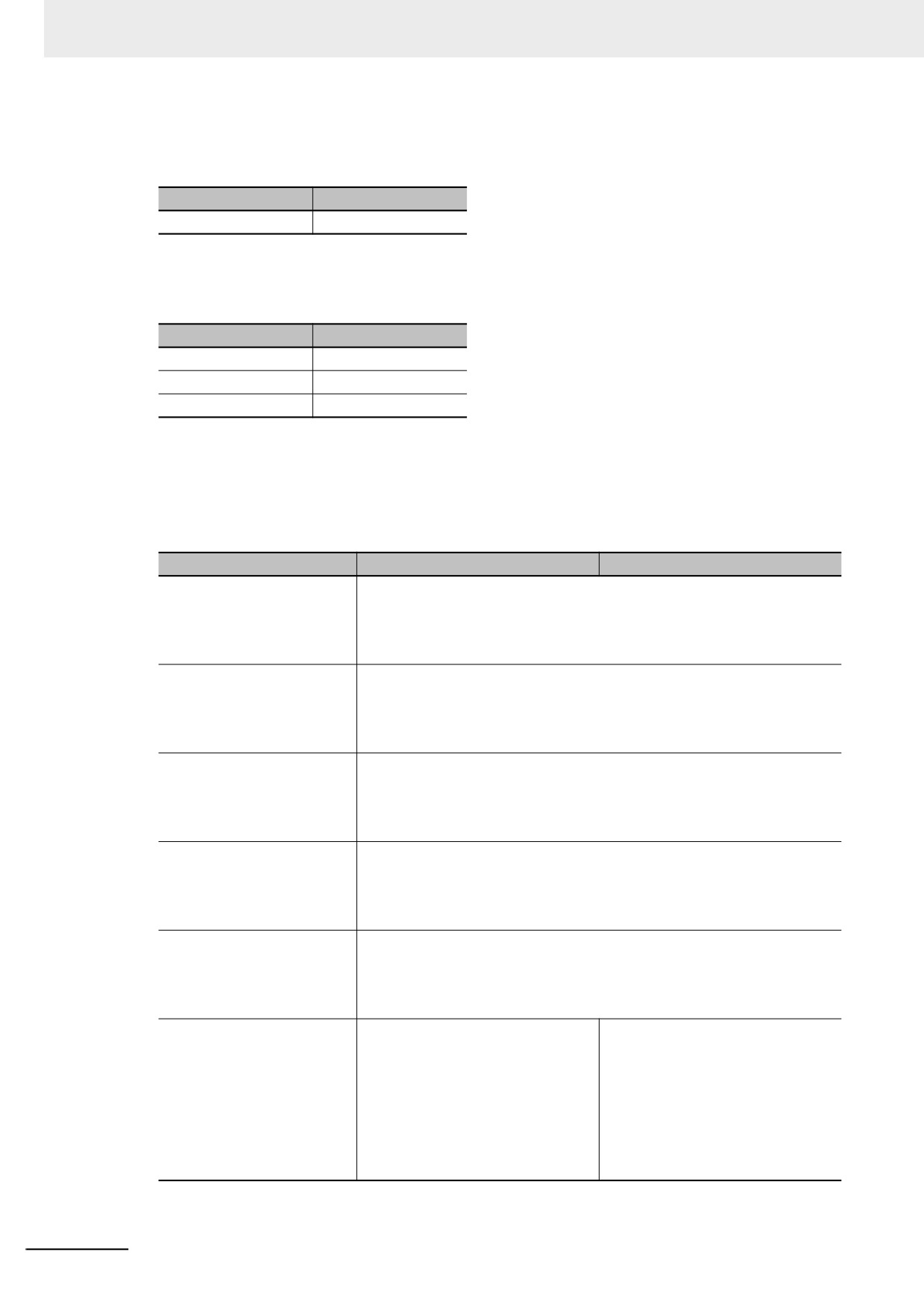
The relationship between changes in the data types and how the controller treats the variables are
given below.
If the condition applies both to retain and to change to the initial value, the variable value changes to
the initial value.
Change description
Pattern 1
Pattern 2
No change
The member value is retained.
ABC = WORD#16#0100
Changing the variable name from
The member value will be the initial value.
ABC to DEF
DEF = Initial value
6
Changing the data type of the
The member value is retained.
member x from WORD to
ABC = WORD#16#0100
BYTE*1
(Same data size as union)
Changing the data type of the
The member value will be the initial
The member value is retained.
member x from WORD to
value.
ABC = WORD#16#0100
LWORD*1
ABC = Initial value
(Expanding data size as union)
Changing the data type of the
The member value will be the initial value.
member y from DWORD to
ABC = Initial value
BYTE*1
(Decreasing data size as union)
Changing the member x to y and
The member value is retained.
the member y to x
ABC = WORD#16#0100
Adding the member z of BYTE
The member value is retained.
after the member y
ABC = WORD#16#0100
(Same data size as union)
Adding the member z of LWORD
The member value will be the initial
The member value is retained.
after the member y
value.
ABC = WORD#16#0100
(Expanding data size as union)
ABC = Initial value
Adding the member z of BYTE
The member value will be the initial value.
after the member y, and deleting
ABC = Initial value
the member y.
(Decreasing data size as union)
*1
Implicit casting applies for changes in data types. Refer to Implicit Casts on page 6-127 for details on
implicit casting.
6-79
6 Programming
z
Changes in Array Variables
Assume the array variables before changes on the Sysmac Studio are defined as in below.
Variable name
Data type
ABC
ARRAY[1..3] OF INT
Assume the Retain attribute of the variable ABC is set to retain, and the elements have the following
present values.
Member
Present value
ABC[1]
100
ABC[2]
200
ABC[3]
300
The relationship between changes in the data types and how the controller treats the variables are
given below.
If the condition applies both to retain and to change to the initial value, the variable value changes to
the initial value.
Change description
Pattern 1
Pattern 2
No change
The element value is retained.
ABC[1] = 100
ABC[2] = 200
ABC[3] = 300
Changing the variable name
The element value will be the initial value.
from ABC to DEF
DEF[1] = Initial value
DEF[2] = Initial value
DEF[3] = Initial value
Changing the data type of the
The element value will be the initial value.
element from INT to UINT*1
ABC[1] = Initial value
(Same data size)
ABC[2] = Initial value
ABC[3] = Initial value
Changing the data type of the
The element value will be the initial value.
element from INT to DINT*1
ABC[1] = Initial value
(Expanding data size)
ABC[2] = Initial value
ABC[3] = Initial value
Changing the data type of the
The element value will be the initial value.
element from INT to SINT*1
ABC[1] = Initial value
(Decreasing data size)
ABC[2] = Initial value
ABC[3] = Initial value
Changing the last number of
The element value will be the initial
The values of the existing element
the array element from 3 to
value.
numbers are retained. The values of
4*2
ABC[1] = Initial value
the new element numbers will be the
initial values.
(Expanding the number of
ABC[2] = Initial value
elements from 3 to 4)
ABC[1] = 100
ABC[3] = Initial value
ABC[2] = 200
ABC[4] = Initial value
ABC[3] = 300
ABC[4] = Initial value
6-80
6 Programming
Change description
Pattern 1
Pattern 2
Changing the first number of
The element value will be the initial
The values of the existing element
the array element from 1 to
value.
numbers are retained. The values of
0*2
ABC[0] = Initial value
the new element numbers will be the
initial values.
(Expanding the number of
ABC[1] = Initial value
elements from 3 to 4)
ABC[0] = Initial value
ABC[2] = Initial value
ABC[1] = 100
ABC[3] = Initial value
ABC[2] = 200
ABC[3] = 300
Changing the last number of
The element value will be the initial
The values of the existing element
the array element from 3 to
value.
numbers are retained.
2*2
ABC[1] = Initial value
ABC[1] = 100
(Decreasing the number of
ABC[2] = Initial value
ABC[2] = 200
elements from 3 to 2)
Changing the first number of
The element value will be the initial
The values of the existing element
the array element from 1 to
value.
numbers are retained.
2*2
ABC[2] = Initial value
ABC[2] = 200
(Decreasing the number of
ABC[3] = Initial value
ABC[3] = 300
elements from 3 to 2)
Changing the first number of
If the number of elements is the
The values of the existing element
the array element from 1 to 3
same, the values of the elements are
numbers are retained. The values of
and the last number from 3 to
retained from the top.*3
the new element numbers will be the
5*2
initial values.
ABC[3] = 100
(Same number of elements)
ABC[3] = 300
ABC[4] = 200
ABC[4] = Initial value
ABC[5] = 300
ABC[5] = Initial value
6
*1
Implicit casting applies for changes in data types. Refer to Implicit Casts on page 6-127 for details on
implicit casting.
*2
The result will be the same for basic and derivative data types.
*3
If the number of elements is expanded or decreased, all values of the elements will be the initial values.
6-81
6 Programming
z
Changes in an Enumeration
Assume the enumeration before changes on the Sysmac Studio are defined as in below.
Data type name
Enumerator
Value
ENU_1
x
1
y
2
Assume the data type of the variable ABC is ENU_1, the Retain attribute is set to retain, and the
variable has the following present value.
Member
Present value
ABC
1 ( = x)
The relationship between changes in the data types and how the controller treats the variables are
given below.
Change description
Pattern 1
Pattern 2
No change
The variable value is retained.
ABC = 1 ( = x)
Changing the variable name
The variable value will be the initial value.
from ABC to DEF
ABC = Initial value
Adding the enumerator z
The variable value is retained.
whose value is 3 after the
ABC = 1 ( = x)
enumerator y
Deleting the enumerator x
The variable value is retained even if the enumerator does not exist.
ABC = 1
Changing the value of the
The variable value is retained even after the enumerator value is changed.
enumerator x from 1 to 5
ABC = 1
6-82
6 Programming
6-3-10
Function Block Instances
Function block instances are added to and displayed in the local variable table as a data type.
Additional Information
A function block instance is treated as a local variable of the program in which the instance is
created. As such, the instance is added to and displayed in the local variable table of the pro-
gram. You cannot treat these instances as global variables.
6-3-11
Monitoring Variable Values
You can monitor the value of variables from a Watch Tab Page on the Sysmac Studio.
1 Select Watch Tab Page from the View Menu. The Watch Tab Page is displayed.
2 Establish an online connection with the Controller and register the variables in one of the follow-
ing ways.
(1) Enter the variable in the name cell in the Watch Tab Page.
(2) Drag variables to the Watch Tab Page from an editor or variable table.
The present values of the variables are displayed.
6
6-83
6 Programming
6-3-12
Restrictions on Variable Names and Other Program-related
Names
The following is a list of restrictions on program-related names.
Character Restrictions
Multibyte
Maximum
Case
Charac-
Program-related
Reserved
character
size (not
Applicable characters
sensitiv-
ter
name
words
compatibil-
including
ity
encoding
ity
NULL)
Variable name
z Usable characters
Refer to
Supported.
Not case
127 bytes
UTF-8*
(including POU
•
0 to 9, A to Z, and a to z
Reserved
sensitive.
instance names)
• Single-byte kana
Words
•
_ (underlines)
below.
POU definition
• Multibyte characters (e.g., Japa-
names
nese)
Data type
Refer to Reserved Words below
Structure member
for a list of the reserved words.
names and union
member names
z Characters that cannot be used
together
Enumerators
• A text string that starts with a
Task names
number (0 to 9)
63 bytes
• Strings that start with “P_”
Namespaces
93 bytes
• A text string that starts in an
Full paths of vari-
Network vari-
underline (_) character
able names
able: 255
• A text string that contains more
bytes
than one underline (_) character
• A text string that ends in an
Other: 511
underline (_) character
bytes
Device names
• Any text string that consists of
127 bytes
an identifier and has a prefix or
Section names
Case
postfix which contains more
sensitive.
than one extended empty space
Axis names
character (i.e., multi-byte
Not case
spaces or any other empty Uni-
sensitive.
Axes group names
code space characters)
Cam table names
* For UTF-8, single-byte alphanumeric characters each use 1 byte. Multibyte characters each use more than 1
byte. Japanese characters require approximately 3 bytes.
Reserved Words
An error is detected during the program check for the following names.
• A name that is the same as any of the instructions that are described in NY-series Instructions Refer-
ence Manual (Cat. No. W560)
• A name that is the same as any of the instructions that are described in NY-series Motion Control
Instructions Reference Manual (Cat. No. W561)
• Words that are reserved by the system
6-84
6 Programming
Names That Must Be Unique
The following names must be unique. An error is detected during the program check if they are not.
• Global variable names in the same Controller
• Variable names in the same POU
• Section names in the same POU
• Member names in the same union or structure
• Enumerators in the same enumeration
• Local variable names and global variable names
• POU names and data type names
• Data type names and variable names
• Enumerators of an enumeration and enumerators of another enumeration
• Enumerators and variable names
6
6-85
6 Programming
6-4
Constants (Literals)
This section describes constants in detail.
6-4-1
Constants
The value of a variable changes depending on the data that is assigned to that variable. The value of a
constant never changes.
Unlike variables, constants are not stored in memory. You can use constants in the algorithm of a POU
without the need to declare them.
In the NY-series Controllers, constants have a data type in the same way as variables,
6-4-2
Notation for Different Data Types
This section gives the notation for constants with different data types. A building error will occur if you
use any other notation for a constant.
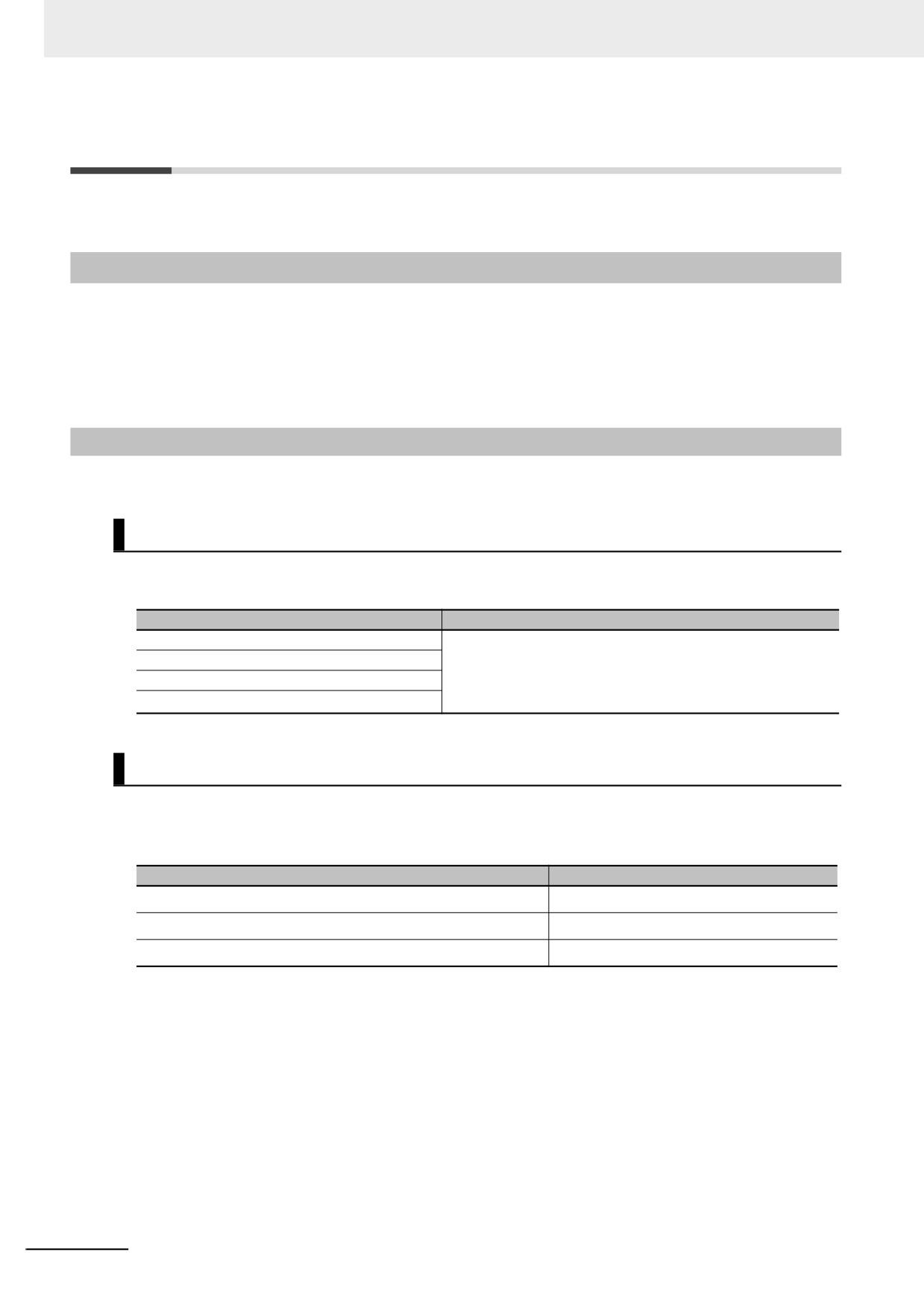
Boolean Data
“BOOL” is used as the data type name for Boolean data. You can use the following values: 1, 0, TRUE,
and FALSE. The meanings of the notations are given in the following table.
Notation
Meaning
TRUE or FALSE
All of the following are equivalent: TRUE, BOOL#1,
BOOL#1 or BOOL#0
BOOL#TRUE, and 1.
All of the following are equivalent: FALSE, BOOL#0,
BOOL#TRUE or BOOL#FALSE
BOOL#FALSE, and 0.
1 or 0
Bit Strings
You can use any of the following data type names for bit string data: BYTE, WORD, DWORD, and
LWORD. You can use any of the following bases: 2, 8, 10, and 16. The notations and notation exam-
ples are given in the following table.
Notation
Notation example
{data_type_name}#{base}#{numeric_value}
WORD#16#0064
{base}#{numeric_value}
16#0064
{numeric_value}*1
100
*1
A base of 10 (i.e., a decimal number) is assumed.
6-86
6 Programming
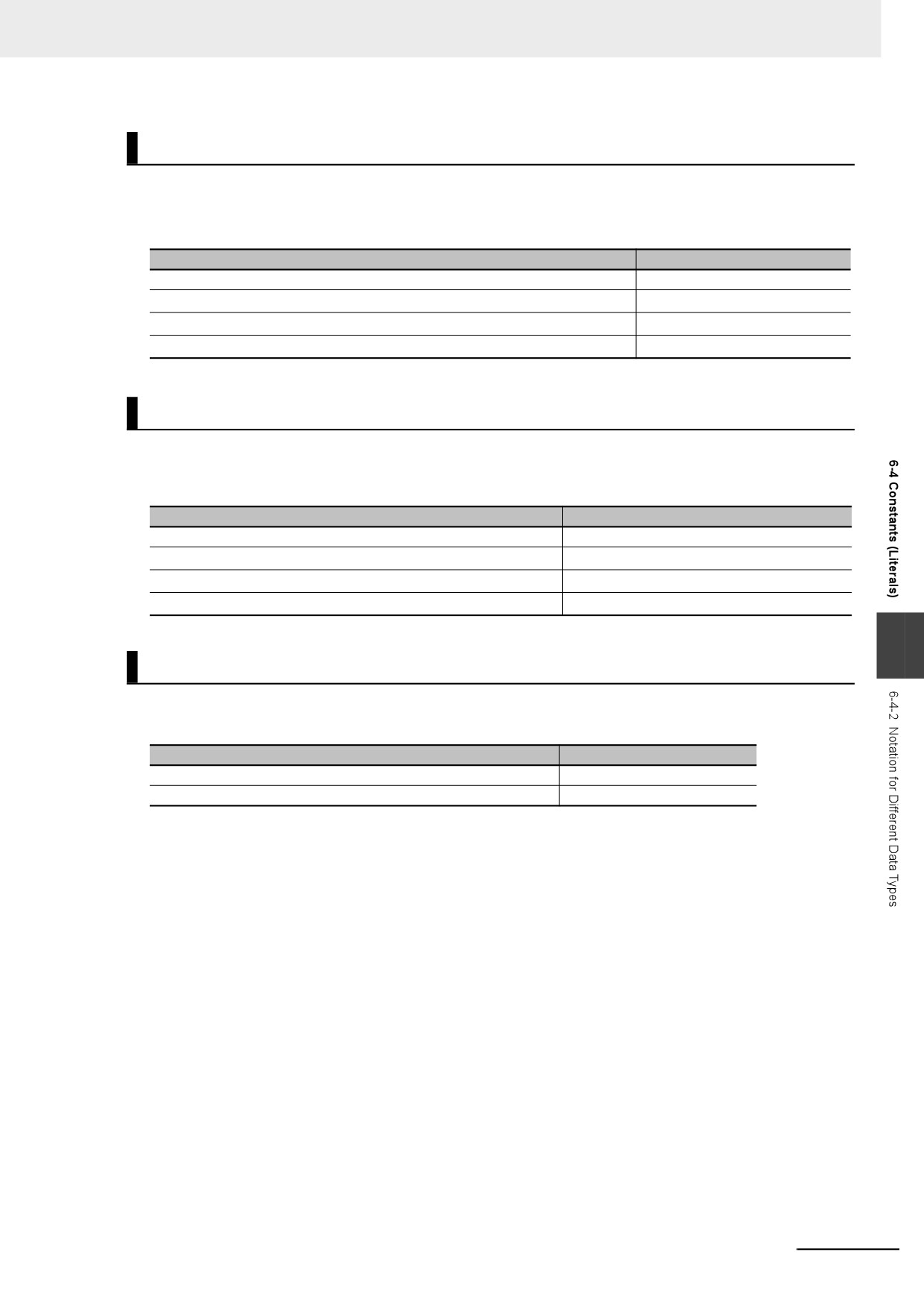
Integer Data
You can use any of the following data type names for integer data: SINT, USINT, INT, UINT, DINT,
UDINT, LINT, and ULINT. You can use any of the following bases: 2, 8, 10, and 16.
The notations and notation examples are given in the following table.
Notation
Notation example
{data_type_name}#{base}#{numeric_value}
INT#10#−1
{base}#{numeric_value}
10#−1
{data_type_name}#{numeric_value}*1
INT#−1
{numeric_value}*1
−1
*1
A base of 10 (i.e., a decimal number) is assumed.
Real Numbers
You can use any of the following data type names for real number data: REAL and LREAL. You can use
only base 10 for real number data. The notations and notation examples are given in the following
table.
Notation
Notation example
{data_type_name}#{base}#{numeric_value}
LREAL#10#−3.14
{base}#{numeric_value}
10#−3.14
{data_type_name}#{numeric_value}*1
LREAL#−3.14
{numeric_value}*1
−3.14
*1
A base of 10 (i.e., a decimal number) is assumed.
6
Durations
You can use any of the following data type names for durations: TIME and T. The notations and notation
examples are given in the following table.
Notation
Notation example
TIME#{day}d{hour}h{minutes}m{seconds}s{milliseconds}ms
TIME#61m5s
T#{day}d{hour}h{minutes}m{seconds}s{milliseconds}ms
T#61m5s
The following rules apply to duration data constants.
• It is not necessary to give all of the following: days, hours, minutes, seconds, and milliseconds. You
must give at least one of them.
• You can use decimal points, such as in TIME#12d3.5h.
• You can give times that exceed the valid time ranges. For example, T#-61m5s expresses the same
duration as T#-1h1m5s.
• All numeric values are interpreted as decimal values. A building error will occur if any number that is
not a decimal number is used.
• You can change the order of the duration units. For example, T#1h2d expresses the same duration
as T#2d1h.
6-87
6 Programming
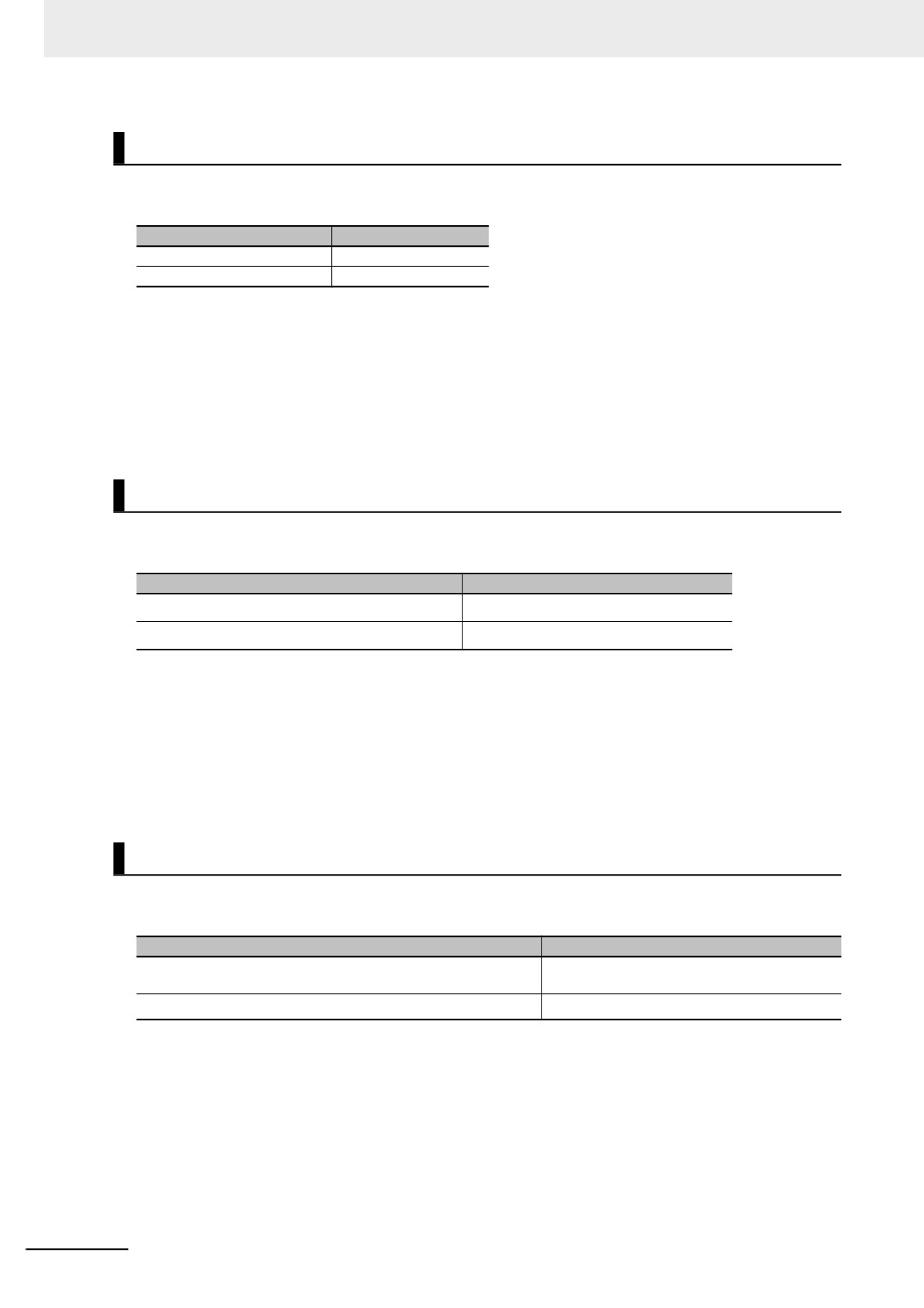
Dates
You can use any of the following data type names for date data: DATE and D. The notations and nota-
tion examples are given in the following table.
Notation
Notation example
DATE#{year}-{month}-{day}
DATE#2010-1-10
D#{year}-{month}-{day}
D#2010-1-10
The following rules apply to date data constants.
• You can add one or more zeroes to the beginning of the year, month, or day. For example,
DATE#2010-01-10 expresses the same date as D#2010-1-10.
• A building error will occur if a valid date range is exceeded. For example, D#2010-01-35 causes an
error.
• All numeric values are interpreted as decimal values. A building error will occur if any number that is
not a decimal number is used.
Times of Day
You can use any of the following data type names for time of day data: TIME_OF_DAY and TOD. The
notations and notation examples are given in the following table.
Notation
Notation example
TIME_OF_DAY#{hour}:{minutes}:{seconds}
TIME_OF_DAY#23:59:59.999999999
TOD#{hour}:{minutes}:{seconds}
TOD#23:59:59.999999999
The following rules apply to time of day data constants.
• You can add one or more zeroes to the beginning of the hour, minutes, or seconds. For example,
TOD#23:01:01 expresses the same time of day as TOD#23:1:1.
• A building error will occur if a valid time range is exceeded. For example, TOD#24:00:00 causes an
error.
• All numeric values are interpreted as decimal values. A building error will occur if any number that is
not a decimal number is used.
Dates and Times
You can use any of the following data type names for date and time data: DATE_AND_TIME and DT.
The notations and notation examples are given in the following table.
Notation
Notation example
DATE_AND_TIME#{year}-{month}-{day}:{hour}:{minutes}:{sec-
DATE_AND_TIME#2010-10-10-23:59:59.123
onds}
DT#{year}-{month}-{day}:{hour}:{minutes}:{seconds}
DT#2010-10-10-23:59:59.123
The following rules apply to date and time data constants.
• You can add one or more zeroes to the beginning of the year, month, day, hour, minutes, or seconds.
For example, DT#2010-01-10-23:01:01 expresses the same date and time as DT#2010-1-10-23:1:1.
• A building error will occur if a valid date and time range is exceeded. For example, DT#2010-01-35-
00:00:00 or DT#2010-01-30-24:00:00 causes an error.
• All numeric values are interpreted as decimal values. A building error will occur if any number that is
not a decimal number is used.
6-88
6 Programming
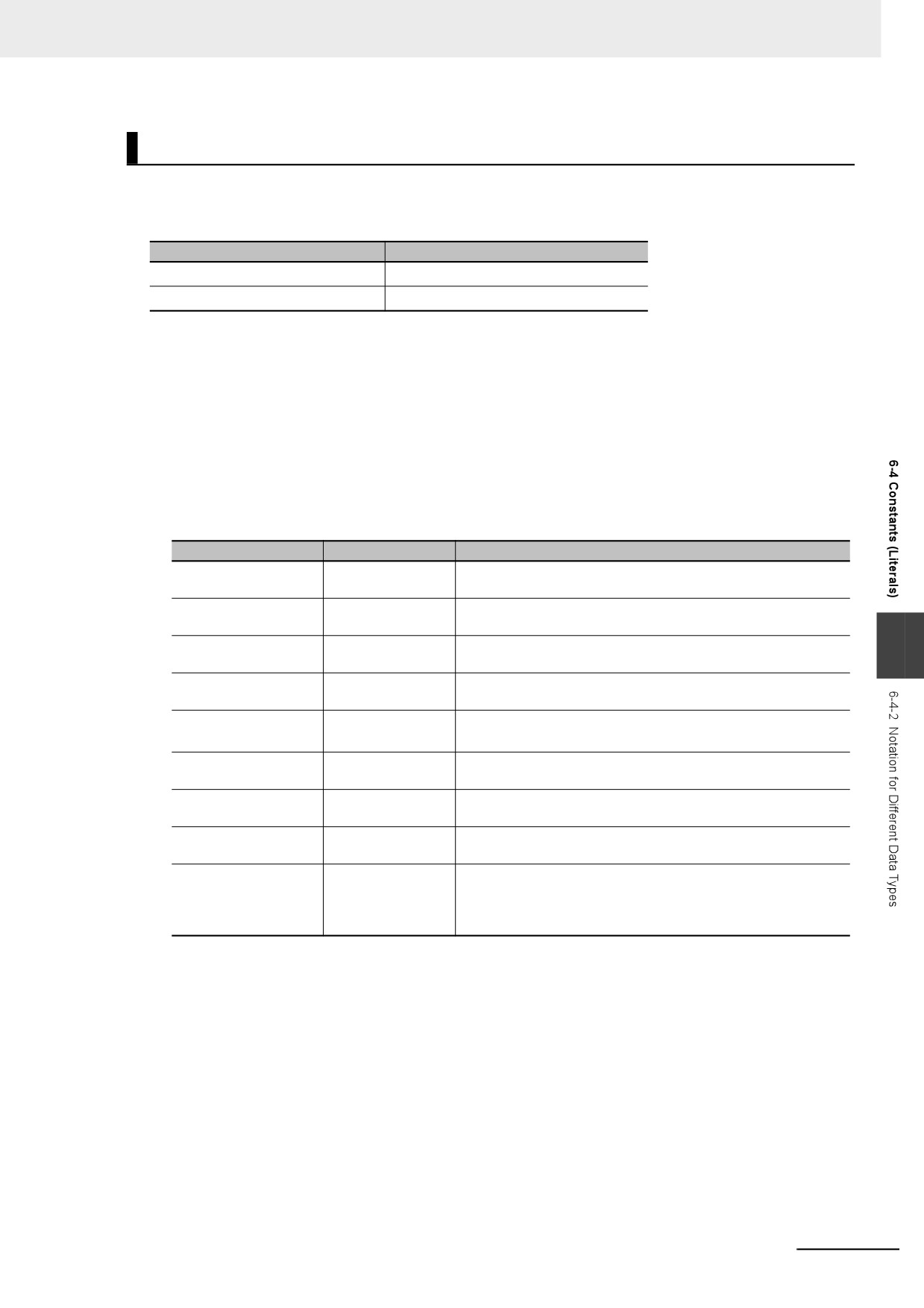
Text Strings
To give text string data, enclose the text string in single-byte single quotation marks ('). You can also
use “STRING” as the data type name. The notations and notation examples are given in the following
table.
Notation
Notation example
'{String}'
'This is a string'
STRING#'{String}'
STRING#'This is a string'
The following rules apply to text string data constants.
•
You can also specify a string with 0 characters. To do so, the notation is ’’.
•
As in the following example, a building error will occur if you specify any strings that span across mul-
tiple lines.
strVar := 'ABC
DEF'
•
If you want to insert tabs, line break codes, or other special characters, you can use a dollar sign ($)
as an escape character before them. The escape character names and meanings are given in the
following table.
Escape character
Name
Meaning
$$
Single-byte dollar
Single-byte dollar sign ($: character code 0x24)
sign
$'
Single-byte single
Single-byte single quotation mark (': character code 0x27)
quotation mark
$"
Single-byte double
Single-byte double quotation mark (”: character code 0x22)
6
quotation mark
$L or $l
Line feed
Moves the cursor to the next line.
LF control character (line feed: character code 0x0A)
$N or $n
New line
Moves the cursor to the next line.
NL control character (new line: character code 0x0A)
$P or $p
Form feed
Moves the cursor to the next page.
FF control character (form feed: character code 0x0C)
$R or $r
Carriage return
Moves the cursor to the start of the line.
CR control character (carriage return: character code 0x0D)
$T or $t
Horizontal tab
Indicates a tab.
Tab character (character code 0x09)
$(character_code)
Direct character
Specify the character code with two hexadecimal digits. The
code specification
range of the character codes is 00 to FF.
For example, “$L” is the same as “$0A”.
For characters of two bytes or more, add $ for each byte.
•
You can also directly designate character codes. To do so, add $ to the front of the character code.
Give the character code with two hexadecimal digits. For example, the character code for a line
break ($L) is 0x0A, so $0A is given.
•
If you designate the character codes directly for characters of two bytes or more, add $ for each byte.
6-89
6 Programming
Enumerated Data Types
For enumerated data, the enumeration data type name and enumerator are given. The notations and
notation examples are given in the following table.
Notation
Notation example
{enumeration_data_type_name}#{enumerator}
_eDAYOFWEEK#_WED
Additional Information
To pass an enumerator to a function or function block for which the parameter specifies an enu-
merator, you can omit the enumeration data type name and give only the enumerator.
For example, the _eBCD_FORMAT enumeration is specified for the Format input variable in the
BinToBCDs instruction. Therefore, you can give either the enumeration data type name and enu-
merator as _eBCD_FORMAT#_BCD0 or omit the enumeration data type name and give only
_BCD0.
6-90
6 Programming
6-5
Programming Languages
This section describes the programming languages in detail. Refer to the Sysmac Studio Version 1
Operation Manual (Cat. No. W504) for details on entering programs with the Sysmac Studio.
6-5-1
Programming Languages
The languages used to express the algorithms in a POU (program, function, or function block) are
called the programming languages.
There are two different programming languages that you can use for an NY-series Controller: ladder
diagram language (LD) and ST (structured text) language.
6-5-2
Ladder Diagram Language
The ladder diagram language (LD) is a graphical programming language that is written in a form that
appears similar to electrical circuits. Each object for processing, including functions and function blocks,
is represented as a diagram. Those objects are connected together with lines to build the algorithm.
Algorithms that are written in the ladder diagram language are called ladder diagrams.
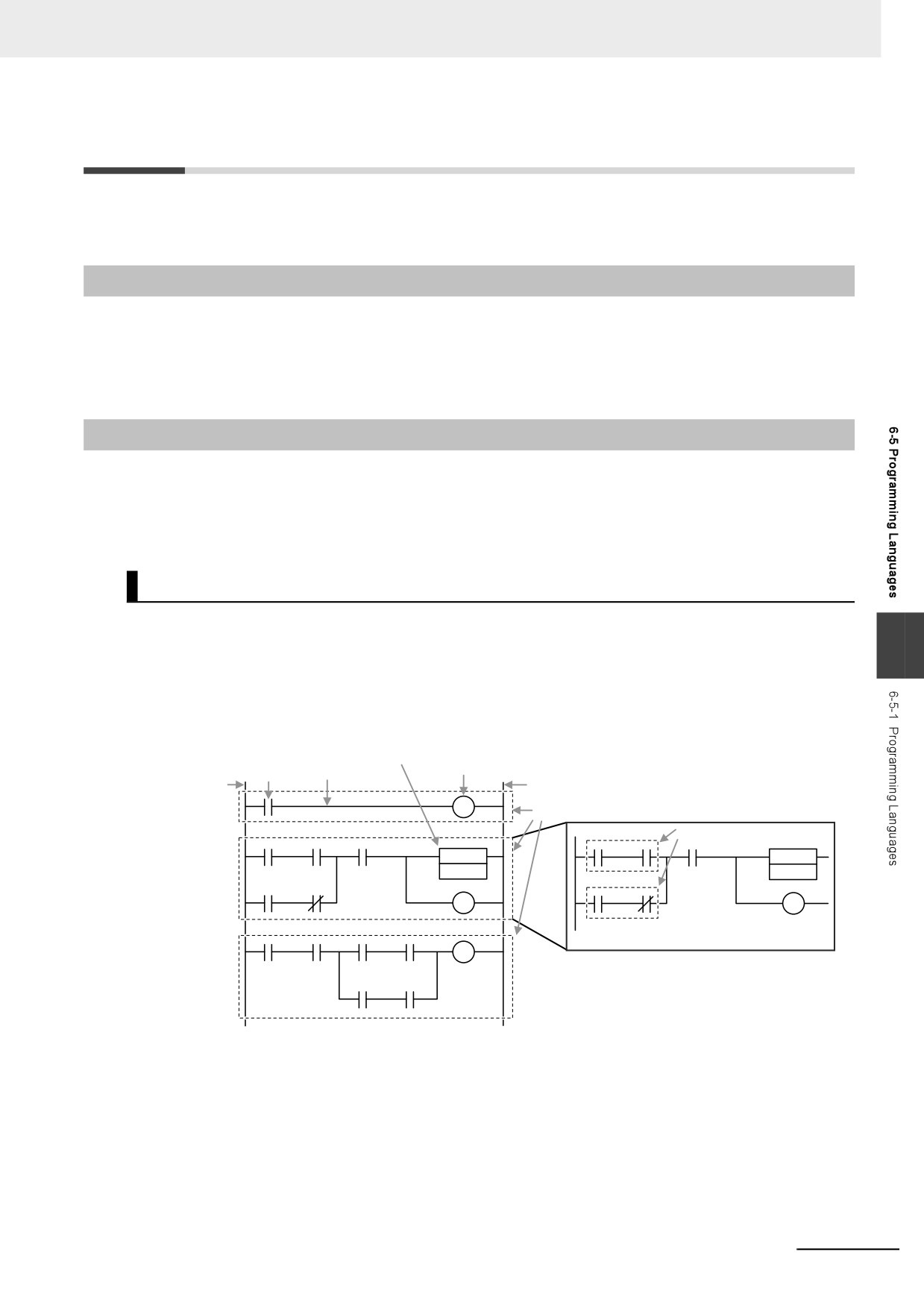
General Structure of the Ladder Diagram Language
A ladder diagram consists of left and right bus bars, connecting lines, ladder diagram structure ele-
ments (e.g., inputs and outputs), functions, and function blocks.*
6
* Only Jump instructions and Label instructions are expressed with symbols that indicate the jumps and labels.
Algorithms are made of multiple rungs connected together. A rung is a connection of all configuration
elements between the left bus bar and the right bus bar. A program rung consists of logic blocks that
begin with an LD/LD NOT instruction that indicates a logical start.
Function or function block
Input
Connecting line
Output
Left bus bar
Right bus bar
Rungs
Logic blocks
z Bus Bars
The vertical lines on the left and right sides of a ladder diagram are called the bus bars. These bus
bars always have a status of either TRUE or FALSE. If you think of the ladder diagram as an electri-
cal circuit, these states represent the flow of current through the circuit. When a POU that is written
as a ladder diagram is executed, the value of the left bus bar changes to TRUE. As a result, all
inputs and other configuration elements connected to the left bus bar also become TRUE. Execution
progresses as elements to the right are also changed to TRUE based on the operation of these con-
figuration elements. This cascade of the TRUE state is called the “power flow.” The left bus bar is
the source of this power flow.
6-91