Omron IPC Machine Controller Industrial Panel PC / Industrial Box PC. Software User’s Manual (Industrial PC Platform NY-series) - page 8
6 Programming
z
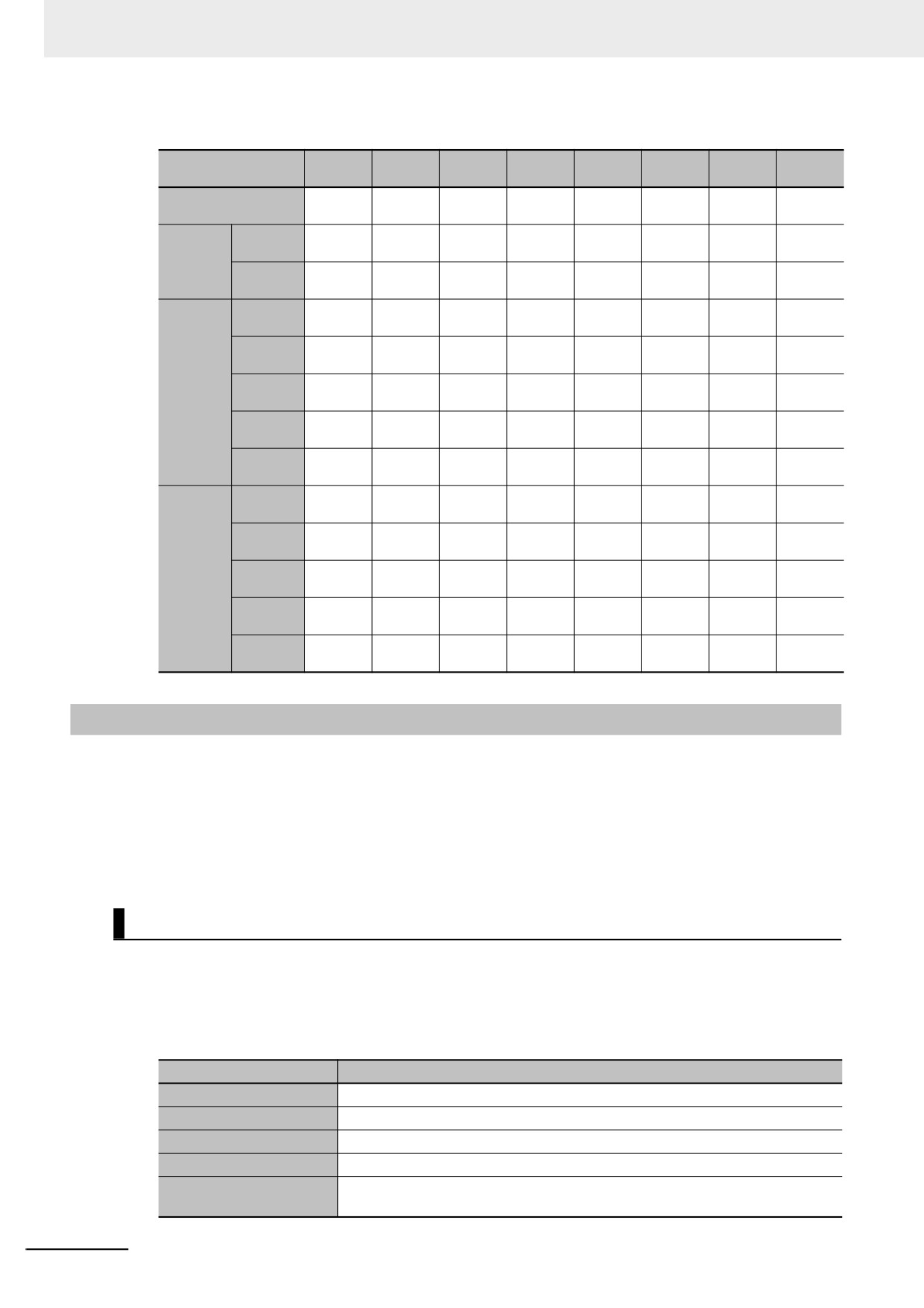
Attributes Supported by Each Type of Variable
Variable
Data
AT Spec-
Initial
Network
Type of variable
Retain
Constant
Edge
Name
Type
ification
Value
Publish
Sup-
Sup-
Sup-
Sup-
Sup-
Sup-
Sup-
Not sup-
Global variables
ported.
ported.
ported.
ported.
ported.
ported.
ported.
ported.
Internal
Sup-
Sup-
Sup-
Sup-
Sup-
Sup-
Not sup-
Not sup-
variables
ported.
ported
ported
ported
ported
ported
ported.
ported.
Programs
External
Not sup-
Not sup-
Not sup-
Not sup-
Not sup-
Sup-
Not sup-
Not sup-
variables
ported.
ported.
ported.
ported.
ported.
ported.
ported.
ported.
Internal
Sup-
Sup-
Sup-
Sup-
Sup-
Sup-
Not sup-
Not sup-
variables
ported.
ported.
ported.
ported.
ported.
ported.
ported.
ported.
Input vari-
Sup-
Sup-
Not sup-
Sup-
Sup-
Sup-
Not sup-
Sup-
able
ported.
ported.
ported.
ported.
ported.
ported.
ported.
ported.
Function
Output
Sup-
Sup-
Not sup-
Sup-
Not sup-
Not sup-
Not sup-
Not sup-
blocks
variables
ported.
ported.
ported.
ported.
ported.
ported.
ported.
ported.
In-out
Sup-
Sup-
Not sup-
Not sup-
Not sup-
Sup-
Not sup-
Not sup-
variables
ported.
ported.
ported.
ported.
ported.
ported.
ported.
ported.
External
Not sup-
Not sup-
Not sup-
Not sup-
Not sup-
Sup-
Not sup-
Not sup-
variables
ported.
ported.
ported.
ported.
ported.
ported.
ported.
ported.
Internal
Sup-
Sup-
Not sup-
Not sup-
Sup-
Sup-
Not sup-
Not sup-
variables
ported.
ported.
ported.
ported.
ported.
ported.
ported.
ported.
Input vari-
Sup-
Sup-
Not sup-
Not sup-
Sup-
Sup-
Not sup-
Not sup-
ables
ported.
ported.
ported.
ported.
ported.
ported.
ported.
ported.
Output
Sup-
Sup-
Not sup-
Not sup-
Not sup-
Not sup-
Not sup-
Not sup-
Functions
variable
ported.
ported.
ported.
ported.
ported.
ported.
ported.
ported.
In-out
Sup-
Sup-
Not sup-
Not sup-
Not sup-
Sup-
Not sup-
Not sup-
variables
ported.
ported.
ported.
ported.
ported.
ported.
ported.
ported.
External
Not sup-
Not sup-
Not sup-
Not sup-
Not sup-
Sup-
Not sup-
Not sup-
variables
ported.
ported.
ported.
ported.
ported.
ported.
ported.
ported.
6-3-5
Data Types
The Data Type attribute defines the type of data and range of data that is expressed by a variable.
The amount of memory that is allocated when you declare a variable depends on the data type of that
variable. The more memory allocated, the larger the range of values that the variable can express.
The data types for the input, output, and in-out variables of instructions depend on the instruction. Set
the data types of input, output, and in-out parameters for the instruction arguments according to the
data types of the input, output, and in-out variables for that instruction.
Basic Data Types and Derivative Data Types
There are two kinds of data types: basic data types, which have predefined specifications, and deriva-
tive data types, which are defined according to user specifications.
z Basic Data Types
The different kinds of basic data types are listed below.
Classification
Definition
Boolean
A data type with a value of either TRUE or FALSE.
Bit string
A data type that represents a value as a bit string.
Integer
A data type that represents an integer value.
Real number
A data type that represents a real number.
A data type that represents a time duration (days, hours, minutes, seconds, and
Duration
milliseconds).
6-30
6 Programming
Classification
Definition
Time of day
A data type that represents a specific time of day (hour, minutes, and seconds).
Date
A data type that represents a date (year, month, and day).
A data type that represents a date and time (year, month, day, hour, minutes,
Date and time
seconds, and milliseconds).
Text string
A data type that contains a value that represents a text string.
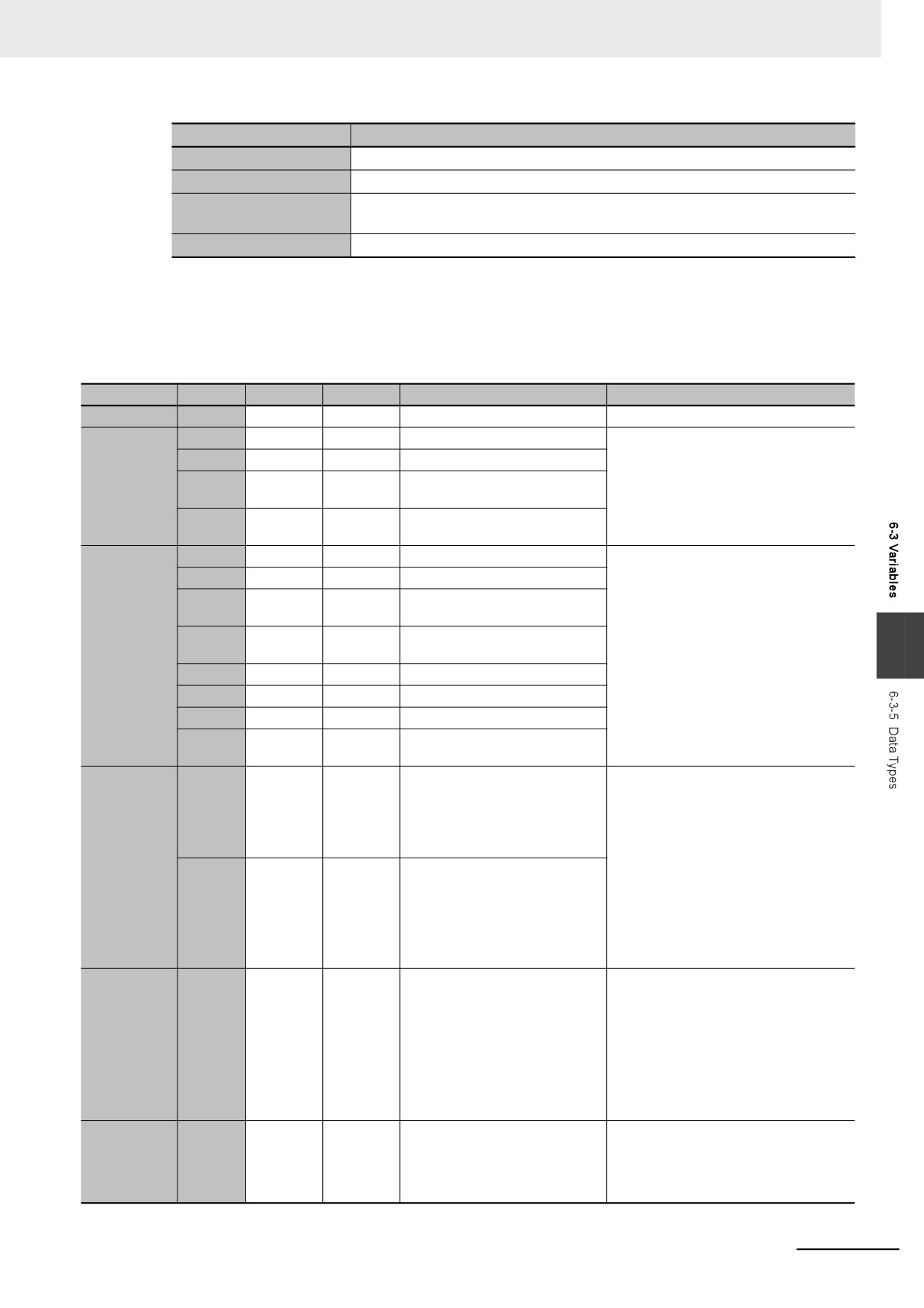
There are a total of twenty different basic data types. The specifications are given in the following
table.
The meanings of the data size and alignment columns in the following table are as follows:
•
Data size: The actual size of the value.
•
Alignment: The unit used to allocate memory.
Classification
Data type
Data size
Alignment
Range of values
Notation
Boolean
BOOL
16 bits
2 bytes
FALSE or TRUE
BOOL#1, BOOL#0, TRUE or FALSE
BYTE
8 bits
1 byte
BYTE#16#00 to FF
BYTE#2#01011010
WORD
16 bits
2 bytes
WORD#16#0000 to FFFF
BYTE#2#0101_1010
32 bits
4 bytes
DWORD#16#00000000 to
BYTE#16#5A
Bit strings
DWORD
FFFFFFFF
You can also use the “_” character as a
separator.
64 bits
8 bytes
LWORD#16#0000000000000000
LWORD
to FFFFFFFFFFFFFFFF
SINT
8 bits
1 byte
SINT#-128 to +127
100
INT
16 bits
2 bytes
INT#-32768 to +32767
INT#2#00000000_01100100
32 bits
4 bytes
DINT#-2147483648 to
INT#8#144
DINT
+2147483647
INT#10#100
64 bits
8 bytes
LINT#-9223372036854775808 to
INT#16#64
LINT
6
Integers
+9223372036854775807
−100
USINT
8 bits
1 byte
USINT#0 to +255
UINT
16 bits
2 bytes
UINT#0 to +65535
UDINT
32 bits
4 bytes
UDINT#0 to +4294967295
64 bits
8 bytes
ULINT#0 to
ULINT
+18446744073709551615
32 bits
4 bytes
REAL#−3.402823e+38 to
REAL#3.14
−1.175495e-38
LREAL#3.14
REAL
0
3.14
1.175495e-38 to 3.402823e+38
−3.14
+∞ /−∞
1.0E+6
Real numbers
64 bits
8 bytes
LREAL#−1.79769313486231e
1.234e4
+308 to −2.22507385850721e-308
0
LREAL
2.22507385850721e-308 to
1.79769313486231e+308
+∞ /−∞
64 bits
8 bytes
T#-9223372036854.775808ms
T#12d3h3s
(T#-
T#3s56ms
106751d_23h_47m_16s_854.7758
TIME#6d_10m
08ms) to
TIME#16d_5h_3m_4s
T#+9223372036854.775807ms
Durations*1*2
TIME
(T#+106751d_23h_47m_16s_854.
T#12d3.5h
775807ms)
T#10.12s
T#61m5s (Equivalent to T#1h1m5s)
TIME#25h_3m
64 bits
8 bytes
D#1970-01-01 to D#2106-02-06
Add “DATE#”, “date#”, “D#”, or “d#” to the
(January 1, 1970 to February 6,
beginning of the string and express the
Date
DATE
2106)
date in the yyyy-mm-dd format.
Example:
d#1994-09-23
6-31
6 Programming
Classification
Data type
Data size
Alignment
Range of values
Notation
64 bits
8 bytes
TOD#00:00:00.000000000 to
Add “TIME_OF_DAY#”, “time_of_day#”,
TOD#23:59:59.999999999
“TOD#”, or “tod #” to the beginning of the
TIME_OF
(00:00:0.000000000 to
string and express the time of day in the
Time of day*2
23:59:59.999999999)
hh-mm-ss format.
_DAY
Example:
tod#12:16:28.12
64 bits
8 bytes
DT#1970-01-01-
Add “DT#” or “dt#” to the beginning of the
00:00:00.000000000 to DT#2106-
string and express the date and time in the
DATE_
Date and
02-06-23:59:59.999999999 (Janu-
yyyy-mm-dd-hh:mm:ss format.
AND_
time*2
ary 1, 1970 00:00:0.000000000 to
TIME
Example:
February 6, 2106,
dt#1994-09-23-12:16:28.12
23:59.999999999 seconds.)
(Number of
1 byte
The character code is UTF-8.
Enclose the string in single-byte single
single-byte
0 to 1,986 bytes (1,985 single-byte
quotation marks (‘).
characters
alphanumeric characters plus the
Example:
Text strings
STRING
plus 1) × 8
final NULL character, for Japanese,
‘OMRON’‘PLC’
bits*3
this is approximately equal to 0 to
661 characters)*4
The default size is 256 bytes.
*1
Use the NanoSecToTime and TimeToNanoSec instructions to convert between durations and integer data. Refer to the
NY-series Instructions Reference Manual (Cat. No. W560) for detailed instruction specifications.
*2
Variables are compared with nanosecond precision for comparison instructions. To change the precision for comparison,
use the TruncTime, TruncDt, or TruncTod instruction. Refer to the NY-series Instructions Reference Manual (Cat. No.
W560) for detailed instruction specifications.
*3
A NULL character (1 byte) is added to the end of text strings. Therefore, reserve memory for one more character than the
number of handled characters. For example, if a maximum of 10 single-byte characters are handled, define a STRING
variable for 11 characters (11 bytes). STRING[11]
*4
If you want to insert tabs, line break codes, or other special characters, you can use a single-byte dollar sign ($) as an
escape character before them. Refer to Text Strings on page 6-89 for a list of the escape characters.
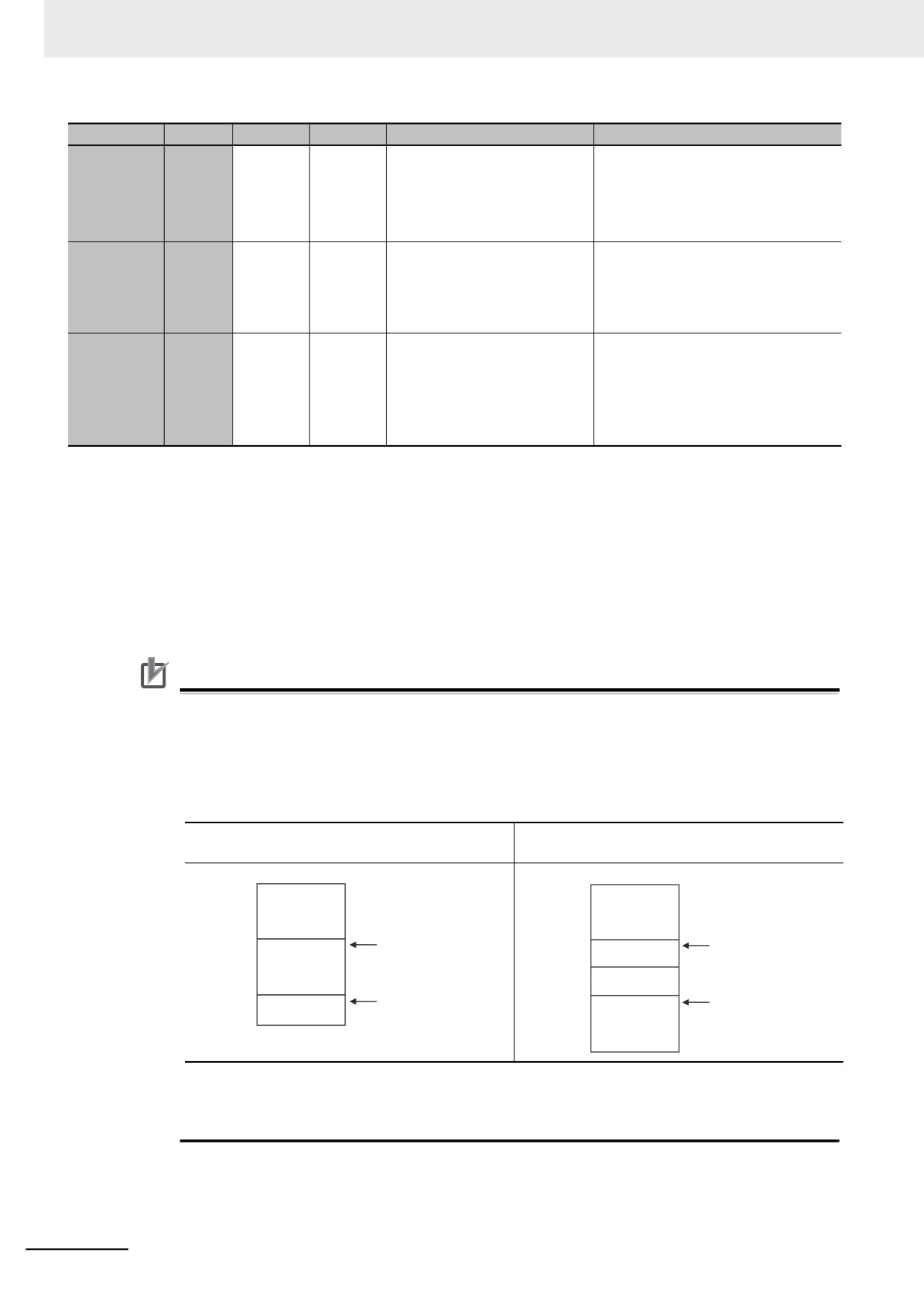
Precautions for Correct Use
The total amount of memory required by all variables is not equal to the total of the data sizes of
each of those variables. This is because the first position where data is stored in memory is auto-
matically set to a multiple of the alignment value for that data type. This results in some empty
space in memory between data types. For example, even if the data types are the same, the
overall memory space required depends on the order of data types, as shown below.
Example:
DWORD -> DWORD -> WORD: Requires a total of
DWORD -> WORD -> DWORD: Requires a total of
10 bytes.
12 bytes.
Byte
Byte
First byte
First byte
First byte+1
First byte+1
DWORD data
DWORD data
First byte+2
First byte+2
First byte+3
First byte+3
The beginning of the
The beginning of the
First byte+4
data type is a
First byte+4
data type is a multiple
WORD data
First byte+5
multiple of four.
First byte+5
of two.
DWORD data
First byte+6
First byte+6
Not used.
First byte+7
First byte+7
The beginning of the
First byte+8
First byte+8
The beginning of the
WORD data
data type is a
First byte+9
multiple of two.
First byte+9
data type is a multiple of
DWORD data
four, i.e., first byte + 8.
First byte+10
First byte+11
You must be aware of the alignment values for different data types when you exchange data
such as structure variables between devices so that you can properly align the position of the
data in memory. Refer to A-6 Variable Memory Allocation Methods for details.
6-32
6 Programming
Additional Information
• You cannot compare the sizes of bit string data types (BYTE, WORD, DWORD, and LWORD).
If value comparisons are necessary, use instructions such as the WORD_TO_UINT instruction
to convert to integer data and compare the values of the integer data variables.
Example:
BCD_data: WORD
IF WORD_BCD_TO _UINT (BCD_data) > UINT#1234 THEN
• You cannot perform logic processing on integer data types (SINT, INT, DINT, LINT, USINT,
UINT, UDINT, and ULINT). If logic processing is necessary, use instructions such as the
INT_TO_WORD instruction to convert to bit string data and perform the logic processing on
the bit string data variables.
Example:
In the following sample programming, 1 is added to variable a if the value of INT variable a is
an odd number.
IF (INT_TO_WORD (a) AND WORD#16#0001) = WORD#16#0001 THEN
a = a+1;
END_IF;
z
Derivative Data Types
A derivative data type is a data type with user-defined specifications. Derivative data types are reg-
istered in the Data Type View in the Sysmac Studio. The following is a list of the derivative data
types.
Type
Description
6
Structures
This data type consists of multiple data types placed together into a single lay-
ered structure.
Unions
This data type allows you to handle the same data as different data types
depending on the situation.
Enumerations
This data type uses one item from a prepared name list as its value.
Refer to 6-3-6 Derivative Data Types for details.
z
Specifications for Data Types
The following array specifications and range specifications are possible for all data types.
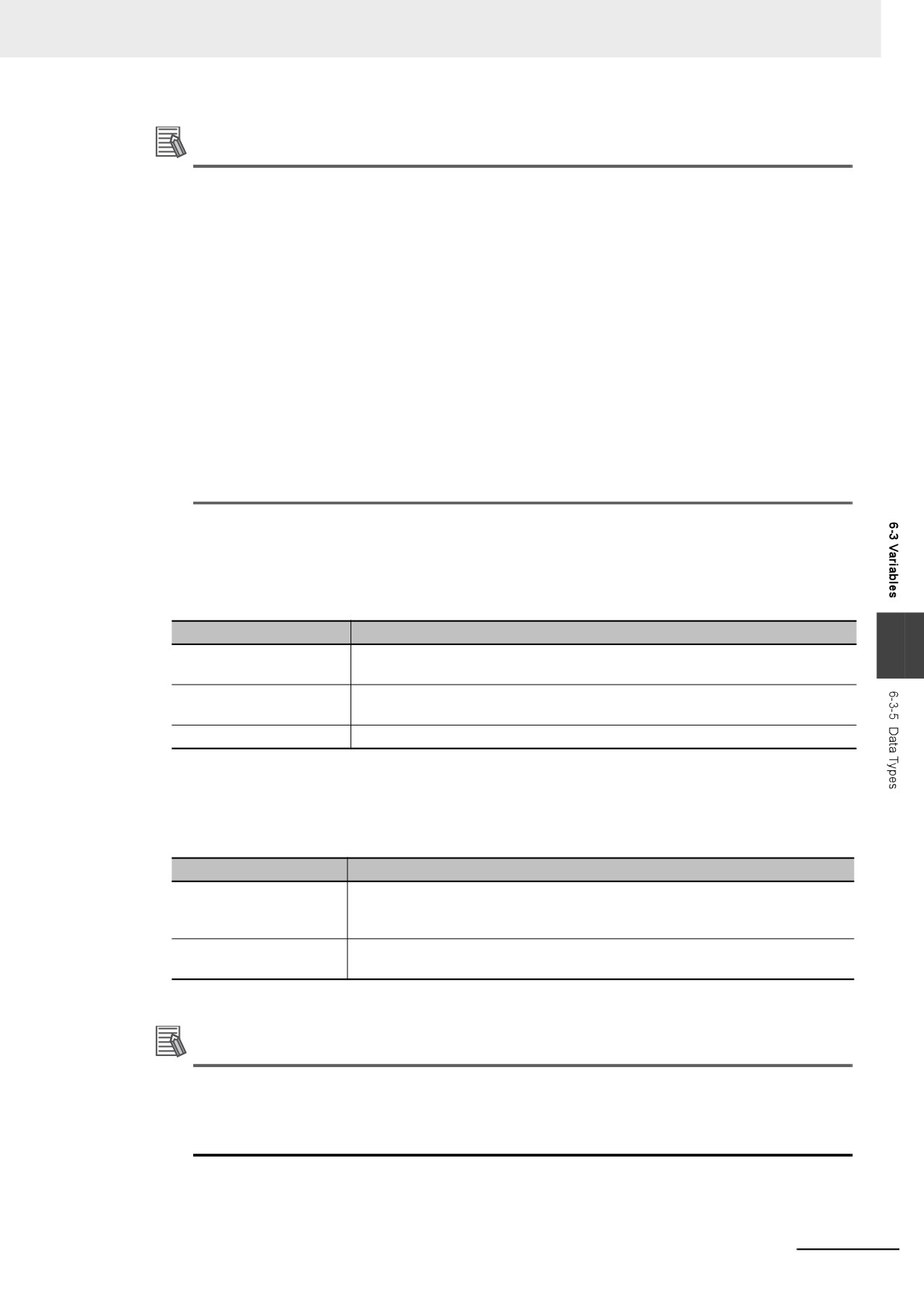
Type
Description
Array specification
An array is a group of elements with the same data type. You specify the number
(subscript) of the element from the first element to specify the element. You can
specify arrays for both basic data types and derivative data types.
Range specification
You can specify a specific range for a data type in advance.
You can specify a range for any integer basic data type.
Refer to 6-3-7 Array Specifications and Range Specifications for Data Types for details.
Additional Information
In addition to basic data types and derivative data types, there are also POU instance data
types. A POU instance data type is the data type of a function block instance. To create a func-
tion block instance, the instance name is registered as a variable and the function block defini-
tion name is registered as a data type in the local variable table.
6-33
6 Programming
Restrictions on Using Data Types
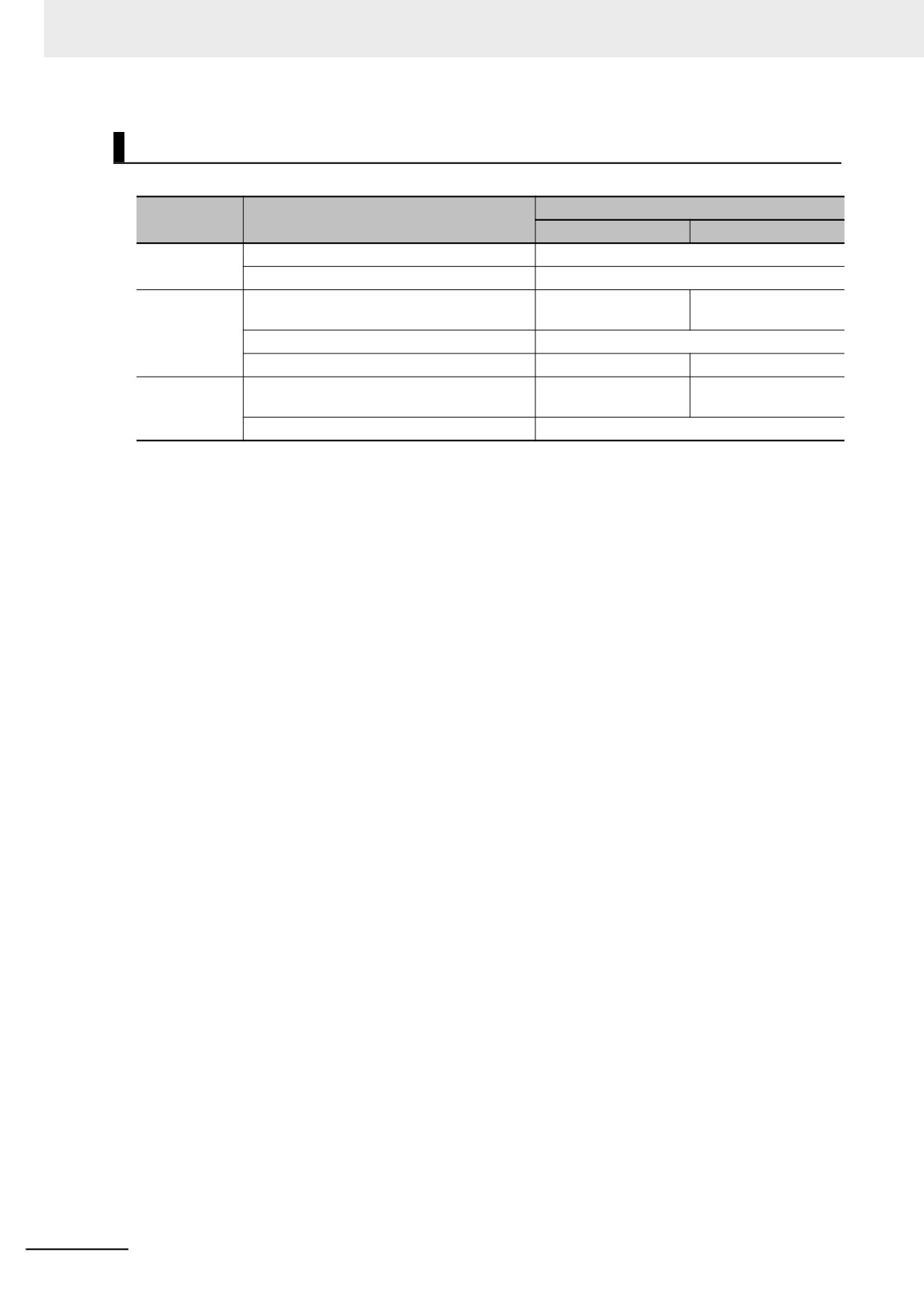
A list of the data types that you cannot use in different POUs is given below.
Unusable data types
POU type
Type of variable
Basic data types
Derivative data types
Programs
Internal variables
None
Global variables
None
FUN
Input variables, output variables, and in-out
None
Unions
variables
Internal variables
None
Return values
None
A structure or union
FB
Input variables, output variables, and in-out
None
Unions
variables
Internal variables
None
6-34
6 Programming
Bit String, Real Number, and Text String Data Formats
This section describes the data formats for bit string data, real number data, and text string data.
z
Bit String Data Format
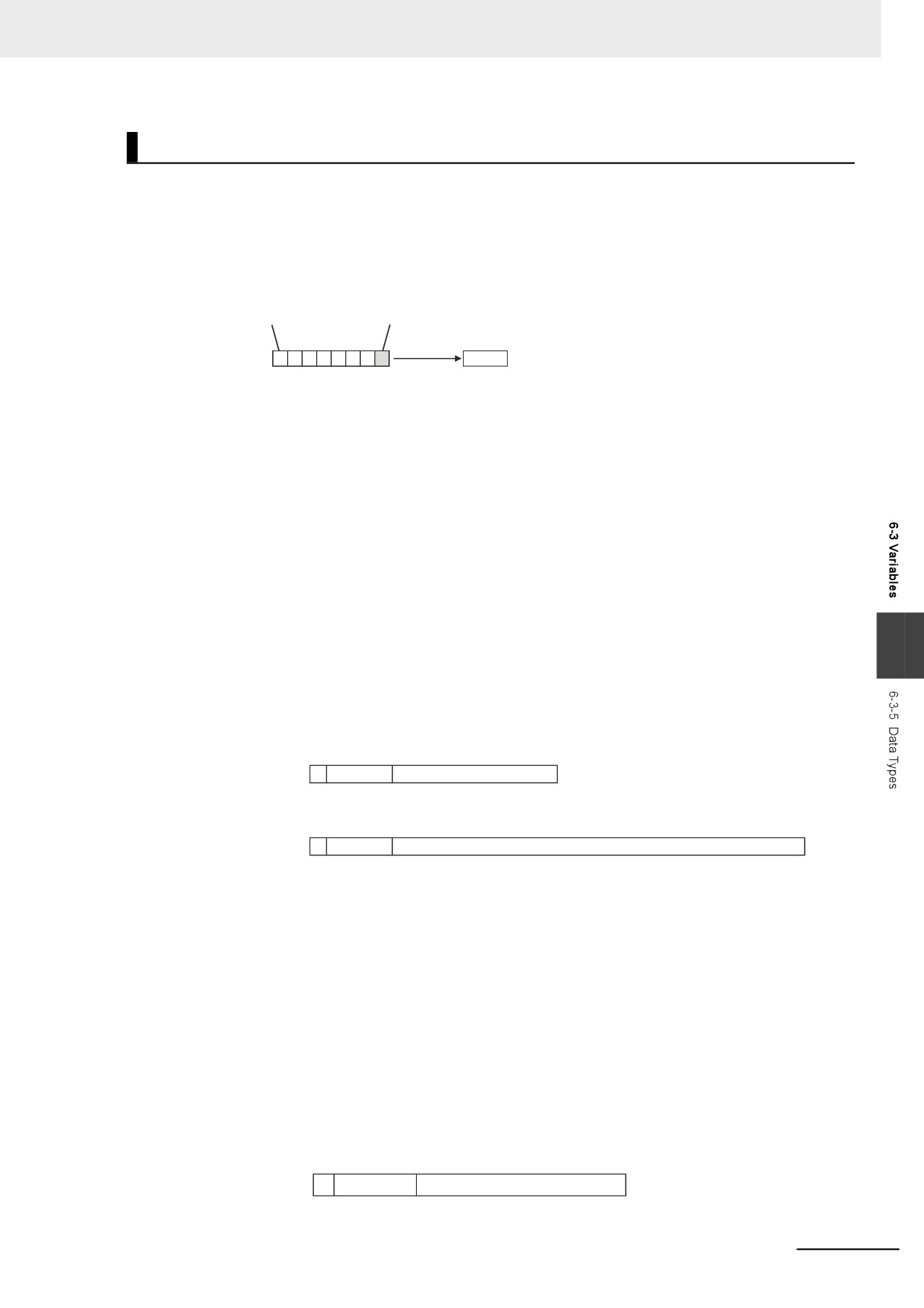
Bit 0 is the least significant bit of a bit string variable. Bit values are represented by values of either 1
or 0. However, you can also represent the value of a single bit as a BOOL variable where 1 equals
TRUE and 0 equals FALSE.
Bit 7
Bit 0
One-bit extraction
BYTE#16#3B
0
0
1
1
1
0
1
1
TRUE
z
Real Numbers (REAL and LREAL Data)
REAL and LREAL data have a real number data format. This section describes how to express real
numbers and how to perform data processing with real number data types.
Data Size
REAL data is 32 bits, while LREAL data is 64 bits.
Data Formats
The floating-point format is a way to express a real number as a combination of a sign, an exponent,
and a mantissa. To express a real number as shown below, the value of s is the sign, the value of e
is the exponent, and the value of f is the mantissa.
• REAL Data
Number = (−1)s2e−127(1+f × 2−23)
6
• LREAL Data
Number = (−1)s2e−1023(1+f × 2−52)
This floating-point format follows the IEEE 754 standard. The formats are given below.
Sign Exponent
Mantissa
REAL data (32 bits)
s
e
f
31 30
23 22
0
Sign Exponent
Mantissa
LREAL data (64 bits)
s
e
f
63 62
52 51
0
Example: Expressing −86.625 as REAL Data
1 This is a negative number, so s =1.
2 86.625 in binary is 1010110.101.
3 Normalizing this value gives us 1.010110101 × 26.
4 From the above expression we can determine that e−127 = 6, so e = 133 (or 10000101 in
binary).
5 Next we take the value after the decimal part of 1.010110101, which is 010110101. This is not
enough for the 23-bit mantissa, so f is this number with the required amount of zeroes added to
the end. Therefore, f = 01011010100000000000000.
Therefore, you can express −86.625 as shown in the following figure.
Sign Exponent
Mantissa
REAL data (32 bits)
1
10000101
01011010100000000000000
31 30
23 22
0
6-35
6 Programming
Valid Ranges
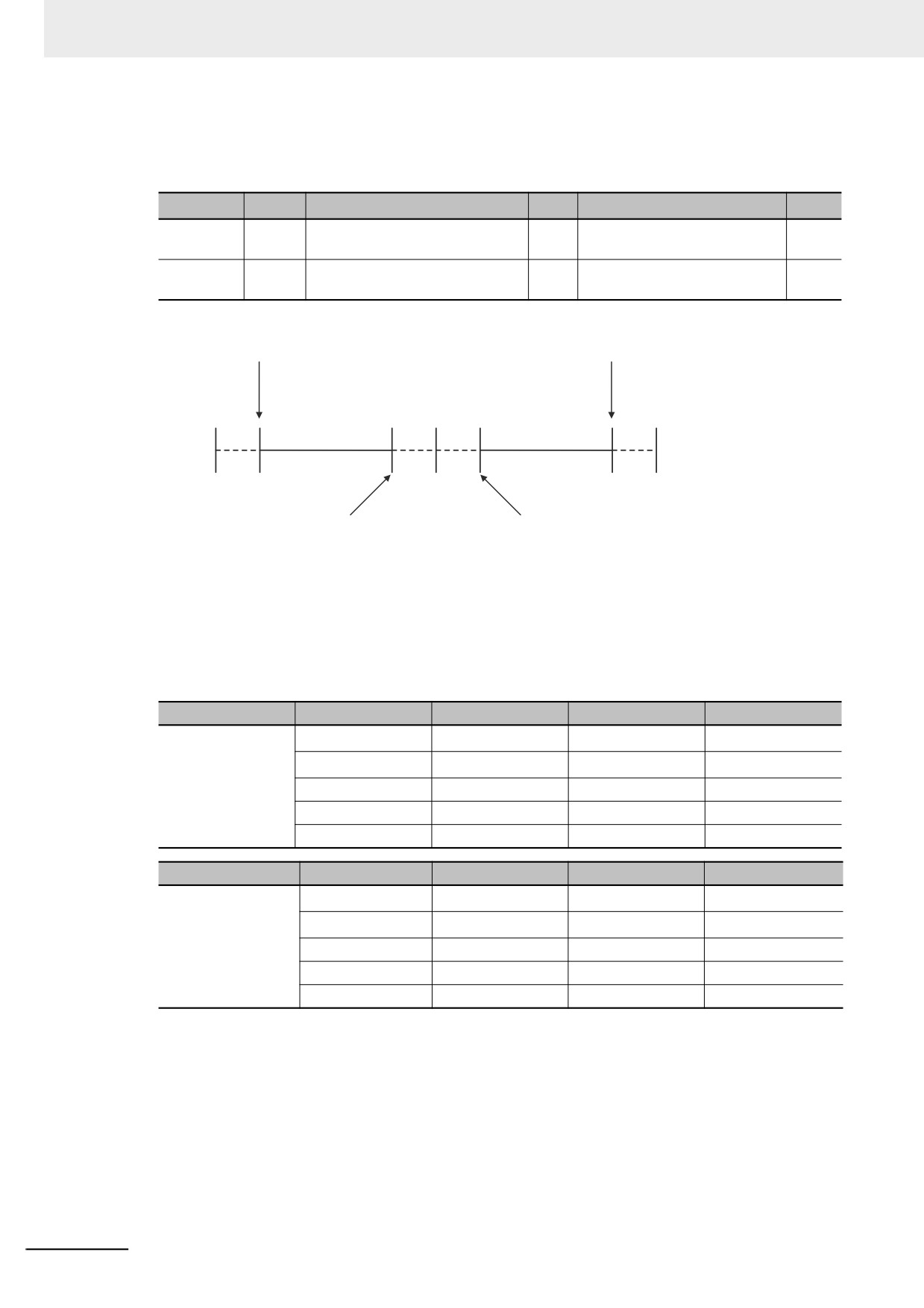
The valid ranges for REAL and LREAL data are shown in the following table. There are a range of
values that you cannot express as you approach 0.
Data type
−∞
Negative numbers
0
Positive numbers
+∞
REAL
−∞
−3.402823e+38 to −1.175495e-38
0
+1.175495e−38 to
+∞
+3.402823e+38
LREAL
−∞
−1.79769313486231e+308 to
0
+2.22507385850721e−308 to
+∞
−2.22507385850721e−308
+1.79769313486231e+308
REAL
−3.402823e+38
REAL
+3.402823e+38
LREAL −1.79769313486231e+308
LREAL +1.79769313486231e+308
−∞
0
+∞
REAL
−1.175495e−38
REAL
+1.175495e−38
LREAL −2.22507385850721e−308
LREAL +2.22507385850721e−308
Special Values
Values such as positive infinity, negative infinity, +0, −0, and nonnumeric data are called special val-
ues. Nonnumeric data refers to data that you cannot express as a floating-point number and there-
fore cannot be treated as a numeric value. Although +0 and −0 both mathematically mean 0, they
are different for the purpose of data processing. This is discussed later in this section. The values for
the sign s, exponent e, and mantissa f of special numbers are given in the following table.
Data type name
Special values
Sign s
Exponent e
Mantissa f
REAL
+∞
0
255
0
−∞
1
255
0
+0
0
0
0
−0
1
0
0
Nonnumeric
---
255
Not 0
Data type name
Special values
Sign s
Exponent e
Mantissa f
LREAL
+∞
0
2047
0
−∞
1
2047
0
+0
0
0
0
−0
1
0
0
Nonnumeric
---
2047
Not 0
6-36
6 Programming
Subnormal Numbers
You cannot use the floating-point format to express values close to 0 (i.e., values with an extremely
small absolute value). Therefore, you can use subnormal numbers to expand the valid range of
numbers near 0. You can use subnormal numbers to express values with a smaller absolute value
than with the normal data format (normal numbers). Any number where the exponent e = 0 and the
mantissa f ≠ 0 is a subnormal number and its value is expressed as shown below.
• REAL Data
Number = (−1)s2−126(f × 2−23)
• LREAL Data
Number = (−1)s2−1022(f × 2−52)
Example: Expressing 0.75 × 2−127 as REAL Data
1 This is a positive number, so s = 0.
2 0.75 in binary is 0.11.
3 From (0.11)2 × 2−127 = 2−126(f × 2−23) we can see that f = (0.11)2 × 222.
4 From the above expression, f = 01100000000000000000000.
Therefore, you can express 0.75 × 2−127 as shown in the following figure.
Sign Exponent
Mantissa
REAL data (32 bits)
0
00000000
01100000000000000000000
31 30
23 22
0
Subnormal numbers have less effective digits than normal numbers. Therefore, if a calculation with
6
normal numbers results in a subnormal number or if a subnormal number results in the middle of
such a calculation, the effective digits of the result may be less than the effective digits of a normal
number.
Data Processing
The floating-point format expresses only an approximate value. Therefore, there may be a differ-
ence between the floating-point number and its true value. There is also a limited number of effec-
tive digits for these values. Therefore, the following actions are taken when you perform calculations
with the floating-point format.
6-37
6 Programming
Precautions for Correct Use
Generally, calculation results for real number data may be different if the hardware such as a
processor is different. Confirm the calculation results for real number data when you reuse pro-
grams and libraries with the different model number of the Controller.
Rounding
If the real value exceeds the effective digits of the mantissa, the value is rounded off according to
the following rules.
• The result of the calculation will be the closest value to the value that can be expressed as a float-
ing-point number.
• If there are two values that are the closest to the real value (e.g., if the real value is the median
value of two approximate values), the mantissa with a least significant bit value of 0 is selected as
the result of the calculation.
6-38
6 Programming
Precautions for Correct Use
When you determine if two values are equal, consider the true values and error.
A real number is expressed in the floating-point decimal format. Because of this, there is a slight
error from the actual value. When you try to determine if two values are equal, this error may
cause unintended results. For example, if you compare 0.1 + 0.2 with 0.3 using boolv := (0.1 +
0.2 = 0.3);, the BOOL variable boolv will not be TRUE. It will be FALSE. To prevent this situation,
do not use the EQ, =, NE, or <> instruction to determine if two real numbers are equal. Instead,
use the value comparison instructions and determine if the absolute value of the difference
between the two values is within a sufficiently small range. For example, the following program-
ming can be used to check to see if the sum of REAL variables real_a and real_b is equal to 0.3.
If the value of boolv is TRUE, the two values are considered to be equal.
boolv := (ABS((real_a + real_b) - 0.3) < 0.000001);
// Here, an allowable error
// of 0.000001 is used.
Overflows and Underflows
An overflow occurs when the absolute value of the true value is larger than the maximum value that
can be expressed in the floating-point format. An underflow occurs when the absolute value of the
true value is smaller than the minimum value that can be expressed in the floating-point format.
• If an overflow occurs and the true value is positive, the result of the calculation is positive infinity.
If the true value is negative, the result of the calculation is negative infinity.
• If an underflow occurs and the true value is positive, the result of the calculation is positive zero. If
the true value is negative, the result of the calculation is negative zero.
Special Value Calculations
6
Calculations that involve special values (i.e., positive infinity, negative infinity, +0, −0, and nonnu-
meric data) are performed according to the following rules.
• Addition of positive and negative infinity results in nonnumeric data.
• Subtraction of two infinite values of the same sign results in nonnumeric data.
• Multiplication of +0 or −0 with infinity results in nonnumeric data.
• Division of +0 by itself, −0 by itself, or infinity by itself results in nonnumeric data.
• Addition of positive and negative zero results in positive zero.
• Subtracting +0 from itself or −0 from itself results in +0.
• Any arithmetic that involves nonnumeric data results in nonnumeric data.
• Comparison instructions (such as for the Cmp instruction) treat +0 and −0 as equal.
• If you compare nonnumeric data with anything else, the result is always not equal.
z
Text String Data Format
All STRING variables are terminated with a NULL character (character code BYTE#16#00).
6-39
6 Programming
Converting Data Types
When you use a variable of a different data type, the data type is automatically converted in some
cases. You can also perform the conversion yourself with a data type conversion instruction.
Data Type Conversion
All variables must have data types. Programs must operate properly according to these data types.
For example, the left and right sides of an assignment expression should normally use the same
data type. In some cases, however, it may be necessary to assign data of a different data type to a
variable in order to program something successfully.
Example:
var3 := var1;
Assigning a value to a variable of a different data type
var1 is a variable of data type INT.
var3 is a variable of data type REAL.
In order to assign the data in var1 to the data type of var3, the data must first be converted. This type
of conversion is called “data type conversion” or just “type conversion” for short.
z
When Data Type Conversion Occurs
Converting between data types occurs in the following two cases.
(1) Conversion by User Execution of Data Type Conversion Instructions
(2) Automatic Conversion for Assignments and Instructions
• ST assignments
• Connecting lines in ladder diagrams
Additional Information
Use the NanoSecToTime and TimeToNanoSec instructions to convert between INT and TIME
data. Refer to the NY-series Instructions Reference Manual (Cat. No. W560) for details.
6-40
6 Programming
6-3-6
Derivative Data Types
A derivative data type has a configuration that is based on one of the basic data types. The following is
a list of the derivative data types.
• Structures
• Unions
• Enumerations
Refer to 6-3-12 Restrictions on Variable Names and Other Program-related Names for restrictions on
the number of characters in data type names and other restrictions when you create a derivative data
type.
Additional Information
NY-series Controllers come with three different types of system-defined derivative data types.
• System-defined variables that are structures
• Structures used for input, output, and in-out variables for instructions
• Structures for Special Unit expansion memory (You must register these in the Unit Editor to
use them.)
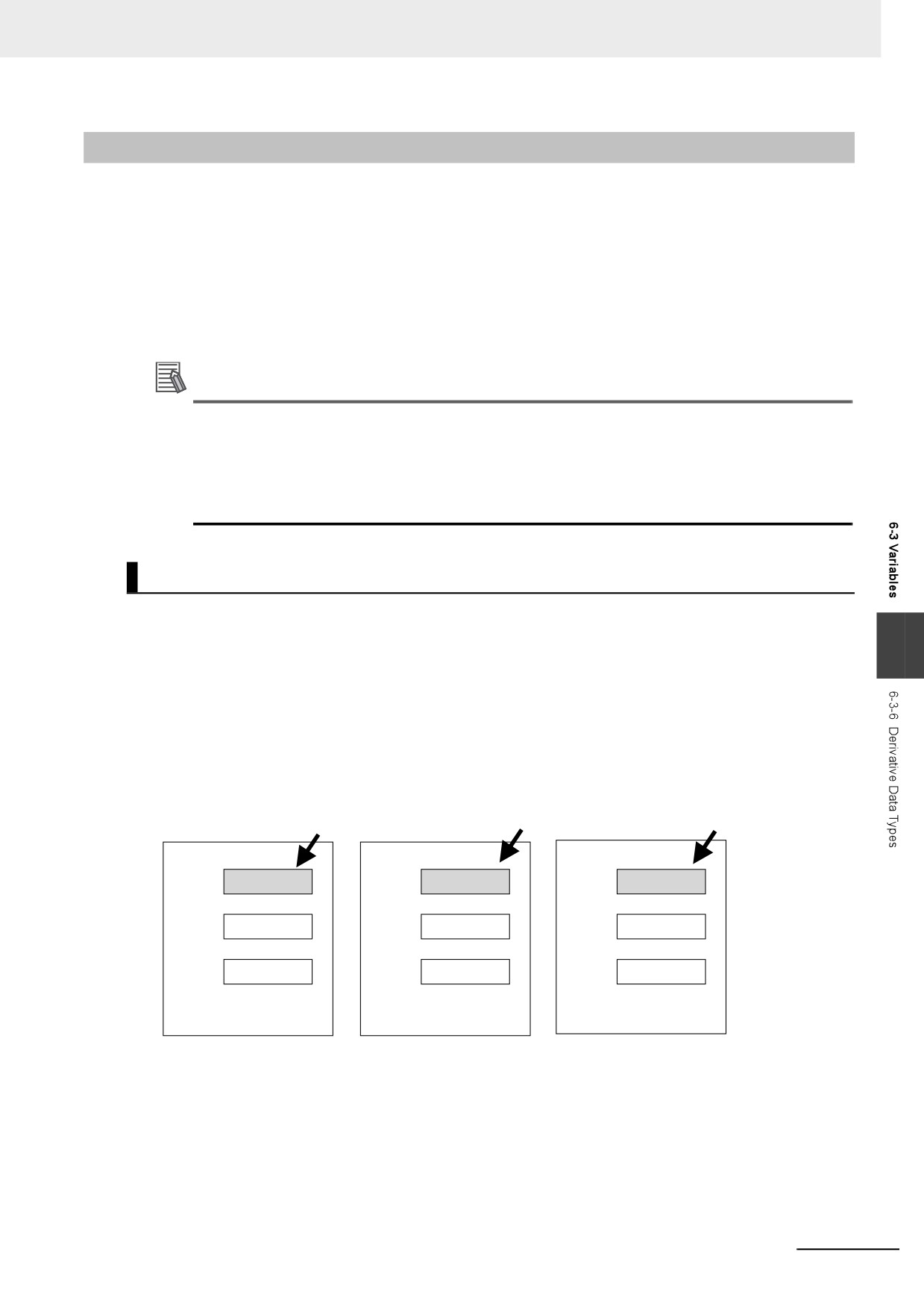
Structures
A structure is a derivative data type that groups together data with the same or different variable types.
You can easily change data and add new data if you place your data into a structure.
6
For example, you can define a “Box” structure that has three members (Width, Height, and Depth) in
order to organize and group your data.
You can then use this structure data type to add a variable called Box1. You can then use it to access
the different levels of the data by placing a period after the variable name followed by the name of the
data you want to access. For example, Box1.Width or Box1.Height.
If you need to create a new variable to store more box data, you can perform the same steps to add a
new variable called Box2 to the variable table.
Height of Box1
Height of Box2
Height of Box3
Structure Variable Box1
Structure Variable Box2
Structure Variable Box3
Member
Member
Member
Height
Height
Height
Width
Width
Width
Depth
Depth
Depth
When a structure is used for a variable in an instruction, it is necessary to select a structure for the input
parameter, output parameter, or in-out parameter, and register the variable.
Example: Communications Instructions
6-41
6 Programming
z Expressing Structure Variables and Structure Variable Members
Specifying Members
The individual pieces of data that make up a structure are called “members.” You can express indi-
vidual members of a structure by putting a period after the variable name that represents the entire
structure followed by the member name that you want to access. You can even have a structure that
is the member of another structure.
Example: abc.x: Member x of structure variable abc
abc.Order.z: Member z of member structure variable Order of structure variable abc
Specifying the Structure
The structure represents all members that make up the structure. A structure is expressed by the
name of the structure variable. In the example above, you would write abc.
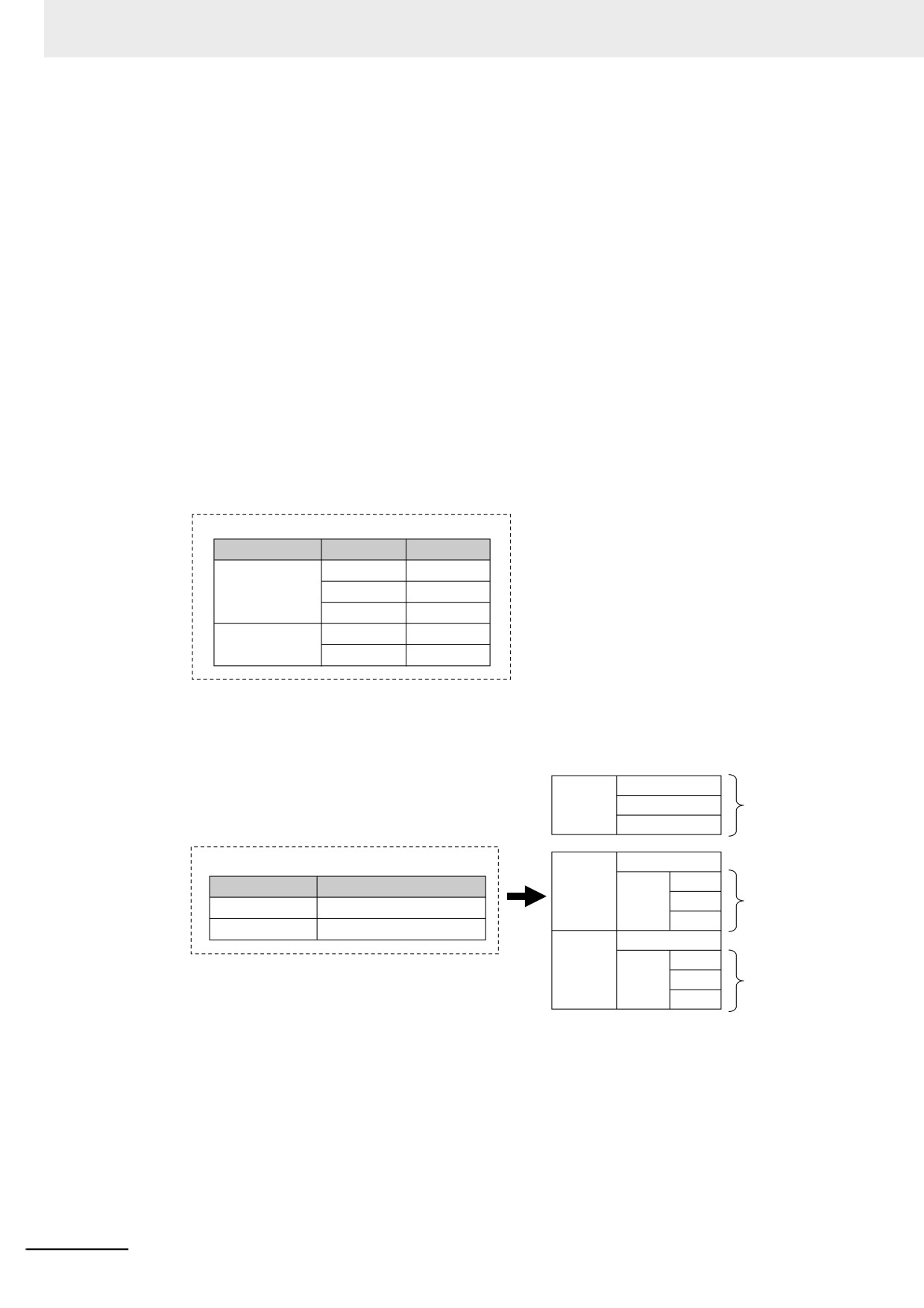
z Creating a Structure
1
Create a structure data type in the Data Type Table.
Specify the data type name, members, and the data type.
Data Type Table
Name
Member
Data type
RGB
red
INT
green
INT
blue
INT
ITEM
ItemNo
INT
Color
RGB
2
Specify the member name and the structure data type from above as the data type and register
the variable in the variable table.
Variables
Desk
red
green
Data type RGB
blue
Variable Table
Chairs[0]
ItemNo
Color
red
Variable name
Data type
green
Data type ITEM
Desk
RGB
blue
Chairs
ARRAY[0..1]OF ITEM
Chairs[1]
ItemNo
Color
red
green
Data type ITEM
blue
6-42
6 Programming
z
Structure Specifications
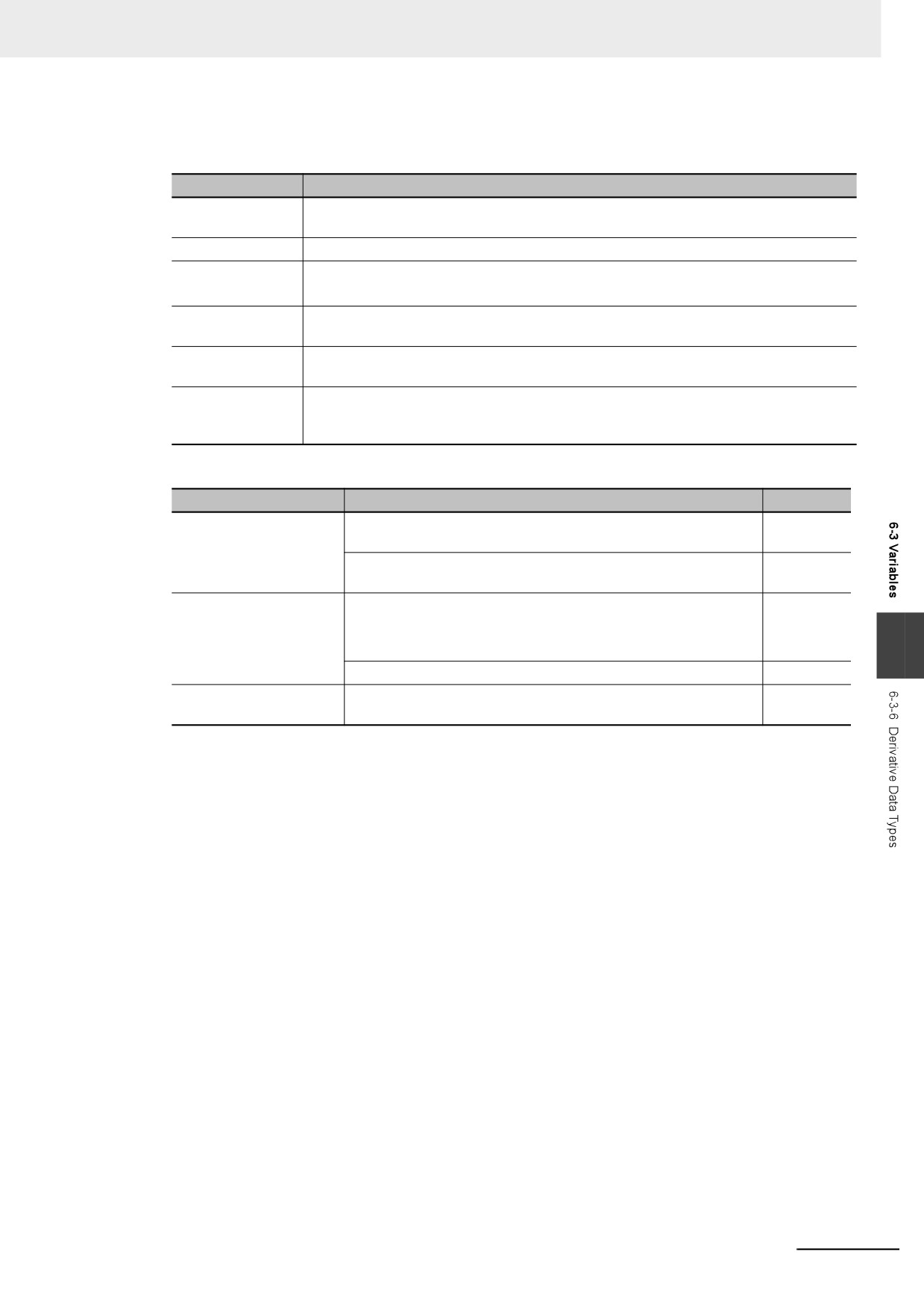
The specifications of structure data types are given in the following table.
Item
Specification
Structure names
Names are not case sensitive. Prohibited characters and character length restrictions
are the same as for variable names.
Member data types
Refer to the table on the data types of structure members that is given below for details.
Member attributes
Member Name
Comment
Number of mem-
1 to 2,048
bers
Nesting depth of
Maximum of 8 levels (however, a member name must be 511 bytes or less, including the
structures
variable name)
Maximum size of
8 MB
one structure vari-
able
Data Types of Structure Members
Classification
Data type
Usage
Basic data types
Boolean, bit string, integer, real, duration, date, time of day, date
Supported.
and time, or text string data
Array of Boolean, bit string, integer, real, duration, date, time of
Supported.
day, date and time, or text string data
Derivative data types
Arrays (see note), unions, and enumerations
Supported.
Note Recursions and loops are not allowed. (An error will occur
when the program is checked.)
6
Array specifications for structures, unions, and enumerations
Supported.
POU instances
Not sup-
ported.
z
Arrays and Structures
You can set an array in which the elements are structures. You can also set a structure in which the
members are arrays.
z
Specifying Structure Member Offsets
When you specify an offset for a member, you can set the memory configuration of the members as
required for each structure data type. This allows you to align the memory configuration of the mem-
bers of the structure data type when you use tag data links with CJ-series CPU Units or with other
external devices.
You can select NJ, CJ, or User as the offset type for structure members. If you select NJ, the mem-
ory configuration that is optimum for the NY-series is automatically used. Refer to A-6 Variable
Memory Allocation Methods for details on the memory configuration of NY-series Controllers. Refer
to A-6-2 Important Case Examples for examples of tag data lings with CJ-series CPU Units.
6-43
6 Programming
The meanings of the offset type are as follows:
Offset type
Meaning
NJ
The memory configuration that is optimum for the NY-series Controllers is
automatically used and operating speed is maximized.
CJ
The memory configuration for CJ-series PLCs is automatically used. This
allows you to use the same memory configuration as a CJ-series CPU Unit.
User
You can set the memory offsets for each member. This allows you to use the
same memory configuration as external devices other than CJ-series CPU
Units.
Setting Offsets
If you set the memory offset type to User, you can set memory offsets for each member of the struc-
ture. There are byte offsets and bit offsets. If you set the memory offset type to NJ or CJ, the mem-
ory configuration is determined automatically. You do not need to set offsets.
The meanings of the offsets are as follows:
Range of
Offset
Meaning
Unit
values
Byte offset
The byte offset is the offset of a member from the start of the
Byte
0 to 1023
structure. Bytes offsets are used for all basic data types and
derivative data types.
Bit offset
The bit offset is the offset of a member from the start of the byte
Bit
0 to 63
position that is specified with the byte offset.
6-44
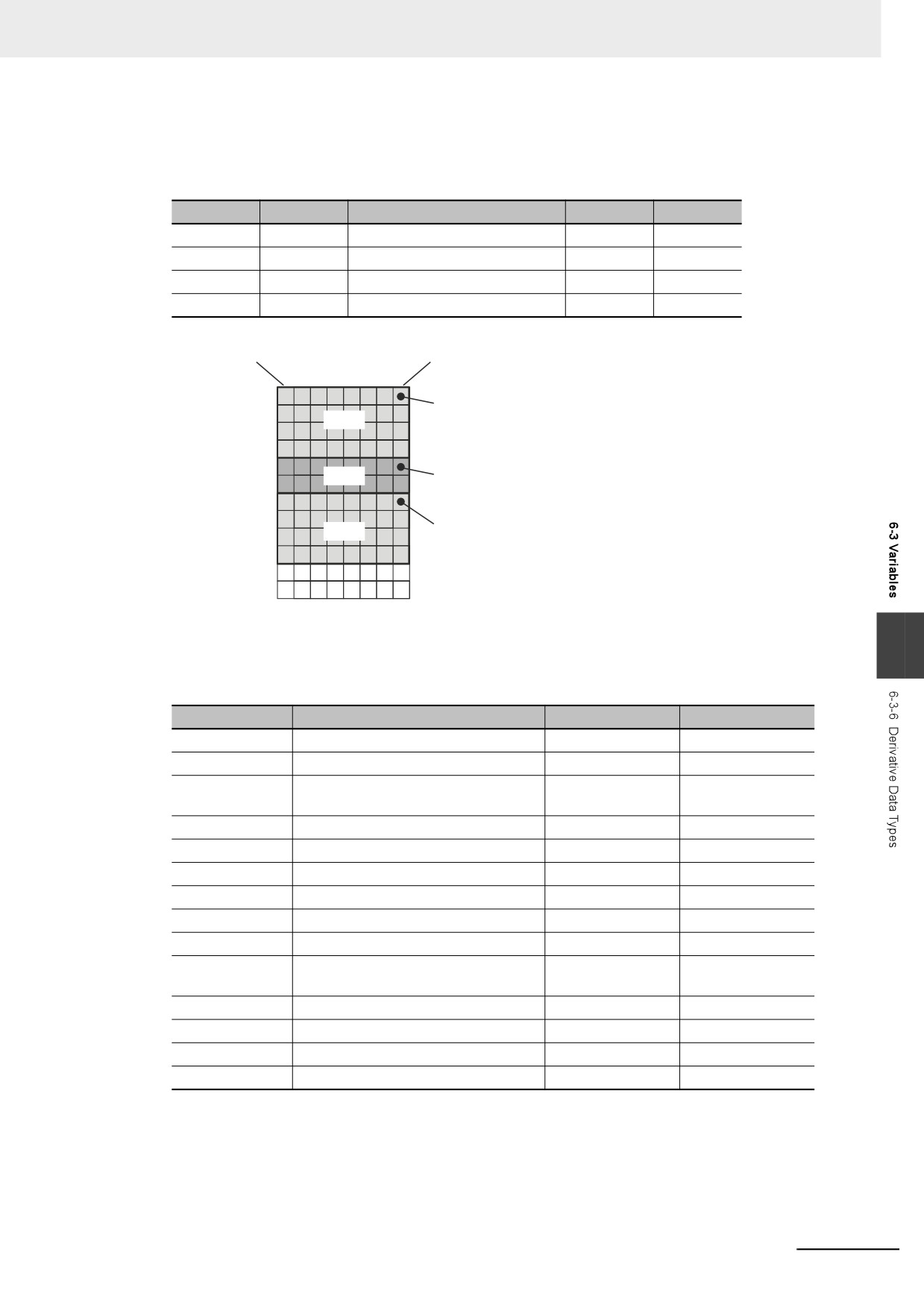
6 Programming
Example:
This example shows the memory configuration when the following settings are made with the Struc-
ture Editor.
Name
Data type
Offset type
Byte offset
Bit offset
StrA
STRUCT
User
VarA
DINT
0
0
VarB
INT
4
0
VarC
DINT
6
0
Bit 7
Bit 0
Memory
First byte
Byte offset: 0
First byte + 1
Bit offset: 0
VarA
First byte + 2
First byte + 3
First byte + 4
Byte offset: 4
First byte + 5
VarB
Bit offset: 0
First byte + 6
First byte + 7
Byte offset: 6
First byte + 8
VarC
Bit offset: 0
First byte + 9
First byte + 10
First byte + 11
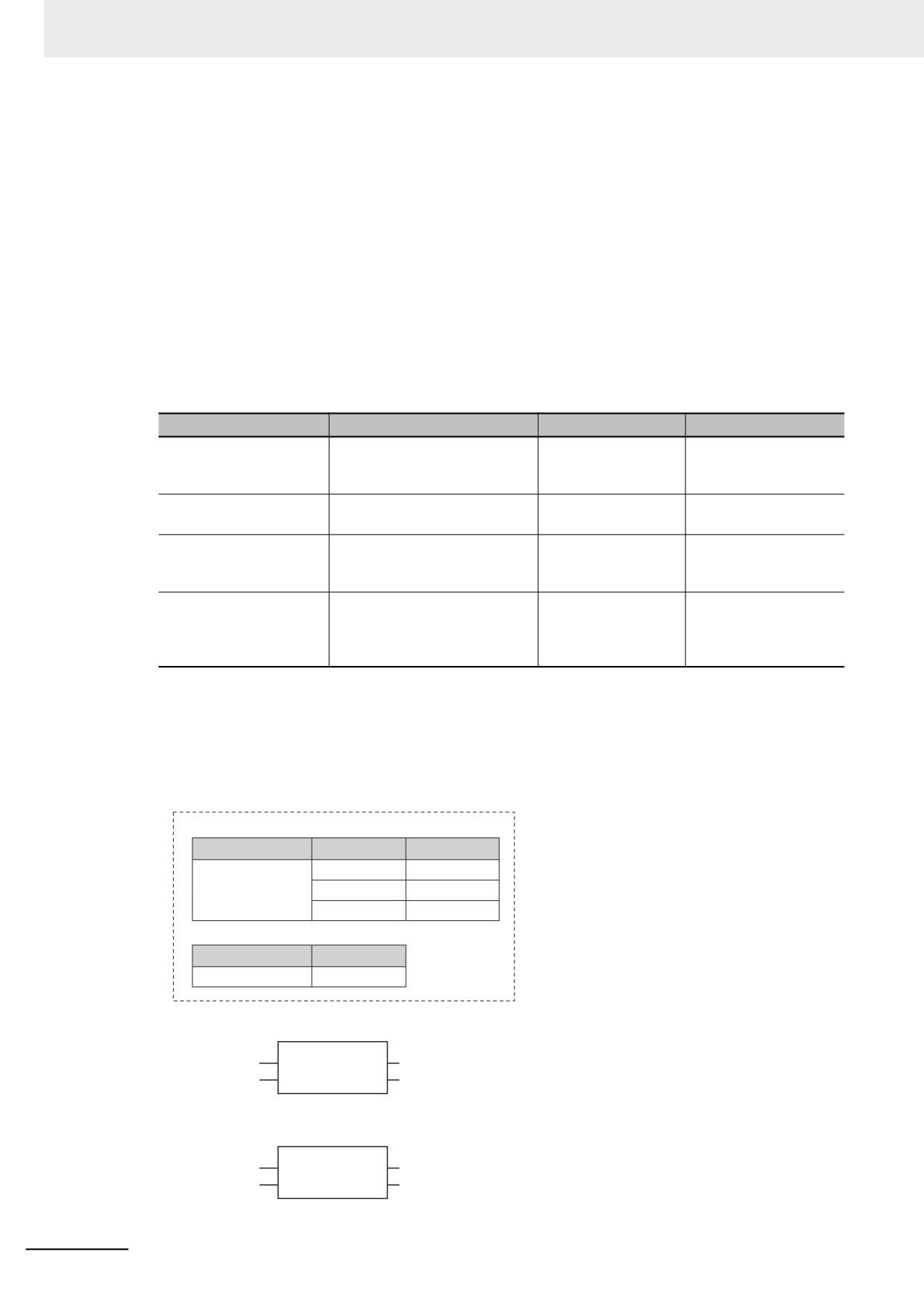
Offsets That You Can Set
6
Even if you set the memory offset type to User, the offsets cannot be changed for some data types.
The following table shows when offsets can be set.
Classification
Data type
Byte offsets
Bit offsets
Boolean
BOOL
Can be set.
Can be set.
Bit strings
BYTE, WORD, DWORD, LWORD
Can be set.
Fixed.
Integers
SINT, INT, DINT, LINT, USINT, UINT,
Can be set.
Fixed.
UDINT, ULINT
Real numbers
REAL, LREAL
Can be set.
Fixed.
Durations
TIME
Can be set.
Fixed.
Dates
DATE
Can be set.
Fixed.
Times of day
TIME_OF_DAY
Can be set.
Fixed.
Dates and Times
DATE_AND_TIME
Can be set.
Fixed.
Text strings
STRING
Can be set.
Fixed.
Arrays
Can be set.
Can be set only for
BOOL elements.
Structures
Can be set.
Fixed.
Unions
Can be set.
Fixed.
Enumerations
Can be set.
Fixed.
POU instances
Fixed.
Fixed.
6-45
6 Programming
Restrictions in Specifying Member Offsets
The following restrictions apply to setting member offsets. If you specify member offsets for a struc-
ture, the same restrictions apply to structures that are members of that structure.
• If you set the memory offset type to User for a structure, you must set offsets for all members of
the structure.
• You cannot set initial values for members of structures for which offsets are set. The default initial
value for each data type is used. Refer to When the Initial Value Specification Is Left Blank on
page 6-65.
• The memory size that is required for the structure is determined by the sizes of the members, the
alignment values of the data types, and the memory configuration.
Errors in Specifying Member Offsets
The following error can occur when setting member offsets.
Error name
Meaning
Offset type
Correction
Offset Out of Range Error
A value that is out of range was
User
Change the value of
specified for an offset.
the offset to a suitable
value.
Offset Not Set Error
There is a member for which
User
Set offsets for all mem-
the offsets are not set.
bers.
Memory Configuration
The same memory location is
User
Change the values of
Overlap Error
allocated to more than one
the offsets to suitable
member.
values.
Initial Value Setting Error
An initial value was set for a
CJ or User
Do not set an initial
structure member for which an
value.
offset was specified when cre-
ating the variable table.
z
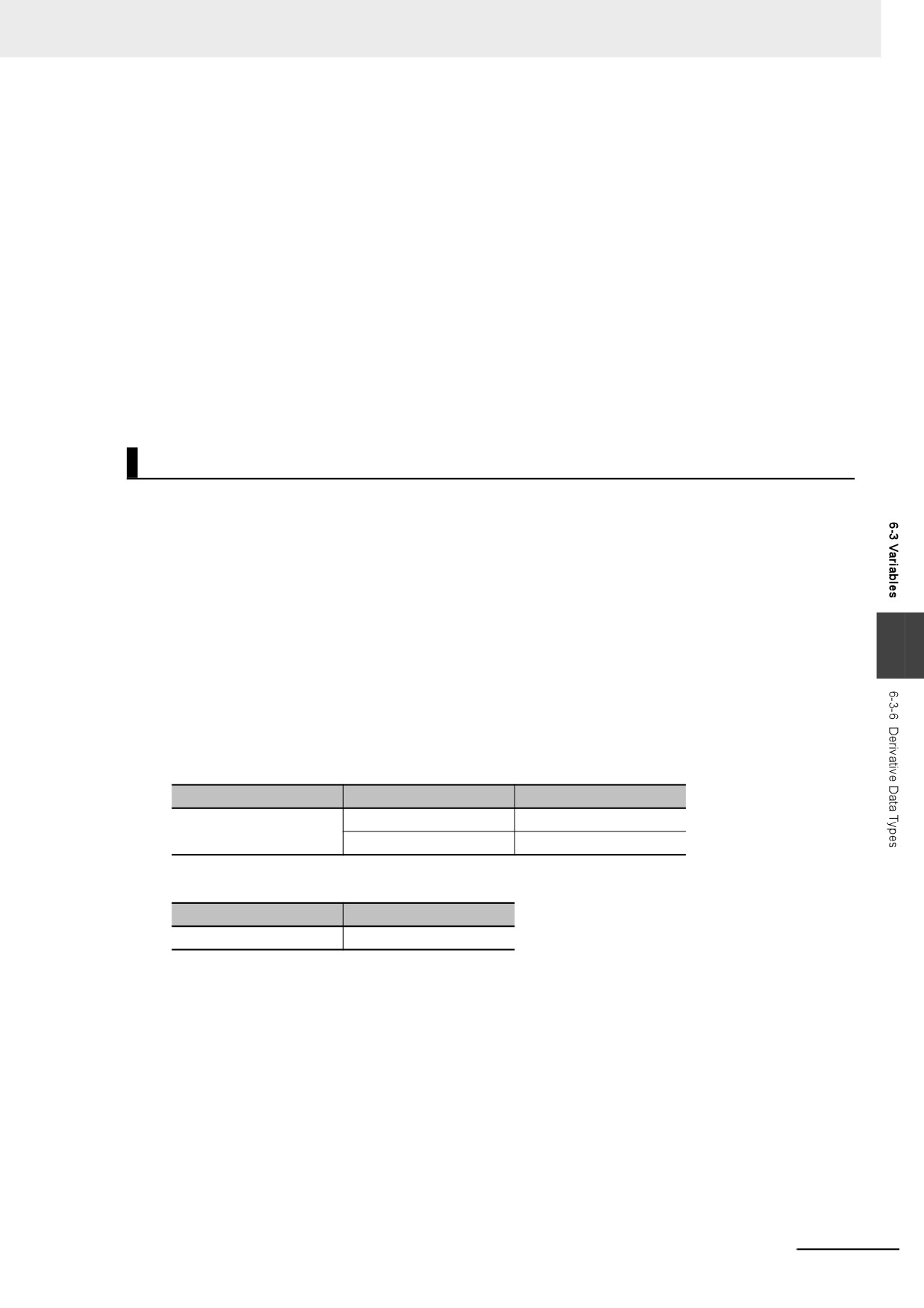
Instructions That Take a Structure as a Parameter
Some instructions pass structure variables as parameters. To do so, specify the structure variable
as the input parameter.
Example: Passing a Member of a Structure Variable to the MOVE Instruction and Passing a Struc-
ture Variable to the MOVE Instruction
Data Type Table
Name
Member
Data type
RGB
red
UINT
green
UINT
blue
UINT
Variable Table
Variable name
Data type
Color1
RGB
■Specifying Just One Member of a Structure
MOVE
EN
ENO
Transferring only the red member of the Color1 RGB structure to x.
Color1.red
In
Out
x
■Specifying the Entire Structure
MOVE
EN
ENO
Transferring all members of the Color1 RGB structure to x.
Color1
In
Out
x
6-46
6 Programming
Passing Values to System-defined Structure Input Variables for Certain
Instructions
Some instructions take a predefined structure variable as an input variable.
Example: The Port input variable for the Serial Communications Instructions (which specifies the
target port) is a structure with a data type name of _sPORT. When you use one of these
instructions, follow the procedure provided below to create a user-defined structure vari-
able and specify that variable for the input parameter to the instruction.
1 The system-defined data type for the instruction is registered in the Sysmac Studio in advance.
Select that system-defined data type in the Sysmac Studio and add a user-defined structure
variable to the variable table.
2 Use the user program or initial values to set the member values of that structure.
3 Specify the structure variable for the input parameter to the instruction.
Unions
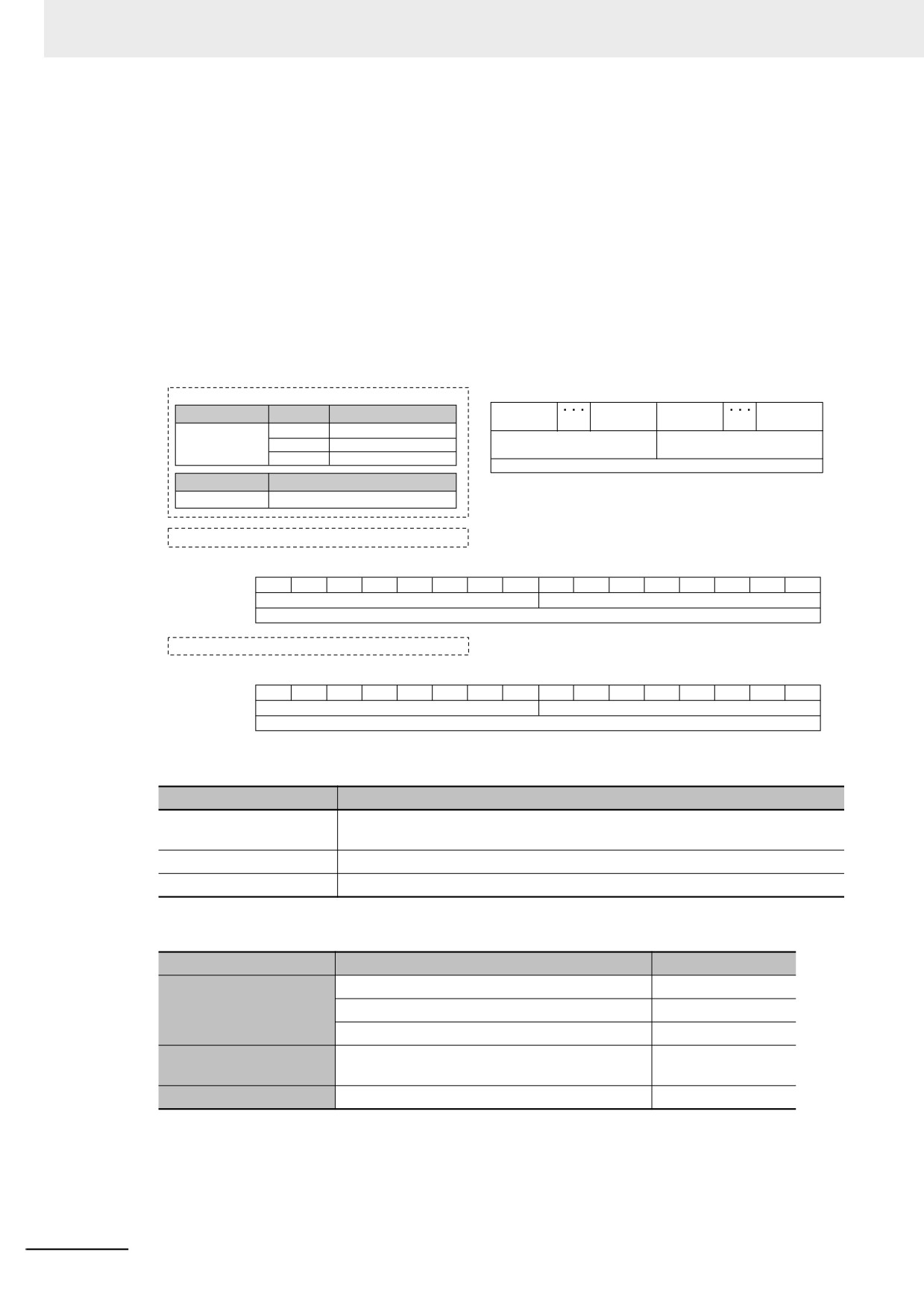
A union is a derivative data type that enables access to the same data with different data types. You
can specify different data types to access the data, such as a BOOL array with 16 elements, 16 BOOL
variables, or a WORD variable.
z
Expressing Unions and Union Members
Specifying Members
When you define a union, you must name each data type that can be accessed. These names are
6
called members. You can express individual members of a union by putting a period after the vari-
able name that represents the entire union followed by the member name that you want to access.
Example:
Define the data type as a union as shown for My Union in the following example.
Data Type Definition
Name
Member
Data type
My Union
data
WORD
bit
ARRAY [0..15] OF BOOL
Variable Table
Variable name
Data type
Output
My Union
Output.bit[0]:
This notation specifies the 0th element, or value at bit 00, of union Output when it is treated
as a 16-bit BOOL array variable.
Output.data:
This notation specifies the value when union Output is treated as a single WORD variable.
Specifying the Union
The union represents all members that make up the union. Unions are expressed by the name of
the union variable. In the example above, you would write Output.
6-47
6 Programming
z Creating Unions
1 Create a union data type in the Union Table.
Specify the data type names and different data types of the members of the union.
2 Specify the union data type from above as the data type and register the variable in the variable
table.
Example:
Here, OUT16_ACCESS is defined as the data type of a union. The members of this union are a
BOOL array with 16 elements and a WORD variable. The variable Output is registered with a data
type of OUT16_ACCESS. You can now read/write variable Output as a BOOL value for any of the
16 bits and as a WORD value.
Data Type Definitions
BoolData
BoolData
BoolData
BoolData
Name
Member
Data type
[15]
[8]
[7]
[0]
OUT16ACCESS
BoolData
ARRAY[0..15] of BOOL
ByteData
ByteData
ByteData
ARRAY[0..1] of BYTE
[1]
[0]
WordData
WORD
WordData
Variable name
Data type
Output
OUT16ACCESS
Output.WordData := WORD#16#1234;
15
14
13
12
11
10
9
8
7
6
5
4
3
2
1
0
BoolData
0
0
0
1
0
0
1
0
0
0
1
1
0
1
0
0
ByteData
16#12
16#34
WordData
16#1234
Output.BoolData[11] :=TRUE;
15
14
13
12
11
10
9
8
7
6
5
4
3
2
1
0
BoolData
1
*
ByteData
Bit 04 of ByteData[1] is TRUE
No change
WordData
Bit 11 of WordData is TRUE
z
Union Specifications
Item
Specification
Data types that can be
Refer to the table on the valid data types for union members that is given below.
specified for members
Number of members
4 max.
Setting initial values
Not supported. Always zero.
Data Types of Union Members
Classification
Data type
Usage
Boolean and bit strings
Supported.
Basic data types
BOOL and bit string data array specifications
Supported.
Other basic data types
Not supported.
Array specification for structures, unions, and
Not supported.
Derivative data types
enumerations
POU instances
Not supported.
z
Restrictions
• The initial values for unions are always zero.
• You cannot move unions.
• You cannot specify unions for parameters to POUs.
6-48
6 Programming
Enumerations (ENUM)
An enumeration is a derivative data type that uses text strings called enumerators to express variable
values. To use an enumeration, you must first set the values that can be obtained from that variable as
enumerators (text strings). Use enumerations to make it easier for humans to understand the meaning
behind the values of a variable.
z
Expressing Enumerations
When you define an enumeration, you must define the possible values of the variable as enumera-
tors and give the enumeration a name.
z
Creating Enumerations
1 Create an enumeration data type in the Enumeration Table.
Set the enumerators and their values for the enumeration.
2 Specify the enumeration data type from above as the data type and register the variable in the
variable table.
Example:
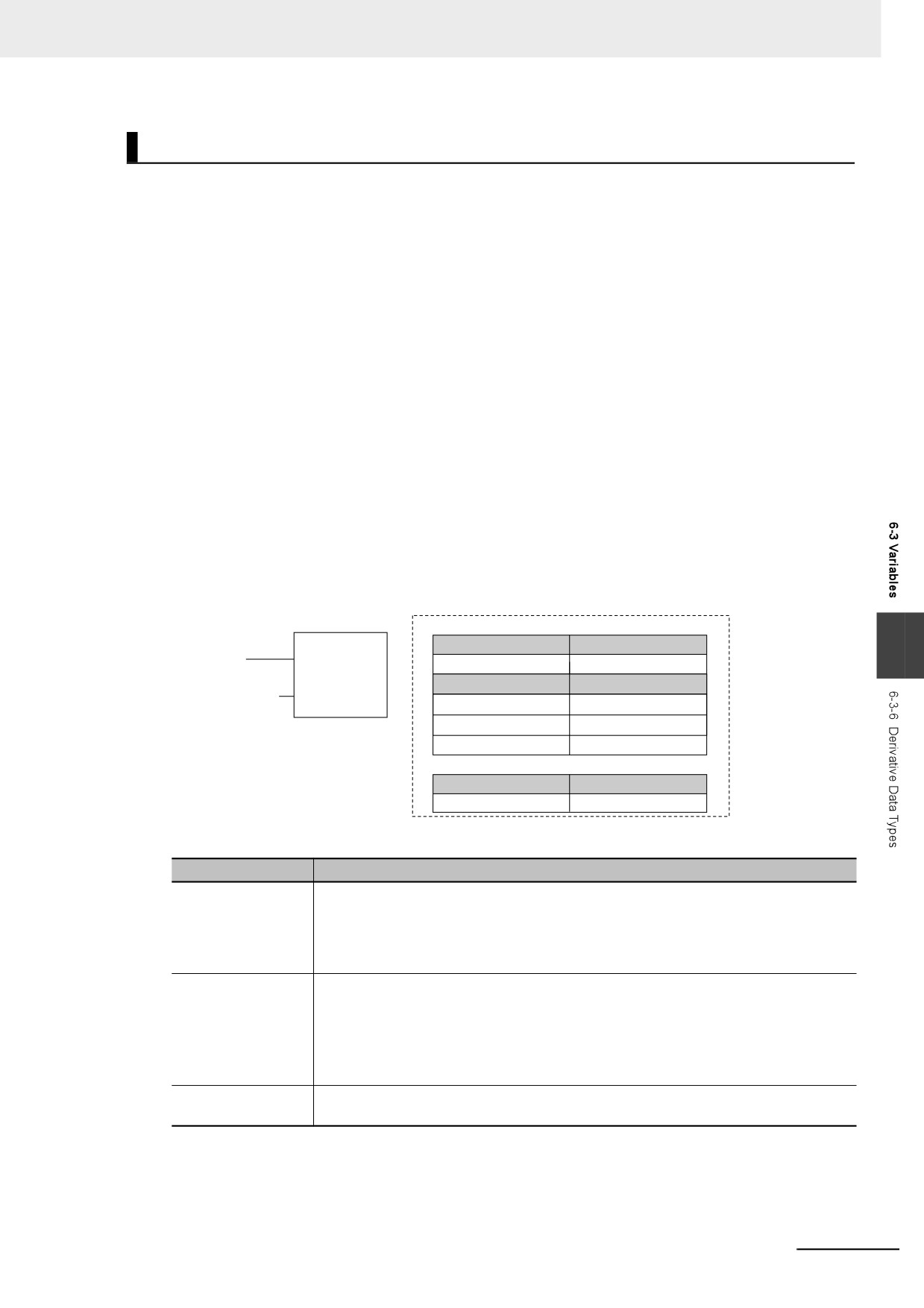
Here, Color is defined as the data type of an enumeration. For this example, we will set three
enumerators: red, yellow, and green. The numbers associated with these enumerators are as
follows: red = 0, yellow = 1, green = 2. The variable DiscColor will change to one of the following:
red (0), yellow (1), or green (2).
Enumeration Table
FB
Data type
6
Color
ENUM
(Color)
Enumerator
Value
Color#red
IN
red
0
yellow
1
green
2
Variable Table
Variable name
Data type
DiscColor
Color
z
Enumeration Specifications
Item
Specification
Enumerator names
Enumerator names consist of single-byte alphanumeric characters. They are not case
sensitive. A building error will occur if you specify the same enumerator more than
once. A building error will occur if you specify an enumerator with the same name as a
variable in the user program or if you specify an enumerator that already exists in
another enumeration.
Values
Valid range: Integers between −2,147,483,648 and 2,147,483,647
Values do not have to be consecutive.
A compiling error will occur if you specify the same value more than once.
Note You cannot perform size comparisons with enumeration variables. You can only
test to see if the enumerators are the same.
Number of enumera-
1 to 2,048
tors
6-49
6 Programming
z
Notation to Use an Enumerator as a Function Block or Function Parameter
There are the following two notations that you can use to specify an enumerator for a function or
function block parameter.
Enumerator Only
For a function or function block for which the parameter specifies an enumerator, you can just spec-
ify the enumerator.
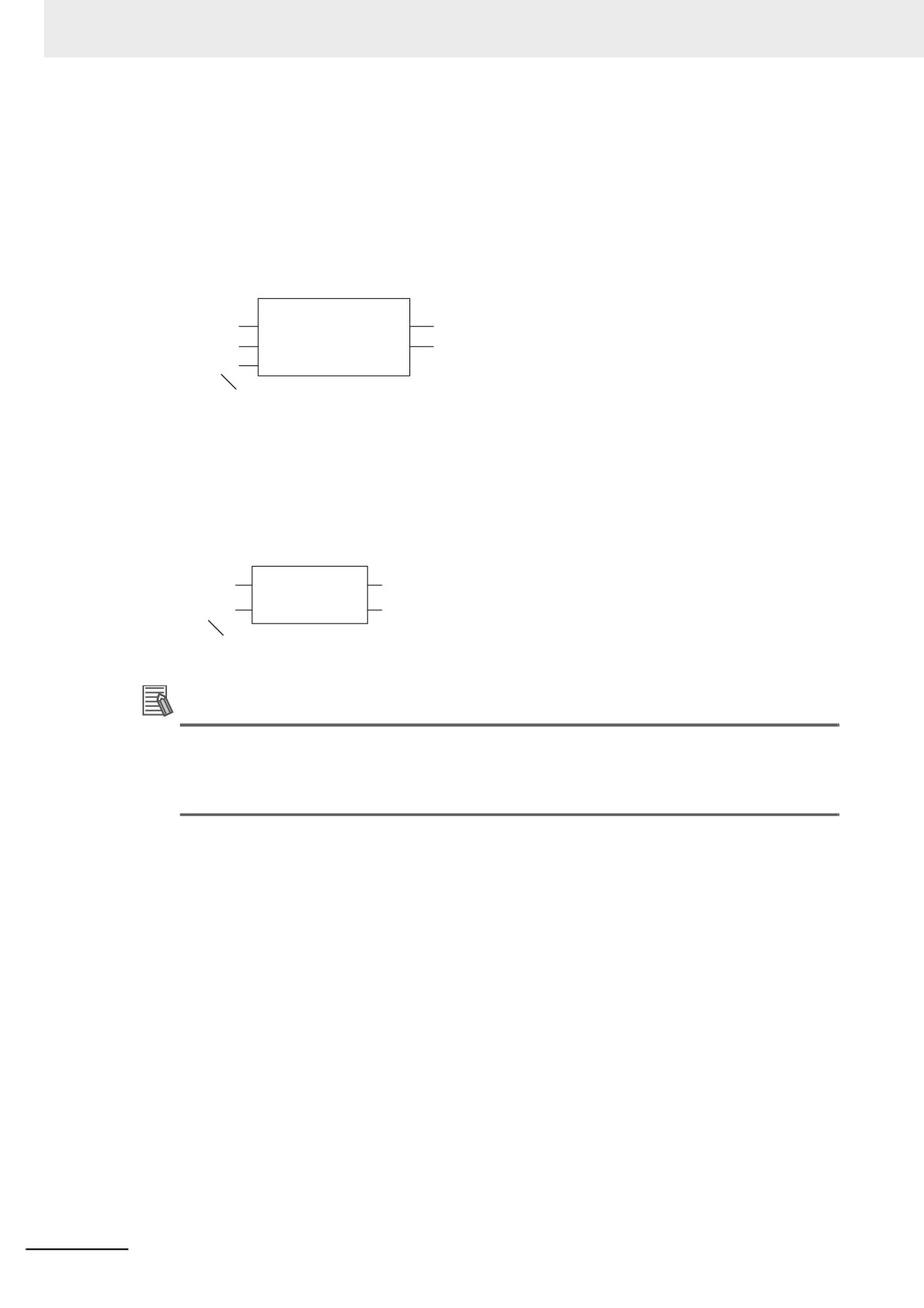
Example: Passing an Enumerator to the BCDToBins_WORD Instruction
BinToBCDs_WORD
EN
ENO
INT#1234
In
BCDdata
_BCD1
Format
The Format input variable to the BinToBCDs_WORD is specified as an enumerator.
Therefore, it is necessary to specify only the enumerator.
Enumeration#Enumerator Notation
For a function or function block for which the data type of the parameter is not specified, specifying
just the enumerator is not valid. A building error will occur. To clarify that the parameter is an enu-
merator, the following notation is used: Enumeration#Enumerator.
Example: Passing an Enumerator to the MOVE Instruction
MOVE
EN
ENO
Color#red
In
Out
ColorA
The data type of the In input variable is not specified.
To pass an enumerator, use the Enumeration#Enumerator notation.
Additional Information
For a function or function block for which the parameter specifies an enumerator, you can also
use the Enumeration#Enumerator notation. Therefore, for the above BinToBCDs_WORD
instruction, the following notation can be used to pass the parameter to Format: _eBCD_FOR-
MAT# _BCD1.
z
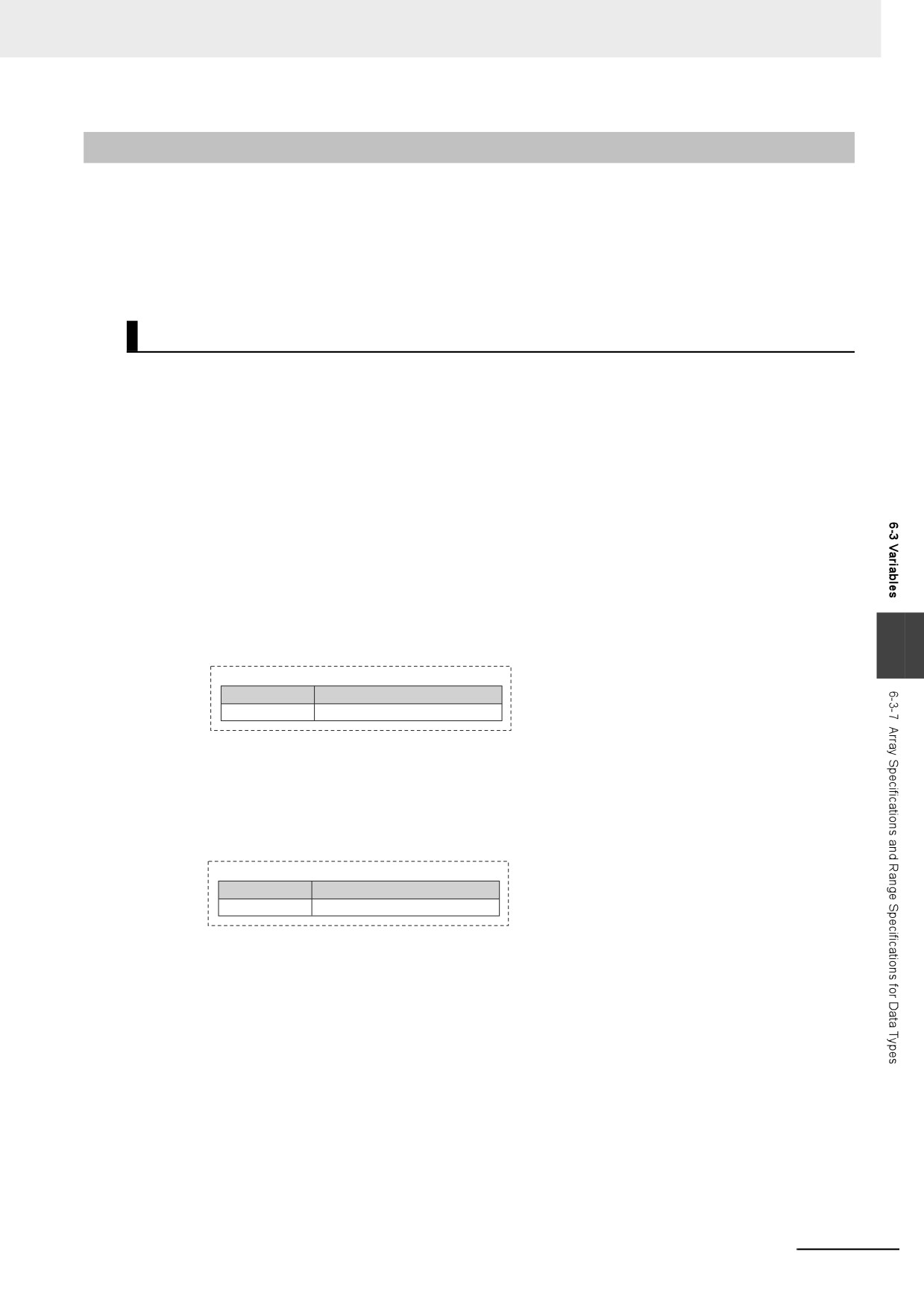
Value Checks
When a value is written to an enumerated variable through execution of an instruction, an error will
not occur even if that value is not defined as one of the enumerators of that variable. Therefore, if it
is necessary to confirm that a value is defined as an enumerator of an enumeration, write the user
program to check the value.
6-50
6 Programming
6-3-7
Array Specifications and Range Specifications for Data Types
You can specify the following attributes for variables with each data types.
• Array specifications
• Fixed-length array specifications
• Variable-length array specifications
• Range specifications
Array Specifications (ARRAY[]OF)
Use an array specification for a data type that handles a group of data with the same attributes as a sin-
gle entity. You can use an array specification for the basic data types and derivative data types. Arrays
are useful when you want to handle multiple pieces of data together as you would, for example, coordi-
nate values for motion control.
z Expressing Arrays and Array Elements
Specifying Elements
The individual pieces of data that make up an array are called “elements.”
The elements of an array are expressed by adding a subscript (element number) from the start of
the array to the name of the variable that represents the entire array.
Enclose the subscript in single-byte braces []. Subscripts can be either constants or variables. In ST,
you can also use expressions to express subscripts.
Examples:
6
Variable Table
Variable name
Data type
Mem
ARRAY[0..99] OF INT
x:=10;
Mem[x]: This expression specifies the xth element of the array variable Mem (the variable x
has a value of 10, so this would point to the 10th element).
Variable Table
Variable name
Data type
Data
ARRAY[0..99] OF INT
x:=10;
y:=20;
Data[x+y]: This expression specifies the x+yth element of the array variable Data (the variable
x has a value of 10 and variable y has a value of 20, so this would point to the 30th element).
Specifying An Array (i.e., the Entire Array)
The array represents all elements that make up the array. Arrays are expressed by the name of the
array variable. In the above examples, the arrays are written as Mem and Data.
6-51
6 Programming
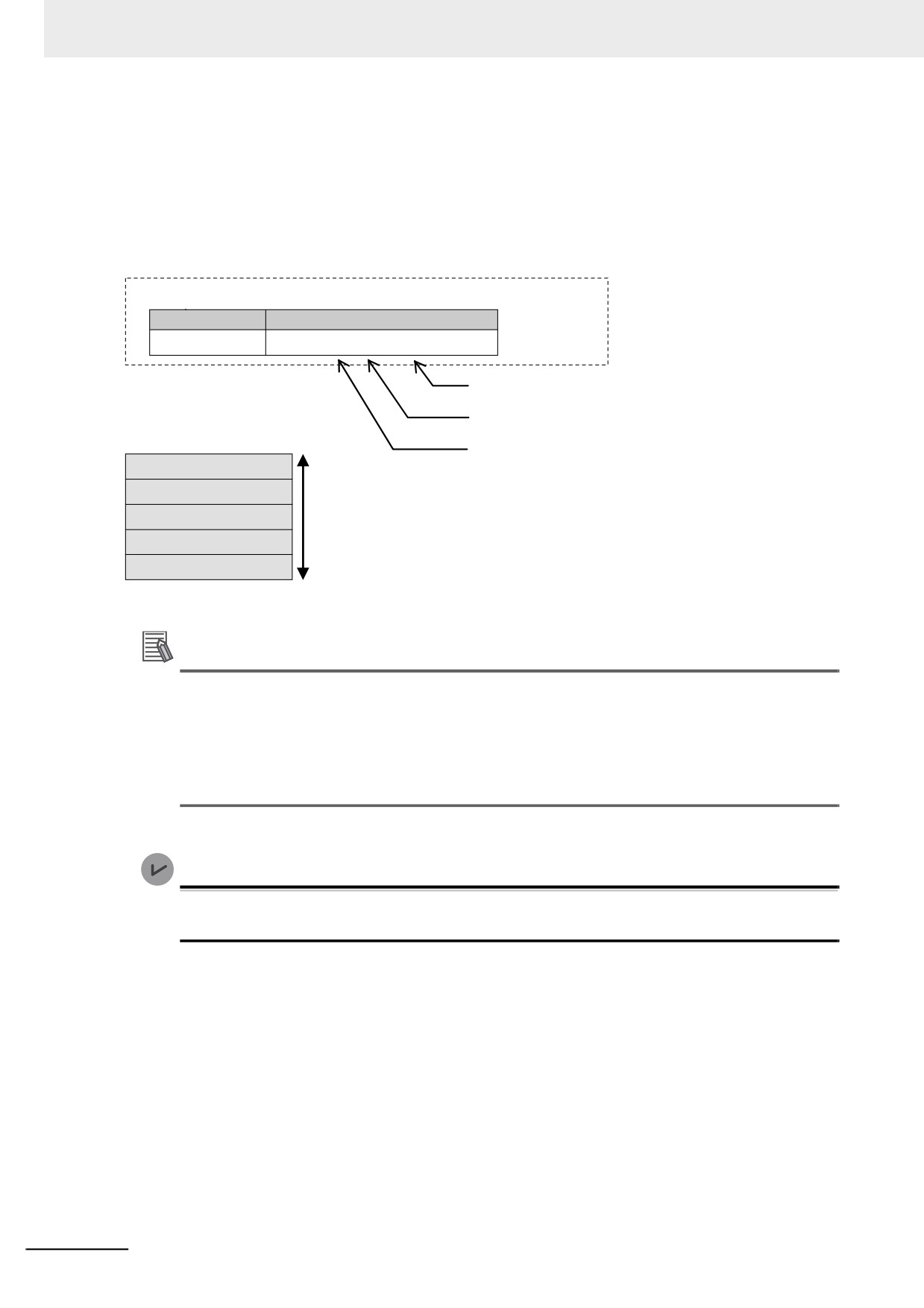
z Creating an Array
1 Enter “A” into the Data type Column of the variable table and select ARRAY[?..?] OF ? from the
list of possible data type name candidates.
2 Enter the number of the first element in the array for the left question mark and the last number
for the right question mark in the “[?..?]” section. Next, enter the data type for the question mark
in the “OF ?” section and register the variable.
Variable Table
Variable name
Data type
abc
ARRAY [ 0 .. 4 ] OF INT
Represents the data type of the array variable.
Represents the last number of the elements of the array.
Represents the first number of the elements of the array.
abc[0]
abc[1]
abc[2]
Array
abc[3]
abc[4]
Additional Information
You can use a fixed-length array specification for a variable when you specify the first number
and last number for the subscripts. You can use a variable-length array specification for a vari-
able when you specify a single-byte asterisk (*) for the subscript.
There are the restrictions on fixed-length array specifications when you use a variable-length
array specification. Refer to Variable-length Array Specifications on page 6-56 for details on vari-
able-length array specifications.
Version Information
A CPU Unit with unit version 1.18 or later and Sysmac Studio version 1.22 or higher are required
to use variable-length array specification.
6-52
6 Programming
z
Array Variable Specifications
Item
Specification
Maximum number
65,535
of elements for an
array variable
Element numbers
0 to 65535
The number for the first element in an array does not have to be 0.
Subscripts
Constants: Integer value between 0 and 65535
Variables:
Classification
Data type
Usage
Integer
SINT, INT, DINT, USINT, UINT,
Supported.
or UDINT
LINT or ULINT
Not sup-
Basic data type
ported.
Boolean, bit string, real, duration, date, time of
Not sup-
day, date and time, or text string data
ported.
Derivative data
Structures, unions, and enumerations
Not sup-
types
ported.
Not sup-
POU instances
ported.
Arithmetic expressions: Arithmetic expressions can be specified only in ST.
Example: y:= x[a+b];
Maximum size of
8 MB
one array variable
6
z
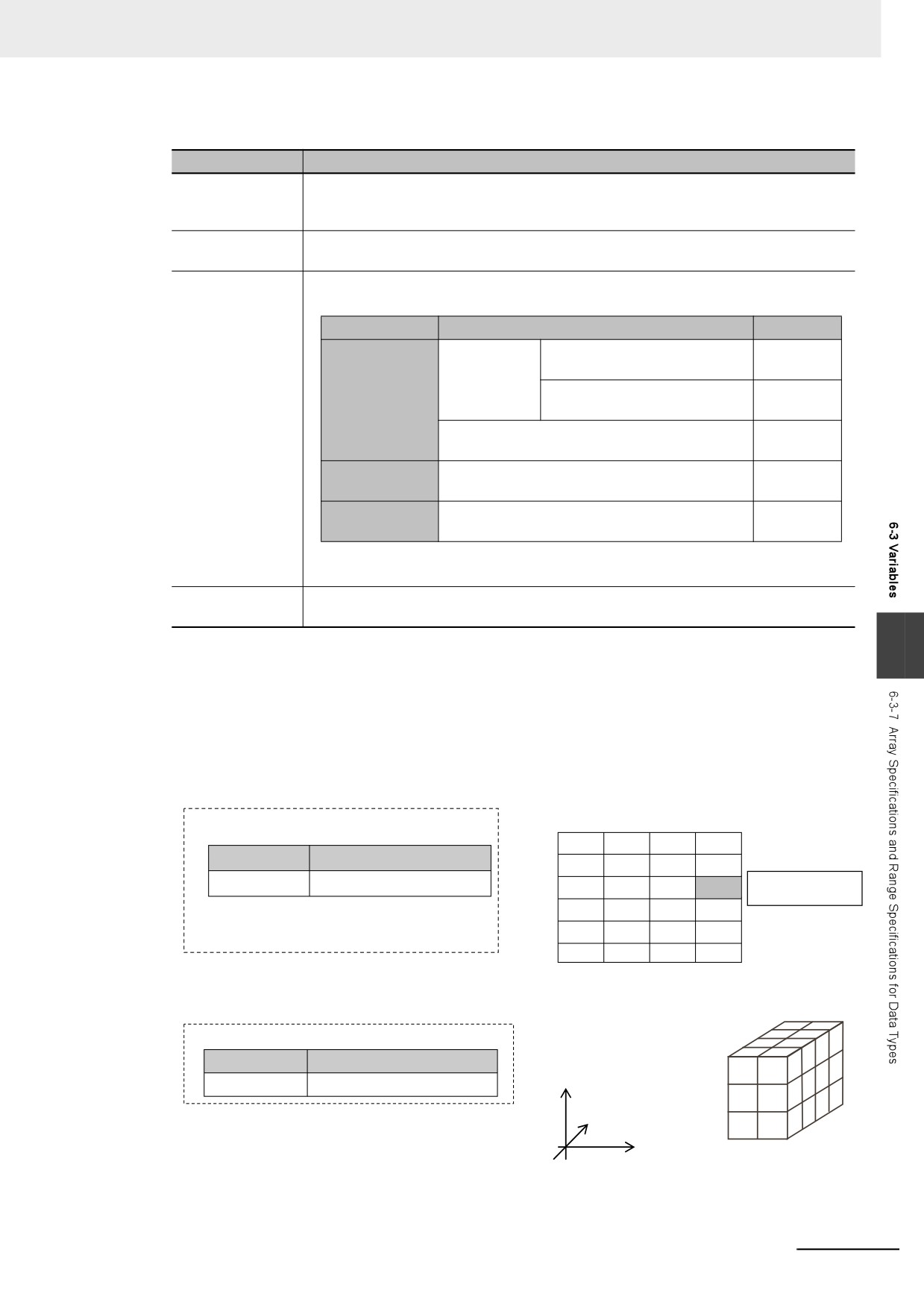
Dimensions of Array Variables
You can regard the elements of a one-dimensional array as one-dimensional data lined up in a sin-
gle row. You can set two-dimensional and three-dimensional arrays in the same way. The array ele-
ments are expressed by adding the same number of subscripts to the array variable name as the
number of dimensions. Arrays can have a maximum of three dimensions.
Two-dimensional Array Specifications
0
1
2
3
Variable Table
0
Variable name
Data type
1
abc
ARRAY [0..5 , 0..3 ] OF INT
2
abc[ 2 , 3 ]
3
4
5
Three-dimensional Array Specifications
Variable Table
Variable name
Data type
Y( 0 . 2 )
2
ITEM
ARRAY [ 0..1, 0..2, 0..3 ] OF INT
1
3
Z( 0 . 3 )
0
2
1
0
0
1
X( 0 . 1 )
6-53
6 Programming
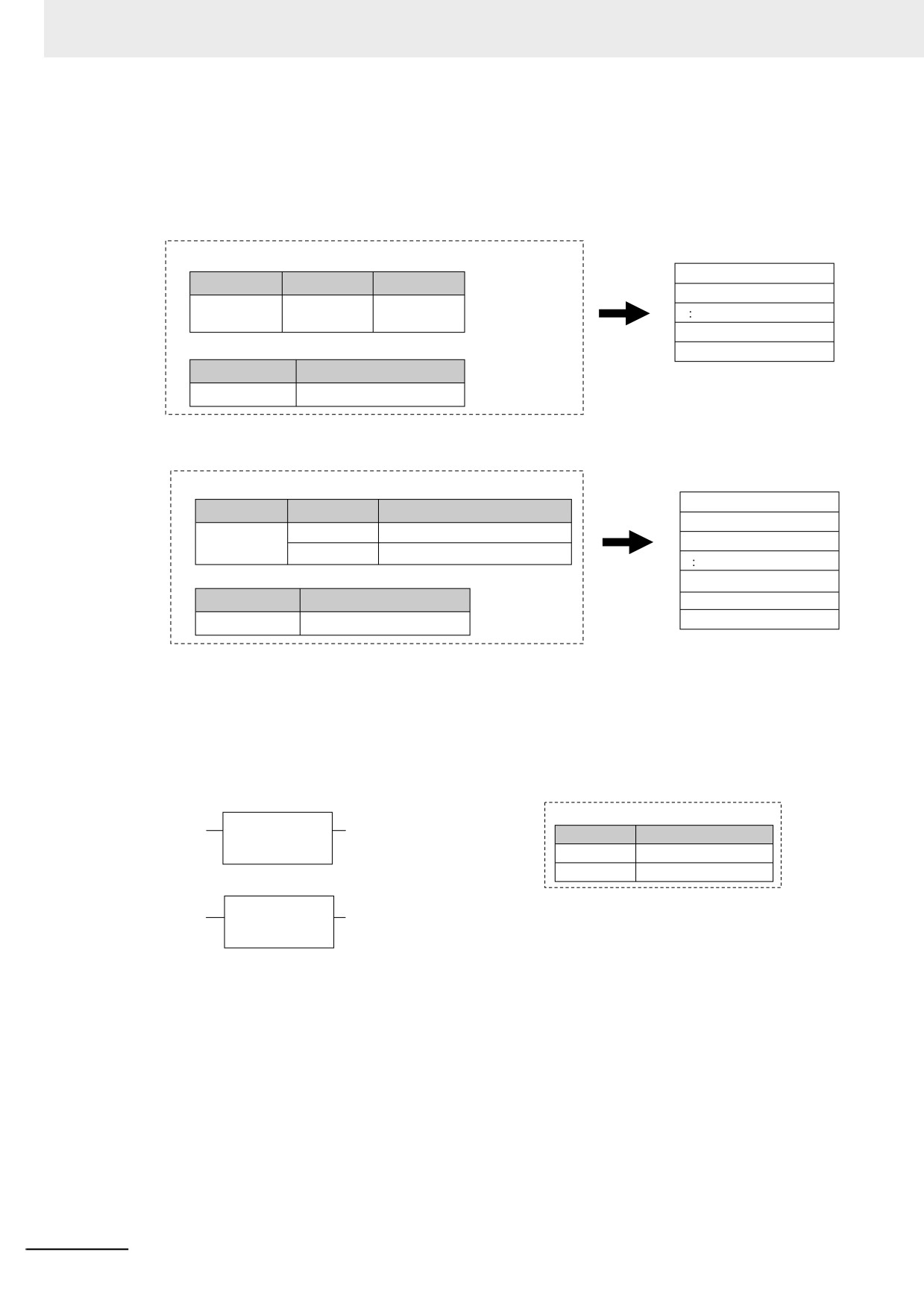
z
Arrays and Structures
You can set an array in which the elements are structures. You can also set a structure in which the
members are arrays.
Arrays with Structure Elements
Date Type Table
Variables
abc[1].x
Data type
Member
Member
abc[1].y
Str
x
INT
y
DINT
abc[4].x
Variable Table
abc[4].y
Variable name
Data type
abc
ARRAY [1..4 ] OF Str
Structure with Array Members
Variables
Data Type Table
abc[1].x[0]
Data type
Member
Data type
abc[1].x[1]
Str
x
ARRAY [0..1] OF INT
abc[1].y
y
DINT
Variable Table
abc[4].x[0]
Variable name
Data type
abc[4].x[1]
abc
ARRAY [1..4 ] OF Str
abc[4].y
z
Instructions with an Array Parameter
Some instructions pass array variables as parameters. To do so, specify only the name of the array
variable as the input parameter.
Example: Passing a Single Array Element to the MOVE Instruction and Passing an Array to the
MOVE instruction
Specifying One Element in the Array
Variable Table
MOVE
EN
ENO
Variable name
Data type
x[0]
y[0]
Moves INT variable x[0] to y[0]
In
Out
x
ARRAY [ 0 .. 199 ]OF INT
y
ARRAY [ 0 .. 199 ]OF INT
Specifying the Array
MOVE
EN
ENO
x
y
Moves INT variable x[0..199] to y[0..199]
In
Out
Restrictions:
When you specify an array variable, it must be moved to a variable of the same data type with the same range of element numbers.
6-54
6 Programming
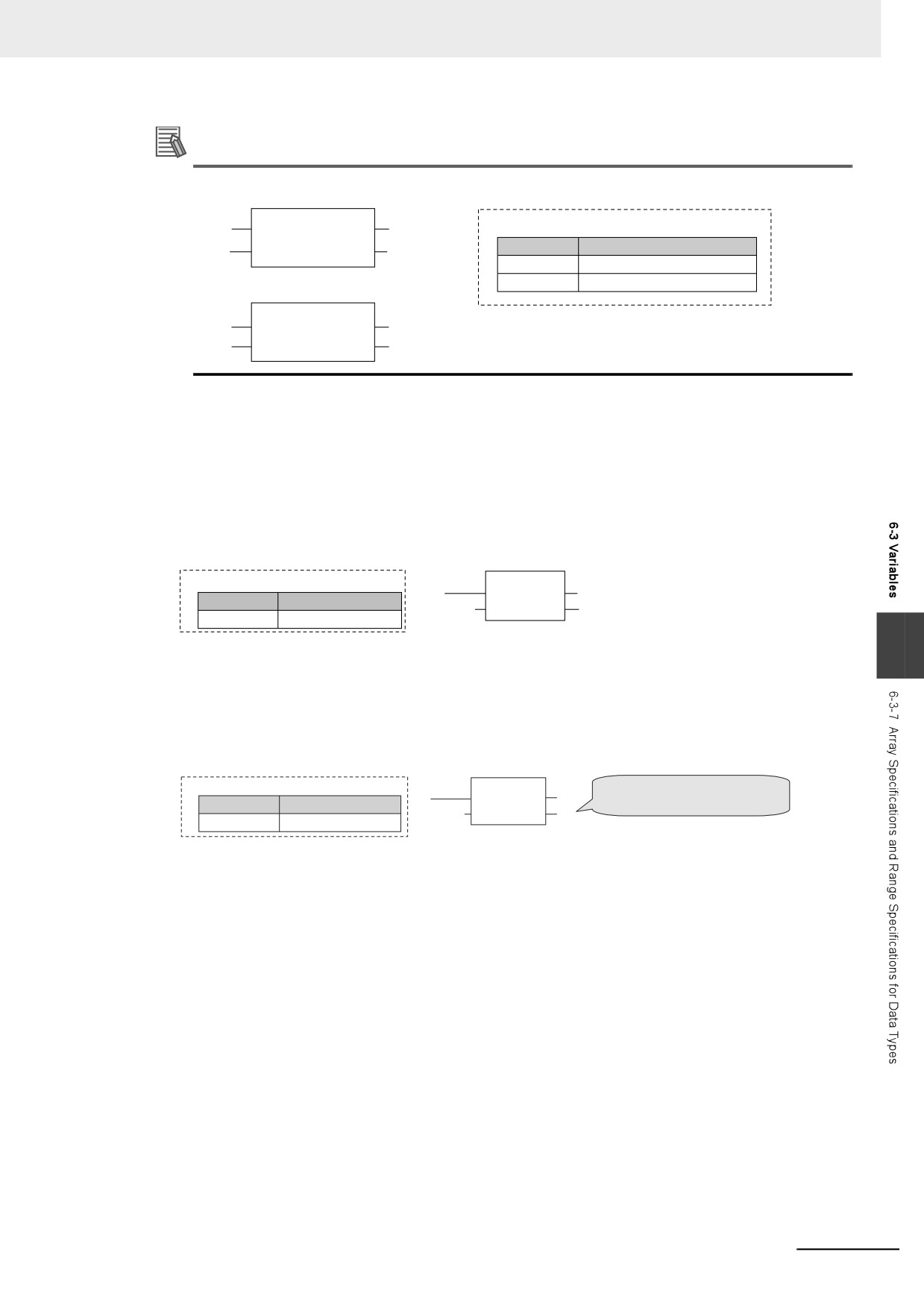
Additional Information
You cannot specify part of a multi-dimensional array as a parameter.
MOVE
×
EN
ENO
Variable Table
x[0]
y[0]
Variable name
Data type
In
Out
x
ARRAY [ 0..9 , 0..9 , 0..9 ]OF INT
y
ARRAY [ 0..9 , 0..9 , 0..9 ]OF INT
×
MOVE
EN
ENO
x[0,1]
y[0,1]
In
Out
z Array Protection
The following errors occur if you attempt to access an element that exceeds the number of elements
in an array.
When the Subscript Is a Constant
An error is displayed when you input the variable or when you check the program on the Sysmac
Studio.
Variable Table
MOVE
EN
ENO
Variable name
Data type
INT#255
In
Out
[11]
x
ARRAY [1..10] OF INT
6
When the Subscript Is a Variable
When an output parameter is assigned to an output variable, the Controller checks to see if the
number of elements was exceeded after it executes the instruction. When a subscript variable
exceeds the range of the elements of the array variable, an instruction error occurs. Even if this error
occurs, the value of ENO will be TRUE because internal processing of the instruction ends normally.
Variable Table
MOVE
If the value of variable i exceeds 10,
EN
ENO
an instruction error occurs.
Variable name
Data type
INT#255
In
Out
[i]
x
ARRAY [1..10] OF INT
6-55
6 Programming
Variable-length Array Specifications
You can use a variable-length array variable if you specify a single-byte asterisk (*) for the subscript
when you declare the array variable. The maximum number of elements, dimensions, and data types
that can be declared are the same as the specification of fixed-length array variables.
However, there are the restrictions on variable declaration and processing.
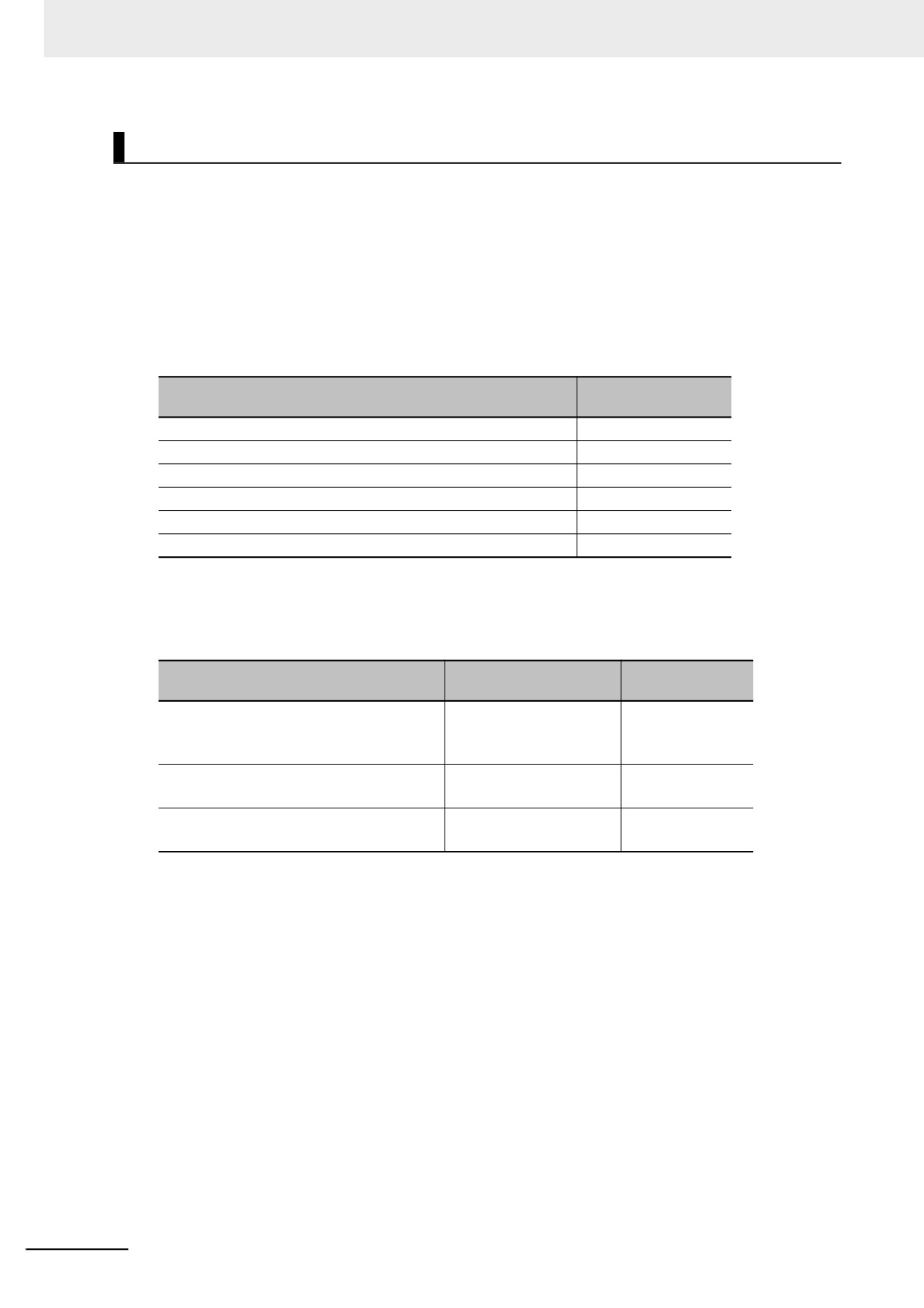
z
Restrictions on Variable Declaration
Only in-out variables for functions (FUN) and in-out variables for function blocks (FB) can be
declared as variable-length array variables. Other variables cannot be declared as variable-length
array variables.
Allowed or not
Array variable to declare
allowed
In-out variables for functions
Allowed.
In-out variables for function blocks
Allowed.
Input variables or output variables for functions
Not allowed.
Input variables/output variables for function blocks
Not allowed.
Internal variables, external variables, and global variables
Not allowed.
Members in structure variables/members in union variables
Not allowed.
When you declare an array variable with two or three dimensions as a variable-length array variable,
you need to specify a single-byte asterisk (*) for all dimensions. You cannot declare a variable in
which uses both variable-length dimension and fixed-length dimension.
Allowed or not
Array variable to declare
Specification example
allowed
Variable-length array specification for all
• ARRAY[*]
Allowed.
dimensions
• ARRAY[*, *]
• ARRAY[*, *, *]
Variable-length dimension and fixed-length
• ARRAY[*, 3..5]
Not allowed.
dimension are used
• ARRAY[*, *, 3..5]
Individual specification for first number or
• ARRAY[1..*]
Not allowed.
last number
• ARRAY[*..*]
z Restrictions on Processing
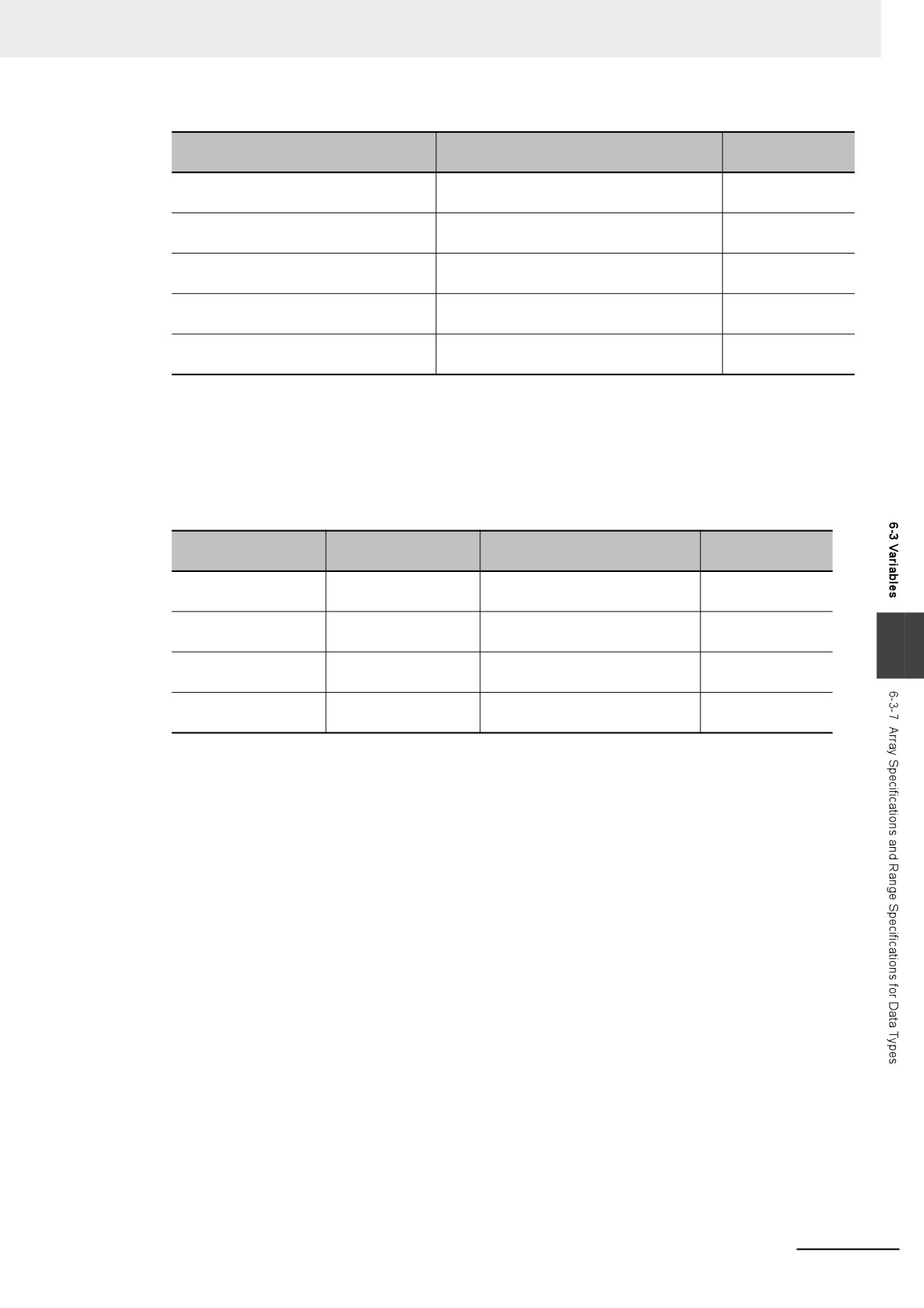
If an in-out variable for a function (FUN) and function block (FB) is a variable-length array variable,
an array variable that you can specify for the in-out parameter is only the one whose data type and
number of dimensions are the same as the in-out variable. You can use either a variable-length
array variable or fixed-length array variable as long as its data type and number of dimensions are
the same as the in-out variable. You cannot specify an array variable whose data type or number of
dimensions is different.
If an in-out variable for a function (FUN) and function block (FB) is a fixed-length array variable, you
cannot specify a variable-length array variable for the in-out parameter.
6-56
6 Programming
Example of in-out variable for func-
Allowed or not
Example of in-out parameter to specify
tion and function block
allowed
Variable-length array whose data type is
Variable-length array whose data type is INT
Allowed.
INT and dimension is 1
and dimension is 1
Variable-length array whose data type is
Fixed-length array whose data type is INT
Allowed.
INT and dimension is 1
and dimension is 1
Variable-length array whose data type is
Variable-length array whose data type is
Not allowed.
INT and dimension is 1
UINT and dimension is 1
Variable-length array whose data type is
Variable-length array whose data type is INT
Not allowed.
INT and dimension is 1
and dimension is 2
Fixed-length array whose data type is
Variable-length array
Not allowed.
INT and dimension is 1
When you write an assignment expression for the entire array in an ST, if you include a variable-
length array variable in either the left side or right side of the expression, a building error will occur.
Similarly, when you transfer the entire array with the MOVE instruction in a ladder diagram, if you
include a variable-length array variable in either the output parameters or input parameters, a build-
ing error will occur.
Left side
Right side
Allowed or not
Example of expression in ST *1
Output parameter
Input parameter
allowed
Variable-length array
Variable-length array
varlen_ary := varlen_ary;
Not allowed.
variable
variable
Variable-length array
Fixed-length array
varlen_ary := fixed_ary;
Not allowed.
variable
variable
6
Fixed-length array
Variable-length array
fixed_ary := varlen_ary;
Not allowed.
variable
variable
Fixed-length array
Fixed-length array
fixed_ary := fixed_ary;
Allowed.
variable
variable
*1 varlen_ary shows a variable-length array variable, and fixed_ary shows a fixed-length array variable.
z First and Last Element Numbers of Variable-length Array Variable
When the user program is executed, the first and last element numbers are determined.
You can obtain the first and last numbers of each dimension of a variable-length array variable with
the LOWER_BOUND and UPPER_BOUND instructions.
Refer to the NJ/NX-series Instructions Reference Manual (Cat. No. W502) for the details on the
LOWER_BOUND and UPPER_BOUND instructions.
6-57
6 Programming
Range Specifications ((..))
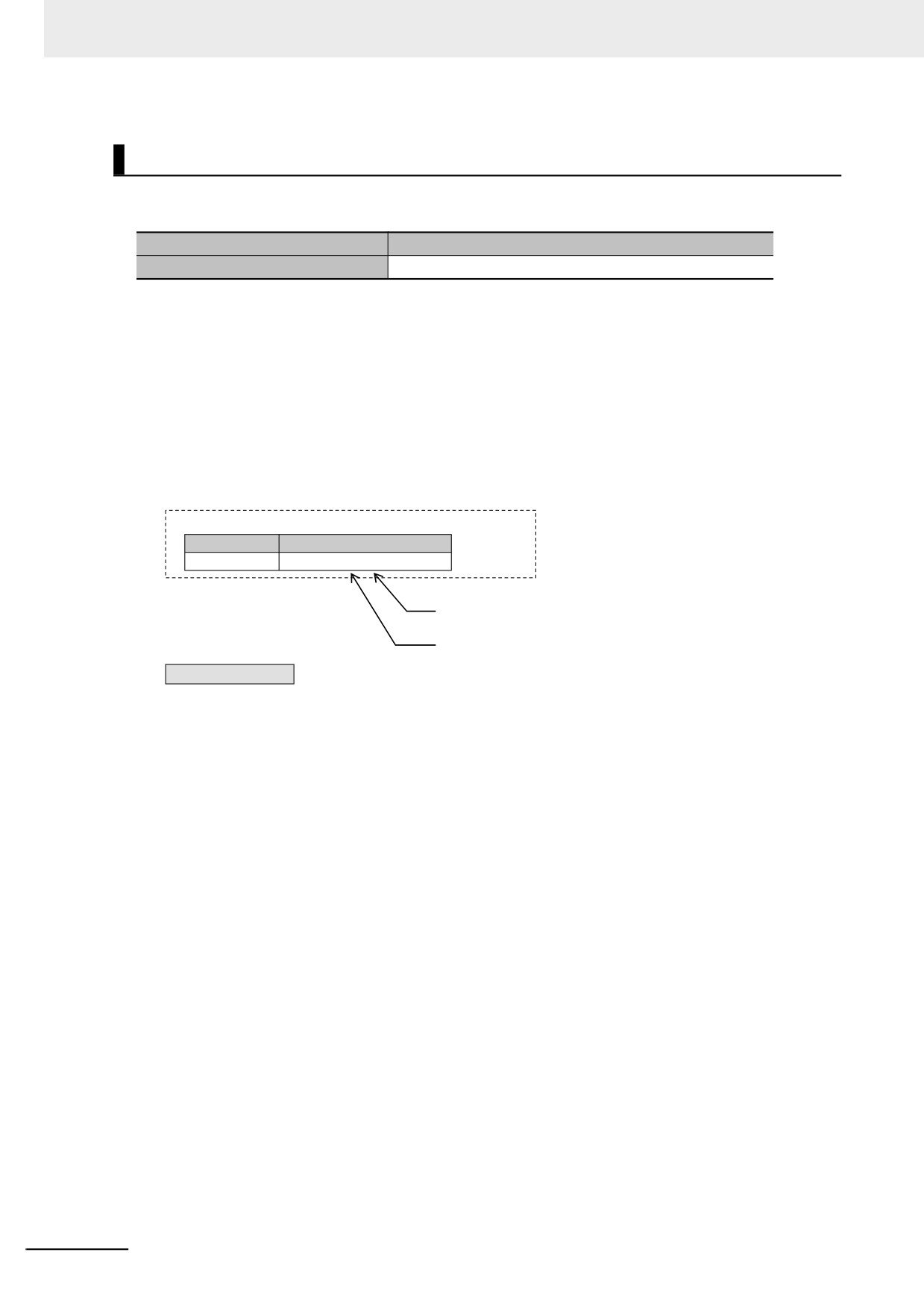
Use the range specification to restrict the values of the following integer variables to specific ranges of
values.
Classification
Data type
Integers
SINT, INT, DINT, LINT, USINT, UINT, UDINT, and ULINT
You can check to make sure that the entered value is within the allowed range in the following cases.
• When you specify an initial value for a variable
• When you write a value to a variable with CIP message communications
z Making a Range Specification
Input the start point and end point after the data type name in the Data type Column in the variable
table.
Start point: The minimum value that you can store in the variable.
End point: The maximum value that you can store in the variable.
Example:
Variable Table
Variable name
Data type
abc
INT (0 ..100)
The end point of the range specification
The start point of the range specification
abc
Range specification: Minimum 0 to maximum 100
6-58
6 Programming
z
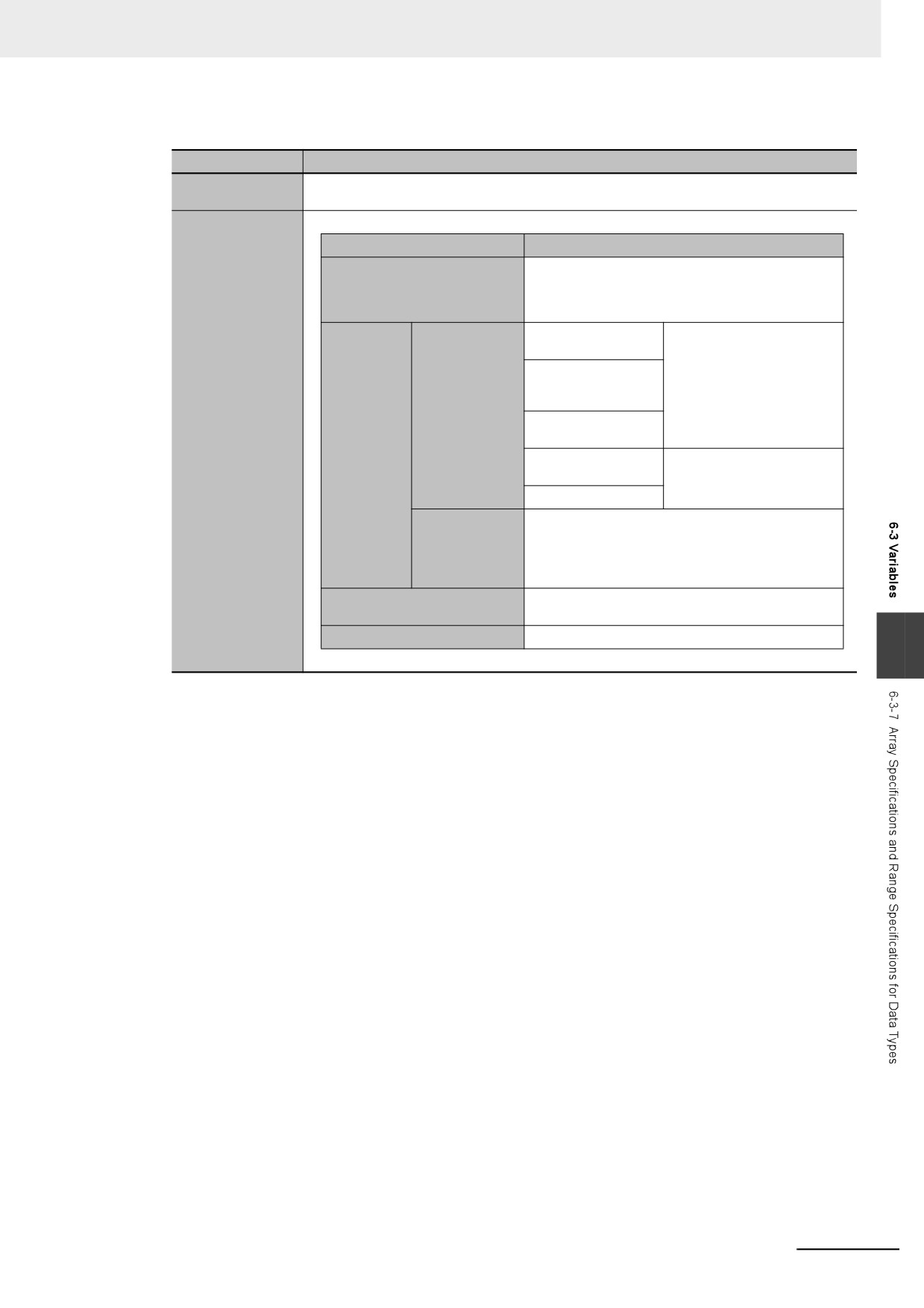
Specifications of Range Specifications
Item
Specification
Data types that
Integer type
you can specify
Case
Operation
An error does not occur and the value is written.
The Controller does not perform a range check
User program
when the value of a variable changes due to the
execution of an instruction.
When the value is
A command error occurs.
an integer
For an element of
an integer array
Write from the
variable
Sysmac Studio
Operation for
or a CIP mes-
For a member of an
attempts to write
sage
integer structure
out-of-range
Communi-
value
cations
For an integer struc-
A command error does not
ture
occur and the value is writ-
ten.
For an integer array
Tag data links
An error occurs if you attempt to write to a single
(both via built-
member that specifies a range. An error does not
in EtherNet/IP
occur if you attempt to write to a structure that
ports and Eth-
contains a member for which a range is specified.
erNet/IP Units)
Input refreshing from slaves
An error does not occur and the value is written.
and Units
Forced refreshing values
An error does not occur and the value is written.
6
6-59
6 Programming
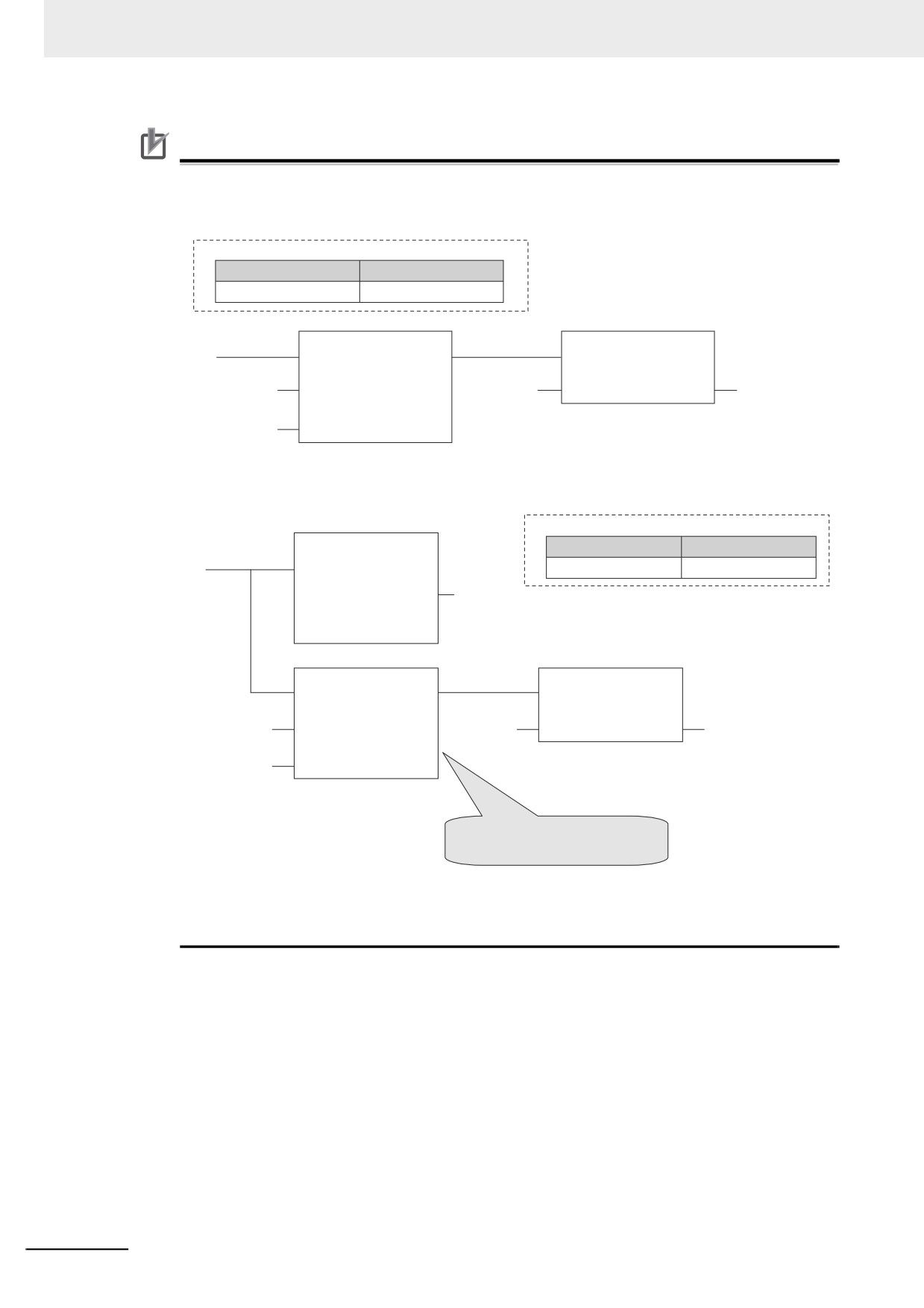
Precautions for Correct Use
Variables with range specifications are not checked for changes in variable values that result
from the execution of instructions in the user program. To check the range of values for a vari-
able that are set from execution of the user program, use instructions that perform range checks.
Variable Table
Variable name
Data type
Variable x
INT(10 .. 100)
ChkRange
MOVE
EN
EN
ENO
Variable x
In
Variable i
In
Out
Variable x
Variable i
Val
You cannot perform any checks beforehand if you set data with arithmetic processing results. In
this case, check the range of values after arithmetic processing (e.g., ADD).
Variable Table
ADD
Variable name
Data type
EN
ENO
Variable A
INT(10 .. 100)
In1
Variable tmp
In2
ChkRange
MOVE
EN
EN
ENO
Variable tmp
In
Variable tmp
In
Out
Variable A
Variable A
Val
If the results of the arithmetic
processing are within the range, set
variable A to the value.
Make sure that the initial value is within the range specified for the Range Specification. If the ini-
tial value field on the Sysmac Studio is left blank, an initial value of 0 is used. This applies even if
a range that does not include 0 is set for a Range Specification.
6-60