Omron IPC Machine Controller Industrial Panel PC / Industrial Box PC. Software User’s Manual (Industrial PC Platform NY-series) - page 7
5 Designing Tasks
Performing Motion Control with Motion Control Instructions
Motion control instructions access the Servo Drives and encoder input slaves to which axes are
assigned.
For NY-series Controllers, motion control instructions can be used in the primary periodic task and in a
priority-16 periodic task.
In either case, the motion control instructions are processed in the motion control processing (MC) sec-
tion of the primary periodic task.
The I/O response times that include EtherCAT communications times are given below.
z
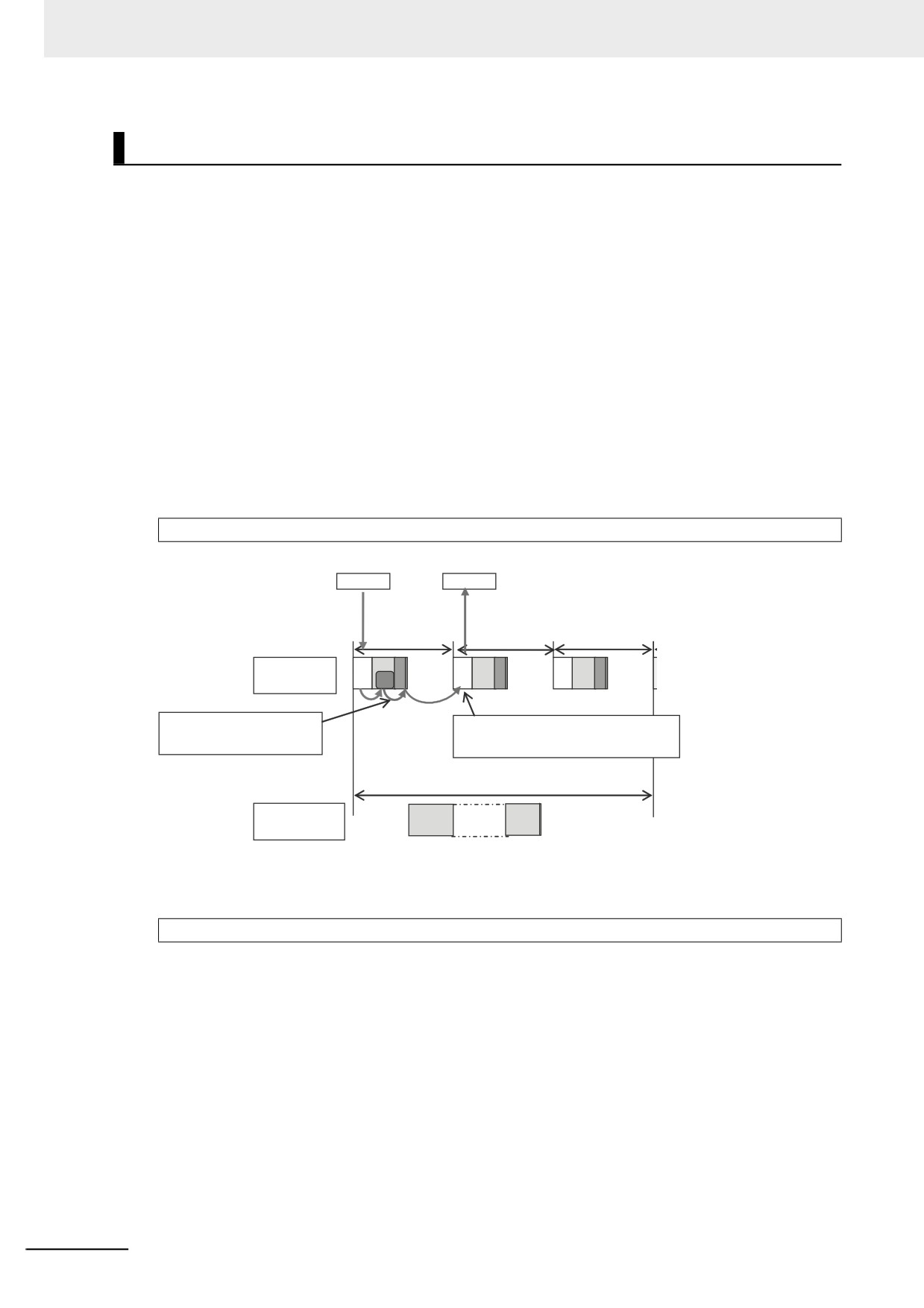
Programming Motion Control Instructions in the Primary Periodic Task
The motion control instructions are processed in the next motion control processing (MC) section of
the primary periodic task. The results of processing are output via EtherCAT communications to the
Servo Drive to which the axis is assigned during the I/O refresh period in the next primary periodic
task.
The Controller makes a response in the following I/O response time.
I/O response time = Primary period (= process data communications cycle)
Slave A
Servo A
IN
Execution command
Process data
communications cycle
= Primary period (t)
Primary period (t)
IO
UPG MC
IO
UPG MC
IO
UPG MC
Primary periodic
task
FB
Motion control
Processing is performed in the
instructions
Commands to Servo A are sent via
motion control processing (MC)
executed.
EtherCAT communications when I/O is
section in the same primary period.
refreshed in the next primary period.
Task period 1 (e.g., t × 3)
Priority-16
UPG
periodic task
Note: The above diagram shows only one input and one output.
However, the I/O response time may be as follows depending on the timing of the input from the
slave.
Maximum I/O response time = Primary period (= process data communications cycle) × 2
5-64
5 Designing Tasks
z
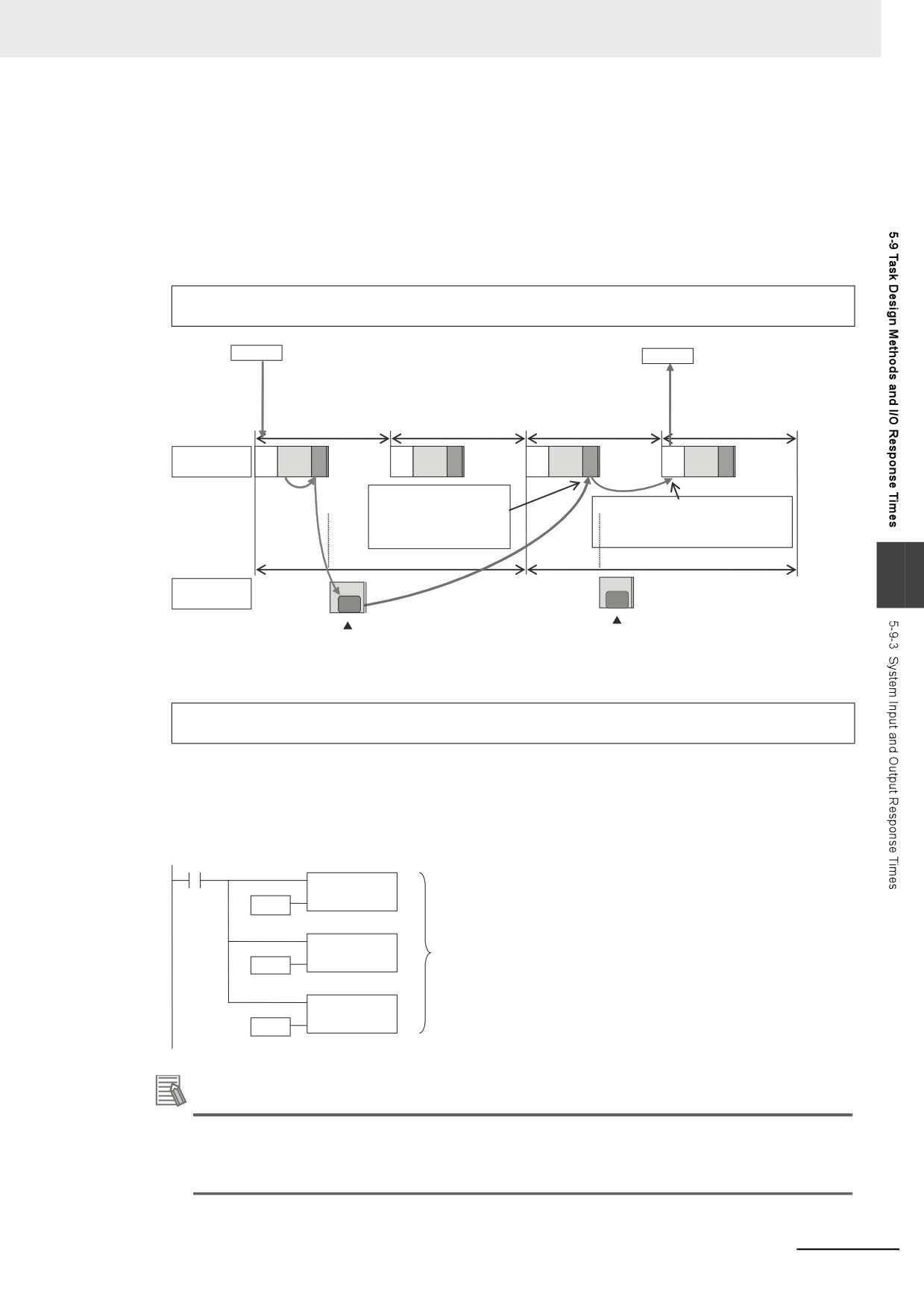
Programming Motion Control Instructions in the Priority-16 Periodic Task
The motion control instructions are processed in the next motion control processing (MC) section of
the primary periodic task after the priority-16 periodic task. The results of processing are output via
EtherCAT communications to the Servo Drive to which the axis is assigned during the I/O refresh
period in the next primary periodic task.
The Controller responds in the following I/O response time regardless of the execution timing of the
motion control instructions.
Minimum I/O response time = Priority-16 periodic task period +
Primary period (= process data communications cycle)
Slave A
Servo A
IN
Execution command
Process data
communications cycle
= Primary period (t)
Primary
IO
UPG
MC
IO
UPG
MC
IO
UPG
MC
IO
UPG
MC
periodic task
Processing is performed in
the motion control processing
Commands to Servo A are sent via
(MC) section of the next
EtherCAT communications when I/O
primary periodic task.
is refreshed in the next primary period.
Task period (e.g., t × 2)
Task period (e.g., t × 2)
5
Priority-16
UPG
UPG
periodic task
FB
FB
Motion control instructions executed.
Motion control instructions executed.
Note: The above diagram shows only one input and one output.
However, the response time may be as follows depending on the timing of the input from the slave.
Maximum I/O response time = Priority-16 periodic task period +
Primary period (= process data communications cycle) x 2
z Simultaneous Execution of More Than One Axis
If more than one axis is controlled by the programs in the same task, they can be started at the
same time.
Motion control
instructions
Axis A
Motion control
Start commands
are output at the
instructions
Axis B
same time.
Motion control
Axis C
instructions
Additional Information
You can access the values of Axis Variables in the tasks other than those for axis control.
For detailed usage and precautions, refer to the NY-series Industrial Panel PC / Industrial Box
PC Motion Control User's Manual (Cat. No. W559).
5-65
Programming
This section describes programming, including the programming languages, and the
variables and instructions that are used in programming.
6-1
Overview of Programming Procedures
6-3
6-2
POUs (Program Organization Units)
6-5
6-2-1
What Are POUs?
6-5
6-2-2
Overview of the Three Types of POUs
6-6
6
6-2-3
Differences between Programs, Functions, and Function Blocks
6-7
6-2-4
Details on Programs
6-7
6-2-5
Details on Function Blocks
6-8
6-2-6
Details on Functions
6-17
6-2-7
Operation That Applies to Both Functions and Function Blocks
6-22
6-2-8
POU Restrictions
6-24
6-3
Variables
6-27
6-3-1
Variables
6-27
6-3-2
Types of Variables
6-27
6-3-3
Types of User-defined Variables in Respect to POUs
6-27
6-3-4
Attributes of Variables
6-28
6-3-5
Data Types
6-30
6-3-6
Derivative Data Types
6-41
6-3-7
Array Specifications and Range Specifications for Data Types
6-51
6-3-8
Variable Attributes
6-61
6-3-9
Changes to Variables for Status Changes
6-68
6-3-10
Function Block Instances
6-83
6-3-11
Monitoring Variable Values
6-83
6-3-12
Restrictions on Variable Names and Other Program-related Names
6-84
6-4
Constants (Literals)
6-86
6-4-1
Constants
6-86
6-4-2
Notation for Different Data Types
6-86
6-5
Programming Languages
6-91
6-5-1
Programming Languages
6-91
6-5-2
Ladder Diagram Language
6-91
6-5-3
Structured Text Language
6-97
6-1
6 Programming
6-6
Instructions
6-134
6-6-1
Instructions
6-134
6-6-2
Basic Understanding of Instructions
6-134
6-6-3
Instruction Errors
6-137
6-7
Namespaces
6-142
6-7-1
Namespaces
6-142
6-7-2
Namespace Specifications
6-143
6-7-3
Procedure for Using Namespaces
6-146
6-8
Libraries
6-147
6-8-1
Introduction to Libraries
6-147
6-8-2
Specifications of Libraries
6-148
6-8-3
Library Object Specifications
6-149
6-8-4
Procedure to Use Libraries
6-150
6-9
Programming Precautions
6-151
6-9-1
Array Specifications for Input Variables, Output Variables, In-Out
Variables
6-151
6-9-2
Structure Variables for Input Variables, Output Variables, In-Out
Variables
6-151
6-9-3
Master Control
6-152
6-2
6 Programming
6-1
Overview of Programming
Procedures
This section provides an overview of programming procedures.
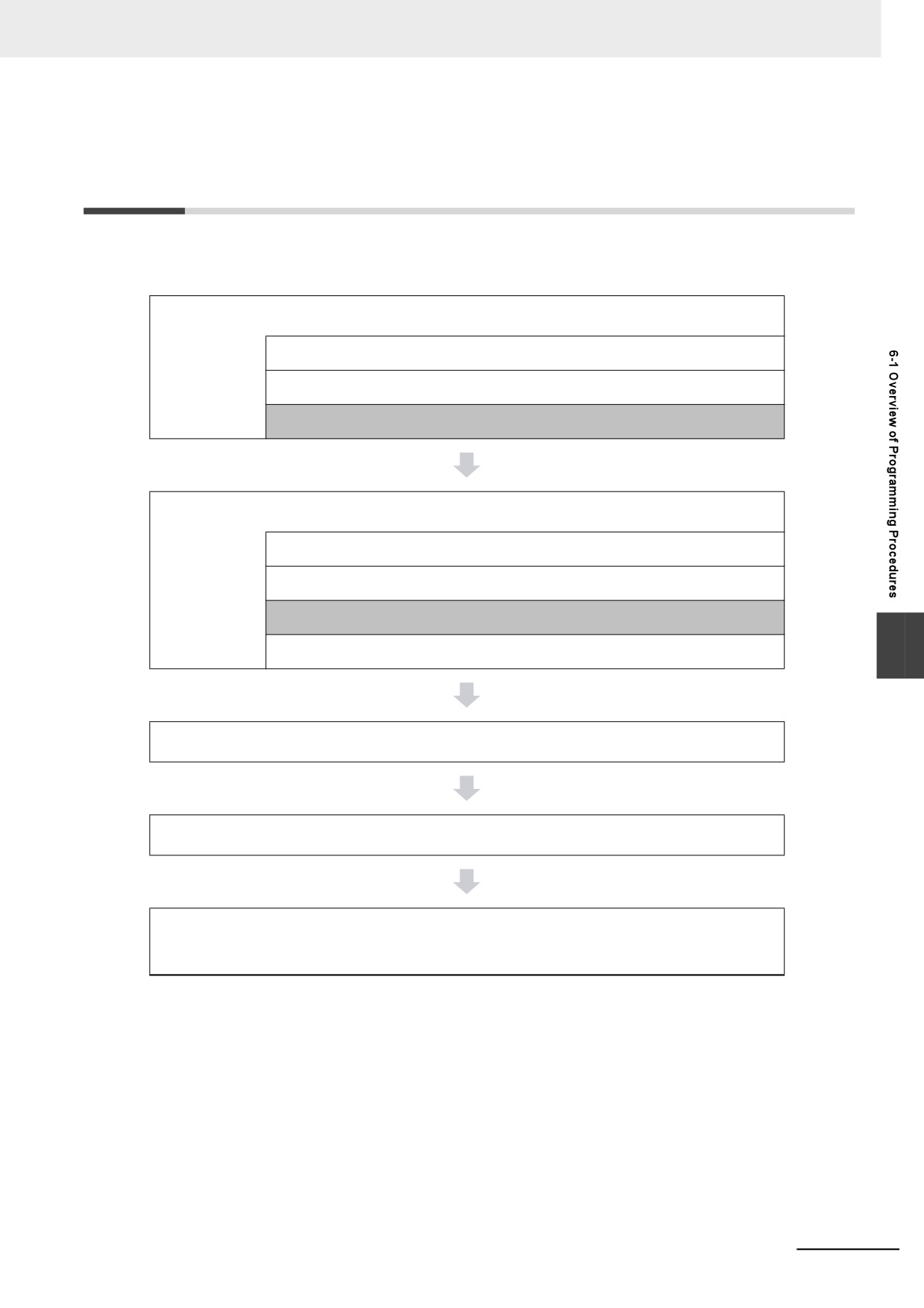
The shaded steps in the overall procedure that is shown below are related to programming.
Step 1. Software Design
Step 1-1 Designing I/O and Processing
Step 1-2 Designing Tasks
Step 1-3 Designing Programs
Step 2. Software Setups and Programming
Step 2-1 Slave and Unit Configurations
Step 2-2 Controller Setup
Step 2-3 Programming
6
Step 2-4 Offline Debugging
Step 3. Mounting and Setting Hardware
Step 4. Wiring
Step 5. Checking Operation and Starting Operation on the
Actual System
Refer to 1-4 Overall Operating Procedure for the NY-series Controller for details.
6-3
6 Programming
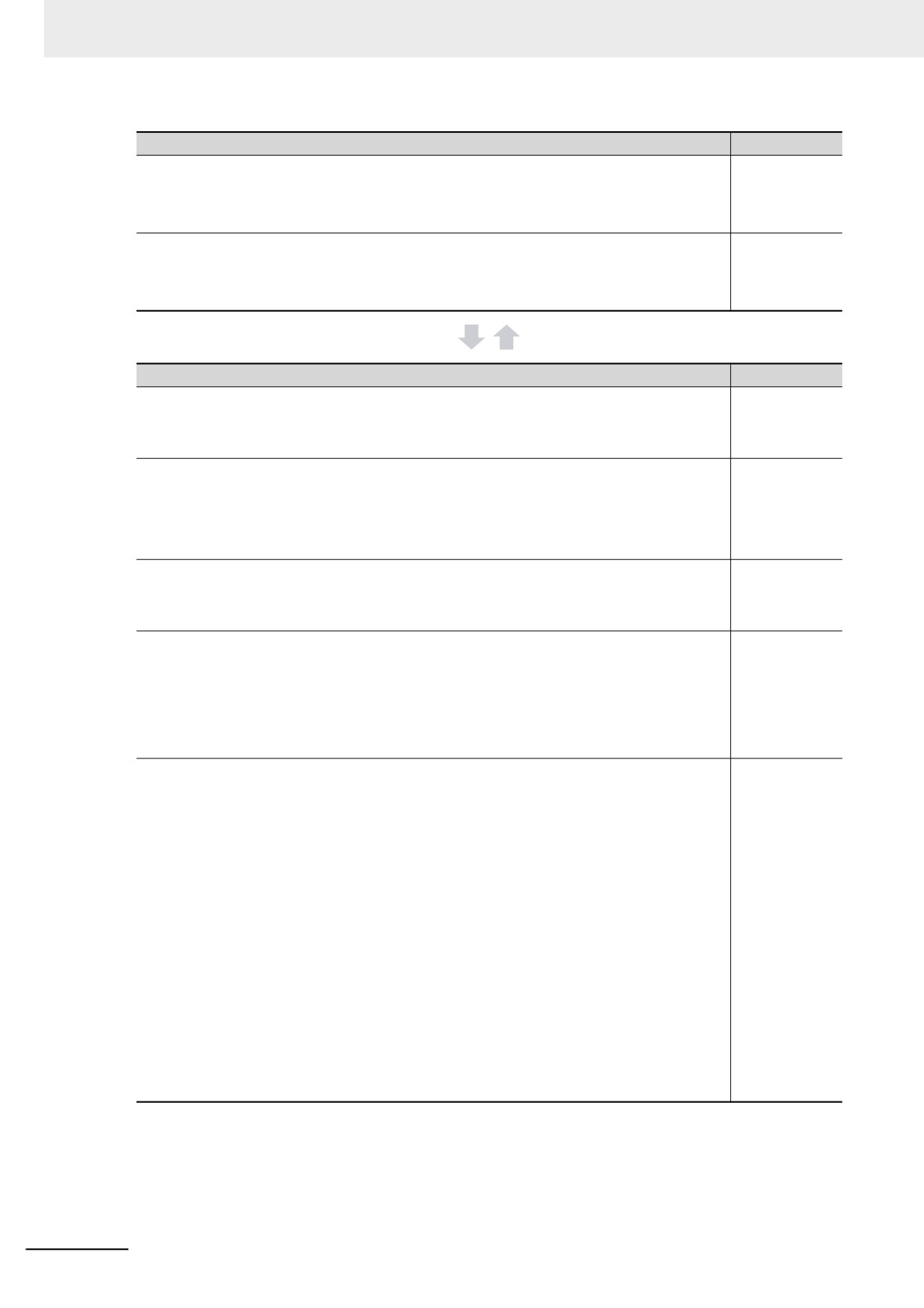
POU (Program Organization Unit) Design
Reference
z Determine which processes to put into which POUs and design
6-2 POUs (Pro-
the POUs.
gram Organiza-
tion Units)
Note Functions cannot contain function block instructions or function blocks.
z Determine which languages, such as ladder diagrams, inline
6-5 Program-
ST, and ST, to use to create each process.
ming Lan-
guages
Note Inline ST is structured text that is written as an element of a ladder diagram.
Variable Design
Reference
z Design the user-defined variables that you need to create.
6-3-1 Variables
6-3-2 Types of
Variables
z Separate variables into those that you use in more than one
6-3-3 Types of
POU (global variables) and variables that you use in only
User-defined
Variables in
specific POUs (local variables).
Respect to
POUs
z Determine if you need to automatically generate the variable
3-3 I/O Ports
names for the device variables that you use to access slaves
and Device
Variables
and Units or if you need to define them yourself.
z Design the attributes for the variables.
6-3-4 Attributes
of Variables
Variable Name, Data Type, AT Specification, Initial Value, Retain, Constant, and Network
Publish
6-3-5 Data
Types
Decide the data types of your variables (including array specifications, range specifications,
structures, and enumerations).
6-3-6 Deriva-
tive Data Types
z Keep the following precautions in mind when you design
6-3-4 Attributes
variables.
of Variables
6-3-5 Data
•
Retention:
Types
Set the Retain attributes to determine the values that are used for variables when the power
supply is turned ON or when the operating mode changes.
6-3-6 Deriva-
tive Data Types
•
Structures:
When a structure is used for a variable in an instruction, design the program to use the same
structure data type for the input parameter, output parameter, or in-out parameter.
Example: Communications Instructions
•
Array Specifications:
When an array variable is used for the variable for an instruction, design the program to use
an array variable for the input parameter, output parameter, or in-out parameter.
Examples: Shift Instructions, Stack Instructions, and Table Instructions
•
AT Specifications:
Use AT specifications for the variables used for input parameters to certain instructions.
Example: User I/O allocations
•
Network Publishing:
Design the variables for EtherNet/IP tag data links.
6-4
6 Programming
6-2
POUs (Program Organization Units)
The user program that runs on an NY-series Controller is made from a combination of POUs (program
organization units).
This section describes the configuration and specifications of POUs.
Refer to the Sysmac Studio Version 1 Operation Manual (Cat. No. W504) for details on creating POUs
in the Sysmac Studio.
6-2-1
What Are POUs?
A POU (program organization unit) is a unit that is defined in the IEC 61131-3 user program execution
model. A POU includes a local variable table and an algorithm (i.e., a series of code or logic). It is the
basic unit used to build the user program.
You combine POUs to build a complete user program.
There are three types of POUs, as described below.
• Programs
A program corresponds to a main routine. It is the main type of POU that is used for algorithms.
You can place any instruction, function, or function block in the algorithm of a program.
• Function Blocks (FBs)
A function block can output different values even with the same inputs. Function blocks are executed
when they are called from a program or another function block.
• Functions (FUNs)
A function always outputs the same values for the same inputs. Functions are executed when they
are called from a program, another function, or a function block.
6
The POUs consists of a combination of these three types of POUs. You can create many POUs.
You assign the programs to tasks to execute them.
6-5
6 Programming
6-2-2
Overview of the Three Types of POUs
Programs
z Executing Programs and Execution Conditions
• You execute a task to execute the programs that are assigned to that task.
• Programs are always executed.
z Notation
• The POUs must include at least one program. You can assign up to 128 programs to a single
task.
Function Blocks (FBs)
z Executing Function Blocks and Execution Conditions
• You can call function blocks from programs or other function blocks to execute them.
• Function blocks are always executed.
• If you want a function block to execute only when a condition is met, you must define an input vari-
able that sets the execution condition.
z Notation
• You can use any instruction, user-defined function, or user-defined function block in the algorithm
of a function block.
• You can retain the values of internal variables. Therefore, you can retain status, such as for timers
and counters.
• There are both user-defined and system-defined function blocks.
User-defined function blocks are called user-defined function blocks. System-defined function
blocks are sometimes called FB instructions.
For details on function blocks, refer to 6-2-5 Details on Function Blocks.
Functions
z Executing Functions and Execution Conditions
• You can call functions from programs, other functions, or function blocks to execute them.
• The EN input variable specifies the execution condition. A function is executed only once each
time EN changes to TRUE.
z Notation
• You cannot use FB instructions or user-defined function blocks in algorithms.
• The values of internal variables are not retained. Therefore, the output value remains constant if
the input values are the same.
• There are both user-defined and system-defined function blocks.
User-defined functions are called user-defined functions. System-defined functions are some-
times called FUN instructions.
For details on functions, refer to 6-2-6 Details on Functions.
6-6
6 Programming
6-2-3
Differences between Programs, Functions, and Function Blocks
Item
POU type
Programs
Function blocks
Functions
Executed upon execu-
Called from a program
Called from a pro-
Execution method
tion of assigned task.
or another function
gram, function, or
block.
function block.
Any instructions
Supported.
Supported.
Not supported.
User-defined functions
Supported.
Supported.
Supported.
Algorithm
User-defined function
Supported.
Supported.
Not supported.
blocks
Executed each period.
Executed each period.
Specify the execution
condition with the EN
Specify the execution
Execution condition
input.
condition with an input
variable.
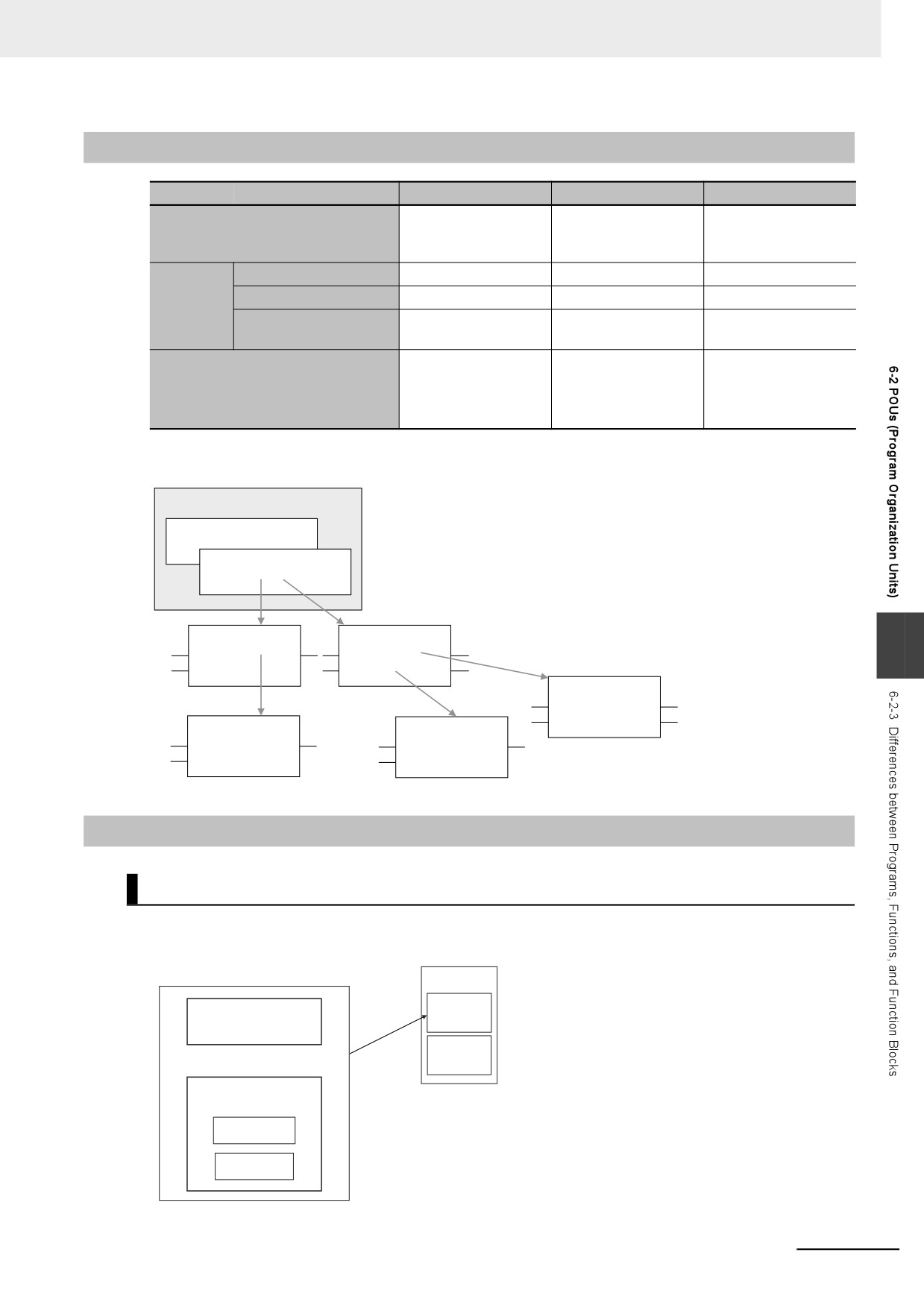
The hierarchical relationships between programs, functions, and function blocks are shown in the fol-
lowing figure.
Task
Program 1
Program 2
Functions
Function blocks
6
Function blocks
Functions
Functions
6-2-4
Details on Programs
Program Structure
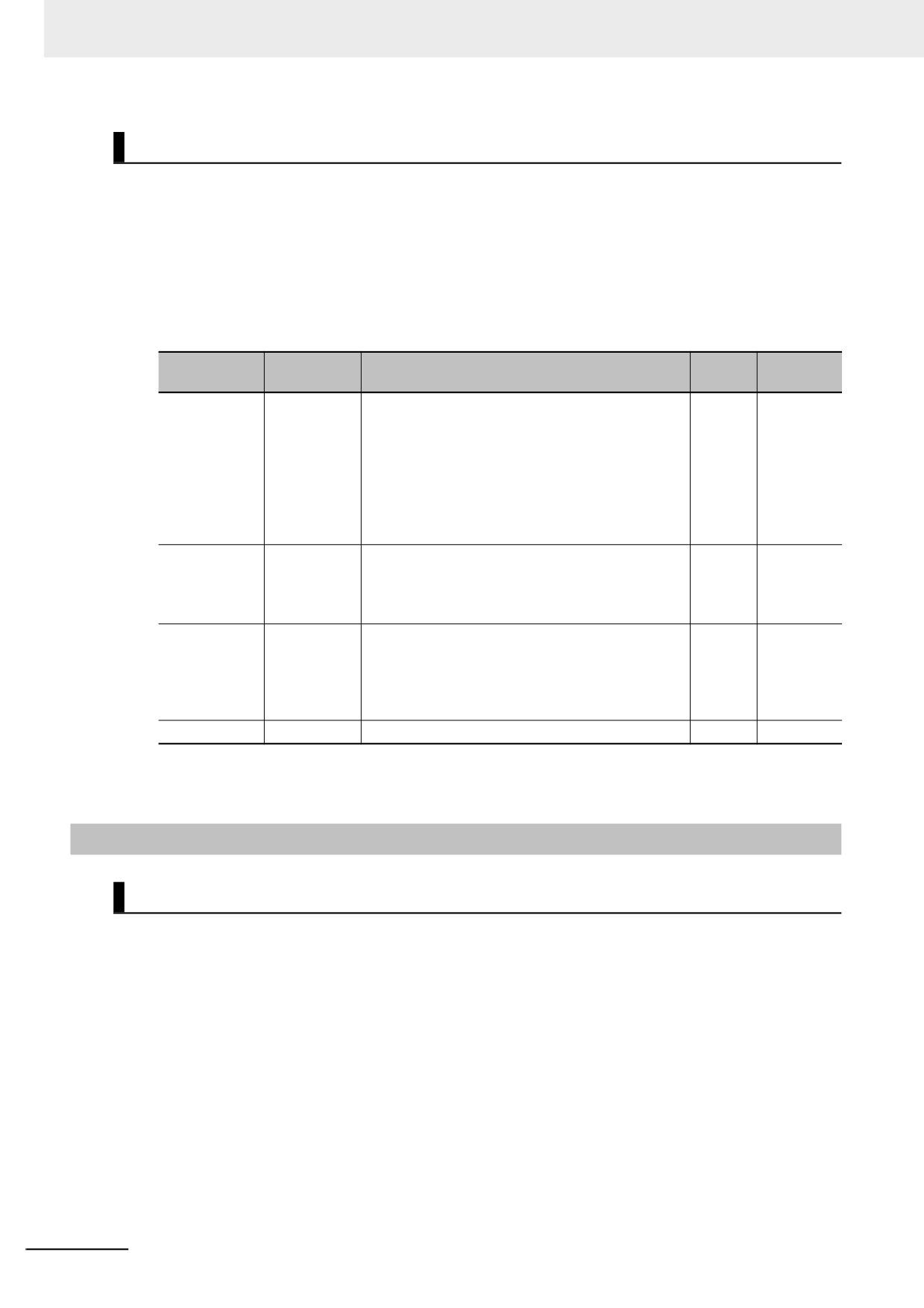
Programs consist of a local variable table and an algorithm.
You can use any function or function block in the algorithm of a program.
Program
Task
Program
Local variable table
Assigned.
Program
Algorithm
FUN
FB
You cannot call programs from other POUs.
6-7
6 Programming
Program Execution Conditions
Programs are executed when the task they are assigned to is executed.
z
Order of Execution
You can set the order of execution of all programs in a task. You specify this order under Task
Settings - Program Assignment Settings in the Sysmac Studio.
z
Related System-defined Variables
All programs have the following system-defined variables in the local variables.
Variable
Data
Meaning
Function
Read/write
name
type
P_First_Run-
First RUN
This flag is TRUE for only one task period after the
BOOL
Read
Mode
Period Flag
operating mode of the CPU Unit is changed from
PROGRAM mode to RUN mode if execution of the
program is in progress.
This flag remains FALSE if execution of the pro-
gram is not in progress.
Use this flag to perform initial processing when the
Controller begins operation.
P_First_Run
First Program
This flag is TRUE for one task period after execu-
BOOL
R
Period Flag
tion of the program starts.*1
Use this flag to perform initial processing when
execution of a program starts.
P_PRGER
Instruction
This flag changes to and remains TRUE when an
BOOL
Read/write
Error Flag
instruction error occurs in the program or in a func-
tion/function block called from the program.
After this flag changes to TRUE, it stays TRUE until
the user program changes it back to FALSE.
P_CY
Carry Flag
This flag is updated by some instructions.
BOOL
Read
*1
To enable or disable the program, use the PrgStart or PrgStop instruction. You can make setting for the Prg-
Start instruction so that it executes the program without changing P_First_Run to TRUE.
6-2-5
Details on Function Blocks
Procedure to Create Function Blocks
A function block consists of a function block definition that is made in advance and instances that are
used in the actual programs. Create function blocks in the following order.
1 Create the function block definition.
Create the algorithm.
2 Placing an Instance of the Function Block Definition in a Program
Call the function block definition from a program or another function block.
You can call the same function block definition from more than one program or function block.
After you place an instance of a function block definition in a program or in another function
block, you can manipulate and execute it as an independent entity.
6-8
6 Programming
Structure of Function Blocks
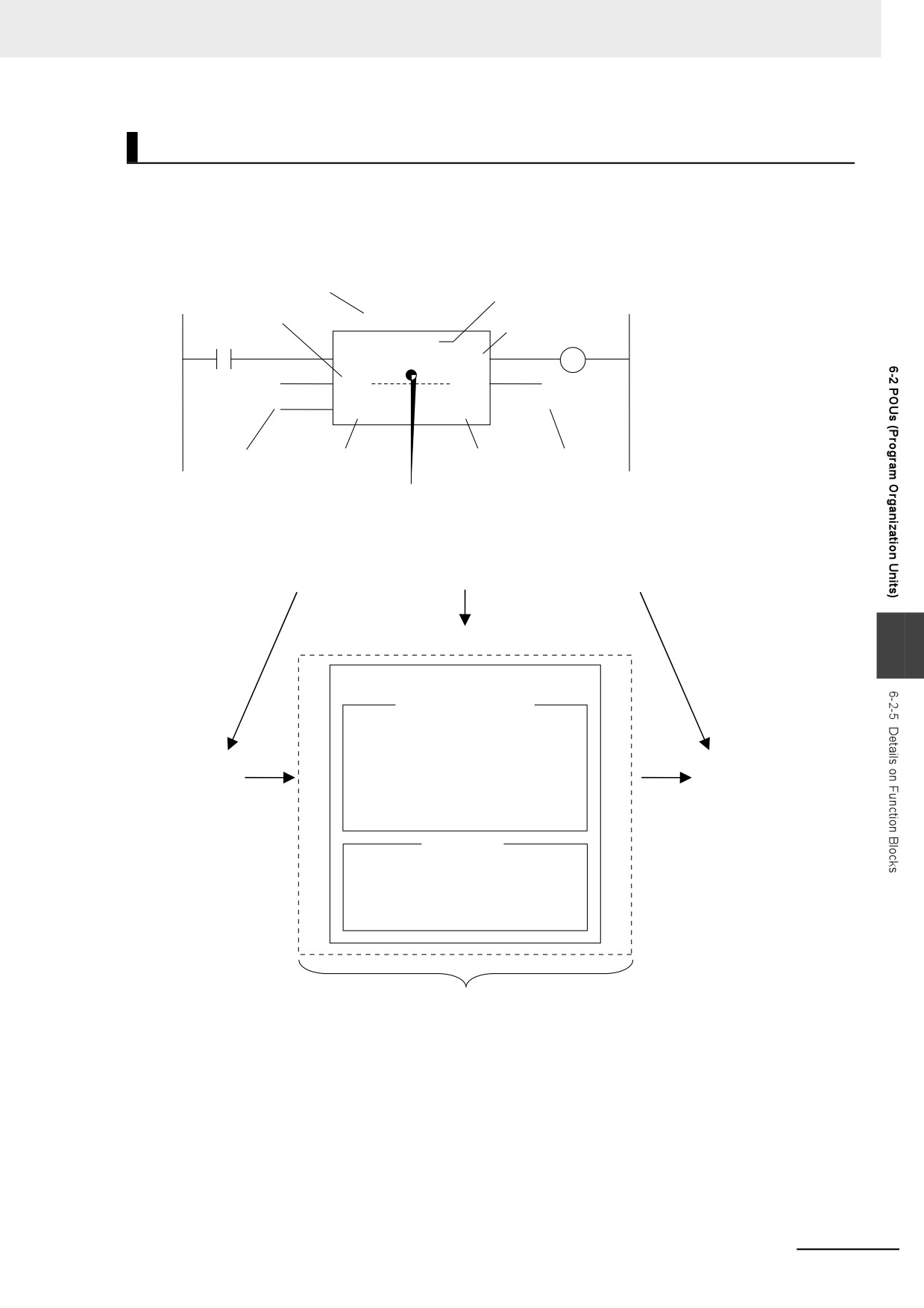
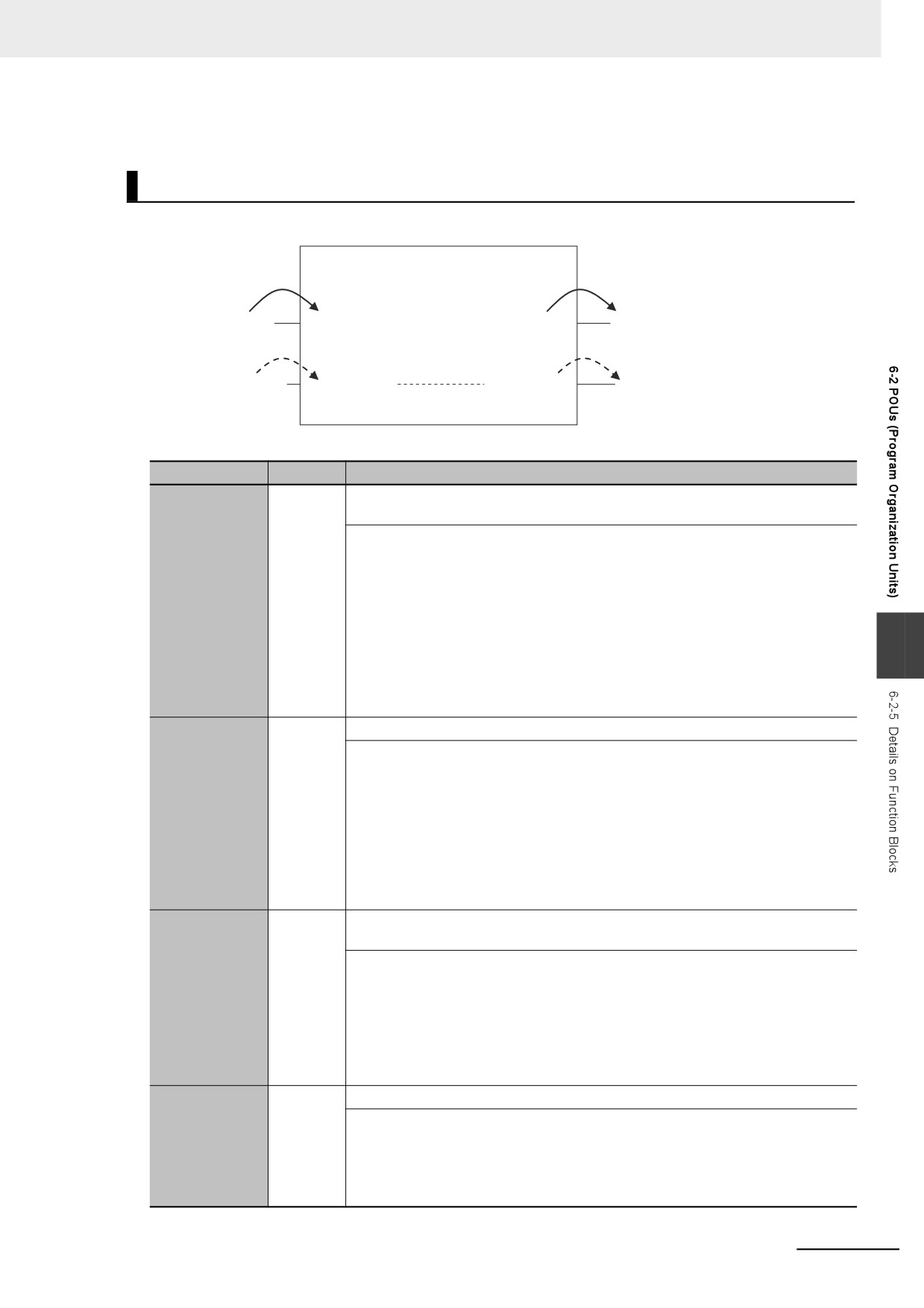
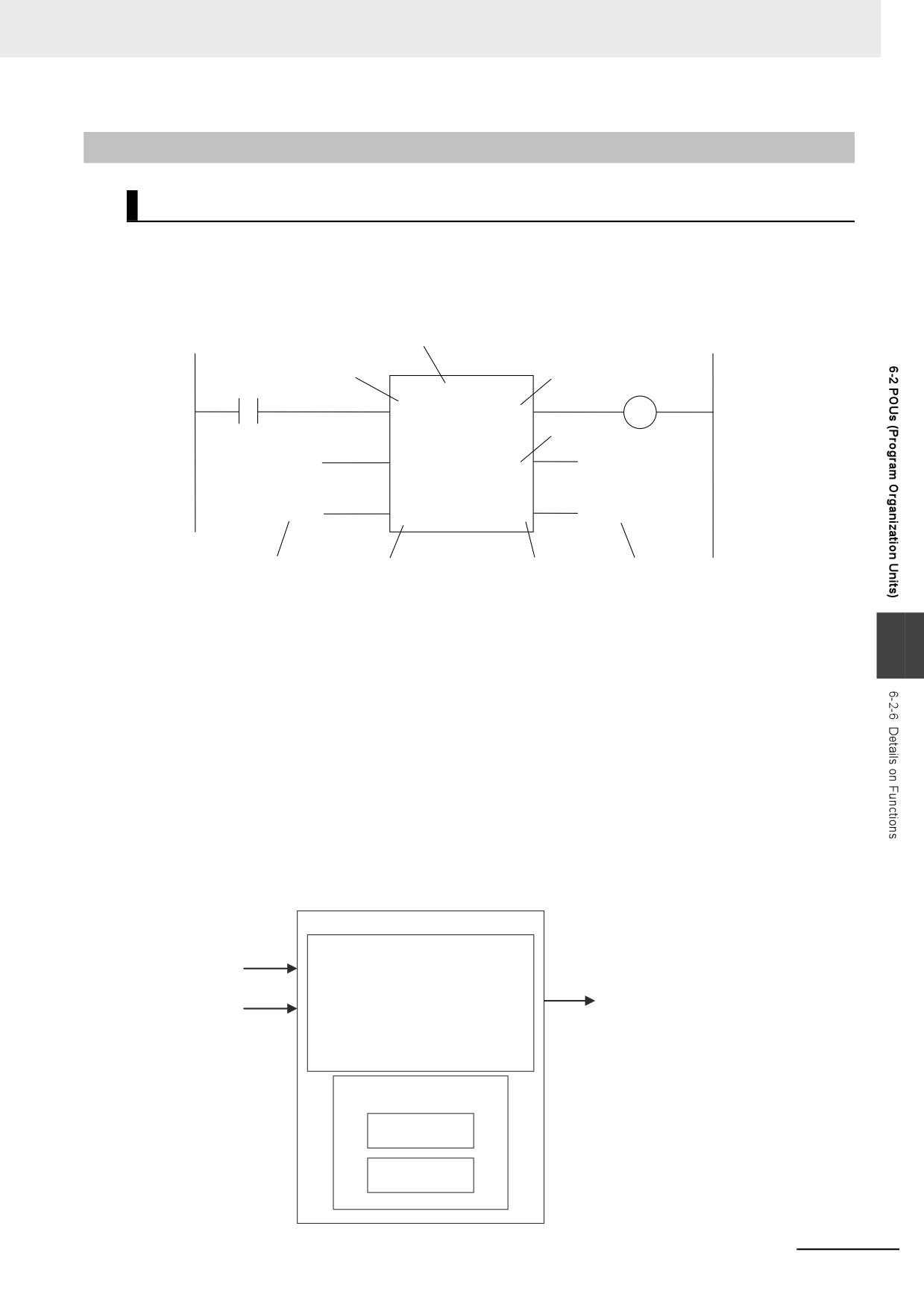
In a ladder diagram, function blocks are represented as rectangular boxes as shown below. Refer to
Calling Function Blocks from ST on page 6-10 for details about how to express function blocks in ST.
Function blocks consist of the following parts.
•
Function Block in Ladder Diagram:
Instance name
Function block name or instruction name
In-out variable
MyFB_instance
Output variable
TRIG
MyFB
OUT
In
Q
InQ
InQ
SET
RESULT
SetValue
Result
Input parameter
Input variable
Output variable
Output parameter
Algorithm
•
Function Block Settings
When you create an instance of a function block definition, make the following settings.
Settings of a function block instance in a program
Instance name
6
Function block name
Local Variable Table
Input parameters
Output parameters
Input
In-out
Output
variables
variables
variables
Internal variables
Algorithm
• Written as a ladder diagram or in ST.
• You can use any instructions,
user-defined functions, and user-
defined function blocks.
Created in the Function Definition
z Function Block Name or Instruction Name
This is the function block name or instruction name assigned in the function block definition when
the function block is created.
z Instance Name
You give an instance name to a function block instance in a program to enable managing it. You
specify an instance name when you call a function block definition from a program or another func-
tion block.
6-9
6 Programming
z
Algorithm
You can code the algorithm either as a ladder diagram or in ST. You can use any instruction, user-
defined function, or user-defined function block in the algorithm.
z
Local Variable Table
The local variable table is used to define input variables, output variables, in-out variables, internal
variables, and external variables.
Refer to Variable Designations for Function Blocks on page 6-11 for details.
z
Parameters
Input Parameters to Input Variables
An input parameter passes a value to an input variable in a function block when function block exe-
cution begins. An input parameter can be either a variable or a constant.
Output Parameters from Output Variables
An output parameter receives a value from an output variable in a function block when function
block execution is completed. A variable is given as the parameter.
In-Out Parameters Shared between In-Out Variables
The value of the in-out parameter changes within the function block. The same variable is used for
both the input and output.
Additional Information
You can omit input and output parameters. Refer to information on operation when parameters
are omitted in Operation When Parameters Are Omitted on page 6-23 for details.
Calling Function Blocks from ST
The following example shows how to call function blocks from ST.
instance_name(input_variable_1:=input_parameter_1, ... input_variable_N:=input_parameter_N,in-out-
_variable_1:=in-out_parameter_1, ... in-out_variable_N:=in-out_parameter_N,output_variable_1=>out-
put_parameter_1, ... output_variable_N=>output_parameter_N);
You can also omit input variable names and other variable names, and give only the parameters. (If you
do, the parameters must be given in the order that they are given in the function block definition.) Also,
the number of parameters must match the number of input variables and other variables in the function
block definition.
TON_instance
a
TON
c
In
Q
b
d
PT
ET
Function Blocks Expressed in ST:
Instance name
TON_instance(In:=a, PT:=b, Q=>c, ET=>d);
TON_instance(In:=a, PT:=b, Q=>c); (*The ET output is omitted here.*)
TON_instance(a,b,c,d); (*Input and output variables are omitted here.*)
6-10
6 Programming
Refer to Function Block Calls in ST Language Statement on page 6-121 for details.
Variable Designations for Function Blocks
Instance Name
Function block definition name
Value is assigned.
or instruction name
Value is assigned.
Input parameter
Input
Internal
Output
Output parameter
variable
variables
variable
Variable assignment
Variable assignment itself is passed.
itself is passed.
In-out parameter
In-out variable
In-Out variable
In-out parameter
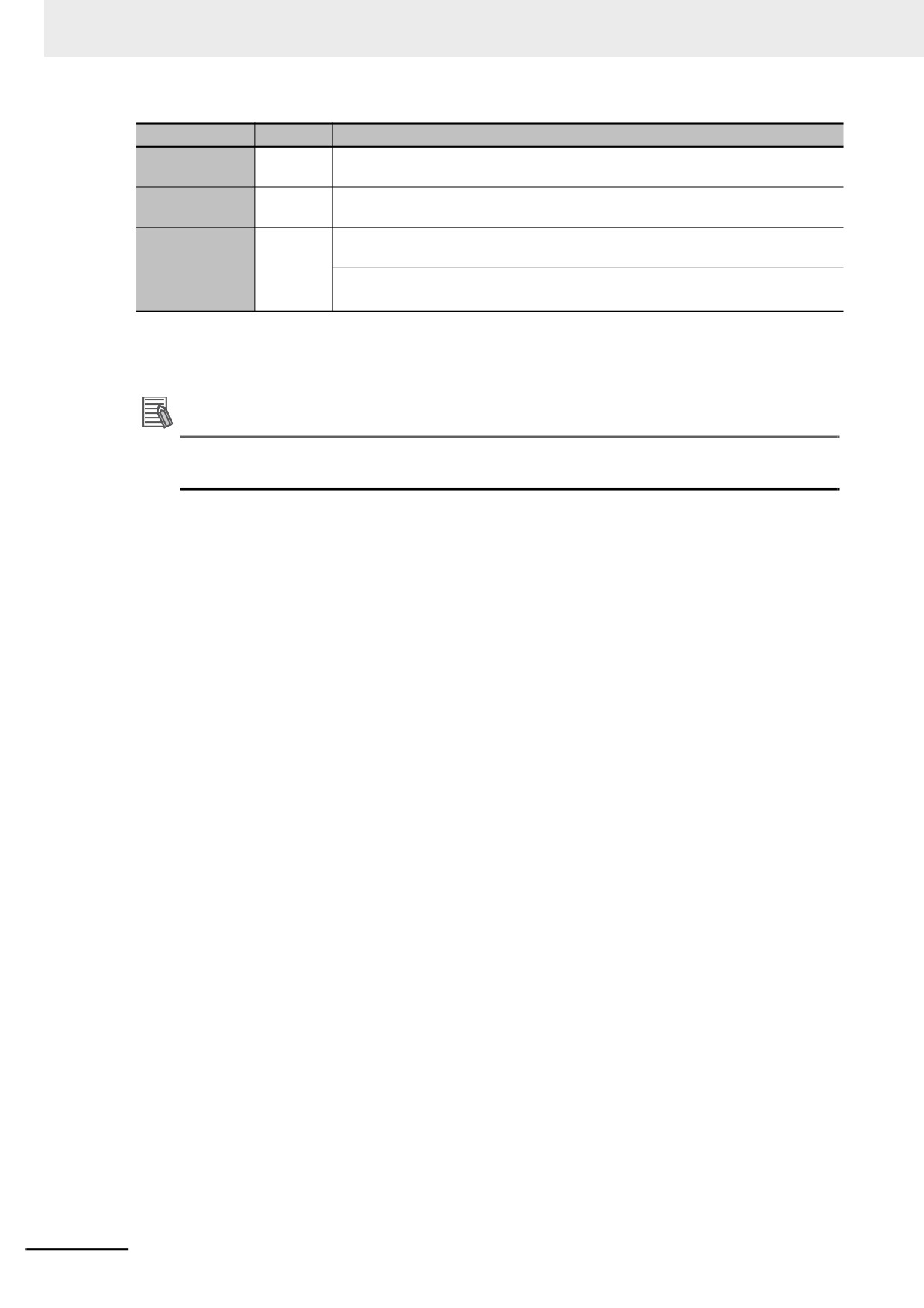
The specifications for variables in function blocks are given below.
Variables
Number
Specification
Input variables
1 to 64
Input variables are used as input arguments within the function block. They can-
not be changed inside the function block.
• When the function block is executed, the input variables are set to the values of
the input parameters.
• You can specify either constants or variables for input parameters.
• Omitting Input Parameters:
Refer to information on operation when parameters are omitted in Operation
When Parameters Are Omitted on page 6-23.
• You can specify to detect when the variable changes to TRUE or changes to
6
FALSE.
• You can access and change the values from outside the function block. Access
these values using the following format: InstanceName.InputVariableName.
Output vari-
1 to 64
Output variables are used as output arguments from the function block.
ables*1
• The output parameters are set to the values of the output variables at the end
of function block execution.
• You cannot specify a constant or a variable with constant attribute for an output
parameter.
• You can omit output parameter connections. If you omit an output parameter,
the value of the output variable is not assigned to any parameter.
• You can access the values of output variables from outside of the function
block. Access these values with the following format: InstanceName.Output-
VariableName. However, you cannot write values directly to an output variable.
In-out variables
0 to 64
In-out variables are used as inputs to and outputs from the function block. They
can be changed inside the function block.
• The value of an in-out parameter is passed to an in-out variable and the value
of the in-out variable is then passed to the in-out parameter.
• You cannot specify a constant or a variable with constant attribute for an in-out
parameter.
• If you change the value of an in-out variable within a function block, the value
of the in-out parameter changes at that time.
• You cannot omit in-out parameters.
Internal vari-
No limit
Internal variables are used for temporary storage within a function block.
ables
• The values of internal variables are retained regardless of whether the function
block is executed.
• Internal variables can have Retain attributes.
• You cannot access the values of internal variables from outside of the function
block.
6-11
6 Programming
Variables
Number
Specification
External vari-
No limit
External variables are used to access global variables.
ables
EN
0
An EN variable cannot be used in a function block. (This applies to both user-
defined function blocks and FB instructions.)
ENO
0 or 1
Generally, this is a BOOL output variable that is set to TRUE for a normal end,
and to FALSE for an error end.
• You can also omit it for some FB instructions.
• Refer to ENO on page 6-20 for details.
*1
At least one BOOL output variable (including ENO) is required when you use function blocks in a ladder dia-
gram.
Refer to 6-3-4 Attributes of Variables for details on setting variable attributes.
Additional Information
If you define an external variable with the same name as a global variable in a function block, it
is defined automatically based on that global variable.
z ENO
• When ENO is FALSE, the previous values of all other output variables are retained.
6-12
6 Programming
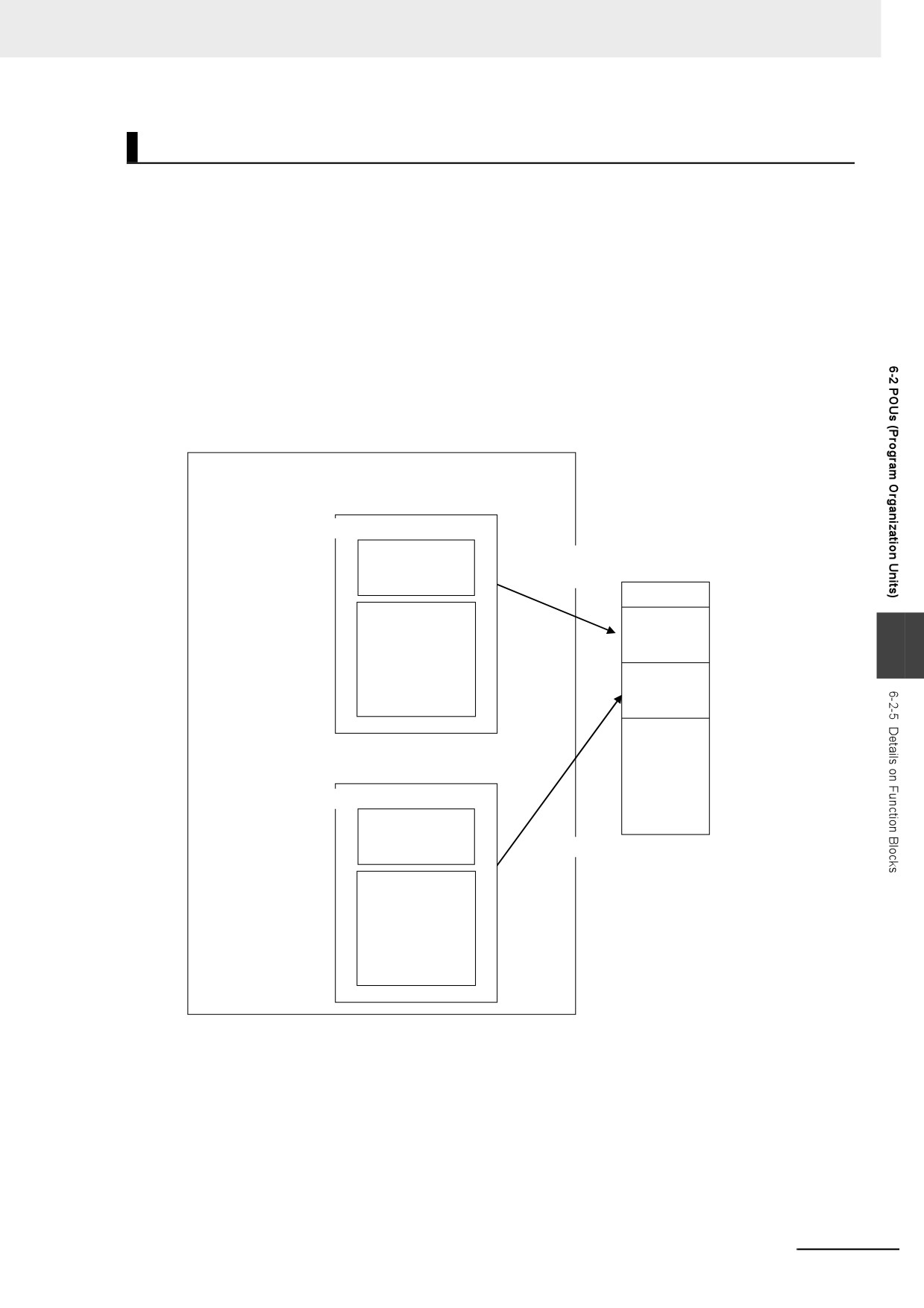
Function Block Definitions and Instances
A function block consists of a function block definition that is made in advance and instances that are
then used in the actual programs. All instances of a function block are based on the function block defi-
nition.
A function block definition consists of an algorithm and a local variable table.
z Function Block Instance
When you place an instance of a function block definition in a program or another function block, the
function block definition is treated as a part of that program or function block.
Function block definitions that are called from a program or another function block are called
instances.
Every instance of a function block has an identifier known as an instance name associated with it,
and every instance uses memory.
You can create instances of a function block definition to process different I/O data in the same way.
Program POU
Instance name
FB1_1
Function block definition name
FB1
Variable
Memory area
Memory area
declarations
reserved.
Algorithm
Memory for
instance
6
FB1_1
Memory for
instance
FB1_2
Instance name
FB1_2
Function block definition name
FB1
Variable
declarations
Memory area reserved.
Algorithm
Instances cannot be read from other programs or function blocks. If an instance with the same name
as another instance is placed in a different program or another function block, that instance will
operate as a completely separate instance.
6-13
6 Programming
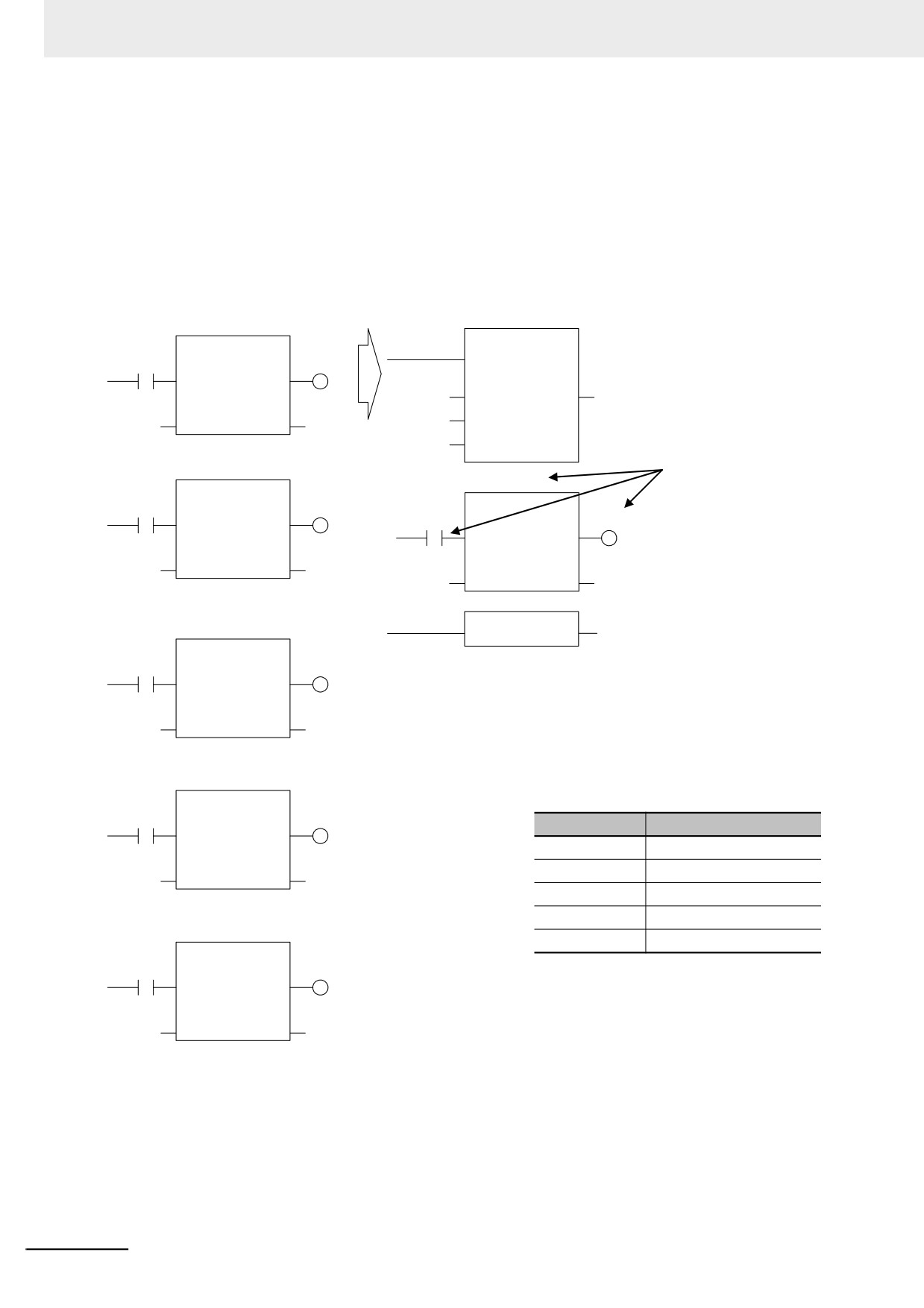
Array Specifications for Instances
Array specifications can be made for instances. You can indirectly specify an array element number
with a variable to execute multiple instances with one instance name. Furthermore, you can switch
input sources and output destinations and effectively execute multiple instances with a single
instance name if you use an array specification for the input parameter and output parameter and
specify the element numbers with the same variable.
Example:
Not Using an Array to Specify Instances
Using an Array to Specify Instances
timer0
FOR
TON
EN
ENO
IN[0]
OUT[0]
In
Q
UINT#0
Initval
Index
i
PT[0]
PT
ET
UINT#4
Endval
UINT#1
Stepval
timer1
Here, array variables are
timer[i]
TON
used to specify instances of
TON
the function block definition
IN[1]
OUT[1]
In
Q
IN[i]
OUT[i]
TON and all input parameters
In
Q
and output parameters. All of
PT[1]
PT
ET
the element numbers are
PT[i]
PT
ET
incremented to execute five
instances in succession.
timer2
NEXT
EN
ENO
TON
IN[2]
OUT[2]
In
Q
PT[2]
PT
ET
timer3
Variable Table
TON
IN[3]
OUT[3]
Variable name
Data type
In
Q
IN
ARRAY [0..4] OF BOOL
PT[3]
PT
ET
OUT
ARRAY [0..4] OF BOOL
PT
ARRAY [0..4] OF TIME
timer
ARRAY [0..4] OF TON
timer4
i
UINT
TON
IN[4]
OUT[4]
In
Q
PT[4]
PT
ET
6-14
6 Programming
Execution Conditions for Function Blocks
Function blocks do not have an EN input like functions. They are executed each period.
Processes That Require Constant Data Monitoring
Case
Algorithm in FB
ENO
Operations other than ENO
Normal opera-
Executed.
Normal end
TRUE
Output parameters: Values are updated
tion
according to the internal algorithm.
In-out parameters: Values are updated
according to the internal algorithm.
Error end
FALSE
Output parameters: Retained
In-out parameters: Values are updated
according to the internal algorithm.
Inside a mas-
Executed when the state of
User-specified
One of the above, depending on the value
ter control
the power flow input is
of ENO.
region
FALSE.
Refer to 6-5-2 Ladder Diagram Language for details on power flow output and parameter output.
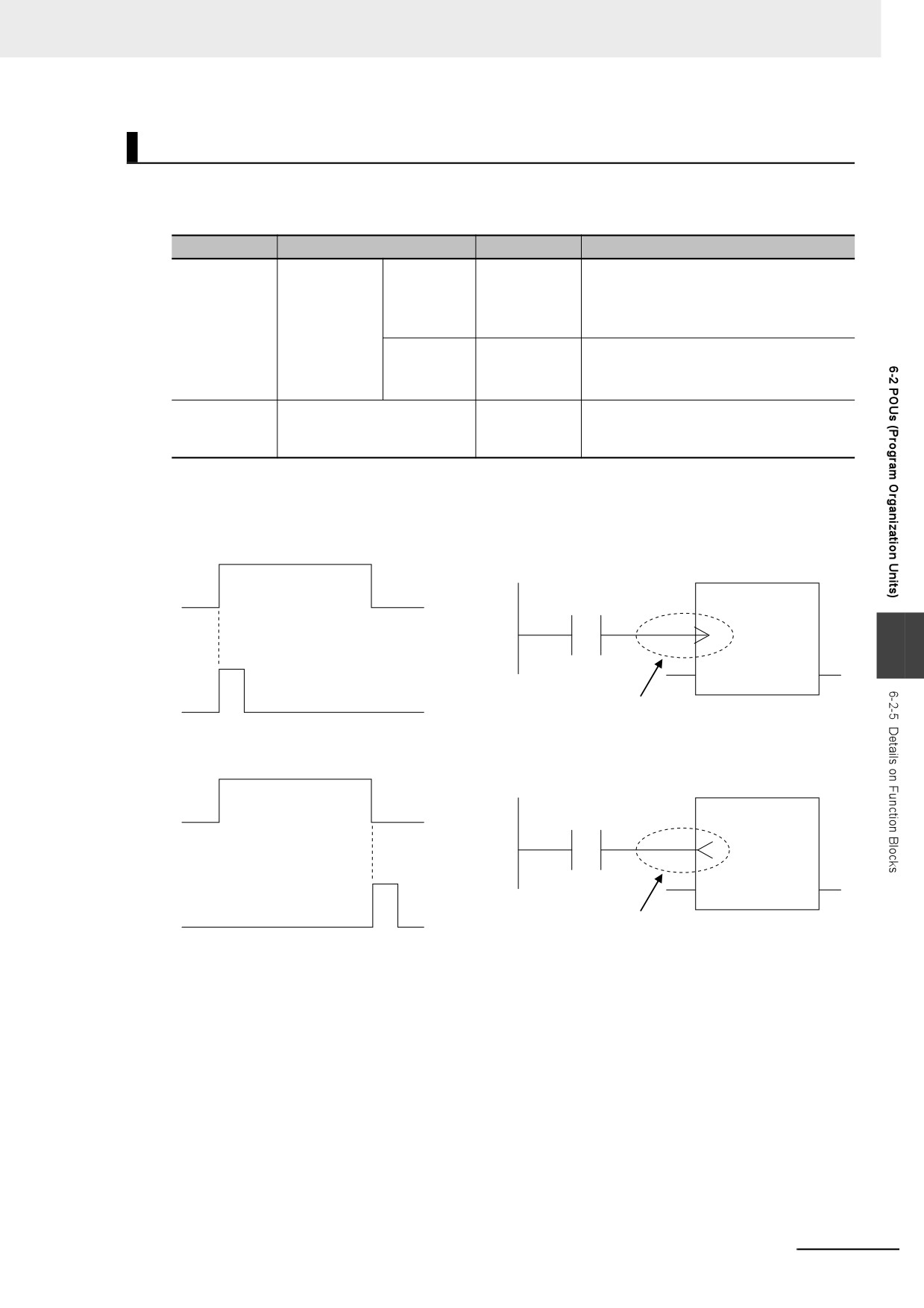
You can specify the edge for an input variable to make the variable TRUE only when the input
parameter changes to TRUE.
Instance
Variable A
FB
A
X
6
Instance X
Specifies detecting a change to TRUE.
You can specify falling edges too.
Instance
Variable A
FB
A
X
Instance X
Specifies detecting a change to FALSE.
6-15
6 Programming
Accessing Variables in a Function Block from Outside the Function
Block
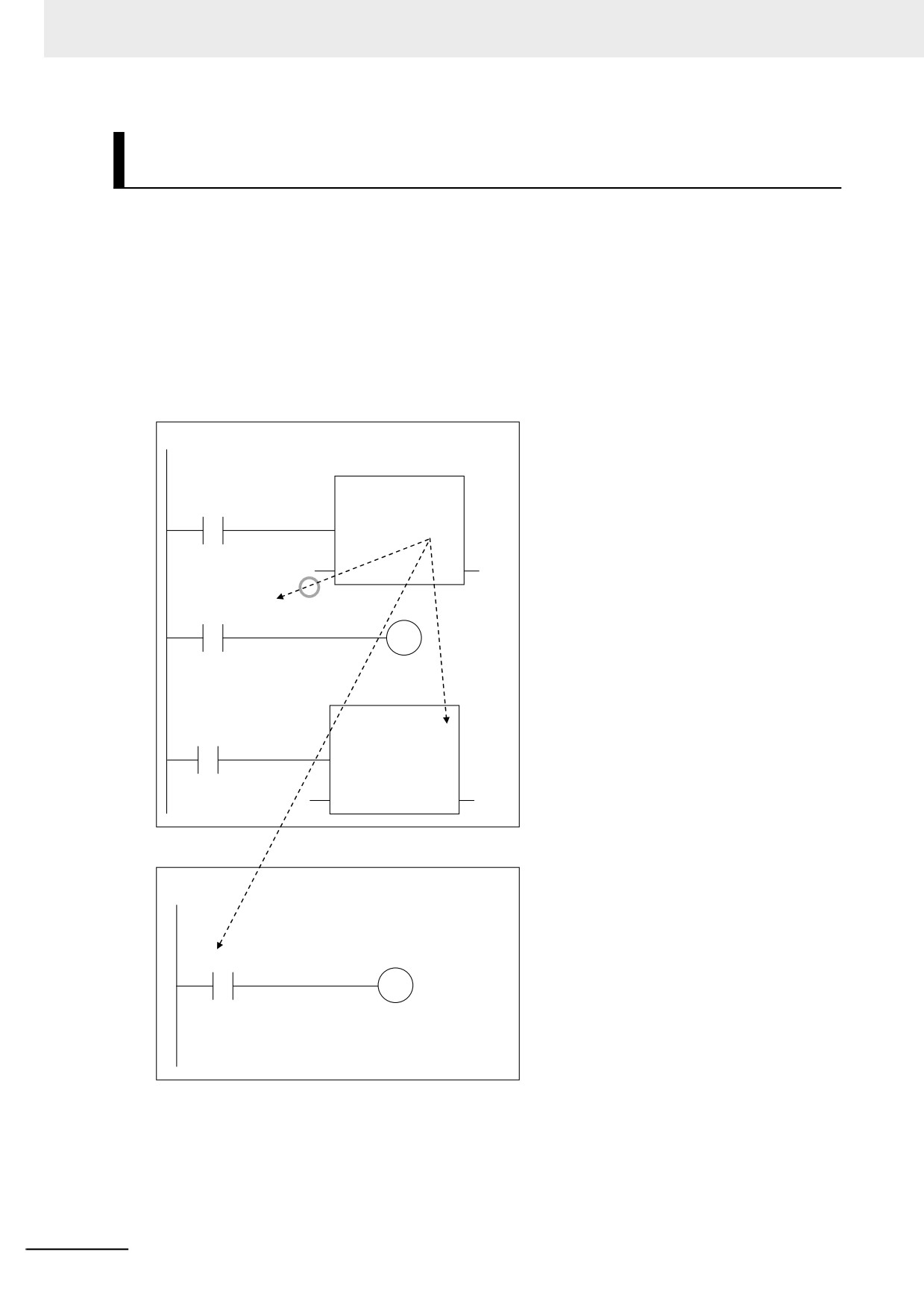
You can access the input and output variables of a function block from outside the function block. Vari-
ables are written as follows:
InstanceName.VariableName
Example: To Access Output Variable B of Function Block Instance FB1_Instance
FB1_Instance.B
You can access the input and output variables for a function block only within the program that contains
the function block. However, you cannot access these variables from within other function block
instances even if they are in the same program. You cannot access them from other programs.
Program P1
FB1_Instance
FB1
Input and Output Variables for FB1
A
B
• Access is possible only from within program P1.
Can be accessed.
• Access is not possible from program P2.
• Access is not possible from within FB2.
FB1_Instance.B
Cannot be
accessed.
FB2_Instance
FB2
C
D
Program P2
Cannot be
accessed.
FB2_Instance.B
The following variables cannot be accessed from external devices. If these variables are accessed, a
building error will occur.
• In-out variables for function blocks
• Input variables for FB instructions for which the default value is not applied if an input parameter is
omitted
6-16
6 Programming
6-2-6
Details on Functions
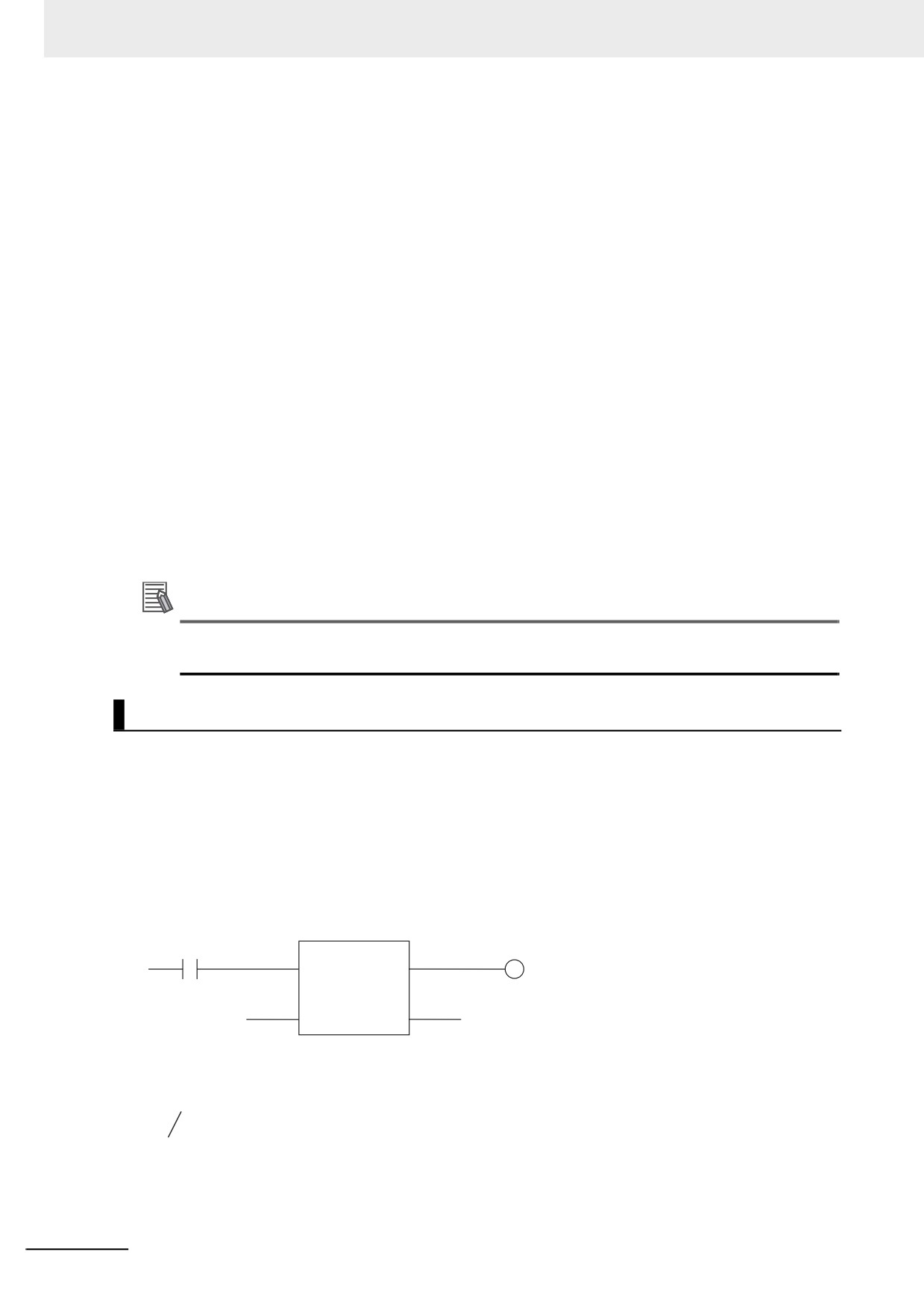
Structure of Functions
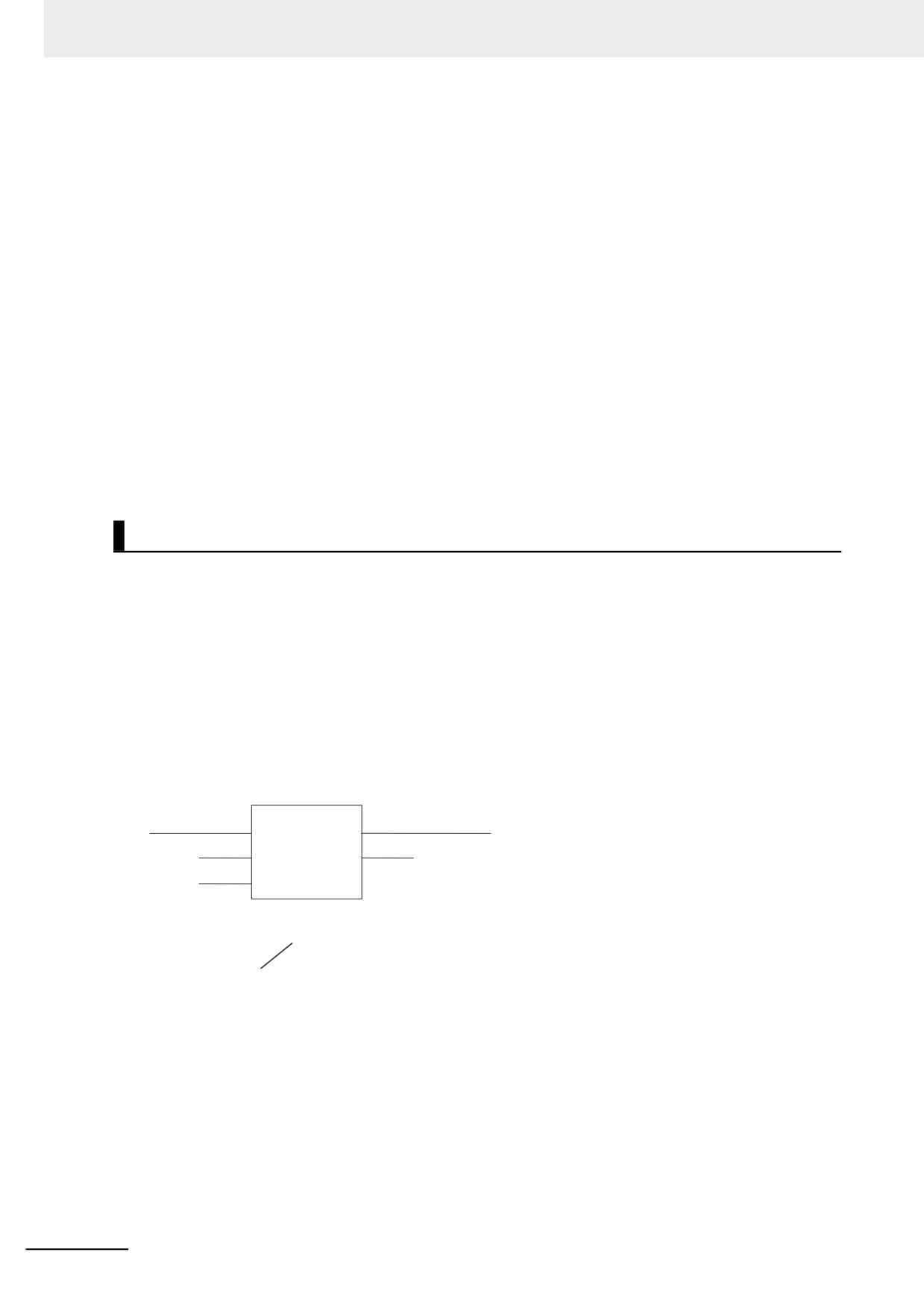
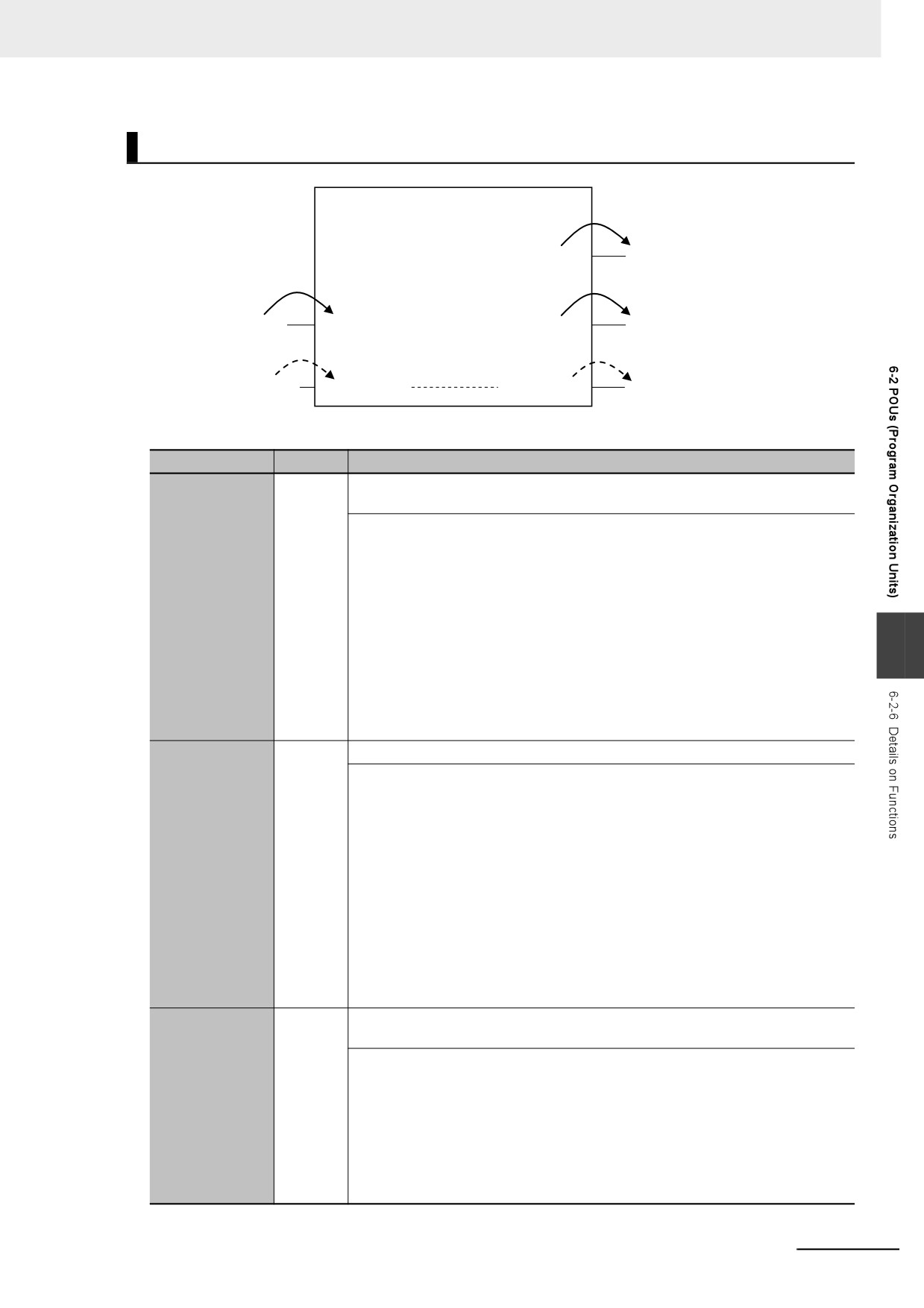
In a ladder diagram, functions are represented as rectangular boxes as shown below. Refer to Express-
ing Functions in ST on page 6-18 for details about how to express functions in ST. A function consists of
the following parts.
Function in Ladder Diagram:
Function name or instruction name
EN input
ENO output
MyFUN
EN
ENO
Return value
Para1
In1
ret_val
Para2
In2
Out1
Output1
Input parameters
Input variables
Output variable
Output parameter
z
Function Name or Instruction Name
This is the function name or instruction name assigned in the function definition when the function is
6
defined.
z
Instance Name
Functions do not have instance names.
z
Algorithm
You can code the algorithm either as a ladder diagram or in ST. You can use function instructions or
user-defined functions in the algorithm of a function. You cannot use any FB instructions or user-
defined function blocks. You also cannot use a differentiated instruction (e.g., R_TRIG or UP).
You cannot use the P_First_RunMode and P_First_Run system-defined variables.
Function
Local variable table
EN
Output parameter
Input parameter
Output
Input
In-out
variable
variable
variable
(return value)
Internal variables
Algorithm
FUN instruction
User-defined
function
6-17
6 Programming
z Local Variable Table
A local variable table defines the input variables, output variables, in-out variables, internal vari-
ables, and external variables.
Refer to Variable Designations for Functions on page 6-19 for details.
z Parameters
Input Parameters to Input Variables
An input parameter passes a value to an input variable in a function when function execution begins.
An input parameter can be either a variable or a constant.
Output Parameters from Output Variables
An output parameter receives a value from an output variable in a function when function execution
is completed. A variable is given as the parameter.
In-Out Parameters Shared between In-Out Variables
The value of the in-out parameter changes within the function. The same variable is used for both
the input and output.
Expressing Functions in ST
The following example shows how to call functions from ST.
return_value:=function_name (input_variable_1:=input_parameter_1, ... input_variable_N:=input_pa-
rameter_N,in-out_variable_1:=in-out_parameter_1, ... in-out_variable_N:=in-out_parameter_N,out-
put_variable_1=>output_parameter_1, ... output_variable_N=>output_parameter_N);
However, you can also omit the return value.
You can also omit input variable names and other variable names, and give only the parameters. (If you
do, the parameters must be given in the order that they are given in the function definition.) Also, the
number of parameters must match the number of input variables and other variables in the function
definition.
Functions Expressed in ST:
MAX
EN
ENO
Para1
In1
Para_MAX
Para2
In2
Function name
Para_MAX := MAX(In1:=Para1, In2:=Para2);
Para_MAX := MAX(Para1, Para2);
(*The input variables are omitted here.*)
Refer to Function Calls on page 6-124 for details.
6-18
6 Programming
Variable Designations for Functions
Function name or instruction name
Value is assigned.
Return value
Return value parameter
Value is assigned.
Value is assigned.
Internal
Input parameter
Input
Output
Output parameter
variables
variable
variable
Variable assignment
Variable assignment
itself is passed.
itself is passed.
In-out parameter
In-out variable
In-out variable
In-out parameter
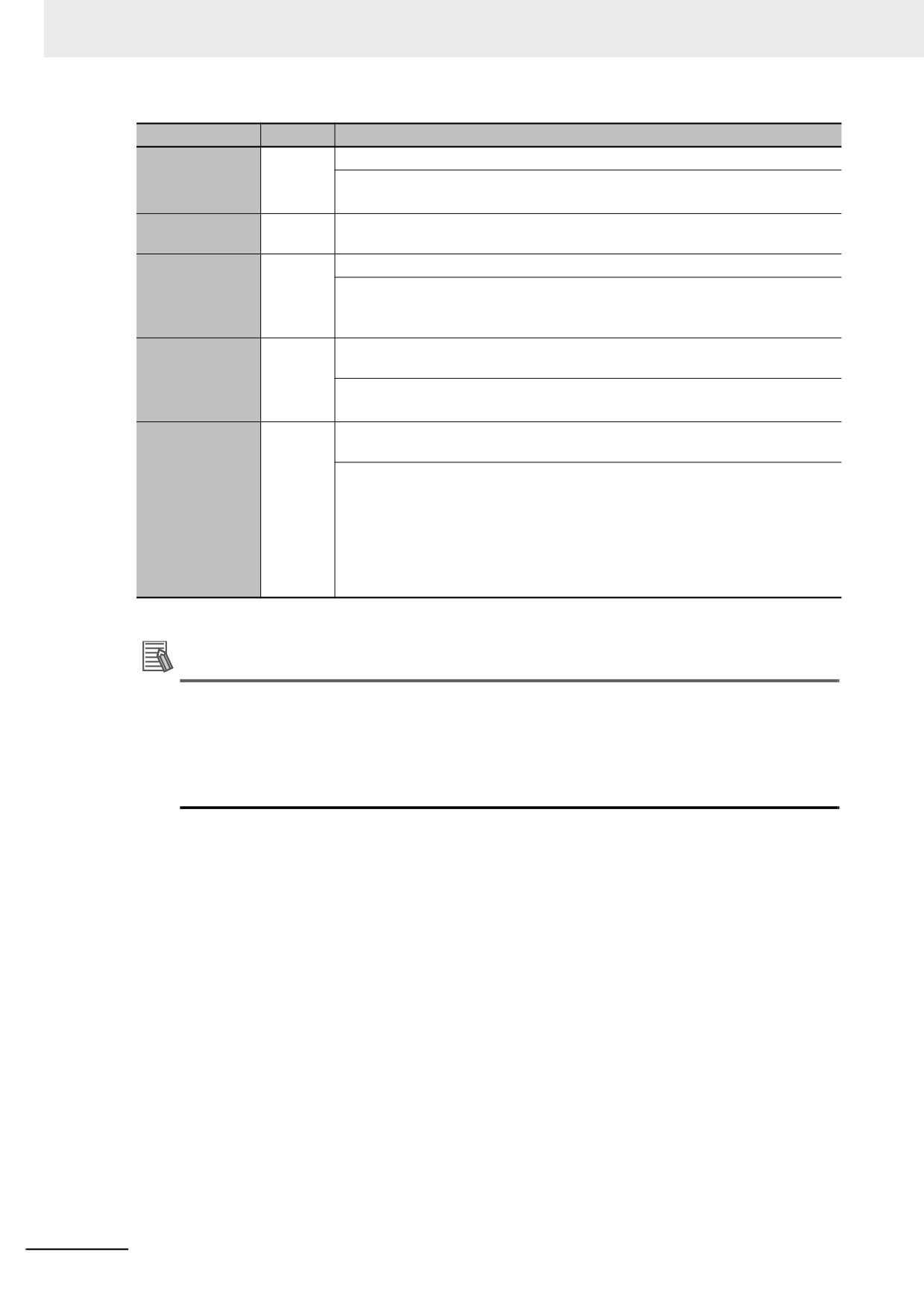
The specifications for variables in functions are given below.
Variables
Number
Specification
Input variables
0 to 64
Input variables are used as input arguments within the function. They cannot be
changed inside the function.
• When the function is executed, the input variables are set to the values of the
input parameters.
• You can specify either constants or variables for input parameters.
• Omitting Input Parameters:
Refer to information on operation when parameters are omitted in Operation
When Parameters Are Omitted on page 6-23.
• Unlike function blocks, you cannot specify to detect changes to TRUE or
6
FALSE.
• You cannot access the values of input variables from outside of the function.
• Some of the instructions provided by OMRON can have varying numbers of
input variables, but you cannot make a user-created function that has a vary-
ing number of input variables.
Output variables
0 to 64
Output variables are used as output arguments from the function.
• The output parameters are set to the values of the output variables at the end
of function execution.
• You cannot specify a constant or a variable with constant attribute for an out-
put parameter.
• At least one BOOL output variable (including ENO and the return value) is
required.
• You can omit output parameter connections.
If you omit an output parameter, the value of the output variable is not
assigned to any parameter.
• You cannot access the values of output variables from outside of the function.
• The values of the output variables of user-defined functions must always be
set in the algorithms of the functions. If the output variables are not set in the
algorithms of the functions, the values of the output variables are not stable.
In-out variables
0 to 64
In-out variables are used as inputs to and outputs from the function. They can be
changed inside the function.
• In-out parameters (variable designations) are directly passed to or received
from the in-out variables.
• You cannot specify a constant or a variable with constant attribute for an in-out
parameter.
• If you change the value of an in-out variable within a function, the value of the
in-out parameter changes at that time.
• You cannot omit in-out parameters.
• You cannot access the values of in-out variables from outside of the function.
6-19
6 Programming
Variables
Number
Specification
Internal vari-
No limit
Internal variables are used for temporary storage within a function.
ables
• The value is not retained after execution is completed.
• You cannot access the values of internal variables from outside of the function.
External vari-
No limit
External variables access global variables.
ables
EN
1
This is a BOOL input variable used to execute the function.
• The function is executed when EN is TRUE.
• You must have one EN variable. (This applies to both user-defined functions
and FUN instructions).
ENO
0 or 1
Generally, this is a BOOL output variable that is set to TRUE for a normal end,
and to FALSE for an error end.
• You can omit the ENO variable from user-defined functions.
• Refer to ENO on page 6-20 for details.
Return value
1
The return value is the value that is returned to the calling instruction. It rep-
resents the results of the process after the algorithm in the function is executed.
• Each function must have one return value.
• You can specify enumerations of all basic data types. You cannot specify an
array, structure, or union.
• The return values of user-defined functions must always be set in the algo-
rithms of the functions. If return values are not set in the algorithms of the
functions, the return values are not stable.
• Refer to Return Values on page 6-21 for details.
Refer to 6-3-4 Attributes of Variables for details on setting variable attributes.
Additional Information
You can register global variables as external variables in a function variable table to access
global variables. We recommend that you create your functions so that they produce output val-
ues uniquely based on their input parameter values. Algorithms that access global variables and
use them to affect the output values are not recommended. When you check the program on the
Sysmac Studio, a message will appear that says that it is not recommended to use global vari-
ables in functions. Take appropriate measures if necessary.
z ENO
• When ENO is FALSE, the previous values of all other output variables are retained.
6-20
6 Programming
z
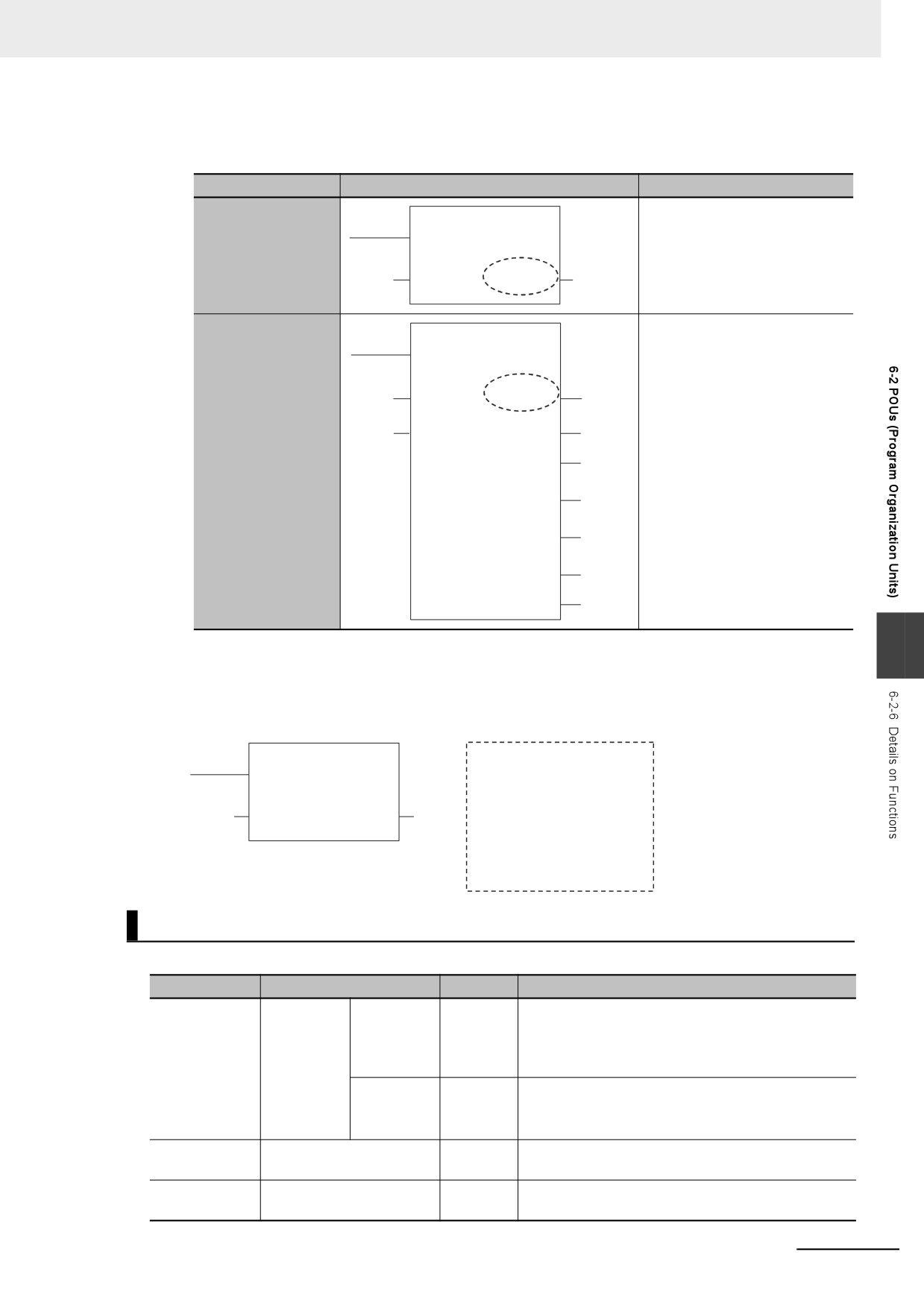
Return Values
•
Return values are blank in ladder diagrams.
Case
Ladder diagram notation
ST language notation
Using return values
variable_q:= MyFUN1(vari-
MyFUN1
able_i);
EN
ENO
Variable i
Variable q
IN
Not using a return
MyFUN2(In1:=vari-
value
MyFUN2
able_i1,In2:=variable_i2,
EN
OutEQ=>variable_q1,
OutNE=>variable_q4 );
Variable i1
In1
Variable i2
Variable q1
In2
OutEQ
OutGT
OutGE
Variable q4
OutNE
OutLT
OutLE
6
•
The calling instruction is not required to use the return value in either a ladder diagram or ST.
•
If you set the return value within a function algorithm, set the value to a variable with the same
name as the function.
For example, the return value of a function called MyFUN is MyFUN.
MyFUN
Definition of MyFUN
EN
ENO
IF IN>100
Variable i
Variable q
MyFUN:=100;
IN
ELSE
MyFUN:=IN;
END_IF;
Execution Conditions for Functions
A function is executed when EN is TRUE. The function stops processing when EN changes to FALSE.
Input variables
Algorithm in FUN
ENO
Operations other than ENO
EN = TRUE
Executed.
Normal end
TRUE
Output parameters: Values are updated according to
the internal algorithm.
In-out parameters: Values are updated according to
the internal algorithm.
Error end
FALSE
Output parameters: Values are retained.
In-out parameters: Values are updated according to
the internal algorithm.
EN = FALSE
Not executed.
FALSE
Output parameters and in-out parameters: Values
are retained.
Inside a master
Not executed.
FALSE
Output parameters and in-out parameters: Values
control region
are retained.
6-21
6 Programming
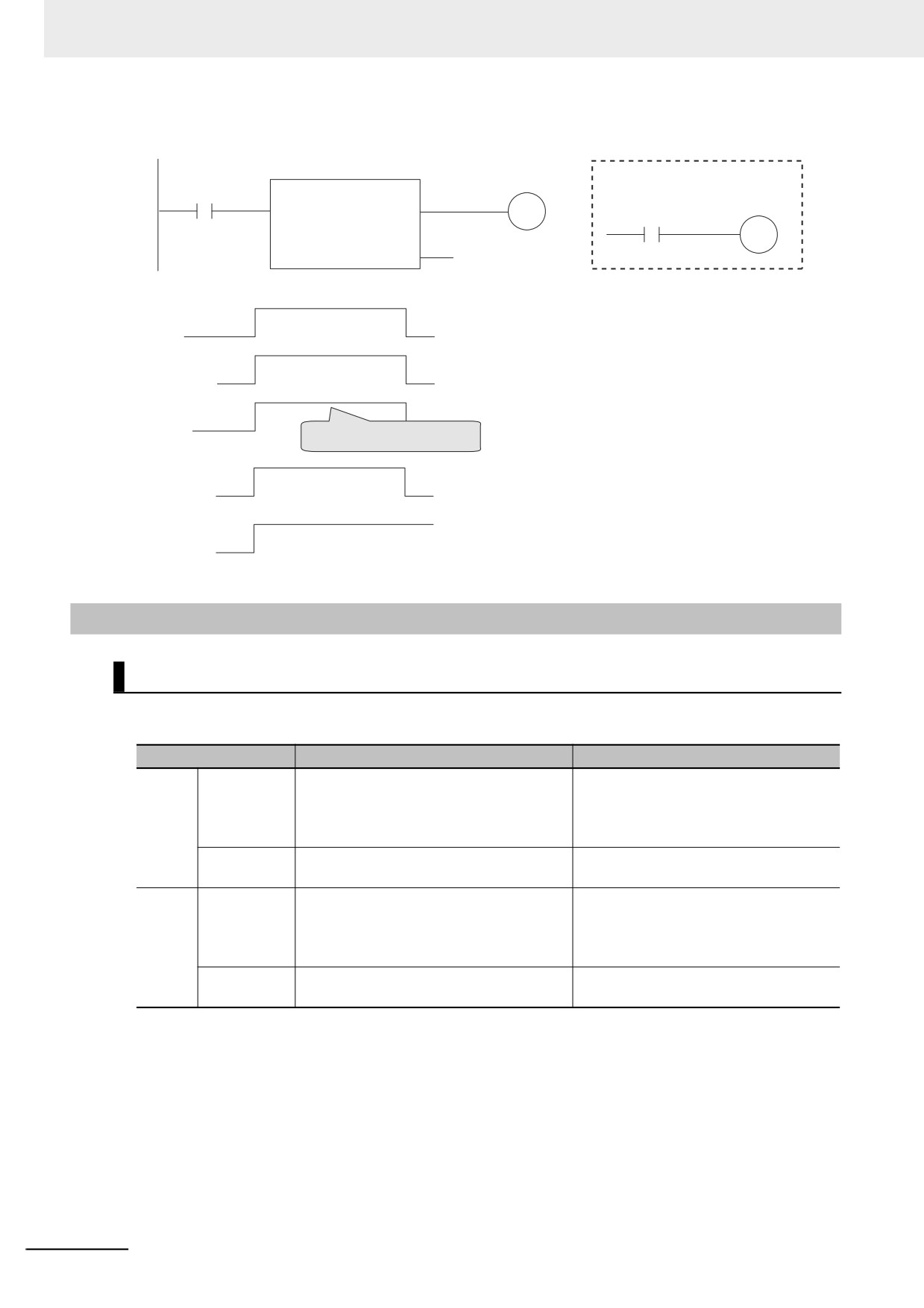
Example:
BOOL variable A
Algorithm within function
in
MyFUN
MyFUN
EN
ENO
P_On
BOOL variable B
in
Function
execution
ENO
You can change ENO with the
algorithm in the function.
BOOL variable A
BOOL variable B
6-2-7
Operation That Applies to Both Functions and Function Blocks
Using or Omitting EN and ENO
The following table shows when you can use and when you can omit EN and ENO in functions and
function blocks.
POU
EN
ENO
FB
User-defined
Cannot be used.
Can be used or omitted.
functions
A building error occurs if you try to define
You define ENO as an output variable in
EN in the variable table from the Sysmac
the Sysmac Studio.
Studio.
Instruction
All FB instructions do not use EN.
Some instructions use ENO, and others
do not.
FUN
User-defined
Required.
Can be used or omitted.
functions
When you create a function, the Sysmac
You define ENO as an output variable in
Studio automatically adds EN to the vari-
the Sysmac Studio.
able table by default.
Instruction
All FUN instructions use EN.
Some instructions use ENO, and others
do not.
6-22
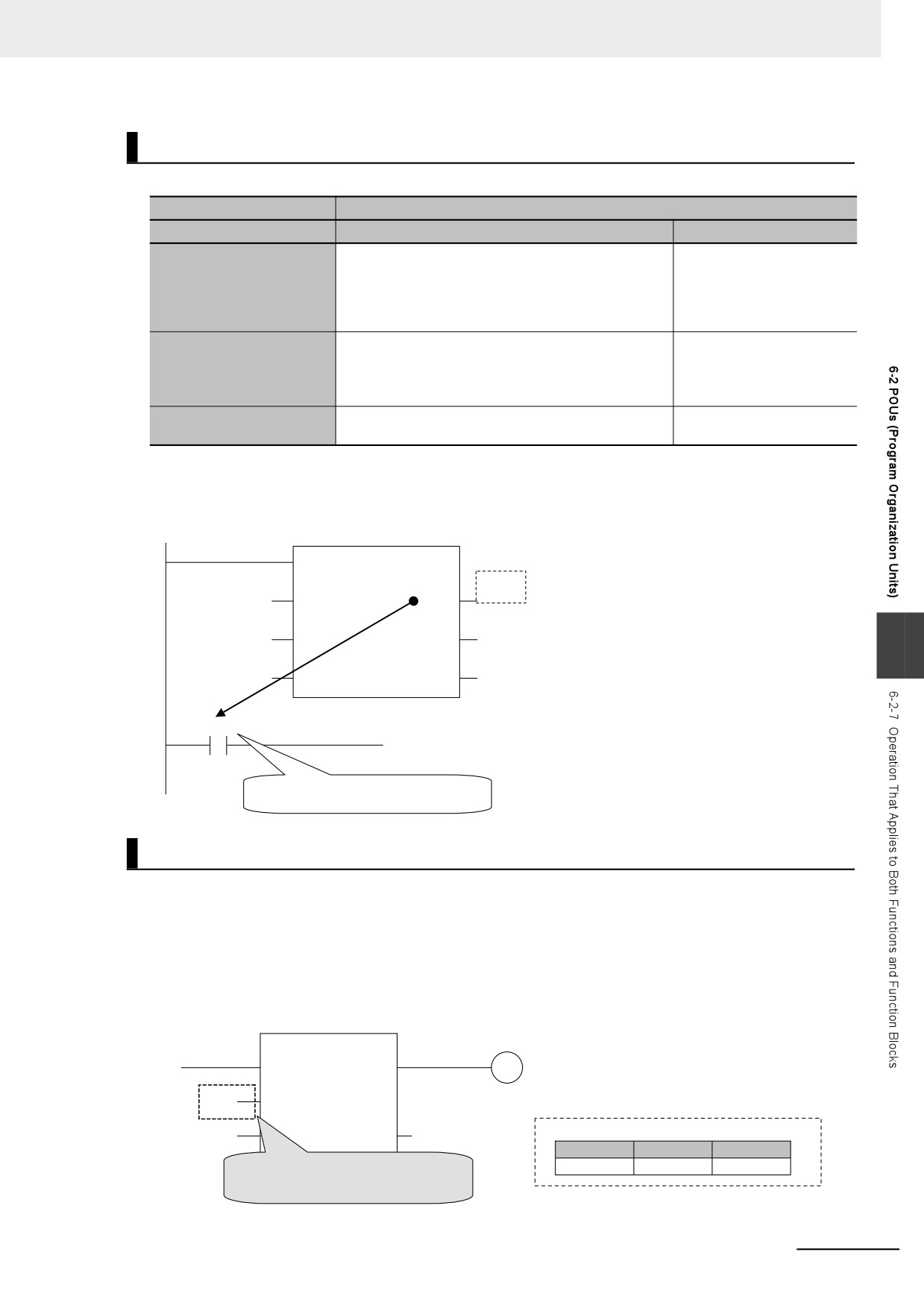
6 Programming
Operation When Parameters Are Omitted
You can omit both input and output parameters.
Operation when omitted
Parameters omitted in
FB
FUN
• When the first time the instance is executed, the
• EN is operated when its
initial value is used.
value is TRUE.
Input parameters to input
• Thereafter, the function block is executed with the
• For other input parame-
variables
previous value (if the input variable is omitted, the
ters, the initial value is
initial value is always used).
used for operation.
Can be omitted.
You can omit the output
Output parameters from
parameter. If it is omitted,
You can access the results of the operation outside
output variables
there is no way to retrieve
of the instruction by using InstanceName.OutputVari-
the result of the operation.
ableName.*
In-out parameters to/from
Cannot be omitted.
Cannot be omitted.
in-out variables
* You can access the input and output variables of a function block from outside of the function block (but only
within the same program) with InstanceName.VariableName. However, you cannot access the input and output
variables of a function from outside the function.
FBinstance
FB
Omitted.
Done
6
FBinstance.Done
Can be specified by using InstanceName.Done.
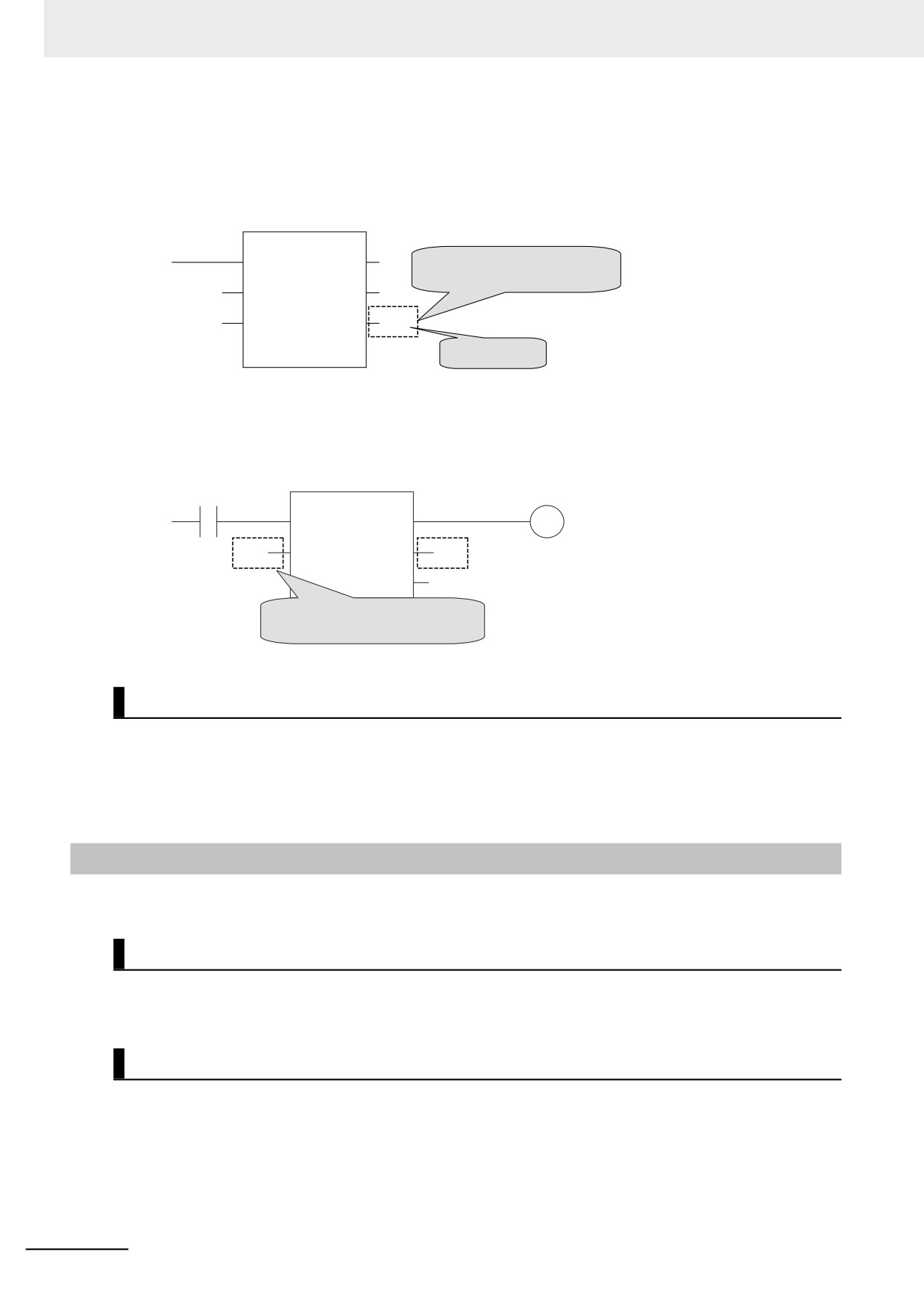
Operation for Parameter Errors
The following operation occurs when there is an error in an input parameter, output parameter, or in-out
parameter.
z Errors in Input Parameters
If an error is detected in an input parameter, the function or function block is not executed and ENO
is FALSE. The power flow output is also FALSE, but all other values are retained.
Example:
Function
EN
ENO
FALSE
x[i]
IN1
x[10]
IN2
OUT2
abc Retained.
Variable Table
Variable name
Array
Data type
Example when variable i is outside the
x
[ 1 .. 10 ]
INT
range of the elements in array variable x
6-23
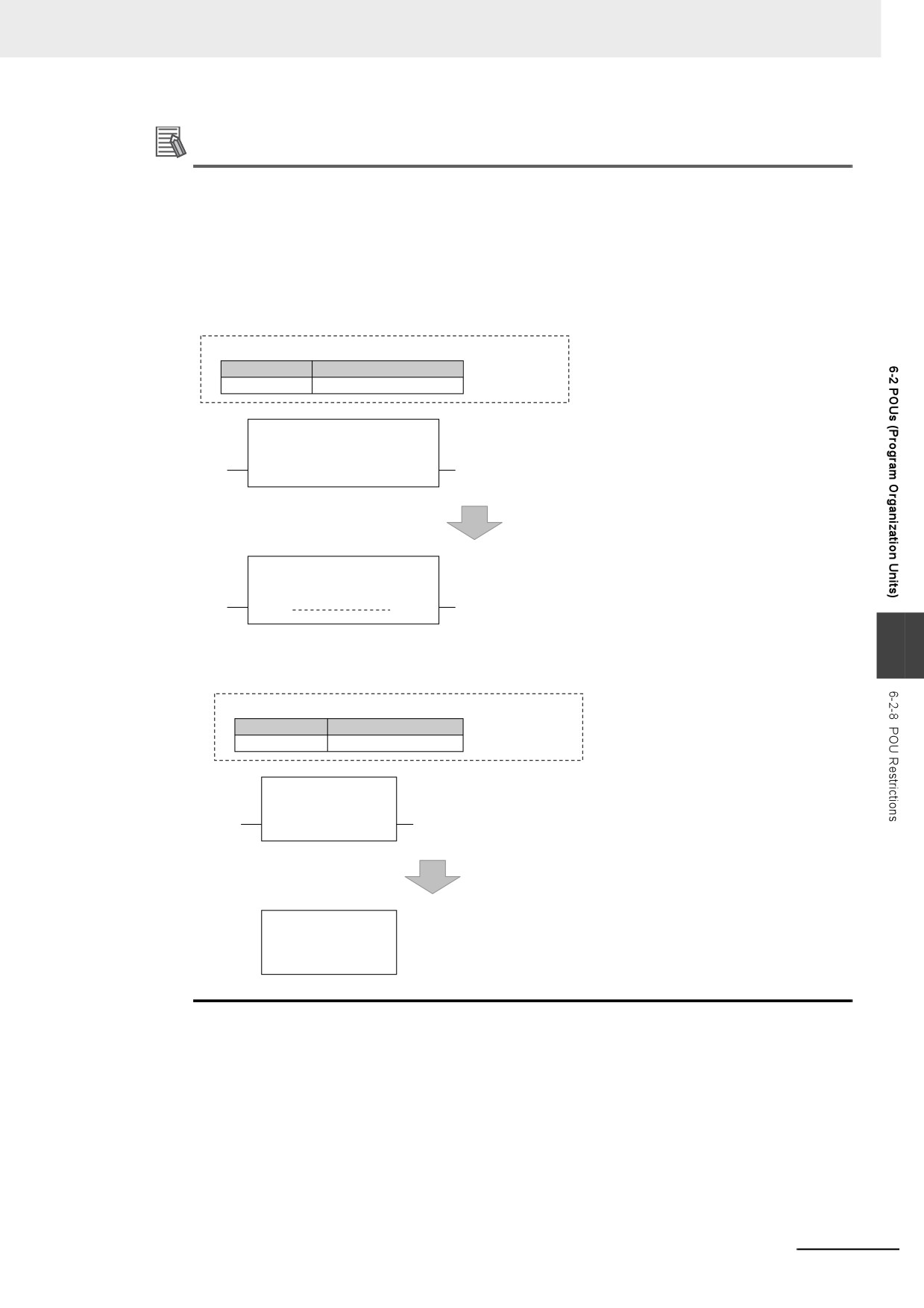
6 Programming
z
Errors in Output Parameters
If an error is detected in an output parameter, all values after that parameter are not output but their
values are retained.
Example:
Function
EN
ENO
Example when variable i is outside the
range of the elements in array variable x
IN1
OUT1
x[9]
IN2
OUT2
x[i]
OUT3
x[10] Retained.
Not output.
z
Errors in In-Out Parameters
If an error is detected in an in-out parameter, the function or function block is not executed and ENO
is FALSE. The power flow output is also FALSE, but all other values are retained.
Function
OFF
EN
ENO
x[i]
x[i]
INOUT--
--INOUT
X xyz Retained.
Example when variable i is outside the
range of the elements in array variable x
Recursive Calling
The following recursive calls are not allowed for functions or function blocks. They will result in an error
when you build the user program on the Sysmac Studio.
• A function or function block cannot call itself.
• A called function or function block cannot call the calling parent.
6-2-8
POU Restrictions
This section describes the restrictions in the creation of POUs.
Names
Refer to 6-3-12 Restrictions on Variable Names and Other Program-related Names for restrictions on
POU names and function block instance names.
Passing Multiple Arguments
If you need to pass multiple arguments to a function or function block, use an array specification or
structure to pass the required data.
This will make your program simpler. However, be aware that if you use an in-out variable, the data
passed to the function block or function as a parameter is written and the original data is not retained.
6-24
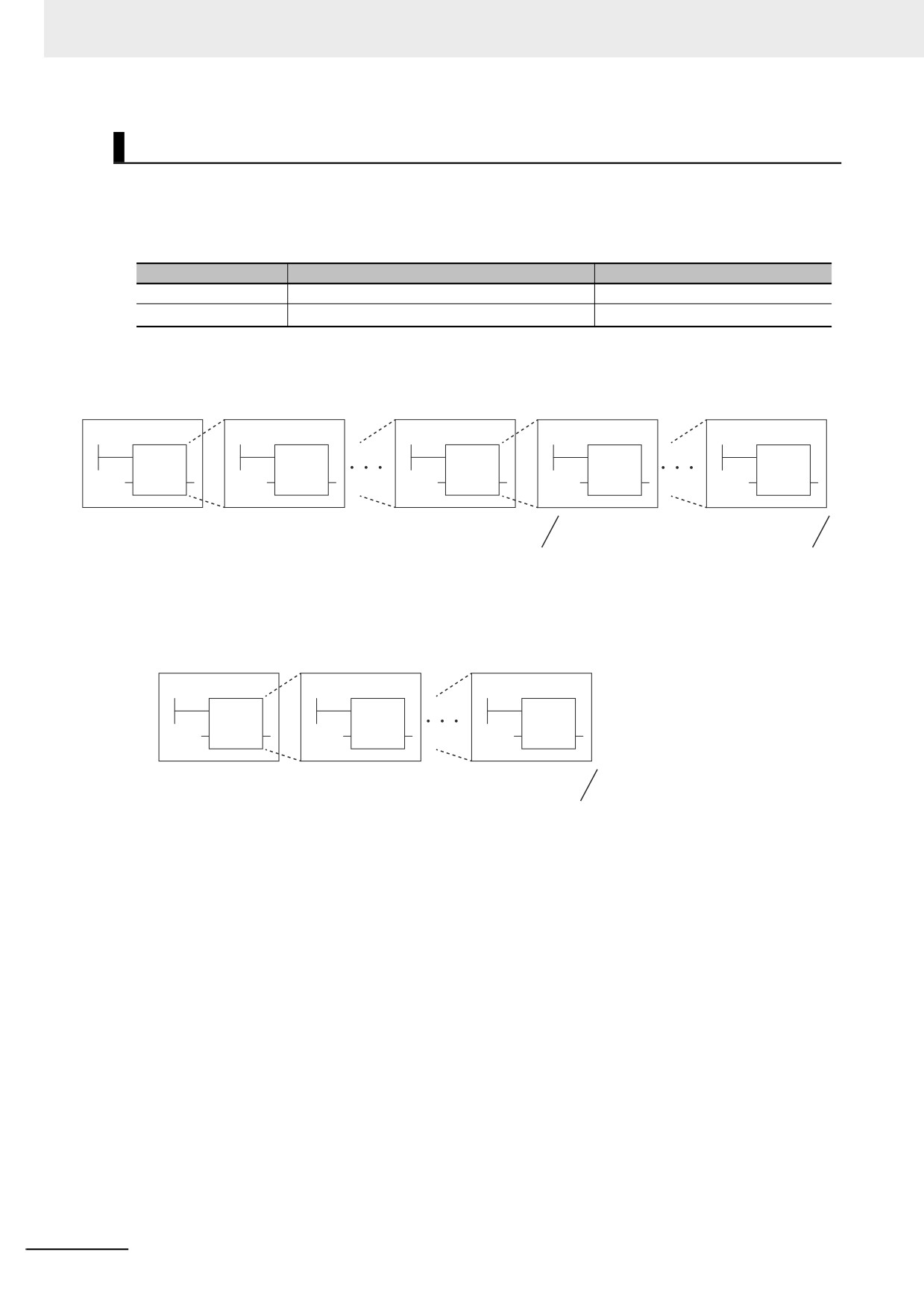
6 Programming
Additional Information
Specifying an Array Variable or Structure Variable as a Parameter
You can also specify an array variable or a structure variable as an input or output parameter.
However, it will take longer to pass and receive data for these data types in comparison to a vari-
able with a basic data type (depending on the size). Therefore, when handling array variables or
structure variables in a function block, we recommend that you design them in such a way that
these variables are passed to and received from in-out variables.
Example 1: Specifying an Array
Program Variable Table
Variable name
Data type
x
ARRAY[0..199] OF INT
FB
Do not assign INT variable x [0..199] to the function block input variable
x
IN1
OUT1
IN1 (Data type of the IN1 input variable in the function block:
ARRAY[0..199] OF INT).
FB
Instead, assign INT variable x [0..199] to the INOUT in-out variable of
the function block. (Data type of INOUT in-out variable in the function
x
INOUT
INOUT
block: ARRAY[0..199] OF INT)
6
Example 2: Specifying a Structure Variable
Program Variable Table
Variable name
Data type
x
MyStructure
FB
Do not assign MyStructure variable x to the IN1 input
x
IN1
OUT1
variable of the function block (Data type of IN1 input
variable of the function block: MyStructure).
FB
Instead, assign MyStructure variable x to the INOUT in-out
x
INOUT
INOUT
variable of the function block. (Data type of INOUT in-out
variable of the function block: MyStructure)
6-25
6 Programming
Nesting Levels
Calling another function or function block from a function or function block that was called from a pro-
gram is called nesting. The limits that are given in the following table apply to the POUs that you can
call from a user-defined function or function block and the number of nesting levels. A building error will
occur if these limits are exceeded.
POU
Called POUs
Nesting depth
Function blocks
Functions and function blocks
8 levels max.
Functions
Functions
16 levels max.
Example 1: From a program, you can call function blocks to a depth of 8 levels. You can then call func-
tions to a depth of 16 levels.
Program
FB1
FB7
FB8
FUN15
FB1
FB2
FB8
FUN9
FUN16
Level 1
Level 2
Level 8
Level 9
Level 16
You cannot call a function
You cannot call a function
block at level 9.
at level 17.
Example 2: From a program, you can call functions to a depth of 16 levels.
Program
FUN1
FUN15
FUN1
FUN2
FUN16
Level 1
Level 2
Level 16
You cannot call a
function at level 17.
6-26
6 Programming
6-3
Variables
In the NY-series System, variables are used to exchange I/O information with external devices, to per-
form data calculations, and to perform other processes. This section describes variable designations in
detail.
Refer to the Sysmac Studio Version 1 Operation Manual (Cat. No. W504) for details on setting vari-
ables with the Sysmac Studio.
6-3-1
Variables
Variables store I/O data for exchange with external devices or temporary data that is used for internal
POU processing. In other words, a variable is a container for data with a name, data type, and other
attributes.
You do not need to assign a memory address to a variable. The NY-series Controller automatically allo-
cates memory addresses in the memory area for variables.
6-3-2
Types of Variables
Variables are broadly classified into the following three types.
z User-defined Variables
The user defines all of the attributes of a user-defined variable. The rest of this section describes
user-defined variables.
6
z Semi-user-defined Variables
These variables are used to access specific devices and data. There are two types of semi-user-
defined variables: device variables and cam data variables. Refer to 2-3-1 Types of Variables and 3-
3-1 I/O Ports for details on device variables.
z System-defined Variables
System-defined variables are provided in advance in an NY-series Controller. The names and all
attributes are defined by the system. They have specific functions. System-defined variables are
supplied for each function module. Refer to A-3 System-defined Variables for details.
Refer to 2-3-1 Types of Variables for details on the different types of variables.
6-3-3
Types of User-defined Variables in Respect to POUs
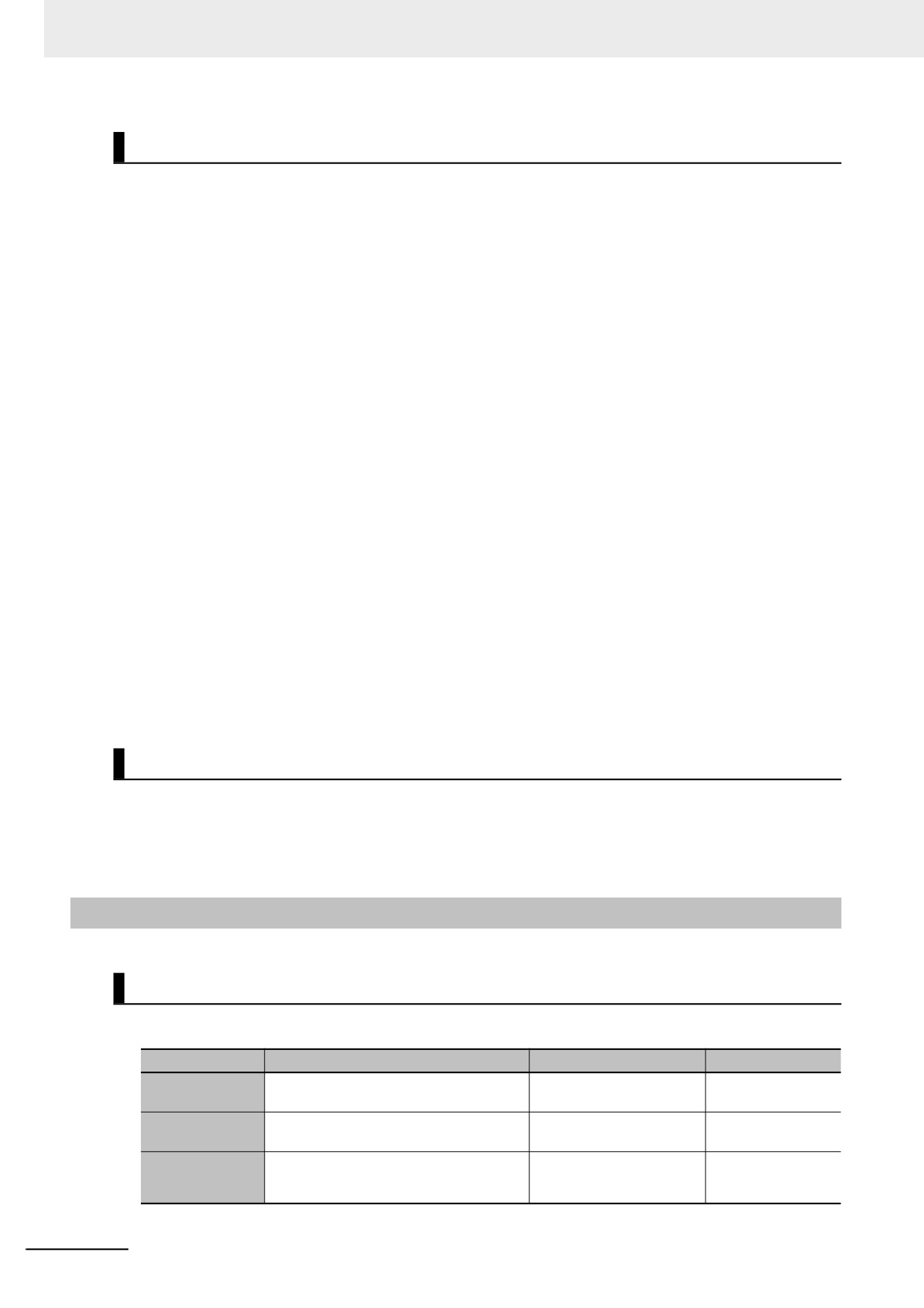
There are six types of user-defined variables as defined according to their function in a POU.
POU type
Type of user-defined variable
Programs
FB
FUN
Internal variables
Supported.
Supported.
Supported.
Input variables
Not supported.
Supported.
Supported.
Local variables
Output variables
Not supported.
Supported.
Supported.
In-out variables
Not supported.
Supported.
Supported.
Global variables
Supported (see note).
Supported (see note).
Supported (see note).
External variables
Supported.
Supported.
Supported.
* You can define global variables as external variables to access the global variables through the external vari-
ables.
6-27
6 Programming
Local Variables
Local variables can be read and written only in the POU (program, function, or function block) in which
it is defined. Local variables are the same as internal variables if the POU is a program. If the POU is a
function block or a function, “local variable” is a collective term for internal variables, input variables,
output variables, in-out variables, and external variables.
z Internal Variables
A local variable can be used only within one POU. An internal variable is declared in the local vari-
able table for the POU. You cannot access the values of internal variables from outside of the POU.
You can declare internal variables with the same names in different POUs. Each of those variables
is assigned to a different memory area.
z Input Variables
When a POU is called, the input variables are assigned to the values of the input parameters from
the calling POU. An input variable is declared in the local variable table of the POU.
z Output Variables
Before processing a POU is completed, the output parameters returned to the calling POU are
assigned to the output variables. An output variable is declared in the local variable table of the
POU.
z In-Out Variables
When a POU is called, the in-out variables are assigned to the in-out parameters themselves (vari-
able designations) from the calling POU. If you change the value of an in-out variable within a POU,
the value of the in-out parameter changes at that time. An in-out variable is declared in the local vari-
able table of the POU.
z External Variables
External variables are used to access data outside of a POU. You can access global variables from
POUs.
Global Variables
A global variable is declared in the global variable table.
Device variables that are automatically generated from the Unit configuration and slave configuration
and axis/axes group variables that are generated from the Axis Setting Table are automatically regis-
tered as global variables.
6-3-4
Attributes of Variables
You can set the following attributes for variables.
Variable Attributes According to Variable Type
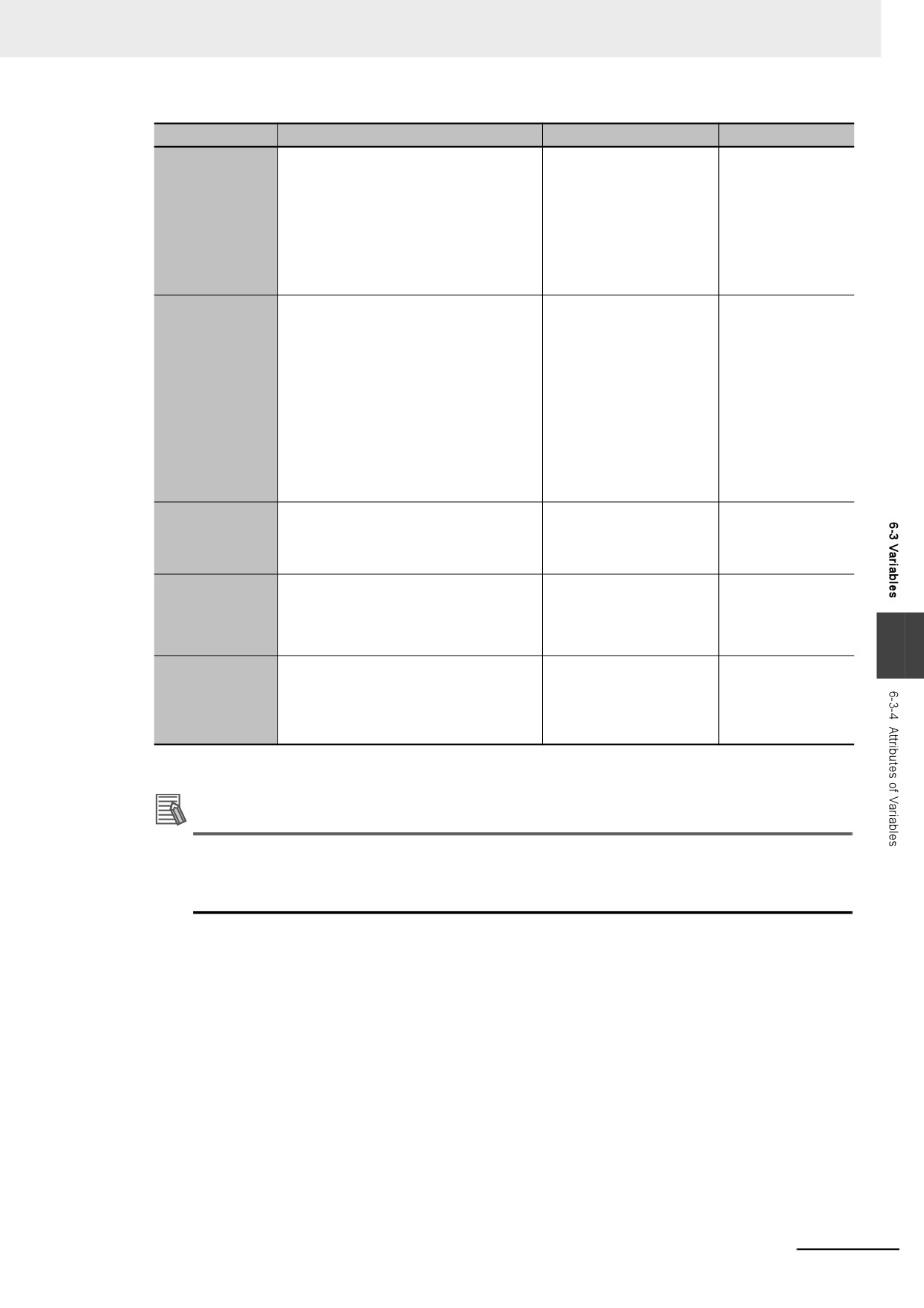
z Attributes of Variables
Attribute
Description
Specification
Default
The variable name is used to identify the
Variable Name
variable.
The data type defines the format of the
BOOL
Data Type
data that is stored in the variable.
If you want to handle an I/O port for an NX
• Not specified.
Not specified.
AT Specification
Unit or an EtherCAT slave as a variable,
• Specify.
specify the address to assign to that variable.
6-28
6 Programming
Attribute
Description
Specification
Default
Specify whether to retain the value of the
• Retain: Value specified
Non-retain: Reset
variable in the following cases.
on the left is retained.*1
to initial value
• When power is turned ON after a
• Non-retain: Changes to
power interruption
initial value.
Retain
• When the CPU Unit changes to RUN
mode
• When a major fault level Controller
error has occurred.
You can select to set or not set an initial
Initial Value
Depends on the
value.
data type. (Refer to
• Yes
the section on initial
Initial value setting: Specify the value of
• None
values.)
the variable in the following cases and
do not specify the Retain attribute.
Initial Value
• When power turned ON
• When operating mode changes
• When a major fault level Controller
error occurs
If the initial value is not set, the value is
not retained.
If you set the Constant attribute, you can
Specify making the value
set the initial value of the variable when it
a constant or not a con-
Constant
is downloaded, but you cannot overwrite
stant.
the value afterwards.
This attribute allows you to use CIP com-
• Do not publish
Do not publish
munications and data links to read/write
• Publish Only
Network Publish
variables from outside of the Controller.
• Input
• Output
6
An Edge attribute allows you to detect
• None
None
when the input parameter of a function
• Change to TRUE
Edge
block changes to TRUE or changes to
• Change to FALSE
FALSE. This can be used only on BOOL
input variables.
*1
An AT specification is retained in a non-volatile memory if a UPS is connected to the Industrial PC and the
Industrial PC is normally shut down.
Additional Information
Exclusive Control between Tasks
You can restrict writing to global variables to a single task to prevent changes to the values of
global variables during processing. Specify this as a task setting, not as a variable attribute.
6-29