Omron IPC Machine Controller Industrial Panel PC / Industrial Box PC. Software User’s Manual (Industrial PC Platform NY-series) - page 5
5 Designing Tasks
5-1
Overview of Task Designing
Procedure
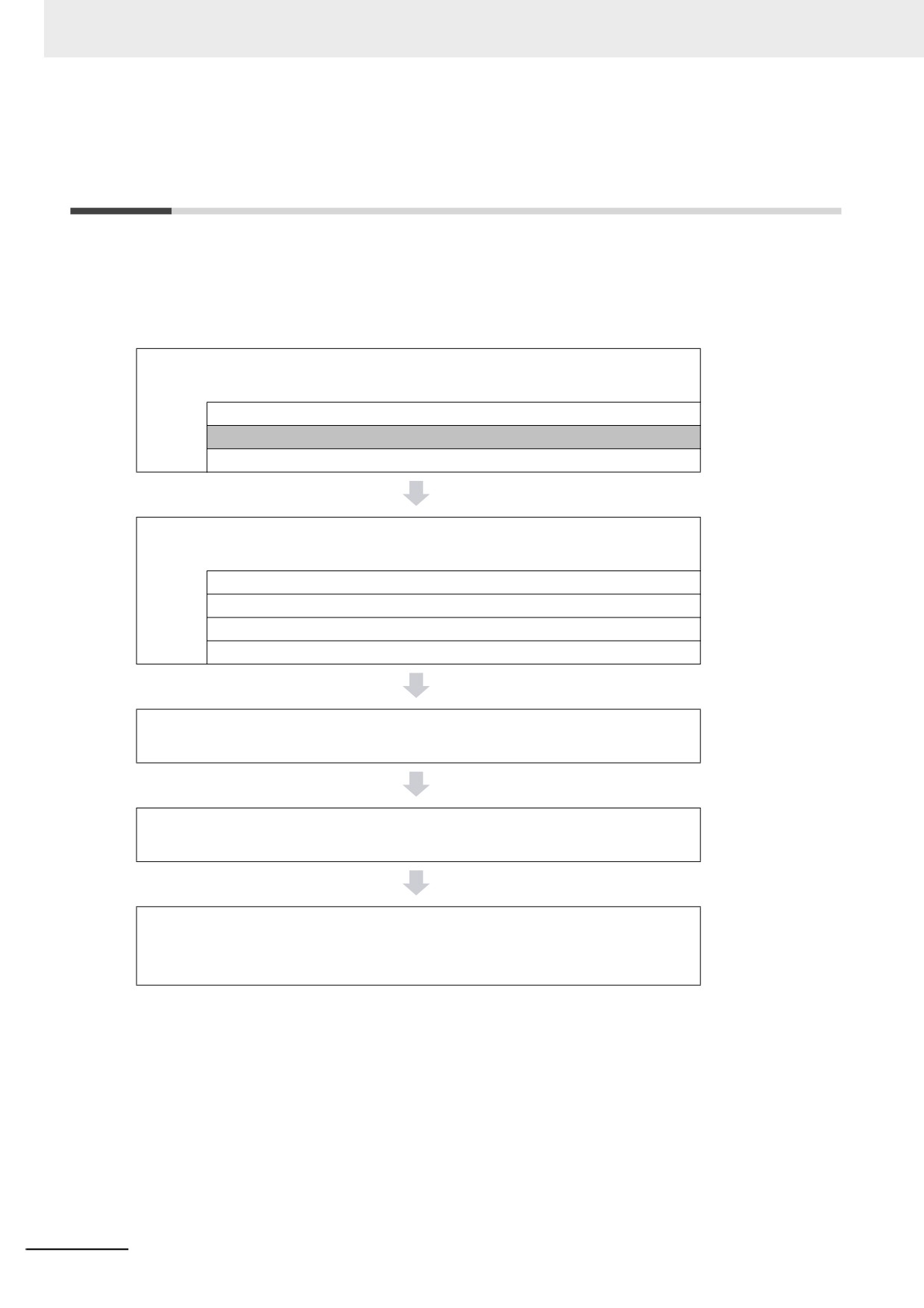
This section provides an overview of the task designing procedure.
The shaded steps in the overall procedure that is shown below are related to the task designing proce-
dure.
Step 1. Software Design
Step 1-1 I/O Designing I/O and Processing
Step 1-2 Designing Tasks
Step 1-3 Designing Programs
Step 2. Software Setups and Programming
Step 2-1 Slave and Unit Configurations
Step 2-2 Controller Setup
Step 2-3 Programming
Step 2-4 Offline Debugging
Step 3. Mounting and Setting Hardware
Step 4. Wiring
Step 5. Checking Operation and Starting Operation
on the Actual System
Refer to 1-4 Overall Operating Procedure for the NY-series Controller for details.
5-2
5 Designing Tasks
Designing the Tasks
Reference
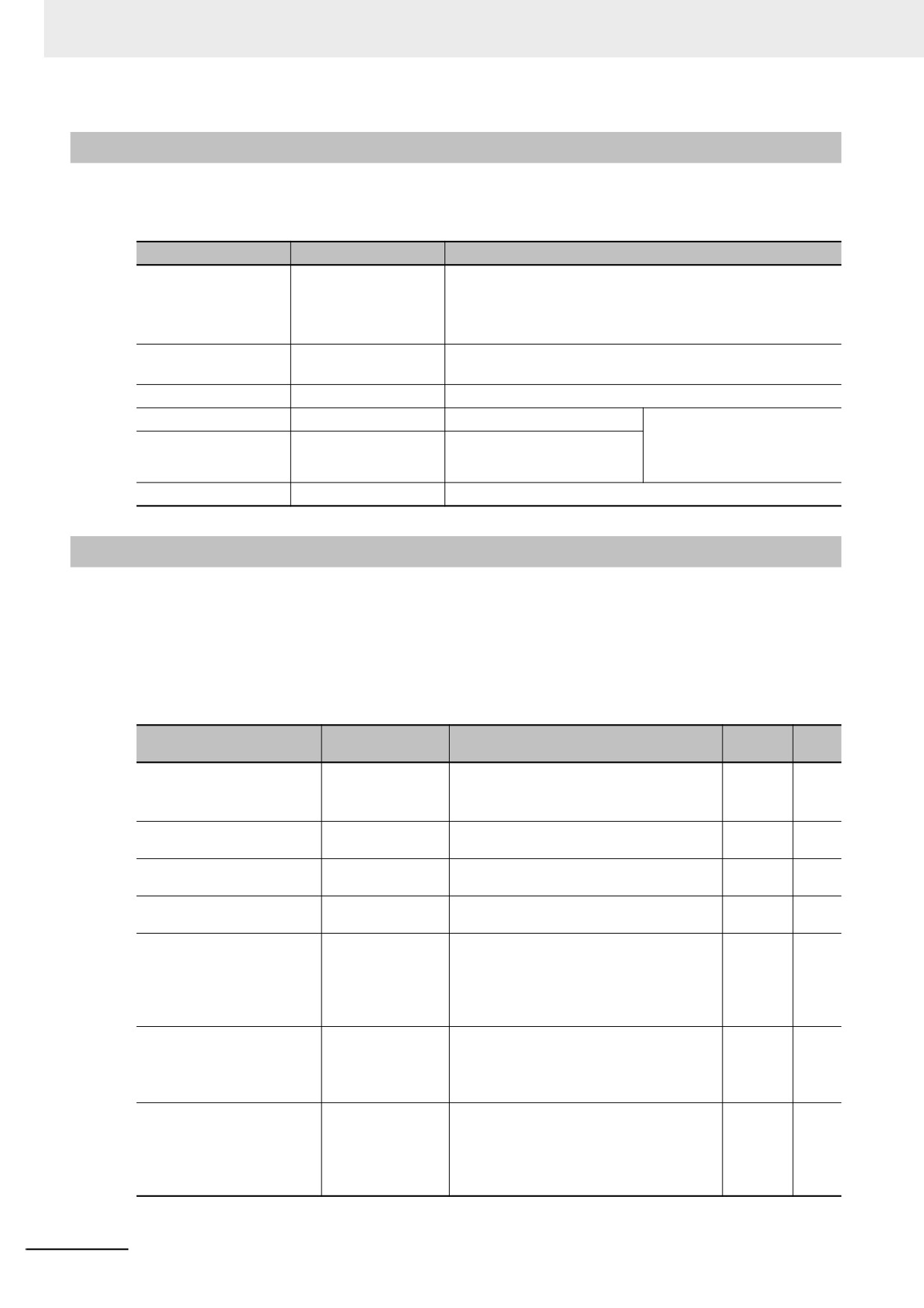
z
Design the task configuration.
5-3-3 Basic Operation
of Tasks for NY-series
Design the task configuration based on the I/O response performance that
Controllers
is required by the controlled devices.
5-9 Task Design Meth-
ods and I/O Response
Times
z
I/O refreshing of slaves and Units is assigned to the tasks.
5-5-1 Assigning I/O
Refreshing to Tasks
You can only assign I/O refreshing to the primary periodic
task in an NY-series Controller.
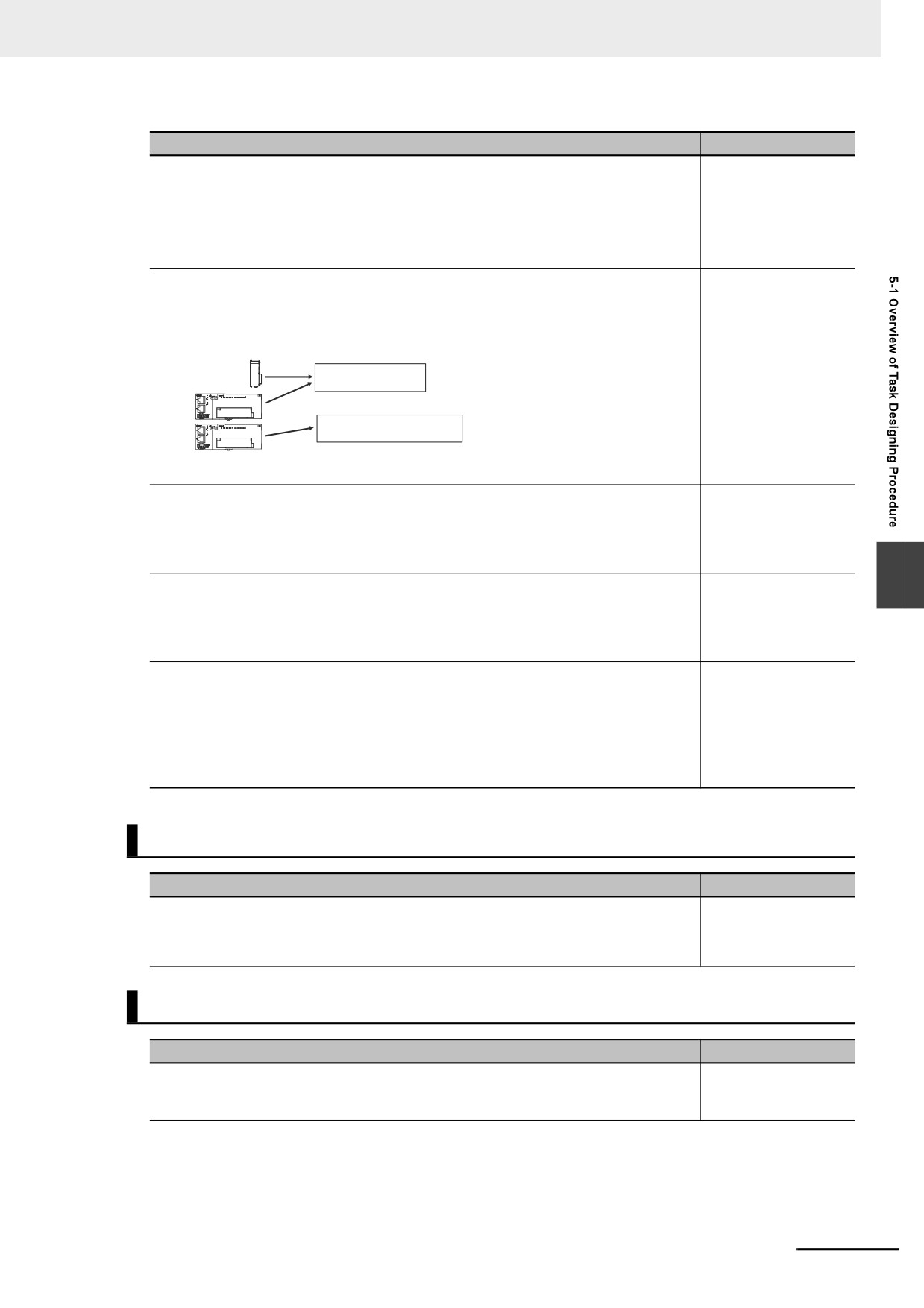
Devices (slaves/Units)
Primary periodic task
Priority-16 periodic task
Assign the slaves and Units to
the task for I/O refreshing.
z
Determine which programs to assign to the primary
5-5-2 Assigning Tasks
to Programs
periodic task, to the priority-16, priority-17, and priority-18
periodic tasks, and to the priority-8 and priority-48 event
tasks.
5
z
Design the exclusive control methods for variables
5-6-1 Ensuring Con-
currency of Variable
between tasks.
Values between Tasks
Design the exclusive control methods for variables between tasks when the
same global variables are used in different tasks.
z
Design the tasks to access variables from outside of the
5-6-2 Variable Access
from Outside the Con-
Controller.
troller
Design the tasks to enable synchronization of accessing variables in the
Controller from outside of the Controller with the execution of a program in
a specific task. EtherNet/IP tag data links are included in accessing vari-
ables.
Task Settings on the Sysmac Studio
Setting the Tasks
Reference
z Initial Settings for the PLC Function Module:
4-2 Initial Settings for
the PLC Function
Task Settings: Task Periods, I/O Settings, Program Assignments,
Module
Task Interface Settings, and other settings
Offline Debugging with the Sysmac Studio
Desktop Operation Check
Reference
z Perform desktop debugging of sequence control and
Section 7 Checking
Operation and Actual
motion control with the Simulator (virtual controller).
Operation
5-3
5 Designing Tasks
5-2
Overview of Tasks
This section provides an overview of tasks.
5-2-1
Tasks
Tasks are used to assign an execution condition and execution order to a series of processes, such as
I/O refreshing and user program execution.
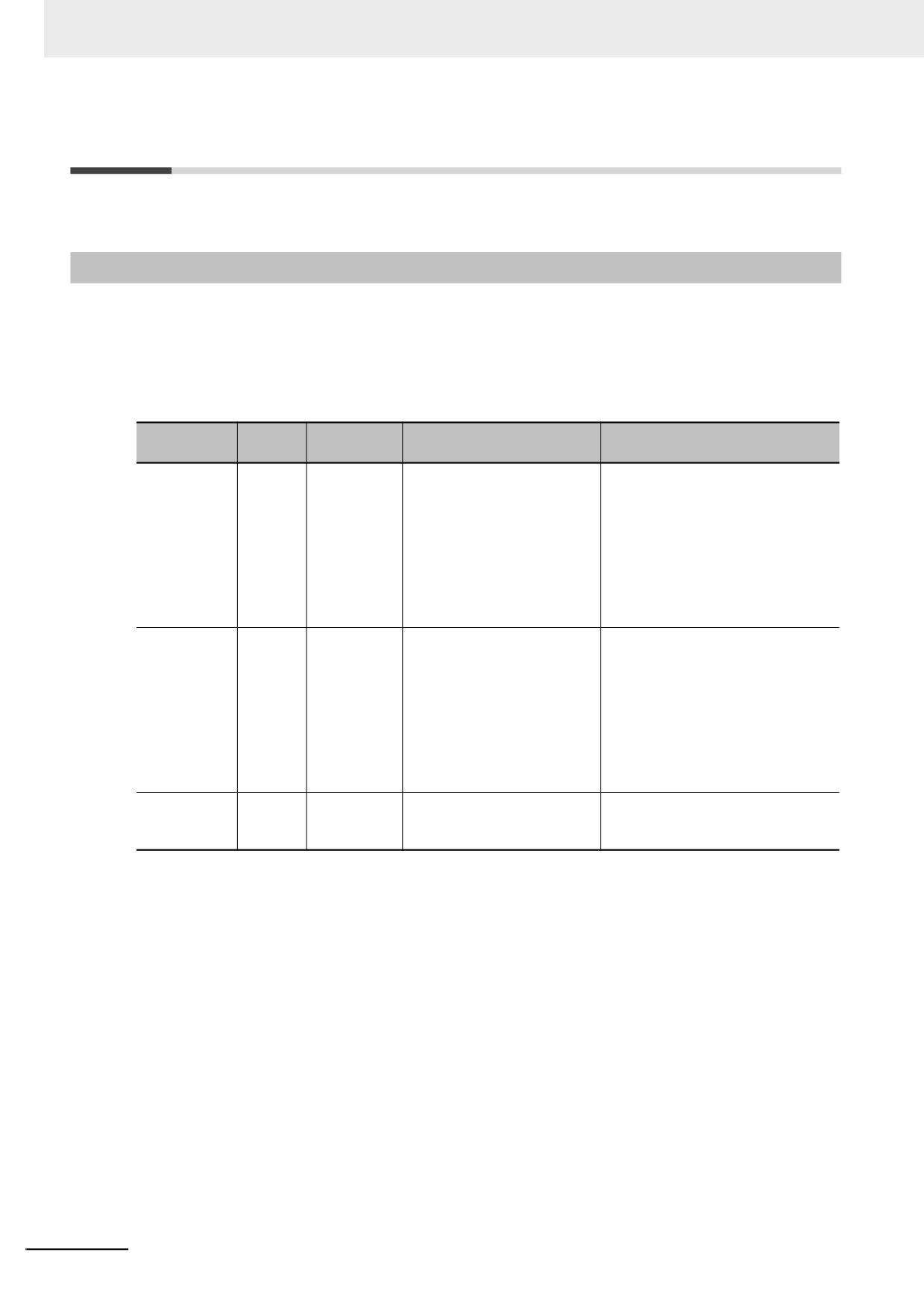
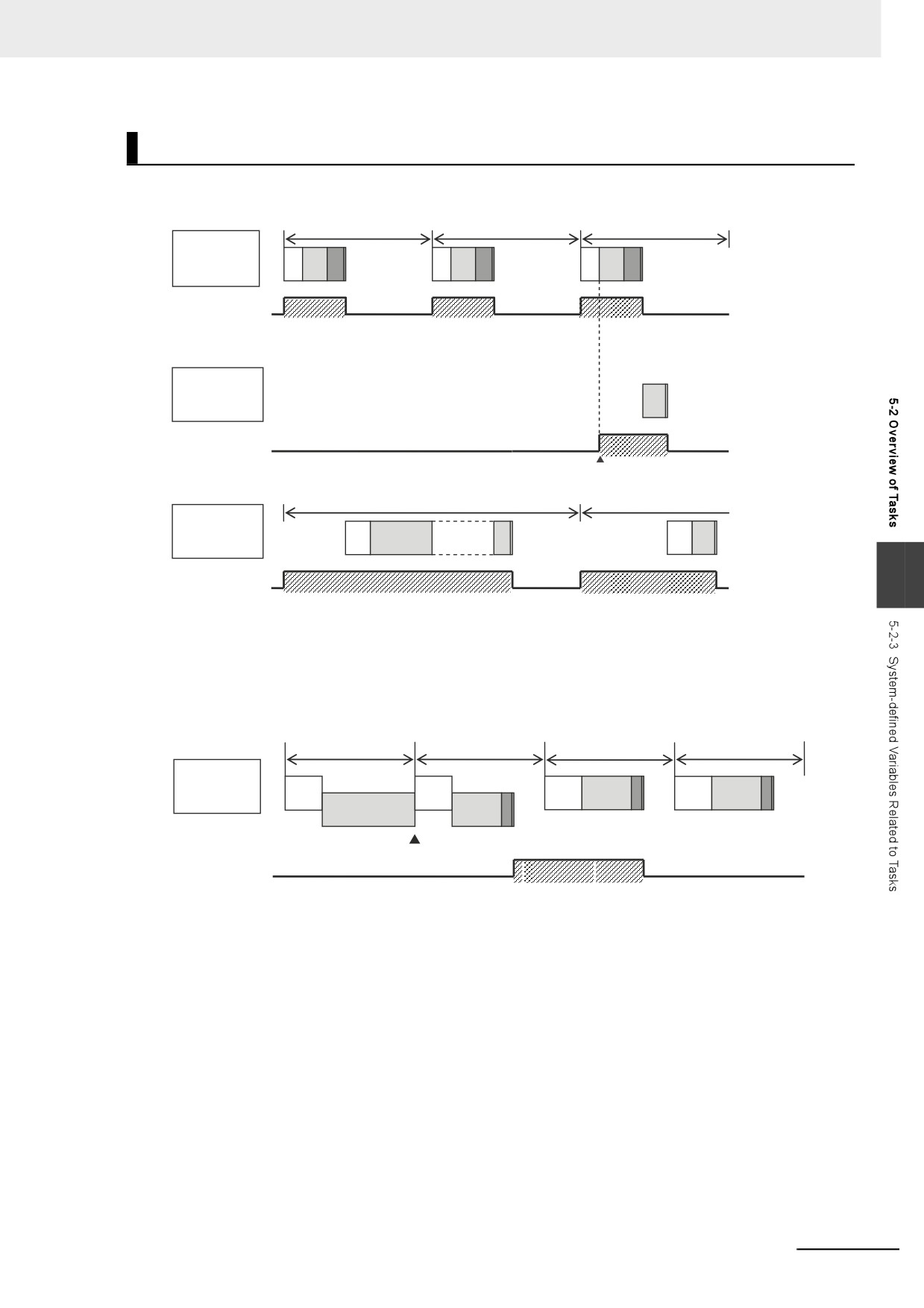
There are three kinds of tasks, as shown in the following table. They are defined by their execution con-
ditions and execution priorities.
Number
Task execu-
Type of task
Definition
Main processing content
of tasks
tion priority
Primary peri-
1
4
The primary periodic task is
I/O refreshing, user program execu-
odic task
executed once every task
tion, and motion control
period. It has the highest exe-
cution priority.
Motion control instructions
and EtherCAT communica-
tions of the primary periodic
task are executed on the pri-
mary periodic task period.
Periodic tasks
0 to 3
16, 17, or 18
The priority-16, priority-17,
The processing that can be per-
and priority-18 periodic tasks
formed depends on the task execu-
are executed once every task
tion priority.
period.
Execution priority 16, 17, or 18: User
Motion control instructions
program execution
and EtherCAT communica-
tions of the priority-16 periodic
task are executed on the pri-
mary periodic task period.
Event tasks
0 to 32
8 or 48
An event task is executed
User program execution
only once when the specified
execution condition is met.
5-4
5 Designing Tasks
z Primary Periodic Task and Periodic Tasks
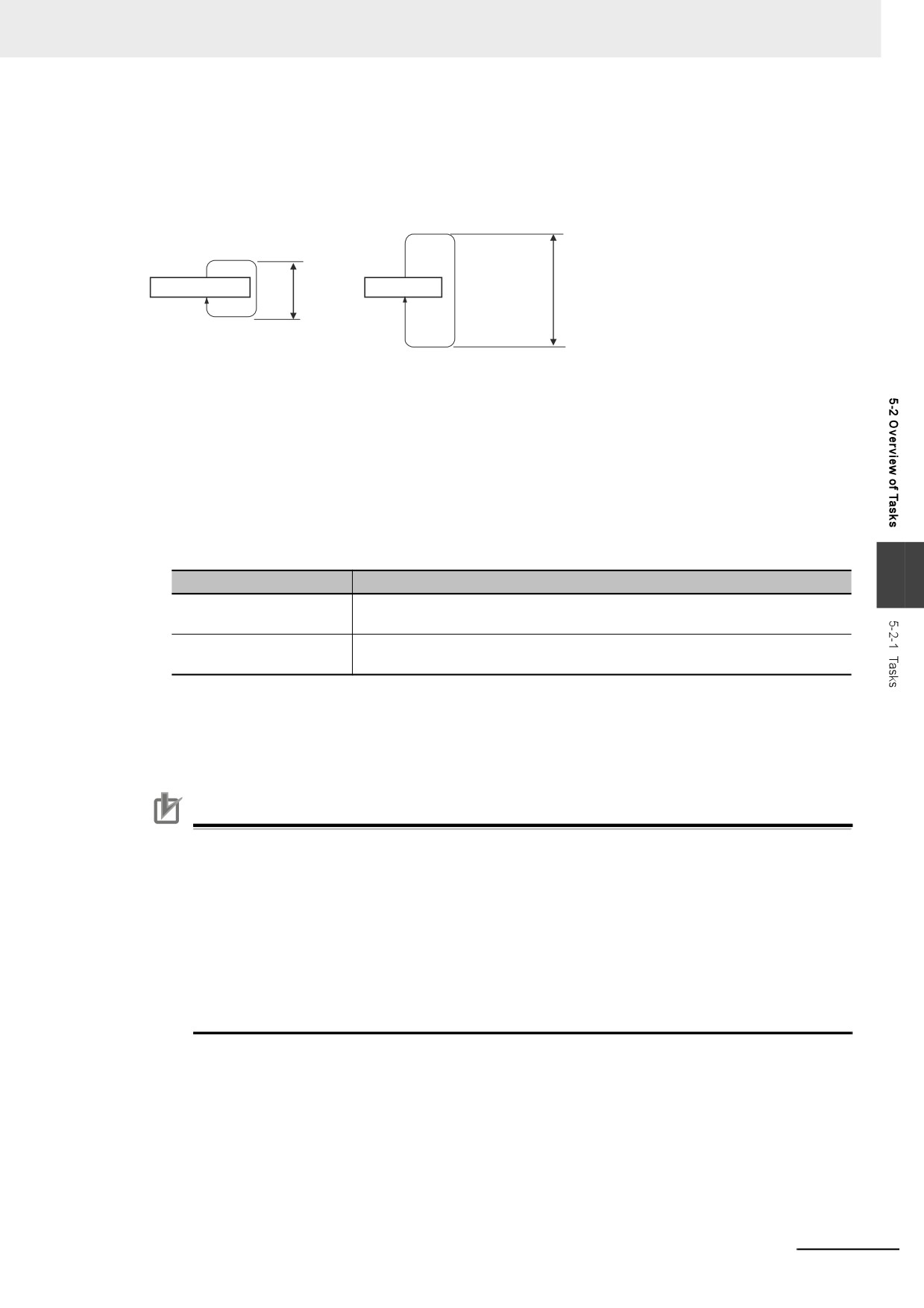
The NY-series Controller periodically executes both the primary periodic task and periodic tasks.
(The interval in which the NY-series Controller executes the primary periodic task or a periodic task
is called the task period.)
Fixed period (an
Primary periodic task
Fixed
Task period
Periodic task
integer multiple of
period
the task period of
Task period
the primary
periodic task)
From 1 to 128 programs can be assigned to one task. The programs that are assigned to a task are
executed in the order that they are assigned. Execution of the all of the programs assigned to each
task is called user program execution.
Exchanging data with EtherCAT slaves is called I/O refreshing.
You can only assign I/O refreshing for each slave and Unit to the primary periodic task.
z Event Tasks
An event task is executed only once when the specified execution condition is met. There are the
following two types of execution conditions for event tasks.
5
Execution condition
Specification
Execution with an instruc-
The event task is executed when the ActEventTask (Execute Event Task)
tion
instruction is executed.
Execution when a condi-
The event task is executed when the specified variable matches a predefined
tion for a variable is met
condition.
From 1 to 128 programs can be assigned to one task. The programs that are assigned to a task are
executed in the order that they are assigned.
Precautions for Correct Use
• I/O refreshing and motion control are not executed in event tasks. This means that you cannot
assign programs to event tasks if the program performs I/O control or executes motion control
instructions.
• Event tasks are not executed repeatedly every task period. Therefore, you cannot assign a
program to an event task if that program contains an instruction whose execution is not com-
pleted within one task period. Instructions that are executed over more than one task period
include some of the basic instructions, such as instructions for SD Memory Cards and commu-
nications, all motion control instructions, and all simulation instructions. Refer to the NY-series
Instructions Reference Manual (Cat. No. W560) for details on the basic instructions that can-
not be used in event tasks.
5-5
5 Designing Tasks
5-2-2
Instructions Related to Tasks
The following instructions are supported to read the status of the current task, to determine if execution
is in progress for other tasks, and to perform exclusive control for regional concurrency between tasks.
Instruction
Instruction name
Introduction
GetMyTaskStatus
Read Current Task
Reads the following status of the current task.
Status
Last Task Execution Time, Maximum Task Execution Time,
Minimum Task Execution Time, Task Execution Count, Task
Period Exceeded Flag, and Task Period Exceeded Count
GetMyTaskInterval
Read Current Task
Reads the task period of the current task.
Period
Task_IsActive
Determine Task Status
Determines if the specified task is currently in execution.
Lock
Lock Tasks
Starts a lock between tasks.
Execution of any other task
with a lock region with the
Unlock
Unlock Tasks
Stops a lock between tasks.
same lock number is dis-
abled.
ActEventTask
Activate Event Task
Activates the specified event task.
5-2-3
System-defined Variables Related to Tasks
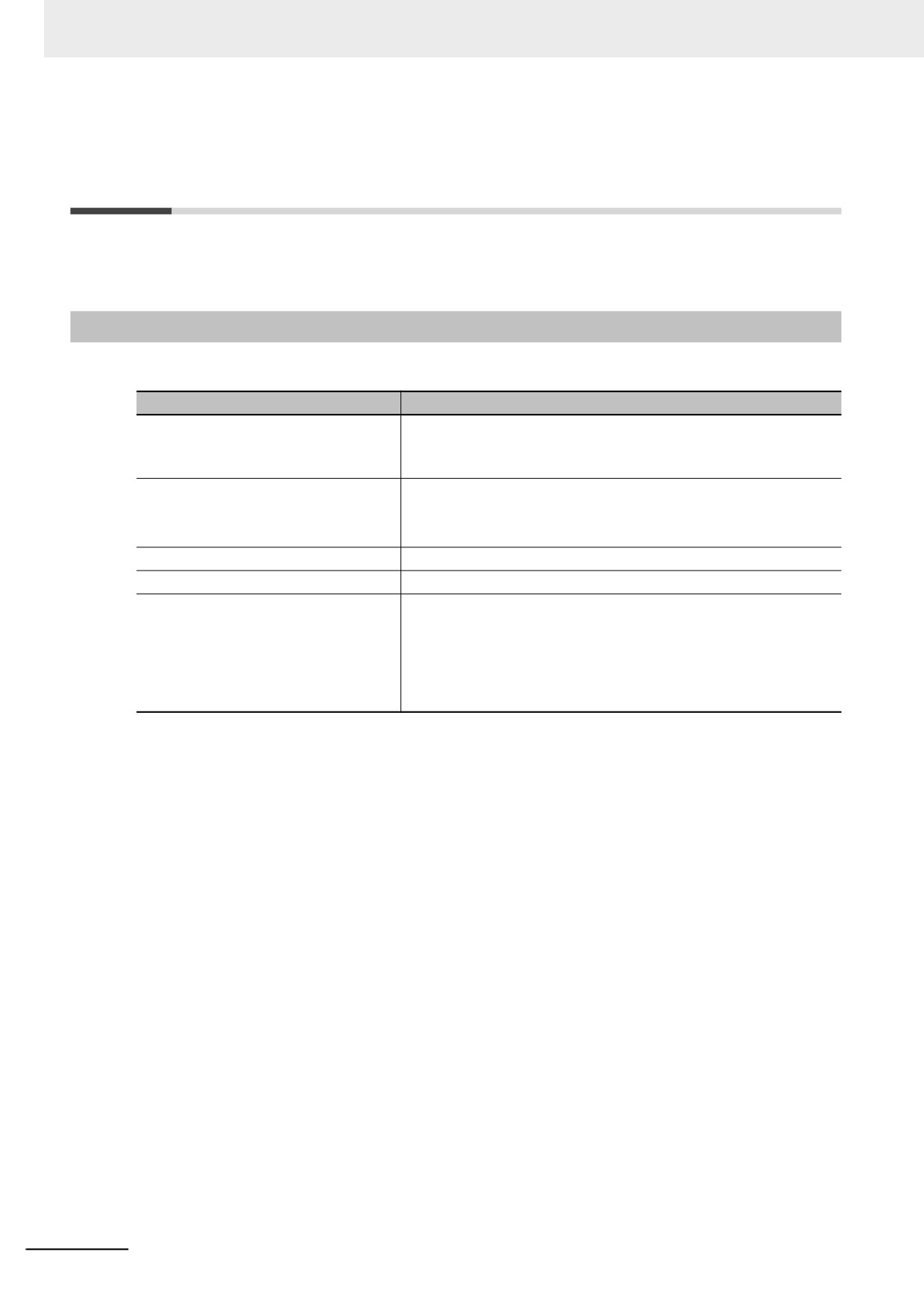
The following system-defined variables are provided for each task to show task status.
Do not use these variables in the user program. There may be a delay in updating them and concur-
rency problems in relation to the error status of the Function Module. It is used only to sample the task
status for data tracing from the Sysmac Studio.
You can also use the GetMyTaskStatus and Task_IsActive instructions to read task status from the user
program.
Data
Variable name
Meaning
Function
R/W
type
_TaskName_Active
Task Active Flag
TRUE during task execution.
BOOL
R
FALSE from the completion of task execu-
tion until the end of the task period.
_TaskName_LastExecTime
Last Task Execu-
Gives the last execution time of the task.
TIME
R
tion Time
_TaskName_MaxExecTime
Maximum Task
Gives the maximum value of the task exe-
TIME
R
Execution Time
cution time.
_TaskName_MinExecTime
Minimum Task
Gives the minimum value of the task exe-
TIME
R
Execution Time
cution time.
_TaskName_ExecCount
Task Execution
Contains the number of executions of the
UDINT
R
Count
task.
If the present value exceeds the maximum
value of the data type, the present value
returns to 0 and the count is continued.
_TaskName_Exceeded
Task Period
TRUE when task execution is completed if
BOOL
R
Exceeded Flag
the task period is exceeded.
FALSE if task execution was completed
within the task period.
_TaskName_ExceedCount
Task Period
Contains the number of times that the task
UDINT
R
Exceeded Count
period was exceeded.
If the present value exceeds the maximum
value of the data type, the present value
returns to 0 and the count is continued.
Note Example: The Task Period Exceeded Flag for the task named MainTask is _MainTask_Exceeded.
5-6
5 Designing Tasks
Flag Operation
z Task Active Flag (_TaskName_Active)
Task period
Primary
periodic task:
IO
UPG
MC
IO
UPG
MC
IO
UPG
MC
Task A
_TaskA_Active
Event task
(execution priority
UPG
of 8): Task B
_TaskB_Active
Task execution
condition is met.*
Task period
Priority-16
periodic task:
IO
UPG
IO
UPG
Task C
5
_TaskC_Active
* When the ActEventTask instruction is used
to execute an event task, the Task Active
Flag changes to TRUE.
z Task Period Exceeded Flag (_TaskName_Exceeded)
Task period
Primary
periodic task:
M
M
IO
IO
IO
UPG
IO
UPG
Task A
C
C
M
UPG
C
Period exceeded.
_TaskA Exceeded
5-7
5 Designing Tasks
5-3
Specifications and Basic Operation
of Tasks for NY-series Controllers
This section describes the specifications and basic operation of tasks for NY-series Controllers with a
multi-core processor.
5-3-1
Specifications of Tasks for NY-series Controllers
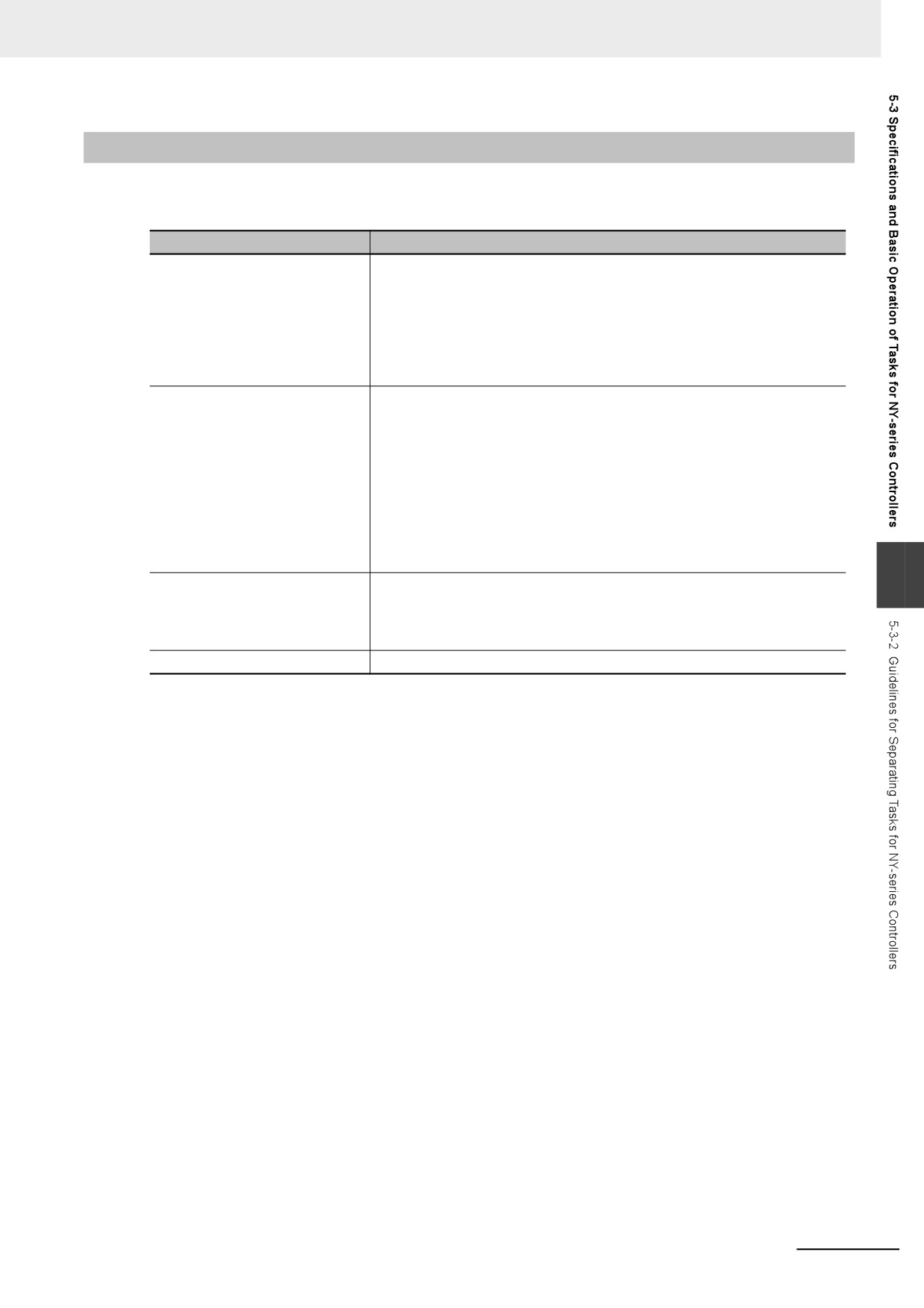
The specifications of tasks are given in the following table.
Item
Specification
Type of task
• Primary periodic task
• Periodic task (priority 16, 17, or 18)
• Event task (priority 8 or 48)
Numbers of tasks
• Primary periodic task: 1
• Periodic tasks: 0 to 3 tasks*1
• Event tasks: 0 to 32 tasks*2
Number of programs per task
128 max.
Task period of the primary periodic task
500 μs to 8 ms (in 250-μs increments)
Task period of periodic task
1 ms to 100 ms (in 250-μs increments)
Set the task period of each periodic task to an integer multiple of the task
period of the primary periodic task.
You cannot select any combination of task periods whose least common
multiple exceeds 600 ms.
*1
There can be no more than one task with each of the following execution priorities: 16, 17, and 18.
*2
There can be up to 32 tasks with each of the following priorities as long as there are no more than a total of 32
tasks with these priorities: 8 and 48.
5-8
5 Designing Tasks
5-3-2
Guidelines for Separating Tasks for NY-series Controllers
All programs must be assigned to one of the tasks. Use the guidelines in the following table to deter-
mine which tasks to assign your programs to based on the requirements of the programs.
Task
Programs that are suitable for this task
Primary periodic task
• Programs that require periodic I/O refreshing, user program execution,
motion control, or system common processing at an exact execution
period.
• Programs that require the highest execution priority and contain controls
that need high-speed response.
• Programs that contain motion control instructions with the highest execu-
tion priority.
Priority-16 periodic task
• Programs that contain controls for some slaves and Units whose I/O
refreshing is assigned to the primary periodic task.
• Programs with a relatively low execution priority that require periodic user
program execution or system common processing.
• Programs that contain motion control instructions with a relatively low
execution priority.
• Programs used for applications where, among the processes for slaves
and Units controlled with the primary periodic task, those with a relatively
low execution priority are controlled separately with the priority-16 peri-
odic task.
5
Priority-17 or priority-18 periodic
• Programs with a relatively low execution priority that require periodic user
task
program execution or system common processing.
• Programs that contain data processing and communications processing
controls that do not need high-speed response.
Event task
• Programs that are executed only when specified conditions are met.
5-9
5 Designing Tasks
5-3-3
Basic Operation of Tasks for NY-series Controllers
With a multi-core processor, the NY-series Controller can execute multiple tasks, the tag data link ser-
vice, and system services in parallel. The order in which tasks are executed depends on the execution
priority that is set for each task.
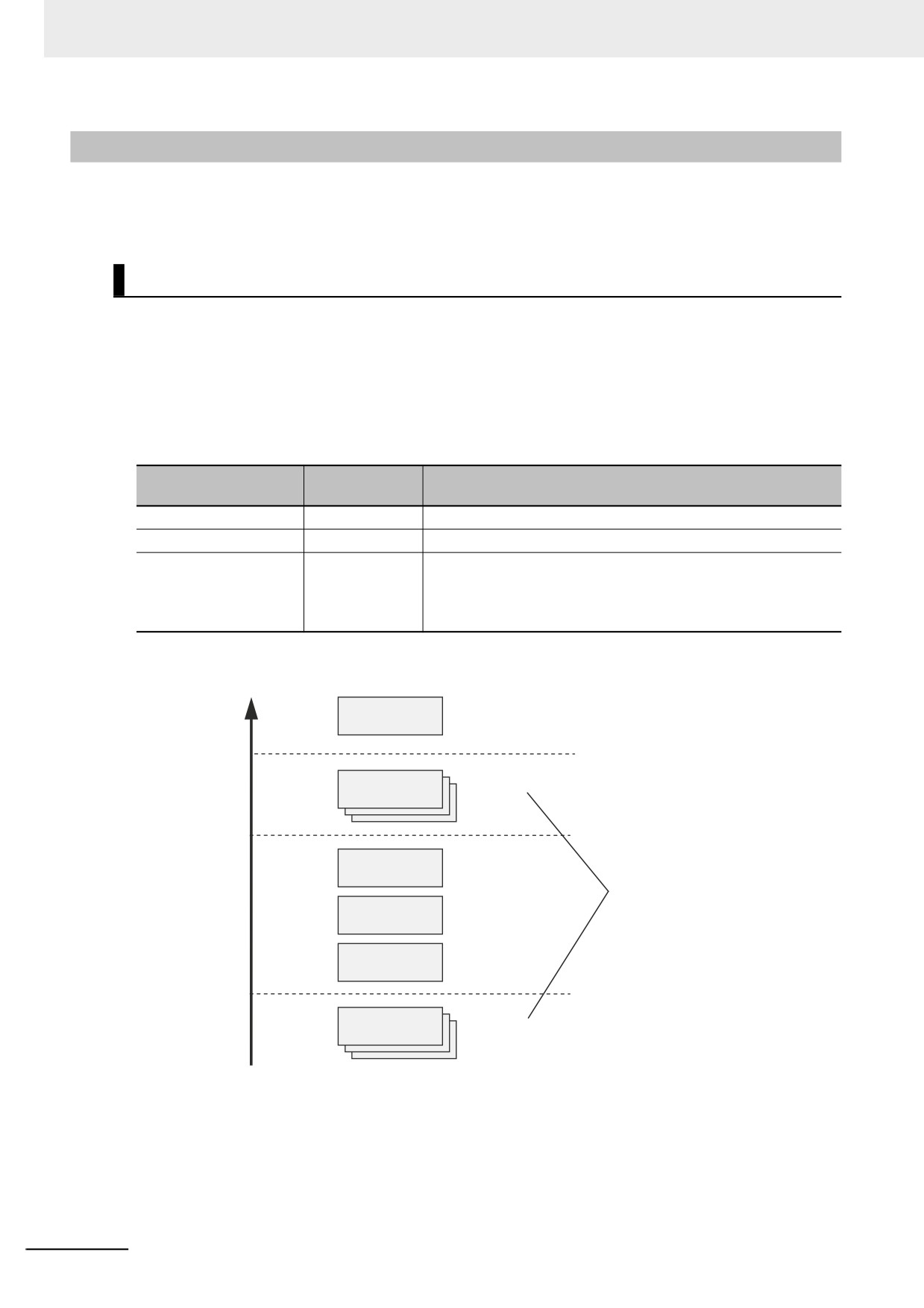
Task Execution Priority
The type of the task determines its execution priority. The NY-series Controller executes the task with
the highest execution priority first.
If the execution condition is met for another task, Tb, that has a higher execution priority while task Ta
execution is in progress, the NY-series Controller will assign Tb to the available core for processing on
a priority basis.
The execution priority for each task type is given in the following table. The smaller the value of the exe-
cution priority, the higher the priority.
Execution pri-
Task
Tasks with the same execution priority
ority
Primary periodic task
4
---
Periodic task
16, 17, or 18
You cannot set the same execution priority for more than one task.
Event task
8 or 48
You can set the same execution priority for more than one event
task.
Refer to 5-3-5 Event Task Execution Timing for NY-series Control-
lers for the order of execution.
High
Numbers of tasks
Primary
4
1
periodic task
Event tasks
0 to 32
8
Execution priority
(0 to 63)
16
Periodic task
0 or 1
A total of up to 32
tasks for both
priority levels.
17
Periodic task
0 or 1
18
Periodic task
0 or 1
Event tasks
0 to 32
48
Low
5-10
5 Designing Tasks
Task Periods for the Primary Periodic Task and Periodic Tasks
The NY-series Controller repeatedly and cyclically executes the primary periodic task and periodic
tasks.
The task periods for periodic tasks must be assigned as integer multiples of the task period of the pri-
mary periodic task (called the primary period). Therefore, execution of both tasks will start at the same
time every few cycles.
For example, if the primary period is set to 1 ms and the task period of the priority-16 periodic task is set
to 4 ms, the execution timing of the primary periodic task and the priority-16 periodic task is synchro-
nized after each four executions of the primary periodic task.
Additional Information
An event task is not executed periodically. Instead, it is executed only once when the specified
execution condition is met. Therefore, execution of an event task depends on when its execution
condition is met and on its execution priority.
Examples of Execution Order for Tasks
5
This section gives a few examples of the execution order for the primary periodic task and periodic
tasks.
Refer to 5-3-5 Event Task Execution Timing for NY-series Controllers for the order of execution of event
tasks.
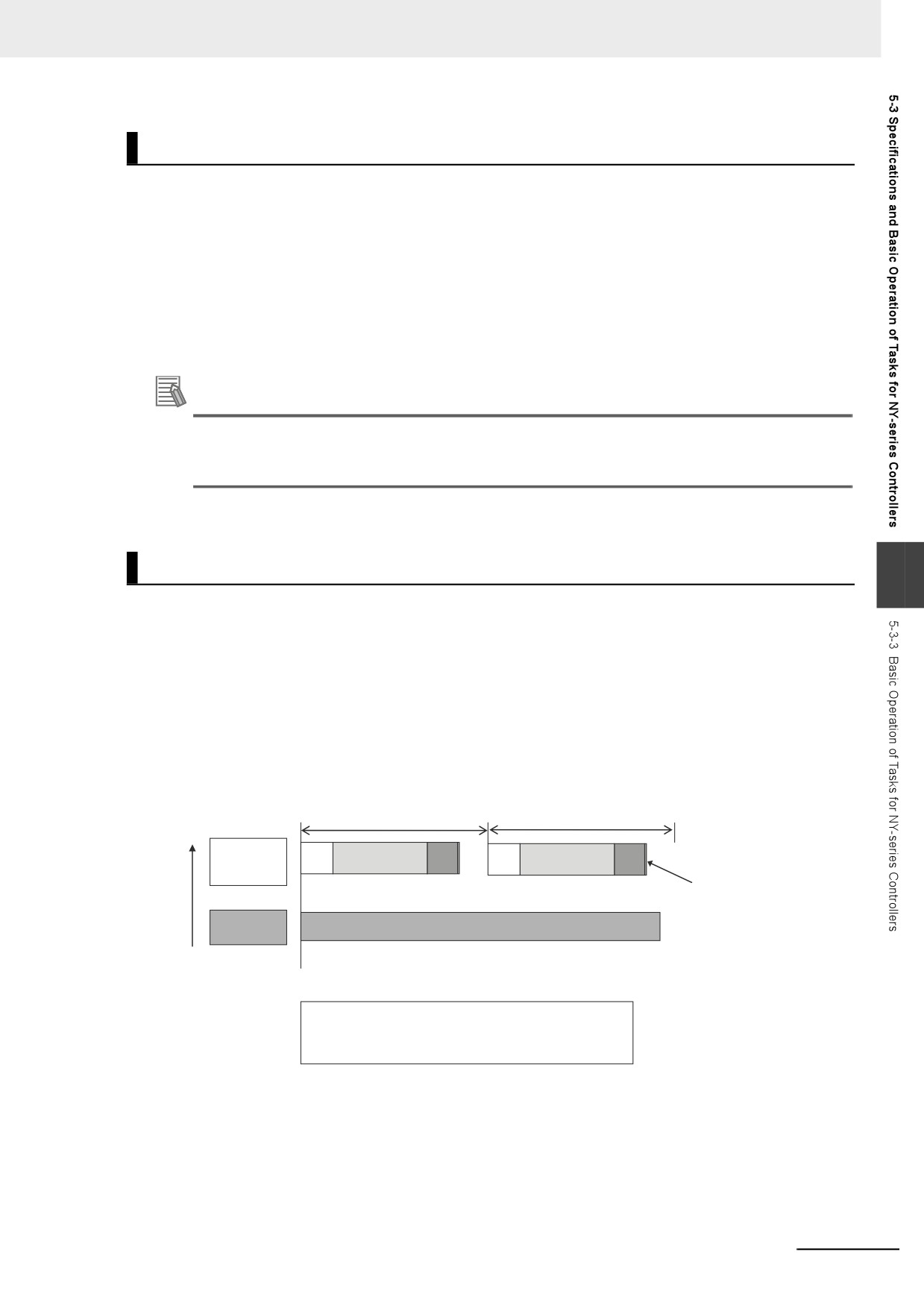
z Projects with Only the Primary Periodic Task
The primary periodic task is executed every primary period.
The system service shown in this figure refers to non-task related processing, such as communica-
tions processing, that is performed by the Controller. Refer to Processing Performed in System Ser-
vices on page 5-32 for details on the system services.
Execution priority
Primary period
Primary period
High
Primary
IO
UPG
MC
IO
UPG
MC
periodic
task
A double line means
that all processing for
that task has been
System
completed.
SS
services
Low
IO: Indicates I/O refreshing (data outputs and then data inputs).
UPG: User program execution.
MC: Indicates motion control.
SS: Indicates system services.
5-11
5 Designing Tasks
z
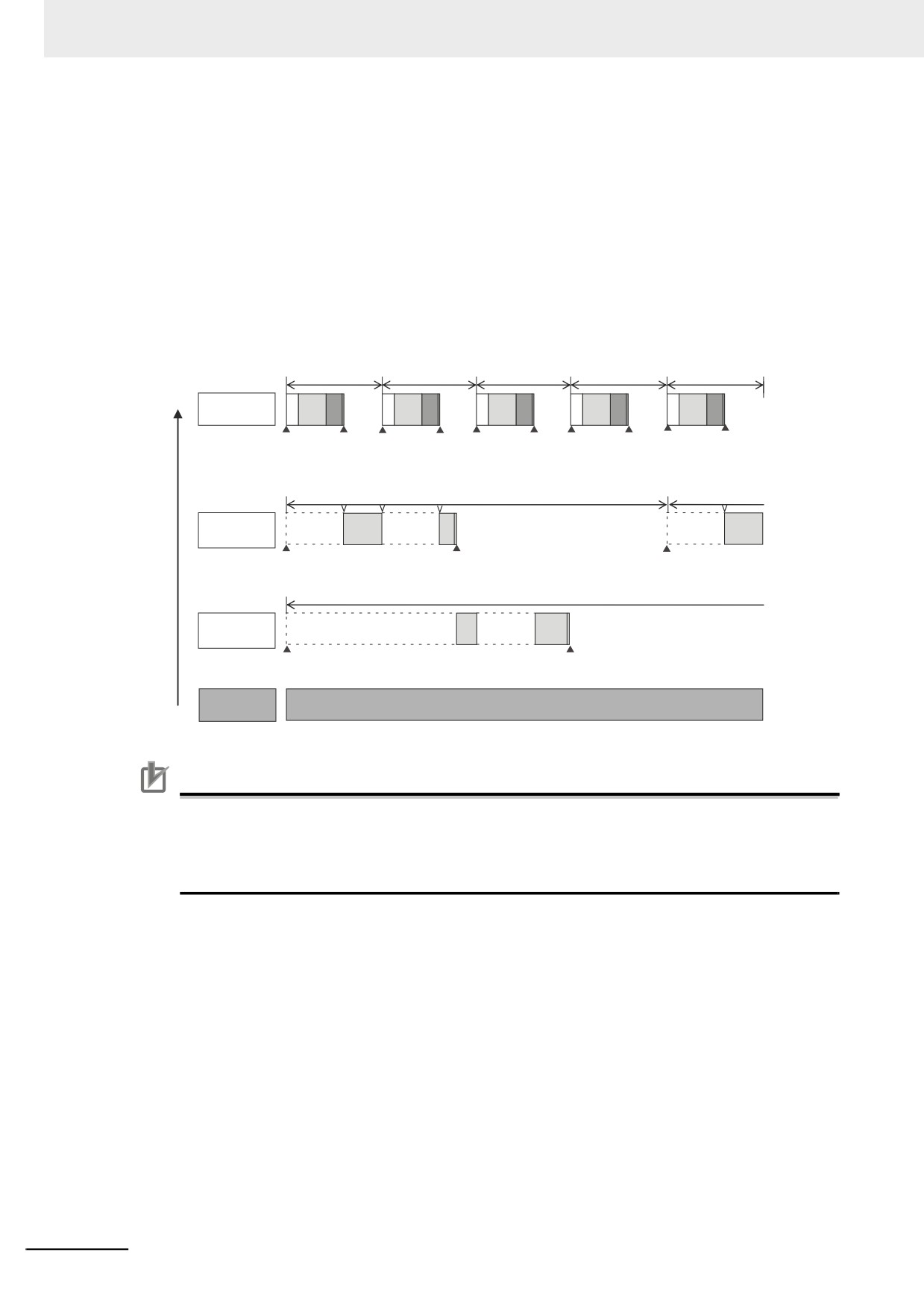
Project with the Primary Periodic Task, Priority-16 Periodic Task, and Priority-
17 Periodic Task
• The primary periodic task has the highest execution priority, so it is always executed in the pri-
mary period.
• The priority-16 periodic task is executed after execution of the primary periodic task is completed.
• The priority-17 periodic task has an even lower execution priority, so it is executed when the
above two tasks are not under execution.
• In this example, the task period for the priority-16 periodic task is set to four times the primary
period. This means that once ever four primary periods, execution of the primary periodic task and
the priority-16 periodic task will start at the same time.
• The system services are executed at the required time without being affected by the tasks.
Execution priority
Primary period
Primary period
Primary period
Primary period
Primary period
High
Primary
IO
UPG
MC
IO
UPG
MC
IO
UPG
MC
IO
UPG
MC
IO
UPG
MC
periodic task
Task execution
Task
Task execution
Task
Task execution
Task
Task execution
Task
Task execution
Task
condition is
execution
condition is
execution
condition is
execution
condition is
execution
condition is
execution
met.
is completed. met.
is completed. met.
is completed. met.
is completed. met.
is completed.
Task period
Task period
Priority-16
UPG
UPG
periodic task
Task execution
Task
Task execution
condition is
execution
condition is
met.
is completed.
met.
Task period
Priority-17
UPG
UPG
periodic task
Task execution
Task
condition is
execution
met.
is completed.
System
SS
Low
services
Precautions for Correct Use
If you have multiple tasks that read and write to the same variables, make sure to use exclusive
control of variables between the tasks. Otherwise, a task other than the one currently in execu-
tion may change the variable values.
Refer to 5-6-1 Ensuring Concurrency of Variable Values between Tasks for details.
5-12
5 Designing Tasks
Tasks and Operating Modes
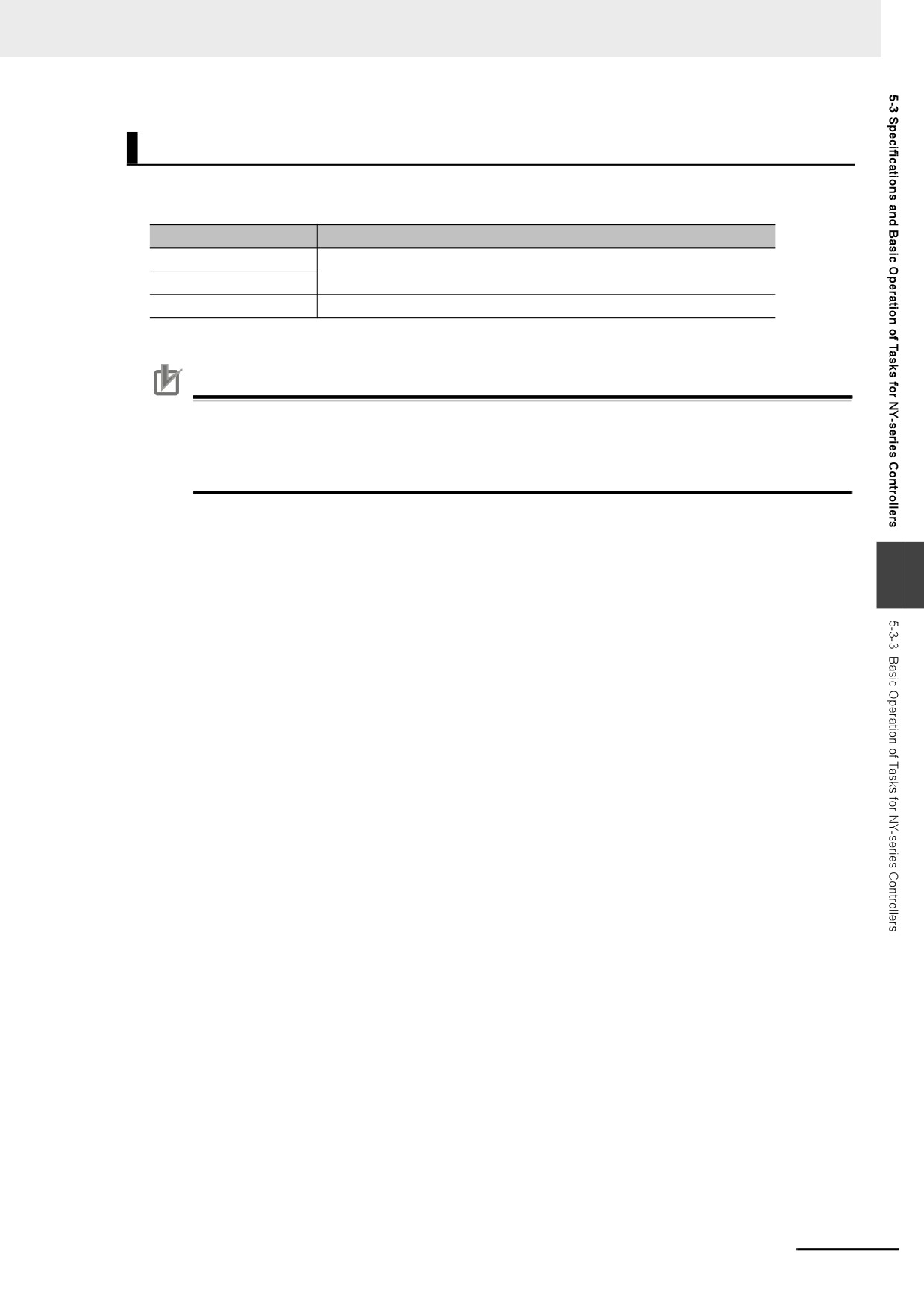
The relationship between the operating modes and tasks of an NY-series Controller is given in the fol-
lowing table.
Task
Specification
Primary periodic task
• These tasks are executed in both RUN mode and PROGRAM mode.
Periodic task
• The user program is executed only in RUN mode.
Event task
Event tasks are executed only in RUN mode.
Precautions for Correct Use
• Even if the execution condition for an event task is already met when you change the operat-
ing mode to RUN mode, the event task will not be executed. An event task is executed only
when its execution condition changes from not met to met during RUN mode.
• Even in RUN mode, an event task is not executed if there is a major fault level error.
5
5-13
5 Designing Tasks
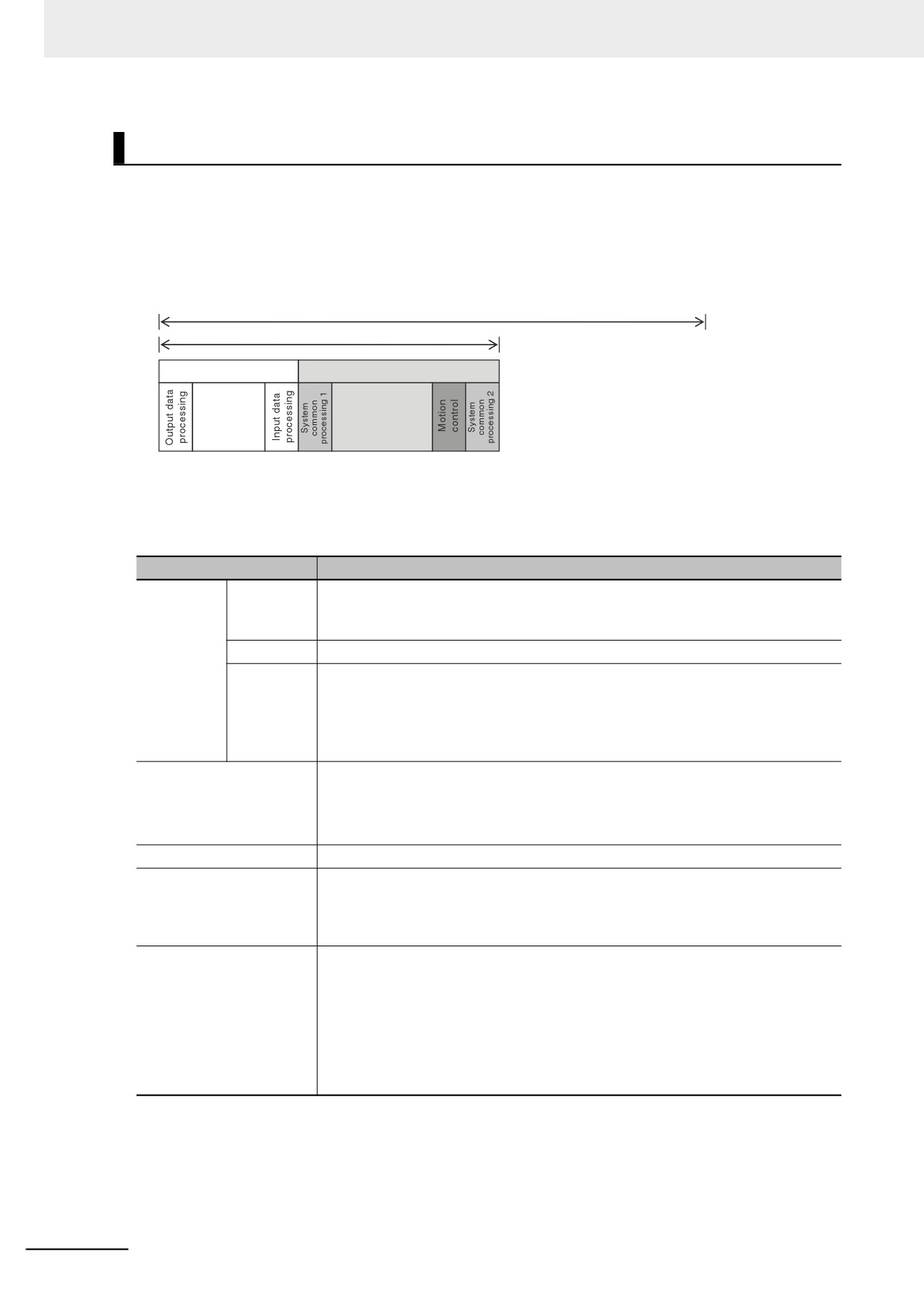
The Processing Performed in Each Task
z Primary Periodic Task
The primary periodic task has the highest execution priority. It executes processes with high speed
and high precision.
In the specified period, this task performs system common processing, I/O refreshing, user program
execution, and motion control.
Task period*1 = Primary period (fixed)
Task execution time*2 (varies)
I/O refreshing
Control processing
User program
Refreshing
execution
*1
: Task period
The Controller executes tasks in this fixed period. This is a preset, fixed time.
*2
: Task execution time
This is the actual time it takes from the point that the execution condition is met
until execution is completed.
Processing
Processing contents
I/O refresh-
Output data
•
Output refresh data is created for Output Units that refresh I/O.
ing
processing
•
If forced refreshing is set, the forced refreshing values are reflected in the output
refresh data.
Refreshing
•
This process exchanges data with I/O.
Input data
•
Whether the condition expression for event task execution is met or not is deter-
processing
mined.
•
Input refresh data is loaded from Input Units that refresh I/O.
•
If forced refreshing is set, the forced refreshing values are reflected in the input
refresh data that was read.
System common process-
•
Processing for exclusive control of variables in tasks is performed (when access-
ing 1
ing tasks are set).
•
Motion input processing is performed.*1
•
Data trace processing (sampling and trigger checking) is performed.
User program execution
•
Programs assigned to tasks are executed in the order that they are assigned.
Motion control*2
•
The motion control commands from the motion control instructions in the user
program assigned to the primary periodic task and the priority-16 periodic task
are executed.
•
Processing the motion outputs for I/O refreshing in the next primary periodic task.
System common process-
•
Processing for exclusive control of variables in tasks is performed (when refresh-
ing 2
ing tasks are set).
•
Processing for variables accessed from outside of the Controller is performed to
maintain concurrency with task execution (executed for the variable access time
that is set in the Task Settings).
•
If there is processing for EtherNet/IP tag data links and refreshing tasks are set
for the tags (i.e., variables with a Network Publish attribute), variable access pro-
cessing is performed.
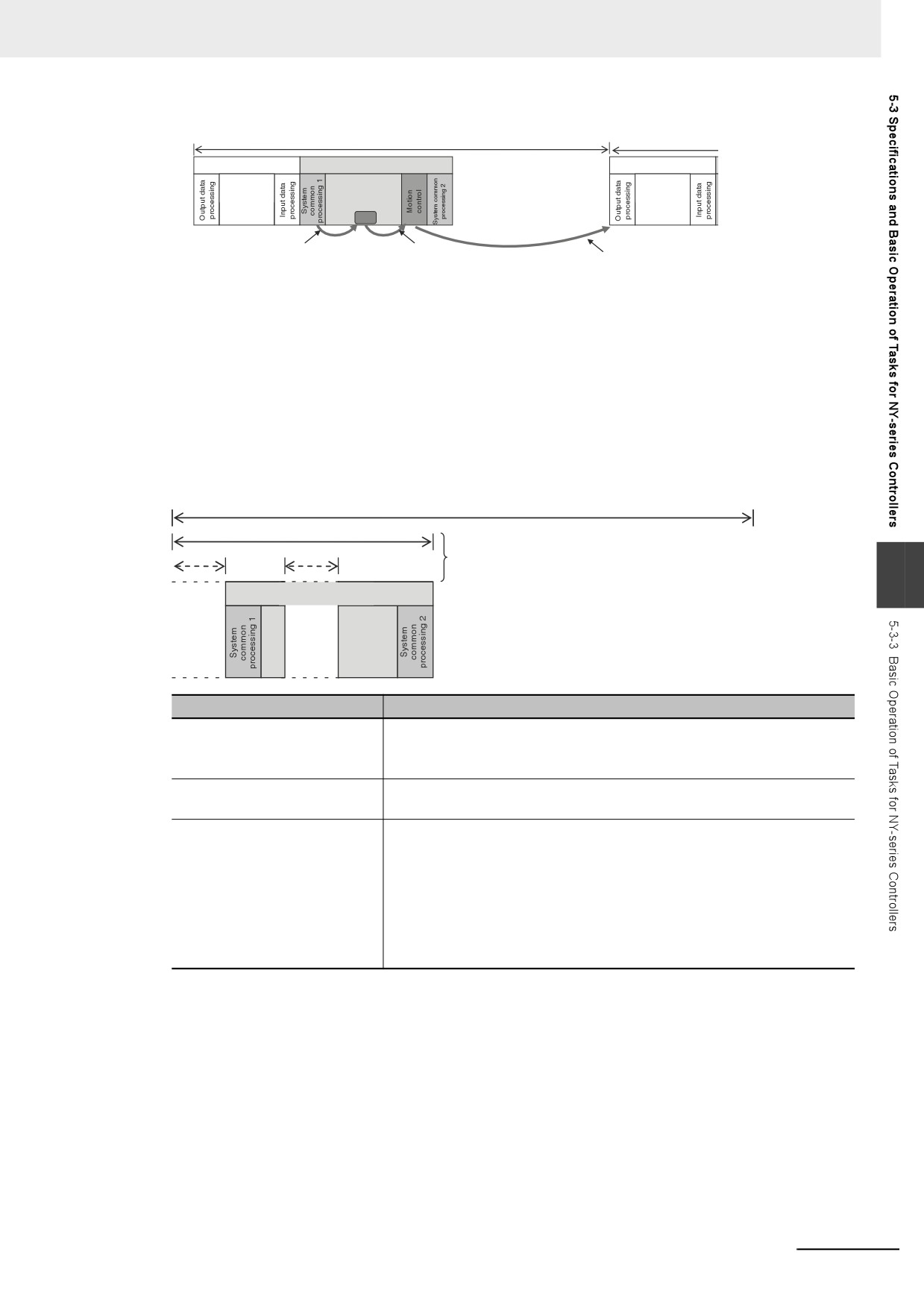
*1
The Axis Current Values (Position, Velocity, and Torque) and Drive Status in the system-defined variables for
motion control are updated.
*2
When there are motion control instructions in user program execution in the primary periodic task, the Controller
executes the results from those instructions immediately afterward in motion control processing as shown below.
The Controller outputs the results to the Servo Drives during I/O refreshing in the next primary periodic task.
Note The processes in each cell in the above table are executed in the order of description.
5-14
5 Designing Tasks
Task period = Primary period (fixed)
I/O refreshing
Control processing
I/O refreshing
User
program
Refreshing
execution
Refreshing
MC_
The system-defined variables for motion control
When the CPU Unit executes a motion
are updated for use in the following motion
control instruction, it executes the result of
During output data processing in the next primary
control instructions.
that instruction in motion control processing
period, the CPU Unit sends the results of motion
immediately afterward.
control processing to the Servo Drive via EtherCAT.
When there is a motion control instruction in user program execution in the priority-16 periodic task,
the Controller executes the result from that instruction in the motion control processing (MC) of the
next primary periodic task.
Refer to 5-9-3 System Input and Output Response Times for details.
z
Priority-16, Priority-17, or Priority-18 Periodic Task
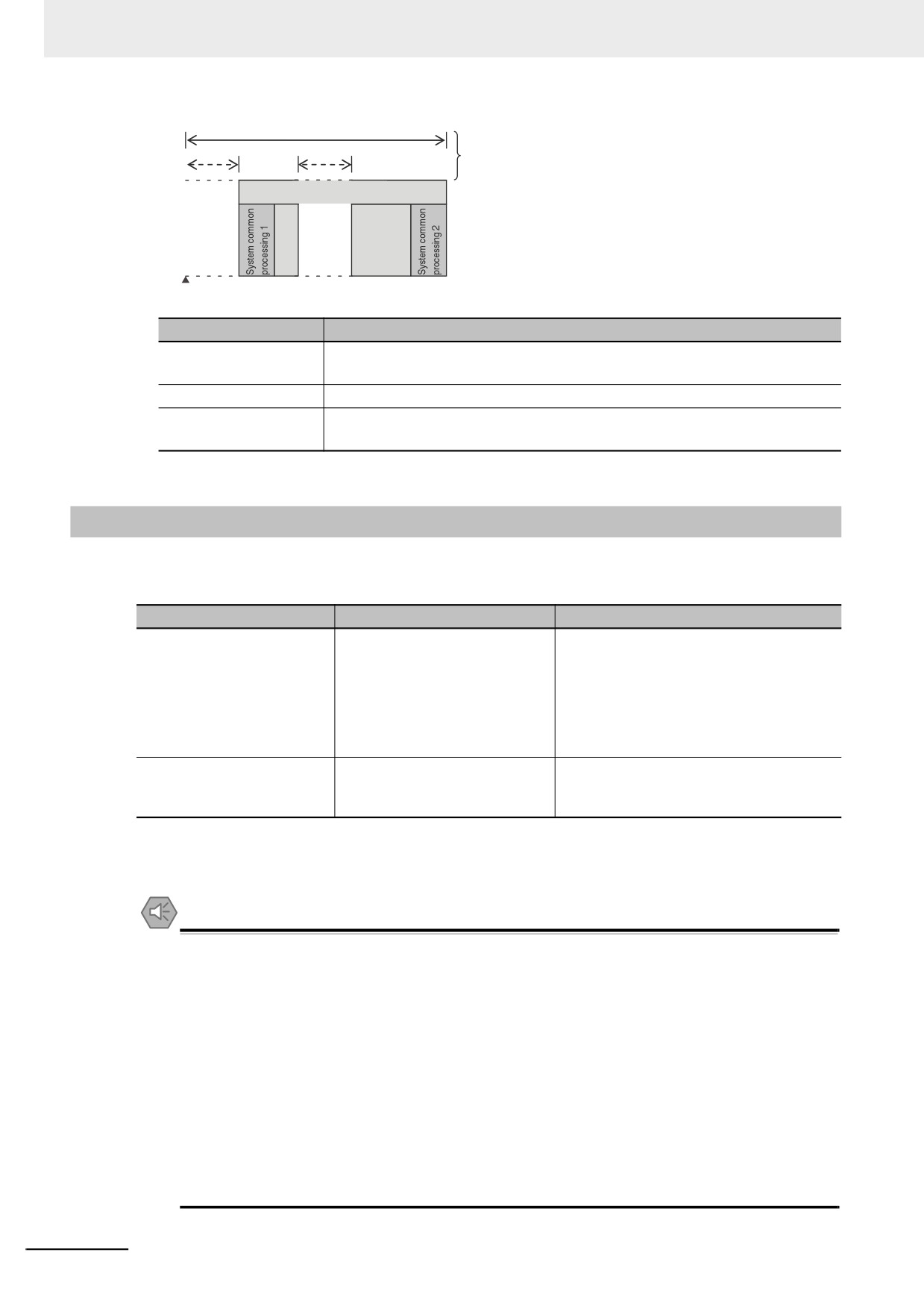
A periodic task executes its programs every task period. The task period is specified as an integer
multiple of the primary period. You can use 0 to 3 periodic tasks.
Task period (fixed)
Task execution time (varies)
* The Controller will pause the execution of a
priority-16, -17, or -18 periodic task in order
to execute a task with a higher execution
5
Control processing
priority.
User
program
execution
Processing
Processing contents
System common processing 1
• Processing for exclusive control of variables in tasks is performed (when
accessing tasks are set).
• Data trace processing (sampling and trigger checking) is performed.
User program execution
• Programs assigned to tasks are executed in the order that they are
assigned.
System common processing 2
• Processing for exclusive control of variables in tasks is performed (when
refreshing tasks are set).
• Processing for variables accessed from outside of the Controller is per-
formed to maintain concurrency with task execution (executed for the
variable access time that is set in the Task Settings).
• If there is processing for EtherNet/IP tag data links and refreshing tasks
are set for the tags (i.e., variables with a Network Publish attribute), vari-
able access processing is performed.
Note The processes in each cell in the above table are executed in the order of description.
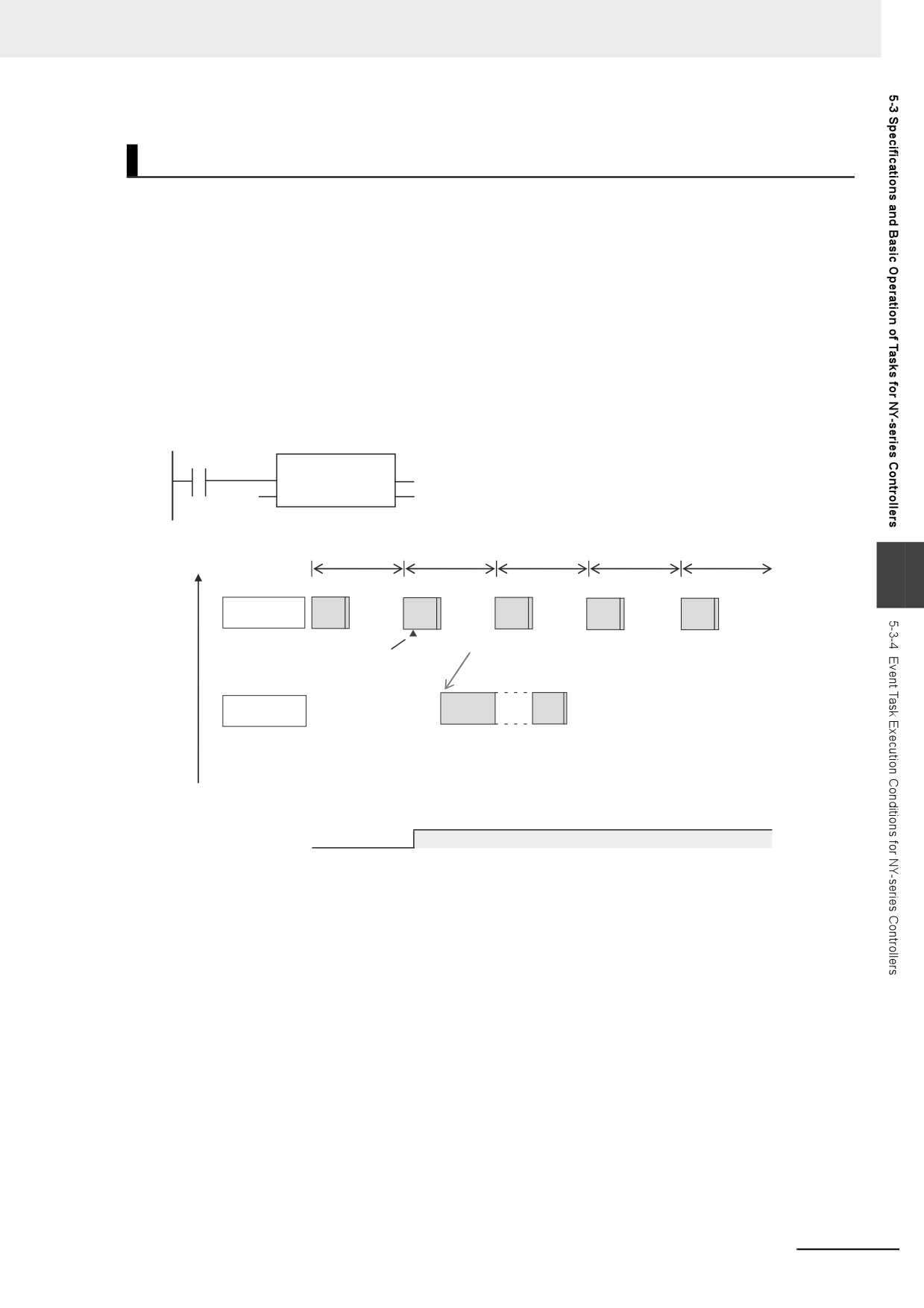
z Event Tasks
An event task is executed only once when the specified execution condition is met. You can use 0 to
32 event tasks.
The processing details for event tasks are shown in the following figure.
5-15
5 Designing Tasks
Task execution time (varies)
* The Controller will pause the
execution of a task in order to
execute a task with a higher
Control processing
execution priority.
User program
execution
Task execution
condition is met.
Processing
Processing contents
System common pro-
• Processing for exclusive control of variables in tasks is performed (when
cessing 1
accessing tasks are set).*1
User program execution
• Programs assigned to tasks are executed in the order that they are assigned.
System common pro-
• Processing for exclusive control of variables in tasks is performed (when
cessing 2
refreshing tasks are set).*1
*1
Refer to 5-6-1 Ensuring Concurrency of Variable Values between Tasks for details on exclusive control.
5-3-4
Event Task Execution Conditions for NY-series Controllers
An event task is executed only once when the specified execution condition is met. There are the fol-
lowing two types of execution conditions for event tasks.
Execution condition
Event task execution timing
Reason for use
Execution with the ActEvent-
When ActEventTask instruction is
• When you need to explicitly specify which
Task instruction
executed
event tasks to execute in the user pro-
gram
• When the execution condition for the
event task may change before meeting
the condition expression for the variable is
determined
Execution when a condition
When the specified variable value
When you want to simplify the user program
expression for a variable is
matches the specified condition
by executing event tasks without user pro-
met
expression*1
gramming
*1
Refer to Execution Timing When the Execution Condition Is a Condition Expression for a Variable on page 5-22
for the timing of when the value of the specified variable is checked to see if the specified condition expression
is met.
Precautions for Safe Use
If the following variables are specified for a condition expression when the execution condition is
a condition expression for a variable, event tasks may not be executed when conditions are met
or event tasks may be executed when conditions are not met.
• Structure members whose data size is 16 bits or more, except for system-defined variables for
motion control
• Array elements whose data size is 16 bits or more
When the above variables are specified and the match evaluation is performed, perform either of
the followings.
• Copy the above variables to the internal variables with a basic data type other than a data size
of 64 bits, and access the copied internal variables.
• Use the settings for exclusive control of variables in tasks, and set the primary periodic task as
a refreshing task.
5-16
5 Designing Tasks
Executing Event Tasks for the ActEventTask Instruction
When the ActEventTask (Execute Event Task) instruction is executed in the user program, the specified
event task is executed once. Refer to the NY-series Instructions Reference Manual (Cat. No. W560) for
the detailed specifications of the ActEventTask instruction.
Using the ActEventTask instruction to execute event tasks makes it easy to see which event tasks are
executed. Also, this method is also effective when the execution condition for the event task may
change before meeting the condition expression for the variable is determined.
z Example of User Programming Using the ActEventTask Instruction
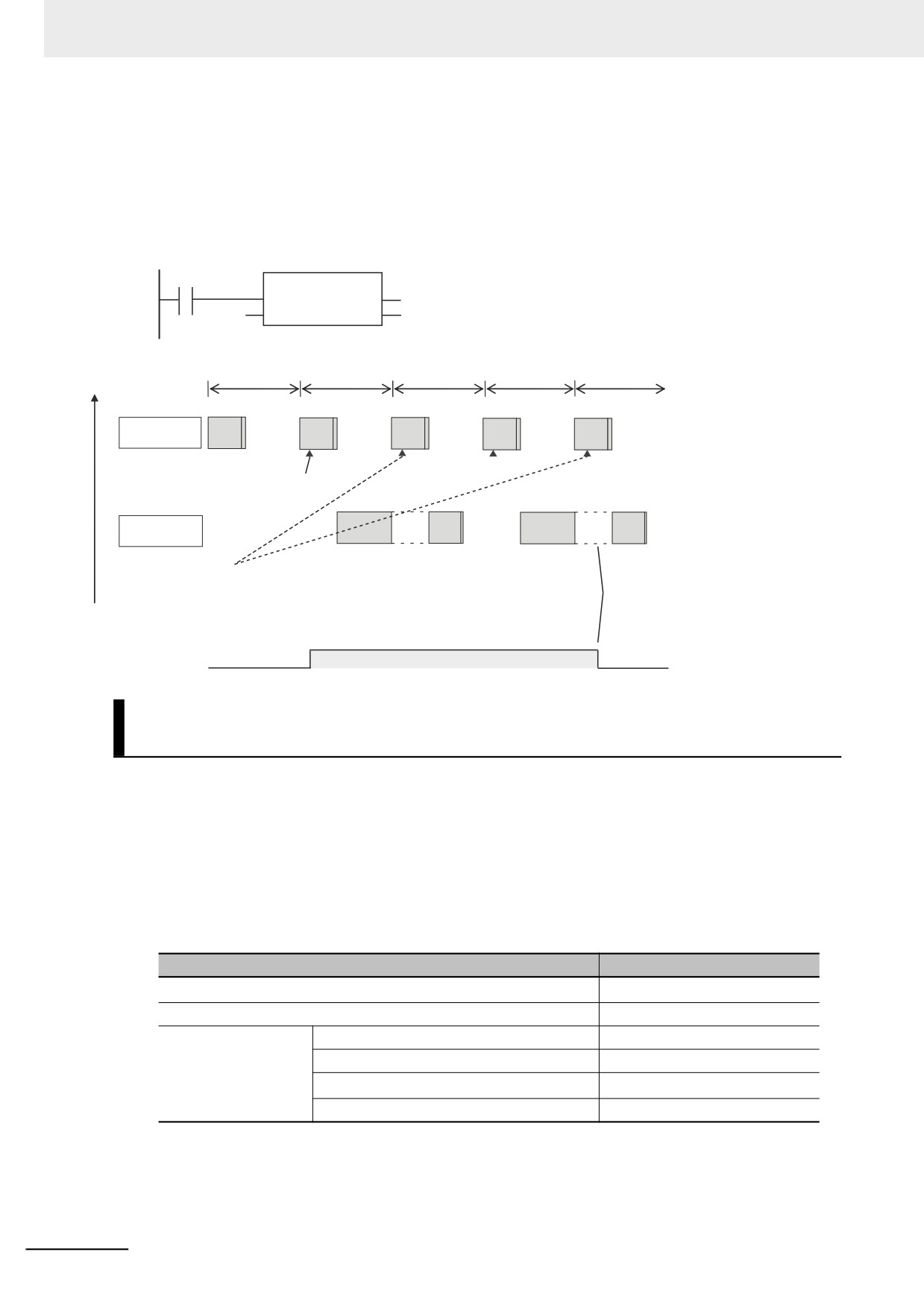
Example 1: Executing an Event Task Only Once When the Value of a Variable Changes
In the following example, the upward differentiation option is used for the ActEventTask instruction.
This causes the Task1 event task to be executed only once when the BoolVar BOOL variable
changes to TRUE.
BoolVar
@ActEventTask
EN
ENO
'T
ask1'
TaskName
Execution
priority
Primary period
High
5
Primary
periodic task
ActEventTask
The event
task is executed only once.
instruction is executed.
Task1
Interrupted.
event task
Low
TRUE
BoolVar
FALSE
5-17
5 Designing Tasks
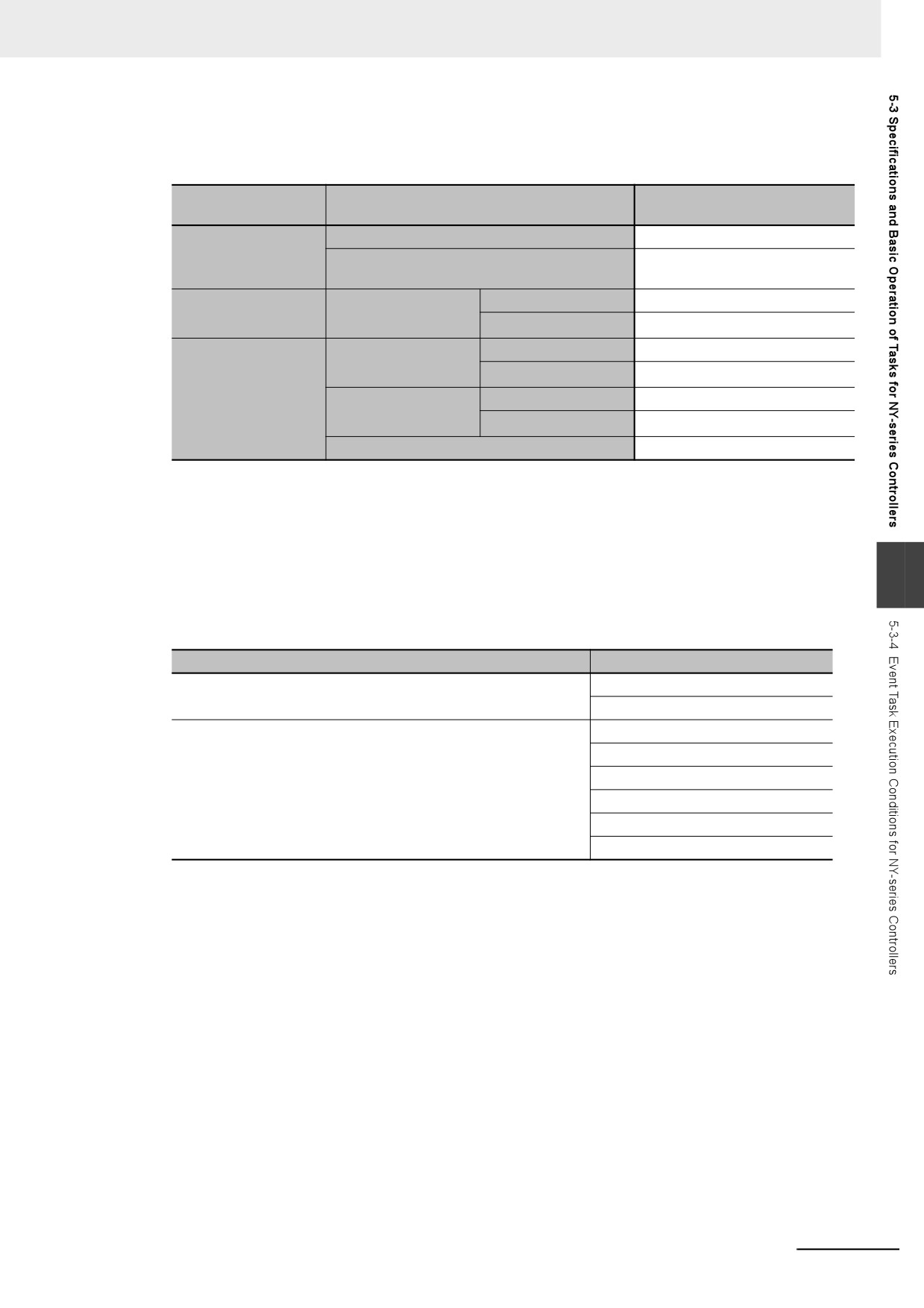
Example 2: Executing an Event Task Repeatedly While the Value of a Variable Matches a Specified
Value
In the following example, the upward differentiation option is not used for the ActEventTask instruc-
tion. This causes the Task1 event task to be executed as long as the BoolVar BOOL variable is
TRUE. Any ActEventTask instructions that specify Task1 will be ignored if Task1 is already in execu-
tion. After the execution of the event task has started, it is executed to the end even if the value of
BoolVar changes to FALSE during execution.
BoolVar
ActEventTask
EN
ENO
'T
ask1'
TaskName
Execution
priority
Primary period
High
Primary
periodic task
ActEventTask instruction
is executed.
Task1
Interrupted.
Interrupted.
event task
Task1 is already in execution so any ActEventTask
After the execution of the event
instructions that specify Task1 are ignored.
task has started, it is executed
to the end even if the value of
Low
The event task is executed repeatedly
the BoolVar variable changes
while the BoolVar variable is TRUE.
to FALSE.
TRUE
BoolVar
FALSE
Executing Event Tasks When Condition Expressions for Variables
Are Met
This method executes the event task once when the specified condition expression is met for the value
of a variable that was specified on the Sysmac Studio. The event task is not executed repeatedly while
the value of the variable matches the condition expression. It is executed only once when the value of
the variable first changes so that it meets the condition expression.
This method of execution does not require user programming to execute the event task.
z Variables for Which You Can Specify Condition Expressions
The following table lists the variables that you can specify for condition expressions.
Type of variables
Specification
System-defined variables
Possible.*1
Semi-user-defined variables
Possible.
User-defined variables
Global variables
Possible.
Variables used in a program
Possible.
Variables used in a function block
Possible.*2
Variables used in a function
Not possible.
*1
The following variables cannot be used. EN, ENO, P_Off, P_CY, P_First_RunMode, P_First_Run and
P_PRGER
*2
In-out variables cannot be used.
5-18
5 Designing Tasks
z
Data Types of Variables for Condition Expressions
The following table lists the data types of variables that you can specify for condition expressions.
Classification of data
Data type
Specification
type
Boolean, bit string, integer, and real
Possible.
Basic data types
Duration, date, time of day, date and time, or
Not possible.
text string data
Arrays
Not possible.
Data type specifica-
Array specification
tions
Elements
Possible.*1
Structures
Not possible.
Structures
Members
Possible.*2
Derivative data types
Unions
Not possible.
Unions
Members
Possible.*2
Enumerations
Possible.
*1
The elements of the array must be Boolean variables, bit strings, integer data, or real data.
*2
The members must be Boolean, bit strings, integer data, or real data.
z
Condition Expressions That You Can Specify
The condition expressions that you can specify depend on the data type of the variable that you
specify for the condition expression.
5
If the variable that you specify for a condition expression is bit string data, integer data, or real data,
you must set a comparison constant to compare to the value of the variable.
Data type
Possible condition expressions
Boolean, Boolean array elements, Boolean structure members,
Change to TRUE
and Boolean union members
Change to FALSE
Bit string, real number, integer, as well as array element, structure
Variable = {Comparison constant}
member, or union member with one of those data types
Variable ≠ {Comparison constant}
Variable > {Comparison constant}
Variable ≥ {Comparison constant}
Variable < {Comparison constant}
Variable ≤ {Comparison constant}
z
Valid Range of Comparison Constants
If the variable that you specify for a condition expression is bit string data, integer data, or real data,
you must set a comparison constant to compare to the value of the variable. The valid range of com-
parison constants is the same as the valid range of the data type of the variable that you specify for
the condition expression.
Refer to Basic Data Types and Derivative Data Types on page 6-30 for the valid range of values for
each data type.
For example, if the variable that you specify for the condition expression is a BYTE variable, the
valid range of comparison constant values is from BYTE#16#00 to BYTE#16#FF.
z
Example of Executing Event Tasks When Condition Expressions for Variables
Are Met
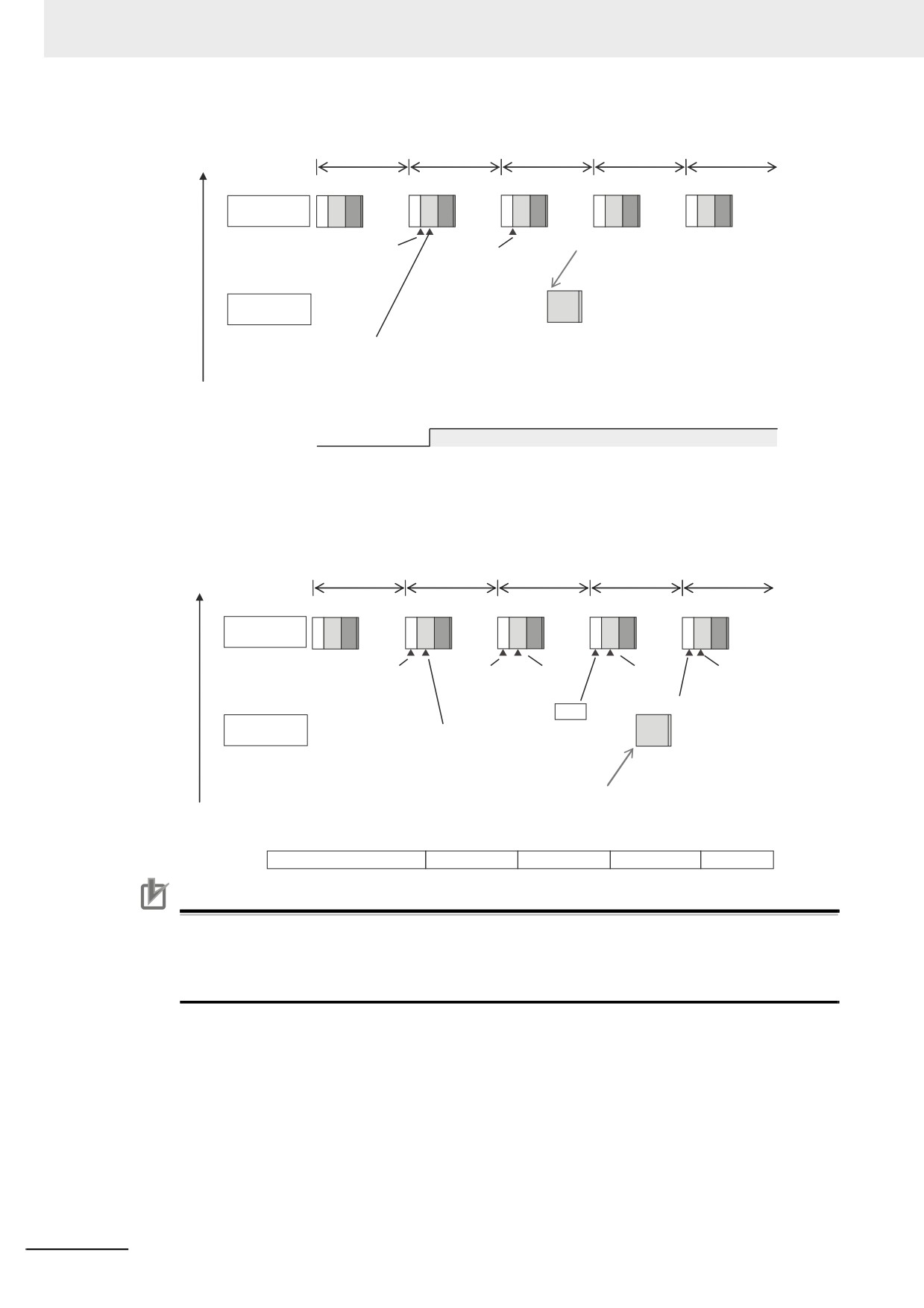
Example 1: Execution Condition for Event Task Set to a Change to TRUE of the Program1.trigger1
Boolean Variable
When the value of Program1.trigger1 changes to TRUE, the event task is executed only once.
5-19
5 Designing Tasks
Execution
priority
Primary period
High
Primary
IO
UPG
MC
IO
UPG
MC
IO
UPG
MC
IO
UPG
MC
IO
UPG
MC
periodic task
The event task is executed only once.
Condition expression
Condition expression
is not met.
is met.
Event task
TRUE is assigned to
Program1.trigger1 variable.
Low
TRUE
Program1.trigger1
FALSE
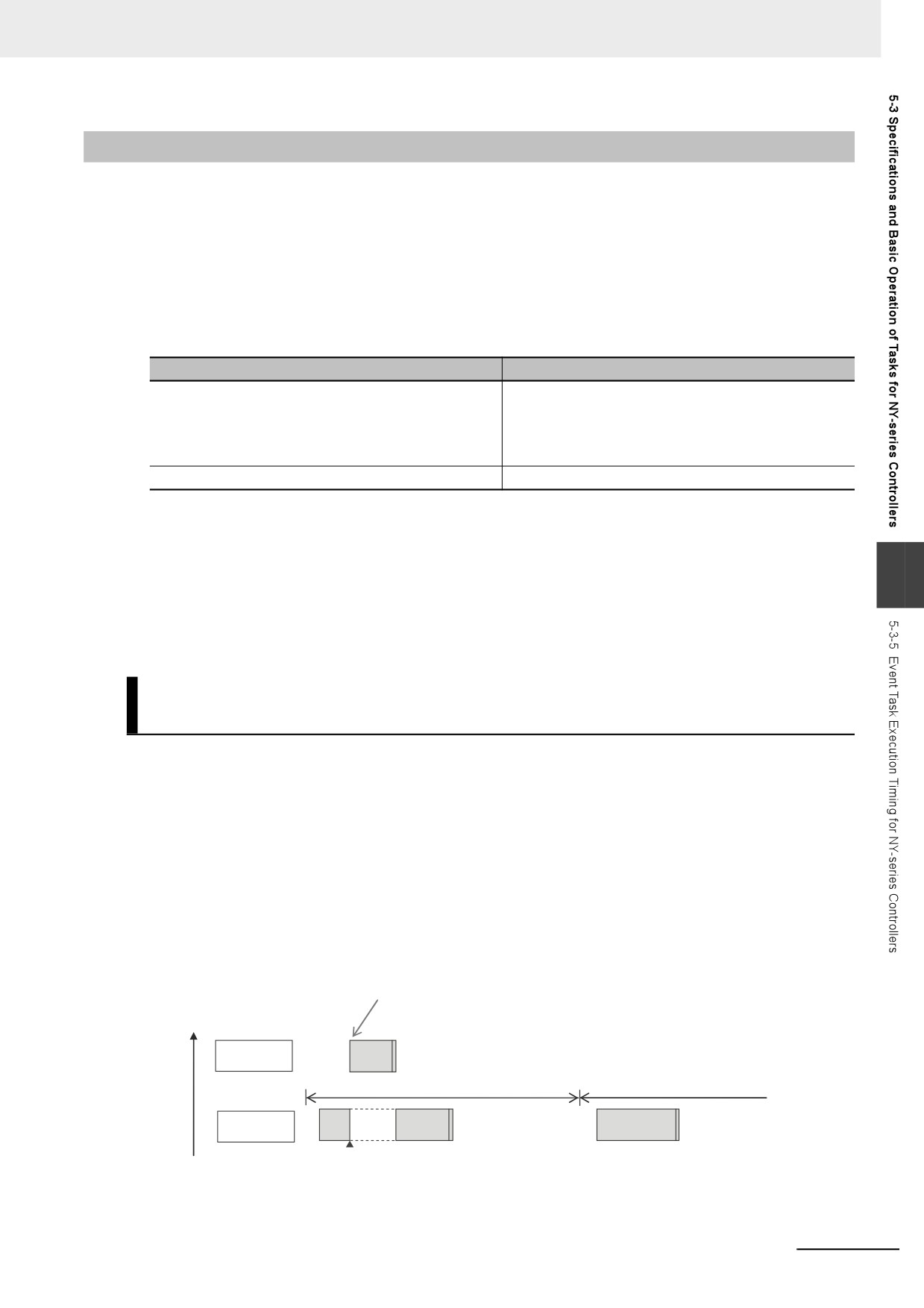
Example 2: Execution Condition for an Event Task Set to When Program1.curVal (INIT variable) ≥ 10
The event task is executed only once when the value of Program1.curVal changes from less
than 10 to 10 or higher.
Execution
priority
Primary period
High
Primary
IO
UPG
MC
IO
UPG
MC
IO
UPG
MC
IO
UPG
MC
IO
UPG
MC
periodic task
Condition expression
Not met.
Value of 10
Value of 11
Value of 9
is not met.
is assigned.
is assigned.
is assigned.
Not met.
Met
Event task
Value of 9 is assigned to
Program1.curVal variable.
The event task
is executed only once when
Low
the value of
the Program1.curVal variable
changes from less than 10 to
10 or higher.
Program1.curVal
0
9
10
11
9
Precautions for Correct Use
If the value of a specified variable changes in the primary periodic task, the Controller evaluates
whether the condition expression is met in the next primary periodic task. This means that the
event task will be executed on completion if this evaluation against the condition expression in
the next primary periodic task after the Controller evaluates that the condition expression is met.
5-20
5 Designing Tasks
5-3-5
Event Task Execution Timing for NY-series Controllers
The execution priority of event tasks is 8 or 48. If the execution conditions for an event task are met
while another task is in execution, the task with the higher execution priority is given priority. The task
with the lower execution priority is interrupted. This is the same as with the primary periodic task and
periodic tasks.
If you have multiple tasks that read and write to the same variables, make sure to use the following
functions to control how an event task is executed with the primary periodic task, periodic tasks, or
other event tasks with different execution priorities.
Purpose
Function to use
Accessing the same global variable from an event task
Exclusive control of variables in tasks
and from another task
• Settings for exclusive control of variables in tasks
• Lock (Lock Tasks) instruction
• Unlock (Unlock Tasks) instruction
Checking the execution status of other tasks
Task_IsActive (Determine Task Status) instruction
Refer to 5-6-1 Ensuring Concurrency of Variable Values between Tasks for details.
5
The execution of an event task also depends on its execution conditions.
You can also set the same execution priority for more than one event task. You must be careful when
the execution conditions are met for more than one event task that has the same execution priority.
Differences in Execution Timing Based on the Execution Conditions
of Event Tasks
The execution timing for event tasks depends on whether the execution condition is triggered by an
ActEventTask instruction or by when a condition expression for a variable is met.
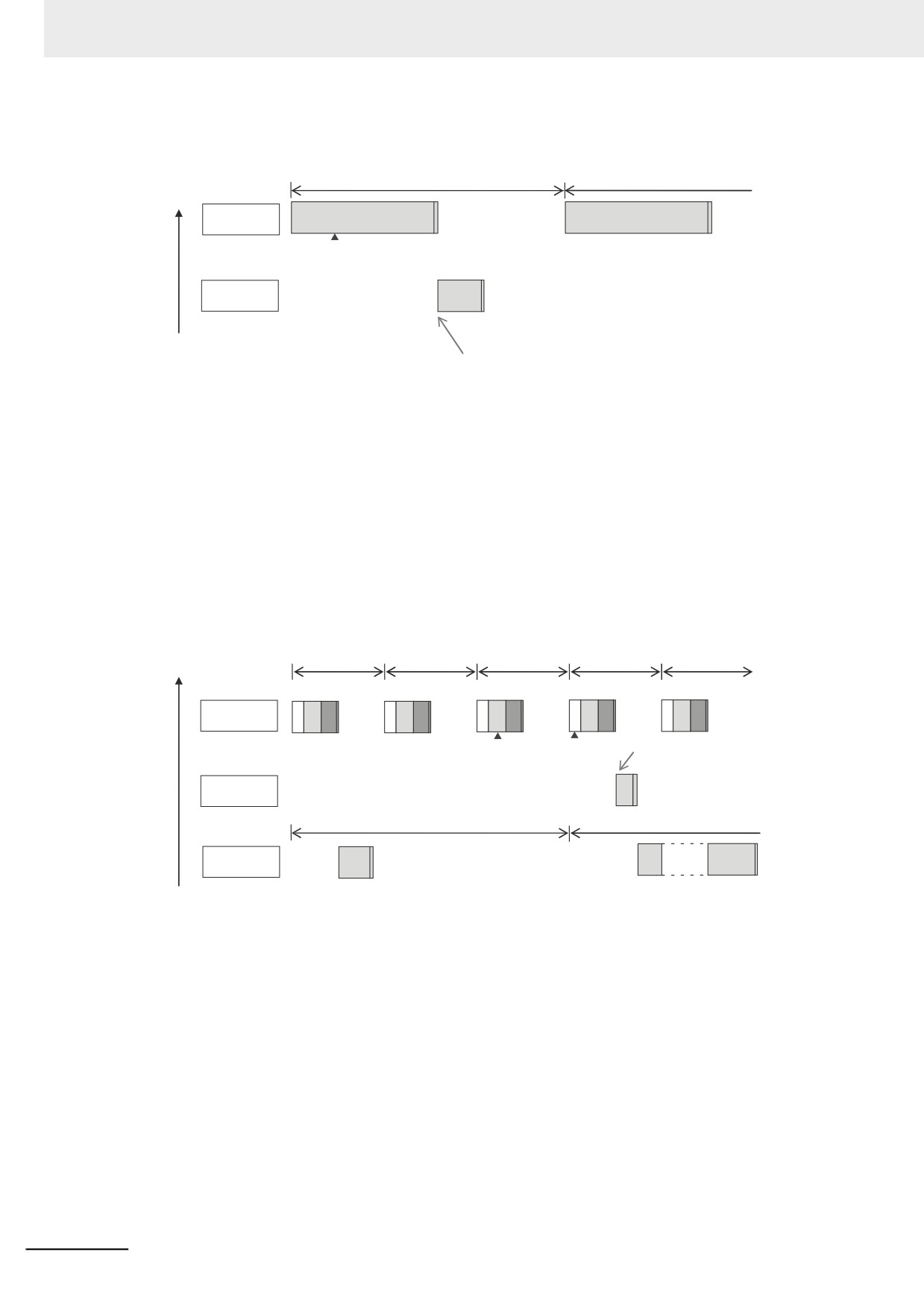
z Execution Timing When the Execution Condition Is an ActEventTask
Instruction
If the execution condition for an event task is triggered by an ActEventTask instruction, the event
task execution condition will be met immediately after the ActEventTask instruction is executed. The
NY-series Controller executes event tasks for which the execution condition is met according to the
task execution priority.
Example 1: Executing an Event Task with an Execution Priority Higher Than the Task That Executes
an Instruction
The event task is executed immediately after execution of ActEventTask.
Execution
priority
High
Event task
(execution priority of 8)
Task period
Priority-16
Interrupted.
periodic task
ActEventTask instruction
Low
is executed.
5-21
5 Designing Tasks
Example 2: Executing an Event Task with an Execution Priority Lower Than the Task That Executes
an Instruction
Execution
Primary period
priority
High
Primary
periodic task
ActEventTask instruction
is executed.
Event task
(execution priority of 8)
Low
Event task is executed when the primary periodic task is completed.
z
Execution Timing When the Execution Condition Is a Condition Expression
for a Variable
The condition expression is evaluated for a match inside the primary periodic task. The execution
condition for an event task is met when it is evaluated to match the condition expression. The NY-
series Controller executes event tasks for which the execution condition is met according to the task
execution priority.
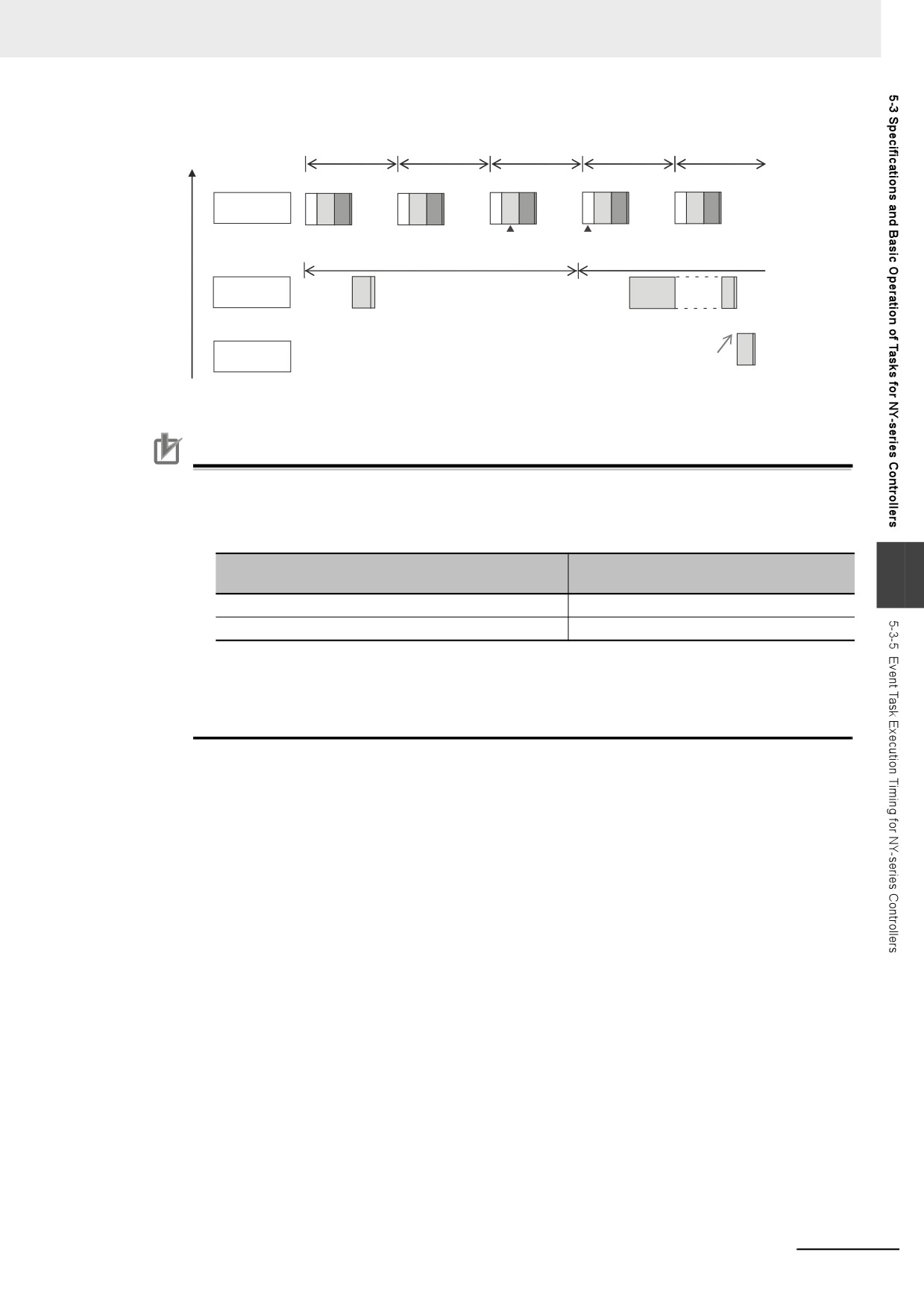
Example 1: Project with a Priority-16 Periodic Task and an Event Task Execution with a Priority of 8
The execution priority of the event task (execution priority of 8) is higher than the execution priority
of the priority-16 periodic task. The priority-16 periodic task is therefore executed after the event task
is executed.
Execution
priority
Primary period
High
Primary periodic
IO
UPG
MC
IO
UPG
MC
IO
UPG
MC
IO
UPG
MC
IO
UPG
MC
task
Value is assigned
Condition
to variable in user
expression is met.
Event task is executed only once.
program.
Event task (execution
priority of 8)
Task period
Priority-16
Interrupted.
periodic task
Low
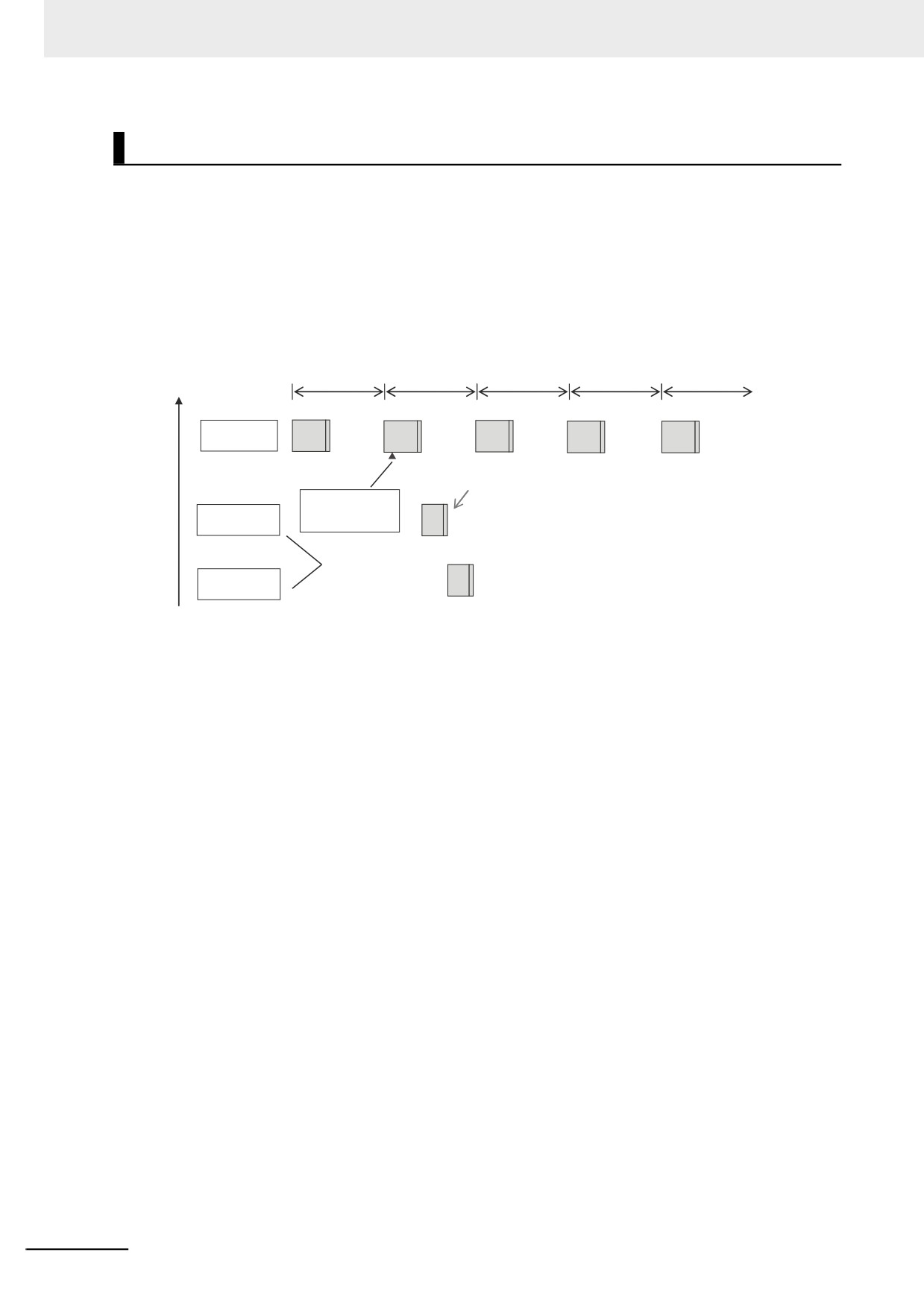
Example 2: Project with a Priority-16 Periodic Task and an Event Task Execution with a Priority of 48
The execution priority of the event task is lower than the execution priority of the priority-16 periodic
task. The event task is therefore executed after the priority-16 periodic task is executed.
5-22
5 Designing Tasks
Execution
priority
Primary period
High
Primary periodic
IO
UPG
MC
IO
UPG
MC
IO
UPG
MC
IO
UPG
MC
IO
UPG
MC
task
Value is assigned
Condition expression
to variable in user
is met.
Task period
program.
Priority-16
periodic task
Interrupted.
Event task (execution
Event task is executed
priority of 48)
immediately after completion
of the periodic task.
Low
Precautions for Correct Use
• For NY-series Controllers, the timing at which the execution condition for an event task is met
is the same regardless of whether the condition expression match is triggered by I/O refresh-
ing in the primary periodic task, or by execution of a program that is assigned to the primary
periodic task.
Timing at which the execution condition for
Trigger for condition expression to match
5
an event task is met
I/O refreshing in the primary periodic task
Evaluation in the next primary periodic task
Execution of the programs in the primary periodic task
Evaluation in the next primary periodic task
• In order for an event task to be executed, the condition expression must be met in the evalua-
tion after the previous evaluation where the condition expression was not met. This means
that even if the status of the condition expression changes from not met to met, if the condition
returns to not met before the next evaluation, the event task will not be executed.
5-23
5 Designing Tasks
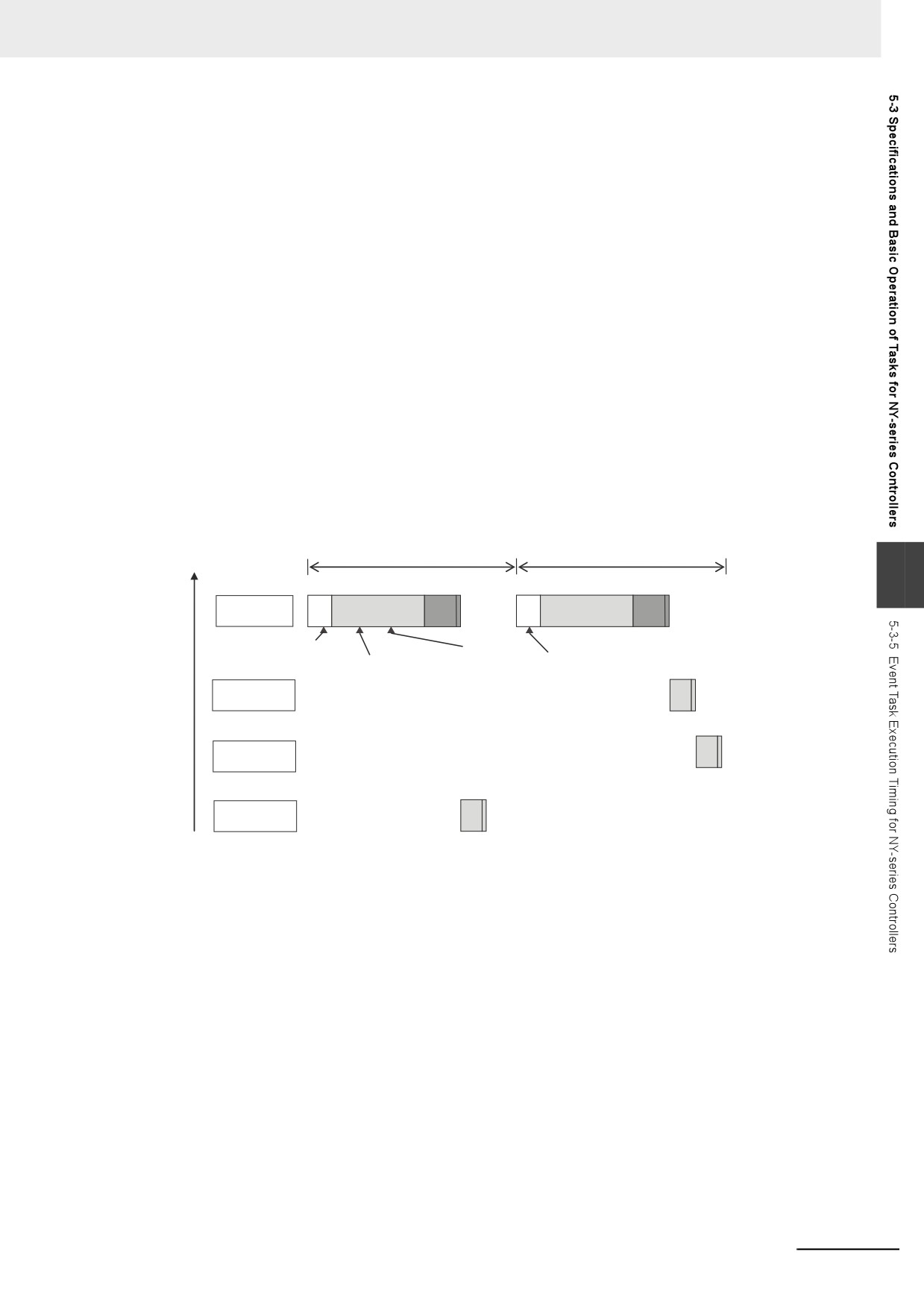
Execution Timing for Event Tasks with the Same Execution Priority
You can also set the same execution priority for more than one event task. If the execution conditions
are met for more than one event task with the same execution priority are triggered by an ActEventTask
instruction, the event tasks will be executed in the order that the instruction is executed.
Example 1: When Two ActEventTask instructions Are Executed
In the example given below, two ActEventTask instructions are used to execute two event tasks. The T1
event task is executed before the T2 event task because the ActEventTask instruction that triggered T1
was executed first.
Execution
priority
Primary period
High
Primary
periodic task
T1 event task is executed first because the ActEventTask
instruction that triggered it was executed first.
User program
ActEventTask(‘T1’);
T1 event task
ActEventTask(‘T2’);
(execution priority of 8)
Execution priority
is the same.
T2 event task
(execution priority of 8)
Low
5-24
5 Designing Tasks
Example 2: When Both Condition Expressions for Variables and the ActEventTask Instruction Are Used
In this example, the execution conditions of the T1, T2, and T3 event tasks are set as given below.
• T1: Condition expression for the VarA variable
• T2: Condition expression for the VarB variable
• T3: ActEventTask instruction
The operation would proceed as described below if the condition expression for VarA was met during
I/O refreshing, the ActEventTask instruction was executed in the user program, and the condition
expression for VarB was met during execution of the user program all in the same primary period.
(1) The condition expression for VarA is met during I/O refreshing.
(2) The condition expression for VarB is met during execution of the user program.
(3) At this point, T1 and T2 are not executed because the condition expressions are not
yet evaluated.
(4) The ActEventTask instruction is executed in the user program, so T3 is executed.
(5) When I/O refreshing is executed in the primary periodic task, the match is detected
that the condition expressions for VarA and VarB are met, so T1 and T2 are executed.
If the match is detected that more than one condition expression is met in the same
execution period, the order of execution of event tasks is undefined. The following
figure shows an example when T1 is executed first.
Execution
priority
High
Primary period
5
Primary periodic
IO
UPG
MC
IO
UPG
MC
task
Condition expression
The match for the condition
ActEventTask
for VarA is met.
expression for VarA and
Condition expression
instruction is executed.
VarB is detected.
for VarB is met.
T1 event task
(execution priority of 8)
T2 event task
(execution priority of 8)
T3 event task
(execution priority of 8)
Low
5-25
5 Designing Tasks
5-3-6
Operation When Execution Condition Is Met Again Before
Execution of the Event Task Is Completed
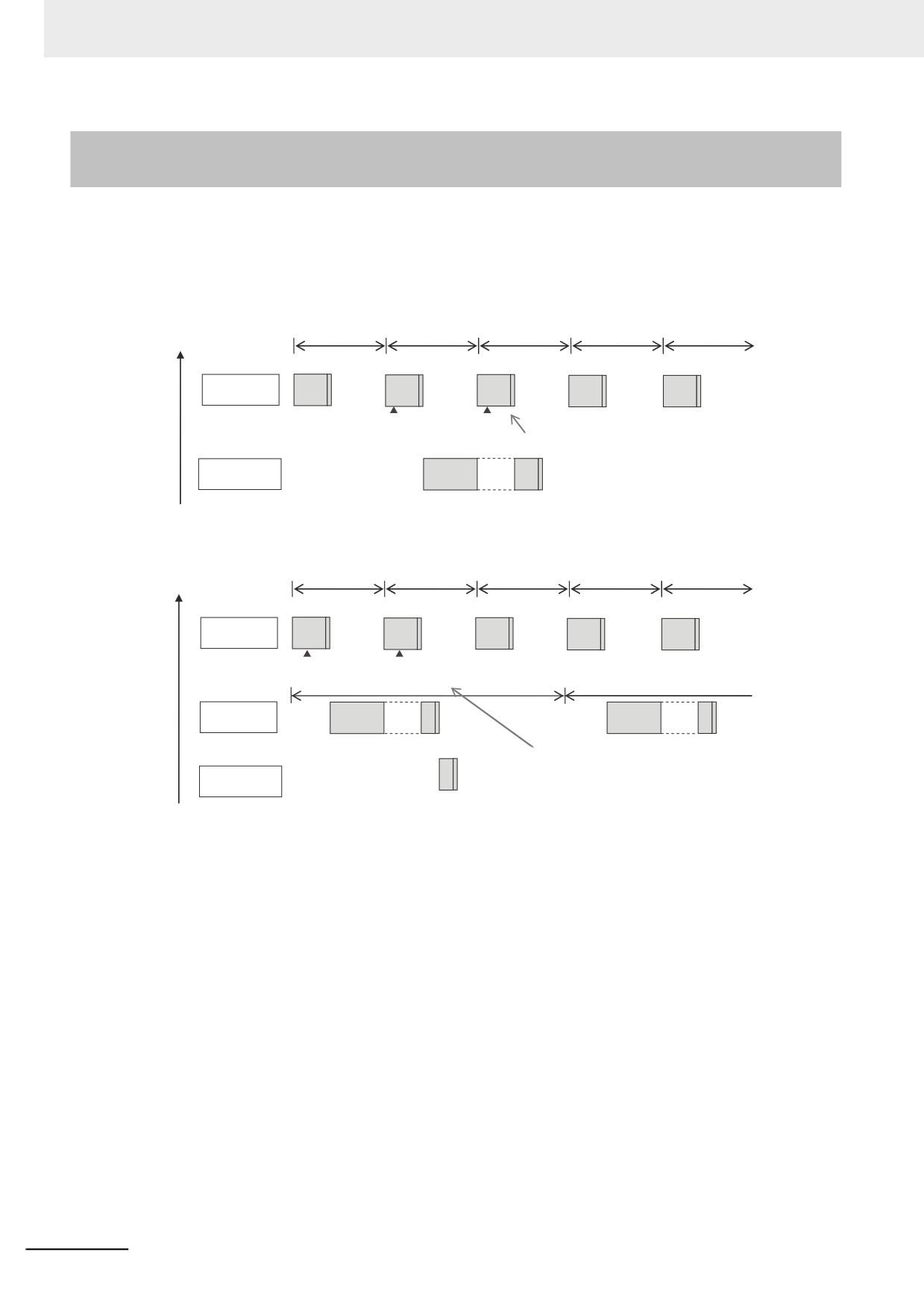
If the execution condition for an event task is met again before the execution of that event task is com-
pleted, the second match of the execution condition is ignored. “Before an event task is completed”
includes the duration of execution of the event task and the time waiting for execution. After the execu-
tion of the event task has started, it is executed to the end even if the condition expression is no longer
met.
Execution
priority
Primary period
High
Primary
periodic task
ActEventTask
ActEventTask
instruction is
instruction is
Execution of the event task has not completed yet,
executed for T1.
executed for T1.
so the second ActEventTask instruction is ignored.
T1 event task
Interrupted.
(execution priority of 8)
Low
Execution
priority
High
Primary period
Primary periodic
task
ActEventTask instruction
ActEventTask instruction
is executed for T2.
is executed for T2.
Task period
Priority-16
Interrupted.
Interrupted.
periodic task: T1
This event task (T2) was triggered by the first
ActEventTask instruction and is still waiting for
T2 event task
execution. The second ActEventTask
(execution priority of 48)
instruction is ignored.
Low
5-26
5 Designing Tasks
5-4
Tag Data Link Service and System
Services
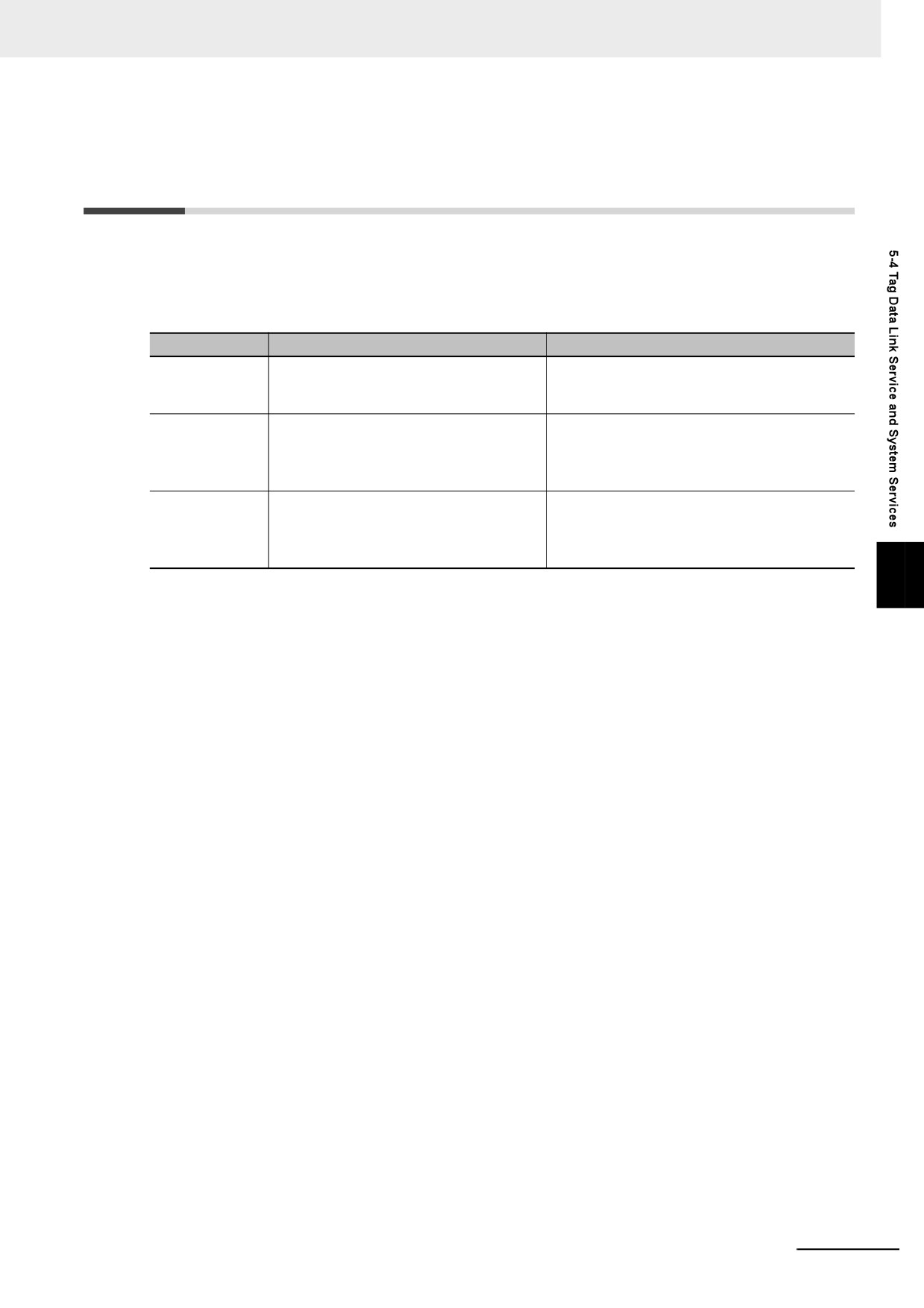
The NY-series Controller performs processing other than the primary periodic task, periodic tasks, and
event tasks. This processing includes the tag data link service and the system services. The processing
that is performed, the execution priority, and the execution timing for these services are given in the fol-
lowing table.
Item
Tag data link service
System services
Execution prior-
The execution priority is between the exe-
The execution priority is lower than that of any
ity
cution priorities of the priority-16 periodic
of the tasks.
task and the priority-17 periodic task.
Processing
Data is exchanged by using tags with other
System services include services with low exe-
controllers and devices on an EtherNet/IP
cution priority, such as communications pro-
network. You can use the built-in Ether-
cessing and other services.
Net/IP port on the NY-series Controller.*1
Execution timing
The execution interval and the time that is
For NY-series Controllers, the system services
required for each execution depend on the
are executed at the required time without being
model of the NY-series Controller and on
affected by the tasks.
the tag data link settings.*2
5
*1
Refer to the NY-series Industrial Panel PC / Industrial Box PC Built-in EtherNet/IP Port User's Manual (Cat. No.
W563) for details on the processing that is performed for tag data links.
*2
Refer to 5-4-2 Processing Performed in and Execution Timing of the Tag Data Link Service for details on the
execution interval and the time that is required for execution of tag data links.
5-27
5 Designing Tasks
5-4-1
Execution Priorities and Execution Orders of the Tag Data Link Service
and System Services
This section provides examples of the execution priorities and execution orders of the tag data link ser-
vice and system services.
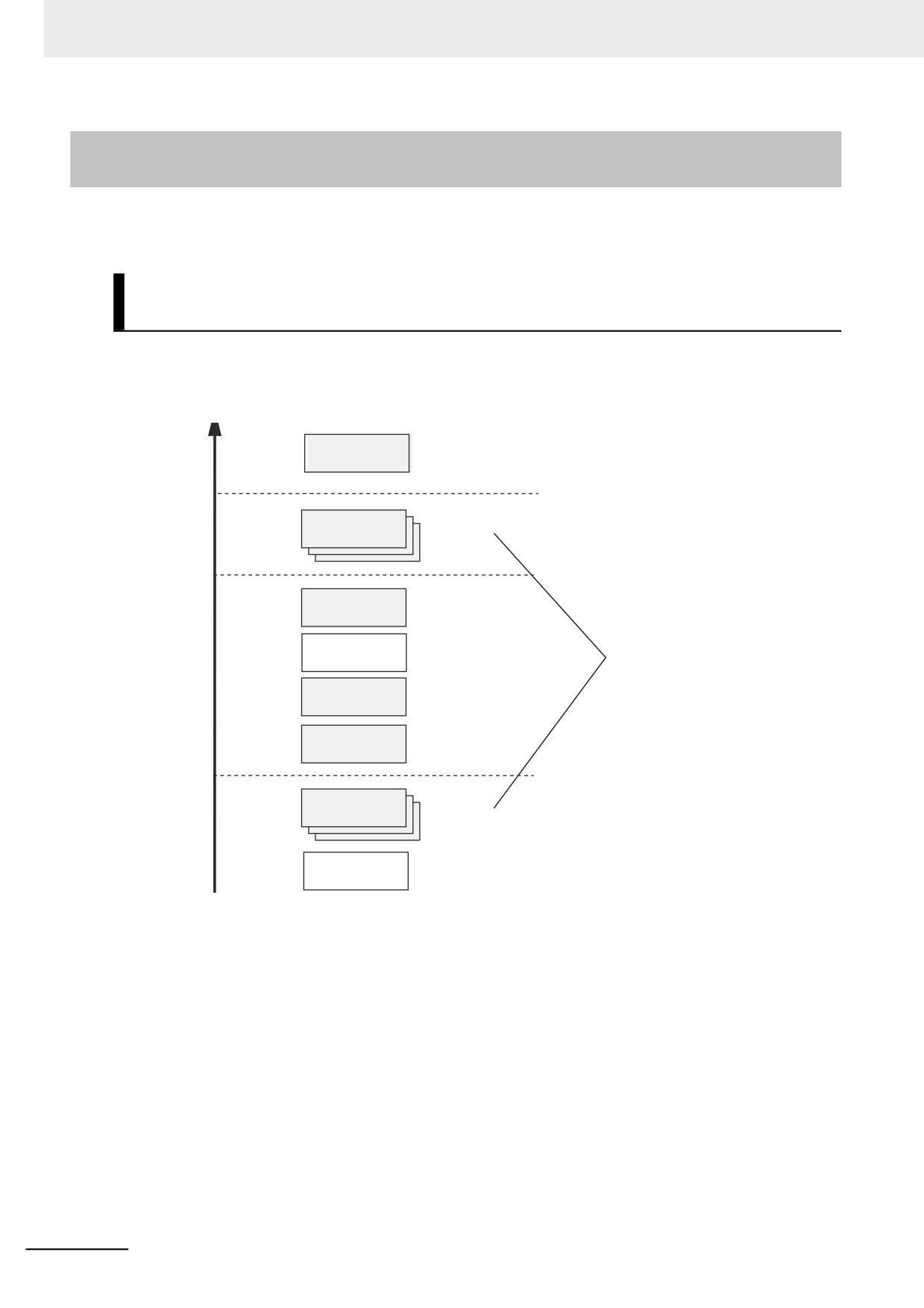
Execution Priorities of the Tag Data Link Service and System
Services
The execution priorities of the tag data link service and system services are shown below. The execu-
tion priority of the tag data link service is between the execution priorities of the priority-16 periodic task
and the priority-17 periodic task. The execution priority of the system services is lower than the execu-
tion priority of any of the tasks.
Primary periodic
4
1
task
8
Event tasks
0 to 32
16
Periodic task
0 or 1
Tag data link
A total of up to 32 tasks
Execution
service
for both priority levels.
priority
(0 to 63)
17
Periodic task
0 or 1
18
Periodic task
0 or 1
Event tasks
0 to 32
48
System services
Low
5-28
5 Designing Tasks
Examples of the Order of Execution for the Tag Data Link Service
and System Services
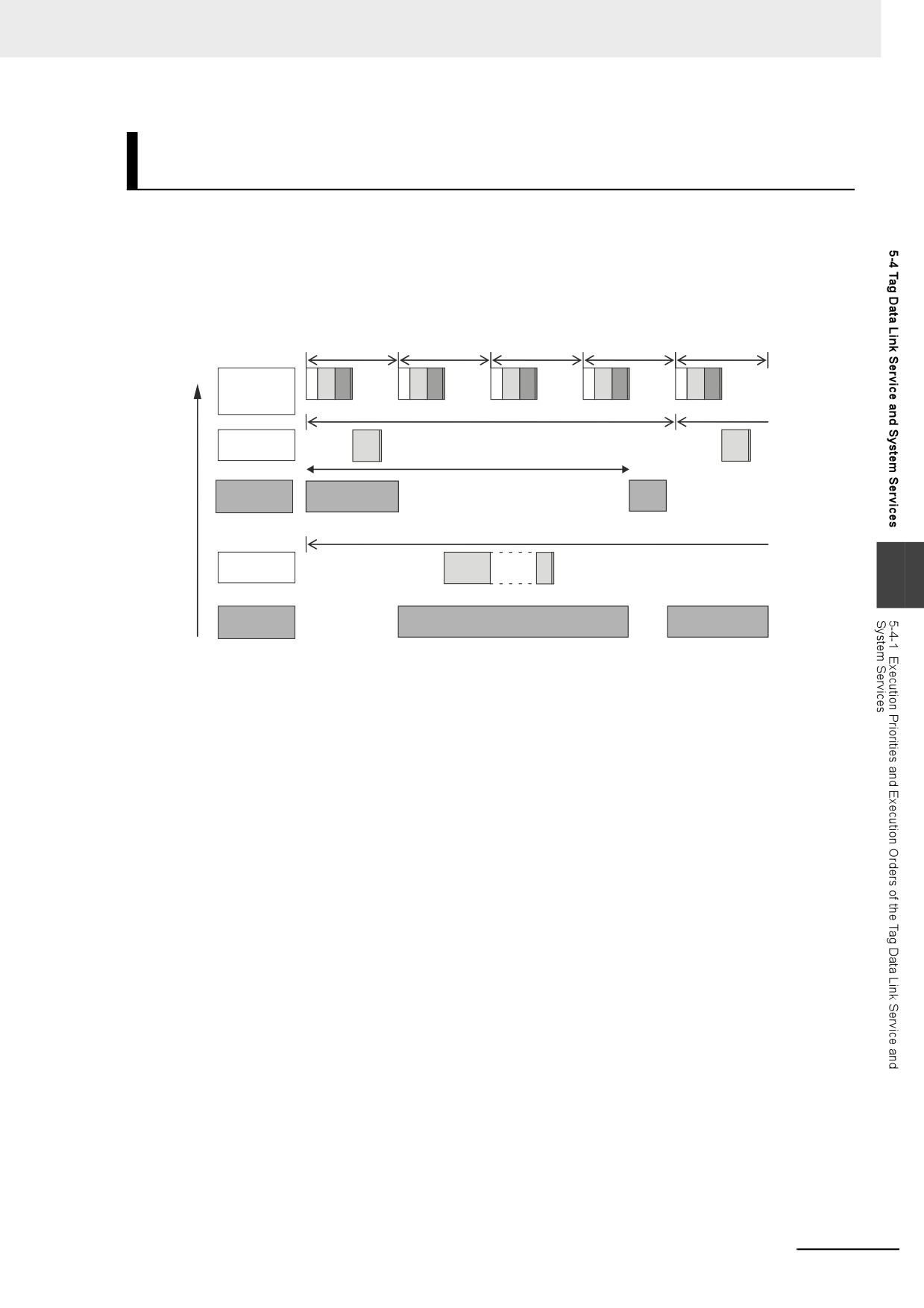
As an example, the order of execution for the primary periodic task, priority-16 periodic task, priority-17
periodic task, tag data link service, and system services is shown below.
z NY-series Controllers
• You can execute multiple tasks, the tag data link service, and system services in parallel.
• The system services are not executed while the tag data link service is in progress.
Execution
Primary period
priority
High
Primary
IO
UPG
MC
IO
UPG
MC
IO
UPG
MC
IO
UPG
MC
IO
UPGMC
periodic task
Task period
Priority-16
UPG
Execution period of the
UPG
periodic task
tag data
link service
Tag data link
service
Task period
Priority-17
UPG
Interrupted.
periodic task
5
Sysem
services
Low
The execution interval and the execution time for one execution depend on the model of the NY-series
Controller and on the tag data link settings. Refer to 5-4-2 Processing Performed in and Execution Tim-
ing of the Tag Data Link Service for details.
5-29
5 Designing Tasks
5-4-2
Processing Performed in and Execution Timing of the Tag Data
Link Service
This section describes the processing that is performed in and the execution timing of the tag data link
service.
Processing Performed in Tag Data Link Service
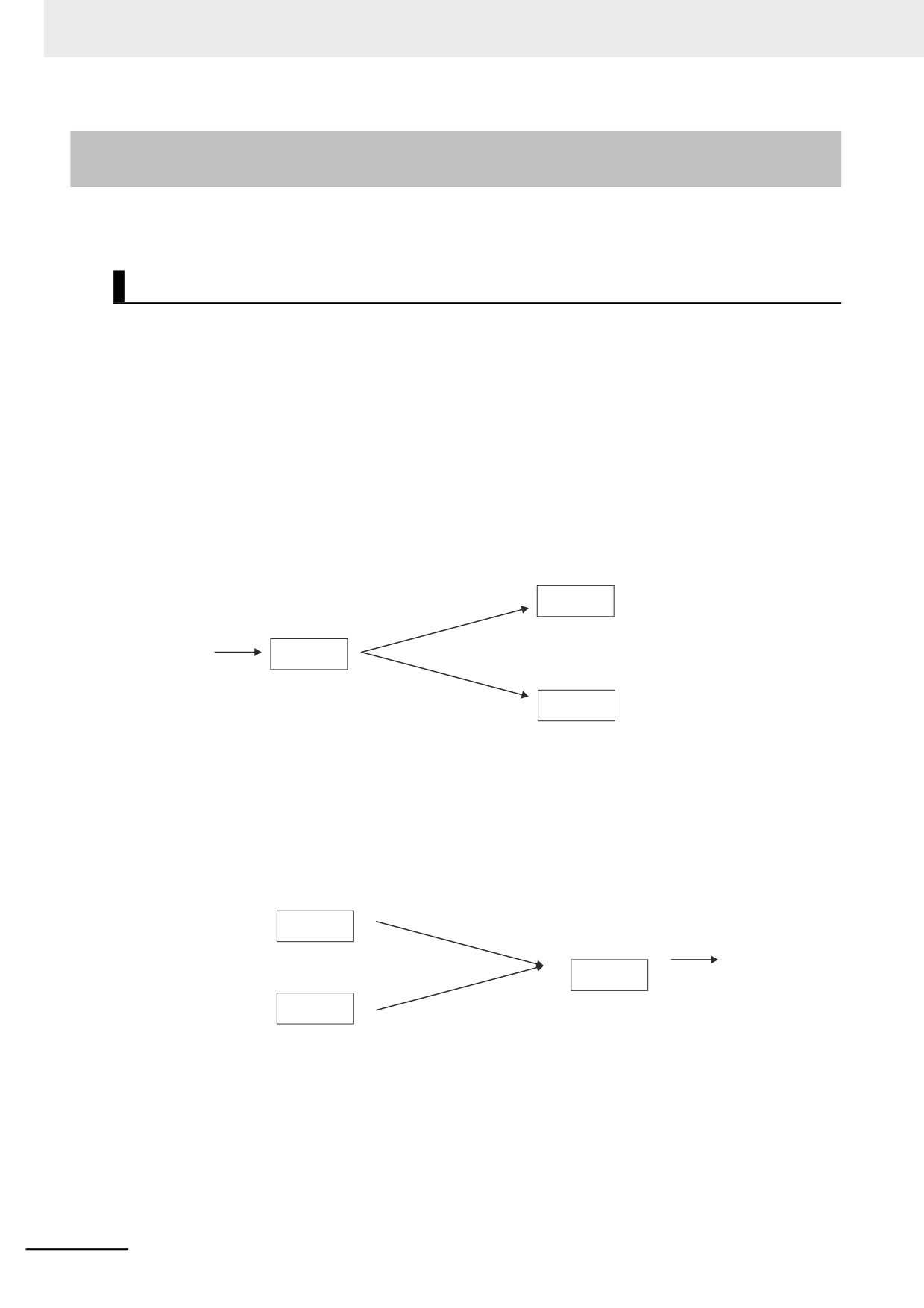
The processing for tag data links is separated in multiple processes. This processing is performed in
the tag data link service, the system services, and the tasks. The following example shows the process-
ing that is performed for the tag data links when the built-in EtherNet/IP port on the NY-series Controller
is used.
z
Flow of Tag Data Reception Processing
• The tag data link service reads the tag data from the received tag sets.
• If a refreshing task is set, the task writes the values of the tag data to the variables that are
assigned to the tags.
• If a refreshing task is not set, a system service writes the values of the tag data to the variables
that are assigned to the tags.
Task set as
refreshing task
Writes values
Refreshing task
to variables.
is specified.
Tag data
Tag data
link service
Received
Reads the
tag set
tag data.
System service
Tag data
Writes values
Refreshing task
to variables.
is not specified.
z
Flow of Tag Data Transmission Processing
• If a refreshing task is set, the task reads the values of the tag data from the variables that are
assigned to the tags.
• If a refreshing task is not set, a system service reads the values of the tag data from the variables
that are assigned to the tags.
• Then, in the tag data link service, the tag set is created from the tag data and the tag set is sent.
Task set as
refreshing task
Refreshing task
Reads values
Tag data
is specified.
from variables.
Tag data
link service
Tag set
Creates the
is sent.
System service
tag set.
Refreshing task
Reads values
Tag data
is not specified.
from variables.
5-30
5 Designing Tasks
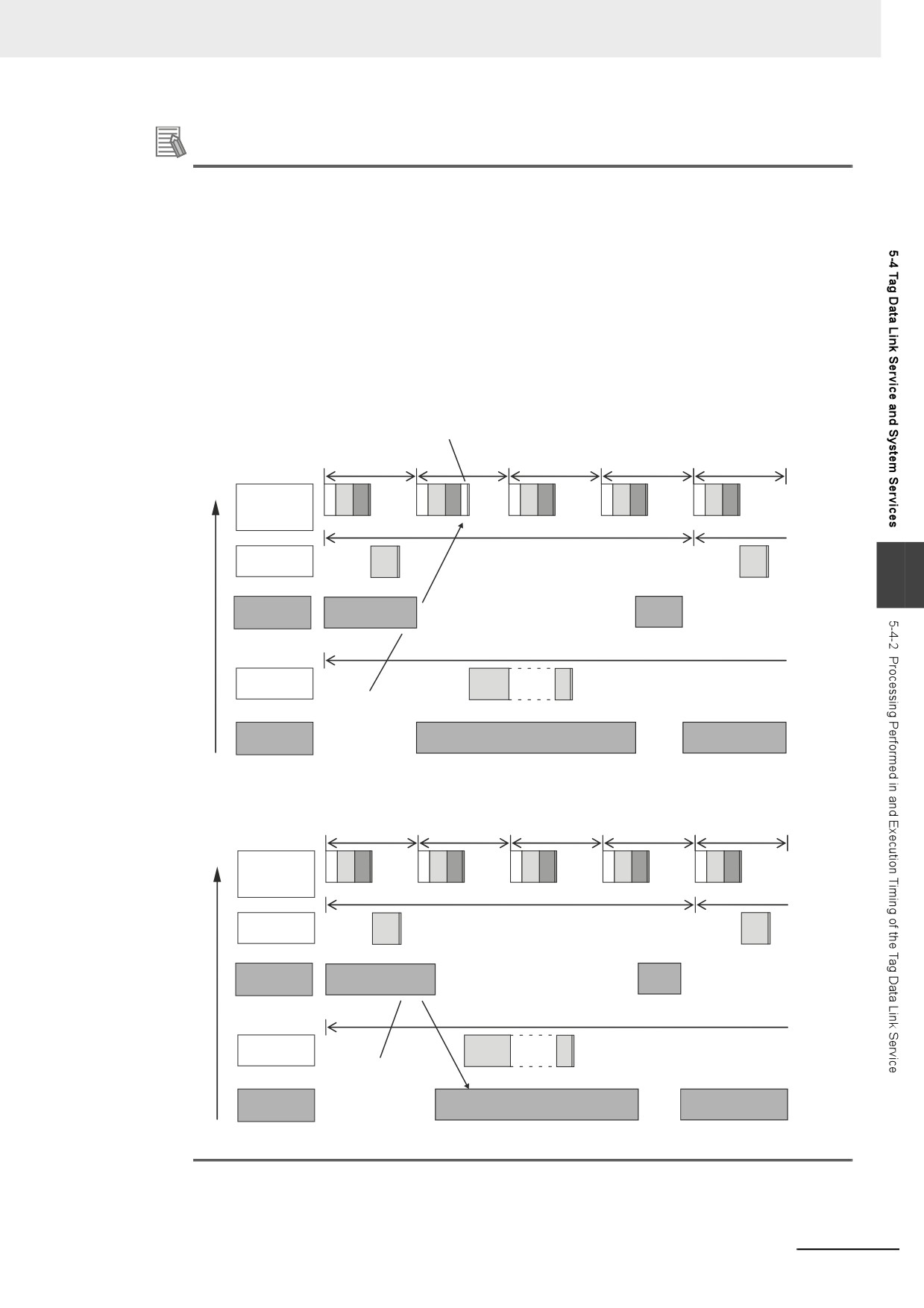
Additional Information
Differences in the Timing of Processing Tag Data Links Depending on Whether a Refresh-
ing Task Is Set
The process to write values to and read values from variables is different depending on whether
a refreshing task is set. If a refreshing task is set, the values are read and written in that task. If a
refreshing task is not set, the values are read and written in a system service. This means there
is a difference in the execution timing of processing tag data links.
The difference in the execution timing when data is received for tag data links with an NY-series
Controller is shown below.
• When a Refreshing Task Is Specified
In this example, the primary periodic task is set as the refreshing task. Values are written to the
variables in the next primary periodic task after the tag data link service.
Values are written to the variables in the next primary
periodic task after the tag data links service.
Execution
Primary period
priority
High
Primary
IO
UPG
MC
IO
UPG
MC
IO
UPG
MC
IO
UPG
MC
IO
UPGMC
periodic task
Task period
Priority-16
UPG
UPG
periodic task
5
Tag data link
service
Task period
Priority-17
UPG
Interrupted.
periodic task
Tag data is read
from the tag set.
System
service
Low
• When a Refreshing Task Is Not Specified
The values are written to the variables in a system service.
Execution
Primary period
priority
High
Primary
IO
UPG
MC
IO
UPG
MC
IO
UPG
MC
IO
UPG
MC
IO
UPGMC
periodic task
Task period
Priority-16
UPG
UPG
periodic task
Tag data link
service
Task period
Priority-17
UPG
Interrupted.
periodic task
Tag data is read
from the tag set.
System
services
Low
The values are written to the variables
in a system service.
5-31
5 Designing Tasks
5-4-3
Processing Performed in and Execution Timing of the System
Services
This section describes the processing that is performed in and the execution timing of the system ser-
vices.
Processing Performed in System Services
System services include the following processing.
System service
Description
Built-in EtherNet/IP port service
• Processing of message service requests, such as CIP commands,
from the Sysmac Studio, an HMI, host computers, or other controllers
• Execution of communications instructions for CIP and socket commu-
nications
Internal port service
• Processing of message service requests, such as CIP commands and
HTTP commands, from Windows inside the NY-series Controller.
Built-in EtherCAT port service
• Execution of EtherCAT message communications
Virtual SD Memory Card service
• Access from FTP client
• SD Memory Card operations from the Sysmac Studio
• Execution of SD Memory Card instructions
Self-diagnosis
• Hardware error detection
Execution Timing of the System Services
For NY-series Controllers, the system services are executed without being affected by the tasks. How-
ever, the system services are not executed while the tag data link service is in progress.
There is no priority in the processing of system services. All of the processing is executed in parallel
with time slicing.
5-32