SINUMERIK 840D sl. Training. Operate - Turning (2016-2020) - page 11
Appendix
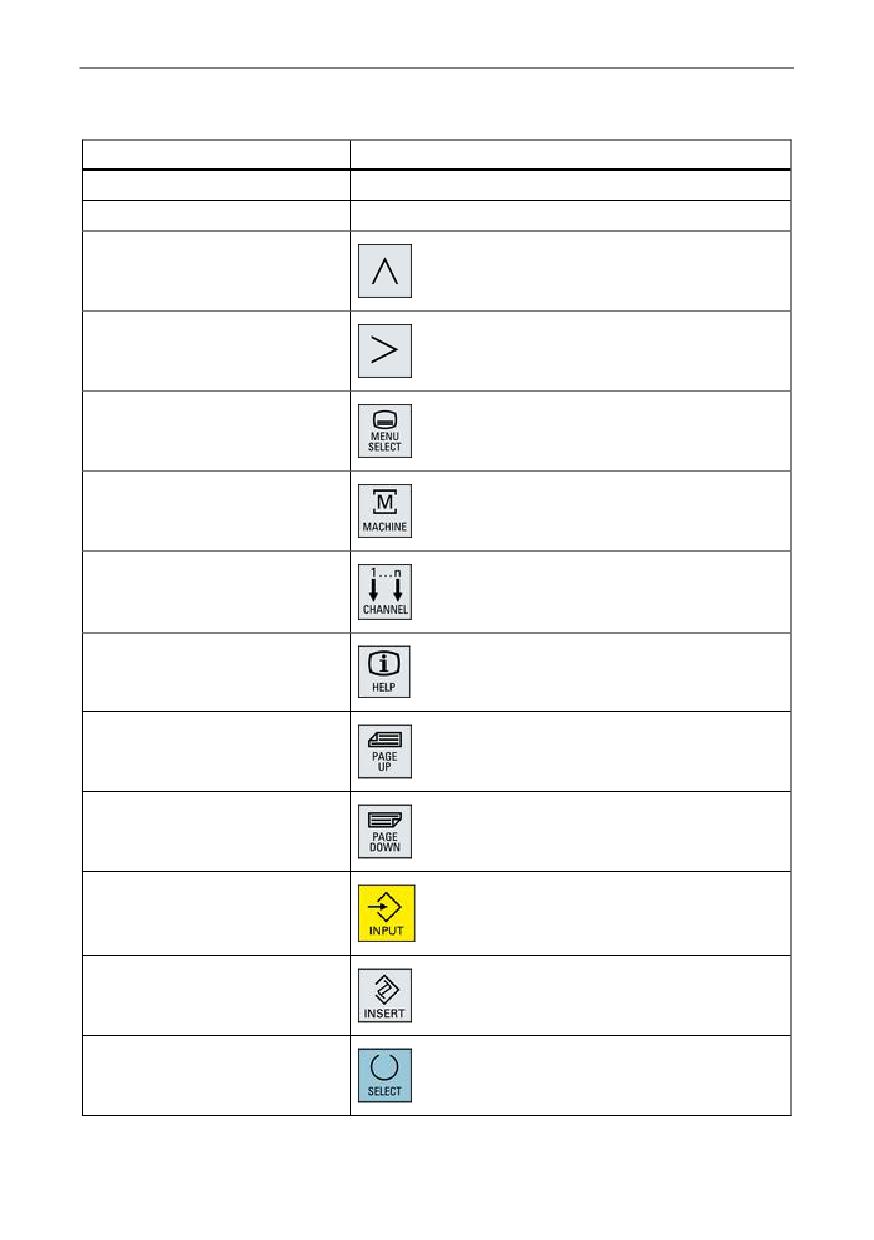
Keyboard commands in the machine simulation
PC keyboard
Function
<F1> ... <F8>
Horizontal softkeys 1 to 8
Shift + <F1> ... <F8>
Vertical softkeys 1 to 8
<F9>
Shift + <F9>
<F10>
Shift + <F10>
<F11>
<F12>
<Page↑>
<Page↓>
<Enter>
<Insert>
Numerical block <5>
Training and Programming
A5E43899500, 01/2018
105
Appendix
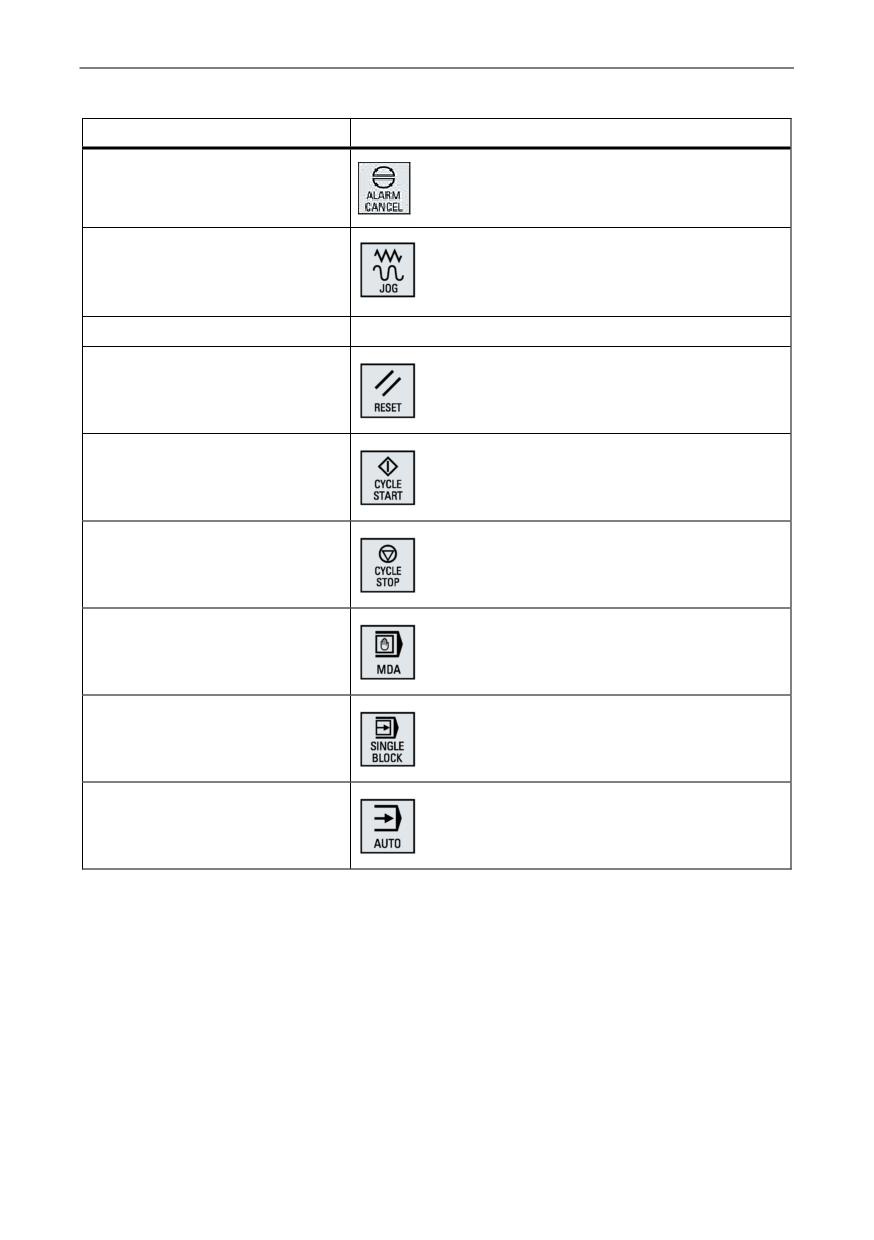
PC keyboard
Function
<Esc>
<Ctrl> + <Alt> + <Shift> + <1>
<Ctrl> + <Alt> + <Shift> + <2>
The operational SinuTrain machine is shut down.
<Ctrl> + <Alt> + <Shift> + <3>
<Ctrl> + <Alt> + <Shift> + <4>
<Ctrl> + <Alt> + <Shift> + <5>
<Ctrl> + <Alt> + <Shift> + <6>
<Ctrl> + <Alt> + <Shift> + <7>
<Ctrl> + <Alt> + <Shift> + <8>
Training and Programming
106
A5E43899500, 01/2018
Preface
1
________________
Introduction
2
________________
System overview
CNC operation with
SINUMERIK
S
3
INUMERIK Operate_____
4
mode (JOG)
SINUMERIK 828D
5
SINUMERIK 840D sl
Tool management______
SINUMERIK Operate - Turning
6
Data memory_________
7
Control system overview
Data transfer_________
for machine tools' sales people
CNC operation in automatic__
8
mode (AUTO)
9
CNC funtionalities______
________________
10
CNC programming methods
________________
11
Workpiece visualization
________________
12
CNC technology cycles
________________
13
Complete machining
________________
14
Multi-channel machining
SINUMERIK Integrate Run__
15
MyRobot
________________
16
Tools and information
________________
17
Safety functions
________________
18
Summary of unique features
Valid for:
Controls
SINUMERIK 828D / SINUMERIK 840D sl
Software
CNC software version 4.7
2017
A5E41992653B AA
Table of contents
Preface
3
1
Introduction
9
2
System overview
11
2.1
SINUMERIK 828D
11
2.2
SINUMERIK 840D sl
14
2.2.1
Panels
15
2.2.2
Operator panel equipment
19
3
CNC operation with SINUMERIK Operate
21
3.1
Animated Elements
21
3.2
Onboard documentation
22
3.3
Multitouch operation
23
3.4
Shortcuts
24
4
CNC operation in manual mode (JOG)
25
4.1
TSM universal cycle
25
4.2
Work offsets
26
4.3
Measure workpiece
27
4.4
Measure tool
28
4.5
Logging measurement results in JOG
29
4.6
Stock removal cycle
30
4.7
Positioning cycle
31
4.8
Manual machine
32
5
Tool management
33
5.1
Tool table
33
5.2
Monitoring of tool life and workpiece count
34
5.3
Replacement tools
35
5.4
Setup data
36
6
Data memory
37
6.1
Data storage - SINUMERIK 828D
37
6.2
Data storage - SINUMERIK 840D sl
38
7
Data transfer
39
7.1
Program manager
39
7.2
Ethernet networking
40
SINUMERIK Operate - Turning
Control system overview for machine tools' sales people, 2017, A5E41992653B AA
5
Table of contents
8
CNC operation in automatic mode (AUTO)
41
8.1
Block search
41
8.2
Program control
42
8.3
Execution from external storage devices
43
8.4
Basic block display
44
8.5
Simultaneous recording
45
8.6
Logging measurement results in automatic operation
46
9
CNC funtionalities
47
9.1
80-bit NANO floating-point accuracy
47
9.2
Block change times
48
9.2.1
SINUMERIK 828D
48
9.2.2
SINUMERIK 840D sl
48
9.3
Jerk limitation
49
9.4
Dynamic feedforward control
50
10
CNC programming methods
51
10.1
programGUIDE DIN/ISO and SINUMERIK high-level language
52
10.1.1
Introduction
52
10.1.2
Program editor
53
10.1.3
Languages
54
10.1.4
programGUIDE input support
55
10.2
ShopTurn machining step programming
56
10.2.1
Introduction
56
10.2.2
Sequence editor
57
10.2.3
Interlinking of sequences
58
10.2.4
Graphical view
59
11
Workpiece visualization
61
11.1
2D simulation
61
11.2
3D simulation
62
12
CNC technology cycles
63
12.1
CNC technology cycles for programGuide and ShopTurn
63
12.2
Highlights of machining cycles
64
12.2.1
Stock removal along contour with blank contour
64
12.2.2
Engraving cycle
65
12.2.3
Counterspindle cycle
66
12.3
Residual material detection for contour cycles
67
12.3.1
Residual material detection during turning
67
12.3.2
Residual material detection during milling
68
12.4
In-process measuring for workpieces and tools
69
SINUMERIK Operate - Turning
6
Control system overview for machine tools' sales people, 2017, A5E41992653B AA
Table of contents
13
Complete machining
71
13.1
End face machining (TRANSMIT)
71
13.2
Peripheral surface machining (TRACYL)
72
14
Multi-channel machining
73
14.1
Overview
73
14.2
programSYNC job list
74
14.3
Double editor
75
14.4
Multi-channel stock removal cycle
76
14.5
Simulation
77
15
SINUMERIK Integrate Run MyRobot
79
15.1
SINUMERIK Integrate Run MyRobot / EasyConnect
79
15.2
SINUMERIK Integrate Run MyRobot / Handling
80
16
Tools and information
81
16.1
DXF reader
81
16.2
SinuTrain for SINUMERIK Operate
82
16.3
CNC4you
83
17
Safety functions
85
17.1
SINUMERIK Safety Integrated
85
17.2
Collision avoidance
86
18
Summary of unique features
87
18.1
SINUMERIK 828D
87
18.2
SINUMERIK 840D sl
88
Index
89
SINUMERIK Operate - Turning
Control system overview for machine tools' sales people, 2017, A5E41992653B AA
7
Introduction
1
SINUMERIK 828D and SINUMERIK 840D sl controls, and the easily understandable and
intuitive SINUMERIK Operate programming interface provide a tailored solution for all CNC
turning machines used worldwide.
SINUMERIK Operate
Characteristic features of SINUMERIK Operate include…
● HMI-Advanced, ShopMill and ShopTurn combined under one interface
● Intuitive and clear operation and programming, including Animated Elements
● Display in the modern Windows style
● New powerful functions around setting up, programming, tool and program management
● New functions for complete machining (single-chuck machining)
Two options are available for the programming:
● DIN-ISO programming with programGuide (CNC text editor with programGuide cycle
support, and DIN-ISO and readable CNC high-level language commands) for mid-sized
and large series
● ShopTurn machining step programming with graphical interactive CNC machining step
editor and CNC programming without DIN-ISO knowledge for small series
programSYNC - Efficient programming for multi-channel machines
Turning-milling centers with several saddles are considered to be the high-end machines in
this segment. The individual tool carriers are distributed and managed by SINUMERIK in
different channels. Programs must be created for each channel that then run simultaneously
later during the machining. With the uniform SINUMERIK Operate user interface, Siemens
provides a standard user interface which enables programs for two channels to be created
simultaneously by means of a double editor and to align them with the programSYNC
function. In this way, efficient programming is possible directly on the control.
SINUMERIK Operate - Turning
Control system overview for machine tools' sales people, 2017, A5E41992653B AA
9
System overview
2
2.1
SINUMERIK 828D
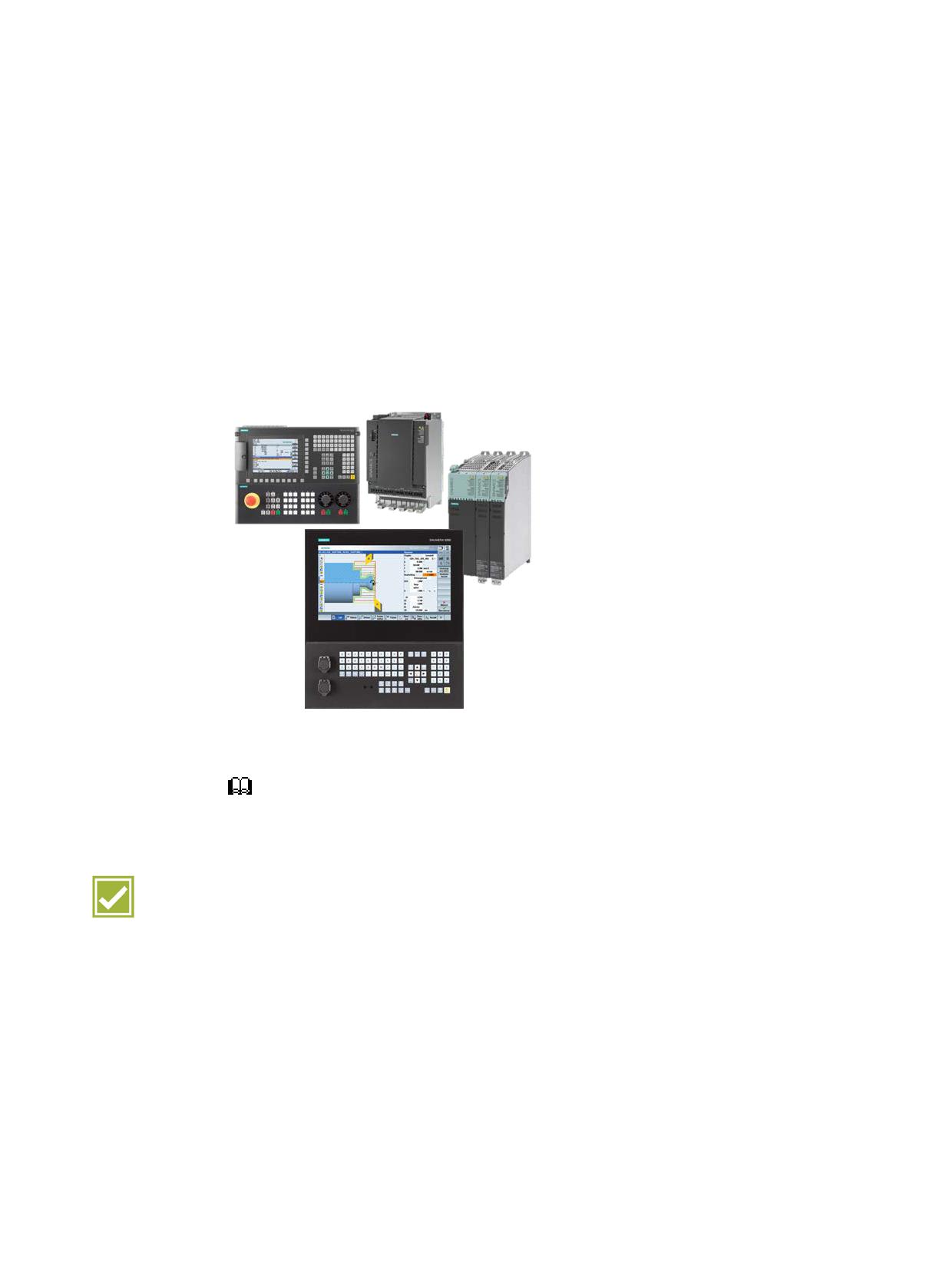
Alongside three high-performance CNC variants of SINUMERIK 828D, SINUMERIK 828D
BASIC is a low-cost starter model in the compact class. SINUMERIK 828 therefore fits the
performance requirements of standard machine concepts perfectly.
• Panel-based compact CNC
• Technologies: Turning, milling, G-Tech
• Up to 10 axes/spindles and 2 help axes
• Up to 2 machining channels
•
10.4" color display / 15.6" touch display
• SIMATIC S7-200 PLC-based
You can find further information in catalog NC 82
Benefits
● Maximum robustness and low maintenance
● Reliable CNC, even in a harsh environment
● Improved efficiency thanks to state-of-the-art operating technologies and functions
● Scalable solutions thanks to tailored hardware and software for the compact class
SINUMERIK Operate - Turning
Control system overview for machine tools' sales people, 2017, A5E41992653B AA
11
System overview
2.1 SINUMERIK 828D
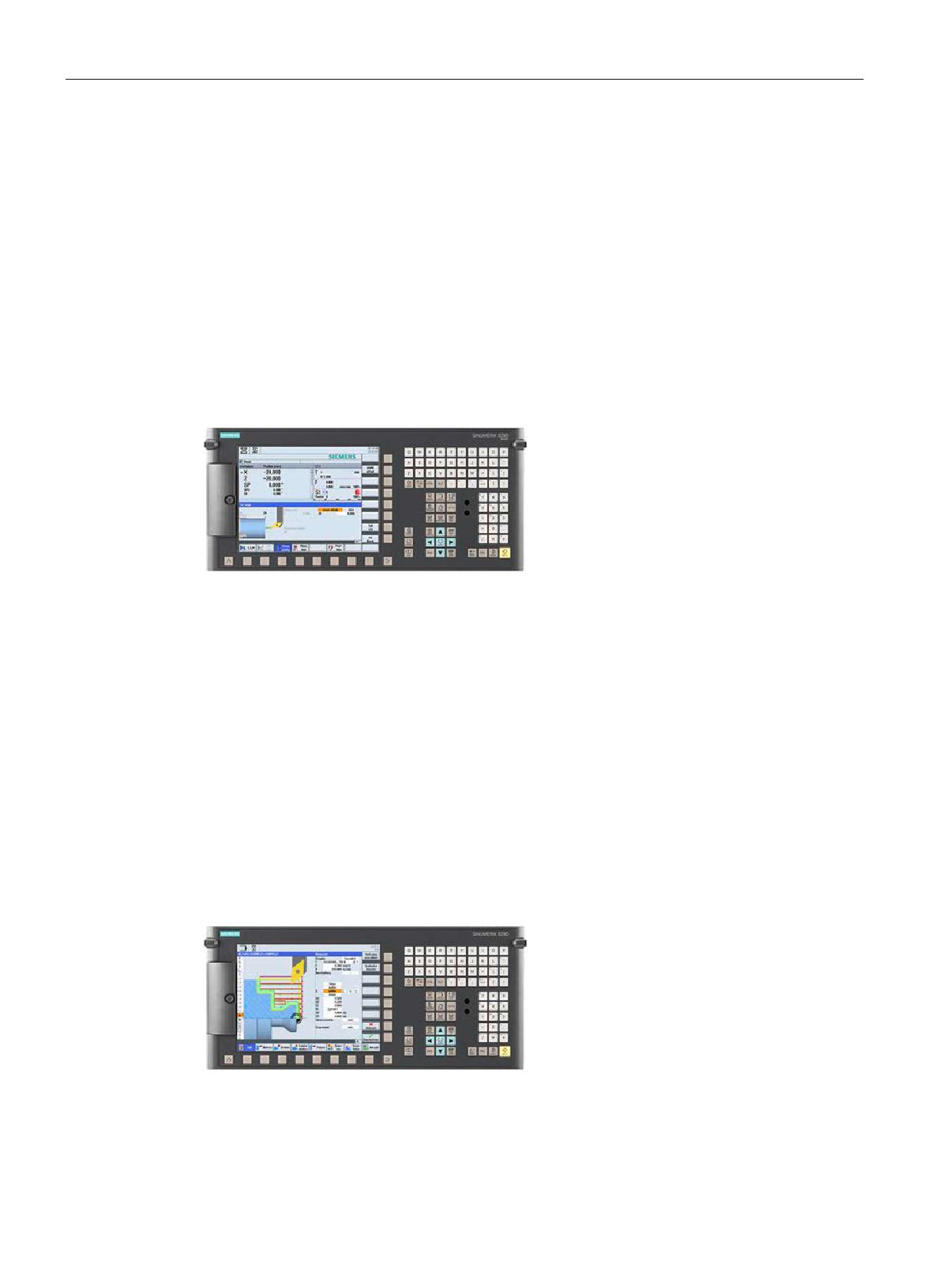
SINUMERIK 828D BASIC PPU 24x.3
The SINUMERIK 828D BASIC is an operator-panel CNC that combines all the components
of a CNC in a single unit:
● CNC, PLC, HMI
●
10.4" TFT color display
● Full CNC keyboard
●
1 machining channel
● Closed-loop control for up to 5 axes/spindles
SINUMERIK 828D BASIC PPU 240.3, horizontal
SINUMERIK 828D PPU 28x.3
The SINUMERIK 828D PPU 28x.3 is an operator-panel CNC that combines all the
components of a CNC in a single unit:
● CNC, PLC, HMI
●
10.4" TFT color display
● Full CNC keyboard
●
1 machining channel
● Closed-loop control for up to 8 axes/spindles
Note: Use with 26x or 28x software variant
SINUMERIK 828D PPU 280.3, horizontal
SINUMERIK Operate - Turning
12
Control system overview for machine tools' sales people, 2017, A5E41992653B AA
System overview
2.1 SINUMERIK 828D
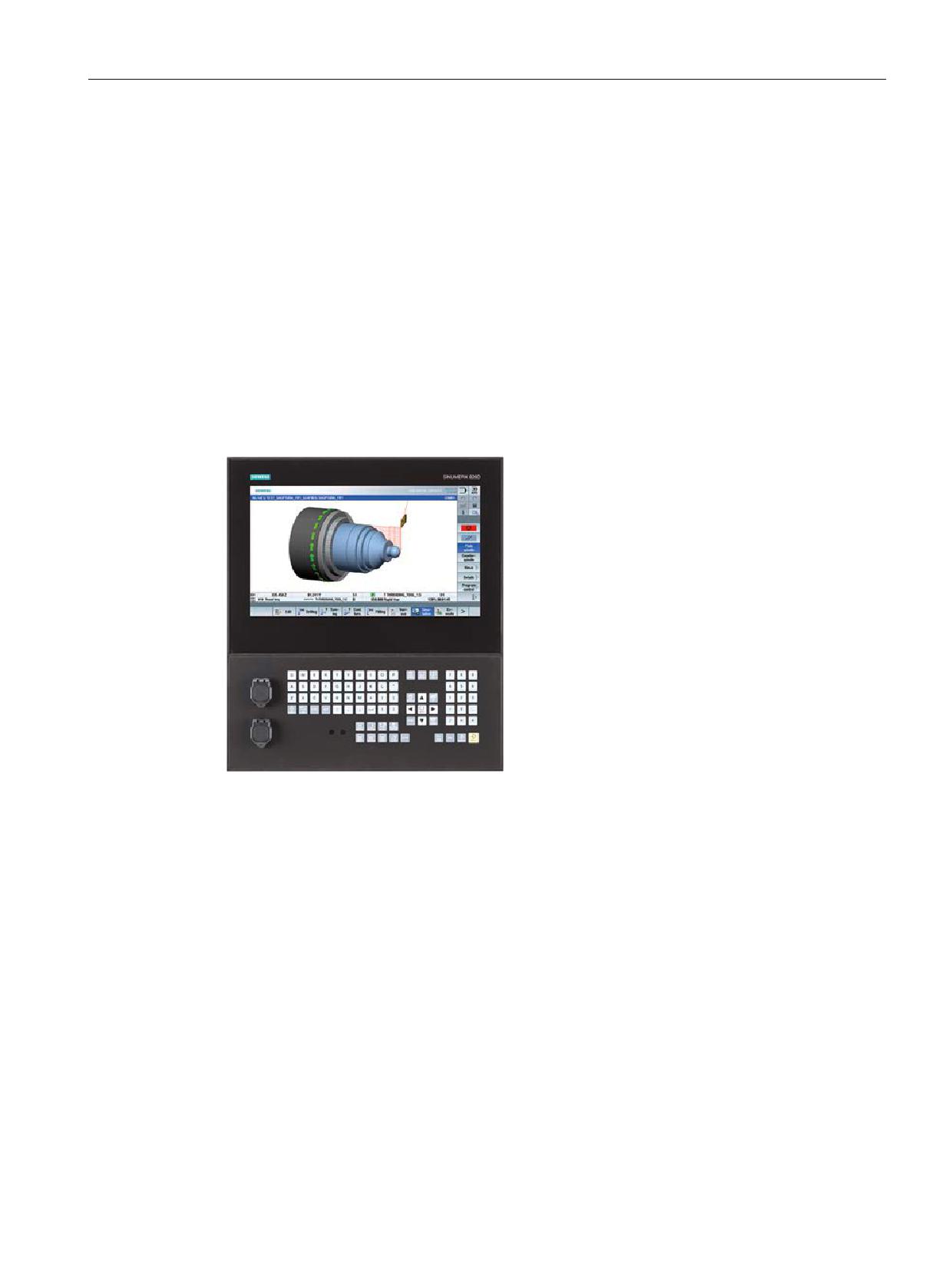
SINUMERIK 828D ADVANCED PPU 290.3
The SINUMERIK 828D ADVANCED PPU 290.3 is an operator-panel CNC that combines all
the components of a CNC in a single unit:
● CNC, PLC, HMI
●
15.6" multitouch display in 16:9 format
● Full CNC keyboard
● Up to 2 machining channels
● Closed-loop control for up to 10 axes/spindles, depending on the software used
Note: Use with 26x, 28x or 28xA software variant
SINUMERIK 828D PPU 290.3
SINUMERIK Operate - Turning
Control system overview for machine tools' sales people, 2017, A5E41992653B AA
13
System overview
2.2 SINUMERIK 840D sl
2.2
SINUMERIK 840D sl
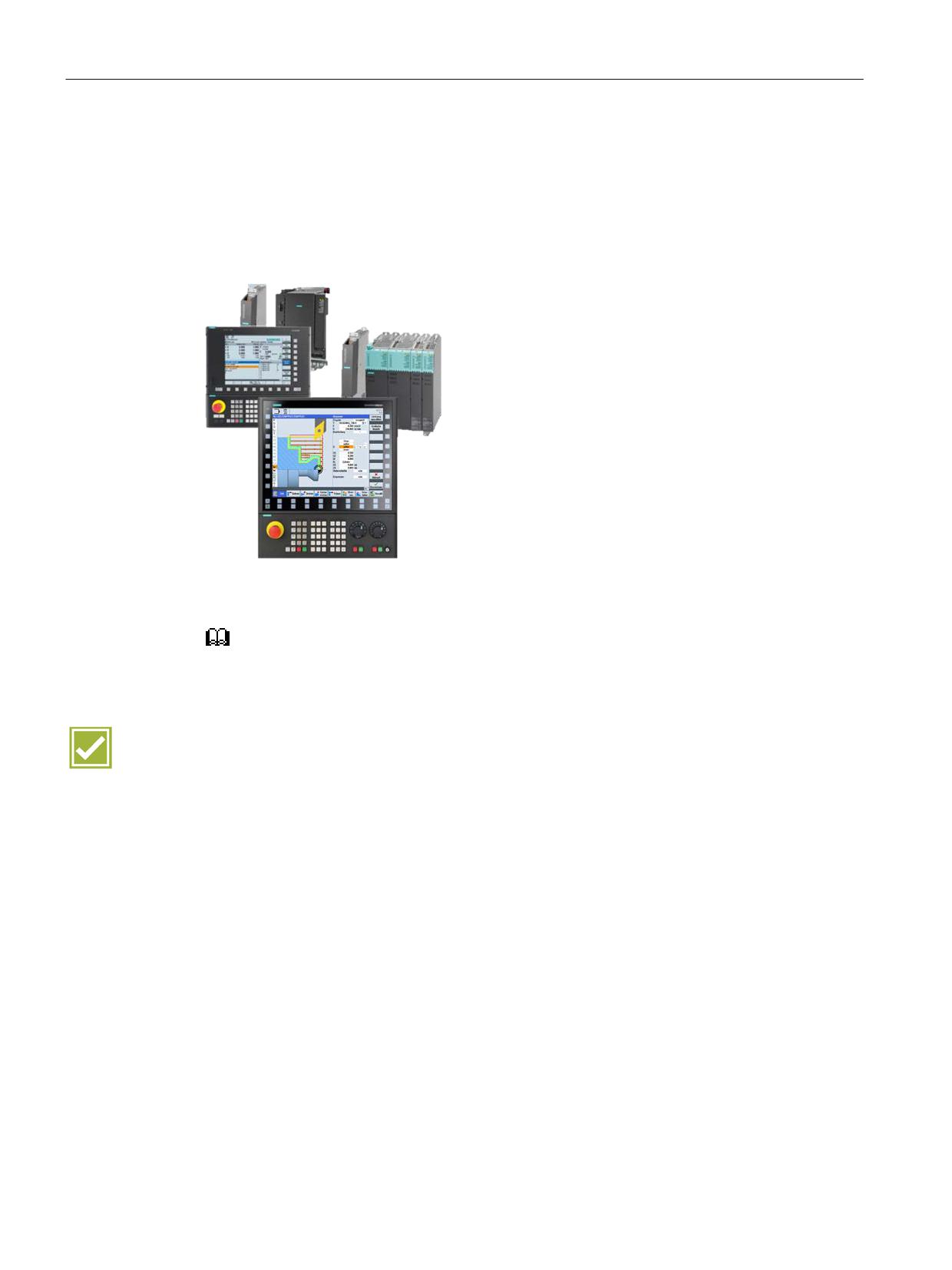
SINUMERIK 840D sl is an open CNC for modular premium machine concepts. With
powerful, innovative system functions, the SINUMERIK 840D sl opens up a boundless range
of technologies. SINUMERIK 840D sl is leading the way in exploiting global machining
trends; this makes it the preferred CNC in the industries of the future.
• Drive-based modular CNC
• Multi-technology CNC
• Up to 93 axes/spindles
• Up to 30 machining channels
• Modular panel concept up to 19" color
display
• SIMATIC S7-300 PLC
You can find further information in catalog NC 62
Benefits
● Increased productivity of the machines thanks to faster controls and innovative machine
concepts
● Improved efficiency for operation thanks to state-of-the-art operating technologies and
functions
● Improved quality by perfectly adapting the control to the machine behavior
● Simplified engineering thanks to additional system support for configuring, testing and
optimizing
● Future-oriented expanded functionality for digitalization and integration in Industry 4.0
automation concepts
SINUMERIK Operate - Turning
14
Control system overview for machine tools' sales people, 2017, A5E41992653B AA
System overview
2.2 SINUMERIK 840D sl
2.2.1
Panels
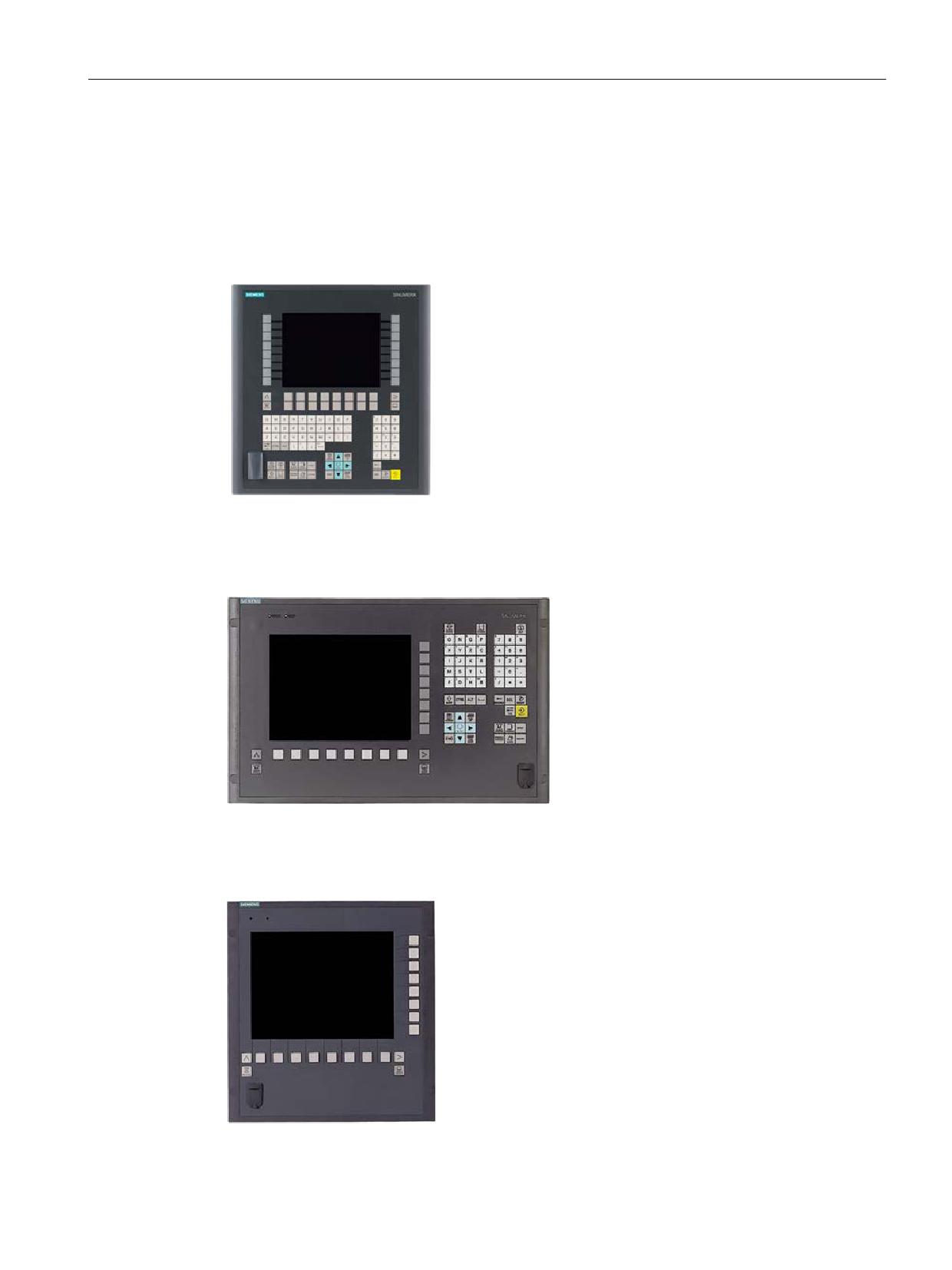
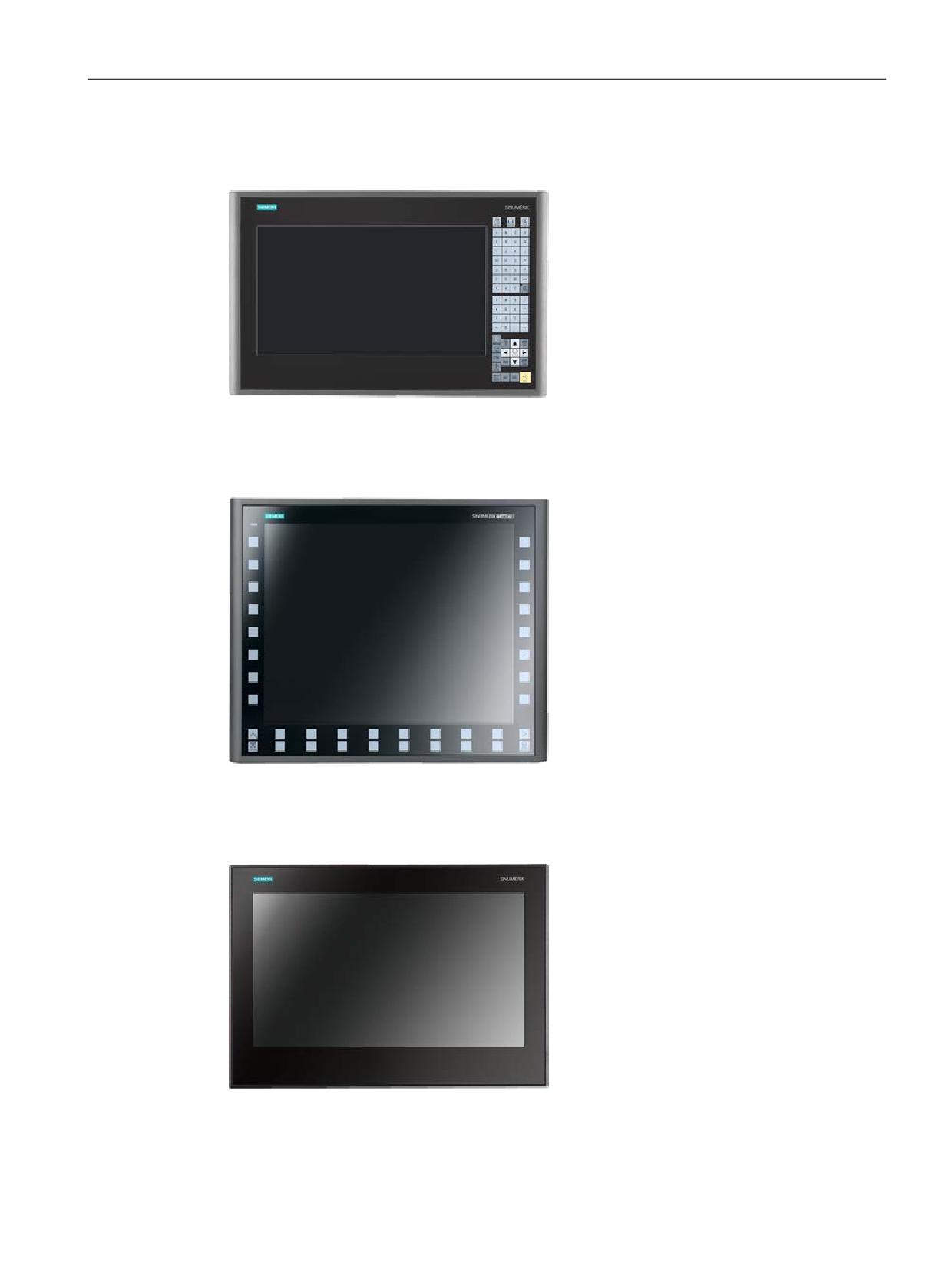
SINUMERIK OP 08T
• Operator panel 191 mm wide,
7.5" TFT display
(resolution 640 × 480 pixels)
• Integrated 75-key CNC keyboard (layout
as for the SINUMERIK full CNC keyboard)
• With USB interface at the front
• Version with membrane keys
SINUMERIK OP 010
• Operator panel 483 mm wide,
10.4" TFT display
(resolution 640 × 480 pixels)
• Integrated CNC keyboard
• With USB interface for a memory stick at
the front
• Version with membrane keys
• Separate machine control panel
SINUMERIK OP 010S
• Operator panel 310 mm wide,
10.4" TFT display
(resolution 640 × 480 pixels)
• Mechanical keys
• With USB interface for a memory stick at
the front
• Separate CNC keyboard and machine
control panel
SINUMERIK Operate - Turning
Control system overview for machine tools' sales people, 2017, A5E41992653B AA
15
System overview
2.2 SINUMERIK 840D sl
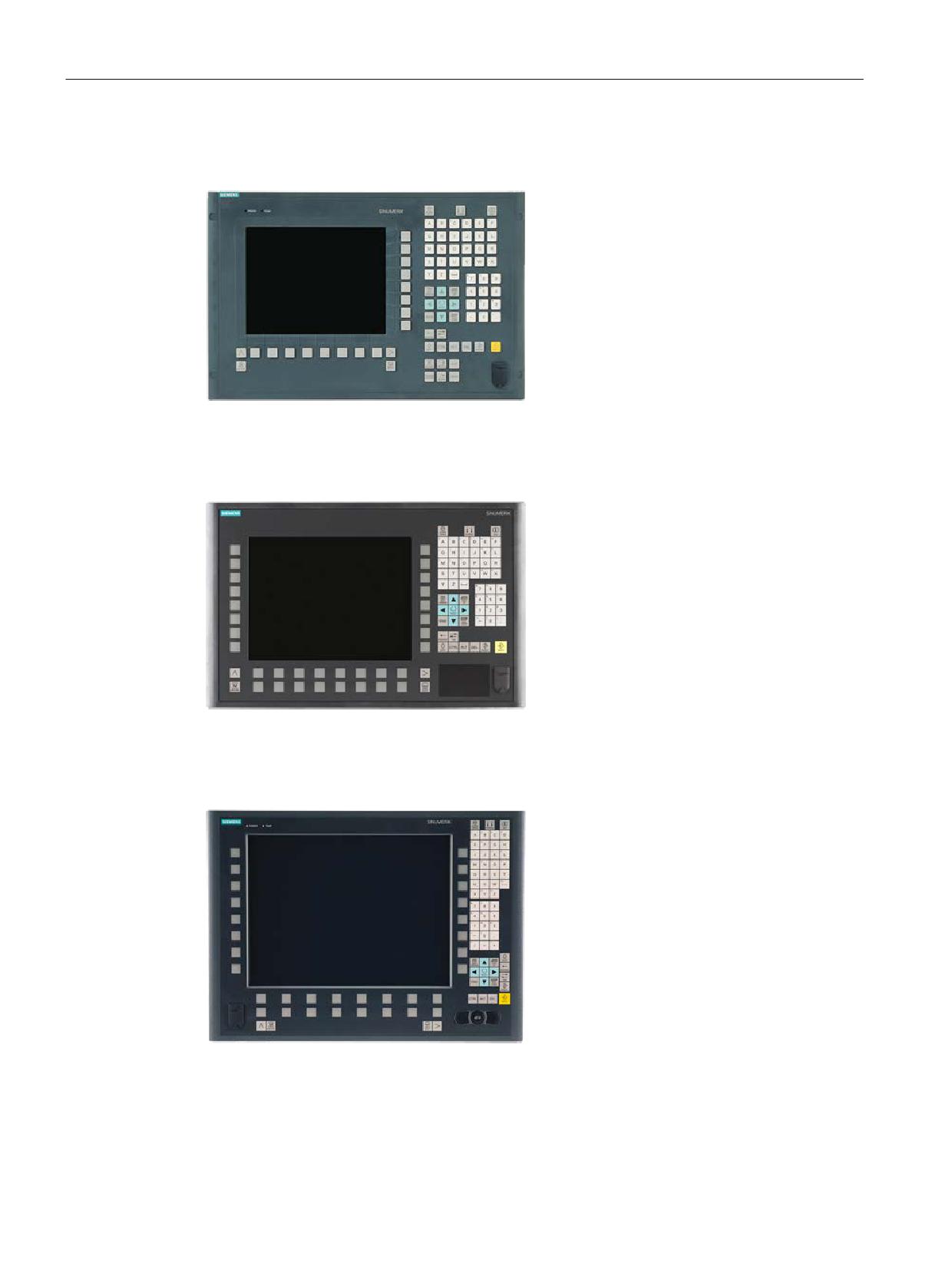
OP 010C
• Operator panel 483 mm wide,
10.4" TFT display
(resolution 640 × 480 pixels)
• Integrated CNC keyboard
• With USB interface for a memory stick at
the front
• Version with mechanical keys
• Separate machine control panel
OP 012
• Operator panel 483 mm wide,
12" TFT display
(resolution 800 × 600 pixels)
• Membrane keys
• Integrated mouse
• Touchpad
• With USB interface for a memory stick at
the front
SINUMERIK OP 015A
• Operator panel 380 mm wide,
15" TFT display
(resolution 1024 × 768 pixels)
• Version with membrane keyboard with 62
keys
• With USB interface at the front
• Integrated mouse
SINUMERIK Operate - Turning
16
Control system overview for machine tools' sales people, 2017, A5E41992653B AA
System overview
2.2 SINUMERIK 840D sl
SINUMERIK OP 015 black
• Operator panel 396 mm wide,
15.6" TFT display
(resolution 1366 × 768 pixels)
• Capacitive keyboard with 64 keys
• Capacitive display area for gesture
operation (touch operation)
Note: see also Chapter AUTOHOTSPOT
SINUMERIK OP 019
• Operator panel 483 mm wide,
19" TFT display
(resolution 1280 × 1024 pixels)
• Version with membrane keys, gloved
operation also possible
• Capacitive sensor equipment for fast key
operation
• Integrated key disable as protection
against incorrect operation
• USB 2.0 connector socket for console
installation
• Separate CNC keyboard and machine
control panel
SINUMERIK OP 019 black
• Operator panel 46.99 cm wide,
18.5" TFT display
(resolution 1366 × 768 pixels)
• Permits the distributed installation of the
operator panel front and the controller
• Capacitive display area for gesture
operation
Note: see also Chapter AUTOHOTSPOT
SINUMERIK Operate - Turning
Control system overview for machine tools' sales people, 2017, A5E41992653B AA
17

System overview
2.2 SINUMERIK 840D sl
SIMATIC Industrial Thin Client
SIMATIC Industrial Thin Client
• Touch operation
• Connection via Ethernet
Versions:
SIMATIC ITC 1200, 12" widescreen TFT dis-
play
(resolution 1280 x 800 pixels)
SIMATIC ITC 1500, 15" widescreen TFT dis-
play
(resolution 1280 x 800 pixels)
SIMATIC ITC 1900, 19" widescreen TFT dis-
play
(resolution 1366 x 768 pixels)
Note: see also Chapter AUTOHOTSPOT
SINUMERIK Operate - Turning
18
Control system overview for machine tools' sales people, 2017, A5E41992653B AA

System overview
2.2 SINUMERIK 840D sl
2.2.2
Operator panel equipment
PCU 50
We offer the PCU 50.x for customers who specify a hard disk and/or supplementary
Windows-based software.
● Windows 7 operating system
● Up to 40 GB for data (part programs, documentation, other data)
● Additional PCI slots
● Additional CF card slot
● DVI interface
SINUMERIK Operate - Turning
Control system overview for machine tools' sales people, 2017, A5E41992653B AA
19

System overview
2.2 SINUMERIK 840D sl
SIMATIC IPC
Panel PC variant up to 19" panels for multitouch operation:
● Compact and rugged
● Solid State Drive (SSD)
● Passive cooling
● Specific configuration for SINUMERIK
SINUMERIK Operate - Turning
20
Control system overview for machine tools' sales people, 2017, A5E41992653B AA
CNC operation with SINUMERIK Operate
3
3.1
Animated Elements
SINUMERIK 828D
SINUMERIK 828D
SINUMERIK 828D
BASIC
ADVANCED
Basic configuration
Basic configuration
Basic configuration
SINUMERIK 840D sl
SINUMERIK 840D sl
BASIC
Basic configuration
Basic configuration
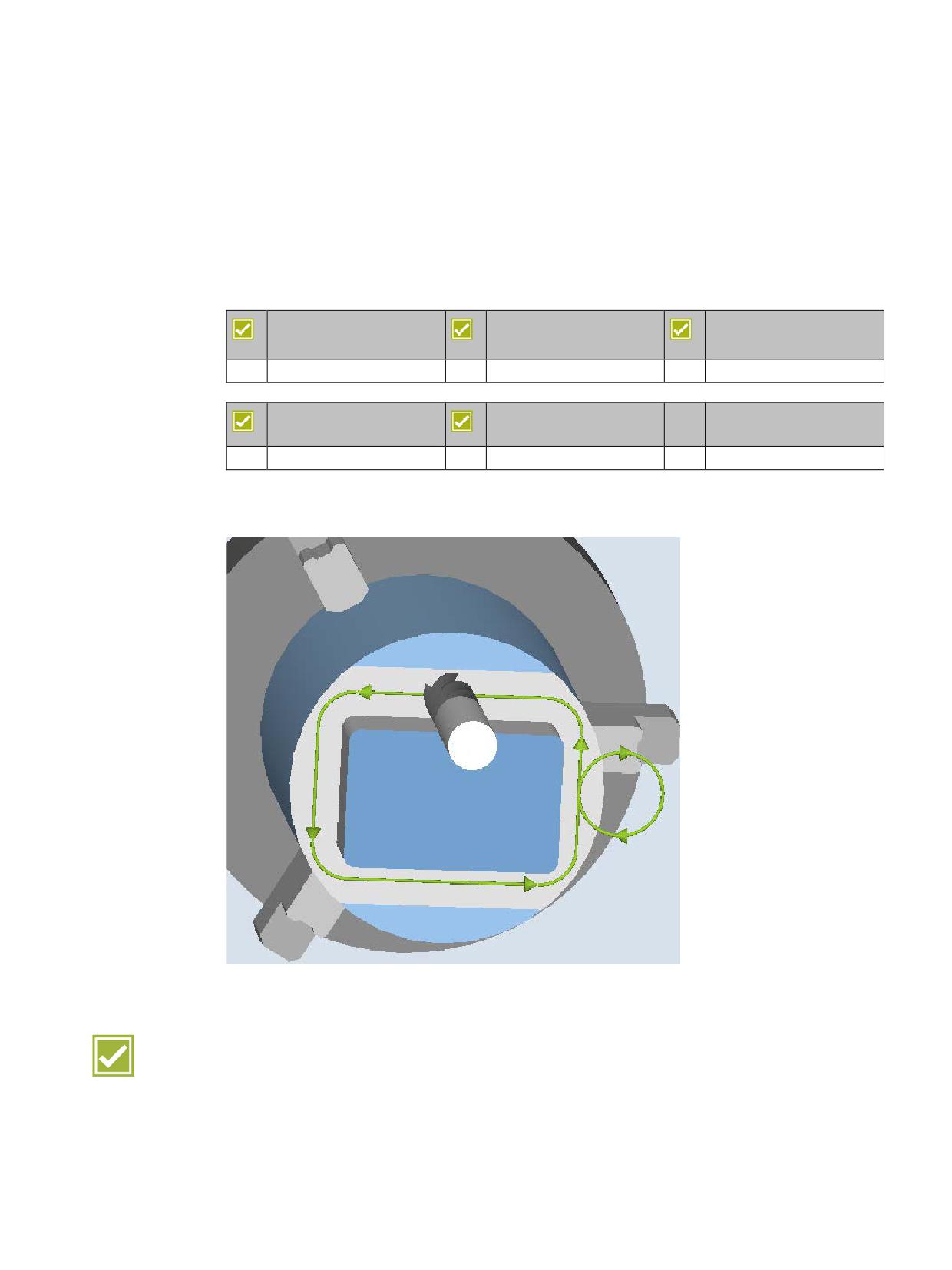
To illustrate which parameters affect what in machining operations, SINUMERIK Operate
offers a new input support function with animated element sequences.
Benefits
● Process reliability during the setup
● Increased reliability at program input by easily understood depiction of selection options
● This results in improved efficiency and so increased availability of the machine
SINUMERIK Operate - Turning
Control system overview for machine tools' sales people, 2017, A5E41992653B AA
21
CNC operation with SINUMERIK Operate
3.2 Onboard documentation
3.2
Onboard documentation
SINUMERIK 828D
SINUMERIK 828D
SINUMERIK 828D
BASIC
ADVANCED
Basic configuration
Basic configuration
Basic configuration
SINUMERIK 840D sl
SINUMERIK 840D sl
BASIC
Basic configuration
Basic configuration
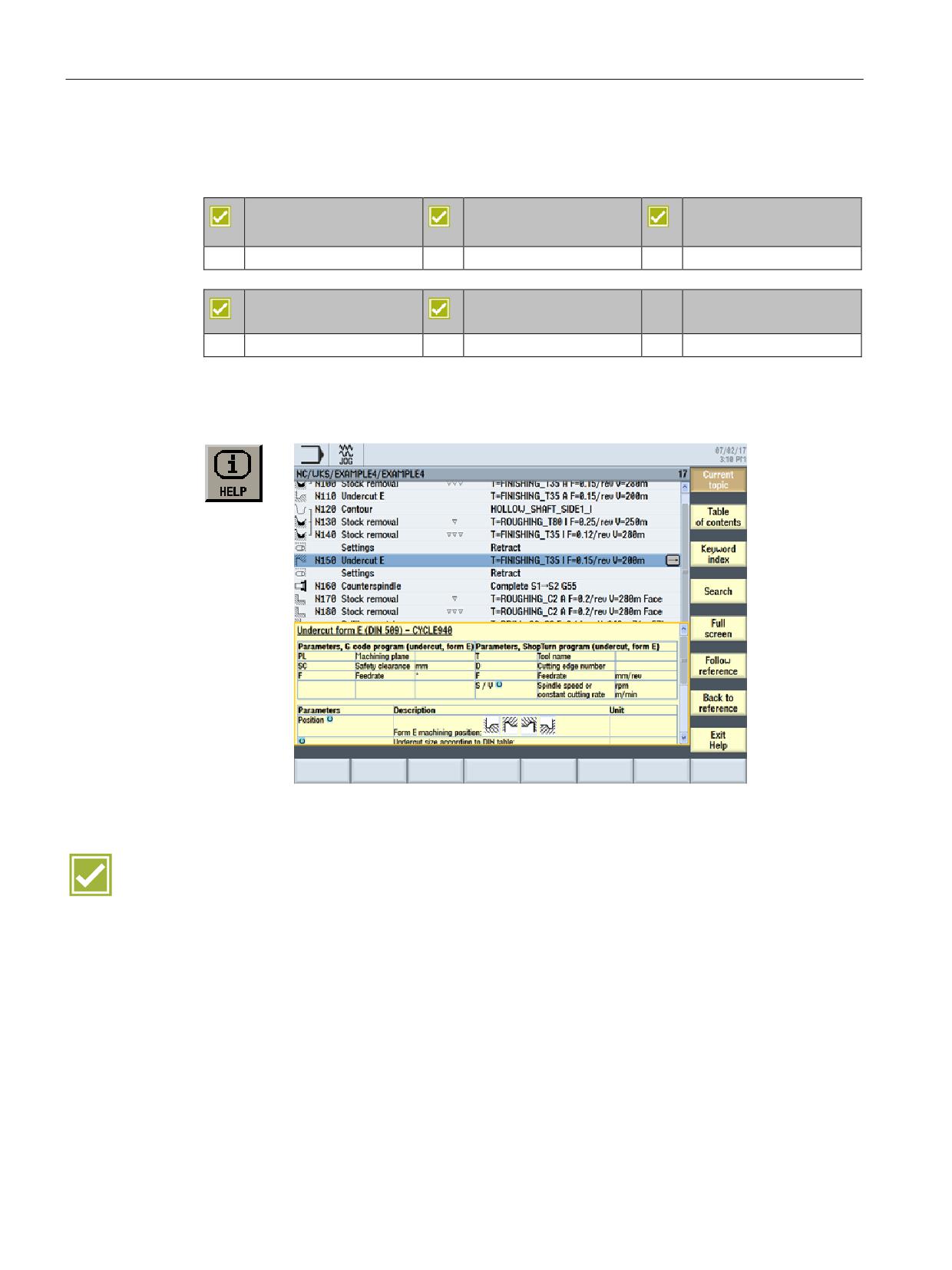
For each input field in the operating screens, SINUMERIK Operate automatically displays
help in the form of a "cursor text". Further information is provided in the form of a complete
context-sensitive help system with many useful details and graphics.
Benefits
● Programming on the machine without a handbook
● Help button to toggle between the editor and help screens
SINUMERIK Operate - Turning
22
Control system overview for machine tools' sales people, 2017, A5E41992653B AA
CNC operation with SINUMERIK Operate
3.3 Multitouch operation
3.3
Multitouch operation
SINUMERIK 828D
SINUMERIK 828D
SINUMERIK 828D
BASIC
ADVANCED
Basic configuration
Basic configuration
Basic configuration
SINUMERIK 840D sl
SINUMERIK 840D sl
BASIC
Basic configuration
Basic configuration
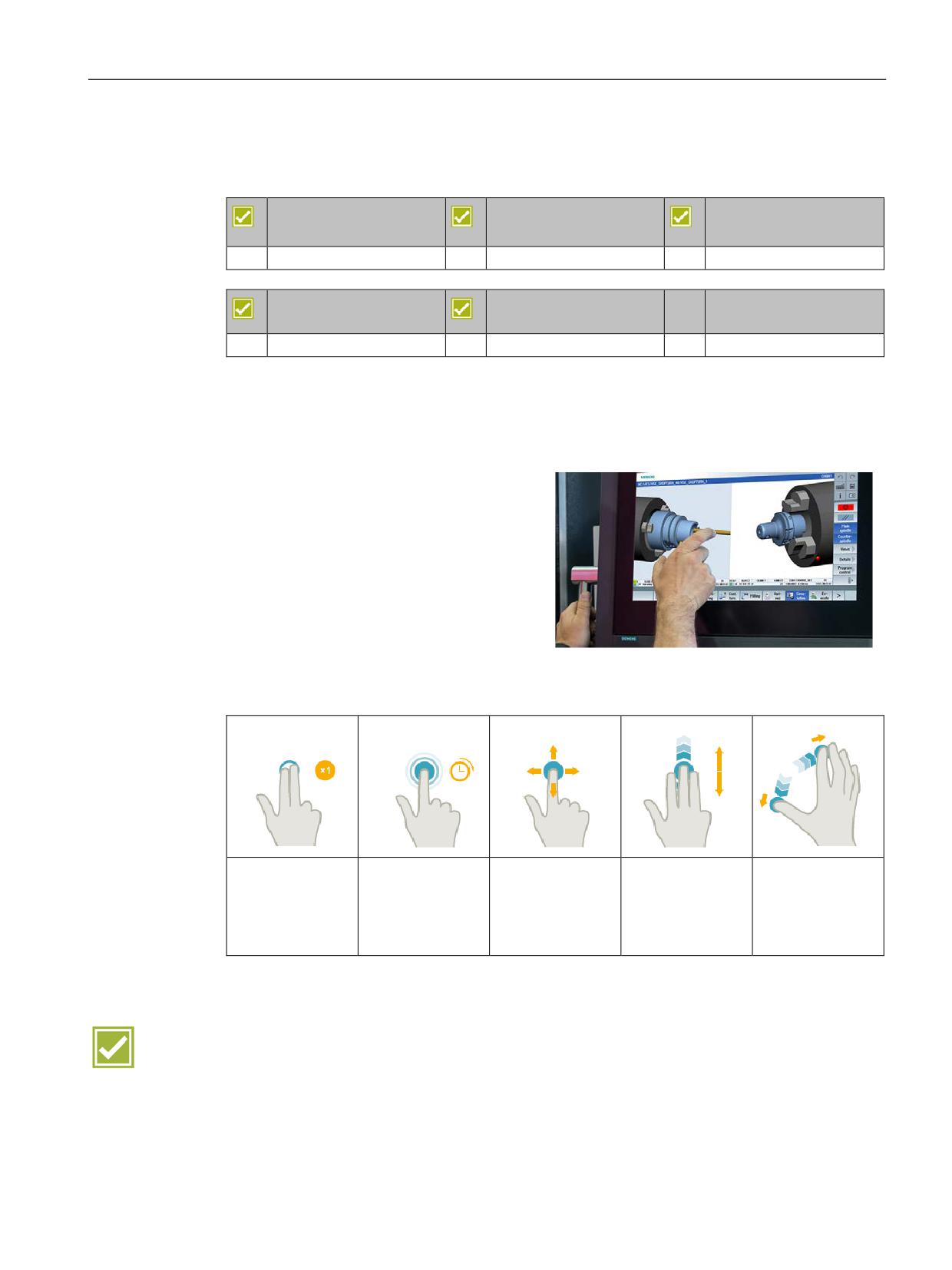
With the appropriate operator panel fronts, SINUMERIK Operate can also be operated with
multitouch gestures. Multitouch operation is possible for the SINUMERIK 840D sl with the
operator panel fronts SINUMERIK OP 015 black line or SINUMERIK OP 019 black line and
for the SINUMERIK 828D PPU 290.3, vertical.
• Intelligent gesture operation with
touchpanels, also with work gloves
• Capacitive touch for industrial use
• Palm detection
• Detection of liquids and contaminations
Extract from the multitouch operation gestures:
Tap with two fin-
Tap and hold
Pan
Flick with three
Spread
gers
fingers
Open object to be
Move graphic
Zoom out graphic
Call the shortcut
changed, e.g. NC
contents, e.g.
Scroll to the start
contents, e.g.
menu, e.g. copy,
block
simulation, mold
or end of lists or
simulation, mold
paste
making view
files
making view
Benefit
● Modern and efficient gesture operation of SINUMERIK Operate - rugged and reliable,
even in harsh industrial environments
SINUMERIK Operate - Turning
Control system overview for machine tools' sales people, 2017, A5E41992653B AA
23
CNC operation with SINUMERIK Operate
3.4 Shortcuts
3.4
Shortcuts
SINUMERIK 828D
SINUMERIK 828D
SINUMERIK 828D
BASIC
ADVANCED
Basic configuration
Basic configuration
Basic configuration
SINUMERIK 840D sl
SINUMERIK 840D sl
BASIC
Basic configuration
Basic configuration
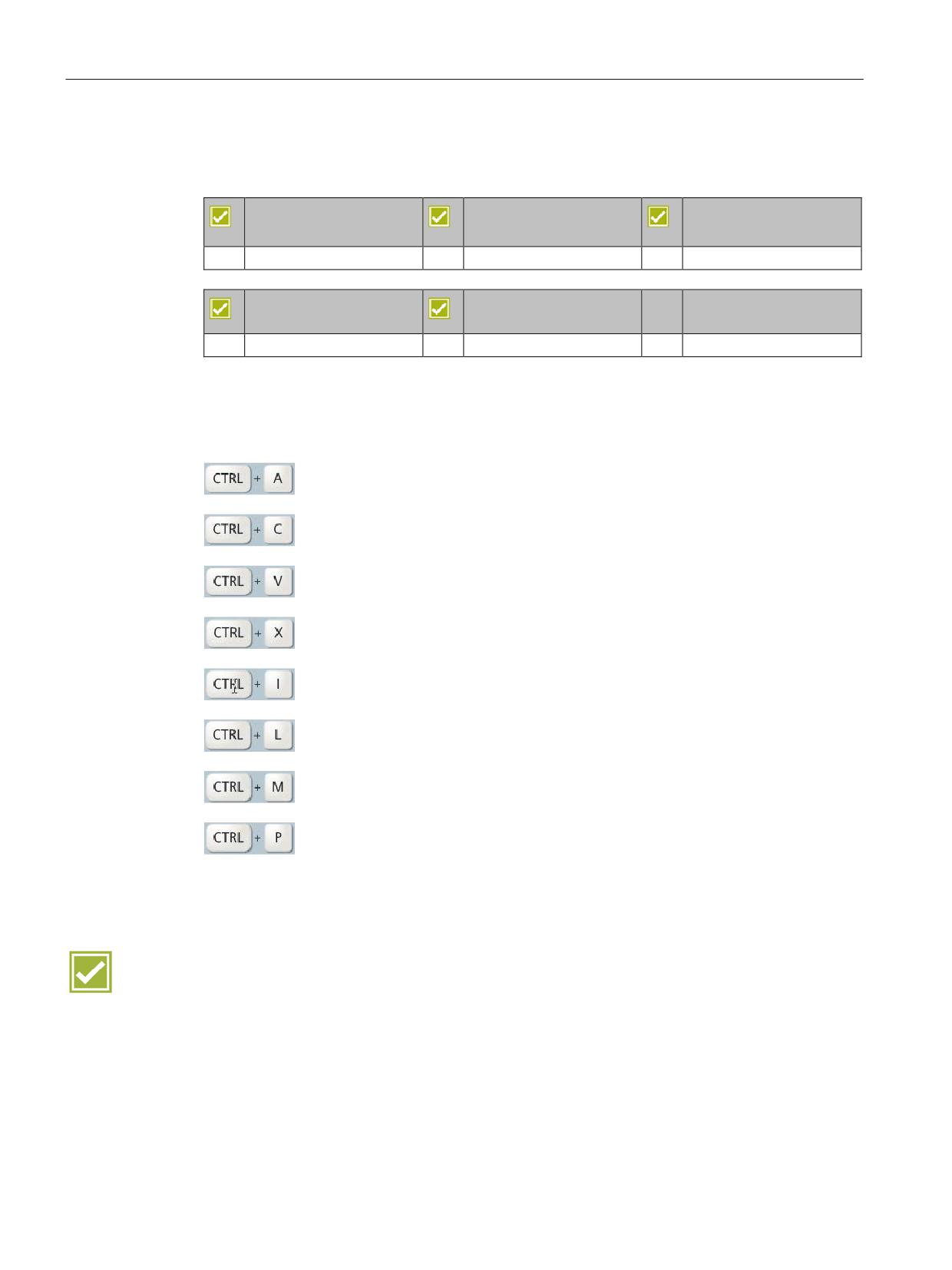
Shortcuts are available for many menu operations in SINUMERIK Operate. A small extract
follows:
Select all (editor functionality)
Copy
Paste
Cut
Calculation of the time from/to line/block
Language selection
Maximum simulation speed
For screenshots
(Storage location: commissioning (keyword) → System data → HMI data →
Logs → Screenshots)
Benefit
● Shortcuts in SINUMERIK Operate avoid the need for complicated menu operations and
provide functions not previously expected from a CNC
SINUMERIK Operate - Turning
24
Control system overview for machine tools' sales people, 2017, A5E41992653B AA
CNC operation in manual mode (JOG)
4
4.1
TSM universal cycle
SINUMERIK 828D
SINUMERIK 828D
SINUMERIK 828D
BASIC
ADVANCED
Basic configuration
Basic configuration
Basic configuration
SINUMERIK 840D sl
SINUMERIK 840D sl
BASIC
Basic configuration
Basic configuration
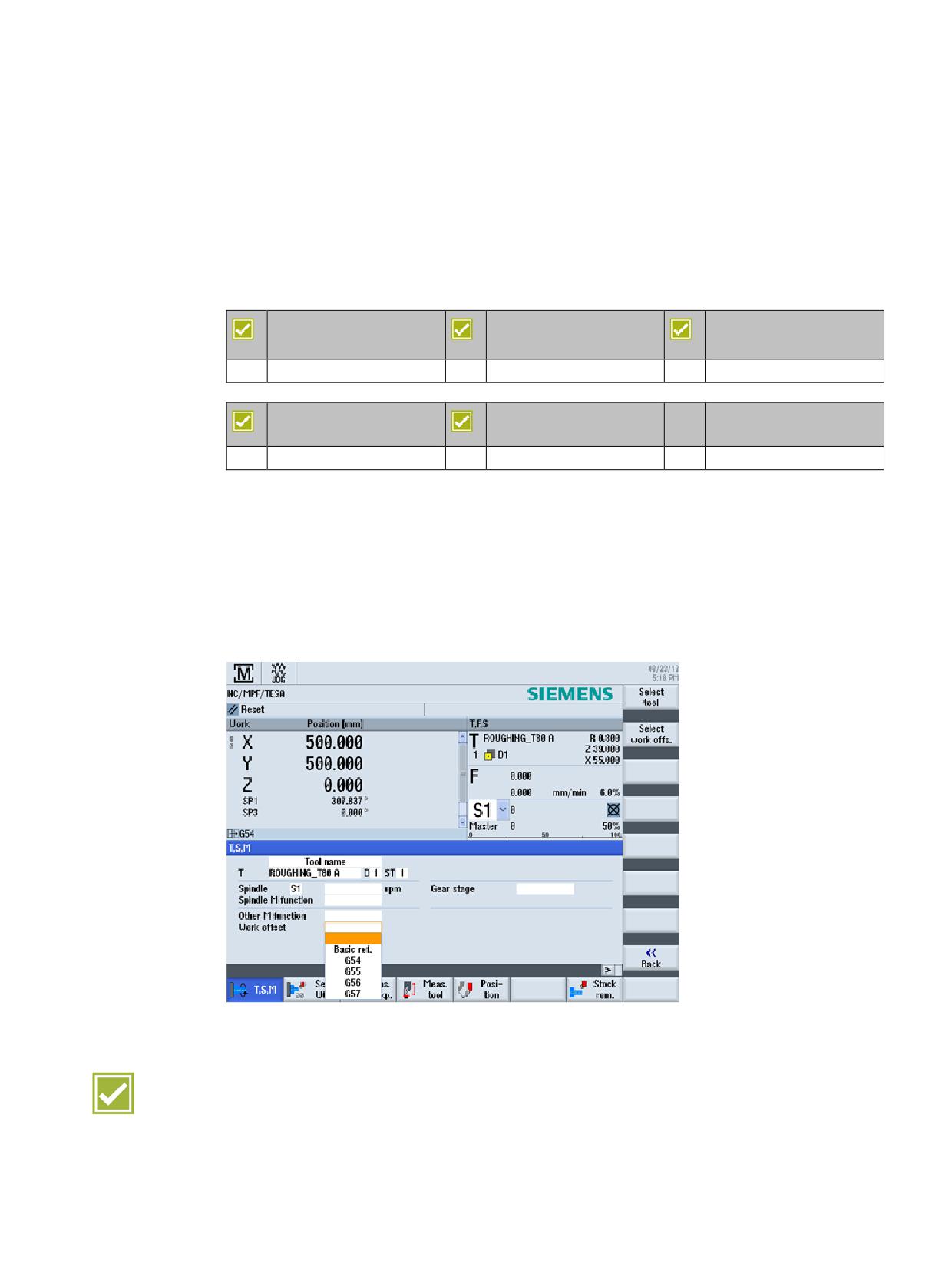
A universal cycle is available in the setup for the most commonly used machine functions:
● Tool change, also involving sister tools, with direct access via the tool table (T)
● Spindle speed and direction (S)
● M functions (M)
● Activation of work offsets
● Definition of the gearbox stage
Benefit
● Take over and change in tools directly from the tool table
SINUMERIK Operate - Turning
Control system overview for machine tools' sales people, 2017, A5E41992653B AA
25
CNC operation in manual mode (JOG)
4.2 Work offsets
4.2
Work offsets
SINUMERIK 828D
SINUMERIK 828D
SINUMERIK 828D
BASIC
ADVANCED
Basic configuration
Basic configuration
Basic configuration
SINUMERIK 840D sl
SINUMERIK 840D sl
BASIC
Basic configuration
Basic configuration
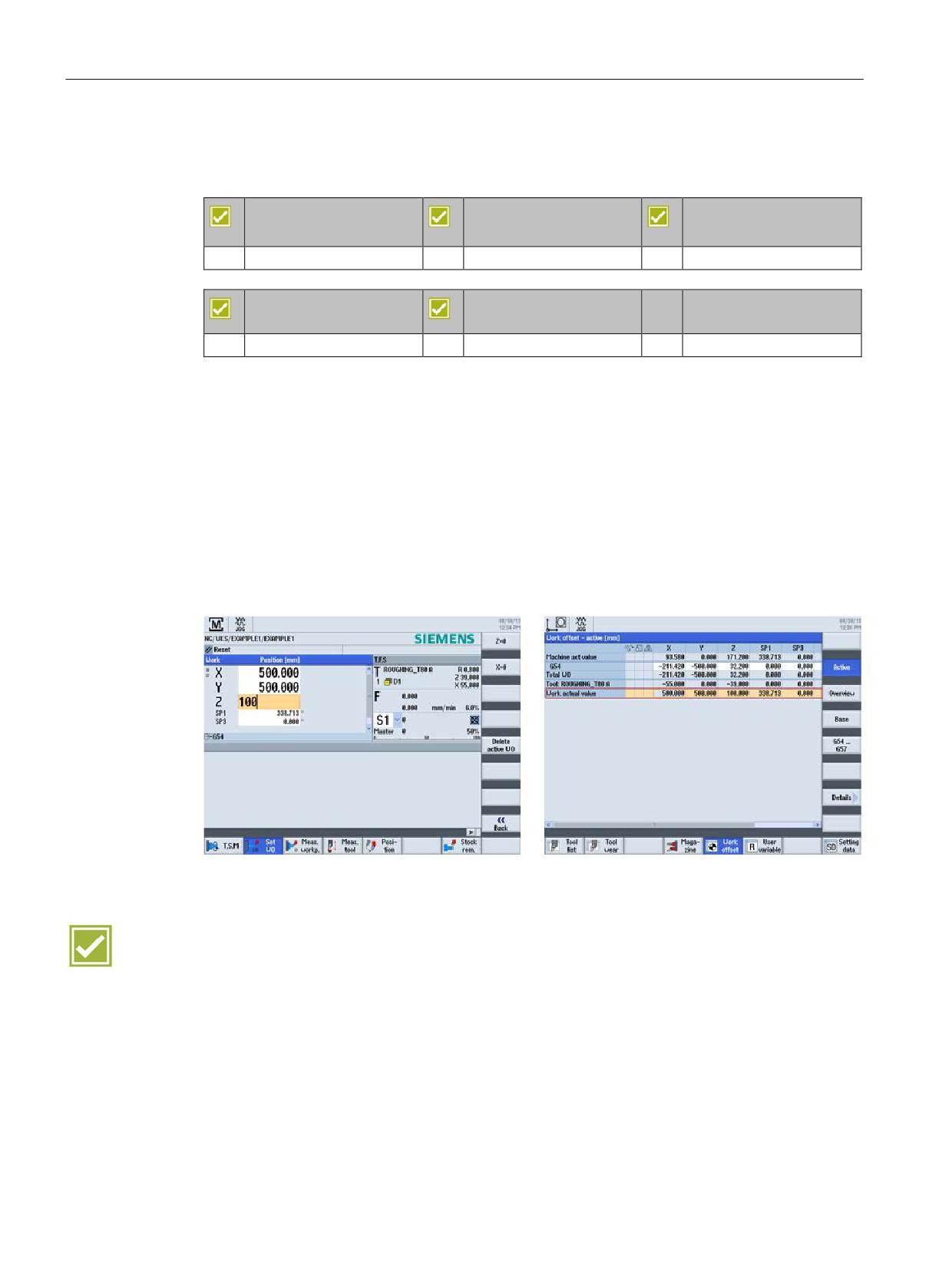
The following work offsets are possible:
● Settable work offsets:
It is possible to enter as many as 100 work offsets (G54 to G57, G505 to G599), offset
coordinates, angles and scaling factors.
● Programmable work offsets:
The programmable work offsets allow you, for example, to work with different work offsets
for repetitive machining operations at different positions on the workpiece.
● External work offsets:
Axis-related linear work offsets can also be activated via the PLC user software.
Benefits
● Flexible machining thanks to a large number of settable work offsets
● User-friendly understandable display of the number of work offsets
SINUMERIK Operate - Turning
26
Control system overview for machine tools' sales people, 2017, A5E41992653B AA
CNC operation in manual mode (JOG)
4.3 Measure workpiece
4.3
Measure workpiece
SINUMERIK 828D
SINUMERIK 828D
SINUMERIK 828D
BASIC
ADVANCED
Basic configuration
Basic configuration
Basic configuration
SINUMERIK 840D sl
SINUMERIK 840D sl
BASIC
Basic configuration
Basic configuration
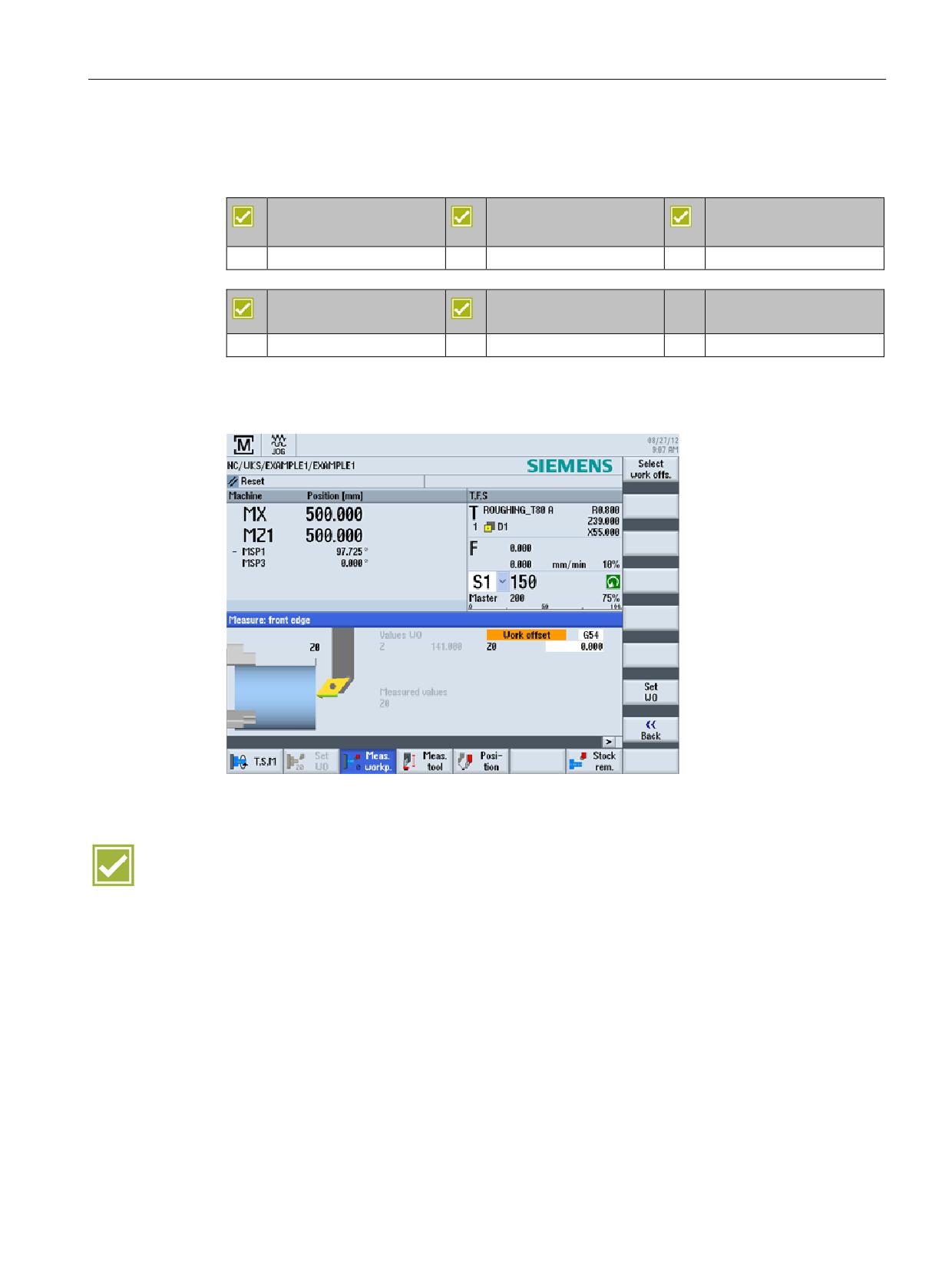
The workpieces can be measured as follows:
● Reference tool
Benefit
● Time saving due to user-friendly determination of the workpiece zero
SINUMERIK Operate - Turning
Control system overview for machine tools' sales people, 2017, A5E41992653B AA
27
CNC operation in manual mode (JOG)
4.4 Measure tool
4.4
Measure tool
SINUMERIK 828D
SINUMERIK 828D
SINUMERIK 828D
BASIC
ADVANCED
Basic configuration
Basic configuration
Basic configuration
SINUMERIK 840D sl
SINUMERIK 840D sl
BASIC
Basic configuration
Basic configuration
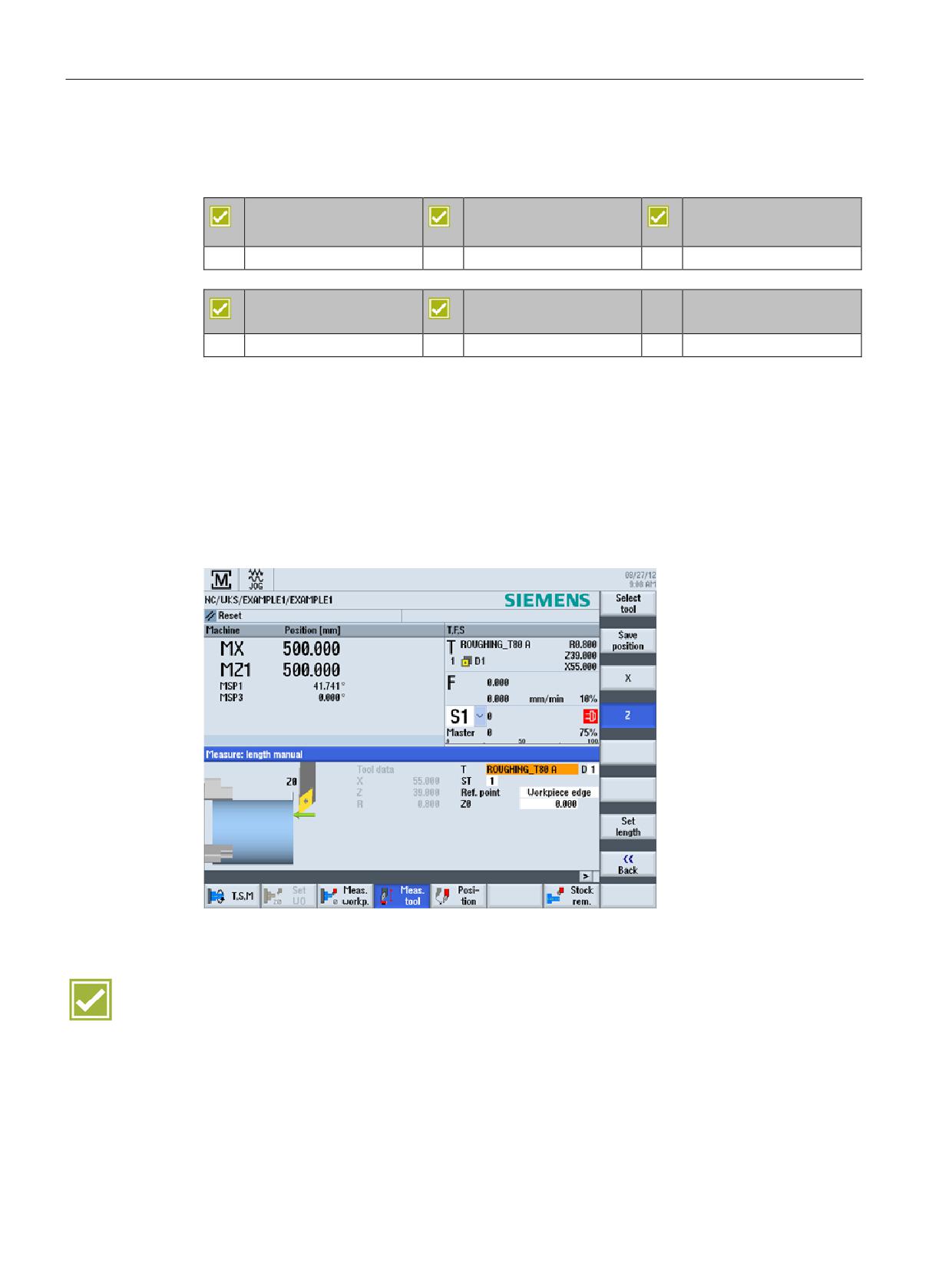
The tool compensation value can be directly determined in the machine set-up.
The following variants are supported:
● Touch chuck
● Determine lengths via reference diameter
● Tool measuring probe (tooleye) or magnifier
The measurement results can be output in a measurement report (see Logging
measurement results in JOG (Page 29)).
Benefit
● User-friendly functions for determining the tool dimensions directly in the machine
SINUMERIK Operate - Turning
28
Control system overview for machine tools' sales people, 2017, A5E41992653B AA
CNC operation in manual mode (JOG)
4.5 Logging measurement results in JOG
4.5
Logging measurement results in JOG
SINUMERIK 828D
SINUMERIK 828D
SINUMERIK 828D
BASIC
ADVANCED
Basic configuration
Basic configuration
Basic configuration
SINUMERIK 840D sl
SINUMERIK 840D sl
BASIC
Basic configuration
Basic configuration
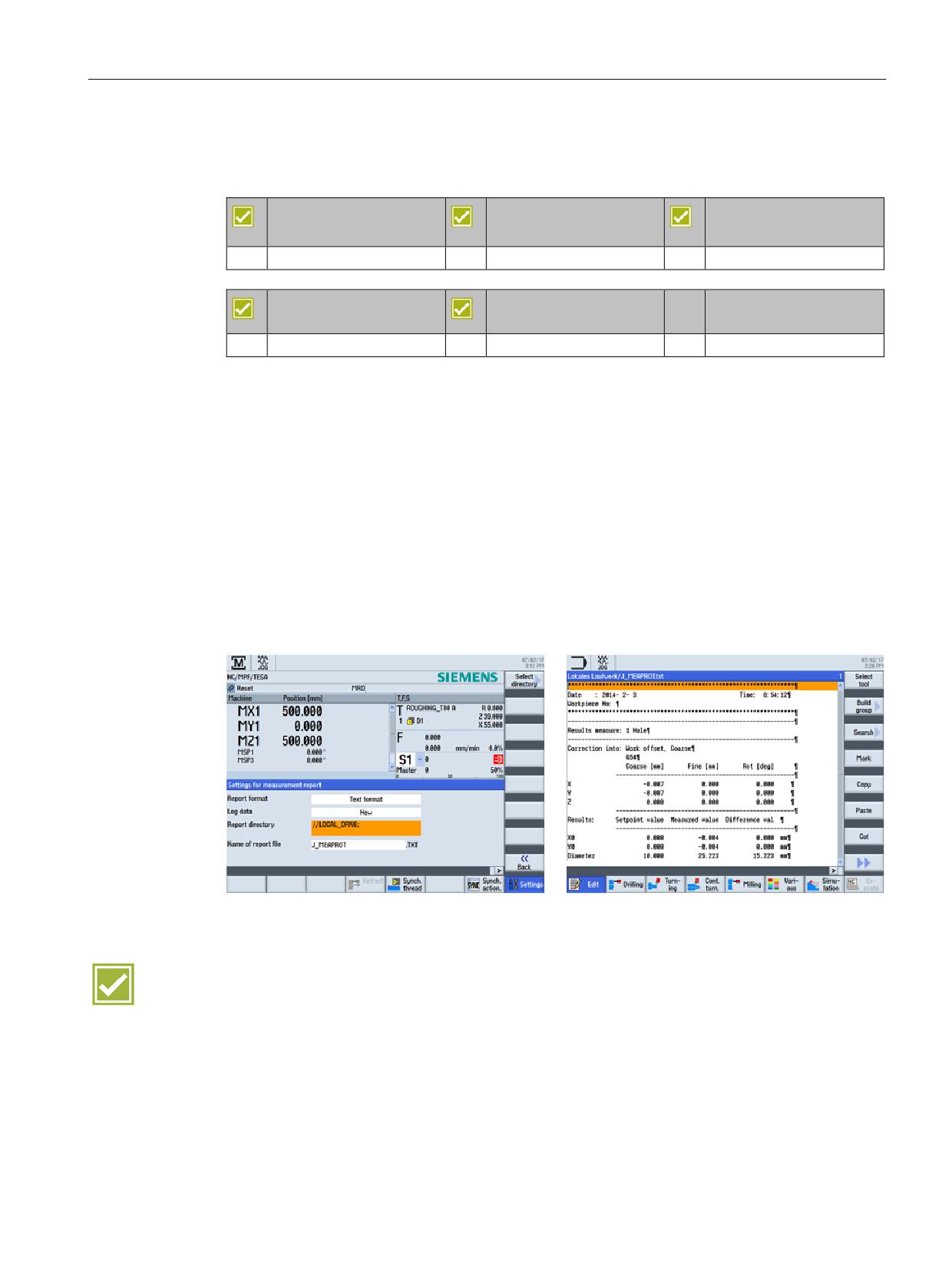
The results for measuring in JOG can be logged. The standard log contains the
measurement results of the most recently performed measuring method.
The function is available as turning technology for the tool measurement.
Text format or table format can be selected for the output format
The measuring log comprises the following data:
● Date and time when the log was written
● Log name with path details
● Measuring method
● Correction target
● Setpoints, measured values and differences
Benefit
● Simple logging of measured values in log files
SINUMERIK Operate - Turning
Control system overview for machine tools' sales people, 2017, A5E41992653B AA
29
CNC operation in manual mode (JOG)
4.6 Stock removal cycle
4.6
Stock removal cycle
SINUMERIK 828D
SINUMERIK 828D
SINUMERIK 828D
BASIC
ADVANCED
Basic configuration
Basic configuration
Basic configuration
SINUMERIK 840D sl
SINUMERIK 840D sl
BASIC
Basic configuration
Basic configuration
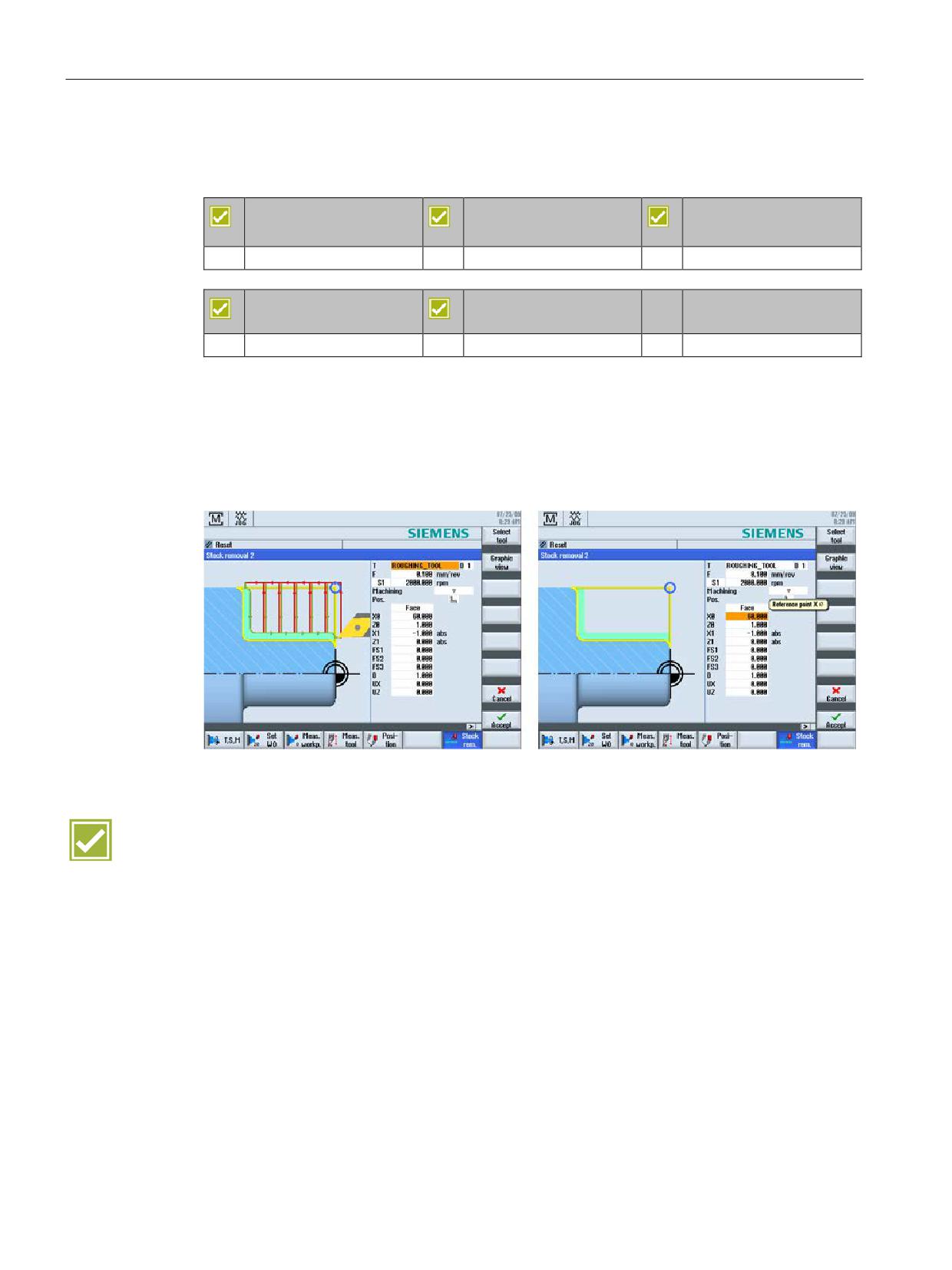
A comfortable stock removal cycle is available in the set-up mode. Soft collet chucks can, for
example, be turned with this cycle.
The following parameters can be specified:
● Roughing or finishing
● Undercut for soft collet chucks
Benefit
● Preparation of workpiece or collet chuck without having to create a part program
SINUMERIK Operate - Turning
30
Control system overview for machine tools' sales people, 2017, A5E41992653B AA
CNC operation in manual mode (JOG)
4.7 Positioning cycle
4.7
Positioning cycle
SINUMERIK 828D
SINUMERIK 828D
SINUMERIK 828D
BASIC
ADVANCED
Basic configuration
Basic configuration
Basic configuration
SINUMERIK 840D sl
SINUMERIK 840D sl
BASIC
Basic configuration
Basic configuration
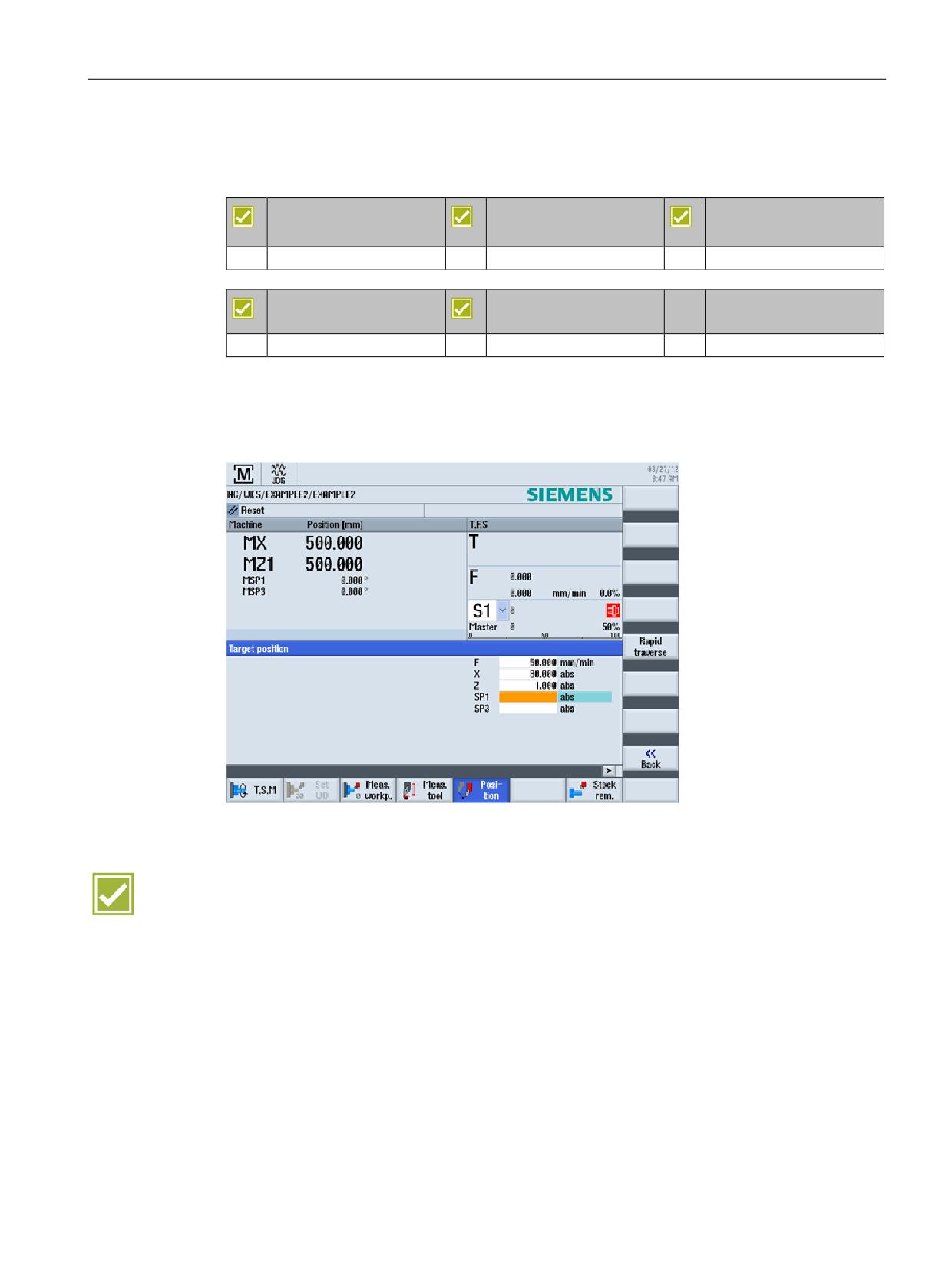
The machine axes can be positioned directly via input screens in the setup:
● Linear axes / spindles
● Feedrate / rapid traverse
Benefit
● Simple axis positioning without manual input, directly over the dialog screen
SINUMERIK Operate - Turning
Control system overview for machine tools' sales people, 2017, A5E41992653B AA
31
CNC operation in manual mode (JOG)
4.8 Manual machine
4.8
Manual machine
SINUMERIK 828D
SINUMERIK 828D
SINUMERIK 828D
BASIC
ADVANCED
Option: P17
Option: P17
Option: P17
SINUMERIK 840D sl
SINUMERIK 840D sl
BASIC
Option: P17
Option: P17
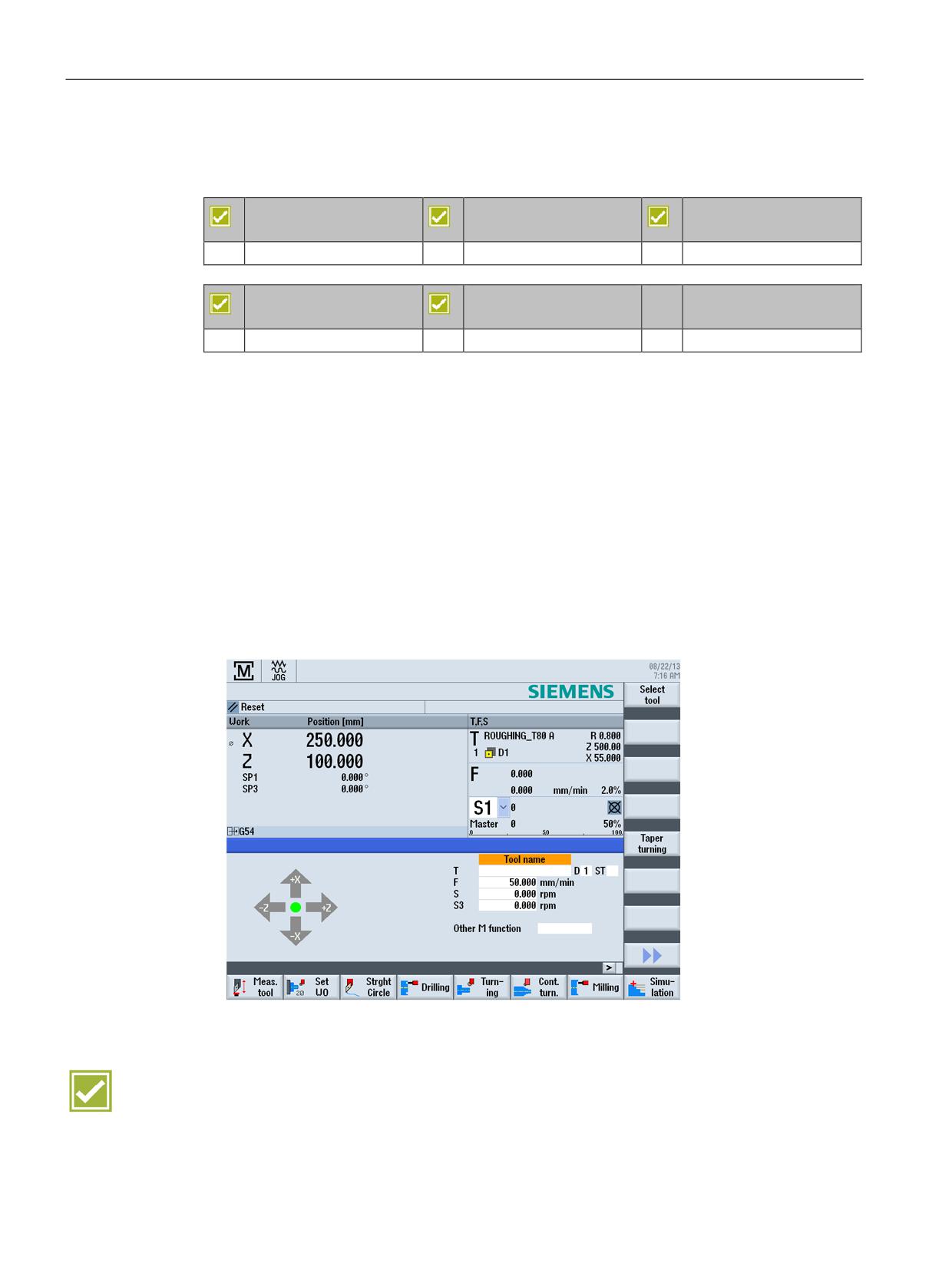
The "Manual machine" function is part of the Shopmill/Shopturn option package. This allows
you to perform all important machining operations in the manual machine operating area
without needing to create a specific part program.
The following functions are available:
● Measuring a tool
● Traversing axes
● Setting the work offset
● Setting the endstop
● Turning a straight line / circle
● Drilling, including centering, deep-hole drilling, tapping
● Milling, including face milling, pocket, multiple edge spigot
Benefit
● Simple and intuitive operation of cycle-controlled turning machines
SINUMERIK Operate - Turning
32
Control system overview for machine tools' sales people, 2017, A5E41992653B AA

Tool management
5
5.1
Tool table
SINUMERIK 828D
SINUMERIK 828D
SINUMERIK 828D
BASIC
ADVANCED
Basic configuration
Basic configuration
Basic configuration
SINUMERIK 840D sl
SINUMERIK 840D sl
BASIC
Basic configuration
Basic configuration
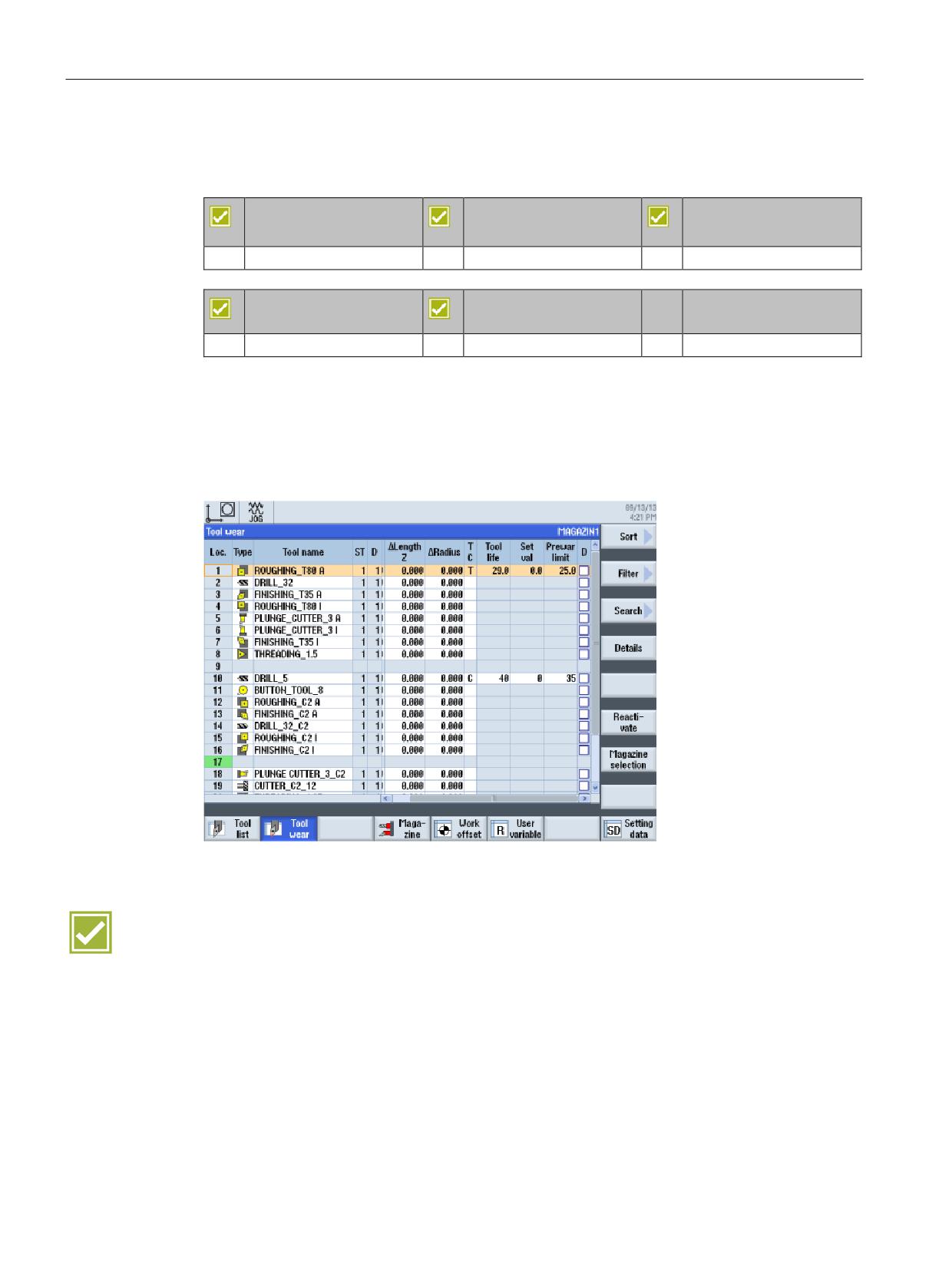
Tools with their complete operating data can be managed in the tool list.
● Tools are assigned to the desired magazine locations with the load function.
● For each tool, you can store the following data:
- Tool type (rougher, finisher, engraver, drilling and milling tools
)
- Tool name in plaintext (ex.: "ROUGHING_80DEGREES")
- Max. of 9 cutting edges per tool
- Tool length and cutting plate geometry
- Nose angle for drills or number of teeth for milling tools
- Direction of spindle rotation and coolant (level 1 and 2)
● Direct transfer of the tool from the list in the program or for measurement
● Using the settings, for example, you can activate the graphic magazine display
● Reading tools from a file or archiving to a file
Benefits
● All tool data at a glance
● Simple and secure handling via unmistakable tool names
SINUMERIK Operate - Turning
Control system overview for machine tools' sales people, 2017, A5E41992653B AA
33
Tool management
5.2 Monitoring of tool life and workpiece count
5.2
Monitoring of tool life and workpiece count
SINUMERIK 828D
SINUMERIK 828D
SINUMERIK 828D
BASIC
ADVANCED
Basic configuration
Basic configuration
Basic configuration
SINUMERIK 840D sl
SINUMERIK 840D sl
BASIC
Basic configuration
Basic configuration
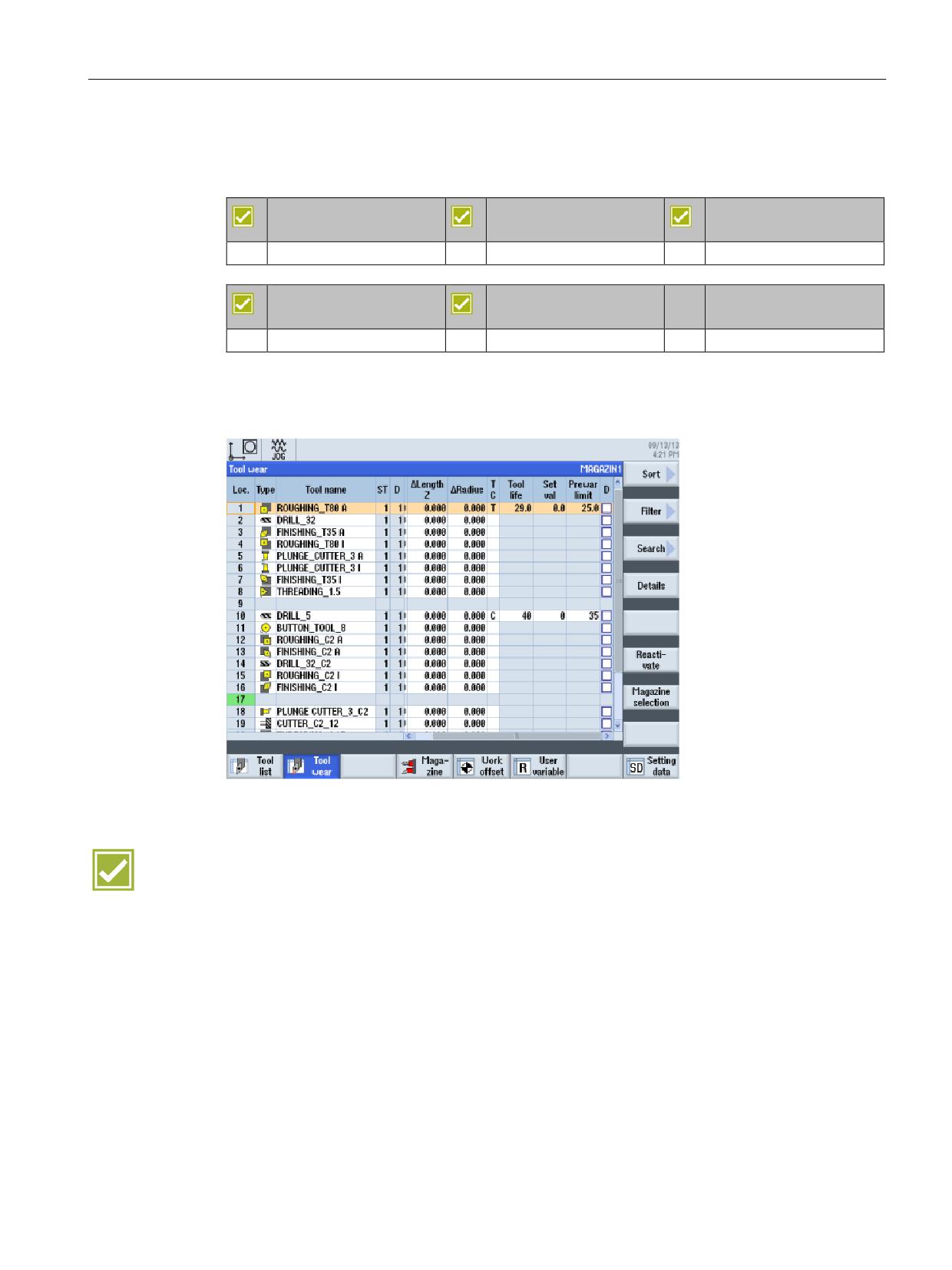
You can use SINUMERIK Operate to monitor the service life of your tools and the number of
exchanges. You can give your tools meaningful names instead of cryptic numbers. You will
come to appreciate this convenience when you read the CNC program, if not before.
● Monitor cutting time (T) in minutes or number of exchanges (C)
● Prewarning limit for timely preparation of new tools
Benefits
● Reduction of machine standstill times via tool monitoring
● Support of tool life monitoring or job time monitoring as standard
SINUMERIK Operate - Turning
34
Control system overview for machine tools' sales people, 2017, A5E41992653B AA
Tool management
5.3 Replacement tools
5.3
Replacement tools
SINUMERIK 828D
SINUMERIK 828D
SINUMERIK 828D
BASIC
ADVANCED
Option: M78
Option: M78
Basic configuration
SINUMERIK 840D sl
SINUMERIK 840D sl
BASIC
Basic configuration
Basic configuration
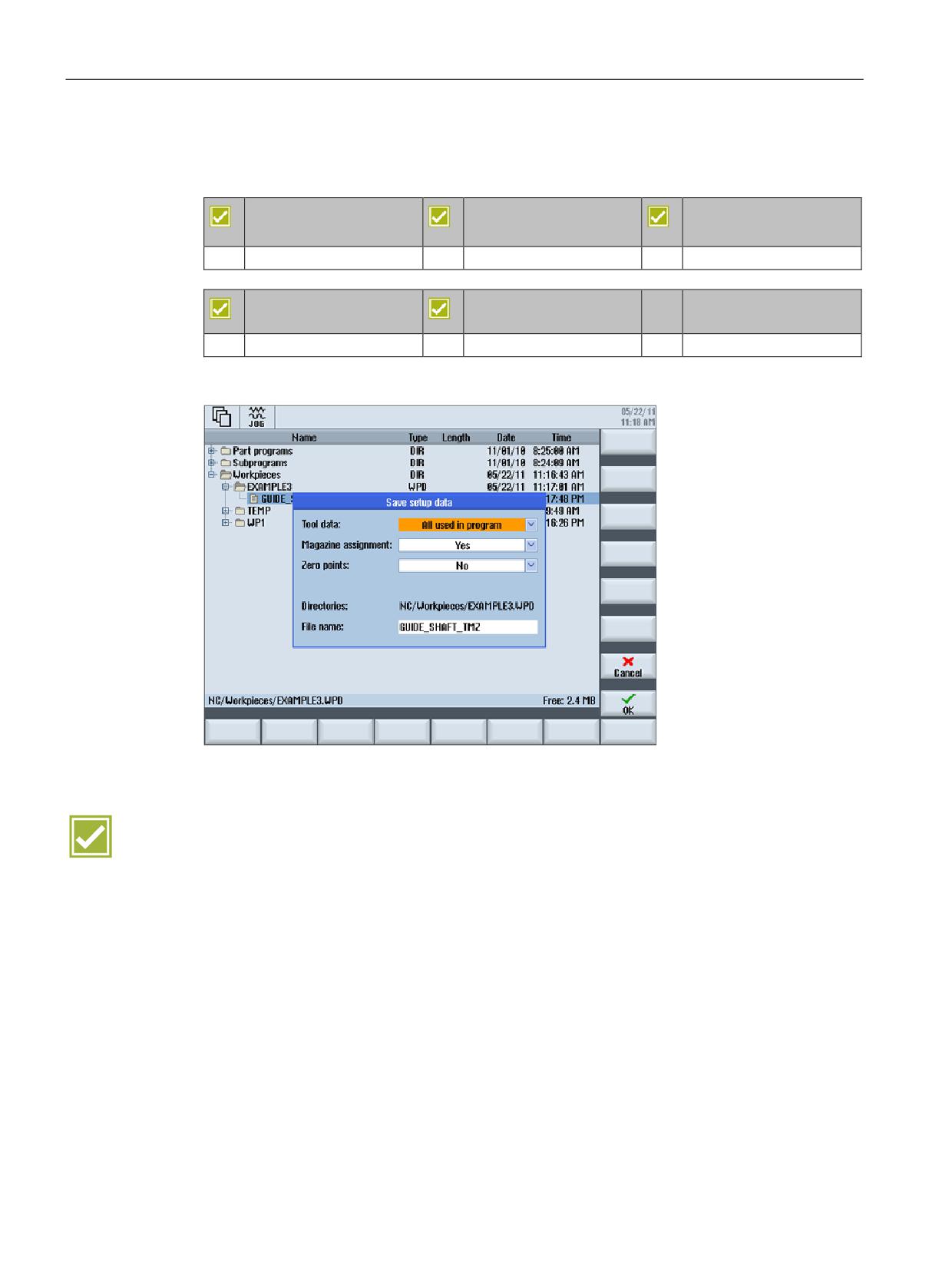
If needed, you can also manage replacement tools with SINUMERIK Operate. Tools with the
same name are created as replacement tools. The replacement tools are identified with an
incrementing number in the ST column.
Benefit
● Automatic exchange of identical tools for unmanned operation
SINUMERIK Operate - Turning
Control system overview for machine tools' sales people, 2017, A5E41992653B AA
35
Tool management
5.4 Setup data
5.4
Setup data
SINUMERIK 828D
SINUMERIK 828D
SINUMERIK 828D
BASIC
ADVANCED
Option: P16
Option: P16
Basic configuration
SINUMERIK 840D sl
SINUMERIK 840D sl
BASIC
Basic configuration
Basic configuration
Part programs can be saved complete with set-up data like tool data and zero points.
Benefit
● Time savings when you save the part programs
SINUMERIK Operate - Turning
36
Control system overview for machine tools' sales people, 2017, A5E41992653B AA

Data memory
6
6.1
Data storage - SINUMERIK 828D
Internal memory
External storage
Execution from external
storage (EES)
828D
828D
828D
(option P75)
BASIC
ADVANCED
Network, USB storage me-
USB / CF card can be used for data transport or
dia, compact flashcard
for execution with EXTCALL
Option P77
100 MB
SW
3 MB
5 - 10 MB
Execution from the CNC
expanded user memory
(option P77)
Internal memory can be expanded via option P77 → 100 MB
External storage via
option P75 → can be ex-
panded almost without limit
SINUMERIK Operate - Turning
Control system overview for machine tools' sales people, 2017, A5E41992653B AA
37

Data memory
6.2 Data storage - SINUMERIK 840D sl
6.2
Data storage - SINUMERIK 840D sl
Internal memory
External storage
Execution from external
storage devices (EES, op-
NCU
NCU
NCU
NCU +
tion P75)
PCU
Network, USB storage me-
Option P77 +
up to
dia, compact flashcard
PCU
40 GB
Option P77 +
up to 6 GB
option P12 1)
Option P77
100 MB
CNC user
NCU 710.3B: 2 to 16 MB
Execution from the CNC
memory
expanded user memory
NCU 720.3B and NCU 730.3B: 2 to 22 MB
(option D00)
(option P77)
Internal memory can be expanded via option P77 + PCU →
External storage via
40 GB
option P75 → can be ex-
panded almost without limit
Internal memory can be expanded via option P77 + P12 → 6 GB
Internal memory can be expanded via option P77 → 100 MB
1) HMI user memory, alternative to PCU
SINUMERIK Operate - Turning
38
Control system overview for machine tools' sales people, 2017, A5E41992653B AA

Data transfer
7
7.1
Program manager
SINUMERIK 828D
SINUMERIK 828D
SINUMERIK 828D
BASIC
ADVANCED
Basic configuration
Basic configuration
Basic configuration
SINUMERIK 840D sl
SINUMERIK 840D sl
BASIC
Basic configuration
Basic configuration
The program manager provides an optimum overview of the directories and programs, and
very easy-to-use file handling similar to Windows Explorer.
● Plain text names with as many as 24 characters for directories and files
● Manage subdirectories on external storage media, local drives and on the NC
● Store and display files of any type (e.g. *.png, *.pdf, *.dxf, *.xml)
● Manage and open DXF files
● Display all storage media in the program manager (with details of the storage capacity),
including the network drives.
● Part programs can be edited on all media
Benefits
● Easy and open exchange of data between the various storage media and the network
● User-friendly data handling in typical PC style with copy, paste, rename, etc.
● Preview window permits quick identification of programs without having to open them
SINUMERIK Operate - Turning
Control system overview for machine tools' sales people, 2017, A5E41992653B AA
39

Data transfer
7.2 Ethernet networking
7.2
Ethernet networking
SINUMERIK 828D
SINUMERIK 828D
SINUMERIK 828D
BASIC
ADVANCED
Option: P01
Option: P01
Option: P01
SINUMERIK 840D sl
SINUMERIK 840D sl
BASIC
Option: P17
Option: P17
The SINUMERIK controls are prepared for networking via Ethernet (TCP/IP) (RJ45
connection).
● The data transfer rate is 10/100 Mbit/s.
● Remote access to the control via the RCS Commander, e.g. for commissioning and
remote diagnostics
● Access to the network drives is available directly from the program manager. No
additional software is required on the server.
Benefits
● Cost-effective and simple connection via Ethernet (TCP/IP) to Windows PCs
● No software required on the servers
SINUMERIK Operate - Turning
40
Control system overview for machine tools' sales people, 2017, A5E41992653B AA

CNC operation in automatic mode (AUTO)
8
8.1
Block search
SINUMERIK 828D
SINUMERIK 828D
SINUMERIK 828D
BASIC
ADVANCED
Basic configuration
Basic configuration
Basic configuration
SINUMERIK 840D sl
SINUMERIK 840D sl
BASIC
Basic configuration
Basic configuration
A block search may be executed in machine status RESET, e.g. after a program interruption
or to specifically return to machining. The program data is prepared in such a way that all
relevant parameters (tool, work offsets, M functions, etc.) are available when accessing the
program.
The following search variants are available:
● selectively to the point of interruption, still possible after Power Off for G code program
● to arbitrary CNC blocks in DIN/ISO programs
● in arbitrary subprogram levels for DIN/ISO programs
● in ShopTurn machining step programs
● in position patterns for machining step programming
You can individually configure the block search:
● with calculation/without calculation
● with approach/without approach
Benefits
● Time-saving and secure restart at any program point, as no editing of the part program is
required
● An extremely quick block search is also available for large part programs through the
"External block search without calculation" function; overstore, if necessary
SINUMERIK Operate - Turning
Control system overview for machine tools' sales people, 2017, A5E41992653B AA
41

CNC operation in automatic mode (AUTO)
8.2 Program control
8.2
Program control
SINUMERIK 828D
SINUMERIK 828D
SINUMERIK 828D
BASIC
ADVANCED
Basic configuration
Basic configuration
Basic configuration
SINUMERIK 840D sl
SINUMERIK 840D sl
BASIC
Basic configuration
Basic configuration
You can influence the program sequence in the AUTO and MDI modes. The following
options are available to do this:
● PRT - No axis motion
The program is completely executed with the axes stationary, e.g. for the program test.
● DRY - Dry run feedrate
The traversing velocities programmed in conjunction with G1, G2, G3, CIP and CT are
replaced by a defined dry run feedrate.
● RG0 - Reduced rapid traverse
You define the reduced rapid traverse in the settings for automatic operation.
● M01 - Programmed stop 1
The processing of the program stops at every block in which supplementary function M01
is programmed. In this way you can check the intermediate result
when machining a workpiece.
● SKP - Skip block
Skip blocks are skipped during machining.
● MRD - Displaying measurement result
The display of the measurement result can be enabled or disabled during program
execution.
Benefits
● Secure positioning of new part programs
● Continue machining quickly after interruptions
SINUMERIK Operate - Turning
42
Control system overview for machine tools' sales people, 2017, A5E41992653B AA

CNC operation in automatic mode (AUTO)
8.3 Execution from external storage devices
8.3
Execution from external storage devices
SINUMERIK 828D
SINUMERIK 828D
SINUMERIK 828D
BASIC
ADVANCED
Basic configuration
Basic configuration
Basic configuration
SINUMERIK 840D sl
SINUMERIK 840D sl
BASIC
Basic configuration
Basic configuration
You can select, edit and execute part programs directly on the CF card, USB stick, hard disk
or via the network.
SINUMERIK 828D
SINUMERIK 828D
SINUMERIK 828D
BASIC
ADVANCED
Option: P75
Option: P75
Option: P75
SINUMERIK 840D sl
SINUMERIK 840D sl
BASIC
Option: P75
Option: P75
The "Execution from external storage (EES)" option provides the following advantages over
the basic configuration:
● Uniform syntax for the subprogram call, independent of the storage location of the
subprogram. This reduces syntax errors for the subprogram call.
● Part programs can be edited without NC reset.
● The size of the memory available on the machine can be expanded economically with
external media. The size of the part programs is limited only by the capacity of the
external data storage.
Benefit
● Quick and easy access to part programs on external storage media
● Block search for large programs on external storage media
SINUMERIK Operate - Turning
Control system overview for machine tools' sales people, 2017, A5E41992653B AA
43
CNC operation in automatic mode (AUTO)
8.4 Basic block display
8.4
Basic block display
SINUMERIK 828D
SINUMERIK 828D
SINUMERIK 828D
BASIC
ADVANCED
Basic configuration
Basic configuration
Basic configuration
SINUMERIK 840D sl
SINUMERIK 840D sl
BASIC
Basic configuration
Basic configuration
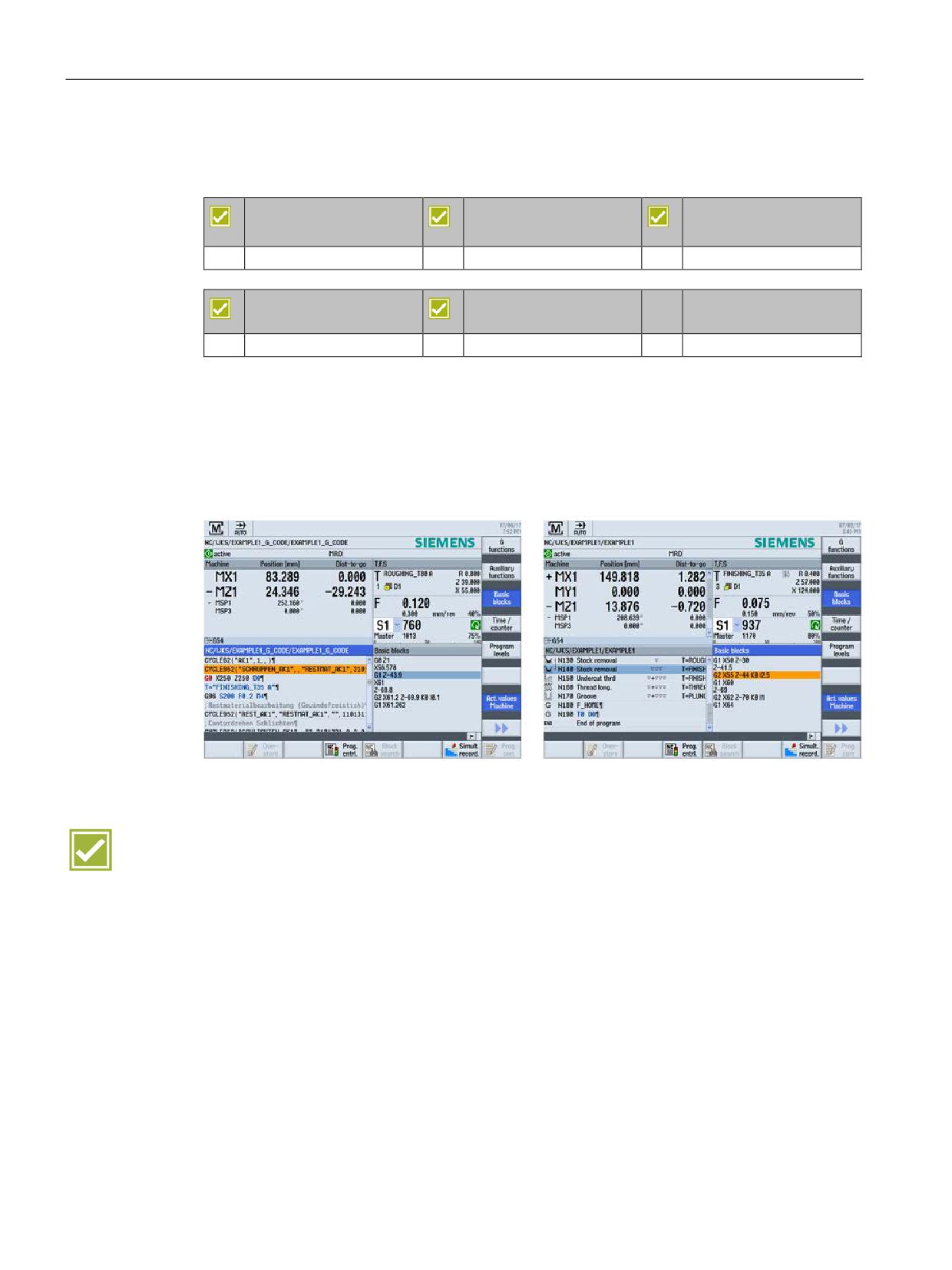
The individual traversing blocks are displayed as DIN/ISO commands during execution of
machining steps or machining cycles.
The basic block display guarantees an especially high process security while running-in
programs in single block mode.
This function is available for programGUIDE (screenshot on left) and also for ShopTurn
(screenshot on right).
Benefit
● Optimal control of the program execution, even in complex sequences or machining
cycles, especially in single block mode
SINUMERIK Operate - Turning
44
Control system overview for machine tools' sales people, 2017, A5E41992653B AA
CNC operation in automatic mode (AUTO)
8.5 Simultaneous recording
8.5
Simultaneous recording
SINUMERIK 828D
SINUMERIK 828D
SINUMERIK 828D
BASIC
ADVANCED
Option: P22
Option: P22
Option: P22
SINUMERIK 840D sl
SINUMERIK 840D sl
BASIC
Option: P22
Option: P22
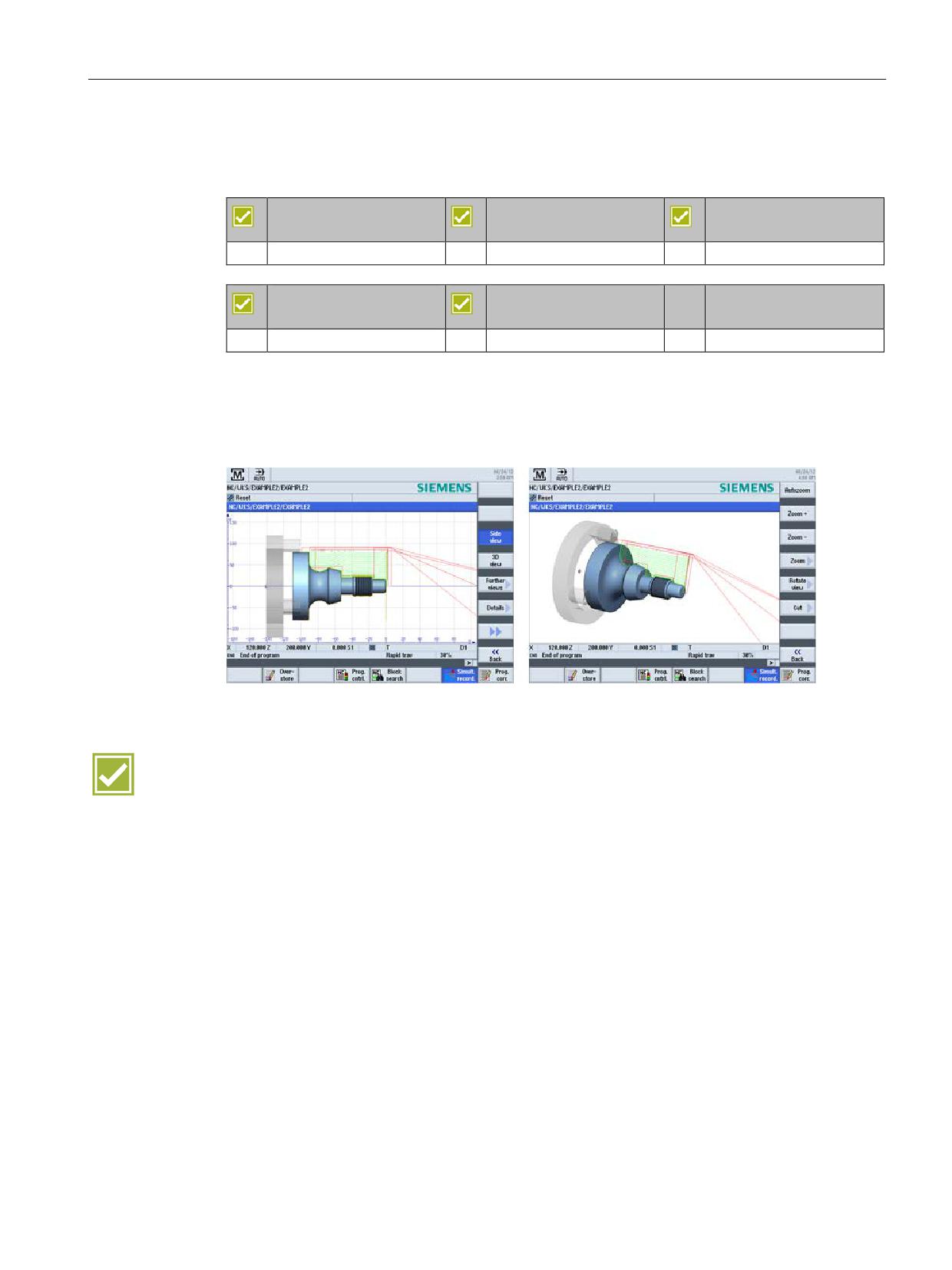
During machining, the tool paths can be simultaneously recorded on the display of the
controller in side view, front view, two window view or in 3D view. Workpiece depiction and
views correspond to the graphic simulation.
Benefit
● Machining can also be monitored in a complex machine room
SINUMERIK Operate - Turning
Control system overview for machine tools' sales people, 2017, A5E41992653B AA
45

CNC operation in automatic mode (AUTO)
8.6 Logging measurement results in automatic operation
8.6
Logging measurement results in automatic operation
SINUMERIK 828D
SINUMERIK 828D
SINUMERIK 828D
BASIC
ADVANCED
Basic configuration
Basic configuration
Basic configuration
SINUMERIK 840D sl
SINUMERIK 840D sl
BASIC
Basic configuration
Basic configuration
In automatic operation, you can output the measurement results as measuring log. You can
configure the output. The following settings are some of those possible:
● Display mode: autom. 8 s, NC start, for alarm
● Log type: standard log, user log
● Log format: text format (*.txt), table format (*.csv)
● Log data: new (discard old log data), append (append to old log data)
● Log storage: storage directory (complete path)
You can then open the measuring log in the program management at the configured storage
path. The measuring log contains data that includes:
● Date and time when the log was written
● Measuring method
● Correction target
● Setpoints, measured values and differences
Note: Irrespective of the user interface language, the measuring logs are output in English.
Benefit
● Simple logging of measured values in log files
SINUMERIK Operate - Turning
46
Control system overview for machine tools' sales people, 2017, A5E41992653B AA
CNC funtionalities
9
9.1
80-bit NANO floating-point accuracy
SINUMERIK 828D
SINUMERIK 828D
SINUMERIK 828D
BASIC
ADVANCED
Basic configuration
Basic configuration
Basic configuration
SINUMERIK 840D sl
SINUMERIK 840D sl
BASIC
Basic configuration
Basic configuration
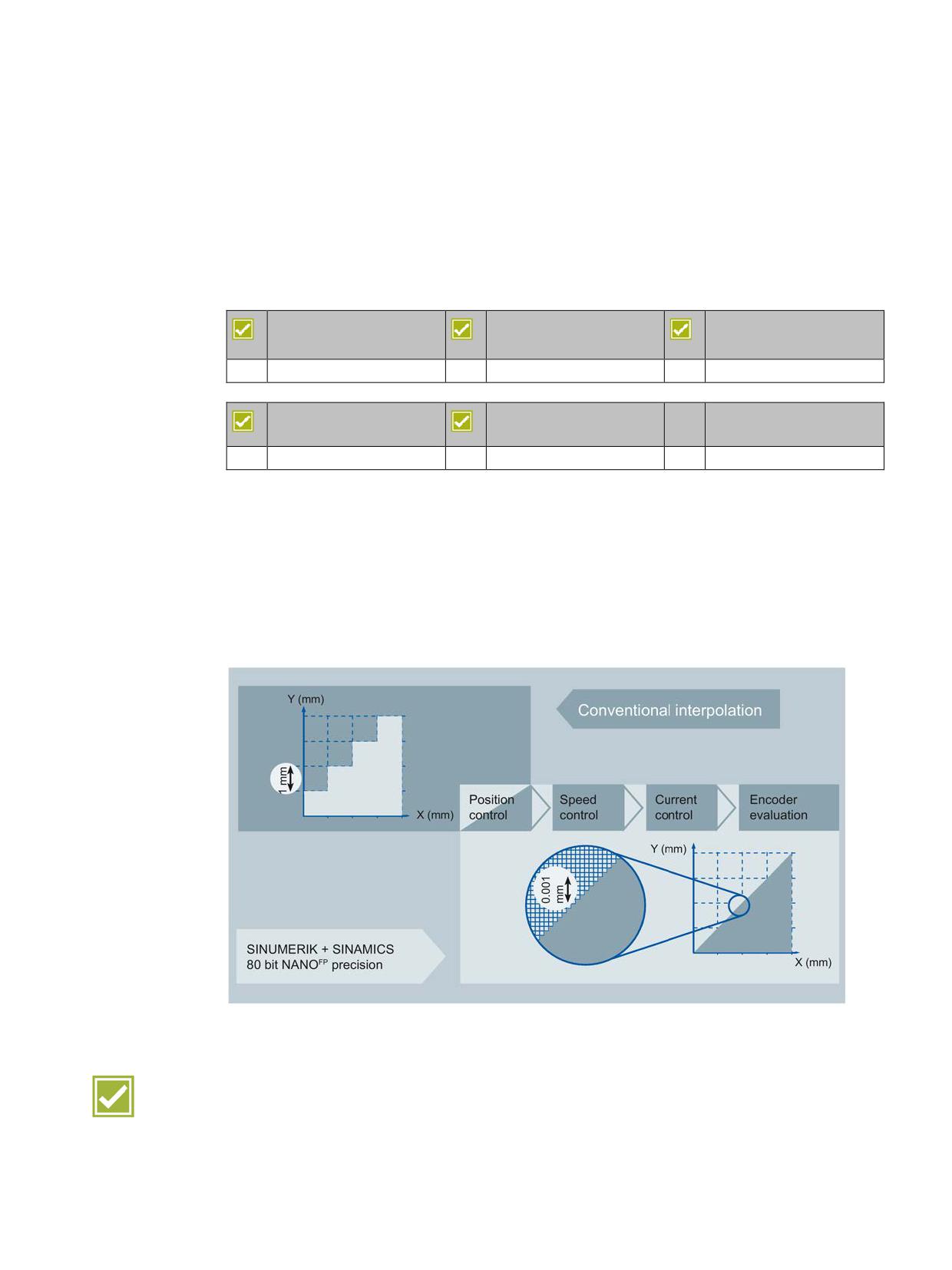
The accuracy of the workpiece is determined by more factors than just the mechanical
characteristics of the machine. The CNC also contributes to a critical degree towards the
precision of the workpieces. SINUMERIK Operate offers many CNC functions for this
purpose.
The SINUMERIK controls and the SINAMICS drive calculate with 80-bit NANO floating-point
accuracy. This enables a calculation accuracy much less than a nanometer. This exactness
is available not only for closed loop position control but also for closed-loop power and speed
control and also for sensor evaluation of the drive.
Benefit
● Maximum precision in the workpiece results based on extremely high calculation
accuracy
SINUMERIK Operate - Turning
Control system overview for machine tools' sales people, 2017, A5E41992653B AA
47

CNC funtionalities
9.2 Block change times
9.2
Block change times
9.2.1
SINUMERIK 828D
SINUMERIK 828D
SINUMERIK 828D
SINUMERIK 828D
BASIC
ADVANCED
Basic configuration
Basic configuration
Basic configuration
The following table shows typical block change times depending on the deployed PPU:
PPU 241.3/240.3
PPU 281.3/280.3
PPU 290.3
SW24
SW26
SW28
SW28
~3 ms
~2 ms
~1 ms
~1 ms
Benefit
● Minimum block change times for the associated performance versions
9.2.2
SINUMERIK 840D sl
SINUMERIK 840D sl
SINUMERIK 840D sl
BASIC
Basic configuration
Basic configuration
The following table shows typical block change times depending on the deployed NCU:
NCU 710.3B PN
NCU 720.3B PN
NCU 730.3B PN
1.2 ms
0.5 ms
0.3 ms
Benefit
● Minimum block change times for the associated performance versions
SINUMERIK Operate - Turning
48
Control system overview for machine tools' sales people, 2017, A5E41992653B AA
CNC funtionalities
9.3 Jerk limitation
9.3
Jerk limitation
SINUMERIK 828D
SINUMERIK 828D
SINUMERIK 828D
BASIC
ADVANCED
Basic configuration
Basic configuration
Basic configuration
SINUMERIK 840D sl
SINUMERIK 840D sl
BASIC
Basic configuration
Basic configuration
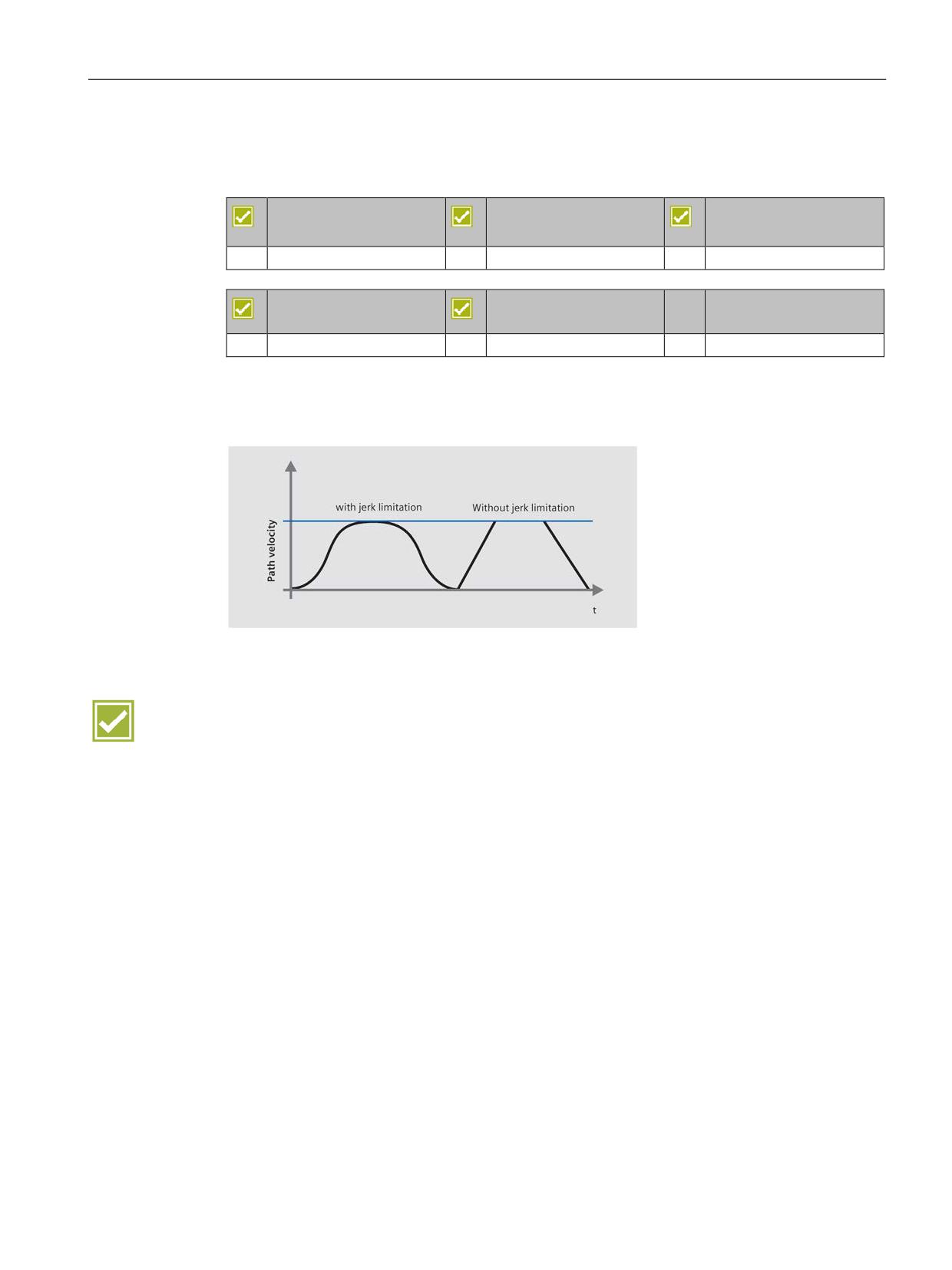
The control calculates a steady acceleration profile instead of jumps in acceleration. This
enables jerk-free speed characteristics for the involved path axes. The jerk limitation can
also be directly activated in the part program with the »SOFT« NC language command.
Benefits
● Longer machine lifespan through protection of the mechanical components
● Higher path accuracy through softer acceleration
SINUMERIK Operate - Turning
Control system overview for machine tools' sales people, 2017, A5E41992653B AA
49
CNC funtionalities
9.4 Dynamic feedforward control
9.4
Dynamic feedforward control
SINUMERIK 828D
SINUMERIK 828D
SINUMERIK 828D
BASIC
ADVANCED
Basic configuration
Basic configuration
Basic configuration
SINUMERIK 840D sl
SINUMERIK 840D sl
BASIC
Basic configuration
Basic configuration
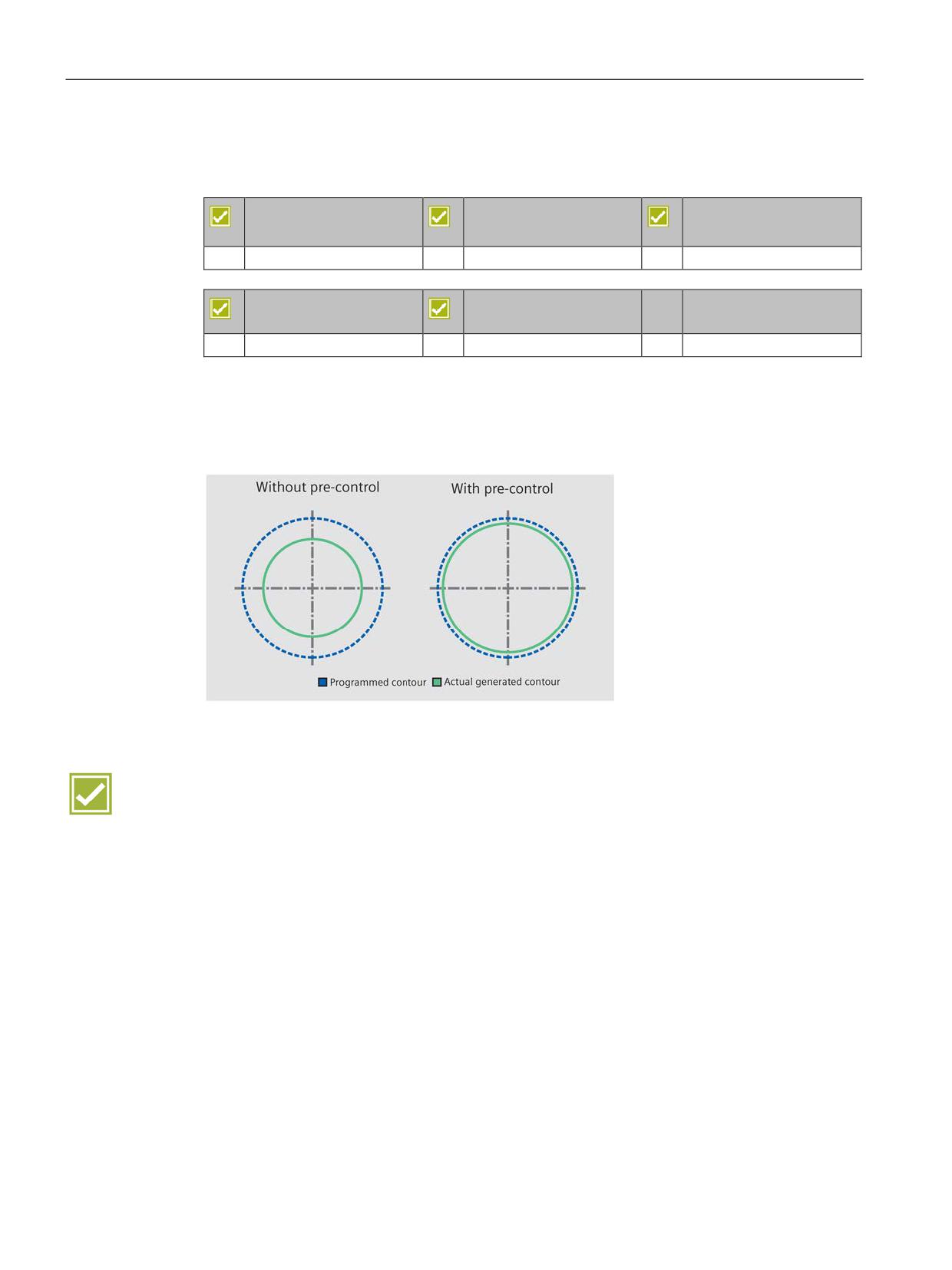
Inaccuracies in the resulting workpiece contour due to following errors can practically be
eliminated using dynamic feedforward control FFWON. The result is excellent machining
precision even at high path speeds. This is clarified with a circularity test on the machine.
Example:
Benefit
● Higher path accuracy through compensation of contouring errors
SINUMERIK Operate - Turning
50
Control system overview for machine tools' sales people, 2017, A5E41992653B AA
CNC programming methods
10
SINUMERIK Operate provides the following programming methods for selection:
DIN-ISO programming with programGUIDE
CNC text editor with programGuide cycle support, and DIN-ISO and readable CNC high-
level language commands for mid-sized and large series
The wide choice of technology cycles and the ease of parameterization allows you to reduce
the programming time.
ShopTurn - Machining step programming
with graphical interactive CNC machining step editor and CNC programming without DIN-
ISO knowledge for small series.
Machining operations such as stock removal, grooving or thread cutting are shown in
ShopTurn in the form of worksteps. In this way CNC programs - even for complex machining
operations - are very compact and easily read. Associated sequences are automatically
interlinked and can be assigned any position patterns.
ShopTurn offers you the shortest programming times even for highly demanding machining
tasks. The parameter input is supported by Animated Elements.
Benefit
● Whether you use programGUIDE or ShopTurn - in either case the full range of
technological cycles, position patterns and geometries is available to you
SINUMERIK Operate - Turning
Control system overview for machine tools' sales people, 2017, A5E41992653B AA
51

CNC programming methods
10.1 programGUIDE DIN/ISO and SINUMERIK high-level language
10.1
programGUIDE DIN/ISO and SINUMERIK high-level language
10.1.1
Introduction
SINUMERIK 828D
SINUMERIK 828D
SINUMERIK 828D
BASIC
ADVANCED
Basic configuration
Basic configuration
Basic configuration
SINUMERIK 840D sl
SINUMERIK 840D sl
BASIC
Basic configuration
Basic configuration
Below is an overview of the characteristic functions of programGUIDE and SINUMERIK CNC
programming. This includes:
● DIN/ISO editor
● Languages
● programGUIDE input support
These functions belong to the basic configuration of SINUMERIK Operate.
SINUMERIK Operate - Turning
52
Control system overview for machine tools' sales people, 2017, A5E41992653B AA
CNC programming methods
10.1 programGUIDE DIN/ISO and SINUMERIK high-level language
10.1.2
Program editor
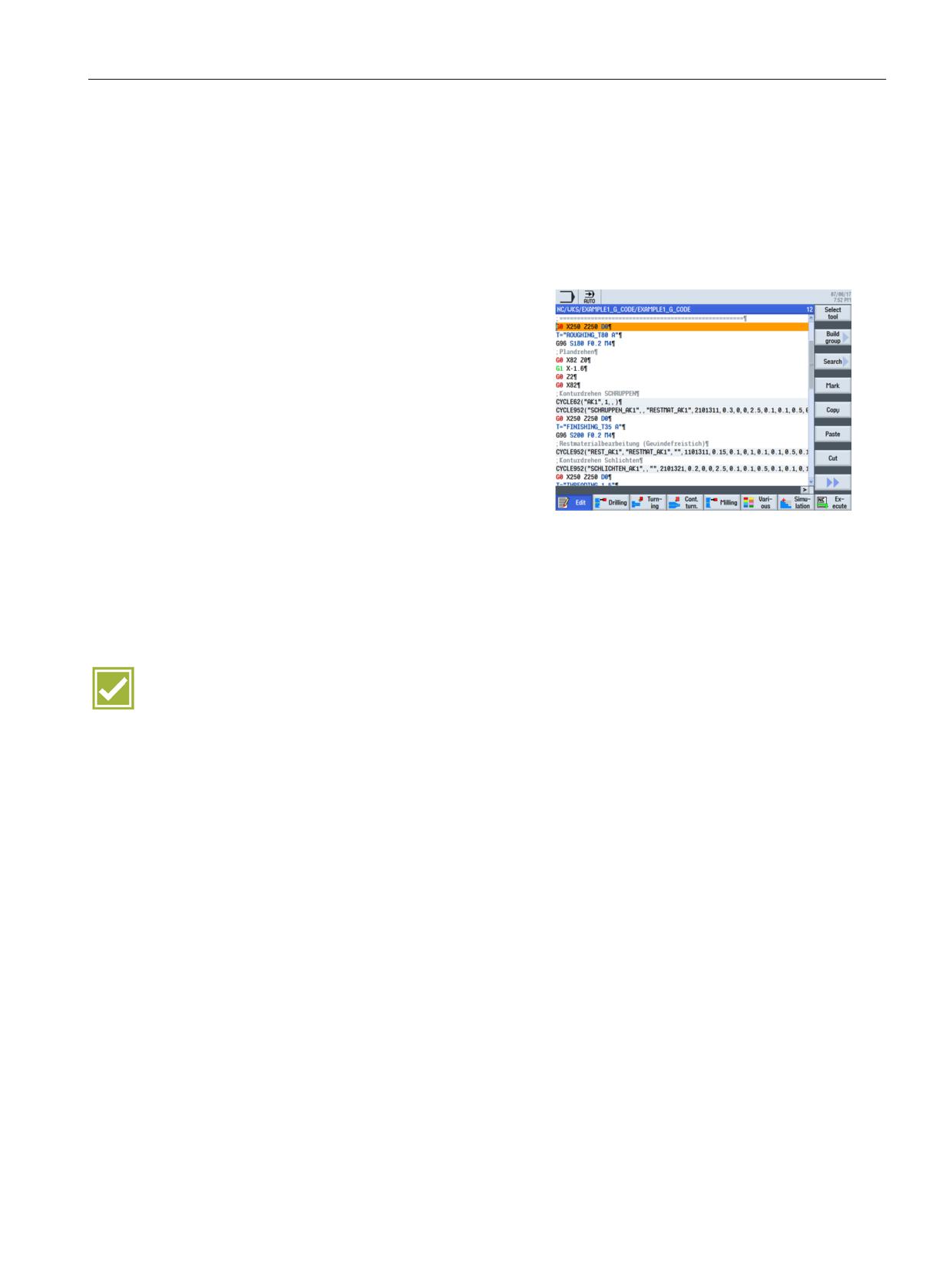
A line-oriented program editor is available to you for DIN/ISO programming. The editor ena-
bles you to input CNC language commands directly or to edit them. Thereby, the complete
range of CNC functions are available for the most complex machining.
The following functions are included in the
program editor:
• Contour calculator
• Tool selection directly from tool list
• Support screens for standard machining
and measuring cycles
• "Copy", "Insert" and "Cut" key group
• "Find", "Replace" and "Replace All"
character string
• The syntax is highlighted in various colors
(comments, NC blocks, etc.)
• Renumbering a program
• Direct execution from any NC program
block (block search)
• Jump to program start or program end
Benefits
● Time saving by using a powerful editor when programming
● Even large part programs allow extremely fast editing in MB size
SINUMERIK Operate - Turning
Control system overview for machine tools' sales people, 2017, A5E41992653B AA
53
CNC programming methods
10.1 programGUIDE DIN/ISO and SINUMERIK high-level language
10.1.3
Languages
The CNC Interpreter of the SINUMERIK 828D and the SINUMERIK 840D sl can also
process more complex CNC commands, in addition to DIN 66025 standard commands. The
commands are presented in clearly readable form.
The following commands are available:
●
G-code
G-code in accordance with DIN 66025 and in ISO dialect mode
●
G functions
G0, G1, G2, G71 ...
●
Language commands (extended G functions)
CIP, SOFT, BRISK, FFWON ...
●
Frame operations (programmable work offsets)
The workpiece coordinate system can be shifted, scaled, mirrored or rotated with the
commands TRANS, SCALE, MIRROR, ROT.
●
R parameters (arithmetic parameters)
300 predefined R parameters are available as arithmetic parameters (floating-point
format).
●
User variables
Users can define their own variables by name and type.
●
System variables
System variables can be read/written in all programs. They enable access to work offsets,
tool offsets, axis positions, measurement values, control conditions etc.
●
Arithmetic operations
The following arithmetic operations are available to combine the variables:
arithmetic operations + - * / sin, cos, exp, etc.
logical operations == <> >=, etc.
●
Program control structures
BASIC-style language commands are available for flexible programming of the user
cycles: IF-ELSE-ENDIF, FOR, CASE ...
Benefits
●
Established programming according to DIN 66025
●
Unbeatable range of commands for flexibility and time saving while programming
SINUMERIK Operate - Turning
54
Control system overview for machine tools' sales people, 2017, A5E41992653B AA
CNC programming methods
10.1 programGUIDE DIN/ISO and SINUMERIK high-level language
10.1.4
programGUIDE input support
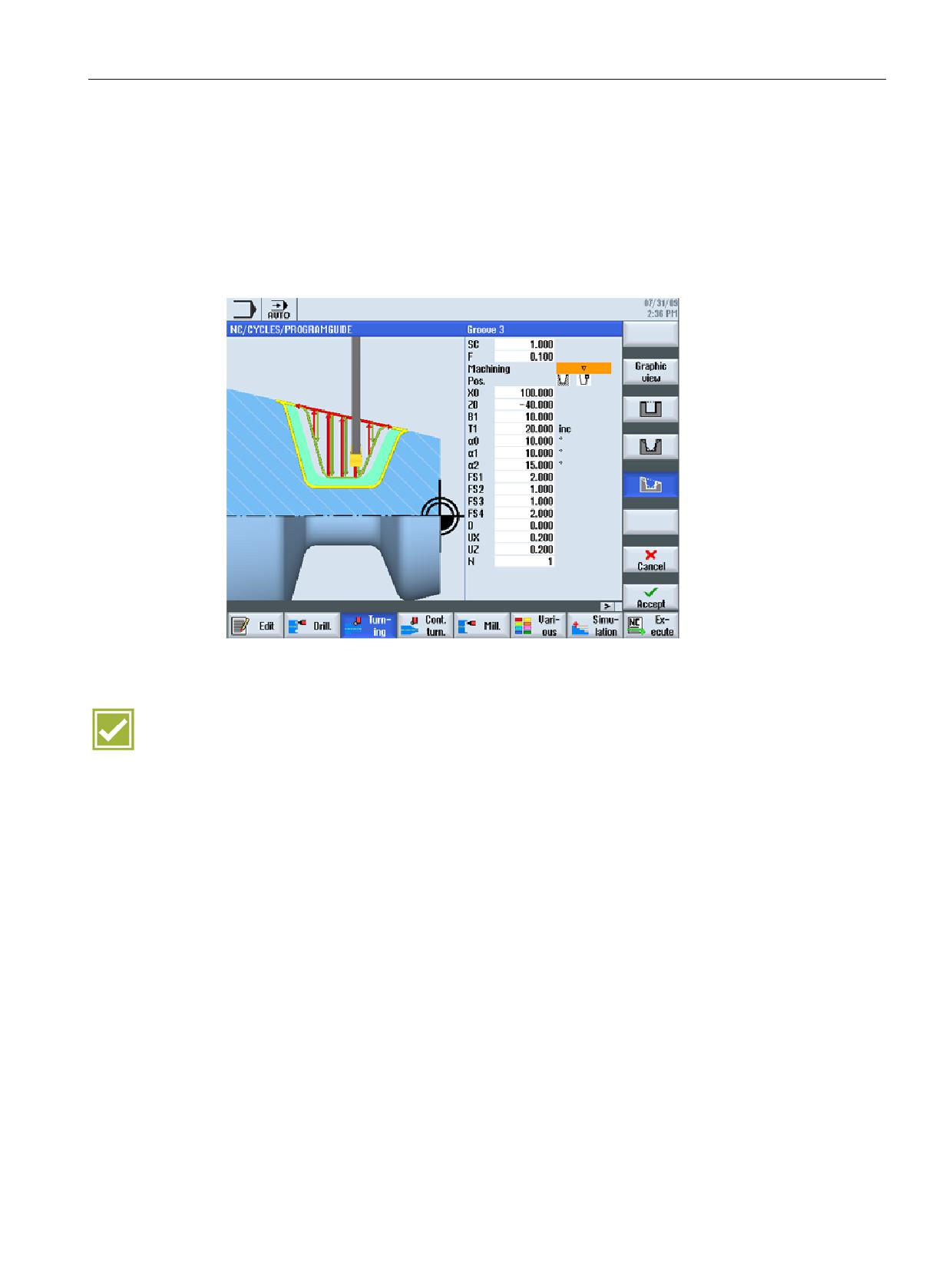
The cycle support is an extension of the highly flexible DIN/ISO programming. The input
screens are based on the ShopTurn cycles input screens, so as to ensure optimum
continuity.
The calls for tool, feedrate and spindle speed can of course also be input in the DIN/ISO
editor.
Benefits
● Existing DIN/ISO part programs with cycles can continue to be used
● Minimum learning requirements due to the continuity of the input support
SINUMERIK Operate - Turning
Control system overview for machine tools' sales people, 2017, A5E41992653B AA
55

CNC programming methods
10.2 ShopTurn machining step programming
10.2
ShopTurn machining step programming
10.2.1
Introduction
SINUMERIK 828D
SINUMERIK 828D
SINUMERIK 828D
BASIC
ADVANCED
Option: P17
Option: P17
Option: P17
SINUMERIK 840D sl
SINUMERIK 840D sl
BASIC
Option: P17
Option: P17
The following information provides you with an overview of the characteristic functions of
ShopTurn. This includes:
● Sequence editor
● Interlinking of sequences
● Graphic view (broken-line graphics)
These functions are part of the machining step programming options package in ShopTurn.
SINUMERIK Operate - Turning
56
Control system overview for machine tools' sales people, 2017, A5E41992653B AA
CNC programming methods
10.2 ShopTurn machining step programming
10.2.2
Sequence editor
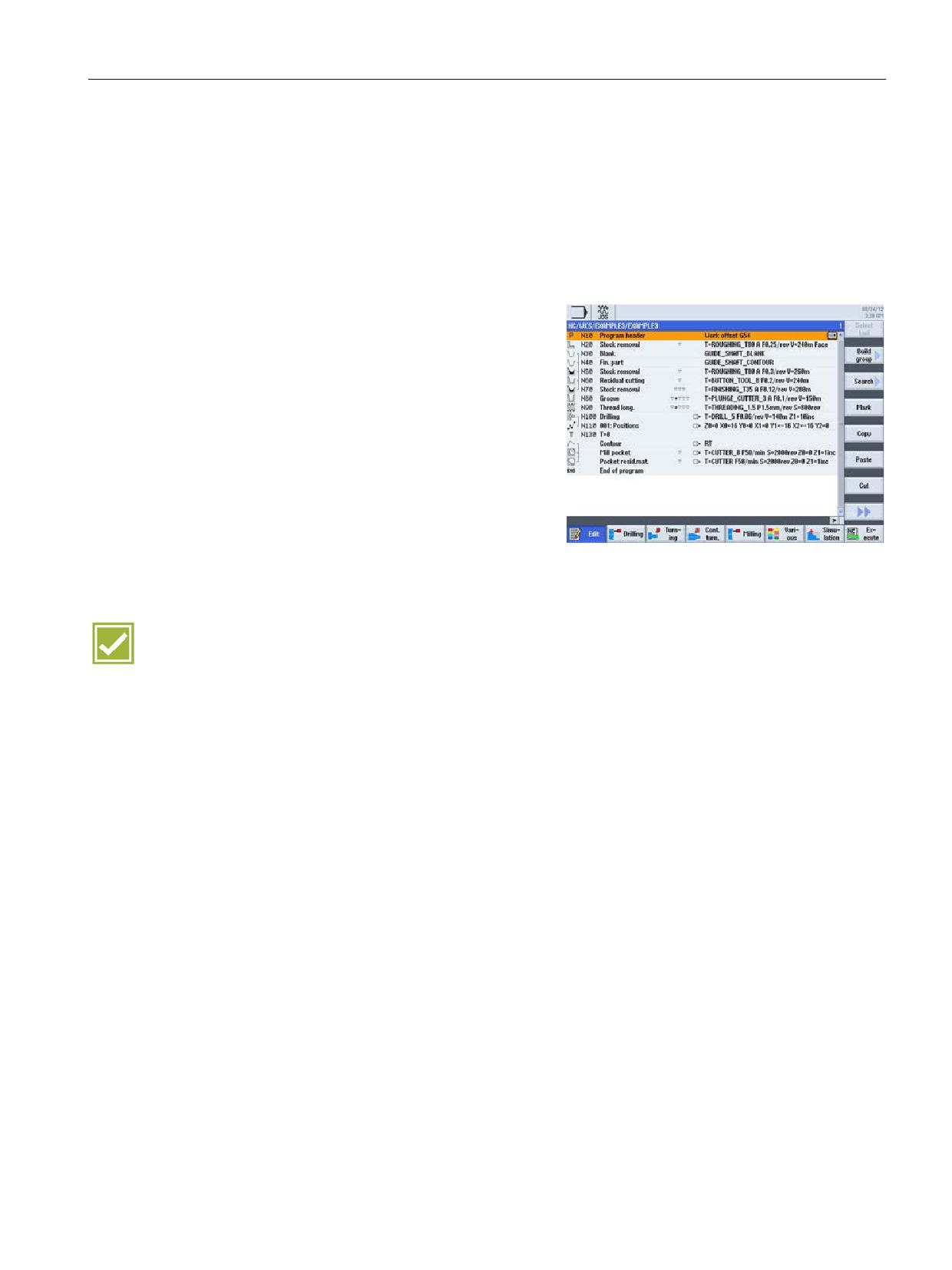
The graphical programming is performed via a graphic interactive sequence editor. Each
program line represents a technological sequence (such as: face turning, centering, drilling,
tapping) or geometric data required for the sequences (position patterns or contours). Graph-
ical programming offers, in comparison to DIN/ISO programming, a compact and compre-
hensible program overview.
Entering individual sequences requires no
knowledge of DIN/ISO. All required technical
and geometric parameters are entered in
screen forms. Simple, intuitive programming
with sequences can always be expanded very
flexibly by inputting DIN/ISO blocks and con-
trol functions.
Benefits
● Intuitive program input, without knowledge of DIN/ISO or Operating Manual
● Compact, clearly arranged machining programs
● Reducing the programming time by graphical input screens and copying / inserting
machining steps
SINUMERIK Operate - Turning
Control system overview for machine tools' sales people, 2017, A5E41992653B AA
57
CNC programming methods
10.2 ShopTurn machining step programming
10.2.3
Interlinking of sequences
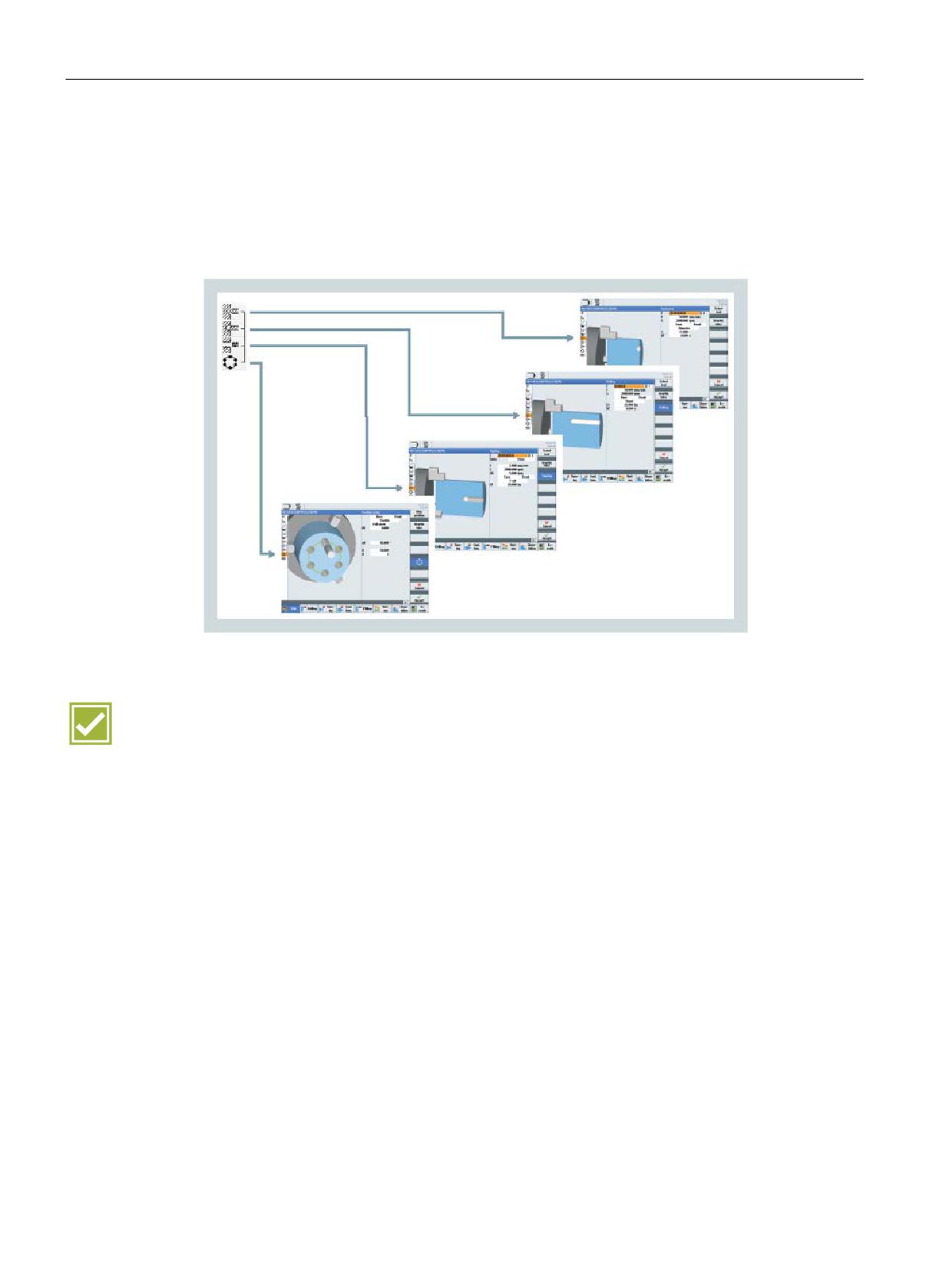
In ShopTurn, associated sequences are interlinked with each other. The interlinked
sequences are performed consecutively at the appropriate contours or pattern positions.
In the following example, the sequences centering, drilling and tapping are applied to 4 holes
on the pitch circle pattern position.
Benefit
● Reduced programming time due to linking of machining steps
SINUMERIK Operate - Turning
58
Control system overview for machine tools' sales people, 2017, A5E41992653B AA
CNC programming methods
10.2 ShopTurn machining step programming
10.2.4
Graphical view
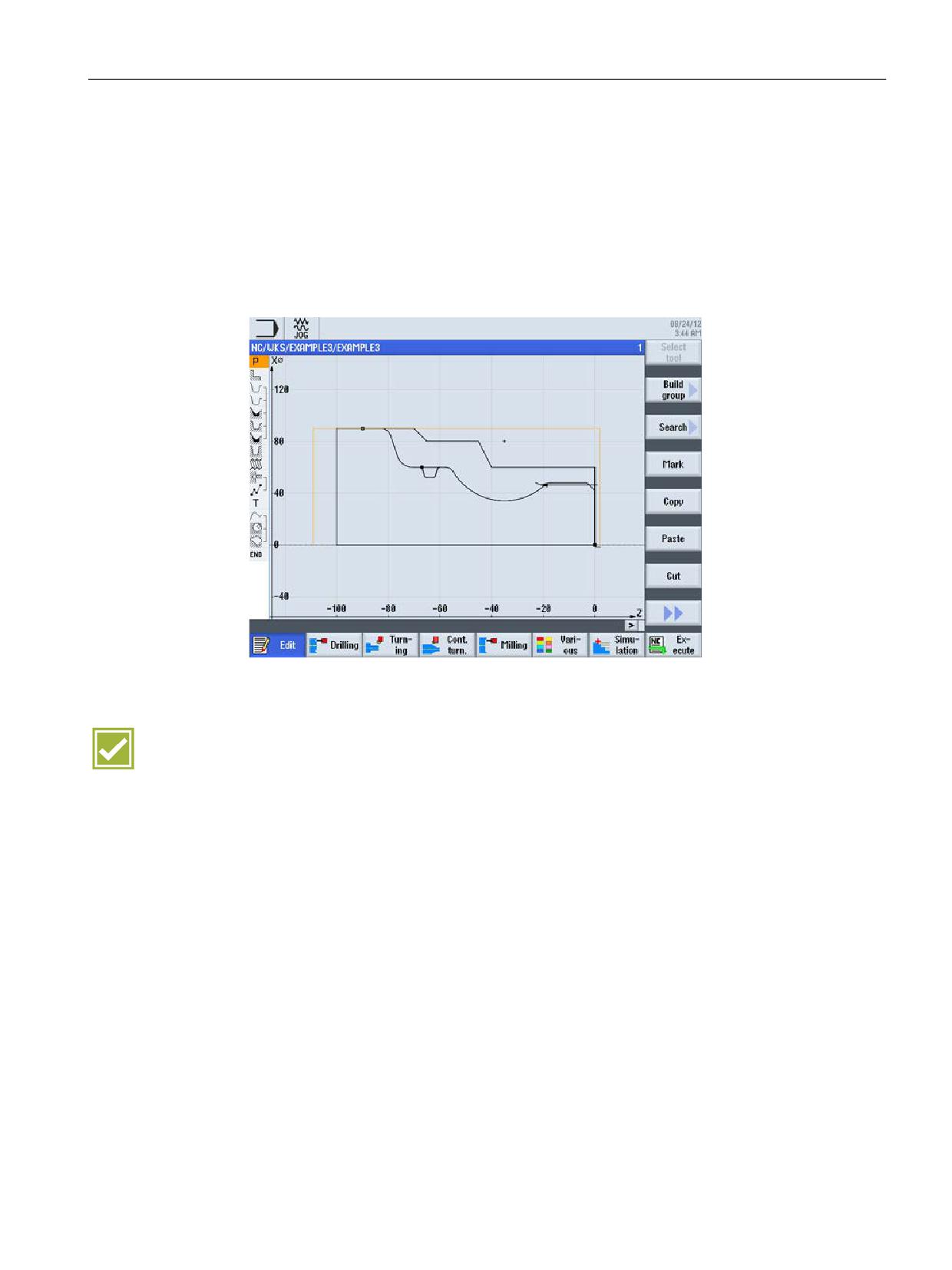
While programming, the previously entered sequences will be continuously displayed to
scale. A simulation is not required for this. The switching between the machining step
program and the broken-line graphics is performed with the "Graphics View" softkey or the
"Ctrl+G" shortcut.
● Turning view
● Front face and peripheral side
Benefit
● Increased reliability at program input by quickly checking the contour, without having to
start a simulation run
SINUMERIK Operate - Turning
Control system overview for machine tools' sales people, 2017, A5E41992653B AA
59
CNC programming methods
10.2 ShopTurn machining step programming
SINUMERIK Operate - Turning
60
Control system overview for machine tools' sales people, 2017, A5E41992653B AA
Workpiece visualization
11
11.1
2D simulation
SINUMERIK 828D
SINUMERIK 828D
SINUMERIK 828D
BASIC
ADVANCED
Basic configuration
Basic configuration
Basic configuration
SINUMERIK 840D sl
SINUMERIK 840D sl
BASIC
Basic configuration
Basic configuration
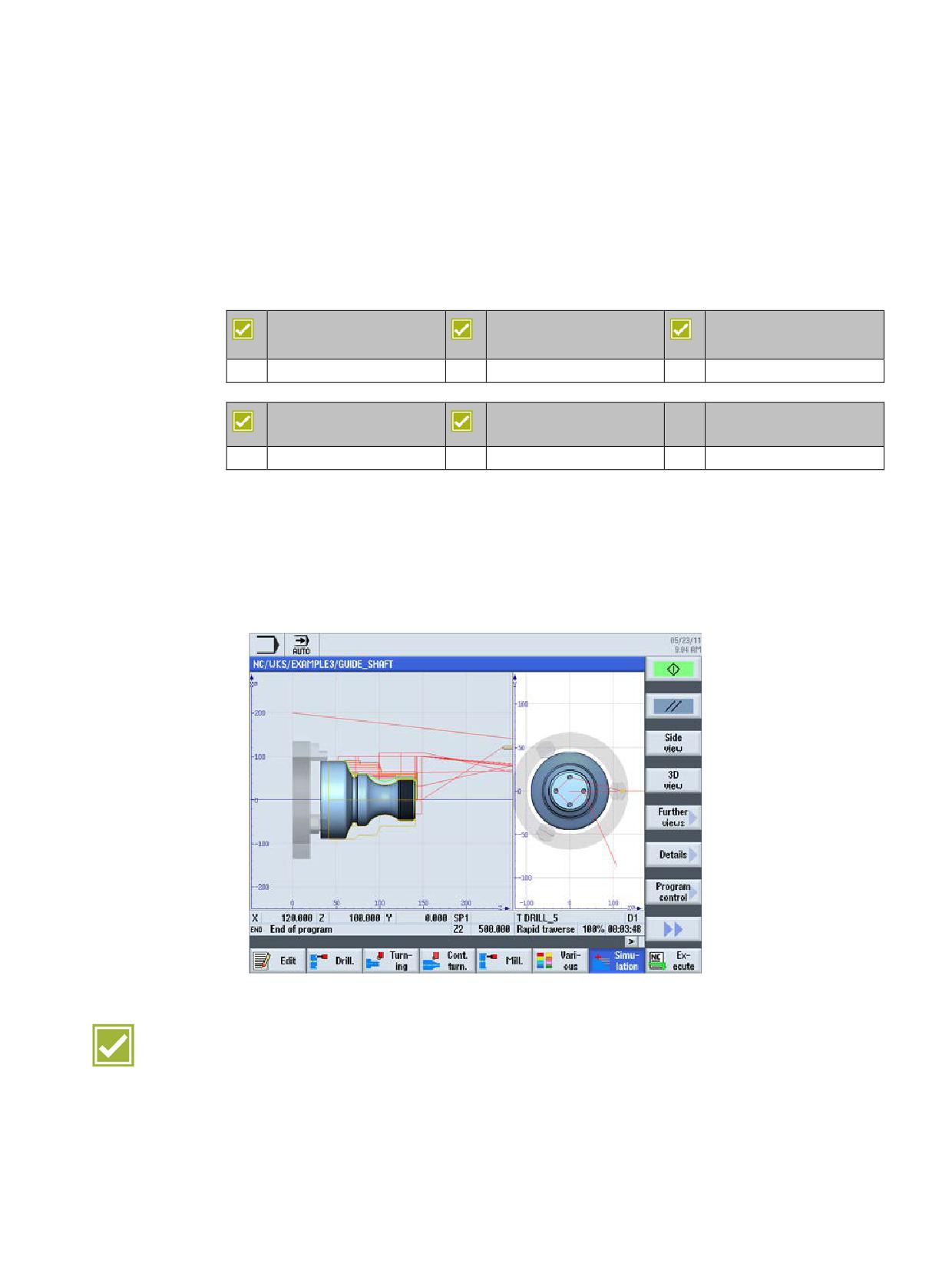
SINUMERIK Operate offers with 2D simulation the facility to make optimum and reliable
preparations for machining workpieces, such as by detecting collisions. Calculating the
machining time also supports optimum calculation of tooling costs.
● Use of the real geometry values of the tools mounted in the machine
● Simulation in side view, front view or two window view
● Simulation can be interrupted at any time, and the speed is controllable
Benefits
● Maximum process reliability through simulation using real geometry values
● Perfect clarity by showing the workpiece dimensions with a scale
● Parallel simulation (backg11round simulation) is possible in conjunction with the NCU 720
and NCU 730, i.e. simulating a part program while another part program is being
simultaneously machined.
SINUMERIK Operate - Turning
Control system overview for machine tools' sales people, 2017, A5E41992653B AA
61
Workpiece visualization
11.2 3D simulation
11.2
3D simulation
SINUMERIK 828D
SINUMERIK 828D
SINUMERIK 828D
BASIC
ADVANCED
Option: P25
Option: P25
Option: P25
SINUMERIK 840D sl
SINUMERIK 840D sl
BASIC
Option: P25
Option: P25
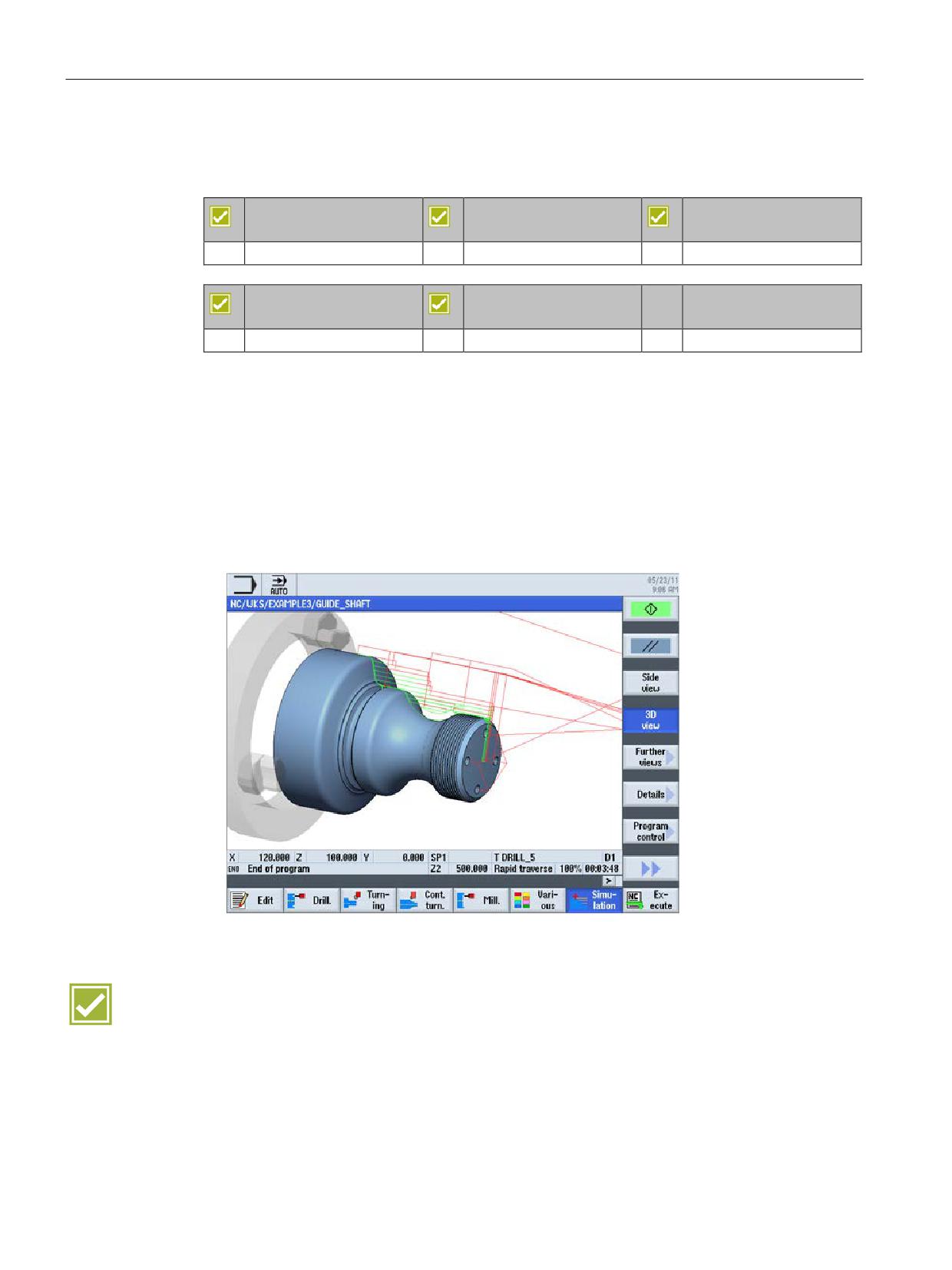
SINUMERIK 3D workpiece simulation offers you optimum assistance and reliability in
programming and in quotation costing.
● Reliability:
realistic 3D volume model, with zoom to details and free rotation of the viewing angle
● Support:
- Simulation speed controllable
- Single block operation and start / stop available at any time
● Checking:
Automatic calculation of machining time
Benefits
● Particularly realistic simulation through representation of the tool
● Optimum help and reliability in programming and in quotation costing
● Parallel simulation (backg11round simulation) is possible in conjunction with the NCU 720
and NCU 730, i.e. simulating a part program while another part program is being
simultaneously machined.
SINUMERIK Operate - Turning
62
Control system overview for machine tools' sales people, 2017, A5E41992653B AA
CNC technology cycles
12
12.1
CNC technology cycles for programGuide and ShopTurn
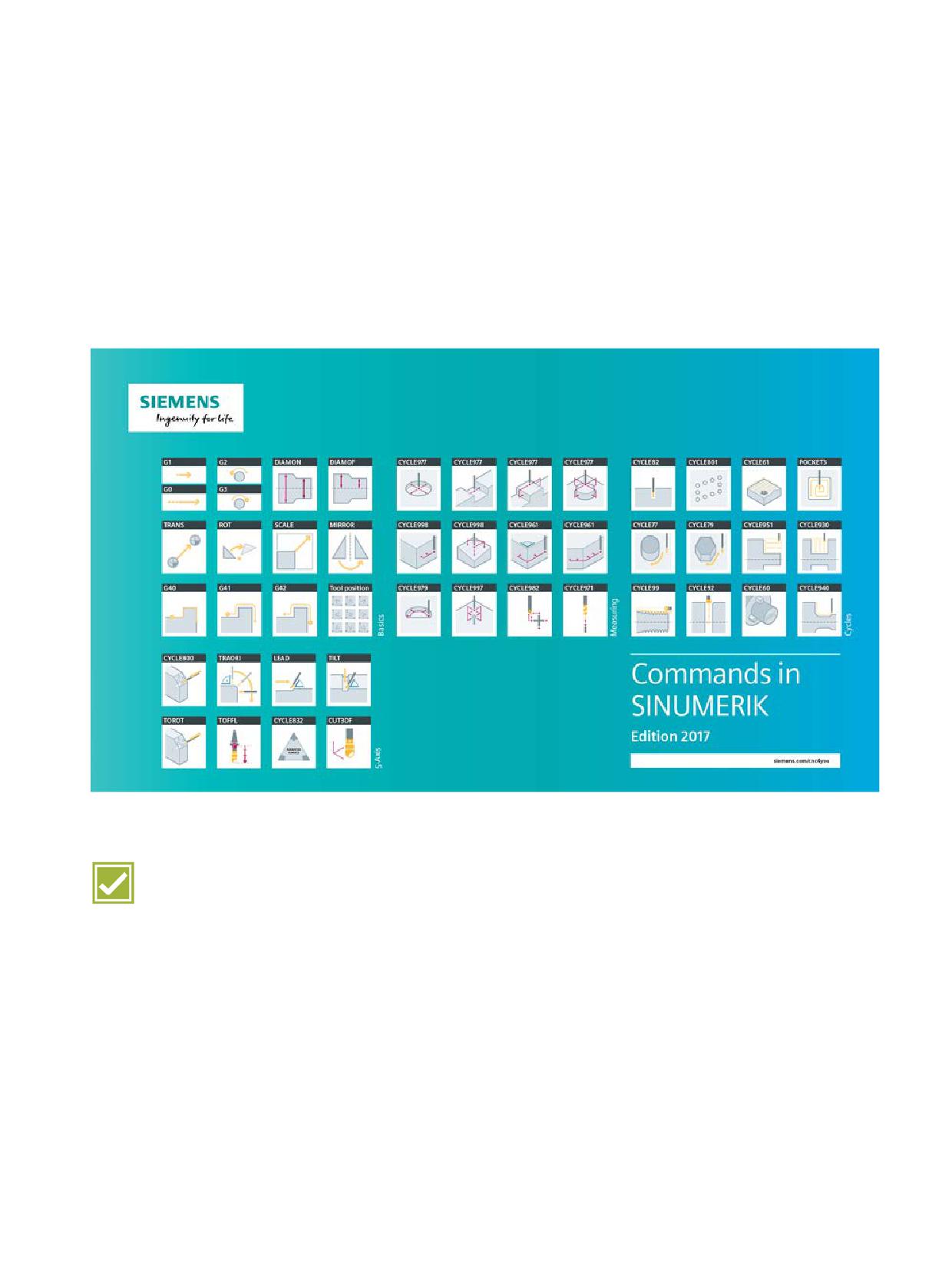
Irrespective of whether you use programGUIDE or ShopTurn - in either case the full range of
technological cycles, position patterns and geometries is available to you.
Benefits
● Significant simplification of programming, even for complex jobs, using CNC technology
cycles
● Continuity of cycles for programGuide and ShopTurn
SINUMERIK Operate - Turning
Control system overview for machine tools' sales people, 2017, A5E41992653B AA
63
CNC technology cycles
12.2 Highlights of machining cycles
12.2
Highlights of machining cycles
12.2.1
Stock removal along contour with blank contour
SINUMERIK 828D
SINUMERIK 828D
SINUMERIK 828D
BASIC
ADVANCED
Basic configuration
Basic configuration
Basic configuration
SINUMERIK 840D sl
SINUMERIK 840D sl
BASIC
Basic configuration
Basic configuration
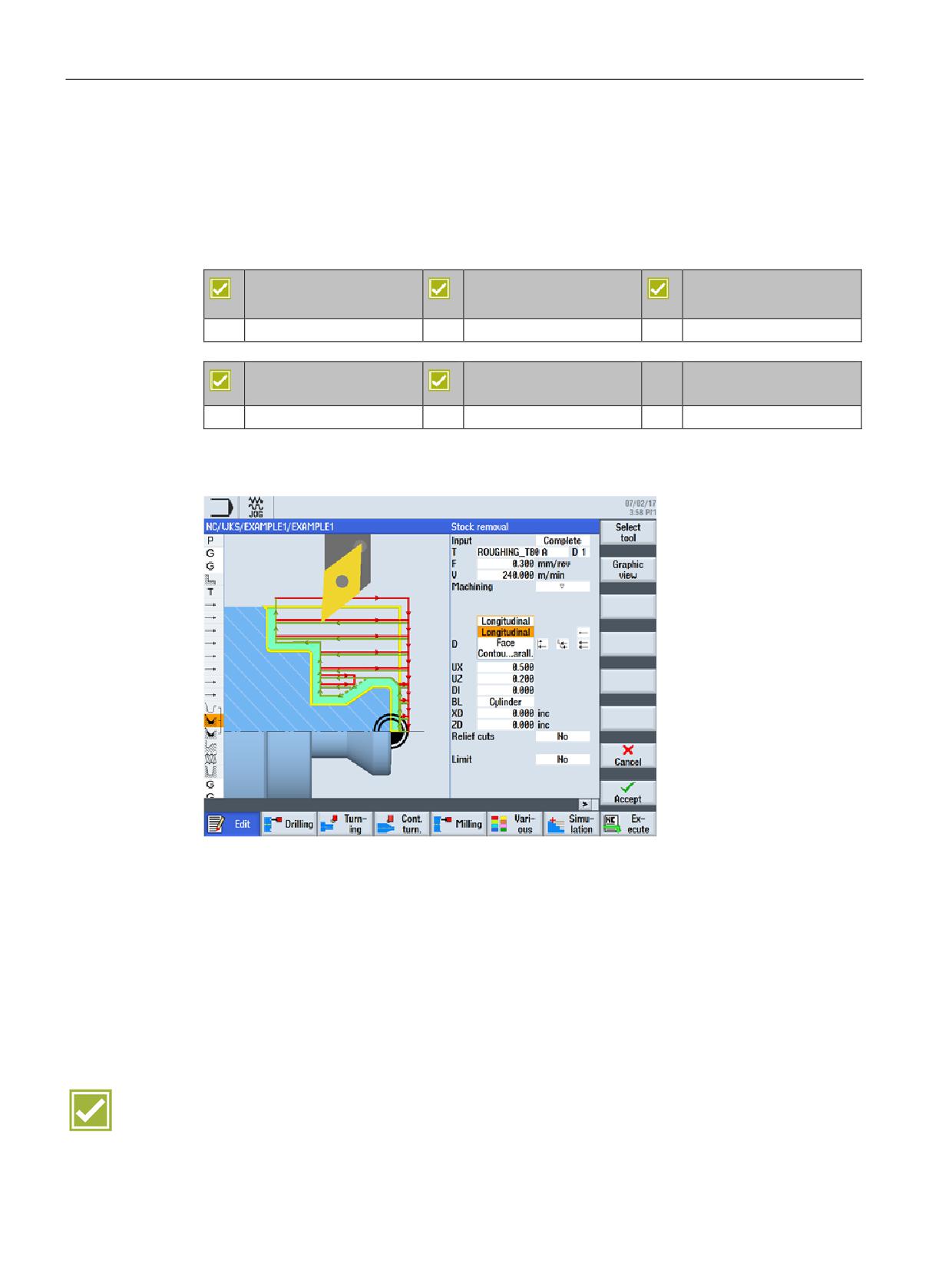
With the intelligent contour stock removal cycle, free contours can be processed in a variety
of ways:
● Processing any contour calculator geometry
● Cylindrical blank, freely-defined blank, blank as allowance of finished-part contour
● Longitudinal / face / contour-parallel roughing on outside and inside
● Processing sloping contours (relief cuts)
● Consideration of tool's setting and plate angle
● Grooving any contours on outside, inside or end face
● ...
Benefits
● Effective processing through orientation to the actually existing material
● Lower risk of accident and better chip disposal through feed interruption
SINUMERIK Operate - Turning
64
Control system overview for machine tools' sales people, 2017, A5E41992653B AA
CNC technology cycles
12.2 Highlights of machining cycles
12.2.2
Engraving cycle
SINUMERIK 828D
SINUMERIK 828D
SINUMERIK 828D
BASIC
ADVANCED
Basic configuration
Basic configuration
Basic configuration
SINUMERIK 840D sl
SINUMERIK 840D sl
BASIC
Basic configuration
Basic configuration
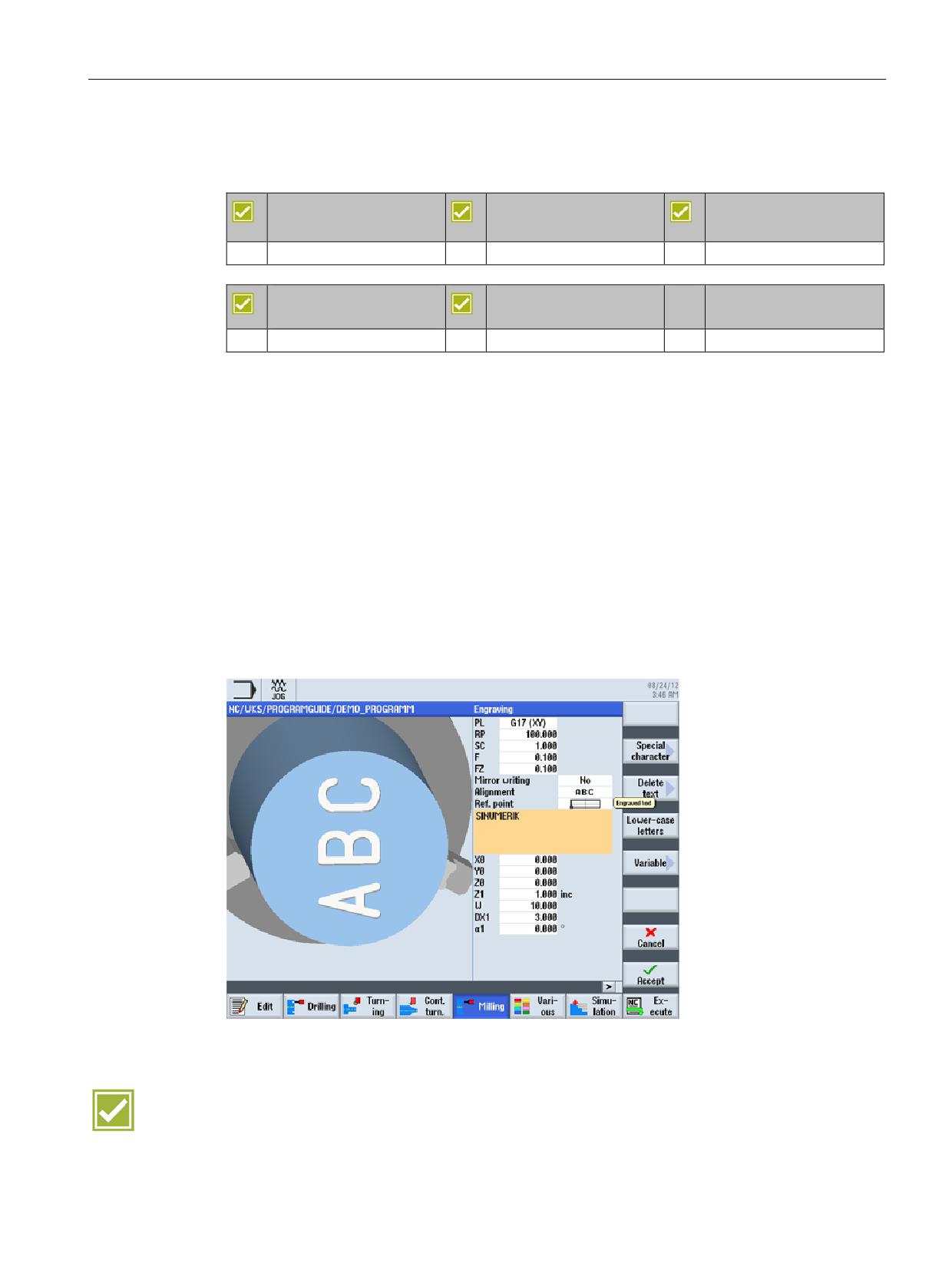
The engraving cycle is used to engrave a text on a workpiece along a line or arc. You can
enter the text as fixed text or assign it via a variable as variable text.
Examples of variable texts:
● Date and time
The values for the date and time are read from the CNC.
● Quantity
The "Quantity" variable is available as a pre-defined user variable
● Numbers
When outputting numbers (e.g. measurement results), you can select the output format
(digits before and after the point) of the number to be engraved.
● Text
Instead of entering a fixed text in the engraving text field, you can specify the text to be
engraved via a text variable (e.g., _VAR_TEXT="ABC123").
Benefits
● Reduction of set-up times by complete machining on one machine
● Simple program input of engraving
SINUMERIK Operate - Turning
Control system overview for machine tools' sales people, 2017, A5E41992653B AA
65
CNC technology cycles
12.2 Highlights of machining cycles
12.2.3
Counterspindle cycle
SINUMERIK 828D
SINUMERIK 828D
SINUMERIK 828D
BASIC
ADVANCED
not available
Option: M75 (SW 28x) 1)
Option: M75 1)
SINUMERIK 840D sl
SINUMERIK 840D sl
BASIC
Basic configuration 1)
Basic configuration 1)
1) The function is only available in conjunction with ShopTurn/ShopMill machining step
programming (option: P17).
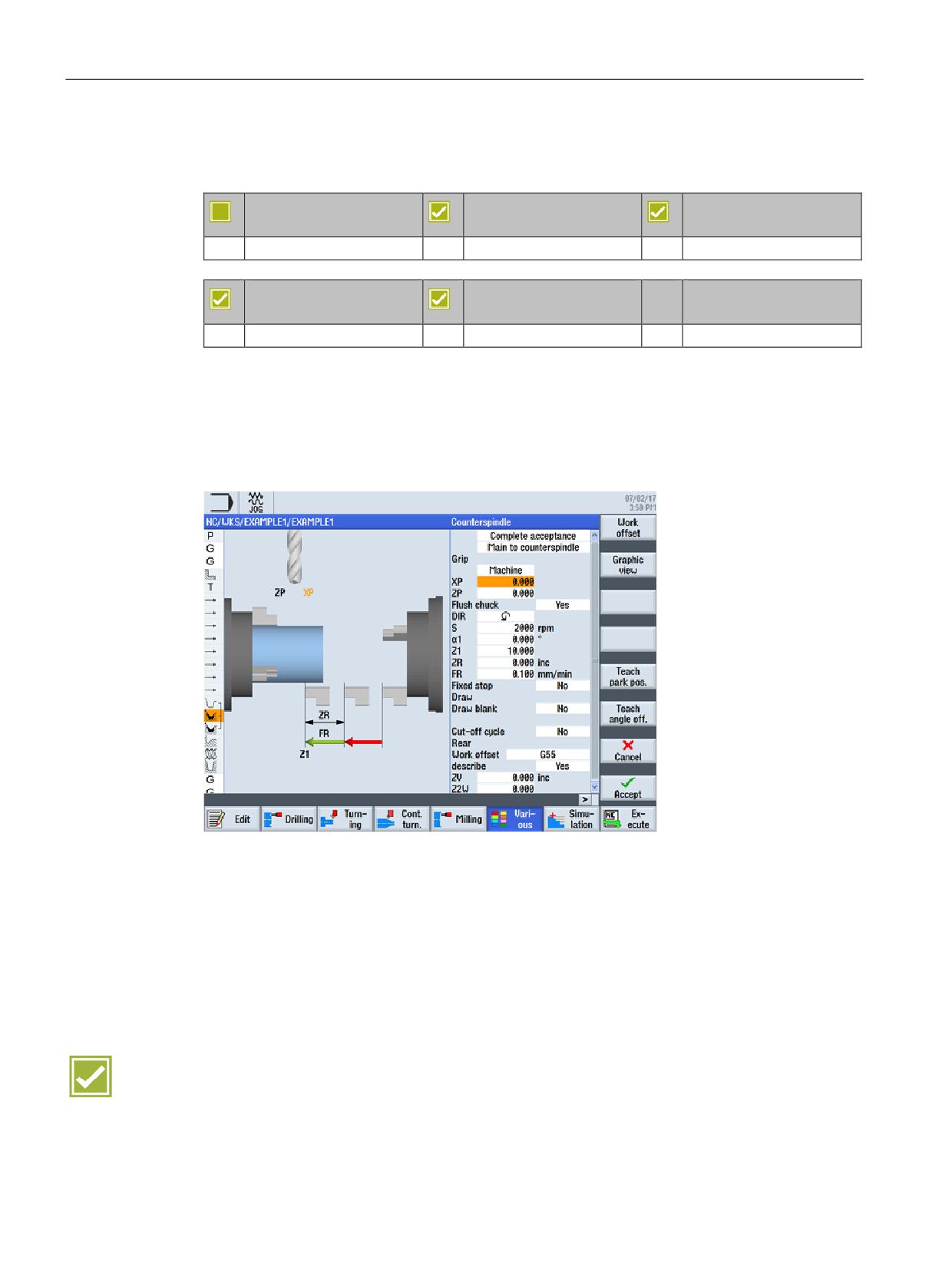
SINUMERIK Operate enables the use of a fully-functional counterspindle. The main spindle
and counterspindle can be operated under conditions of angular synchronism.
DIN/ISO programming
The commands for spindle synchronization and the axis movements for workpiece transfer
can be programmed as DIN/ISO language commands.
Machining step programming
A user-friendly counterspindle cycle is conveniently available for spindle synchronization and
axis movements for workpiece transfer.
Benefits
● Simple and secure programming of all counterspindle functions
● High quality of workpieces by workpiece transfer in synchronous spindle mode
SINUMERIK Operate - Turning
66
Control system overview for machine tools' sales people, 2017, A5E41992653B AA
CNC technology cycles
12.3 Residual material detection for contour cycles
12.3
Residual material detection for contour cycles
12.3.1
Residual material detection during turning
SINUMERIK 828D
SINUMERIK 828D
SINUMERIK 828D
BASIC
ADVANCED
Option: P13
Option: P13
Option: P13
SINUMERIK 840D sl
SINUMERIK 840D sl
BASIC
Option: P13
Option: P13
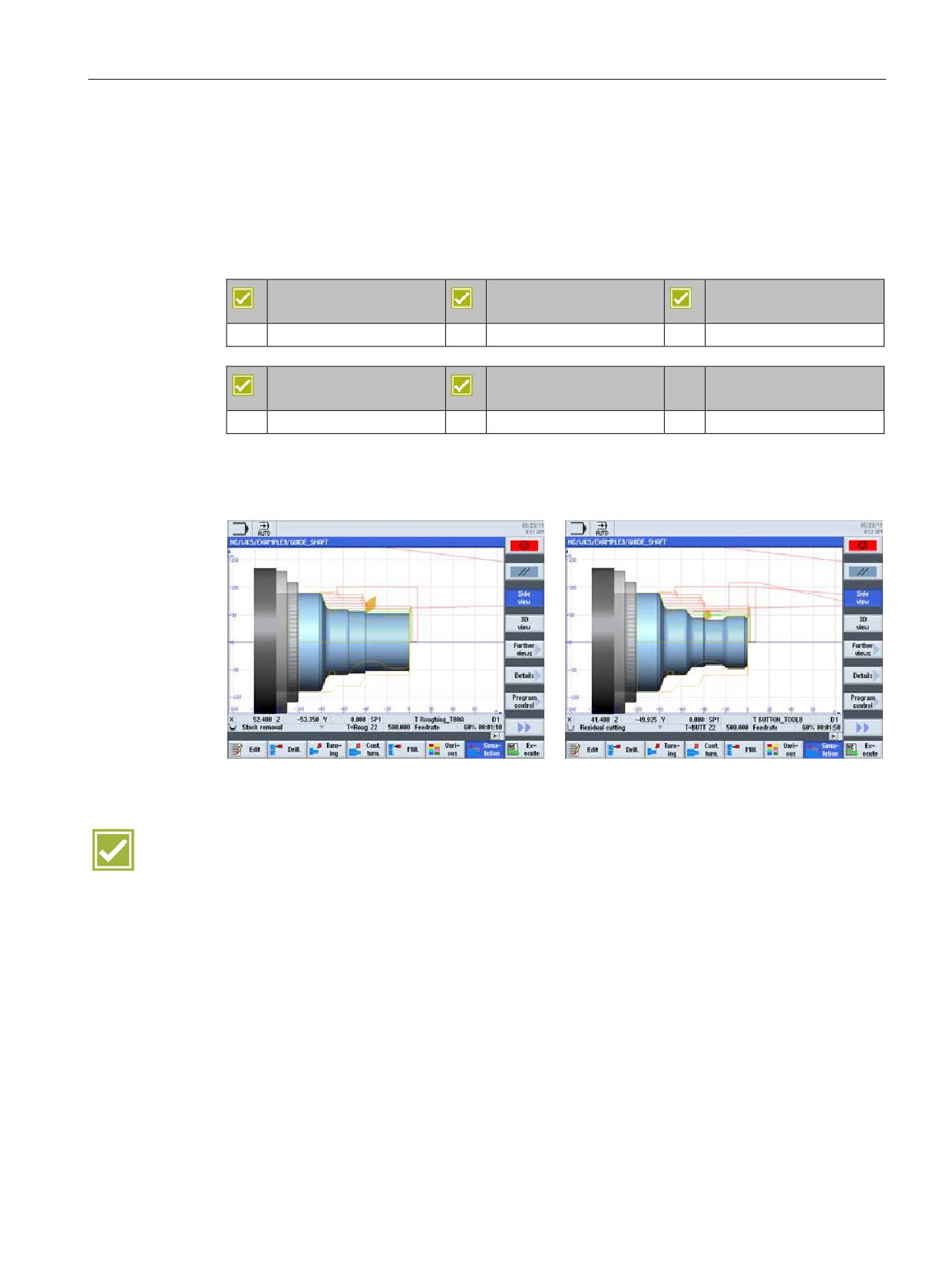
Contour areas which do not permit machining by tools with large plate angles are
automatically recognized in the stock removal cycle. The operator can rework these areas
using a suitable tool with a smaller plate angle.
Benefit
● Time saving through avoiding idle cuts during residual stock removal
SINUMERIK Operate - Turning
Control system overview for machine tools' sales people, 2017, A5E41992653B AA
67
CNC technology cycles
12.3 Residual material detection for contour cycles
12.3.2
Residual material detection during milling
SINUMERIK 828D
SINUMERIK 828D
SINUMERIK 828D
BASIC
ADVANCED
Option: P13
Option: P13
Option: P13
SINUMERIK 840D sl
SINUMERIK 840D sl
BASIC
Option: P13
Option: P13
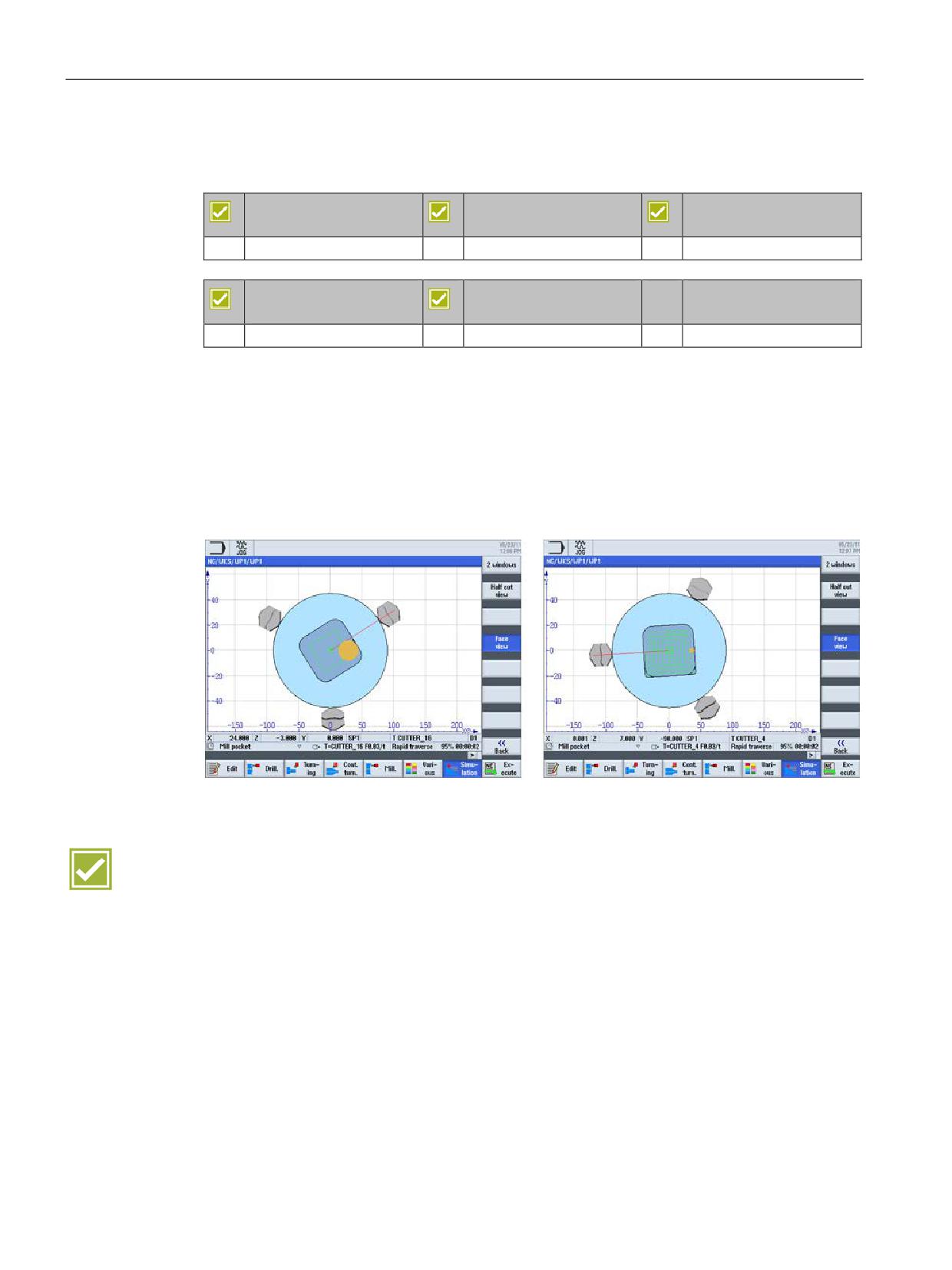
Contour ranges which do not permit milling with large diameters are automatically identified
in the cycle for contour pockets and contour pins. These areas can be selectively machined
with a suitable smaller tool, rather than having to use this tool for the entire contour pocket or
pin.
If you mill several pockets and wish to avoid unnecessary tool changeovers, remove stock
from all the pockets first and then remove the residual material. In this case, you must enter
the tool used for removing the residual material from the pocket in the "TR reference tool"
parameter.
Benefits
● Shorter machining times through the use of a large tool for the substantial part of the
stock removal and a smaller tool for the remaining residual material
● Avoidance of non-cutting movements while achieving extremely simple programming
SINUMERIK Operate - Turning
68
Control system overview for machine tools' sales people, 2017, A5E41992653B AA
CNC technology cycles
12.4 In-process measuring for workpieces and tools
12.4
In-process measuring for workpieces and tools
SINUMERIK 828D
SINUMERIK 828D
SINUMERIK 828D
BASIC
ADVANCED
Option: P28
Option: P28
Option: P28
SINUMERIK 840D sl
SINUMERIK 840D sl
BASIC
Option: P28
Option: P28
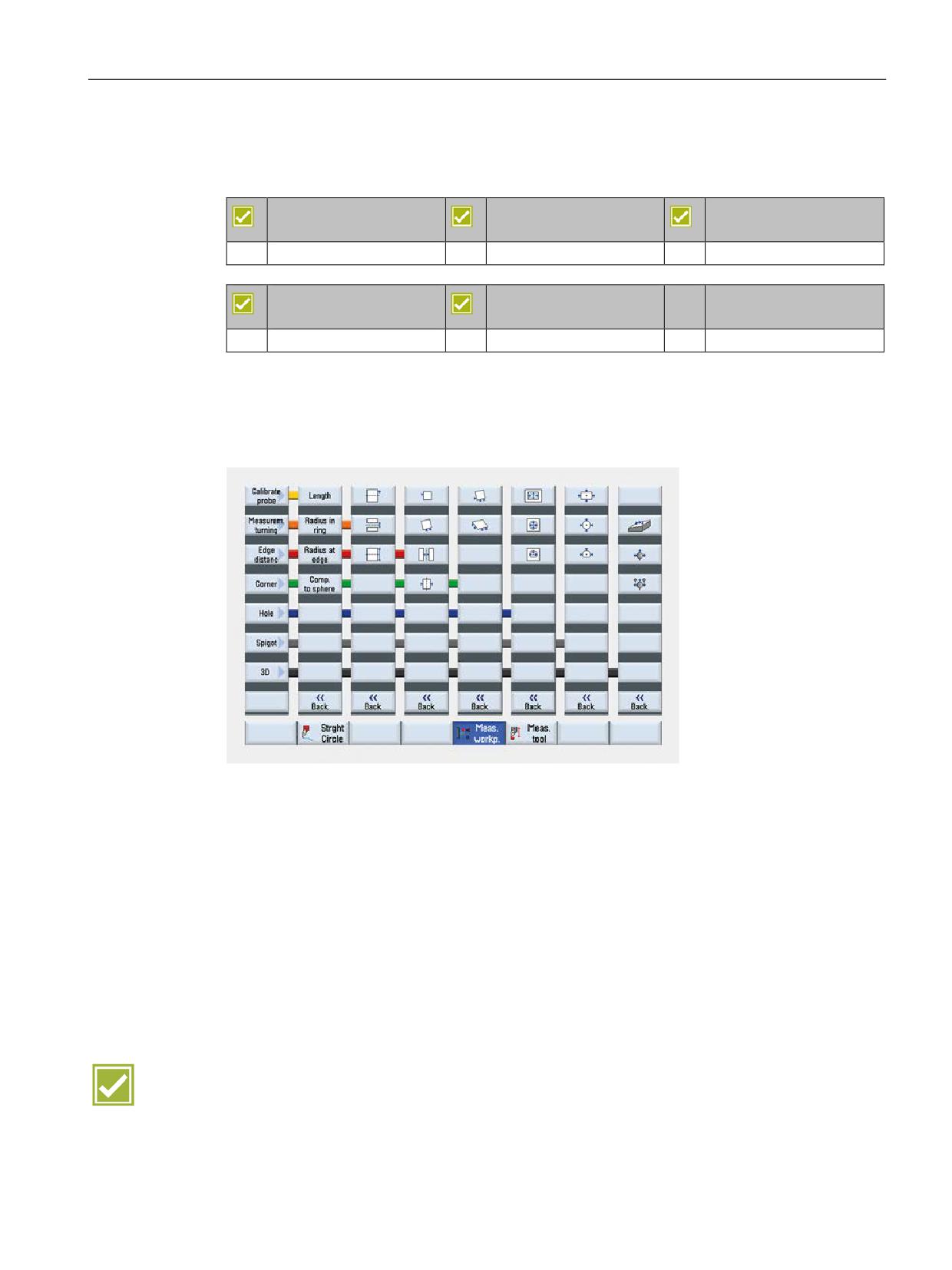
For measurement tasks in automatic operation, powerful measuring cycles are available
both within the sequence and in DIN/ISO programming. Input screens with dynamic help
displays are used for convenient entry of the measuring parameters.
The following cycles are available for workpiece measurement:
The following measurement variants are available for tool measurement:
● Calibration of the tool probe
● Determation of the tool length of turning tools and drills
● Determation of length/radius/length and radius of milling tools on a turning machine
The following measuring tasks can be made:
● Automatic value correction for tool geometry or work offset
● Display of measurement results
● Logging of measurement results
Benefits
● Reliable quality of the manufactured parts by automatic measurement in the machine
● Fast programming for complex measuring tasks thanks to input screens with graphic
support
SINUMERIK Operate - Turning
Control system overview for machine tools' sales people, 2017, A5E41992653B AA
69
CNC technology cycles
12.4 In-process measuring for workpieces and tools
SINUMERIK Operate - Turning
70
Control system overview for machine tools' sales people, 2017, A5E41992653B AA
Complete machining
13
13.1
End face machining (TRANSMIT)
SINUMERIK 828D
SINUMERIK 828D
SINUMERIK 828D
BASIC
ADVANCED
Option: M27
Option: M27
Option: M27
SINUMERIK 840D sl
SINUMERIK 840D sl
BASIC
Option: M27
Option: M27
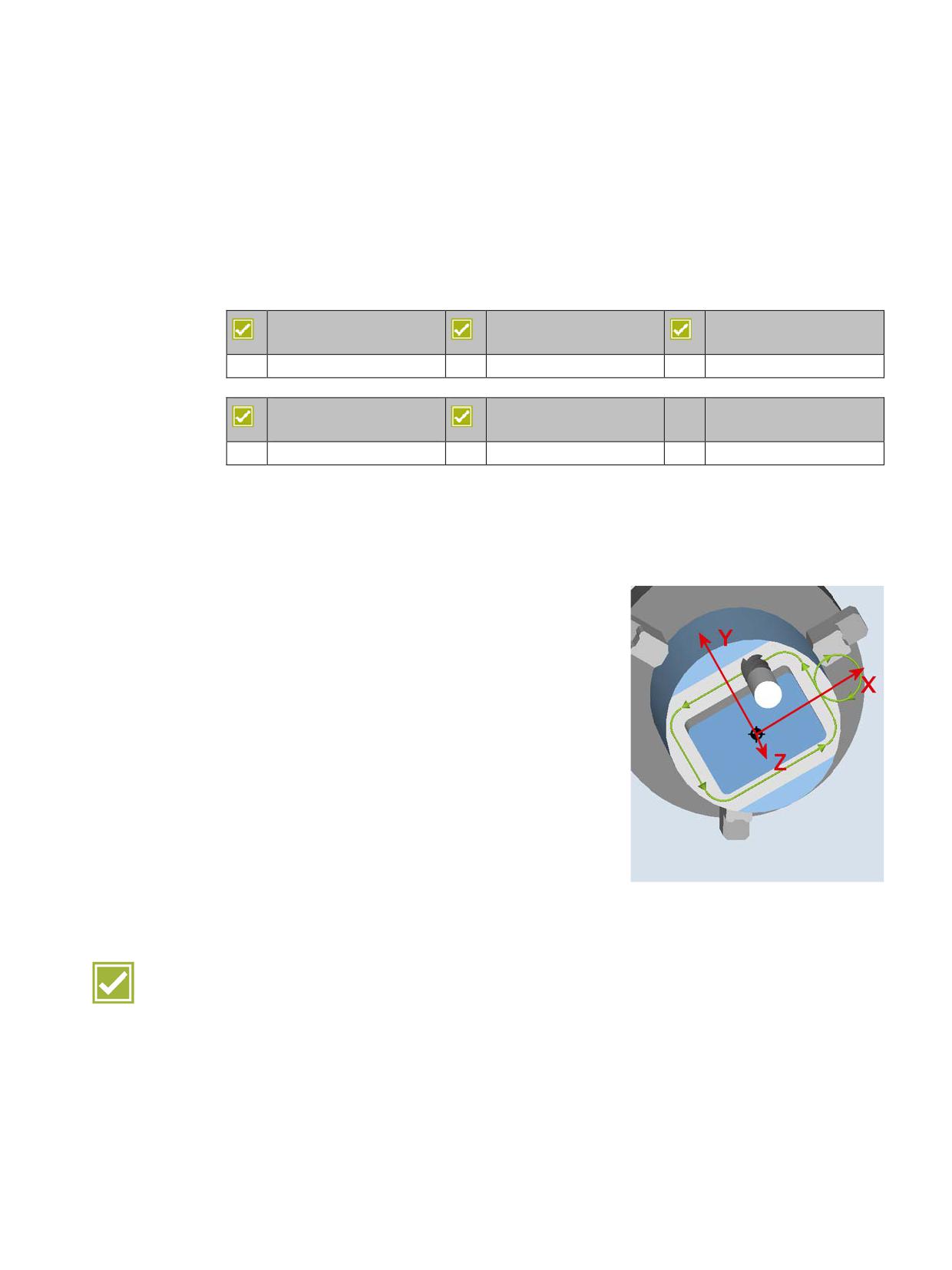
Drilling and milling can be performed on the end face of workpieces in the main and
counterspindle with ShopTurn.
The part program is easily created in a right-angle coordinate system with the end face
transformation TRANSMIT (C axis mode) .
The path movements are conducted with the linear axes
X / Z and the rotary axis C.
Machine without Y axis
• Machining with TRANSMIT
Machine with Y axis
• Machining with Y axis
• Machining with TRANSMIT
Benefit
● Full functional range for drilling and milling on the end face
SINUMERIK Operate - Turning
Control system overview for machine tools' sales people, 2017, A5E41992653B AA
71
Complete machining
13.2 Peripheral surface machining (TRACYL)
13.2
Peripheral surface machining (TRACYL)
SINUMERIK 828D
SINUMERIK 828D
SINUMERIK 828D
BASIC
ADVANCED
Option: M27
Option: M27
Option: M27
SINUMERIK 840D sl
SINUMERIK 840D sl
BASIC
Option: M27
Option: M27
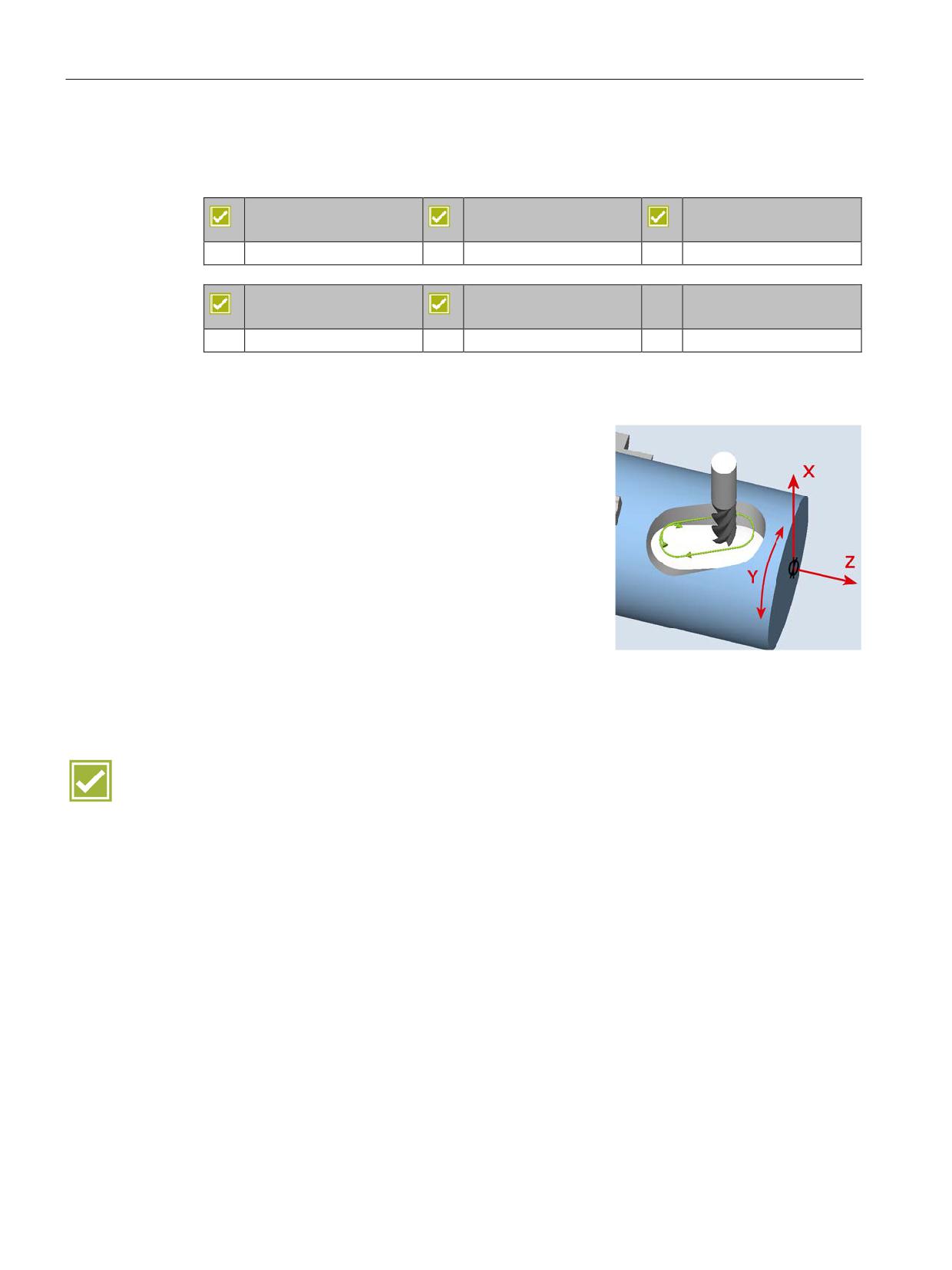
Using the peripheral surface transformation TRACYL, drilling and milling machining can be
executed on the peripheral surface of workpieces in the main and counterspindle.
Machine without Y axis
• Any drill holes on the peripheral surface
• Any milling without slot wall offset on the peripheral
surface
Machine with Y axis
• Any drill holes on the peripheral surface
• Any milling without slot wall offset on the peripheral
surface
• Any milling with slot wall offset on the peripheral
surface
• Grooving on parallel walls of the peripheral surface
with milling radius correction
Benefits
● Full functional range for drilling and milling on the peripheral surface
● Reduction of set-up times by complete machining on one machine
SINUMERIK Operate - Turning
72
Control system overview for machine tools' sales people, 2017, A5E41992653B AA