SINUMERIK 840D sl. Service - Safety Integrated. Manual (2020) - page 18
Acceptance test wizard
3.2 SINUMERIK 828D/840D sl/ONE/MC - drive-based safety functions
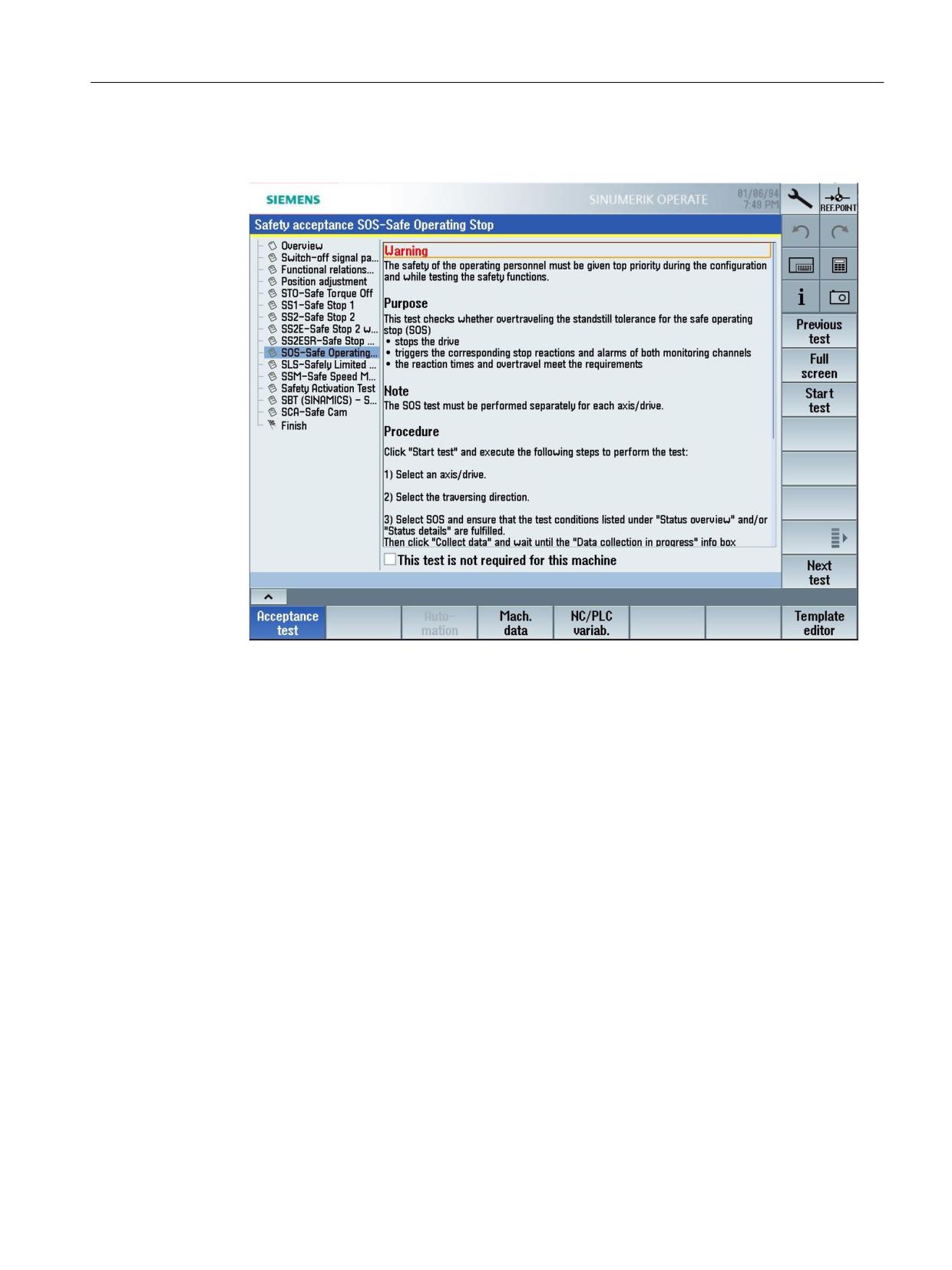
3. If you do not want to begin with the test type "Switch-off signal path", select the desired test
type; SOS in the example.
Figure 3-7
Example - Test type: SOS - Safe Operating Stop
SINUMERIK Operate acceptance test
Function Manual, 10/2020, 6FC5397-3HP40-0BA1
31
Acceptance test wizard
3.2 SINUMERIK 828D/840D sl/ONE/MC - drive-based safety functions
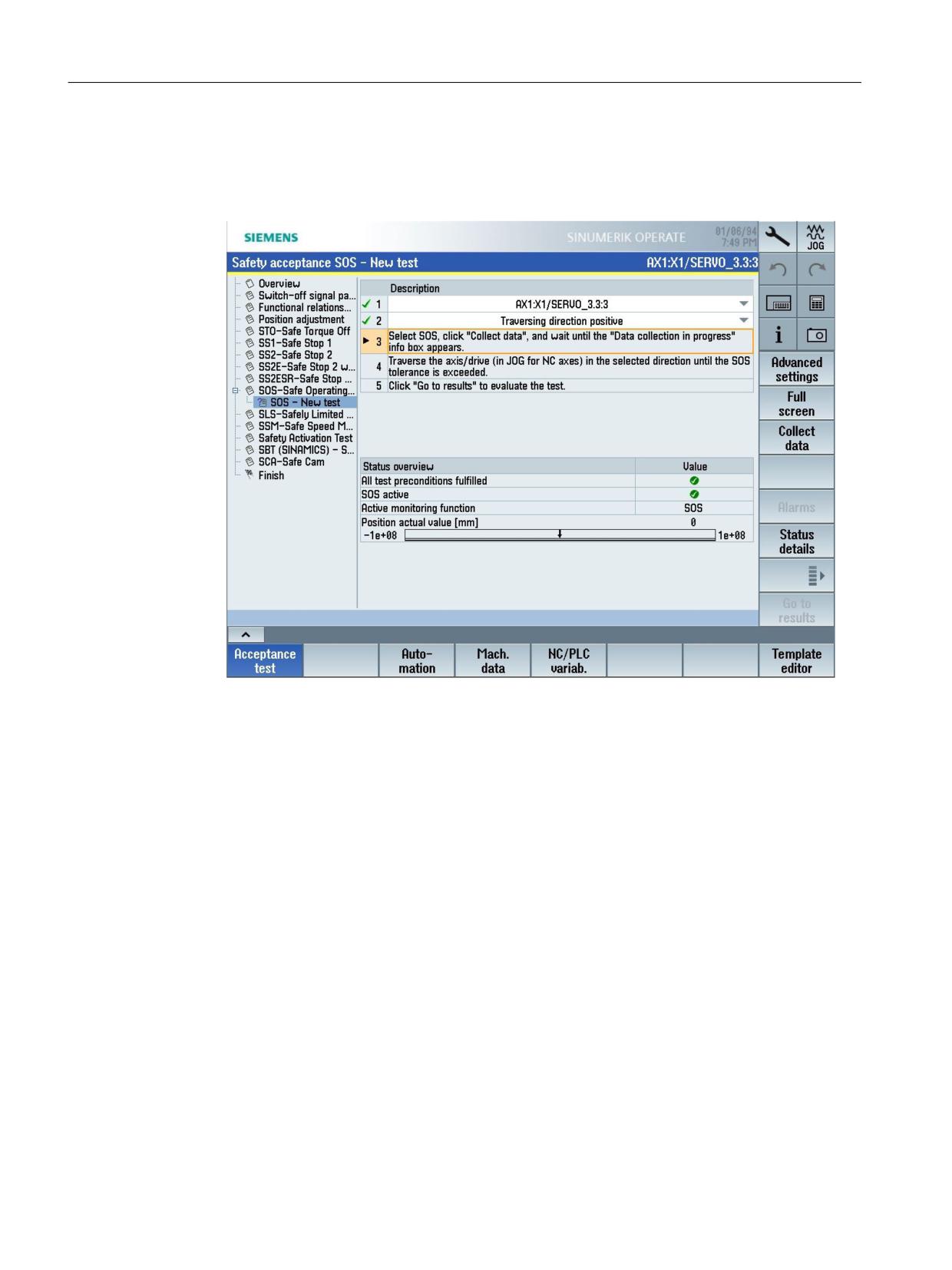
4. Press the "Start test" softkey.
A list of all of the activities required for the test is shown to the right in the detailed display.
Select the axis to be tested and the traversing direction for the test.
Check the "Status overview" to view whether all preconditions have been met.
Figure 3-8
Example - Safety acceptance test: SOS
Open the detailed display by pressing the "Status details" softkey.
SINUMERIK Operate acceptance test
32
Function Manual, 10/2020, 6FC5397-3HP40-0BA1
Acceptance test wizard
3.2 SINUMERIK 828D/840D sl/ONE/MC - drive-based safety functions
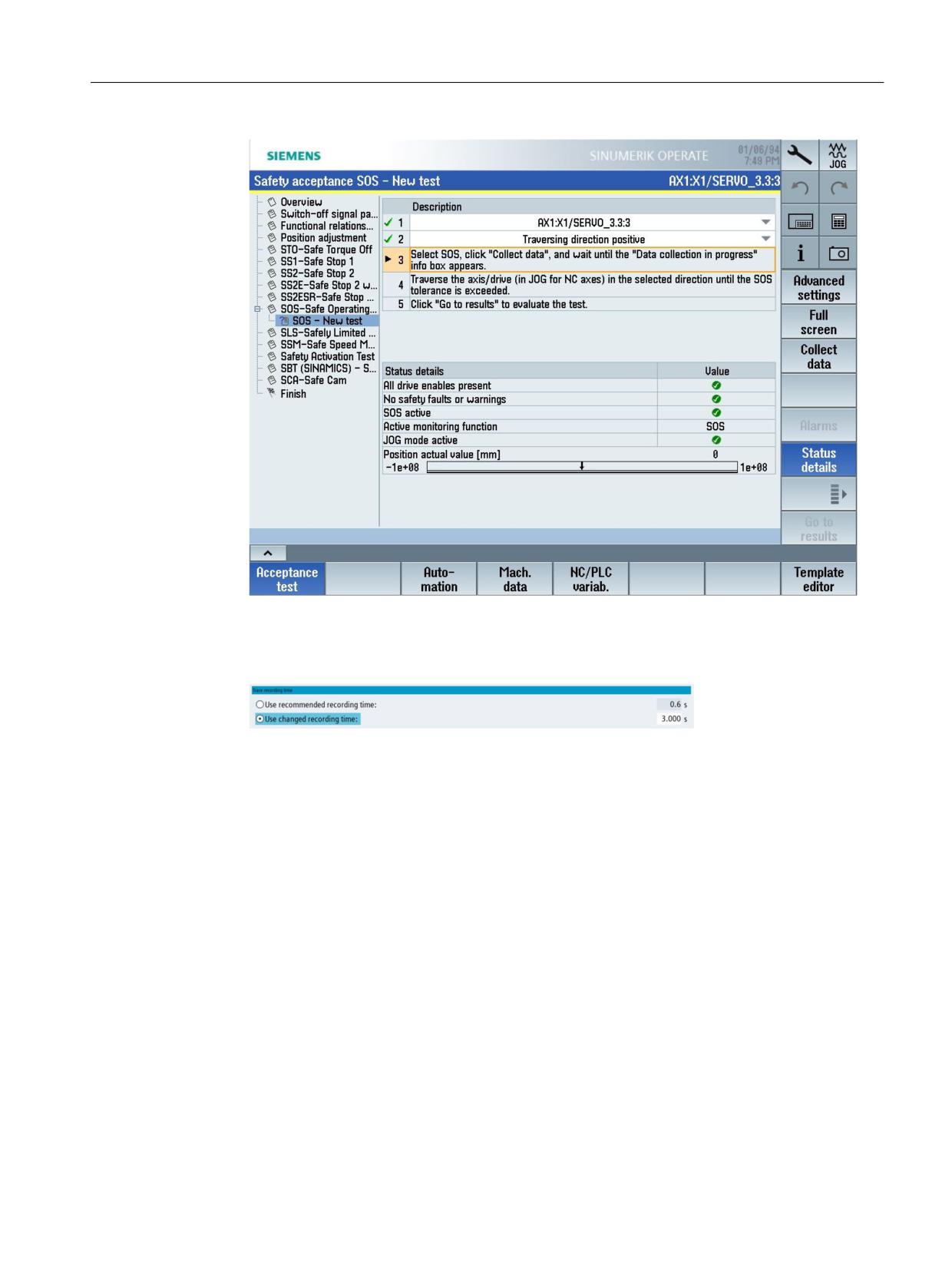
Figure 3-9
Example - Safety acceptance test: SOS, status details
The suggested trace recording duration (default) is displayed with the "Advanced settings"
softkey. If necessary, you can modify the recording duration (in seconds).
Figure 3-10
Use modified recording duration
SINUMERIK Operate acceptance test
Function Manual, 10/2020, 6FC5397-3HP40-0BA1
33
Acceptance test wizard
3.2 SINUMERIK 828D/840D sl/ONE/MC - drive-based safety functions
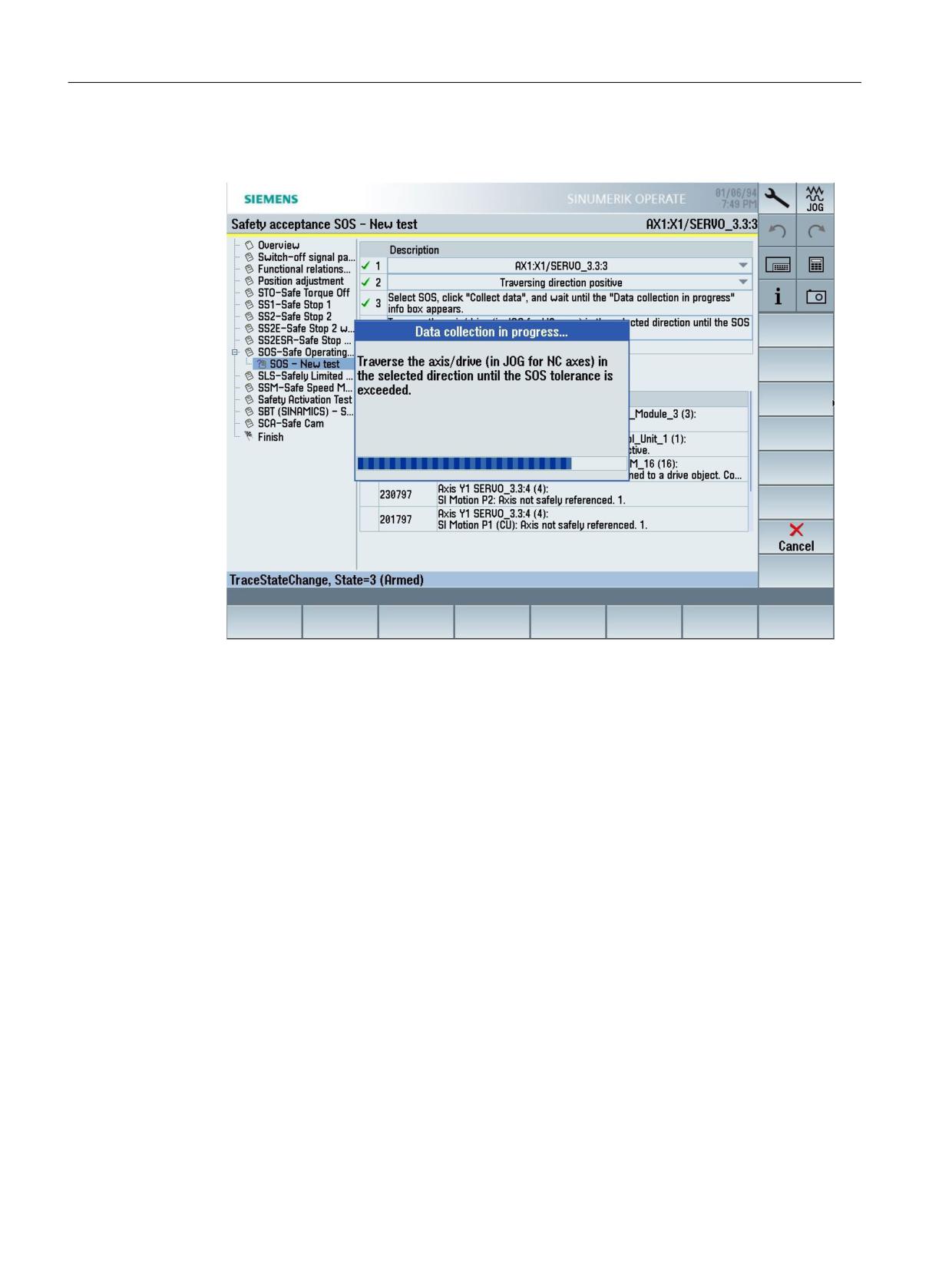
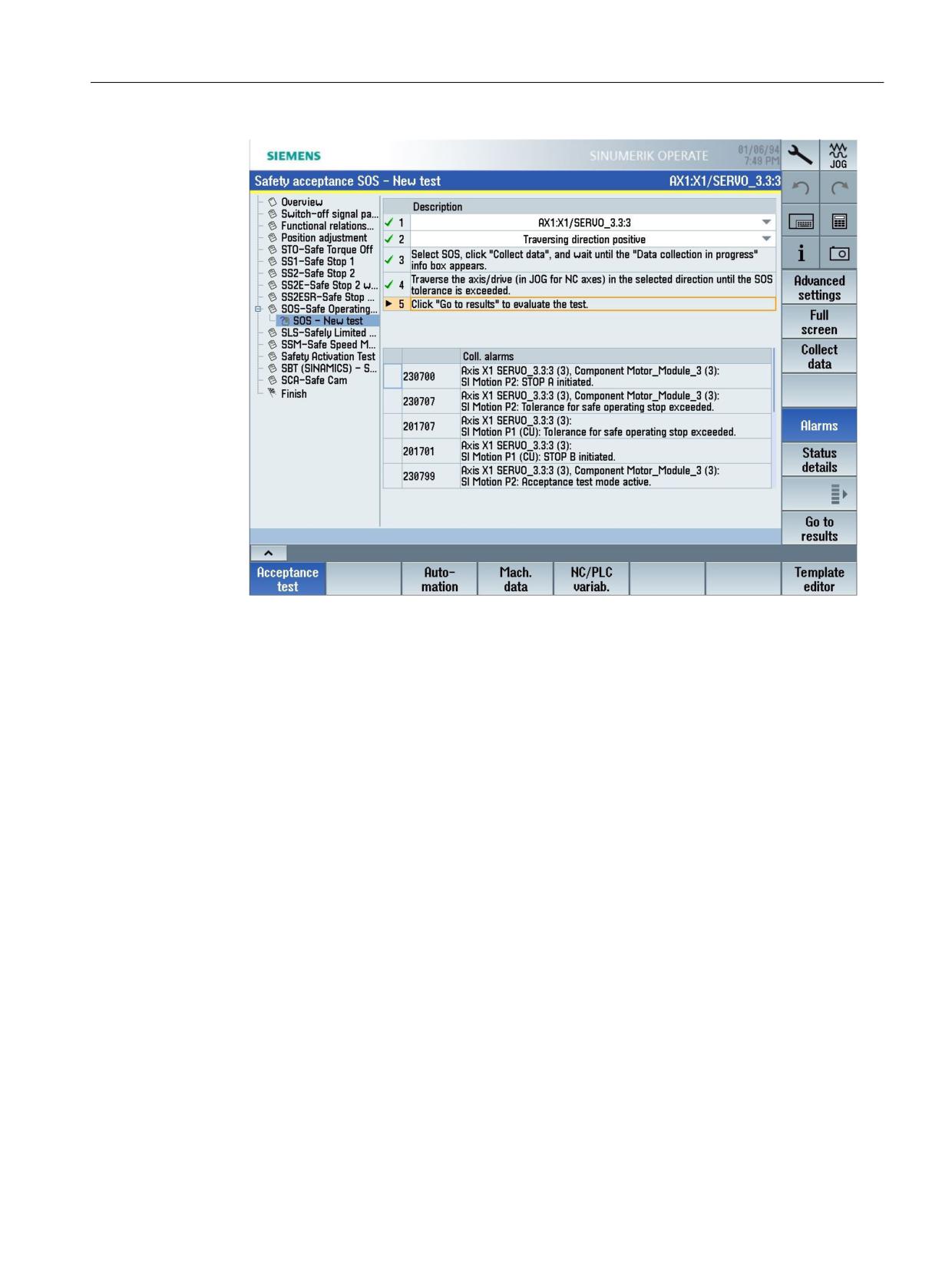
5. Press the "Collect data" softkey.
Then follow the instructions which appear on your screen.
Figure 3-11
Example - Safety acceptance test: SOS, acquire data
Data acquisition is concluded automatically as soon as limit value violation is detected. The
alarms that have been collected are then listed in the detailed view.
SINUMERIK Operate acceptance test
34
Function Manual, 10/2020, 6FC5397-3HP40-0BA1
Acceptance test wizard
3.2 SINUMERIK 828D/840D sl/ONE/MC - drive-based safety functions
Figure 3-12
Example - Safety acceptance test: SOS, collected alarms
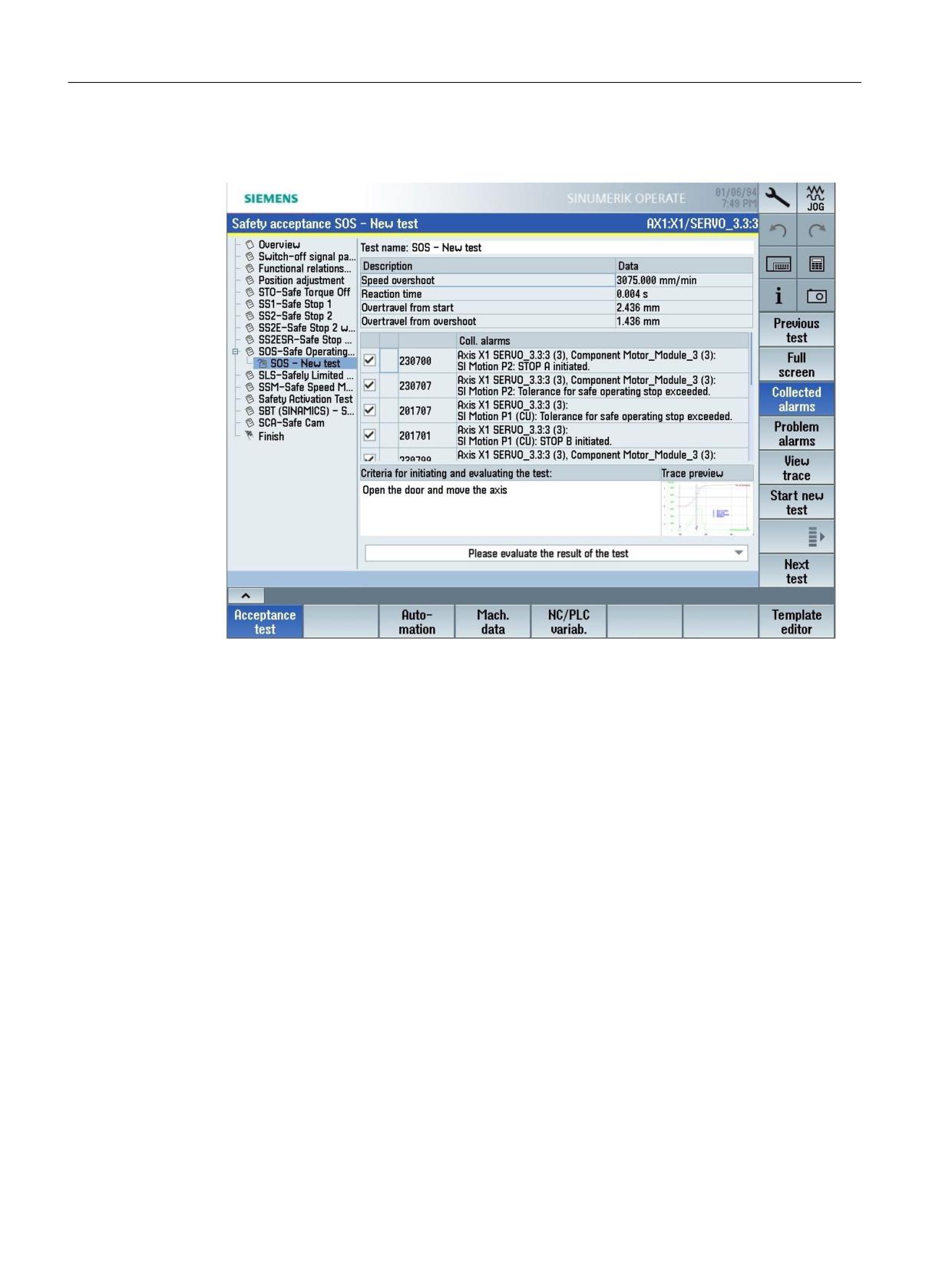
6. Press the "Go to results" softkey.
After the acceptance test, the alarms that occurred are listed and a trace generated with the
relevant signals.
SINUMERIK Operate acceptance test
Function Manual, 10/2020, 6FC5397-3HP40-0BA1
35
Acceptance test wizard
3.2 SINUMERIK 828D/840D sl/ONE/MC - drive-based safety functions
7. Enter the conditions to initiate the test.
An entry is mandatory here in order to be able to start additional steps.
Figure 3-13
Example - Safety acceptance test: SOS, criteria for initiation of the test
SINUMERIK Operate acceptance test
36
Function Manual, 10/2020, 6FC5397-3HP40-0BA1
Acceptance test wizard
3.2 SINUMERIK 828D/840D sl/ONE/MC - drive-based safety functions
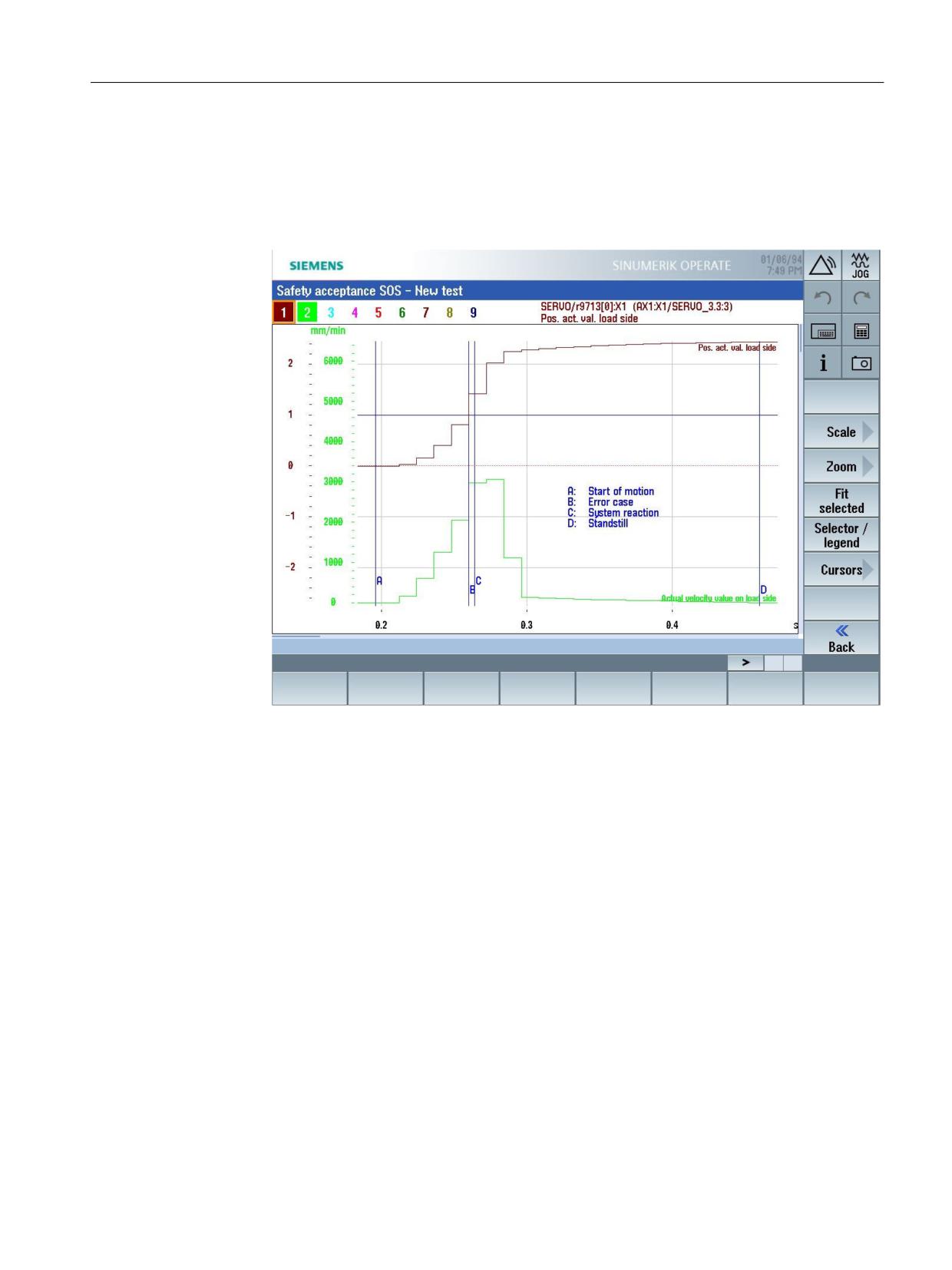
8. Then evaluate the test result. Then check the list as to whether all of the expected alarms have
occurred, and whether the results in the trace recording are correct.
- To display the trace recording, press the "View trace" softkey.
The trace for this test is displayed in the input screen. You can change the display as
needed.
Figure 3-14
Example - Safety acceptance test: SOS, trace
– The "Back" softkey will take you back to the default view of the input screen.
SINUMERIK Operate acceptance test
Function Manual, 10/2020, 6FC5397-3HP40-0BA1
37
Acceptance test wizard
3.2 SINUMERIK 828D/840D sl/ONE/MC - drive-based safety functions
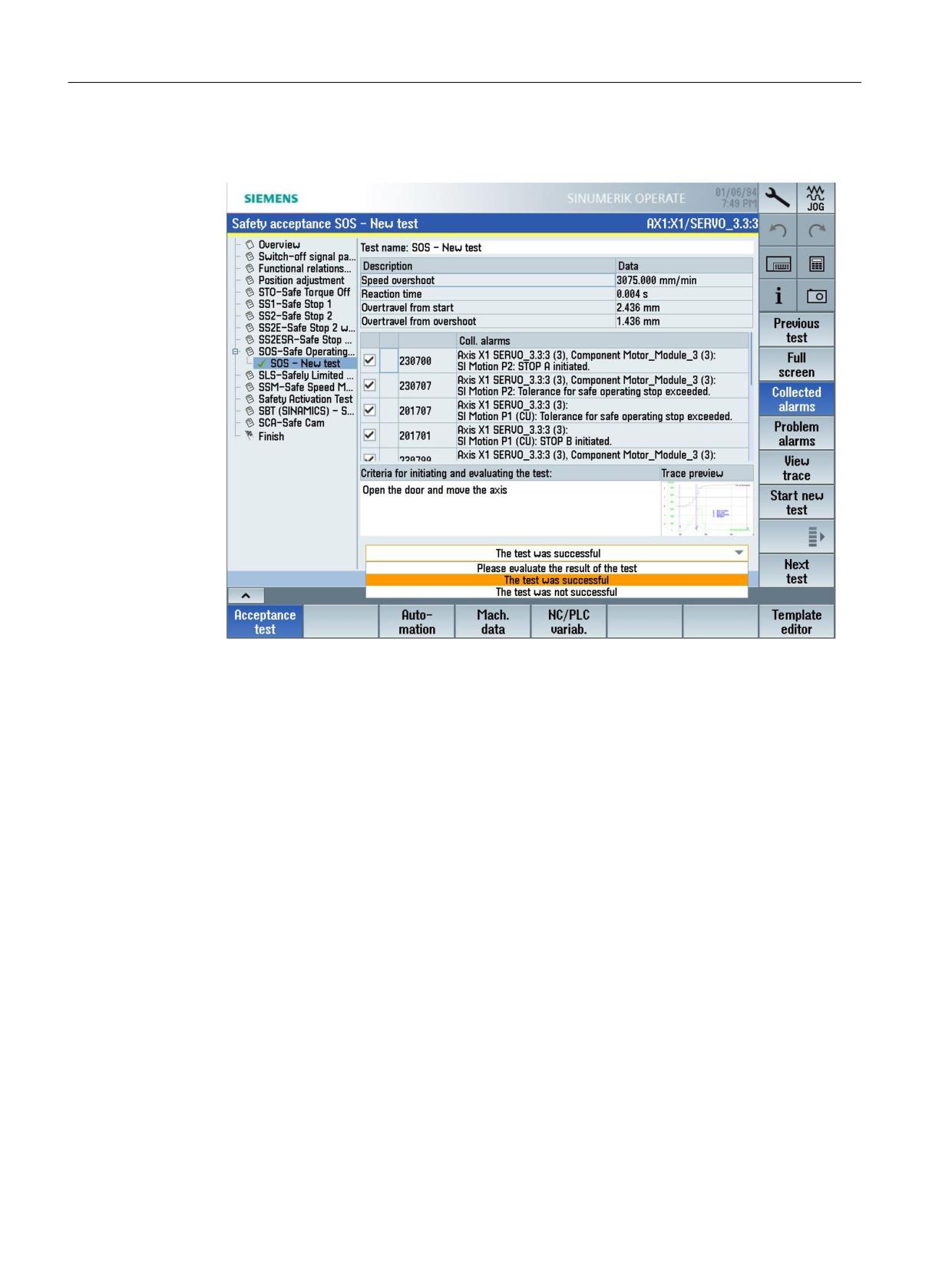
9. Make a selection in the bottom right of the default view to define whether the test (in this
case: SOS) was successful.
Figure 3-15
Example - Safety acceptance test: SOS, evaluate result
The test name is marked with a green checkmark if the test was evaluated to be positive.
In this case, you can either perform another test by pressing the softkey "Start new test" or
you can switch to the next test type using the softkey "Next test".
If the test was evaluated to be negative, then the test name is assigned a red cross and if
necessary, you can repeat the test.
Define which of the listed alarms should be subsequently documented in the acceptance
report.
Remove the check mark (left) for all alarms that should not be documented in the report.
10.Change the pre-assigned test names as required.
11.Press softkey "Start new test" if you wish to test another axis.
The setting area for an additional axis for this test type is shown in the detailed view.
SINUMERIK Operate acceptance test
38
Function Manual, 10/2020, 6FC5397-3HP40-0BA1
Acceptance test wizard
3.2 SINUMERIK 828D/840D sl/ONE/MC - drive-based safety functions
12.Press the "Next test" softkey if you wish to perform a test for the next test type. A list of the
necessary activities for this particular test type is shown in the detailed display.
13.Follow the instructions on the screen (generally these involve steps 3 to 13).
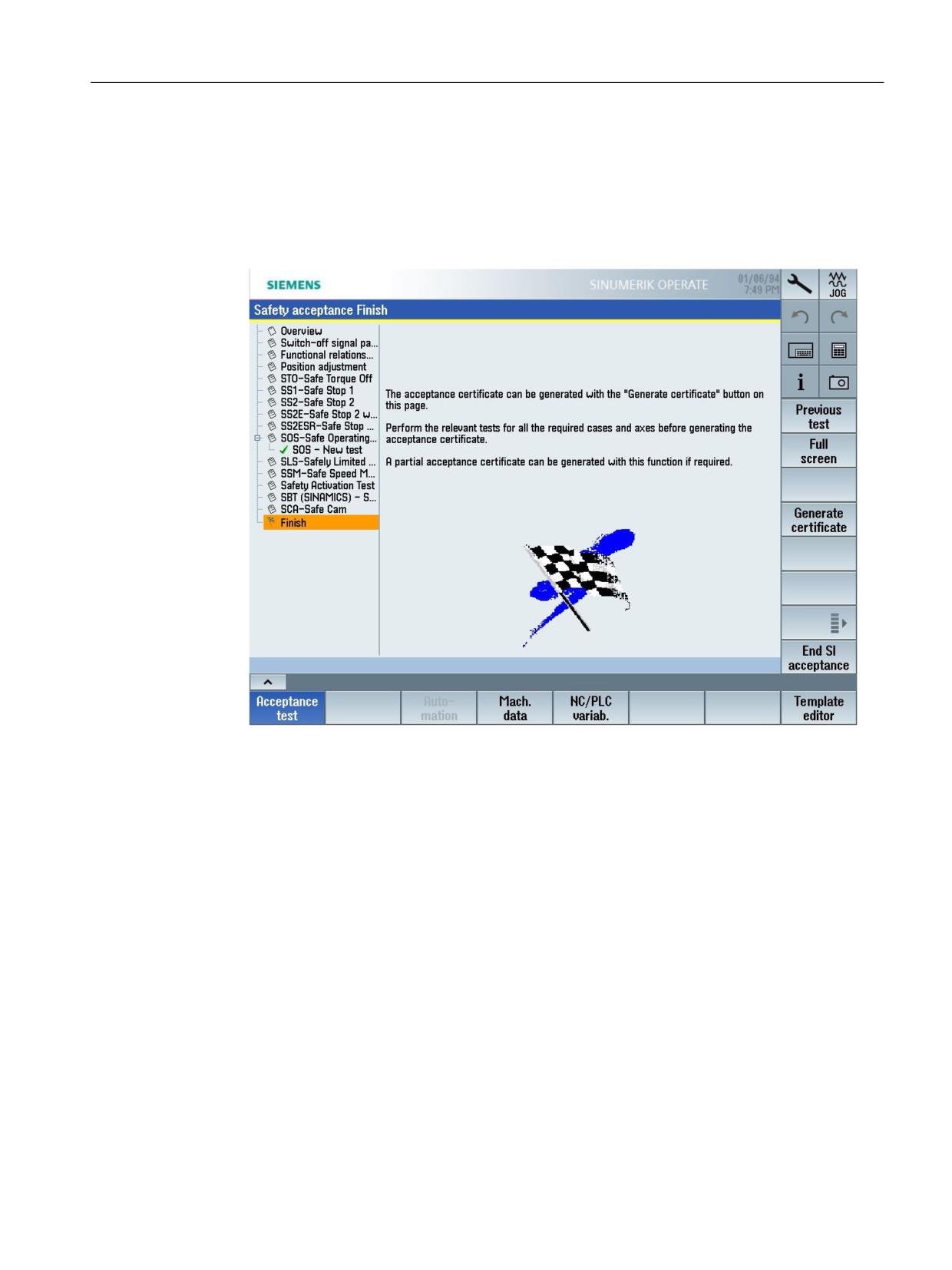
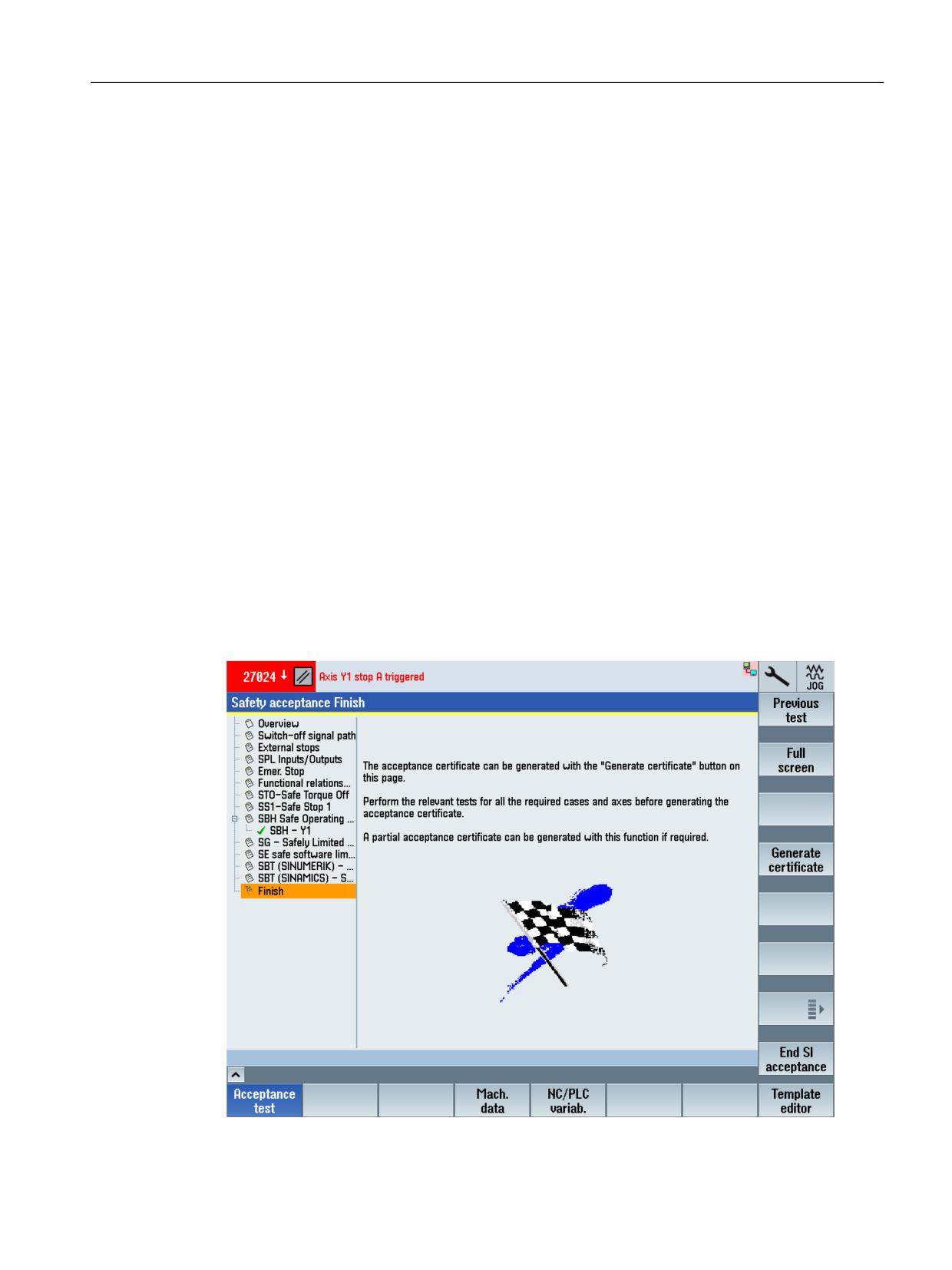
After all tests of the individual setting areas have been performed, at the end, the "Finish"
setting area is displayed. In this setting area, you can generate the acceptance report from
the acceptance test and save it (Page 41).
Figure 3-16
Example - Finish
Supplementary functions
• Full screen
Hides the list of the setting areas and displays the detail settings of the currently selected
setting area over the complete screen width.
• Load template (Page 75)
Loads a template (*.xml).
The template must be located in directory .../user/sinumerik/hmi/data/safety/atw/
templates.
• Export template (Page 75)
Exports the current acceptance test as template (in XML format). The template contains a list
of all of the implemented tests that must be carried out for the acceptance test. Further, all
of the texts of the complete acceptance test are included; e.g. details about the machine on
the overview page.
• Save results (Page 78)
Saves the result file (*.atw) to directory .../user/sinumerik/hmi/data/safety/atw/results.
SINUMERIK Operate acceptance test
Function Manual, 10/2020, 6FC5397-3HP40-0BA1
39
Acceptance test wizard
3.2 SINUMERIK 828D/840D sl/ONE/MC - drive-based safety functions
• Load results (Page 78)
Loads the saved results from a directory. This function is useful if the test is exited before
completion and you wish to continue at the position where you left off.
• Start new test
Starts an additional test in the currently displayed setting area.
• Repeat test
Repeats a selected test in the currently displayed setting area.
• Delete test
Deletes the currently marked test.
• Go to overview
Jumps from the current setting area into the "Overview" setting area.
• Finish
Skips the following setting area and jumps directly to the "Finish" setting area.
• View trace
Displays the trace that was recorded when carrying out the test.
• Advanced settings
Display of the suggested trace recording duration (default). If necessary, you can define the
recording duration (in seconds).
• End SI acceptance
Exits the acceptance test for the Safety Integrated functions.
See also
Tips and tricks (Page 105)
SINUMERIK Operate acceptance test
40
Function Manual, 10/2020, 6FC5397-3HP40-0BA1
Acceptance test wizard
3.2 SINUMERIK 828D/840D sl/ONE/MC - drive-based safety functions
3.2.4.2
Generating and saving an acceptance report/certificate
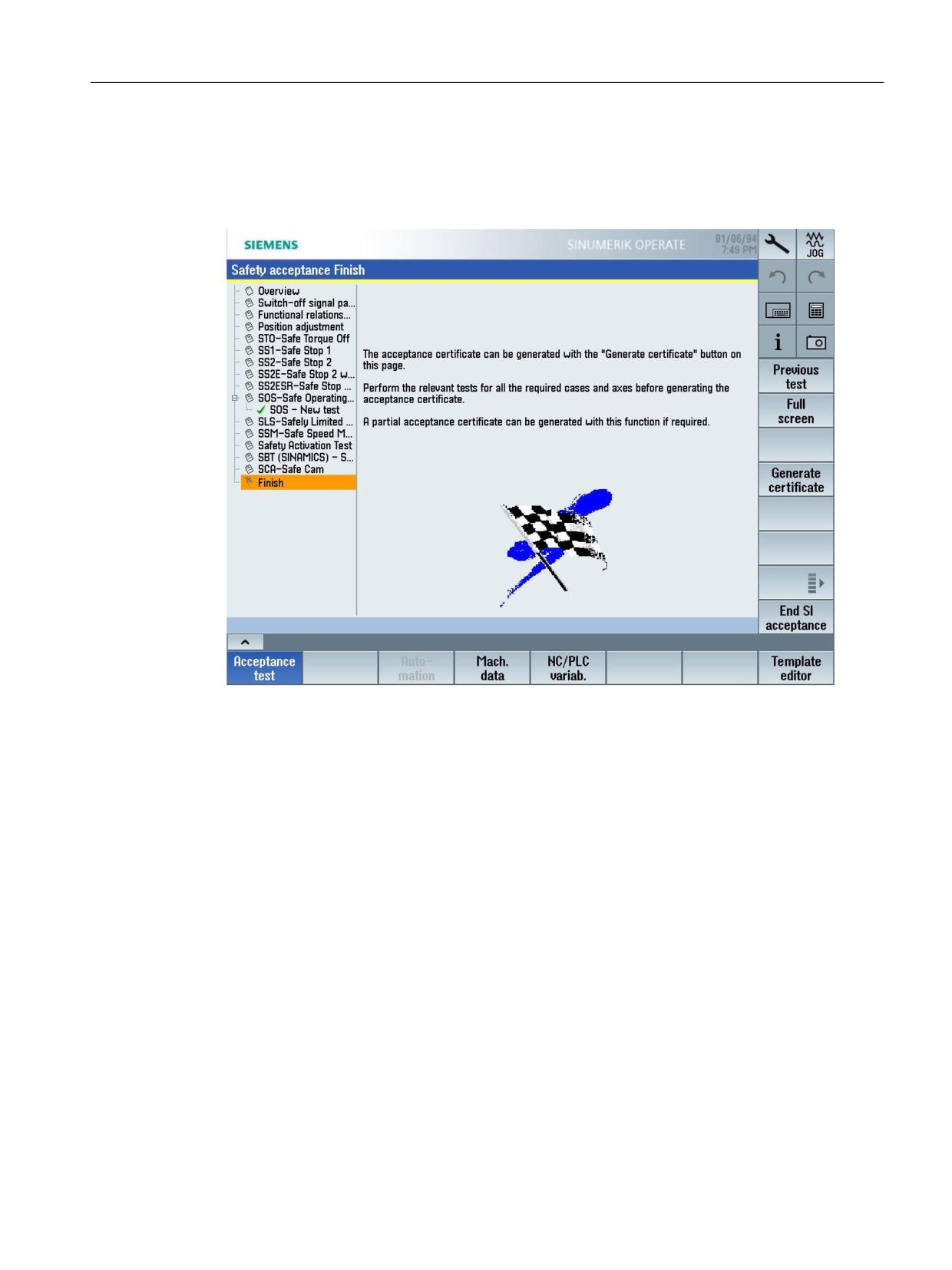
After completing all of the acceptance tests, in the "Finish" setting area, you can generate a
certificate for the acceptance report and save it.
Figure 3-17
Example - Safety acceptance, finish
A typical procedure for generating an acceptance report/certificate is shown based on the
following example.
SINUMERIK Operate acceptance test
Function Manual, 10/2020, 6FC5397-3HP40-0BA1
41
Acceptance test wizard
3.2 SINUMERIK 828D/840D sl/ONE/MC - drive-based safety functions
Procedure
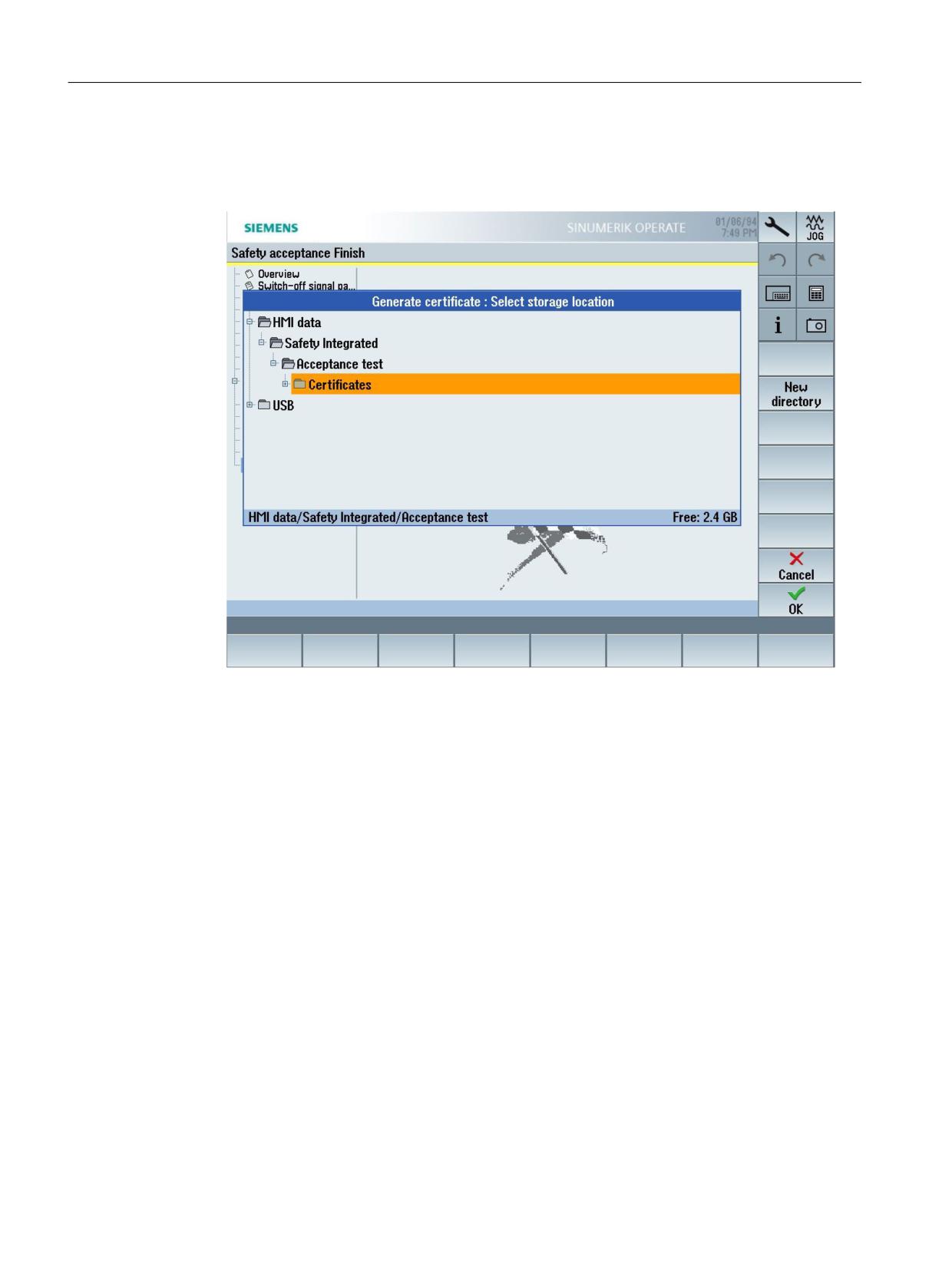
1. Press the "Generate certificate" softkey to generate a certificate from the acceptance report.
The standard file archive is displayed.
Figure 3-18
Example - Safety acceptance, save certificate
2. Select a directory or create a new one. Then press the "OK" softkey to confirm your selection.
You are prompted to assign a name for the future certificate.
3. Enter the certificate name here. Then press the "OK" softkey to confirm your entry.
The certificate is then saved in the selected archive folder as RTF file. As a result of the RTF
format, the certificate can be subsequently supplemented, e.g. to include a machine
diagram.
3.2.5
Acceptance test mode
SINAMICS Safety Integrated has a parameter-supported acceptance test mode for the following
safety functions: SS2, SOS, SDI, SLS, SLP.
SINUMERIK Operate acceptance test
42
Function Manual, 10/2020, 6FC5397-3HP40-0BA1
Acceptance test wizard
3.2 SINUMERIK 828D/840D sl/ONE/MC - drive-based safety functions
The SINAMICS acceptance test mode is integrated in the SINUMERIK Operate acceptance test
wizard, where you parameterize the time and activate the mode in the associated SINUMERIK
Operate input screens, rather than directly via parameters.
WARNING
Unexpected axis motion at speed setpoint ≠ 0
If a speed setpoint ≠ 0 is present, the active stop function SS2 is set, and the motor is at a
standstill (active SOS), the axis starts to move as soon as the acceptance test is activated. If
persons are in the danger zone, accidents causing death or severe injury can occur.
• Take suitable measures to ensure that nobody is in the danger zone.
The limit value violations required and intended for the acceptance test are possible while the
acceptance test mode remains active. For instance, the setpoint speed limits are no longer active
in the acceptance test mode. To ensure that this state is not inadvertently retained, the
acceptance test mode is automatically exited after the parameterized time (p9558).
Normally, SOS can be selected directly or via SS2. To be able to trigger violation of the SOS
standstill limits with the acceptance test mode active (also in the "SS2 active" state) the setpoint
is enabled again by the acceptance test mode after deceleration and transition to SOS to allow
the motor to move. When an SOS violation is acknowledged in the active acceptance test mode,
the actual position is adopted as the new standstill position so that an SOS violation is not
immediately identified again.
Effects of the acceptance test mode in the NC
The following status bits and/or values from the SIC/SCC, relevant for the acceptance test of the
monitoring and stop functions, are linked to the NCs:
• Safety Info Channel status word 3: S_ZSW3B
- Bit 15 ACCEPTANCE_TEST_SELECTED (acceptance test mode selected)
When traversing the axes via the JOG traversing keys, this SIC signal means that in the NC
the set velocity limits, for example MD 32020 $MA_JOG_VELO, as well as the actual
override value are ignored, and the G0 value (maximum axis velocity) is activated as
setpoint.
- Bit 14 ACCEPTANCE_SLP_ACTIVE (acceptance test SLP(SE) selected)
If the acceptance test SLP(SE) is selected, then the software limit switches active in the NC
are deactivated so that SLP limits can be passed over (component of this acceptance test).
In order that users can see the selection and/or the deactivated software limit switch, for
a positive edge of this SIC signal, alarm 27008 "Axis %1 SW limit switch deactivated" is
initiated for the appropriate axis. For a negative edge, the software limit switch is
reactivated and the corresponding alarm is cleared.
SINUMERIK Operate acceptance test
Function Manual, 10/2020, 6FC5397-3HP40-0BA1
43

Acceptance test wizard
3.2 SINUMERIK 828D/840D sl/ONE/MC - drive-based safety functions
3.2.6
Safety summary (TIA Portal)
You use the safety summary to document the safety-relevant properties of the components
configured in the TIA Portal.
Note
The safety summary is only relevant for SINUMERIK ONE, SINUMERIK MC, and SINUMERIK 840D
sl.
Requirement
Note
Error-free hardware and software compilation
Error-free HW and SW compilation is the prerequisite for the creation of the safety summary for
acceptance purposes. Only then is it assured that all consistency checks have been performed
and that the safety summary was created for a consistent project.
Procedure
To create a safety summary, proceed as follows:
1. In the project navigator, select the Safety Administration Editor of the F-CPU for which you
would like to create the safety summary, e.g. under "CNC_1 > PLC_1 > Safety Administration
Editor".
2. Right-click on the Safety Administration Editor and select the "Print" command.
3. Perform the following settings in the "Print" dialog:
Setting
Procedure
Printer
Select either a printer installed in Windows or a PDF application installed as a
Windows printer.
Document layout
Select one of the ISO formats, e.g. "DocuInfo_ISO_A4_Portrait"
Properties
Activate the "All" option in order to display the F-blocks and F-conformant PLC
data types in the printout. This is necessary to document the program code for
acceptance.
SINUMERIK Operate acceptance test
44
Function Manual, 10/2020, 6FC5397-3HP40-0BA1
Acceptance test wizard
3.2 SINUMERIK 828D/840D sl/ONE/MC - drive-based safety functions
4. Click "Print" to confirm the settings.
5. Check the safety summary for the following criteria after printing:
- Ensure that all pages have been printed out in their entirety.
Incomplete printouts (as a result of toner deficiency, for example) may not be used for
acceptance of a change.
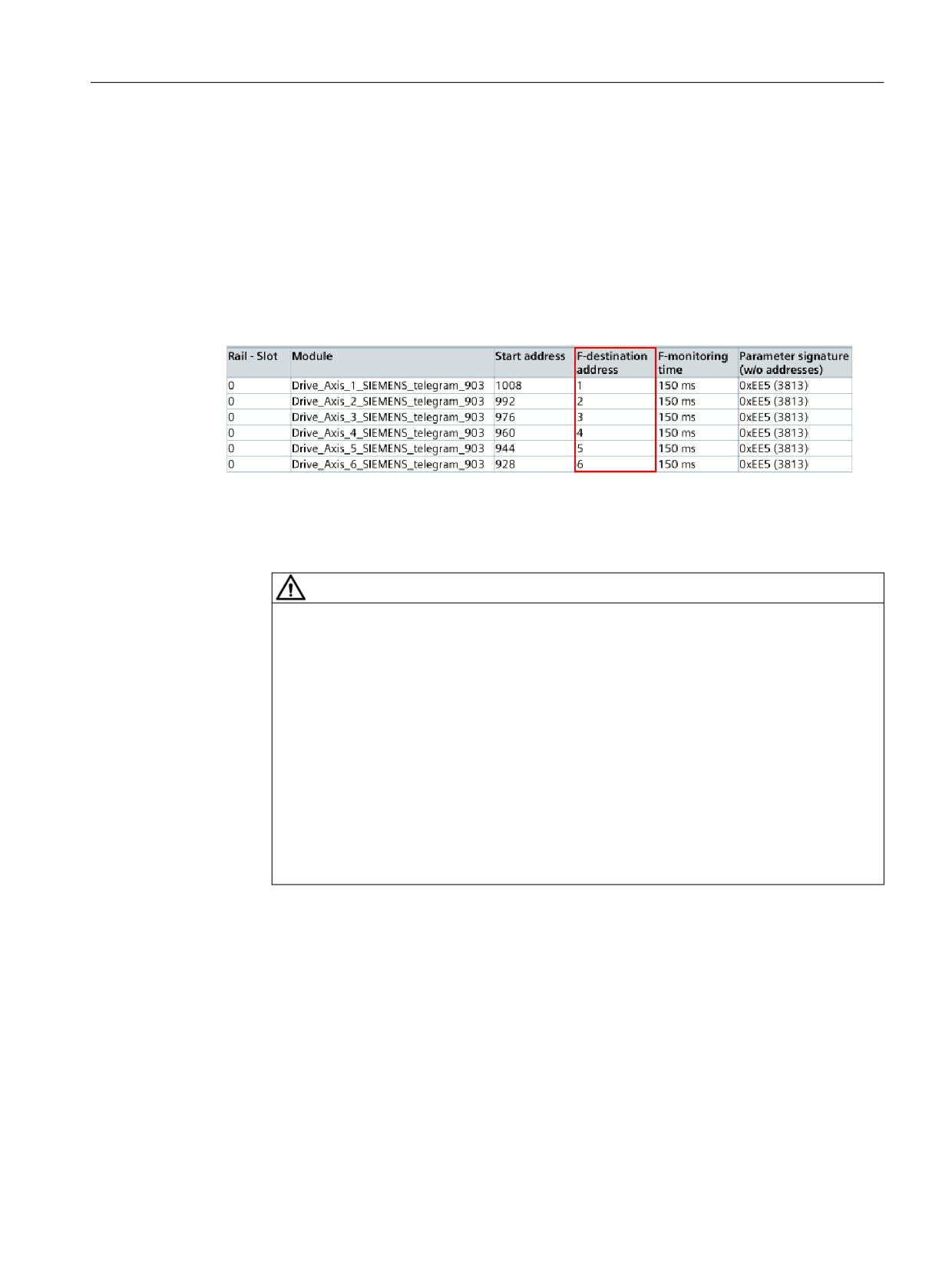
- Compare the PROFIsafe addresses of the individual drive objects with the value of the
drive parameter p9610 in SINUMERIK Operate.
PROFIsafe addresses of SINAMICS Safety Integrated are listed in the safety summary in
column "F-target address".
Figure 3-19
PROFIsafe addresses of drive objects in the safety summary - example of a NCU 730.3 PN
with SINAMICS Safety Integrated standard configuration
- Compare the PROFIsafe addresses with the values of all other nodes and ensure
uniqueness.
WARNING
Incorrect assignment of the safety functions of an axis
An incorrect assignment of a (valid) F-address results in an incorrect assignment of the
safety functions to the corresponding axis. The system does not identify this incorrect
assignment (in the CPU and in the network). As a consequence, the safety functions can
act in a way that was not intended, which in turn can result in death and serious injury.
• Uniquely address the F-destination address of the fail-safe I/O of PROFIsafe address
type 1.
• Ensure that the F-destination address of the fail-safe I/O (the drive units in this case)
is unique for the entire failsafe I/O throughout the network and the CPU (system-
wide). When doing this, also take into account the fail-safe I/O of PROFIsafe address
type 2, e.g. modules of the ET 200SP type.
• Note also the corresponding documentation in the TIA Portal online help in the
section "SIMATIC Safety - Configuring and programming".
Additional information
• Additional information on the uniqueness of PROFIsafe addresses and the safety summary is
provided in the Programming and Operating Manual SIMATIC Safety - Configuring and
section with the same name in the TIA Portal online help.
SINUMERIK Operate acceptance test
Function Manual, 10/2020, 6FC5397-3HP40-0BA1
45
Acceptance test wizard
3.2 SINUMERIK 828D/840D sl/ONE/MC - drive-based safety functions
3.2.6.1
Comparing Safety Programs
Comparing safety programs as in the standard
You can use the comparison editor in STEP 7 for offline-online or offline-offline comparison of
safety programs. This procedure conforms to the that for standard user programs. A comparison
of the content of F-blocks is also undertaken when comparing safety programs. This means that
an offline-offline comparison can also be made when accepting a change. You enable this
comparison by selecting the "Safety" comparison criterion and disabling all other comparison
criteria.
Result of the comparison for safety programs
Display of the comparison result corresponds with the display of STEP 7.
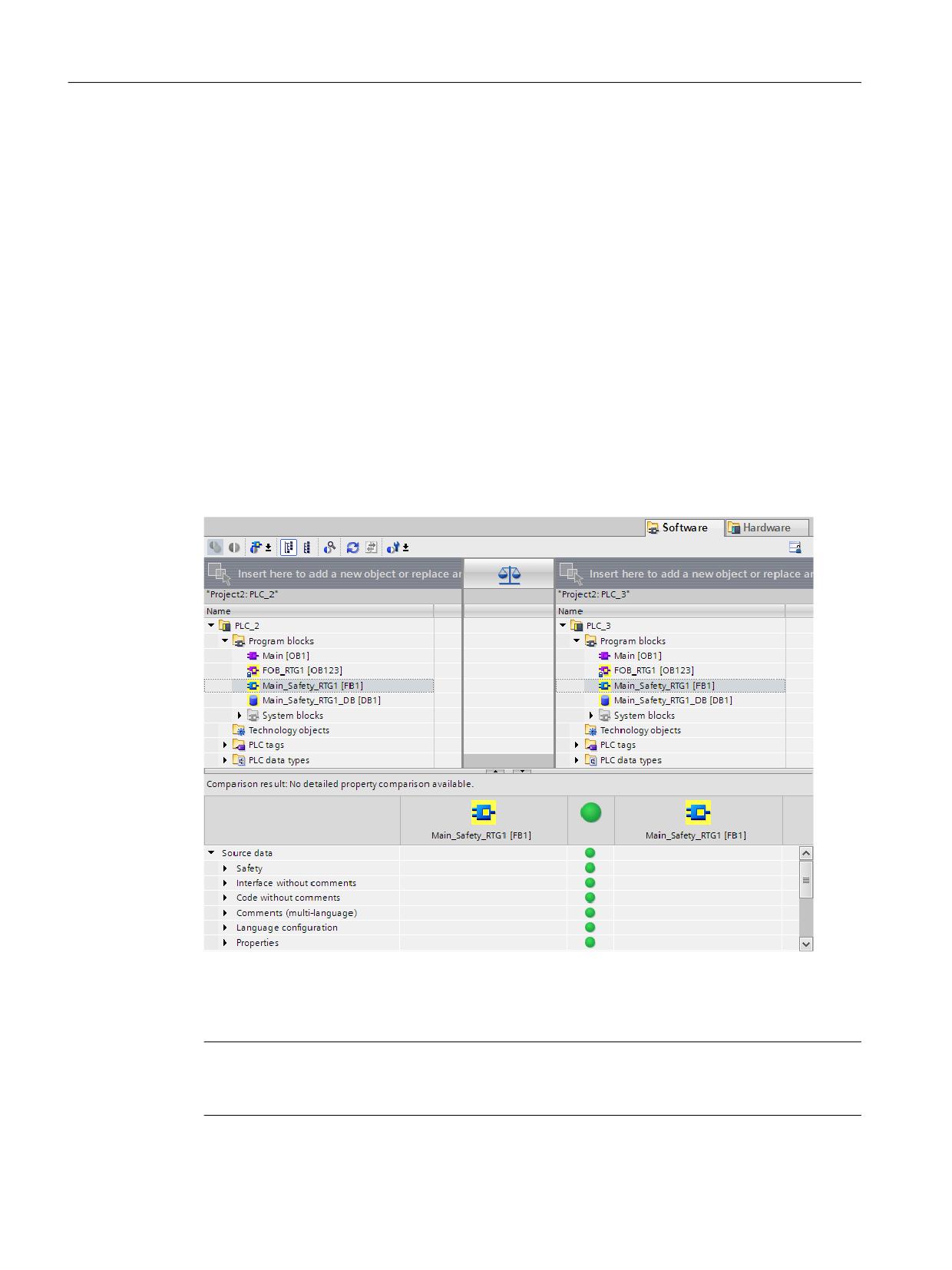
If you click the "Program blocks" folder on the left of the comparison editor, you can see the
collective F-signature of the safety program displayed under "Comparison result". You will also
receive information as to whether the safety program is consistent.
Figure 3-20
Comparison editor
If you click on an F-block, the relevant signatures and interface signatures are displayed to you
in addition to the standard information.
Note
If you interrupt the connection to the F-CPU during the online/offline comparison, the
comparison result will be incorrect.
SINUMERIK Operate acceptance test
46
Function Manual, 10/2020, 6FC5397-3HP40-0BA1
Acceptance test wizard
3.2 SINUMERIK 828D/840D sl/ONE/MC - drive-based safety functions
Filter options for the comparison
Filters in the Comparison editor allow you to restrict the comparison result to the following block
groups:
• Only compare F-blocks
• Only compare F-blocks relevant for the acceptance
• Only compare standard blocks
You also have the STEP 7 filter options "Show only objects with differences" and "Show identical
and different objects".
F-blocks in the "System blocks" folder are also relevant for the comparison of safety programs.
Comparison criteria
Make sure that under
only the "Safety" comparison criterion is activated.
Classification of displayed changes
Regardless of whether you carried out an offline/online or offline/offline-comparison, the
following changes could account for the indicated changes to the automatically generated F-
blocks:
• Change in the maximum cycle time of F-runtime group and warn cycle time of F-runtime
group
• Change in F-parameters of the F-CPU
• Changed Safety system version or change in the hardware configuration (S7-1200/1500:
This is displayed as a change of the "F_SystemInfo_DB" block).
• (S7-300/400) Change of the F-runtime group communication, e.g. changing the number of
a DB for F-runtime group communication
• Change of the main safety block, F-FB, F-FC, F-DB
• Change of hardware configuration for the fail-safe I/O addressed in the safety program
It may be possible that a block is indicated as having been changed, however, no changes are
indicated in the detailed comparison of the block content. This does not signify a problem in the
display, but rather that changes, e.g. to addresses in the variable table, affect this block. If in
doubt, test this block.
Printing out the result of the comparison
You can print-out the comparison result via "Project > Print" in the menu bar, or using the "Print"
icon in the toolbar. Select "Print objects/area" "All" and "Properties" "All".
Ensure after printing that all pages have been printed out in their entirety. Incomplete printouts
(as a result of toner deficiency, for example) may not be used for acceptance of a change.
SINUMERIK Operate acceptance test
Function Manual, 10/2020, 6FC5397-3HP40-0BA1
47

Acceptance test wizard
3.2 SINUMERIK 828D/840D sl/ONE/MC - drive-based safety functions
3.2.7
Manufacturer-specific configurations (slatw.ini)
General user-specific and test-specific settings can be made in file slatw.ini.
For SINUMERIK Operate, the file is located under the following directory:
• .../siemens/sinumerik/hmi/cfg
To activate user-specific settings, a file must be created under the same name in the user
directory:
• .../user/sinumerik/hmi/cfg
The subsequently described changes can be entered into this file.
NC/PLC interface signals (only SINUMERIK 840D sl)
The following NC/PLC interface signals can be defined in section [General]:
• Interface signal PLC → NC: "PLC commissioning completed"
Entry: PLCCommCompleteBit=<DBxy.DBXy.z>
Program code
[General]
PLCCommCompleteBit=DBxy.DBXy.z
• Interface signal NC → PLC: "Acceptance test was started"
Entry: WizardRunningPLCBit=<DBxy.DBXy.z>
Program code
[General]
WizardRunningPLCBit=DBxy.DBXy.z
Note
The interface signal is not reset in the following situations
• When the user interface software crashes, e.g. SINUMERIK Operate.
• When the operating system crashes, under which the user interface software is running,
e.g. SINUMERIK Operate.
• If the user interface, e.g. SINUMERIK Operate, is connected with several NCs - using the
1:N function - then the interface signal is only reset for the NC with which the user
interface is currently connected.
• The "WizardRunningPLCBit" is reset if the acceptance test is explicitly exited using softkey
"Exit acceptance test".
Test type-specific settings
In the section available for each test type (see Table below "Test-type-specific sections"), a user-
specific string can be specified, which when executing a test of this type, is displayed in the
acceptance test or is entered in the certificate and the customized template.
Entry: TestName=
SINUMERIK Operate acceptance test
48
Function Manual, 10/2020, 6FC5397-3HP40-0BA1

Acceptance test wizard
3.2 SINUMERIK 828D/840D sl/ONE/MC - drive-based safety functions
Parameter %<x>, e.g. %1 for the name of the axis selected for the test case, can be included in
the string. The possible parameters are specified in the relevant section.
When displaying the string in the acceptance test, the parameter is replaced by the actual value
at the instant that the test is being performed.
The string must be specified without quotation marks.
Example
The following data are entered in the test case:
• Name of the test case: "Open the door"
• The selected axis
• The number of the test case
Table 3-2
File: .../user/sinumerik/hmi/cfg/slatw.ini
Program code
[TESTFR]
TestName=open door, axis = %1, number = %4
Two test cases are performed in the acceptance test for test type "Function relations":
• Test case 1: Axis X1
• Test case 2: Axis Y1
The following are displayed or entered for the test cases at the user interface of the acceptance
test, in the certificate and in the customized template:
• Test case 1: Open door, axis = X1, number = 1
• Test case 2: Open door, axis = Y1, number = 2
Test type-specific sections
Section
Test type
[TESTPD]
Switch-off signal path
[TESTXS]
External stops
[TESTSPL]
SPL inputs/outputs
[TESTES]
Emergency Stop
[TESTFR]
Functional relationships
[TESTPOS]
Position alignment
[TESTSTO]
STO - Safe Torque Off
[TESTSS1]
SS1 - Safe Stop 1
[TESTSS2]
SS2 - Safe Stop 2
[TESTSS2E]
SS2E - Safe Stop 2 External
[TESTSS2ESR]
SS2ESR - Safe Stop 2 Extended Stop and Retract
[TESTSBH]
SBH - Safe Operating Stop
[TESTSOS]
SOS - Safe Operating Stop
[TESTSG]
SG - Safely Limited Speed
[TESTSLS]
SLS - Safe Limited Speed
SINUMERIK Operate acceptance test
Function Manual, 10/2020, 6FC5397-3HP40-0BA1
49

Acceptance test wizard
3.2 SINUMERIK 828D/840D sl/ONE/MC - drive-based safety functions
Section
Test type
[TESTSSM]
SSM - Safe Speed Monitoring
[TESTSE]
SE - safe software limit switches
[TESTSLS]
SLP - Safely Limited Position
[TESTSBH]
SBT (SINUMERIK) - Safe Brake Test
[TESTSBH]
SBT (SINAMICS) - Safe Brake Test
[TESTSDI]
SDI - Safe Direction
[TESTFLOGIC]
Safety Activation Test
[TESTSAFECAM]
SCA - Safe Cam
File information
File name:
slatw.ini
Siemens path (source):
.../siemens/sinumerik/hmi/cfg
User path (target):
.../user/sinumerik/hmi/cfg
Editor:
Any editor, saved in the ASCII format
Note
User-specific changes
For user-specific adaptation, use the "slatw.ini" file provided by SIEMENS. This is located in
directory .../siemens/sinumerik/hmi/cfg/. Create a copy and save this to directory .../user/
sinumerik/hmi/cfg/.
SINUMERIK Operate acceptance test
50
Function Manual, 10/2020, 6FC5397-3HP40-0BA1
Acceptance test wizard
3.3 SINUMERIK 840D sl - system-integrated Safety Functions
3.3
SINUMERIK 840D sl - system-integrated Safety Functions
3.3.1
Criteria for conducting an acceptance test
The criteria for performing an acceptance test are obtained from the requirements laid down in
the specified directives and standards. The acceptance test is used to specifically check that all
safety, monitoring and stop functions - which are used in the NCK, PLC and drive - have been
correctly configured:
• If necessary, the standard NC monitoring functions, such as zero speed monitoring, software
limit switches, etc. must be de-activated (monitoring limits must be made less sensitive)
before the acceptance test is carried out.
The function sequences can be captured and listed using the servo trace function or using the
D/A converter output.
• After the SPL has been commissioned the access authorization for the NCK-SPL (SAFE.SPF) via
the user interface must be reduced to the manufacturer or service level.
• Observe the information in Chapter "Procedure for initial commissioning" in the SINUMERIK
840D sl Safety Integrated Function Manual.
• For SINUMERIK 840D sl, to document a forced checking procedure that has been carried out,
it is sufficient to just log the forced checking procedure alarms of the NCK (27002); it is not
absolutely necessary to log the forced checking procedure alarms of the SINAMICS S120
(C01798).
During the acceptance test, standard NC monitoring functions (e.g. standstill monitoring or
software limit switches) are deactivated, if necessary. The function sequences can be captured
and listed using the servo trace function or using the D/A converter output.
For acceptance of the plant, all relevant user-specific standards must be complied with. This also
applies to systems that do not legally require acceptance.
3.3.2
Acceptance test Wizard
SINUMERIK Operate has an acceptance test wizard, which uses specific input screens to guide
the person authorized by the machine manufacturer through the acceptance test. After all of the
relevant data has been entered and the test cases are concluded, a log template is generated,
which must be completely filled in, checked, and signed. You can find examples of a complete
acceptance test in the annex Example contents of the acceptance test.
The acceptance test integrated in SINUMERIK Operate, is used to support the user (test
engineer) for the following tasks as part of an acceptance test:
• Coordination and execution of SI function tests
• Generation of a certificate (Page 83) (acceptance report) to document the state of all SI-
relevant functions when the equipment is shipped.
SINUMERIK Operate acceptance test
Function Manual, 10/2020, 6FC5397-3HP40-0BA1
51
Acceptance test wizard
3.3 SINUMERIK 840D sl - system-integrated Safety Functions
Note
Automation
In compliance with the relevant directives, the result status of a test (successful/not successful)
must be determined by the user. As a consequence, the acceptance test cannot be completely
automated.
The acceptance test can be modified in the template editor of the acceptance test wizard. For
instance, you can define test cases and default settings for a certain machine type.
Calling the acceptance test wizard
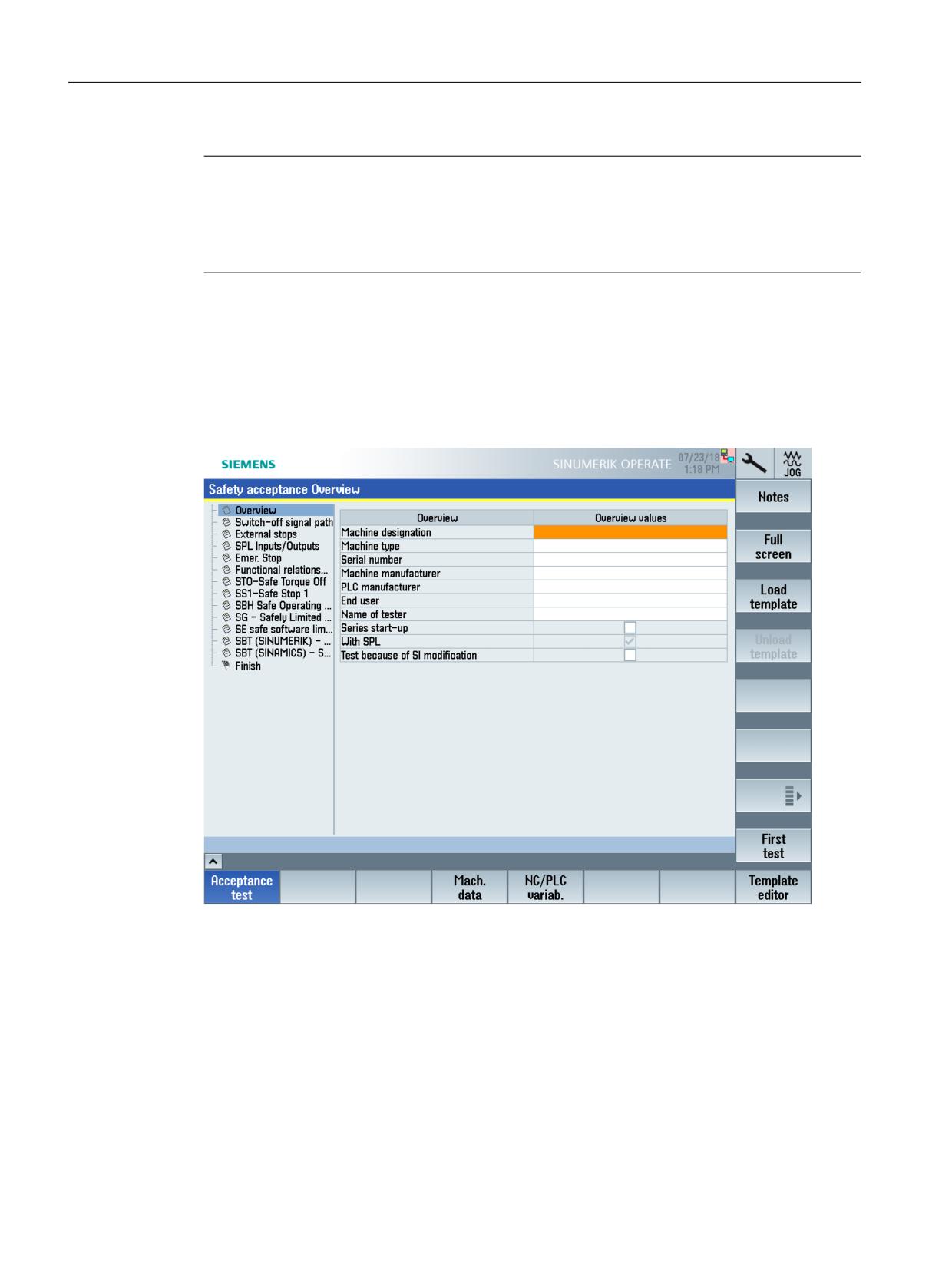
MENU SELECT > Commissioning > Safety > Acceptance test
Figure 3-21
SINUMERIK Operate - Acceptance test wizard (example)
Descriptions of the individual test cases and information to be entered in the acceptance test
wizard can be found directly in the respective input screens.
Working with the acceptance test wizard
With the acceptance test, tests can be carried out with safety functions integrated in the system
(SINUMERIK Safety Integrated) as well as for axes with safety functions integrated in the drives
(SINAMICS Basic). The test results for both versions are included in the certificate that is finally
generated.
SINUMERIK Operate acceptance test
52
Function Manual, 10/2020, 6FC5397-3HP40-0BA1
Acceptance test wizard
3.3 SINUMERIK 840D sl - system-integrated Safety Functions
Available test types/setting ranges
In the left-hand section of the acceptance test basic screen, the test types (switch-off signal path,
STO, SBH, etc.) of the SI functions currently configured in the system are displayed in a selection
list. Test instances can only be created for these - or tests carried out for these.
Access rights
In order that the acceptance test can be started, for all of the components within the scope of
the SI functions to be tested (NC, drive) access rights that permit changes to be made to machine
data and parameters must be active.
Special cases
Gantry axes
As part of an acceptance test, when compared to "standard" SI axes, gantry axes are not handled
in a special way, and are also not specifically designated in the acceptance test user interface.
The following supplementary conditions must be observed:
• Every SI axis of a gantry group is individually tested.
• If it is necessary for a following axis to be traversed for a test, then the leading axis must also
be traversed.
• If the acceptance test mode has to be active when testing an axis of a gantry group, then the
acceptance test mode is active for all SI axes of the gantry group.
Leading/following axes
In the acceptance test, leading/following axes are not handled in a special way that is different
from "standard" SI axes, and are also not specifically identified in the acceptance test user
interface.
The following supplementary conditions must be observed:
• Every SI axis of a leading/following axis group is individually tested.
• If a following axis has to be traversed for a test, the leading axis must also be traversed.
• If the acceptance test mode has to be active when an axis of a leading/following group is
tested, the acceptance test mode is active for all SI axes of the leading/following group.
Modulo rotary axes
Observe the following special issues when recording traces for modulo rotary axes.
Recording errors in the trace can occur when passing the modulo limit <= half of the trace
sampling time. The actual axis position displayed deviates from the real actual position.
SINUMERIK Operate acceptance test
Function Manual, 10/2020, 6FC5397-3HP40-0BA1
53
Acceptance test wizard
3.3 SINUMERIK 840D sl - system-integrated Safety Functions
3.3.3
Test types
3.3.3.1
Overview
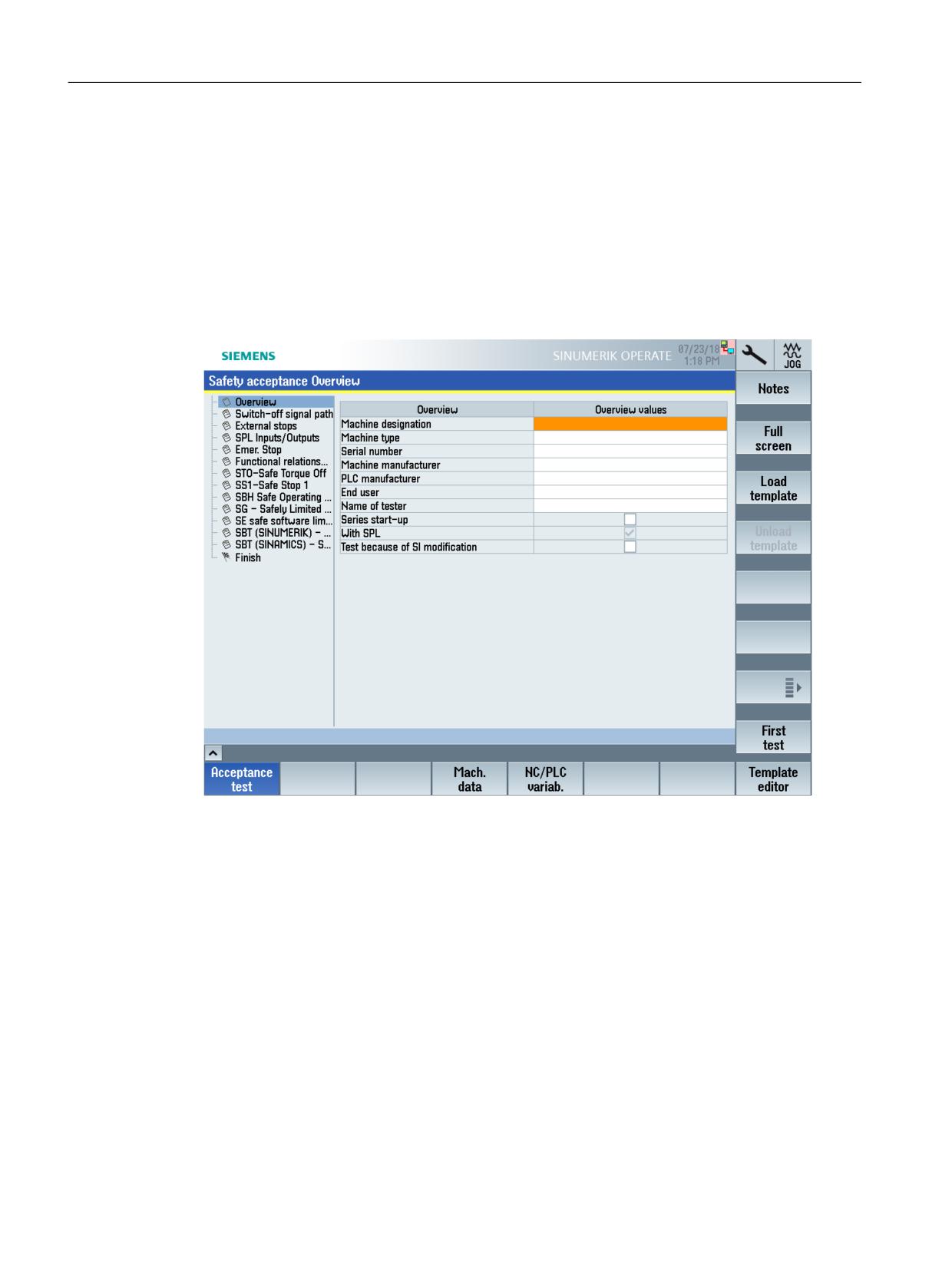
The "Overview" setting area is automatically activated after the acceptance test function is
called. In this setting area, you can either manually enter the required overview values, or load
the content of a template ("Load template" softkey) to the setting area.
The following overview values can be entered:
Figure 3-22
Test type/setting area overview
Series commissioning
If you set the checkmark in the setting area "Overview" for "Series commissioning" under the
overview values, then this has no effect from a functional perspective. This entry is for
information purposes only.
Test as a result of an SI change
If you set the check mark in the "Overview" setting area for "Test as a result of an SI change" under
the overview values, this has no effect in terms of function.
SINUMERIK Operate acceptance test
54
Function Manual, 10/2020, 6FC5397-3HP40-0BA1
Acceptance test wizard
3.3 SINUMERIK 840D sl - system-integrated Safety Functions
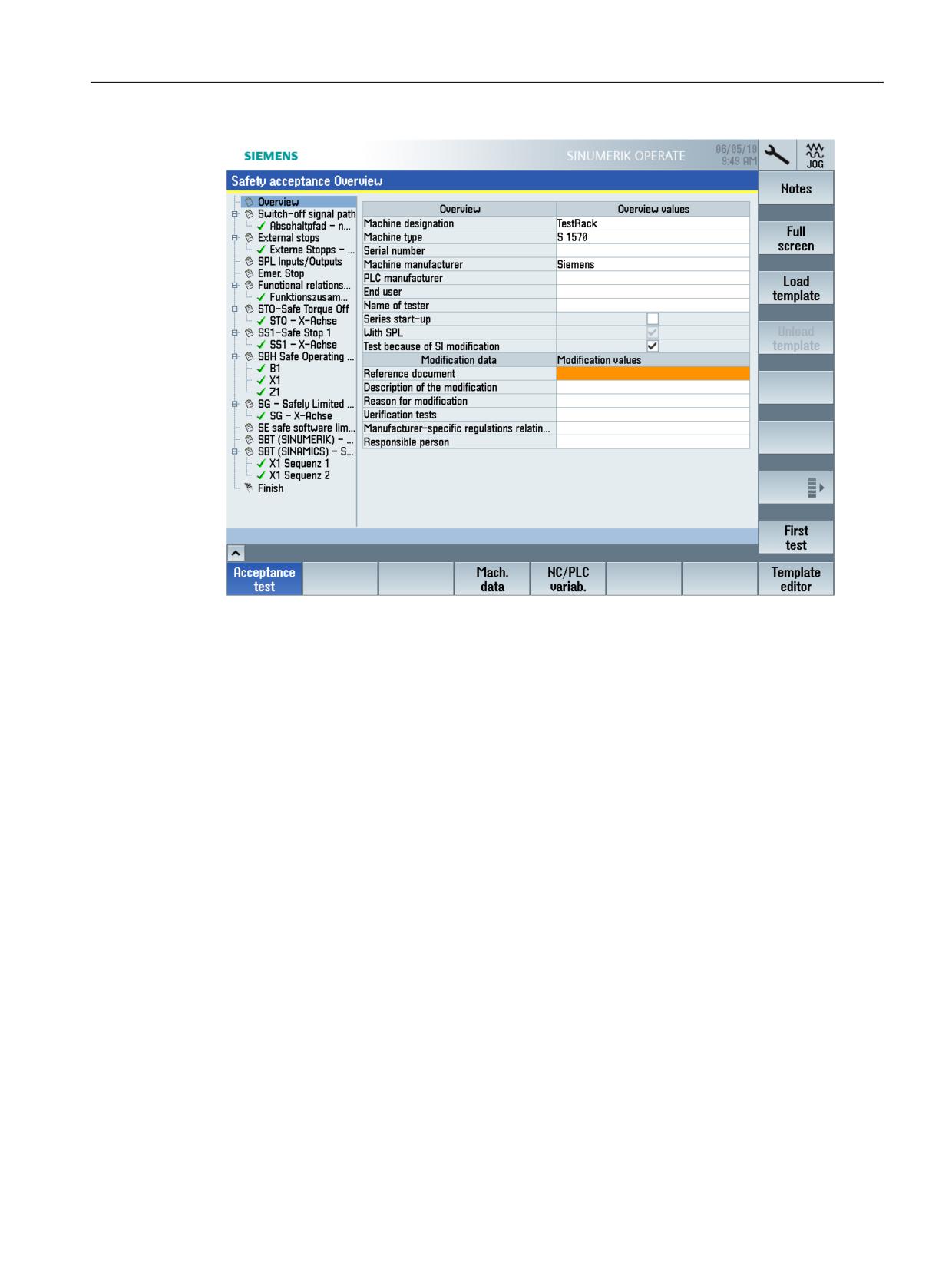
Figure 3-23
Test as a result of an SI change - change values
Here, you document the changes:
• Description of the change
• Reason for the change
• Verification tests required
• Manufacturer-specific regulations taken into account
• Responsibility
3.3.3.2
Test type not required
An acceptance test can be carried out for every safety function used on the machine. Not all of
the Safety functions listed in the dialog are used on the machine. Therefore, in the acceptance
test wizard, you can set the acceptance test (test type) for individual Safety Functions to not
required.
A test can be predefined using a customizing template. You can also hide test types from the
customized template as required.
SINUMERIK Operate acceptance test
Function Manual, 10/2020, 6FC5397-3HP40-0BA1
55
Acceptance test wizard
3.3 SINUMERIK 840D sl - system-integrated Safety Functions
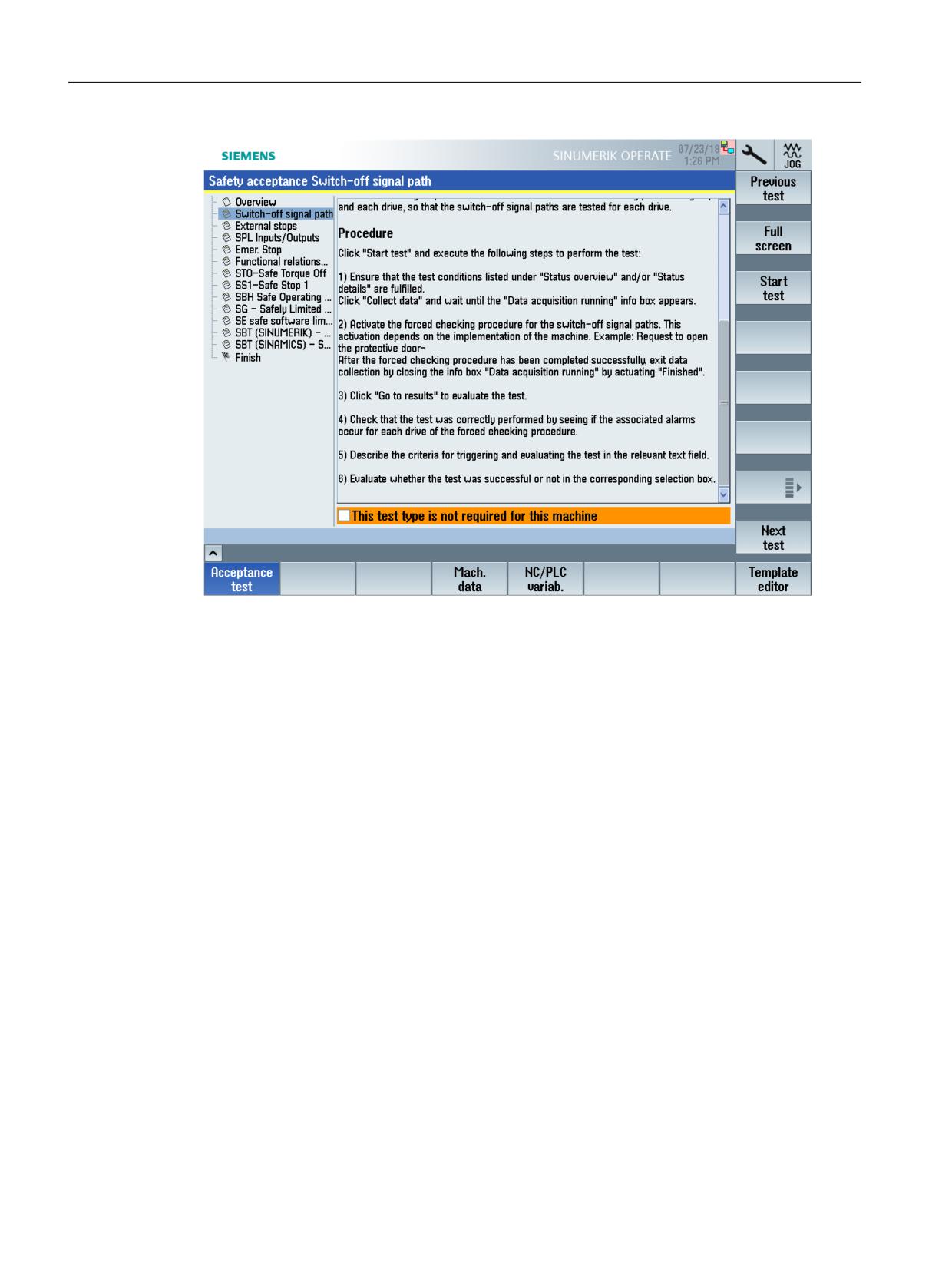
Figure 3-24
Setting the test type to not required
If the test type is not required, set the checkmark for "This test is not required for this machine".
Press the "Next test" softkey.
This information is listed in the certificate accordingly.
SINUMERIK Operate acceptance test
56
Function Manual, 10/2020, 6FC5397-3HP40-0BA1
Acceptance test wizard
3.3 SINUMERIK 840D sl - system-integrated Safety Functions
3.3.3.3
Switch-off signal path
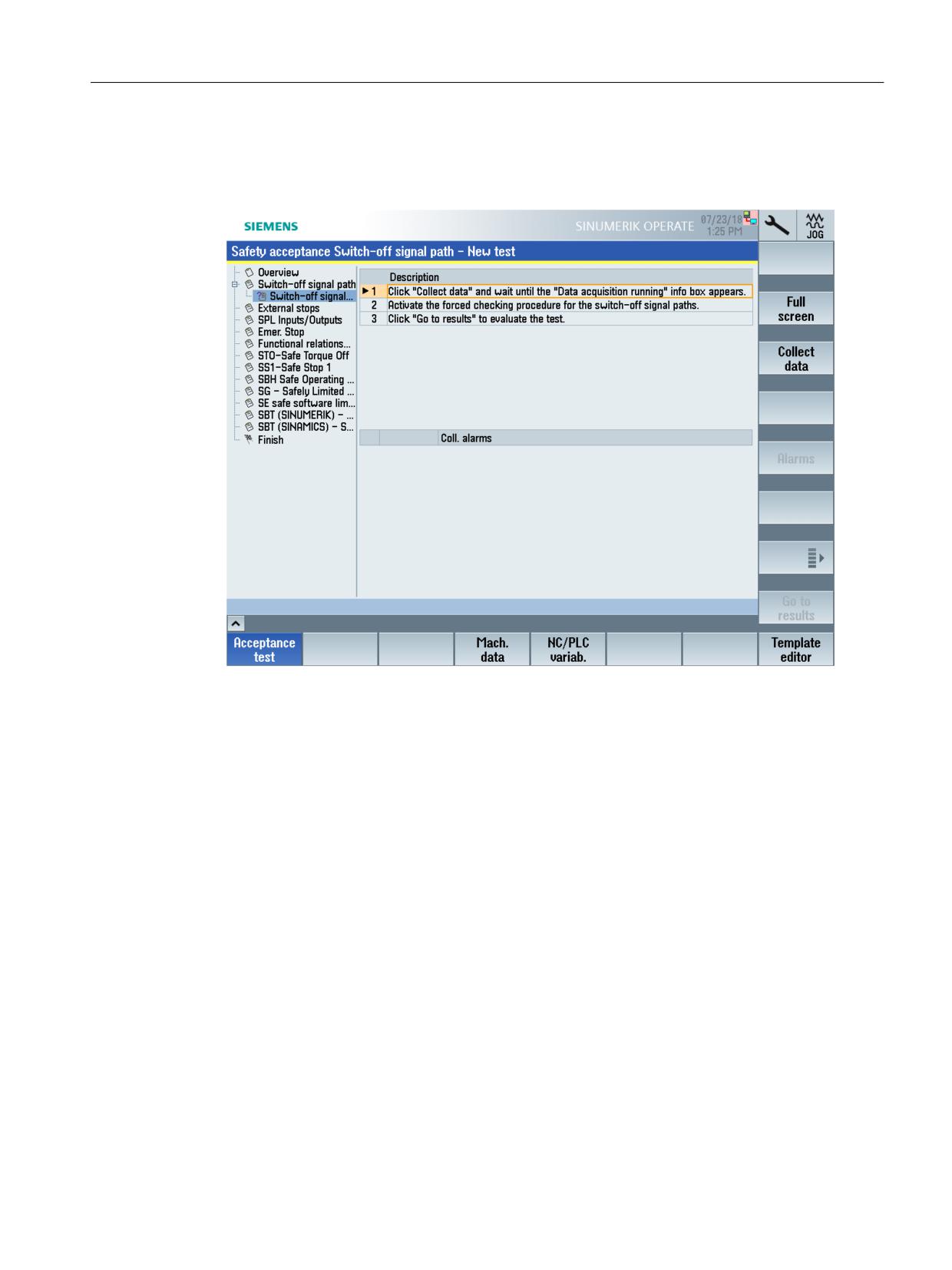
To test the switch-off signal paths, carefully follow the instructions in the detailed display.
Figure 3-25
Test type/setting range switch-off signal path
You can make the following settings here, for example:
• Enter conditions to initiate the test
• Select acquired alarms that should appear in the report
• Confirm a test result
3.3.3.4
Function relations
User-specific test cases for safety-related functions can be saved in test type "Function relations".
After the test case has started, the user executes the steps required at the system itself. He
observes the response/behavior, and documents the test result that has been monitored.
Example of a function to be tested
When the machining area door is opened, safety function "Safe operating stop" (SBH) must be
selected for all axes of mode group 1 (BAG 1).
Trace
When creating a test instance, a user-defined trace can be activated, which documents the
signal characteristic of the signals that are relevant for the particular test case.
SINUMERIK Operate acceptance test
Function Manual, 10/2020, 6FC5397-3HP40-0BA1
57

Acceptance test wizard
3.3 SINUMERIK 840D sl - system-integrated Safety Functions
A trace can be parameterized for the "Functional relations" test type. The XML file must be stored
in the directory ...\safety\atw\trace in order to be able to select the trace for this test case.
Table 3-3
File information
File name:
<name>.xml
Path:
...\user\sinumerik\hmi\data\safety\atw\trace
Note
Default path for the trace template: ...\user\sinumerik\hmi\data\trace
Axis-specific trace variables
If axis-specific variables are contained in the trace, a safety-related axis can be selected before
recording the trace data. The data associated with this axis are marked in the trace, even if a
different axis was parameterized in the trace file.
Only signals in the "/Nck/MachineAxis/..." and "/Nck/ServoData/..." areas are replaced by the
selected axis.
If an axis is not selected for the test case, then the data of the axis parameterized in the trace
template are recorded.
3.3.4
Application example
3.3.4.1
Configuring and performing an acceptance test
The following example shows the typical procedure for configuring and performing an
acceptance test.
SINUMERIK Operate acceptance test
58
Function Manual, 10/2020, 6FC5397-3HP40-0BA1
Acceptance test wizard
3.3 SINUMERIK 840D sl - system-integrated Safety Functions
Procedure:
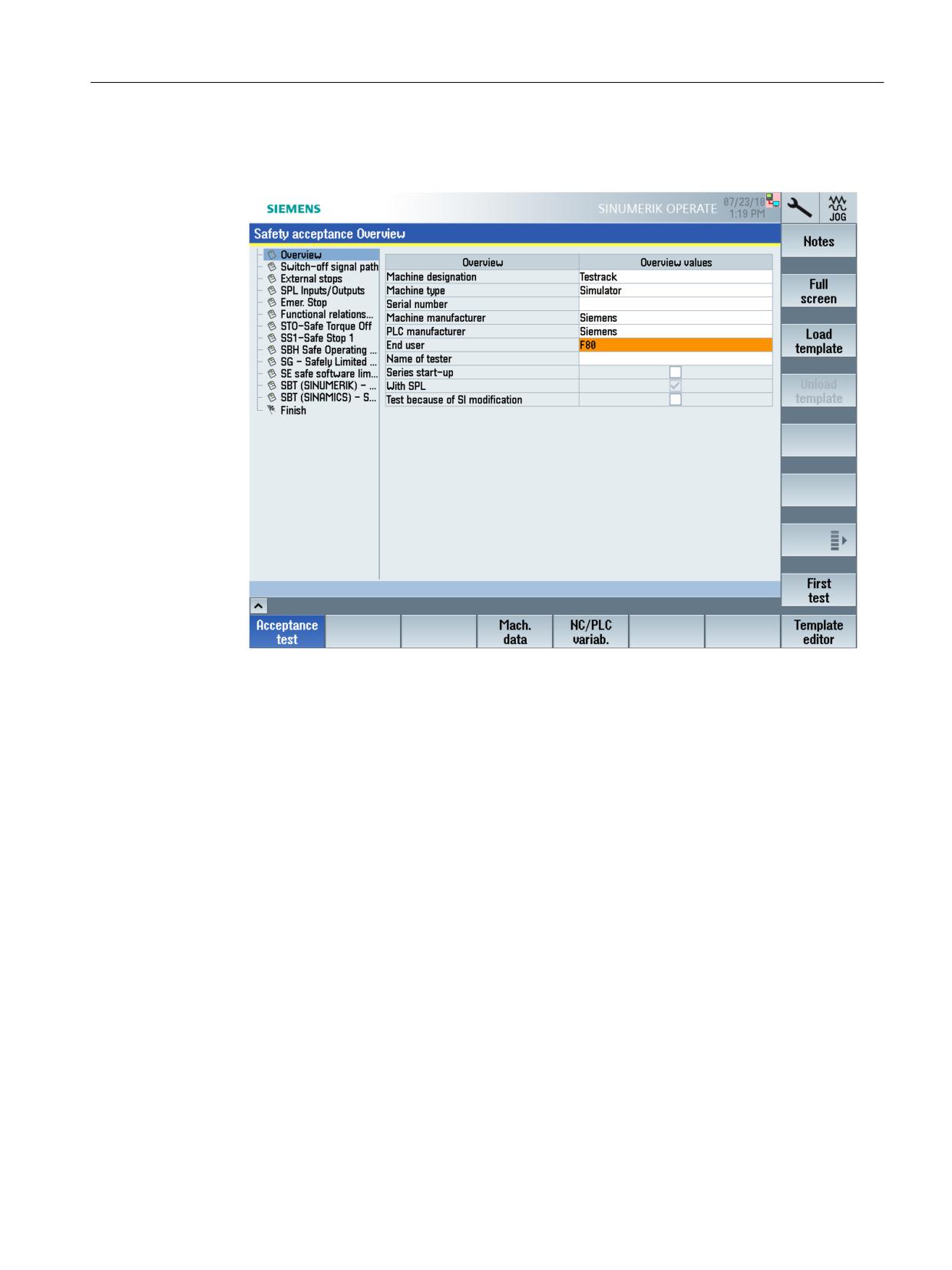
1. Enter the information required for the machine in the "Overview" setting area.
Figure 3-26
Example - Safety acceptance test overview
2. Press the "First test" softkey.
The "Switch-off signal path" setting area/test type becomes active.
If you do not wish to use this test, in this setting area, activate option "This test type is not
required for this machine". Also in other setting areas you can deactivate the particular test
in the same way.
SINUMERIK Operate acceptance test
Function Manual, 10/2020, 6FC5397-3HP40-0BA1
59
Acceptance test wizard
3.3 SINUMERIK 840D sl - system-integrated Safety Functions
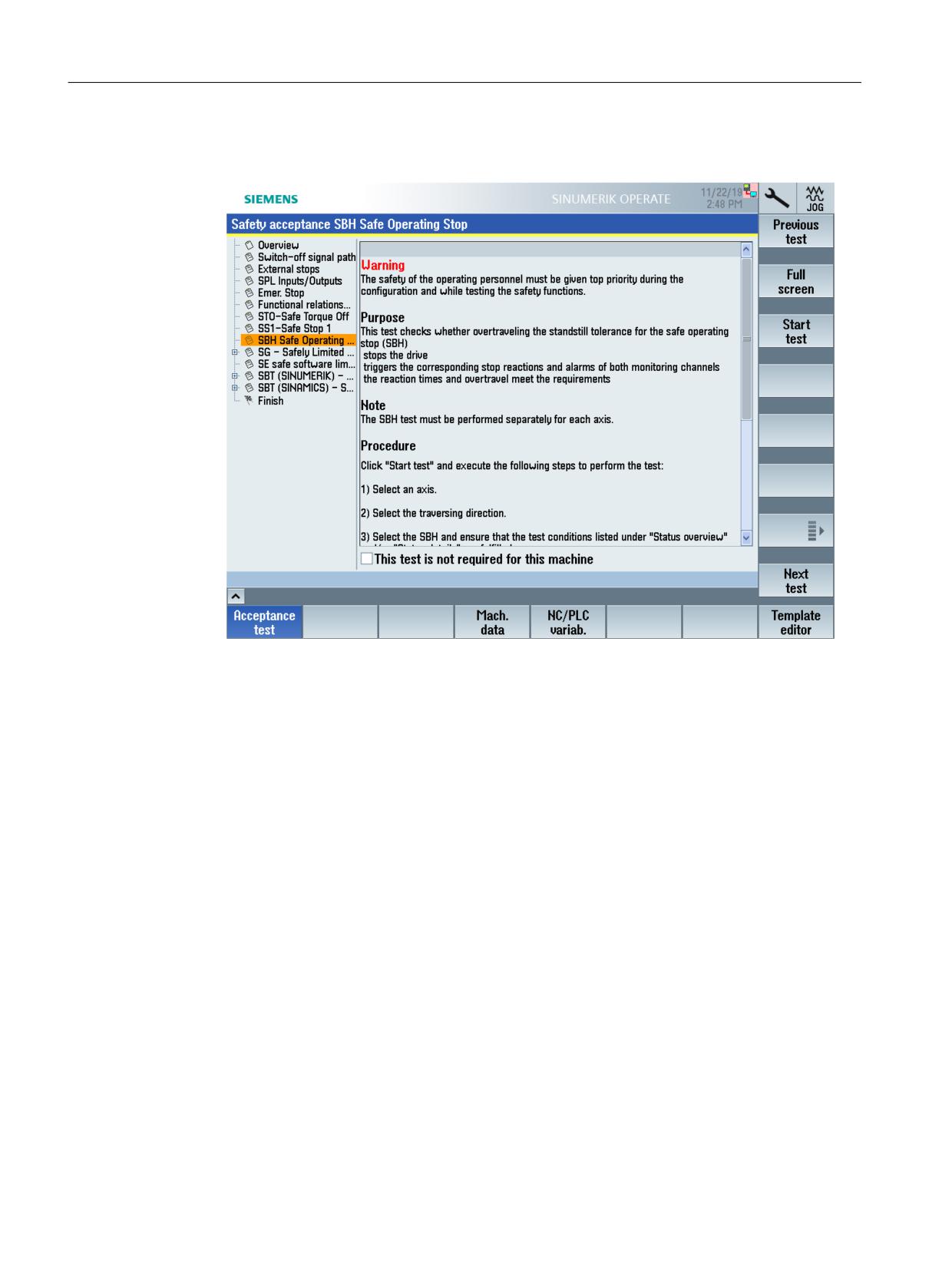
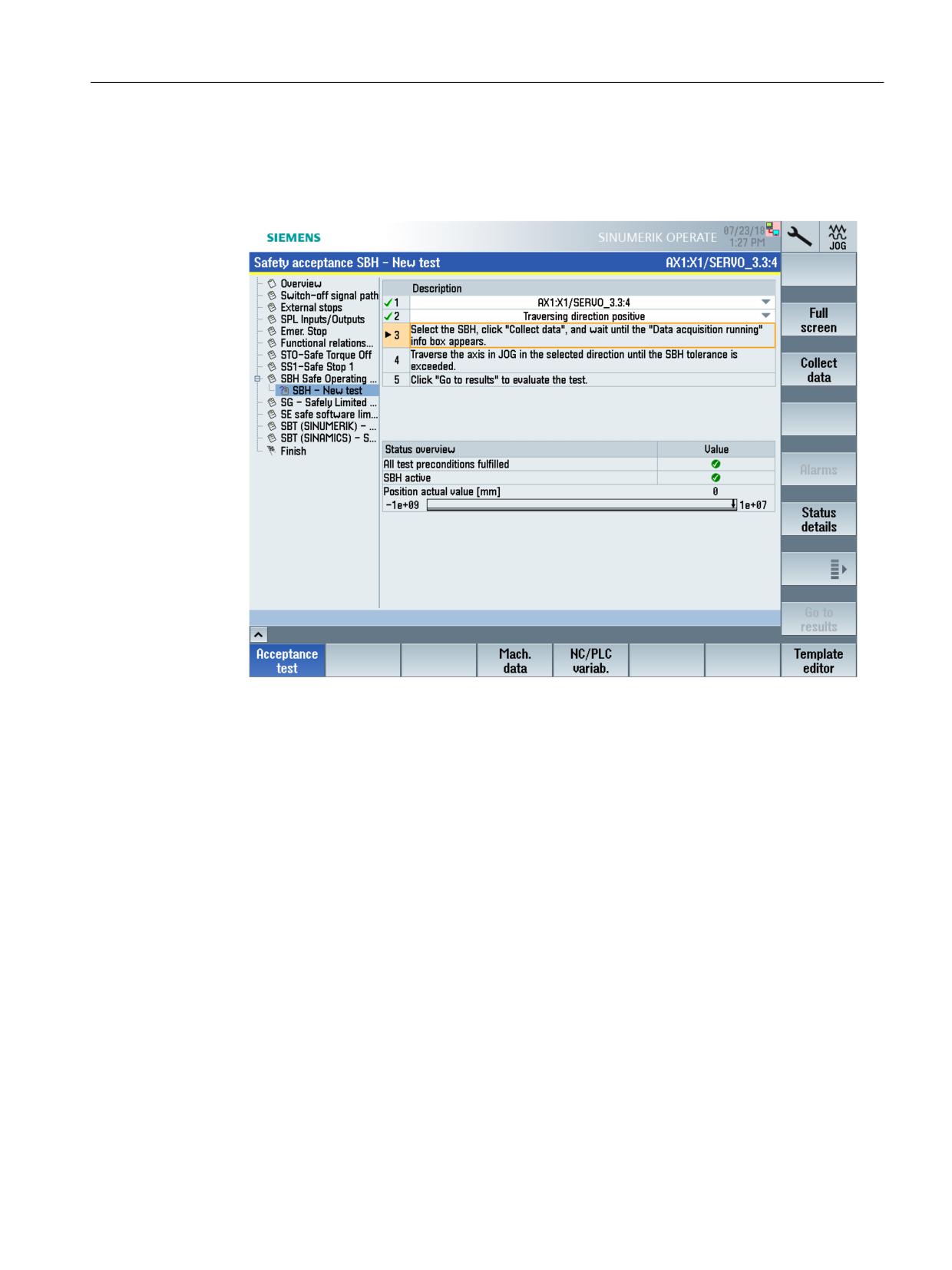
3. If you do not want to begin with the test type "Switch-off signal path", select the desired test
type; SBH in the example.
Figure 3-27
Example - Test type: SBH - Safe Operating Stop
SINUMERIK Operate acceptance test
60
Function Manual, 10/2020, 6FC5397-3HP40-0BA1
Acceptance test wizard
3.3 SINUMERIK 840D sl - system-integrated Safety Functions
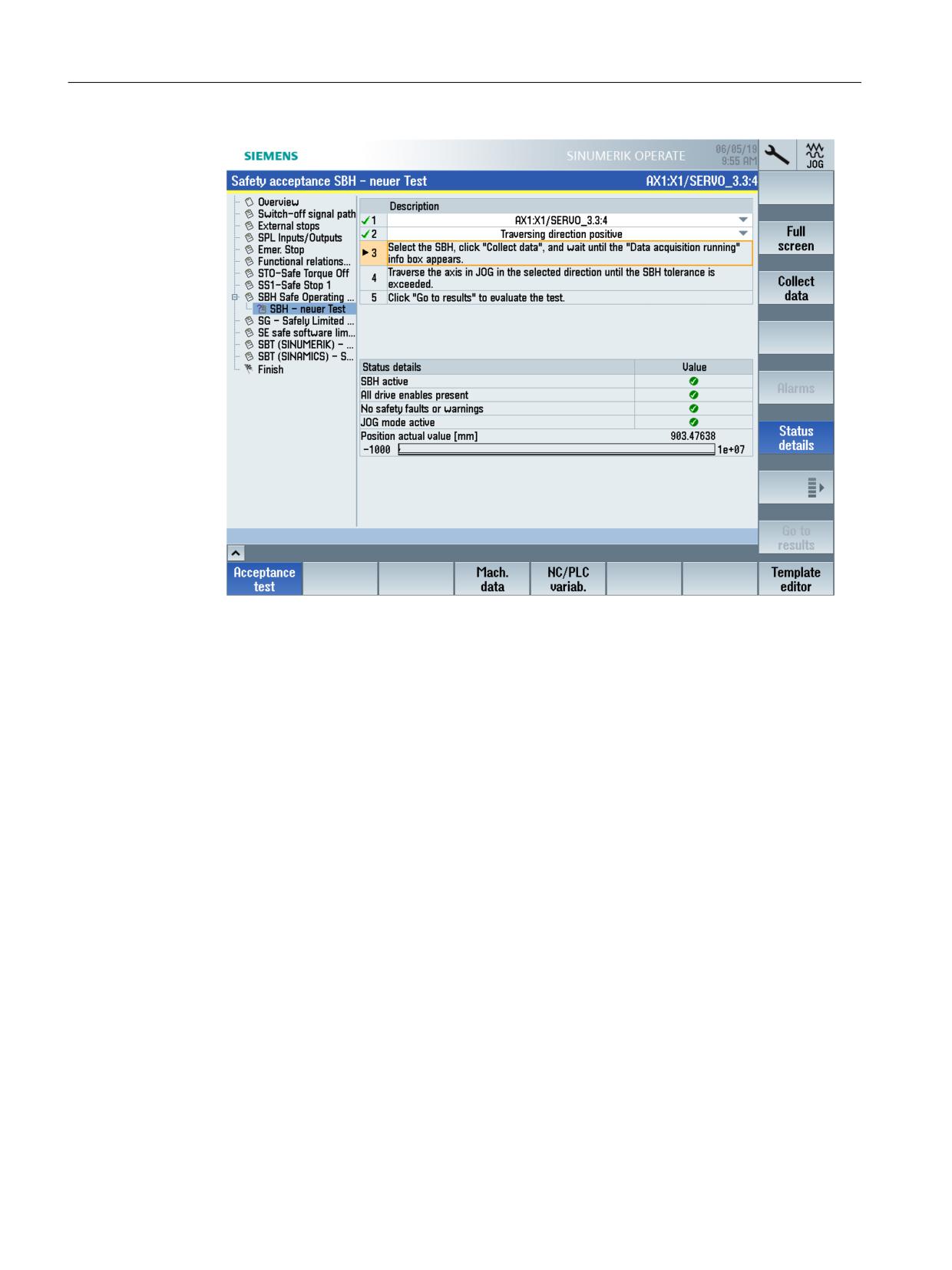
4. Press the "Start test" softkey.
A list of all of the activities required for the test is shown to the right in the detailed display.
Select the axis to be tested and the traversing direction for the test.
Check the "Status overview" to view whether all preconditions have been met.
Figure 3-28
Example - Safety acceptance test: SBH
Open the detailed display by pressing the "Status details" softkey.
SINUMERIK Operate acceptance test
Function Manual, 10/2020, 6FC5397-3HP40-0BA1
61
Acceptance test wizard
3.3 SINUMERIK 840D sl - system-integrated Safety Functions
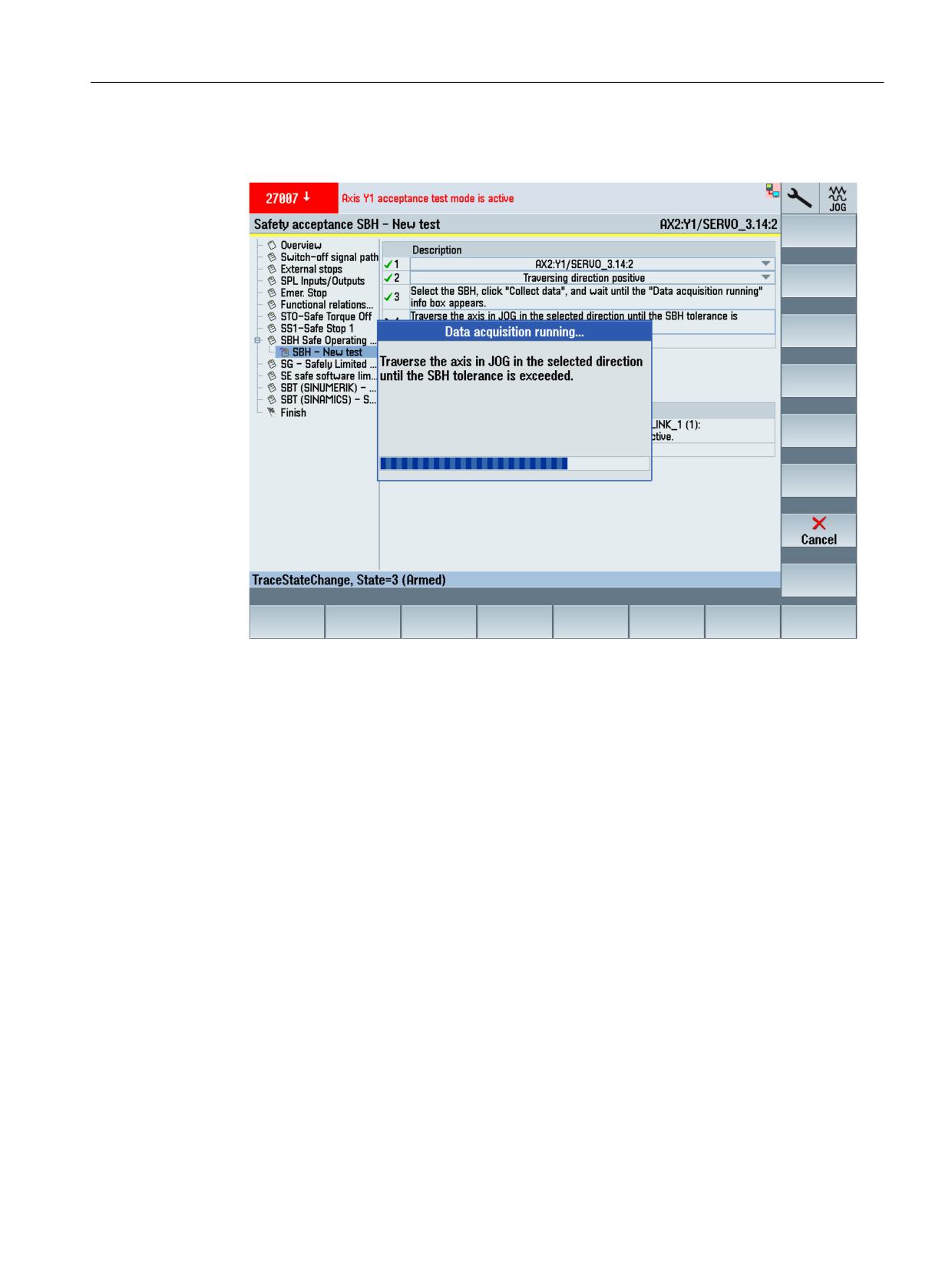
Figure 3-29
Example - Safety acceptance test: SBH, status details
SINUMERIK Operate acceptance test
62
Function Manual, 10/2020, 6FC5397-3HP40-0BA1
Acceptance test wizard
3.3 SINUMERIK 840D sl - system-integrated Safety Functions
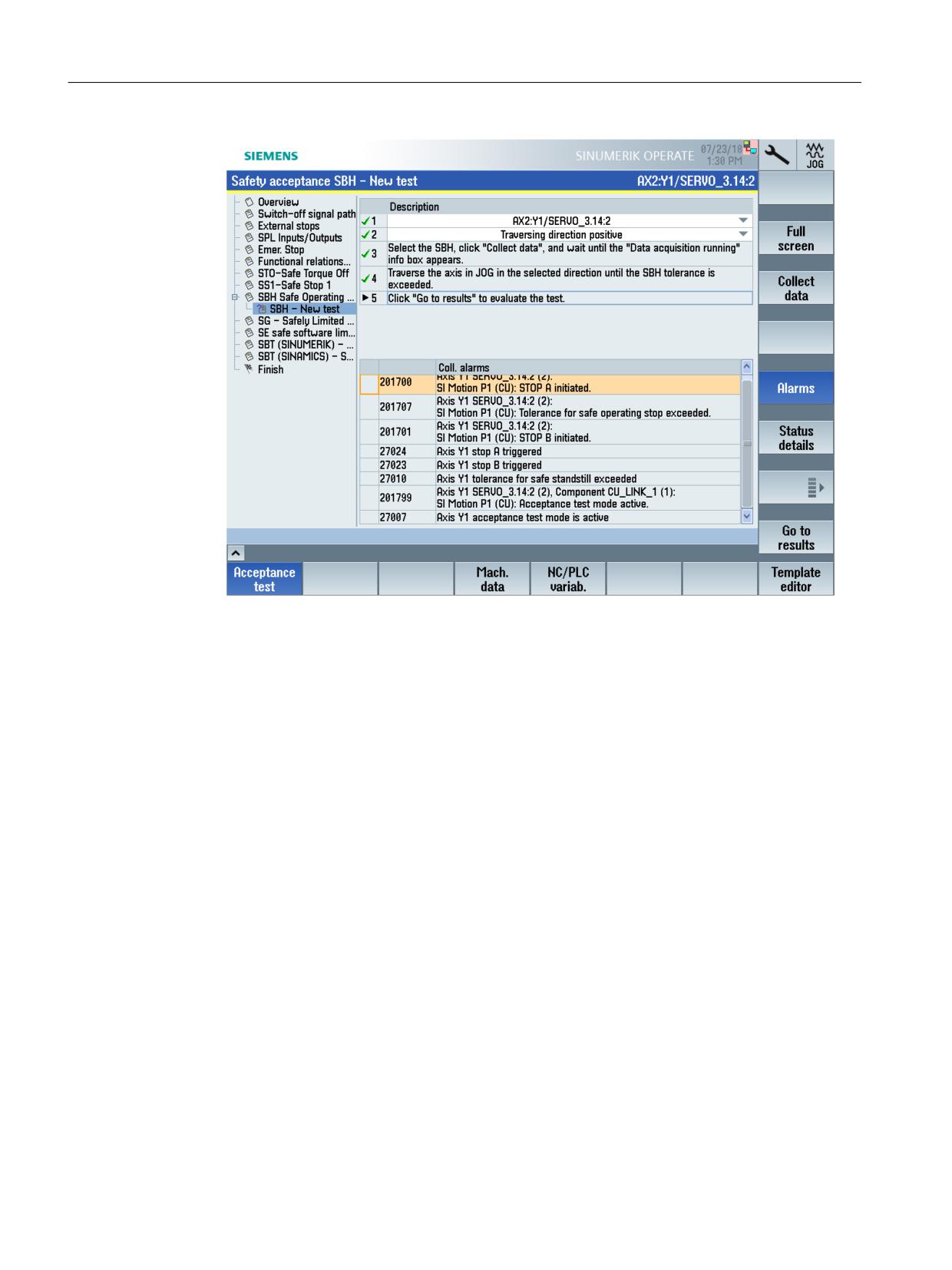
5. Press the "Collect data" softkey.
Then follow the instructions which appear on your screen.
Figure 3-30
Example - Safety acceptance test: SBH, acquire data
Data acquisition is concluded automatically as soon as limit value violation is detected. The
alarms that have been collected are then listed in the detailed view.
SINUMERIK Operate acceptance test
Function Manual, 10/2020, 6FC5397-3HP40-0BA1
63
Acceptance test wizard
3.3 SINUMERIK 840D sl - system-integrated Safety Functions
Figure 3-31
Example - Safety acceptance test: SBH, collected alarms
6. Press the "Go to results" softkey.
After the acceptance test, the alarms that occurred are listed and a trace generated with the
relevant signals.
SINUMERIK Operate acceptance test
64
Function Manual, 10/2020, 6FC5397-3HP40-0BA1
Acceptance test wizard
3.3 SINUMERIK 840D sl - system-integrated Safety Functions
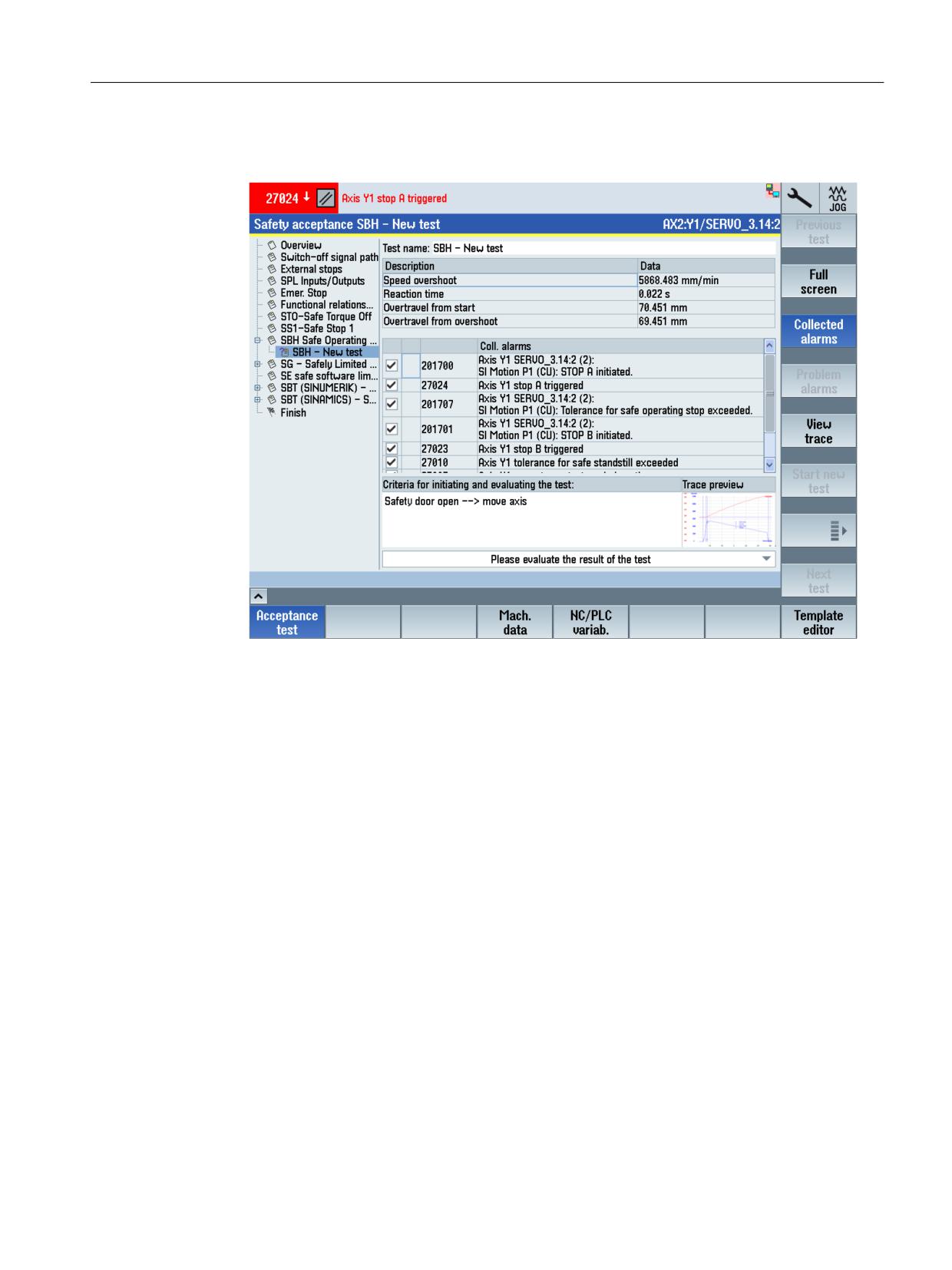
7. Enter the conditions to initiate the test.
An entry is mandatory here in order to be able to start additional steps.
Figure 3-32
Example - Safety acceptance test: SBH, criteria for initiation of the test
SINUMERIK Operate acceptance test
Function Manual, 10/2020, 6FC5397-3HP40-0BA1
65
Acceptance test wizard
3.3 SINUMERIK 840D sl - system-integrated Safety Functions
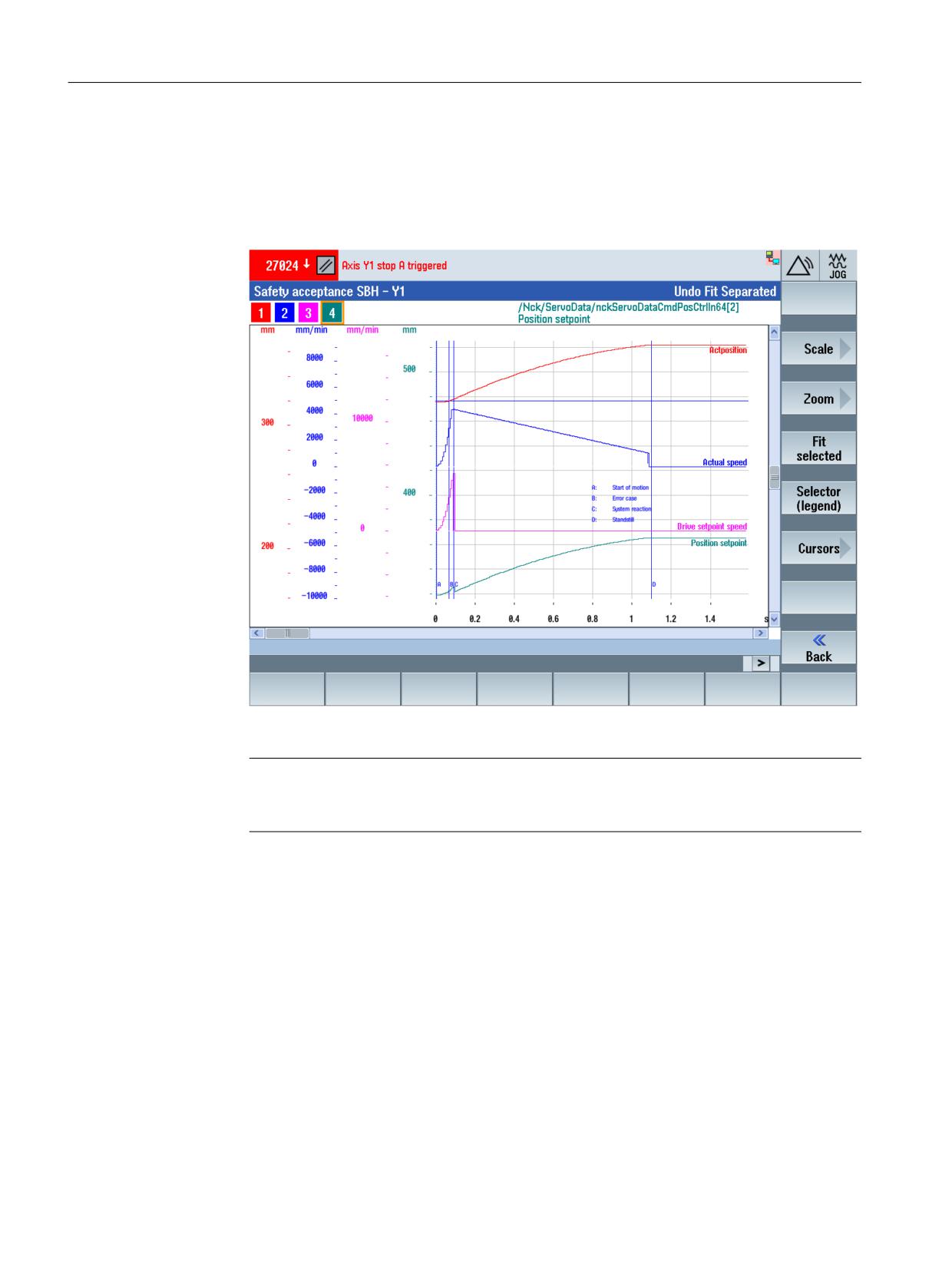
8. Then evaluate the test result. Then check the list as to whether all of the expected alarms have
occurred, and whether the results in the trace recording are correct.
- To display the trace recording, press the "View trace" softkey.
The trace for this test is displayed in the input screen. You can change the display as
needed.
Figure 3-33
Example - Safety acceptance test: SBH, trace
Note
In the event of problems with the trace recording, you will find information on clearing the
problem under "Tips and tricks (Page 105)".
- The "Back" softkey will take you back to the default view of the input screen.
SINUMERIK Operate acceptance test
66
Function Manual, 10/2020, 6FC5397-3HP40-0BA1
Acceptance test wizard
3.3 SINUMERIK 840D sl - system-integrated Safety Functions
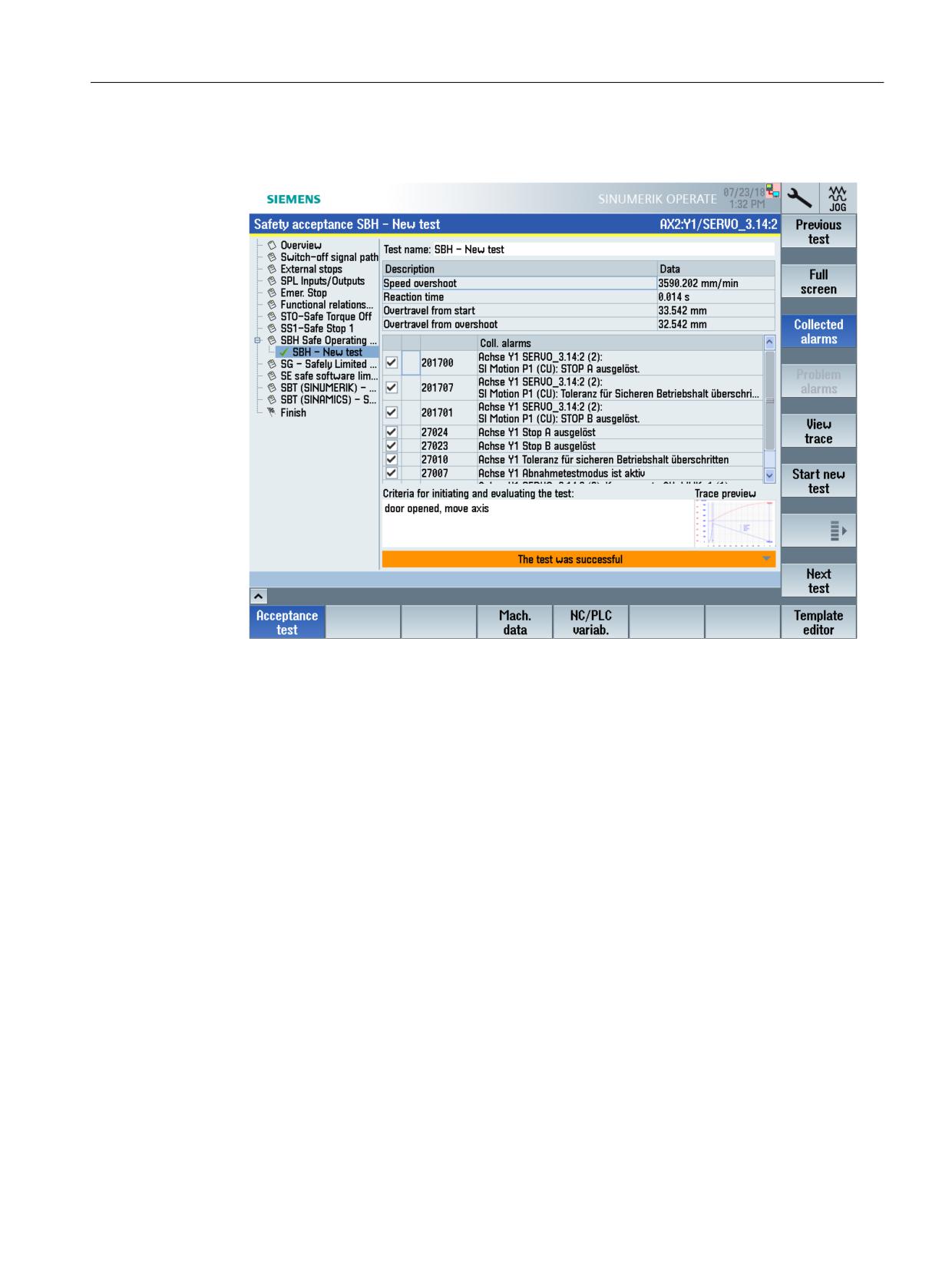
9. Make a selection in the bottom right of the default view to define whether the test (in this
case: SBH) was successful.
Figure 3-34
Example - Safety acceptance test: SBH, evaluate result
The test name is marked with a green checkmark if the test was evaluated to be positive. In
this case, you can either perform another test in the active setting area by pressing softkey
"Start new test" - or you can initiate the next test in the following setting area by pressing
softkey "Next test".
If the test was evaluated to be negative, then the test name is assigned a red cross and if
necessary, you can repeat the test.
Define which of the listed alarms should be subsequently documented in the acceptance
report.
Remove the check mark (left) for all alarms that should not be documented in the report.
10.Change the pre-assigned test names as required.
11.Press softkey "Start new test" if you wish to test another axis.
The setting area for an additional axis for this test type is now shown in the detailed display.
SINUMERIK Operate acceptance test
Function Manual, 10/2020, 6FC5397-3HP40-0BA1
67
Acceptance test wizard
3.3 SINUMERIK 840D sl - system-integrated Safety Functions
12.Press the "Next test" softkey if you wish to perform a test for the next test type. A list of the
necessary activities for this particular test type is shown in the detailed display.
13.Follow the instructions on the screen (generally these involve steps 3 to 13).
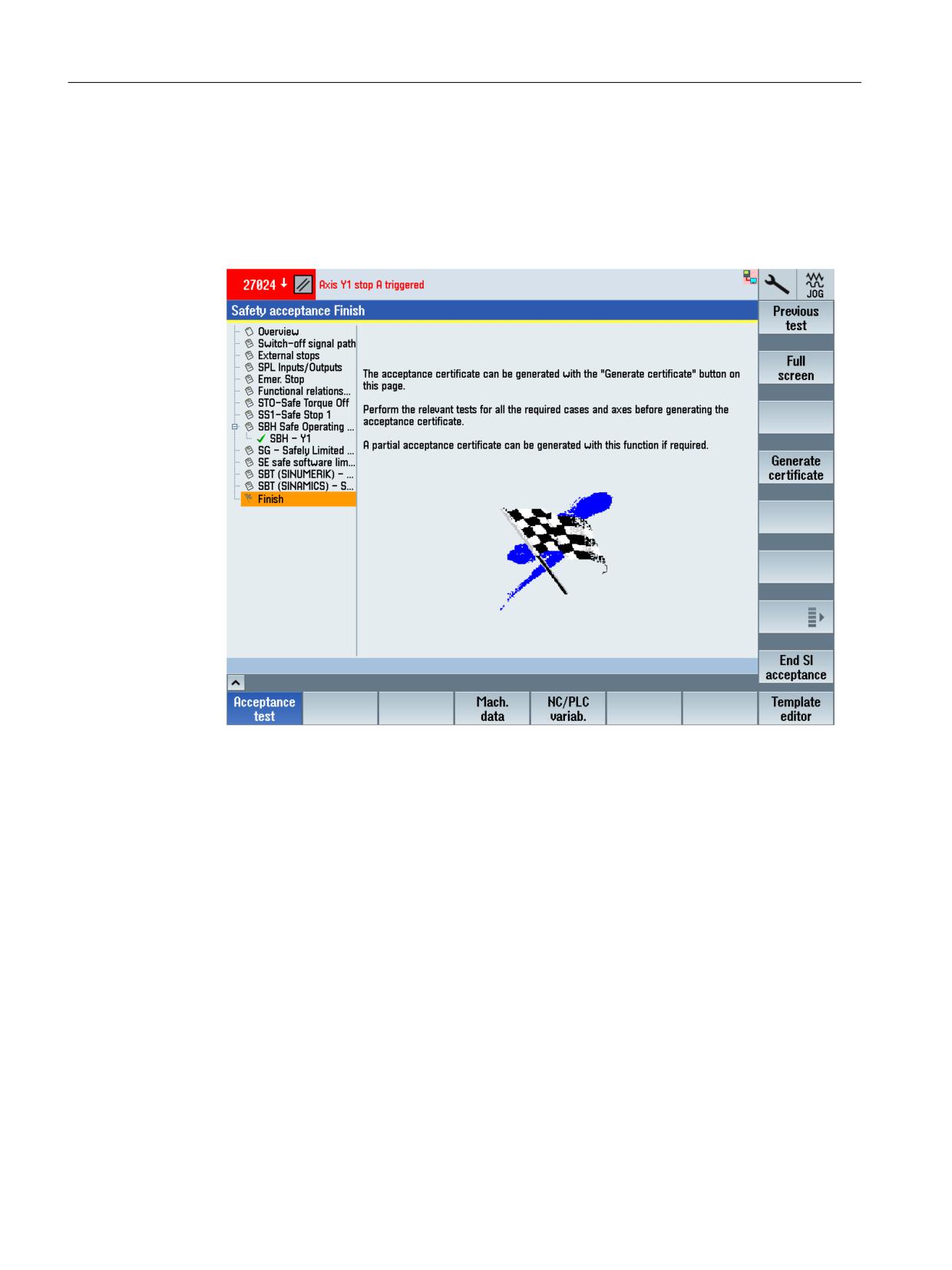
After all tests of the individual setting areas have been performed, at the end, the "Finish"
setting area is displayed. In this setting area, you can generate the acceptance report from
the acceptance test and save it (Page 69).
Figure 3-35
Example - Finish
Supplementary functions
• Full screen
Hides the list of the setting areas and displays the detail settings of the currently selected
setting area over the complete screen width.
• Load template (Page 75)
Loads a template (*.xml), which can also be externally created.
The template must be located in directory .../user/sinumerik/hmi/data/safety/atw/
templates.
• Export template (Page 75)
Exports the current acceptance test as template (in XML format). The template contains a list
of all of the implemented tests that must be carried out for the acceptance test. Further, all
of the texts of the complete acceptance test are included; e.g. details about the machine on
the overview page.
• Save results (Page 78)
Saves the result file (*.atw) to directory .../user/sinumerik/hmi/data/safety/atw/results.
SINUMERIK Operate acceptance test
68
Function Manual, 10/2020, 6FC5397-3HP40-0BA1
Acceptance test wizard
3.3 SINUMERIK 840D sl - system-integrated Safety Functions
• Load results (Page 78)
Loads the saved results from a directory. This function is useful if the test is exited before
completion and you wish to continue at the position where you left off.
• Start new test
Starts an additional test in the currently displayed setting area.
• Repeat test
Repeats a selected test in the currently displayed setting area.
• Delete test
Deletes the currently marked test.
• Go to overview
Jumps from the current setting area into the "Overview" setting area.
• Finish
Skips the following setting area and jumps directly to the "Finish" setting area.
• View trace
Displays the trace that was recorded when carrying out the test.
• End SI acceptance
Exits the acceptance test for the Safety Integrated functions.
3.3.4.2
Generating and saving an acceptance report/certificate
After completing all of the acceptance tests, in the "Finish" setting area, you can generate a
certificate for the acceptance report and save it.
Figure 3-36
Example - Safety acceptance, finish
SINUMERIK Operate acceptance test
Function Manual, 10/2020, 6FC5397-3HP40-0BA1
69
Acceptance test wizard
3.3 SINUMERIK 840D sl - system-integrated Safety Functions
A typical procedure for generating an acceptance report/certificate is shown based on the
following example.
Procedure
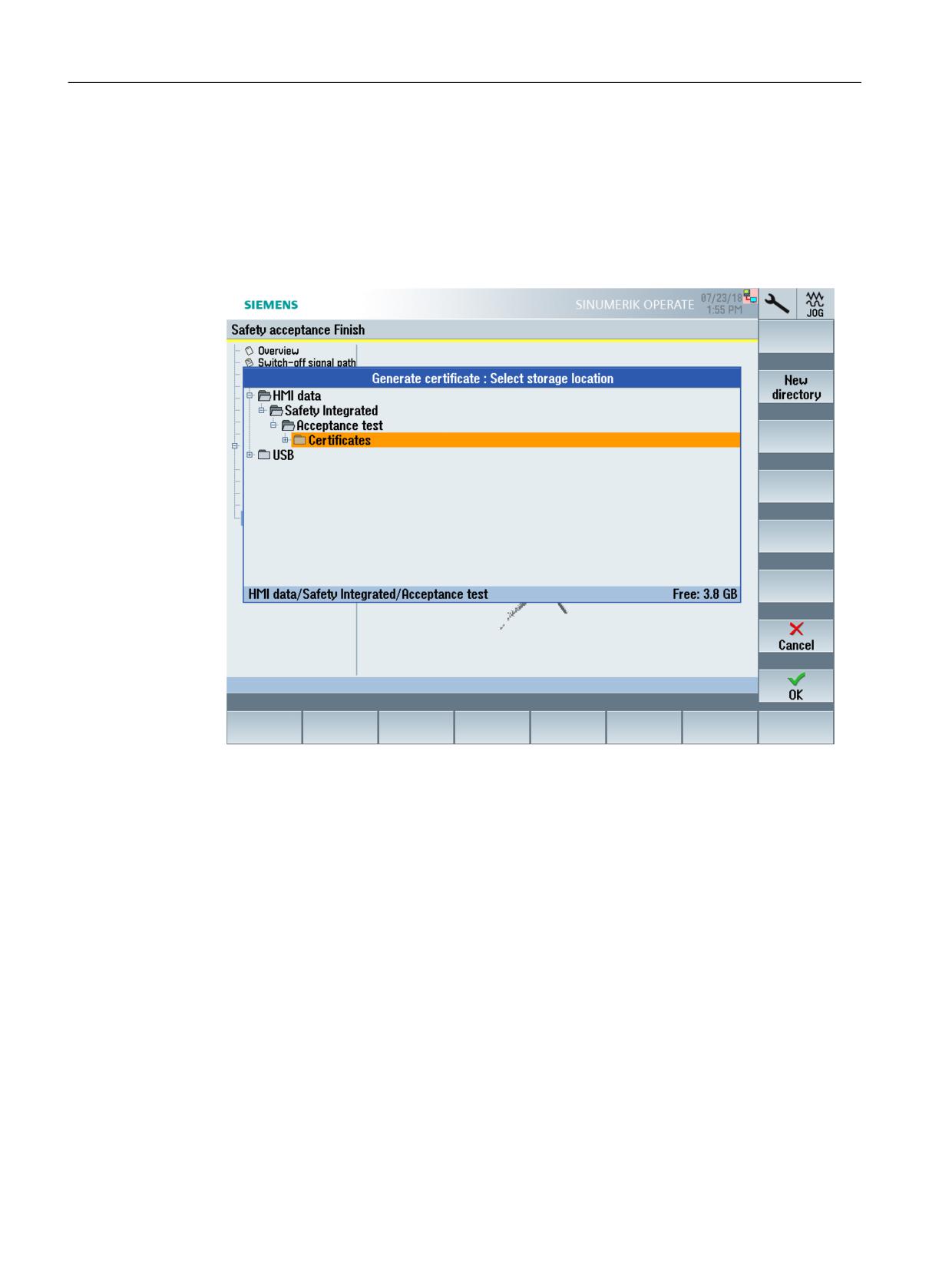
1. Press the "Generate certificate" softkey to generate a certificate from the acceptance report.
The standard file archive is displayed.
Figure 3-37
Example - Safety acceptance, save certificate
2. Select a directory or create a new one. Then press the "OK" softkey to confirm your selection.
You are prompted to assign a name for the future certificate.
3. Enter the certificate name here. Then press the "OK" softkey to confirm your entry.
The certificate is then saved in the selected archive folder as RTF file. As a result of the RTF
format, the certificate can be subsequently supplemented, e.g. to include a machine
diagram.
3.3.5
Acceptance test mode
For specific test types, the acceptance test mode is activated for the axis and/or the drive involved
while the test is being performed.
SINUMERIK Operate acceptance test
70
Function Manual, 10/2020, 6FC5397-3HP40-0BA1
Acceptance test wizard
3.3 SINUMERIK 840D sl - system-integrated Safety Functions
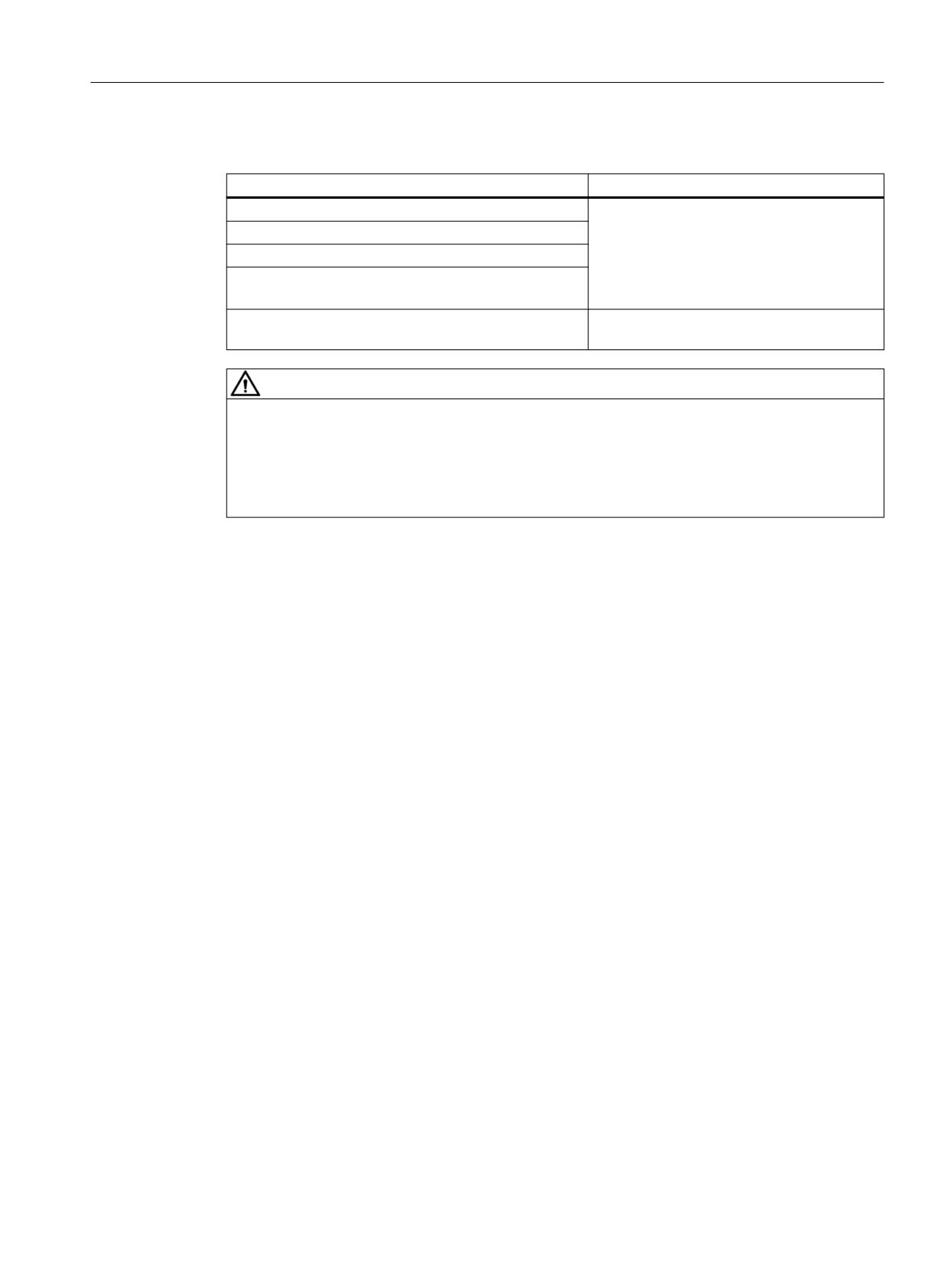
Activating the acceptance test mode has the following effects:
Acceptance test
Effects
Axis: Safely reduced speed (SG)
• Safety Integrated-specific power on
Axis: Safe Operating Stop (SBH)
alarms can be acknowledged using a chan-
nel reset.
Drive: Safely reduced speed (SG)
• The setpoint speed limit is deactivated.
Drive: Safe Operating Stop (SBH)
• It is run with $MA_MAX_AX_VELO.
Axis: Safe software limit switches (SE)
The software limit switches of the axis are de-
activated.
WARNING
Unexpected axis motion at speed setpoint ≠ 0
If a speed setpoint ≠ 0 is present, the active stop function SS2 is set, and the motor is at a
standstill (active SOS), the axis starts to move as soon as the acceptance test is activated. If
persons are in the danger zone, accidents causing death or severe injury can occur.
• Take suitable measures to ensure that nobody is in the danger zone.
Time limit
The acceptance test mode may only be active for a limited time - and only during a test. After the
parameterized time has elapsed, the acceptance test mode of NCK and drive is reset
automatically. Even if the test has not yet been completed. As a consequence, the test is
canceled.
If it crystallizes out that the default value is too short, then the time limit can be increased using
the following parameters:
• Safety Integrated
- MD36958 $MA_SAFE_ACCEPTANCE_TST_TIMEOUT (time limit for acceptance test
duration)
- p9558 SI Motion acceptance test mode time limit (Control Unit)
3.3.6
Manufacturer-specific configurations (slatw.ini)
General user-specific and test-specific settings can be made in file slatw.ini.
For SINUMERIK Operate, the file is located under the following directory:
• .../siemens/sinumerik/hmi/cfg
To activate user-specific settings, a file must be created under the same name in the user
directory:
• .../user/sinumerik/hmi/cfg
The subsequently described changes can be entered into this file.
SINUMERIK Operate acceptance test
Function Manual, 10/2020, 6FC5397-3HP40-0BA1
71

Acceptance test wizard
3.3 SINUMERIK 840D sl - system-integrated Safety Functions
NC/PLC interface signals (only SINUMERIK 840D sl)
The following NC/PLC interface signals can be defined in section [General]:
• Interface signal PLC → NC: "PLC commissioning completed"
Entry: PLCCommCompleteBit=<DBxy.DBXy.z>
Program code
[General]
PLCCommCompleteBit=DBxy.DBXy.z
• Interface signal NC → PLC: "Acceptance test was started"
Entry: WizardRunningPLCBit=<DBxy.DBXy.z>
Program code
[General]
WizardRunningPLCBit=DBxy.DBXy.z
Note
The interface signal is not reset in the following situations
• When the user interface software crashes, e.g. SINUMERIK Operate.
• When the operating system crashes, under which the user interface software is running,
e.g. SINUMERIK Operate.
• If the user interface, e.g. SINUMERIK Operate, is connected with several NCs - using the
1:N function - then the interface signal is only reset for the NC with which the user
interface is currently connected.
• The "WizardRunningPLCBit" is reset if the acceptance test is explicitly exited using softkey
"Exit acceptance test".
Test type-specific settings
In the section available for each test type (see Table below "Test-type-specific sections"), a user-
specific string can be specified, which when executing a test of this type, is displayed in the
acceptance test or is entered in the certificate and the customized template.
Entry: TestName=
Parameter %<x>, e.g. %1 for the name of the axis selected for the test case, can be included in
the string. The possible parameters are specified in the relevant section.
When displaying the string in the acceptance test, the parameter is replaced by the actual value
at the instant that the test is being performed.
The string must be specified without quotation marks.
Example
The following data are entered in the test case:
• Name of the test case: "Open the door"
• The selected axis
• The number of the test case
SINUMERIK Operate acceptance test
72
Function Manual, 10/2020, 6FC5397-3HP40-0BA1

Acceptance test wizard
3.3 SINUMERIK 840D sl - system-integrated Safety Functions
Table 3-4
File: .../user/sinumerik/hmi/cfg/slatw.ini
Program code
[TESTFR]
TestName=open door, axis = %1, number = %4
Two test cases are performed in the acceptance test for test type "Function relations":
• Test case 1: Axis X1
• Test case 2: Axis Y1
The following are displayed or entered for the test cases at the user interface of the acceptance
test, in the certificate and in the customized template:
• Test case 1: Open door, axis = X1, number = 1
• Test case 2: Open door, axis = Y1, number = 2
Test type-specific sections
Section
Test type
[TESTPD]
Switch-off signal path
[TESTXS]
External stops
[TESTSPL]
SPL inputs/outputs
[TESTES]
Emergency Stop
[TESTFR]
Functional relationships
[TESTPOS]
Position alignment
[TESTSTO]
STO - Safe Torque Off
[TESTSS1]
SS1 - Safe Stop 1
[TESTSS2]
SS2 - Safe Stop 2
[TESTSS2E]
SS2E - Safe Stop 2 External
[TESTSS2ESR]
SS2ESR - Safe Stop 2 Extended Stop and Retract
[TESTSBH]
SBH - Safe Operating Stop
[TESTSOS]
SOS - Safe Operating Stop
[TESTSG]
SG - Safely Limited Speed
[TESTSLS]
SLS - Safe Limited Speed
[TESTSSM]
SSM - Safe Speed Monitoring
[TESTSE]
SE - safe software limit switches
[TESTSLS]
SLP - Safely Limited Position
[TESTSBH]
SBT (SINUMERIK) - Safe Brake Test
[TESTSBH]
SBT (SINAMICS) - Safe Brake Test
[TESTSDI]
SDI - Safe Direction
[TESTFLOGIC]
Safety Activation Test
[TESTSAFECAM]
SCA - Safe Cam
SINUMERIK Operate acceptance test
Function Manual, 10/2020, 6FC5397-3HP40-0BA1
73

Acceptance test wizard
3.3 SINUMERIK 840D sl - system-integrated Safety Functions
File information
File name:
slatw.ini
Siemens path (source):
.../siemens/sinumerik/hmi/cfg
User path (target):
.../user/sinumerik/hmi/cfg
Editor:
Any editor, saved in the ASCII format
Note
User-specific changes
For user-specific adaptation, use the "slatw.ini" file provided by SIEMENS. This is located in
directory .../siemens/sinumerik/hmi/cfg/. Create a copy and save this to directory .../user/
sinumerik/hmi/cfg/.
SINUMERIK Operate acceptance test
74
Function Manual, 10/2020, 6FC5397-3HP40-0BA1
Managing templates and results
4
6WDUW
&DOO $FFHSWDQFH WHVW
1R
/RDG
/RDG WHPSODWH"
UHVXOWV"
1R
<HV
<HV
DWZ
[PO
&DUU\ RXW WKH
<HV
3HUIRUP DGGLWLRQDO
DFFHSWDQFH WHVW
WHVWV"
DWZ
1R
&DOO *HQHUDWH
FHUWLILFDWH
1R
8VH 6,(0(16
WHPSODWH"
<HV
6DYH WHPSODWH
UWI
*HQHUDWH FHUWLILFDWH
(QG
*
Save template:
Save the certificate template to one of the following directories:
...user\sinumerik\hmi\lng
...oem\sinumerik\hmi\lng
...addon\sinumerik\hmi\lng
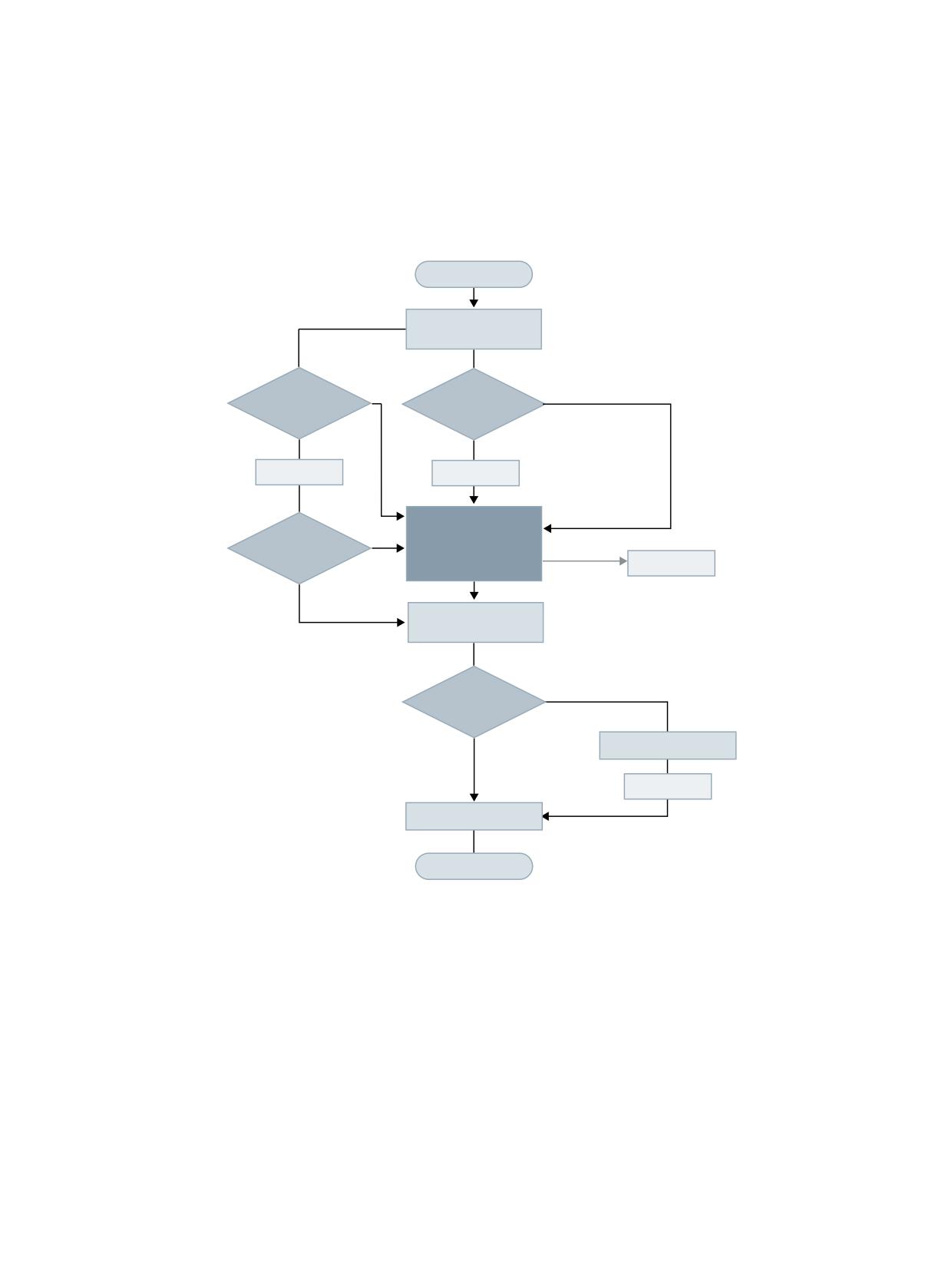
Figure 4-1
Sequence of an acceptance test and generating a certificate
SINUMERIK Operate acceptance test
Function Manual, 10/2020, 6FC5397-3HP40-0BA1
75
Managing templates and results
4.1 Customizing templates
4.1
Customizing templates
4.1.1
Template editor
With the template editor (Page 85) in SINUMERIK Operate, you can create or edit customizing
templates for an acceptance test.
SINUMERIK 840D sl with Safety Integrated (system-integrated)
You can continue to use templates created using the CT Editor (Customizing Template Editor).
4.1.2
Customizing templates
A customizing template is a user-specific XML file for an acceptance test, in which all of the
required test types and instances - together with the corresponding parameters, limit values,
alarms and handling instructions - are completely specified. As a consequence, using a
customizing template, an acceptance test can be precisely coordinated for a specific machine
and/or machine types.
From the tests specified in a customizing template, during an acceptance test, a deviation can
only be made to the extent that it is possible that individual tests are not performed. Additional
test types or instances cannot be added.
Specifications in a template
The following inputs can be defined in a customer-specific template:
• Test types
• Test instances
• Test parameters
• Limit values
• Problem alarms, i.e. alarms that must occur - or alarms that must not occur
• Filtered alarms, i.e. alarms that are neither displayed nor logged
• User-specific tasks to describe a test with instructions for the operator
Note
Changes
The content of a customer-specific template can only be changed using the template editor. A
change within the acceptance test is not possible.
SINUMERIK Operate acceptance test
76
Function Manual, 10/2020, 6FC5397-3HP40-0BA1
Managing templates and results
4.1 Customizing templates
Creating templates
Note
Only create a template from a complete test.
Proceed as follows, to create a customer-specific template from the currently configured test:
1. In the acceptance test, select the setting range "Overview" or "Finish".
2. Press the softkey >>.
3. Press the "Export template" softkey.
Then a file explorer appears with the default storage path "...\user\sinumerik\hmi\data\safety
\atw\templates".
4. Select a different target directory as needed.
5. Create a subdirectory for the template as needed.
6. Assign a name for the template. Confirm your entries with "OK".
Load templates
To load a customer-specific template into the acceptance test (including templates created using
SinuComNC), proceed as follows:
1. In the acceptance test, select the setting range "Overview".
2. Press the softkey >>.
3. Press the "Load template" softkey.
File information
File name:
<name>.xml
Path:
...\user\sinumerik\hmi\data\safety\atw\templates
Editor:
Template editor (Page 76)
4.1.3
Customizing template (SinuComNC)
An existing customizing template, created using SinuComNC or the CT Editor, can be loaded into
the acceptance test and an acceptance test performed. It is not possible to edit the template.
File information
File name:
<name>.xml
Path:
Source:
Any
Destination:
...\user\sinumerik\hmi\data\safety\atw\templates
Editor:
Template editor (Page 76)
SINUMERIK Operate acceptance test
Function Manual, 10/2020, 6FC5397-3HP40-0BA1
77
Managing templates and results
4.2 Result file
4.2
Result file
Function
The result file (* .atw) is an archive, and is used to backup tests that have been performed. The
result file consists of the following information:
• Session file
• Customer-specific template (if available)
• Trace files (if existing)
The archive can be loaded by SINUMERIK Operate independently of the control system (even
offline).
A certificate can be generated in the acceptance test from a result file at any time after the file
has been loaded.
Customizing templates
If the result file is obtained from a session file with customizing template, then the result file
contains all of the information of the customizing template. This especially includes the
specification of problem alarms and filtered alarms, as the customizing template is also saved in
the result file when it is saved. Without the customizing template, these alarms are not included
in the result file.
Unexpected alarms (it is not permissible that these occur) and missing alarms (must occur) are
summarized as problem alarms. Using a softkey, they can be displayed in the result screen form
instead of the acquired alarms. Initially, the unexpected alarms are displayed in the list of
problem alarms corresponding to the sequence in which they occurred. The missing alarms are
then displayed in the customizing template in the sequence they occurred. For missing alarms,
only the alarm number and the axis/drive designation are displayed.
SINUMERIK Operate acceptance test
78
Function Manual, 10/2020, 6FC5397-3HP40-0BA1
Managing templates and results
4.2 Result file
Tests
The tests performed by the acceptance test are classified according to test types and test
instances:
• Test types are responsible for testing different machine mechanisms. This can require various
steps for tests and different machine data/parameters. Examples of different test types
include: Safe operating stop (SBH) and safely reduced speed (SG). If a test type is selected in
the tree-type view, then its start screen form is displayed.
• Each test type can have no, one or several test instances depending on whether a test is to
be applied to a certain machine - and how many tests the user has created and/or has
performed. A test instance can refer to a specific axis and/or motion direction. A specific test
type is defined by specific test steps and the associated machine data/parameters. The same
test steps are executed for all test instances of a test type.
• A customizing template prepopulates the test instances, selected by the user, for the test
being executed. The customizing template already contains certain selections for the test to
be executed (e.g. axes and directions). It also contains other information for the test, e.g.
limits. This means that the customizing template already includes a lot of information that
can also be found in the session and result file (with the exception of data that has been
acquired).
Test instances are either created with the acceptance test using the associated softkeys - or a
customizing template. A customizing template populates the tree-type review with the
previously configured tests for a specific machine. A customizing template can be created using
the template editor integrated in SINUMERIK Operate (see Template editor (Page 85)).
No new test instances can be created if a customizing template was loaded. The start screen
form is displayed if you select a test type or a test defined by a customizing template that has still
not been run in the tree-type view. Before starting the test, press the "Start Test" softkey to access
the screen form for the test that is being performed.
After the test has been performed, the test instance selection is displayed in the overview of the
result screen form. To do this, beforehand the test type must be selected in the tree-type view,
which expands this view. Depending on the particular test type, the result screen form includes
access to alarms and/or traces for the selected test instance. For customizing templates, there is
a dedicated list for "Problem alarms" and "Collected alarms". Only "Collected alarms" is available
if there are no customizing templates. A customizing template can also specify alarms as
"Filtered alarms". These are ignored, which means they neither appear in the user interface nor
in the certificate.
Working offline
If the results of an acceptance test are to be reviewed at a later point in time, or used as basis to
generate a test certificate, then before exiting the acceptance test - or for an external computer,
before disconnecting the connection to the NCU or MCU - the test results must be saved to a
result file (see paragraph below "Saving results").
SINUMERIK Operate acceptance test
Function Manual, 10/2020, 6FC5397-3HP40-0BA1
79

Managing templates and results
4.2 Result file
Save results
In order to save the test results in a file, proceed as follows:
1. Press the softkey >>.
2. Press the "Save results" softkey.
Then a file explorer appears with the default storage path "...\user\sinumerik\hmi\data\atw
\results".
3. Select a different target directory as needed.
4. Create a subdirectory for the result file as needed.
5. Assign a name for the result file.
6. Confirm your entries with "OK".
The result file is saved in the selected target directory and is automatically provided with the
extension "atw".
Load results
To reload a result file, proceed as follows:
1. Press the softkey >>.
2. Press the "Load results" softkey.
Then a message appears. It points out that all of the results of the current session will be
automatically deleted when the result file is loaded.
3. If you really want to load the result file, press the "Yes" softkey.
The result file is loaded.
File information
File name:
<Name>.atw
Path:
.../user/sinumerik/hmi/data/safety/atw/results
Editor:
---
SINUMERIK Operate acceptance test
80
Function Manual, 10/2020, 6FC5397-3HP40-0BA1
Managing templates and results
4.3 Certificate template
4.3
Certificate template
A certificate template is a language-dependent file in the RTF format. In addition to general texts,
it includes text marks for all information that is required to document the details of the
acceptance test carried out for a specific system.
All of the information that was obtained as part of an acceptance test - and relevant for the
certificate - was saved to a session file. When generating the certificate, this information is
written from the session file into the text marks of the certificate template, thus creating the
certificate.
User-specific adaptations
Using a suitable editor, e.g. Microsoft Word, additional user-specific texts and graphics can be
imported into a certificate template - or standard texts and graphics modified or removed. Is
important that existing text marks are neither changed nor deleted. Otherwise, the
corresponding information will not be entered into the certificate.
The SIEMENS certificate template is located in directory ...\siemens\sinumerik\hmi\lng. Save the
user-specific certificate templates to directory ...\user\sinumerik\hmi\lng, ...\oem\sinumerik\hmi
\lng or ...\addon\sinumerik\hmi\lng.
Text marks
Normally, a text mark comprises invisible square brackets [ ... ] and the name of the text mark in
angle brackets <...>. As example, the text mark included in the certificate template is shown for
the manufacturer's name in the following.
Manufacturer 1)
[<MachineManufacturer>] 2)
1)
Standard, fixed text
2)
Text mark
SINUMERIK Operate acceptance test
Function Manual, 10/2020, 6FC5397-3HP40-0BA1
81

Managing templates and results
4.3 Certificate template
When generating the certificate, the text mark is replaced by the content displayed in the
acceptance test menu "Overview" for "Machine manufacturer".
Note
Text marks (Microsoft Word 2010)
• Display text marks in body text
In order that the text marks are displayed in the body text, the "Display text marks" option
must be set:
Menu "File" > "Options" > "Extended" > Group "Display document content"> Option "Display
text marks"
• Display all text marks in the certificate template
Menu "Insert" > Group "Hyperlinks" > "Text mark"
• Update the table of contents
The table of contents is not automatically adapted to the configuration. Proceed as follows
to update the table of contents:
- Place the cursor in the table of contents.
- Open the shortcut menu using the right mouse button.
- Select "Update fields".
- In dialog "Update table of contents", select "Update entire table".
- Confirm with "OK".
File information
File name:
atcerttpl_<language code>.rtf 1)
Path:
.../siemens/sinumerik/hmi/lng
Editor:
RTF-capable editor, e.g. Microsoft Word
1)
See NC Programming Programming Manual, Chapter "Fundamentals" > "Tables" > "Current languages
in the HMI"
SINUMERIK Operate acceptance test
82
Function Manual, 10/2020, 6FC5397-3HP40-0BA1
Managing templates and results
4.4 Certificate
4.4
Certificate
The acceptance test provides, with the finally generated certificate (acceptance report), a
confirmation for the machine manufacturer or the acceptance test engineer about the state of
the SI functions of the system when supplied. Based on the SI checksums listed in the
certificate, it is ensured that any subsequent changes to SI-relevant system data can be tracked
and verified.
Generating
The certificate can be subsequently generated as part of the acceptance test after any arbitrary
test has been completed.
1. In the acceptance test, select the setting range "Finish".
2. Press the "Generate certificate" softkey.
See also Generating and saving an acceptance report/certificate (Page 41).
The certificate of the completed acceptance test is then created from the following data:
• Text and graphics of the certificate template (Page 81)
• Test-specific texts
• Graphics and data from the session file
• Static parameterization data of the controller
Languages
The language of the texts in the certificate depend on the following settings:
• Text from the certificate template
The language of the certificate template texts and/or the corresponding language-
dependent file, which is used to generate the certificate, depends on the language set in
SINUMERIK Operate at the time that the certificate is generated.
• Variable control texts
Variable texts generated by the control system during the test, for example, alarm and
message texts, are entered in the certificate in the language that was set in SINUMERIK
Operate at the time of the actual test.
• User-specific text
Text that the user enters in the input fields provided during the course of the acceptance test
are included in the certificate without any changes being made to them.
Update table of contents
If, in the certificate, not all of the sections of the certificate template are included, in the table of
contents, then "Text mark not reference" is displayed for each text mark that is not referenced.
This means that when opening the certificate for the first time, the table of contents must be
updated using a suitable editor.
Example: Microsoft Word:
1. Press the key combination <CTRL> + <A> (select entire content).
2. Then press the key <F9> (update table of contents).
SINUMERIK Operate acceptance test
Function Manual, 10/2020, 6FC5397-3HP40-0BA1
83

Managing templates and results
4.4 Certificate
File information
File name:
<Name>.rtf
Path:
.../user/sinumerik/hmi/data/safety/atw/certificates
Editor:
RTF-capable editor, e.g. Microsoft Word
SINUMERIK Operate acceptance test
84
Function Manual, 10/2020, 6FC5397-3HP40-0BA1
Template editor
5
5.1
Introduction
Note
SINUMERIK MC with SINAMICS S120
SINUMERIK MC with SINAMICS S120 is configured with the SINUMERIK ONE Commissioning
Tool. The description of the template editor applies analogously to the SINUMERIK ONE
Commissioning Tool.
Using the template editor in SINUMERIK Operate, you can create or edit customizing templates
(Page 76) for an acceptance test.
SINUMERIK Operate acceptance test
Function Manual, 10/2020, 6FC5397-3HP40-0BA1
85
Template editor
5.2 Working with the template editor
5.2
Working with the template editor
Call
MENU SELECT > Commissioning > Menu forward key > Safety > Acceptance test > Template
editor
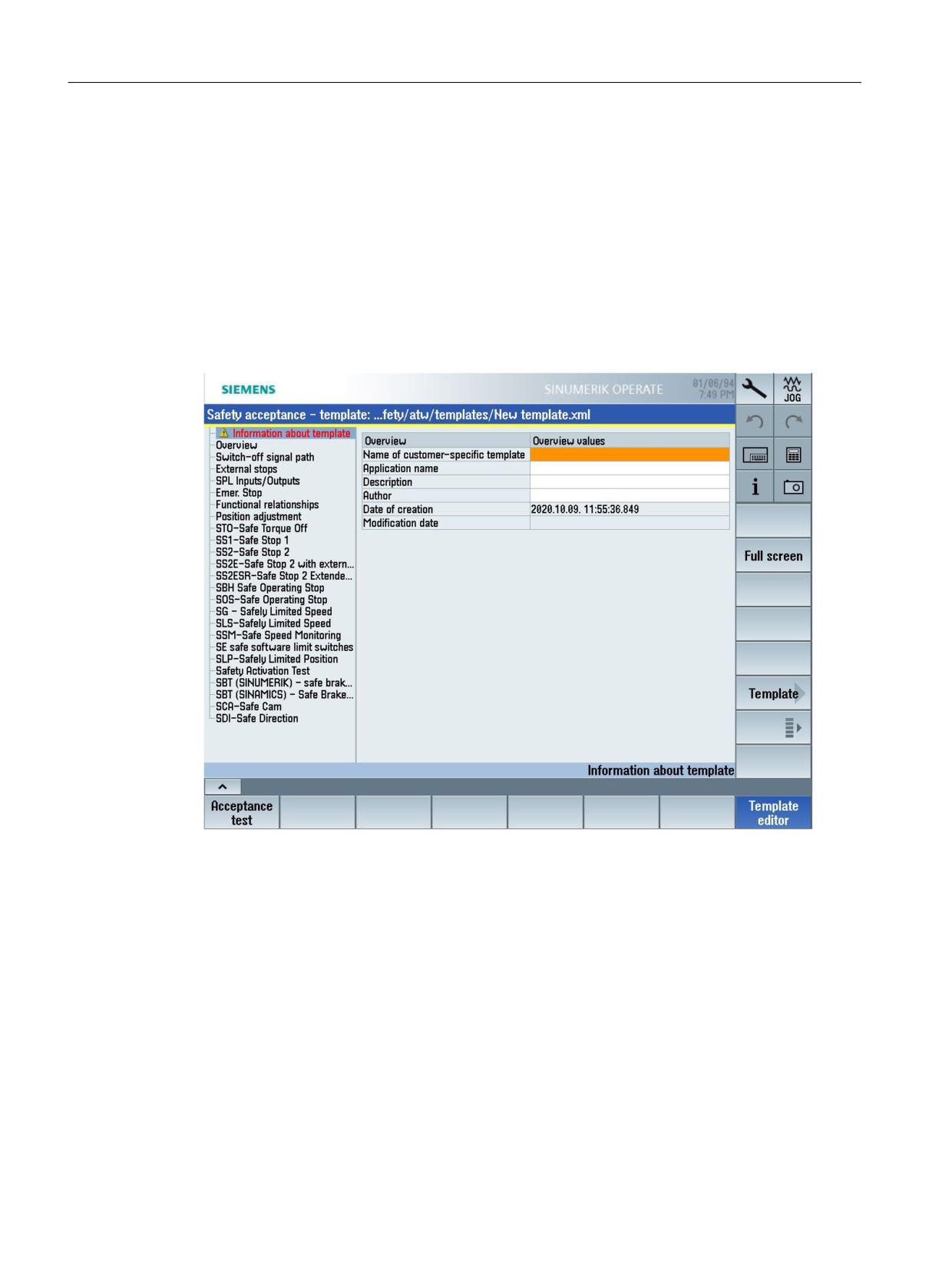
Information about the template and the machine
In the "Information about the template" screen form, enter the name and author of the template.
Figure 5-1
Information about the template
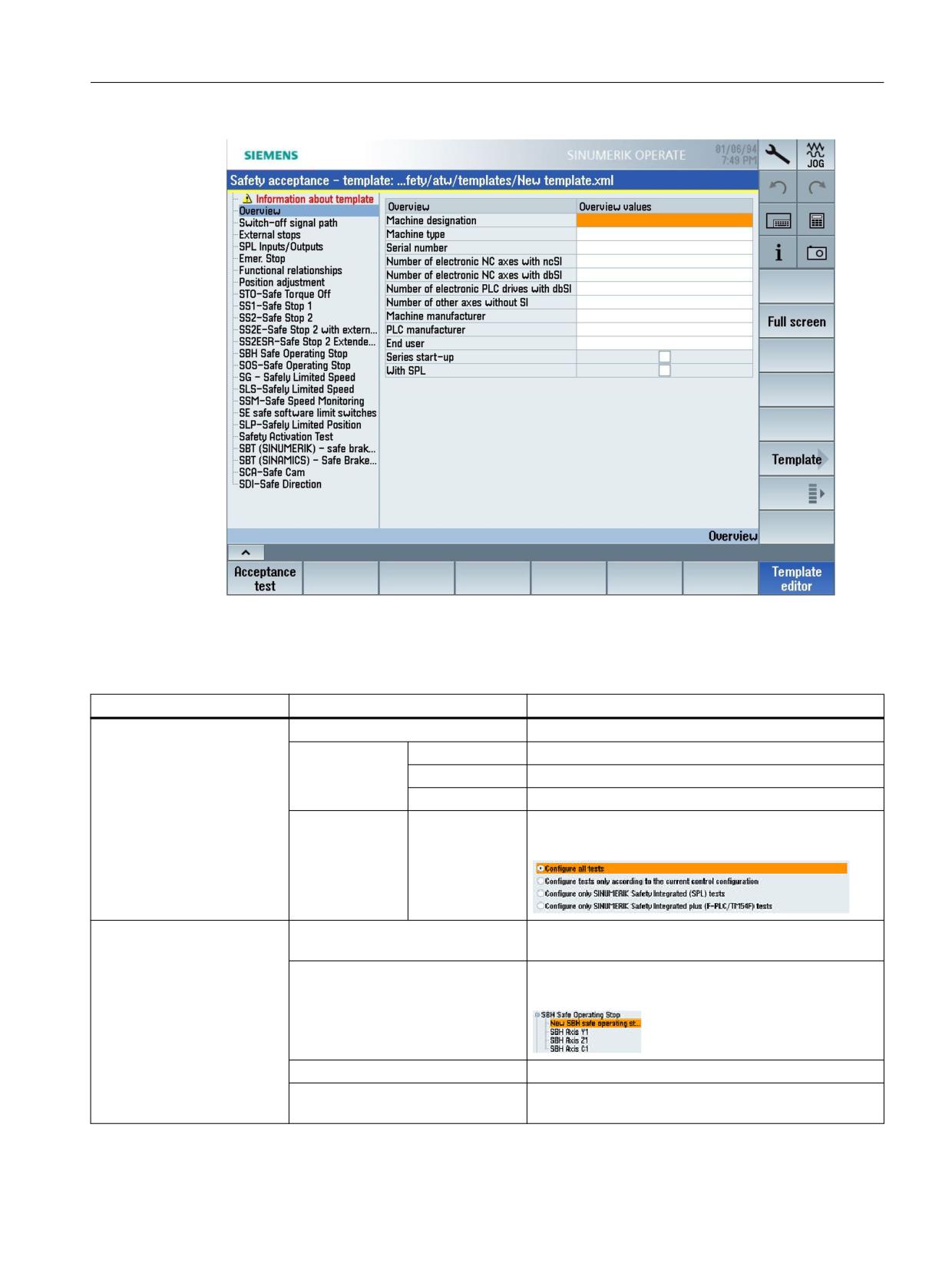
Enter all of the information relevant for the machine to be tested in the "Overview" screen form.
SINUMERIK Operate acceptance test
86
Function Manual, 10/2020, 6FC5397-3HP40-0BA1
Template editor
5.2 Working with the template editor
Figure 5-2
Overview
Menu structure
Setting areas
Softkey
Description
• Information about the
Full screen
Switches over the setting area to full screen view.
template
Template >
New
Creates a new template.
• Overview
Open
Opens an existing template (*.xml).
• Safety functions
Save
Saves the template.
Menu >
Options
Here, you define the test scope for the template that you
wish to configure.
• Safety functions
Add test
Using this softkey, you add a new test for the selected
safety function.
Copy test
You create a copy of the selected test, e.g. for an addi-
tional axis.
Delete test
You delete the selected test using this softkey.
Next page
You scroll within the setting area of the test using this
softkey.
SINUMERIK Operate acceptance test
Function Manual, 10/2020, 6FC5397-3HP40-0BA1
87
Template editor
5.3 Example of SOS - Safe Operating Stop
5.3
Example of SOS - Safe Operating Stop
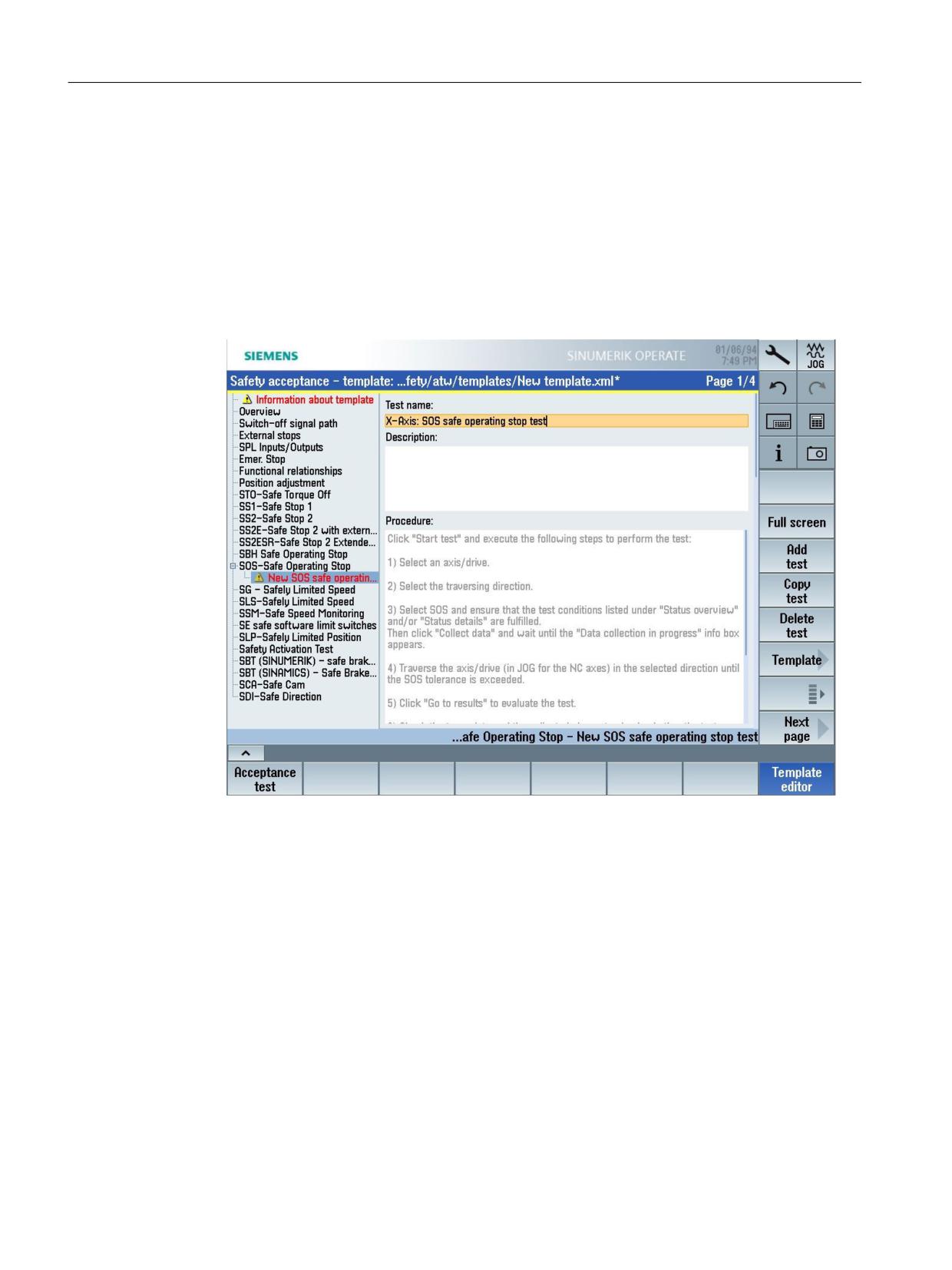
Setting area at the example "SOS - Safe Operating Stop"
In the following example you can see the setting areas for the "SOS-Safe Operating Stop" safety
function.
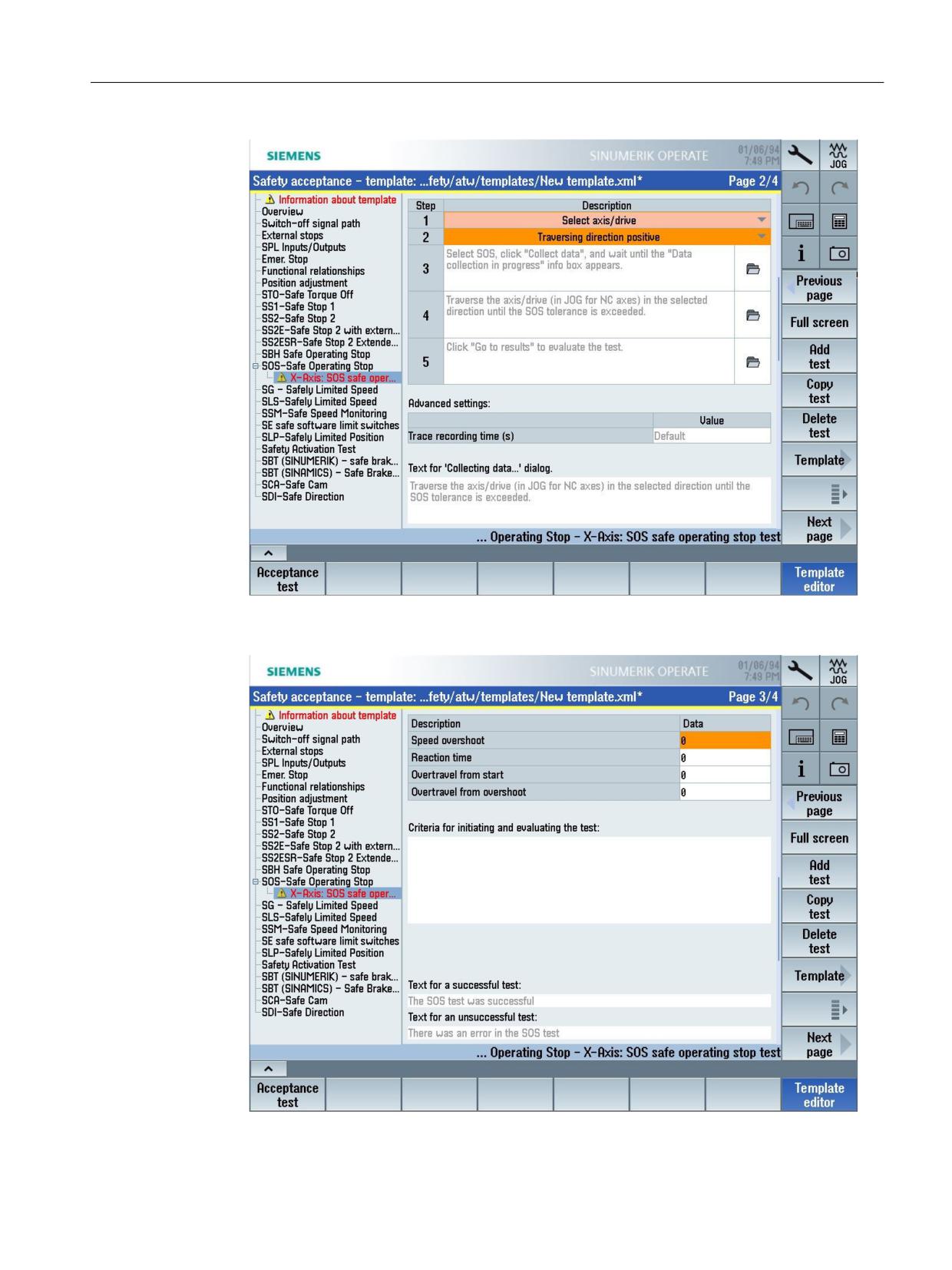
1. First, enter the test name. Optionally, you can enter additional information in field
"Description". For text-based adaptations, e.g. the test sequence, click in text field
"Sequence". When editing, the text color changes to "black".
Figure 5-3
Example of the setting area - SOS-Safe Operating Stop (1)
2. Select the axis and define the traversing direction.
SINUMERIK Operate acceptance test
88
Function Manual, 10/2020, 6FC5397-3HP40-0BA1
Template editor
5.3 Example of SOS - Safe Operating Stop
Figure 5-4
Example of the setting area - SOS-Safe Operating Stop (2)
3. Define the limit values for the test.
Figure 5-5
Example of the setting area - SOS-Safe Operating Stop (3)
SINUMERIK Operate acceptance test
Function Manual, 10/2020, 6FC5397-3HP40-0BA1
89
Template editor
5.3 Example of SOS - Safe Operating Stop
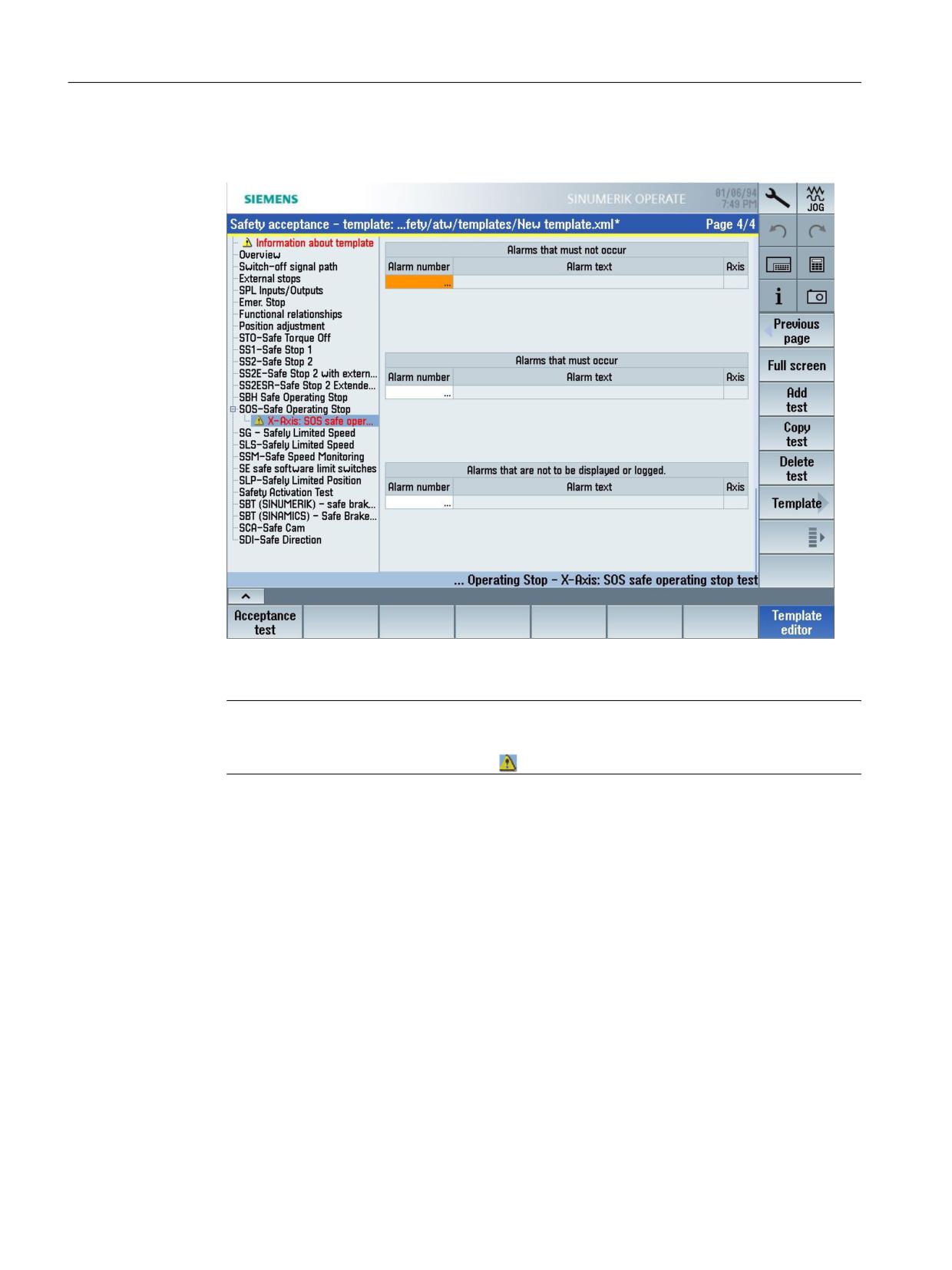
4. Now define the alarms that must not occur, which must occur and which should neither be
displayed nor logged.
Figure 5-6
Example of the setting area - SOS-Safe Operating Stop (4)
5. Save the changes.
Note
The templates can only be saved when all mandatory fields have been filled out. Tests with
missing specifications are marked with
SINUMERIK Operate acceptance test
90
Function Manual, 10/2020, 6FC5397-3HP40-0BA1
Actions for hardware replacement and
modifications
6
6.1
Necessity of a new acceptance test
A complete acceptance test is required for the first commissioning of the Safety Integrated
functionality on a machine.
If you carry out certain measures after the acceptance test, it may be necessary to carry out a
new (complete or partial) acceptance test.
These measures include the following for example:
• Safety-related functional expansions
• Transferring the commissioning data to additional series machines
• Hardware changes
• Software upgrades
• Changes within the scope of modular machine concepts
In order to define a partial acceptance test with lower test depth, it is first necessary to describe
the individual parts of the acceptance test and then define logical groups, which represent the
components of the acceptance test. The assignment of the safety-related machine data and
parameters to difference CRCs support this grouping (e.g. to support modular machine
concepts).
Messages during component replacement after Safety commissioning
WARNING
Non-safe states possible after a component has been replaced
Non-safe states are possible after a component has been replaced. If persons are in the danger
zone, accidents causing death or severe injury can occur.
• Before re-entering the danger area and before resuming operation, a simplified function
test must be carried out for all the drives affected by the component replacement (see
Section "Acceptance test wizard (Page 15)").
Safety-related components are assigned a CRC checksum, which can be used to identify if the
hardware has been changed after Safety commissioning:
• Replacing certain drive components after Safety Integrated has been commissioned.
• Different checksums as a result of series commissioning with Safety Integrated functionality
SINUMERIK Operate acceptance test
Function Manual, 10/2020, 6FC5397-3HP40-0BA1
91

Actions for hardware replacement and modifications
6.1 Necessity of a new acceptance test
The appropriate messages are displayed depending on the components involved (and the
control type). Example:
Warning
Example
F01650 SI P1 (CU): Acceptance test
Fault value 2005
required
Indicates that the Control Unit has been replaced.
A01695 SI Motion: Sensor Module
Indicates that the Sensor Module has been replaced.
has been replaced
C30711 SI Motion P2: Defect in a
Fault value 1031
monitoring channel
Stop response STOP F
As a consequence of A01695, a defect is signaled in a monitoring channel.
SINUMERIK Operate acceptance test
92
Function Manual, 10/2020, 6FC5397-3HP40-0BA1

Actions for hardware replacement and modifications
6.2 Effect of the acceptance test for specific measures
6.2
Effect of the acceptance test for specific measures
6.2.1
Effects with SINUMERIK 828D Safety Integrated
The effects of the acceptance test with certain measures are described in the following table.
Function test parts 1 and 2, as well as the supplementary measures relate to Chapter Example
contents of the acceptance test (Page 109).
Measure
Documentation
Function test
Function test
Supplementary
Completion of the
Part 1
Part 2
measures
report
Replacement of
Inclusion of hard-
No
No
Point 4.1
Supplement
the encoder sys-
ware data
(Page 109)
possibly new
tem
checksums and
countersignature
Replacing an SMC,
Inclusion of hard-
No
No
Point 4.1
Inclusion of the
SME module
ware data/ soft-
(Page 109)
new checksums
ware version data
and countersigna-
ture
Replacing a motor
Inclusion of hard-
No
No
Point 4.1
Inclusion of the
equipped with
ware data/ soft-
(Page 109)
new checksums
DRIVE-CLiQ
ware version data
and countersigna-
ture
Replacing a Motor
Inclusion of hard-
Yes, only Point 2.1
No
Point 4.1
Countersignature
Module
ware data/ soft-
(Page 109)
(Page 109)
ware version data
Replacing the PPU
Inclusion of hard-
Yes
No
Point 4.1
Countersignature
hardware
ware data/ soft-
(Page 109)
ware version data
Replacing the NX
Inclusion of hard-
Yes, only Point 2.1
No
Point 4.1
Countersignature
hardware
ware data/ soft-
(Page 109)
(Page 109), only
ware version data
for axes controlled
by the NX
Replacing TM54F
Possibly supple-
No
No
Point 4.2
Countersignature
hardware
ment hardware da-
(Page 109)
ta
Changing the mon-
Supplement con-
No
Yes
No
Inclusion of the
itoring clock cycle
figuration data
new checksum and
of the drive
countersignature
Changes to the
Supplement con-
Yes
No
No
Inclusion of the
TM54F monitoring
figuration data
new checksum and
clock cycle
countersignature
Changes to the
Adapt configura-
Yes, only Point 2.6
No
Point 4.1
Inclusion of the
drive assignment
tion diagram
(Page 109)
(Page 109)
new checksum and
countersignature
SW update 2
Supplement soft-
No 1
No 1
Point 4.3
No
ware version
(Page 109)
(NCU/drive/PLC)
SW upgrade 3
Supplement soft-
No 1
Yes, for axes with
Points 4.3 and 4.4
No
ware version
modified drive
(Page 109)
(NCU/drive/PLC)
checksum 1,4
SINUMERIK Operate acceptance test
Function Manual, 10/2020, 6FC5397-3HP40-0BA1
93

Actions for hardware replacement and modifications
6.2 Effect of the acceptance test for specific measures
Measure
Documentation
Function test
Function test
Supplementary
Completion of the
Part 1
Part 2
measures
report
Change to an indi-
Inclusion of SI func-
No
Yes, only test the
No
Inclusion of the
vidual limit value
tion per axis
corresponding
new checksum and
(e.g. SG limit)
function
countersignature
Expanded function
Inclusion of the SI
Yes, only for the
Yes, only for the
No
Inclusion of the
(e.g. additional ac-
function per axis,
tests influenced by
tests influenced by
new checksum and
tuator, additional
function table
the function ex-
the function ex-
countersignature
SG stage)
pansion
pansion
Data transferred to
Possible supple-
Yes
No
Points 4.1, 4.3 and
Inclusion of the
additional ma-
ment to the ma-
4.5 (Page 109)
new checksum and
chines with series
chine description
countersignature
commissioning
(check the soft-
ware version)
1
Regarding the acceptance test, the notes in the documentation of the SW upgrade must be carefully observed.
2
An update involves an update to a new Service Pack (SP) or a new Hotfix (HF) within a software line, e.g. 02.05.01.03 (01 =
Service Pack; 03 = Hotfix) to 02.05.02.03 (does not take into account any change of the Safety functionality).
3
An upgrade involves an upgrade to a new software release, e.g. 02.05.xx.xx to 02.06.xx.xx or 02.xx.xx.xx. to 03.xx.xx.xx
(does not take into account any change of the Safety functionality).
4
If no checksums have changed, then a complete function test, Part 2 does not have to be performed. However, a test should
be performed with reduced test scope.
Note
Test with reduced test scope
Test of Safety Integrated Functions at any axis (each PPU and each NX) and a comparison with
the test results before the upgrade.
Note
If the results of function test, part 2, are taken from another identical machine, then this is the
sole responsibility of the machine manufacturer and must be appropriately commented in the
acceptance report.
6.2.2
Effects with SINUMERIK 840D sl Safety Integrated plus
The effects of the acceptance test with certain measures are described in the following table.
Function test parts 1 and 2, as well as the supplementary measures relate to Chapter Example
contents of the acceptance test (Page 111).
Measure
Documentation
Function test
Function test
Supplemen-
Completion of
Part 1
Part 2
tary meas-
the report
ures
Replacement of the encoder
Inclusion of hardware da-
No
No
Point 4.1
Document
system
ta
(Page 111)
changed check-
sum
Replacing an SMC, SME mod-
Supplement hardware
No
No
Point 4.1
Document
ule
data/software version da-
(Page 111)
changed check-
ta
sum
SINUMERIK Operate acceptance test
94
Function Manual, 10/2020, 6FC5397-3HP40-0BA1

Actions for hardware replacement and modifications
6.2 Effect of the acceptance test for specific measures
Measure
Documentation
Function test
Function test
Supplemen-
Completion of
Part 1
Part 2
tary meas-
the report
ures
Replacing a motor equipped
Supplement hardware
No
No
Point 4.1
Document
with DRIVE-CLiQ
data/software version da-
(Page 111)
changed check-
ta
sum
Replacing the Motor Module
Supplement hardware
Yes, only
No
Point 4.1
No
data/software version da-
(Page 111)
Point 2.1
ta
(Page 111)
(3.2.1)
Replacing the NCU hardware
Supplement hardware
Yes, only
No
Point 4.1
No
data/software version da-
(Page 111)
Point 2.1
ta
(Page 111)
(3.2.1)
Replacing the NX hardware
Supplement hardware
Yes, only
No
Point 4.1
No
data/software version da-
(Page 111),
Point 2.1
ta
only for axes
(Page 111)
controlled by
(3.2.1)
the NX
Hardware replacement, PROFI-
No
No
Point 4.2
No
safe I/O
(Page 111)
Change to the SI clock cycle
Supplement configura-
No
Yes
No
Document
tion data
changed check-
sum
Changes to the drive assign-
Adapt configuration dia-
Yes,
No
Point 4.1
Document
ment
gram
only Point 2.6
(Page 111)
changed check-
(Page 111) for
sum
the changed
axes
Reconfigure PROFIsafe I/O (in
Safety summary
No
No
Only test the
Document
STEP 7)
modified con-
changed check-
figuration
sum
SW update 2
Supplement software
No 1
No 1
No 1
No
version
(NCU/drive/PLC)
Changed jerk and/or accelera-
No 1
No 1
Yes,
No
tion
only Point 4.3
(Page 111)
SW upgrade3
Supplement software
No 1
No 1, 4
No 1
No
version
(NCU/drive/PLC)
Software upgrade (HMI)
Supplement software
No
No
No
No
version
Changing an individual limit
Inclusion of SI function
No
Yes, only test
No
Document
value (e.g. SLS limit)
per axis
changed check-
of the corre-
sum
sponding
function at
the axes in-
volved
SINUMERIK Operate acceptance test
Function Manual, 10/2020, 6FC5397-3HP40-0BA1
95

Actions for hardware replacement and modifications
6.2 Effect of the acceptance test for specific measures
Measure
Documentation
Function test
Function test
Supplemen-
Completion of
Part 1
Part 2
tary meas-
the report
ures
Function expansion or new
Inclusion of the SI func-
Yes, only for
Yes, only
No
Document
functions (e.g. additional ac-
tion per axis, function ta-
the tests influ-
changed check-
tests influ-
tuator, additional SLS level)
ble
enced by the
sum
enced by the
function ex-
function ex-
pansion
pansion
Change the safety program
Inclusion of SI function
Yes,
No
No
Document
per axis, function table,
only Points
changed check-
safety summary
2.4, 2.5 and
sum
2.6 (Page 111)
Data transferred to additional
Include machine descrip-
Yes
No
Points 4.1
Document
machines via series commis-
tion (check the SW ver-
and 4.5
changed check-
sioning
sion)
(Page 111)
sum
1) Regarding the acceptance test, the notes in the documentation of the SW upgrade must be
carefully observed.
2) An update involves an update to a new Service Pack (SP) or a new Hotfix (HF) within a software
line, e.g.:
04.07.02.00 (02=Service Pack; 00=Hotfix) auf 04.07.03.00 (does not take into account any
change of the Safety functionality).
3) An upgrade involves an upgrade to a new software release, e.g.:
04.07.xx.xx to 04.08.xx.xx (does not take into account any change to the safety functionality).
4) If no drive checksums have changed, then a complete function test Part 2 does not have to be
performed. However, a test should be performed with reduced test scope.
Note
Test with reduced test scope
Test of Safety Integrated Functions at any axis (each NCU and each NX) and a comparison with
the test results before the upgrade.
Note
If the results of function test, Part 2 are taken from another identical machine, then this is the
sole responsibility of the machine manufacturer and should be appropriately commented in the
acceptance report.
SINUMERIK Operate acceptance test
96
Function Manual, 10/2020, 6FC5397-3HP40-0BA1

Actions for hardware replacement and modifications
6.2 Effect of the acceptance test for specific measures
6.2.3
Effects for SINUMERIK ONE Safety Integrated
The effects of the acceptance test with certain measures are described in the following table.
Function test parts 1 and 2, as well as the supplementary measures relate to Chapter Example
contents of the acceptance test (Page 113).
Measure
Documentation
Function test
Function test
Supplemen-
Completion of
Part 1
Part 2
tary meas-
the report
ures
Replacement of the encoder
Inclusion of hardware da-
No
No
Point 4.1
Document
system
ta
(Page 113)
changed check-
sum
Replacing an SMC, SME mod-
Supplement hardware
No
No
Point 4.1
Document
ule
data/software version da-
(Page 113)
changed check-
ta
sum
Replacing a motor equipped
Supplement hardware
No
No
Point 4.1
Document
with DRIVE-CLiQ
data/software version da-
(Page 113)
changed check-
ta
sum
Replacing the Motor Module
Supplement hardware
Yes, only
No
Point 4.1
No
data/software version da-
(Page 113)
Point 2.1
ta
(Page 113)
Replacing the NCU/PPU hard-
Supplement hardware
Yes, only
No
Point 4.1
No
ware
data/software version da-
(Page 113)
Point 2.1
ta
(Page 113)
Replacing the NX hardware
Supplement hardware
Yes, only
No
Point 4.1
No
data/software version da-
(Page 113),
Point 2.1
ta
only for axes
(Page 113)
controlled by
the NX
Hardware replacement, PROFI-
No
No
Point 4.2
No
safe I/O
(Page 113)
Change to the SI clock cycle
Supplement configura-
No
Yes
No
Document
tion data
changed check-
sum
Changes to the drive assign-
Adapt configuration dia-
Yes,
No
Point 4.1
Document
ment
gram
only Point 2.6
(Page 113)
changed check-
(Page 113) for
sum
the changed
axes
Reconfigure PROFIsafe I/O (in
Safety summary
No
No
Only test the
Document
STEP 7)
modified con-
changed check-
figuration
sum
SW upgrade update 2 (NCU/
Supplement software
No 1
No 1
No 1
No
drive/PLC)
version
Changed jerk and/or accelera-
No 1
No 1
Yes,
No
tion
only Point 4.3
(Page 113)
SW upgrade, upgrade3 (NCU/
Supplement software
No 1
No 1, 4
No 1
No
drive/PLC)
version
Software upgrade (HMI)
Supplement software
No
No
No
No
version
SINUMERIK Operate acceptance test
Function Manual, 10/2020, 6FC5397-3HP40-0BA1
97

Actions for hardware replacement and modifications
6.2 Effect of the acceptance test for specific measures
Measure
Documentation
Function test
Function test
Supplemen-
Completion of
Part 1
Part 2
tary meas-
the report
ures
Changing an individual limit
Inclusion of SI function
No
Yes, only test
No
Document
value (e.g. SLS limit)
per axis
changed check-
of the corre-
sum
sponding
function at
the axes in-
volved
Function expansion or new
Inclusion of the SI func-
Yes, only for
Yes, only
No
Document
functions (e.g. additional ac-
tion per axis, function ta-
the tests influ-
changed check-
tests influ-
tuator, additional SLS level)
ble
enced by the
sum
enced by the
function ex-
function ex-
pansion
pansion
Change the safety program
Inclusion of SI function
Yes,
No
No
Document
per axis, function table,
only Points
changed check-
safety summary
2.4, 2.5 and
sum
2.6 (Page 113)
Data transferred to additional
Include machine descrip-
Yes
No
Points 4.1
Document
machines via series commis-
tion (check the SW ver-
and 4.5
changed check-
sioning
sion)
(Page 113)
sum
1) Regarding the acceptance test, the notes in the documentation of the SW upgrade must be
carefully observed.
2) An update involves an update to a new Service Pack (SP) or a new Hotfix (HF) within a software
line, e.g.:
04.07.02.00 (02=Service Pack; 00=Hotfix) auf 04.07.03.00 (does not take into account any
change of the Safety functionality).
3) An upgrade involves an upgrade to a new software release, e.g.:
04.07.xx.xx to 04.08.xx.xx (does not take into account any change to the safety functionality).
4) If no drive checksums have changed, then a complete function test Part 2 does not have to be
performed. However, a test should be performed with reduced test scope.
Note
Test with reduced test scope
Test of Safety Integrated Functions at any axis (each NCU and each NX) and a comparison with
the test results before the upgrade.
Note
If the results of function test, Part 2 are taken from another identical machine, then this is the
sole responsibility of the machine manufacturer and should be appropriately commented in the
acceptance report.
SINUMERIK Operate acceptance test
98
Function Manual, 10/2020, 6FC5397-3HP40-0BA1

Actions for hardware replacement and modifications
6.2 Effect of the acceptance test for specific measures
6.2.4
Effects for SINUMERIK MC Safety Integrated
The effects of the acceptance test with certain measures are described in the following table.
Function test parts 1 and 2, as well as the supplementary measures relate to Chapter Example
contents of the acceptance test (Page 115).
Measure
Documentation
Function test
Function test
Supplemen-
Completion of
Part 1
Part 2
tary meas-
the report
ures
Replacement of the encoder
Inclusion of hardware da-
No
No
Point 4.1
Document
system
ta
(Page 115)
changed check-
sum
Replacing an SMC, SME mod-
Supplement hardware
No
No
Point 4.1
Document
ule
data/software version da-
(Page 115)
changed check-
ta
sum
Replacing a motor equipped
Supplement hardware
No
No
Point 4.1
Document
with DRIVE-CLiQ
data/software version da-
(Page 115)
changed check-
ta
sum
Replacing the Motor Module
Supplement hardware
Yes, only
No
Point 4.1
No
data/software version da-
(Page 115)
Point 2.1
ta
(Page 115)
Replacing the MCU hardware
Supplement hardware
Yes, only
No
Point 4.1
No
data/software version da-
(Page 115)
Point 2.1
ta
(Page 115)
Hardware replacement, PROFI-
No
No
Point 4.2
No
safe I/O
(Page 115)
Change to the SI clock cycle
Supplement configura-
No
Yes
No
Document
tion data
changed check-
sum
Changes to the drive assign-
Adapt configuration dia-
Yes,
No
Point 4.1
Document
ment
gram
only Point 2.6
(Page 115)
changed check-
(Page 115) for
sum
the changed
axes
Reconfigure PROFIsafe I/O (in
Safety summary
No
No
Only test the
Document
STEP 7)
modified con-
changed check-
figuration
sum
SW upgrade, update2
Supplement software
No 1
No 1
No 1
No
(MCU/drive/PLC)
version
Changed jerk and/or accelera-
No 1
No 1
Yes,
No
tion
only Point 4.3
(Page 115)
SW upgrade3
Supplement software
No 1
No 1, 4
No 1
No
(MCU/drive/PLC)
version
Software upgrade (HMI)
Supplement software
No
No
No
No
version
SINUMERIK Operate acceptance test
Function Manual, 10/2020, 6FC5397-3HP40-0BA1
99