SINUMERIK 840D sl. Service - Functions. Manual (2018-2020) - page 85
NC programming
7.9 NC language commands
in
Magazine number of internal magazine in relation to location number ip to
which the magazine must be moved. An internal magazine is either a loading
or a buffer magazine.
This parameter is optional. If im is not specified, the command refers to the
buffer magazine.
Data type
INT
Example
Specified configuration:
• Magazine (magazine number = 1),
• Spindle (buffer magazine = 9998, location 1),
• Loading magazine (loading magazine = 9999, location 2).
Program code
Comment
N100 POSM(4, 1, 1, 9998)
; It is moved from magazine 1 of location
number 4 to the spindle.
N100 POSM(4, 1, 1, 9999)
; Command for traversing to loading maga-
zine
Example with result check
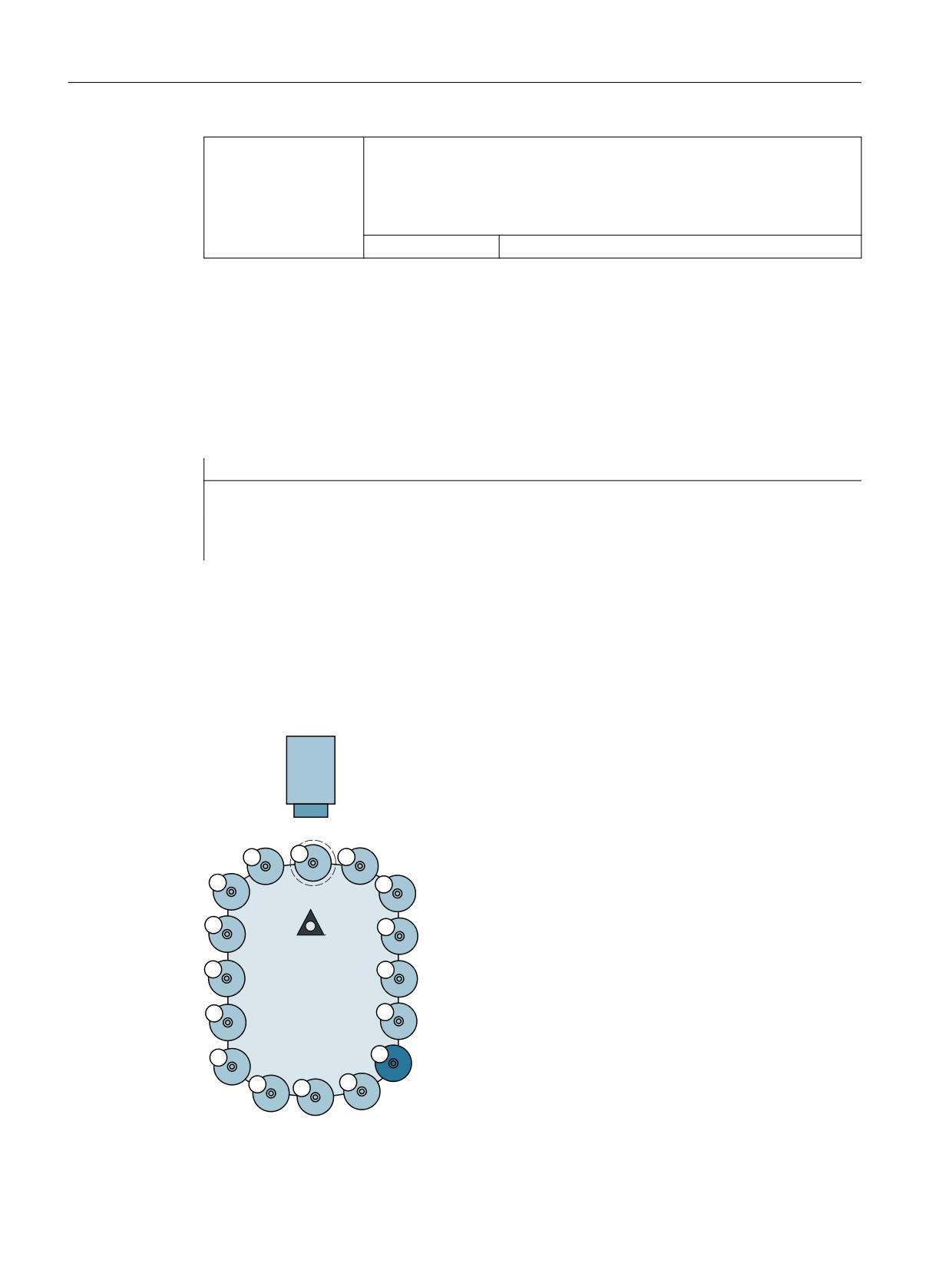
A magazine is specified as shown in the following diagram.
Location 12 is to be positioned at the change position and the program must not be continued
until positioning has been successfully completed (simplest case with only one magazine and
one defined change position).
7RRO KROGHU
LQ WKH EXIIHU PDJD]LQH
ORFDWLRQ
7&B0'3 >
@
0DJD]LQH
7&B0$3 > @
Figure 7-12
Magazine positioning with a check of the positioning operation result
Tool management
254
Function Manual, 10/2020, 6FC5397-1HP40-0BA1
NC programming
7.9 NC language commands
In this example, the magazine zero point is the location in front of tool holder 1. It is defined by
system variable $TC_MDP2. Tool holder 1 is assigned to the master spindle of the channel.
Program code
Comment
N100 POSM(12)
;Moves location 12 to the change position, any non-pro-
grammed parameters are set internally to POSM (12, 1,
1, 9998)
N200 wait:
N300 G4 F1
;Waiting time according to the conditions prevailing at
the machine (exit possibly necessary if reaction is re-
quired to positioning errors)
N400 if ( $TC_MAP8[1] <>
;goto wait
12 )
;After POSM(12) is executed, the current magazine posi-
tion must be equal to 12.
Multitool
The definition of function POSM remains unchanged. The magazine location to be positioned to
is programmed irrespective of whether the location is empty, contains a tool or a multitool.
The PI service _N_TMPOSM offers various options for programming magazine positions; for
instance, a tool can be programmed using its tool number or its name and duplo number. If this
tool is at a magazine location, the system positions to this magazine location. If the tool is in a
multitool, which in turn is at a magazine location, the system positions to this magazine
location. If, instead of a tool number, an MT number is programmed and the multitool is at a
magazine location, the system positions to this magazine location.
7.9.23
POSMT - position multitool on toolholder to location number
Function POSMT is available for TMMG.
Function POSMT positions a multitool that is located on a tool holder to the programmed MT
location number. At the time that the command is executed, it is not permissible that any tool
offset is active for the programmed tool holder, i.e. D0 must have been previously executed.
The complete command is: POSMT(state, MTlocno, THno)
Note
Selecting an offset or deselecting a possibly active tool offset is not linked with the command.
The command initiates an implicit STOPRE.
Syntax
state = POSMT(state, MTlocno, THno)
Tool management
Function Manual, 10/2020, 6FC5397-1HP40-0BA1
255
NC programming
7.9 NC language commands
Meaning
POSMT
Positions a multitool to a programmed MT location number
Data type:
INT
MTlocno
MT location number of the MT, which is located on the programmed tool hold-
er.
Data type:
INT
THno
Tool holder number on which the MT to be positioned is located. This param-
eter is optional.
If THno is not programmed, the number of the master tool holder is automat-
ically used.
Data type:
INT
Return value
state
Success status of command
Data type:
INT
0
Successful execution of the command. Command suc-
cessfully completed at the PLC. (PLC acknowledgement
may still be pending.)
-1
Command cannot be used because TMMG and/or multi-
tool function is not active.
-2
Function is not executed because of block search, pro-
gram test.
-3
MT cannot be positioned, because a tool offset associ-
ated with the programmed tool holder is (still) active.
-4
MT cannot be positioned, because the programmed tool
holder does not contain an MT, but a tool.
-5
MT cannot be positioned, because the programmed tool
holder neither contains an MT nor a tool.
-6
MTlocno has an invalid value.
-7
THno has an invalid value.
Example 1
The tool with the name "Tool1" / duplo number = 5 or T number = 33 is loaded in multitool 555
at MT location = 2. The MT has been created with 6 locations.
Program code
Comment
DEF INT state = 0
;
T="Tool1" M06 D1
;The PLC changes MT 555 on tool holder 1
and positions it on MT location 2
;The PLC acknowledges the change, axis
movements are programmed ...
D0
;Deselect tool offset
POSMT(state, 5, 1)
;Position the MT on location 5
Tool management
256
Function Manual, 10/2020, 6FC5397-1HP40-0BA1

NC programming
7.9 NC language commands
Program code
Comment
;The previously active tool with T number
33 is still active (however, due to the
POSMT command is no longer in the machin-
ing position)
M17
The following is still configured - "activate tool of the tool holder and activate its offset D1".
With RESET (end of program) a tool change command is generated for the PLC, which has the
following initial data:
• Bring the multitool from tool holder 1 from the tool holder to tool holder 1 (i.e. the MT is
already located on the tool holder)
• Position the multitool at location 5
In the NC, after the input, the PLC end acknowledgement is initiated:
• Activate the tool with tool number 34 and select its offset D1
The multitool remains on the tool holder - and neither a tool nor D offset are active.
Example (2)
If, in example 1, POSMT is not programmed before the end of the program, but only the MT
position is set to the value 5 in the NC with $TC_MTP8, the command to the PLC - generated in
the init block - would specify this MT position and the PLC would have to position the MT
according to the position data. When acknowledging the MT position specified by the NC in the
init block, the PLC must not change this.
PLC
To process the command, NC command = 1 to the PLC is prepared, which is output via the tool
management interface. The PLC must handle and acknowledge this command, in order that it
can be correctly completed by the NC.
PLC acknowledgement
In the NC, the NC command generates the command for the PLC - and outputs the command
within the scope of executing the active block to the PLC. The active block is only considered to
have been executed if the end acknowledgement of the command is available from the PLC.
This can be PLC status = 3 or 5. Only then can a new block be loaded for execution.
Status = 5, "The sequence has been completed. The MT is in position." With regard to the MT
configuration, means "The sequence has been completed. The MT is in position."
Example of parameter settings
The following configuration applies:
Multitool
MT No. = 5, MT locations 1, ...10,
The multitool has location coding
The tool with tool number = 4711 and tool name "4711" is at location 4
The tool with tool number 815 and tool name "815" is at location 7
There is no tool at location 8
Tool management
Function Manual, 10/2020, 6FC5397-1HP40-0BA1
257

NC programming
7.9 NC language commands
Tool holder
Buffer magazine no. = 9998, location 1 is the master tool holder with no. = 3
The MT with MT No.=5 is on the tool holder
Tool 4711 is active, active D No.=0 (no offset active)
Buffer magazine no. = 9998, location 2 is tool holder with no. = 9
There is no tool and no MT at tool holder 9
At the start, the MT position is equal to 4 (tool with tool number=4711 from MT location 4 is the
active tool), this means that MT location 4 is in the machining position.
def int state
POSMT(state, 7, 3) ; position MT of tool holder 3 to location 7 (with
tool "815")
has the same contents as
POSMT(state, 7) ; position MT of tool holder 3 to location 7
The two commands are correctly programmed. The status value is state = 0.
The block remains active in the main run until the end acknowledgement from the PLC is
available.
Tool "815" with tool number=815 at location 7 does not become active with the positioning
To ensure that tool "815" becomes active (and an offset D),
• either a program must be started (and $MC_START_MODE_MASK appropriately set), or
• RESET executed ($MC_TOOL_MANAGEMENT_MASK, bit 14 = 1 and
$MC_RESET_MODE_MASK appropriately set), or
• in the program after POSMT, the tool should be programmed to the positioned MT location
with a tool change command (T="815" M06 D1).
With
POSMT(state, 8, 3) ; position MT of tool holder 3 to location 8
the empty MT location is positioned to the machining position if a D offset is still not active. The
following init blocks are implicitly programmed with "T0 M06 D0" if the corresponding machine
data has been appropriately set.
The mechanical MT transport "MT from tool holder back into the magazine" is associated with
this.
Programming of
POSMT(state, 3, 9) ; position MT of tool holder 9 to location 3
Supplies the status value state=-5, as there is no MT and no tool holder at the programmed tool
holder 9.
POSMT(state, 77, 3) ; position MT of tool holder 3 to location 77
Supplies the status value state=-6, as MT location number=77 on tool holder 3 is not defined.
7.9.24
MVTOOL - NC command to move tool
Function MVTOOL is available for TMMG.
Tool management
258
Function Manual, 10/2020, 6FC5397-1HP40-0BA1

NC programming
7.9 NC language commands
Function MVTOOL loads and unloads tools by NC programming only. It can also be used to
transport a tool from one magazine location to any other magazine location.
It is mandatory for a tool to be positioned at the source magazine location.
This NC command does not generate an alarm.
Whether MVTOOL was carried out with or without error(s) must be checked via the return value
of parameter "state".
The command can also be applied to multitools.
Syntax
MVTOOL (state, magFrom, locFrom, magTo, locTo)
Meaning
MVTOOL
Loads and unloads tools
Data type:
-
magFrom
Magazine number of magazine in which the tool to be moved is located
Data type:
INT
locFrom
Location number of location in which the tool to be moved is located
Data type:
INT
magTo
Target magazine number of magazine to which the tool is to be moved. This
can be a loading magazine, buffer magazine or another real magazine.
This parameter is optional. If magTo is not programmed, the value from mag-
From is used.
Data type:
INT
locTo
Target location number of location to which the tool is to be moved.
This parameter is optional.
If locTo is not programmed or the value = 0 is programmed, an empty location
search is conducted in magazine magTo - if this is a real magazine. A location
search cannot be performed in an internal magazine. If magTo is the number
of an internal magazine and locTo is not programmed or programmed with
a value=0, status=-8 is set.
Data type:
INT
state
Success status of command
Data type:
INT
0
Execution was successful (PLC acknowledgement may
still be pending)
-1
Command cannot be used because TMMG is not active
-2
Function is not performed because of block search, pro-
gram testing
-3
Tool cannot be moved (because e.g. tool status "being
changed" is set)
-4
No tool located in source location
-5
magFrom has invalid value
-6
locFrom has invalid value
-7
magTo has invalid value
Tool management
Function Manual, 10/2020, 6FC5397-1HP40-0BA1
259

NC programming
7.9 NC language commands
-8
locTo has invalid value
-9
No distance relation defined (if exactly one magazine is
an internal magazine)
-10
No empty location found (if parameter locTo is not pro-
grammed)
-11
Target location for tool occupied
-12
The parameter locTo must be programmed, as magTo
is an internal magazine
Note
The command MVTOOL always reserves the target location with "reserved for tool to be loaded".
The command sets the tool status of the tool to be moved to "tool is being changed", bit value
"H20" from the command preparation to the command completion (acknowledgement with
status 1 or 3).
Command completion means the successful completion with PLC status = 1 or 10 - or the
command is interrupted with PLC status = 3.
If a tool is moved from a real magazine to an internal magazine (or vice versa), the respective
magazine distance relation must be defined.
If the programmed parameters are invalid or if a tool is not located at the source magazine
location, or if the programmed target location cannot be occupied by the tool, or if the empty
location search does not find a location because parameter locTo has not been programmed, or
if a magazine distance relation that is required has not been defined, the appropriate error code
is returned via state.
Deselecting an active tool offset is not linked with the command.
PLC
In the NC, the NC command generates the command for the PLC, outputs the command within
the scope of executing the active block to the PLC. The active block is only considered to have
been executed if the end acknowledgement of the command is available from the PLC. This can
be the PLC status = 1, 3, or 5. Only then can a new block be loaded for execution.
Examples
The following configuration exists:
• Magazine (Magazine no. = 5, locations 1, ...10),
• a spindle (buffer magazine no. = 9998, location 1),
• a loading point (loading magazine no. = 9999, location 1)
The magazine is linked to the spindle and the loading point via a distance relation (see
$TC_MDP1/$TC_MDP2).
Tool management
260
Function Manual, 10/2020, 6FC5397-1HP40-0BA1
NC programming
7.9 NC language commands
Example 1
The tool from loading location 9999/1 is to be loaded in magazine 5. The following is
programmed:
Program code
Comment
def int state
$TC_MPP6[9999, 1] =123
;place tool with internal T no.=123 onto
loading location
MVTOOL(state, 9999, 1, 5)
;search for a suitable empty location in
magazine 5
;If the tool is to be loaded onto precisely location 7:
MVTOOL(state, 9999, 1, 5, 7)
; before loading, a check is performed to
ensure location 7 is empty
Example 2
The tool with T No.=123 is to be loaded from the loading location to spindle 1 (magazine
No.=9998, location No.=1):
Program code
Comment
$TC_MPP6[9999, 1] =123
MVTOOL(state, 9999, 1, 9998, 1)
Example 3
With the same configuration, a tool that is loaded on location 7 is to be moved to another
suitable location in the same magazine.
Program code
Comment
MVTOOL(state, 5, 7, 5)
;or to location 3 in the same magazine
MVTOOL(state, 5, 7, 5, 3)
;to any location in magazine 11
MVTOOL(state, 5, 7, 11)
7.9.25
SETTA - Activate tool from wear group
Procedure SETTA sets all tools belonging to the wear group that are not disabled to active.
However, from a tool group, no more than one tool, with reference to a spindle or tool holder,
becomes active.
If, at the call instant, no wear groups have been defined or if the function "wear group" via
machine data has not been activated, the command can still be used. The call parameters must
then be set accordingly.
If the selection criteria of SETTA match several tools within a tool group, selection criterion
$TC_MAMP3, bits 12-13 is applied. If there is already an active tool that fulfills the criteria of
SETTA, no additional tool (relating to the same spindle) is activated.
Tool management
Function Manual, 10/2020, 6FC5397-1HP40-0BA1
261

NC programming
7.9 NC language commands
If SETTA is not parameterized, the active setting refers to all tools that are loaded, released, and
not blocked in the TO area.
Syntax
SETTA (STATUS, MNO, VNO, USEKT)
Meaning
SETTA
Sets all tools belonging to the wear group that are not disabled to active
Data type:
-
MNR
Magazine number (optional)
Data type:
INT
0
or Not specifying the parameter means that active set-
ting applies to all magazines - irrespective of whether a
distance relation to a spindle location exists.
-1
All magazines with a distance relation to a spindle or tool
holder.
-2
An active tool from every tool group represented in the
magazine is set in the magazine of each spindle or each
tool holder (equivalent to calling SETTA several times
with the specific magazine numbers that are involved).
This means there can be, for example, 2 tool holders with
1 magazine assigned to each. The tools of a group can be
distributed in any configuration among the two maga-
zines. If both magazines include tools of a group, this
means that two tools from the tool group are allocated
the active state.
If several magazines are addressed (MNR ≤ 0), the magazines are regarded as a unit and a tool from the
tool group is activated across all of the magazines that are being considered. Blocked magazines
($TC_MPP3, Bit 1=1) are not taken into account.
VNR
Wear group number (optional)
Data type:
INT
0
The active setting applies to the magazine locations that
are not assigned to a wear group.
-1
Active wear group ($TC_MAP9). If there is no active wear
group in any of the magazines, status -1 is returned and
the status of the tools is not changed.
-2
or if the parameter is not specified, this means that active
setting applies to the whole magazine. Especially param-
eter VNR is not specified or set to -2 if the system does not
use the "wear group" function.
USEKT
Tool subgroup (optional)
Data type:
INT
0
or If the parameter is not specified, all tools in the group
are considered.
-1
The currently programmed value of $P_USEKT is used.
Tool management
262
Function Manual, 10/2020, 6FC5397-1HP40-0BA1

NC programming
7.9 NC language commands
STATUS
Return parameter (optional)
Data type:
REF INT
0
Procedure was correctly executed.
1
Procedure was executed, but another tool is active in the
group (e.g. an unloaded tool).
-1
Procedure was not executed because there is no active
wear group in the selected magazines.
-2
Procedure was not executed because the programmed
wear group number does not exist.
-3
Procedure was not executed because the programmed
magazine number does not exist.
-4
Procedure was not executed because the function "wear
group" is not enabled (MN_TOOL_MANAGE-
MENT_MASK).
-5
Procedure was not executed for other reasons.
A search strategy can be set in parameter $TC_MAMP3 for the tool to be activated by SETTA.
Bit 12 = 0
Smallest possible duplo number (default)
Bit 12 = 1
Smallest possible magazine location
Bit 13 = 1
Smallest possible number contained in parameter $TC_TP10 (sequence of use)
Note
It is mandatory to set the wear group for the SETTA procedure.
Multitool
If SETTA is programmed for a multitool, instead of for a magazine, the following alarm is
generated: alarm 6462 "[Channel %1:] block %2 command %' can only be programmed for
magazines. '%4' means no magazine".
See also
SETTIA - Deactivate tool from wear group (Page 263)
7.9.26
SETTIA - Deactivate tool from wear group
Procedure SETTIA resets the status "active" in all tools. By parameterizing the NC command,
this can be either magazine-specific or wear group-specific.
Note
It is mandatory to set the wear group for the SETTIA procedure.
Syntax
SETTIA(STATUS, MNO, VNO,USEKT)
Tool management
Function Manual, 10/2020, 6FC5397-1HP40-0BA1
263

NC programming
7.9 NC language commands
Meaning
SETTIA:
Sets all tools belonging to the wear group that are not disabled to inactive
Data type:
INT
MNR
Magazine number (optional)
Data type:
INT
0
The inactive setting is applied to all magazines irrespective of
any assignment to a spindle. In this case, the tools in the buf-
fer are also considered as well as the tool holder.
> 0
Magazine number in which the inactive setting will be applied.
Tools in this magazine that are in the buffer are not considered.
This means that if these tools are placed back into the maga-
zine, they still have "active" status.
-1
All magazines with a distance relation to a spindle or tool
holder.
VNR
Wear group number (optional)
0
The inactive setting applies to all tools that are not assigned to
a wear group. If no wear group is defined, the inactive setting
is applied to all tools in the magazine.
> 0
Wear group number in which the active setting will be applied.
-1
Active wear group ($TC_MAP9).
USEKT
Tool subgroup (optional)
0
All tools in the group are considered.
> 0
The tools are considered that have a bit set in the value pro-
grammed in USEKT in parameter $TC_TP11.
-1
The currently programmed value of USEKT is used.
STATUS
Return parameter (optional)
Data type:
REF INT
0
procedure was able to be executed correctly.
-1
Procedure was not executed because there is no active wear
group in the selected magazines.
-2
Procedure was not executed because the programmed wear
group number does not exist.
-3
Procedure was not executed because the programmed maga-
zine number does not exist.
-4
Procedure was not executed because the function "wear
group" is not enabled (MN_TOOL_MANAGEMENT_MASK).
-5
Procedure was not executed.
A search strategy can be set in parameter $TC_MAMP3 for the tool to be activated by SETTIA.
Multitool
If SETTIA is programmed for a multitool, instead of for a magazine, the following alarm is
generated: Alarm 6462 "[Channel %1:] block %2 command %3' can only be programmed for
magazines. '%4' means no magazine".
See also
SETTA - Activate tool from wear group (Page 261)
Tool management
264
Function Manual, 10/2020, 6FC5397-1HP40-0BA1

NC programming
7.9 NC language commands
7.9.27
RESETMON - NC command for setpoint activation
Procedure RESETMON sets the actual value of the tool to the setpoint.
The original maximum values, for example, set service life, and set workpiece count, are
reactivated and tool states such as "tool disabled" (prewarning limit reached) are reset.
This command is used for tools and multitools.
Syntax
RESETMON (state, t, d, mon, resetStates)
Meaning
RESETMON
Sets the actual value of the tool to the setpoint
Data type:
state
Return parameter, which can have the following values:
Data type:
REF INT
0
Command was successfully executed
-1
The cutting edge with the specified D number d does not
exist.
-2
The tool with the specified T number t does not exist.
-3
There is no monitoring function defined for the specified
tool. This status is only possible if t has been specified
explicitly.
-4
Monitoring function is not active in the NC, i.e. the com-
mand has not been executed.
t
Internal T number
Data type:
INT
t = 0
All tools are handled.
t > 0
Precisely this tool is handled.
t < 0
The absolute value of t is formed and all replacement
tools of this tool are handled.
d
D number of the tool (optional).
If the parameter is not specified at all or is assigned the value 0, all D numbers
or all cutting edges of the tool are handled.
Data type:
INT
d > 0
The command applies specifically to the specified D num-
ber.
Tool management
Function Manual, 10/2020, 6FC5397-1HP40-0BA1
265

NC programming
7.9 NC language commands
mon
Bit-coded parameters (optional)
If the parameter is either not specified at all or assigned the value 0, all actual
values of the active, tool-specific monitoring functions for the designated
edge(s) are set to the setpoints.
mon > 0
Precisely the actual value of the specified monitoring
type is handled.
Possible values are the positive values of the system pa-
rameter $TC_TP9 (1, 2, 4, 8) or the corresponding bit
combinations when several monitoring types are activa-
ted.
mon < 0
Precisely the actual value in the monitoring type speci-
fied in "absolute value mon" is handled. There is no re-
striction due to the system variable values $TC_TP9. The
values of non-activated monitoring types can also be re-
set in this way too. In particular, it is also possible to
simultaneously reset the actual values of wear and addi-
tive offset monitoring values.
resetStates
Bit-coded parameters (optional)
Bit 0
Tool status "active" is deleted
Bit 1
Tool status "enabled" is set
Bit 2
Tool status "disabled" is reset if
• a) the monitoring data permit this
• b) parameter "mon" is set accordingly
Bit 3
Tool status "measure" is set
Bit 4
Tool status "prewarning limit" is reset if
• c) the monitoring data permit this
• d) parameter "mon" is set accordingly
Bit 5
Not permitted
Bit 6
Not permitted
Bit 7
Tool status "was in use" is deleted
Bit 8
Not permitted
Bit 9
Not permitted
Bit 10
Tool status "to unload" is deleted
Bit 11
Not permitted
Bit 12
Not permitted
The parameter resetStates allows selective modification of the tool status in addition to the
monitoring parameters. The bit coding for resetStates corresponds to that for the tool status
parameter $TC_TP8[x].
If this parameter is not specified, machine data $MN_TOOL_RESETMON_MASK is accessed. The
bit coding for this data is identical to that for parameter "resetStates". With the analogous PI
service PI_TRESMO, this machine data is also effective.
RESETMON for multitools
Multitool
Tool management
266
Function Manual, 10/2020, 6FC5397-1HP40-0BA1
NC programming
7.9 NC language commands
The parameters of RESETMON are extended for a multitool.
Syntax for multitools
RESETMON (state, MTno, Dno, mon, resetStates)
Meaning of the parameters for multitools
state
Return parameter, which can have the following values:
Data type:
REF INT
0
Command was successfully executed
-1
The cutting edge with the specified number Dno does
not exist.
-2
The multitool with the specified number MTno does not
exist.
MTno
Internal T number
Data type:
INT
t = 0
All tools are handled.
t > 0
Precisely this tool is handled.
t < 0
The absolute value of t is formed and all replacement
tools of this tool are handled.
Dno
D number of the tool (optional).
If the parameter is not specified at all or is assigned the value 0, all D numbers
or all cutting edges of the tool are handled.
Data type:
INT
Dno = 0
If the parameter is not specified, or if the tool is program-
med with 0, all cutting edges of the tools are handled in
the multitool.
Dno > 0
The command refers precisely to the cutting edges of the
tools in the multitool with the specified D number.
mon
mon applies to the tools in the multitool - see above
Data type:
INT
resetStates
resetStates applies, on one hand, to states of the individual tool, which
when reset to the setpoints, must be additionally changed, but here, for this
particular programming, also to the corresponding MT states, which are
changed if at least the same state has been changed in one of the tools loaded
in the multitool.
Bit
Value
Meaning
1 =
0
Multitool status "enabled" remains unchanged
1
Multitool status "enabled" is set
2 =
0
Multitool status "disabled" remains unchanged
1
Multitool status "disabled" is deleted if permitted by the
monitoring data and the 4th parameter is set accordingly
Tool management
Function Manual, 10/2020, 6FC5397-1HP40-0BA1
267

NC programming
7.9 NC language commands
Note
If the optional parameter resetstates is not programmed, the value of MD
$MN_TOOL_RESETMON_MASK is considered an implicit value.
Analogously to this, the MT number can be programmed for the parameter T number of the
corresponding PI service _N_TRESMO.
The MD $MN_TOOL_RESETMON_MASK available to parameterize the RESETMON command,
with the description "behavior of the tool data for RESETMON", retains its effect on the tools -
even if they are located in a multitool and are reset using RESETMON.
The selectable state changes also affects the multitool, if this has been programmed and the
appropriate state has been defined.
T
MT
Bit 0
Delete "active" status
X
-
Bit 1
Set the "enabled" status
X
X
Bit 2
Conditionally delete "disabled" status if monitoring data permit this
X
X
Bit 3
Set the "measured" status
X
-
Bit 4
Conditionally delete "Prewarning limit" status if monitoring data permit this
X
-
Bit 7
Delete "was in use" status
X
-
Bit 10
Delete "to unload" status
x
x
Multitool example (1)
The actual time monitoring value (4th parameter = 1) of the cutting edges with the D number
2 (3rd parameter) of all tools that have been loaded to the MT with the number 500, is reset to
the setpoint. As part of this, the state value of the tools whose time monitoring has been
changed, is changed in accordance with the settings of the last parameter.
As 500 is the number of a multitool, the state of this multitool is also changed in accordance with
the settings of the last parameter. Note that only the programmed bits 1, 2, 10 are relevant for
the MT state change.
The success of the command is indicated in the "state" reference parameter.
int state=0
RESETMON(state, 500, 2, 1, "H49F")
MT 500 in the example is equipped with three tools. Each tool has two cutting edges with D no.
= 1 and 2. Two are time-monitored and are disabled due to the time limit in the cutting edges
with D number = 2; the third tool is workpiece count-monitored and is also disabled because the
workpiece count limit has been reached in the cutting edge with the D number = 2. The two time-
monitored tools are now reset with RESETMON, the tool state "disabled" is canceled and the MT
state "disabled" is also canceled (although the workpiece count-monitored tool is still disabled).
The other programmed tool and MT states except "disabled" are changed according to the
definition.
If the following had been programmed:
Tool management
268
Function Manual, 10/2020, 6FC5397-1HP40-0BA1

NC programming
7.9 NC language commands
RESETMON(state, 500, 2, 0, "H49F")
all the monitoring actual values of all tools in the MT would have been reset to their setpoints
(4th parameter = 0) and all tools would have reset the "disabled" state and the MT would have
reset its "disabled" state. The other programmed states would also have been changed.
Multitool example (2)
The actual values of the time monitoring of all cutting edges and all tools are set to the setpoints
of the time monitoring.
The states of the tools are changed in accordance with the programming (last parameter =
"H405"; reset "disabled" state conditionally and reset states "active" and "to be unloaded"
unconditionally). The state of the multitool is also changed in accordance with the programming
(the MT state "disabled" conditionally, the state "to be unloaded" unconditionally).
int state=0
RESETMON(state, 0, 0, 1, "H405")
7.9.28
DELTC - Delete toolholder data record
The function "Tool holder orientation" must be active. The function can be additively
superimposed over the functions TMMO and TMMG.
The function DELTC deletes a tool holder data set.
Syntax
DELTC(n,m)
Meaning
DELTC
Deletes a toolholder data set
Data type:
-
n
First number of the tool holder data area whose values are to be set to zero
(optional).
If n is not specified, all tool holder data sets are set to zero starting at the lowest
through to the highest number.
Data type:
INT
m
Last number of the tool holder data area the values of which are to be set to
zero (optional).
If m is not specified, the tool holder data set identified by n is set to zero. If m is
greater than the highest number of a tool holder data record in this channel,
those data sets up to the highest number are set to zero.
Data type:
INT
The tool holder data sets are defined by the system variables $TC_CARRx. System variable
$TC_CARR1[0] is provided for setting all data sets to zero. With DELTC, a range of numbers for
the tool holder data from n to m can now be set to zero.
Tool management
Function Manual, 10/2020, 6FC5397-1HP40-0BA1
269

NC programming
7.9 NC language commands
In particular, the content of DELTC is equal to $TC_CARR1[0]=0= set all data sets to zero.
Parameters n, m have to be programmed with values larger than zero. Other values result in an
alarm.
Parameter n must be less than m. Other values result in an alarm.
Also, n must lie in the range of numbers permitted for tool holder data.
The selected range of numbers must include the range of numbers for the tool holder data sets
on the channel. Programming is otherwise rejected and an alarm is issued.
If the function "Tool holder data" is not activated ($MN_MM_NUM_TOOL_CARRIER 0 0), DELTC
will also generate an alarm.
Example
In the TO unit, 14 tool holder sets with the numbers 1 to 14 are defined.
Program code
Comment
DELTC(5,8)
;set the values of the data sets 5, 6, 7, 8 to zero
DELTC(5,20)
;set the values of the data sets 5, 6, 7, ...,14 to zero
DELTC(9)
;set the values of the data set 9 to zero
DELTC()
;set the values of the data sets 1, ..., 14 to zero
DELTC(0,1)
;error → alarm - n, m must be greater than zero
DELTC(0,-2)
;error → alarm - n, m must be greater than zero
DELTC(0)
;error → alarm - n must be greater than zero
DELTC(15,20)
;error → alarm - n must not be more than 14
DELTC(20)
;error → alarm - n must not be more than 14
7.9.29
TCA - tool selection/tool change irrespective of tool status
Function TCA is available for TMMO and TMMG.
The function TCA loads a tool irrespective of its "disabled" or "to be unloaded" status.
For certain routines (e. g. measuring cycles), it is necessary to load a specific tool onto the
spindle / the tool holder for tool change regardless of its status (e. g. a disabled tool).
Syntax
TCA("Tool name", duplo No., toolholder No.)
Meaning
TCA
Loads a tool irrespective of its status.
Data type:
-
Tool name
Identifier of the tool to be loaded
Data type:
STRING
Tool management
270
Function Manual, 10/2020, 6FC5397-1HP40-0BA1

NC programming
7.9 NC language commands
Duplo no.
Duplo number of tool to be loaded (optional).
If Duplono. is not specified, the tool with the lowest duplo number is loaded.
Data type:
INT
Tool holder no.
Tool holder or spindle on which the tool change is to be performed (optional).
If Tool holder no. is not specified, the tool change refers to the currently
set or programmed master spindle / master tool holder.
The following applies for TMMO without TMMG:
The parameter corresponds to the address extension of the T command.
(The setting for MD $MC_T_M_ADDRESS_EXT_IS_SPINO is taken into account.)
Data type:
INT
TCA behaves like the T command in its alarm and command output.
If neither TMMG nor TMMO are active, an alarm is generated.
Any alarms occurring during programming are handled in the same way as the alarms during T
programming.
Note
Offset selection, in accordance with $MC_CUTTING_EDGE_DEFAULT, acts in the same way as for
the T command. TCA and D must not be programmed in the same block.
Tool management
Function Manual, 10/2020, 6FC5397-1HP40-0BA1
271
NC programming
7.9 NC language commands
Examples
1.
Preparation and change with T command (i. e. $MC_TOOL_CHANGE_MODE=0)
Configuration 1x turret, 1x tool holder
There are 2 tools with the identifier "Finish cutter" and duplo numbers 1 and 2.
TCA("Finish cutter", 1.1)
The tool "Finish cutter" with duplo number 1 is loaded onto tool holder 1.
With the machine configuration assumed above, the following programming would have the
same result:
TCA("Finish cutter")
The duplo number is not specified, this means that the tool with the lowest duplo number is
changed, i.e. duplo "1".
Tool holder not specified. Therefore, the change is effective for the current master tool holder,
i.e. "1".
2.
Change with M06 ($MC_TOOL_CHANGE_MODE=1)
Configuration: 1x chain magazine, 2x spindles, spindle_1 is the master spindle. 4 tools are
loaded, "MILL_20MM", with duplo numbers 4, 5, 8 and 15.
"MILL_20MM", duplo "8" was disabled and must be measured. Measurement is taken on
spindle 2.
TCA("MILL_20MM",8,2)
M2=6
The tool "MILL_20MM", duplo "8" is prepared for spindle "2" and changed.
In this case, the following programming would lead to a different result:
TCA("MILL_20MM")
M06
Tool "MILL_20MM" with duplo "4" (lowest duplo number) is prepared for spindle "1" (this is
the master spindle) and changed with M06.
Note
The following special issues apply for TCA when compared to T commands:
• TCA and D cannot be programmed in the same block.
• TCA renders the set search strategies ($TC_MAMP2 and/or $TC_MAP10) ineffective and
ignores the programmed values of $P_USEKT.
• The tool must have status "enabled".
• The PLC interface signals "Transition to new replacement tool" and "Last replacement tool
of group" are not set.
PLC
The PLC is not allowed to reject a tool prepared with "TCA". Acknowledgement with Status_2,
Status_7 or Status_103 is not permissible.
Notice: Currently the interface does not have any criteria as to whether a tool may be rejected
or not.
If this function is being used, an additional identifier must be used to indicate this to the PLC.
Program code
Comment
$TC_VDITCP[2]=101
("101" - identifier that the PLC is not allowed to reject)
TCA("Mill",1)
Tool management
272
Function Manual, 10/2020, 6FC5397-1HP40-0BA1

NC programming
7.9 NC language commands
Supplement to the definition if the programmed tool is a multitool
With function TCA, a specific tool with "tool name"/"duplo number" can be loaded into the tool
holder irrespective of the tool state. If this tool is a multitool, the state of the multitool as well
as the state of the tool is ignored for the command. This especially allows a tool to be selected
and/or swapped out from a disabled multitool.
Note
The command can only be programmed for tools - also those that are loaded in a multitool;
however it cannot be programmed for a multitool. If the programmed name is an MT name for
example, Alarm 6460 "[Channel%1: ] block %2 command %3 can only be programmed for tools.
%4 means no tool." is generated.
Note
A tool from a disabled magazine or magazine location cannot be loaded into the spindle or the
tool holder even with TCA.
See also
Replacement of the TCA command (Page 411)
7.9.30
TCI - Load tool from buffer into magazine
Function TCI is available for TMMG.
The function TCI loads the tools from the buffer locations back into the magazine Tool holder
locations are however excepted from this. Generally, applications are for complex machines
with several grippers.
The necessary empty location search is performed in the same way as for a programmed tool
change with T (see Section "Preparing a tool change via T command (Page 378)").
Note
TCI cannot be programmed together with M06 in one NC block. Tool change preparation and
execution are performed in one operation.
The TCI command cannot be substituted (T function replacement).
TCI(locNo, toolholder no.)
locNo
Number of the buffer whose tool is to be returned to the magazine.
Since the locNo cannot be the location number of a tool holder, returning the tool has no effect on active
tool offset.
Tool holder no.
This specifies the number of the tool holder from where the tool is to be removed. This parameter is
optional. If this parameters is not specified, the current master tool holder is automatically selected.
Alarm 6403 is generated if an invalid location number is programmed.
Tool management
Function Manual, 10/2020, 6FC5397-1HP40-0BA1
273

NC programming
7.9 NC language commands
Syntax
TCI(locNo, toolholder no.)
Meaning
TCI
Loads the tools from the buffer locations back into the magazine.
Data type:
-
locNo
Number of the buffer whose tool is to be returned to the magazine.
Since locNo cannot be the location number of a tool holder, returning the
tool has no effect on active tool offset.
Data type:
INT
Tool holder no.
Specifies the number of the tool holder from where the tool is to be removed
(optional).
If Tool holder no. is not specified, the current master tool holder is auto-
matically selected.
Data type:
INT
Alarm 6403 is generated if an invalid location number is programmed.
The location number locNo is invalid
• if locNo indicates a tool holder / spindle (alarm 6450)
• if locNo indicates a non-defined buffer location (alarm 6403)
• if locNo is not linked to the programmed tool holder or master tool holder by $TC_MLSR
(alarm 6454)
• if no distance table is defined either for the buffer locNo or for the tool holder / spindle (alarm
6454)
Alarm 6451 is generated if no buffer magazine has been defined.
Alarm 6452 is generated if the specified tool holder is not defined.
Alarm 6431 is generated if TMMG is not active.
To successfully program TCI, it is necessary for the specified location number locNo to be
assigned to the tool holder via $TC_MLSR. Empty locations are searched for in the magazines
defined in the distance table (defined by $TC_MDP2) of the buffer locNo or of the tool holder.
If both the buffer locNo and the tool holder have a distance table, the buffer distance table is
the one that is used. Alarm 6454 is generated if neither has a distance table.
Note
The command TCI contains as parameter, the number of a location (gripper, loader, transfer
point) of the buffer magazine. To use this NC command in your own cycle programs, the location
number can be identified using the system variable $P_MAGNREL, $P_MAGREL.
Examples
The following magazine configuration is present:
• Magazine 1
Tool management
274
Function Manual, 10/2020, 6FC5397-1HP40-0BA1
NC programming
7.9 NC language commands
The following is defined in the buffer magazine with 5 locations:
• Spindle 2 (location 1) with grippers 1 and 2 (locations 3 and 4 coupled with the spindle
through $TC_MLSR[3,1] = 0 and $TC_MLSR[4,1] = 0)
• Spindle 1 (location 2) with gripper 3 (location 5 coupled with the spindle through
$TC_MLSR[5,2] = 0)
The following is programmed:
Program code
Comment
TCI(2)
;generates alarm 6450
TCI(5)
;returns the tool from location 5 (gripper 3) back to the
magazine
TCI(9)
;Alarm 6403 (buffer only has the numbers 1 to 5)
The user determines the sequence in which the buffer locations are cleared by programming.
PLC
TCI is executed in the PLC like the programming of T0 M06.
The buffer number transferred in the DB72 has to be evaluated.
Multitool
The TCI command also changes multitools from internal magazines into the magazine.
7.9.31
GETFREELOC - Search for empty location
Function GETFREELOC is available for TMMG.
The function GETFREELOC searches for an empty location for a given tool in those magazines
assigned to the specified loading location or the specified spindle / tool holder location by an
entry in the distance table. The strategy set by $TC_MAMP2 or $TC_MAP10 is used as the search
strategy. The search strategy can be programmed with:
Defined location type hierarchies are taken into consideration during a search for an empty
location by the PI service or in a programmed tool change.
Alarm 14020 is generated if fewer than three parameters are programmed.
Note
GETFREELOC only reserves the empty location found if the optional parameter withReserv is
programmed with "L" or "S".
GETFREELOC(magNo&, locNo&, T-No., refMag, refLoc, withReserv)
Find/check empty location for specified tool regarding specified loading / buffer magazine and
location number. Reserve the location found corresponding to the programming of the
parameter withReserve.
Tool management
Function Manual, 10/2020, 6FC5397-1HP40-0BA1
275

NC programming
7.9 NC language commands
Syntax
GETFREELOC(magNo, locNo, T no., refMag, refLoc, withReserv)
Meaning
GETFREELOC
Searches for a free space in the magazine for a given tool
Data type:
-
mgNo
Magazine number of the magazine; the parameter is both an input parameter
and a result parameter.
Data type:
REF INT
Input value
> 0
Magazine number of the magazine in which the search is
to be made. Note that only magazine numbers are valid
that can be reached from the programmed reference lo-
cation (parameter refMag/refLoc).
0
The magazine in which the search is to be made is not
specified. Search starts in the magazine that is the first in
accordance with the selected search strategy.
Output value
> 0
Magazine number of the magazine where the empty lo-
cation is found.
0
If no empty location is found.
-1
TMMG not active
-2
Invalid magazine number specified
-3
Invalid magazine location number specified.
The location number is also regarded as invalid when the
magazine number is invalid.
-4
Invalid T number tNo specified.
-5
Invalid letter for "refMag".
-6
If refMag = = "S", invalid tool holder number refLoc
specified.
If regMag = = "L", invalid load location number refLoc
specified.
-7
Parameter "withReserv" has an illegal value.
-8
Parameter withReserv = "reserved for new tool to be
loaded" cannot be programmed for tools that are in the
buffer (whatever the value of the owner magazine for
this tool).
-9
Parameter withReserv = "reserved for tools in the buf-
fer" is only possible for tools that are in the buffer.
-10
The value of parameter "withReserv" is not compatible
with the programmed value of parameter refMag.
-11
First parameter has the value of a multitool number
(i.e. empty location search in the MT). Only three pa-
rameters can be programmed.
-99
Other (unexpected) problem in the programming.
Tool management
276
Function Manual, 10/2020, 6FC5397-1HP40-0BA1
NC programming
7.9 NC language commands
locNo
Magazine number of the location; The parameter both an input parameter and
a result parameter.
Data type:
REF INT
Input value
> 0
Magazine location number of the location that is to be
checked for receiving the specified tool.
If magNo=0 is programmed, a value locNo > 0 is ignored.
0
No specification of the magazine location. Search starts
with the location that is the first according to the set
search strategy.
Result value
> 0
Magazine location number of the empty location that
was found or checked.
0
If no empty location is found.
-1, -2, ..., -99
Have the same meaning as the error status values of
parameter magNo.
tNo
T number of the tool for which an empty location is to be searched.
The searched location must be suitable for the tool size and the type of mag-
azine location defined in the tool.
If an invalid T number is programmed, parameters magNo, locNo each return
the value -4.
refMag
Reference magazine referred to for the empty location search (optional pa-
rameter).
Data type:
CHAR
"S" = buffer magazine
"L" = loading magazine
"-" = no reference magazine. Is used if a magazine definitely has to be specified.
If a value not equal to "S", "L" is programmed, parameters magNo, locNo each
return the value -5. If the specified reference magazine is not yet defined,
parameters magNo, locNo also return the value -5.
refLoc
Spindle number/tool holder number;
Data type:
INT
If refMag equals "S", then the spindle number / tool holder number is speci-
fied here for empty location search.
If an invalid tool holder number is programmed, parameters magNo, locNo
each return the value -6.
If refMag equals "L", the number of the location in the loading magazine is
specified for which a search will be made for an empty location.
If an invalid number is programmed, parameters magNo, locNo each return
the value -6.
This parameter is optional. If it is not programmed, the search for the master
tool holder is performed for refMag = "S".
When refMag = "L", the search is performed for location number = 1 in the
loading magazine.
When refMag = "-", the parameter is not taken into account.
Tool management
Function Manual, 10/2020, 6FC5397-1HP40-0BA1
277

NC programming
7.9 NC language commands
withReserv
Reserved for the found/checked empty location in the real magazine.
Data type:
CHAR
"L" = reserves the found/checked empty location in the real magazine with
"reserved for tool to be loaded" (this is in system parameter $TC_MPP4, the bit
value "H8).
The reservation is only set when the programmed tool has not been loaded yet,
i.e. the owner address of the tool is zero.
Otherwise, the status is set to the value = -8.
"S" = if the tool for the programmed T number is already located at a location
in the buffer: Reserve the found/checked empty location in the real magazine
with "reserved for tool in the buffer" (in system parameter $TC_MPP4, the bit
value "H4"; this is generally automatically set if the tool change is programmed
with T / M06).
If the owner magazine address of this tool is = 0 and the tool is located in a
magazine location (i.e. the current magazine address of the tool is not 0): Also
set this owner address to the value of the found/checked empty location.
If the tool already has an owner magazine address, this is replaced by the new
magazine address if the new address is different from the old address.
If the location of the old owner magazine address is reserved, the reservation
is canceled.
If a location is already reserved for the programmed tool, this reservation is
canceled before the new reservation is set. "-" = leaves the reserved status of
the found/checked empty location unchanged.
This parameter is optional. If it is not programmed, "-" is implicitly interpreted
as programmed; i.e. the reserved status remains unchanged.
Note
If several parameters are incorrect, the value of magNo, locNo will depend on which parameter
NC checks first.
If an empty location is sought for a tool with fixed coding, GETFREELOC always returns the owner
location of this tool.
Locations on internal magazines (loading magazine, buffer magazine) cannot be reserved.
If TMMG is not active, an alarm is generated.
Examples
There are two magazines with the magazine numbers 1 and 2 - each with five locations. There
are also two spindles (spindle numbers 1 and 2 with location numbers 1 an 2) and a gripper
(assigned location number 3, spindle number 1) in the buffer magazine and two loading
locations (location numbers 1 and 2) in the loading magazine.
Both magazines are linked to the locations of the buffer and the locations of the loading
magazine (via the distance relations). The following examples are independent of one another.
Empty location search / reservation for loading via loading location
def int magNo=0, locNo=0
def int tNo=44
;Tool with T no. = 44 is defined
Tool management
278
Function Manual, 10/2020, 6FC5397-1HP40-0BA1
NC programming
7.9 NC language commands
GETFREELOC
( magNo, locNo, tNo, "L", 2 )
; for the defined tool with T no. = 44 an empty location is sought for loading location 2.
; The suitable empty location is in magazine 2, location 5. The references magNo/locNo
; return the values 2/5.
; The state of the magazine location is not changed.
def int magNo=0, locNo=0
def int tNo=44
;Tool with T no. = 44 is defined
GETFREELOC
( magNo, locNo, tNo, "L", 2, "L")
; for the defined tool with T no. = 44 and emptly location is sought for loading location 2.
; The suitable empty location is in magazine 2, location 5. The references magNo/locNo
; return the values 2/5.
; The location 2/5 is reserved "for the tool to be loaded".
def int magNo=0, locNo=0
def int tNo=44
;Tool with T no. = 44 is defined
GETFREELOC
( magNo, locNo, tNo, "L", 2, "S" )
; for the defined tool with T no. = 44 regarding loading location 2, a search is made for an
empty location.
; The programming is illegal because for refMag = "L", the programming
; with Reserv = "S" is not defined
; The references magNo/locNo return the status values = -10 /-10 = the value of
; parameter "withReserv" is not compatible with the value of
; parameter "refMag".
def int magNo=0, locNo=0
def int tNo = 44
;Tool with T no. = 44 ist definiert
GETFREELOC
( magNo, locNo, tNo, "L", 2, "e" )
; for the defined tool with T no. = 44 regarding the tool holder with location no. = 1,
;a search is made for an empty location.
; The programming is illegal because parameter "withReserv" has been programmed
; with the wrong value.
; The references magNo/locNo ; return the status values = -7 / -7 = parameter "withReserv"
; has an illegal value.
Empty location search / reservation for loading via tool holder / spindle
def int magNo = 0, locNo = 0
def int tNo = 4 ;tool with T No. = 4 is defined
GETFREELOC
( magNo, locNo, tNo, "S" )
or with the same function
GETFREELOC
( magNo, locNo, tNo, "S", "-" )
; for the defined tool with T no. = 4, regarding the master spindle, a search is made for an
empty location.
; The suitable empty location is in magazine 1, location 3. The references
; magNo/locNo return the values 1/3.
; The state of the magazine location is not changed.
def int magNo = 2, locNo = 0
def int tNo = 44
Tool management
Function Manual, 10/2020, 6FC5397-1HP40-0BA1
279
NC programming
7.9 NC language commands
; Tool with T no. = 44 is defined, is on the tool holder and does not have an
; owner location in the magazine yet (is therefore not considered as loaded),
; or already has an owner location in a magazine (loaded)
GETFREELOC( magNo, locNo, tNo, "S", 1, "L" )
; for the tool with T no. = 44, regarding the tool holder with location number1, a
; search is made for an empty location. The programming is illegal because an attempt is
made
; to set the reservation "reserved for new tool to be loaded" for a tool in the
; buffer. The references magNo/locNo return the status values -8 / -8 = "Parameter value
: cannot be programmed for tools that are in the buffer".
def int magNo, locNo
def int tNo = 44
; Tool with T no. = 44 is defined, is on the tool holder
GETFREELOC( magNo, locNo, tNo, "S", 1, "S" )
; the same starting position applies as for the programming of the previous
; command. The suitable empty location is in magazine 2, location 5. The references magNo/
locNo
; return the values 2/5. Location 2/5 is reserved "for tool in the buffer".
def int magNo = 0, locNo = 0
def int tNo = 44
; Tool with T no. = 44 is defined and is in the gripper which is connected via $TC_MLSR with
; the tool holder of the location with number 1
GETFREELOC( magNo, locNo, tNo, "S", 3, "S" )
; for the defined tool with T no. = 44, regarding the tool holder with location number 1, a
; search is made for an empty location. The suitable empty location is in magazine 2, location
5. The references magNo/locNo
; return the values 2/5.
; The location 2/5 is reserved "for tool in the buffer".
; (This state is retained during NC run-up if the reserving tool is still in the
; buffer at this time)
def int magNo = 0, locNo = 0
def int tNo = 44
; Tool with T no. = 44 is defined and is not in the buffer
GETFREELOC( magNo, locNo, tNo, "S", 2, "S" )
; for the defined tool with T No. = 44, regarding the buffer location 2 a search is made for
an empty location
;.
; The programming is impermissible because an attempt is made to set the reservation
"reserved for
: tool in the buffer" for a tool search of the buffer.
; The references magNo/locNo return the status values -9 / -9 = "Parameter value is only
; possible for tools that are in the buffer".
def int magNo = 0, locNo = 0
def int tNo = 44
; Tool with T no. = 44 is defined, but not (yet) loaded.
GETFREELOC( magNo, locNo, tNo, "S", 1, "S" )
; An empty location
is sought for the defined tool with T No. = 44 with tool holder no. 1.
; The suitable empty location is in magazine 2, location 5.
Tool management
280
Function Manual, 10/2020, 6FC5397-1HP40-0BA1

NC programming
7.9 NC language commands
; But because the tool cannot be loaded,
; the last parameter cannot be programmed with the value "S".
; The reference magNo/locNo return the status values -8 / -8 = "Parameter value cannot be
; programmed for tools that are in the buffer".
def int magNo = 0, locNo = 0
def int tNo = 44
; Tool with T no. = 44 is defined, but not (yet) loaded.
GETFREELOC( magNo, locNo, tNo, "S", 1, "L" )
; for the defined tool with T no. = 44, regarding the tool holder with location number 1, a
; search is made for an empty location. The suitable empty location is in magazine 2, location
5. The references
; magNo/locNo return the values 2/5.
7.9.32
DELMLRES - Delete location status "reserved for tool in the buffer"
Function DELMLRES is available for TMMG.
The function DELMLRES cancels the location reservation, type resType of the location with the
number magNo.
Syntax
state = DELMLRES (magNo, locNo, resType)
Meaning
delmlres
Cancels location reservation
Data type:
INT
magNo
Magazine number of the magazine that contains the location.
Data type:
INT
Unit:
Value range:
MIN < x < MAX
locNo
Magazine location number of the location whose reservation should be de-
leted.
Data type:
INT
resType
Type of reservation to be deleted (optional).
• "L" Reservation for "tool to be loaded" ("L "= "Tool to be Loaded")
• "S" Reservation for "tool in the buffer" ("S" = tool in spindle" or generally tool
in buffer).
If resType is not programmed, the reservation that is set is deleted - either "L"
or "S". If no reservation is set, the command has no effect.
Return value
state
Result of the command execution
Data type:
INT
0
Command successfully executed (even if the location
was not reserved).
Tool management
Function Manual, 10/2020, 6FC5397-1HP40-0BA1
281

NC programming
7.9 NC language commands
-1
TMMG is not active
-2
Invalid magazine number specified
-3
Invalid magazine location number specified
-4
Invalid letter for resType
Example 1
For the oversize tool located in gripper 1 (magazine No. 9998, location No. = 4), the location
reservation, for tool in the buffer, is to be deleted.
Program code
Comment
def int tNo, magNo, locNo
;
tNo = $TC_MPP6[ 9998, 4 ]
;
magNo = $A_MYMN[ tNo ]
; Owner magazine
locNo = $A_MYLN[ tNo ]
; Owner magazine location
that
; was
reserved
state = DELMLRES ( magNo, locNo, "s" )
; the same meaning would be "DELMLRES(mag-
No, locNo)"
if (state < 0 ) gotof error
;To ensure that the location is also reserved for the tool that is intended to be
loaded on a tool change, the following additional check can be made:
if ( $TC_MPP66[ magNo, locNo ] GOTOF ERROR
Example 2
Load programmed tool via tool holder (magazine No. 9998, location No. = 2). The loading
operation is programmed using the commands GETFREELOC, MVTOOL.
Program code
Comment
def int tNo, magNo, locNo
;
tNo = 3
; this tool should be loaded
GETFREELOC (magNo, locNo, tNo, "S", 2, "L")
; Empty location search with reser-
vation
if ( (magNo > 0) ans (locNo > 0)
and ( "something not as wanted") )
if ( state < 0 ) GOTOF ERROR
endif
MVTOOL( state, 9998, 2, magNo, locNo )
7.9.33
DELMLOWNER - Delete owner magazine location of the tool
Function DELMLOWNER is available for TMMG.
The function DELMLOWNER deletes the tool or the multitool in the buffer magazine - owner
magazine location.
Tool management
282
Function Manual, 10/2020, 6FC5397-1HP40-0BA1

NC programming
7.9 NC language commands
Syntax
state = DELMLOWNER(t)
Meaning
DELMLOWNER>:
Deletes the tool or the multitool in the buffer magazine - owner magazine
location.
Data type:
INT
t
T number of the tool in which the owner location is deleted
Data type:
INT
Return value
state
Result of the command execution
0
Command was successfully executed.
-1
TMMG is not active
-2
Tool with the T no. = t does not exist - not for t = 0 either
-3
The tool is not loaded (does not have an owner location)
-4
The tool is not in the buffer magazine
Examples
If the owner location is reserved for this tool, implicitly, the location reservation "for tool in
buffer" is also deleted.
The system parameters $A_MYMN [ t ] and $A_MYMLN [ t ] read, after the delete operation, the
value = 0.
Program code
Comment
def int tNo
;
tNo = GETT( name, duplo )
; if only the name and duplo number of the
tool are known
tNo = $TC_MPP&[ magNo, locNo ]
; if only the magazine location contain-
ing the tool is known
tNo = $TC_MPP&[ magNo, locNo ]
; if only the magazine location whose res-
ervation is to be deleted is known
Multitool
The function DELMLOWNER is also available for multitools.
state = DELMLOWNER(INT MTno)
• In multitool with number MTno, delete the owner magazine location in the buffer magazine
• Therefore, also delete the owner location of the tools - contained in the multitool - with
numbers Tnoi; i=1, ..., $P_MTOOLNT.
Tool management
Function Manual, 10/2020, 6FC5397-1HP40-0BA1
283

NC programming
7.9 NC language commands
After the deletion operation, system parameters $A_MYMN [MTno] / $A_MYMLN [MTno] and
$A_MYMN [Tnoi] / $A_MYMLN [Tnoi] read the value = 0.
Note
After the deletion, the system parameters $A_TOOLMTN [Tnoi], $A_TOOLMTLN [Tnoi] and
$A_MYMTN [Tnoi], $A_MYMTLN [Tnoi] still read the values of the multitool, of the MT location
on which the tool with T number Tnoi has been loaded.
Note
The command cannot be programmed with the T number of a tool, which is loaded in a
multitool. This programming is rejected with state = -5.
7.9.34
$P_USEKT - Tool change only with tools of subgroup
Overview
This function is only available for TMMO and TMMG.
This command selects a subset of tools of a tool group which is then taken into account for the
subsequent tool changes (tool technology group).
The subgroups are set via system variables $TC_TP11[t].
Name
$P_USEKT
Meaning
$P_USEKT is a bit-coded value. Only the contents of the bits 0 - 3 are of significance.
All tools having the parameter $TC_TP11 that have set one of the bits of $P_USEKT
are available in the following tool changes. The value 0 means that "all bits are set".
An alarm is generated if there is no such tool in a tool group for which a tool change
was programmed.
Data type
INT
Access
Read in part pro-
Write in part pro-
Read in synchro-
Write in synchro-
gram
gram
nous action
nous action
x
x
-
-
Implicit prepro-
-
-
cessing stop
Machine data $MC_RESET_MODE_MASK, bit 20 sets whether after a reset or end of program, the
last programmed value of $P_USEKT is retained or whether $P_USEKT is set to the value entered
in $MC_USEKT_RESET_VALUE.
Behavior at NC reset
For a more precise definition of the behavior at NC reset and NC start, a further bit is defined in
$MC_RESET_MODE_MASK:
The newly defined bit 20 = 1 together with bit 0 = 1 of the same machine data specifies that the
programmed $P_USEKT value is retained at NC reset.
Tool management
284
Function Manual, 10/2020, 6FC5397-1HP40-0BA1

NC programming
7.9 NC language commands
In the other three possible combinations of bit 0 and bit 20, the value is taken from MD
$MC_USEKT_RESET_VALUE.
Behavior at NC start
The last set $P_USEKT value remains effective. As $P_USEKT can only be changed by an NC
program, the $P_USEKT that was set at the last NC reset is effective.
It is possible, for example, to program a desired value n in $P_USEKT by using ASUPs at the
program start (ProgEvents).
If the tool change is programmed with the function T="location", the $P_USEKT command can
also be used. However, it is then necessary that the tool has set at least one bit of the
programmed $P_USEKT value on the programmed magazine location in parameter $TC_TP11.
Otherwise, the tool of another magazine location is selected. The following still applies for this
setting: At NC start the value of $P_USEKT = 0 is pre-assigned, irrespective of
$MC_RESET_MODE_MASK and $MC_USEKT_RESET_VALUE.
Note
The system variable $TC_TP11 was not evaluated in NC up to now. The value is automatically
assigned 0. A check should be made in existing data records whether the values included here
are suitable.
The programming $P_USEKT = 0 means that all tools of the tool group are considered in the tool
selection.
The value $TC_TP11[t] = 0 means "the tool belongs to all defined tool groups". This ensures
compatibility with existing data records.
If working with the function T=location, $P_USEKT cannot be programmed.
Overview of the behavior for various settings:
The value from $MN_USEKT_RESET_VALUE is 8.
The values from $P_USEKT results in the following programs
1st program:
N10 $P_USEKT=2
N20 M00
N30 M02
M02
2nd program:
N100 R0=$P_USEKT
Setting of $MC_RE-
Bit 0 = 0
Bit 0 = 1
Bit 0 = 0
Bit 0 = 1
SET_MODE_MASK
Bit 20 = 0
Bit 20 = 0
Bit 20 = 1
Bit 20 = 1
Sequence of actions
After run-up
8
8
8
8
For "N20 M00" (after setting P_USEKT)
2
2
2
2
Tool management
Function Manual, 10/2020, 6FC5397-1HP40-0BA1
285

NC programming
7.9 NC language commands
Setting of $MC_RE-
Bit 0 = 0
Bit 0 = 1
Bit 0 = 0
Bit 0 = 1
SET_MODE_MASK
Bit 20 = 0
Bit 20 = 0
Bit 20 = 1
Bit 20 = 1
Sequence of actions
After end of program
8
8
8
2
For "N100 M00" (after program start)
8
8
8
2
Bit coding makes it possible for a tool to belong to several tool subgroups. Maximum four
different tool subgroups can be implemented through the configuration of NC; i.e. only bits 0,
1, 2, 3 are taken into account - not only during the programming of $P_USEKT, but also for
$TC_TP11. Tools with $TC_TP11[ t ] = 0 do not count as a tool subgroup.
Example
The tool group "Mill_25" comprises four tools.
(The following applies: Tool_Change_Mode=1)
Mill_25
Duplo 1
T_No. 1
TP11=1
Mill_25
Duplo 2
T_No. 2
TP11=2
Mill_25
Duplo 3
T_No. 3
TP11=4
Mill_25
Duplo 4
T_No. 4
TP11=8
%MPF
…
T="Mill_25"
M06
Every tool in this group can be loaded, as no selection has been made.
The search strategy that has been set prevails.
…
$P_USEKT=2
…
T="Mill_25"
M06
"Mill_25", duplo 2 loaded at change
…
$P_USEKT=9
…
T="Mill_25"
M06
"Mill_25", duplo 1 or duplo 4 loaded at change (depending on the selec-
ted search strategy)
…
$P_USEKT=0
…
T="Mill_25"
M06
Every tool in this group can be loaded, as USEKT=0 has canceled the
selection. The search strategy that has been set prevails.
…
Tool management
286
Function Manual, 10/2020, 6FC5397-1HP40-0BA1

NC programming
7.9 NC language commands
$P_USEKT=15
…
T="Mill_25"
M06
Every tool in this group can be loaded, as all bits are set. The search
strategy that has been set prevails.
T=location, automatic tool selection
First the attempt is made to load the tool from the programmed magazine location,
independently of the value in $TC_TP11. With the selection of the tool, the TP11 value of this tool
is taken into $P_USEKT and is considered as programmed. This means that only tools of this
subgroup can be selected.
However, if the tool at the programmed location is disabled, then the $TC_TP11 value of the tool
at the programmed magazine location is considered in order to access the sister tool. Only tools
that have one of the bits of the disabled tool in $TC_TP11 can be replacement tools.
7.9.35
TOOLGNT/TOOLGT - Tool groups
Functions TOOLGNT and TOLLGT are available for TMMO and TMMG.
The abbreviation TOOLGNT means: TOOLGroupNumberOfTools - number of tools of the group.
The abbreviation TOOLGT means: TOOLGroupToolNumber - T no. of the i-th tool of tool group
with i = 1, ...TOOLNTG.
The NC commands allow information to be obtained about the tools in the tool group.
TOOLGNT("identifier")
TOOLGT("identifier", i)
Syntax
result = TOOLGNT("identifier")
result = TOOLGT("identifier", i)
Meaning
TOOLGNT
Number of tools of the group
TOOLGT
T number of the i-th tool of the tool group
Data type:
INT
Identifier
Name of tool
Data type:
STRING
i
Tool group; i = 1 TOOL0TNG
Data type
STRING
Return value
Tool management
Function Manual, 10/2020, 6FC5397-1HP40-0BA1
287
NC programming
7.9 NC language commands
result
Result value
Data type:
INT
> 0
successful read access
0
i is a value outside of the permitted range
-1
Neither function TMMG nor function TMMO active
-2
No tool exists for the name "identifier"
The NC defines the sequence of the tools in the tool group and this changes during the
programmed tool change with tools from this group.
Example
The tools "Drill_6mm"/Duplo_1, "Drill_6mm"/Duplo_2 and "Drill_6mm"/Duplo_3 are available.
The number of tools of the group "Drill_6mm" is read-out first.
Program code
Comment
R1=TOOLGNT("Bohrer_6mm")
; R1=3
;The T number of these tools are then determined.
R11=TOOLGT("Drill_6mm,1))
R12=TOOLGT("Drill_6mm,2)
R13=TOOLGT("Drill_6mm,3)
7.9.36
$P_TMNOIS - is number, T number, magazine number, or MT number
The system variable $P_TMNOIS is available with TMMO and TMMG.
The system variable $P_TMNOIS returns the number property. Individual tools, magazines as
well as multitools use the number range 1-32000 for numbering. As a consequence, a
distinction must be made as to what the number actually refers to. This system parameter does
this.
Syntax
result = $P_TMNOIS[ nr ]
Meaning
$P_TMNOIS
Returns the number property of the specified number.
Data type:
INT
nr
Number to be checked
Data type:
INT
Return value
Tool management
288
Function Manual, 10/2020, 6FC5397-1HP40-0BA1
NC programming
7.9 NC language commands
result
Property of the number
Data type:
INT
3
no is the number of a defined tool and the number of a
defined magazine
2
no is the magazine number of a defined magazine
1
no is the T number of a defined tool
0
no is the MT number of a defined multitool
-3
Invalid number. no is neither the number of a tool, a
magazine nor a multitool.
Examples
Checks what the number stands for, e. g. a T number, MT number, or an invalid number
Program code
Comment
def int result
;
def int no=4711
;
7.9.37
$P_TOOLEXIST - Determine existence of a tool
System variable $P_TOOLEXIST returns the information whether a tool exists for a T number.
$P_TOOLEXIST is parameterized with the internal T number. Either true or false is returned. If the
T no. that returns a multitool is $P_TOOLEXIST=false, the T no. that returns an existing tool is
$P_TOOLEXIST=true. $P_TMNOIS (Page 288) can be used as an alternative.
Syntax
$P_TOOLEXIST[t]
Meaning
$P_TOOLEXIST
Returns the information as to whether a tool exists for a particular number.
Data type:
BOOL
TRUE
A tool with this number exists
FALSE
A tool with this number does not exist.
t
T number of the tool
Data type:
INT
The two commands are each available in all function versions of the tool management. The
following still applies: the result value True from $P_TOOLEXIST is equivalent to the result value
1 from $P_TMNOIS. Settings for the following examples:
Tool management
Function Manual, 10/2020, 6FC5397-1HP40-0BA1
289
NC programming
7.9 NC language commands
Examples
Example 1: A new tool is to be created (with a T number which is not identical to that of a
multitool or an already existing tool).
Program code
Comment
N1 DEF INT no=2
; number to be checked
N5 if ( ( $P_TMNOIS[ no ] != 0 ) and
;
( $P_TMNOIS[ no ] != 1 ) )
N6 $TC_TP2[ no ] = "Tool_2"
;generate new TL
N7 endif
Example 2: Example 2: A new MT is to be created (with a T number that is not identical to that
of an already existing multitool, or an already existing tool, or an already existing magazine):
Program code
Comment
N1 DEF INT no=2
; number to be checked
N5 if ( ( $P_TMNOIS[ no ] != 0 ) and
;
( $P_TMNOIS[ no ] != 1 ) and
( $P_TMNOIS[ no ] != 2 ) )
N6 $TC_MTPN[ no ] = 5
; new MT with 5 locations
N7 endif
Example 3: An explicit number is to be checked as to whether it belongs to a defined tool:
Program code
Comment
N1 DEF INT no=2
; number to be checked
N5 if ( $P_TOOLEXIST[ no ] == true )
;
N6 $TC_TP9[ no ] = 1
; define the type of tool monitoring
N7 endif
7.9.38
$A_TOOLMN - read magazine no. from tool
System variable $A_TOOLMN returns the magazine number of the tool with T number t.
TOOLMN stands for "toolmagazine number".
Syntax
$A_TOOLMN[t]
Tool management
290
Function Manual, 10/2020, 6FC5397-1HP40-0BA1
NC programming
7.9 NC language commands
Meaning
$A_TOOLMN:
Returns the magazine number
Data type:
INT
0
The tool is not assigned to any magazine.
-1
The tool management function is not active.
-2
No tool with the specified T number exists.
If the T number is outside the value range, an alarm is output.
t
T number of the tool
Data type:
INT
7.9.39
$P_MTOOLN / $P_MTOOLMT- determine number of multitools / MT number
System variables $P_MTOOLN and $P_MTOOLMT are provided with TMMG.
The following system variables provide an overview of the defined multitools.
Syntax
result = $P_MTOOLN
result = $P_MTOOLMT[i]
Meaning
$P_MTOOLN
Returns the number of multitools in this channel.
Data type:
INT
Return value
result
Result value
> 0
Number of defined multitools
0
No multitool defined
-1
TMMG function not active
-2
Multitool function not active
$P_MTOOLMT
Returns the multitool number of the i-th multitool
Data type:
INT
i
Number of the multitool
Return value
result
Multitool number of the multitool
Data type:
INT
Example
Program code
Comment
def int number = 0
Tool management
Function Manual, 10/2020, 6FC5397-1HP40-0BA1
291
NC programming
7.9 NC language commands
Program code
Comment
def int i = 0
def string[32] mtName
number = $P_MTOOLN
for i = 1 to number
r[i] = $P_MTOOLMT[i]
;write all MT numbers of the defined mul-
titool :in consecutive R parameters
endfor
mtName = $P_MTP2[$P_MTOOLMT[i]]
;write the name of the last multitool af-
ter mtName
7.9.40
$P_MTOOLNT / $P_MTOOLT - Number of tools in the multitool
System variables $P_MTOOLNT and $P_MTOOLT are made available with TMMG.
Note
Also refer to the analog tool-specific system parameters $P_TOOLNT, $P_TOOLT.
System variable $P_MTOOLNT returns the number of tools in the multitool.
System variable $P_MTOOLT returns the T number of the i-th tool of the multitool.
Syntax
result = $P_MTOOLNT[mt]
result = $P_MTOOLT[mt, i]
Meaning
$P_MTOOLNT
Returns the number of tools in the multitool
Data type:
INT
mt
Multitool number
Data type:
INT
Return value
result
Result value
Data type:
INT
> 0
Number of tools in the multitool
0
No tool contained in the multitool with the number mt
-1
TMMG function not active
-2
Multitool function not active
-3
mt is not the number of a defined multitool
$P_MTOOLT[mt, i]
Returns the T number of the i-th tool
Data type:
INT
mt
Multitool number
Data type:
INT
Tool management
292
Function Manual, 10/2020, 6FC5397-1HP40-0BA1
NC programming
7.9 NC language commands
i
Index of multitools with 0 < i < $P_MTOOLNT
Data type:
INT
Return value
result
Result value
Data type:
INT
> 0
Number of the i-th tool in the multitool
0
i is a value outside of the permitted range
-1
TMMG function not active
-2
Multitool function not active
-3
mt is not the number of a defined multitool
Example
Multitool with number 500 has 6 locations. 3 tools with the T numbers 11, 22, and 33 are loaded
to the locations 1, 2, and 5.
Program code
Comment
def int number = 0
def int i = 0
number = $P_MTOOLNT[500]
;the number of tools is 3
for i = 1 to number
;Loop over 3 tools and not over 6 MT locations
r[i] = $P_MTOOLT [500, i]
;Write the T numbers of the loaded tools to succes-
sive R parameters
;r1=11, r1=22, r3=33
endfor
7.9.41
$A_TOOLMLN - Read magazine location No. of tool
Comment
TOOLMLN stands for = "toolmagazine location number".
Name
$A_TOOLMLN[t]
Meaning
Returns the magazine location number of the tool with T no.=t. If not assigned to a
magazine, 0 is returned. If the tool management function is not active, -1 is re-
turned. If there is no tool with T no.=t, -2 is returned.
An alarm is issued if the value range for the T number was violated.
Data type
INT
Value range
1-32000
Indices
Meaning
Value range
The index specifies the T number
1-32000
Access
Read in part pro-
Write in part pro-
Read in synchro-
Write in synchro-
gram
gram
nous action
nous action
Tool management
Function Manual, 10/2020, 6FC5397-1HP40-0BA1
293

NC programming
7.9 NC language commands
Name
$A_TOOLMLN[t]
x
-
x
-
Implicit prepro-
x
-
cessing stop
Comment: It is not possible that the following applies $A_TOOLMLN[t]==0 and
$A_TOOLMN[t]>0, or $A_TOOLMLN[t]>0 and $A_TOOLMN[t]==0.
7.9.42
$P_TOOLND - Read number of cutting edges for tool
Comment
TOOLND stands for = "tool number of Ds".
Name
$P_TOOLND[t]
Meaning
Returns the number of cutting edges for tool with T no.=t. A tool always has at least
one cutting edge.
Default: If there is no tool with T no.=t, -1 is returned.
The value 0 is rejected as index error.
Data type
INT
Value range
Default: 1 - 9
1 - "Machine data value for the maximum number of D numbers"
Indices
Meaning
Value range
The index specifies the T number
1-32000
Access
Read in part pro-
Write in part pro-
Read in synchro-
Write in synchro-
gram
gram
nous action
nous action
x
-
-
-
Implicit prepro-
-
-
cessing stop
7.9.43
$A_MONIFACT - factor for tool life monitoring
Overview
If different tool materials are to be machined with the same tool, it may be necessary to increase
or reduce the time intervals for monitoring in order to detect the varying degrees of tool wear.
The factor is set accordingly before the tool is used. The write operation is performed
synchronously with the main run.
A channel-specific parameter, used to multiply the actual time measurement, has been defined.
Tool management
294
Function Manual, 10/2020, 6FC5397-1HP40-0BA1
NC programming
7.9 NC language commands
Setting a value = 0 deactivates the time monitoring function for all tools used on the channel via
the part program.
Name
$A_MONIFACT
Meaning
Only relevant when time monitoring is active in the tool management.
Factor for influencing the time measurement for tracking time for time-monitored
tools.
Values < 1 and > 0 slow down time measurement (the clock "runs slower").
Values > 1 speed up the time measurement (clock "runs faster"). Value 1 is active
after the control has been powered up, after Reset and M30 (default) and corre-
sponds to real time. Value 0 is also permitted and disables time measurement of all
time-monitored tools that are operated on a time-monitored spindle on this chan-
nel.
Comment: You can get the monitoring time to "run backwards" by using negative
values.
Data type
REAL
Value range
Value range of type REAL
Indices
Meaning
Value range
-
Access
Read in part pro-
Write in part pro-
Read in synchron-
Write in synchron-
gram
gram
ized action
ized action
x
x
x
x
Implicit prepro-
-
x
cessing stop
Tool life counter on monitor
If system variable $A_MONIFACT is set accordingly, the tool life counter on the monitor can run
at a speed other than real time. The time values of OPI module TS and the internal NC time values
remain the same. Both are realtime values.
Read and write OPI
The time values are transferred without modification irrespective of the current value of
$A_MONIFACT.
Note
Tool life value on HMI
The real-time values are displayed on the HMI, not the converted tool life values.
Example
The current values are specified (units in real time).
Planned tool life: 10 minutes
Actual tool life: 2 minutes - in one minute, the pre-warning limit is reached
Prewarning limit: 1 minute
Tool management
Function Manual, 10/2020, 6FC5397-1HP40-0BA1
295
NC programming
7.9 NC language commands
The values 10, 2, 1 are displayed on the screen.
$A_MONIFACT = 2 is programmed in the part program (clock runs faster). The planned tool life,
the actual tool life, and the prewarning limit displayed on the monitor are still shown in real time.
Planned tool life: 10 minutes
Actual tool life: 2 minutes - but the prewarning limit is reached in half a minute because the
clock is now running twice as fast.
Prewarning limit: 1 minute
7.9.44
$AC_MONMIN - Factor for tool search
General
The following is defined by the variable $AC_MOMIN:
Only consider those tools whose actual value is at least a factor $AC_MONMIN (0, ...1) of the
setpoint away from the limiting value.
Definition of lowest/highest actual value
Absolute lowest/highest actual values are, in accordance with the tool-search strategy "Search
for the tool with the lowest/highest actual value" used for the tool search exactly then when all
tools of a tool group have the same monitoring type defined (via $TC_TP9).
This means all tools of the tool group are either time-monitored or count-monitored, or are wear
or alternatively additive offset monitored.
Relative lowest/highest actual values are, in accordance with the tool-search strategies "Search
for the tool with the lowest/highest actual value" used for the tool search exactly then when the
tools of a tool group have different monitoring types defined in $TC_TP9.
This means one tool can be time-monitored, the other tool can be count-monitored. A third tool
could be both wear as well as time-monitored.
Lowest/highest actual value for exactly one monitoring type
This is the standard application.
Each lowest/highest actual value here of the monitored variable ($TC_MOP2, $TC_MOP4,
$TC_MOP6 for time, count, wear or additive offset) corresponds to lowest/highest actual value
of the tools in the tool group.
Example:
A tool group "Tool1" is defined. For example, $TC_MAMP2="H108" applies - lowest actual value:
Duplo no.
Actual value
Setpoint
Absolute
$TC_TP1
$TC_MOP2
$TC_MOP11
Lowest actual value = $TC_MOP2
1
9
10
9
Tool management
296
Function Manual, 10/2020, 6FC5397-1HP40-0BA1

NC programming
7.9 NC language commands
2
8
10
8
3
6
6
6 lowest actual value in the tool group
Therefore the order of tools for use is: Duplo no.= 3 → 2 → 1.
Lowest/highest actual value with several parallel monitoring types
Tools in a tool group can be monitored in different ways.
Or different types of tool monitoring can be defined for a tool. These situations are detected by
the NC and handled accordingly:
The definition of the lowest/highest actual value is determined for these cases by the quotient
of dividing actual value and setpoint; i.e.
Quotient (Q)= actual value / setpoint
The tool with the lowest quotient has the lowest actual value of the tools in the tool group.
The tool with the highest quotient has the highest actual value of the tools in the tool group.
Example 1:
Tool group "millers" has two tools with T Nos. =1 and 2 each with a cutting edge D1.
Time monitoring is active for T1; $TC_TP9[1]=1.
Workpiece count monitoring is active for T2; $TC_TP9[2]=2.
Q(T1) = $TC_MOP2[1,1] / $TC_MOP11[1,1] = 0.5
Q(T2) = $TC_MOP4[2,1] / $TC_MOP13[2,1] = 0.9
Therefore, T1 has the lower actual value.
Example 2:
A tool group "Tool1" is defined. For example, $TC_MAMP2="H108" applies - lowest actual value:
Duplo no.
Actual value
Setpoint
Absolute
$TC_TP1
$TC_MOP2
$TC_MOP11
Lowest actual value = $TC_MOP2
1
9
10
0.9
2
8
10
0.8 lowest actual value
3
6
6
1
Therefore the order of tools for use is: Duplo no.=2 → 1 → 3.
$AC_MONMIN
The above definition of the actual value applies for the actual value that is checked against the
setpoint where a factor of $AC_MONMIN has been applied.
The following check is made for the absolute actual-value comparison (time monitoring taken
here as the example):
$TC_MOP2 = $AC_MONMIN * $TC_MOP11.
This is the criterion for the usability of the tool.
Tool management
Function Manual, 10/2020, 6FC5397-1HP40-0BA1
297

NC programming
7.9 NC language commands
The following check is made for the relative actual value comparison (time monitoring taken
here as the example):
$TC_MOP2 / $TC_MOP11 = $AC_MONMIN
This is the criterion for the usability of the tool.
The result is the same in each case.
Note
The lowest of the actual values (both absolute as well as relative) of the cutting edges of a tool
is used for the comparison with the actual values of other tools.
Name
$AC_MONMIN
Meaning
Only when tool management is active
Gives the factor for the tool-search strategy "Only consider those tools whose actual
value is at least a factor $AC_MONMIN* of the setpoint away from the limiting
value".
The programmed value is ignored if the tool status "disabled" shall be ignored during
the tool search. This can be initiated either by the command TCA, PLC signal or
machine data for start/reset.
See also the system variables $TC_MOPx, $TC_MAMP2.
Data type
REAL
Value range
0-1
Indices
Meaning
Value range
Access
Read in part pro-
Write in part pro-
Read in synchro-
Write in synchro-
gram
gram
nous action
nous action
X
X
X
X
Implicit prepro-
-
X
-
cessing stop
Boundary conditions
If different types of tool monitoring are selected for the tools of a tool group, then the decision
has to be made whether it is meaningful for the specific application to use the tool-search
strategy "Search tool with lowest or highest actual value" in this tool group.
Similar conditions apply when working with multiple-edge tools. Also, it is necessary to consider
whether it is meaningful to apply the tool search strategy "Search tool with lowest or highest
actual value" in this tool group.
Note
As for the other tool search strategies, that tool is preferred for use that is on the spindle or in one
of the assigned buffer at the time of the tool search; i.e. the tool search strategy is not applied.
The PLC signal "Do not disable tool" renders the tool search strategy ineffective in accordance
with $AC_MONMIN.
Tool management
298
Function Manual, 10/2020, 6FC5397-1HP40-0BA1

NC programming
7.9 NC language commands
Activation
The following must apply so that the tool-monitoring-specific tool search strategies can be
effective:
• The sub-function "Tool-monitoring function" must be active within the tool management
function
• The appropriate monitoring parameter values ($TC_MOP1,
) must have been set for the
cutting edges of the tools
• The monitoring must be activated for the appropriate tool (system variable $TC_TP9)
• $AC_MONMIN can be programmed in the part program as well. The programmed value is
only meaningful if points 1, 2, and 3 are met.
7.9.45
$P_TOOLNG - Number of tool groups
This function is only available for TMMO and TMMG.
Name
$P_TOOLNG
Meaning
Number of defined tool groups that are assigned to the channel.
> 0: Successful read access
0: No tool group defined
(tool group is defined by writing the tool name)
-1: Neither function TMMG nor TMMO active
Data type
INT
Value range
1-32000
Indices
Meaning
Value range
Access
Read in part pro-
Write in part pro-
Read in synchro-
Write in synchro-
gram
gram
nous action
nous action
X
-
-
-
Implicit prepro-
-
-
-
cessing stop
7.9.46
$A_MYMN / $A_MYMLN - Owner magazine/location of the tool
This function is available for TMMG.
System variables $A_TOOLMN and $A_TOOLMLN contain definitions which magazine/magazine
location the specified tool is currently located at. This can be a real or an internal magazine.
Tool management
Function Manual, 10/2020, 6FC5397-1HP40-0BA1
299

NC programming
7.9 NC language commands
The system variables $A_MYMN and $A_MYMLN indicate the magazine/magazine location (real
magazine only), at which the specified tool was loaded or from which a tool contained in an
internal magazine was loaded.
Name
$A_MYMN[t] / $A_MYMLN[t]
Meaning
Use:
$A_MYMN[t] - number of the owner magazine of the tool with the T no. = t
> 0: Tool is loaded
0: Tool is not loaded
-1: Function TMMG is not active
-2: Tool with the T no. = t does not exist - not for t = 0 either
$A_MYMLN[t] - number of the owner-magazine location of the tool with the T no.
= t
> 0: Tool is loaded
0: Tool is not loaded
-1: Function TMMG is not active
-2: Tool with the T no. = t does not exist - not for t = 0 either
Data type
INT
Value range
1-32000
Indices
Meaning
Value range
Access
Read in part pro-
Write in part pro-
Read in synchro-
Write in synchro-
gram
gram
nous action
nous action
X
-
X
-
Implicit prepro-
-
-
-
cessing stop
1. The following applies for tools that are not loaded:
$A_MYMN = $A_MYMLN = $A_TOOLMN = $A_TOOLMLN = 0
2. The following applies for manual tools that were loaded or for tools newly loaded on tool
holders:
$A_MYMN = $A_MYMLN = 0
$A_TOOLMN 1 = 0, $A_TOOLMLN 1 = 0
3. The following applies for tools that have been loaded but are not in an internal magazine:
$A_MYMN = $A_TOOLMN > 0
$A_MYMLN = $A_TOOLMLN >0
For fixed-location-coded tools in buffers, the two parameters indicate where the respective
tool shall be brought when returning to the magazine.
7.9.47
$A_MYMTN / $A_MYMTLN - $A_TOOLMTN / $A_TOOLMTLN - tools in multitool
System functions $A_MYMTN / $A_MYMTLN and $A_TOOLMTN / $A_TOOLMTLN (with same
content) specify in which multitool and location within the multitool the tool is located.
The following applies:
$A_MYMTN = $A_TOOLMTN
Tool management
300
Function Manual, 10/2020, 6FC5397-1HP40-0BA1

NC programming
7.9 NC language commands
and
$A_MYMTLN = $A_TOOLMTLN.
This expresses that the tool remains permanently in the MT.
Syntax
result = $A_MYMTN [t]
result = $A_TOOLMTN [t]
result = $A_MYMTLN [t]
result = $A_TOOLMTLN [t]
Meaning
$A_MYMTN
Returns the multitool number of the owner multitool of the tool with T number
t.
$A_TOOLMTN
Data type:
INT
t
T number of the tool
Data type:
INT
Tool Tno. t = 1, ...,32000 MYMultiToolNumber
Tool Tno. t = 1, ..., 32000 TOOLisOnMultiToolNumber
Return value
result
Result value
Data type:
INT
>0
The tool with the T number t is on the multitool with the
number result
0
The tool with Tno.= t is not in a multitool
-1
TMMG function not active
-2
Multitool function not active
-3
Is not a tool T no. (outside of range, not defined, or it is an
MT no. or a magazine no.)
$A_MYMTLN
Multitool number of tool t.
$A_TOOLMTLN
Data type
INT
t
T number of the tool
Data type:
INT
Tool Tno. t = 1, ...,32000 MYMultiToolLoactionNumber
Tool Tno. t = 1, ...,32000 TOOLisOnMultiToolLoactionNumber
Return value
result
Result value
>0
The tool with the T number t is on the location with the
number result within a multitool
0
The tool with T number = t is not in a multitool
-1
TMMG function not active
-2
Multitool function not active
-3
Is not a tool T no. (outside of range, not defined, or it is an
MT no. or a magazine no.)
Tool management
Function Manual, 10/2020, 6FC5397-1HP40-0BA1
301
NC programming
7.9 NC language commands
7.9.48
$P_TOOLNT / $P_TOOLT - T numbers
This function is available for TMMG and TMMO.
Name
$P_TOOLNT / $P_TOOLT[i]
Meaning
These system variables enables an overview of the tools defined in NC.
$P_TOOLNT
Number of defined tools that are assigned to the channel.
> 0:Successful read access
0: No tool defined
$P_TOOLT[i]
i-th tool number T
> 0: T number
0: i is a value outside of the permitted range
Data type
INT
Value range
1-32000
Indices
Meaning
Value range
N = number of tools that are assigned to the channel
i = i-th T no.; i=1, ..., $P_TOOLNT
Access
Read in part pro-
Write in part pro-
Read in synchro-
Write in synchro-
gram
gram
nous action
nous action
X
-
-
-
Implicit prepro-
-
-
-
cessing stop
The system variable $P_TOOLT returns value 1 for index i = 1 if at least one D offset has been
defined and returns value 0 for other values of i.
7.9.49
$P_TOOLD - D numbers
This function is available for TMMG and TMMO.
Name
$P_TOOLND / $P_TOOLD[t,i]
Meaning
Determine the defined D numbers of a tool. The command can generally be pro-
grammed.
i-th number of tool compensations D of the tool with the T no. = t
> 0: D number
0: i is a value outside of the permitted range
-2: t is the value of a non-defined tool
Data type
INT
Value range
1-32000
Indices
Meaning
Value range
t = T number
i = i-th T no.; i=1, ..., $P_TOOLND
Access
Read in part pro-
Write in part pro-
Read in synchro-
Write in synchro-
gram
gram
nous action
nous action
Tool management
302
Function Manual, 10/2020, 6FC5397-1HP40-0BA1

NC programming
7.9 NC language commands
Name
$P_TOOLND / $P_TOOLD[t,i]
X
-
-
-
Implicit prepro-
-
-
-
cessing stop
7.9.50
$P_TOOLNDL - Number of defined DL offsets
This function is available for TMMG and TMMO. The function "additive offset" must have been
activated via MD.
Name
$P_TOOLNDL[t,d]
Meaning
Determine the number of defined DL numbers of a D offset. The command can generally
be programmed.
Number of DL offsets for D offset provided by T no. = t, D no. = d
> 0: Number of DL offsets
0: No DL offsets for this D offset
-1: Additive offset function not active
-2: t is the value of a non-defined tool
-3: d is the value of a non-defined D offset
Data type
INT
Value range
1-32000
Indices
Meaning
Value range
t = T number
d = D number
Access
Read in part program
Write in part pro-
Read in synchro-
Write in synchro-
gram
nous action
nous action
X
-
-
-
Implicit pre-
-
-
-
processing
stop
Tool management
Function Manual, 10/2020, 6FC5397-1HP40-0BA1
303

NC programming
7.9 NC language commands
7.9.51
$A_USEDND - Workpiece counting
This function is available for TMMO.
Name
$A_USEDND[s]
Meaning
Number of different cutting edges used on tool holder s since the last workpiece
count including the currently used active cutting edge on s. Each tool used is inclu-
ded at least once. Index s means:
TMMG + TMMO
Spindle number / tool holder number
s = 0 means that the currently active master tool holder is selected.
TMMO active without TMMG
a) $MC_T_M_ADDRESS_EXT_IS_SPINO = FALSE: s is not evaluated. It is not possible
to count the workpieces separately according to tool holders.
b) $MC_T_M_ADDRESS_EXT_IS_SPINO = TRUE: Spindle number. s = 0 means that
the currently active master spindle is selected.
> 0: Number of cutting edges used
0: No more tools used since the last workpiece count
-1: TMMO is not active
-2: s is the value of a non-defined tool holder
Data type
INT
Value range
1-32000
Indices
Meaning
Value range
s = 1,
, MAXNUM_AXES_PER_CHAN
s = 0 indicates the master tool holder
Access
Read in part pro-
Write in part pro-
Read in synchro-
Write in synchro-
gram
gram
nous action
nous action
X
-
-
-
Implicit prepro-
-
-
-
cessing stop
Example, see "$A_USEDT - Workpiece counting (Page 305)".
Tool management
304
Function Manual, 10/2020, 6FC5397-1HP40-0BA1

NC programming
7.9 NC language commands
7.9.52
$A_USEDT - Workpiece counting
Overview
This function is available for TMMO.
Name
$A_USEDT[i,s]
Meaning
T number of the tool of the i-th cutting edge that has been used on tool holder s since
the last workpiece count or is still being used.
Example: For i=$A_USEDND, the T number of the first cutting edge or D offset is
obtained, which was selected on the programmed tool holder s since the last work-
piece count. Index s means:
TMMG + TMMO
Spindle number / tool holder number
s = 0 means that the currently active master tool holder is selected.
TMMO active without TMMG
a) $MC_T_M_ADDRESS_EXT_IS_SPINO = FALSE: s is not evaluated. It is not possible
to count the workpieces separately according to tool holders.
b) $MC_T_M_ADDRESS_EXT_IS_SPINO = TRUE: Spindle number. s = 0 means that
the currently active master spindle is selected.
>0: T number (can also exist multiple times if different D offsets of the tool were in
use)
0: No more cutting edges used since the last workpiece count
-1: TMMO is not active
-2: s is the value of a non-defined tool holder
Data type
INT
Value range
1-32000
Indices
Meaning
Value range
S = 1,
, MAXNUM_AXES_PER_CHAN
I = 1,
, $A_USEDND
Access
Read in part pro-
Write in part pro-
Read in synchro-
Write in synchro-
gram
gram
nous action
nous action
X
-
-
-
Implicit prepro-
-
-
-
cessing stop
Example
Two tool holders are defined with numbers 1 and 2. Tool holder no. 1 is the master tool holder.
On tool holder 1, previously three tools with T numbers 10, 20, 30 were used; on tool holder 2,
one tool was used with T number 666. Each tool only has offset D1 defined.
The following program section is run in the status:
def int n1, n2, i, tNo
n1 = $A_USEDND[1]
;n1 = 3 same content would have been
$A_USEDND[0]
n2 = $A_USEDND[2]
;n2 = 1
Tool management
Function Manual, 10/2020, 6FC5397-1HP40-0BA1
305

NC programming
7.9 NC language commands
for i = 1 to n1
tNo = $A_USEDT[1,i]
MSG ("T no. participating in workpiece machining =" << tNo
endfor
;The loop displays T numbers 10, 20, 30
T2=0
;Bits 7, 8, 19 are set for synchronization
in $MC_TOOL_MANAGEMENT_MASK. (Automatic
read-in disable until tool change is
acknowledged with "End".)
setpiece(5,2)
if (n2 == 1) tNo = $A_USEDT[1,1]
;Sets tNo to value 0. Setpiece was
programmed since determination of n2. This
deletes the list of tools used and there is
currently no entry for the specified
Index1 in the list of tools used.
7.9.53
$A_USEDD - Workpiece count
This function is available for TMMO.
Name
$A_USEDD[i,s]
Meaning
D number of the i-th cutting edge that has been used on the tool holder s since the
last workpiece count or is still being used.
Example: For i=$A_USEDND, the D number is obtained for the first cutting edge or D
offset that was selected after the last workpiece count on the programmed tool
holder. Index s means:
TMMG + TMMO
Spindle number / tool holder number
s = 0 means that the currently active master tool holder is selected.
TMMO active without TMMG
a) $MC_T_M_ADDRESS_EXT_IS_SPINO = FALSE: s is not evaluated. It is not possible
to count the workpieces separately according to tool holders.
b) $MC_T_M_ADDRESS_EXT_IS_SPINO = TRUE: Spindle number. s = 0 means that
the currently active master spindle is selected.
>0: D number
0: No more tools used since the last workpiece count
-1: TMMO is not active
-2: s is the value of a non-defined tool holder
Data type
INT
Value range
1-32000
Indices
Meaning
Value range
S = 1,
, MAXNUM_AXES_PER_CHAN
I = 1,
, $A_USEDND
Tool management
306
Function Manual, 10/2020, 6FC5397-1HP40-0BA1
NC programming
7.9 NC language commands
Name
$A_USEDD[i,s]
Access
Read in part pro-
Write in part pro-
Read in synchro-
Write in synchro-
gram
gram
nous action
nous action
X
-
-
-
Implicit prepro-
-
-
-
cessing stop
7.9.54
$A_TOOLADAPT - Assignment of tool to adapter
Assigning a tool to an adapter
Name
$A_TOOLADAPT
Meaning
$A_TOOLADAPT[t]
Number of the adapter that is assigned to the magazine location on which the tool
or multitool with the T no. "t" is currently located.
• Result value = 0: No adapter on the magazine or tool is currently not loaded.
• Result value = -1: 'Adapter' function or tool management is not active.
• Result value = -2: No tool or multitool with the T no. t exists.
Data type
INT
Value range
1-32000
Indices
Meaning
Value range
t: T number 1 - SLMAXTOOLNUMBER
Access
Read in part pro-
Write in part pro-
Read in synchron-
Write in synchron-
gram
gram
ized action
ized action
X
-
-
-
Implicit prepro-
-
-
-
cessing stop
Name
$A_TOOLMTADAPT
Meaning
$A_TOOLMTADAPT[t]
Number of the adapter that is assigned to the multitool location on which the tool with the T no. "t"
is currently located.
• Result value = 0 No adapter on the multitool location or tool is not assigned to a multitool location.
• Result value = -1 'Adapter' function or TMMG function not active
• Result value = -2 = No tool with the T no. t exists.
• Result value = -3 Multitool function not active
Data type
INT
Value range
1-32000
Indices
Meaning
Value range
t: T number 1 - SLMAXTOOLNUMBER
Access
Read in part program
Write in part program
Read in synchronized ac-
Write in synchronized
tion
action
Tool management
Function Manual, 10/2020, 6FC5397-1HP40-0BA1
307
NC programming
7.9 NC language commands
Name
$A_TOOLMTADAPT
X
-
-
-
Implicit preprocessing
-
-
-
stop
7.9.55
$TC_ADPTx - adapter description
Adapter description
Name
$TC_ADPT_TYPE[n]
Meaning
$TC_ADPT_TYPE[n]
Tool adapter type
0: No adapter with the number "n" is defined.
1: Adapter with the number "n" is of type 1
2: Adapter with the number "n" is of type 2 (angle head adapter)
The adapter is deleted with $TC_ADPT[n] = 0.
If other values are written on $TC_ADPT_TYPE, they are ignored (no alarm).
Data type
INT
Value range
1-32000
Indices
Meaning
Value range
Adapter number: 1 - SLMAXADATERNUMBER
Access
Read in part pro-
Write in part pro-
Read in synchron-
Write in synchron-
gram
gram
ized action
ized action
X
-
-
-
Implicit prepro-
-
-
-
cessing stop
Name
$TC_ADPT_OFF[n]
Meaning
$TC_ADPT_OFF[n,3,3]
Adapter of type 2
The offset is defined by 3 vector parameters.
The vector parameters describe the adapter elements.
All vector parameters have 3 coordinates.
Data type
INT
Value range
1-32000
Indices
Meaning
Value range
Adapter number: 1 - SLMAXADATERNUMBER
Access
Read in part pro-
Write in part pro-
Read in synchron-
Write in synchron-
gram
gram
ized action
ized action
X
-
-
-
Implicit prepro-
-
-
-
cessing stop
Tool management
308
Function Manual, 10/2020, 6FC5397-1HP40-0BA1
NC programming
7.9 NC language commands
Name
$TC_ADPT_DIR[n]
Meaning
$TC_ADPT_DIR[n,3,3]
Adapter of type 2: Direction of the rotary axis
The direction of the rotary axis is defined by 3 vector parameters.
The vector parameters describe the direction of the adapter rotary axes.
All vector parameters have 3 coordinates.
Data type
INT
Value range
1-32000
Indices
Meaning
Value range
Adapter number: 1 - SLMAXADATERNUMBER
Access
Read in part pro-
Write in part pro-
Read in synchron-
Write in synchron-
gram
gram
ized action
ized action
X
-
-
-
Implicit prepro-
-
-
-
cessing stop
Name
$TC_ADPT_ANG[n,n]
Meaning
$TC_ADPT_ANG[n,3]
Adapter of type 2: Angle
There are 3 angle parameters per adapter
Data type
INT
Value range
1-32000
Indices
Meaning
Value range
Adapter number: 1 - SLMAXADATERNUMBER
Access
Read in part pro-
Write in part pro-
Read in synchron-
Write in synchron-
gram
gram
ized action
ized action
X
-
-
-
Implicit prepro-
-
-
-
cessing stop
Name
$TC_ADPT_ANG_CONST[n,n]
Meaning
$TC_ADPT_ANG_CONST[n,3]
Adapter of type 2: Angle offset
There are 3 angle offset parameters per adapter
Data type
INT
Value range
1-32000
Indices
Meaning
Value range
Adapter number: 1 - SLMAXADATERNUMBER
Access
Read in part pro-
Write in part pro-
Read in synchron-
Write in synchron-
gram
gram
ized action
ized action
X
-
-
-
Implicit prepro-
-
-
-
cessing stop
Tool management
Function Manual, 10/2020, 6FC5397-1HP40-0BA1
309
NC programming
7.9 NC language commands
7.9.56
$P_MAGNA / $P_MAGA - Tool adapter
This function is available for TMMG.
Name
$P_MAGNA / $P_MAGA[i]
Meaning
$P_MAGNA
Number of defined adapters that are assigned to the channel.
> 0 Successful read access
0 No adapter defined
-1 Function "Adapter" or TMMG is not active
$P_MAGA[i]
i-th adapter number
> 0 Successful read access
0 n is outside of the defined range
-1 Function "Adapter" or TMMG is not active
Data type
INT
Value range
1-32000
Indices
Meaning
Value range
i = 1,
, $P_MAGNA
Access
Read in part pro-
Write in part pro-
Read in synchron-
Write in synchron-
gram
gram
ized action
ized action
X
-
-
-
Implicit prepro-
-
-
-
cessing stop
$P_MAGNA1, $P_MAGNA2
Name
$P_MAGNA1
Meaning
$P_MAGNA1
Number of defined adapters of type 1 in the TO unit of the channel.
•
>0 Successful read access
•
0 No adapters of type 1 defined
•
-1 Function 'Adapter' or TMMG is not active
OPI block= T/TMV
Data type
INT
Value range
1-32000
Indices
Meaning
Value range
i = 1,
, $P_MAGNA1
Access
Read in part program
Write in part program
Read in synchronized ac-
Write in synchronized
tion
action
X
-
-
-
Implicit preprocessing
-
-
-
stop
Tool management
310
Function Manual, 10/2020, 6FC5397-1HP40-0BA1
NC programming
7.9 NC language commands
Name
$P_MAGNA 2
Meaning
$P_MAGNA2
Number of defined adapters of type 2 in the TO unit of the channel.
•
>0 Successful read access
•
0 No adapters of type 2 defined
•
-1 Function 'Adapter' or TMMG is not active
OPI block= T/TMV
Data type
INT
Value range
1-32000
Indices
Meaning
Value range
i = 1,
, $P_MAGNA2
Access
Read in part program
Write in part program
Read in synchronized ac-
Write in synchronized
tion
action
X
-
-
-
Implicit preprocessing
-
-
-
stop
7.9.57
$P_MAGN / $P_MAG - Magazine
This function is available for TMMG.
Name
$P_MAGN / $P_MAG[i]
Meaning
$P_MAGN
Number of defined magazines that are assigned to the channel.
> 0: Successful read access
0: No magazine defined
-1:TMMG is not active
$P_MAG
i-th magazine number
> 0: Successful read access
0: i is outside of the permitted range
-1: TMMG is not active
Data type
INT
Value range
1-32000
Indices
Meaning
Value range
i = 1,
, $P_MAGN
Access
Read in part pro-
Write in part pro-
Read in synchro-
Write in synchro-
gram
gram
nous action
nous action
X
-
-
-
Implicit prepro-
-
-
-
cessing stop
Example, see "Example of magazine configuration system variables (Page 315)".
Tool management
Function Manual, 10/2020, 6FC5397-1HP40-0BA1
311

NC programming
7.9 NC language commands
7.9.58
$P_MAGNDIS / $P_MAGDISS / $P_MAGDISL - magazine distance tables
This function is available for TMMG.
Name
$P_MAGNDIS[n,m] / $P_MAGDISS[l,i] / $P_MAGDISL[l,i]
Meaning
$P_MAGNDIS[n,m]
Number of magazines that are linked to the internal magazine n by the location m
> 0: Successful read access
0: No magazine linked with the buffer
-1: TMMG is not active
-2: n is not the number of an internal magazine
-3: m is not the number of an internal magazine location
$P_MAGDISS[l,i]
Number of the i-th magazine that is linked with location l of the buffer magazine.
> 0: Successful read access
0: i is outside of the permitted range
-1: TMMG is not active
-2: m is not the number of a buffer location
-3: No buffer location defined
$P_MAGDISL[l,i]
Number of the i-th magazine that is linked with location l of the loading magazine.
> 0: Successful read access
0: i is outside of the permitted range
-1: TMMG is not active
-2: m is not the number of a loading magazine location
-3: No buffer location defined
Data type
INT
Value range
1-32000
Indices
Meaning
Value range
i = 1,
, $P_MAGNDIS
Access
Read in part pro-
Write in part pro-
Read in synchro-
Write in synchro-
gram
gram
nous action
nous action
X
-
-
-
Implicit prepro-
-
-
-
cessing stop
Example, see "Example of magazine configuration system variables (Page 315)".
Tool management
312
Function Manual, 10/2020, 6FC5397-1HP40-0BA1

NC programming
7.9 NC language commands
7.9.59
$P_MAGNS / $P_MAGS - Toolholder
This function is available for TMMG.
Name
$P_MAGNS / $P_MAGS[n]
Meaning
$P_MAGNS
Number of spindle locations / tool holder locations in the buffer assigned to the
channel.
> 0: Successful read access
0: no spindle location defined
-1: TMMG is not active
-2: No buffer magazine defined
$P_MAGS[n]
n-th number of the spindle / tool holder in the buffer
> 0: Successful read access
0: n is outside of the permitted range
-1: TMMG is not active
-3: No buffer magazine defined
Data type
INT
Value range
1-32000
Indices
Meaning
Value range
n = 1,
, max. tool holder number
Access
Read in part pro-
Write in part pro-
Read in synchro-
Write in synchro-
gram
gram
nous action
nous action
X
-
-
-
Implicit prepro-
-
-
-
cessing stop
Example, see "Example of magazine configuration system variables (Page 315)".
Tool management
Function Manual, 10/2020, 6FC5397-1HP40-0BA1
313

NC programming
7.9 NC language commands
7.9.60
$P_MAGNREL / $P_MAGREL - Assigned buffer
This function is available for TMMG.
Name
$P_MAGNREL[n] / $P_MAGREL[n,m]
Meaning
$P_MAGNREL[n]
Number of buffers assigned to the spindle no. / tool holder no.
> 0: Successful read access
0: Spindle location has not been assigned buffer location
-1: TMMG is not active
-2: n is not the number of a spindle location
-3: No buffer magazine defined
$P_MAGREL[n,m]
m-th buffer number of the n-th spindle no. / tool holder no.
> 0: Successful read access
0: m is outside of the permitted range
-1: TMMG is not active
-2: n is not the number of a spindle location
-3: No buffer magazine defined
Data type
INT
Value range
1-32000
Indices
Meaning
Value range
m = 1,
, $P_MAGNREL
n = 1,
, max. tool holder number
Access
Read in part pro-
Write in part pro-
Read in synchro-
Write in synchro-
gram
gram
nous action
nous action
X
-
-
-
Implicit prepro-
-
-
-
cessing stop
Example, see "Example of magazine configuration system variables (Page 315)".
Tool management
314
Function Manual, 10/2020, 6FC5397-1HP40-0BA1
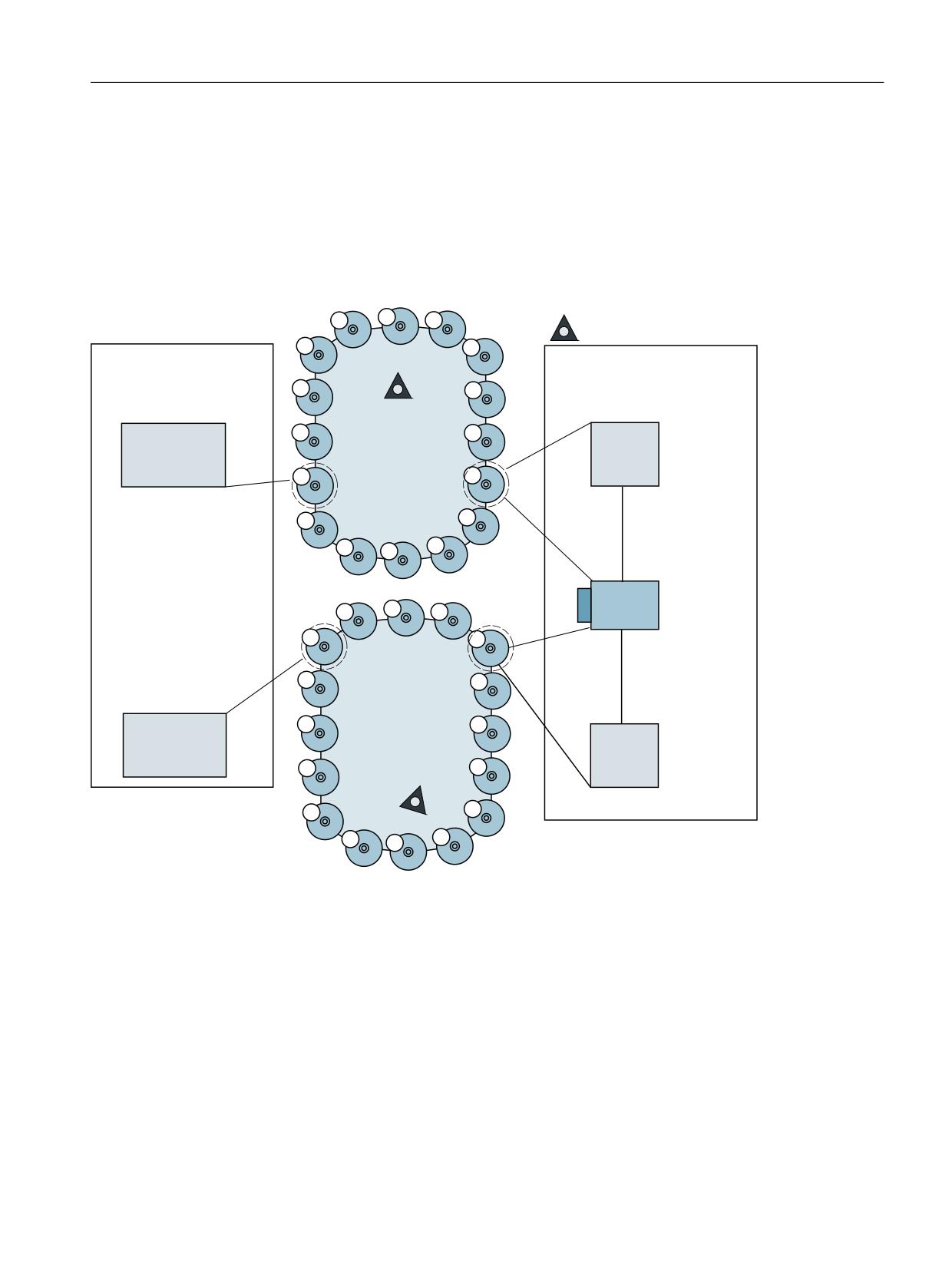
NC programming
7.9 NC language commands
7.9.61
Example of magazine configuration system variables
Specifications
The magazine configuration selected in the following example is selected. Information about
the current magazine configuration can be obtained by reading the system variables described
here.
PDJD]LQH FHQWHU
,Q ILUVW LQWHUQDO PDJD]LQH
,Q VHFRQG LQWHUQDO PDJD]LQH
ORDGLQJ PDJD]LQH
EXIIHU PDJD]LQH
7&B0'3 >
@
0DJD]LQH
/RDGLQJ VWDWLRQ
7&B0$3 > @
*ULSSHU
/RFDWLRQ
/RFDWLRQ
7&B0'3 >
@
7&B0/65>
@
7&B0'3
>
@
6SLQGOH
/RFDWLRQ
7&B0'3 >
@
7&B0/65>
@
7&B0'3 >
@
0DJD]LQH
/RDGLQJ VWDWLRQ
7&B0$3 > @
/RFDWLRQ
*ULSSHU
/RFDWLRQ
7&B0'3 >
@
Figure 7-13
Magazine configuration
N10 def int noOfMag=0, noOfLoc=0, noOfDist=0, noOfRel=0,
noOfSpindles=0, spindeleNo=0
N20 def int i=0
; Total number of defined magazines
N100 noOfMag = $P_MAGN
;noOfMag is assigned value =4 - 2 real
magazines
;1, 2+2 internal magazines 9998, 9999
Tool management
Function Manual, 10/2020, 6FC5397-1HP40-0BA1
315
NC programming
7.9 NC language commands
; Display all magazine numbers
N200 for i=1 to noOfMag
N220 MDG ("magazine no.="<<$P_MAG[i])
;Display numbers 1, 2, 9998, 9999
N240 endfor
; Total number of defined magazine locations
N300 for i=1 to noOfMag
N320 noOfLoc=noOfLoc + $TC_MAP7[$P_MAG[i]]
N340 endfor
;noOfLoc now contains value 16+16+3+2=37
; Number of magazines linked with Spindle 1
N400 noOfDist=$P_MAGNDIS[9998,3]
;; noOfDist is assigned value=2 - Mag.1, 2 are linked with
the spindle location
; Display the magazine numbers linked with Spindle 1 (=location 3)
N500 for i=1 to noOfDist
N520 MSG ("magazine no.=" << $P_MAGDISS[ i ] )
;Display numbers 1, 2
N540 endfor
; Number of magazines linked with Loading station 2
N410 noOfDist = $P_MAGNDIS[9999,1]
;noOfDist is assigned value=1 - Mag. 2 is
linked with loading station 2
; Display the magazine numbers linked with loading station 2 (=location 1)
N510 for i=1 to noOfDist
N530 MSG ("magazine no.="<< $P_MAGDISL[i] )
;Display number 2
N550 endfor
; Total number of defined spindles
N600 noOfSpindles=
;noOfSpindles contains value = 1
$P_MAGNS
;- one spindle location is defined
; Display the numbers of the spindles defined in the magazine configuration
N620 for i=1 to noOfSpindles
N640 MSG ("magazine no.="<< $P_MAGS[i])
;Display number 1
N660 endfor
Tool management
316
Function Manual, 10/2020, 6FC5397-1HP40-0BA1

NC programming
7.9 NC language commands
: Total number of buffer locations assigned to spindle 1
(=gripper in example)
N700 noOfRel=$P_MAGNREL[1]
;noOfRel contains value=2, grippers 1 and
2 are assigned to the spindle
; Display the numbers of the grippers of spindle no. 1 defined in the magazine configuration
N720 for i=1 to noOfRel
N740 MSG ("magazine no.="<< $P_MAGREL[1,i] )
;Display numbers 1, 2
N760 endfor
7.9.62
$P_MAGNH / $P_MAGNHLT / $P_MAGHLT - Location type hierarchies
Overview
This function is available for TMMG.
The system variables return the following information:
• Number of hierarchies
• Number of magazine location types each hierarchy.
Name
$P_MAGNH / $P_MAGNHLT[n] / $P_MAGHLTn,m]
Meaning
$P_MAGNH
Number of defined magazine location type hierarchies that are assigned to the
channel.
> 0; Successful read access
0; No location type hierarchies are defined.
-1; TMMG is not active
$P_MAGNHLT[n]
Number of the defined location types in the n-the defined hierarchy
> 0; Successful read access
0; Hierarchy "n" is outside of the defined range.
-1; TMMG is not active.
-2; n is outside of the defined range.
$P_MAGHLTn,m]
m-th location type of hierarchy n
> 0; Successful read access
-1; TMMG is not active.
-2; Hierarchy n does not have any defined location types.
-3; m is outside of the defined range.
Data type
INT
Tool management
Function Manual, 10/2020, 6FC5397-1HP40-0BA1
317

NC programming
7.9 NC language commands
Name
$P_MAGNH / $P_MAGNHLT[n] / $P_MAGHLTn,m]
Value range
1-32000
Indices
Meaning
Value range
n = 1,
, $P_MAGNH
m = 1,
, $P_MAGNHLT
Access
Read in part pro-
Write in part pro-
Read in synchro-
Write in synchro-
gram
gram
nous action
nous action
X
-
-
-
Implicit prepro-
-
-
-
cessing stop
Example
The following three hierarchies are defined:
Hierarchy 1:
$TC_MPTH[0,0]
=
12
$TC_MPTH[0,1]
=
88
$TC_MPTH[0,2]
=
9999
$TC_MPTH[0,3]
=
9999
$TC_MPTH[0,4]
=
9999
Hierarchy 2:
$TC_MPTH[1,0]
=
55
$TC_MPTH[1,1]
=
808
$TC_MPTH[1,2]
=
45
$TC_MPTH[1,3]
=
9999
$TC_MPTH[1,4]
=
9999
Hierarchy 3:
$TC_MPTH[2,0]
=
87
$TC_MPTH[2,1]
=
21
$TC_MPTH[2,2]
=
3
$TC_MPTH[2,3]
=
9999
$TC_MPTH[2,4]
=
62
Hierarchy 4:
$TC_MPTH[3,0]
=
9999
$TC_MPTH[3,1]
=
9999
$TC_MPTH[3,2]
=
9999
$TC_MPTH[3,3]
=
9999
$TC_MPTH[3,4]
=
9999
Tool management
318
Function Manual, 10/2020, 6FC5397-1HP40-0BA1
NC programming
7.9 NC language commands
Hierarchy 5:
$TC_MPTH[4,0] = 99
$TC_MPTH[4,1] = 124
$TC_MPTH[4,2] = 32
$TC_MPTH[4,3] = 7
$TC_MPTH[4,4] = 9999
The following example returns the total number of hierarchies that are defined and the number
of magazine location types in each hierarchy.
N10 def int noOfH, noOfTypes[8], locTypeNo
N100 noOfH=$P_MAGNH
;noOfH is assigned value = 5
N220 for i=1 to noOfH
N240 noOfTypes[i - 1]=$P_MAGNHLT[ i ]
;sets the values 2, 3, 5, 0, 4 in
the array
N260 endfor
The following example returns which magazine location types are defined in the 2nd hierarchy.
N310 for i=1 to noOfTypes[1]
N340 MSG ("magazine no.="<<$P_MAGHLT[2, i])
;shows values 55, 808, 45
N330 endfor
The following example returns which magazine location types are defined in the 3rd hierarchy.
N350 for i=1 to
noOfTypes[2]
N360 MSG ("magazine no.="<<$P_MAGHLT[3, i])
;shows the values 87, 21, 3, 9999, 62
N370 endfor
The following example returns which magazine location types are defined in the 5th hierarchy.
N400 for i=1 to noOfTypes[4]
N410 MSG ("magazine no.="<<$P_MAGHLT[5, i])
;shows values 99, 124, 32, 7
N420 endfor
The following example returns the location type of an undefined hierarchy level (beyond the end
of hierarchy 2).
N500 MSG ( " Magazine no. = " << $P_MAGHLT[ 2, 4 ] )
; shows the value -3
Tool management
Function Manual, 10/2020, 6FC5397-1HP40-0BA1
319
NC programming
7.9 NC language commands
7.9.63
Additional language commands
Name
$P_TOOLNO
Meaning
Active tool number T0 to T32000 Generally, the command should not be used when
magazine management is active. When magazine management is active GETTEXET
should be used instead. For $MC_CUTTING_EDGE_DEFAULT=0, the incorrect T num-
ber can be determined. If the programming was implemented after programming D
> 0, then it is also reliable
Data type
Integer
Value range
1-32000
Indices
Meaning
Value range
Access
Read in part pro-
Write in part pro-
Read in synchro-
Write in synchro-
gram
gram
nous action
nous action
X
-
-
-
Implicit prepro-
-
-
-
cessing stop
Name
$P_TOOLP
Meaning
Tool number last programmed
Command is available for TMMO.
It is analogous to the TMMG-specific command GETSELT.
Data type
Integer
Value range
1-32000
Indices
Meaning
Value range
Access
Read in part pro-
Write in part pro-
Read in synchro-
Write in synchro-
gram
gram
nous action
nous action
X
-
-
-
Implicit prepro-
-
-
-
cessing stop
Name
$P_TOOL
Meaning
Active tool cutting edge (Dx)
Data type
Integer
Value range
Indices
Meaning
Value range
Access
Read in part pro-
Write in part pro-
Read in synchro-
Write in synchro-
gram
gram
nous action
nous action
X
-
-
-
Implicit prepro-
-
-
-
cessing stop
Tool management
320
Function Manual, 10/2020, 6FC5397-1HP40-0BA1
NC programming
7.9 NC language commands
Name
$P_DLNO
Meaning
Active additive offset number DL=0-DL=max;
max=value of $MN_MM_MAX_SUMCORR_PER_CUTTEDGE
$P_DLNO is analogous to the already existing parameters $P_TOOL, $P_TOOLNP
and active D and T numbers.
Data type
Integer
Value range
0-6
Indices
Meaning
Value range
Access
Read in part pro-
Write in part pro-
Read in synchro-
Write in synchro-
gram
gram
nous action
nous action
X
-
-
-
Implicit prepro-
-
-
cessing stop
Name
$P_TOOLL[n]
Meaning
Active tool total length; n = 1...3
$P_TOOLL[1] to $P_TOOLL[3] correspond to the values in $TC_DP3[] to
$TC_DP3[], including the active tool offsets irrespective of the plane selection and
irrespective of setting data such as $SC_TOOL_LENGTH_CONST etc.
Data type
REAL
Value range
Indices
Meaning
Value range
Access
Read in part pro-
Write in part pro-
Read in synchro-
Write in synchro-
gram
gram
nous action
nous action
X
-
-
-
Implicit prepro-
-
-
-
cessing stop
Name
$P_TOOLR
Meaning
Active radius
Data type
REAL
Value range
Indices
Meaning
Value range
Access
Read in part pro-
Write in part pro-
Read in synchro-
Write in synchro-
gram
gram
nous action
nous action
X
-
-
-
Implicit prepro-
-
-
-
cessing stop
Name
$P_TC
Meaning
Active tool holder
Data type
Integer
Value range
Tool management
Function Manual, 10/2020, 6FC5397-1HP40-0BA1
321