Mitsubishi Galant. Manual - part 562
 

  Index      Mitsubishi     Mitsubishi Galant - service repair manual 2001 year


Search            


Content   ..  560  561  562  563   ..


Mitsubishi Galant. Manual - part 562


DOOR

TSB Revision

BODY

42-31

INSPECTION PROCEDURE 4: Only the rear door window <RH> does not open and close.

AC000583AB

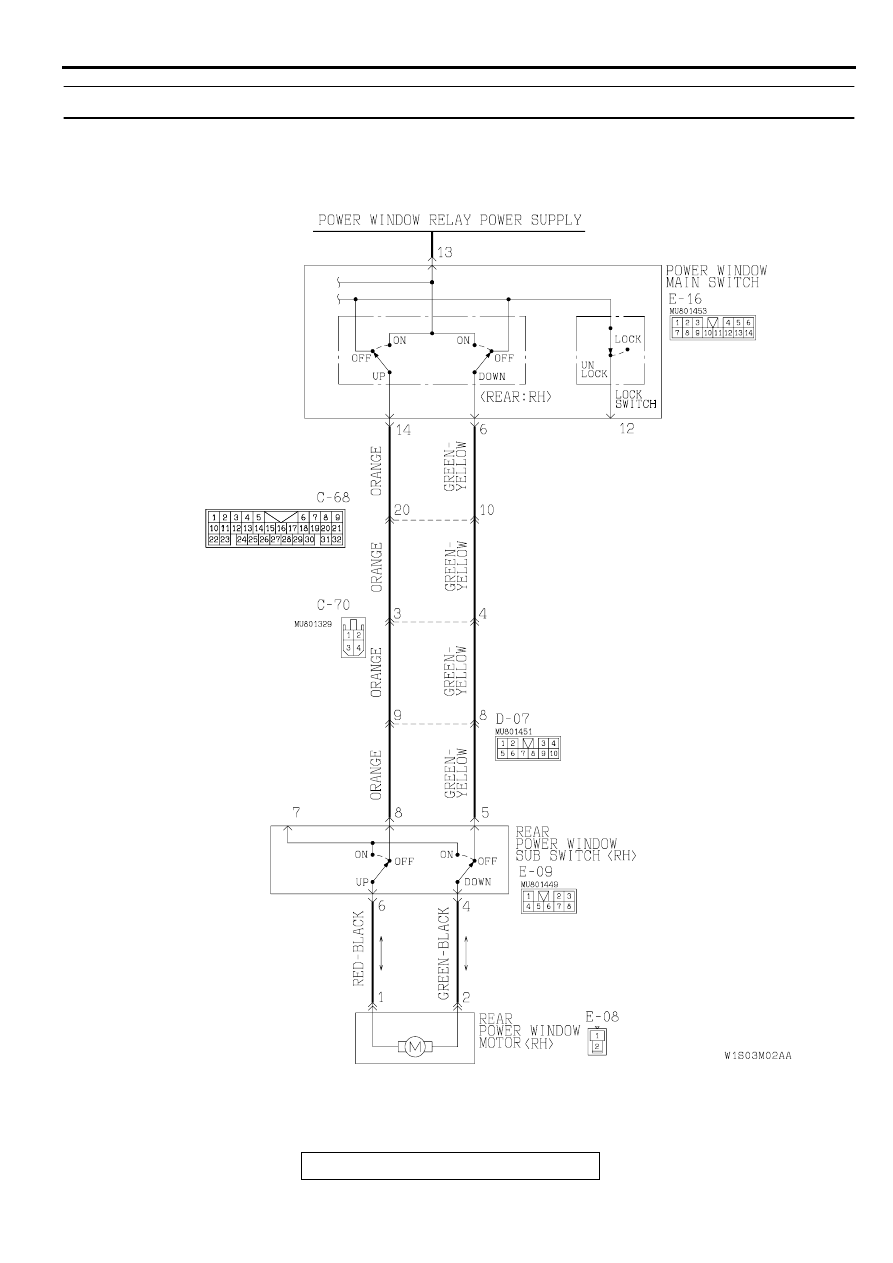
Rear Power Window Motor <RH> Drive Circuit

DOOR

TSB Revision

BODY

42-32

CIRCUIT OPERATION

•

When the rear power window switch is operated 
up or down, the rear power window motor 
operates, and opens or closes the door window.

TECHNICAL DESCRIPTION (COMMENT)

•

The cause may be a malfunction of the rear 
power window motor <RH> drive circuit.

TROUBLESHOOTING HINTS

•

Malfunction of the power window main switch

•

Malfunction of the rear power window sub-switch 
<RH>

•

Malfunction of the rear power window motor 
<RH>

•

Damaged harness wires or connectors

AC003079AG

CONNECTOR
BLOCK (LH)

CONNECTOR: C-68

AC000564

CONNECTOR: C-70

CONNECTOR BLOCK (RH)

AB

AC000581AC

CONNECTOR: D-07

AC000570

CONNECTOR: E-16

AC

AC000576AC

CONNECTOR: E-05

DOOR

TSB Revision

BODY

42-33

DIAGNOSIS

STEP 1. Check the power window main switch continuity.
(1) Remove the power window main switch. (Refer to 

P.42-54

.)

(2) Check the continuity when the rear power window main 

switch <RH> is turned to the UP position or DOWN position.

Q: Is the power window main switch damaged?

YES : Replace it, then go to Step 6.
NO :  Go to Step 2.

STEP 2. Check the rear power window sub-switch <RH> 
continuity.
(1) Remove the rear power window sub-switch <RH>. (Refer to 

P.42-54

.

(2) Check the continuity when the rear power window sub-

switch <RH> is turned to the UP position or DOWN position.

Q: Is the rear power window sub-switch <RH> damaged?

YES : Replace it, then go to Step 6.
NO :  Go to Step 3.

REAR <RH> SWITCH POSI-
TION

TESTER CON-
NECTION

SPECIFIED 
CONDITION

When the lock 
switch is 
locked.

UP

13 

−

 14

Continuity

OFF

6 

−

 14

Continuity

DOWN

6 

−

 13

Continuity

When the lock 
switch is un-
locked.

UP

6 

−

 12, 13 

−

 14

Continuity

OFF

6 

−

 12 

−

 14

Continuity

DOWN

12 

−

 14, 6 

−

 13

Continuity

AC000571

5

4

6

13

3

2

1

14

12

11

10

9

8

7

SWITCH 
POSITION

TESTER 
CONNECTION

SPECIFIED 
CONDITION

UP

4 

−

 5, 6 

−

 7

Continuity

OFF

4 

−

 5, 6 

−

 8

Continuity

DOWN

4 

−

 7, 6 

−

 8

Continuity

AC000582

1

2 3

4 5 6 7 8

DOOR

TSB Revision

BODY

42-34

STEP 3. Check the rear power window motor <RH> 
operation.
(1) Remove the rear power window regulator <RH>. (Refer to 

P.42-56

.

(2) Connect a battery directly to the motor terminals and check 

that the motor runs smoothly.

Q: Is the rear power window motor <RH> damaged?

YES : Replace it, then go to Step 6.
NO :  Go to Step 4.

STEP 4. Check the harness wires between rear power 
window sub-switch <RH> connector E-09 and rear power 
window motor <RH> connector E-08.
Q: Are there any damaged wires between rear power 

window sub-switch connector <RH> E-09 and rear 
power window motor <RH> connector E-08?
YES : 
Repair them, then go to Step 6.
NO :  Go to Step 5.

TESTER CONNECTION

SLIDER POSITION

1

−

Battery(+), 2

−

Battery(-)

UP

2

−

Battery(+), 1

−

Battery(-)

DOWN

AC000798

2

1

SLIDER

AB

AC000576

AD

E-08

E-09

CONNECTORS: E-08, E-09


Content   ..  560  561  562  563   ..