Mazda Protege 5. Manual - part 222
 

  Index      Mazda     Mazda Protege 5 - service repair manual 2002 year


Search            


Content   ..  220  221  222  223   ..


Mazda Protege 5. Manual - part 222


ON-BOARD DIAGNOSTIC 

05–02–16

DTC P0706

A3U050201030W08

DTC P0706

Transaxle range (TR) switch circuit malfunction (open circuit)

DETECTION 

CONDITION

•

When all conditions below satisfied and 100 seconds or more have passed.
— D, 2, 1range and R range switch not input.
— Engine speed 530 rpm or above.
— Vehicle speed 20 km/h {12 mph} or above.

Diagnostic support note:

•

This is a continuous monitor (CCM).

•

MIL illuminates if PCM detects the above malfunction conditions during two consecutive drive cycles.

•

PENDING CODE is available.

•

FREEZE FRAME DATA is available.

•

O/D OFF indicator light flashes.

•

DTC is stored in the PCM memory.

POSSIBLE 

CAUSE

•

Charging system malfunction

•

TR switch malfunction

•

TR switch misadjustment

•

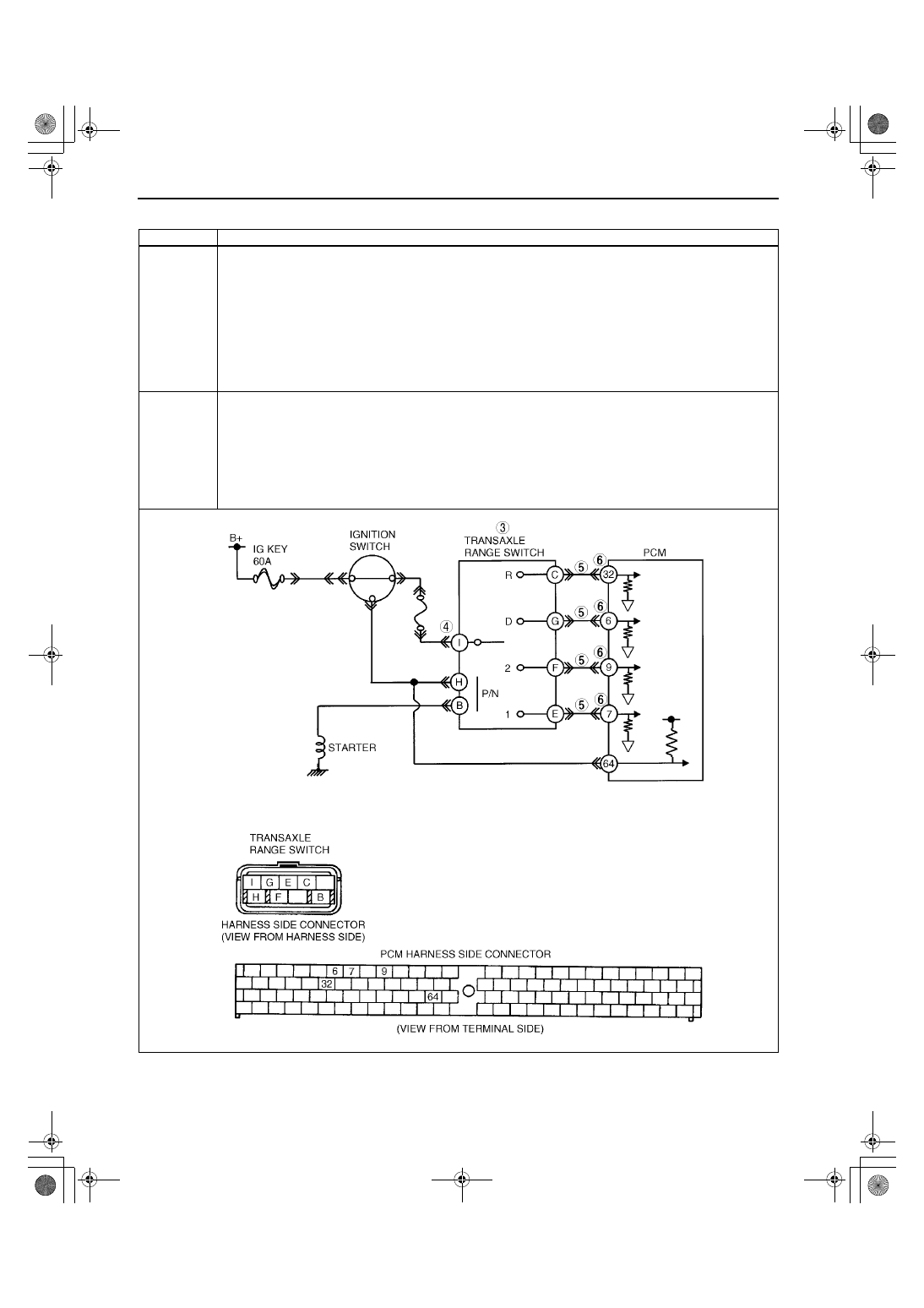
Open circuit between TR switch terminal G and PCM terminal 6

•

Open circuit between TR switch terminal F and PCM terminal 9 

•

Open circuit between TR switch terminal E and PCM terminal 7 

•

Open circuit between TR switch terminal I and dash harness (JB-04) terminals

•

Damaged connectors between TR switch and PCM

•

PCM malfunction

1712-1U-01G(05-02).fm  16 ページ  2001年6月29日 金曜日 午後4時35分

ON-BOARD DIAGNOSTIC 

05–02–17

05–02

Diagnostic procedure

End Of Sie

STEP

INSPECTION

ACTION

1

VERIFY FREEZE FRAME DATA HAS BEEN 
RECORDED

•

Has FREEZE FRAME PID DATA been 
recorded?

Yes Go to next step.

No

Record FREEZE FRAME PID DATA on repair order, then 
go to next step.

2

VERIFY RELATED REPAIR INFORMATION 
AVAILABILITY

•

Check for related Service Bulletins availability.

•

Is any related repair information available?

Yes Perform repair or diagnosis according to available repair 

information.

•

If vehicle is not repaired, go to next step.

No

Go to next step.

3

INSPECT TR SWITCH FOR OPEN

•

Turn ignition key to OFF.

•

Disconnect TR switch connector.

•

Inspect for continuity between TR switch 
terminals (part-side).
— D range: I and G
— 2 range: I and F
— 1 range: I and E
— R range: I and C

•

Is there continuity between TR switch terminals 
(part-side)?

(See 05–17–20 TRANSAXLE RANGE (TR) 
SWITCH INSPECTION.)

Yes Go to next step.

No

Replace TR switch, then go to Step 7.
(See 05–17–20 TRANSAXLE RANGE (TR) SWITCH 
REMOVAL/INSTALLATION.)

4

INSPECT TR SWITCH POWER CIRCUIT FOR 
OPEN

•

Turn ignition key to ON.

•

Inspect voltage at TR switch terminal I 
(harness-side).

•

Is there B+ at TR switch terminal I (harness-
side)?

Yes Go to next step.

No

Inspect main fuse.

•

If okay, repair or replace wiring, then go to Step 7.

5

INSPECT PCM CONNECTOR FOR POOR 
CONNECTION

•

Turn ignition key to OFF.

•

Check for poor connection (damaged/pulled-
out terminals, corrosion, etc.).

•

Is connection okay?

Yes Go to next step.

No

Repair or replace connector and/or terminals, then go to 
Step 7.

6

INSPECT TR SWITCH SIGNAL CIRCUIT FOR 
OPEN

•

Inspect for continuity between TR switch 
terminals (harness-side) and PCM terminals 
(harness-side).
— D range: G to 6
— 2 range: F to 9
— 1 range: E to 7
— R range: C to 32

•

Is there continuity?

Yes Go to next step.

No

Repair or replace harness, then go to next step.

7

VERIFY TROUBLESHOOTING OF DTC P0706 
COMPLETED

•

Make sure to reconnect all disconnected 
connectors.

•

Clear DTC from memory using WDS or 
equivalent.

•

Drive vehicle in each range (D, 2, 1, and R) for 
100 seconds or more under following 
conditions.
— Engine speed (RPM PID) 530 rpm or 

above

— Vehicle speed (VSS PID) 20 km/h {12 mph} 

or above

•

Is pending code present?

Yes Replace PCM, then go to next step.

(See 01–40A–7 PCM REMOVAL/INSTALLATION [ZM].)
(See 01–40B–7 PCM REMOVAL/INSTALLATION [FS].)

No

No concern is detected. Go to next step.

8

VERIFY AFTER REPAIR PROCEDURE

•

Perform “After Repair Procedure”.

(See 05–02–6 AFTER REPAIR PROCEDURE.)

•

Are any DTCs present?

Yes Go to applicable DTC inspection.

No

Troubleshooting completed.

1712-1U-01G(05-02).fm  17 ページ  2001年6月29日 金曜日 午後4時35分

ON-BOARD DIAGNOSTIC 

05–02–18

DTC P0710

A3U050201030W09

DTC P0710

Transaxle fluid temperature (TFT) sensor circuit malfunction (short to ground/open circuit)

DETECTION 

CONDITION

•

If PCM detects either of following conditions for 150 seconds or more, PCM determines that TFT sensor 
circuit has a malfunction.
— TFT sensor voltage is 0.06 V or below and vehicle speed 20 km/h {12 mph} or above.
— TFT sensor voltage is 4.67 V or above and vehicle speed 20 km/h {12 mph} or above.

Diagnostic support note:

•

This is a continuous monitor (CCM).

•

MIL illuminates if PCM detects the above malfunction conditions during first drive cycle.

•

PENDING CODE is not available.

•

FREEZE FRAME DATA is available.

•

O/D OFF indicator light flashes.

•

DTC is stored in the PCM memory.

POSSIBLE 

CAUSE

•

TFT sensor malfunction

•

Open circuit between TFT sensor terminal A and ATX connector terminal E

•

Short to ground between TFT sensor terminal A and ATX connector terminal E

•

Open circuit between TFT sensor terminal B and ATX connector terminal H

•

Short to ground between TFT sensor terminal B and ATX connector terminal H

•

Open circuit between ATX connector terminal E and PCM terminal 37

•

Short to ground between ATX connector terminal E and PCM terminal 37

•

Open circuit between ATX connector terminal H and PCM terminal 91

•

Damaged connectors between TFT sensor and PCM

•

PCM malfunction

1712-1U-01G(05-02).fm  18 ページ  2001年6月29日 金曜日 午後4時35分

ON-BOARD DIAGNOSTIC 

05–02–19

05–02

Diagnostic procedure

STEP

INSPECTION

ACTION

1

VERIFY FREEZE FRAME DATA HAS BEEN 
RECORDED

•

Has FREEZE FRAME PID DATA been 
recorded?

Yes Go to next step.

No

Record FREEZE FRAME PID DATA on repair order, then 
go to next step.

2

VERIFY RELATED REPAIR INFORMATION 
AVAILABILITY

•

Check for related Service Bulletins availability.

•

Is any related repair information available?

Yes Perform repair or diagnosis according to available repair 

information.

•

If vehicle is not repaired, go to next step.

No

Go to next step.

3

VERIFY CURRENT INPUT SIGNAL STATUS

•

Turn ignition key to OFF.

•

Connect breakout box to PCM.

•

Turn ignition key to ON (engine OFF).

•

Measure the voltage at PCM terminal 37.

•

Are voltage readings within 0.06—4.67 V?

Yes Go to intermittent concern troubleshooting procedure.

(See 01–03A–4 INTERMITTENT CONCERN 
TROUBLESHOOTING [ZM].)
(See 01–03B–4 INTERMITTENT CONCERN 
TROUBLESHOOTING [FS].)

No

Voltage 0.06 V or below: go to Step 11.
Voltage 4.67 V or above: go to next step.

4

INSPECT ATX CONNECTOR FOR POOR 
CONNECTION

•

Turn ignition key to OFF.

•

Inspect ATX connector connection.

•

Disconnect ATX connector.

•

Check for poor connection (damaged/pulled-
out terminals, corrosion etc.).

•

Is connection okay?

Yes Go to next step.

No

Repair or replace connector and/or terminal, then go to 
Step 16.

5

INSPECT TFT SENSOR CIRCUIT

•

Turn ignition key to ON (engine OFF).

•

Measure the voltage at PCM terminal 37 when 
connect between ATX connector terminals E 
and H (vehicle harness-side) using jumper 
wire.

•

Verify that voltage changes to 0.06 V or below.

•

Does voltage change?

Yes Go to next step.

No

Go to Step 8.

6

INSPECT TFT SENSOR CONNECTOR FOR 
POOR CONNECTION

•

Turn ignition key to OFF.

•

Remove valve body cover.

•

Disconnect TFT sensor connector.

•

Check for poor connection (damaged/pulled-
out terminals, corrosion, etc.).

•

Is connection okay?

Yes Go to next step.

No

Repair or replace connector and/or terminal or replace TFT 
sensor, then go to Step 16.
(See 05–17–25 TRANSAXLE FLUID TEMPERATURE 
(TFT) SENSOR REMOVAL/INSTALLATION.)

7

INSPECT TFT SENSOR CIRCUIT FOR OPEN

•

Check for continuity between TFT sensor 
terminals (harness-side) and ATX connector 
terminals (transaxle case side).
— ATX connector terminal E and TFT sensor 

terminal A

— ATX connector terminal H and TFT sensor 

terminal B

•

Is there continuity?

Yes Replace TFT sensor, then go to Step 16.

(See 05–17–25 TRANSAXLE FLUID TEMPERATURE 
(TFT) SENSOR REMOVAL/INSTALLATION.)

No

Repair or replace harness, then go to Step 16.

8

INSPECT PCM CONNECTOR FOR POOR 
CONNECTION

•

Turn ignition key to OFF.

•

Disconnect PCM connector.

•

Check for poor connection (damaged/pulled-
out terminals, corrosion, etc.).

•

Is connection okay?

Yes Go to next step.

No

Repair or replace connector and/or terminal, then go to 
Step 16.

9

INSPECT HARNESS FOR OPEN CIRCUIT

•

Disconnect ATX connector.

•

Connect the PCM connector.

•

Turn ignition key to ON (engine OFF).

•

Inspect voltage at ATX connector terminal E 
(vehicle harness-side).

•

Is voltage 5 V?

Yes Go to next step.

No

Repair or replace harness, then go to Step 16.

1712-1U-01G(05-02).fm  19 ページ  2001年6月29日 金曜日 午後4時35分


Content   ..  220  221  222  223   ..