FANUC Series 30i/300i/300is-MODEL A. Machining Center System. User's manual - page 221
12.SETTING AND DISPLAYING DATA
OPERATION
B-63944EN/03
- 1724 -
Procedure for enabling/displaying parameter writing
Procedure
1
Select the MDI mode or enter state emergency stop.
2
Press function key
.
3
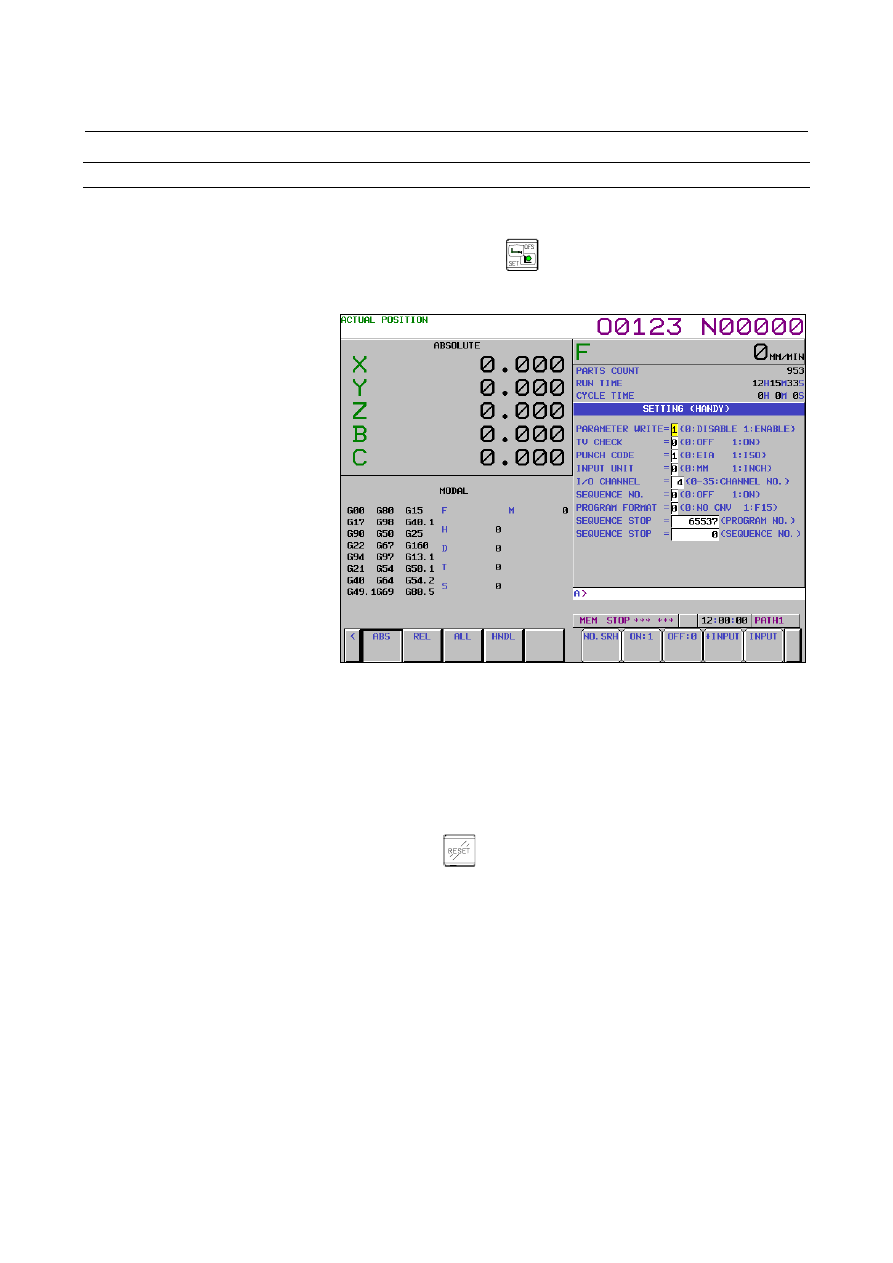
Press soft key [SETTING] to display the setting screen.
Fig. 12.4.1 (b) SETTING screen (10.4-inch)
4
Move the cursor to PARAMETER WRITE using cursor keys.
5
Press soft key [(OPRT)], then press [ON:1] to enable parameter
writing.
At this time, the CNC enters the alarm state SW0100.
6
After setting parameters, return to the setting screen. Move the
cursor to PARAMETER WRITE and press soft key [(OPRT)] ,
then press [OFF:0].
7 Press
the
key to release the alarm condition.
When an alarm PW0000 occurred, however, it is not released
unless the power is turned off and back on.