Boeing 737 - 600/700/800/900. Operations Manual (1997 year) - page 63
Flight Management, Navigation -
FMC Preflight
Boeing 737 Operations Manual
Company Data Link
[Option - With company data link]
TAK EOFF REF
1 / 2
T A K E O F
F
D
A T A
1
<REQUES T
I N T E R S E C T
2
---/RW1
3
R
1
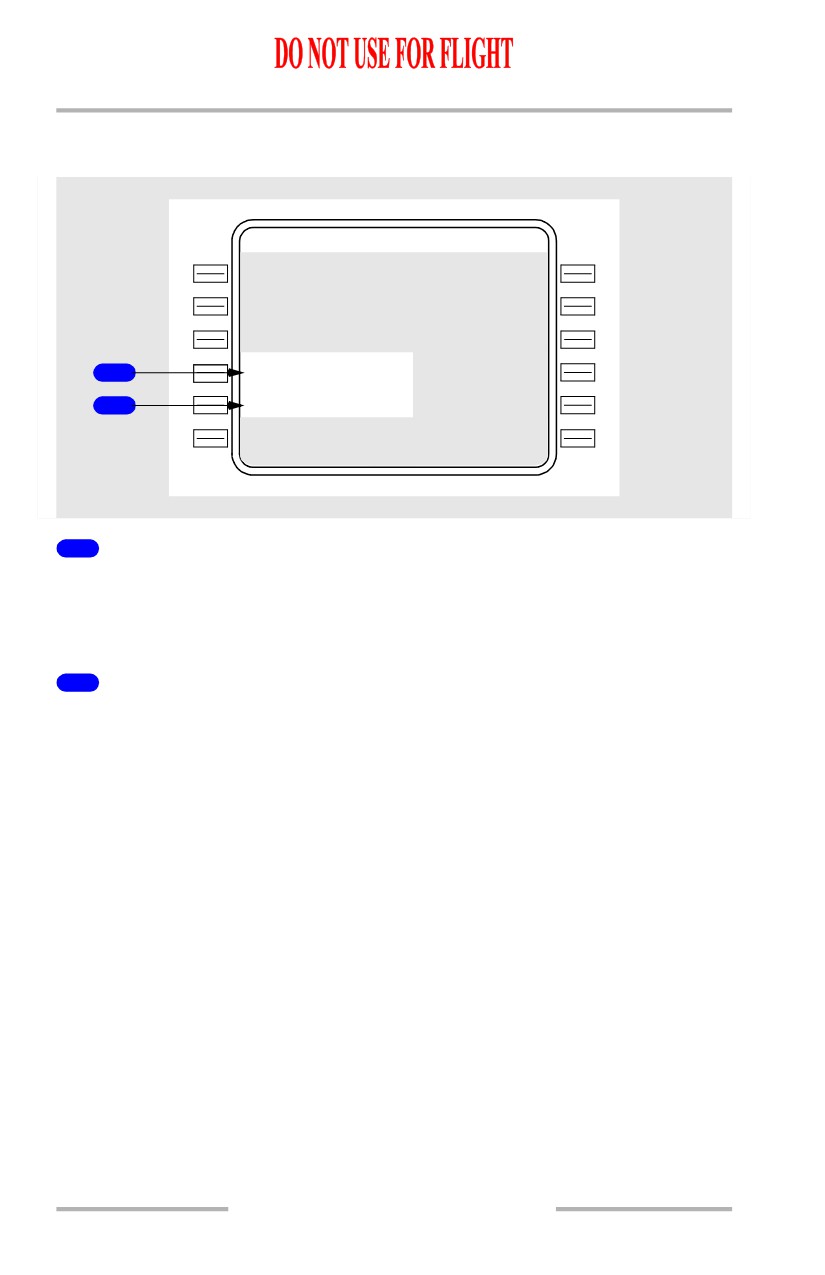
TAKEOFF DATA REQUEST
Push - transmits a data link request for a takeoff data uplink. Resulting TAKEOFF
REF uplink may contain takeoff data for up to 6 runways, which are stored in
FMC uplink memory.
2
Intersection (INTERSECT)
Displays active runway.
An intersection may be entered. Valid entries are 1 to 3 alphanumerics.
If an intersection is entered and TAKEOFF DATA REQUEST is made, the
runway/intersection pair is included in the request downlink.
If the displayed runway or runway/intersection pair matches a runway or
runway/intersection pair in FMC uplink memory, the associated TAKEOFF REF
UPLINK is annunciated for flight crew ACCEPT/REJECT.
11.40.48
Flight Management, Navigation -
FMC Preflight
Boeing 737 Operations Manual
V Speed Data
[Option - With company data link, without FMC computed takeoff speeds]
TAK EOFF
REF
1
/
2
V
1
1
1
7
V
R
1
1
1
8
V
2
1
2
4
G
W
/ T O W
1
1
0.0
/
1
10.4
2
3
1
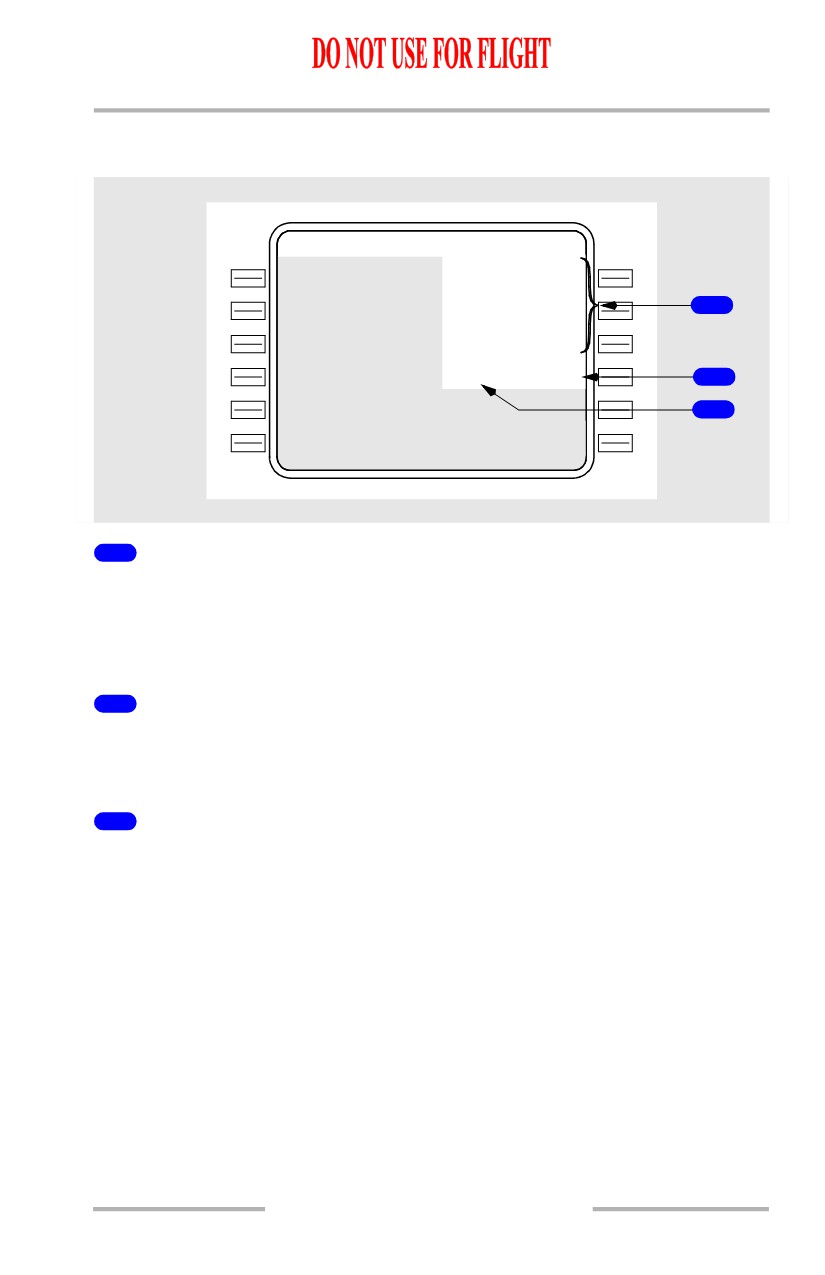
V Speeds (V1, VR, and V2)
Crew calculated V speeds may be entered and displayed for reference.
V speeds may be uplinked.
Large font V speeds are displayed on the airspeed indication.
2
Takeoff Weight (TOW)
Displays gross weight the uplink V speeds are based on.
Blank if there are no uplinked V speeds in the column above.
3
Gross Weight (GW)
Displays current gross weight.
11.40.49
Flight Management, Navigation -
FMC Preflight
Boeing 737 Operations Manual
FMC Computed V Speed Data
[Option - With FMC computed QRH takeoff speeds]
TAK EOFF
REF
1
/
2
1
Q
R
H
V 1
1
1
6
>
117
V
R
2
1
1
7
>
118
V
2
1
2
3
>
124
G
W
/ T O W
1
1
0.0
/
1
10.4
3
4
S
E
L E C T
QR H OFF>
5
1
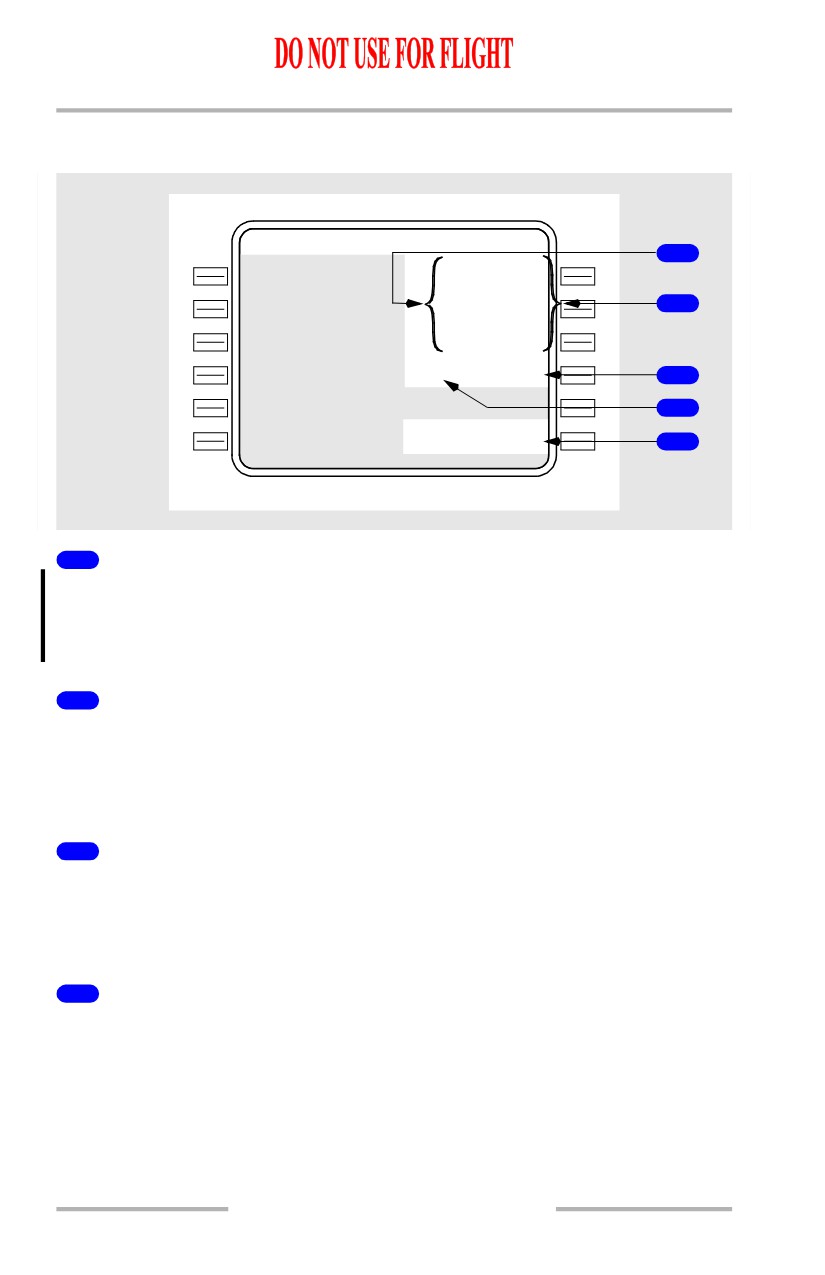
QRH
[Option - With FMC computed QRH takeoff speeds]
Displays FMC computed V speeds, based on assumed temperature, current gross
weight and flap setting.
2
V Speeds (V1, VR, and V2)
Push - selects associated FMC computed V speed from center column.
Manual entry may be made.
Large font V speeds are displayed on the airspeed indication.
3
Takeoff Weight (TOW)
Displays gross weight that the large font V speeds in the column above are based
on.
Blank if there are no large font V speeds in the column above.
4
Gross Weight (GW)
Displays current gross weight.
FMC computed V speeds in the column above are based on this weight.
11.40.50
Flight Management, Navigation -
FMC Preflight
Boeing 737 Operations Manual
5
Select FMC Computed V Speeds On/Off (SELECT QRH ON/OFF)
[Option - With FMC computed QRH takeoff speeds]
When SELECT QRH OFF displayed
• Push - Removes FMC computed V speeds from display.
When SELECT QRH ON displayed
• Push - Displays FMC computed V speeds.
Default is FMC Computed V speeds displayed.
Change of Performance Data After V Speed Entry
V speeds should be entered on the TAKEOFF REF page as a final step of FMC
preflight. If V speeds are entered and then performance data (for example, OAT
or takeoff thrust) is subsequently changed, the FMC automatically removes the
previously entered V speeds and the NO VSPD flag shows on the airspeed
indication.
In addition, the scratchpad message VERIFY TAKEOFF SPEEDS displays if any
of the following items are changed after V speeds have been entered:
• gross weight
• zero fuel weight
• plan fuel.
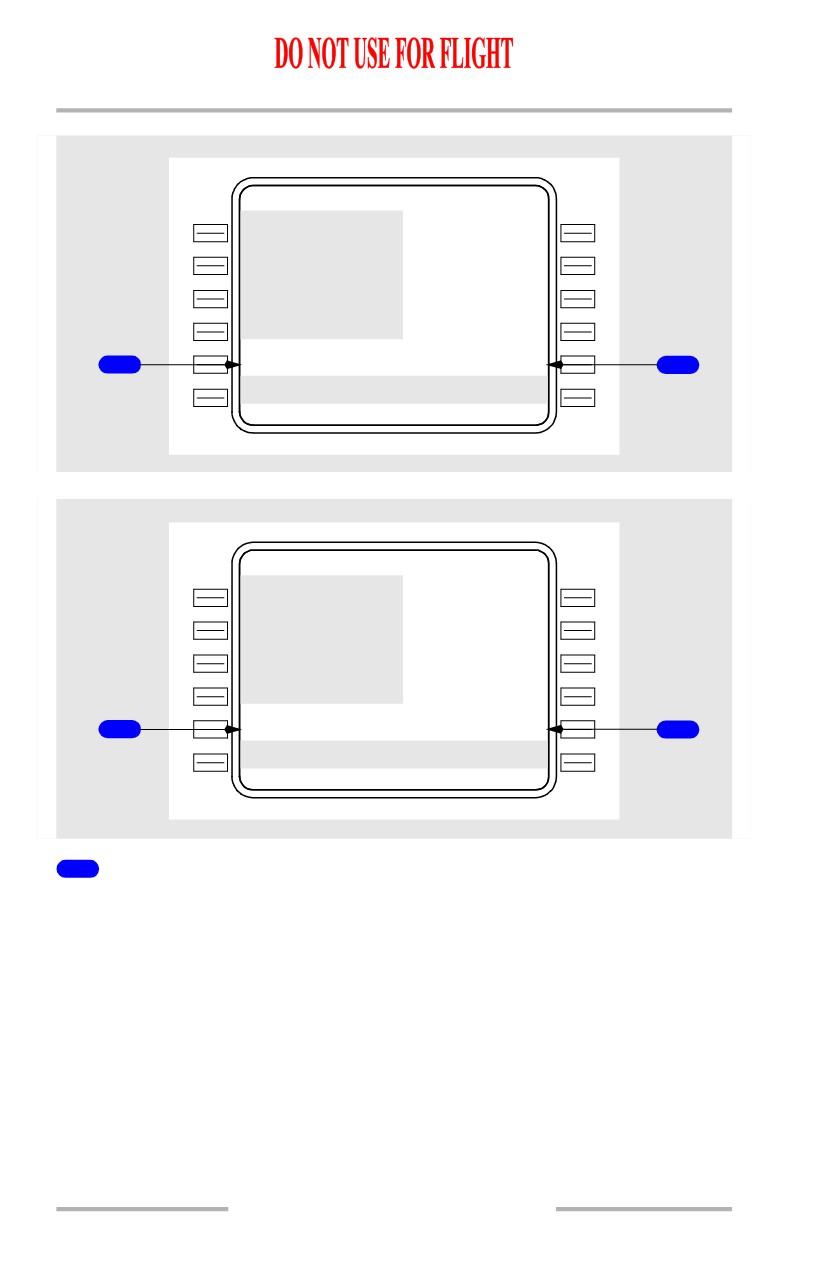
[Option - Without company data link or FMC computed takeoff speeds]
The FMC allows the flight crew to re-display the previously entered V speeds.
[Option - With company data link or FMC computed takeoff speeds]
The previously entered V speeds are displayed in small font on the TAKEOFF
REF page.
[Option - Without FMC computed takeoff speeds]
TAK EOFF REF
1 / 2
V 1
117 K T
V R
118 K T
V
2
124 K T
C O M P L E T E - - -
R W 1 3 R T A K E O F F S P D S
1
<REJEC T
ACCEPT>
2
VERIFY TA KEOFF SPEEDS
11.40.51
Flight Management, Navigation -
FMC Preflight
Boeing 737 Operations Manual
[Option - With FMC computed QRH takeoff speeds]
TAK EOFF
REF
1 / 2
Q R H
V 1
1
1
6
117
V
R
1
1
7
118
V
2
1
2
3
124
G
W
/
T O W
110.0/110.4
R W 1 3 R T A K EO F F S P D S
1
<REJEC T
ACCEPT>
2
VERIFY TA KEOFF SPEEDS
[Option - Data link without FMC computed takeoff speeds]
TAK EOFF
REF
1 / 2
V
1
117 K T
V
R
118 K T
V
2
124 K T
G
W
/
T O W
1
1
0.0/110.4
R W 1 3 R T A K EO F F S P D S
1
<REJEC T
ACCEPT>
2
VERIFY TA KEOFF SPEEDS
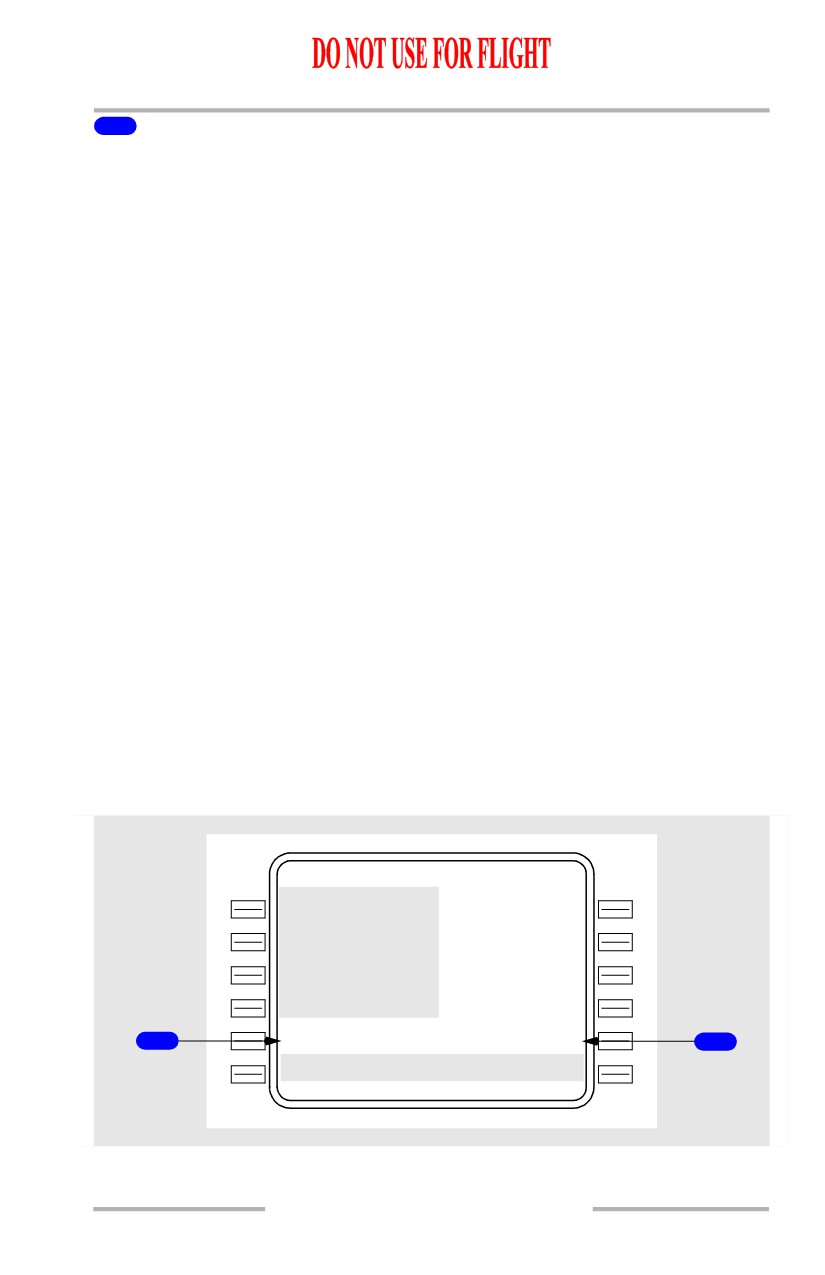
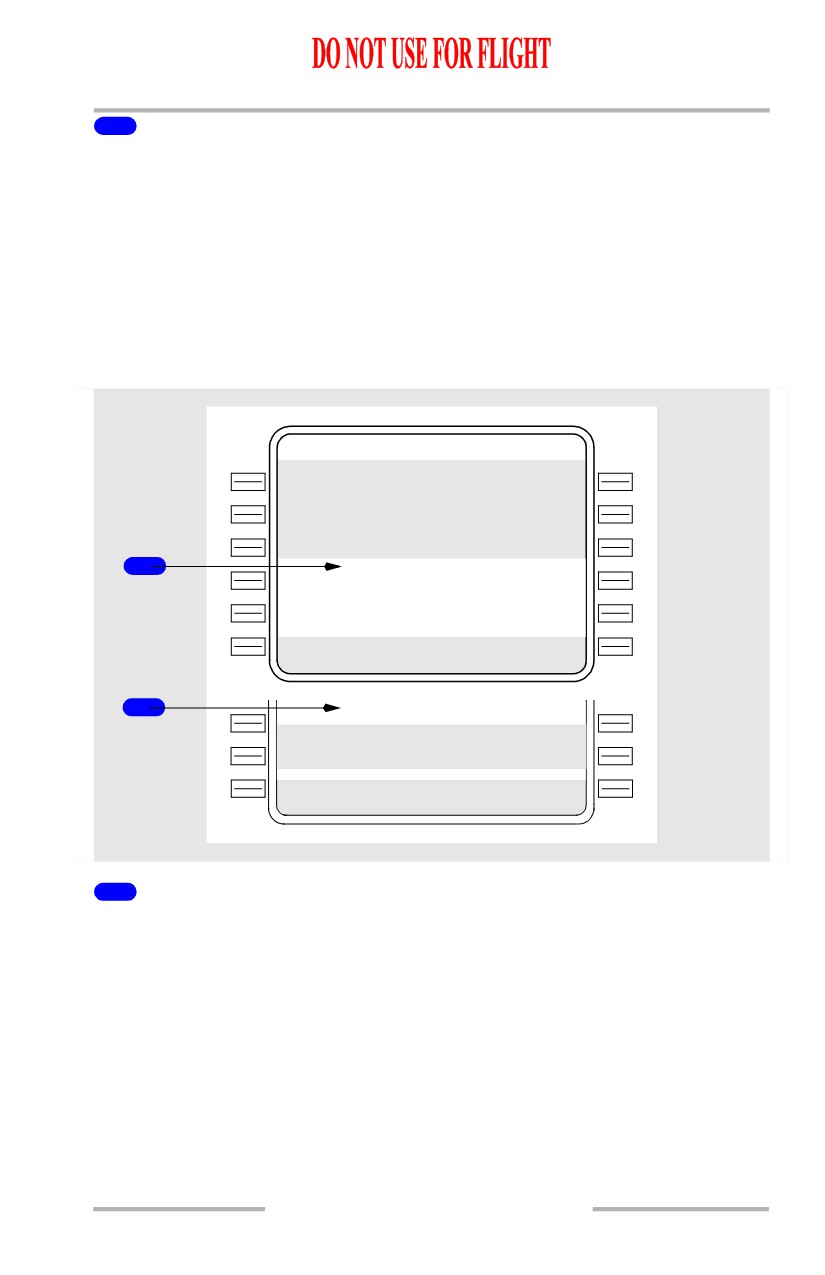
1
REJECT
[Option - With plan fuel]
Displayed if V speeds have been entered and airplane gross weight, ZFW, or plan
fuel has been changed.
[Option - Without plan fuel]
Displayed if V speeds have been entered and airplane gross weight or ZFW has
been changed.
Selection causes the now small font takeoff speeds to disappear.
11.40.52
Flight Management, Navigation -
FMC Preflight
Boeing 737 Operations Manual
2
ACCEPT
[Option - With plan fuel]
Displayed if V speeds have been entered and airplane gross weight, ZFW, or plan
fuel has been changed.
[Option - Without plan fuel]
Displayed if V speeds have been entered and airplane gross weight or ZFW has
been changed.
Selection changes the small font takeoff speeds to large font.
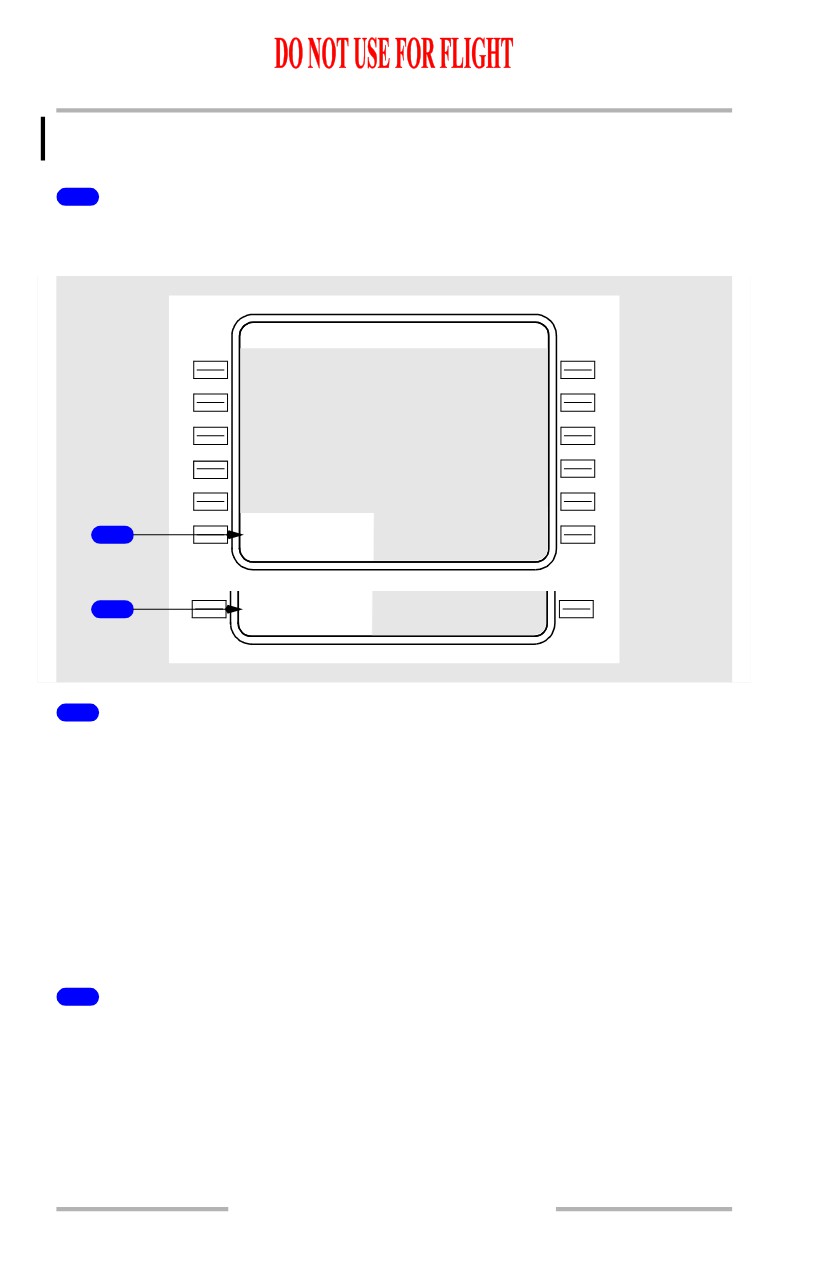
Preflight Status
TAK EOFF REF
1
/
2
1
- - - - - P R E - F L T S T A T U S - - - - -
<POS INI T
ROUTE>
<PERF INI T
DEPARTURE>
2
- - - - - P R E - F L T C O M P L E T E - - -
- - - - - - - -
-
-
- - - - - - - - - - - - - -
1
Preflight Status (PRE-FLT STATUS)
Displays when required preflight data is not complete. Lines below are selectively
displayed to allow line selection of incomplete pages;
• POS INIT shows if a valid IRS position entry disagrees with the position
determined by any IRS in the ALIGN mode; otherwise blank
• PERF INIT shows if any required PERF INIT entries not completed;
otherwise blank
• ROUTE shows if a route is not active; otherwise blank
• DEPARTURE shows if RTE page 1 displays prompts for RUNWAY and
VIA lines; otherwise blank.
11.40.53
Flight Management, Navigation -
FMC Preflight
Boeing 737 Operations Manual
[Option - FMC U10.1 and later]
• N1 LIMIT shows if valid OAT has not been entered.
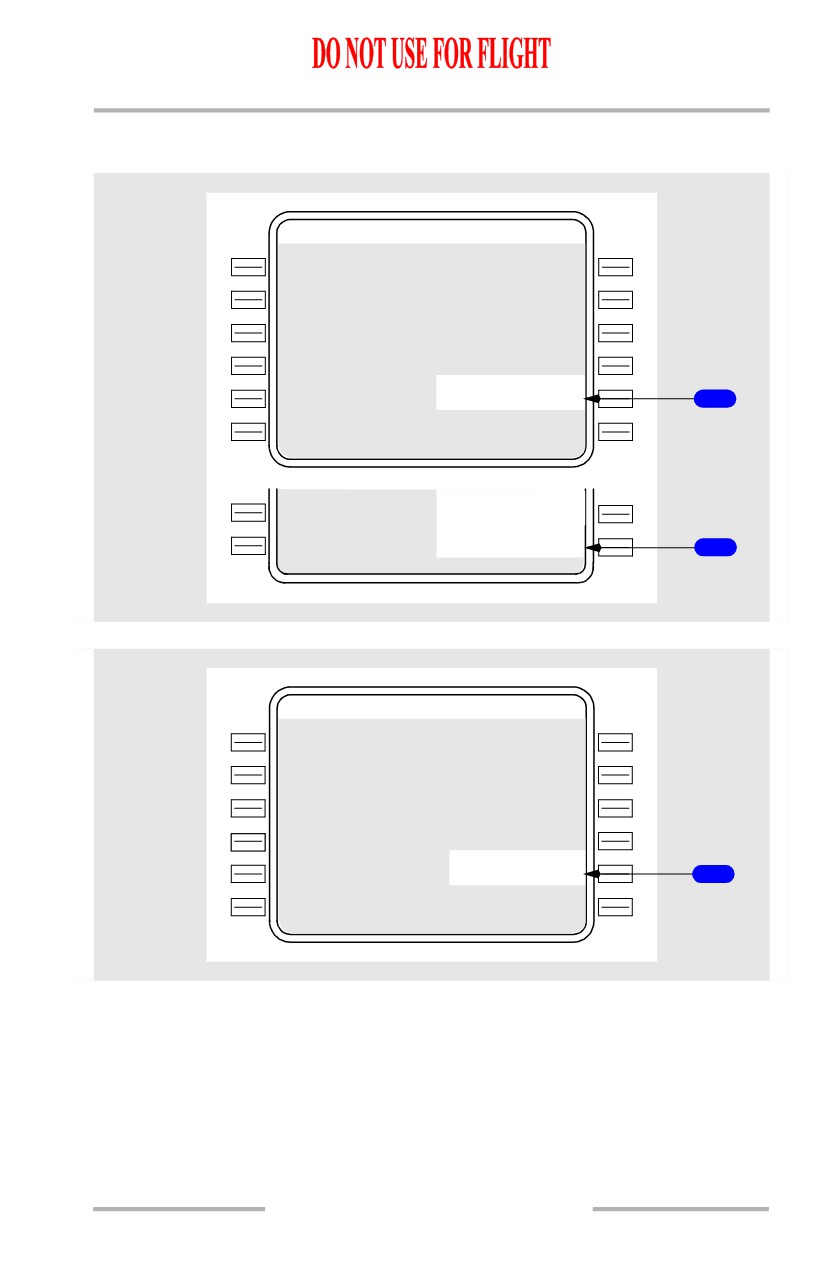
2
Preflight Complete (PRE-FLT COMPLETE)
Displayed following completion of required entries on the POS INIT, RTE, and
PERF INIT pages.
TAK EOFF REF
1
/ 2
- - - - - - - -
-
-
1
<PERF IN
I
T
- - - - - - - -
-
-
2
<INDE X
1
Preflight Incomplete
When required preflight entries are not complete, the related page title displays
• POS INIT - IRS position not entered or invalid
• PERF INIT - required performance data not entered or executed
• ROUTE - required RTE page data not entered
• DEPARTURE - runway or route data not entered on the RTE page.
[Option - Non-aspirated TAT]
• N1 LIMIT - OAT not entered.
Push - Displays associated page.
2
Preflight Complete (INDEX)
When the required preflight entries are complete, the index prompt is displayed
below the takeoff reference page data. When required preflight entries are not
complete, the related page title replaces the INDEX prompt.
Displayed following completion of required preflight entries on the POS INIT,
RTE, and PERF INIT pages.
Push - Displays INIT REF INDEX page.
11.40.54
Flight Management, Navigation -
FMC Preflight
Boeing 737 Operations Manual
FMC Takeoff Position Update
[Option - Runway position update via the CDU only]
TAK EOFF REF
1 / 2
F
M
C P O S U P D
R
W
13R>
1
F
M
C P O S U P D
R
W
13R>
CANCEL UPD>
2
[Option - Runway position update with TO/GA activation, meters]
TAK EOFF REF
1 / 2
T
O
S
H I F T
RW13R
-00M
1
11.40.55

Flight Management, Navigation -
FMC Preflight
Boeing 737 Operations Manual
[Option - Runway remaining update with TO/GA activation, feet]
TAK EOFF REF
1 / 2
R W Y R E M A I N
R
W
1
3R
---00F
1
1
FMC Position Update (FMC POS UPD)
[Option - Runway position update via the CDU only]
Displayed automatically on the ground when preflight complete and a departure
runway is entered into the active route.
Selection illuminates the execute key and displays the CANCEL UPDATE
prompt on line 6R.
Execution updates the computed FMC position to the threshold of the departure
runway.
1
Takeoff Shift (TO SHIFT)
[Option - Runway position update with TO/GA activation, FMC U10.2 and
later]
Automatically displays the departure runway from the route page.
If a takeoff shift distance is not entered and GPS UPDATE is OFF, the FMC
updates to the runway threshold when TO/GA is pushed.
If a takeoff shift distance is entered and GPS UPDATE is OFF, the FMC updates
to the threshold of the departure runway plus the entered distance when the
TO/GA switch is pushed.
TO/GA position update inhibited if GPS UPDATE is ON.
Following TO/GA update, the runway identifier and any entered shift value are
highlighted in reverse video characters.
To remove a TO SHIFT entry, reselect RWY on the RTE page.
11.40.56
Flight Management, Navigation -
FMC Preflight
Boeing 737 Operations Manual
1
Runway Remaining (RWY REMAIN)
[Option - Runway remaining update with TO/GA activation, FMC U10.2
and later]
Automatically displays the departure runway from the RTE page.
If a runway remaining distance is not entered and GPS UPDATE is OFF, the FMC
updates to the runway threshold when TO/GA is pushed.
If a runway remaining distance is entered and GPS UPDATE is OFF, the FMC
updates to the runway length remaining when the TO/GA switch is pushed.
TO/GA position update inhibited if GPS UPDATE is ON.
Following TO/GA update, the runway identifier and any entered shift value are
highlighted in reverse video characters.
To remove a RWY REMAIN entry, reselect RWY on RTE page.
2
Cancel Update (CANCEL UPD)
[Option - Runway position update via the CDU only]
Displayed after line selection of the FMC POS UPD prompt.
Selection clears the prompt, cancels the position update armed condition, and
extinguishes the execute key light.
11.40.57
Flight Management, Navigation -
FMC Preflight
Boeing 737 Operations Manual
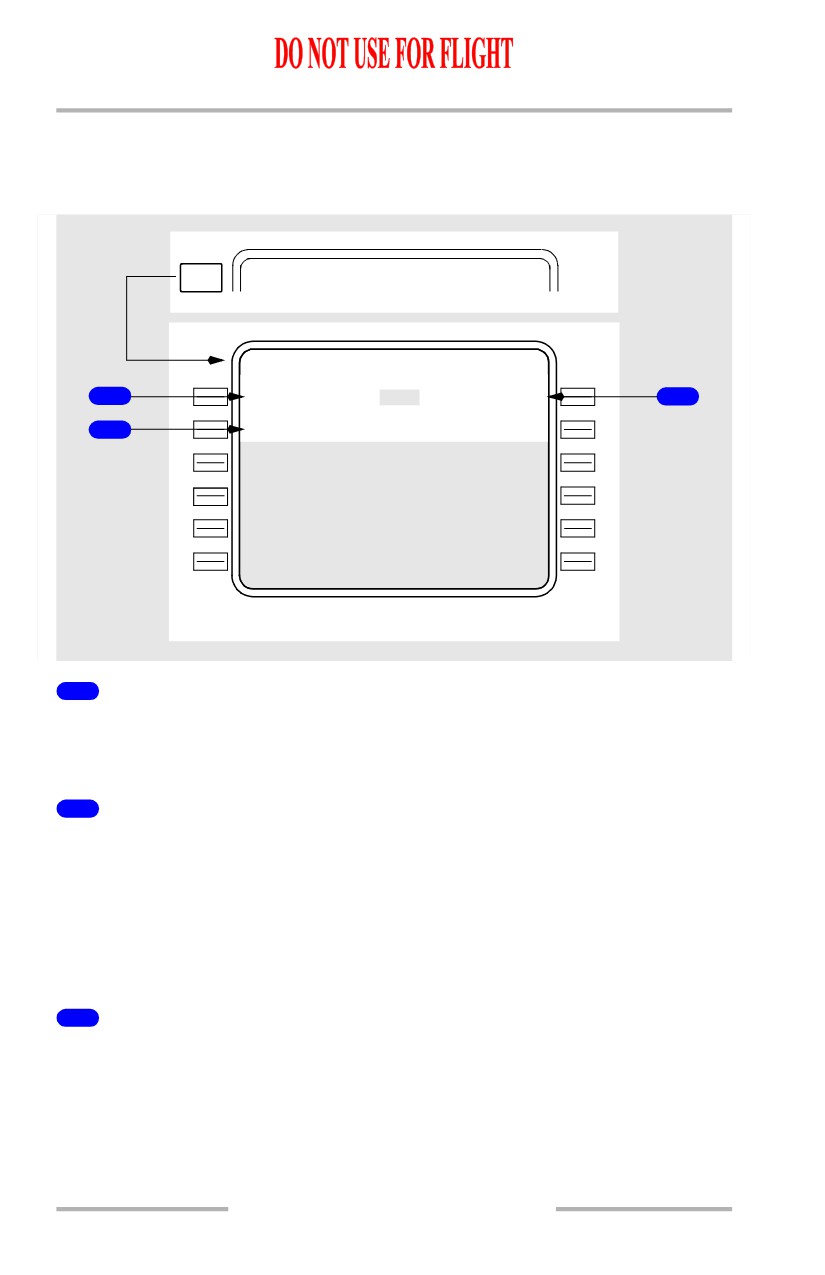
Takeoff Reference Page 2/2
[Option - FMC U10.1 and later, with company data link or FMC computed
takeoff speeds]
NEXT
TAK EOFF REF
1 / 2
PAGE
TAK EOFF REF
2 / 2
R W W I N D
R W C O N D
1
---`/-
-
-
DRY/W E T / S K - R >
3
R W S L O P
E
/
H D G
2
--.-%/1 3
0
`
* See subsequent pages for description
1
Runway Wind (RW WIND)
Enter surface wind direction and speed.
Entry is optional for preflight completion.
2
Runway Slope/Heading (RW SLOPE/HDG)
Enter runway slope.
Entry is optional for preflight completion.
Valid runway slope is U or + for up or D or - for down followed by slope in percent
gradient.
HDG displays runway heading for origin airport.
3
Runway Condition (RWY COND)
Select runway condition:
• DRY - Dry runway computations
• WET - Wet runway computations
• SK-R - Skid resistant runway computations
Default condition is DRY.
11.40.58
Flight Management, Navigation -
FMC Preflight
Boeing 737 Operations Manual
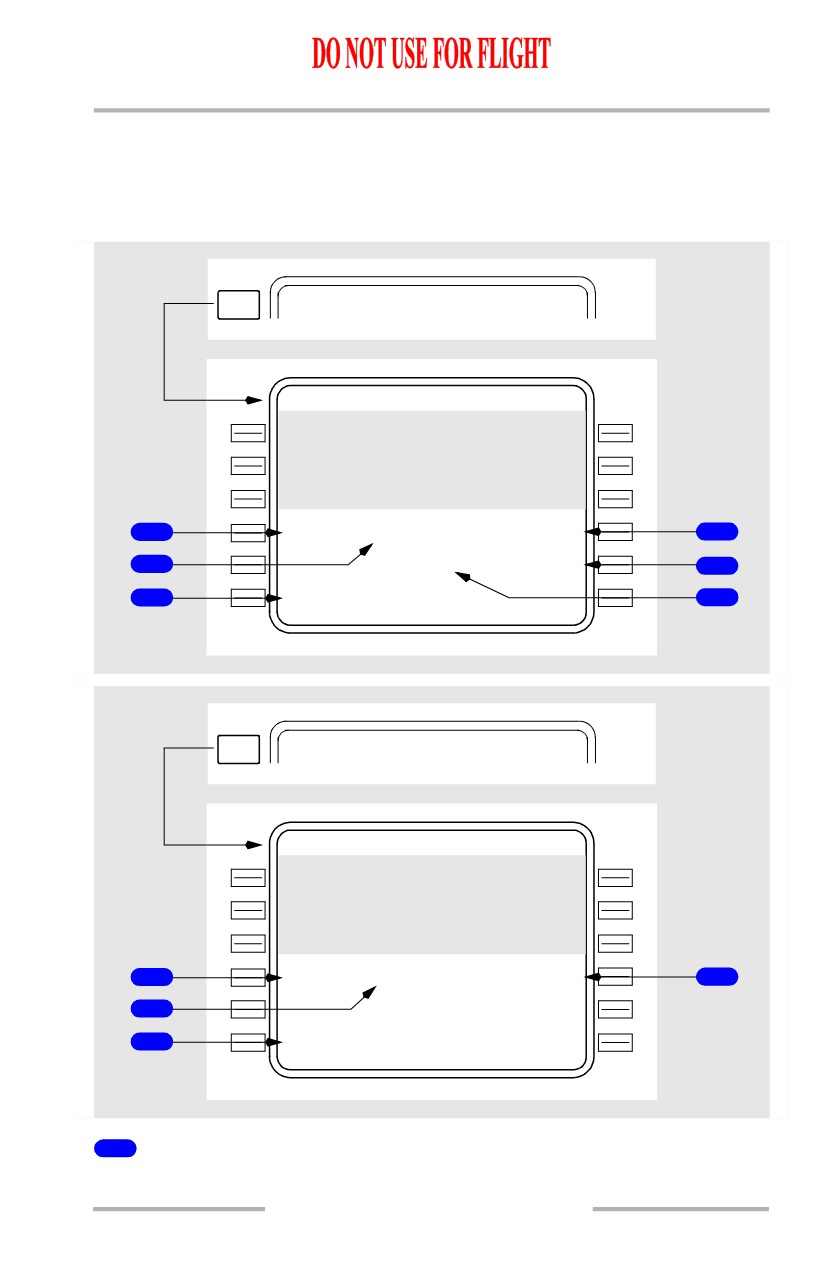
Active runway condition is highlighted.
Takeoff Thrust
[Option - FMC U10.1 and later]
[Option - With automatic thrust reduction after takeoff]
NEXT
TA
K
E
OFF REF
1 / 2
PAGE
TAK EOFF REF
2 / 2
S E L / O A T
X X K N 1
1
- - - -/
+1
5
`
C
94.6/
94.6%
4
T H R R E D U C T I O N
2
CL B
1500A G L
5
- - - - - - - -
-
-
- - - - - - - - - - - - - -
3
<INDE X
6
NEXT
TA
K
E
OFF REF
1 / 2
PAGE
TAK EOFF REF
2 / 2
S E L / O A T
X X K N 1
1
- - - -/
+ 1
5
`C
94.6/
94.6%
4
2
- - - - - - - -
-
-
- - - - - - - - - - - - - -
3
<INDE X
1
Selected Temperature (SEL)
Entry of an assumed temperature calculates a reduced thrust takeoff N1.
11.40.59
Flight Management, Navigation -
FMC Preflight
Boeing 737 Operations Manual
Entry can be made in degrees C or degrees F.
Maximum allowable entry is 70 degrees C (158 degrees F). The FMC, however,
will limit the N1 to 25% takeoff reduction.
Repeats data shown on the preflight version of the N1 LIMIT page.
2
Outside Air Temperature (OAT)
[Option -Aspirated TAT]
Aspirated TAT displays the sensed OAT in small-size characters. Manual entry of
actual takeoff OAT is displayed in large-sized characters.
Sensed or manually entered OAT is used by the FMC to calculate the takeoff N1
limits.
Entry can be made in degrees C or degrees F.
2
Outside Air Temperature (OAT)
[Option - Non-Aspirated TAT]
Manual entry of actual takeoff OAT is used by the FMC to calculate the takeoff
N1 limits.
Entry can be made in degrees C or degrees F.
3
INDEX
Push - displays the INIT/REF INDEX page.
4
Takeoff N1 (XXK N1)
Displays the FMC computed N1 for takeoff.
Data line title displays full rated thrust or selected takeoff derate thrust. Typical
line titles display as “24K N1” or “22K N1.”
Data line title changes to RED XXK N1 when an assumed temperature (SEL
TEMP) entry results in a reduced N1 value. The Reference N1 bugs will still
display full rated or selected takeoff derate thrust N1 values.
[Option - Takeoff bump thrust]
Data line title changes to XXK BUMP N1 when takeoff bump thrust is selected.
Repeats the same information shown on TAKEOFF REF page 1 and the preflight
version of the N1 LIMIT page.
11.40.60
Flight Management, Navigation -
FMC Preflight
Boeing 737 Operations Manual
5
Thrust Reduction (THR REDUCTION)
[Option - With automatic takeoff thrust reduction]
Altitude above origin airport elevation at which the autothrottle reduces from
takeoff N1 to climb N1.
[Option - FMC U10.3 and later]
The default value is determined by the airline and is stored in the model/engine
database. The default is displayed in small font.
Manual entries allowed on the ground. Entries must be between 800 to 15,000 feet
and are displayed in large font.
Deletion of a manual entry returns the display to the default value.
6
Selected Climb Rating
[Option - With automatic takeoff thrust reduction]
Displays the climb rating that will be set at the THR REDUCTION altitude, as
selected on the preflight version of the N1 LIMIT page.
11.40.61
Flight Management, Navigation -
FMC Preflight
Boeing 737 Operations Manual
[Option - FMC U10.3 and later, with quiet climb]
[Option - With QFE/QNH selection]
NEXT
TA
K
E
OFF REF
1 / 2
PAGE
TAK EOFF REF
2 / 2
T A K E O F
F
R
E F
C U T B A C K N 1
<Q F
E
/QN H
80.5/
80.5
5
1
S E L / O A T
X X K N 1
2
- - - -/
+1
5
`
C
94.6/
94.6%
6
R E D U C T I
O
N
T H R
R E S T O R E
3
800 A G L
CLB
3000 A G L
7
- - - - - - - -
-
-
- - - - - - - C U T B A C K
4
<INDE X
ON/
O F F
8
9
TAK EOFF REF
2 / 2
T A K E O F
F
R
E F
10
<Q F
E
/QN H
S E L / O A T
X X K N 1
- - - -/
+1
5
`
C
94.6/
94.6%
R E D U C T I
O
N
T H R
800 A G L
CLB
- - - - - - - -
-
-
- - - - - - - C U T B A C K
<INDE X
O N /OFF
8
1
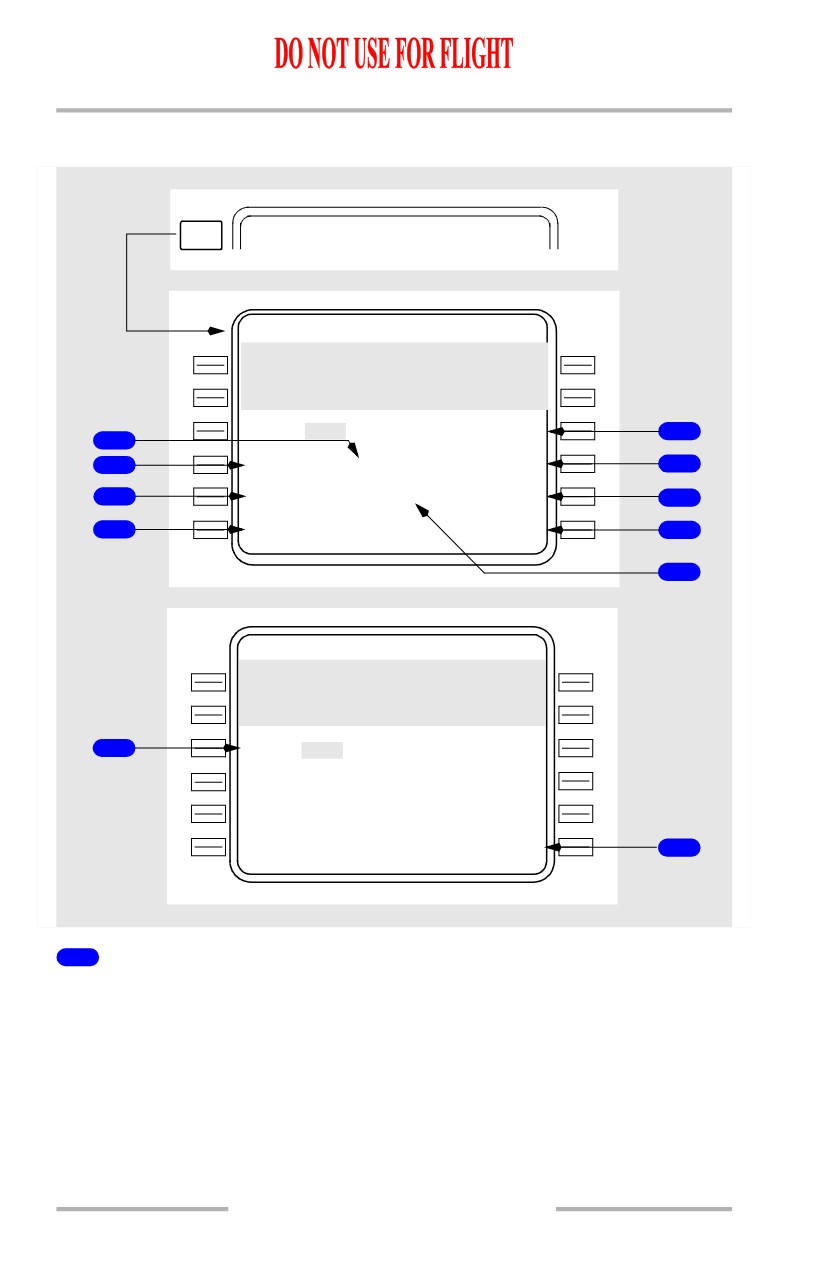
Outside Air Temperature (OAT)
[Option -Aspirated TAT]
Aspirated TAT displays the sensed OAT in small-size characters. Manual entry of
actual takeoff OAT is displayed in large-sized characters.
Sensed or manually entered OAT is used by the FMC to calculate the takeoff N1
limits.
Entry can be made in degrees C or degrees F.
11.40.62
Flight Management, Navigation -
FMC Preflight
Boeing 737 Operations Manual
2
Selected Temperature (SEL)
Entry of an assumed temperature calculates a reduced thrust takeoff N1.
Entry can be made in degrees C or degrees F.
Maximum allowable entry is 70 degrees C (158 degrees F). The FMC, however,
will limit the N1 to 25% takeoff reduction.
Repeats data shown on the preflight version of the N1 LIMIT page.
3
REDUCTION
With cutback mode OFF, altitude above origin airport elevation at which the
autothrottle reduces from takeoff N1 to climb N1.
With cutback mode ON, altitude above origin airport elevation at which the
transition from takeoff thrust to cutback thrust occurs.
Manual entries allowed on the ground.
The default value is determined by the airline and is stored in the model/engine
database. The default is displayed in small font.
4
INDEX
Push - displays the INIT/REF INDEX page.
5
CUTBACK N1
FMC calculated cutback N1.
Prior to takeoff, if the FMC is unable to calculate the cutback N1 using the entered
data, CUTBACK UNAVAILABLE displays.
6
Takeoff N1 (XXK N1)
Displays the FMC computed N1 for takeoff
Data line title displays full rated thrust or selected takeoff derate thrust. Typical
line titles display as “24K N1” or “22K N1.”
Data line title changes to RED XXK N1 when an assumed temperature (SEL
TEMP) entry results in a reduced N1 value. The Reference N1 bugs will still
display full rated or selected takeoff derate thrust N1 values.
[Option - Takeoff bump thrust]
Data line title changes to XXK BUMP N1 when takeoff bump thrust is selected.
Repeats the same information shown on TAKEOFF REF page 1 and the preflight
version of the N1 LIMIT page.
11.40.63
Flight Management, Navigation -
FMC Preflight
Boeing 737 Operations Manual
7
RESTORE
The altitude at which the normal climb thrust is restored.
8
CUTBACK ON/OFF
Push - selects cutback mode ON/OFF.
Currently selected cutback mode is displayed in large font.
Default is cutback mode OFF.
9
Selected Climb Rating
Displays the climb rating that will be set at the THR REDUCTION altitude, as
selected on the preflight version of the N1 LIMIT page.
10
Takeoff Reference (TAKEOFF REF)
[Option - With QFE/QNH selection]
Push - Toggles altimeter reference between QFE and QNH.
Default is QNH.
Resets to QNH at flight complete.
Reflects LANDING REF selection on APPROACH REF page.
Active altimeter reference is highlighted.
During preflight with QFE selected, the PFD altitude indications show zero feet
at the departure runway threshold. The PFD altitude indication background colors
change to green.
If QFE is the current altimeter reference, and the EFIS control panel STD switch
is pushed, The takeoff reference automatically toggles to QNH.
11.40.64
Flight Management, Navigation -
FMC Preflight
Boeing 737 Operations Manual
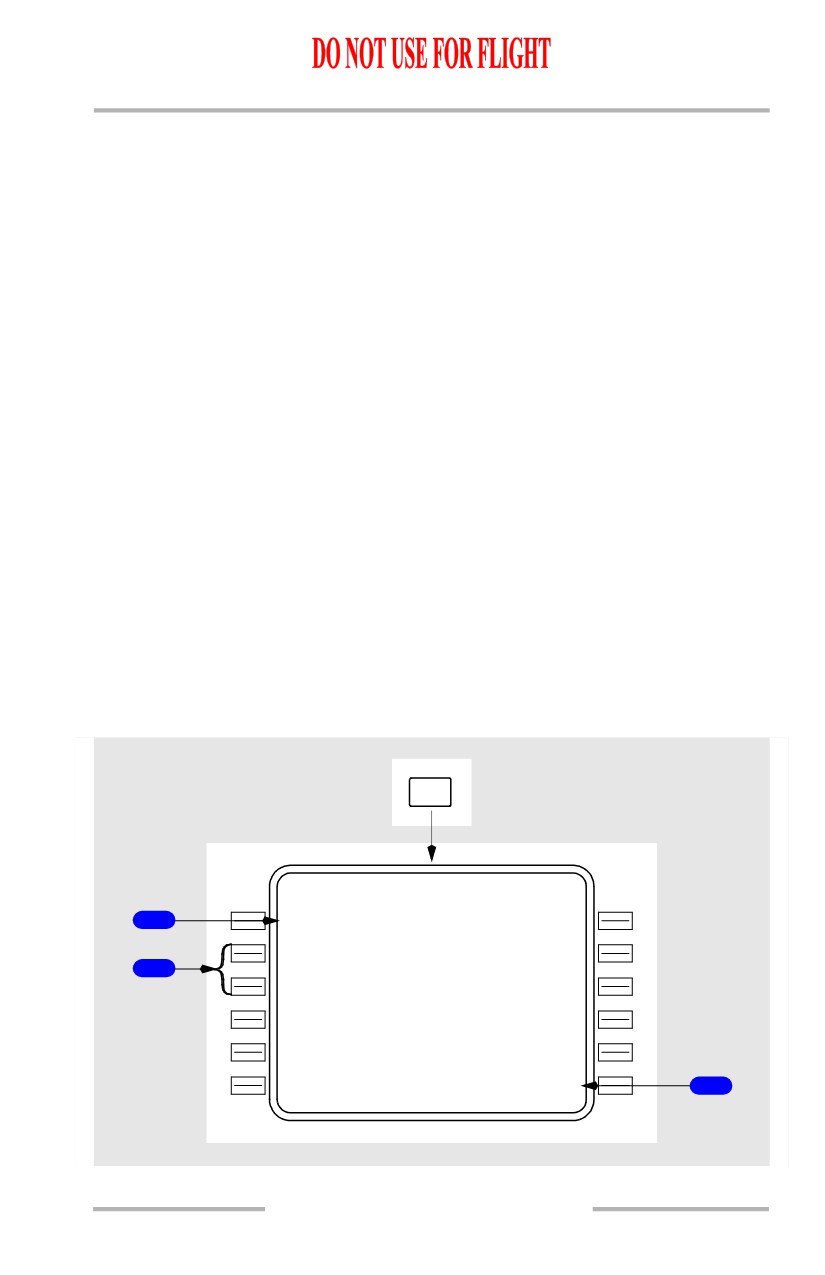
Menu Page
[Option - MCDU]
The menu page is selected with the MENU key or is automatically displayed when
the currently active subsystem fails or on initial power up if the FMC system is
not detected.
The menu page displays subsystems (ACARS, DFDAU, etc.) that require
control/display functions through the MCDU and provides a means to temporarily
access to these subsystems. The active system is indicated by <ACT> displayed
next to the system title. A subsystem that requires use of the CDU displays a
request message <REQ> next to the subsystem title. The FMC system or a
requesting subsystem is accessed by using the line select key next to the title. The
FMC can be reselected by selecting the FMC prompt on the MENU page or
selecting any mode key (INIT/REF, RTE, etc.). A subsystem can be temporarily
placed on hold <HLD> by selecting the subsystem XXXXXX HOLD> line select
key returning the CDU display to the currently active FMC page (XXXXXX
represents the system name). While the subsystem is on hold the MCDU CALL
light is illuminated. To reselect the subsystem on hold, push the subsystem line
select key again. When a subsystem is placed on hold a XXXXXX LOGOFF
prompt appears to allow for release of the subsystem being held. No more than one
subsystem can be selected at a time. If an attempt is made to select more than one
subsystem, a FIRST LOGOFF XXXXXX prompt is displayed as a reminder to
logoff the currently active subsystem.
[Option - Liquid crystal display MCDU]
MENU
MEN U
1
<FM C
<ACARS
<
A
CT>
2
<DFDA U
A
C
AR S
HOLD>
3
11.40.65
Flight Management, Navigation -
FMC Preflight
Boeing 737 Operations Manual
1
FMC
Push - selects FMC as the system for which the MCDU will be active in providing
control/display function.
2
Other Aircraft Subsystems (typical)
Push - selects the subsystem for which the MCDU will be active in providing
control/display function.
3
XXXXXX HOLD/LOGOFF
Push - places active subsystem on hold or logs off subsystem and returns control
to the FMC.
11.40.66
Boeing 737 Operations Manual
Flight Management, Navigation
Chapter 11
FMC Takeoff and Climb
Section 41
Introduction
The FMC takeoff phase begins with the selection of takeoff/go-around (TO/GA).
Preparation for this phase begins in the preflight phase and includes entry of the
TAKEOFF REF page data.
The takeoff phase automatically changes to the climb phase when climb thrust is
selected. The climb phase continues to the top of climb point, where the cruise
phase begins.
During these phases, the following pages are normally used:
• TAKEOFF REF page - to make last minute changes to the departure
runway
• DEPARTURES page - to make last minute changes to the SID
• CLIMB page - to modify climb parameters and monitor airplane climb
performance
• RTE LEGS page - to modify the route and monitor route progress
• PROGRESS page - to monitor the overall progress of the flight
• N1 LIMIT page - to select alternate climb thrust limits
• DEP/ARR INDEX page - to select an approach during a turn-back.
Takeoff Phase
When last minute changes are made to the departure runway and SID, the
TAKEOFF REF and DEPARTURES pages must be modified to agree. The
modifications are performed the same as during preflight.
With correct takeoff parameters, the FMC commands the selected takeoff thrust
when the TO/GA switch is pushed. During the takeoff roll, the autothrottle
commands the thrust and the FMC commands acceleration to between V2+15 and
V2+25 knots.
LNAV can be selected prior to takeoff. Prior to 50 feet radio altitude, roll
command is wings level. At 50 feet radio altitude, if within engagement criteria,
LNAV engages and provides roll commands to fly the route leg. VNAV may be
engaged to control the climb profile.
Note: For LNAV to be engaged on the ground, the departure runway must be
selected and the course, to the first waypoint, must be within 5 degrees of
the runway heading.
11.41.1