Boeing 737 - 600/700/800/900. Operations Manual (1997 year) - page 60
Flight Management, Navigation -
Flight Management Computer
Boeing 737 Operations Manual
Intentionally
Blank
11.32.8
Boeing 737 Operations Manual
Flight Management, Navigation
Chapter 11
Company Data Link
Section 33
[Option]
11.33 Flight Management, Navigation-Company Data Link
Company Data Link
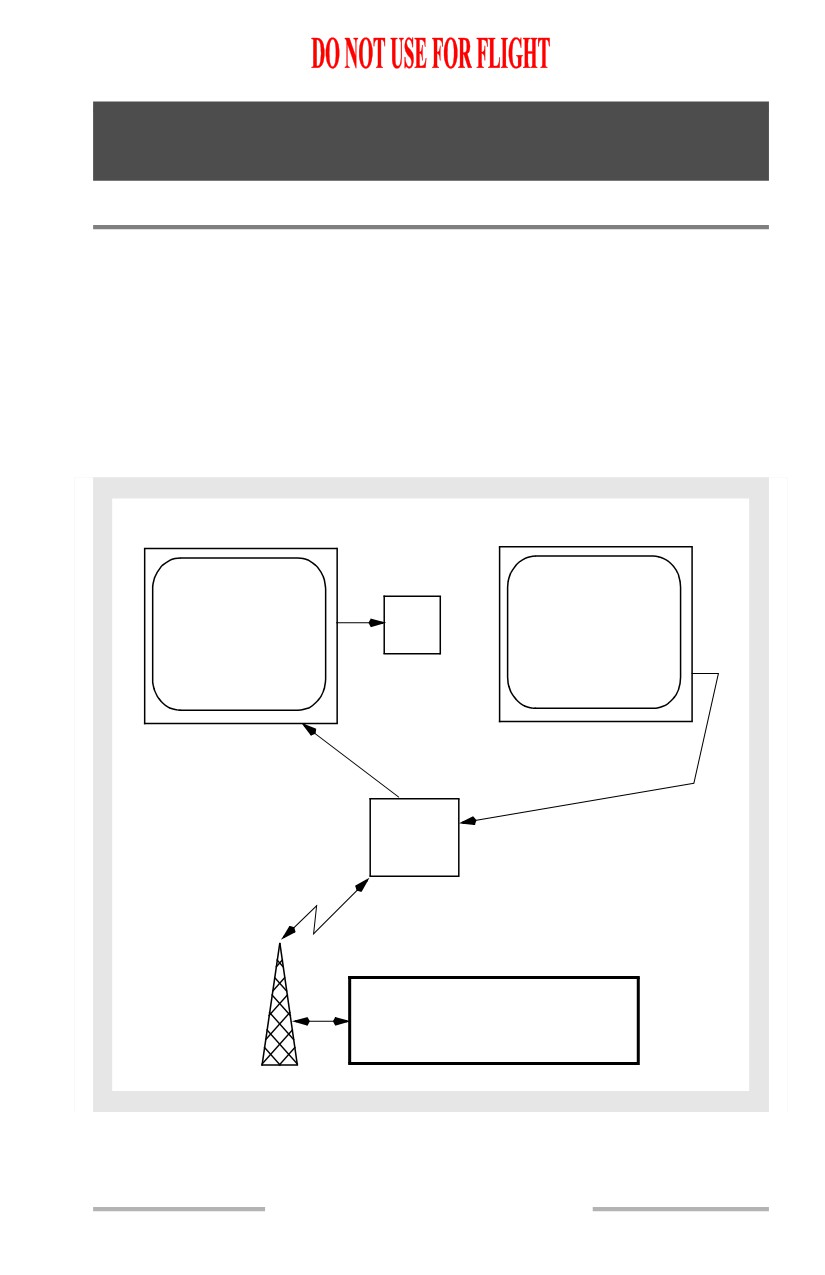
The airplane communications system enables two-way data link communications
between the FMC and airline operations. A downlink occurs when data is
transferred from the FMC and transmitted through the airplane communications
system to a receiver on the ground. Data may be downlinked from the FMC either
manually or automatically. An uplink is the opposite of a downlink; data is
transmitted from a ground station for input to the FMC. Data may be uplinked at
the discretion of the airline operations dispatcher or in response to a downlink
request.
CDU
CDU
XXXXXX
FMC
P/RST
POSITION
REPORT>
XXX UPLINK READY
Data
Receiver
Airline Operations
Data Link Information
11.33.1
Flight Management, Navigation -
Company Data Link
Boeing 737 Operations Manual
Data Link
Downlinks are data link messages transmitted to a ground station. Requests for
data and reports of FMC information are two types of downlinks. Requests are
made manually by the flight crew. Reports can be made manually or may occur
automatically.
Uplinks are messages transmitted to the airplane. Most uplinks require manual
selections by the flight crew. Some uplinks are input automatically.
Manual Downlinks
Select a REQUEST prompt to start the downlink request for data. REQUEST
prompts are on PERF INIT, PERF LIMITS, TAKEOFF REF, PROGRESS, DES
FORECASTS, RTE, ALTERNATE DEST, RTE DATA, and SUPP NAV DATA
pages. Downlink reports of the active route may be accomplished by selection of
the REPORT prompt on the PERF LIMITS or PROGRESS page and a position
report may be downlinked by selection of the REPORT prompt on the
PROGRESS page. The contents of the supplemental navigation database can be
downlinked by selection of the REPORT prompt on the SUPP NAV DATA page.
When the communications function is unable to process FMC downlinks, the
words FAIL, VOICE, NO COMM, or FULL are displayed on the CDU pages in
place of the REQUEST and REPORT prompts and the header line displays the
word DATALINK. The status messages are:
• FAIL
• the ACARS management unit is inoperative
• VOICE
• radio is operating in the VOICE mode
• NO COMM
• radio is operational but not available
• FULL
• all available downlink space is full.
Reports
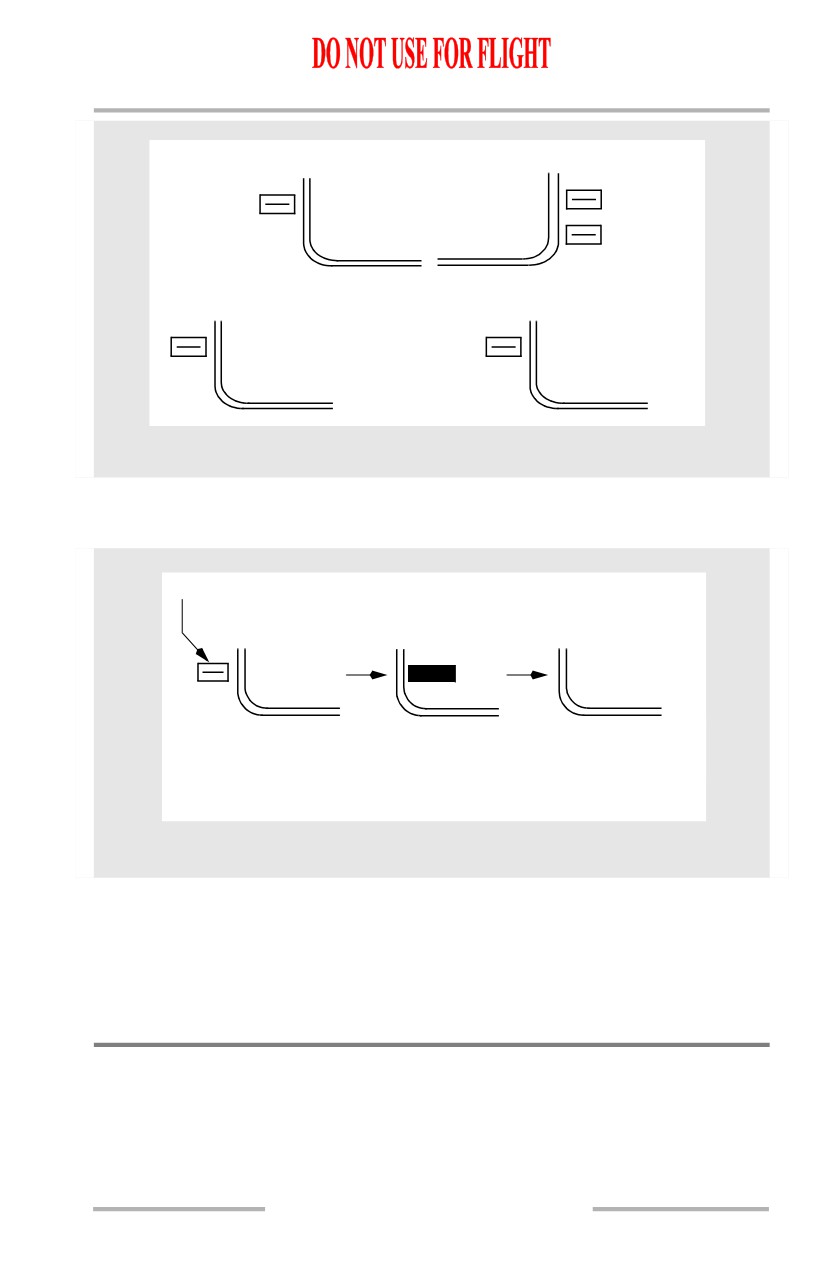
A REPORT prompt on each page downlinks a unique report applicable to that
page. The pages below contain report prompts.
11.33.2
Flight Management, Navigation -
Company Data Link
Boeing 737 Operations Manual
PROGRESS PAGE 3
PRE-FLIGHT
PROGRESS
<REPORT
REPORT>
POSITION
REPORT>
PERF LIMITS
SUPP NAV DATA
PERF LIM
SUPP NAV
<REPORT
<REPORT
CDU Pages
Report Status
Below is a typical sequence of status in response to sending a report.
Selection of REPORT
<REPORT
REPORT
<REPORT
Report being
Report
transmitted.
acknowledged by
Highlighted for
ground station
3 seconds.
CDU Page
Automatic Downlinks
The FMC can be configured by the airline to automatically transmit downlinks of
FMC data at predetermined points during the flight or in response to specific
information requests from the airline dispatcher. The FMC response in these cases
is completely automatic and no crew action is necessary.
Uplinks
Uplinked data may be loaded automatically or may require flight crew action.
Three uplinks automatically load data into the FMC when the REQUEST prompt
is selected and do not require execution.
11.33.3
Flight Management, Navigation -
Company Data Link
Boeing 737 Operations Manual
Uplinked data that waits in system memory for flight crew action are considered
to be pending. A pending uplink is included or discarded when the flight crew
selects the applicable prompt. Flight crew response to an uplink depends on the
type of uplink. Flight crew action is made with ACCEPT/REJECT or LOAD
prompts, FMC modification ERASE prompt or EXEC key, or when the page with
the uplink is selected.
Data can be uplinked from the airline dispatcher directly to the FMC. The uplinks
are annunciated to the crew by the FMC alert lights. The uplink is identified by a
CDU scratchpad message.
PERF INIT uplinks are available only on the ground and after an origin airport has
been entered on the RTE page.
RTE DATA cruise winds are available when not in descent and a cruise altitude
and a flight plan route exist.
DES FORECASTS winds are available if a cruise altitude exists.
Long Delete Function
[Option - MCDU]
During uplink, CDU keys are ignored until data is loaded into the FMC. The
uplink may be suspended by pressing and holding down the DEL key for at least
one second. For all uplinks, except SUPP NAV DATA uplinks, the loaded data is
then removed from the flight plan and placed back into the ready to be loaded
state.Uplinks that do not generate a modified plan are reloaded when there has
been no CDU pushbutton activity for 30 seconds. Uplinks that do generate a
modified plan can be reloaded using the LOAD prompt on the appropriate page.
When the long delete is used during a SUPP NAV DATA uplink, the uplink is
suspended, but the data loaded up to that point remains in the database.After 30
seconds of keyboard inactivity, the remaining data is loaded.
Requests
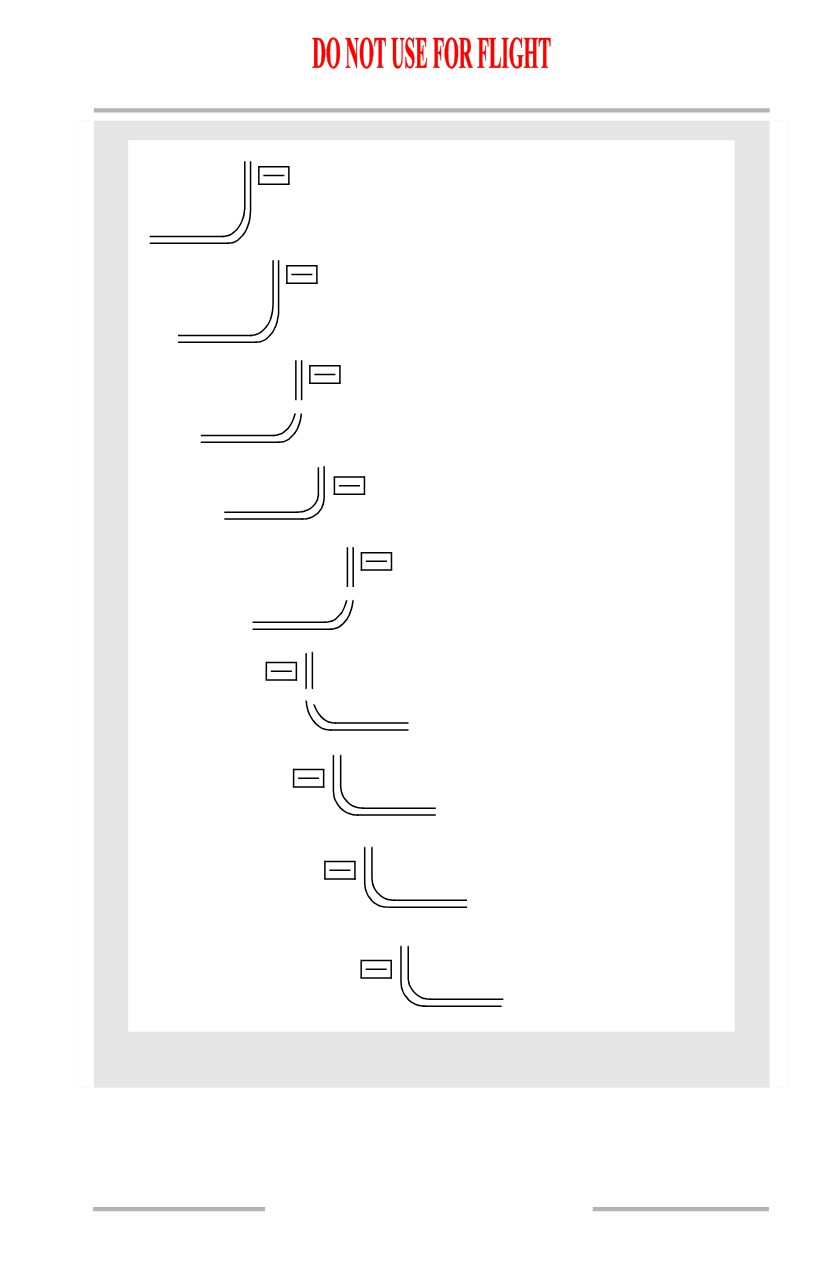
A REQUEST prompt on each page downlinks a unique request applicable to that
page. The pages below contain request prompts.
11.33.4
October 15, 2001
Flight Management, Navigation -
Company Data Link
Boeing 737 Operations Manual
PERF INIT
REQUEST>
PERF INIT
PERF LIM
REQUEST>
PERF LIMITS
FLT PLAN
REQUEST>
RTE
WINDS
REQUEST>
RTE DATA
SUPP NAV
REQUEST>
SUPP NAV DATA
TAKEOFF DATA
<REQUEST
TAKEOFF REF
WEATHER
<REQUEST
PROGRESS
DES WINDS
<REQUEST
DES FORECASTS
WEATHER
<REQUEST
ALTERNATE DESTS
CDU Pages
Request Status
Below is a typical sequence of status in response to sending a request.
11.33.5

Flight Management, Navigation -
Company Data Link
Boeing 737 Operations Manual
Selection of REQUEST
<REQUEST
REQUEST
<REQUEST
Request being
Request
transmitted
acknowledged by
ground station
CDU Page
FMC Data Link Uplinks (Accept/Reject)
ACCEPT and REJECT are shown on the TAKEOFF REF 1/2 page following
receipt of uplink data.
Uplink data for the current runway is shown initially in small font for preview.
Selecting ACCEPT:
• displays uplinked data in large font
• replaces previous data with uplinked data
• returns page display to normal (pre-uplink) format
• clears scratchpad message
• transmits a downlink accept message (if enabled) to acknowledge
acceptance.
Selecting REJECT:
• replaces uplinked data with previous data
• returns page display to normal (pre-uplink) format
• clears scratchpad message
• transmits a downlink reject message (if enabled) to inform of rejection.
11.33.6

Flight Management, Navigation -
Company Data Link
Boeing 737 Operations Manual
TAKEOFF DATA
<REQUEST
RUNWAY 13R TAKEOFF DATA
<REJECT
ACCEPT>
TAKEOFF DATA
TAKEOFF DATA LOADED
<REQUEST
CDU Pages
FMC Data Link Uplinks (Load/Activate/Exec)
LOAD is shown on the RTE page after receipt of uplink data. After the uplinked
data is loaded, the ACTIVATE prompt is shown. After selecting ACTIVATE, the
EXEC light illuminates.
Selecting LOAD:
• loads uplinked data into FMC for viewing
• updates scratchpad message
• transmits a downlink accept message (if enabled) to acknowledge
acceptance.
Selecting ACTIVATE and EXEC:
• puts uplinked data in active flight plan
• returns page display to normal (pre-uplink) format
• clears scratchpad message
• transmits a downlink accept message (if enabled) to acknowledge
acceptance.
11.33.7

Flight Management, Navigation -
Company Data Link
Boeing 737 Operations Manual
[Option - Liquid crystal display CDU or Liquid crystal display MCDU or Liquid
crystal FANS MCDU]
<LOAD
ROUTE UPLINK READY
<ALTN DEST
ACTIVATE>
ROUTE DATA UPLINK
EXEC
<ALTN DEST
PERF INIT>
CDU Pages
FMC Data Link Uplinks (Load/Exec-Erase)
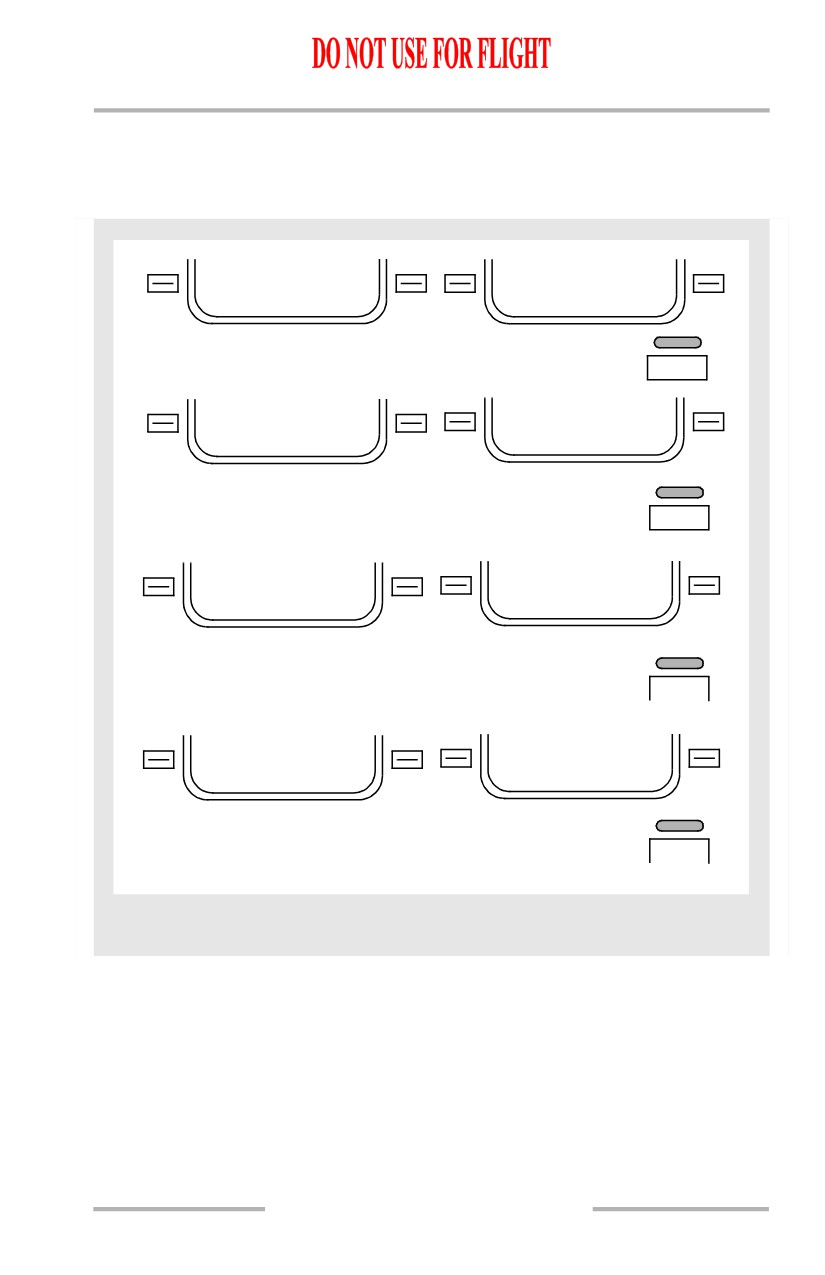
LOAD shows on the PERF INIT, PERF LIMITS, RTE DATA, and DES
FORECASTS pages after receipt of uplink data.
After the uplinked data is loaded, the EXEC light illuminates and the ERASE
prompt is displayed.
Selecting LOAD:
• loads uplinked data into FMC for viewing
• updates scratchpad message
• uplinked data modifies previous data
• ERASE prompt displays
• EXEC light illuminates.
Pushing the EXEC key:
• incorporates modified data into active flight plan
• clears scratchpad message
• returns page display to normal (pre-uplink) format
• transmits a downlink accept message (if enabled) to acknowledge
acceptance.
Selecting ERASE:
• removes modified data
• clears scratchpad message
11.33.8
Flight Management, Navigation -
Company Data Link
Boeing 737 Operations Manual
• returns page display to normal (pre-uplink) format.
• transmits a downlink reject message (if enabled) to inform of rejection.
[Option - Liquid crystal display CDU or Liquid crystal display MCDU or Liquid
crystal FANS MCDU]
PERF INIT UPLINK
<LOAD
<ERASE
PERF INIT UPLINK READY
PERF INIT UPLINK
EXEC
PERF LIMITS UPLINK
<LOAD
<ERASE
PERF LIMITS UPLINK READY
PERF LIMITS UPLINK
EXEC
RTE DATA UPLINK
<LOAD
<ERASE
CRZ WIND UPLINK READY
CRZ WIND FL270 UPLINK
EXEC
DES WINDS UPLINK
LOAD>
ERASE>
FORECASTS UPLINK READY
DESCENT FORECASTS UPLINK
EXEC
CDU Pages
FMC Data Link Uplinks (Request)
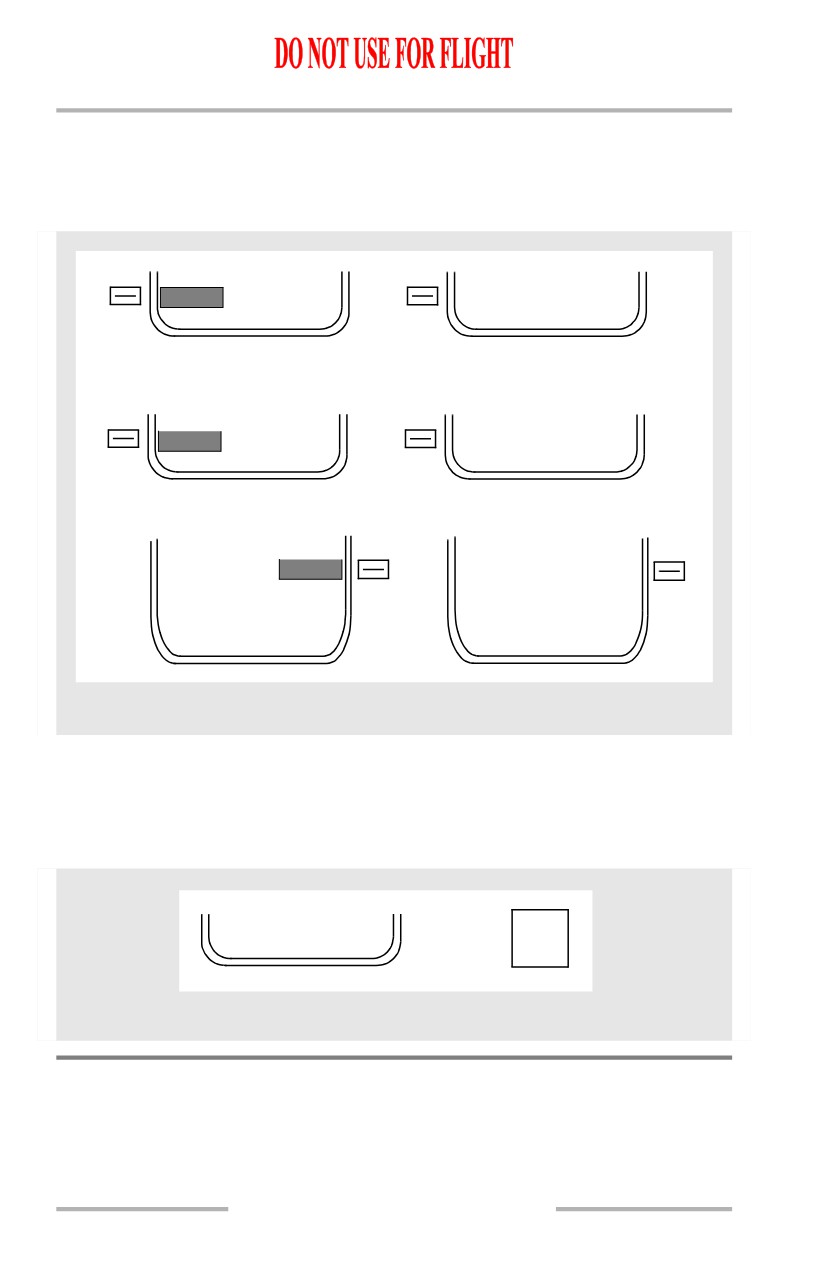
Selecting the REQUEST prompt is the only action required to uplink data on the
PROGRESS, ALTERNATE DEST, and SUPP NAV DATA pages.
After the uplinked data is loaded, an uplink message appears in the scratchpad.
11.33.9
Flight Management, Navigation -
Company Data Link
Boeing 737 Operations Manual
Selecting REQUEST:
• loads uplinked data into FMC
• displays scratchpad message when uplink complete
• uplinked data modifies previous data.
PROGRESS WINDS UPLINK
WEATHER
WEATHER
REQUEST
<REQUEST
ALTN DEST UPLINK
ALTERNATE DESTS UPLINK
WEATHER
WEATHER
REQUEST
<REQUEST
ALTN DEST UPLINK
SUPP NAV DATA UPLINK
SUPP NAV
SUPP NAV
REQUEST
REQUEST>
NAV DATA UPLINK
CDU Pages
FMC Data Link Uplinks (Automatic)
Data can be automatically uplinked.
The scratchpad message XXXXX UPLINK READY is displayed and the FMC
alert light illuminates.
FMC
XXXXX UPLINK READY
P/RST
CDU Pages
Data Link Management
The flight crew should monitor system status of FMC data link by observing status
displays on CDU pages.
11.33.10

Flight Management, Navigation -
Company Data Link
Boeing 737 Operations Manual
CDU Data Link Status Displays
Data link operation is verified when the correct line title is above the related
prompt. In the example below, the line title TAKEOFF DATA is above the
REQUEST prompt on the TAKEOFF REF page.
TAKEOFF REF
TAKEOFF DATA
<REQUEST
CDU Pages
When the data link system is not operating, CDU page prompts change to FAIL,
VOICE, NO COMM or FULL and the headings change to DATALINK. A typical
example is shown below.
DATALINK
NO COMM
CDU Pages
11.33.11
Flight Management, Navigation -
Company Data Link
Boeing 737 Operations Manual
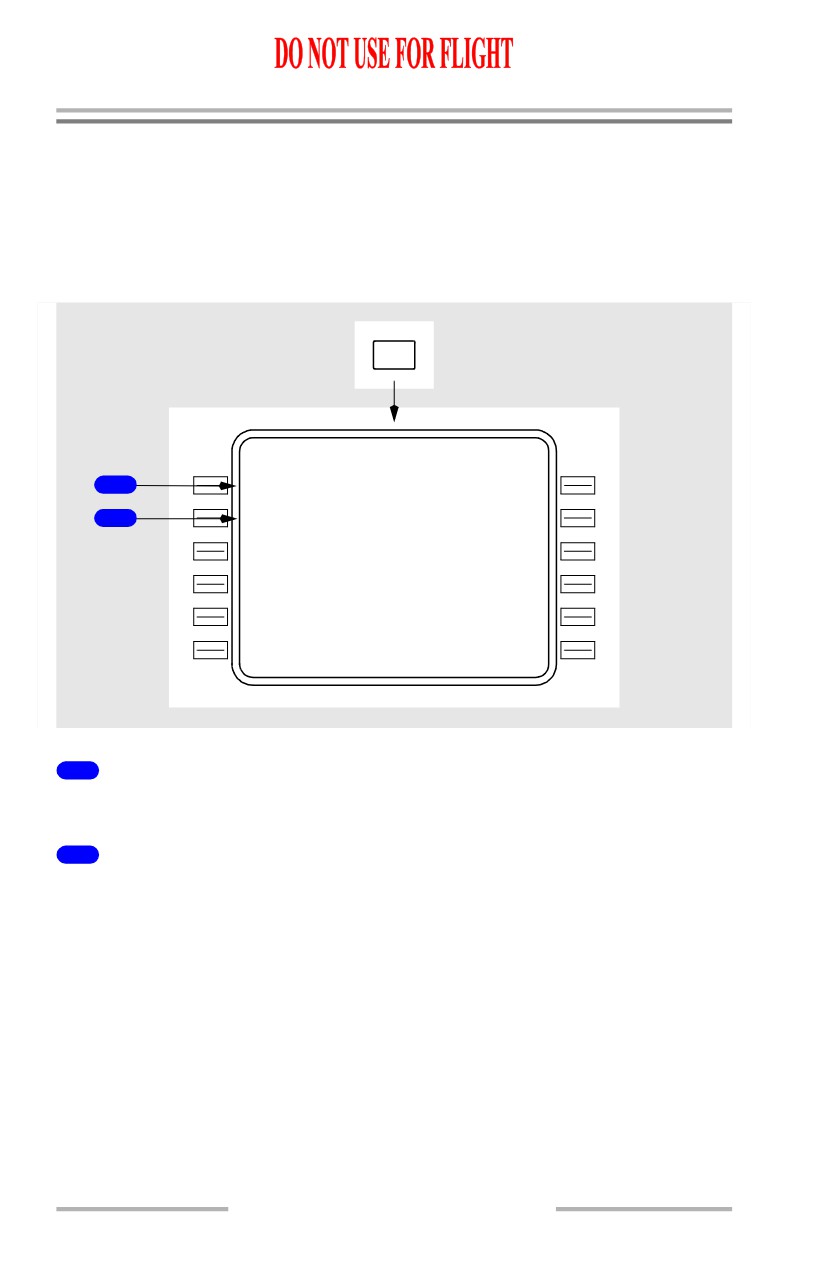
FMC Communications Page
[Option - FANS MCDU with company data link]
FMC communication page provides ability to initiate AOC datalink downlink
requests. The actual prompts available and types of information requests
generated is customer definable. The page examples below are representative
only.
FMC
COMM
F
M
C COMM
1 / 1
F L T P L A N
1
<REQUES T
W I N D S
2
<REQUES T
<INDE X
1
Flight Plan Request (FLT PLAN REQUEST)
Push - transmits a data link request for a flight plan uplink.
2
WINDS REQUEST
Push - transmits a data link request for a winds uplink.
11.33.12
October 15, 2001
Boeing 737 Operations Manual
Flight Management, Navigation
Chapter 11
FMC Preflight
Section 40
Introduction
Completion of the FMC preflight requires data entry in all minimum required data
locations. Completing all required and optional preflight data entries ensures the
most accurate performance possible.
[Option - With company data link]
Data link can be used to load preflight data from airline ground stations. Using
data link reduces the required crew actions. Manual crew entries replace existing
data. Data link can also be used to load takeoff data onto the TAKEOFF REF
pages.
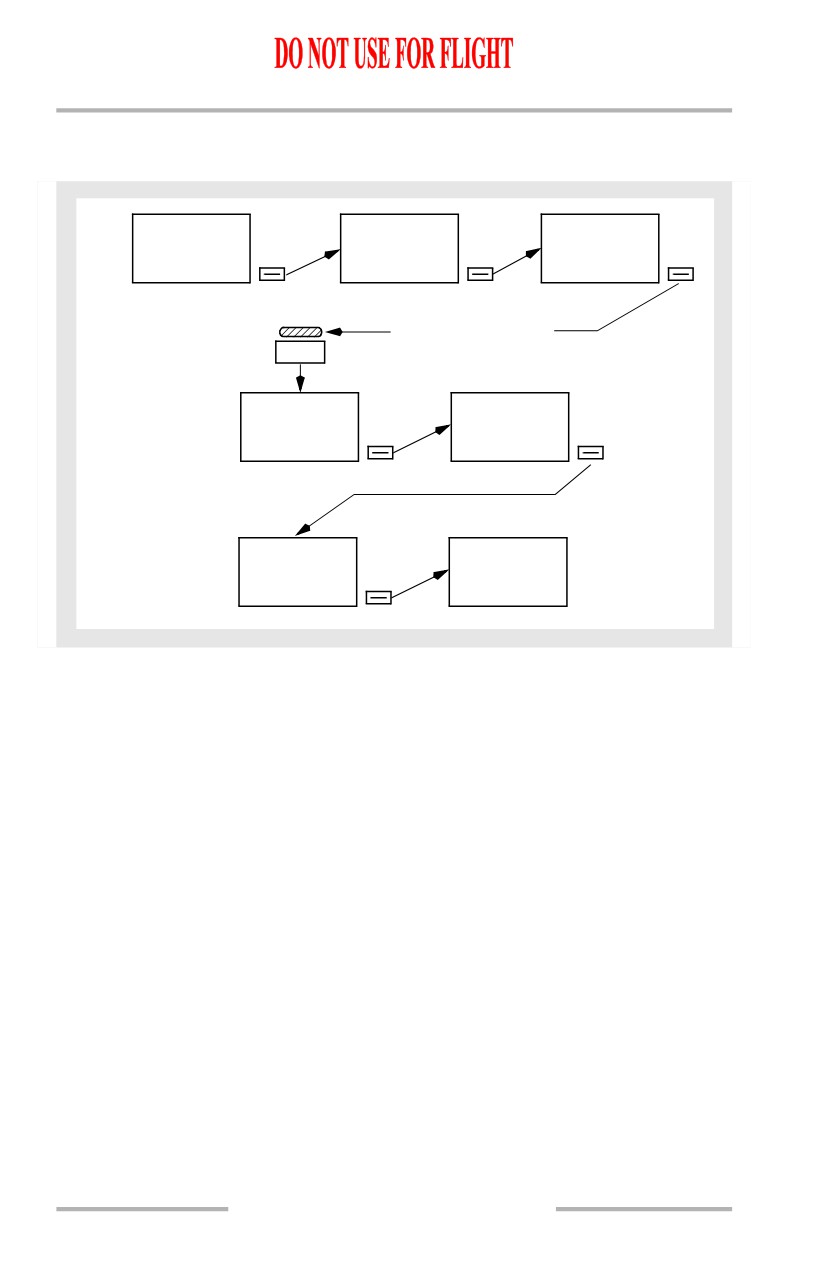
Preflight Page Sequence
The normal preflight sequence follows paging prompts on each CDU page.
The normal FMC power-up page is the identification page. Preflight flow
continues in this sequence:
• identification (IDENT) page
• position initialization (POS INIT) page
• route (RTE) page
• DEPARTURES page (no automatic prompt)
• performance initialization (PERF INIT) page
[Option - FMC U10.1 and later]
• with U10.1 or later installed:
• N1 LIMIT page
• takeoff reference (TAKEOFF REF) page.
Some of these pages are also used in flight.
11.40.1
Flight Management, Navigation -
FMC Preflight
Boeing 737 Operations Manual
Minimum Preflight Sequence
[Option - FMC U10.1 and later]
IDENT
POS INIT
RTE
POS INIT>
ROUTE>
ACTIVATE>
EXEC LIGHT ILLUMINATES
EXEC
ACT RTE
PERF INIT
PERF INIT>
N1 LIMIT>
N1 LIMIT
TAKEOFF REF
TAKEOFF>
During preflight, a prompt in the lower right of the CDU page automatically
directs the crew through the minimum requirements for preflight completion.
Pushing the prompt key for the next page in the flow presents new entry
requirements. Additional entries are made on pages to refine the performance and
route calculations. If a required entry is missed, a prompt on the TAKEOFF page
leads the crew to the preflight page that is missing data.
The airplane inertial position is required for FMC preflight and flight instrument
operation.
A route must be entered and activated. The minimum route information is origin
and destination airports and a route leg.
Performance information requires the airplane weight and cruising altitude.
Supplementary Pages
Supplementary pages are sometimes required. These pages must be manually
selected. Manual selection interrupts the normal automatic sequence. Discussions
of each normal page include methods to display the page when the automatic
sequence is interrupted.
When the route includes SIDs and STARs, they can be entered into the preflight
using the DEPARTURES or ARRIVALS pages.
11.40.2
Flight Management, Navigation -
FMC Preflight
Boeing 737 Operations Manual
Route discontinuities are removed, the route is modified, and speed/altitude
restrictions are entered on the RTE LEGS page. The RTE LEGS page is described
in the FMC Takeoff and Climb and FMC Cruise sections of this chapter.
[Option - With alternate destination prediction]
Alternate airports are added on the ALTERNATE DESTS page. The
ALTERNATE DESTS page is described in the FMC Descent/Approach section of
this chapter.
Waypoint, navigation, airport, and runway data is referenced on the REF NAV
DATA page or the SUPP NAV DATA page. The REF NAV DATA page and SUPP
NAV DATA page are described in the FMC Cruise section of this chapter.
VNAV performance is improved if the forecast winds and temperatures are
entered during the preflight.
A single wind and temperature for cruise may be entered on the PERF INIT page.
Wind and temperature data for specific cruise waypoints are entered on the RTE
DATA page. The RTE DATA page is described in the FMC Cruise section. Wind
and temperature for descent is entered on the DES FORECASTS page. The DES
FORECASTS page is described in the FMC Descent section.
11.40.3
Flight Management, Navigation -
FMC Preflight
Boeing 737 Operations Manual
Preflight Pages
The preflight pages are presented in the sequence used during a typical preflight.
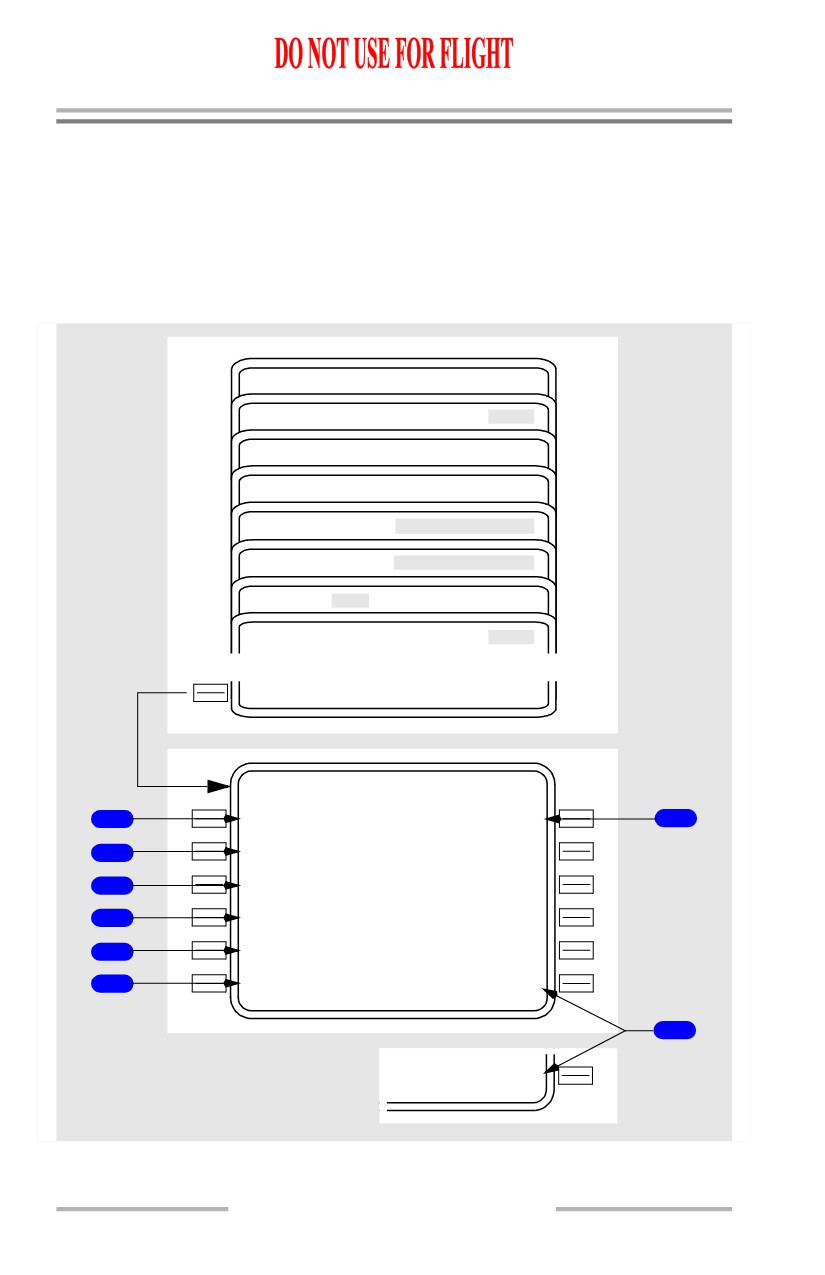
Initialization/Reference Index Page
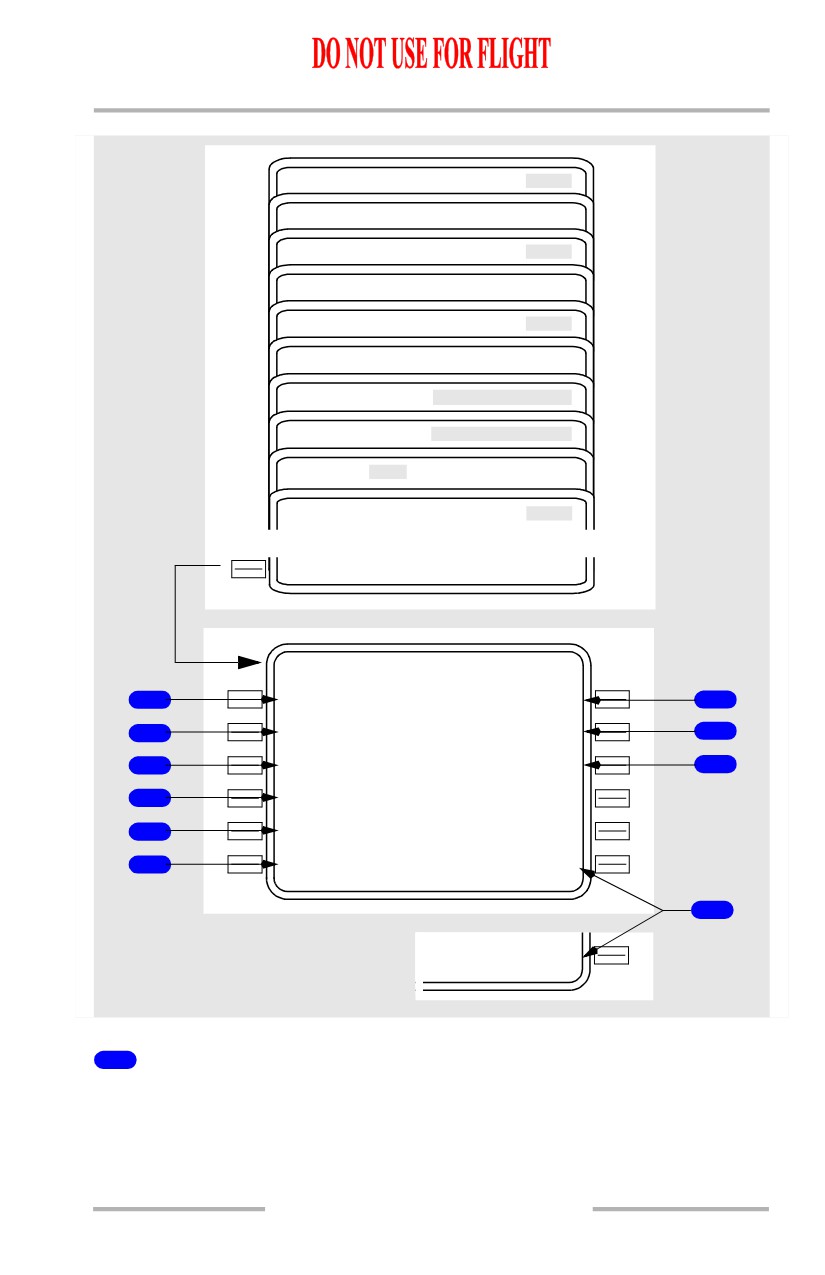
The initialization/reference index page provides manual selection of FMC pages.
It provides access to pages used during preflight and not normally used in flight.
[Option - Without alternate destination prediction or message recall]
APPROACH REF
IDENT
MAINT BITE INDEX
NAV STATUS
PERF
POS
NAV DATA
TAKEOFF REF
<INDE X
INIT/ REF INDEX
1
<IDEN T
NAV DATA>
6
2
<PO S
3
<PER F
4
<TAKEOF F
5
<APPROAC H
8
<OFFSE T
MAINT>
7
NAV STATUS>
11.40.4
Flight Management, Navigation -
FMC Preflight
Boeing 737 Operations Manual
[Option - With alternate destination prediction and message recall]
ALTN DEST
APPROACH REF
IDENT
MAINT BITE INDEX
MESSAGE RECALL
NAV STATUS
PERF
POS
NAV DATA
TAKEOFF REF
<INDE X
INIT/ REF INDEX
1
<IDEN T
NAV DATA>
6
2
<PO S
MSG RECALL>
9
3
<PER F
ALTN DEST>
10
4
<TAKEOF F
5
<APPROAC H
8
<OFFSE T
MAINT>
7
NAV STATUS>
1
IDENT
Displays the IDENT page, the first page in the automatic preflight sequence.
11.40.5
Flight Management, Navigation -
FMC Preflight
Boeing 737 Operations Manual
2
Position Initialization (POS)
• Displays the POS INIT page used for IRS initialization
• POS INIT page is also used to enter/update magnetic heading for an IRS
which is in the ATT mode.
3
Performance Initialization (PERF)
Displays the PERF INIT page for initialization of data required for VNAV
operations and performance predictions.
4
Takeoff Reference (TAKEOFF)
Displays the TAKEOFF REF page to enter takeoff reference information and V
speeds.
5
APPROACH
Displays the APPROACH REF page for entry of the approach VREF speed.
6
Navigation Data (NAV DATA)
Displays the REF NAV DATA page to display information about waypoints,
navaids, airports, and runways. On the ground, displays the SUPP NAV DATA
page if SUPP is entered in the scratchpad prior to selection.
7
Maintenance (MAINT) or Navigation Status (NAV STATUS)
• MAINT - On ground only. Displays maintenance pages for maintenance
use.
• NAV STATUS - Displays NAV STATUS page which shows status of
navigation aids being tuned by the FMC. Replaces MAINT prompt when
in air.
8
OFFSET
Displays the LATERAL OFFSET page for initiating a lateral offset.
9
Message Recall (MSG RECALL)
[Option - With message recall]
Displays the MESSAGE RECALL page to view active messages.
10
Alternate Destinations (ALTN DEST)
[Option - With alternate destination prediction]
Displays the ALTERNATE DESTS page used for alternate airport planning and
diversions.
11.40.6
Flight Management, Navigation -
FMC Preflight
Boeing 737 Operations Manual
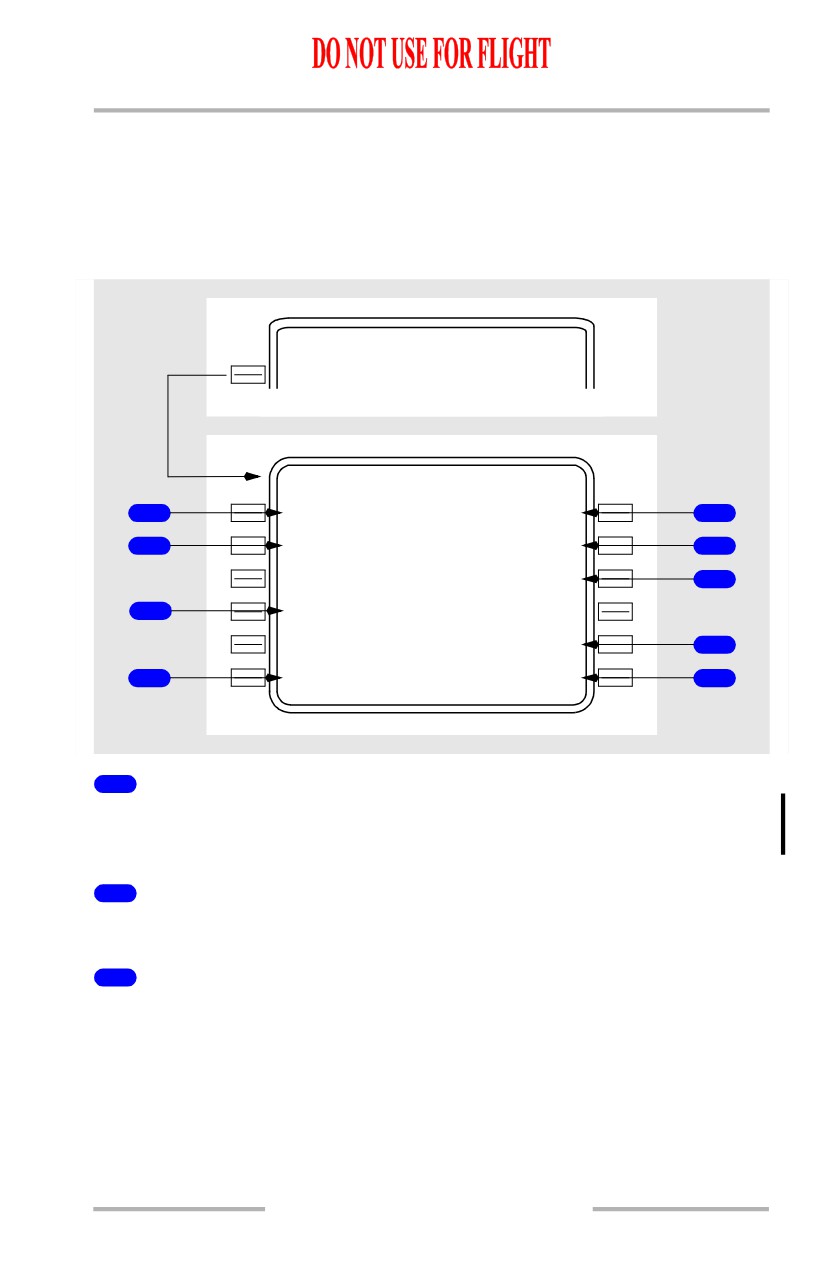
Identification Page
Most of the data on this page is for crew verification. Active date accepts manual
entries.
The crew verifies FMC data and selects a navigation database on the identification
page.
INIT/ REF INDEX
<IDEN T
IDE NT
1 / X
M O D E L
E N G R A T I N G
1
737-XX X
XXK
5
N A V D A T A
A C T I V E
2
B0689040
0
1
SEP24OCT21/96
6
OC
T
2
2NOV18/96
7
O P P R O G R A M
3
549250-0
0
X
(UXX.X)
S U P P D A T A
OC
T
2
1/96
8
- - - - - - - -
-
-
- - - - - - - - - - - - - -
4
<INDE X
POS INIT>
9
1
MODEL
Displays the airplane model from the FMC performance database (e.g., 737-600,
737-700, 737-800 or 737-900).
2
Navigation Data (NAV DATA)
Displays the navigation database identifier.
3
Operational Program (OP PROGRAM)
Displays the Boeing software part number and update version. Update version
installed at delivery:
[Option - FMC U10.3]
• Update 10.3 (U10.3)
[Option - FMC U10.4]
• Update 10.4 (U10.4)
11.40.7