SINUMERIK 840D sl/828D. Job Planning. Programming Manual (2010-2018) - page 16
Flexible NC programming
1.18 Write file (WRITE)
<error>
:
Variable for returning the error value.
Type.
INT
Value:
0
No error
1
Path not allowed
2
Path not found
3
File not found
4
Incorrect file type
10
File is full
11
The file is in use
12
No resources available
13
No access rights
20
Other error
<file name>
:
The name of the file in which the specified block or specified data is to
be added.
Type:
STRING
The following points should be noted when specifying the file name:
• The specified file name must not contain any blank spaces or
control characters (characters with ASCII code ≤ 32), otherwise the
WRITE command will be canceled with error code 1 "Path not
allowed".
• The file name can be specified with path data and file identifier.
- Path data
Path data must be absolute, i.e. start with "/".
If a path is not specified, the file is saved in the current directory
(= directory of selected program).
- File identifier
If the file name does not contain a domain identifier ("_N_"), it is
added accordingly.
If the fourth-last character of the file name is an underscore "_",
the next three characters will be interpreted as the file identifier.
In order to be able to use the same file name for all file
commands, e.g. via a STRING type variable, only the _SPF and
_MPF file identifiers may be used.
If there is no "_MPF" or "_SPF" identifier, the file name is
automatically completed with _MPF.
• The file name length can be up to 32 bytes, the path length up to
128 bytes.
Example:
"PROTFILE"
"_N_PROTFILE"
"_N_PROTFILE_MPF"
"/_N_MPF_DIR_/_N_PROTFILE_MPF/"
Job Planning
130
Programming Manual, 03/2010, 6FC5398-2BP20-1BA0
Flexible NC programming
1.18 Write file (WRITE)
<block/data>
:
The block or data to be added to the specified file.
Type:
STRING
Note:
Internally LF is then added; this means that the character string is
lengthened by one character.
General conditions
● Maximum file size (→ machine manufacturer)
The maximum possible file size of log files is set with the machine data:
MD11420 $MN_LEN_PROTOCOL_FILE
The maximum file length is applicable for all files created using the WRITE command. If it is
exceeded an error message is output and the block or data is not saved. If there is
sufficient free memory, a new file can be created.
Examples
Example 1: WRITE command without absolute path data
Program code
Comment
N10 DEF INT ERROR
; Definition of error
variables.
N20 WRITE(ERROR,"TEST1","LOG FROM 7.2.97")
; Write the text from "LOG
FROM 7.2.97" to file
_N_TEST1_MPF.
N30 IF ERROR
; Error evaluation.
N40 MSG ("Error with WRITE command:" <<ERROR)
N50 M0
N60 ENDIF
Example 2: WRITE command with absolute path data
Program code
WRITE(ERROR,"/_N_WKS_DIR/_N_PROT_WPD/_N_PROT_MPF","LOG FROM 7.2.97")
Job Planning
Programming Manual, 03/2010, 6FC5398-2BP20-1BA0
131
Flexible NC programming
1.19 Delete file (DELETE)
1.19
Delete file (DELETE)
Function
The DELETE command can be used to delete all files, irrespective of whether these were
created using the WRITE command or not. Files that were created using a higher access
authorization can also be deleted with DELETE.
Syntax
DEF INT <error>
DELETE(<error>,"<file name>")
Significance
DELETE:
Command for deleting the specified file.
<error>
:
Variable for returning the error value.
Type.
INT
Value:
0
No error
1
Path not allowed
2
Path not found
3
File not found
4
Incorrect file type
11
The file is in use
12
No resources available
20
Other error
<file name>:
Name of the file to be deleted
Type:
STRING
Job Planning
132
Programming Manual, 03/2010, 6FC5398-2BP20-1BA0
Flexible NC programming
1.19 Delete file (DELETE)
The following points should be noted when specifying the file name:
• The specified file name must not contain any blank spaces or
control characters (characters with ASCII code ≤ 32), otherwise the
DELETE command will be canceled with error code 1 "Path not
allowed".
• The file name can be specified with path data and file identifier.
- Path data
Path data must be absolute, i.e. start with "/".
If a path is not specified, the file is searched for in the current
directory (= directory of selected program).
- File identifier
If the file name does not contain a domain identifier ("_N_"), it is
added accordingly.
If the fourth-last character of the file name is an underscore "_",
the next three characters will be interpreted as the file identifier.
In order to be able to use the same file name for all file
commands, e.g. via a STRING type variable, only the _SPF and
_MPF file identifiers may be used.
If there is no "_MPF" or "_SPF" identifier, the file name is
automatically completed with _MPF.
• The file name length can be up to 32 bytes, the path length up to
128 bytes.
Example:
"PROTFILE"
"_N_PROTFILE"
"_N_PROTFILE_MPF"
"/_N_MPF_DIR_/_N_PROTFILE_MPF/"
Example
Program code
Comment
N10 DEF INT ERROR
; Definition of error
variables.
N15 STOPRE
; Preprocessing stop.
N20 DELETE(ERROR,"/_N_SPF_DIR/_N_TEST1_SPF")
; Deletes file TEST1 in the
subprogram directory.
N30 IF ERROR
; Error evaluation.
N40 MSG("error for DELETE command:" <<ERROR)
N50 M0
N60 ENDIF
Job Planning
Programming Manual, 03/2010, 6FC5398-2BP20-1BA0
133
Flexible NC programming
1.20 Read lines in the file (READ)
1.20
Read lines in the file (READ)
Function
The READ command reads one or several lines in the specified file and stores the information
read in an STRING type array. In this array, each read line occupies an array element.
Note
The file must be stored in the NCK's static user memory (passive file system).
Condition
The currently set protection level must be equal to or greater than the READ right of the file.
If this is not the case, access is denied with an error message (return value of error variable
= 13).
Syntax
DEF INT <error>
DEF STRING[<string length>] <result>[<n>,<m>]
READ(<error>,"<file name>",<start line>,<number of lines>,<result>)
Significance
READ:
Command for reading lines from the specified file and storing these
lines in a variable array.
Job Planning
134
Programming Manual, 03/2010, 6FC5398-2BP20-1BA0
Flexible NC programming
1.20 Read lines in the file (READ)
<error>
:
Variable for returning the error value (call-by-reference parameter)
Type.
INT
Value:
0
No error
1
Path not allowed
2
Path not found
3
File not found
4
Incorrect file type
13
Insufficient access rights
21
Line does not exist (<start line> or <number of
lines> parameter exceeds the number of lines in
the specified file).
22
Field length of the result variable (<result>) is too
small.
23
Line range too large (<number of lines>
parameter selected so large that the read would
go beyond the end of the file).
<file name>
:
Name of the file to be read (call-by-value parameter)
Type:
STRING
The following points should be noted when specifying the file name:
• The specified file name must not contain any blank spaces or
control characters (characters with ASCII code ≤ 32), otherwise
the READ command will be canceled with error code 1 "Path not
allowed".
• The file name can be specified with path data and file identifier.
- Path data
Path data must be absolute, i.e. start with "/".
If a path is not specified, the file is searched for in the current
directory (= directory of selected program).
- File identifier
If the file name does not contain a domain identifier ("_N_"), it
is added accordingly.
If the fourth-last character of the file name is an underscore
"_", the next three characters will be interpreted as the file
identifier. In order to be able to use the same file name for all
file commands, e.g. via a STRING type variable, only the
_SPF and _MPF file identifiers may be used.
If there is no "_MPF" or "_SPF" identifier, the file name is
automatically completed with _MPF.
• The file name length can be up to 32 bytes, the path length up to
128 bytes.
Example:
"PROTFILE"
"_N_PROTFILE"
"_N_PROTFILE_MPF"
"/_N_MPF_DIR_/_N_PROTFILE_MPF/"
Job Planning
Programming Manual, 03/2010, 6FC5398-2BP20-1BA0
135
Flexible NC programming
1.20 Read lines in the file (READ)
<start line>
:
Start line of the section of the file to be read (call-by-value
parameter)
Type:
INT
Value:
0
Reads the number of lines specified with the
<number of lines> parameter before the end
of the file.
1 to n
Number of the first line to be read.
<number of lines>: Number of lines to be read (call-by-value parameter)
Type:
INT
<result>
:
Result variable (call-by-reference parameter)
Variable array in which the read text is stored.
Type:
STRING (max. length: 255)
If fewer lines are specified in the <number of lines> parameter than
the array size [<n>,<m>] of the result variable, the remaining array
elements will not be modified.
Termination of a line by means of the control characters "LF" (Line
Feed) or "CR LF" (Carriage Return Line Feed) is not stored in the
result variable.
Read lines are cropped if the line is longer than the defined string
length. An error message is not output.
Note
Binary files cannot be read in. The "incorrect data type" error is output (return value of the
error variable = 4). The following types of file are not readable: _BIN, _EXE, _OBJ, _LIB,
_BOT, _TRC, _ACC, _CYC, _NCK.
Example
Program code
Comment
N10 DEF INT ERROR
; Definition of error variables.
N20 DEF STRING[255] RESULT[5]
; Definition of result variables.
N30 READ(ERROR,"/_N_CST_DIR/_N_TESTFILE_MPF",1,5,RESULT)
; Filename with domain, file
identifier and path
specification.
N40 IF ERROR <>0
; Error evaluation.
N50 MSG("ERROR"<<ERROR<<"ON READ COMMAND")
N60 M0
N70 ENDIF
Job Planning
136
Programming Manual, 03/2010, 6FC5398-2BP20-1BA0
Flexible NC programming
1.21 Check for presence of file (ISFILE)
1.21
Check for presence of file (ISFILE)
Function
The ISFILE command can be used to check whether a file exists in the NCK's static user
memory (passive file system).
Syntax
<result>=ISFILE("<file name>")
Significance
ISFILE:
Command for checking if the specified file exists in the passive file
system.
:
Name of the file whose existence is to be checked in the passive file
<file name>
system.
Type:
STRING
The following points should be noted when specifying the file name:
• The specified file name must not contain any blank spaces or
control characters (characters with ASCII code ≤ 32).
• The file name can be specified with path data and file identifier.
- Path data
Path data must be absolute, i.e. start with "/".
If a path is not specified, the file is searched for in the current
directory (= directory of selected program).
- File identifier
If the file name does not contain a domain identifier ("_N_"), it is
added accordingly.
If the fourth-last character of the file name is an underscore "_",
the next three characters will be interpreted as the file identifier.
In order to be able to use the same file name for all file
commands, e.g. via a STRING type variable, only the _SPF and
_MPF file identifiers may be used.
If there is no "_MPF" or "_SPF" identifier, the file name is
automatically completed with _MPF.
• The file name length can be up to 32 bytes, the path length up to
128 bytes.
Example:
"PROTFILE"
"_N_PROTFILE"
"_N_PROTFILE_MPF"
"/_N_MPF_DIR_/_N_PROTFILE_MPF/"
Job Planning
Programming Manual, 03/2010, 6FC5398-2BP20-1BA0
137
Flexible NC programming
1.21 Check for presence of file (ISFILE)
<result>
:
Result variable to which the result of the check is assigned.
Type.
BOOL
Value:
TRUE
File exists
FALSE
File does not exist
Example
Program code
Comment
N10 DEF BOOL RESULT
; Definition of result variables.
N20 RESULT=ISFILE("TESTFILE")
N30 IF(RESULT==FALSE)
N40 MSG("FILE DOES NOT EXIST")
N50 M0
N60 ENDIF
or:
Program code
Comment
N10 DEF BOOL RESULT
; Definition of result variables.
N20 RESULT=ISFILE("TESTFILE")
N30 IF(NOT ISFILE("TESTFILE"))
N40 MSG("FILE DOES NOT EXIST")
N50 M0
N60 ENDIF
Job Planning
138
Programming Manual, 03/2010, 6FC5398-2BP20-1BA0
Flexible NC programming
1.22 Read out file information (FILEDATE, FILETIME, FILESIZE, FILESTAT, FILEINFO)
1.22
Read out file information (FILEDATE, FILETIME, FILESIZE,
FILESTAT, FILEINFO)
Function
The FILEDATE, FILETIME, FILESIZE, FILESTAT, and FILEINFO commands can be used to read
out specific file information such as date/time of the last write access, current file size, file
status or all of this information.
Note
The file must be stored in the NCK's static user memory (passive file system).
Condition
The currently set protection level must be equal to or greater than the show right of the
superordinate directory. If this is not the case, access is denied with an error message
(return value of error variable = 13).
Syntax
DEF INT <error>
DEF STRING[<string length>] <result>
FILE
(<error>,"<file name>",<result>)
Significance
FILEDATE:
The FILEDATE command returns the date of the last write access to
the specified file.
FILETIME:
The FILETIME command returns the time of the last write access to
the specified file.
FILESIZE:
The FILESIZE command returns the current size of the specified file.
FILESTAT:
The FILESTAT command returns the status of the specified file with
regard to read, write and execution rights.
FILEINFO:
The FILEINFO command returns all file information for the specified
file which can be read out using FILEDATE, FILETIME, FILESIZE, and
FILESTAT.
Job Planning
Programming Manual, 03/2010, 6FC5398-2BP20-1BA0
139
Flexible NC programming
1.22 Read out file information (FILEDATE, FILETIME, FILESIZE, FILESTAT, FILEINFO)
<error>
:
Variable for returning the error value (call-by-reference parameter)
Type.
INT
Value:
0
No error
1
Path not allowed
2
Path not found
3
File not found
4
Incorrect file type
13
Insufficient access rights
22
String length of the result variable (<result>) is too
small.
<file name>
:
Name of the file from which the file information is to be read out.
Type:
STRING
The following points should be noted when specifying the file name:
• The specified file name must not contain any blank spaces or
control characters (characters with ASCII code ≤ 32), otherwise
the FILE... command will be canceled with error code 1 "Path not
allowed".
• The file name can be specified with path data and file identifier.
- Path data
Path data must be absolute, i.e. start with "/".
If a path is not specified, the file is searched for in the current
directory (= directory of selected program).
- File identifier
If the file name does not contain a domain identifier ("_N_"), it
is added accordingly.
If the fourth-last character of the file name is an underscore "_",
the next three characters will be interpreted as the file
identifier. In order to be able to use the same file name for all
file commands, e.g. via a STRING type variable, only the _SPF
and _MPF file identifiers may be used.
If there is no "_MPF" or "_SPF" identifier, the file name is
automatically completed with _MPF.
• The file name length can be up to 32 bytes, the path length up to
128 bytes.
Example:
"PROTFILE"
"_N_PROTFILE"
"_N_PROTFILE_MPF"
"/_N_MPF_DIR_/_N_PROTFILE_MPF/"
Job Planning
140
Programming Manual, 03/2010, 6FC5398-2BP20-1BA0
Flexible NC programming
1.22 Read out file information (FILEDATE, FILETIME, FILESIZE, FILESTAT, FILEINFO)
<result>
:
Result variable (call-by-reference parameter)
Variable in which the requested file information is stored.
FILEDATE
Type:
STRING
With:
Format: "dd.mm.yy"
⇒ string length must be 8.
FILETIME
Format: "hh:mm.ss"
⇒ string length must be 8.
FILESTAT
Format: "rwxsd"
(r: read, w: write, x: execute,
s: show, d: delete)
⇒ string length must be 5.
FILEINFO
Format: "rwxsd nnnnnnnn dd.mm.yy
hh:mm:ss"
⇒ string length must be 32.
FILESIZE
INT
With:
The file size is output in bytes.
Example
Program code
Comments
N10 DEF INT ERROR
; Definition of error variables.
N20 STRING[32] RESULT
; Definition of result variables.
N30 FILEINFO(ERROR,"/_N_MPF_DIR/_N_TESTFILE_MPF",RESULT)
; Filename with domain, file
identifier and path
specification.
N40 IF ERROR <>0
; Error evaluation
N50 MSG("ERROR"<<ERROR<<"ON FILEINFO COMMAND")
N60 M0
N70 ENDIF
The example could return the following result in the RESULT result variable, for example:
"77777 12345678 26.05.00 13:51:30"
Job Planning
Programming Manual, 03/2010, 6FC5398-2BP20-1BA0
141
Flexible NC programming
1.23 Checksum calculation using an array (CHECKSUM)
1.23
Checksum calculation using an array (CHECKSUM)
Function
The CHECKSUM command can be used to calculate the checksum using an array. This
checksum can be compared with the result of an earlier checksum calculation to ascertain
whether the array data has changed.
Application
Check to see whether the initial contour has changed during stock removal.
Syntax
DEF INT <error>
DEF STRING[<string length>] <checksum>
DEF ... <array>[<n>,<m>,<o>]
<error>=CHECKSUM(<checksum>,"<array>"[,<start column>,<end column>])
Significance
CHECKSUM:
Command for calculating the checksum using an array.
<error>
:
Variable for returning the error value.
Type.
INT
Value:
0
No error
1
Symbol not found
2
No array
3
Index 1 too large
4
Index 2 too large
5
Invalid data type
10
Check sum overflow
<checksum>
:
Result variable to which the result of the checksum calculation is
written (call-by-reference parameter)
Type:
STRING
Required string length:
16
The checksum is indicated as a
character string of 16 hexadecimal
numbers. However, no format
characters are indicated.
Example: "A6FC3404E534047C"
Job Planning
142
Programming Manual, 03/2010, 6FC5398-2BP20-1BA0
Flexible NC programming
1.23 Checksum calculation using an array (CHECKSUM)
<array>
:
Name of the array to be used to generate the checksum (call-by-
value parameter)
Type:
STRING
Max. string length:
32
Permissible arrays are 1- to 3-dimensional arrays of the following
types:
BOOL, CHAR, INT, REAL, STRING
Note:
Arrays of machine data are not permissible.
<start column>:
Number of the start column of the array for calculating the
checksum (optional parameter)
<end column>:
Number of the end column of the array for calculating the
checksum (optional parameter)
Note
The <start column> and <end column> parameters are optional. If no column indices are
indicated, the checksum is formed over the whole array.
The result of the checksum is always definite. If an array element is changed, the result
string will also be changed.
Example
Program code
Comment
N10 DEF INT ERROR
; Definition of error variables.
N20 DEF STRING[16] MY_CHECKSUM
; Definition of result
variables.
N30 DEF INT MY_VAR[4,4]
; Array definition.
N40 MY_VAR=...
N50 ERROR=CHECKSUM(MY_CHECKSUM,"MY_VAR",0,2)
The example could return the following result in the MY_CHECKSUM result variable, for
example:
"A6FC3404E534047C"
Job Planning
Programming Manual, 03/2010, 6FC5398-2BP20-1BA0
143
Flexible NC programming
1.24 Roundup (ROUNDUP)
1.24
Roundup (ROUNDUP)
Function
Input values, type REAL (fractions with decimal point) can be rounded up to the next higher
integer number using the ROUNDUP" function.
Syntax
ROUNDUP(<value>)
Significance
ROUNDUP:
Command to roundup an input value
<value>:
Input value, type REAL
Note
Input value, type INTEGER (an integer number) are returned unchanged.
Examples
Example 1: Various input values and their rounding up results
Example
Rounding up result
ROUNDUP(3.1)
4.0
ROUNDUP(3.6)
4.0
ROUNDUP(-3.1)
-3.0
ROUNDUP(-3.6)
-3.0
ROUNDUP(3.0)
3.0
ROUNDUP(3)
3.0
Example 2: ROUNDUP in the NC program
Program code
N10 X=ROUNDUP(3.5) Y=ROUNDUP(R2+2)
N15 R2=ROUNDUP($AA_IM[Y])
N20 WHEN X=100 DO Y=ROUNDUP($AA_IM[X])
Job Planning
144
Programming Manual, 03/2010, 6FC5398-2BP20-1BA0
Flexible NC programming
1.25 Subprogram technique
1.25
Subprogram technique
1.25.1
General information
1.25.1.1
Subprogram
Function
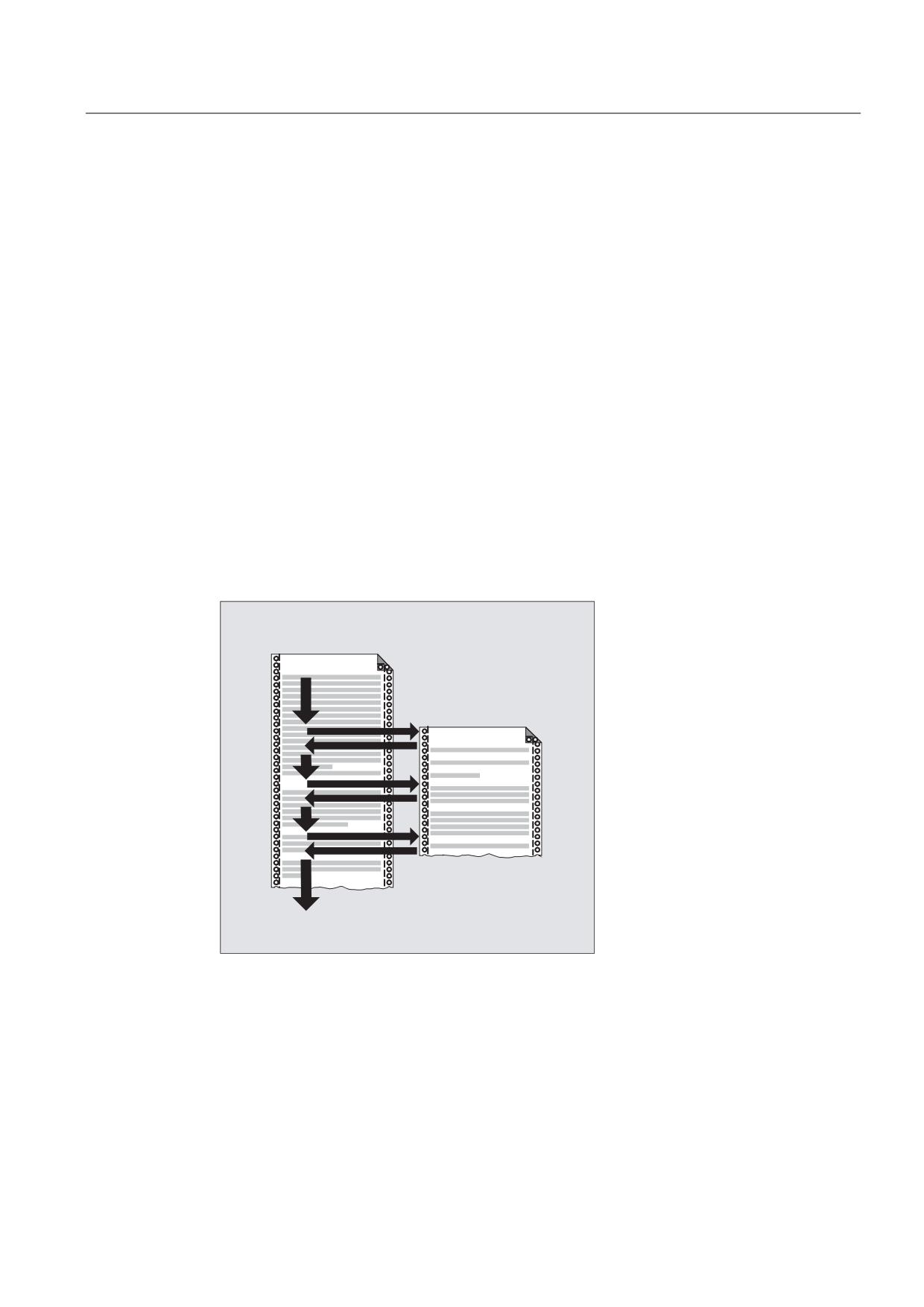
The term "subprogram" has its origins during the time when part programs were split strictly
into main and subprograms. Main programs were the part programs selected for processing
on the control and then launched. Subprograms were the part programs called from within
the main program.
This strict division no longer exists with today's SINUMERIK NC language. In principle, each
part program can be selected as a main program and launched or called from another part
program as a subprogram.
Accordingly, the subprogram can then be used to refer to a part program called from within
another part program.
0DLQ SURJUDP
6XESURJUDP
Job Planning
Programming Manual, 03/2010, 6FC5398-2BP20-1BA0
145
Flexible NC programming
1.25 Subprogram technique
Application
As in all high-level programming languages, in the NC language, subprograms are used to
swap out program sections used more than once to independent, self-contained programs.
Subprograms offer the following advantages:
● Increase the transparency and readability of programs
● Increase quality by reusing tested program parts
● Offer the possibility of creating specific machining libraries
● Save memory space
1.25.1.2
Subprogram names
Naming rules
The following rules must be observed with regard to naming subprograms:
● The first two characters must be letters (A - Z, a - z).
● The following characters can be any combination of letters, numbers (0 to 9), and
underscores ("_").
● A maximum of 31 characters may be used.
Note
The SINUMERIK NC language does not distinguish between uppercase and lowercase
letters.
Program name expansion
The program name assigned when the program is created is expanded within the control
with the addition of a prefix and a suffix.
● Prefix: _N_
● Suffix:
- Main programs: _MPF
- Subprograms: _SPF
Job Planning
146
Programming Manual, 03/2010, 6FC5398-2BP20-1BA0
Flexible NC programming
1.25 Subprogram technique
Using the program name
When using the program name, e.g. in the context of a subprogram call, all combinations of
prefix, program name, and suffix are possible.
Example:
The subprogram with the program name "SUB_PROG" can be started using the following
calls:
1. SUB_PROG
2. _N_SUB_PROG
3. SUB_PROG_SPF
4. _N_SUB_PROG_SPF
Note
Main programs and subprograms with the same name
If there are main programs (.MPF) and subprograms (.SPF) with the same program name,
when the program name is used in the part program, the relevant suffix must be specified in
order that the program can be uniquely identified.
1.25.1.3
Nesting of subprograms
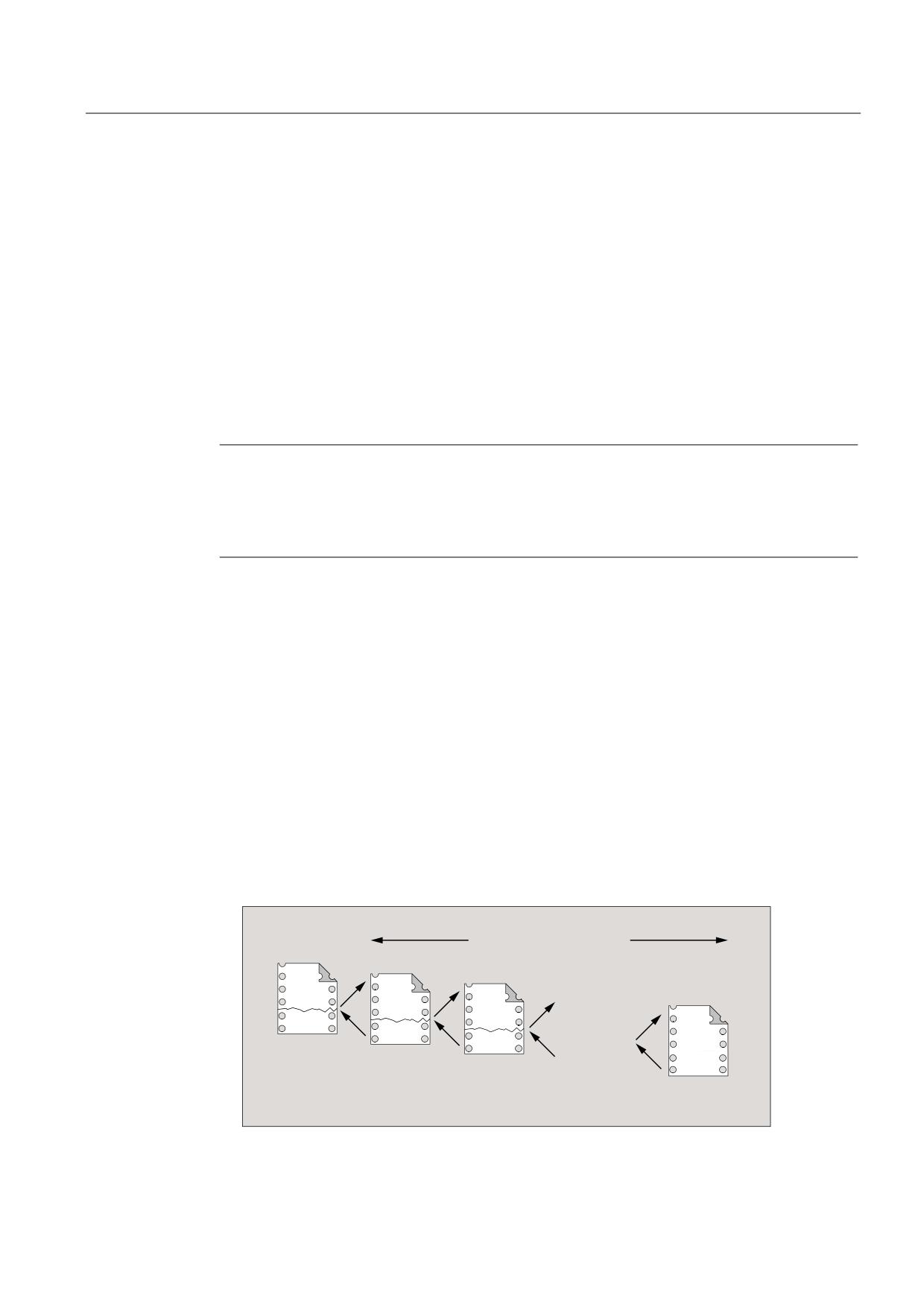
A main program can call subprograms which in turn call more subprograms. As such, the
sequences of the programs are nested within each other. Each program runs on a dedicated
program level.
Nesting depth
The NC language currently provides 16 program levels. The main program always runs at
the uppermost program level, 0. A subprogram always runs at the next lowest program level
following the call. Program level 1 is, therefore, the first subprogram level.
Division of program levels:
● Program level 0: Main program level
● Program level 1 to 15: Subprogram level 1 to 15
3URJUDP OHYHOV PD[
0DLQ
6XE
SURJU
SURJU
6XE
SURJU
6XE
SURJU
Job Planning
Programming Manual, 03/2010, 6FC5398-2BP20-1BA0
147

Flexible NC programming
1.25 Subprogram technique
Interrupt routines (ASUB)
If a subprogram is called in the context of an interrupt routine, this will not be executed at the
program level currently active in the channel (n) but at the next lowest program level (n+1).
So that this remains possible even at the lowest program level, 2 additional program levels
(16 and 17) are available in conjunction with interrupt routines.
If more than 2 program levels are required, this has to be taken into account explicitly in the
structuring of the part program executed in the channel. In other words, only a maximum of
as many program levels may be used in order to leave sufficient program levels available for
interrupt processing.
If interrupt processing needs 4 program levels for example, the part program must be
structured so that it uses a maximum of up to program level 13. In the event of an interrupt,
the 4 program levels it requires (14 to 17) will be available to it.
Siemens cycles
Siemens cycles need 3 program levels. Therefore, a Siemens cycle must be called at the
latest in:
● Part program processing: program level 12
● interrupt routine: program level 14
1.25.1.4
Search path
When a subprogram is called without a path being specified, the control will search the
following directories in the sequence indicated:
Sequence
Directory
Description
1.
Current directory
Directory containing the calling program
2.
/_N_SPF_DIR /
Global subprogram directory
3.
/_N_CUS_DIR /
User cycles
4.
/_N_CMA_DIR /
Manufacturer cycles
5.
/_N_CST_DIR /
Standard cycles
Job Planning
148
Programming Manual, 03/2010, 6FC5398-2BP20-1BA0
Flexible NC programming
1.25 Subprogram technique
1.25.1.5
Formal and actual parameters
Formal and actual parameters occur in conjunction with the definition and calling of
subprograms with parameter transfer.
Formal parameter
When a subprogram is defined, the parameters to be transferred to it (known as the formal
parameters) have to be defined with type and parameter name.
The formal parameters define, therefore, the interface of the subprogram.
Example:
Program code
Comment
PROC CONTOUR (REAL X, REAL Y)
; Formal parameters: X and Y, both REAL type
N20 X1=X Y1=Y
; Traversing of axis X1 to position X and axis
Y1 to position Y
N100 RET
Actual parameters
When a subprogram is called, absolute values or variables (known as actual parameters)
have to be transferred to it.
As such, the actual parameters assign up-to-date values to the interface of the subprogram
when the latter is called.
Example:
Program code
Comment
N10 DEF REAL WIDTH
; Variable definition
N20 WIDTH=20.0
; Variable assignment
N30 CONTOUR(5.5, WIDTH)
; Subprogram call with actual parameters: 5.5
and WIDTH
N100 M30
Job Planning
Programming Manual, 03/2010, 6FC5398-2BP20-1BA0
149
Flexible NC programming
1.25 Subprogram technique
1.25.1.6
Parameter transfer
Definition of a subprogram with parameter transfer
A subprogram with parameter transfer is defined using the PROC keyword and a complete list
of all the parameters expected by the subprogram.
Incomplete parameter transfer
When the subprogram is called, not all the parameters defined in the subprogram interface
have to be transferred explicitly. If a parameter is omitted, the default value "0" is transferred
for it.
So that the parameter sequence can be uniquely identified, however, the commas used as
parameter separators always have to be included. The last parameter is an exception. If it is
omitted from the call, the last comma can also be left out.
Example:
Subprogram:
Program code
Comment
PROC SUB_PROG (REAL X, REAL Y, REAL Z)
; Formal parameters: X, Y, and Z
N100 RET
Main program:
Program code
Comment
PROC MAIN_PROG
N30 SUB_PROG(1.0,2.0,3.0)
; Subprogram call with complete parameter transfer:
X=1.0, Y=2.0, Z=3.0
…
N100 M30
Examples for the subprogram call in N30 with incomplete parameter transfer:
N30 SUB_PROG( ,2.0,3.0)
; X=0.0, Y=2.0, Z=3.0
N30 SUB_PROG(1.0, ,3.0)
; X=1.0, Y=0.0, Z=3.0
N30 SUB_PROG(1.0,2.0)
; X=1.0, Y=2.0, Z=0.0
N30 SUB_PROG( , ,3.0)
; X=0.0, Y=0.0, Z=3.0
N30 SUB_PROG( , , )
; X=0.0, Y=0.0, Z=0.0
Job Planning
150
Programming Manual, 03/2010, 6FC5398-2BP20-1BA0

Flexible NC programming
1.25 Subprogram technique
CAUTION
Call-by-reference parameter transfer
Parameters transferred using call-by-reference must not be left out of the subprogram call.
CAUTION
AXIS data type
AXIS data type parameters must not be left out of the subprogram call.
Checking the transfer parameters
System variable $P_SUBPAR [ n ] where n = 1, 2, etc., can be used to check whether a
parameter has been transferred explicitly or left out in the subprogram. The index n refers to
the sequence of the formal parameters. Index n = 1 refers to the first formal parameter, index
n = 2 to the second formal parameter, and so on.
The following program excerpt shows an example of how a check can be performed based
on the first formal parameter:
Programming
Comment
PROC SUB_PROG (REAL X, REAL Y, REAL Z)
; Formal parameters: X, Y, and Z
N20 IF $P_SUBPAR[1]==TRUE
; Check of the first formal parameter
X.
; These actions are taken if the formal
parameter X has been transferred
explicitly.
N40 ELSE
; These actions are taken if the formal
parameter X has not been transferred.
N60 ENDIF
; General actions
N100 RET
Job Planning
Programming Manual, 03/2010, 6FC5398-2BP20-1BA0
151
Flexible NC programming
1.25 Subprogram technique
1.25.2
Definition of a subprogram
1.25.2.1
Subprogram without parameter transfer
Function
When defining subprograms without parameter transfer, the definition line at the beginning of
the program can be omitted.
Syntax
[PROC <program name>]
Significance
PROC:
Definition operation at the beginning of a program
<program name>:
Name of the program
Example
Example 1: Subprogram with PROC operation
Program code
Comment
PROC SUB_PROG
; Definition line
N10 G01 G90 G64 F1000
N20 X10 Y20
N100 RET
; Subprogram return
Example 2: Subprogram without PROC operation
Program code
Comment
N10 G01 G90 G64 F1000
N20 X10 Y20
N100 RET
; Subprogram return
Job Planning
152
Programming Manual, 03/2010, 6FC5398-2BP20-1BA0

Flexible NC programming
1.25 Subprogram technique
1.25.2.2
Subprogram with call-by-value parameter transfer (PROC)
Function
A subprogram with call-by-value parameter transfer is defined using the PROC keyword
followed by the name of the program and a complete list of all the parameters expected by
the subprogram, with type and name. The definition operation must appear in the first
program line.
Call-by-value parameter transfer does not affect the calling program. The calling program
only transfers the values of the actual parameters to the subprogram.
0DLQ SURJUDP
9DOXH DVVLJQPHQW
/(1*7+
:,'7+
6XESURJUDP
/(1*7+ :,'7+
1HZ YDOXH
DVVLJQPHQW
/(1*7+
:,'7+
1HZ YDOXHV
YDOLG
2OG YDOXHV YDOLG
Note
A maximum of 127 parameters can be transferred.
Syntax
PROC <program name> (<parameter type> <parameter name>, etc.)
Significance
PROC:
Definition operation at the beginning of a program
<program name>:
Name of the program
<parameter type>:
Data type of the parameter (e.g. REAL, INT, BOOL)
<parameter name>:
Name of the parameter
Job Planning
Programming Manual, 03/2010, 6FC5398-2BP20-1BA0
153

Flexible NC programming
1.25 Subprogram technique
NOTICE
The program name specified after the PROC keyword must match the program name
assigned on the user interface.
Example
Definition of a subprogram with 2 REAL type parameters
Program code
Comment
PROC SUB_PROG (REAL LENGTH, REAL WIDTH)
; Parameter 1: Type: REAL, name:
LENGTH
Parameter 2: Type: REAL, name:
WIDTH
N100 RET
; Subprogram return
Job Planning
154
Programming Manual, 03/2010, 6FC5398-2BP20-1BA0
Flexible NC programming
1.25 Subprogram technique
1.25.2.3
Subprogram with call-by-reference parameter transfer (PROC, VAR)
Function
A subprogram with call-by-reference parameter transfer is defined using the PROC keyword
followed by the name of the program and a complete list of all the parameters expected by
the subprogram, with the VAR keyword, type and name. The definition operation must appear
in the first program line.
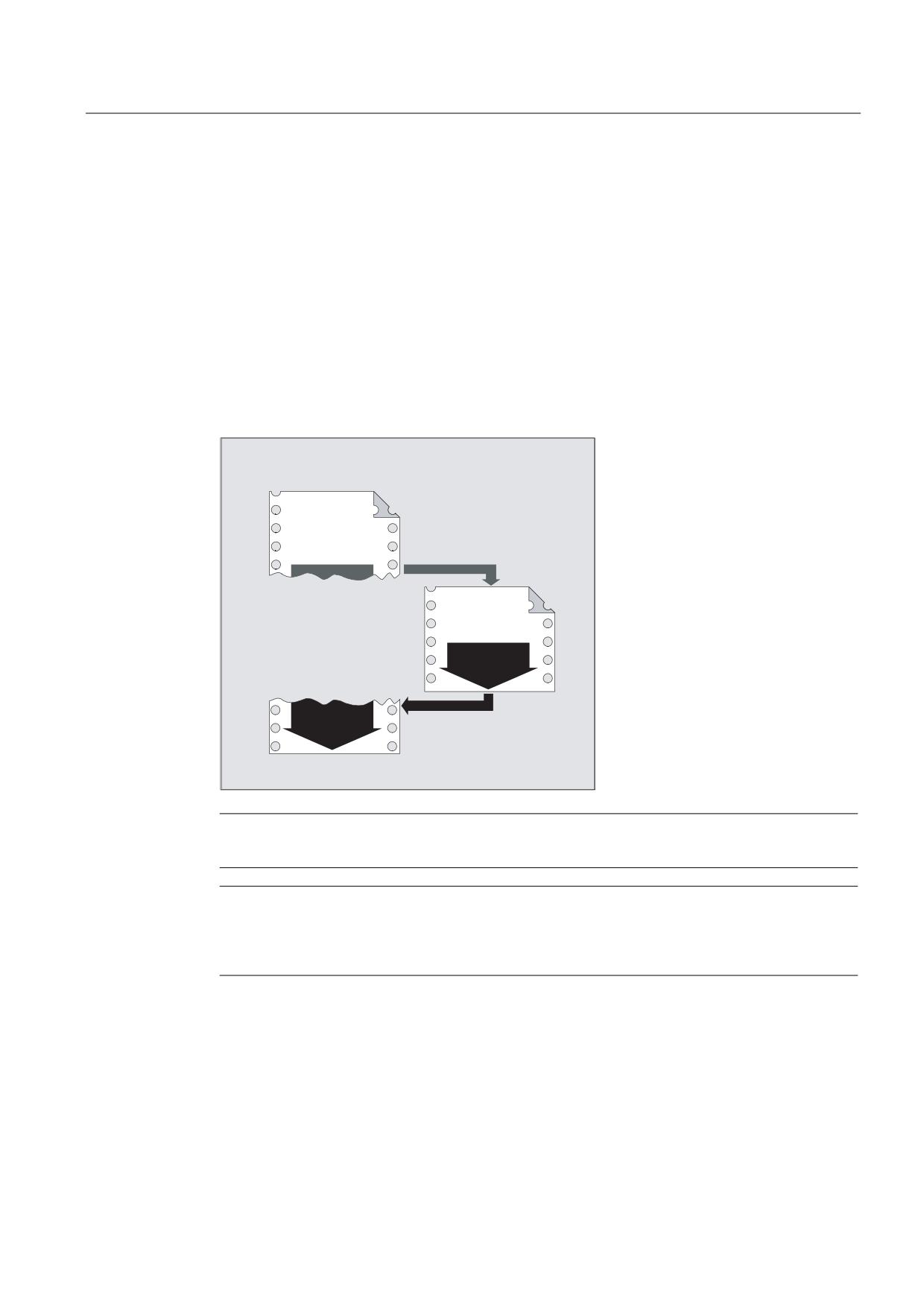
With call-by-reference parameter transfer, references to arrays can also be transferred.
Call-by-reference parameter transfer affects the calling program. The calling program
transfers a reference to the actual parameter to the subprogram, thereby providing the
subprogram with direct access to the corresponding variable.
0DLQ SURJUDP
9DOXH
DVVLJQPHQW
/(1*7+
:,'7+
6XESURJUDP
/(1*7+ :,'7+
1HZ YDOXH
DVVLJQPHQW
/(1*7+
:,'7+
1HZ YDOXHV
YDOLG
/(1*7+ :,'7+
1HZ YDOXHV YDOLG
Note
A maximum of 127 parameters can be transferred.
Note
Call-by-reference parameter transfer is then only necessary if the transferred variable was
defined in the calling program (LUD). Channel-global or NC-global variables do not have to
be transferred, since these cannot be accessed directly from within the subprogram.
Job Planning
Programming Manual, 03/2010, 6FC5398-2BP20-1BA0
155

Flexible NC programming
1.25 Subprogram technique
Syntax
PROC <program name> (VAR <parameter type> <parameter name>, etc.)
PROC <program name> (VAR <array type> <array name>, [<m>,<n>,<o>],
etc.)
Significance
PROC:
Definition operation at the beginning of a program
VAR:
Keyword for parameter transfer via reference
<program name>:
Name of the program
<parameter type>:
Data type of the parameter (e.g. REAL, INT, BOOL)
<parameter name>:
Name of the parameter
<array type>:
Data type of the array elements (e.g. REAL, INT, BOOL)
<array name>:
Name of the array
[<m>,<n>,<o>]
:
Array size
Currently, up to 3-dimensional arrays are possible:
<m>:
Array size for 1st dimension
<n>:
Array size for 2nd dimension
<o>:
Array size for 3rd dimension
NOTICE
The program name specified after the PROC keyword must match the program name
assigned on the user interface.
Note
With arrays of an undefined array length, subprograms can process arrays of variable length
as formal parameter. When defining a two-dimensional array as a formal parameter, for
example, the length of the 1st dimension is not specified. However, the comma must be
written.
Example: PROC <program name> (VAR REAL ARRAY[,5])
Example
Definition of a subprogram with 2 parameters as reference to REAL type:
Program code
Comment
PROC SUB_PROG(VAR REAL LENGTH, VAR REAL WIDTH)
; Parameter 1: Reference to type: REAL,
name: LENGTH
Parameter 2: Reference to type: REAL,
name: WIDTH
N100 RET
Job Planning
156
Programming Manual, 03/2010, 6FC5398-2BP20-1BA0

Flexible NC programming
1.25 Subprogram technique
1.25.2.4
Save modal G functions (SAVE)
Function
The SAVE attribute means that before the subprogram call, active modal G functions are
saved and are re-activated after the end of the subprogram.
CAUTION
Interrupt continuous-path mode
If, for active continuous-path mode, a sub-program is called with the SAVE attribute, the
continuous-path mode is interrupted at the end of the sub-program (return jump).
Syntax
PROC <subprogram name> SAVE
Meaning
SAVE:
Saves the modal G functions before the subprogram call and restores after the
end of the subprogram.
Example
The modal G function G91 is effective in the CONTOUR subprogram (incremental
dimension). The modal G function G90 is effective in the main program (absolute dimension).
G90 is again effective in the main program after the end of the subprogram due to the
subprogram definition with SAVE.
Subprogram definition:
Program code
Comment
PROC CONTOUR (REAL VALUE1) SAVE
; Subprogram definition with the SAVE
parameter
N10 G91 ...
; Modal G function G91: Incremental dimension
N100 M17
; Subprogram end
Main program:
Program code
Comment
N10 G0 X... Y... G90
; Modal G function G90: Absolute dimensions
N20 ...
N50 CONTOUR (12.4)
; Subprogram call
N60 X... Y...
; Modal G function G90 reactivated using SAVE
Job Planning
Programming Manual, 03/2010, 6FC5398-2BP20-1BA0
157
Flexible NC programming
1.25 Subprogram technique
General conditions
Frames
The behavior of frames regarding subprograms with the SAVE attribute depends on the frame
time and can be set using machine data.
References
Function Manual, Basic Functions; Axes, Coordinate Systems, Frames (K2),
Chapter: "Subprogram return with SAVE"
1.25.2.5
Suppress single block execution (SBLOF, SBLON)
Function
Single block suppression for the complete program
Programs designated with SBLOF are completely executed just like a block when single block
execution is active, i.e. single block execution is suppressed for the complete program.
SBLOF is in the PROC line and is valid up to the end of the subprogram or until it is interrupted.
At the return command, the decision is made whether to stop at the end of the subprogram:
Return jump with M17:
Stop at the end of the subprogram
Return jump with RET:
No stop at end of subprogram
Single block suppression within the program
SBLOF alone must remain in the block. Single block is deactivated after this block until:
● To the next SBLON
or
● To the end of the active subprogram level
Syntax
Single block suppression for the complete program:
PROC ... SBLOF
Single block suppression within the program:
SBLOF
SBLON
Job Planning
158
Programming Manual, 03/2010, 6FC5398-2BP20-1BA0
Flexible NC programming
1.25 Subprogram technique
Significance
PROC:
First instruction in a program
SBLOF:
Command to deactivate single block execution
SBLOF can be written in a PROC block or alone in the block.
SBLON:
Command to activate single block execution
SBLON must be in a separate block.
Restrictions
● Single block suppression and block display
The current block display can be suppressed in cycles/subprograms using DISPLOF.
IfDISPLOF is programmed together withSBLOF, then the cycle/subprogram call continues to
be displayed on single-block stops within the cycle/subprogram.
● Single block suppression in the system ASUB or user ASUB
If the single block stop in the system or user ASUB is suppressed using the settings in
machine data MD10702 $MN_IGNORE_SINGLEBLOCK_MASK (bit0 = 1 or bit1 = 1),
then the single block stop can be re-activated by programming SBLON in the ASUB.
If the single block stop in the user ASUB is suppressed using the setting in machine data
MD20117 $MC_IGNORE_SINGLEBLOCK_ASUP then the single block stop cannot be
reactivated by programming SBLON in the ASUB.
● Special features of single block suppression for various single block execution types
When single block execution SBL2 is active (stop after each part program block) there is
no execution stop in the SBLON block if bit 12 is set to "1" in the
MD10702 $MN_IGNORE_SINGLEBLOCK_MASK (prevent single block stop).
When single block execution SBL3 is active (stop after every part program block - also in
the cycle), the SBLOF command is suppressed.
Examples
Example 1: Single block suppression within a program
Program code
Comment
N10 G1 X100 F1000
N20 SBLOF
; Deactivate single block
N30 Y20
N40 M100
N50 R10=90
N60 SBLON
; Reactivate single block
N70 M110
N80 ...
The area between N20 and N60 is executed as one step in single-block mode.
Job Planning
Programming Manual, 03/2010, 6FC5398-2BP20-1BA0
159
Flexible NC programming
1.25 Subprogram technique
Example 2: A cycle is to act like a command for a user
Main program:
Program code
N10 G1 X10 G90 F200
N20 X-4 Y6
N30 CYCLE1
N40 G1 X0
N50 M30
Cycle CYCLE1:
Program code
Comments
N100 PROC CYCLE1 DISPLOF SBLOF
; Suppress single block
N110 R10=3*SIN(R20)+5
N120 IF (R11 <= 0)
N130 SETAL(61000)
N140 ENDIF
N150 G1 G91 Z=R10 F=R11
N160 M17
CYCLE1 is processed for active single block execution, i.e., the Start key must be pressed
once to process CYCLE1.
Example 3:
An ASUB, which is started by the PLC in order to activate a modified zero offset and tool
offsets, is to be executed invisibly.
Program code
N100 PROC ZO SBLOF DISPLOF
N110 CASE $P_UIFRNUM OF
0 GOTOF _G500
1 GOTOF _G54
2 GOTOF _G55
3 GOTOF _G56
4 GOTOF _G57
DEFAULT GOTOF END
N120 _G54: G54 D=$P_TOOL T=$P_TOOLNO
N130 RET
N140 _G54: G55 D=$P_TOOL T=$P_TOOLNO
N150 RET
N160 _G56: G56 D=$P_TOOL T=$P_TOOLNO
N170 RET
N180 _G57: G57 D=$P_TOOL T=$P_TOOLNO
N190 RET
N200 END: D=$P_TOOL T=$P_TOOLNO
N210 RET
Job Planning
160
Programming Manual, 03/2010, 6FC5398-2BP20-1BA0
Flexible NC programming
1.25 Subprogram technique
Example 4: Is not stopped with MD10702 Bit 12 = 1
Initial situation:
● Single block execution is active.
● MD10702 $MN_IGNORE_SINGLEBLOCK_MASK Bit12 = 1
Main program:
Program code
Comments
N10 G0 X0
; Stop in this part program line.
N20 X10
; Stop in this part program line.
N30 CYCLE
; Traversing block generated by the cycle.
N50 G90 X20
; Stop in this part program line.
M30
Cycle CYCLE:
Program code
Comments
PROC CYCLE SBLOF
; Suppress single block stop:
N100 R0 = 1
N110 SBLON
; Execution is not stopped in the part program line due
to the fact that MD10702 bit12=1.
N120 X1
; Execution is stopped in this part program line.
N140 SBLOF
N150 R0 = 2
RET
Job Planning
Programming Manual, 03/2010, 6FC5398-2BP20-1BA0
161
Flexible NC programming
1.25 Subprogram technique
Example 5: Single block suppression for program nesting
Initial situation:
Single block execution is active.
Program nesting:
Program code
Comments
N10 X0 F1000
; Execution is stopped in this block.
N20 UP1(0)
PROC UP1(INT _NR) SBLOF
; Suppress single block stop.
N100 X10
N110 UP2(0)
PROC UP2(INT _NR)
N200 X20
N210 SBLON
; Activate single block stop.
N220 X22
; Execution is stopped in this block.
N230 UP3(0)
PROC UP3(INT _NR)
N300 SBLOF
; Suppress single block stop.
N305 X30
N310 SBLON
; Activate single block stop.
N320 X32
; Execution is stopped in this block.
N330 SBLOF
; Suppress single block stop.
N340 X34
N350 M17
; SBLOF is active.
N240 X24
; Execution is stopped in this block.
SBLON is active.
N250 M17
; Execution is stopped in this block.
SBLON is active.
N120 X12
N130 M17
; Execution is stopped in this
return jump block. SBLOF of the PROC
instruction is active.
N30 X0
; Execution is stopped in this block.
N40 M30
; Execution is stopped in this block.
Job Planning
162
Programming Manual, 03/2010, 6FC5398-2BP20-1BA0
Flexible NC programming
1.25 Subprogram technique
Further Information
Single block disable for unsynchronized subprograms
In order to execute an ASUB in one step, a PROC instruction must be programmed in the
ASUB with SBLOF. This also applies to the function "Editable system ASUB" (MD11610
$MN_ASUP_EDITABLE).
Example of an editable system ASUB:
Program code
Comments
N10 PROC ASUB1 SBLOF DISPLOF
N20 IF $AC_ASUP==’H200’
N30 RET
; No REPOS for mode change.
N40 ELSE
N50 REPOSA
; REPOS in all other cases.
N60 ENDIF
Program control in single block mode
With the single block execution function, the user can execute a part program block-by-
block. The following setting types exist:
● SBL1: IPO single block with stop after each machine function block.
● SBL2: Single block with stop after each block.
● SBL3: Stop in the cycle (the SBLOF command is suppressed by selecting SBL3).
Single block suppression for program nesting
If SBLOF was programmed in the PROC instruction in a subprogram, then execution is stopped
at the subprogram return jump with M17. That prevents the next block in the calling program
from already running. If SBLOF, without SBLOF is programmed in the PROC instruction in a
subprogram, single block suppression is activated, execution is only stopped after the next
machine function block of the calling program. If that is not wanted, SBLON must be
programmed in the subprogram before the return (M17). Execution does not stop for a return
jump to a higher-level program with RET.
Job Planning
Programming Manual, 03/2010, 6FC5398-2BP20-1BA0
163
Flexible NC programming
1.25 Subprogram technique
1.25.2.6
Suppress current block display (DISPLOF, DISPLON, ACTBLOCNO)
Function
The current program block is displayed as standard in the block display. The display of the
current block can be suppressed in cycles and subprograms using the DISPLOF command.
Instead of the current block, the call of the cycle or the subprogram is displayed. The DISPLON
command can be used to revoke suppression of the block display.
DISPLOF and DISPLON are programmed in the program line with the PROC operation and are
effective for the entire subprogram and implicitly for all subprograms called from it which do
not contain a DISPLON or DISPLOF command. This is true of all ASUBs.
Syntax
PROC … DISPLOF
PROC … DISPLOF ACTBLOCNO
PROC … DISPLON
Significance
DISPLOF
:
Command to suppress the current block display.
Location:
At the end of the program line with the PROC operation
Effective:
Up to the return jump from the subprogram or end of
program.
Note:
If further subprograms are called from the subprogram using the DISPLOF
command, then the current block display is also suppressed in these
subprograms unless DISPLON is explicitly programmed in them.
DISPLON
:
Command for revoking suppression of the display of the current block
Location:
At the end of the program line with the PROC operation
Effective:
Up to the return jump from the subprogram or end of
program.
Note:
If further subprograms are called from the subprogram using the DISPLON
command, then the current block will also be displayed in these
subprograms unless DISPLOF is explicitly programmed in them.
ACTBLOCNO:
DISPLOF together with the ACTBLOCNO attribute means that in the case of
an alarm, the number of the actual block is output in which the alarm
occurred. The also applies if only DISPLOF is programmed in a lower
program level.
On the other hand, for DISPLOF without ACTBLOCNO, the block number of
the cycle or subprogram call from the last program level not designated
with DISPLOF is displayed.
Job Planning
164
Programming Manual, 03/2010, 6FC5398-2BP20-1BA0
Flexible NC programming
1.25 Subprogram technique
Examples
Example 1: Suppress current block display in the cycle
Program code
Comments
PROC CYCLE (AXIS TOMOV, REAL POSITION) SAVE DISPLOF
; Suppress current block display
Instead, the cycle call should be
displayed, e.g.: CYCLE(X,100.0)
DEF REAL DIFF
; Cycle contents
G01 ...
RET
; Subprogram return jump. The block
following the cycle call is
displayed in the block display.
Example 2: Block display for alarm output
Subprogram SUBPROG1 (with ACTBLOCNO):
Program code
Comments
PROC SUBPROG1 DISPLOF ACTBLOCNO
N8000 R10 = R33 + R44
N9040 R10 = 66 X100
; Output Alarm 12080
N10000 M17
Subprogram SUBPROG2 (without ACTBLOCNO):
Program code
Comments
PROC SUBPROG2 DISPLOF
N5000 R10 = R33 + R44
N6040 R10 = 66 X100
; Output Alarm 12080
N7000 M17
Job Planning
Programming Manual, 03/2010, 6FC5398-2BP20-1BA0
165
Flexible NC programming
1.25 Subprogram technique
Main program:
Program code
Comments
N1000 G0 X0 Y0 Z0
N1010 ...
N2050 SUBPROG1
; Alarm output = "12080 channel K1 block N9040 syntax
error for text R10="
N2060 ...
N2350 SUBPROG2
; Alarm output = "12080 channel K1 block N2350 syntax
error for text R10="
N3000 M30
Example 3: Revoking suppression of the current block display
Subprogram SUB1 with suppression:
Program code
Comment
PROC SUB1 DISPLOF
; Suppress current block display in SUB1 subprogram.
Instead, the block is to be displayed with the SUB1
call.
N300 SUB2
; Call subprogram SUB2.
N500 M17
Subprogram SUB2 without suppression:
Program code
Comment
PROC SUB2 DISPLON
; Revoke suppression of the current block display in
subprogram SUB2.
N200 M17
; Return to subprogram SUB1. Suppression of the
current block display is restored in SUB1.
Job Planning
166
Programming Manual, 03/2010, 6FC5398-2BP20-1BA0
Flexible NC programming
1.25 Subprogram technique
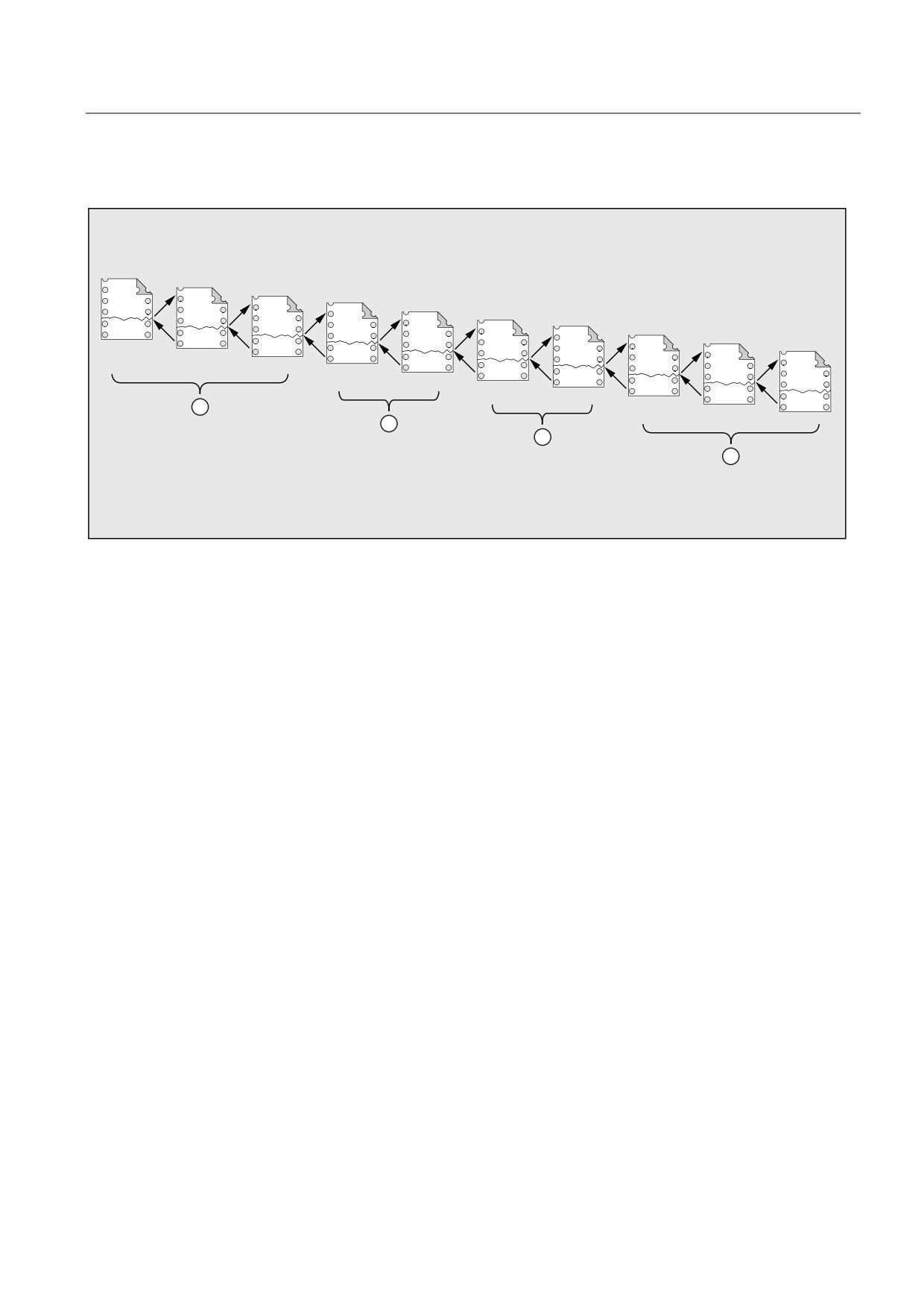
Example 4: Display response in the case of different DISPLON/DISPLOF combinations
3URJUDP OHYHO
03
ZLWKRXW
63
352&
63
352&
63
',63/2)
ZLWKRXW
352&
63
352&
$68%
',63/21
352&
63
',63/2)
352&
352&
63
',63/2)
352&
63
',63/2)
63
',63/21
ZLWKRXW
352&
352&
',63/2)
03 0DLQ SURJUDP
63 6XESURJUDP
$68% $V\QFKURQRXV VXESURJUDP LQWHUUXSW URXWLQH
① The part program lines from program level 0 are displayed in the current block display.
② The part program lines from program level 3 are displayed in the current block display.
③ The part program lines from program level 3 are displayed in the current block display.
④ The part program lines from program level 7/8 are displayed in the current block display.
Job Planning
Programming Manual, 03/2010, 6FC5398-2BP20-1BA0
167
Flexible NC programming
1.25 Subprogram technique
1.25.2.7
Identifying subprograms with preparation (PREPRO)
Function
All files can be identified with the PREPRO keyword at the end of the PROC operation line during
power up.
Note
This type of program preparation depends on the relevant set machine data. Please follow
the manufacturer's instructions.
References:
Function Manual, Special Functions, Preprocessing (V2)
Syntax
PROC … PREPRO
Significance
PREPRO:
Keyword for identifying all files (of the NC programs stored in the cycle
directories) prepared during power up
Read subprogram with preparation and subprogram call
The cycle directories are processed in the same order both for subprograms preprocessed
with parameters during power up and during subprogram call.
1. _N_CUS_DIR user cycles
2. _N_CMA_DIR manufacturer cycles
3. _N_CST_DIR standard cycles
In the case of NC programs sharing the same name but having different characteristics, the
first PROC operation found is activated and the other PROC operation is overlooked without an
alarm message.
Job Planning
168
Programming Manual, 03/2010, 6FC5398-2BP20-1BA0
Flexible NC programming
1.25 Subprogram technique
1.25.2.8
Subprogram return M17
Function
The return command M17 (or the part program end command M30) appears at the end of a
subprogram. It prompts the return to the calling program at the part program block following
the subprogram call.
Note
M17 and M30 are treated as equivalents in the NC language.
Syntax
PROC <program name>
M17/M30
General conditions
Effect of the subprogram return on continuous-path mode
If M17 (or M30) appears on its own in the part program block, active continuous-path mode in
the channel will be interrupted.
To avoid continuous-path mode being interrupted, M17 (or M30) has to be included in the last
traversing block. Furthermore, the following machine data must be set to "0":
MD20800 $MC_SPF_END_TO_VDI = 0 (no M30/M17 output to the NC/PLC interface)
Example
1. Subprogram with M17 in a separate block
Program code
Comment
N10 G64 F2000 G91 X10 Y10
N20 X10 Z10
N30 M17
; Return jump with interruption of continuous-path
mode.
2. Subprogram with M17 in the last traversing block
Program code
Comment
N10 G64 F2000 G91 X10 Y10
N20 X10 Z10 M17
; Return jump without interruption of continuous-
path mode.
Job Planning
Programming Manual, 03/2010, 6FC5398-2BP20-1BA0
169
Flexible NC programming
1.25 Subprogram technique
1.25.2.9
RET subprogram return
Function
The RET command can also be used in the subprogram as a substitute for the M17 return
jump command. RET must be programmed in a separate part program block. Like M17, RET
prompts the return to the calling program at the part program block following the subprogram
call.
Note
Parameters can be programmed to change the return jump behavior of RET (see
"Parameterizable subprogram return jump (RET ...) (Page 171)").
Application
The RET operation should then be used if a G64 continuous-path mode (G641 to G645) is not to
be interrupted by the return jump.
Precondition
The RET command can only be used in subprograms, which were not defined with the SAVE
attribute.
Syntax
PROC <program name>
RET
Example
Main program:
Program code
Comment
PROC MAIN_PROGRAM
; Beginning of the program
N50 SUB_PROG
; Subprogram call: SUB_PROG
N60 ...
N100 M30
; End of program
Job Planning
170
Programming Manual, 03/2010, 6FC5398-2BP20-1BA0
Flexible NC programming
1.25 Subprogram technique
Subprogram:
Program code
Comment
PROC SUB_PROG
N100 RET
; Prompts return jump to block N60 in the main program.
1.25.2.10
Parameterizable subprogram return jump (RET ...)
Function
Usually, an RET or M17 end of subprogram returns to the program from which the subprogram
was called and processing continues with the program line following the subprogram call.
However, on the other hand, there are also applications where the program should be
resumed at another position, e.g.:
● Resuming program execution after calling the stock removal cycles in the ISO dialect
mode (after describing the contour).
● Return to main program from any subprogram level (even after ASUB) for error handling.
● Return jump through several program levels for special applications in compile cycles and
in the ISO dialect mode.
In cases such as these, the RET command is programmed together with "return jump
parameters".
Syntax
RET("<destination block>")
RET("<destination block>",<block after destination block>)
RET("<destination block>",<block after destination block> <number of
return jump levels>)
RET("<destination block>", ,<number of return jump levels>)
RET("<destination block>",<block after destination block>,<number of
return jump levels>,
<return jump to the beginning of the program>)
RET( , ,<number of return jump levels>,<return jump to the beginning
of the program>)
Job Planning
Programming Manual, 03/2010, 6FC5398-2BP20-1BA0
171
Flexible NC programming
1.25 Subprogram technique
Significance
RET:
Subprogram end (use instead of M17)
<destination block>
:
Return jump parameter 1
Declares as jump destination the block where program
execution should be resumed.
If the return jump parameter 3 is not programmed, then
the jump destination is in the program from which the
current subprogram was called.
Possible data include:
"<block number>" Number of the destination block
"<jump marker>"
Jump marker that must be set in the
destination block.
"<character
Character string that must known in
string>"
the program (e.g. program or
variable name).
The following rules apply when
programming the character string:
• Blank at the end (contrary to the
jump marker, that is designated
using ":" at the end).
• Before the character string only
one block number and/or a jump
marker may be set, no program
commands.
<block after destination
Return jump parameter 2
block>:
Refers to the return jump parameter 1.
Type:
INT
Value:
0
Return jump is made to the block that
was specified using return jump
parameter 1.
> 0 Return jump is made to the block that
follows the block specified with return
jump parameter.
Job Planning
172
Programming Manual, 03/2010, 6FC5398-2BP20-1BA0
Flexible NC programming
1.25 Subprogram technique
<number of
Return jump parameter 3
return jump levels>:
Specifies the number of levels that must be jumped back
in order to reach the program level in which program
execution should be continued.
Type:
INT
Value:
1
The program is resumed at the "current
program level - 1" (like RET without
parameter).
2
The program is resumed at the "current
program level - 2", i.e. one level is
skipped.
3
The program is resumed at the "current
program level - 3", i.e. two levels are
skipped.
Value
range:
1 ... 15
<return jump to the
Return jump parameter 4
beginning of the program>:
Type:
BOOL
Value:
1
If the return jump is made into the main
program and an ISO dialect mode is
active there, then the program branches
to the beginning of the program.
Note
For a subprogram return jump with a character string to specify the destination block search,
initially, a search is always made for a jump marker in the calling program.
If a jump destination is to be uniquely defined using a character string, it is not permissible
that the character string matches the name of a jump marker, as otherwise the subprogram
return jump would always be made to the jump marker and not to the character string (refer
to example 2).
Job Planning
Programming Manual, 03/2010, 6FC5398-2BP20-1BA0
173
Flexible NC programming
1.25 Subprogram technique
General conditions
When making a return jump through several program levels, the SAVE instructions of the
individual program levels are evaluated.
If, for a return jump over several program levels, a modal subprogram is active and if in one
of the skipped programs the de-selection command MCALL is programmed for the modal
subprogram, then the modal subprogram remains active.
CAUTION
The programmer must carefully ensure that for a return jump over several program levels,
the program continues with the correct modal settings. This can be achieved, e.g. by
programming an appropriate main block.
Examples
Example 1: Resuming in the main program after ASUB execution
Programming
Comment
N10010 CALL "UP1"
; Program level 0 (main program)
N11000 PROC UP1
; Program level 1
N11010 CALL "UP2"
N12000 PROC UP2
; Program level 2
N19000 PROC ASUB
; Program level 3 (ASUB execution)
N19100 RET("N10900", ,$P_STACK)
; Subprogram return.
N10900
; Resumption in main program.
N10910 MCALL
; Deactivate modal subprogram.
N10920 G0 G60 G40 M5
; Correct additional modal settings.
Example 2: Character string (string>) to specify the destination block search
Main program:
Program code
Comments
PROC MAIN_PROGRAM
N1000 DEF INT iVar1=1, iVar2=4
N1010 ...
N1200 subProg1
; Calls subprogram "subProg1"
N1210 M2 S1000 X10 F1000
N1220
N1400 subProg2
; Calls subprogram "subProg2"
N1410 M3 S500 Y20
N1420 ..
Job Planning
174
Programming Manual, 03/2010, 6FC5398-2BP20-1BA0
Flexible NC programming
1.25 Subprogram technique
Program code
Comments
N1500 lab1: iVar1=R10*44
N1510 F500 X5
N1520 ...
N1550 subprog1: G1 X30
;
"subProg1" is defined here as jump marker.
N1560 ...
N1600 subProg3
Calls subprogram "subProg3"
N1610 ...
N1900 M30
Subprogram subProg1:
Program code
Comments
PROC subProg1
N2000 R10=R20+100
N2010 ...
N2200 RET("subProg2")
; Return
jump into the main program at block N1400
Subprogram subProg2:
Program code
Comments
PROC subProg2
N2000 R10=R20+100
N2010 ...
N2200 RET("iVar1")
; Return
jump into the main program at block N1500
Subprogram subProg3:
Program code
Comments
PROC subProg3
N2000 R10=R20+100
N2010 ...
N2200 RET("subProg1")
; Return
jump into the main program at block N1550
Job Planning
Programming Manual, 03/2010, 6FC5398-2BP20-1BA0
175
Flexible NC programming
1.25 Subprogram technique
Further information
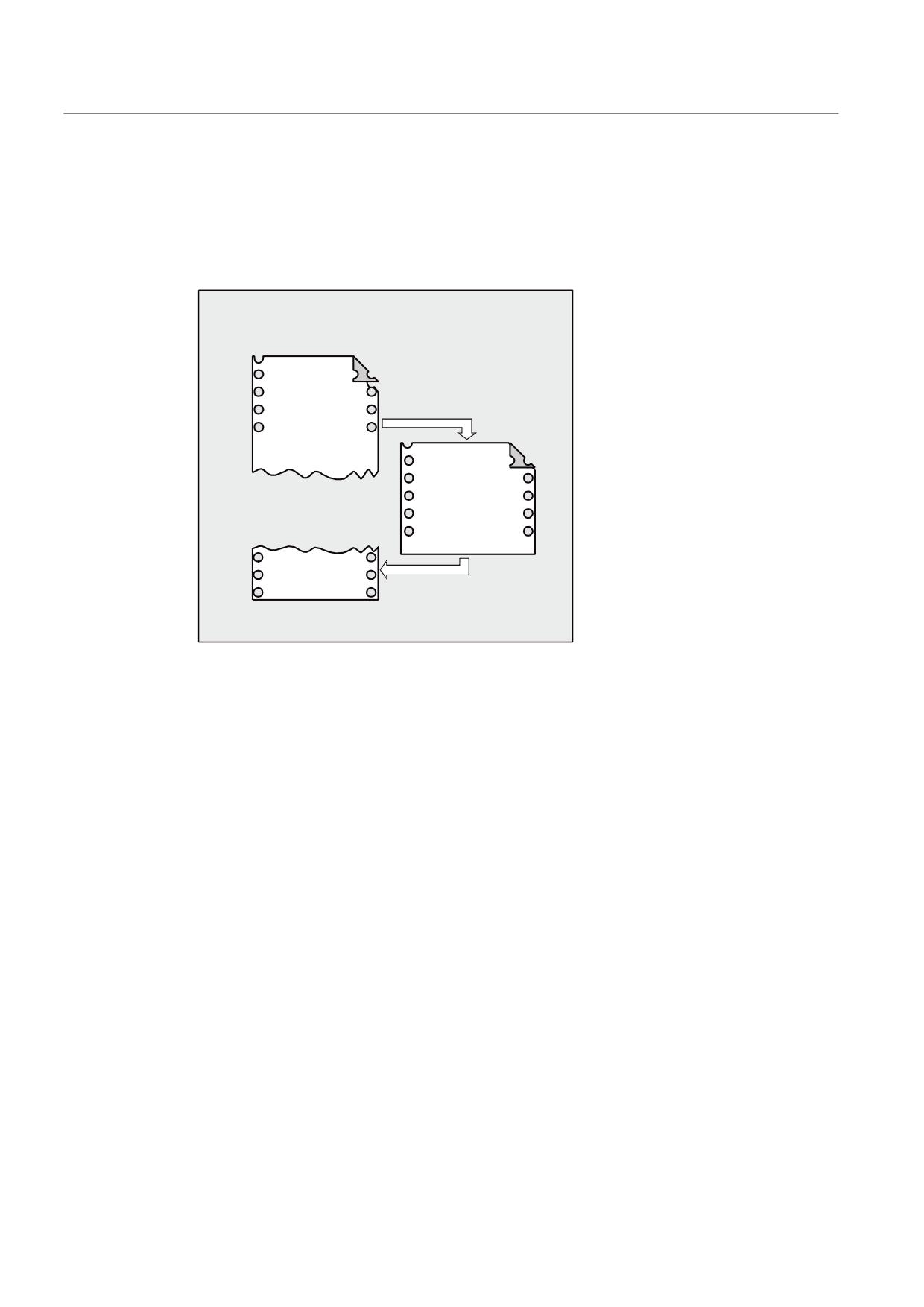
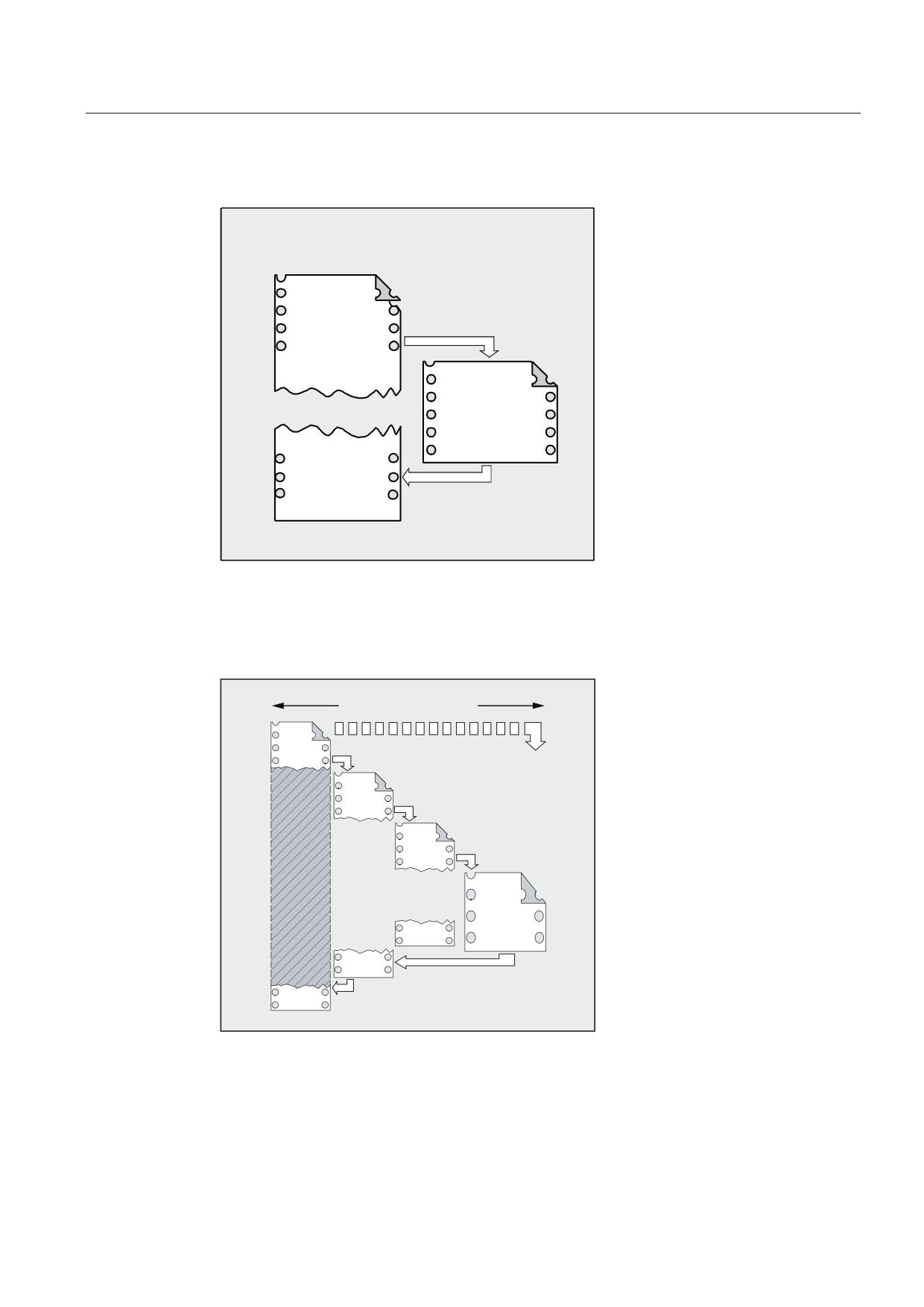
The different effects of return jump parameters 1 to 3 are explained in the following graphics.
1st return jump parameter 1 = "N200", return jump parameter 2 = 0
0DLQ SURJUDP
6XESURJUDP
1
68%
1
*
352& 68%
1
1
5(7 ರ1
ರ
1
After the RET command, program execution is continued with block N200 in the main program.
Job Planning
176
Programming Manual, 03/2010, 6FC5398-2BP20-1BA0
Flexible NC programming
1.25 Subprogram technique
2nd return jump parameter 1 = "N200", return jump parameter 2 = 1
0DLQ SURJUDP
6XESURJUDP
1
68%
1
*
352& 68%
1
1
5(7 ರ
ರ
1
1
1
After the RET command, program execution is continued with the block (N210) that follows
block N200 in the main program.
3rd return jump parameter 1 = "N220", return jump parameter 3 = 2
PD[
SURJUDP OHYHOV
0DLQ
SURJU
6XS
SURJU
6XE
SURJU
6XE
SURJU
5(7 1
1
5HWXUQ MXPS
5HWXUQ MXPS
After the RET command, two program levels are jumped through and program execution is
continued with block N220.
Job Planning
Programming Manual, 03/2010, 6FC5398-2BP20-1BA0
177
Flexible NC programming
1.25 Subprogram technique
1.25.3
Subprogram call
1.25.3.1
Subprogram call without parameter transfer
Function
A subprogram is called either with address L and subprogram number or by specifying the
program name.
A main program can also be called as a subprogram. The end of program M2 or M30 set in the
main program is evaluated as M17 in this case (end of program with return to the calling
program).
Note
Accordingly, a subprogram can also be started as a main program.
Search strategy of the control:
Are there any *_MPF?
Are there any *_SPF?
This means: if the name of the subprogram to be called is identical to the name of the main
program, the main program that issued the call is called again. This is generally an
undesirable effect and must be avoided by assigning unique names to subprograms and
main programs.
Note
Subprograms not requiring parameter transfer can also be called from an initialization file.
Syntax
L<number>/<program name>
Note
The subprogram call must always be programmed in a separate NC block.
Job Planning
178
Programming Manual, 03/2010, 6FC5398-2BP20-1BA0

Flexible NC programming
1.25 Subprogram technique
Meaning
L:
Address for the subprogram call
<number>
:
Name of the subprogram
Type:
INT
Value:
Maximum 7 decimal places
Notice:
Leading zeros are significant in names (⇒ L123,
L0123 and L00123 are three different
subprograms).
<program name>:
Name of the subprogram (or main program)
Examples
Example 1: Subprogram call without parameter transfer
0DLQ SURJUDP
1
/
RU
6XESURJUDP
1
6SLJRWB
Job Planning
Programming Manual, 03/2010, 6FC5398-2BP20-1BA0
179
Flexible NC programming
1.25 Subprogram technique
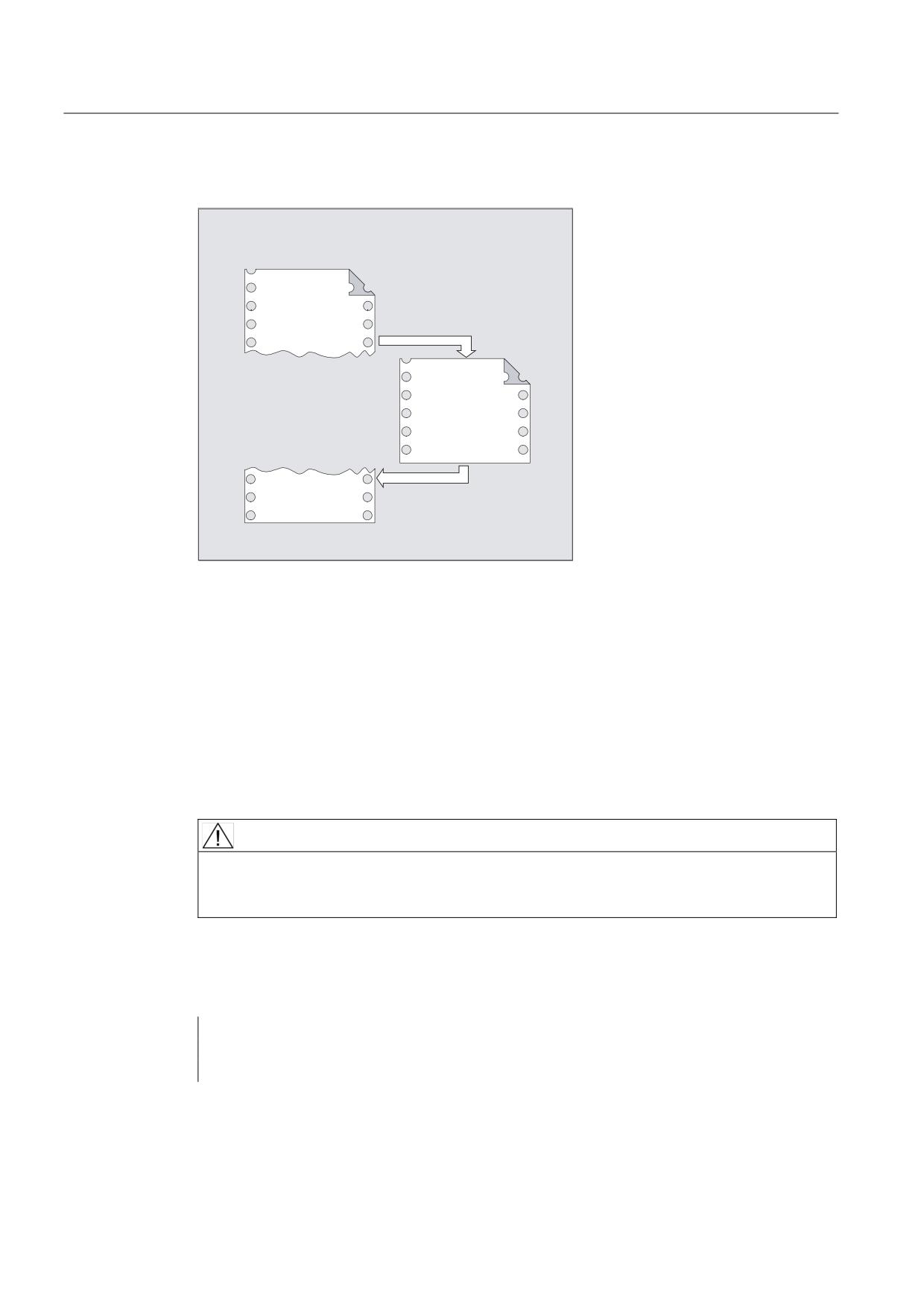
Example 2: Calling a main program as a subprogram
0DLQ SURJUDP
1
03)
$GGLWLRQDO PDLQ
RU
SURJUDP
1
:(//(
1
1
0
1.25.3.2
Subprogram call with parameter transfer (EXTERN)
Function
For a subprogram call with parameter transfer, variables or values can be transferred directly
(but not VAR parameters).
Subprograms with parameter transfer must be declared with EXTERNAL in the main program
before they are called in the main program (e.g., at the beginning of the program). The name
of the subprogram and the variable types are thereby specified in the sequence in which
they are transferred.
CAUTION
Both the variable types and the sequence of the transfer must match the definitions
declared under PROC in the subprogram. The parameter names can be different in the main
program and the subprogram.
Syntax
EXTERNAL <program name>(<type_Par1>,<type_Par2>,<type_Par3>)
<program name>(<value_Par1>,<value_Par2>,<value_Par3>)
Job Planning
180
Programming Manual, 03/2010, 6FC5398-2BP20-1BA0
Flexible NC programming
1.25 Subprogram technique
CAUTION
The subprogram call must always be programmed in a separate NC block.
Significance
<program name>:
Name of subprogram
EXTERN:
Keyword to declare a subprogram with
parameter transfer.
Note:
You only have to specifyEXTERNALif the
subprogram is in the workpiece or in
the global subprogram directory.
Cycles do not have to be declared as
EXTERN.
<type_par1>,<type_par2>,<type_par3>:
Variable types of the parameters to be
transferred in the sequence of the
transfer
<value_par1>,<value_par2>,<value_par3>:
Variable values for the parameters to
be transferred
Examples
Example 1: Subprogram call preceded by declaration
Program code
Comments
N10 EXTERNAL BORDERS(REAL,REAL,REAL)
; Specify the subprogram.
N40 BORDER(15.3,20.2,5)
; Call the subprogram with parameter
transfer.
Job Planning
Programming Manual, 03/2010, 6FC5398-2BP20-1BA0
181

Flexible NC programming
1.25 Subprogram technique
0DLQ SURJUDP
1
(;7(51$/
%25'(5 5($/ 5($/ 5($/
1
%25'(5
Example 2: Subprogram call without declaration
Program code
Comments
N10 DEF REAL LENGTH, WIDTH, DEPTH
N20 …
N30 LENGTH=15.3 WIDTH=20.2 DEPTH=5
N40 BORDER(LENGTH,WIDTH,DEPTH)
; or: N40 BORDER(15.3,20.2,5)
0DLQ SURJUDP
1
/(1*7+
:,'7+
'(37+
1
%25'(5 /(1*7+ :,'7+ '(37+
RU
1
%25'(5
Job Planning
182
Programming Manual, 03/2010, 6FC5398-2BP20-1BA0
Flexible NC programming
1.25 Subprogram technique
1.25.3.3
Number of program repetitions (P)
Function
If a subprogram is to be executed several times in succession, the desired number of
program repetitions can be entered at address P in the block with the subprogram call.
CAUTION
Subprogram call with program repetition and parameter transfer
Parameters are transferred only when the program is called, i.e., on the first run. The
parameters remain unchanged for the remaining repetitions. If you want to change the
parameters during program repetitions, you must make the appropriate provision in the
subprogram.
Syntax
<program name> P<value>
Significance
<program name>:
Subroutine call
P:
Address to program program repetitions
<value>
:
Number of program repetitions
Type:
INT
Value range:
1 … 9999
(unsigned)
Job Planning
Programming Manual, 03/2010, 6FC5398-2BP20-1BA0
183

Flexible NC programming
1.25 Subprogram technique
Example
Program code
Comments
N40 FRAME P3
; The BORDER subprogram is to be executed three times one
after the other.
0DLQ SURJUDP
6XESURJUDP
1
)5$0( 3
Job Planning
184
Programming Manual, 03/2010, 6FC5398-2BP20-1BA0
Flexible NC programming
1.25 Subprogram technique
1.25.3.4
Modal subprogram call (MCALL)
Function
For a modal subprogram call with MCALL, the subprogram is automatically called and
executed after each block with path motion. This allows subprogram calls to be automated,
which are to be executed at different workpiece positions (for example to create drilling
patterns).
MCALL is used to deactivate the function without a subprogram call or by programming a new
modal subprogram call for a new subprogram.
CAUTION
Only one MCALL call can be effective at one time in a program run. Parameters are only
transferred once for an MCALL call.
In the following situations the modal subprogram is also called without motion
programming:
• Programming addresses S and F if G0 or G1 is active.
• If G0/G1 were programmed alone in the block or with additional G codes.
Syntax
MCALL <program name>
Significance
MCALL:
Command for the modal subprogram call
<program name>:
Name of subprogram
Job Planning
Programming Manual, 03/2010, 6FC5398-2BP20-1BA0
185

Flexible NC programming
1.25 Subprogram technique
Examples
Example 1:
Program code
Comment
N10 G0 X0 Y0
N20 MCALL L70
; Modal subroutine call.
N30 X10 Y10
; The programmed position is approached and then subprogram
L70 is executed.
N40 X50 Y50
; The programmed position is approached and then subprogram
L70 is executed.
0DLQ SURJUDP
1
* ; <
1
0&$// /
6XESURJUDP
/
1
;
<
1
;
<
Example 2:
Program code
N10 G0 X0 Y0
N20 MCALL L70
N30 L80
In this example, the following NC blocks with programmed path axes are in subprogram L80.
L70 is called by L80.
Job Planning
186
Programming Manual, 03/2010, 6FC5398-2BP20-1BA0
Flexible NC programming
1.25 Subprogram technique
1.25.3.5
Indirect subprogram call (CALL)
Function
Depending on the prevailing conditions at a particular point in the program, different
subprograms can be called. The name of the subprogram is stored in a variable of type
STRING. The subprogram call is realized with CALL and the variable name.
CAUTION
The indirect subprogram call is only possible for subprograms without parameter transfer.
For a direct subprogram call, save the name in a STRING constant.
Syntax
CALL <program name>
Significance
CALL:
Command for the indirect subprogram call.
<program name>:
Name of the subprogram (variable or constant)
Type: STRING
Example
Direct call with STRING constant:
Program code
Comment
…
CALL "/_N_WKS_DIR/_N_SUBPROG_WPD/_N_PART1_SPF"
; Direct call to subprogram
PART1 with CALL.
…
Job Planning
Programming Manual, 03/2010, 6FC5398-2BP20-1BA0
187
Flexible NC programming
1.25 Subprogram technique
Indirect call via variable:
Program code
Comment
…
DEF STRING[100] PROGNAME
; Define variable.
PROGNAME="/_N_WKS_DIR/_N_SUBPROG_WPD/_N_PART1_SPF"
;
Assign subprogram
PART1 to the
PROGNAME variable.
CALL PROGNAME
; Indirect call to
subprogram PART1 via
CALL and the
PROGNAME variable.
…
1.25.3.6
Indirect subprogram call with specification of the calling program part (CALL
BLOCK ... TO ...)
Function
CALL and the keyword combination BLOCK ... TO is used to call a subprogram indirectly and
execute the program part designated by the start and end labels.
Syntax
CALL <program name> BLOCK <start label> TO <end label>
CALL BLOCK <start label> TO <end label>
Significance
CALL:
Command for the indirect subprogram call.
<program name>
:
Name of the subprogram (variable or constant) that contains
the program part to be executed (specification optional).
Type: STRING
Note:
If a <program name> has not been programmed, the program
part designated by <start label> and <end label> is searched
for in the current program and executed.
BLOCK ... TO ... :
Keyword combination for indirect program part execution
<start label>
:
Variable that refers to the start of the program part to be
executed.
Type: STRING
<end label>
:
Variable that refers to the end of the program part to be
executed.
Type: STRING
Job Planning
188
Programming Manual, 03/2010, 6FC5398-2BP20-1BA0
Flexible NC programming
1.25 Subprogram technique
Example
Main program:
Program code
Comment
DEF STRING[20] STARTLABEL, ENDLABEL
; Variable definition for the
start and end labels.
STARTLABEL="LABEL_1"
ENDLABEL="LABEL_2"
CALL "CONTUR_1" BLOCK STARTLABEL TO ENDLABEL
; Indirect subprogram call and
identifier associated with
the calling program part.
Subprogram:
Program code
Comments
PROC CONTUR_1 ...
LABEL_1
; Start label: Start of program part execution.
N1000 G1 ...
LABEL_2
; End label: End of program part execution.
Job Planning
Programming Manual, 03/2010, 6FC5398-2BP20-1BA0
189
Flexible NC programming
1.25 Subprogram technique
1.25.3.7
Indirect call of a program programmed in ISO language (ISOCALL)
Function
A program programmed in an ISO language can be called using the indirect program call
ISOCALL. The ISO mode set in the machine data is then activated. The original execution
mode becomes effective again at the end of the program. If no ISO mode is set in the
machine data, the subprogram is called in Siemens mode.
For further information about the ISO mode, see
References:
ISO Dialects Functional Description
Syntax
ISOCALL <program_name>
Significance
ISOCALL:
Keyword for an indirect subprogram call with which the ISO
mode set in the machine data is activated.
<program name>:
Name of the program programmed in an ISO language (variable
or constant, type STRING)
Example: Calling a contour with cycle programming from ISO mode
Program code
Comments
0122_SPF
; Contour description in the ISO
mode
N1010 G1 X10 Z20
N1020 X30 R5
N1030 Z50 C10
N1040 X50
N1050 M99
N0010 DEF STRING[5] PROGNAME = “0122“
; Siemens part program
(cycle)
N2000 R11 = $AA_IW[X]
N2010 ISOCALL PROGNAME
N2020 R10 = R10+1
; Execute program 0122.spf in the
ISO mode
N2400 M30
Job Planning
190
Programming Manual, 03/2010, 6FC5398-2BP20-1BA0
Flexible NC programming
1.25 Subprogram technique
1.25.3.8
Calling subroutine with path specification and parameters (PCALL)
Function
With PCALL you can call subprograms with the absolute path and parameter transfer.
Syntax
PCALL <path/program name>(<parameter 1>,…,<parameter n>)
Significance
PCALL:
Keyword for subprogram call with absolute path name
<path/program name>:
Absolute path name beginning with "/", including
subprogram names
If no absolute path name is specified, PCALL behaves like
a standard subprogram call with a program identifier.
The program identifier is written without the leading _N_
and without an extension.
If the program name is to be programmed with leading
character and extension, then it must be explicitly
declared with leading character and extension using the
EXTERN command.
<parameter 1>, etc.:
Actual parameters in accordance with the PROC operation
of the subprogram.
Example
Program code
PCALL/_N_WKS_DIR/_N_WELLE_WPD/WELLE(parameter1,parameter2,…)
Job Planning
Programming Manual, 03/2010, 6FC5398-2BP20-1BA0
191
Flexible NC programming
1.25 Subprogram technique
1.25.3.9
Extend search path for subprogram calls (CALLPATH)
Function
The search path for subprogram calls can be extended using the CALLPATH command.
This means that also subprograms can be called from a non-selected workpiece directory
without having to specify the complete, absolute path name of the subprogram.
The search path extension is made before the entry for user cycles (_N_CUS_DIR).
The search path extension is de-selected again as a result of the following events:
● CALLPATH with blanks
● CALLPATH without parameter
● Part program end
● Reset
Syntax
CALLPATH("<path name>")
Significance
CALLPATH:
Keyword for the programmable search path extension.
Is programmed in a separate part program line.
<path name>:
Constant or variable, type STRING. Contains the absolute path name of
a directory by which the search path should be extended. The path
name starts with "/". The path must be completely specified using
prefixes and suffixes. The maximum path length is 128 bytes.
If the <path name> contains a blank or if CALLPATH is called without
parameter, then search path instruction is reset again.
Job Planning
192
Programming Manual, 03/2010, 6FC5398-2BP20-1BA0
Flexible NC programming
1.25 Subprogram technique
Example
Program code
CALLPATH ("/_N_WKS_DIR/_N_MYWPD_WPD")
This means that the following search path is set (position 5. is new):
1. Current directory / subprogram name
2. Current directory / subprogram identifier_SPF
3. Current directory / subprogram identifier_MPF
4.
/_N_SPF_DIR/subprogram identifier_SPF
5.
/_N_WKS_DIR/_N_MYWPD/subprogram identifier_SPF
6. /N_CUS_DIR/_N_MYWPD/subprogram identifier_SPF
7.
/_N_CMA_DIR/subprogram identifier_SPF
8.
/_N_CST_DIR/subprogram identifier_SPF
Supplementary conditions
● CALLPATH checks whether the programmed path name actually exists. In the case of an
error part program execution is interrupted with correction block alarm 14009.
● CALLPATHcan also be programmed INI files. It is only effective for the time it takes to
process the INI file(WPD-INI file or initialization program for NC active data, e.g. frames in
the 1st channel _N_CH1_UFR_INI). The search path is again reset.
1.25.3.10
Execute external subroutine (EXTCALL)
Function
Using the EXTCALL command, it is possible to subsequently download a subprogram from an
external program memory (local drive, network drive, USB drive) and execute it.
The path for the external subprogram directory can be preset using setting data:
SD42700 $SC_EXT_PROG_PATH
Together with the subprogram path or identifier specified with the EXTCALL call, this forms the
entire path for the program to be called.
Note
External subprograms must not contain jump statements such as GOTOF, GOTOB, CASE, FOR,
LOOP, WHILE, or REPEAT.
IF-ELSE-ENDIF constructions are possible.
Subprogram calls and nested EXTCALL calls may be used.
Job Planning
Programming Manual, 03/2010, 6FC5398-2BP20-1BA0
193

Flexible NC programming
1.25 Subprogram technique
Syntax
EXTCALL("<path/><program name>")
Meaning
EXTCALL:
Command for calling an external subprogram.
"<path/><program name>"
:
Constant/variable of type STRING
<path>:
Absolute or relative path data
(optional)
<program name>:
The program name is specified
without prefix "_N_".
The file extension ("MPF",
"SPF") can be attached to
program names using the "_" or
"." character (optional).
Example:
"SHAFT"
or
"WELLE_SPF" or "WELLE.SPF"
Note
Path specification: Short designations
The following short designations can be used to specify the path:
• LOCAL_DRIVE: for local drive
• CF_CARD: for CompactFlash Card
• USB: for USB front connection
CF_CARD: and LOCAL_DRIVE: can be alternatively used.
Note
Execute from external source via USB drive
If external programs are to be transferred from an external USB drive via a USB interface,
only the interface via X203 (with the name "TCU_1") can be used.
NOTICE
Execute from external source via USB FlashDrive (at the USB front connection)
Direct execution from a USB FlashDrive is not recommended.
There is no protection against contact problems, falling out, breakage through knocking or
unintentional removal of the USB FlashDrive during operation.
Disconnecting it during operation will result in immediate stopping of the machining and,
thus, to the workpiece being damaged.
Job Planning
194
Programming Manual, 03/2010, 6FC5398-2BP20-1BA0
Flexible NC programming
1.25 Subprogram technique
Example
Execute from local drive
Main program:
Program code
N010 PROC MAIN
N020 ...
N030 EXTCALL ("ROUGHING")
N040 ...
N050 M30
External subprogram:
Program code
N010 PROC ROUGHING
N020 G1 F1000
N030 X= ... Y= ... Z= ...
N040
N999999 M17
The "MAIN.MPF" main program is stored in NC memory and is selected for execution.
The "SCHRUPPEN.SPF" or "SCHRUPPEN.MPF" subprogram to subsequently loaded is on
the local drive in the directory "/user/sinumerik/data/prog/WKS.DIR/WST1.WPD".
The subprogram path is preset in SD42700:
SD42700 $SC_EXT_PROG_PATH = "LOCAL_DRIVE:WKS.DIR/WST1.WPD"
Note
Without the path being specified in the SD42700, the EXTCALL instruction for this example
would have to be programmed as follows:
EXTCALL("LOCAL_DRIVE:WKS.DIR/WST1.WPD/SCHRUPPEN")
Job Planning
Programming Manual, 03/2010, 6FC5398-2BP20-1BA0
195
Flexible NC programming
1.25 Subprogram technique
Further information
EXTCALL call with absolute path name
If the subprogram exists at the specified path, it will be executed following the EXTCALL call. If
it does not exist, program execution is cancelled.
EXTCALL call with relative path name/without path name
In the event of an EXTCALL call with a relative path name or without a path name, the
available program memories are searched as follows:
● If a path name is preset in SD42700 $SC_EXT_PROG_PATH, the data specified in the
EXTCALL call (program name or with relative path name) is searched for first, starting from
this path. The absolute path results from linking the following characters:
- The path name preset in SD42700
- The "/" character as a separator
- The subprogram path or identifier programmed in EXTCALL
● If the called subprogram is not found at the preset path, the data specified in the EXTCALL
call is then searched for in the user-memory directories.
● The search ends when the subprogram is found for the first time. If the search does not
produce any hits, the program is canceled.
Adjustable reload memory (FIFO buffer)
A reload memory is required in the NCK in order to run a program in "Execution from
external source" mode (main program or subprogram). The size of the reload memory is
preset to 30 Kbytes and, like all other memory-related machine data, can only be changed to
match requirements by the machine manufacturer.
One reload memory must be set for each program (main program or subprogram) to run
concurrently in "Execution from external source" mode.
RESET, POWER ON
RESET and POWER ON cause external subprogram calls to be interrupted and the
associated load memory to be erased.
A subprogram selected for "Execution from external source" remains selected for "Execution
from external source" after a RESET/part-program end. A POWER ON deletes the selection.
References
For further information about "Execution from external source", see:
Function Manual, Basic Functions, Mode Group, Channel, Program Operation, Reset
Behavior (K1)
Job Planning
196
Programming Manual, 03/2010, 6FC5398-2BP20-1BA0
Flexible NC programming
1.25 Subprogram technique
1.25.4
Cycles
1.25.4.1
Cycles: Setting parameters for user cycles
Function
You can use the cov.com and uc.com files to parameterize your own cycles.
The cov.com file is included with the standard cycles at delivery and is to be expanded
accordingly. The uc.com file is to be created by the user.
Both files are to be loaded in the passive file system in the "User cycles" directory (or must
be given the appropriate path specification):
;$PATH=/_N_CUS_DIR
in the program.
Files and paths
cov.com_COM
Overview of cycles
uc.com
Cycle call description
Adaptation of cov.com - Overview of cycles
The cov.com file supplied with the standard cycles has the following structure:
%_N_COV_COM
File name
;$PATH=/_N_CST_DIR
Path
;Vxxx 11.12.95 Sca cycle overview
Comment line
C1(CYCLE81) drilling, centering
Call for 1st cycle
C2(CYCLE82) drilling, counterboring Call for 2nd cycle
C24(CYCLE98) chaining of threads
Call for last cycle
M17
End of file
Syntax
For each newly added cycle a line must be added with the following syntax:
C<number> (<cycle_name>) comment_text
Number: an integer as long as it has not already been used in the file;
Cycle name: The program name of the cycle to be included
Comment text: Optionally a comment text for the cycle
Example:
C25 (MY_CYCLE_1) usercycle_1
C26 (SPECIAL CYCLE)
Job Planning
Programming Manual, 03/2010, 6FC5398-2BP20-1BA0
197
Flexible NC programming
1.25 Subprogram technique
Example: uc.com file - user cycle description
The explanation is based on the continuation of the
example:
For the following two cycles a cycle parameterization is to be newly created:
Programming
Comments
PROC MY_CYCLE_1 (REAL PAR1, INT PAR2, CHAR PAR3, STRING[10] PAR4)
The cycle has the following transfer parameters:
PAR1:
; Real value in range -1000.001 <= PAR2 <= 123.456, default
with 100
PAR2:
; Positive integer value between 0 <= PAR3 <= 999999, default
with 0
PAR3:
; 1 ASCII character
PAR4:
; String of length 10 for a subprogram name
M17
;
Programming
Comments
PROC SPECIAL CYCLE (REAL VALUE1, INT VALUE2)
The cycle has the following transfer parameters:
VALUE1:
; Real value without value range limitation and default
VALUE2:
; Integer value without value range limitation and default
M17
;
Associated file uc.com:
Programming
%_N_UC_COM
;$PATH=/_N_CUS_DIR
//C25(MY_CYCLE_1) usercycle_1
(R/-1000.001 123.456 / 100 /Parameter_2 of cycle)
(I/0 999999 / 1 / Integer value)
(C//"A" / Character parameter)
(S///Subprogram name)
//C26(SPECIALCYCLE)
(R///Entire length)
(I/*123456/3/Machining type)
M17
Job Planning
198
Programming Manual, 03/2010, 6FC5398-2BP20-1BA0