BMW AG Motorcycle (K1100LT, K1100RS). Manual - part 27
 

  Index      Manuals     BMW AG Motorcycle (K1100LT, K1100RS). Repair Manual


Search            


Content   ..  25  26  27  28   ..


BMW AG Motorcycle (K1100LT, K1100RS). Manual - part 27


31.17

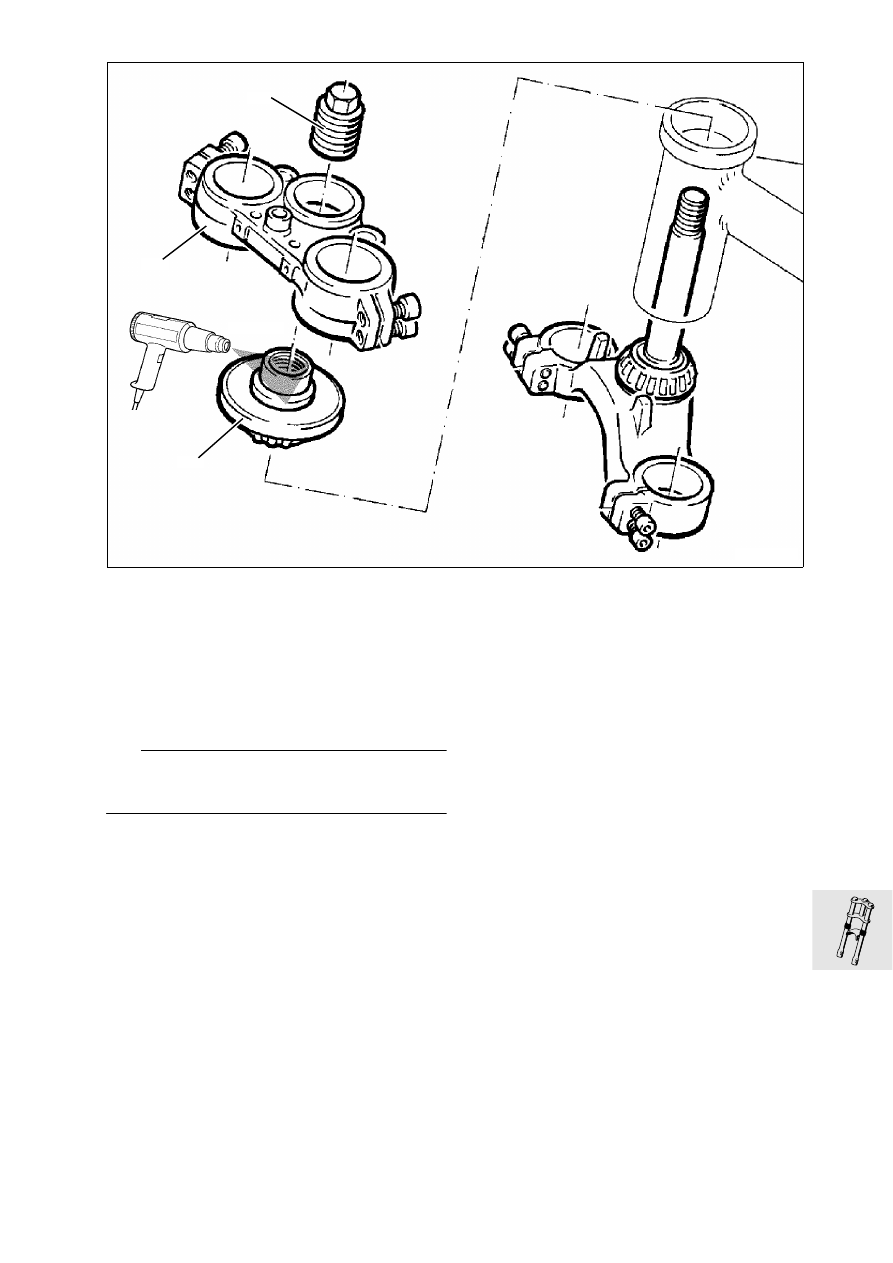
Installing telescopic fork

•

Grease taper roller bearing with 
Shell “Retinax A” or similar.

•

Fit telescopic fork from below into steering head.

•

Install setting ring (1), heat bearing 80 °C 

•

Install upper fork bridge (2).

•

Screw in locking tube (3).

L

 Note:

Do not firmly tighten clamping screws of the upper 
fork bridge at this stage.

LT310260

3

2

1

80°C

31.18

Adjusting steering bearing play

•

Fit a piece of adhesive tape (arrow) on the fork 
bridge above the setting ring.

•

Mark current position of the setting ring (1) on the 
adhesive tape and on the setting ring (2).

•

Fit thrust ring (3), BMW No. 31 4 890,  over the 
locking tube (4).

•

Lock thrust ring with hexagon nut (5) while hold-
ing the locking tube.

•

With the aid of the hexagon nut, turn back the 
adjusting ring a little then tighten to the specified 
setting torque.

Setting torque: 
Hexagon nut ...............................................  12 Nm

New bearing: 
Pretighten hexagon nut ................................ 25 Nm
Move steering several times from lock to lock, 
loosen hexagon nut, retighten ...................... 12 Nm

•

Mark new position of setting ring on adhesive 
tape.

•

Release hexagon nut and remove thrust ring.

•

Firmly tighten locking tube, tighten hexagon nut.

L

 Note:

The position of the setting ring must no longer 
change!

•

Firmly tighten clamping screws.

•

Install handlebar.

X 

Tightening torques:

Locking tube ................................................ 65 Nm
Hexagon nut ................................................ 65 Nm
Clamping screw of fork bridge (6)................. 15 Nm
Clamping block for handle bar ..................... 22 Nm

31 4 890

LT320110

6

5

4

6

1

3

LT320120

1

2

31.19

Installing fork stabilisor

•

Install fork stabilisor, handtighten screws.

•

Install brake distributor (1).

•

Lay ABS sensor line (2) and connect. 

•

Install fuel tank.

•

Install front wheel.

•

Install brake caliper.

L

 Note:

Compress telescopic fork several times then firmly 
tighten fork stabiliser crosswise.

X 

Tightening torque:

Fork stabiliser............................................... 22 Nm

•

Install mudguard.

LT310020

2

1

31.20

32.1

Contents

Page

32

Technical Data

............................................................................................................................... 3

Removing and installing left and right handlebar fittings 

......................................5

Removing and installing left handlebar fitting

 .....................................................................5

Removing and installing handlebar weight ...........................................................................................5

Removing and installing right handlebar fitting

 ..................................................................7

Removing and installing handlebar 

....................................................................................8

Removing and installing handlebar clamping blocks

 ......................................................9

Removing and installing accelerator cable 

.................................................................10

Removing and installing clutch cable 

.............................................................................11

Removing and installing operating cable for increasing starting speed 

.....12

Adjusting steering bearing play

 ..........................................................................................13

32 Steering

32.2

32.3

32

Technical Data

K 1100 LT

K 1100 RS

Steering angle

l

° 2  x  34

Steering tube

-ø

mm (in) 22 (0.86614)

Handlebar width with weights

mm (in) 765 (30.11805)

700 (27.559)

32.4


Content   ..  25  26  27  28   ..