Infiniti Q45. Manual - part 324
 

  Index      Infiniti     Infiniti Q45 - service repair manual 2006 year


Search            copyright infringement  


Content   ..  322  323  324  325   ..


Infiniti Q45. Manual - part 324


VEHICLE INFORMATION AND INTEGRATED SWITCH SYSTEM /WITH NAVIGA-

TION SYSTEM

DI-163

C

D

E

F

G

H

I

J

L

M

A

B

DI

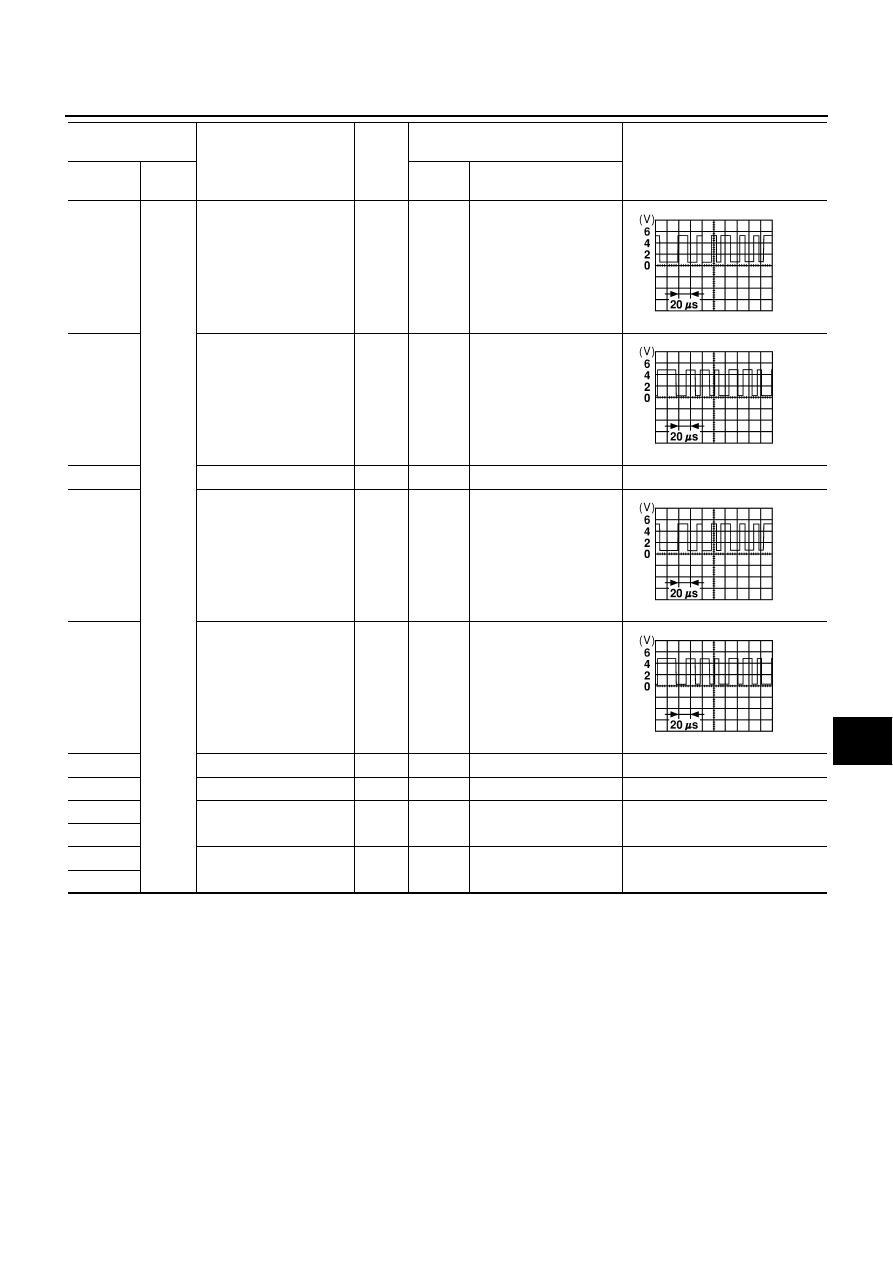
12 (R/L)

Ground

Communication signal (–)

Input/

output

ON

—

13 (Y)

Communication signal (+)

Input/

output

ON

—

14

Shield

—

ON

—

0 V

15 (L)

Communication signal (–)

Input/

output

ON

—

16 (R)

Communication signal (+)

Input/

output

ON

—

17

Shield

—

ON

—

0 V

19 (L/OR)

ACC power supply

Input

ACC

—

Battery voltage

21 (PU/W)

Battery power supply

Input

OFF

—

Battery voltage

23 (PU/W)

22 (B)

Ground

—

ON

—

0 V

24 (B)

Terminal No.

(Wire color)

Item

Signal 

input/

output

Condition

Reference value

(Approx.)

(+)

(–)

Ignition 

switch

Operation

SKIA0176E

SKIA0175E

SKIA0176E

SKIA0175E

DI-164

VEHICLE INFORMATION AND INTEGRATED SWITCH SYSTEM /WITH NAVIGA-

TION SYSTEM

Terminals and Reference Value for Multifunction Switch

NKS001DN

On Board Self-Diagnosis Function (Without CONSULT-II)

NKS001DP

Refer to 

AV-101, "On Board Self-Diagnosis Function (Without CONSULT-II)"

  in AV section.

CONSULT-II Function (MULTI AV)

NKS001DO

Refer to 

AV-115, "CONSULT-II Function (MULTI AV)"

  .

Terminal No.

(Wire color)

Signal

Signal 

input/

output

Condition

Reference value 

(Approx.)

(+)

(–)

Ignition 

switch

Operation

1 (L/OR)

Ground

ACC power supply

Input

ACC

—

Battery voltage

2 (B)

Ground

—

ON

—

0 V

9 (R)

Communication signal (+)

Input/

output

ON

—

10 (L)

Communication signal (–)

Input/

output

ON

—

11

Shield

—

ON

—

Approx. 0

15 (OR)

Communication signal (+)

Input/

output

ON

—

16 (W)

Communication signal (–)

Input/

output

ON

—

17

Shield

—

ON

—

Approx. 0

SKIA0175E

SKIA0176E

SKIA0175E

SKIA0176E

VEHICLE INFORMATION AND INTEGRATED SWITCH SYSTEM /WITH NAVIGA-

TION SYSTEM

DI-165

C

D

E

F

G

H

I

J

L

M

A

B

DI

Multifunction Switch Self-Diagnosis Function

NKS001DQ

It can check ON/OFF operation of each switch in the multifunction switch and diagnose the input signals to the
rear control switch (audio) and steering switch (audio).

DIAGNOSIS FUNCTION 

●

It can illuminate all the indicators (LED) in the multifunction switch.

●

It can check for continuity of the switches by sounding the buzzer when the multifunction switch is
pressed.

●

It can check for continuity of harness between multifunction switch and rear control switch (audio), or
steering switch (audio).
NOTE:
When it checks continuity of harness between multifunction switch and rear control switch (audio), rear
control cancel switch is in OFF position.

STARTING THE SELF-DIAGNOSIS MODE

1.

Turn ignition switch from OFF to ACC.

2.

 Within 10 seconds, press and hold the function switches “1” and
“6 ”simultaneously for 5 seconds or more, when the buzzer
sounds at once.

3.

Release the function switches, when the buzzer sounds. And
self-diagnosis mode is started. 

EXITING THE SELF-DIAGNOSIS MODE

●

Turn ignition switch OFF, or press and hold the function switches “1” and “6” simultaneously for 5 seconds.
Then the self-diagnosis ends.

Power Supply and Ground Circuit Inspection for Display

NKS001DS

1. 

CHECK FUSES

Check for blown display fuses.

OK or NG

OK

>> GO TO 2.

NG

>> If fuse is blown, be sure to eliminate cause of malfunction before installing new fuse. Refer to 

PG-

2, "POWER SUPPLY ROUTING"

 .

PKIB0257E

Unit

Power source

Fuse No.

Display

Battery

52

Ignition switch ACC or ON

21

DI-166

VEHICLE INFORMATION AND INTEGRATED SWITCH SYSTEM /WITH NAVIGA-

TION SYSTEM

2. 

CHECK POWER SUPPLY CIRCUIT

Check voltage between display harness connector M82 terminals
19, 21, 23 and ground.

OK or NG

OK

>> GO TO 3.

NG

>> Check harness between display and fuse.

3. 

CHECK GROUND CIRCUIT

1.

Turn ignition switch OFF.

2.

Disconnect display connector. 

3.

Check continuity between display harness connector M82 termi-
nals 22, 24 and ground.

OK or NG

OK

>> INSPECTION END

NG

>> Check ground harness.

Power Supply and Ground Circuit Inspection for Multifunction Switch

NKS001DT

1. 

CHECK POWER SUPPLY CIRCUIT

Check voltage between multifunction switch harness connector M83
terminal 1 and ground.

OK or NG

OK

>> GO TO 2.

NG

>> Check harness between multifunction switch and fuse.

2. 

CHECK GROUND CIRCUIT

1.

Turn ignition switch OFF.

2.

Disconnect multifunction switch connector.

3.

Check continuity between multifunction switch harness connec-
tor M83 terminal 2 and ground.

OK or NG

OK

>> INSPECTION END

NG

>> Check ground harness.

Terminals

Ignition switch position

(+)

(–)

OFF

ACC

Connector

Terminal

M82

19

Ground

0 V

Battery voltage

21

Battery voltage

Battery voltage

23

Battery voltage

Battery voltage

PKIA9687E

22 – Ground

: Continuity should exist.

24 – Ground

PKIA9728E

Terminals

Ignition switch position

(+)

(–)

OFF

ACC

Connector

Terminal

M83

1

Ground

0 V

Battery voltage

PKIA9729E

2 – Ground

: Continuity should exist.

PKIA9730E


Content   ..  322  323  324  325   ..