Honda Accord (2022 year). Manual in english - page 7
 

  Index      Manuals     Honda Accord (2022 year). Manual in english


Search            copyright infringement  


Content      ..     5      6      7      8     ..


Honda Accord (2022 year). Manual in english - page 7


108

uu

Indicators

u

In

strum

e

nt Pa

nel

Indicator

Name

On/Blinking

Explanation

Message

Safety 
Support 
Indicator 
(Green/Gray)

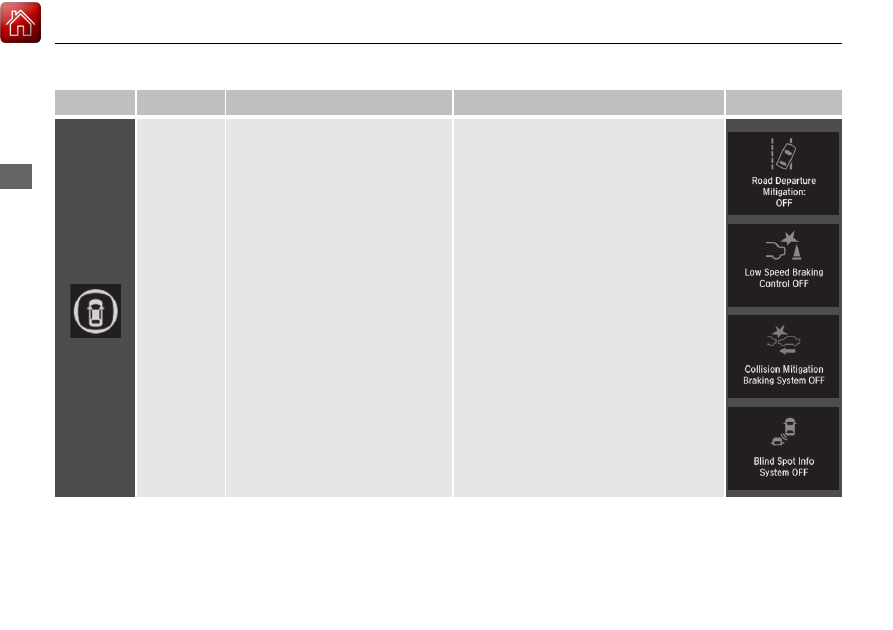
●

Lights up in green when RDM, Low 
Speed Braking Control

*

, CMBS

TM

, 

and the blind spot information 
system

*

 are on.

●

Lights up in green and gray when 
RDM, Low Speed Braking Control

*

, 

CMBS

TM

, or the blind spot 

information system

*

 is off.

●

Lights up in gray when RDM, Low 
Speed Braking Control

*

, CMBS

TM

, 

and the blind spot information 
system

*

 are off.

2

RDM On and Off

 P. 496

2

CMBS

TM

 On and Off

 P. 459

2

Blind spot information System On and 
Off

 P. 452

2

System On and Off

 P. 467

* Not available on all models

109

uu

Indicators

u

Driver Information Interface Warning and Information Messages

Continued

In

strum

e

nt Pa

nel

Driver Information Interface Warning and Information Messages

The following messages appear only on the driver information interface. Press the 

 (home) button, select 

Warnings

, then press the left 

selector wheel to see the message again with the system message indicator on.

Message

Condition

Explanation

●

Appears when the vehicle is no longer able to run 
due to a malfunction.

●

Immediately stop in a safe place.

●

Appears when there is a risk that the vehicle will 
move unexpectedly after you have stopped due to a 
malfunction with the vehicle.

●

While the vehicle is stopped, apply the parking brake.

2

Parking Brake

 P. 508

●

Have your vehicle checked by a dealer.

●

Appears when you set the power mode to ON again 
and the vehicle is able to run.

2

Starting the Engine

 P. 412

Automatic transmission models

110

uu

Indicators

u

Driver Information Interface Warning and Information Messages

In

strum

e

nt Pa

nel

Message

Condition

Explanation

•

Appears if any door or the trunk is not completely 
closed.

•

Appears if any door or the trunk is opened while 
driving. The beeper sounds.

•

Disappears when all doors and the trunk are closed.

•

Appears when the engine oil pressure is low.

•

Appears while driving 

- Immediately stop in a safe 

place.

2

If the Low Oil Pressure Warning Appears

 P. 613

111

uu

Indicators

u

Driver Information Interface Warning and Information Messages

Continued

In

strum

e

nt Pa

nel

Message

Condition

Explanation

•

Appears if there is a problem with the shutter grille, 
and the radiator coolant temperature is too high.

•

Power output will be reduced, so you may not be able 
to accelerate or maintain your current speed. Have your 
vehicle checked by a dealer.

●

Appears when the washer fluid is low.

●

Refill the washer fluid.

2

Refilling Window Washer Fluid

 P. 563

●

Appears when the scheduled maintenance is due 
soon.

●

Consequently, 

Maintenance Due Now

 and 

Maintenance Past Due

 follow.

2

Maintenance Minder Messages on the Driver 
Information Interface

 P. 543

●

Appears when there is a problem with the battery 
charging system.

●

Have your vehicle checked by a dealer.

Models with shutter grille

Canadian models

112

uu

Indicators

u

Driver Information Interface Warning and Information Messages

In

strum

e

nt Pa

nel

Message

Condition

Explanation

●

Appears when the engine coolant temperature gets 
abnormally high.

2

Overheating

 P. 611

●

Appears if the automatic brake hold is automatically 
canceled while it is in operation.

●

Immediately depress the brake pedal.

●

Appears when the automatic brake hold system is 
turned off.

2

Automatic Brake Hold

 P. 513

●

Appears when the automatic brake hold button is 
pressed without wearing the driver’s seat belt.

●

Fasten the driver’s seat belt.

2

Automatic Brake Hold

 P. 513

113

uu

Indicators

u

Driver Information Interface Warning and Information Messages

Continued

In

strum

e

nt Pa

nel

Message

Condition

Explanation

●

Appears when the automatic brake hold button is 
pressed without depressing the brake pedal while 
the automatic brake hold is in operation.

●

Press the automatic brake hold button with the brake 
pedal depressed.

2

Automatic Brake Hold

 P. 513

●

Appears when the parking brake is applied 
automatically while it is in operation.

2

Automatic Brake Hold

 P. 513

2

Parking Brake

 P. 508

●

Appears when the electric parking brake switch is 
pressed without depressing the brake pedal while 
the electric parking brake is in operation.

●

Press the electric parking brake switch with the brake 
pedal depressed.

2

Parking Brake

 P. 508

114

uu

Indicators

u

Driver Information Interface Warning and Information Messages

In

strum

e

nt Pa

nel

Message

Condition

Explanation

●

Appears after you set the power mode to 
ACCESSORY or ON.

●

Appears after you unlock and open the driver’s 
door.

2

Starting the Engine

 P. 412

●

Appears when the steering wheel is locked.

●

Move the steering wheel left and right while pressing the 

ENGINE START/STOP

 button.

Canadian models

Continuously variable transmission models 
for Canadian models

115

uu

Indicators

u

Driver Information Interface Warning and Information Messages

Continued

In

strum

e

nt Pa

nel

Message

Condition

Explanation

●

Appears when the power mode is in ACCESSORY.

—

●

Appears after the driver’s door is opened when the 
power mode is in ACCESSORY.

●

Change the power mode to VEHICLE OFF.

2

ENGINE START/STOP Button

 P. 191

●

Appears when you close the door with the power 
mode in ON without the keyless remote inside the 
vehicle.

●

Disappears when you bring the keyless remote back 
inside the vehicle and close the door.

2

Keyless Remote Reminder

 P. 193

●

Appears when the keyless remote battery becomes 
weak.

2

Replacing the Remote Battery

 P. 586

116

uu

Indicators

u

Driver Information Interface Warning and Information Messages

In

strum

e

nt Pa

nel

Message

Condition

Explanation

●

Appears if the keyless remote battery is too weak to 
start the engine or the key is not within operating 
range to start the engine.
The beeper sounds six times.

●

Bring the back of the keyless remote into contact with 
the 

ENGINE START/STOP

 button.

2

If the Keyless Remote Battery is Weak

 P. 604

●

Appears when the starter system has a problem.

●

As a temporary measure, press and hold the 

ENGINE 

START/STOP

 button for up to 15 seconds while 

pressing the brake pedal, manually start the engine.
Have your vehicle checked by a dealer.

●

Appears as soon as a problem is detected in the 
keyless access system

*

 (smart entry system

*

) or push 

button starting system.

●

Appears constantly

 - Have your vehicle checked by a 

dealer.

U.S.

Canada

* Not available on all models

117

uu

Indicators

u

Driver Information Interface Warning and Information Messages

Continued

In

strum

e

nt Pa

nel

Message

Condition

Explanation

•

Appears if you press the 

ENGINE START/STOP


button while the vehicle is moving.

2

Emergency Engine Stop

 P. 605

•

Appears if the vehicle is being driven in a manner 
consistent with drowsy or inattentive driving.

2

Driver Attention Monitor

 P. 154

•

Appears when you set the power mode to VEHICLE 
OFF, if the rear doors were opened shortly before or 
after the vehicle was powered on.

●

Check the rear seat for passengers or items before 
exiting the vehicle.

2

Rear Seat Reminder

 P. 217

118

uu

Indicators

u

Driver Information Interface Warning and Information Messages

In

strum

e

nt Pa

nel

Message

Condition

Explanation

•

Appears when the temperature of the transmission 
is starting to get too hot.

•

The performance of the vehicle may be reduced.

•

Until the message disappears, reduce your speed and 
allow the system to cool down.

•

Appears when you attempt to change to another 
shift position with the transmission in 

(

P

 and the 

engine OFF.

•

To select another shift position while in 

(

P

, the engine 

must be ON.

•

Appears when you set the power mode to OFF while 
driving.

•

Immediately stop in a safe place, set the parking brake, 
then restart the engine. If the message disappears, 
continue driving.

Automatic transmission models

119

uu

Indicators

u

Driver Information Interface Warning and Information Messages

Continued

In

strum

e

nt Pa

nel

Message

Condition

Explanation

•

Appears if the vehicle is stopped and the driver’s seat 
belt is unfastened, as there is a possibility that the 
vehicle may roll.

•

When the vehicle is idling or when you are parking or 
exiting the vehicle, put the transmission into 

(

P

 before 

releasing the brake pedal.

2

Shift Operation

 P. 421

•

Appears when you put the transmission into 

(

N

, 

then release the 

(

N

 button.

2

If you want to keep the transmission in 

(

N


position [car wash mode]

 P. 423

•

Appears when car wash mode is not available due to 
the transmission being too hot.

•

When the transmission is too hot, car wash mode may 
not be available. Let the engine idle until the 
transmission has cooled down.

2

If you want to keep the transmission in 

(

N


position [car wash mode]

 P. 423

Automatic transmission models

120

uu

Indicators

u

Driver Information Interface Warning and Information Messages

In

strum

e

nt Pa

nel

Message

Condition

Explanation

•

Appears when you try to change the shift position 
without releasing your foot off the accelerator pedal.

•

Release your foot off the accelerator pedal, then 
change the shift position.

•

Appears when the 

(

P

 button is pressed while the 

vehicle is moving.

•

Appears if you put the transmission into 

(

R

 while 

the vehicle is moving forward, or into 

(

D

 while the 

vehicle is reversing.

•

Make sure that the vehicle comes to a stop before 
operating the shift button.

•

Appears when you set the power mode to ON 
without fastening the driver’s seat belt.

•

Appears when you change the shift position after 

(

P

 has been automatically selected with the driver’s 

door open, the driver’s seat belt unfastened, then 
the brake pedal is released.

•

Fasten the seat belt properly before you start to drive.

2

Shift Operation

 P. 421

•

Appears when you try to change the shift position 
without depressing the brake pedal.

•

Depress the brake pedal, then change the shift position.

Automatic transmission models

(White)

121

uu

Indicators

u

Driver Information Interface Warning and Information Messages

Continued

In

strum

e

nt Pa

nel

Message

Condition

Explanation

•

Appears when you depress the accelerator pedal 
while the transmission is in 

(

N

.

•

Remove your foot off the accelerator pedal. When 
driving, depress the brake pedal and operate the shift 
position.

●

Appears when you repeatedly change the shift 
position between 

(

P

 and other positions in short 

period.

●

Take some time before changing the shift position.

•

Appears when you try to take the transmission out 
of 

(

P

 immediately after you start engine.

•

Try to take the transmission out of 

(

P

 again.

•

Appears when you press the 

(

P

 button but it is not 

engaged due to low ATF temperature.

•

Depress the brake pedal until this message disappear.

•

Appears when you press and hold 

(

N

 button for 

more than two seconds.

•

Disappears when you set the shift position to a shift 
other than 

(

N

.

2

If you want to keep the transmission in 

(

N


position [car wash mode]

 P. 423

Automatic transmission models

122

uu

Indicators

u

Driver Information Interface Warning and Information Messages

In

strum

e

nt Pa

nel

Message

Condition

Explanation

•

Appears if you press the 

ENGINE START/STOP


button to turn the engine off without the shift lever 
in 

(

P

.

●

Move the shift lever to 

(

P

. The power mode changes to 

VEHICLE OFF.

●

Move the shift lever to 

(

P

, then press the 

ENGINE 

START/STOP

 button twice.

●

Appears when the engine stops without the 
transmission in 

(

P

, and does not restart 

automatically.

●

Appears if you open the hood while Auto Idle Stop 
activated.

●

If you want to set the power mode to ON, put the 
transmission into 

(

P

.

●

If you want to start the engine, follow the normal 
procedure.

2

Starting the Engine

 P. 412

●

Appears when the engine does not restart 
automatically due to the following reasons:

-

The hood is open.

-

There is a problem in the system that disables Auto 
Idle Stop.

●

Follow the normal procedure to start the engine.

2

Starting the Engine

 P. 412

●

Appears when you turn the Auto Idle Stop system 
on.

2

Auto Idle Stop System ON/OFF

 P. 436

Continuously variable transmission models

U.S. models

Canadian models

123

uu

Indicators

u

Driver Information Interface Warning and Information Messages

Continued

In

strum

e

nt Pa

nel

Message

Condition

Explanation

●

Appears when Auto Idle Stop does not activate for 
some reason.

●

Appears when the engine restarts automatically.

●

Appears when the battery temperature is around 
41°F (5°C) or lower.

2

Auto Idle Stop Activates When:

 P. 437

●

Appears when Auto Idle Stop does not activate 
because the climate control system is in use, and the 
difference between the set temperature and actual 
interior temperature becomes significant.

●

Appears when Auto Idle Stop does not activate 
because the engine is not adequately warmed up or 
the coolant temperature is high.

●

Appears when Auto Idle Stop does not activate 
because the battery charge level is low.

●

Appears when the battery is low performance.

Continuously variable transmission models


Content      ..     5      6      7      8     ..