Honda Accord (2022 year). Manual in english - page 6
 

  Index      Manuals     Honda Accord (2022 year). Manual in english


Search            copyright infringement  


Content      ..     4      5      6      7     ..


Honda Accord (2022 year). Manual in english - page 6


92

uu

Indicators

u

In

strum

e

nt Pa

nel

Indicator

Name

On/Blinking

Explanation

Message

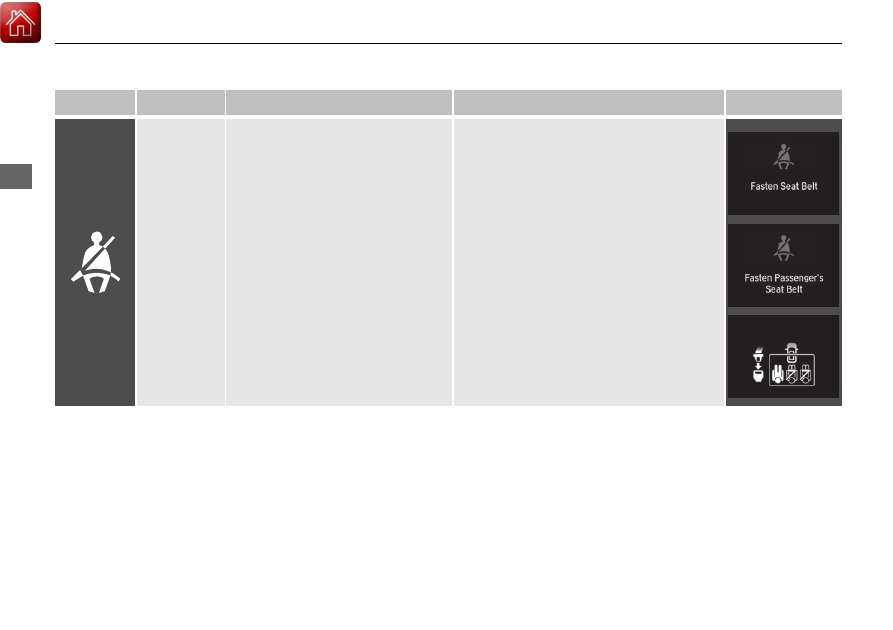
Seat Belt 
Reminder 
Indicator

•

Blinks and the beeper sounds for a 
few seconds if you are not wearing 
a seat belt when you set the power 
mode to ON, then the indicator 
comes on. 

•

If the front passenger is not 
wearing a seat belt, the indicator 
comes on a few seconds later.

•

Comes on for a while when the rear 
seat belt is unfastened while the 
power mode in ON.

•

Blinks while driving if you and/or 
any passenger has not fastened a 
seat belt. The beeper sounds and 
the indicator blinks at regular 
intervals.

•

The beeper stops and the indicator goes off 
when you and the passengers fasten their 
seat belts.

•

Stays on after you and/or the 
passengers have fastened the seat 
belt(s) 

- A detection error may have 

occurred in the sensor. Have your vehicle 
checked by a dealer.

2

Seat Belt Reminder

 P. 39

93

uu

Indicators

u

Continued

In

strum

e

nt Pa

nel

Indicator

Name

On/Blinking

Explanation

Message

Low Fuel 
Indicator

•

Comes on when the fuel reserve is 
running low (approximately 
2.2 U.S. gal./8.4 L left).

•

Blinks if there is a problem with the 
fuel gauge.

•

Comes on 

- Refuel your vehicle as soon as 

possible.

•

Blinks 

- Have your vehicle checked by a 

dealer.

Anti-lock 
Brake System 
(ABS) 
Indicator

•

Comes on if there is a problem with 
the ABS.

•

Stays on constantly 

- Have your vehicle 

checked by a dealer. With this indicator on, 
your vehicle still has normal braking ability 
but no anti-lock function.

2

Anti-lock Brake System (ABS)

 P. 516

Supplemental 
Restraint 
System 
Indicator

•

Comes on if a problem with any of 
the following is detected:

-

Supplemental restraint system

-

Knee airbag system

-

Side airbag system

-

Side curtain airbag system

-

Seat belt tensioner

•

Stays on constantly 

- Have your vehicle 

checked by a dealer.

94

uu

Indicators

u

In

strum

e

nt Pa

nel

Indicator

Name

On/Blinking

Explanation

Message

Auto High-
Beam 
Indicator

•

Comes on when all the operating 
conditions of the auto high-beam 
are met.

2

Auto High-Beam

 P. 199

—

Vehicle 
Stability 
Assist

TM


(VSA

®

) 

System 
Indicator

●

Blinks when VSA

®

 is active.

●

Comes on if there is a problem with 
the brake assist system, VSA

®


system or hill start assist system.

●

Stays on constantly 

- Have your vehicle 

checked by a dealer.

2

Vehicle Stability Assist

TM

 (VSA

®

), aka 

Electronic Stability Control (ESC), 
System

 P. 441

●

Comes on if the VSA

®

 system is 

deactivated temporarily after the 
battery has been disconnected, then 
re-connected.

●

Drive a short distance at more than 12 mph 
(20 km/h). The indicator should go off. If it 
does not, have your vehicle checked by a 
dealer.

95

uu

Indicators

u

Continued

In

strum

e

nt Pa

nel

Indicator

Name

On/Blinking

Explanation

Message

Vehicle 
Stability 
Assist

TM


(VSA

®

) 

OFF


Indicator

●

Comes on when you partially 
disable VSA

®

.

2

VSA

®

 On and Off

 P. 442

●

Comes on if the VSA

®

 system is 

deactivated temporarily after the 
battery has been disconnected, then 
re-connected.

●

Drive a short distance at more than 12 mph 
(20 km/h). The indicator should go off. If it 
does not, have your vehicle checked by a 
dealer.

Electric Power 
Steering (EPS) 
System 
Indicator

•

Comes on if there is a problem with 
the EPS system.

•

Stays on constantly 

- Have your vehicle 

checked by a dealer.

2

If the Electric Power Steering (EPS) 
System Indicator Comes On

 P. 617

96

uu

Indicators

u

In

strum

e

nt Pa

nel

Indicator

Name

On/Blinking

Explanation

Message

Low Tire 
Pressure/
TPMS 
Indicator

●

May come on briefly if the power 
mode is set to ON and the vehicle is 
not moved within 45 seconds, to 
indicate the calibration process is 
not yet complete.

●

Comes on and stays on when:

-

One or more tires’ pressures are 
determined to be significantly low.

-

The system has not been 
calibrated.

●

Comes on while driving 

- Stop in a safe 

place, check tire pressures, and inflate the 
tire(s) if necessary.

●

Stays on after the tires are inflated to 
the recommended pressures 

- The 

system needs to be calibrated.

2

TPMS Calibration

 P. 446

●

Blinks for about one minute, and 
then stays on if there is a problem 
with the TPMS, or when a compact 
spare tire is temporarily installed.

●

Blinks and remains on 

- Have your vehicle 

checked by a dealer. If the vehicle is fitted 
with a compact spare tire, get your regular 
tire repaired or replaced and put back on 
your vehicle as soon as you can.

●

Comes on if the TPMS is deactivated 
temporarily after the battery has 
been disconnected, then re-
connected.

●

Drive a short distance at more than 12 mph 
(20 km/h). The indicator should go off. If it 
does not, have your vehicle checked by a 
dealer.

97

uu

Indicators

u

Continued

In

strum

e

nt Pa

nel

Indicator

Name

On/Blinking

Explanation

Message

Turn Signal 
and Hazard 
Warning 
Indicators

•

Blinks when you operate the turn 
signal lever.

•

Blink along with all turn signals 
when you press the hazard warning 
button.

•

Does not blink or blinks rapidly 

2

Replacing Light Bulbs

 P. 566, 567 

—

High Beam 
Indicator

•

Comes on when the high beam 
headlights are on.

—

—

Lights On 
Indicator

•

Comes on when the parking, tail, 
and other external lights are on.

2

Light Switches

 P. 195

—

Fog Light 
Indicator

*

•

Comes on when the fog lights are 
on.

2

Fog Lights

*

 P. 197

—

* Not available on all models

98

uu

Indicators

u

In

strum

e

nt Pa

nel

*1:Canadian models only: Apply and hold the brake pedal before selecting the ON mode.
*2:Canadian models

Indicator

Name

On/Blinking

Explanation

Message

Immobilizer 
System 
Indicator

•

Blinks if the immobilizer system 
cannot recognize the key 
information.

•

Blinks 

- You cannot start the engine. Set 

the power mode to VEHICLE OFF

*1

, then 

select the ON mode again.

•

Repeatedly blinks 

- The system may be 

malfunctioning. Have your vehicle checked 
by a dealer.

•

Do not attempt to alter this system or add 
other devices to it. Electrical problems can 
occur.

Indicator

*2

*2

99

uu

Indicators

u

Continued

In

strum

e

nt Pa

nel

Indicator

Name

On/Blinking

Explanation

Message

Security 
System Alarm 
Indicator

•

Blinks when the security system 
alarm has been set.

2

Security System Alarm

 P. 185

—

System 
Message 
Indicator

•

Comes on along with a beep when 
a problem is detected. A system 
message on the driver information 
interface appears at the same time.

•

While the indicator is on, press the 


(home) button to see the message again.

2

Accessing contents in the main display


P. 140

•

Refer to the Indicators information in this 
chapter when a system message appears on 
the driver information interface. Respond to 
the message accordingly.

•

The driver information interface does not 
return to the normal screen unless the 
warning is canceled, or the left selector 
wheel is pressed.

—

Indicator

100

uu

Indicators

u

In

strum

e

nt Pa

nel

*1:Models without the adaptive damper system
*2:Models with the adaptive damper system

Indicator

Name

On/Blinking

Explanation

Message

ECON Mode 
Indicator

•

Comes on when the ECON mode is 
on.

2

ECON Mode

 P. 434

*1

*2

101

uu

Indicators

u

Continued

In

strum

e

nt Pa

nel

*1:Models without the adaptive damper system
*2:Models with the adaptive damper system

Indicator

Name

On/Blinking

Explanation

Message

SPORT

 Mode 

Indicator

*

•

Comes on when you press the 

SPORT

 button.

●

The ambient meter remains lit up in red as 
long as SPORT mode is on.

2

SPORT Mode

*

 P. 433

*1

*2

* Not available on all models

102

uu

Indicators

u

In

strum

e

nt Pa

nel

Indicator

Name

On/Blinking

Explanation

Message

Auto Idle 
Stop Indicator 
(Green)

*

●

Comes on when Auto Idle Stop is in 
operation. The engine automatically 
shuts off.

2

Auto Idle Stop

*

 P. 435

—

Auto Idle 
Stop System 
Indicator 
(Amber)

*

●

Comes on when the Auto Idle Stop 
system has been turned off by the 
Auto Idle Stop 

OFF

 button.

2

Auto Idle Stop System ON/OFF

 P. 436

●

Blinks if there is a problem with the 
Auto Idle Stop system.

●

Blinks

 - Have your vehicle checked by a 

dealer.

* Not available on all models

103

uu

Indicators

u

Continued

In

strum

e

nt Pa

nel

Indicator

Name

On/Blinking

Explanation

Message

Adaptive 
Cruise 
Control 
(ACC) with 
Low Speed 
Follow 
Indicator 
(Amber)

●

Comes on if there is a problem with 
ACC with Low Speed Follow.

●

Comes on while driving 

- Have your 

vehicle checked by a dealer.

●

Comes on if the ACC with Low 
Speed Follow is deactivated 
temporarily after the battery has 
been disconnected, then re-
connected.

●

Drive a short distance at more than 12 mph 
(20 km/h). The indicator should go off. If it 
does not, have your vehicle checked by a 
dealer.

●

Indicator may come on temporarily 
when the Maximum Load Limit is 
exceeded.

●

ACC with Low Speed Follow has 
been automatically canceled.

●

Make sure the total load is within the 
Maximum Load Limit.

2

Maximum Load Limit

 P. 405

●

Stays on constantly

 - Have your vehicle 

checked by a dealer.

—

104

uu

Indicators

u

In

strum

e

nt Pa

nel

Indicator

Name

On/Blinking

Explanation

Message

Adaptive 
Cruise 
Control 
(ACC) with 
Low Speed 
Follow 
Indicator 
(White/
Green)

●

Lights up in white when you press 
the  

button.

●

Lights up in green when you press 
the 

RES/+

 button or 

SET/-

 button.

2

Adaptive Cruise Control (ACC) with 
Low Speed Follow

 P. 470

—

Lane Keeping 
Assist System 
(LKAS) 
Indicator 
(Amber)

●

Comes on if there is a problem with 
the LKAS.

●

Stays on constantly 

- Have your vehicle 

checked by a dealer.

Lane Keeping 
Assist System 
(LKAS) 
Indicator 
(White/
Green)

●

Lights up in white when you press 
the LKAS button.

●

Lights up in green when the LKAS is 
in operation.

2

Lane Keeping Assist System (LKAS)


P. 486

—

Cruise Mode 
Indicator 
(White/
Green)

●

Lights up in white when you change 
to cruise mode.

●

Lights up in green when you have 
set a speed for cruise control.

2

To Switch ACC with Low Speed Follow 
to Cruise Control

 P. 484

—

105

uu

Indicators

u

Continued

In

strum

e

nt Pa

nel

Indicator

Name

On/Blinking

Explanation

Message

Safety 
Support 
Indicator 
(Amber)

●

Comes on if there is a problem with 
RDM, Low Speed Braking Control

*

, 

CMBS

TM

, or the blind spot 

information system

*

.

●

Stays on constantly

 - Have your vehicle 

checked by a dealer.

●

Comes on if the RDM, Low Speed 
Braking Control

*

 and CMBS

TM

 are 

deactivated temporarily after the 
battery has been disconnected and 
then re-connected.

●

Drive a short distance at more than 12 mph 
(20 km/h). The indicator should go off. If it 
does not, have your vehicle checked by a 
dealer.

* Not available on all models

106

uu

Indicators

u

In

strum

e

nt Pa

nel

Indicator

Name

On/Blinking

Explanation

Message

Safety 
Support 
Indicator 
(Amber)

●

Comes on when RDM, Low Speed 
Braking Control

*

 and/or CMBS

TM


shuts itself off.

●

Indicator may come on temporarily when 
passing through an enclosed space, such as 
a tunnel.

●

The area around the radar sensor cover is 
blocked by dirt, mud, etc. Stop your vehicle 
in a safe place and wipe the debris off with 
a soft cloth.
Indicator may take some time to go off after 
the radar sensor cover is cleaned.

●

Have your vehicle checked by a dealer if the 
indicator does not go off even after you 
have cleaned the radar sensor cover.

2

Collision Mitigation Braking System

TM


(CMBS

TM

)

 P. 456

2

Radar Sensor

 P. 506

●

Stays on

 - The temperature inside the 

camera is too high.
Use the climate control system to cool down 
the camera.
The system activates when the temperature 
inside the camera cools down.

2

Front Sensor Camera

 P. 504

* Not available on all models

107

uu

Indicators

u

Continued

In

strum

e

nt Pa

nel

Indicator

Name

On/Blinking

Explanation

Message

Safety 
Support 
Indicator 
(Amber)

●

Comes on when RDM, Low Speed 
Braking Control

*

 and/or CMBS

TM


shuts itself off.

●

Stays on

 - The area around the camera is 

blocked by dirt, mud, etc. Stop your vehicle 
in a safe place and wipe the debris off with 
a soft cloth.

●

Have your vehicle checked by a dealer if the 
indicator and message are still displayed 
even after you have cleaned the area 
around the camera.

2

Front Sensor Camera

 P. 504

●

Comes on when mud, snow, or ice 
accumulates in the vicinity of sonar.

●

Remove the obstacle in the vicinity of sonar 
sensor.

2

Low Speed Braking Control

*

 P. 465

2

Sonar Sensors

*

 P. 507

●

Comes on when mud, snow, or ice 
has accumulated in the vicinity of 
the blind spot information system 
sensor.

●

Comes on while driving

 - Something may 

be interfering with the blind spot 
information system sensor. Check the 
vicinity of the blind spot information system 
sensor and remove any obstacles.

2

Blind spot information System

*

 P. 450

●

Indicator may come on temporarily 
when the Maximum Load Limit is 
exceeded.

●

Make sure the total load is within the 
Maximum Load Limit.

2

Maximum Load Limit

 P. 405

—

Models with Low Speed 
Braking Control

Models with blind spot 
information system

* Not available on all models


Content      ..     4      5      6      7     ..