Honda e (2021 year). Manual in english - page 21
 

  Index      Manuals     Honda e (2021 year). Manual in english


Search            copyright infringement  


Content      ..     19      20      21      22     ..


Honda e (2021 year). Manual in english - page 21


uu

Display Audio

u

EV Menu

322

Features

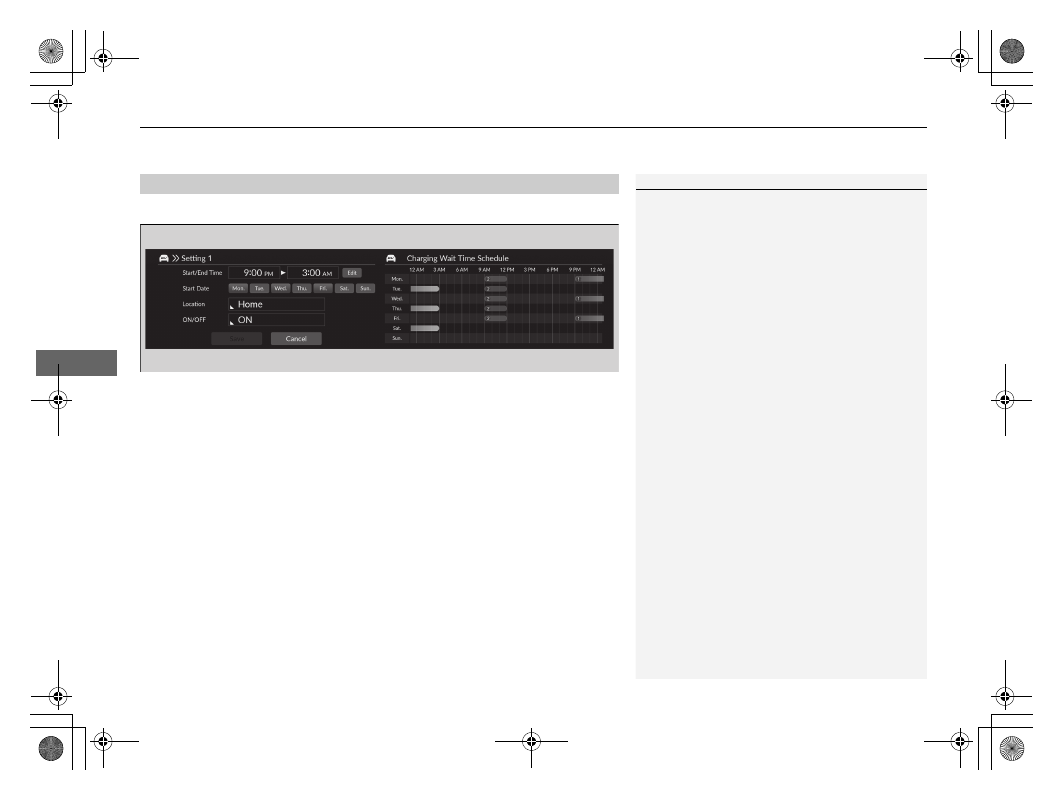
Charging wait time schedule can be set.

1.

Select a desired settings.

u

a

 shows the time for 

Home

, 

b

 shows the time for 

Anywhere

.

2.

Select 

Save

.

u

If the function is 

ON

, it will be light blue; if 

OFF

, it will be gray.

■

Charging Wait Time Schedule Setting

1

Charging Wait Time Schedule Setting

If the Home Location is not set in the Navigation 
system, it will default to 

Anywhere

.

For detail information for charging wait time 
schedule setting, refer to the following page.

2

Using a Timer

 P. 569

Continued

323

uu

Display Audio

u

EV Menu

Features

Pre-conditioning climate schedule can be set.

1.

Select a desired settings.

2.

Select 

Save

.

u

It is possible to set the Pre-conditioning climate schedule from 

Setting 1

 to 

Setting 7

.

■

Pre-Conditioning Climate Schedule Setting

1

Pre-Conditioning Climate Schedule Setting

Pre-Conditioning Climate can only operate for up to 
30 minutes. A new schedule cannot be set if there is 
another valid schedule within those 30 minutes.

uu

Display Audio

u

EV Menu

324

Features

Pre-conditioning climate operation can be set.

1.

Select a desired settings.

2.

Select 

Save

.

The following items can be set.

•

Temperature Adjustment

: Selects the temperature adjustment of the remote 

climate pre-conditioning. (

Colder

/

Normal

*1

/

Warmer

)

•

Operating Time

: Selects operating time of the remote climate pre-conditioning. 

(

10 minutes

/

20 minutes

/

30 minutes

*1

)

•

Defroster Synchronisation

: The On/Off settings for operating the defroster 

automatically. (

ON

*1

/

OFF

)

*1: Default Setting

■

Pre-Conditioning Climate Operation Setting

1

Pre-Conditioning Climate Operation Setting

This setting is possible when the climate control 
system has been activated by the keyless remote.

2

Remote Climate Pre-Conditioning

 P. 250

325

uu

Display Audio

u

EV Menu

Features

Charging limit can be set.

1.

Select a desired settings.

2.

Select 

Save

.

■

Charging Limit Settings

1

Charging Limit Settings

If the Home Location is not set in the Navigation 
system, it will default to 

Away

.

326

uu

Display Audio

u

Driver Assist System On and Off

Features

Driver Assist System On and Off

The Driver Assist System functions can be set to On/Off on the 

Safety Config


screen. Select 

Safety Config

 on the audio/information screen, and then select each 

function icon to change the settings.

1

Driver Assist System On and Off

If there is a problem with any of the functions below, 
the applicable icon/indicator will come on in amber.
If this happens, have your vehicle checked by a 
dealer.

a


Collision Mitigation Brake System

 Icon

c

 Parking Sensor Icon

d


Low Speed Braking Control

 Icon

f


Blind Spot Information

 Icon

g


Road Departure Mitigation

 Icon

h

 Safety Support Indicator

If there is a problem with the function below, the 
icon will come on in gray.
If this happens, have your vehicle checked by a 
dealer.

b

 VSA 

OFF

 Icon

a

Collision Mitigation Brake System

 Icon green (On)/gray (Off)

b

VSA 

OFF

 Icon green (On)/amber (Off)

c

Parking Sensor Icon green (On)/gray (Off)

d

Low Speed Braking Control

 Icon green (On)/gray (Off)

e

Safety Config

 Icon

f

Blind Spot Information

 Icon green (On)/gray (Off)

g

Road Departure Mitigation

 Icon green (On)/gray (Off)

h

Safety Support Indicator

327

uu

Display Audio

u

Customized Features

Continued

Features

Customized Features

Use the audio/information screen to customize certain features.

With the power mode in ON, select 

General Settings

, then select a setting item.

•

System


2

 P. 328

•

Smartphone Connection


2

 P. 330

•

Connections


2

 P. 331

•

Display


2

 P. 332

•

Sound


2

 P. 333

•

Camera


2

 P. 334

•

Voice Control


2

 P. 335

■

How to Customize the General Settings

1

Customized Features

When you customize settings:

•

Make sure that the vehicle is at a complete stop.

•

Put the transmission into 

(

P

.

328

uu

Display Audio

u

Customized Features

Features

■

System

*1:Default Setting

Customizable Features

Description

Selectable Settings

Date & Time

Set 
Date & 
Time

Automatic 
Date & Time

Selects 

ON

 to have the GPS automatically adjust the 

clock. Select 

OFF

 to cancel this function.

ON

*1

/

OFF

Set Date

Adjusts date.

2

Adjusting the Clock

 P. 274

Day

/

Month

/

Year

Set Time

Adjusts time.

2

Adjusting the Clock

 P. 274

Hour

/

Minute

AM

/

PM

Time 
Zone

Automatic 
Time Zone

Sets the audio system to automatically adjust the clock 
when driving through different time zones.

ON

*1

/

OFF

(Select time 
zone)

Changes the time zone manually.

—

Auto Daylight Saving 
Time

Sets the clock to update based on daylight savings time.

ON

*1

/

OFF

Date Format

Select a date format.

MM/DD/YYYY

/

DD/MM/YYYY

*1

/

YYYY/MM/DD

Time Format

Select a time format.

12-H

*1

/

24-H

329

uu

Display Audio

u

Customized Features

Continued

Features

*1:Default Setting

Customizable Features

Description

Selectable Settings

Language

Changes the driver information interface and audio/
information screen language separately.

English

*1

See other selectable 
languages on the screen.

Touch Panel 
Sensitivity

Sets the sensitivity of the touch panel screen.

High

/

Normal

*1

System 
Volumes

System Sounds

Sets the system sound volume level.

—

Text-to-Speech

Sets the text-to-speech volume level.

—

Navigation Guidance

Sets the navigation guidance volume level.

—

Phone Calls

Sets the phone call volume level.

—

Default

Resets all 

System Volumes

 settings to default values.

Location 
and vehicle 
data sharing

Location and vehicle data 
sharing

ON

/

OFF

*1

Passenger App Launcher

Changes the shortcut launcher display on the 
passenger's side.

Auto

/

Always

*1

/

Hide

330

uu

Display Audio

u

Customized Features

Features

■

Smartphone Connection

Customizable Features

Description

Selectable Settings

About

Status

Displays the Android setting items.

—

Legal Information

Model Number

Android Version

Kernel Version

Build Number

Factory Data 
Reset

Resets all the settings to their factory default.

2

Defaulting All the Settings

 P. 343

Continue

/

Cancel

Detail 
Information

App Manager

Displays the Android system memory and apps 
information.

—

Customizable Features

Description

Selectable Settings

Apple CarPlay

+ Connect New Device

Pairs a new phone to Apple CarPlay.

2

Phone Setup

 P. 351

—

(Saved Devices)

Connects, disconnects, or deletes a paired phone.

2

Phone Setup

 P. 351

—

Android Auto

(Saved Devices)

Connects, disconnects, or deletes a paired phone.

2

Phone Setup

 P. 351

—

331

uu

Display Audio

u

Customized Features

Continued

Features

■

Connections

*1:Default Setting
*2:Appears only when Apple CarPlay is connected.

Customizable Features

Description

Selectable Settings

Wi-Fi

Change Mode

Changes the Wi-Fi mode.

Network

/

Smartphone

*2

/

OFF

*1

(Available Networks/Connected 
Devices)

Displays the available network(s) or current connected 
device(s).

—

Options

Add Network

Adds a new network to connect Wi-Fi.

—

Saved Networks

Saves the connected network.

—

Bluetooth

Options

Bluetooth

Turns the 

Bluetooth

®

 on and off.

ON

*1

/

OFF

Priority Device

Sets a device as the priority device.

—

+ Connect New Device

Pairs a new phone to HFT.

2

Phone Setup

 P. 351

—

(Saved Devices)

Connects, disconnects, or deletes a paired phone.

2

Phone Setup

 P. 351

—

332

uu

Display Audio

u

Customized Features

Features

■

Display

*1:Default Setting

Customizable Features

Description

Selectable Settings

Image Quality Adjustment

Day Mode

*1

Changes between the daytime mode and nighttime mode.

2

Display Setup

 P. 278

—

Night Mode

Brightness

Changes the brightness of the centre screen.

—

Contrast

Changes the contrast of the centre screen.

—

Black Level

Changes the black level of the centre screen.

—

Default

Resets all customized settings for the brightness, contrast, 
and black level.

—

Wallpaper

Adds, sets and deletes the wallpaper.

2

Wallpaper Setup

 P. 272

—

333

uu

Display Audio

u

Customized Features

Continued

Features

■

Sound

Customizable Features

Description

Selectable Settings

Bass / Treble

Treble

Adjusts the settings of the audio speakers’ sound.

2

Adjusting the Sound

 P. 277

—

Midrange

Bass

Balance / Fader

Speed Volume Compensation

Subwoofer Volume

*

* Not available on all models

334

uu

Display Audio

u

Customized Features

Features

■

Camera

*1:Default Setting

Customizable Features

Description

Selectable Settings

Rear Camera

*

Fixed Guideline

Shows the guideline that does not move with the 
steering wheel.

2

Multi-View Rear Camera

*

 P. 521

ON

*1

/

OFF

Dynamic Guideline

Shows the guideline that moves with the steering 
wheel.

2

Multi-View Rear Camera

*

 P. 521

ON

*1

/

OFF

Multi 
View 
Camera

*

Guidelines

Fixed Guideline

Shows the guideline that does not move with the 
steering wheel.

2

Multi-View Camera

*

 P. 523

ON

*1

/

OFF

Dynamic Guideline

Shows the guideline that moves with the steering 
wheel.

2

Multi-View Camera

*

 P. 523

ON

*1

/

OFF

Customise

Show after shifting 
from Reverse

Selects whether to display the forward camera image 
after shifting from 

(

R

 to 

(

D

.

ON

/

OFF

*1

Auto display when 
obstacle is detected

Displays the forward camera image when a parking 
sensor detects an obstacle.

ON

*1

/

OFF

Cross Traffic Monitor

*

Shows arrows on the rear camera image to indicate 
vehicles approaching from the sides.

2

Cross Traffic Monitor

*

 P. 517

ON

*1

/

OFF

* Not available on all models

335

uu

Display Audio

u

Customized Features

Continued

Features

■

Voice Control

*1:Default Setting

Customizable Features

Description

Selectable Settings

Voice Control Mode

Selects a mode of the voice portal screen.

2

Voice Control Operation

 P. 265

Assist

/

Normal

*1

uu

Display Audio

u

Customized Features

336

Features

With the power mode in ON, select 

Vehicle Settings

, then select a setting item.

•

Deflation Warning System


2

 P. 337

•

Driver Assist System Setup


2

 P. 337

•

Meter setup


2

 P. 339

•

Keyless Access Setup


2

 P. 340

•

Lighting Setup


2

 P. 341

•

Door/Window Setup


2

 P. 342

•

Maintenance Info.


2

 P. 342

■

How to Customize the Vehicle Settings

1

How to Customize the Vehicle Settings

If 

Vehicle Settings

 is not displayed on the shortcut 

area, select 


All Apps

. You can change the 

displayed icons on the shortcut area.

2

App Shortcut Function

 P. 270

It is possible to customize the vehicle settings from 
the image on the assistant screen.

337

uu

Display Audio

u

Customized Features

Continued

Features

■

Deflation Warning System

■

Driver Assist System Setup

*1:Default Setting

Customizable Features

Description

Selectable Settings

Deflation Warning System

Cancels/Calibrates Deflation Warning System.

2

Deflation Warning System

 P. 420

Calibrate

/

Cancel

Customizable Features

Description

Selectable Settings

Preceding vehicle proximity 
warning distance

Selects distance for Forward Collision Warning audible and visual 
alerts.

2

Collision Mitigation Braking System (CMBS)

 P. 430

Far

/

Normal

*1

/

Near

ACC vehicle ahead detected 
beep

Turns On/Off audible notification when vehicle has moved in/out of 
adaptive cruise control range.

2

Adaptive Cruise Control (ACC) with Low Speed Follow

 P. 447

ON

/

OFF

*1

ACC cut-in prediction 
control

Turns the ACC cut-in prediction control feature on and off.

2

Intelligent Adaptive Cruise Control Function

 P. 464

ON

*1

/

OFF

Lead Car Departure 
Notification System

Changes the setting for the lead car departure notification system.

2

Lead Car Departure Notification System

 P. 484

Normal

*1

/

Early

/

OFF

Road departure mitigation 
setting

Selects operating mode of the Road Departure Mitigation system.

2

Road Departure Mitigation System

 P. 478

Early

/

Normal

/

Delayed

*1

Lane keep assist beep

Selects On/Off the LKAS alert for not detecting road lines.

2

Lane Keeping Assist System (LKAS)

 P. 467

ON

/

OFF

*1


Content      ..     19      20      21      22     ..