Perkins 1206J-E70TA and 1206J-E70TTA Industrial Engines. Operation Manual (2021) - page 4
106
M0082024-03
Maintenance Section
Maintenance Interval Schedule
“ Injector (Diesel Exhaust Fluid) (Emissions Related
Component) - Replace“
141
Every 6000 Service Hours or 3
Years
“ Coolant (ELC) - Change“
112
Every 10 000 Service Hours
“ DEF Manifold Filters (Emission Related
Component) - Replace“
119
M0082024-03
107
Maintenance Section
Aftercooler Core - Clean/Test
i01807350
i02322311
Aftercooler Core - Clean/Test
Alternator - Inspect
(Air-To-Air Aftercooler)
Perkins recommends a scheduled inspection of the
alternator. Inspect the alternator for loose
The air-to-air aftercooler is OEM installed in many
connections and correct battery charging. Check the
applications. Please refer to the OEM specifications
ammeter (if equipped) during engine operation in
for information that is related to the aftercooler.
order to ensure correct battery performance and/or
correct performance of the electrical system. Make
i02322295
repairs, as required.
Check the alternator and the battery charger for
Aftercooler Core - Inspect
correct operation. If the batteries are correctly
charged, the ammeter reading should be very near
zero. All batteries should be kept charged. The
Note: Adjust the frequency of cleaning according to
batteries should be kept warm because temperature
the effects of the operating environment.
affects the cranking power. If the battery is too cold,
the battery will not crank the engine. When the
Inspect the aftercooler for these items: damaged fins,
engine is not run for long periods of time or if the
corrosion, dirt, grease, insects, leaves, oil and other
engine is run for short periods, the batteries may not
debris. Clean the aftercooler, if necessary.
fully charge. A battery with a low charge will freeze
more easily than a battery with a full charge.
For air-to-air aftercoolers, use the same methods that
are used for cleaning radiators.
i02680137
Alternator and Fan Belts -
Personal injury can result from air pressure.
Replace
Personal injury can result without following prop-
er procedure. When using pressure air, wear a
Refer to Disassembly and Assembly Manual , “
protective face shield and protective clothing.
Alternator Belt - Remove and Install”.
Maximum air pressure at the nozzle must be less
than 205 kPa (30 psi) for cleaning purposes.
i05425759
Battery - Replace
After cleaning, start the engine and accelerate the
engine to high idle rpm. This will help in the removal
of debris and drying of the core. Stop the engine. Use
a light bulb behind the core in order to inspect the
core for cleanliness. Repeat the cleaning, if
necessary.
Batteries give off combustible gases which can
explode. A spark can cause the combustible
Inspect the fins for damage. Bent fins may be opened
gases to ignite. This can result in severe personal
with a “comb”.
injury or death.
Note: If parts of the aftercooler system are repaired
Ensure proper ventilation for batteries that are in
or replaced, a leak test is highly recommended.
an enclosure. Follow the proper procedures in or-
der to help prevent electrical arcs and/or sparks
Inspect these items for good condition: Welds,
near batteries. Do not smoke when batteries are
mounting brackets, air lines, connections, clamps
serviced.
and seals. Make repairs, if necessary.

108
M0082024-03
Maintenance Section
Battery Electrolyte Level - Check
The battery cables or the batteries should not be
All lead-acid batteries contain sulfuric acid which
removed with the battery cover in place. The bat-
can burn the skin and clothing. Always wear a
tery cover should be removed before any servic-
face shield and protective clothing when working
ing is attempted.
on or near batteries.
Removing the battery cables or the batteries with
the cover in place may cause a battery explosion
1. Remove the filler caps. Maintain the electrolyte
resulting in personal injury.
level to the “FULL” mark on the battery.
If the addition of water is necessary, use distilled
1. Switch the engine to the OFF position. Remove all
water. If distilled water is not available use clean
electrical loads.
water that is low in minerals. Do not use artificially
softened water.
Note: After the engine has stopped, allow 2 minutes
in order for the diesel exhaust fluid lines to be purged
2. Check the condition of the electrolyte with a
before disconnecting the power.
suitable battery tester.
2. Turn off any battery chargers. Disconnect any
3. Install the caps.
battery chargers.
4. Keep the batteries clean.
3. Ensure that the battery disconnect switch is in the
Clean the battery case with one of the following
OFF position.
cleaning solutions:
4. Disconnect the NEGATIVE “-” cable from the
• Use a solution of 0.1 kg (0.2 lb) baking soda
NEGATIVE “-” battery terminal.
and 1 L (1 qt) of clean water.
5. Disconnect the POSITIVE “+” cable from the
POSITIVE “+” battery terminal.
• Use a solution of ammonium hydroxide.
Note: Always recycle a battery. Never discard a
Thoroughly rinse the battery case with clean
battery. Dispose of used batteries to an appropriate
water.
recycling facility.
i05424317
6. Remove the used battery.
Battery or Battery Cable -
7. Install the new battery.
Disconnect
Note: Before the cables are connected, ensure that
the battery disconnect switch is in the OFF position.
8. Connect the POSITIVE “+” cable to the POSITIVE
“+” battery terminal.
The battery cables or the batteries should not be
9. Connect the NEGATIVE “-” cable to the
removed with the battery cover in place. The bat-
NEGATIVE “-” battery terminal.
tery cover should be removed before any servic-
ing is attempted.
10. Turn the battery disconnect switch to the ON
position.
Removing the battery cables or the batteries with
the cover in place may cause a battery explosion
i02747977
resulting in personal injury.
Battery Electrolyte Level -
1. Turn the start switch to the OFF position. Turn the
Check
ignition switch (if equipped) to the OFF position
and remove the key and all electrical loads.
Note: After the engine has stopped, allow 2 minutes
When the engine is not run for long periods of time or
when the engine is run for short periods, the batteries
in order for the diesel exhaust fluid lines to be purged
may not fully recharge. Ensure a full charge in order
before disconnecting the power.
to help prevent the battery from freezing. If batteries
are correctly charged, the ammeter reading should
be very near zero, when the engine is in operation.
M0082024-03
109
Maintenance Section
Belt - Inspect
2. Disconnect the negative battery terminal. Ensure
• Inspect the belt for cracks, splits, glazing, grease,
that the cable cannot contact the terminal. When
displacement of the cord and evidence of fluid
four 12 V batteries are involved, 2 negative
contamination.
connections must be disconnected.
The belt must be replaced if the following conditions
are present.
3. Remove the positive connection.
4. Clean all disconnected connection and battery
• The belt has a crack in more than one rib.
terminals.
• More than one section of the belt is displaced in
5. Use a fine grade of sandpaper to clean the
one rib of a maximum length of 50.8 mm (2 inch).
terminals and the cable clamps. Clean the items
To replace the belt, refer to Disassembly and
until the surfaces are bright or shiny. DO NOT
Assembly, “Alternator Belt - Remove and Install”. If
remove material excessively. Excessive removal
necessary, replace the belt tensioner. Refer to
of material can cause the clamps to fit incorrectly.
Disassembly and Assembly, “Alternator Belt -
Coat the clamps and the terminals with a suitable
Remove and Install” for the correct procedure.
silicone lubricant or petroleum jelly.
i04907925
6. Tape the cable connections in order to help
prevent accidental starting.
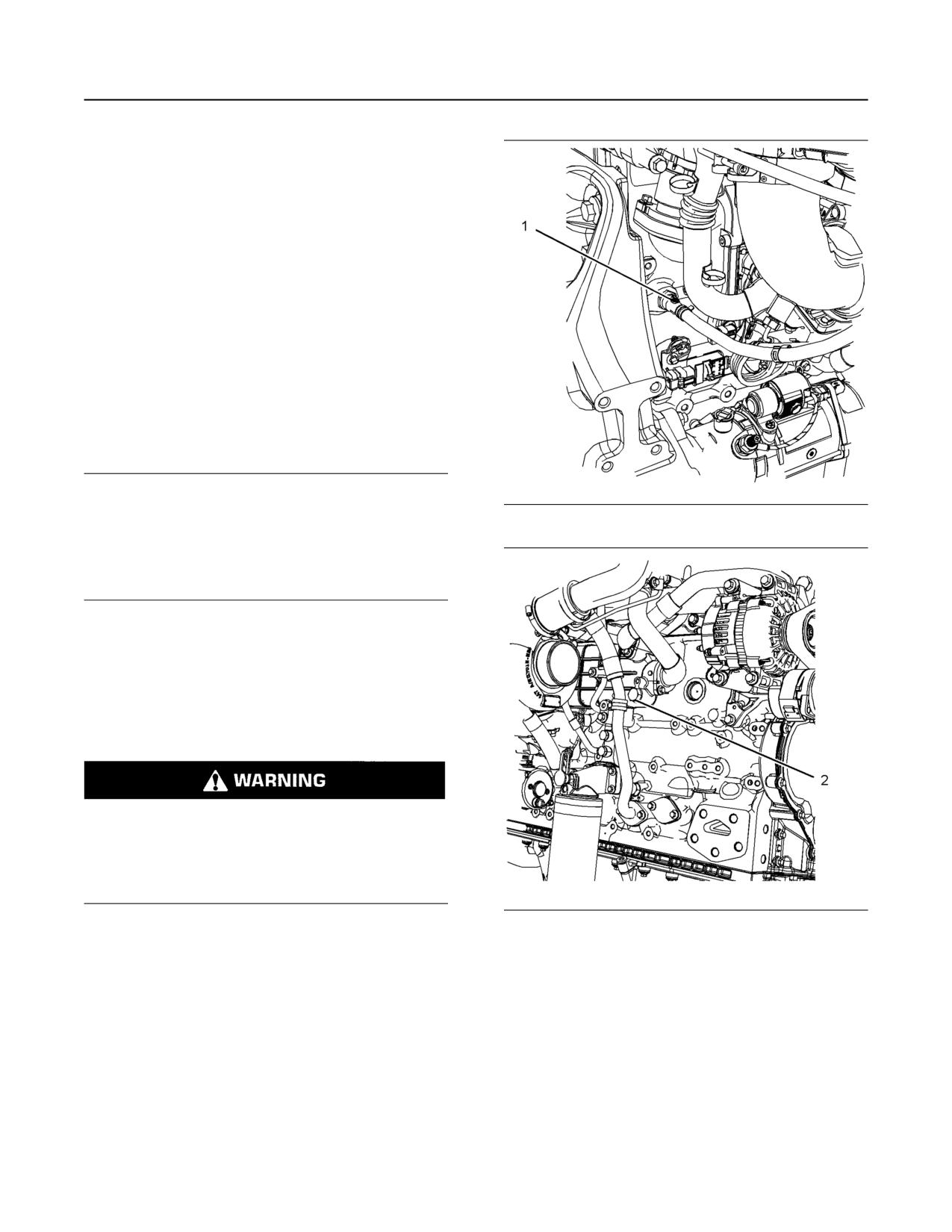
Belt Tensioner - Check
7. Proceed with necessary system repairs.
8. In order to connect the battery, connect the
positive connection before the negative connector.
i04907868
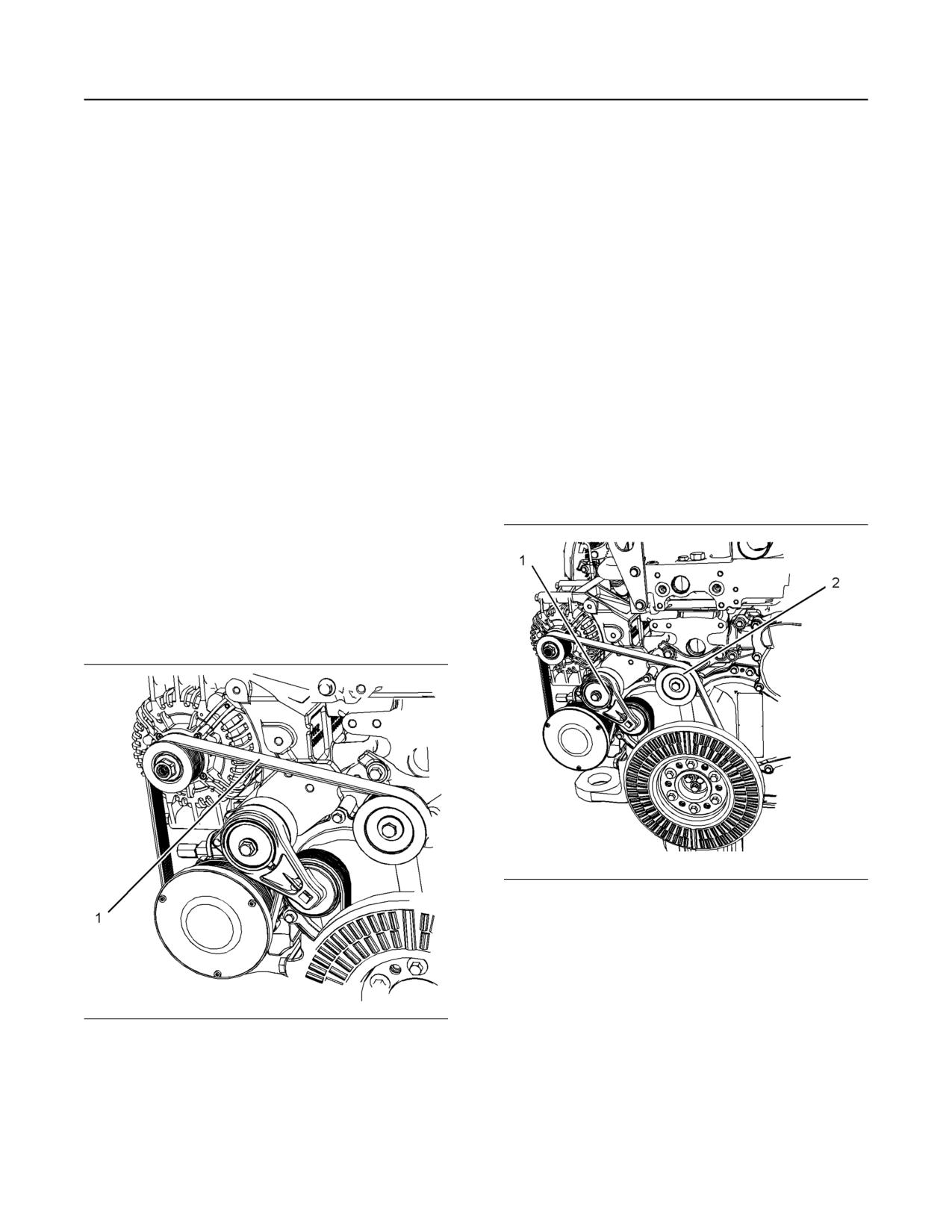
Belt - Inspect
Illustration 63
g03074016
Typical example
Remove the belt. Refer to Disassembly and
Assembly, “Alternator Belt - Remove and Install”.
Ensure that the belt tensioner is securely installed.
Visually inspect the belt tensioner (1) for damage.
Check that the pulley on the tensioner rotates freely
Illustration 62
g03073936
and that the bearing is not loose. Some engines have
Typical example
an idler pulley (2). Ensure that the idler pulley is
securely installed. Visually inspect the idler pulley for
To maximize the engine performance, inspect the
damage. Ensure that the idler pulley can rotate freely
belt (1) for wear and for cracking. Replace the belt if
and that the bearing is not loose. If necessary,
the belt is worn or damaged.
replace damaged components.
Install the belt. Refer to Disassembly and Assembly,
“Alternator Belt - Remove and Install”.
110
M0082024-03
Maintenance Section
Coolant (Commercial Heavy-Duty) - Change
i07679030
Coolant (Commercial Heavy-
Duty) - Change
Clean the cooling system and flush the cooling
system before the recommended maintenance
interval if the following conditions exist:
• The engine overheats frequently.
• Foaming is observed.
• The oil has entered the cooling system and the
coolant is contaminated.
• The fuel has entered the cooling system and the
coolant is contaminated.
NOTICE
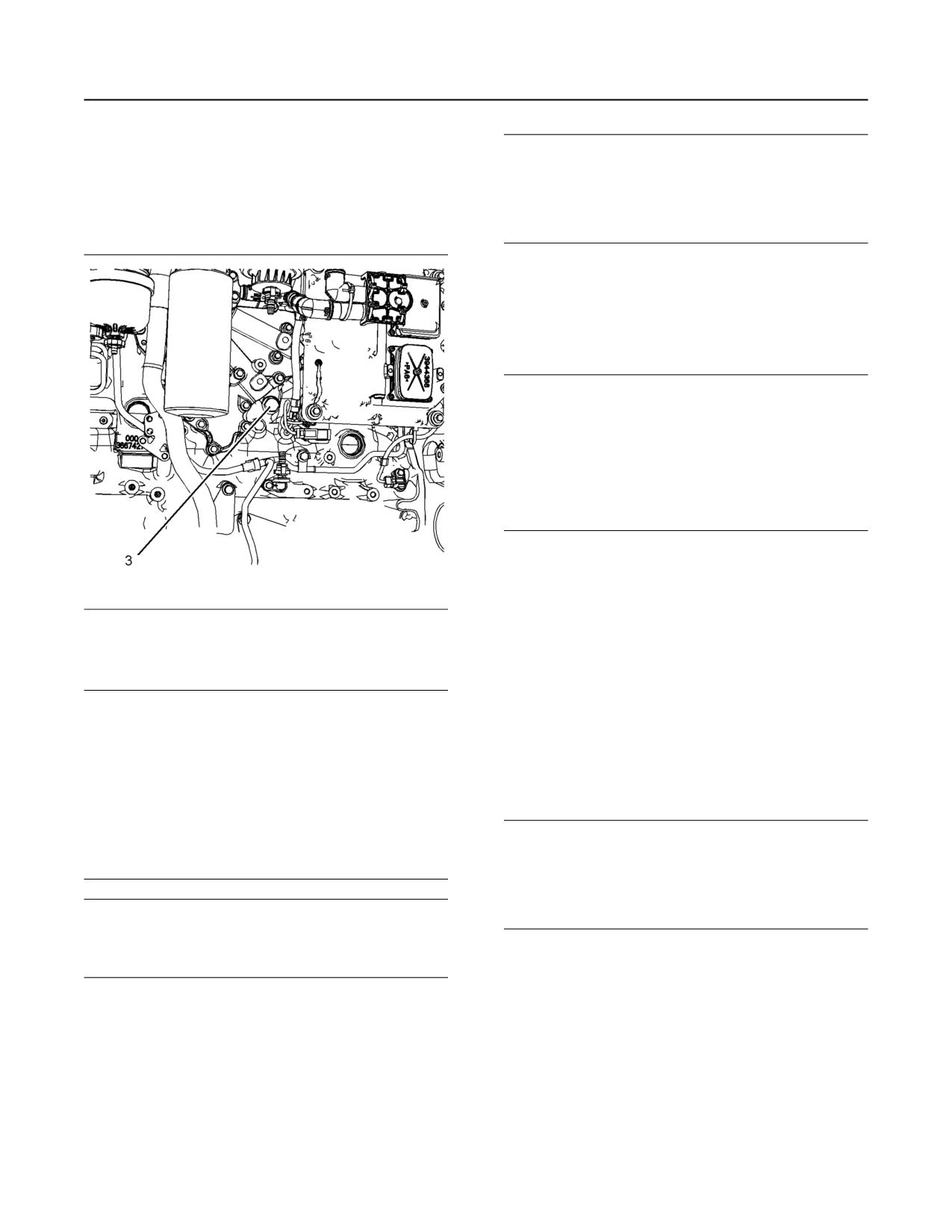
When any servicing or repair of the engine cooling
Illustration 64
g03461657
system is performed, the procedure must be per-
formed with the engine on level ground. Level ground
will allow you to check accurately the coolant level.
This procedure will also help in avoiding the risk of in-
troducing an air lock into the coolant system.
Note: Inspect the water pump and the water
temperature regulator after the cooling system has
been drained. This inspection is a good opportunity
to replace the water pump, the water temperature
regulator, and the hoses, if necessary.
Drain
Pressurized System: Hot coolant can cause seri-
ous burns. To open the cooling system filler cap,
stop the engine and wait until the cooling system
components are cool. Loosen the cooling system
pressure cap slowly in order to relieve the
pressure.
Illustration 65
g02350785
1. Stop the engine and allow the engine to cool.
Loosen the cooling system filler cap slowly to
2. Remove connection hose (1) on the engine. Also
relieve any pressure. Remove the cooling system
remove the drain plug (2). Open the drain cock or
filler cap.
remove the drain plug on the radiator.
Note: Refer to Operation and Maintenance Manual,
Allow the coolant to drain into a suitable container.
“General Hazard Information” for information on
3. Properly dispose of the drained material. Obey
Containing Fluid Spillage.
local regulations for the disposal of the material.
M0082024-03
111
Maintenance Section
Coolant (Commercial Heavy-Duty) - Change
Alternative Drain Plug
NOTICE
Do not fill the cooling system faster than 10 L
The cylinder coolant can be drained from the plug
(2.64 US gal) per minute to avoid air locks.
below the oil cooler. Refer to illustration 66 . If the
alternative drain plug (3) is removed, the O ring seal
Cooling system air locks may result in engine
must be replaced. Tighten the drain plug to a torque
damage.
of 35 N·m (25 lb ft).
3. Fill the cooling system with clean water and install
the cooling system filler cap.
4. Start and run the engine at low idle for a minimum
of 30 minutes. The coolant temperature should be
at least 85° C (185° F).
NOTICE
Improper or incomplete rinsing of the cooling system
can result in damage to copper and other metal
components.
To avoid damage to the cooling system, make sure to
completely flush the cooling system with clear water.
Continue to flush the system until all signs of the
cleaning agent are gone.
5. Stop the engine and allow the engine to cool.
Loosen the cooling system filler cap slowly to
relieve any pressure. Remove the cooling system
filler cap. Remove the connection hose or remove
Illustration 66
g03081697
the cooling system drain plugs. Allow the water to
drain. Flush the cooling system with clean water.
Flush
Install the connection hose.
6. The drain plug O rings on the engine block must be
NOTICE
Most commercial cooling system cleaning agents are
replaced. Clean the drain plugs and install new O
corrosive and their use is not recommended by Per-
ring seal. Install the drain plugs and tighten to a
kins. If commercial cooling system cleaning agents
torque of 35 N·m (25 lb ft).
have to be used, then the cleaning agents should not
be left in the system any longer then recommended
Fill
by manufacturers and engine temperature should not
be elevated above 30 degrees C.
NOTICE
The system must be thoroughly flushed with clean
Do not fill the cooling system faster than 10 L
water after use of cleaning agents.
(2.64 US gal) per minute to avoid air locks.
Cooling system air locks may result in engine
NOTICE
damage.
Cleaning agents for marine or industrial cooling sys-
tems must not be used as they are very aggressive
and will damage cooling system components.
1. Fill the cooling system with the coolant/antifreeze.
Refer to this Operation and Maintenance Manual,
“Refill Capacities and Recommendations” topic
1. Flush the cooling system with clean water and a
(Maintenance Section) for more information on
suitable cleaning agent to remove any debris.
cooling system specifications.
Refer to your Perkins dealer or distributor for
suitable cleaning agents.
2. Start and run the engine at low idle. Increase the
engine rpm to high idle. Operate the engine to
2. Install connection hose. Clean the drain plugs.
open the engine thermostat. This operation will
Install the drain plugs. Tighten drain plug securely.
allow any air in the system to be purged. Decrease
the engine speed to low idle. Stop the engine.
112
M0082024-03
Maintenance Section
Coolant (ELC) - Change
3. Maintain the coolant level at the maximum mark
Drain
that is correct for your application.
4. Clean the cooling system filler cap. Inspect the
gasket that is on the cooling system filler cap. If
Pressurized System: Hot coolant can cause seri-
the gasket that is on the cooling system filler cap is
ous burns. To open the cooling system filler cap,
damaged, discard the old cooling system filler cap
stop the engine and wait until the cooling system
and install a new cooling system filler cap. If the
components are cool. Loosen the cooling system
gasket that is on the cooling system filler cap is not
pressure cap slowly in order to relieve the
pressure.
damaged, perform a pressure test. If the cooling
system filler cap does not retain the correct
pressure, install a new cooling system filler cap.
1. Stop the engine and allow the engine to cool.
Loosen the cooling system filler cap slowly to
5. Start the engine. Inspect the cooling system for
relieve any pressure. Remove the cooling system
leaks and for the correct operating temperature.
filler cap.
i07682735
Coolant (ELC) - Change
Clean the cooling system and flush the cooling
system before the recommended maintenance
interval if the following conditions exist:
• The engine overheats frequently.
• Foaming is observed.
• The oil has entered the cooling system and the
coolant is contaminated.
• The fuel has entered the cooling system and the
coolant is contaminated.
Note: When the cooling system is cleaned, only
clean water is needed when the ELC is drained and
replaced.
Note: Inspect the water pump and the water
temperature regulator after the cooling system has
been drained. Replace the water pump, the water
temperature regulator, and the hoses, if necessary.
NOTICE
Service or repair of the engine cooling system must
be performed on level ground. The engine must be
level to check the coolant level. The engine must be
level to avoid the risk of introducing an air lock into
the coolant system.
M0082024-03
113
Maintenance Section
Coolant (ELC) - Change
For information regarding the disposal and the
recycling of used coolant, consult your Perkins dealer
or Perkins distributor.
Flush
1. Flush the cooling system with clean water to
remove any debris.
2. Install the connection hose. Clean the drain plugs
and install the drain plugs. Tighten the drain plugs
securely.
NOTICE
Do not fill the cooling system faster than 5 L
(1.3 US gal) per minute to avoid air locks.
Cooling system air locks may result in engine
damage.
3. Fill the cooling system with clean water. Install the
cooling system filler cap.
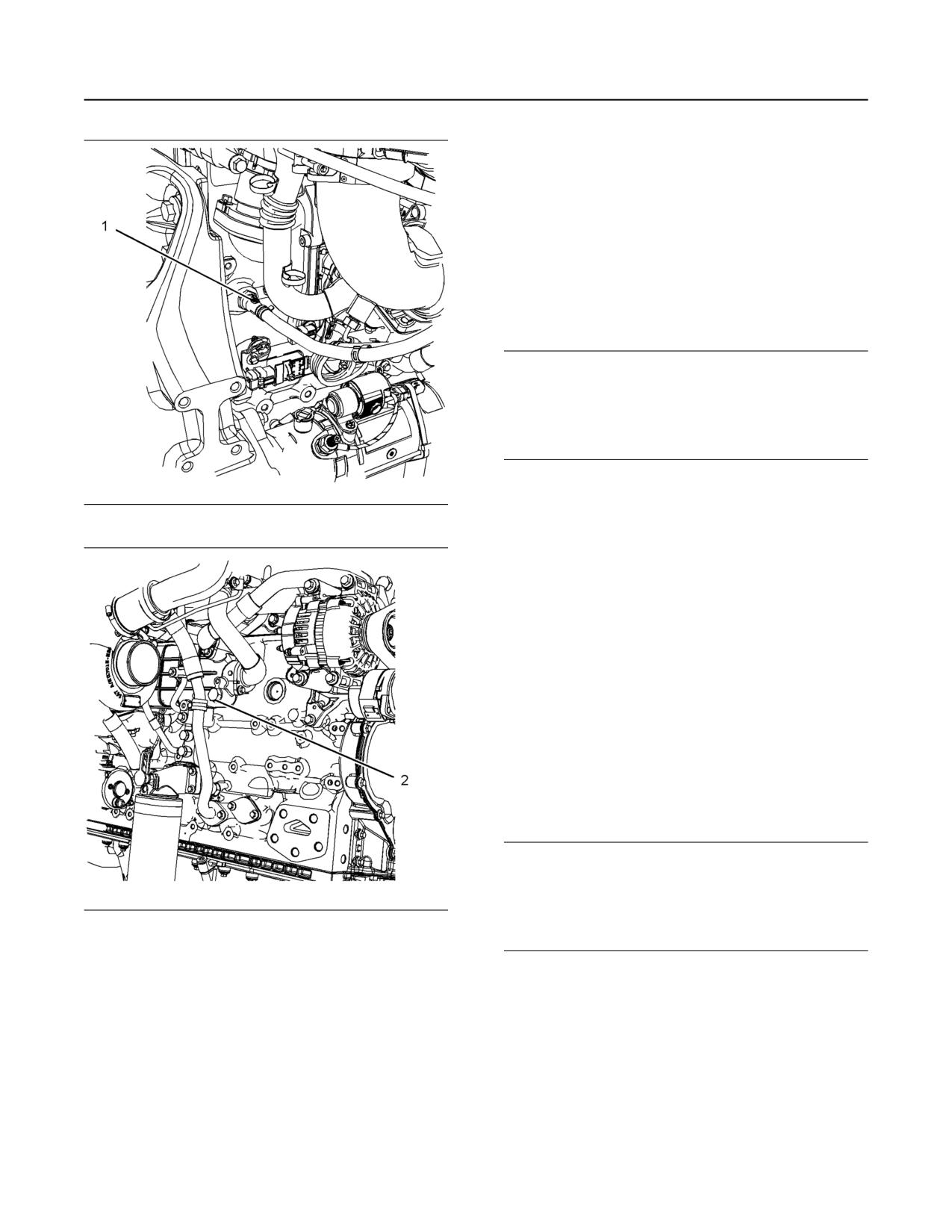
Illustration 67
g03461657
4. Start and run the engine at low idle until the
temperature reaches 49 to 66 °C (120 to 150 °F).
5. Stop the engine and allow the engine to cool.
Loosen the cooling system filler cap slowly to
relieve any pressure. Remove the cooling system
filler cap. Remove the connection hose and
remove the cooling system drain plugs. Allow the
water to drain. Flush the cooling system with clean
water. Install the connection hose.
6. The drain plug O rings on the engine block must be
replaced. Clean the drain plugs and install new O
ring seal. Install the drain plugs and tighten to a
torque of 35 N·m (25 lb ft).
Fill
NOTICE
Do not fill the cooling system faster than 5 L
(1.3 US gal) per minute to avoid air locks.
Illustration 68
g02350785
Cooling system air locks may result in engine
damage.
2. Remove connection hose (1) on the engine. Also
remove the drain plug (2). Open the drain cock or
1. Fill the cooling system with Extended Life Coolant
remove the drain plug on the radiator.
(ELC). Refer to this Operation and Maintenance
Allow the coolant to drain.
Manual, “Refill Capacities” topic (Maintenance
Section) for more information on cooling system
specifications. Do not install the cooling system
filler cap.
114
M0082024-03
Maintenance Section
Coolant - Change
2. Start and run the engine at low idle. Increase the
• The fuel has entered the cooling system and the
engine rpm to high idle. Operate the engine to
coolant is contaminated.
open the engine thermostat. An open thermostat
will allow any air in the system to be purged.
NOTICE
Decrease the engine speed to low idle. Stop the
When any servicing or repair of the engine cooling
system is performed, the procedure must be per-
engine.
formed with the engine on level ground. Level ground
3. Maintain the coolant level at the maximum mark
will allow you to check accurately the coolant level.
This procedure will also help in avoiding the risk of in-
that is correct for your application.
troducing an air lock into the coolant system.
4. Clean the cooling system filler cap. Inspect the
gasket that is on the cooling system filler cap. If
Note: Inspect the water pump and the water
the gasket that is on the cooling system filler cap is
temperature regulator after the cooling system has
damaged, discard the old cooling system filler cap
been drained. This inspection is a good opportunity
and install a new cooling system filler cap. If the
to replace the water pump, the water temperature
gasket that is on the cooling system filler cap is not
regulator, and the hoses, if necessary.
damaged, pressure test the cooling system filler
cap. The correct pressure for the cooling system
Drain
filler cap is stamped on the face of the cooling
system filler cap. If the cooling system filler cap
does not retain the correct pressure, install a new
cooling system filler cap.
Pressurized System: Hot coolant can cause seri-
5. Start the engine. Inspect the cooling system for
ous burns. To open the cooling system filler cap,
stop the engine and wait until the cooling system
leaks and for proper operating temperature.
components are cool. Loosen the cooling system
pressure cap slowly in order to relieve the
i07711032
pressure.
Coolant - Change
1. Stop the engine and allow the engine to cool.
Loosen the cooling system filler cap slowly to
relieve any pressure. Remove the cooling system
NOTICE
filler cap.
Keep all parts clean from contaminants.
Note: Refer to Operation and Maintenance Manual,
Contaminants may cause rapid wear and shortened
“General Hazard Information” for information on
component life.
Containing Fluid Spillage.
NOTICE
Care must be taken to ensure that fluids are con-
tained during performance of inspection, mainte-
nance, testing, adjusting and repair of the product.
Be prepared to collect the fluid with suitable contain-
ers before opening any compartment or disassem-
bling any component containing fluids.
Dispose of all fluids according to local regulations
and mandates.
Clean the cooling system and flush the cooling
system before the recommended maintenance
interval if the following conditions exist:
• The engine overheats frequently.
• Foaming is observed.
• The oil has entered the cooling system and the
coolant is contaminated.
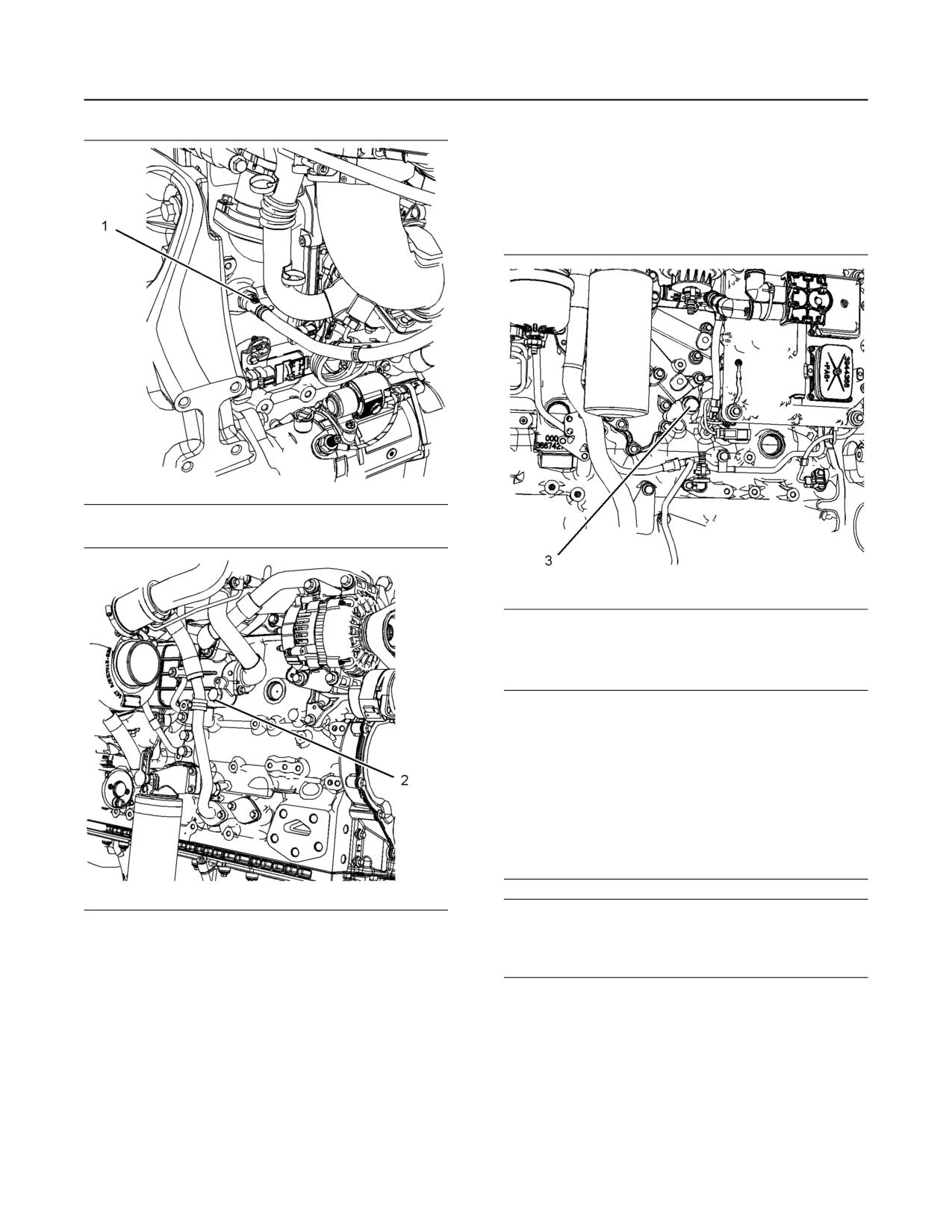
M0082024-03
115
Maintenance Section
Coolant - Change
Alternative Drain Plug
The cylinder coolant can be drained from the plug
below the oil cooler. Refer to illustration 71 . If the
alternative drain plug (3) is removed, the O ring seal
must be replaced. Tighten the drain plug to a torque
of 35 N·m (25 lb ft).
Illustration 69
g03461657
Illustration 71
g03081697
Flush
NOTICE
Most commercial cooling system cleaning agents are
corrosive and their use is not recommended by Per-
kins. If commercial cooling system cleaning agents
have to be used, then the cleaning agents should not
be left in the system any longer then recommended
by manufacturers and engine temperature should not
be elevated above 30 degrees C.
The system must be thoroughly flushed with clean
water after use of cleaning agents.
Illustration 70
g02350785
NOTICE
Cleaning agents for marine or industrial cooling sys-
tems must not be used as they are very aggressive
2. Remove connection hose (1) on the engine. Also
and will damage cooling system components.
remove the drain plug (2). Open the drain cock or
remove the drain plug on the radiator.
1. Flush the cooling system with clean water and a
Allow the coolant to drain into a suitable container.
suitable cleaning agent to remove any debris.
Refer to your Perkins dealer or distributor for
3. Properly dispose of the drained material. Obey
local regulations for the disposal of the material.
suitable cleaning agents.
2. Install connection hose. Clean the drain plugs.
Install the drain plugs. Tighten drain plug securely.
116
M0082024-03
Maintenance Section
Coolant Level - Check
3. Maintain the coolant level at the maximum mark
NOTICE
that is correct for your application.
Do not fill the cooling system faster than 10 L
(2.64 US gal) per minute to avoid air locks.
4. Clean the cooling system filler cap. Inspect the
gasket that is on the cooling system filler cap. If
Cooling system air locks may result in engine
damage.
the gasket that is on the cooling system filler cap is
damaged, discard the old cooling system filler cap
and install a new cooling system filler cap. If the
3. Fill the cooling system with clean water and install
gasket that is on the cooling system filler cap is not
the cooling system filler cap.
damaged, perform a pressure test. If the cooling
4. Start and run the engine at low idle for a minimum
system filler cap does not retain the correct
of 30 minutes. The coolant temperature should be
pressure, install a new cooling system filler cap.
at least 85° C (185° F).
5. Start the engine. Inspect the cooling system for
leaks and for the correct operating temperature.
NOTICE
Improper or incomplete rinsing of the cooling system
can result in damage to copper and other metal
i07676461
components.
Coolant Level - Check
To avoid damage to the cooling system, make sure to
completely flush the cooling system with clear water.
Continue to flush the system until all signs of the
cleaning agent are gone.
Pressurized System: Hot coolant can cause seri-
5. Stop the engine and allow the engine to cool.
ous burns. To open the cooling system filler cap,
Loosen the cooling system filler cap slowly to
stop the engine and wait until the cooling system
relieve any pressure. Remove the cooling system
components are cool. Loosen the cooling system
filler cap. Remove the connection hose or remove
pressure cap slowly in order to relieve the
the cooling system drain plugs. Allow the water to
pressure.
drain. Flush the cooling system with clean water.
Check the coolant level when the engine is stopped
Install the connection hose.
and cool.
6. The drain plug O rings on the engine block must be
replaced. Clean the drain plugs and install new O
NOTICE
When any servicing or repair of the engine cooling
ring seal. Install the drain plugs and tighten to a
system is performed, the procedure must be per-
torque of 35 N·m (25 lb ft).
formed with the engine on level ground. This proce-
dure will allow you to check accurately the coolant
Fill
level. This procedure will also help in avoiding the risk
of introducing an air lock into the coolant system.
NOTICE
Do not fill the cooling system faster than 10 L
1. Remove the cooling system filler cap slowly to
(2.64 US gal) per minute to avoid air locks.
relieve pressure.
Cooling system air locks may result in engine
2. Maintain the coolant level at the maximum mark
damage.
that is correct for your application. If the engine is
equipped with a sight glass, maintain the coolant
1. Fill the cooling system with the coolant/antifreeze.
level to the correct level in the sight glass.
Refer to this Operation and Maintenance Manual,
“Refill Capacities and Recommendations” topic
(Maintenance Section) for more information on
cooling system specifications.
2. Start and run the engine at low idle. Increase the
engine rpm to high idle. Operate the engine to
open the engine thermostat. This operation will
allow any air in the system to be purged. Decrease
the engine speed to low idle. Stop the engine.
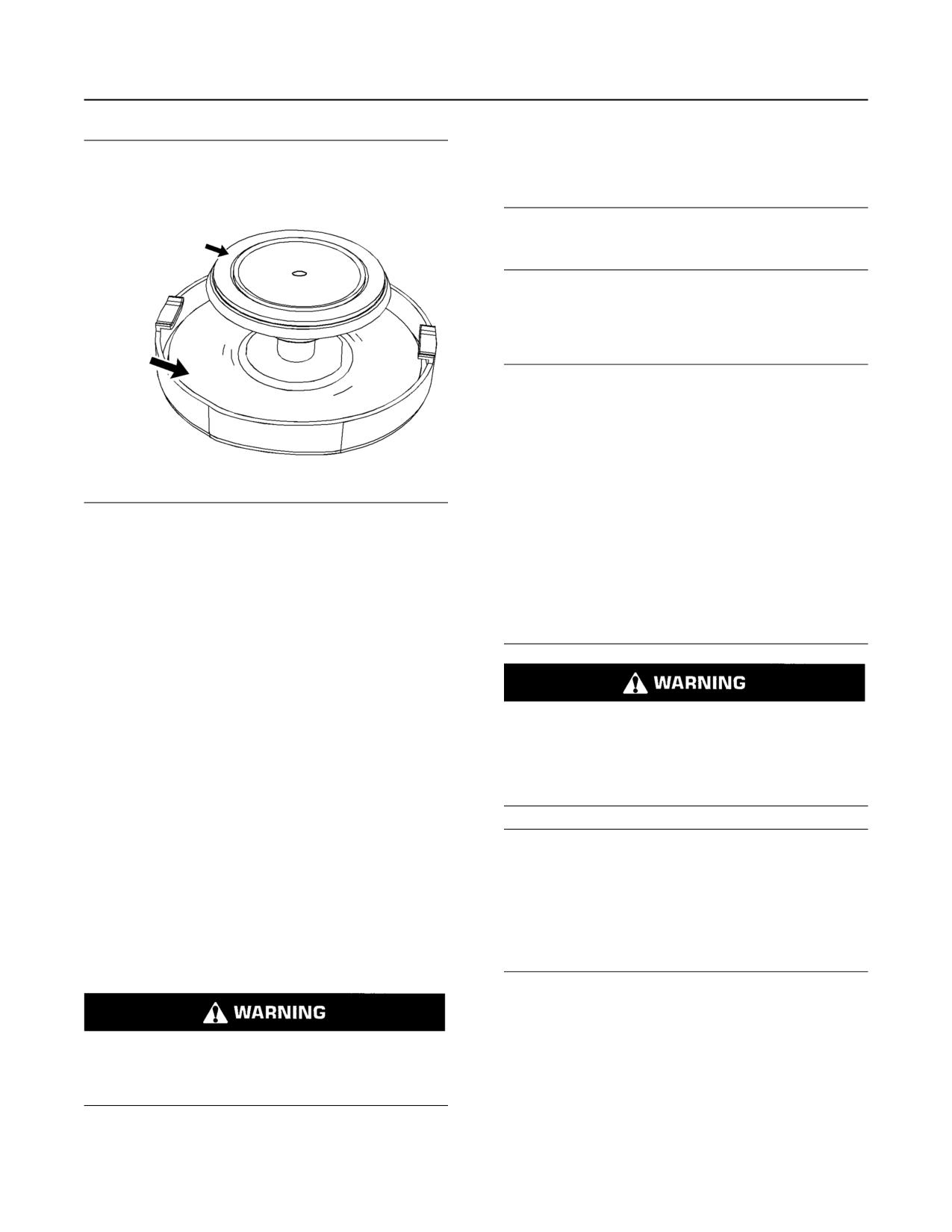
M0082024-03
117
Maintenance Section
Cooling System Supplemental Coolant Additive (SCA) - Test/Add
Test for SCA Concentration
Heavy-Duty Coolant/Antifreeze and SCA
NOTICE
Do not exceed the recommended six percent supple-
mental coolant additive concentration.
Use a Coolant Conditioner Test Kit to check the
concentration of the SCA.
Add the SCA, If Necessary
NOTICE
Do not exceed the recommended amount of supple-
mental coolant additive concentration. Excessive
supplemental coolant additive concentration can form
deposits on the higher temperature surfaces of the
cooling system, reducing the engine's heat transfer
characteristics. Reduced heat transfer could cause
cracking of the cylinder head and other high tempera-
ture components. Excessive supplemental coolant
Illustration 72
g02590196
additive concentration could also result in radiator
Typical filler cap gaskets
tube blockage, overheating, and/or accelerated water
pump seal wear. Never use both liquid supplemental
coolant additive and the spin-on element (if
3. Clean the cooling system filler cap and check the
equipped) at the same time. The use of those addi-
condition of the filler cap gaskets. Replace the
tives together could result in supplemental coolant
cooling system filler cap if the filler cap gaskets are
additive concentration exceeding the recommended
damaged. Reinstall the cooling system filler cap.
maximum.
4. Inspect the cooling system for leaks.
Note: The Diesel Exhaust Fluid (DEF) tank requires
coolant flow around the tank. The Coolant Diverter
Valve (CDV) will turn the flow on or off. If the coolant
Pressurized System: Hot coolant can cause seri-
system has been filled with the CDV in the closed
ous burns. To open the cooling system filler cap,
position, coolant level will drop because of the
stop the engine and wait until the cooling system
components are cool. Loosen the cooling system
opening of the CDV. The coolant flow will be diverted
pressure cap slowly in order to relieve the
when the ambient temperature is continuously at
pressure.
-5° C (23° F) and for a short period after each
engine start.
NOTICE
i07682818
When any servicing or repair of the engine cooling
system is performed the procedure must be per-
Cooling System Supplemental
formed with the engine on level ground. Having the
engine level will allow you to check the coolant level
Coolant Additive (SCA) - Test/
with greater accuracy. When the engine is level, it will
also help in avoiding the risk of introducing an air lock
Add
into the coolant system.
1. Slowly loosen the cooling system filler cap to
relieve the pressure. Remove the cooling system
filler cap.
Cooling system coolant additive contains alkali.
To help prevent personal injury, avoid contact
Note: Always discard drained fluids according to
with the skin and the eyes. Do not drink cooling
local regulations.
system coolant additive.
2. If necessary, drain some coolant from the cooling
system into a suitable container to allow space for
the extra SCA.
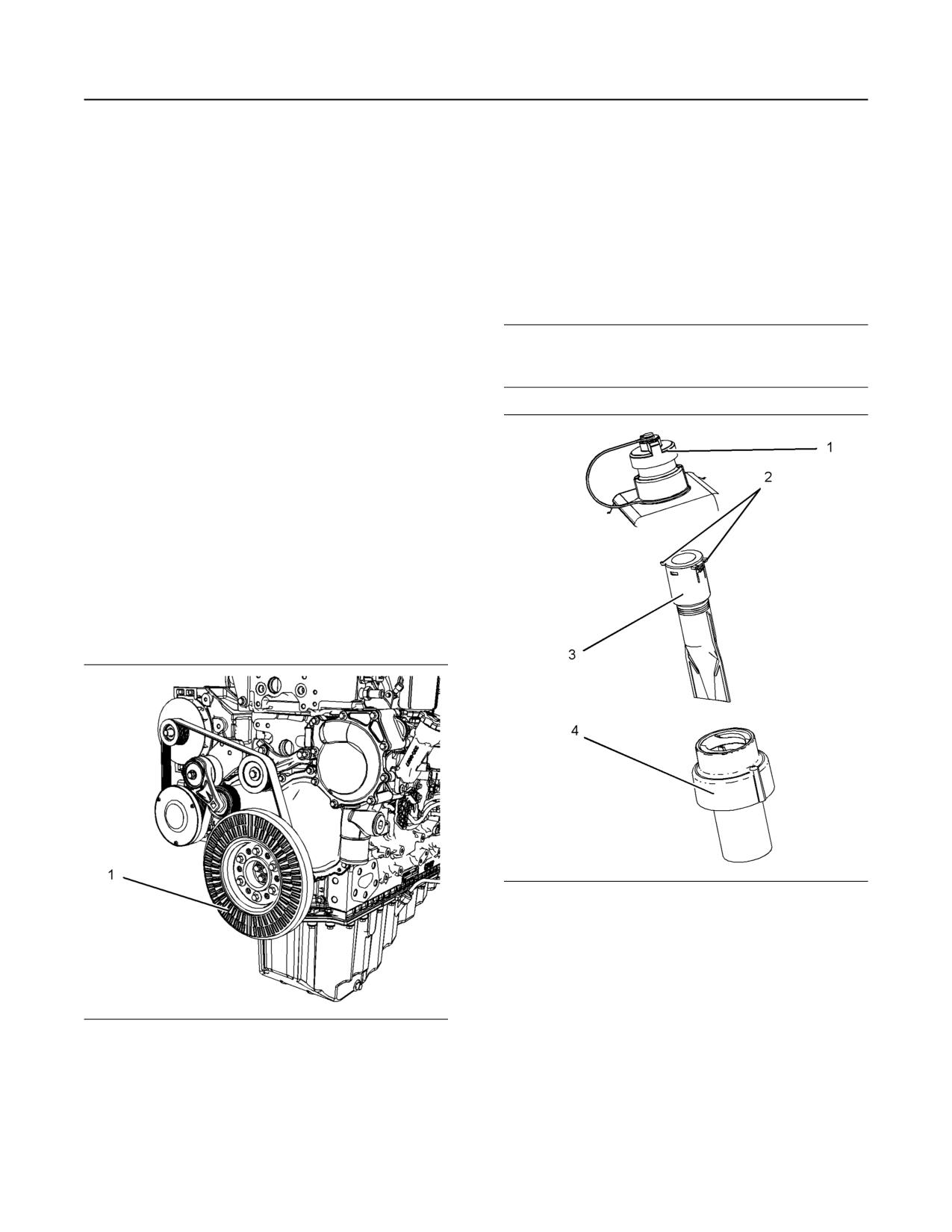
118
M0082024-03
Maintenance Section
Crankshaft Vibration Damper - Inspect
3. Add the correct amount of SCA. Refer to the
For information on removal of the crankshaft damper,
Operation and Maintenance Manual, “Refill
refer to Disassembly and Assembly, “Vibration
Damper and Pulley - Remove and Install”.
Capacities and Recommendations” for more
information on SCA requirements.
i07680861
4. Clean the cooling system filler cap and inspect the
gasket. If the gasket is damaged, discard the old
DEF Filler Screen (Emission
filler cap and install a new filler cap. If the gasket is
Related Component) - Clean
not damaged, use a suitable pressurizing pump to
pressure test the filler cap. The correct pressure is
stamped on the face of the filler cap. If the filler
cap does not retain the correct pressure, install a
NOTICE
new filler cap.
Ensure that the engine is stopped before any servic-
ing or repair is performed.
i03634651
Crankshaft Vibration Damper -
Inspect
Viscous Damper
The viscous damper has a inertia weight that is
located inside a fluid filled case. The inertia weight
moves in the case in order to limit torsional vibration.
Visually inspect the crankshaft damper. Ensure that
the cooling fins (1) on the crankshaft damper are
clean and free from dirt.
Illustration 74
g03725939
Typical example
1. Ensure that the area around cap on the Diesel
Exhaust Fluid (DEF) tank is clean. Remove cap
(1).
2. Using a suitable tool, press the tabs (2) to release
Illustration 73
g01950241
the tabs. With the tabs released remove the filter
Typical example
screen (3) from DEF tank neck adapter (4).
3. The filter screen can be cleaned in clean water and
Inspect the damper and replace the damper for any
of the following reasons:
dried using compressed air. Refer to this
Operation and Maintenance Manual, “General
• The damper is dented, cracked, or leaking.
Hazard Information” for information on using
compressed air.
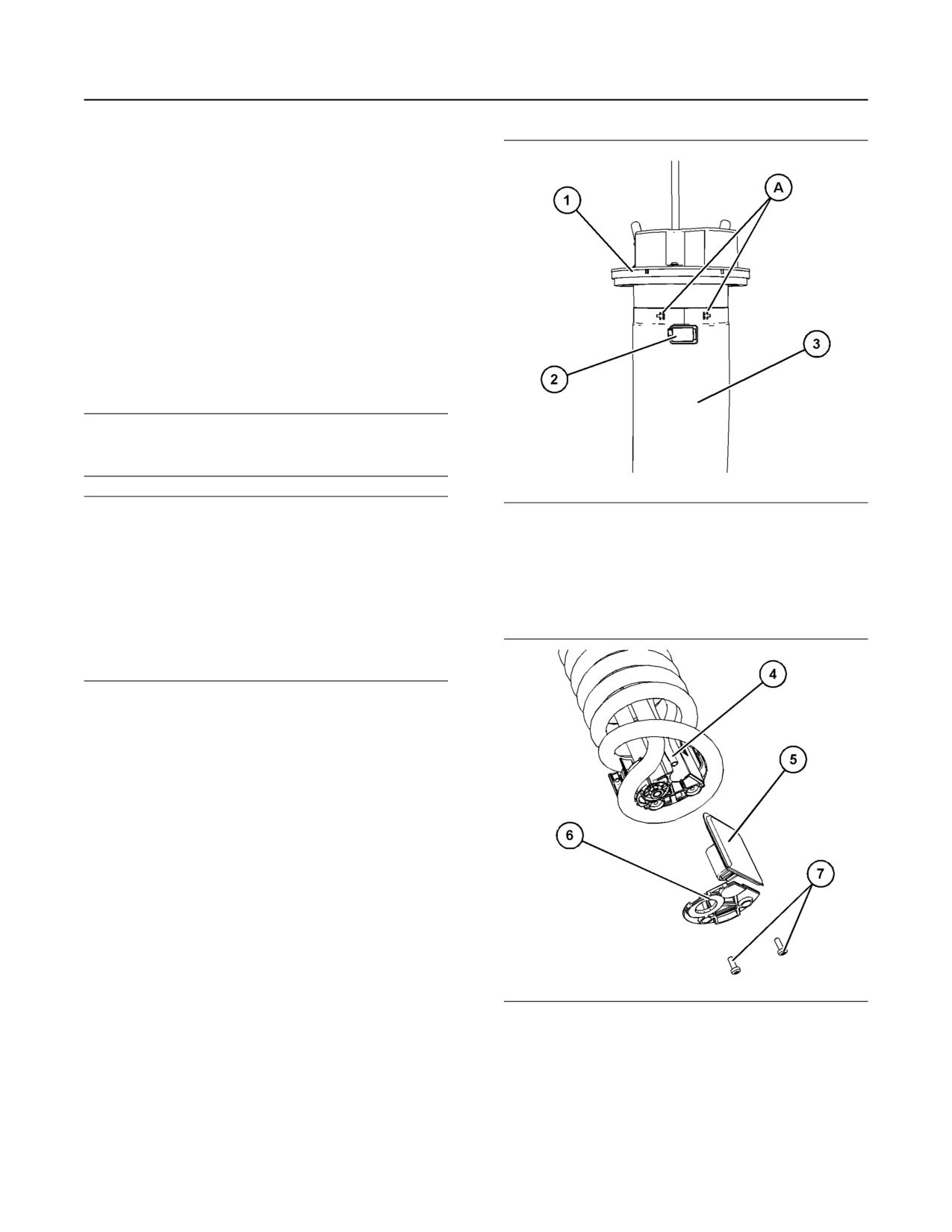
M0082024-03
119
Maintenance Section
DEF Manifold Filters (Emission Related Component) - Replace
4. If the filter screen cannot be cleaned or the filter
screen is damaged, then the filter screen must be
replaced.
5. Install filter screen (3) into DEF tank neck adapter
(4). Press filter screen into neck adapter and
ensure that tabs (2) are located correctly. Install
cap (1).
i07680873
DEF Manifold Filters (Emission
Related Component) - Replace
NOTICE
Ensure that the engine is stopped before any servic-
ing or repair is performed.
NOTICE
Illustration 75
g06159487
Care must be taken to ensure that Diesel Exhaust
Fluid (DEF) for the system is contained during per-
1. Note the location of clamp (2). The clamp (2) must
formance of inspection, maintenance, testing, adjust-
be between the marked location (A).
ing, and repair of the product before opening
compartments or disassembling components con-
2. Loosen clamp (2) and remove outer filter (3) from
taining fluid have containers ready to collect these
DEF tank header (1) and discard outer filter (3).
fluids.
Dispose of all fluids according to local regulations
and mandates.
Ensure that the area around the DEF manifold is free
from contamination before any servicing or repair is
performed.
To remove the DEF manifold and the hoses
connections from the DEF tank, refer to Disassembly
and Assembly, Manifold (DEF Heater) - Remove and
Install.
Illustration 76
g06159580
3. Remove screws (7) and remove retaining plate (6).
4. Remove DEF filter (5) from pickup tube (4) and
discard the used filter (5).
5. Install new filter (5) onto pickup tube (4).
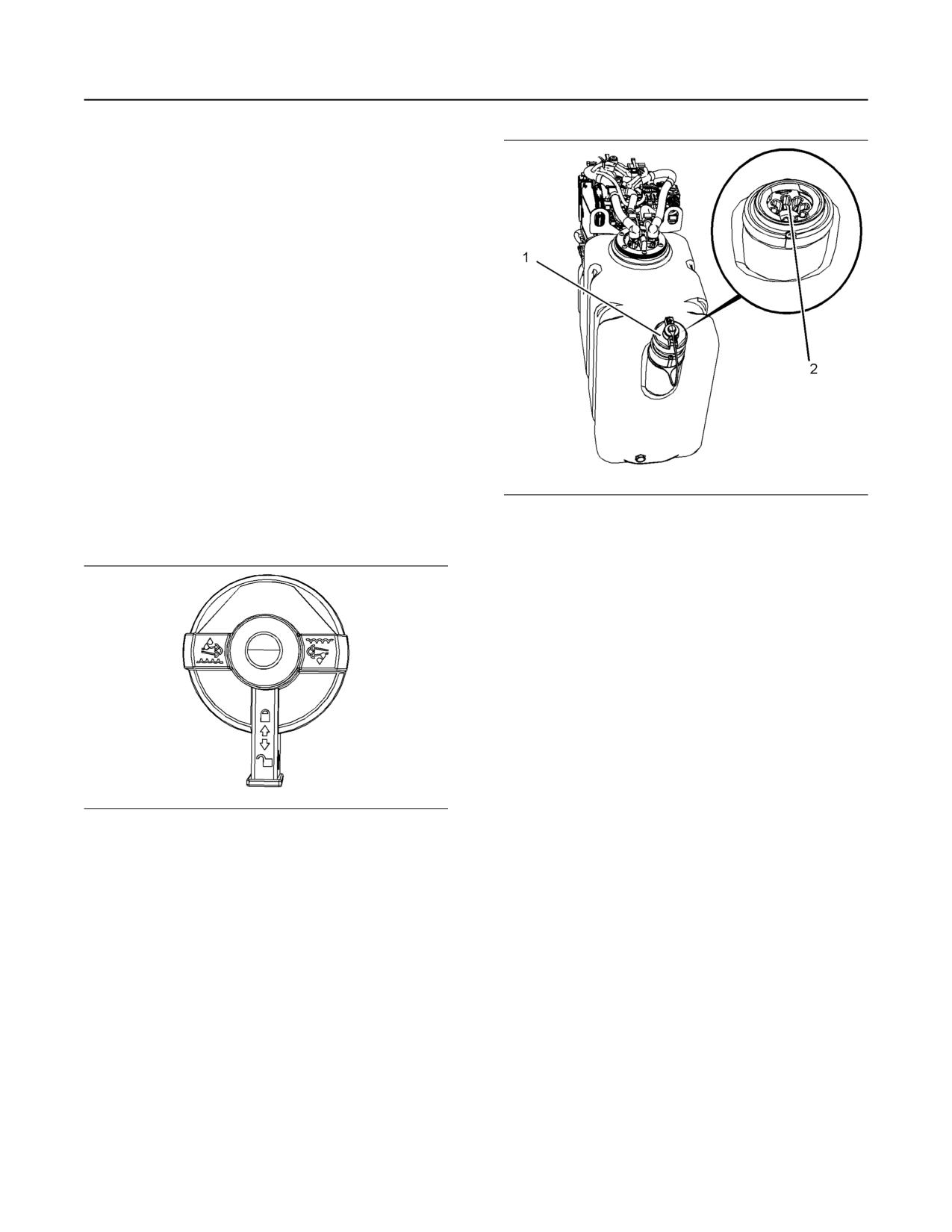
120
M0082024-03
Maintenance Section
Diesel Exhaust Fluid (Emission Related Component) - Fill
6. Install the retaining plate (6) and install screws (7).
Tighten screws (7) to a torque of 1.1 N·m
(9.8 lb in).
7. Install new outer filter (3) onto DEF tank header
(1). Ensure that the clamp (2) is located between
the location points (A).
8. Tighten clamp (2) to a torque of 4.5 N·m (40 lb in).
9. Install the DEF tank header, refer to Disassembly
and Assembly, Manifold (DEF Heater) - Remove
and Install.
i07678991
Diesel Exhaust Fluid
(Emission Related
Component) - Fill
Illustration 78
g03417998
Refer to the Original Equipment Manufacture (OEM)
Typical example
information for the Diesel Exhaust Fluid (DEF) tank
capacity.
Ensure that the correct specification Diesel Exhaust
Fluid (DEF) is used. Ensure the cleanliness of the
DEF, refer to this Operation and Maintenance
Manual, “Fluid Recommendations” for more
information.
Care should be taken when dispensing DEF. Spills
should be cleaned immediately. All surfaces should
be wiped clean and rinsed with water.
DEF that has been spilt will crystallize when the
water within the liquid evaporates. Spilt DEF will
attack paint and metal. If DEF is spilt, wash the area
with water.
Caution should be used when dispensing DEF near
an engine that has recently been running. Spilling
Illustration 77
g03379943
DEF onto hot components may cause the release of
ammonia vapors. Do not breathe ammonia vapors.
Lockable type DEF Filler cap
Do not clean up any spills with bleach.
1. Ensure that the engine is stopped. Ensure that the
DEF cap (1) and the surrounding area are clean
and free from dirt.
2. Remove the DEF cap from the tank.
3. Fill the tank with the required amount of DEF.
Ensure that dirt is not introduced into the tank
during filling. Do not over fill the tank. The DEF
may require room for expansion.
Note: Always fill the DEF tank on level ground. Cold
weather can affect DEF, refer to this Operation and
Maintenance Manual, “Diesel Exhaust Fluid in cold
Weather” for more information.
M0082024-03
121
Maintenance Section
Diesel Exhaust Fluid Filter (Emission Related Component) - Replace
4. The opening on the DEF tank (2) is a special
diameter. Ensure that the correct nozzle is used
when filling the DEF tank.
5. Check the cleanliness of DEF cap and install the
DEF cap.
i07678995
Diesel Exhaust Fluid Filter
(Emission Related
Component) - Replace
Personal injury can result from improper han-
dling of chemicals.
Make sure you use all the necessary protective
equipment required to do the job.
Make sure that you read and understand all direc-
tions and hazards described on the labels and
material safety data sheet of any chemical that is
used.
Observe all safety precautions recommended by
the chemical manufacturer for handling, storage,
and disposal of chemicals.
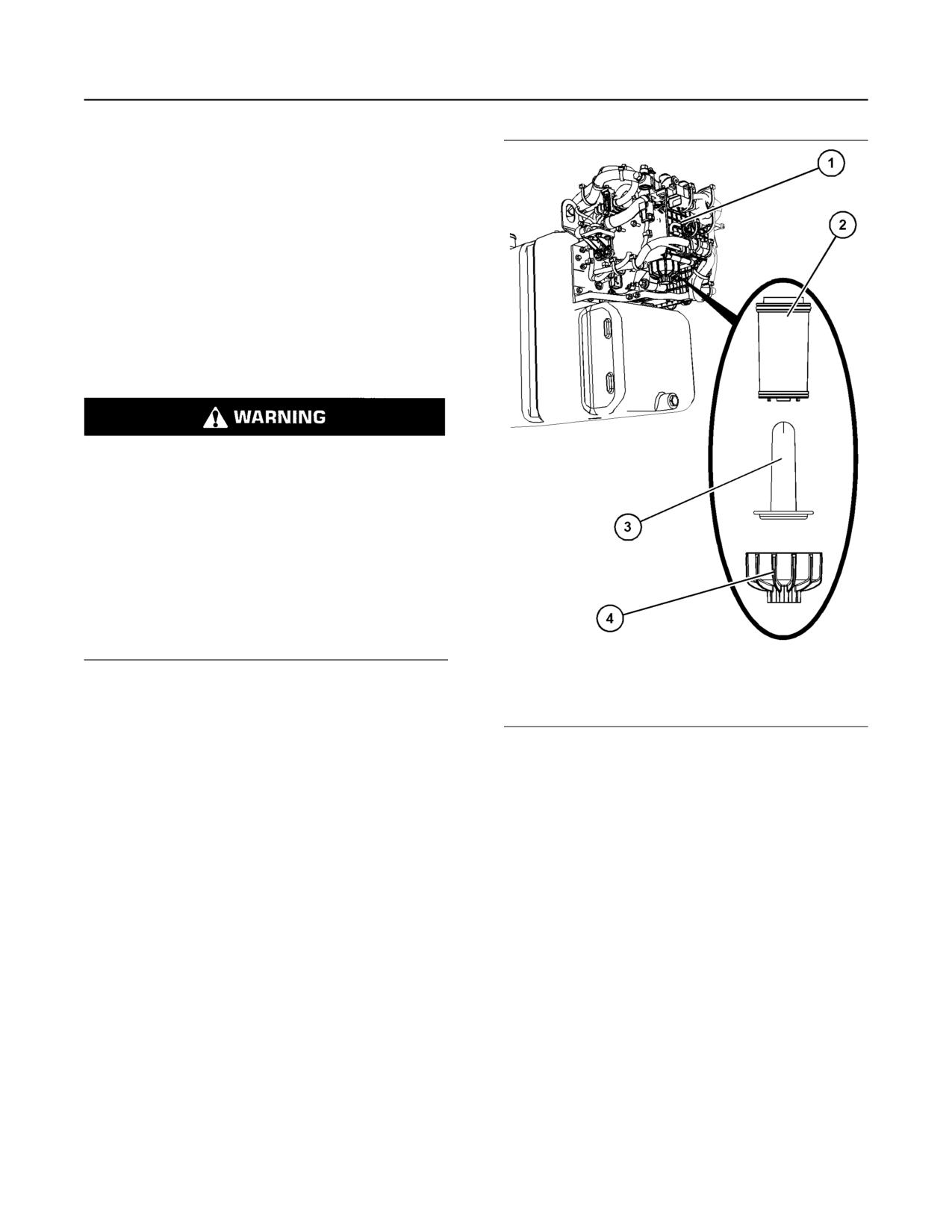
The Diesel Exhaust Fluid (DEF) pump can be located
next to the DEF tank. On some application the DEF
pump can be installed away from the DEF tank.
Illustration 79
g06215651
Typical example
1. Ensure that the area around the DEF filter is clean
and free from dirt. Use a 27mm Bi-Hex socket to
remove filter cap (4).
2. Remove the expansion device (3).
122
M0082024-03
Maintenance Section
Diesel Exhaust Fluid Tank - Flush
i07711082
Diesel Exhaust Fluid Tank -
Flush
Illustration 80
g06215916
Typical example
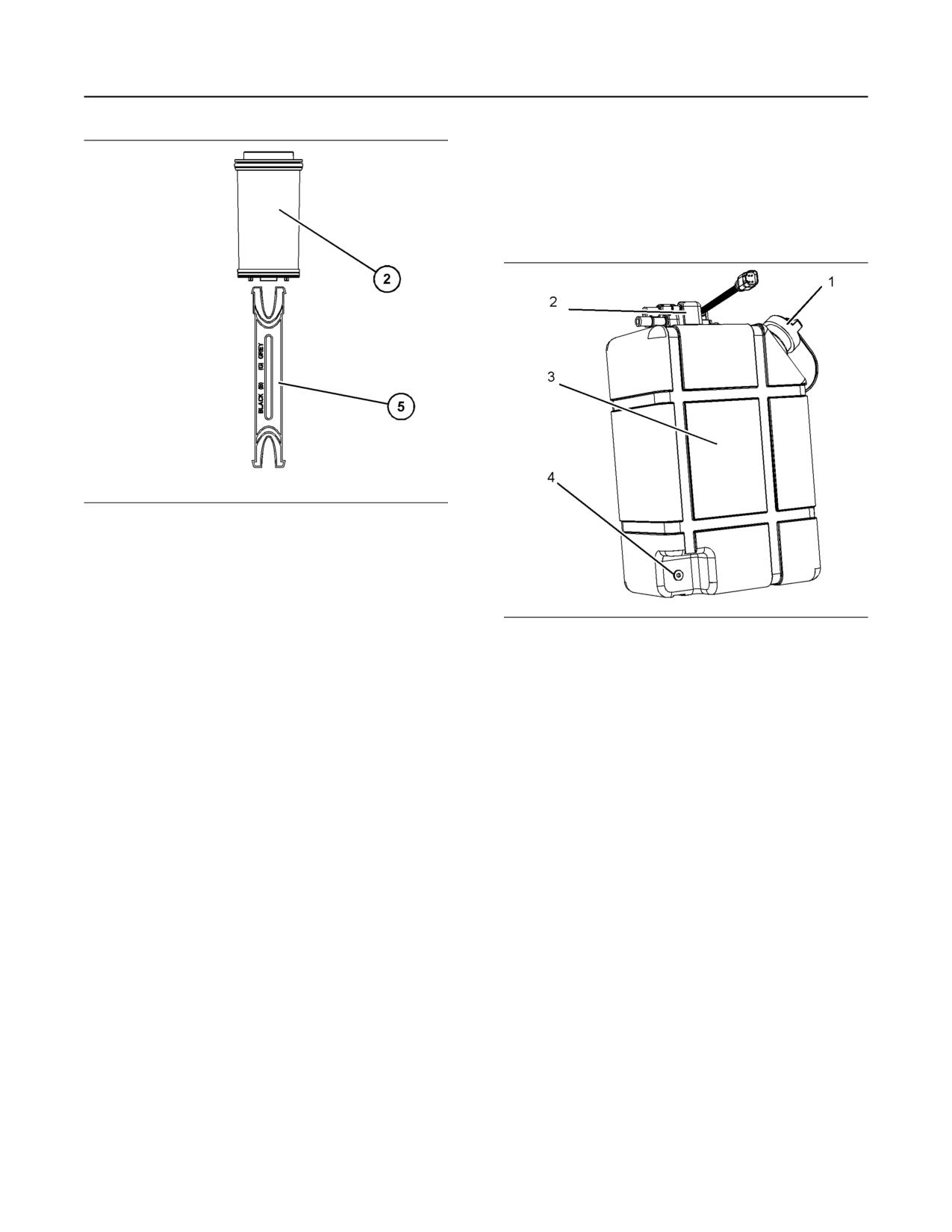
3. Use supplied tool (5) to remove filter element (2)
from DEF pump assembly (1).
4. Install new filter element (2) into DEF pump
assembly (1).
Illustration 81
g03676503
Typical example
5. Install expansion device (3) into filter element (2).
Install filter cap (4) and tighten cap to 20 N·m
If contamination of the Diesel Exhaust Fluid (DEF) is
(15 lb ft).
suspected, the DEF tank (3) will need to be drained
and the DEF tank flushed.
1. Ensure that the purging of the DEF system has
been completed.
2. After the completion of the purging, Isolate the
power, refer to this Operation and Maintenance
Manual, “Battery Disconnect Switch” for more
information.
Note: Ensure that the vessel that will be used is large
enough to collect the fluid to be drained.
3. Position the vessel below the drain plug (4).
Remove the filler cap (1). Remove the drain plug
and allow the fluid to drain.
4. Remove the Manifold (DEF Heater) (2). Refer to
Disassembly and Assembly, “Manifold (DEF
Heater)-Remove and Install” after draining the
fluid.
5. If necessary, remove the DEF filler screen. For
more information, refer to this Operation and
Maintenance Manual, “DEF Filler Screen - Clean”.
M0082024-03
123
Maintenance Section
Driven Equipment - Check
The DEF tank must be flushed after draining.
NOTICE
Flush the tank with deionized water. Ensure that
Accumulated grease and oil on an engine is a fire
all the flushing agents have been drained.
hazard. Keep the engine clean. Remove debris and
fluid spills whenever a significant quantity accumu-
6. Install the Manifold (DEF Heater) (2). Refer to
lates on the engine.
Disassembly and Assembly, “Manifold (DEF
Heater)-Remove and Install”.
Periodic cleaning of the engine is recommended.
Steam cleaning the engine will remove accumulated
7. If necessary, install the DEF filler screen. For more
oil and grease. A clean engine provides the following
information, refer to this Operation and
benefits:
Maintenance Manual, “DEF Filler Screen - Clean”.
• Easy detection of fluid leaks
8. Install the drain plug (4). Tighten the drain plug to a
torque of 6 N·m (53 lb in). Remove the vessel
• Maximum heat transfer characteristics
used for draining. Dispose of the drained fluid in
• Ease of maintenance
accordance with local regulation.
Note: Caution must be used to prevent electrical
9. Refill the DEF tank (3).After the tank has been
components from being damaged by excessive water
filled, connect the electrical supply. Refer to this
when the engine is cleaned. Pressure washers and
Operation and Maintenance Manual, “Diesel
steam cleaners should not be directed at any
Exhaust Fluid - Fill” for more information.
electrical connectors or the junction of cables into the
If the DEF tank has been fill with another fluid other
rear of the connectors. Avoid electrical components
than DEF, then contact your Perkins distributor.
such as the alternator, the starter, and the ECM.
Protect the fuel injection pump from fluids to wash the
i02151646
engine.
Ensure that care is taken that the safety labels,
Driven Equipment - Check
emission label, and all other information labels are
not removed during engine cleaning.
Refer to the OEM specifications for more information
Aftertreatment
on the following maintenance recommendations for
the driven equipment:
During the engine cleaning process, ensure that
water or cleaning fluids cannot enter the
• Inspection
aftertreatment system. If cleaning fluids enters the
aftertreatment system, damage could occur.
• Adjustment
• Lubrication
i07161989
• Other maintenance recommendations
Engine Air Cleaner Element -
Perform any maintenance for the driven equipment
Replace
which is recommended by the OEM.
i07819515
NOTICE
Never run the engine without an air cleaner element
Engine - Clean
installed. Never run the engine with a damaged air
cleaner element. Do not use air cleaner elements
with damaged pleats, gaskets or seals. Dirt entering
the engine causes premature wear and damage to
engine components. Air cleaner elements help to pre-
vent airborne debris from entering the air inlet.
Personal injury or death can result from high
voltage.
NOTICE
Moisture
can
create
paths
of
electrical
Never service the air cleaner element with the engine
conductivity.
running since this will allow dirt to enter the engine.
Make sure that the electrical system is OFF. Lock
Ensure that the engine cannot start before any
out the starting controls and tag the controls “DO
service or repair is performed.
NOT OPERATE” .
124
M0082024-03
Maintenance Section
Engine Air Cleaner Service Indicator - Inspect
Servicing the Air Cleaner Element
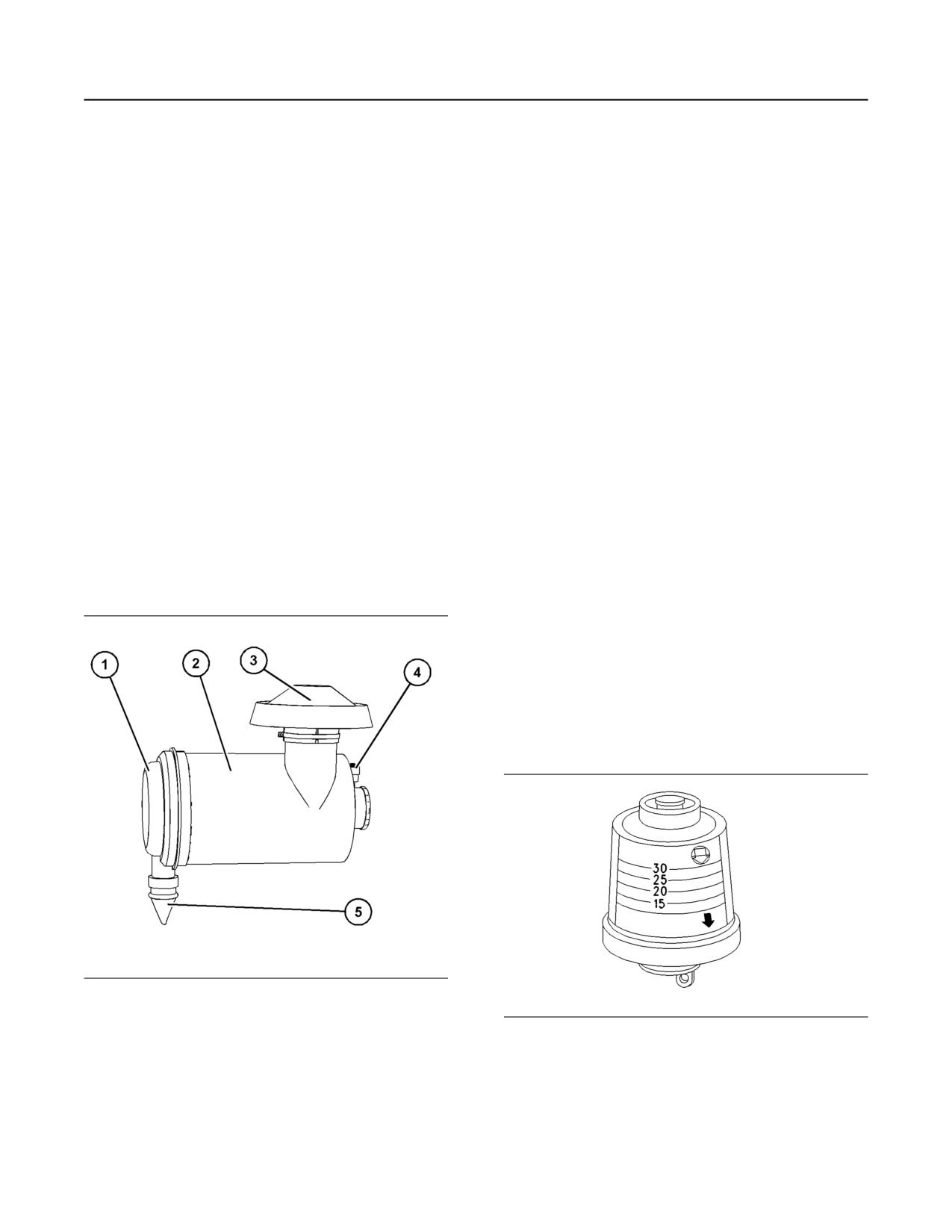
2. Remove the end cap (1). Remove the air filter
element within the main body (2), if a secondary
Note: The air filter system may not have been
filter element is installed then, remove the
provided by Perkins. The procedure that follows is for
secondary filter element. Discard all old elements.
a typical air filter system. Refer to the OEM
information for the correct procedure.
3. If equipped install the new secondary filter
element. Install the primary filter element.
If the air cleaner element becomes plugged, the air
can split the material of the air cleaner element.
4. Ensure that the end cover (1) is clean and free
Unfiltered air will drastically accelerate internal
from dirt and dust. Check the condition of the valve
engine wear. Refer to the OEM information for the
(5), also check the operation of the valve. If
correct air cleaner elements for your application.
necessary replace the valve.
• Check the air cleaner service indicator daily.
5. Install the end cap (1) to the main body (2). Check
and if necessary, reset the service indicator (4).
• Check the pre-cleaner (if equipped) and the dust
bowl daily for accumulation of dirt and debris.
i02335405
Remove any dirt and debris, as needed.
• Operating in dirty conditions may require more
Engine Air Cleaner Service
frequent service of the air cleaner element.
Indicator - Inspect
Replace the dirty air cleaner elements with new air
cleaner elements. Before installation, the air cleaner
elements should be thoroughly checked for tears
Some engines may be equipped with a different
and/or holes in the filter material. Inspect the gasket
service indicator.
or the seal of the air cleaner element for damage.
Maintain a supply of suitable air cleaner elements for
Some engines are equipped with a differential gauge
replacement purposes.
for inlet air pressure. The differential gauge for inlet
air pressure displays the difference in the pressure
that is measured before the air cleaner element and
the pressure that is measured after the air cleaner
element. As the air cleaner element becomes dirty,
the pressure differential rises. If your engine is
equipped with a different type of service indicator,
follow the OEM recommendations in order to service
the air cleaner service indicator.
The service indicator may be mounted on the air
cleaner element or in a remote location.
Illustration 82
g06239375
Typical example
(1) End cover
Illustration 83
g00103777
(2) Main body
Typical service indicator
(3) Rain cap
(4) Service indicator
(5) Valve
Observe the service indicator. The air cleaner
element should be cleaned or the air cleaner element
should be replaced when one of the following
1. If the air cleaner as a primary filter element
conditions occur:
installed, and a secondary filter element installed,
both filter elements must be replaced.
• The yellow diaphragm enters the red zone.
M0082024-03
125
Maintenance Section
Engine Air Precleaner - Check/Clean
• The red piston locks in the visible position.
i08412716
Test the Service Indicator
Engine Crankcase Breather
Element (Emission Related
Service indicators are important instruments.
Component) - Replace
• Check for ease of resetting. The service indicator
should reset in less than three pushes.
(Type 2)
• Check the movement of the yellow core when the
engine is accelerated to the engine rated speed.
The yellow core should latch at the greatest
vacuum that is attained.
Hot oil and hot components can cause personal
If the service indicator does not reset easily, or if the
injury. Do not allow hot oil or hot components to
yellow core does not latch at the greatest vacuum,
contact the skin.
the service indicator should be replaced. If the new
service indicator will not reset, the hole for the service
indicator may be restricted.
NOTICE
Ensure that the engine is stopped before any servic-
The service indicator may need to be replaced
ing or repair is performed.
frequently in environments that are severely dusty.
The crankcase breather is a very important
i07819526
component in order to keep your engine emissions
compliant.
Engine Air Precleaner - Check/
• The filter element within the crankcase breather
Clean
must be serviced at the prescribed service
interval.
• The correct filter element must be installed before
the engine is operated.
• The installation of the filter element is very
important.
• The quality of the filter element that is installed is
very important.
• The filter element protects the engine from
excessive quantities of oil from entering the
induction system. The filter element also protects
the engine aftertreatment system.
Note: Excessive quantities of oil that enter the
induction system of the engine can rapidly increase
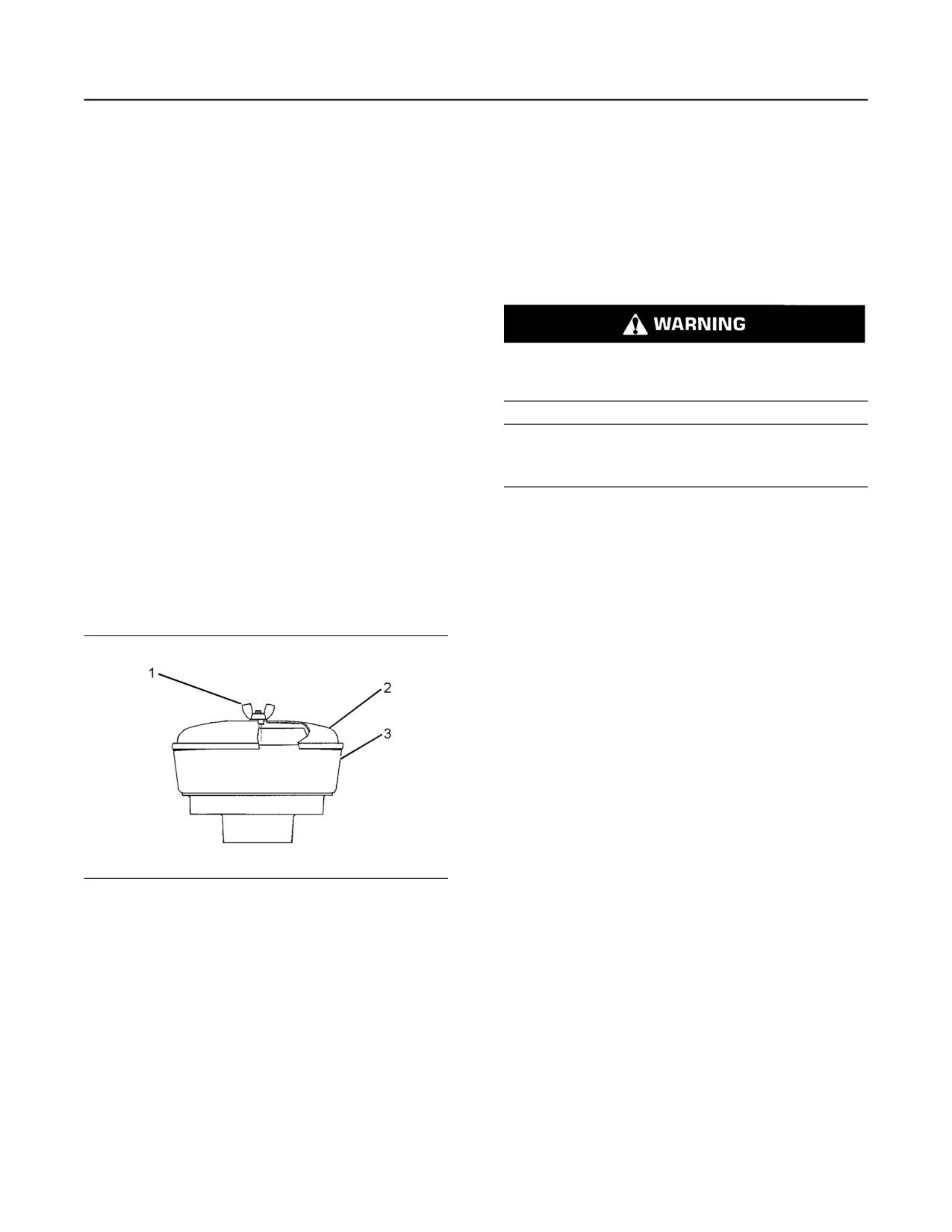
Illustration 84
g01453058
the engine speed without control.
Typical engine air precleaner
For information on aftermarket products, refer to
(1) Wing nut
Operation and Maintenance Manual, “Engine
(2) Cover
Description”. Within that section, refer to the title
(3) Body
“Aftermarket Products and Caterpillar Engines”.
Remove wing nut (1) and cover (2). Check for an
accumulation of dirt and debris in body (3). Clean the
body, if necessary.
After cleaning the precleaner, install cover (2) and
wing nut (1).
Note: When the engine is operated in dusty
conditions, more frequent cleaning is required.
Do not tap or strike the air cleaner element.
126
M0082024-03
Maintenance Section
Type 2
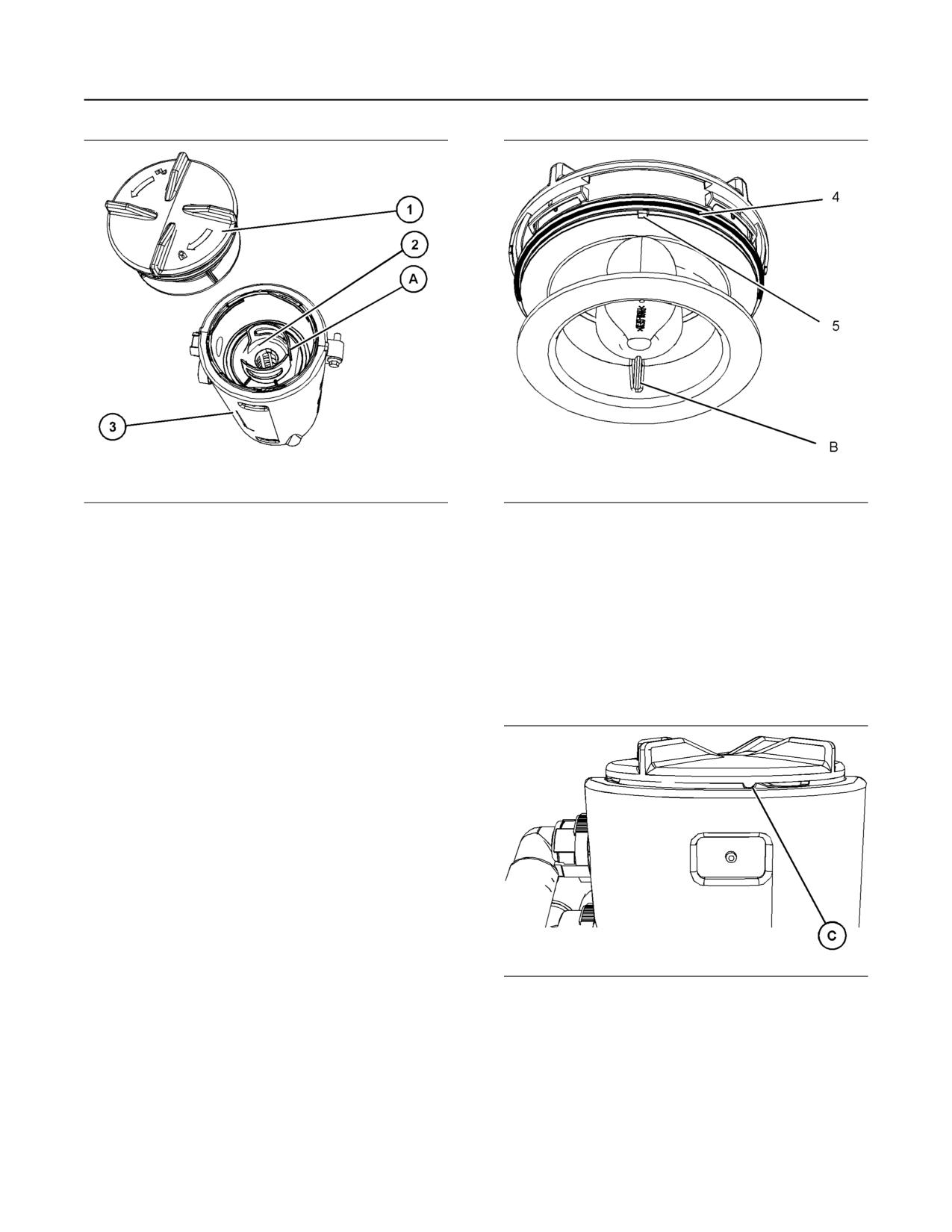
Illustration 85
g06623961
Illustration 86
g01884135
Typical example
(B) Alignment position
1. Ensure that dirt cannot enter the breather
Note: The cut away from section (5) in the cap allows
assembly. Ensure that the outside body of the
access to the seal.
breather assembly is clean and free from damage.
4. Remove the old seal (4) and install a new seal.
Place a container under the breather assembly.
5. Install a new filter element into the breather body
2. Rotate the cap (1) counterclockwise into the
(3) and orient the filter element so that position (A)
unlocked position. Remove the cap from the body
is aligned. Refer to illustration 85 . Align position
of the breather (3).
(A) on the filter element to position (B) on the cap.
Note: The cap (1) is tightened or loosened by hand.
If the cap (1) is difficult to remove, use a suitable tool
to apply a suitable force to assist the removal of the
cap (1). Care should be taken, as excessive force
may cause damage to the cap (1).
3. Note the orientation of the filter element (2).
Remove the filter element .
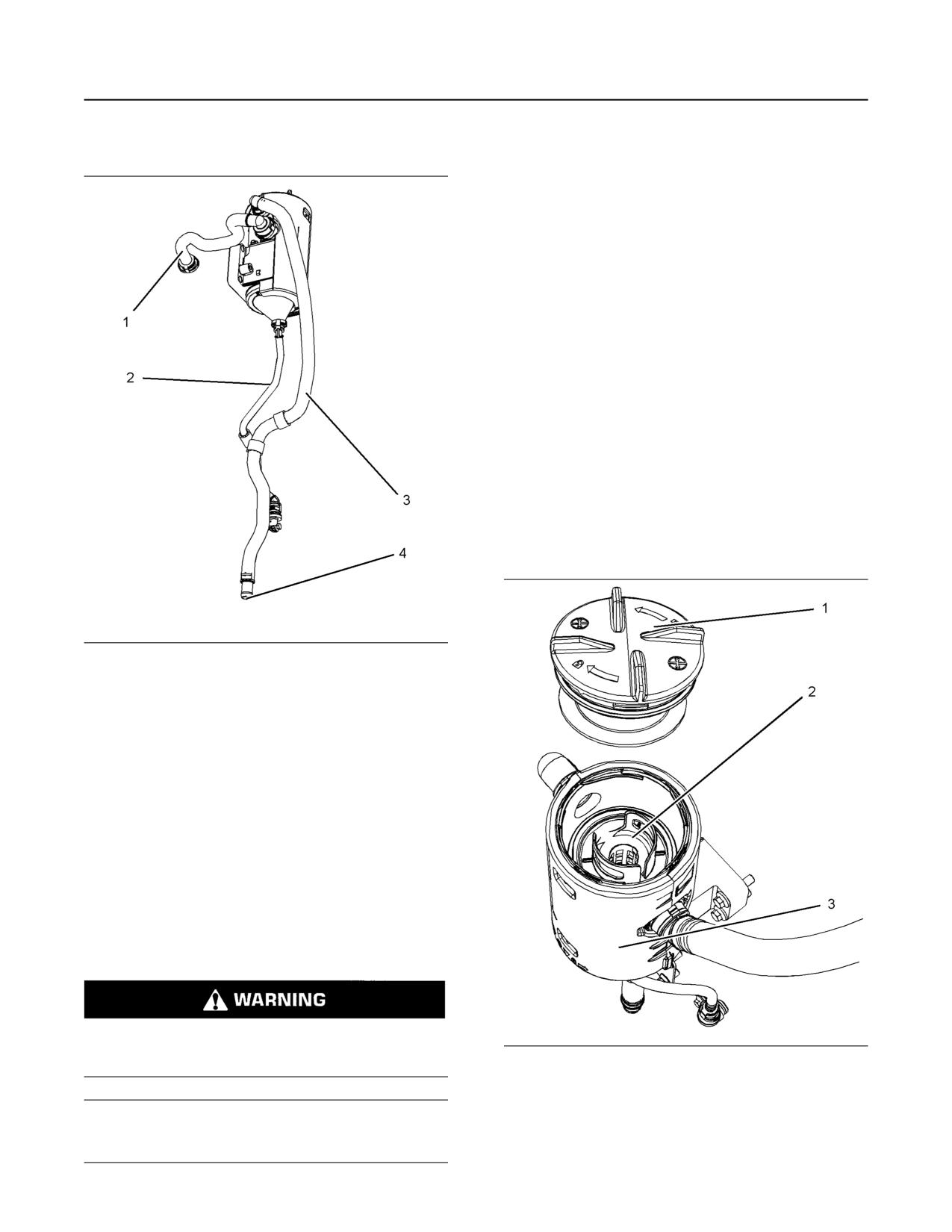
Illustration 87
g06623944
Typical example
6. Install the cap (1). Rotate the cap by hand
clockwise until the cap locks into the locked
position C on the breather body.
7. Remove the container.
M0082024-03
127
Maintenance Section
Engine Crankcase Breather Element (Emission Related Component) - Replace
Check the System
The crankcase breather is a very important
component to keep your engine emissions compliant.
• The filter element within the crankcase breather
must be serviced at the prescribed service
interval.
• The correct filter element must be installed before
the engine is operated.
• The installation of the filter element is very
important.
• The quality of the filter element that is installed is
very important.
For information on aftermarket products, refer to
Operation and Maintenance Manual, “Engine
Description”. Within that section, refer to the title
“Aftermarket Products and Perkins Engines”.
The breather element can be serviced from the top
position or the breather element can be serviced from
the bottom position.
Top Service
Illustration 88
g02416001
(1) Connection to breather cap for the engine
(2) Oil drain
(3) Tube assembly to atmosphere
(4) Outlet
Check the system for damage. Replace any
component that is damaged. Ensure that the outlet
(4) is clear and free from obstructions.
i08414736
Engine Crankcase Breather
Element (Emission Related
Component) - Replace
(Type 1)
Hot oil and hot components can cause personal
injury. Do not allow hot oil or hot components to
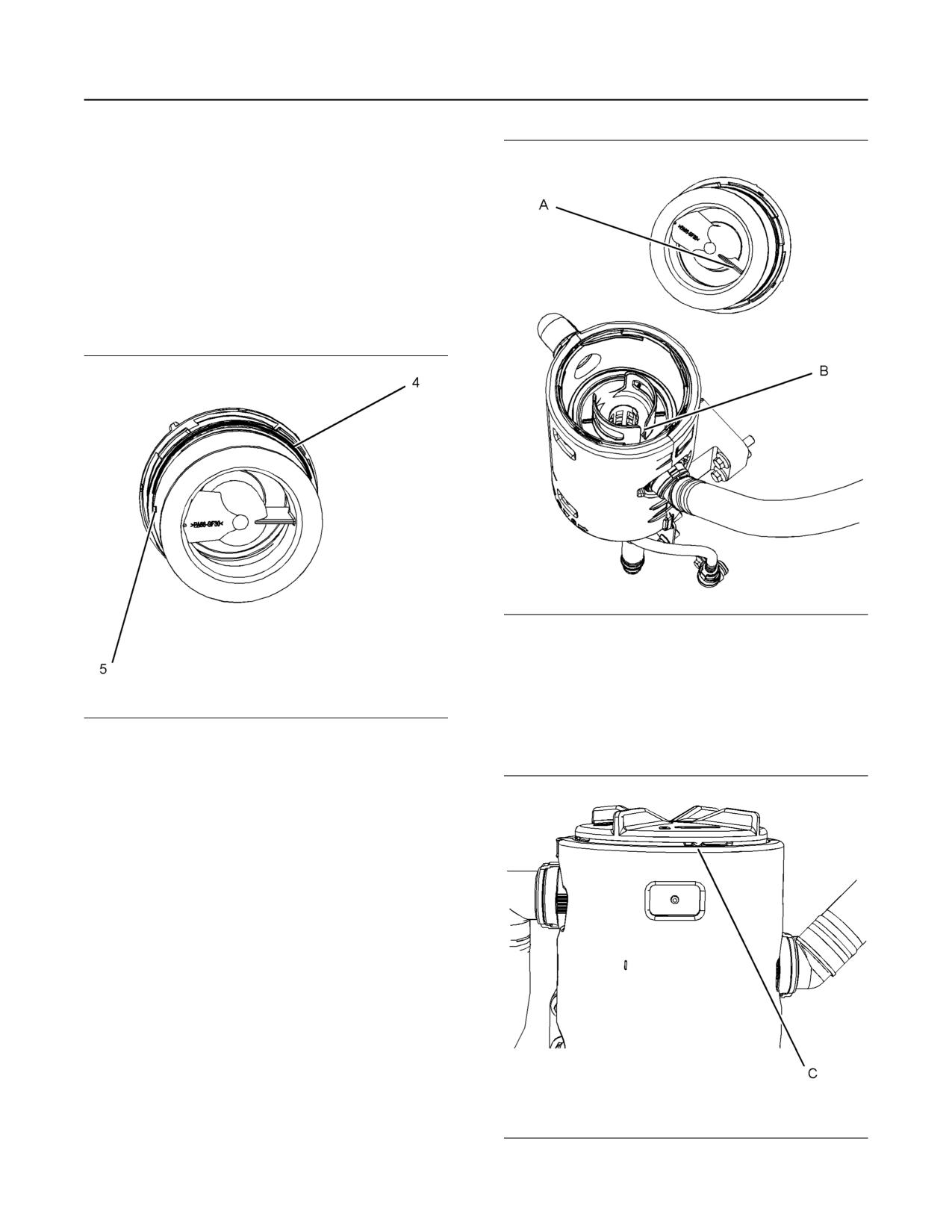
Illustration 89
g03090965
contact the skin.
1. Ensure that dirt cannot enter the breather
assembly. Ensure that the outside body of the
NOTICE
Ensure that the engine is stopped before any servic-
breather assembly is clean and free from damage.
ing or repair is performed.
Place a container under the breather assembly.
128
M0082024-03
Maintenance Section
Type 1
2. Rotate the top cap (1) counterclockwise into the
unlocked position. Remove the top cap from the
body of the breather (3).
Note: The cap (1) is tightened or loosened by hand.
If the cap (1) is difficult to remove, use a suitable tool
to apply a suitable force to assist the removal of the
cap (1). Care should be taken, as excessive force
may cause damage to the cap (1).
3. Note the orientation of the filter element (2).
Remove the filter element.
Illustration 91
g03090938
(A) Alignment position
(B) Alignment position
5. Install a new filter element into the breather body
(3). Ensure the correct position of the element,
Illustration 90
g03090963
refer to illustration 91 . Align position (A) on the top
cap to position (B) on the filter element.
4. Remove the old seal (4) and install a new seal.
Note: The cut away from section (5) in the top cap
allows access to the seal.
Illustration 92
g02346577
Typical example
M0082024-03
129
Maintenance Section
Type 1
6. Install the top cap (1). Rotate the top cap by hand
clockwise until the top cap locks into the locked
position (C) on the breather body.
7. Remove the container.
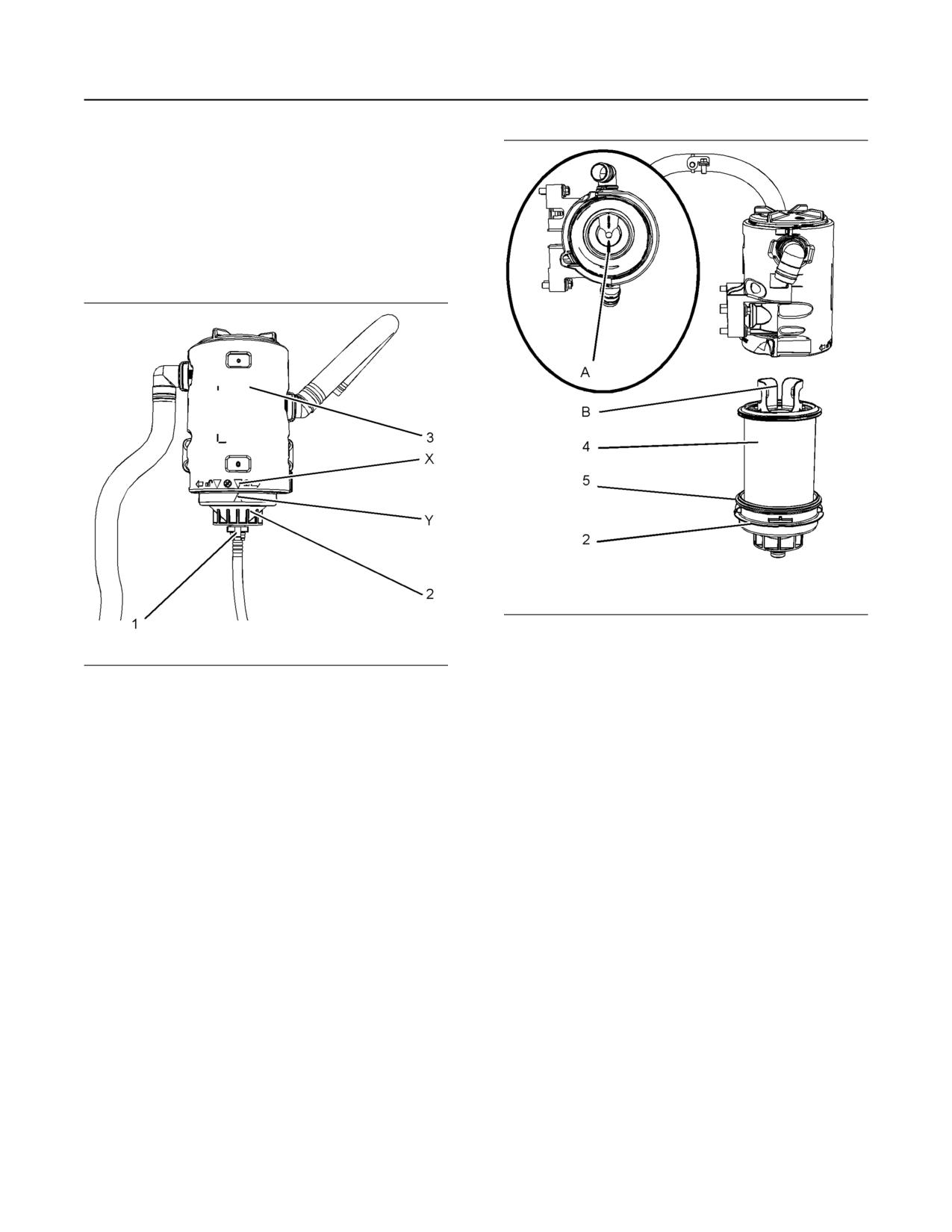
Bottom Service
Ensure that dirt cannot enter the breather assembly.
Illustration 94
g03090968
Typical example
(A) Alignment postion
Illustration 93
g02346498
(B) Alignment postion
Typical example
(X) Alignment mark
3. Remove the filter element (4). Remove the seal
(Y) Alignment mark
(5).
1. Ensure that the outside body of the breather
Note: The bottom cap has a section that allows
assembly is clean and free from damage. Place a
access to remove the seal.
container under the breather.
4. Install a new seal (5). Install a new filter element
2. Remove tube connection (1). Ensure that dirt
into the bottom cap (2).
cannot enter the tube connection. Note the
5. Align position (A) on the top cap to position (B) on
position of the alignment marks (X and Y). Rotate
the filter element. Refer to illustration 94 .
the bottom cap (2) counterclockwise to release the
cap and the filter element (4) from the breather
6. Install the assembly of the filter element and the
body (3).
bottom cap (2). Rotate the bottom cap by hand
clockwise until the bottom cap locks into the
locked position on the breather body. Ensure that
the alignment marks (X and Y) are correctly
aligned. Refer to illustration 93 .
130
M0082024-03
Maintenance Section
Engine Mounts - Inspect
7. Install tube connection (1). Ensure that the
When the engine mounts are supplied by Perkins the
retaining clips on the tube connection are correctly
maintenance procedure will be supplied in the
Disassembly and Assembly manual for your engine.
engaged. Remove the container.
i05300117
Check the System
Engine Oil Level - Check
Hot oil and hot components can cause personal
injury. Do not allow hot oil or hot components to
contact the skin.
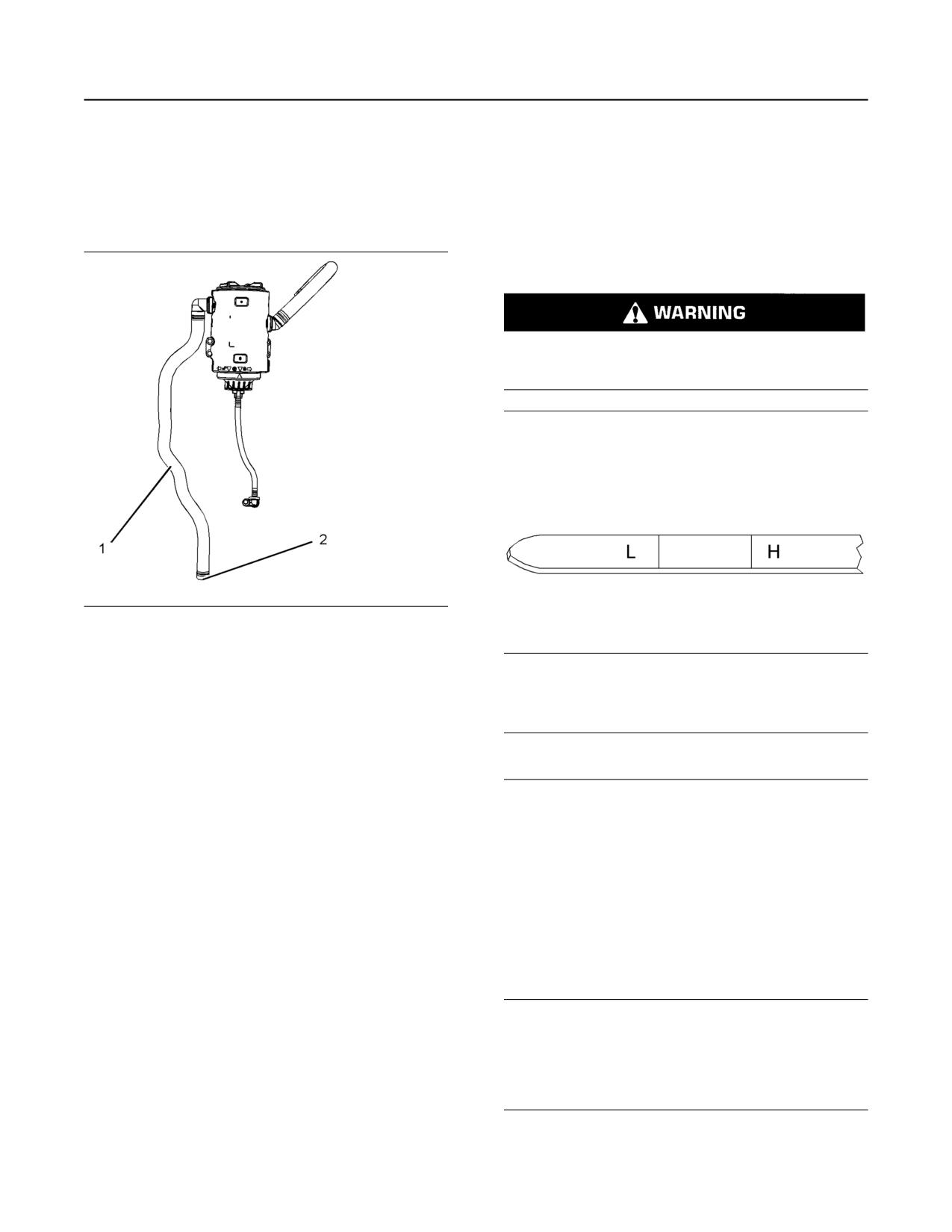
Illustration 95
g02346500
Typical example
Illustration 96
g02173847
Inspect the breather outlet pipe (1) for damage.
Ensure that the outlet (2) is clean and free from any
“L” Low
obstructions. Ice can cause obstructions in adverse
“H” High
weather conditions.
i07819538
NOTICE
Perform this maintenance with the engine stopped.
Engine Mounts - Inspect
Note: Ensure that the engine is either level or that
the engine is in the normal operating position in order
Note: The engine mounts may not have been
to obtain a true level indication.
supplied by Perkins. Refer to the Original Equipment
Note: After the engine has been switched OFF, wait
Manufacturer (OEM) information for further details on
for 10 minutes in order to allow the engine oil to drain
the engine mounts and the correct bolt torque.
to the oil pan before checking the oil level.
Inspect the engine mounts for deterioration and for
correct bolt torque. Excessive engine vibration can
1. Maintain the oil level between the mark (L) and the
be caused by the following conditions:
mark (H) on the engine oil dipstick. Do not fill the
crankcase above the “H” .
• Incorrect mounting of the engine
NOTICE
• Deterioration of the engine mounts
Operating your engine when the oil level is above the
“H” mark could cause your crankshaft to dip into the
• Loose engine mounts
oil. The air bubbles created from the crankshaft dip-
ping into the oil reduces the oils lubricating character-
Any engine mount that shows deterioration should be
istics and could result in the loss of power.
replaced. Refer to the OEM information for the
recommended torques.
2. Remove the oil filler cap and add oil, if necessary.
Clean the oil filler cap. Install the oil filler cap.
M0082024-03
131
Maintenance Section
Engine Oil Sample - Obtain
If an increase in the oil level is noticed, refer to
The sample can be checked for the following: the
Troubleshooting, “Oil Contains Fuel”.
quality of the oil, the existence of any coolant in the
oil, the existence of any ferrous metal particles in the
i01907674
oil and the existence of any nonferrous metal
particles in the oil.
Engine Oil Sample - Obtain
i07074312
Engine Oil and Filter - Change
The condition of the engine lubricating oil may be
checked at regular intervals as part of a preventive
maintenance program. Perkins include an oil
sampling valve as an option. The oil sampling valve
(if equipped) is included in order to regularly sample
the engine lubricating oil. The oil sampling valve is
positioned on the oil filter head or the oil sampling
Hot oil and hot components can cause personal
injury. Do not allow hot oil or hot components to
valve is positioned on the cylinder block.
contact the skin.
Perkins recommends using a sampling valve in order
to obtain oil samples. The quality and the consistency
of the samples are better when a sampling valve is
NOTICE
used. The location of the sampling valve allows oil
Care must be taken to ensure that fluids are con-
that is flowing under pressure to be obtained during
tained during performance of inspection, mainte-
normal engine operation.
nance, testing, adjusting and repair of the product.
Be prepared to collect the fluid with suitable contain-
ers before opening any compartment or disassem-
Obtain the Sample and the
bling any component containing fluids.
Analysis
Dispose of all fluids according to local regulations
and mandates.
Hot oil and hot components can cause personal
NOTICE
injury. Do not allow hot oil or hot components to
Keep all parts clean from contaminants.
contact the skin.
Contaminants may cause rapid wear and shortened
In order to help obtain the most accurate analysis,
component life.
record the following information before an oil sample
is taken:
Do not drain the engine lubricating oil when the
engine is cold. As the engine lubricating oil cools,
• The date of the sample
suspended waste particles settle on the bottom of the
oil pan. The waste particles are not removed with
• Engine model
draining cold oil. Drain the oil pan with the engine
stopped. Drain the oil pan with the oil warm. This
• Engine number
draining method allows the waste particles that are
suspended in the oil to be drained properly.
• Service hours on the engine
Failure to follow this recommended procedure will
• The number of hours that have accumulated since
cause the waste particles to be recirculated through
the last oil change
the engine lubrication system with the new oil.
• The amount of oil that has been added since the
Oil and Filter Change Intervals
last oil change
Ensure that the container for the sample is clean and
The standard engine oil and filter change period is
dry. Also ensure that the container for the sample is
500 hours. There are several other factors that can
alter the standard engine oil and filter change of 500
clearly labelled.
hours.
To ensure that the sample is representative of the oil
• If the engine is using engine oil analysis to
in the crankcase, obtain a warm, well mixed oil
sample.
determine oil and filter change period.
To avoid contamination of the oil samples, the tools
• The engine is working in a severe service
and the supplies that are used for obtaining oil
environment/Load Factor
samples must be clean.
• Infrequent operation of the engine
132
M0082024-03
Maintenance Section
Engine Oil and Filter - Change
Refer to this Operation and Maintenance Manual,
After the oil has drained, the oil drain plugs should be
“Severe Service Application” for more information on
cleaned and installed. If necessary, replace the O
reducing the engine oil and filter change period. For
ring seal. Tighten the drain plug to 34 N·m (25 lb ft).
severe service applications the recommended oil and
filter change period is 250 hours.
Replace the Oil Filter
If the engine is operated in severe service conditions,
Perkins recommends the use of engine oil sampling.
NOTICE
Refer to this Operation and Maintenance Manual,
Perkins oil filters are manufactured to Perkins specifi-
Engine Oil sample - Obtain for more information.
cations. Use of an oil filter that is not recommended
by Perkins could result in severe damage to the en-
If the engine is operated infrequently less than 500
gine bearings, crankshaft, and so forth. As a result of
hours in a 12-month period, then the engine oil and
the larger waste particles from unfiltered oil entering
filter change should be conducted yearly.
the engine lubricating system. Only use oil filters rec-
ommended by Perkins.
Drain the Engine Lubricating Oil
1. Remove the oil filter with a suitable tool.
Note: Ensure that the vessel that will be used is large
enough to collect the waste oil.
Note: The following actions can be carried out as
part of the preventive maintenance program.
After the engine has been run at the normal
operating temperature, stop the engine. Use one of
2. Cut the oil filter open with a suitable tool. Break
the following methods to drain the engine oil pan:
apart the pleats and inspect the oil filter for metal
debris. An excessive amount of metal debris in the
oil filter may indicate early wear or a pending
failure.
Use a magnet to differentiate between the ferrous
metals and the nonferrous metals that are found in
the oil filter element. Ferrous metals may indicate
wear on the steel and cast iron parts of the engine.
Nonferrous metals may indicate wear on the
aluminum parts, brass parts, or bronze parts of the
engine. Parts that may be affected include the
following items: main bearings, rod bearings, and
turbocharger bearings.
During to normal wear small amounts of debris
may be found in the oil filter.
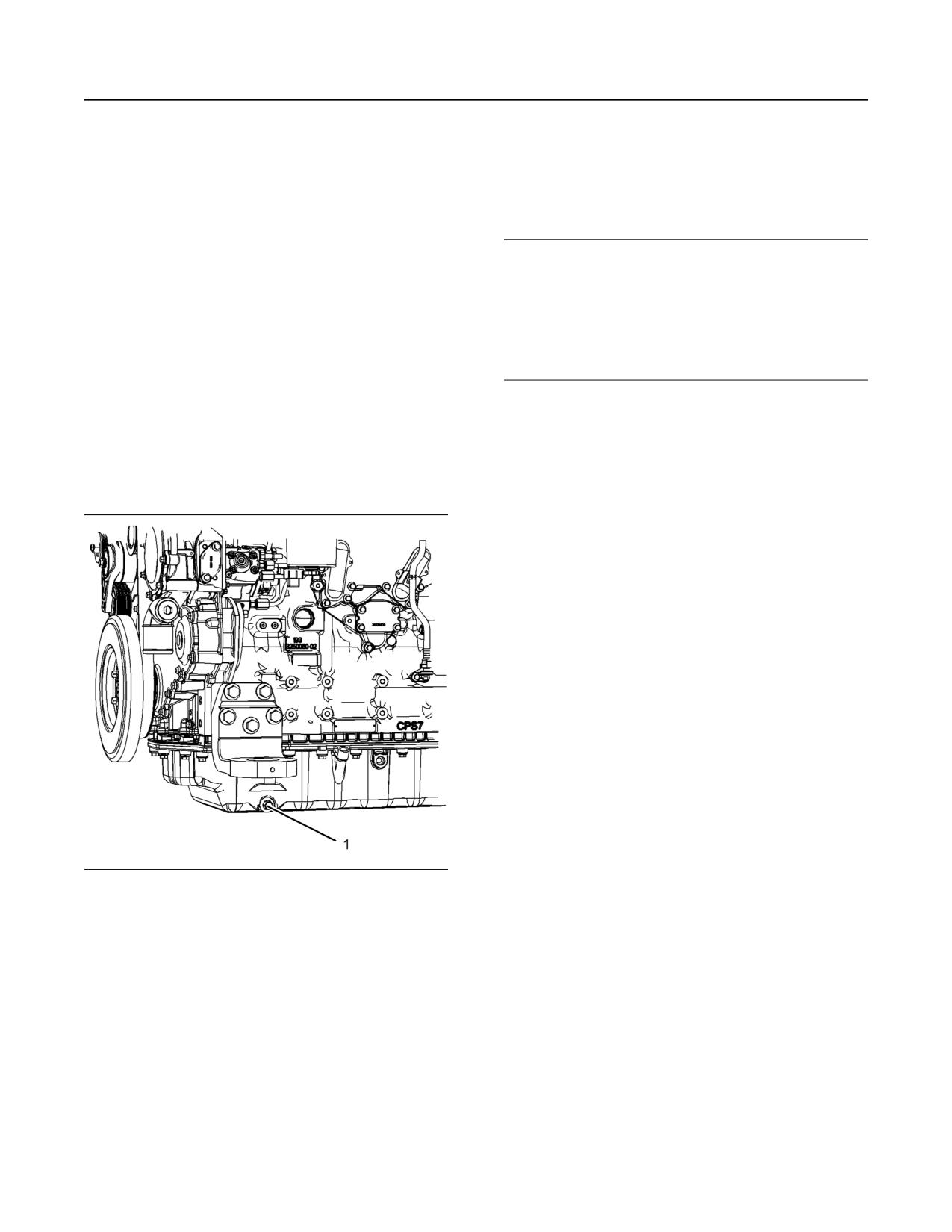
Illustration 97
g01880893
Typical example
• If the engine is equipped with a drain valve, turn
the drain valve knob counterclockwise to drain the
oil. After the oil has drained, turn the drain valve
knob clockwise to close the drain valve.
• If the engine is not equipped with a drain valve,
remove the oil drain plug (1) to allow the oil to
drain. If the engine is equipped with a shallow oil
pan, remove the bottom oil drain plugs from both
ends of the oil pan.
M0082024-03
133
Maintenance Section
Fan Clearance - Check
2. Start the engine and run the engine at “LOW IDLE”
for 2 minutes. Perform this procedure to ensure
that the lubrication system has oil and that the oil
filters are filled. Inspect the oil filter for oil leaks.
3. Stop the engine and allow the oil to drain back to
the oil pan for a minimum of 10 minutes.
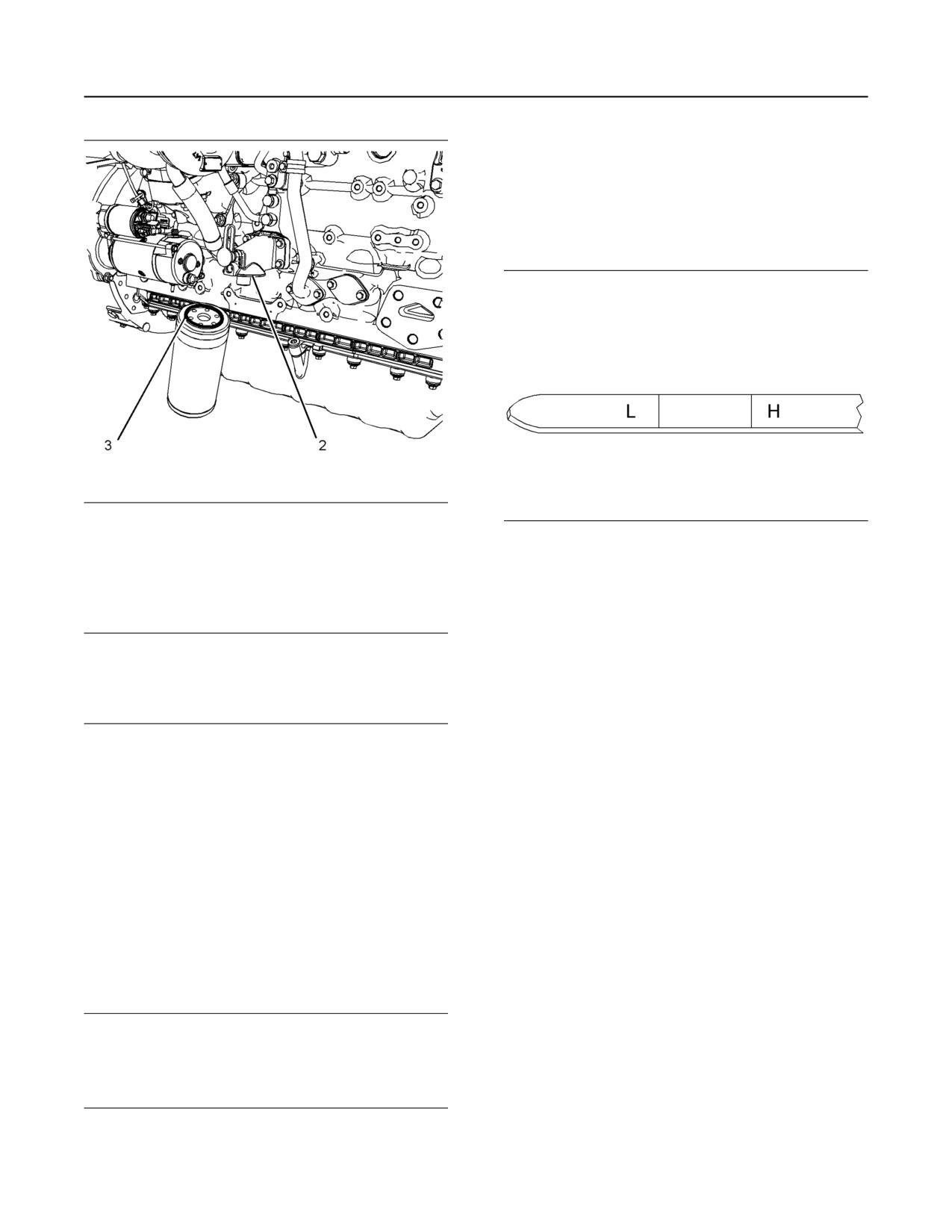
Illustration 98
g02351361
Typical example
Illustration 99
g02173847
“L” Low
3. Clean sealing surface (2).
“H” High
4. Apply clean engine oil to O ring seal (3) for the new
4. Remove the engine oil level gauge to check the oil
oil filter.
level. Maintain the oil level between the “L” and “H”
marks on the engine oil level gauge. Do not fill the
NOTICE
Do not fill the oil filters with oil before installing them.
crankcase above the “H” mark.
This oil would not be filtered and could be contami-
nated. Contaminated oil can cause accelerated wear
i05404932
to engine components or engine damage.
Fan Clearance - Check
5. Install the new oil filter. Spin on the oil filter until the
O ring contacts the sealing surface (2). Then
rotate the oil filter ¾ of a full turn.
There are different types of cooling systems that can
be installed. Refer to the Original Equipment
Manufactory (OEM) for your application for more
Fill the Oil Pan
information.
1. Remove the oil filler cap. Refer to this Operation
Ensure that the engine is stopped and allow 2
and Maintenance Manual, “Fluid
minutes before the battery disconnect switch is
Recommendations” for more information on
turned off. This procedure will allow the Diesel
Exhaust Fluid (DEF) system to purged.
suitable oils. Fill the oil pan with the correct
amount of new engine lubricating oil. Refer to this
Ensure that the cooling system is full before checking
Operation and Maintenance Manual, “Refill
the fan tip clearance. The fan tip clearance is the
Capacities” for more information on refill
distance between the tip of the fan blade (2) and the
capacities.
edge of the cover (1).
NOTICE
If equipped with an auxiliary oil filter system or a re-
mote filter system, follow the OEM or the filter manu-
factures recommendations. Under-filling or over filling
the crankcase with oil can cause engine damage.
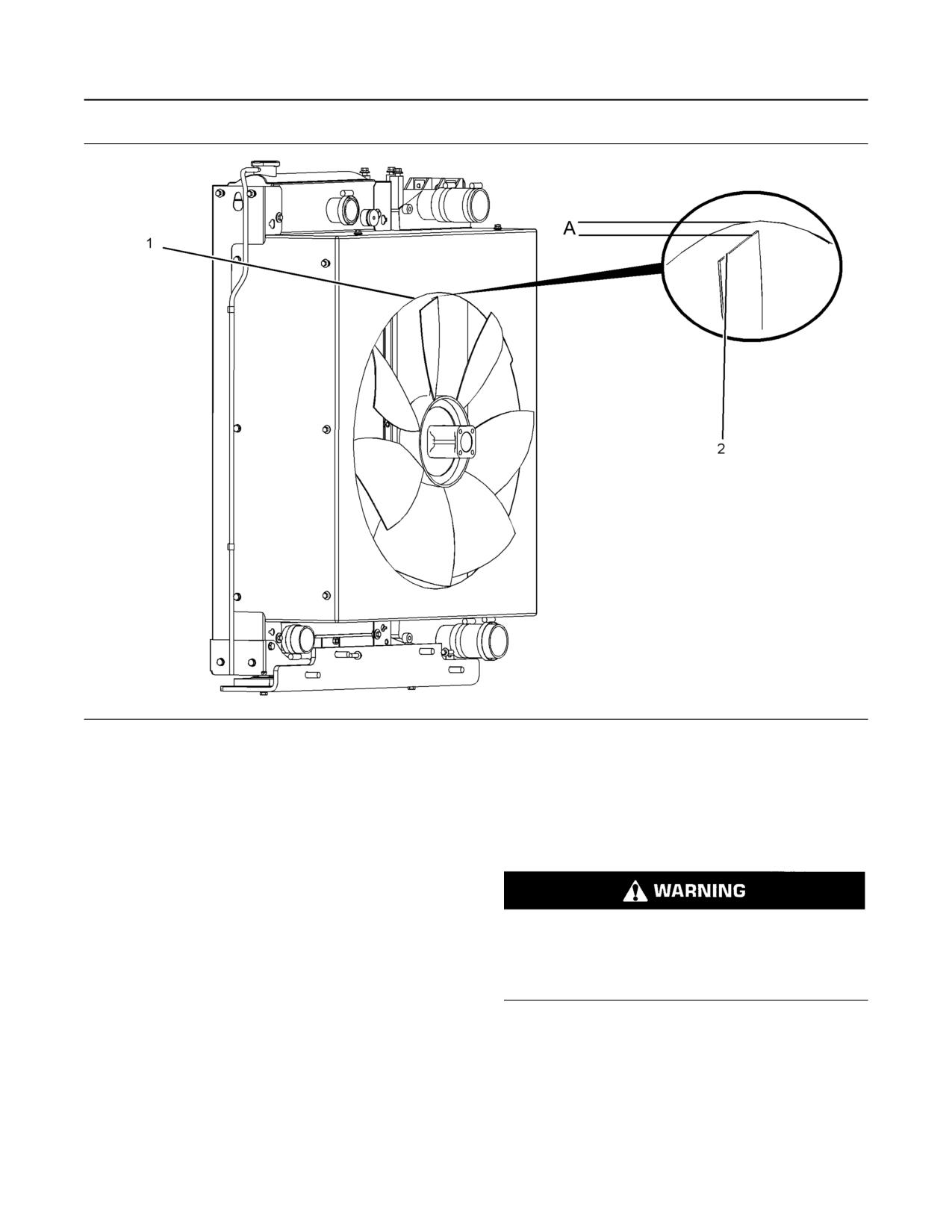
134
M0082024-03
Maintenance Section
Fuel Filter (In-Line) - Replace
Illustration 100
g03414037
Typical example
The gap (A) must be checked in the vertical position
i05814842
and in the horizontal position.
Fuel Filter (In-Line) - Replace
In the vertical position the gap can be checked at the
vertically top position or at the vertically bottom
position.
• Gap (A) vertical top position 12 ± 1 mm
(0.47244 ± 0.03937 inch).
Fuel leaked or spilled onto hot surfaces or electri-
• Gap (A) vertical bottom position 8 ± 1 mm
cal components can cause a fire. To help prevent
possible injury, turn the start switch off when
(0.31496 ± 0.03937 inch).
changing fuel filters or water separator elements.
Clean up fuel spills immediately.
After the gap (A) has been checked in the vertical top
position or the vertical bottom position, the horizontal
position must be checked.
Note: Refer to Systems Operation, Testing, and
• Gap (A) in the horizontal position must be a
Adjusting, “Cleanliness of Fuel System
minimum of 9 mm (0.35433 inch).
Components” for detailed information on the
standards of cleanliness that must be observed
If the fan tip clearance requires adjustment, refer to
during ALL work on the fuel system.
the Disassembly and Assembly manual for more
information.
M0082024-03
135
Maintenance Section
Fuel System - Prime
i05774864
NOTICE
Ensure that the engine is stopped before any servic-
ing or repair is performed.
Fuel System - Prime
The location of the in-line fuel filter will depend on the
application that the engine has been installed.
Note: Refer to Systems Operation, Testing, and
Adjusting, “Cleanliness of Fuel System
Components” for detailed information on the
standards of cleanliness that must be observed
during ALL work on the fuel system.
Ensure that all adjustments and repairs are
performed by authorized personnel that have had the
correct training.
NOTICE
Do not crank the engine continuously for more than
30 seconds. Allow the starting motor to cool for two
minutes before cranking the engine again.
If air enters the fuel system, the air must be purged
from the fuel system before the engine can be
started. Air can enter the fuel system when the
following events occur:
• The fuel tank is empty or the fuel tank has been
partially drained.
• The low-pressure fuel lines are disconnected.
Illustration 101
g03086919
Typical example
• A leak exists in the low-pressure fuel system.
1. Turn the fuel supply valve (if equipped) to the OFF
• The fuel filter has been replaced.
position. Remove any brackets that hold the in-line
Use the following procedures in order to remove air
fuel filter (1) in place, refer to OEM information.
from the fuel system:
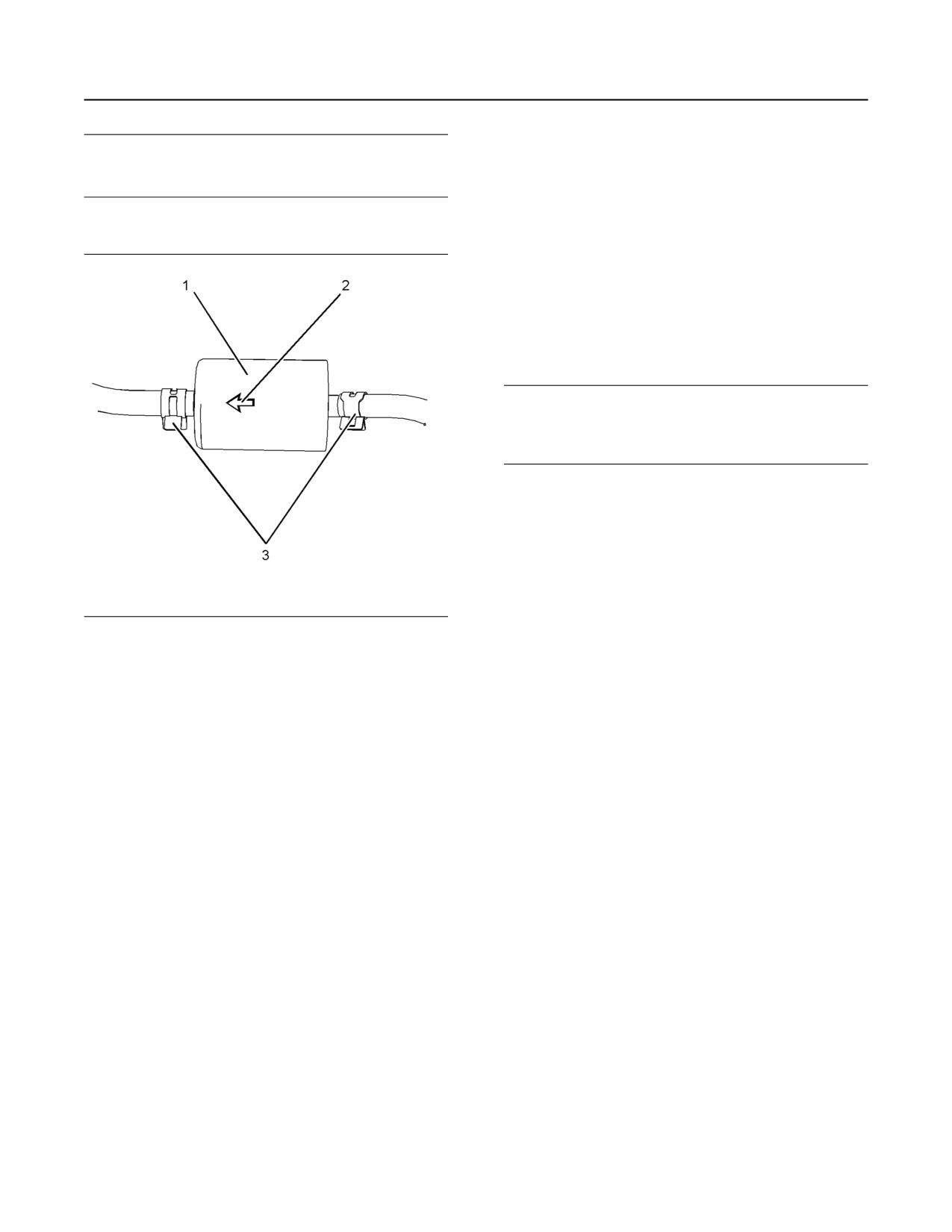
2. Release the hose clips (3) and remove the hose
1. Ensure that the fuel system is in working order.
lines from the in-line fuel filter. Remove the in-line
Check that the fuel supply valve (if equipped) is in
filter.
the “ON” position.
3. Install a new in-line filter and secure, refer to OEM
2. Turn the keyswitch to the “RUN” position.
information. Ensure that the arrow mark (2) is
aligned to the direction of fuel flow from the tank to
3. The keyswitch will allow the electric priming pump
the fuel pump.
to operate. Operate the electric priming pump. The
ECM will stop the pump after 2 minutes.
4. Install the fuel hose lines and install the hose clips
(3). Turn the fuel supply valve (if equipped) to the
4. Turn the keyswitch to the “OFF” position. The fuel
ON position.
system should now be primed and the engine
should be able to start.
5. The in-line fuel filter must be changed with the
primary filter and the secondary fuel filter. The fuel
5. Operate the engine starter and crank the engine.
system will need to be primed, refer to Operation
After the engine has started, operate the engine at
and Maintenance Manual, “Fuel System - Prime”
low idle for a minimum of 5 minutes. Ensure that
for more information.
the fuel system is free from leaks.
Note: Operating the engine for this period will help
ensure that the fuel system is free of air. DO NOT
loosen the high-pressure fuel lines in order to
purge air from the fuel system. This procedure is
not required.
136
M0082024-03
Maintenance Section
Fuel System Primary Filter (Water Separator) Element - Replace
After the engine has stopped, you must wait for 10
minutes in order to allow the fuel pressure to be
purged from the high-pressure fuel lines before any
service or repair is performed on the engine fuel
lines. The 10 minute wait will also allow static charge
to dissipate from the low-pressure fuel system. If
necessary, perform minor adjustments. Repair any
leaks from the low-pressure fuel system and from the
cooling, lubrication, or air systems. Replace any high-
pressure fuel line that has leaked. Refer to
Disassembly and Assembly Manual, “Fuel Injection
Lines - Install”.
If you inspect the engine in operation, always use the
proper inspection procedure in order to avoid a fluid
penetration hazard. Refer to Operation and
Maintenance Manual, “General hazard Information”.
If the engine will not start, refer to Troubleshooting,
“Engine Cranks but will not Start”.
i06217529
Fuel System Primary Filter
Illustration 102
g03858194
Typical example
(Water Separator) Element -
Replace
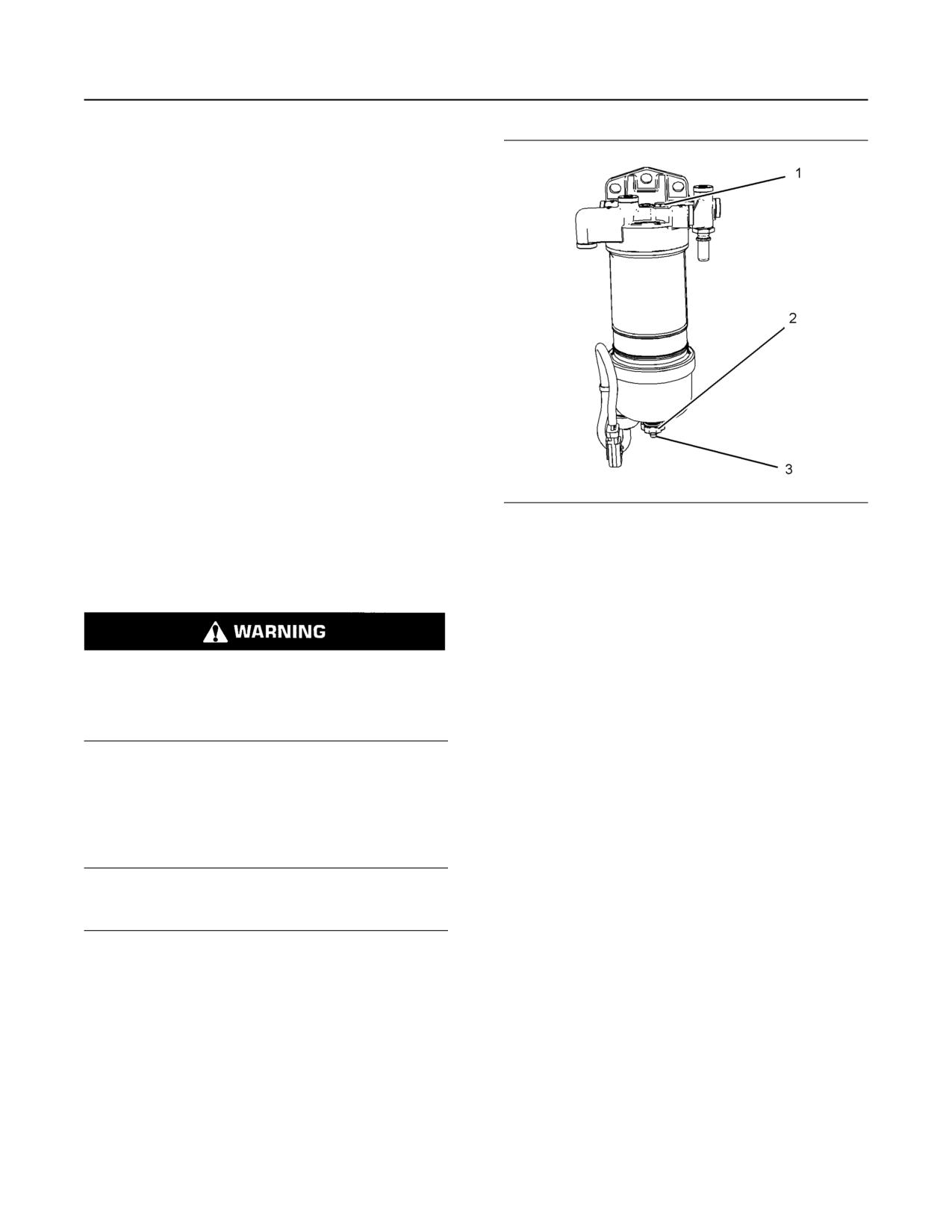
3. Install a suitable tube onto drain (3). Open the
drain valve (2). Rotate the drain valve
counterclockwise. Two full turns are required.
4. Loosen the vent screw (1).
5. Allow the fuel to drain into the container. If the fuel
Fuel leaked or spilled onto hot surfaces or electri-
cal components can cause a fire. To help prevent
will not drain, loosen the vent screw on the
possible injury, turn the start switch off when
secondary fuel filter.
changing fuel filters or water separator elements.
Clean up fuel spills immediately.
Note: In some applications, the vent screw on the
secondary fuel filter will need to be open in order to
drain the primary fuel filter.
Note: Refer to Systems Operation, Testing, and
Adjusting, “Cleanliness of Fuel System
6. Remove the tube from the drain valve.
Components” for detailed information on the
7. Tighten the vent screw (1) to a torque of 2.5 N·m
standards of cleanliness that must be observed
during ALL work on the fuel system.
(22 lb in). If necessary, tighten the vent screw on
the secondary fuel filter. Tighten to a torque of
2.5 N·m (22 lb in). Remove the wiring harness
NOTICE
Ensure that the engine is stopped before any servic-
from connection (4).
ing or repair is performed.
8. Rotate filter bowl (6) counterclockwise and remove
the filter bowl from assembly.
Remove the Element
1. Turn the fuel supply valve (if equipped) to the OFF
position before performing this maintenance.
2. Place a suitable container under the water
separator in order to catch any fuel that might spill.
Clean up any spilled fuel. Clean the outside body
of the filter assembly.
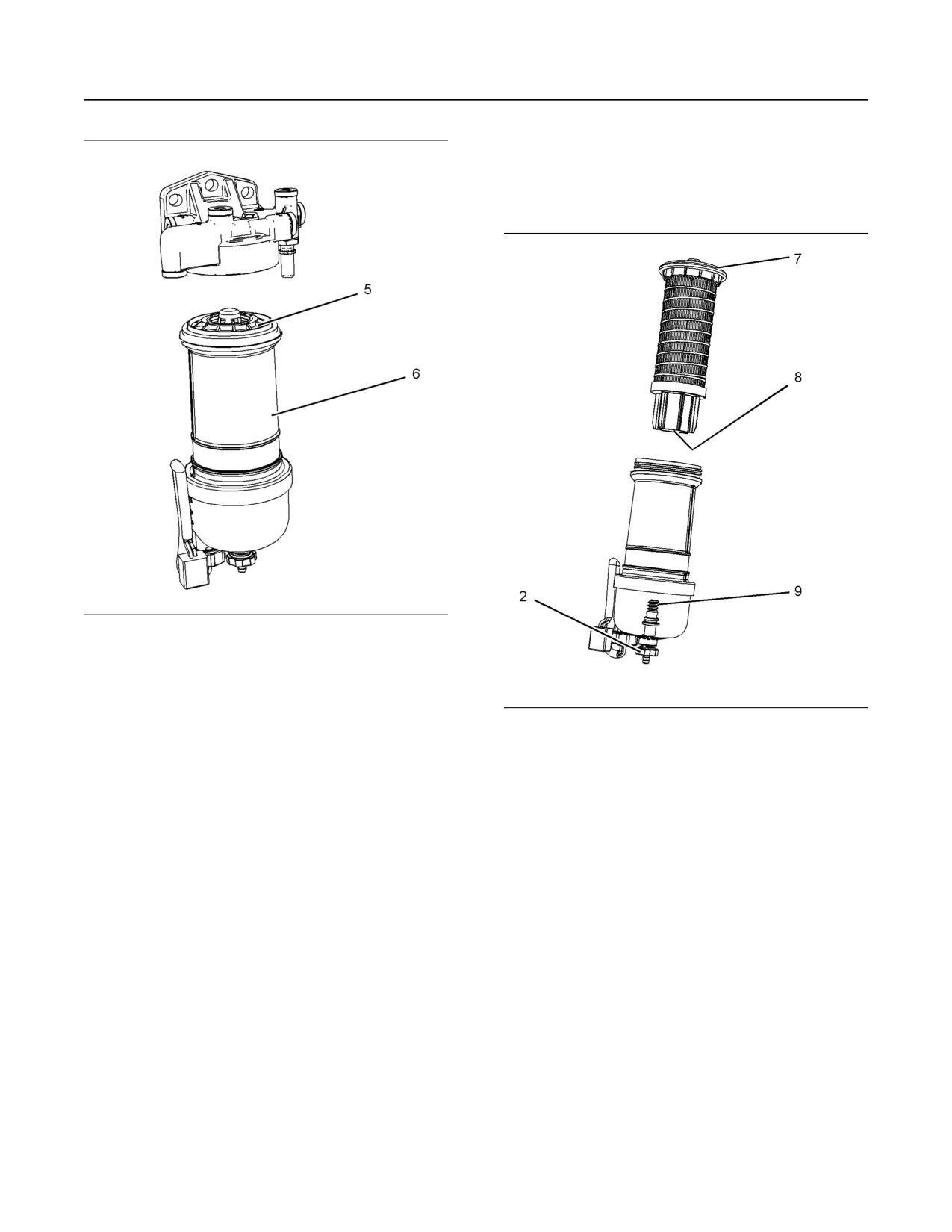
M0082024-03
137
Maintenance Section
Fuel System Primary Filter (Water Separator) Element - Replace
9. Rotate the filter element (5) counterclockwise and
remove the filter element . Clean the filter bowl.
Install the New Filter Element
Illustration 103
g03858640
Typical example
Illustration 104
g03086798
Typical example
1. Locate the thread in the new filter element (8) onto
the threads (9). Spin on the filter element and
tighten the drain valve (2) securely.
2. Lubricate the O ring seal (7) with clean engine oil.
Do NOT fill the bowl with fuel before the assembly
is installed.
3. Do not use a tool in order to install the filter
assembly. Tighten the filter bowl (6) by hand.
Install the filter bowl (6). Turn the filter bowl
clockwise until the filter bowl locks into position
against the stops.
4. Remove the container and dispose of the fuel in a
safe place.
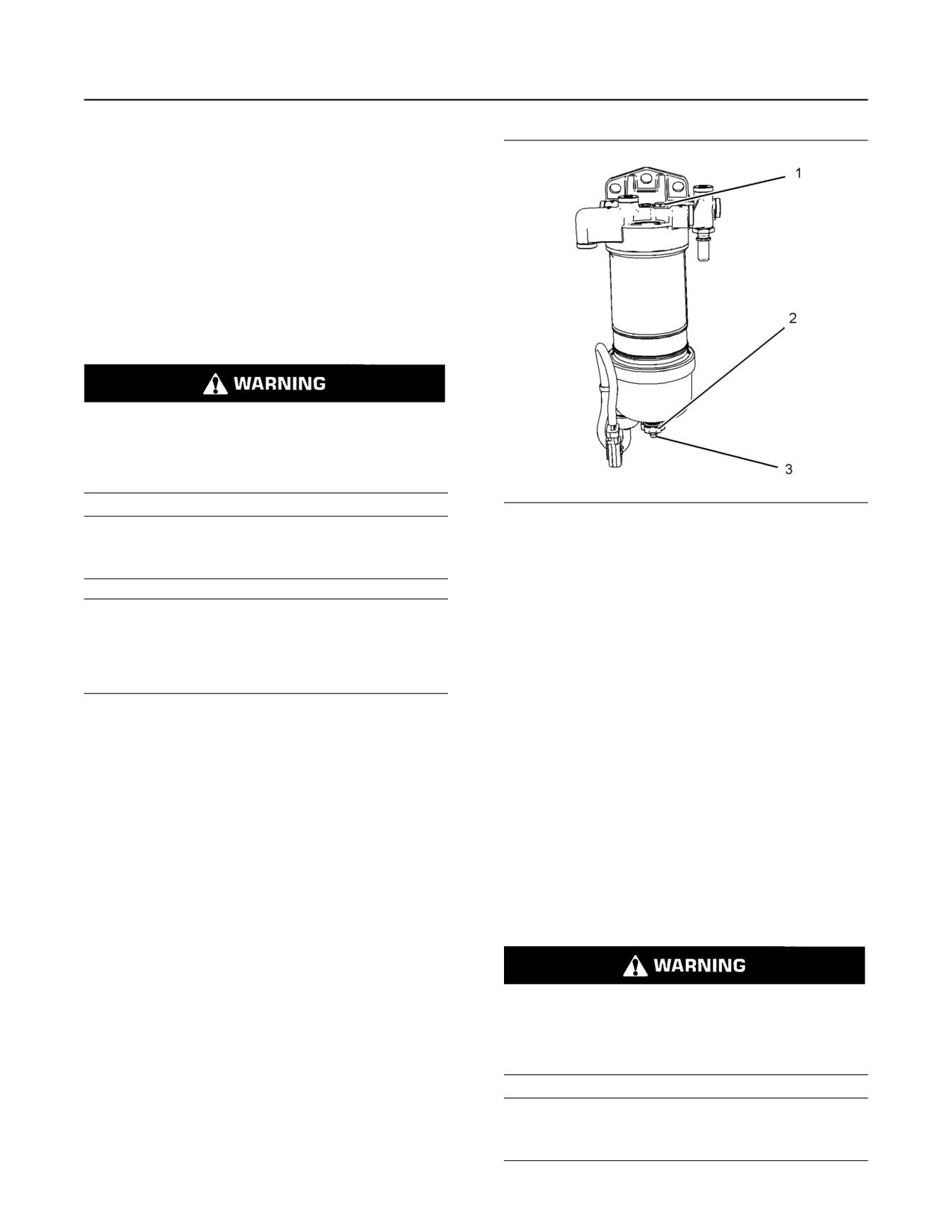
138
M0082024-03
Maintenance Section
Fuel System Primary Filter/Water Separator - Drain
5. The secondary filter element must be replaced at
the same time as the primary filter element. Also,
the in-line filter must be changed. Refer to the
Operation and Maintenance Manual , “Fuel
System Filter - Replace”.
i06891342
Fuel System Primary Filter/
Water Separator - Drain
Fuel leaked or spilled onto hot surfaces or electri-
cal components can cause a fire. To help prevent
possible injury, turn the start switch off when
changing fuel filters or water separator elements.
Clean up fuel spills immediately.
Illustration 105
g03858194
NOTICE
Typical example
Ensure that the engine is stopped before any servic-
ing or repair is performed.
3. Install a suitable tube onto drain (3). Open the
drain valve (2). Rotate the drain valve
counterclockwise. Two full turns are required.
NOTICE
Loosen vent screw (1).
The water separator can be under suction during nor-
mal engine operation. Ensure that the drain valve is
4. Visually check that the fluid will drain. Allow the
tightened securely to help prevent air from entering
fluid to drain into the container.
the fuel system.
5. When fluid free from water comes from the primary
fuel filter, tighten the drain valve clockwise by hand
Drain Procedure
pressure only. Remove the tube and remove the
container.
1. Place a suitable container under the water
6. Tighten the vent screw to a torque of 2.5 N·m
separator to catch any fluid that might spill. Clean
(22 lb in).
up any spilled fluid.
2. Ensure that the outer body of the filter assembly is
i06217548
clean and free from dirt.
Fuel System Secondary Filter -
Replace
Fuel leaked or spilled onto hot surfaces or electri-
cal components can cause a fire. To help prevent
possible injury, turn the start switch off when
changing fuel filters or water separator elements.
Clean up fuel spills immediately.
NOTICE
Ensure that the engine is stopped before any servic-
ing or repair is performed.
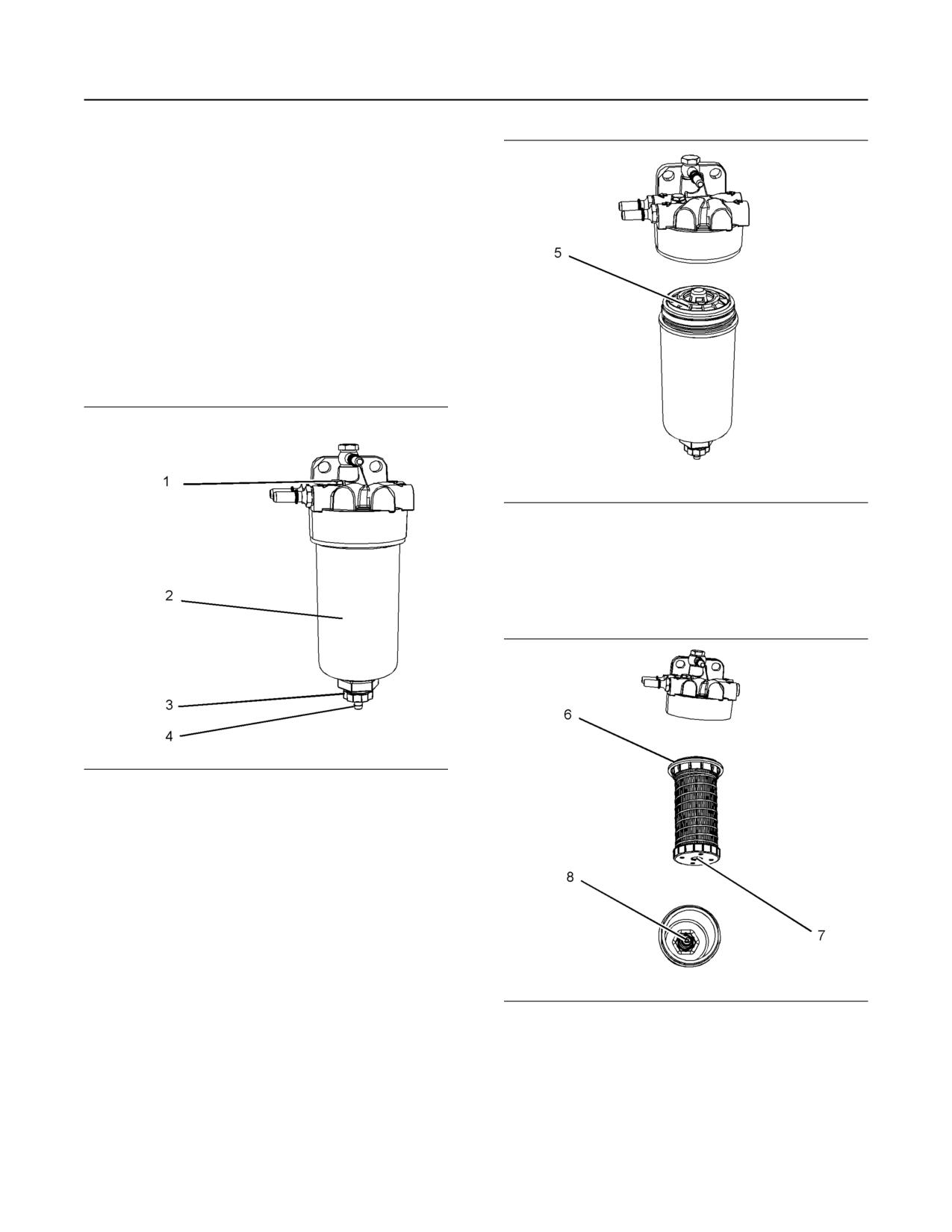
M0082024-03
139
Maintenance Section
Fuel System Secondary Filter - Replace
Refer to Systems Operation, Testing, and
Adjusting, “Cleanliness of Fuel System
Components” for detailed information on the
standards of cleanliness that must be observed
during ALL work on the fuel system.
Remove the Element
1. Turn the fuel supply valve (if equipped) to the OFF
position before performing this maintenance.
2. Place a suitable container under the fuel filter in
order to catch any fuel that might spill. Clean up
any spilled fuel. Clean the outside body of the filter
assembly.
Illustration 107
g02546456
7. Rotate the filter element (5) counterclockwise and
remove the filter element. Clean the filter bowl.
Install the Element
Illustration 106
g03088718
3. Install a suitable tube onto drain (4). Open the
drain valve (3). Rotate the drain valve
counterclockwise. Two full turns are required.
Loosen vent screw (1).
4. Allow the fuel to drain into the container and
remove the tube.
5. Tighten the vent screw (1) to a torque of 2.5 N·m
(22 lb in).
6. Remove the filter bowl (2). Rotate the filter
assembly counterclockwise in order to remove the
Illustration 108
g03088837
assembly.
1. Locate the thread (7) in the filter element onto the
threads (8). Spin on the element and tighten the
drain valve (3) by hand.
2. Lubricate the O ring seal (6) with clean engine oil.
Do NOT fill the filter bowl (2) with fuel before the
filter assembly is installed.
140
M0082024-03
Maintenance Section
Fuel Tank Water and Sediment - Drain
3. Do not use a tool in order to install the filter
Open the drain valve on the bottom of the fuel tank in
assembly. Tighten the assembly by hand. Install
order to drain the water and the sediment. Close the
drain valve.
the filter bowl (2). Turn the filter bowl clockwise
until the filter bowl locks into position against the
Check the fuel daily. Allow five minutes after the fuel
stops.
tank has been filled before draining water and
sediment from the fuel tank.
4. Turn the fuel supply valve to the ON position.
Fill the fuel tank after operating the engine in order to
5. The primary fuel filter the secondary fuel filter must
drive out moist air. This will help prevent
be replaced at the same time. Refer to the
condensation. Do not fill the tank to the top. The fuel
Operation and Maintenance Manual , “Fuel
expands as the fuel gets warm. The tank may
overflow.
System Primary Filter (Water Separator) Element -
Replace”. Also, the in-line fuel must be replaced
Some fuel tanks use supply pipes that allow water
when the primary and secondary filters are
and sediment to settle below the end of the fuel
replaced. Refer to Operation and Maintenance
supply pipe. Some fuel tanks use supply lines that
take fuel directly from the bottom of the tank. If the
Manual , “Fuel Filter (In-Line)- Replace”
engine is equipped with this system, regular
6. Prime the fuel system. Refer to the Operation and
maintenance of the fuel system filter is important.
Maintenance Manual, “Fuel System - Prime” for
more information.
Fuel Storage Tanks
i02348492
Drain the water and the sediment from the fuel
storage tank at the following intervals:
Fuel Tank Water and Sediment
• Weekly
- Drain
• Service intervals
• Refill of the tank
NOTICE
This will help prevent water or sediment from being
Care must be taken to ensure that fluids are con-
pumped from the storage tank into the engine fuel
tained during performance of inspection, mainte-
tank.
nance, testing, adjusting and repair of the product.
Be prepared to collect the fluid with suitable contain-
If a bulk storage tank has been refilled or moved
ers before opening any compartment or disassem-
recently, allow adequate time for the sediment to
bling any component containing fluids.
settle before filling the engine fuel tank. Internal
baffles in the bulk storage tank will also help trap
Dispose of all fluids according to local regulations
sediment. Filtering fuel that is pumped from the
and mandates.
storage tank helps to ensure the quality of the fuel.
When possible, water separators should be used.
Fuel Tank
i07819616
Fuel quality is critical to the performance and to the
Hoses and Clamps - Inspect/
service life of the engine. Water in the fuel can cause
excessive wear to the fuel system.
Replace
Water can be introduced into the fuel tank when the
fuel tank is being filled.
Condensation occurs during the heating and cooling
of fuel. The condensation occurs as the fuel passes
through the fuel system and the fuel returns to the
Contact with high pressure fuel may cause fluid
fuel tank. This causes water to accumulate in fuel
penetration and burn hazards. High pressure fuel
tanks. Draining the fuel tank regularly and obtaining
spray may cause a fire hazard. Failure to follow
fuel from reliable sources can help to eliminate water
these inspection, maintenance and service in-
in the fuel.
structions may cause personal injury or death.
If you inspect the engine in operation, always use the
Drain the Water and the Sediment
proper inspection procedure to avoid a fluid
penetration hazard. Refer to Operation and
Fuel tanks should contain some provision for draining
Maintenance Manual, “General hazard Information”
water and draining sediment from the bottom of the
and Operation and Maintenance Manual, “High
fuel tanks.
Pressure Fuel Lines” for the correct procedures.
M0082024-03
141
Maintenance Section
Injector (Diesel Exhaust Fluid) (Emissions Related Component) - Replace
Inspect all hoses for leaks that are caused by the
following conditions:
Pressurized System: Hot coolant can cause seri-
• Cracking
ous burns. To open the cooling system filler cap,
stop the engine and wait until the cooling system
• Softness
components are cool. Loosen the cooling system
pressure cap slowly in order to relieve the
• Loose clamps
pressure.
Replace hoses that are cracked or soft. Tighten any
loose clamps.
1. Stop the engine. Allow the engine to cool.
Check for the following conditions:
2. Loosen the cooling system filler cap slowly to
relieve any pressure. Remove the cooling system
• End fittings that are damaged or leaking
filler cap.
• Outer covering that is chafed or cut
Note: Drain the coolant into a suitable, clean
• Exposed wire that is used for reinforcement
container. The coolant can be reused.
• Outer covering that is ballooning locally
3. Drain the coolant from the cooling system to a
level that is below the hose that is being replaced.
• Flexible part of the hose that is kinked or crushed
4. Remove the hose clamps.
• Armoring that is embedded in the outer covering
5. Disconnect the old hose.
A constant torque hose clamp can be used in place
6. Replace the old hose with a new hose.
of any standard hose clamp. Ensure that the constant
torque hose clamp is the same size as the standard
7. Install the hose clamps with a torque wrench.
clamp.
Note: For the correct coolant, see this Operation and
Due to extreme temperature changes, the hose will
Maintenance Manual, “Fluid Recommendations”.
harden. Hardening of the hoses will cause hose
clamps to loosen. This can result in leaks. A constant
8. Refill the cooling system. Refer to the OEM
torque hose clamp will help to prevent loose hose
information for further information on refilling the
clamps.
cooling system.
Each installation application can be different. The
differences depend on the following factors:
9. Clean the cooling system filler cap. Inspect the
cooling system filler cap's seals. Replace the
• Type of hose
cooling system filler cap if the seals are damaged.
Install the cooling system filler cap.
• Type of fitting material
10. Start the engine. Inspect the cooling system for
• Anticipated expansion and contraction of the hose
leaks.
• Anticipated expansion and contraction of the
i07679023
fittings
Injector (Diesel Exhaust Fluid)
Replace the Hoses and the Clamps
(Emissions Related
Refer to the OEM information for further information
Component) - Replace
on removing and replacing fuel hoses (if equipped).
The following text describes a typical method of
replacing coolant hoses. Refer to the OEM
• DEF
Diesel Exhaust Fluid
information for further information on the coolant
system and the hoses for the coolant system.
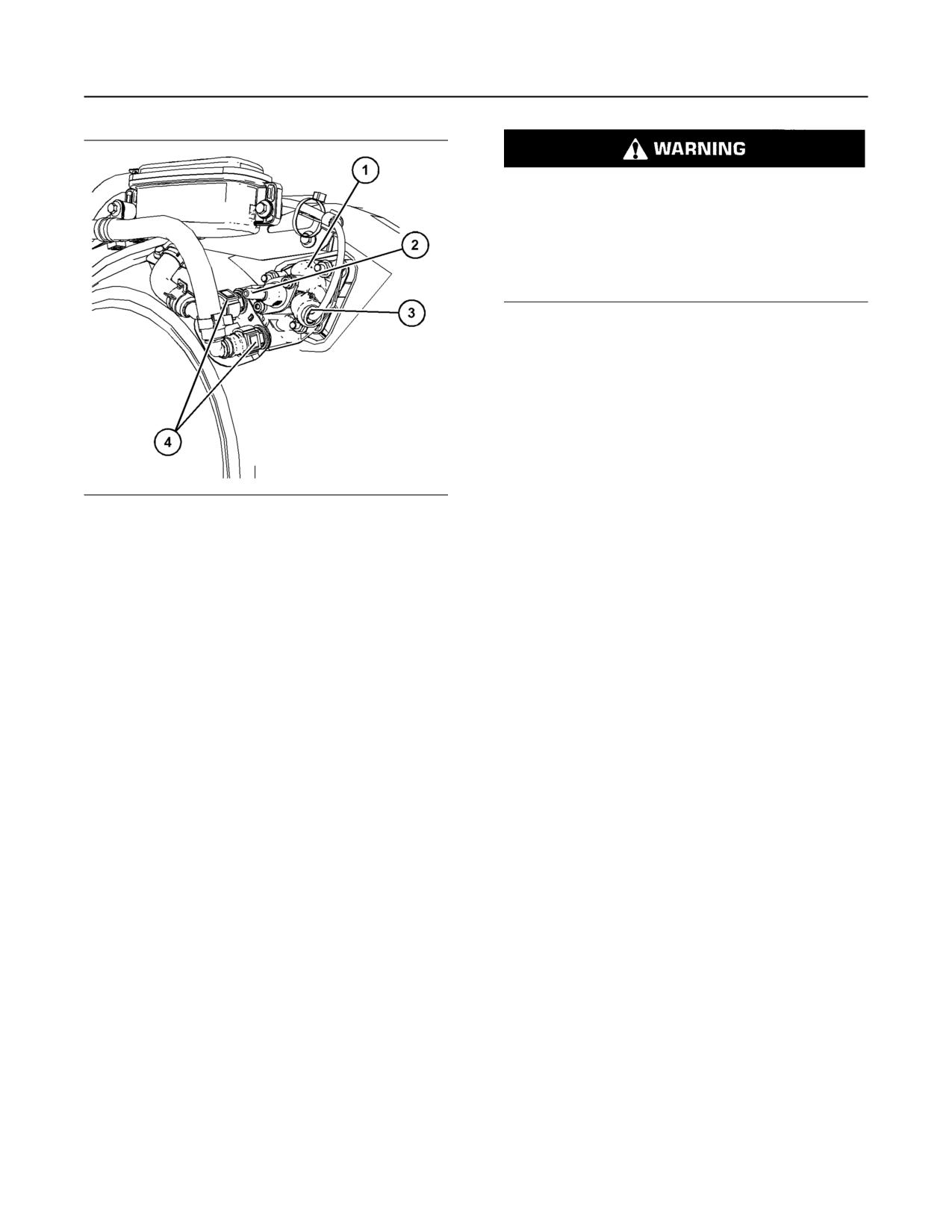
142
M0082024-03
Maintenance Section
Radiator - Clean
Personal injury can result from air pressure.
Personal injury can result without following prop-
er procedure. When using pressure air, wear a
protective face shield and protective clothing.
Maximum air pressure at the nozzle must be less
than 205 kPa (30 psi) for cleaning purposes.
Pressurized air is the preferred method for removing
loose debris. Direct the air in the opposite direction to
the fan's air flow. Hold the nozzle approximately
6 mm (0.25 inch) away from the radiator fins. Slowly
move the air nozzle in a direction that is parallel with
the radiator tube assembly. This will remove debris
that is between the tubes.
Pressurized water may also be used for cleaning.
The maximum water pressure for cleaning purposes
must be less than 275 kPa (40 psi). Use pressurized
Illustration 109
g06158030
water in order to soften mud. Clean the core from
both sides.
Typical example
(1) DEF injector
Use a degreaser and steam for removal of oil and
(2) DEF connector
grease. Clean both sides of the core. Wash the core
(3) Electrical connector
with detergent and hot water. Thoroughly rinse the
(4) Coolant connector
core with clean water.
For a detailed procedure to remove and install the
If the radiator is blocked internally, refer to the OEM
DEF injector (1), refer to Disassembly and Assembly,
Manual for information regarding flushing the cooling
DEF Injector and Mounting - Remove and Install.
system.
After installation of the DEF injector, use the
After cleaning the radiator, start the engine. Allow the
electronic service tool to perform the “DEF Dosing
engine to operate at low idle speed for three to five
System Verification test” .
minutes. Accelerate the engine to high idle. This will
help in the removal of debris and the drying of the
i02335774
core. Slowly reduce the engine speed to low idle and
then stop the engine. Use a light bulb behind the core
in order to inspect the core for cleanliness. Repeat
Radiator - Clean
the cleaning, if necessary.
Inspect the fins for damage. Bent fins may be opened
The radiator is not usually supplied by Perkins. The
with a “comb”. Inspect these items for good condition:
following text describes a typical cleaning procedure
Welds, mounting brackets, air lines, connections,
for the radiator. Refer to the OEM information for
clamps and seals. Make repairs, if necessary.
further information on cleaning the radiator.
i07888480
Note: Adjust the frequency of cleaning according to
the effects of the operating environment.
Starting Motor - Inspect
Inspect the radiator for these items: Damaged fins,
corrosion, dirt, grease, insects, leaves, oil and other
debris. Clean the radiator, if necessary.
Perkins recommends a scheduled inspection of the
starting motor. If the starting motor fails, the engine
may not start in an emergency situation.
Check the starting motor for correct operation. Check
the electrical connections and clean the electrical
connections. Refer to the Systems Operation, Testing
and Adjusting Manual, “Electric Starting System -
Test” for more information on the checking procedure
and for specifications consult your Perkins dealer or
your Perkins distributor for assistance.
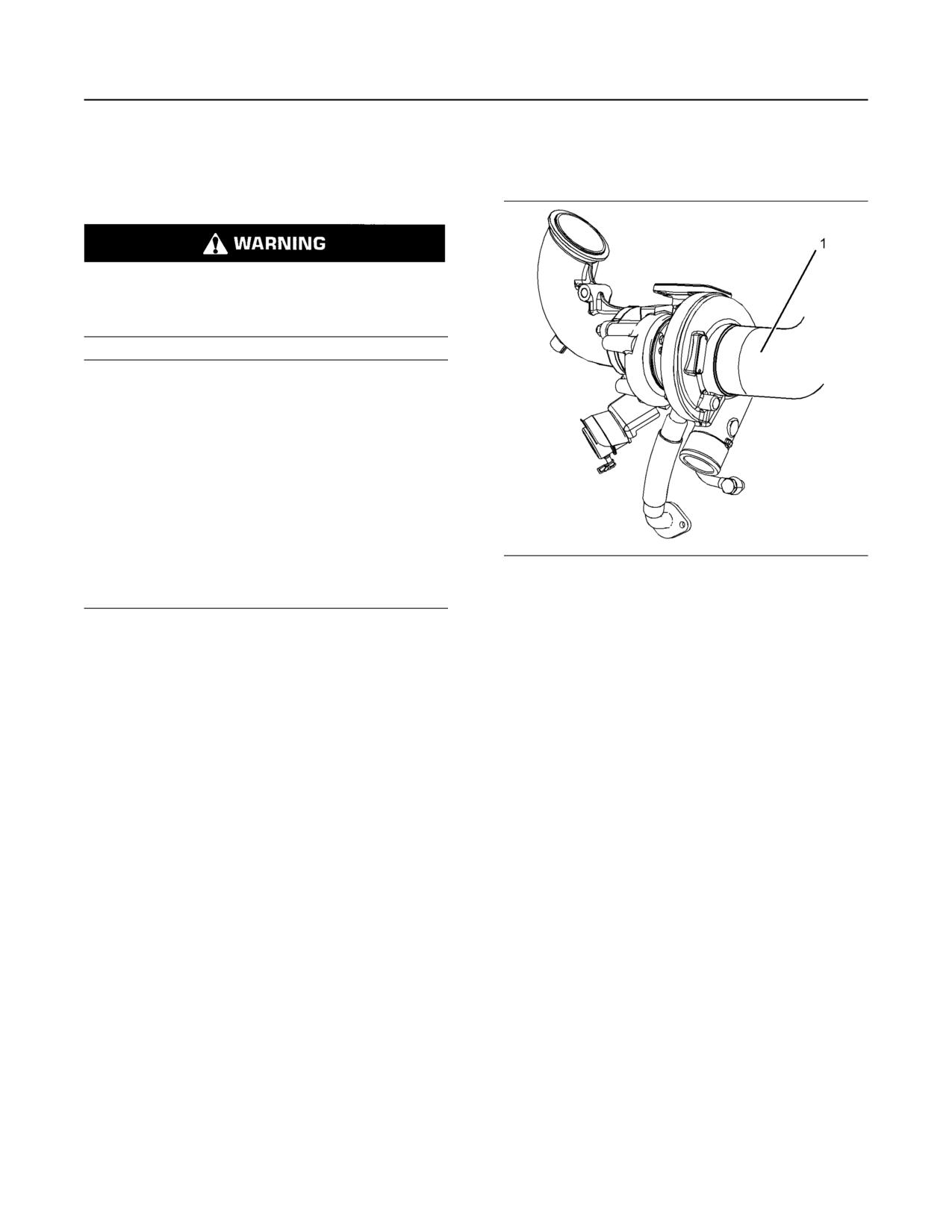
M0082024-03
143
Maintenance Section
Turbocharger - Inspect
i04922217
Engine Installed with Single
Turbocharger
Turbocharger - Inspect
Hot engine components can cause injury from
burns. Before performing maintenance on the en-
gine, allow the engine and the components to
cool.
NOTICE
Turbocharger bearing failures can cause large quan-
tities of oil to enter the air intake and exhaust sys-
tems. Loss of engine lubricant can result in serious
engine damage.
Minor leakage of oil into a turbocharger under ex-
tended low idle operation should not cause problems
as long as a turbocharger bearing failure has not
occured.
When a turbocharger bearing failure is accompanied
by a significant engine performance loss (exhaust
Illustration 110
g03089297
smoke or engine rpm up at no load), do not continue
engine operation until the turbocharger is renewed.
1. Ensure that the turbocharger is clean and free from
A visual inspection of the turbocharger or
dirt before removing components for inspection.
turbochargers can minimize unscheduled downtime.
2. Remove the pipe from the turbocharger exhaust
A visual inspection of the turbocharger or
turbochargers can also reduce the chance for
outlet and remove the air intake pipe (1). Visually
potential damage to other engine parts. Do not
inspect the piping for the presence of oil. Clean the
inspect the engine with the engine in operation.
interior of the pipes in order to prevent dirt from
entering during reassembly.
3. Check for obvious heat discoloration of the
turbocharger. Check for any loose bolts or any
missing bolts. Check for damage to the oil supply
line and the oil drain line. Check for cracks in the
housing of the turbocharger. Ensure that the
compressor wheel can rotate freely.
4. Check for the presence of oil. If oil is leaking from
the back side of the compressor wheel, there is a
possibility of a failed turbocharger oil seal.
The presence of oil may be the result of extended
engine operation at low idle. The presence of oil
may also be the result of a restriction of the line for
the intake air (clogged air filters), which causes the
turbocharger to slobber.
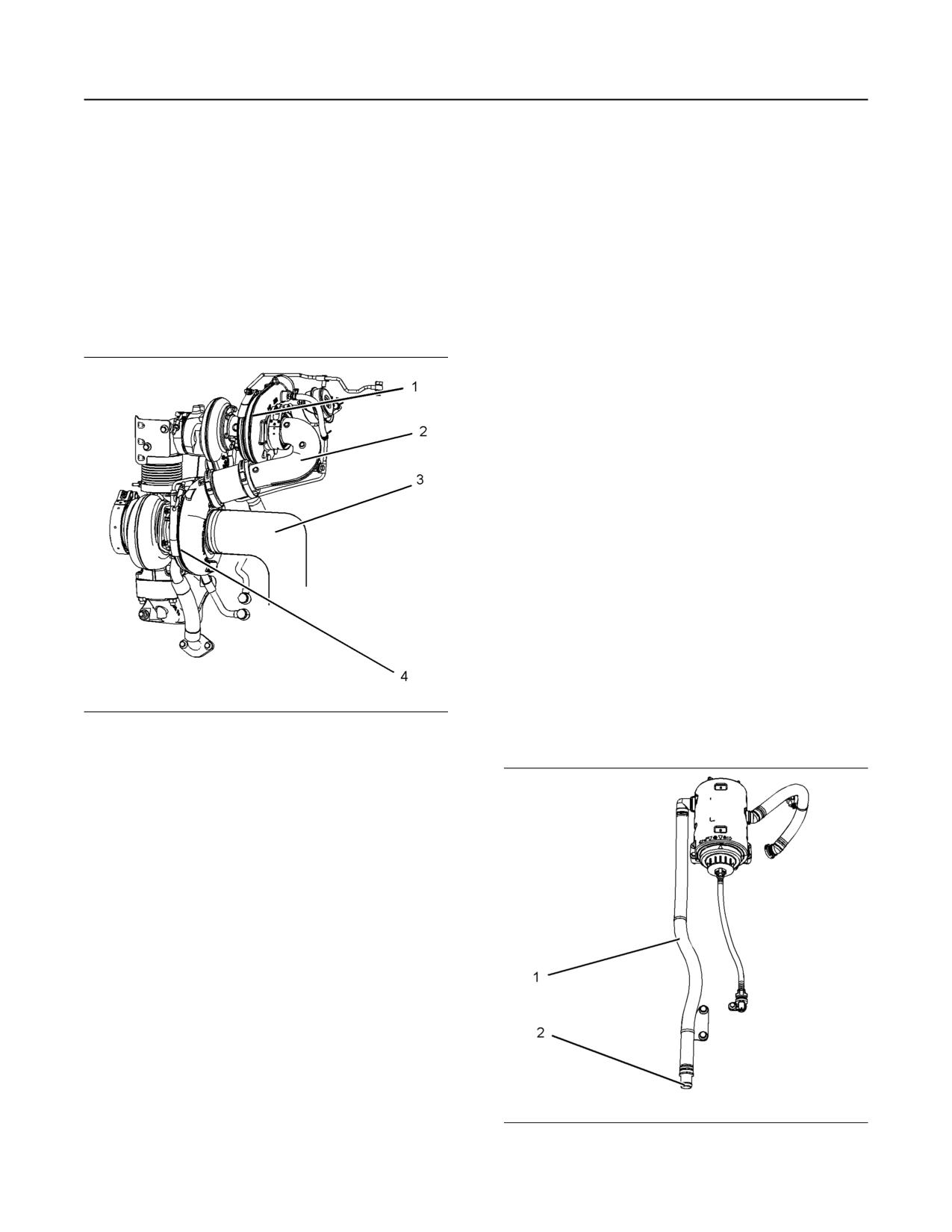
144
M0082024-03
Maintenance Section
Walk-Around Inspection
5. Install the air intake pipe and the exhaust outlet
4. Check for obvious heat discoloration of the
pipe to the turbocharger housing. Ensure that all
turbocharger. Check for any loose bolts or any
clamps are installed correctly and that all clamps
missing bolts. Check for damage to the oil supply
are tightened securely. For more information, refer
line and the oil drain line. Check for cracks in the
to Systems Operation, Testing, and Adjusting,
housing of the turbocharger. Ensure that the
“Turbocharger - Inspect”.
compressor wheel can rotate freely.
5. Check for the presence of oil. If oil is leaking from
Engine Installed with High
the back side of the compressor wheel, there is a
Pressure Turbocharger and Low
possibility of a failed turbocharger oil seal.
Pressure Turbocharger
The presence of oil may be the result of extended
engine operation at low idle. The presence of oil
may also be the result of a restriction of the line for
the intake air (clogged air filters), which causes the
turbocharger to slobber.
6. Inspect the bore of the housing of the turbine outlet
for corrosion.
7. Install the air intake pipe and the exhaust outlet
pipe to the turbocharger housing. Ensure that all
clamps are installed correctly and that all clamps
are tightened securely. For more information, refer
to Systems Operation, Testing, and Adjusting,
“Turbocharger - Inspect”.
i07676516
Walk-Around Inspection
Inspect the Tube of the Crankcase
Illustration 111
g03089316
Breather
The engine is equipped with a high-pressure
turbocharger (1) and a low-pressure turbocharger
(4). A regular visual inspection of both turbochargers
is recommended. If the turbocharger fails during
engine operation, damage to the turbocharger
compressor wheel and/or to the engine may occur.
Damage to the turbocharger compressor wheel can
damage the pistons, the valves, and the cylinder
head.
1. Ensure that the turbochargers are clean and free
from dirt before removing components for
inspection.
2. Remove the pipe from the high-pressure
turbocharger exhaust outlet and remove the air
intake pipe (3 ) to the turbocharger. Visually
inspect the piping for the presence of oil. Clean the
interior of the pipes in order to prevent dirt from
entering during reassembly.
3. Remove elbow (2) and check for the presence of
engine oil.
Illustration 112
g02351425
Typical example
M0082024-03
145
Maintenance Section
Walk-Around Inspection
Inspect the breather outlet pipe (1) for damage.
• Inspect the piping for the air intake system and the
Ensure that the outlet tip (2) is clean and free from
elbows for cracks and for loose clamps. Ensure
any obstructions. Ice can cause obstructions in
that hoses and tubes are not contacting other
adverse weather conditions.
hoses, tubes, wiring harnesses.
• Ensure that the areas around the rotating parts are
Inspect the Engine for Leaks and
clear.
Loose Connections
• Inspect the alternator belts and any accessory
A walk-around inspection should only take a few
drive belts for cracks, breaks, or other damage.
minutes. When time is taken to perform these
checks, costly repairs and accidents can be avoided.
• Inspect the wiring harness for damage.
For maximum engine service life, make a thorough
Belts for multiple groove pulleys must be replaced as
inspection of the engine compartment before starting
matched sets. If only one belt is replaced, the belt will
the engine. Look for items such as oil leaks or
carry more load than the belts that are not replaced.
coolant leaks, loose bolts, worn belts, loose
The older belts are stretched. The additional load on
connections, and trash buildup. Make repairs, as
the new belt could cause the belt to break.
needed:
• The guards must be in the correct place. Repair
High-Pressure Fuel Lines
damaged guards or replace missing guards.
• Wipe all caps and plugs before the engine is
serviced to reduce the chance of system
Contact with high pressure fuel may cause fluid
contamination.
penetration and burn hazards. High pressure fuel
spray may cause a fire hazard. Failure to follow
NOTICE
these inspection, maintenance and service in-
For any type of leak (coolant, lube, or fuel) clean up
structions may cause personal injury or death.
the fluid. If leaking is observed, find the source and
correct the leak. If leaking is suspected, check the flu-
After the engine has stopped, you must wait for 10
id levels more often than recommended until the leak
minutes to allow the fuel pressure to be purged from
is found or fixed, or until the suspicion of a leak is
the high-pressure fuel lines before any service or
proved to be unwarranted.
repair is performed on the engine fuel lines. If
necessary, perform minor adjustments. Repair any
leaks from the low-pressure fuel system and from the
NOTICE
cooling, lubrication, or air systems. Replace any high-
Accumulated grease and/or oil on an engine is a fire
pressure fuel line that has leaked. Refer to
hazard. Remove the accumulated grease and oil. Re-
Disassembly and Assembly Manual, “Fuel Injection
fer to this Operation and Maintenance Manual, “En-
Lines - Install”.
gine - Clean” for more information.
When there is not an alternative course of action and
the engine must be in operation while it is inspected,
always use the proper inspection procedure to avoid
• Ensure that the cooling system hoses are correctly
a fluid penetration hazard. Refer to Operation and
clamped and that the cooling system hoses are
Maintenance Manual, “General hazard Information”.
tight. Check for leaks. Check the condition of all
pipes.
Visually inspect the high-pressure fuel lines for
damage or signs of fuel leakage. Replace any
• Inspect the water pump for coolant leaks.
damaged high-pressure fuel lines or high-pressure
fuel lines that have leaked.
Note: The water pump seal is lubricated by the
coolant in the cooling system. It is normal for a small
Ensure that all clips on the high-pressure fuel lines
amount of leakage to occur as the engine cools down
are in place and that the clips are not loose.
and parts contract.
• Inspect the rest of the fuel system for leaks. Look
Excessive coolant leakage may indicate the need to
for loose fuel line clamps.
replace the water pump. Remove the water pump.
Refer to Disassembly and Assembly, “Water Pump -
• Drain the water and the sediment from the fuel
Remove and Install”. For more information, consult
tank daily to ensure that only clean fuel enters the
your Perkins dealer or your Perkins distributor.
fuel system.
• Inspect the lubrication system for leaks at the front
crankshaft seal, the rear crankshaft seal, the oil
pan, the oil filters, and the rocker cover.
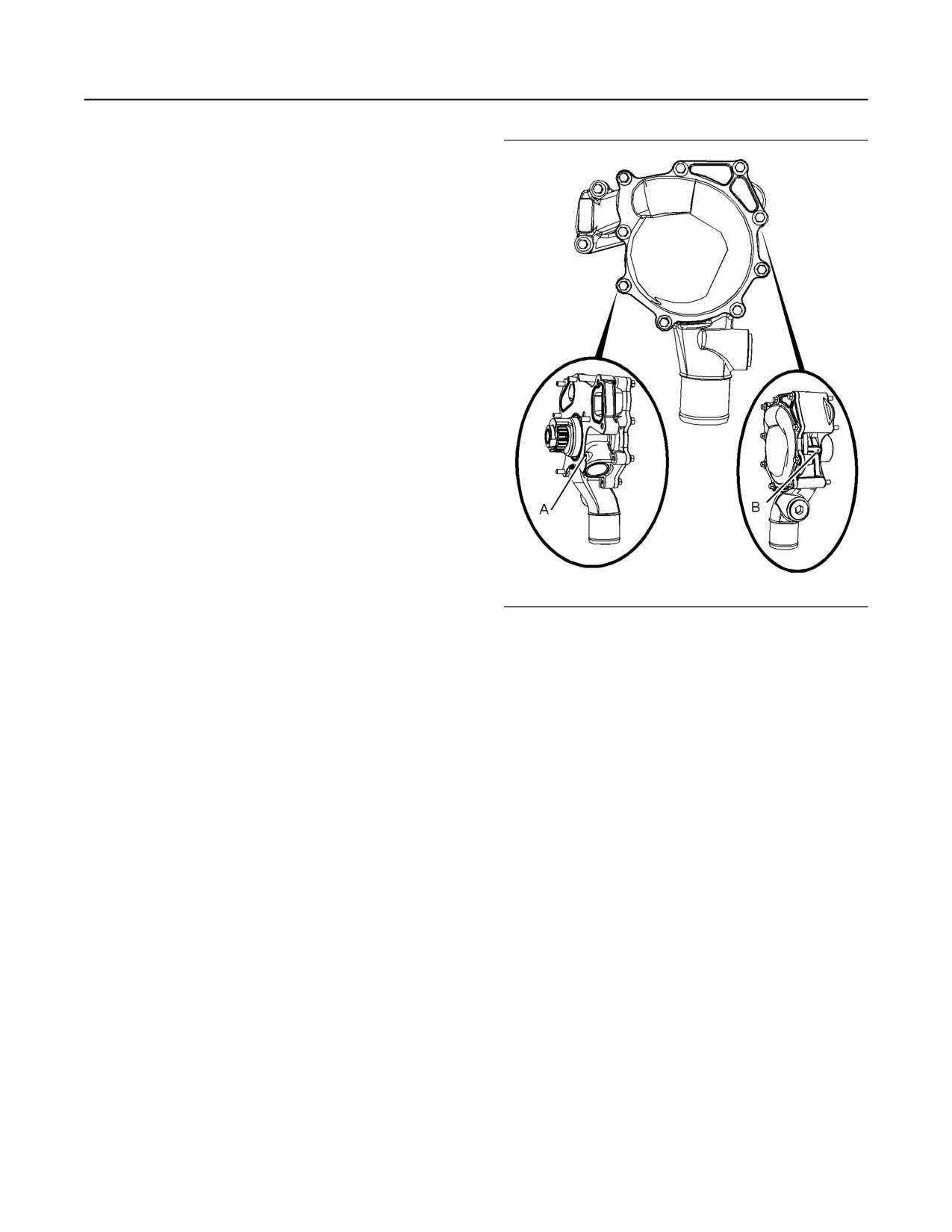
146
M0082024-03
Maintenance Section
Water Pump - Inspect
• Inspect the wiring and the wiring harnesses for
loose connections and for worn wires or frayed
wires. Check for any loose tie-wraps or missing
tie-wraps.
• Inspect the ground strap for a good connection
and for good condition.
• Disconnect any battery chargers that are not
protected against the current drain of the starting
motor. Check the condition and the electrolyte
level of the batteries, unless the engine is
equipped with a maintenance free battery.
• Check the condition of the gauges. Replace any
gauges that are cracked. Replace any gauge that
cannot be calibrated.
Engine Aftertreatment
Check the condition of the coolant lines, Diesel
Exhaust Fluid (DEF) lines, and electrical
connections. Check that all clamps, clips, and tie-
wraps are secure and in good condition. Check that
the DEF filler cap is secure and that the cap is clean
and free from dirt.
Check the level of DEF in the tank is sufficient for
operational purpose. If necessary fill the tank.
Illustration 113
g01904773
i03570653
(A) Weep hole
(B) Vent hole
Water Pump - Inspect
Note: The water pump seals are lubricated by the
coolant in the cooling system. It is normal for a small
amount of leakage to occur. Refer to illustration 113
A failed water pump may cause severe engine
overheating problems that could result in the
for the position of the weep hole and the vent hole.
following conditions:
Visually inspect the water pump for leaks.
• Cracks in the cylinder head
Note: If engine coolant enters the engine lubricating
system the lubricating oil and the engine oil filter must
• A piston seizure
be replaced. This will remove any contamination that
• Other potential damage to the engine
is caused by the coolant and this will prevent any
irregular oil samples.
The water pump is not a serviceable item. In order to
install a new water pump, refer to the Disassembly
and Assembly Manual, “Water Pump - Remove and
Install”.
M0082024-03
147
Warranty Section
Warranty Information
3. New non-road diesel engines installed in
Warranty Section
construction machines conforming to theSouth
Korean regulations for construction machines
manufactured after January 1, 2015, and operated
Warranty Information
and serviced inSouth Korea, including all parts of
their emission control systems (“emission related
i07304835
components”), are:
Emissions Warranty
a. Designed, built, and equipped so as to conform,
at the time of sale, with applicable emission
Information
standards prescribed in the Enforcement Rule
Mã SMCS: 1000
of the Clean Air Conservation Act promulgated
by South Korea MOE.
The certifying engine manufacturer warrants to the
ultimate purchaser and each subsequent purchaser
b. Free from defects in materials and
that:
workmanship in emission-related components
that can cause the engine to fail to conform to
1. New non-road diesel engines and stationary diesel
applicable emission standards for the warranty
engines less than 10 L per cylinder (including Tier
period.
1 and Tier 2 marine engines < 37 kW, but
excluding locomotive and other marine engines)
The aftertreatment system can be expected to
operated and serviced in the United States and
function properly for the lifetime of the engine
Canada, including all parts of their emission
(emissions durability period) subject to prescribed
control systems (“emission-related components”),
maintenance requirements being followed.
are:
For a detailed explanation of the Emission Control
a. Designed, built, and equipped so as to conform,
Warranty, contact your authorized Perkins dealer or
your authorized Perkins distributor.
at the time of sale, with applicable emission
standards prescribed by the United States
Environmental Protection Agency (EPA) by way
of regulation.
b. Free from defects in materials and
workmanship in emission-related components
that can cause the engine to fail to conform to
applicable emission standards for the warranty
period.
2. New non-road diesel engines (including Tier 1 and
Tier 2 marine propulsion engines < 37 kW and Tier
1 through Tier 4 marine auxiliary engines < 37 kW,
but excluding locomotive and other marine
engines) operated and serviced in the state of
California, including all parts of their emission
control systems (“emission-related components”),
are:
a. Designed, built, and equipped so as to conform,
at the time of sale, to all applicable regulations
adopted by the California Air Resources Board
(ARB).
b. Free from defects in materials and
workmanship which cause the failure of an
emission-related component to be identical in
all material respects to the component as
described in the engine manufacturer's
application for certification for the warranty
period.
148
M0082024-03
Reference Information Section
Reference Materials
• Owners receipts
Reference Information
• Maintenance log
Section
Reference Materials
i05204672
Maintenance Records
Perkins recommends the retention of accurate
maintenance records. Accurate maintenance records
can be used for the following purposes:
• Determine operating costs.
• Establish maintenance schedules for other
engines that are operated in the same
environment.
• Show compliance with the required maintenance
practices and maintenance intervals.
Maintenance records can be used for various other
business decisions that are related to engine
maintenance.
Maintenance records are a key element of a
maintenance program that is correctly managed.
Accurate maintenance records can help your Perkins
dealer to fine-tune the recommended maintenance
intervals in order to meet the specific operating
situation. This should result in a lower engine
operating cost.
Records should be kept for the following items:
Fuel Consumption - A record of fuel consumption is
essential in order to determine when the load
sensitive components should be inspected or
repaired. Fuel consumption also determines overhaul
intervals.
Service Hours - A record of service hours is
essential to determine when the speed sensitive
components should be inspected or repaired.
Documents - These items should be easy to obtain,
and these items should be kept in the engine history
file. All of the documents should show this
information: date, service hours, fuel consumption,
unit number and engine serial number. The following
types of documents should be kept as proof of
maintenance or repair for warranty:
Keep the following types of documents as proof of
maintenance for warranty. Also, keep these types of
documents as proof of repair for warranty:
• Dealer work orders and itemized bills
• Owners repair costs
M0082024-03
149
Reference Information Section
Maintenance Log
i05204675
Maintenance Log
Table 29
Engine Model
Customer Identifier
Serial Number
Arrangement Number
Service
Quantity Of
Service Item
Date
Authorization
Hours
Fuel
150
M0082024-03
Reference Information Section
Reference Material
i07677995
Reference Material
(Extended Service Contract)
Extended Service Contracts - purchased in minutes,
protected for years.
Extended Service Contracts (ESC) protect you from
the stress that unexpected repair work brings to your
life by covering the cost of getting your engine up and
running again. Unlike other extended warranties,
Perkins Platinum ESC protects you against all
component part failures.
Purchase peace of mind from only £0.03 / $0.05 /
euro 0.04 a day and let an ESC make your dreams a
reality.
Why buy an Extended Service Contract?
1. No surprises - total protection from unexpected
repair cost (parts, labor, and travel).
2. Enjoy longer lasting product support from Perkins
global network.
3. Genuine Perkins parts ensure continued engine
performance.
4. Highly trained technicians carry out all repairs.
5. Transferable coverage should you sell your
machine.
Flexible coverage provides the right level of
protection for your Perkins Engine. Coverage can be
extended to 2 years/ 1,000 hours right up to 10 year/
40,000
You can buy an ESC at any time during standard
warranty - even the last day!
Each Perkins Distributor has highly trained and
experienced Perkins Product Support Service
Technicians. The Support Service is equipped, and
available around the clock to get your engine running
again with the minimum of downtime. Buying an ESC
means that you get all this for free.
To purchase an Extended Service Contract, is quick
and simple! Contact your local Perkins Distributor
now and the distributor can provide you with a quote
in minutes. You can locate your nearest Perkins
Distributor by visiting:
NOTICE
Dependant upon engine type and application.
M0082024-03
151
Index Section
Index
A
Coolant (Commercial Heavy-Duty) -
Change
110
Additional Messages
9
Drain
110
After Starting Engine
66
Fill
111
After Stopping Engine
82
Flush
111
Aftercooler Core - Clean/Test (Air-To-Air
Coolant (ELC) - Change
112
Aftercooler)
107
Drain
112
Aftercooler Core - Inspect
107
Fill
113
Aftertreatment Operation
70
Flush
113
Alarms and Shutoffs
45
Coolant Level - Check
116
Alarms
45
Cooling System Supplemental Coolant
Shutoffs
45
Additive (SCA) - Test/Add
117
Testing
46
Add the SCA, If Necessary
117
Alternator - Inspect
107
Test for SCA Concentration
117
Alternator and Fan Belts - Replace
107
Crankshaft Vibration Damper - Inspect
118
Viscous Damper
118
B
Crushing Prevention and Cutting Prevention.. 18
Battery - Replace
107
Battery Disconnect Switch (If Equipped)
46
D
Battery Electrolyte Level - Check
108
DEF Filler Screen (Emission Related
Battery or Battery Cable - Disconnect
108
Component) - Clean
118
Before Starting Engine
20, 64
DEF Manifold Filters (Emission Related
Belt - Inspect
109
Component) - Replace
119
Belt Tensioner - Check
109
Diagnostic Lamp
59
Burn Prevention
14
Diesel Exhaust Fluid (Emission Related
Batteries
15
Component) - Fill
120
Coolant
15
Diesel Exhaust Fluid Filter (Emission
Diesel Fuel
15
Related Component) - Replace
121
Engine and Aftertreatment System
15
Diesel Exhaust Fluid in Cold Weather
80
Induction System
15
Diesel Exhaust Fluid Tank - Flush
122
Oils
15
Driven Equipment - Check
123
C
E
Cold Weather Operation
77
Electrical System
21
Hints for Cold-Weather Operation
77
Grounding Practices
21
Idling the Engine
78
Emergency Stopping
82
Recommendations for Coolant Warm Up
78
Emissions Certification Film
38
Recommendations for the Coolant
78
Emissions Warranty Information
147
Viscosity of the Engine Lubrication Oil
78
Engaging the Driven Equipment
69
Cold Weather Starting
64
Engine - Clean
123
Configuration Parameters
60
Aftertreatment
123
Customer Specified Parameters
61
Engine Air Cleaner Element - Replace
123
System Configuration Parameters
60
Servicing the Air Cleaner Element
124
Coolant - Change
114
Engine Air Cleaner Service Indicator -
Drain
114
Inspect
124
Fill
116
Test the Service Indicator
125
Flush
115
Engine Air Precleaner - Check/Clean
125
152
M0082024-03
Index Section
Engine Crankcase Breather Element
Contamination Control Recommendations for
(Emission Related Component) - Replace
Fuels
93
(Type 1)
127
Diesel Fuel Characteristics
89
Bottom Service
129
Diesel Fuel Requirements
86
Check the System
130
General Information
86
Top Service
127
Foreword
4
Engine Crankcase Breather Element
California Proposition 65 Warning
4
(Emission Related Component) - Replace
Literature Information
4
(Type 2)
125
Maintenance
4
Check the System
127
Maintenance Intervals
5
Engine Diagnostics
59
Operation
4
Engine Electronics
22
Overhaul
5
Engine Mounts - Inspect
130
Safety
4
Engine Oil and Filter - Change
131
Fuel and the Effect from Cold Weather
79
Drain the Engine Lubricating Oil
132
Fuel Conservation Practices
69
Fill the Oil Pan
133
Fuel Filter (In-Line) - Replace
134
Oil and Filter Change Intervals
131
Fuel Related Components in Cold Weather ... 80
Replace the Oil Filter
132
Fuel Filters
80
Engine Oil Level - Check
130
Fuel Heaters
80
Engine Oil Sample - Obtain
131
Fuel Tanks
80
Obtain the Sample and the Analysis
131
Fuel System - Prime
135
Engine Operation
68
Fuel System Primary Filter (Water
Carbon Dioxide (CO2) Emissions
68
Separator) Element - Replace
136
Engine Operation and the Aftertreatment
Install the New Filter Element
137
System
68
Remove the Element
136
Engine Operation with Active Diagnostic
Fuel System Primary Filter/Water
Codes
59
Separator - Drain
138
Engine Operation with Intermittent
Drain Procedure
138
Diagnostic Codes
60
Fuel System Secondary Filter - Replace
138
Engine Starting
20, 64
Install the Element
139
Engine Stopping
21, 82
Remove the Element
139
Fuel Tank Water and Sediment - Drain
140
Drain the Water and the Sediment
140
F
Fuel Storage Tanks
140
Fan Clearance - Check
133
Fuel Tank
140
Fault Logging
59
Features and Controls
45
G
Fire Prevention and Explosion Prevention
16
Ether
17
Gauges and Indicators
46
Fire Extinguisher
17
Aftertreatment Lamps and gauges
48
Lines, Tubes, and Hoses
18
Indicator Lamps
47
Fluid Recommendations
94, 99
General Hazard Information
10
ELC Cooling System Maintenance
97
Containing Fluid Spillage
12
Engine Oil
99
Diesel Exhaust Fluid
14
General Coolant Information
94
Dispose of Waste Properly
14
General Lubricant Information
99
Fluid Penetration
12
Fluid Recommendations (Diesel Exhaust
Inhalation
13
Fluid (DEF))
84
Pressurized Air and Water
11
General Information
84
Static Electricity Hazard when Fueling with
Fluid Recommendations (General Fuel
Ultra-low Sulfur Diesel Fuel
12
Information)
85
General Information
24
M0082024-03
153
Index Section
H
Overspeed
49
High Pressure Fuel Lines
18
Hoses and Clamps - Inspect/Replace
140
P
Replace the Hoses and the Clamps
141
Plate Locations and Film Locations
36
Serial Number Plate (1)
36
I
Plate Locations and Film Locations
(Aftertreatment System)
37
Important Safety Information
2
Clean Emissions Module (CEM)
37
Injector (Diesel Exhaust Fluid) (Emissions
Pump Tank Unit (PTU)
38
Related Component) - Replace
141
Product Description (Engine and
Aftertreatment)
33
L
Aftermarket Products and Perkins
Engines
34
Lifting and Storage
40
Aftertreatment System
35
Electronic Engine Features
34
M
Engine Cooling and Lubrication
34
Maintenance Interval Schedule
105
Engine Diagnostics
34
Daily
105
Engine Service Life
34
Every 10 000 Service Hours
106
Engine Specifications
33
Every 1000 Service Hours
105
Product Identification Information
36
Every 1500 Service Hours
105
Product Information Section
24
Every 2000 Service Hours
105
Product Lifting
40
Every 3000 Service Hours
105
Engine and Clean Emissions Module
Every 3000 Service Hours or 1 Year
105
(CEM)
40
Every 3000 Service Hours or 2 Years
105
Engine CEM and Radiator
43
Every 4000 Service Hours
105
Product Storage (Engine and
Every 4500 Service Hours
105
Aftertreatment)
43
Every 50 Service Hours or Weekly
105
Aftertreatment
44
Every 500 Service Hours
105
Condition for Storage
43
Every 500 Service Hours or 1 Year
105
Every 5000 Service Hours
105
R
Every 6000 Service Hours or 3 Years
106
When Required
105
Radiator - Clean
142
Maintenance Log
149
Radiator Restrictions
79
Maintenance Recommendations
102
Reference Information
39
Record for Reference
39
Maintenance Records
148
Reference Information Section
148
Maintenance Section
84
Model View Illustrations
24
Reference Material (Extended Service
Aftertreatment Systems
29
Contract)
150
Off Engine Components
31
Reference Materials
148
Pump Tank Unit (PTU)
31
Refill Capacities
84
Cooling System
84
Series Turbocharged Engine
27
Lubrication System
84
Single Turbocharged Engine
24
Monitoring System (Engine Indicators and
Aftertreatment Indicators)
48
S
Engine Indicator Lamps
48
Safety Messages
6
Mounting and Dismounting
18
Ether Warning 2
7
Hand (High Pressure) 3
8
O
Universal Warning 1
6
Operation Section
40
Safety Section
6
154
M0082024-03
Index Section
Selective Catalytic Reduction Warning
System
70
Warning Indicators
70
Warning Levels
70
Warning Strategy
70
Self-Diagnostics
59
Sensors and Electrical Components
50
Aftertreatment Components
54
Engine Components
51
Severe Service Application
104
Environmental Factors
104
Incorrect Maintenance Procedures
104
Incorrect Operating Procedures
104
Starting Motor - Inspect
142
Starting the Engine
65
Starting the Engine
65
Starting with Jump Start Cables (Do Not
Use This Procedure in Hazardous
Locations that have Explosive
Atmospheres)
65
Stopping the Engine
82
System Pressure Release
102
Coolant System
102
Engine Oil
102
Fuel System
102
T
Table of Contents
3
Turbocharger - Inspect
143
Engine Installed with High Pressure
Turbocharger and Low Pressure
Turbocharger
144
Engine Installed with Single
Turbocharger
143
W
Walk-Around Inspection
144
Engine Aftertreatment
146
High-Pressure Fuel Lines
145
Inspect the Engine for Leaks and Loose
Connections
145
Inspect the Tube of the Crankcase
Breather
144
Warranty Information
147
Warranty Section
147
Water Pump - Inspect
146
Welding on Engines with Electronic
Controls
102
Product and Dealer Information
Note: For product identification plate locations, see the section “Product Identification Information” in the Operation
and Maintenance Manual.
Delivery Date:
Product Information
Model:
Product Identification Number:
Engine Serial Number:
Transmission Serial Number:
Generator Serial Number:
Attachment Serial Numbers:
Attachment Information:
Customer Equipment Number:
Dealer Equipment Number:
Dealer Information
Name:
Branch:
Address:
Dealer Contact
Phone Number
Hours
Sales:
Parts:
Service: