Toyota Camry (2018 year). Manual - part 75


  Главная      Toyota     Toyota Camry (2018 year) - Workshop Manual


поиск по сайту           правообладателям


содержание   ..  73  74  75  76   ..


Toyota Camry (2018 year). Manual - part 75


310

4-5. Using the driving support systems

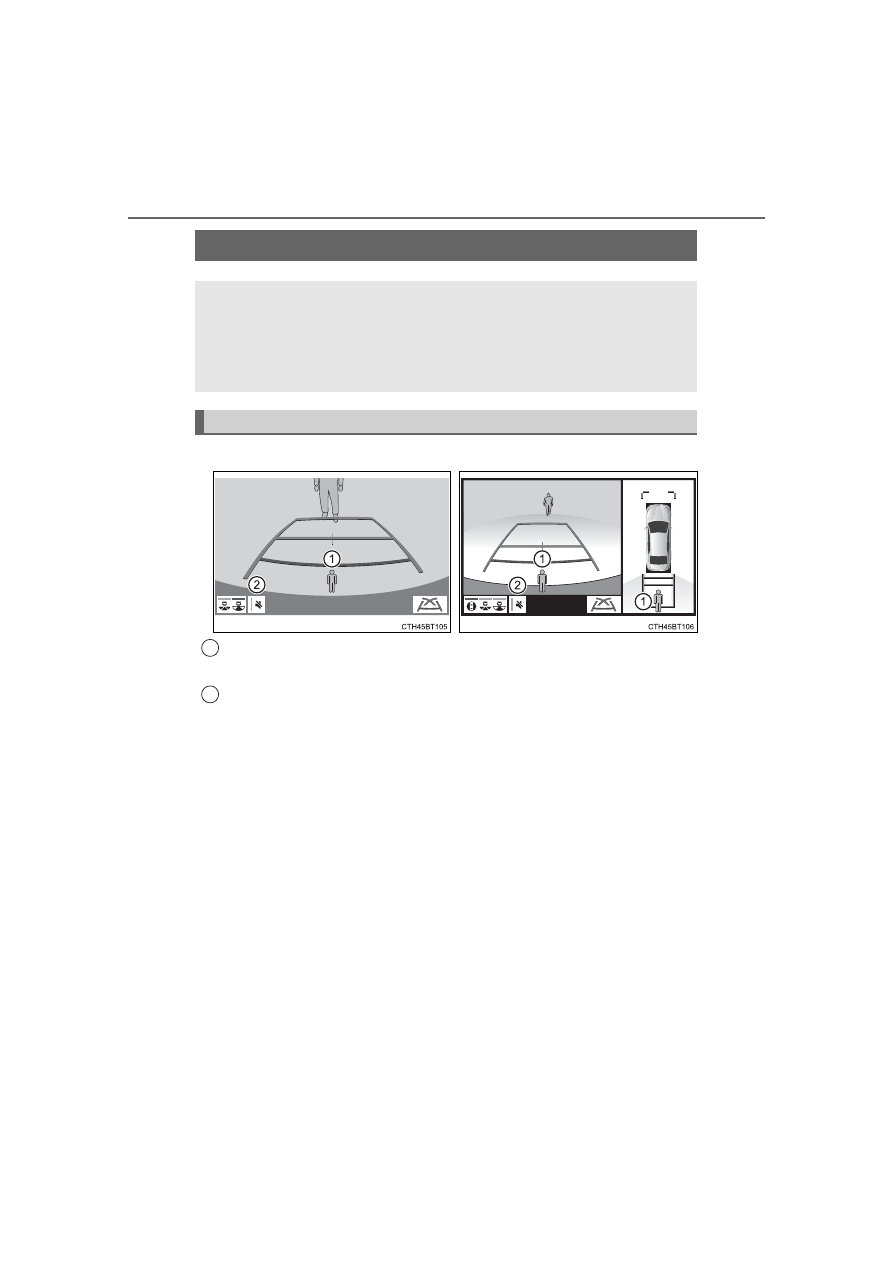
Displayed automatically when a pedestrian is detected.

Mute switch

Select to mute the buzzer. The buzzer will be re-enabled when the shift
lever is shifted to a position other than R.
The buzzer volume of this function changes with the RCTA buzzer volume.
(→P. 94, 106)

Rear Camera Detection Function

∗

∗

: If equipped

When the vehicle is backing up, the rear camera detection func-
tion can detect pedestrians in the detection area behind the
vehicle. If a pedestrian is detected, a buzzer will sound and an
icon on the audio system screen will be displayed to inform the
driver of the pedestrian.

Display

Toyota parking assist monitor

Panoramic view monitor

1

2

311

4-5. Using the driving support systems

4

Drivin

g

■

The rear camera detection function is operational when
The rear camera detection function is operational when the following condi-
tions are met:

●

The engine switch is in the “ON” position (vehicles without a smart key sys-
tem) or in IGNITION ON mode (vehicles with a smart key system).

●

The shift lever is in R.

■

If the rear camera detection function is malfunctioning
If a malfunction of the rear camera detection function is detected, one of the
following messages will be displayed on the audio system screen. Have the
vehicle inspected by your Toyota dealer.

●

“RCD malfunction.”

●

“Visit your dealer.”

●

“RCD unavailable.”

When a pedestrian is detected

Area

Buzzer

Icon

Sounds repeatedly

Blinks 3 times and then stays on

When the vehicle is stationary:
Sounds 3 times
When the vehicle is backing up:
Sounds repeatedly

When the vehicle is stationary:
Blinks 3 times
When the vehicle is backing up:
Blinks 3 times and then stays on

When it is determined that a
pedestrian will enter area 
within a few seconds: Sounds
repeatedly

When it is determined that a
pedestrian will enter area 
within a few seconds: Blinks 3
times and then stays on

1

2

3

1

1

312

4-5. Using the driving support systems

Situations in which the system may not operate properly

●

Some pedestrians, such as the following, may not be detected by the Rear
Camera Detection function, preventing the function from operating properly: 
• Pedestrians who are squatting
• Pedestrians who are lying down
• Pedestrians who are running
• Pedestrians who suddenly enter the detection area 
• Pedestrians riding a bicycle, skateboard, or other light vehicle
• Pedestrians wearing unusual clothing, such as a costume
• Pedestrians whose body is partially hidden by a cart or other object 
• Pedestrians which are obscured by darkness, such as at night

●

In some situations, such as the following, pedestrians may not be detected
by the Rear Camera Detection function, preventing the function from operat-
ing properly:
• When backing up in inclement weather (rain, snow, fog, etc.)
• When the rear camera is obscured (dirt, snow, ice, etc. are attached) or

scratched

• When a very bright light, such as the sun, or the headlights of another

vehicle, shines directly into the rear camera

• When backing up in a place where the surrounding brightness changes

suddenly, such as at the entrance or exit of a garage or underground
parking lot

●

In some situations, such as the following, the Rear Camera Detection func-
tion may operate even though there are no pedestrians in the detection
area.
• When a three dimensional object, such as a pole, traffic cone, fence, or

parked vehicle, is detected

• When a moving object, such as a car or motorcycle is detected
• When backing up toward moving objects such as flags or puddles, or air-

borne matter, such as smoke, steam, rain, or snow

• When there is a pattern on the road, due to the road being made of cob-

blestone or gravel or having tram rails, traces of repair, white lines,
pedestrian crossings or fallen leaves on the surface

• When backing up on a metal cover (grating), such as those used for

drainage ditches

• When backing up toward the roadside or a bump in the road 
• When an object is reflected in a puddle or on a wet road surface
• When there are shadows on the road
• When backing up over a bump in the road 
• If the vehicle is significantly tilted, such as when carrying a heavy load 
• When backing up toward an incline/decline
• If the suspension has been modified or tires of a size other than specified

are installed

• If the rear of the vehicle is raised or lowered due to the carried load
• If an electronic component, such as a backlit license plate (especially flu-

orescent type), is installed near the rear camera

• If a bumper protector, such as an additional trim strip, is installed to the

rear bumper

313

4-5. Using the driving support systems

4

Drivin

g

or other impact, or removal and installation

• If a towing eyelet is installed to the rear of the vehicle
• When the rear camera is obscured (dirt, snow, ice, etc. are attached) or

scratched

• When water is flowing over the rear camera lens
• If there is a flashing light in the detection area, such as the emergency

flashers of another vehicle

■

Situations in which the Rear Camera Detection function may be difficult
to notice

●

If buzzer may be difficult to hear if the surrounding area is noisy, the volume
of the audio system volume is high, the air conditioning system is being
used, etc.

●

If the temperature in the cabin is extremely high or low, the audio system
screen may not operate correctly.


содержание   ..  73  74  75  76   ..