Mitsubishi Grandis. Manual - part 137
TROUBLESHOOTING
SMART WIRING SYSTEM (SWS) USING SWS MONITOR
54C-10
NOTE: In addition to the function-specific
diagnostic menu, a service data menu is available
for SWS monitor service data to check all items
for each ECU.
• The switch condition does not meet the service
data display: Input signal system related to
defective functions
• The switch condition meets the service data
display: Output signal system related to defective
functions
6. Check of input signal circuit system
Check relevant switch, sensor, input signal-side
ECU and their wiring harness and connector.
7. Check of output signal circuit system
Check an output signal-side ECU, electrical load
components and their wiring harness and
connector.
HOW TO CONNECT THE SWS MONITOR
M1549014800513
CAUTION
Always turn the ignition switch to the "LOCK"
(OFF) position before connecting or
disconnecting the SWS monitor and the MUT-III.
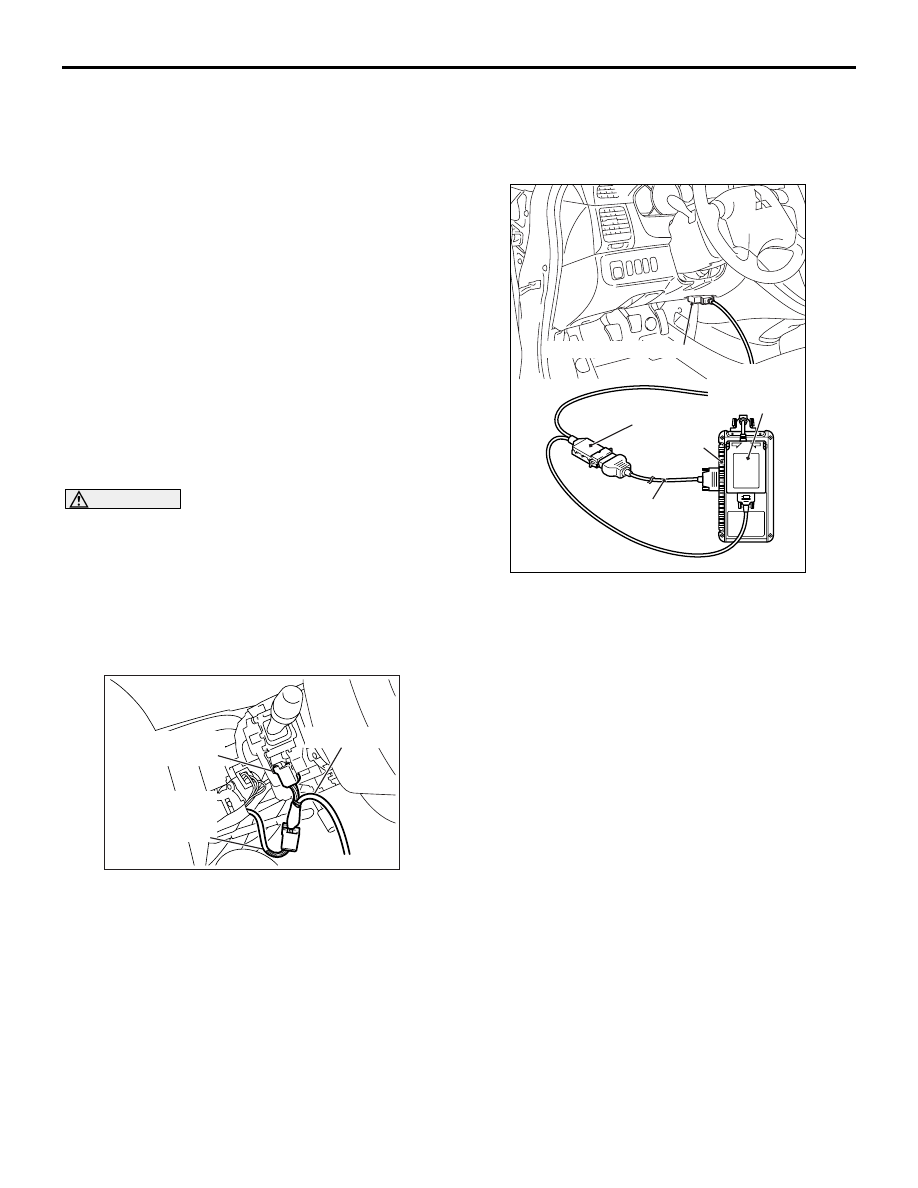
HOW TO CONNECT THE SWS
COMMUNICATION LINE <SPECIAL TOOL
SWS MONITOR HARNESS (FOR
COLUMN-ECU) MB991812>
1. Remove the steering column cover.
2. Remove the steering column switch connector.
3. Connect special tool SWS monitor harness (for
column-ECU) MB991812.
<WHEN CONNECTING THE DIAGNOSIS
CONNECTOR BY USING THE
INTERMEDIATE WIRES FOR SWS
MONITOR CUSTOMISATION>
1. Connect the special tool Intermediate wires
(MB991960) for SWS monitor customisation to
the special tool MUT-III main harness A
(MB991910).
2. Connect the MUT-III main harness A (with the
intermediate wires) to the special tool V.C.I.
(MB991824) .
3. Connect the intermediate wires for SWS monitor
customisation to the the diagnosis connector and
the SWS monitor cartridge.
HOW TO ESTABLISH COMMUNICATION
BETWEEN DOORS
Connect the MUT-III and the SWS monitor to the
SWS communication lines. Refer to .
1. Select "DOOR CNT.COM." on the MUT-III.
2. Disconnect the SWS monitor cartridge from the
SWS communication lines without switching off
the MUT-III and the V.C.I.
AC103262AE
Column switch
connector
Column switch
connector at
harness side
MB991812
AC311046
AB
Diagnosis connector
MB991806
(SWSmonitor
cartridge)
MB991960
MB991824
MB991910