Mercedes-Benz ML320. Manual - part 90
 

  Index      Mercedes     Mercedes-Benz ML320 - service repair manual 1997-2005 year


Search            


Content   ..  88  89  90  91   ..


Mercedes-Benz ML320. Manual - part 90


187

Controls in detail

Useful features

Compass

The compass displays the direction the ve-
hicle is traveling. The display 3 will show 
you N, NE, E, SE, S, SW, W or NW.

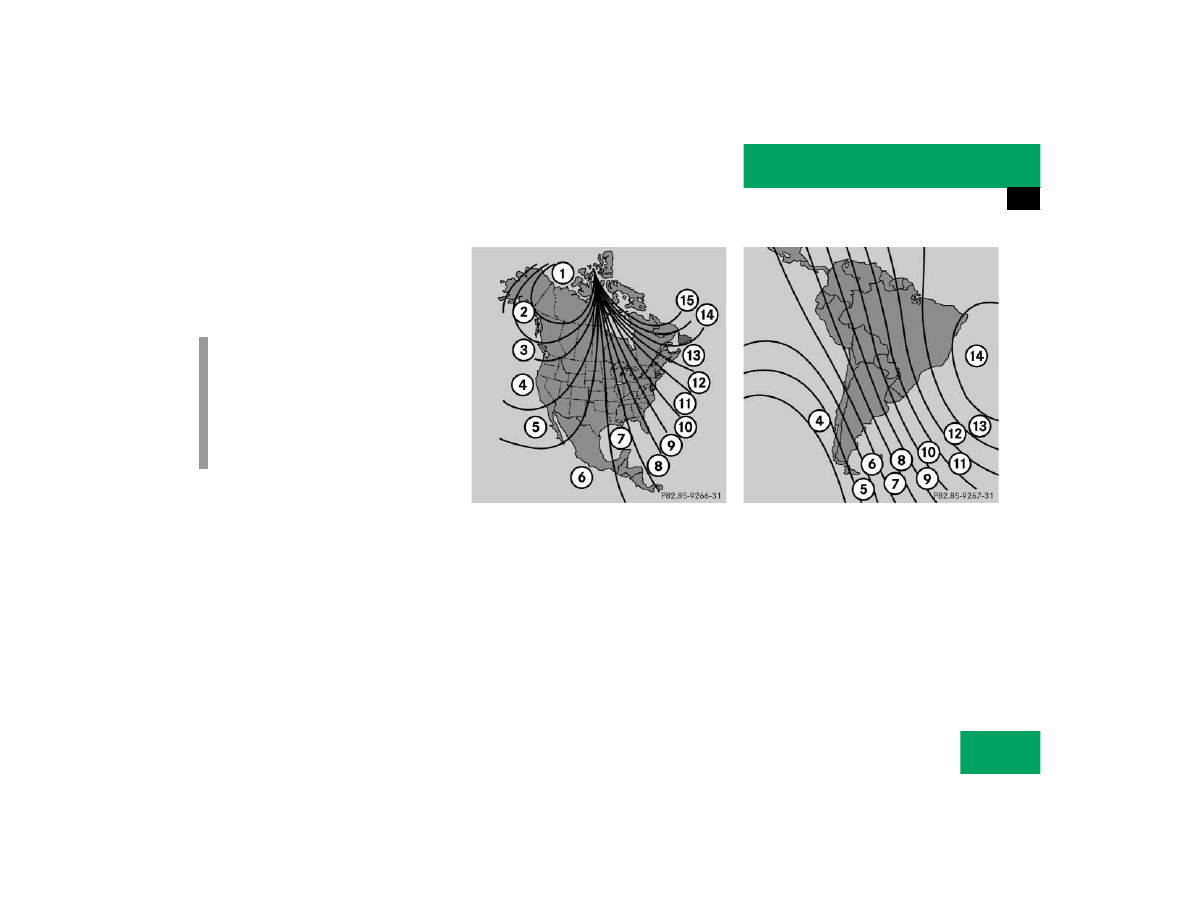
To ensure the display is correct, the com-
pass must be set to the proper geographic 
zone (

컄

page 188). It may also be neces-

sary to calibrate the compass 
(

컄

page 188).

Zone map North America

Zone map South America

i

The presence of buildings, bridges, 
power lines and large antenna masts 
can influence the displayed values. Me-
tallic or magnetic objects in or on the 
vehicle can influence the accuracy of 
the compass.

188

Controls in detail

Useful features

Setting the compass zone

왘

Determine the geographical point of 
the vehicle with the aid of the zone 
maps.

왘

Switch on the ignition.

왘

Press MODE 2 (

컄

page 186) repeat-

edly until the compass display appears 
in the trip computer display 3.

왘

Press RESET 1 (

컄

page 186) to select 

the compass zone mode.

The zone selected last is shown in the 
display.

왘

Press RESET 1 repeatedly until the 
correct compass zone, as determined 
from the zone map, is shown in the dis-
play.

왘

Press MODE 2 twice.

The new compass zone is activated and 
the compass display will be shown.

Calibrating the compass

If the vehicle was exposed to a significant 
magnetic zone, such as high voltage power 
lines, the compass may have to be calibrat-
ed.

To calibrate the compass correctly, ob-
serve the following:

앫

Calibrate the compass in an area free 
of steel superstructures and power 
lines.

앫

Switch off all electrical consumers (e.g. 
exterior lamps, climate control, rear 
window defroster etc.).

앫

Do not open or close the 
sliding/pop-up roof.

앫

Close doors and liftgate.

왘

Start and run the engine.

왘

Press MODE 2 (

컄

page 186) repeat-

edly until the compass display appears 
in the trip computer display 3.

왘

Press RESET 1 and afterwards press 
MODE 2.

In the display appears 

CAL–

.

왘

Press and hold RESET 1 for approxi-
mately two seconds.

The calibration mode is activated and 
the display shows 

CAL

.

왘

Drive without interruption two full cir-
cles at a speed between 3 mph 
(5 km/h) and 7 mph (10 km/h).

The message 

CAL

 goes out after a short 

time. The calibration is now complete.

i

An open liftgate triggers the 
display

- - -

.

189

Controls in detail

Useful features

Stop watch

왘

Press MODE 2 (

컄

page 186) repeat-

edly until the stop watch display ap-
pears in the trip computer display 3.

Counting

왘

Press RESET 1 (

컄

page 186) to start 

counting.

Stopping

왘

Press RESET 1 again to stop counting.

Resetting

왘

Press and hold RESET 1 until the dis-
play shows “0:00”.

Average fuel consumption

왘

Press MODE 2 (

컄

page 186) repeat-

edly until the average fuel consumption 
display appears in the trip computer 
display 3.

Distance remaining with fuel presently 
in tank

왘

Press MODE 2 (

컄

page 186) repeat-

edly until the distance remaining dis-
play appears in the trip computer 
display 3.

i

If 

CAL

 remains in the display, calibration 

was not successfully completed. You 
have to recalibrate:

앫

Remove the key from the steering 
lock.

앫

Start the vehicle and start the cali-
bration procedure described previ-
ously.

We recommend that you have the com-
pass calibrated at a Mercedes-Benz 
Light Truck Center.

i

When the fuel supply drops to reserve 
level the display flashes distance re-
maining.

앫

USA only:
The display alternates between 

FUEL

 and distance remaining until 

supply is consistently below the re-
serve level. When the fuel supply is 
very low [approximately 1.5 gal 
(5.5 l)] 

FUEL

 is displayed 

continuously.

190

Controls in detail

Useful features

Country

왘

Press MODE 2 (

컄

page 186) repeat-

edly until the country display appears 
in the trip computer display 3.

왘

Press and hold RESET 1 a minimum of 
five seconds to change the country unit 
system.

Canada units system selection

You can choose between CAN-English or 
CAN-French.

Setting CAN-English

왘

Press RESET 1 repeatedly until CAN is 
displayed.

왘

Press MODE 2 to select 

–ENG

.

왘

Press MODE 2 again to set CAN-En-
glish.

Setting CAN-French

왘

Press RESET 1 repeatedly until CAN is 
displayed.

왘

Press MODE 2.

–ENG

 is displayed.

왘

Press RESET 1 to select 

–Fr

.

왘

Press MODE 2 to set CAN-French.

The language selected determines how the 
various displays are presented, see table.

Display

Language

Date

Cardinal points

Fuel consumption

Distance remaining

GEr

German

DD.MM

Süd, Nord, Ost, West

l/100 km

Kilometer

GB

English

MM.DD

South, North, East, West mi/gal (Imperial)

Miles

ESP

Spain

DD.MM

Sur, Norte, Este, Oeste

l/100 km

Kilometer

Fr

French

DD.MM

Sud, Nord, Est, Ouest

l/100 km

Kilometer

USA

American

MM.DD

South, North, East, West mi/gal (US)

Miles

CAN-ENG

American

MM.DD

South, North, East, West l/100 km

Kilometer

CAN-Fr

French

DD.MM

Sud, Nord, Est, Ouest

l/100 km

Kilometer

GEr

German

DD.MM

Süd, Nord, Ost, West

l/100 km

Kilometer


Content   ..  88  89  90  91   ..