Mazda 6. Manual - part 73
 

  Index      Mazda     Mazda 6 - service repair manual 2002 year


Search            


Content   ..  71  72  73  74   ..


Mazda 6. Manual - part 73


T–68

AUDIO AND NAVIGATION SYSTEM 

LCD UNIT

A6E812466902T02

Outline

•

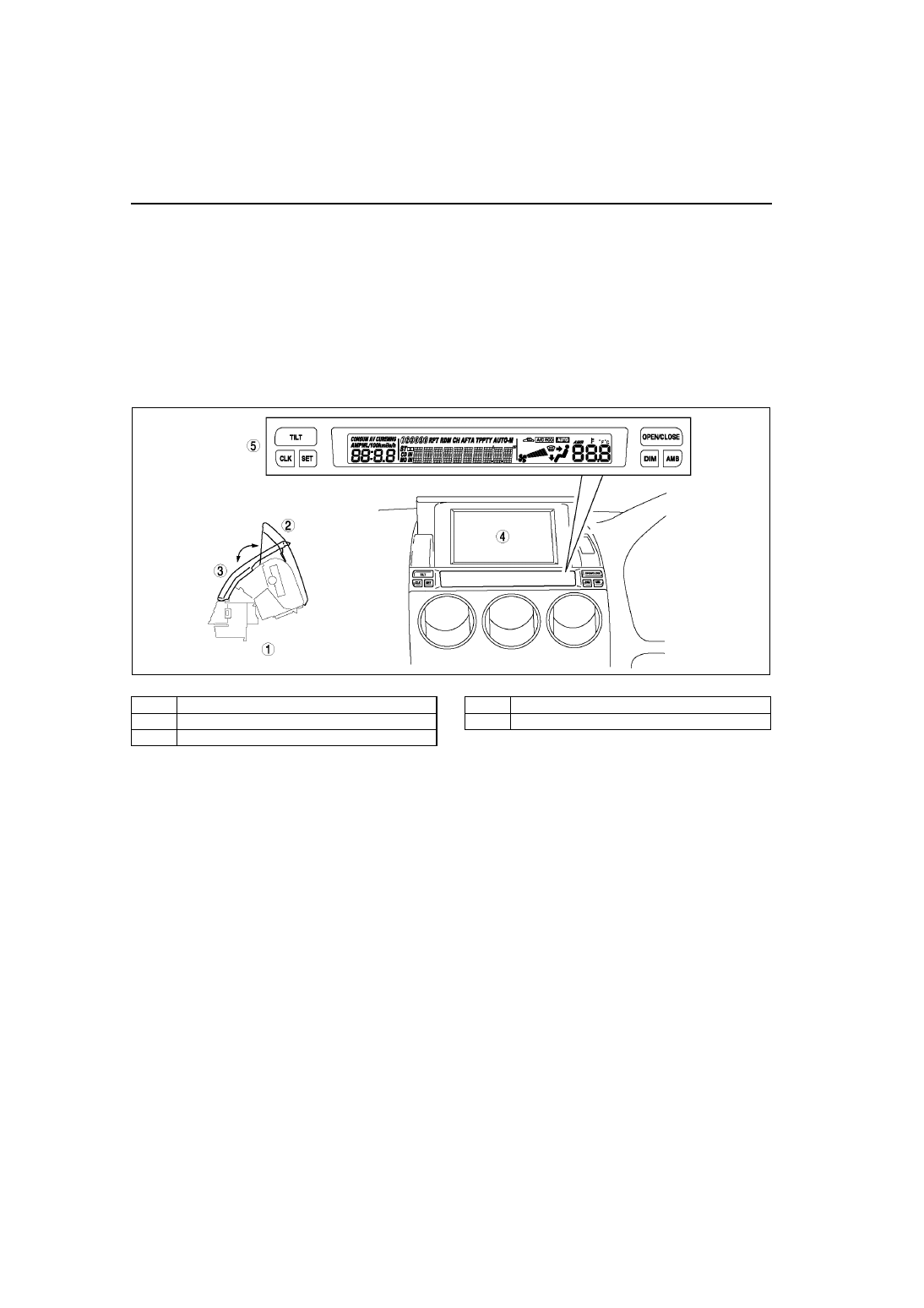
The car-navigation system LCD and the information display are incorporated into one unit. Based on signals 
from the car-navigation unit and remote control, the LCD displays navigational information. Based on signals 
from a specialized systems (audio, DIS and A/C) module, the LCD displays information about these systems 

•

The LCD unit senses the user operations from the remote control and sends a signal to the car-navigation unit.

Structure

•

An LCD unit, located in the upper-center part of the dashboard to improve visibility, has been adopted.

•

A pop-up LCD, controlled by an [OPEN/CLOSE] switch, has been adopted.

•

The angle of the display screen can be adjusted in stages using the [TILT] switch.

•

The audio, DIS and A/C information display is located on the lower portion of the unit. (See 

T–40 DRIVE 

INFORMATION SYSTEM

.)

.

A6E8126T060

1

LCD unit

2

Open

3

Close

4

LCD for car-navigation system

5

Information display

AUDIO AND NAVIGATION SYSTEM 

T–69

T

T

Terminal Layout and Signals

End Of Sie

Terminal

Signals

24-pin connector

1A

Video (B)

1B

Video (G)

1C

Video (composite sync)

1D

Video (R)

1E

Video GND

1F

–

1G

Shield GND

1H

–

1I

Monitor serial output

1J

–

1K

Monitor serial input

1L

–

1M

Control illumination

1N

–

1O

ACC

1P

GND

1Q

B+

1R

–

1S

Shield GND

1T

R-range

1U

UART2

1V

Illumination

1W

UART1

1X

–

Terminal

Signals

6-pin connector

2A

Remote-data

2B

Power

2D

Shield GND

2F

–

2G

GND

2H

Illumination

Terminal

Signal

1-pin connector

3A

GND

T–70

AUDIO AND NAVIGATION SYSTEM 

REMOTE CONTROL AND CRADLE

A6E812400174T01

Outline

•

A remote control for the car-navigation system, with simplified design for easy operation, has been adopted.

•

A cradle to hold the remote control has been adopted.

Structure

•

The remote control and cradle are located on the console.

•

The buttons and joystick for controlling car-navigation are located on the top side of the remote control. The 
infrared transmitter sends signals through a terminal on the front and back of the remote control.

•

An infrared sensor that receives signals from the remote control is located on the cradle. The received signals 
are sent to the LCD unit.

•

The remote control uses the batteries as a power source when not in the cradle and uses the power supply 
connector when set in the cradle. (Ignition switch at ACC or ON position)

Note

•

The batteries are not charged when the remote control is in the cradle.

.

End Of Sie

A6E8126T061

1

Remote control

2

Cradle

3

Front  view

4

Top view

5

Underside view

6

Infrared transmitter

7

Infrared sensor

8

Power supply connector

No.

Button (component)

Function

9

[POS (Position)] button

Displays the current position.

10

Joystick

Selects items by tilting it up, down, right and left.

11

[ENTER] button

Executes a selected item.

12

[ZOOM] button

Changes the map scale.

13

[RET] button

Returns to the previous screen.

14

[MENU] button

Select a menu.

15

[VOICE] button

Initiates vocal guidance for route maneuvers.

AUDIO AND NAVIGATION SYSTEM 

T–71

T

T

NAVIGATION FUNCTION

A6E812466000T06

Outline

•

A vehicle's position is measured by a hybrid method of autonomous navigation (using yaw-rate signals from the 
gyro sensor and vehicle speed signals from the DSC unit (with DSC) or ABS/TCS HU/CM (with ABS/TCS) and 
GPS navigation (using signals from GPS satellites). Accurate detection of the vehicle's position is possible 
based on the adoption of a map-matching function which specifies the vehicle's position as compared with the 
map data read from the DVD-ROM and the vehicle’s position measured from autonomous navigation and GPS 
navigation.

•

Guidance to destination is provided via display of the recommended route on the map screen, as well as voice 
messaging guidance at intersections and points of divergence.

•

Based on inputted signals and information on the DVD-ROM, the following features are available:
— Destination can be selected based on address, intersection, POI (Point of Interest), history, memory or 

map.

— Route information is available in map and guide mode.
— Voice guidance and menus are available in six languages.
— A map screen that displays maps in twelve steps with scales from 100m to 500km.
— A map screen that displays routes according to Shortest Route and Avoid Motorway functions.
— A detour function which provides three routes to select from based on streets selected to avoid, up to five 

via points and calculation of set detour distance.

— A wide variety of preferential settings are available.

Block Diagram

.

A6E8126T062

1

Car-navigation unit

2

GPS antenna

3

Signal from satellite

4

DSC unit (with DSC) or ABS/TCS HU/CM (with 
ABS/TCS)

5

Vehicle speed signal

6

Detection of current measured position

7

Correction by GPS

8

Detection of vehicle travel distance

9

Detection of vehicle’s position

10

Map matching

11

Yaw-rate signal

12

Gyro sensor

13

Map data

14

DVD-ROM

15

LCD unit

16

Display


Content   ..  71  72  73  74   ..