Honda CR-V (2022 year). Manual in english - page 8
 

  Index      Manuals     Honda CR-V (2022 year). Manual in english


Search            copyright infringement  


Content      ..     6      7      8      9     ..


Honda CR-V (2022 year). Manual in english - page 8


125

uu

Indicators

u

Driver Information Interface Warning and Information Messages

Continued

In

strum

e

nt Pa

nel

Message

Condition

Explanation

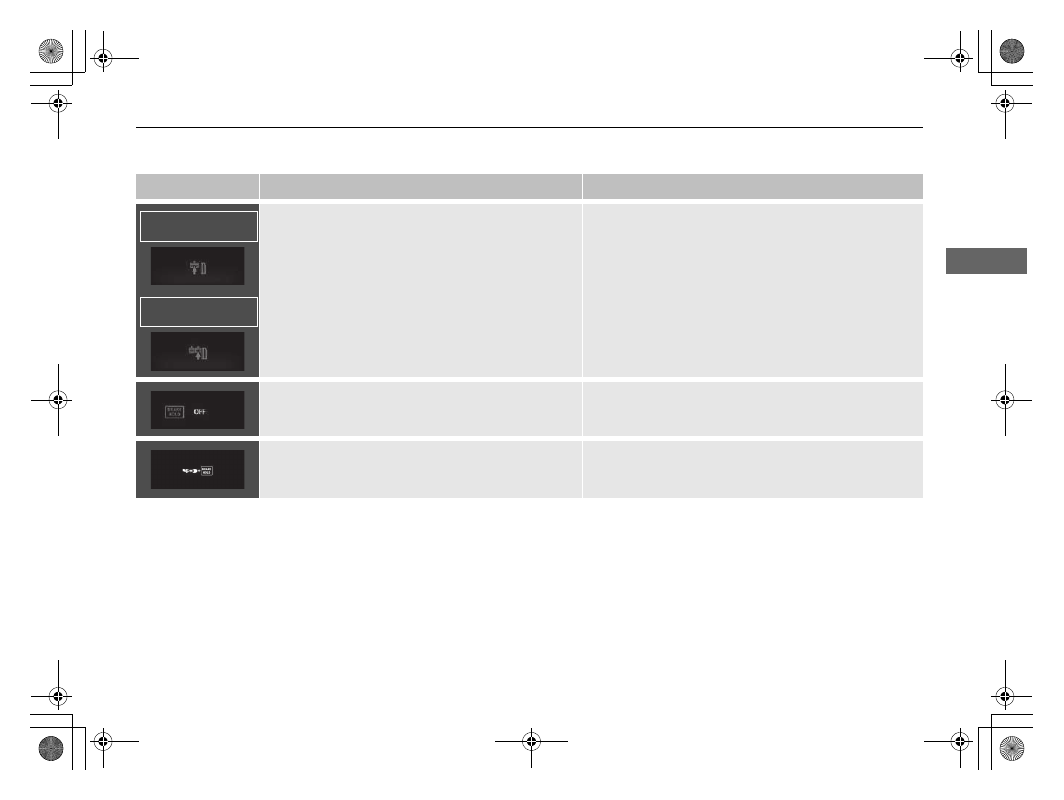
•

Appears if the automatic brake hold is automatically 
cancelled while it is in operation.

•

Immediately depress the brake pedal.

•

Appears when the automatic brake hold system is 
turned off.

2

Automatic Brake Hold

 P. 631

•

Appears when the automatic brake hold button is 
pressed without wearing the driver’s seat belt.

•

Fasten the driver’s seat belt.

2

Automatic Brake Hold

 P. 631

Continuously variable 
transmission models

Manual transmission 
models

126

uu

Indicators

u

Driver Information Interface Warning and Information Messages

In

strum

e

nt Pa

nel

Message

Condition

Explanation

•

Appears when the automatic brake hold button is 
pressed without depressing the brake pedal while 
the automatic brake hold is in operation.

•

Press the automatic brake hold button with the brake 
pedal depressed.

2

Automatic Brake Hold

 P. 631

•

Appears when the parking brake is applied 
automatically while it is in operation.

2

Automatic Brake Hold

 P. 631

2

Parking Brake

 P. 626

•

Appears when the electric parking brake switch is 
pressed without depressing the brake pedal while 
the electric parking brake is in operation.

•

Appears while driving 

- Press the electric parking 

brake switch with the brake pedal depressed.

2

Parking Brake

 P. 626

Continuously variable 
transmission models

Manual transmission 
models

Continuously variable 
transmission models

Manual transmission 
models

127

uu

Indicators

u

Driver Information Interface Warning and Information Messages

Continued

In

strum

e

nt Pa

nel

*1:Models with the keyless access system have an 

ENGINE START/STOP

 button instead of an ignition switch.

*2:Models without third row seat
*3:Models with third row seat

Message

Condition

Explanation

•

Appears if the vehicle is being driven in a manner 
consistent with drowsy or inattentive driving.

2

Driver Attention Monitor

 P. 151

•

Appears when any of the second row and third row

*


seat belts are latched or unlatched, or either rear 
door is opened and closed.

2

Seat Belt Reminder

 P. 45

•

Appears when the vehicle speed reaches the set 
speed. You can set two different speeds for the 
alarm.

2

Speed Alarm

 P. 155

•

Appears when the starter system has a problem.

•

As a temporary measure, hold the ignition switch to 
START 

(

e

*1

 for up to 15 seconds while pressing the 

brake pedal and clutch pedal (manual transmission 
only), and manually start the engine.
Have your vehicle checked by a dealer.

(White)

(Amber)

*2

*3

* Not available on all models

128

uu

Indicators

u

Driver Information Interface Warning and Information Messages

In

strum

e

nt Pa

nel

Message

Condition

Explanation

•

Appears when any of the service items is required in 
less than 30 days.

•

The remaining days will be counted down per day.

2

Service Reminder System

*

 P. 660

•

Appears when any of the service items is required in 
less than 10 days.

•

Have the indicated service performed as soon as 
possible.

2

Service Reminder System

*

 P. 660

•

Appears when the indicated maintenance service is 
still not done after the remaining time reaches 0.

•

Your vehicle has passed the service required point. 
Immediately have the service performed and make sure 
to reset the service reminder.

2

Service Reminder System

*

 P. 660

Models with service reminder system

* Not available on all models

129

uu

Indicators

u

Driver Information Interface Warning and Information Messages

Continued

In

strum

e

nt Pa

nel

Message

Condition

Explanation

•

Appears when the scheduled maintenance is due 
soon.

•

The engine oil, or the engine oil and oil filter should be 
changed soon.

2

Oil Monitor System

*

 P. 665

•

Appears when the scheduled maintenance is due.

•

The engine oil, or the engine oil and oil filter should be 
changed as soon as possible.

2

Oil Monitor System

*

 P. 665

•

Appears when the scheduled engine oil change is 
passed due.

•

The engine oil, or the engine oil and oil filter should be 
changed immediately.

2

Oil Monitor System

*

 P. 665

Message

Condition

Explanation

•

Appears when washer fluid gets low.

•

Refill washer fluid.

2

Refilling Window Washer Fluid

 P. 690

Models with oil monitor system

Models with headlight washer

* Not available on all models

130

uu

Indicators

u

Driver Information Interface Warning and Information Messages

In

strum

e

nt Pa

nel

Message

Condition

Explanation

•

Appears when you open the driver’s door while the 
ignition key is in ACCESSORY 

(

q

.

•

Turn the ignition switch to LOCK 

(

0

, then remove the 

key.

•

Appears when you open the driver’s door while the 
ignition key is in LOCK 

(

0

.

•

Remove the key from the ignition switch.

•

Appears when the ignition key is turned to 
ACCESSORY 

(

q

 from ON 

(

w

. (The driver’s door is 

closed.)

—

Message

Condition

Explanation

•

Appears when the ignition switch is turned to START 

(

e

 without depressing the clutch pedal.

•

Turn the ignition switch with depressing the clutch 
pedal.

Models without keyless access system

Models without keyless access system with manual transmission

131

uu

Indicators

u

Driver Information Interface Warning and Information Messages

Continued

In

strum

e

nt Pa

nel

Message

Condition

Explanation

•

Appears as soon as a problem is detected in the 
keyless access system or keyless starting system.

•

Appears constantly 

- Have your vehicle checked by a 

dealer.

•

Appears when you close the door with the power 
mode on without the keyless remote inside the 
vehicle.

•

The message goes away when you bring the keyless 
remote back inside the vehicle, and close the door.

2

Keyless Remote Reminder

 P. 217

•

Appears when the keyless remote battery becomes 
weak.

•

Replace the battery as soon as possible.

2

Replacing the Button Battery

 P. 716

Models with keyless access system

132

uu

Indicators

u

Driver Information Interface Warning and Information Messages

In

strum

e

nt Pa

nel

Message

Condition

Explanation

•

Appears after you set the power mode to 
ACCESSORY or ON.

•

Appears after you unlock and open the driver’s door.

2

Starting the Engine

 P. 513

•

Appears when the power mode is ACCESSORY.

—

•

Appears after the driver’s door is opened when the 
power mode is ACCESSORY.

•

Press the 

ENGINE START/STOP

 button twice with your 

foot off the brake pedal (automatic transmission) or the 
clutch pedal (manual transmission) to change the 
power mode to VEHICLE OFF (LOCK).

•

Appears if the keyless remote’s battery is too weak 
to start the engine or the key is not within operating 
range to start the engine. The beeper sounds six 
times.

•

Bring the keyless remote in front of the 

ENGINE 

START/STOP

 button to be touched with.

2

If the Keyless Remote Battery is Weak

 P. 742

Models with keyless access system

Continuously variable 
transmission models

Manual transmission 
models

Right-hand drive type

133

uu

Indicators

u

Driver Information Interface Warning and Information Messages

Continued

In

strum

e

nt Pa

nel

Message

Condition

Explanation

•

Appears when the steering wheel is locked.

•

Move the steering wheel left and right while pressing 
the 

ENGINE START/STOP

 button.

•

Appears if you push the 

ENGINE START/STOP


button to turn the engine off without the shift lever 
in 

(

P

.

•

Move the shift lever to 

(

P

, then press the 

ENGINE 

START/STOP

 button twice.

•

Appears if you press the 

ENGINE START/STOP


button while the vehicle is moving.

2

Emergency Engine Stop

 P. 743

Models with keyless access system

Continuously variable 
transmission models

(Amber)

134

uu

Indicators

u

Driver Information Interface Warning and Information Messages

In

strum

e

nt Pa

nel

*1:Models with the keyless access system have an 

ENGINE START/STOP

 button instead of an ignition switch.

Message

Condition

Explanation

•

Appears when the engine does not restart 
automatically due to the following reasons:

-

The bonnet is open.

-

There is a problem in the system that disables Auto 
Idle Stop.

•

Follow the normal procedure to start the engine.

2

Starting the Engine

 P. 510, 513

•

Appears when you move the shift lever from 

(

N

 to 

any other position without depressing the clutch 
pedal while Auto Idle Stop is in operation.

•

The engine will not start even when the battery charge 
becomes low. Shift to 

(

N

 to avoid the battery charge 

becomes low.

2

Auto Idle Stop

 P. 528

•

Appears in white when you turn the ignition switch 
to START 

(

e

*1

 before fully depressing the clutch 

pedal.

•

Depress the clutch pedal.

•

Appears in amber when the following conditions are 
kept while Auto Idle Stop is in operation:

-

You are not wearing a seat belt.

-

The shift lever is in any position except 

(

N

.

•

Depress the clutch pedal. Wear the seat belt 
immediately, and continue to keep the shift lever in 

(

N


next time Auto Idle Stop activates.

Models with auto idle stop

135

uu

Indicators

u

Driver Information Interface Warning and Information Messages

Continued

In

strum

e

nt Pa

nel

Message

Condition

Explanation

•

Appears when Auto Idle Stop does not activate for 
some reason.

•

Appears when the engine restarts automatically.

•

Appears when the battery temperature is around 
5°C or lower.

2

Auto Idle Stop Activates When:

 P. 530

•

Appears when Auto Idle Stop does not activate 
because the engine coolant temperature is low or 
high.

2

Auto Idle Stop does not activate when:

 P. 530

•

Appears when Auto Idle Stop does not activate 
because the climate control system is in use, and the 
difference between the set temperature and actual 
interior temperature becomes significant.

2

Auto Idle Stop Activates When:

 P. 530

•

Appears when the system is under the following 
conditions while Auto Idle Stop activates:

-

The climate control system is in use, and the 
difference between the set temperature and actual 
interior temperature becomes significant.

-

The humidity in the interior is high.

•

The engine restarts automatically in a few seconds.

Models with auto idle stop

136

uu

Indicators

u

Driver Information Interface Warning and Information Messages

In

strum

e

nt Pa

nel

Message

Condition

Explanation

•

Appears when Auto Idle Stop does not activate 
because the battery charge level is low.

•

Appears when the battery is low performance.

2

Auto Idle Stop

 P. 528

•

Appears when the system is under the following 
conditions while Auto Idle Stop activates:

-

The battery charge level is low.

•

The engine restarts automatically in a few seconds.

•

Appears when you turn the Auto Idle Stop system 
on.

2

Auto Idle Stop

 P. 528

•

Appears when the bonnet is opened.

•

Close the bonnet.

Models with auto idle stop

137

uu

Indicators

u

Driver Information Interface Warning and Information Messages

Continued

In

strum

e

nt Pa

nel

Message

Condition

Explanation

•

Appears if there is a problem with the auto high-
beam.

•

Manually operate the headlight switch.

•

If you are driving with the high beam headlights when 
this happens, the headlights are changed to low beams.

•

Appears if anything covers the radar sensor cover 
and prevents the sensor from detecting a vehicle in 
front.

•

May appear when driving in bad weather (rain, 
snow, fog, etc.)

•

When the radar sensor gets dirty, stop your vehicle in a 
safe place, and wipe off dirt using a soft cloth. The 
message may take some time to go off.

•

Have your vehicle checked by a dealer if the message 
does not disappear even after you clean the sensor 
cover.

2

Radar Sensor

 P. 625

2

Honda Sensing

 P. 555

•

Appears if the temperature inside the front sensor 
camera is too high and some driver assist systems 
cannot be activated.

•

Use the climate control system to cool down the 
camera.

•

Disappears 

- The camera has been cooled down and 

the systems are activated normally.

2

Front Sensor Camera

 P. 623

2

Honda Sensing

 P. 555

•

Appears if the area around the front sensor camera 
is blocked by dirt, mud, etc. and be prevented from 
detecting a vehicle in front.

•

May appear when driving in bad weather (rain, 
snow, fog, etc.)

•

When the front window gets dirty, stop your vehicle in 
a safe place, and wipe it off with a soft cloth.

•

Have your vehicle checked by a dealer if the message 
does not disappear even after you cleaned the area 
around the camera.

2

Front Sensor Camera

 P. 623

2

Honda Sensing

 P. 555

138

uu

Indicators

u

Driver Information Interface Warning and Information Messages

In

strum

e

nt Pa

nel

Message

Condition

Explanation

•

Appears when the system predicts the vehicle 
cutting in in front of you from the right and decrease 
your vehicle speed according to the cut-in vehicle.

•

The system automatically keeps a safe distance from the 
cut-in vehicle when the system predicts the cutting in.

2

How the system activates

 P. 585, 600

•

Appears when the system predicts the vehicle 
cutting in in front of you from the left and decrease 
your vehicle speed according to the cut-in vehicle.

•

The system automatically keeps a safe distance from the 
cut-in vehicle when the system predicts the cutting in.

2

How the system activates

 P. 585, 600

•

Appears when ACC has been automatically 
cancelled.

•

You can resume the set speed after the condition that 
caused ACC to cancel improves. Press the 

RES/+


button.

2

Adaptive Cruise Control (ACC) with Low Speed 
Follow (LSF)

 P. 569

2

Adaptive Cruise Control (ACC)

 P. 586

139

uu

Indicators

u

Driver Information Interface Warning and Information Messages

Continued

In

strum

e

nt Pa

nel

Message

Condition

Explanation

•

Appears when the distance between your vehicle 
and the vehicle ahead of you is too close while ACC 
is in operation.

•

ACC has been automatically cancelled.

2

Adaptive Cruise Control (ACC) with Low Speed 
Follow (LSF)

 P. 569

2

Adaptive Cruise Control (ACC)

 P. 586

•

Appears when pressing the 

–/SET

 button while the 

distance between your vehicle and the vehicle ahead 
of you is too close.

•

ACC cannot be set.

2

Adaptive Cruise Control (ACC) with Low Speed 
Follow (LSF)

 P. 569

2

Adaptive Cruise Control (ACC)

 P. 586

•

Appears when the driver’s seat belt is unfastened 
while your vehicle is automatically stopped by ACC.

•

ACC has been automatically cancelled.

2

Adaptive Cruise Control (ACC) with Low Speed 
Follow (LSF)

 P. 569

•

Appears when pressing the 

–/SET

 button while the 

driver’s seat belt is unfastened.

•

ACC cannot be set.

2

Adaptive Cruise Control (ACC) with Low Speed 
Follow (LSF)

 P. 569

Continuously variable 
transmission models

(White)

140

uu

Indicators

u

Driver Information Interface Warning and Information Messages

In

strum

e

nt Pa

nel

Message

Condition

Explanation

•

Appears if the VSA or traction control function 
operates while ACC is in operation.

•

ACC has been automatically cancelled.

2

Adaptive Cruise Control (ACC) with Low Speed 
Follow (LSF)

 P. 569

2

Adaptive Cruise Control (ACC)

 P. 586

•

Appears when pressing the 

RES/+

 or 

–/SET

 button 

while the vehicle is moving and the brake pedal is 
depressed.

•

ACC cannot be set.

2

Adaptive Cruise Control (ACC)

 P. 586

•

Appears when pressing the 

RES/+

 or 

–/SET

 button 

while the vehicle is moving and the clutch pedal is 
depressed.

•

ACC cannot be set.

2

Adaptive Cruise Control (ACC)

 P. 586

•

Appears when the clutch pedal is applied too long 
while ACC is in operation.

•

ACC has been automatically cancelled.

2

Adaptive Cruise Control (ACC)

 P. 586

Manual transmission 
models

Manual transmission 
models


Content      ..     6      7      8      9     ..