Honda Civic (2019 year). Instruction - part 6
 

  Index      Honda     Honda Civic - instruction 2019 year in english


Search            


Content   ..  4  5  6  7   ..


Honda Civic (2019 year). Instruction - part 6


80

uu

Indicators

u

In

strum

e

nt Pa

nel

*1:Models with the smart entry system have an ENGINE START/STOP button instead of an ignition switch.

Indicator

Name

On/Blinking

Explanation

Message

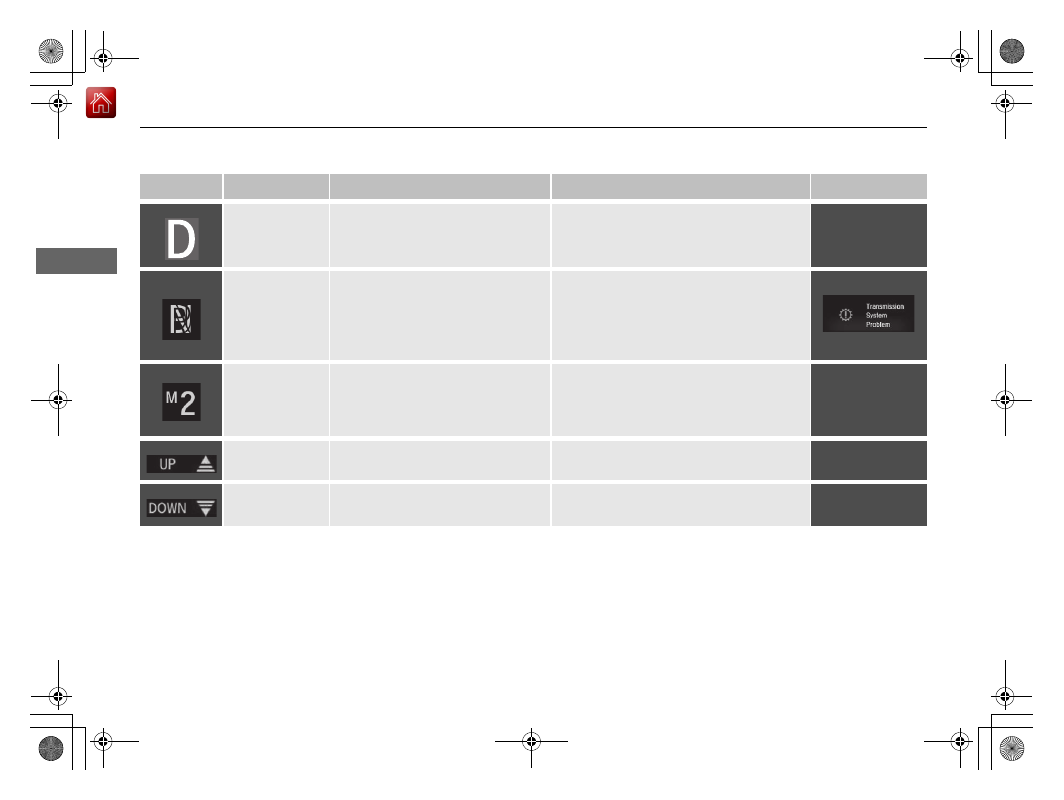
Shift Lever 
Position 
Indicator

*

●

Indicates the current shift lever 
position.

2 Shifting P. 444, 446

—

Transmission 
System 
Indicator

*

●

Comes on for a few seconds when 
you turn the ignition switch to ON 

(

w

*1

, then goes off.

●

Blinks if the transmission system 
has a problem.

●

Blinks while driving - Avoid sudden 
starts and acceleration and have your 
vehicle checked by a dealer immediately.

M (7-speed 
manual shift 
mode) Indicator/
Shift Indicator

*

●

Comes on when 7-speed manual 
shift mode is applied.

2 7-Speed Manual Shift Mode P. 448

—

Shift Up 
Indicator

*

●

Comes on when shifting up is 
recommended.

2 Shift Up/Down Indicators

*

 P. 451

—

Shift Down 
Indicator

*

●

Comes on when shifting down is 
recommended.

2 Shift Up/Down Indicators

*

 P. 451

—

* Not available on all models

81

uu

Indicators

u

Continued

In

strum

e

nt Pa

nel

*1:Models with the smart entry system have an ENGINE START/STOP button instead of an ignition switch.

Indicator

Name

On/Blinking

Explanation

Message

Seat Belt 
Reminder 
Indicator

●

Comes on and the beeper sounds 
if you are not wearing a seat belt 
when you turn the ignition switch 
to ON 

(

w

*1

.

●

If the front passenger is not 
wearing a seat belt, the indicator 
comes on a few seconds later.

●

Blinks while driving if either you or 
the front passenger has not 
fastened a seat belt. The beeper 
sounds and the indicator blinks at 
regular intervals.

●

The beeper stops and the indicator goes 
off when you and the front passenger 
fasten their seat belts.

●

Stays on after you or the front 
passenger has fastened the seat belt 
- A detection error may have occurred in 
the sensor. Have your vehicle checked by 
a dealer.

2 Seat Belt Reminder P. 40

82

uu

Indicators

u

In

strum

e

nt Pa

nel

*1:Models with the smart entry system have an ENGINE START/STOP button instead of an ignition switch.

Indicator

Name

On/Blinking

Explanation

Message

Low Fuel 
Indicator

●

Comes on when the fuel reserve is 
running low (approximately 1.8 
U.S. gal/7.0 Liter left).

●

Blinks if there is a problem with the 
fuel gauge.

●

Comes on - Refuel your vehicle as soon 
as possible.

●

Blinks - Have your vehicle checked by a 
dealer.

Anti-lock Brake 
System (ABS) 
Indicator

●

Comes on for a few seconds when 
you turn the ignition switch to ON 

(

w

*1

, then goes off.

●

If it comes on at any other time, 
there is a problem with the ABS.

●

Stays on constantly - Have your vehicle 
checked by a dealer. With this indicator 
on, your vehicle still has normal braking 
ability but no anti-lock function.

2 Anti-lock Brake System (ABS) P. 535

Supplemental 
Restraint System 
Indicator

●

Comes on for a few seconds when 
you turn the ignition switch to ON 

(

w

*1

, then goes off.

●

Comes on if a problem with any of 
the following is detected:
- Supplemental restraint system
- Side airbag system
- Side curtain airbag system
- Seat belt tensioner

●

Stays on constantly or does not come 
on at all 
- Have your vehicle checked by 
a dealer.

Auto High-Beam 
Indicator

*

• Comes on when all the operating 

conditions of the auto high-beam 
are met.

2 Auto High-Beam

*

 P. 170

—

* Not available on all models

83

uu

Indicators

u

Continued

In

strum

e

nt Pa

nel

*1:Models with the smart entry system have an ENGINE START/STOP button instead of an ignition switch.

Indicator

Name

On/Blinking

Explanation

Message

Vehicle Stability 
Assist® (VSA®) 
System Indicator

●

Comes on for a few seconds when 
you turn the ignition switch to ON 

(

w

*1

, then goes off.

●

Blinks when VSA® is active.

●

Comes on if there is a problem 
with the VSA® system or hill start 
assist system.

●

Stays on constantly - Have your vehicle 
checked by a dealer.

2 Vehicle Stability Assist® (VSA®), aka 

Electronic Stability Control (ESC), 
System
 P. 459

●

Comes on if the VSA® system is 
deactivated temporarily after the 
battery has been disconnected, 
then re-connected.

●

Drive a short distance at more than 12 
mph (20 km/h). The indicator should go 
off. If it does not, have your vehicle 
checked by a dealer.

Vehicle Stability 
Assist® (VSA®) 
OFF Indicator

●

Comes on for a few seconds when 
you turn the ignition switch to ON 

(

w

*1

, then goes off.

●

Comes on when you partially 
disable VSA®.

2 VSA® On and Off P. 460

●

Comes on if the VSA® system is 
deactivated temporarily after the 
battery has been disconnected, 
then re-connected.

●

Drive a short distance at more than 12 
mph (20 km/h). The indicator should go 
off. If it does not, have your vehicle 
checked by a dealer.

84

uu

Indicators

u

In

strum

e

nt Pa

nel

*1:Models with the smart entry system have an ENGINE START/STOP button instead of an ignition switch.

Indicator

Name

On/Blinking

Explanation

Message

Electric Power 
Steering (EPS) 
System Indicator

• Comes on when you turn the 

ignition switch to ON 

(

w

*1

, and 

goes off when the engine starts.

• Comes on if there is a problem 

with the EPS system.

• Stays on constantly or does not come 

on at all - Have your vehicle checked by 
a dealer.

2 If the Electric Power Steering (EPS) 

System Indicator Comes On P. 641

SPORT Mode 
Indicator

*

• Comes on when you press the 

SPORT button.

• The shift up backlight remains lit 

up in red as long as SPORT mode 
is on.

2 SPORT Mode

*

 P. 453

* Not available on all models

85

uu

Indicators

u

Continued

In

strum

e

nt Pa

nel

*1:Models with the smart entry system have an ENGINE START/STOP button instead of an ignition switch.

Indicator

Name

On/Blinking

Explanation

Message

Low Tire 
Pressure/TPMS 
Indicator

●

Comes on for a few seconds when 
you turn the ignition switch to ON 

(

w

*1

.

●

May come on briefly if the ignition 
switch is turned to ON 

(

w

*1

 and 

the vehicle is not moved within 45 
seconds, to indicate the calibration 
process is not yet complete.

●

Comes on and stays on when:
- One or more tires’ pressures are 

determined to be significantly 
low.

- The system has not been 

calibrated.

●

Comes on while driving - Stop in a safe 
place, check tire pressures, and inflate the 
tire(s) if necessary.

●

Stays on after the tires are inflated to 
the recommended pressures 
- The 
system needs to be calibrated.

2 TPMS Calibration P. 463

●

Blinks for about one minute, and 
then stays on if there is a problem 
with the TPMS, or when a compact 
spare tire

*

 is temporarily installed.

●

Blinks and remains on - Have your 
vehicle checked by a dealer. If the vehicle 
is fitted with a compact spare, get your 
regular tire repaired or replaced and put 
back on your vehicle as soon as you can.

●

Comes on if the TPMS is 
deactivated temporarily after the 
battery has been disconnected, 
then re-connected.

●

Drive a short distance at more than 12 
mph (20 km/h). The indicator should go 
off. If it does not, have your vehicle 
checked by a dealer.

U.S. 
models

* Not available on all models

86

uu

Indicators

u

In

strum

e

nt Pa

nel

*1:Models with the smart entry system have an ENGINE START/STOP button instead of an ignition switch.

Indicator

Name

On/Blinking

Explanation

Message

System Message 
Indicator

• Comes on for a few seconds 

when you turn the ignition switch 
to ON 

(

w

*1

, then goes off.

• Comes on along with a beep 

when a problem is detected. A 
system message on the driver 
information interface appears at 
the same time.

• While the indicator is on, press the 


(display/information) button to see the 
message again.

• Refer to the Indicators information in this 

chapter when a system message appears 
on the driver information interface. Take 
the appropriate action for the message.

• The driver information interface does not 

return to the normal screen unless the 
warning is canceled, or the 

 button 

is pressed.

—

Turn Signal and 
Hazard Warning 
Indicators

• Blinks when you operate the turn 

signal lever.

• Blink along with all turn signals when 

you press the hazard warning button.

• Does not blink or blinks rapidly 

2 Replacing Light Bulbs P. 576, 578, 579

—

High Beam 
Indicator

• Comes on when the high beam 

headlights are on.

—

—

Lights On 
Indicator

• Comes on when the light switch 

in a position other than OFF or 
when the switch is set to AUTO

*


and the exterior lights come on.

• If you remove the key from the ignition 

switch

*1

 while the exterior lights are on, a 

chime sounds when the driver’s door is 
opened.

—

Fog Light 
Indicator

*

• Comes on when the fog lights are 

on.

2 Fog Lights

*

 P. 169

—

* Not available on all models

87

uu

Indicators

u

Continued

In

strum

e

nt Pa

nel

*1:Models with the smart entry system have an ENGINE START/STOP button instead of an ignition switch.
*2:Canadian models only: Apply and hold the brake pedal before turning the ignition on.
*3:Canadian models without smart entry system
*4:Canadian models with smart entry system
*5:Continuously variable transmission models
*6:Manual transmission models

Indicator

Name

On/Blinking

Explanation

Message

Immobilizer 
System Indicator

• Blinks if the immobilizer system 

cannot recognize the key 
information.

• Blinks - You cannot start the engine. 

Turn the ignition switch to LOCK 

(

0

*1

, 

pull the key out

*2

, and then insert the key 

and turn it to ON 

(

w

*1

 again.

Indicator

*3, *5

*3, *6

*3

*4, *5

*4, *6

*4, *5

*4, *6

88

uu

Indicators

u

In

strum

e

nt Pa

nel

Indicator

Name

On/Blinking

Explanation

Message

Immobilizer 
System Indicator

• Blinks if the immobilizer system 

cannot recognize the key 
information.

●

Repeatedly blinks - The system may be 
malfunctioning. Have your vehicle 
checked by a dealer.

●

Do not attempt to alter this system or add 
other devices to it. Electrical problems can 
occur.

—

Security System 
Alarm Indicator

• Blinks when the security system 

alarm has been set.

2 Security System Alarm P. 153

—

ECON Mode 
Indicator

*

●

Comes on when you press the 
ECON button.

2 ECON Mode

*

 P. 454

CRUISE MAIN 
Indicator

*

●

Comes on when you press the 
CRUISE button.

2 Cruise Control* P. 456

—

CRUISE 
CONTROL
 
Indicator

*

●

Comes on if you have set a speed 
for cruise control.

2 Cruise Control* P. 456

—

Indicator

Indicator

* Not available on all models

89

uu

Indicators

u

Continued

In

strum

e

nt Pa

nel

*1:Models with the smart entry system have an ENGINE START/STOP button instead of an ignition switch.

Indicator

Name

On/Blinking

Explanation

Message

Road Departure 
Mitigation (RDM) 
Indicator

*

●

Comes on for a few seconds 
when you turn the ignition switch 
to ON 

(

w

*1

, then goes off.

●

Comes on if there is a problem 
with the RDM system.

●

Stays on constantly - Have your vehicle 
checked by a dealer.

●

Comes on if the RDM is 
deactivated temporarily after the 
battery has been disconnected, 
then re-connected.

●

Drive a short distance at more than 12 
mph (20 km/h). The indicator should go 
off. If it does not, have your vehicle 
checked by a dealer.

* Not available on all models

90

uu

Indicators

u

In

strum

e

nt Pa

nel

Indicator

Name

On/Blinking

Explanation

Message

Road Departure 
Mitigation (RDM) 
Indicator

*

●

Comes on when the RDM system 
shuts itself off.

●

Stays on - The temperature inside the 
camera is too high.
Use the climate control system to cool 
down the camera.
The system activates when the 
temperature inside the camera cools 
down.

2 Front Sensor Camera P. 526

●

Stays on - The area around the camera is 
blocked by dirt, mud, etc. Stop your 
vehicle in a safe place, and wipe it off with 
a soft cloth.

●

Have your vehicle checked by a dealer if 
the indicator and message come back on 
after you cleaned the area around the 
camera.

2 Front Sensor Camera P. 526

●

Comes on if there is a problem 
with the RDM system.

●

Indicator may comes on 
temporarily when the Maximum 
Load Limit is exceeded.

●

Make sure the total load is within the 
Maximum Load Limit.

2 Maximum Load Limit P. 431

●

Stays on constantly - Have your vehicle 
checked by a dealer.

—

* Not available on all models

91

uu

Indicators

u

Continued

In

strum

e

nt Pa

nel

*1:Models with the smart entry system have an ENGINE START/STOP button instead of an ignition switch.

Indicator

Name

On/Blinking

Explanation

Message

Adaptive Cruise 
Control (ACC) 
with Low Speed 
Follow (LSF)

*


Indicator 
(Amber)

*

●

Comes on for a few seconds when 
you turn the ignition switch to ON 

(

w

*1

, then goes off.

●

Comes on if there is a problem 
with ACC with LSF

*

.

●

Comes on while driving - Have your 
vehicle checked by a dealer.

●

Comes on if the ACC with LSF

*

 is 

deactivated temporarily after the 
battery has been disconnected, 
then re-connected.

●

Drive a short distance at more than 12 
mph (20 km/h). The indicator should go 
off. If it does not, have your vehicle 
checked by a dealer.

●

Comes on if there is a problem 
with ACC with LSF

*

.

●

Indicator may comes on 
temporarily when the Maximum 
Load Limit is exceeded.

●

ACC with LSF

*

 has been 

automatically canceled.

●

Make sure the total load is within the 
Maximum Load Limit.

2 Maximum Load Limit P. 431

●

Stays on constantly - Have your vehicle 
checked by a dealer.

—

Adaptive Cruise 
Control (ACC) 
with Low Speed 
Follow (LSF)

*


Indicator 
(Green)

*

●

Comes on when you press the 
MAIN button.

2 Adaptive Cruise Control (ACC) with 

Low Speed Follow (LSF)

*

 P. 483

2 Adaptive Cruise Control (ACC)

*

 P. 499

—

* Not available on all models

92

uu

Indicators

u

In

strum

e

nt Pa

nel

*1:Models with the smart entry system have an ENGINE START/STOP button instead of an ignition switch.

Indicator

Name

On/Blinking

Explanation

Message

Lane Keeping 
Assist System 
(LKAS) Indicator 
(Amber)

*

●

Comes on for a few seconds 
when you turn the ignition switch 
to ON 

(

w

*1

, then goes off.

●

Comes on if there is a problem 
with the LKAS.

●

Stays on constantly - Have your vehicle 
checked by a dealer.

Lane Keeping 
Assist System 
(LKAS) Indicator 
(Green)

*

●

Comes on when you press the 
MAIN button.

2 Lane Keeping Assist System (LKAS) 

P. 514

—

* Not available on all models

93

uu

Indicators

u

Continued

In

strum

e

nt Pa

nel

*1:Models with the smart entry system have an ENGINE START/STOP button instead of an ignition switch.

Indicator

Name

On/Blinking

Explanation

Message

Collision 
Mitigation 
Braking 
System

TM


(CMBS

TM

) 

Indicator

*

• Comes on for a few seconds 

when you turn the ignition switch 
to ON 

(

w

*1

, then goes off.

• Comes on when you deactivate 

the CMBS

TM

. A driver information 

interface message appears for five 
seconds.

• Comes on if there is a problem 

with the CMBS

TM

.

●

Stays on constantly without the 
CMBS

TM

 off - Have your vehicle checked 

by a dealer.

2 Collision Mitigation Braking 

System

TM

 (CMBS

TM

) P. 473

• Comes on if the CMBS

TM

 is 

deactivated temporarily after the 
battery has been disconnected, 
then re-connected.

• Drive a short distance at more than 12 

mph (20 km/h). The indicator should go 
off. If it does not, have your vehicle 
checked by a dealer.

* Not available on all models

94

uu

Indicators

u

In

strum

e

nt Pa

nel

Indicator

Name

On/Blinking

Explanation

Message

Collision 
Mitigation 
Braking 
System

TM


(CMBS

TM

) 

Indicator

*

• Comes on when the CMBS

TM


shuts itself off.

• Stays on - The area around the camera is 

blocked by dirt, mud, etc. Stop your 
vehicle in a safe place, and wipe it off with 
a soft cloth.

2 Front Sensor Camera P. 526

• When the radar sensor gets dirty, stop 

your vehicle in a safe place, and wipe off 
dirt using a soft cloth.

• Have your vehicle checked by a dealer if 

the indicator does not go off even after 
you clean the sensor cover.

2 Collision Mitigation Braking 

System

TM

 (CMBS

TM

) P. 473

• Stays on - The temperature inside the 

camera is too high. Use the climate control 
system to cool down the camera. The 
system activates when the temperature 
inside the camera cools down.

2 Front Sensor Camera P. 526

●

Comes on if there is a problem 
with the CMBS

TM

.

●

Indicator may comes on 
temporarily when the Maximum 
Load Limit is exceeded.

●

Make sure the total load is within the 
Maximum Load Limit.

2 Maximum Load Limit P. 431

●

Stays on constantly - Have your vehicle 
checked by a dealer.

—

* Not available on all models

95

uu

Indicators

u

Driver Information Interface Warning and Information Messages

Continued

In

strum

e

nt Pa

nel

Driver Information Interface Warning and Information Messages

The following messages appear only on the driver information interface. Press the 

 (display/information) button to see the message 

again with the system message indicator on.

Message

Condition

Explanation

●

Appears if any door or the trunk is not completely 
closed.

●

Appears if any door or the trunk is opened while 
driving. The beeper sounds.

●

Goes off when all doors and the trunk are closed.

●

Appears when the washer fluid gets low.

●

Refill the washer fluid.

2 Refilling Window Washer Fluid P. 571

●

Appears when the scheduled maintenance is due 
soon.

●

Consequently, Maintenance Due Now and 
Maintenance Past Due follow.

2 Maintenance Minder Messages on the Driver 

Information Interface P. 553

●

Appears when there is a problem with the sensor on 
the battery.

●

Have your vehicle checked by a dealer.

2 Checking the Battery P. 594

●

Appears along with the battery charging system 
indicator when the battery is not charging.

●

Turn off the climate control system and rear defogger to 
reduce electricity consumption.

2 If the Charging System Indicator Comes On P. 637

Canadian models


Content   ..  4  5  6  7   ..