Ford Explorer (2027 year). Manual in english - page 1
Introduction
ABOUT THIS PUBLICATION
Providing Feedback
If you would like to provide feedback to the
Owner's Manual team, please email us at
OWNERMANUALFEEDBACK@ford.com.
WARNING: Driving while distracted
can result in loss of vehicle control, crash
You will not receive a direct email
and injury. We strongly recommend that
response. Your submission will be
youuseextremecautionwhenusingany
investigated and necessary changes will
device that may take your focus off the
be made to the Owner's Manual content.
road. Your primary responsibility is the
safe operation of your vehicle. We
Tohelpinvestigate yoursubmission,
recommend against the use of any
please include the following information:
hand-held device while driving and
•
Your vehicle model
encourage the use of voice-operated
•
The country in which your vehicle was
systemswhen possible. Makesure you
purchased
are aware of all applicable local laws
that may affect the use of electronic
•
The Owner's Manual section needing
devices while driving.
investigation
Illustrations
WARNING: You risk death, fire, or
seriousinjury to yourself and othersif you
Note: Some of the illustrations in this
do not follow the instruction highlighted
publication could show features as used in
by the warning symbol.
different models, so could appear different
to you on your vehicle.
Thank you for choosing Ford. We
recommend that you take some time to
Location of Components
get to know your vehicle in order to benefit
This manual may qualify the location of a
from greater safety and pleasure from
component as left-hand side or right-hand
driving it. Use this publication, whether
in-vehicle center display screen, print, in
side. The side is determined when facing
Ford app or online, to familiarize yourself
forward in the seat.
with the features on your vehicle.
Note: Use and operate your vehicle in line
with all applicable laws and regulations.
Note: Pass on all printed owner’s
information when selling this vehicle.
Features and Options
Thispublicationdescribesproductfeatures
and optionsavailable throughout the range
of available models, sometimes even
before they are generally available. It could
E154903
describe options that are not available on
the vehicle you have purchased.
A
Right-hand side.
B
Left-hand side.
13
Explorer (CFU) 5-Door SUV, CG3968en enGBR, Edition date: 202603, First-Printing
Introduction
Accessing the Digital Owner's
Note: To find the local Ford website, visit
Manual
locations/global-links.html.
The online version of the Owner’s Manual
may contain the very latest information,
Note: We strongly recommend
downloading a copy of the Owner's Manual
which may vary slightly from the in-vehicle
and having it with you whenever you drive,
digital Owner’s Manual originally provided
and to view the information if you are unable
with your vehicle.
to be inside the vehicle.
1.
Printed Materials
E453114
Press this icon on the
touchscreen.
In U.S. and Canada, visit https://
2.
dealer.
E454572
Press the Owner's Manual
application icon.
see an authorized dealer.
Note: We strongly recommend updating
For all other countries, see your authorized
the vehicle software so that the digital
dealer.
Owner’s Manual is the latest version.
Accessing the Digital Service
USING THIS PUBLICATION
Portfolio
To quickly locate information about your
The in-vehicle digital Service Portfolio
vehicle, use the word search within the
contains information about the Warranty
Owner's Manual application.
applicable to your vehicle. It also contains
the service intervals, the body and paint
check intervals applicable to your vehicle
WARNINGSANDNOTESUSED
and contact information to help you if you
IN THIS PUBLICATION
need assistance.
1.
Warnings Used in This Publication
E453114
Press this icon on the
We include warnings in this publication to
touchscreen.
make you aware of possible danger. You
can keep yourself and others safe if you
2.
follow the instructions highlighted by the
E459701
warning symbol.
Press the Service Portfolio
application icon.
Notes Used in This Publication
Accessing the Online Owner's
We include notes to give you more
Manual and Service Portfolio
information to those instructions that
require further explanation.
•
Through your device's app store, you
can download the Ford app.
•
You can visit the local Ford Website.
14
Explorer (CFU) 5-Door SUV, CG3968en enGBR, Edition date: 202603, First-Printing
Introduction
SPECIAL NOTICES - TURKEY
you can use one of these rights. Seller shall
be liable to fulfill such request preferred
*
by consumer.
Consumer
Information
2) Rights of free of charge repair or
*Consumer: Real or legal person acting for
replacement of merchandise with an
commercial or non-occupational purposes.
equivalent free of defects may also be
If a driver drives his vehicle for commercial
exercised against manufacturer or
or occupational purposes, whether on
importer. Seller, manufacturer and
full-time or part-time basis, he may not be
importer shall be severally liable for
evaluated as a "Consumer" under the
fulfillment of rights set out in this clause.
legislation.
Manufacturer or importer shall not be held
In the event a vehicle is purchased subject
liable if they prove that defect has arisen
to Consumer Warranty terms but driven
after merchandise is placed on the market
for commercial or occupational purposes
by them.
thereafter or if purchased subject to
3) If free of charge repair or replacement
Commercial Warranty Terms and then
of merchandise with an equivalent free of
driven out of commercial or occupational
defects would bring along disproportional
purposes, COMMERCIAL WARRANTY
inconvenience for seller, consumer may
TERMS shall apply under general statutory
exercise one of rights of reneging on
provisions. This shall bindDriver and other
contract or discount from price pro rata to
persons who take over such vehicle. Please
defect. During determination of
see Ford Warranty Terms for detailed
disproportionality, matters such as value
information.
of merchandise free of defects,importance
Optional rights granted to consumers
of defect and whether resorting to other
optional rights would create any problems
pursuant to Consumer Protection Law no.
for consumer shall be considered.
6502 and Regulation for Introductory and
Owner Manuals published at the Official
4) In the event either right of free of charge
Gazette dated 13.06.2014 and no. 29029
repair or replacement of merchandise with
and information related to authorities to
an equivalent free of defects is chosen,
which consumers may file complaints and
such request must be fulfilled within
objections are as follows:
maximum thirty business days from
I. Optional Rights of Consumers
notification of this request to seller,
manufacturer or importer. However,
1) If merchandise is understood to be
concerning merchandise included at the
defective consumer may exercise one of
list attachment of regulation issued as per
following rights;
article 58 of Consumer Protection Law no.
a) Reneging on contract by notifying that
6502, consumer's request for free of
he is ready to return sold item,
charge repair shall be fulfilled within
maximum repair period set out at the
b) Retainingsolditemand askingdiscount
regulation. Otherwise, consumer shall be
from sales price pro rata to defect,
free to exercise other optional rights.
c) In case excessive expense is not
5) In cases consumer chooses right of
required, asking free of charge repair of
reneging on contract or discount from price
sold item, all expenses at seller's account,
pro rata to defect, full price paid or amount
d) If possible, asking replacement of sold
of discount from price shall be promptly
item with an equivalent free of defects,
refunded to consumer.
15
Explorer (CFU) 5-Door SUV, CG3968en enGBR, Edition date: 202603, First-Printing
Introduction
6) Anyexpensesincurredbecauseof
exercising optional rights shall be covered
by the party fulfilling the right chosen by
consumer. Consumer, along with one of
such optional rights, may also claim
compensation as per provisions of Turkish
Code of Obligations dated 11/01/2011 and
no. 6098.
II. Consumer Complaints and
Objections
Consumers may file applications regarding
complaints and objections to consumer
courts and consumer arbitration
committees in accordance with
arrangements provided at Consumer
Protection Law no. 6502.
Maufacturer or Importer
Ford Otomotiv Sanayi A.S.
Akpınar Mah. Hasan Basri Cad. No: 2
34885 Sancaktepe/Istanbul
Trade Registration No: 73232 - Istanbul
Tel: 0.216 564 71 00
Fax: 0.216 564 73 85
Service Life
The service life of this vehicle is 10 years.
16
Explorer (CFU) 5-Door SUV, CG3968en enGBR, Edition date: 202603, First-Printing
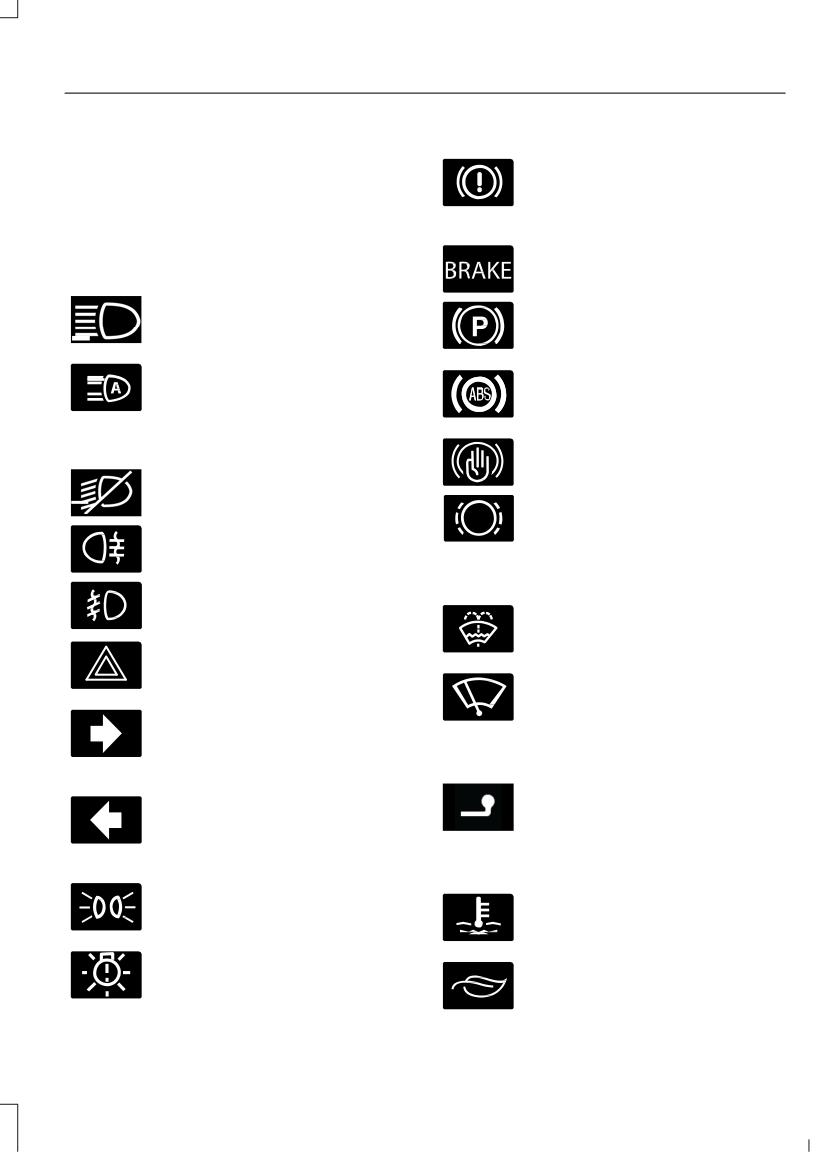
Symbols Glossary
SYMBOLS USED ON YOUR
Brakes
INSTRUMENT CLUSTER
Brake failure. See Brakes -
E67024
Warning Lamps (page 189).
Depending on your vehicle options, market,
See Electric Parking Brake -
and instrument cluster type, not all
Warning Lamps (page 193).
symbols shown are available.
Brake failure. See Brakes -
Lighting and Signaling
Warning Lamps (page 189).
E270480
High beams. See Using the
Parking brake. See Electric
High Beam Headlamps (page
Parking Brake - Warning
E406243
82).
E210346
Lamps (page 193).
Auto high beams. See
Anti-lock brake system
E146105
Automatic High Beam Control
E67020
malfunction. See Brakes -
Indicators (page 87). See
Warning Lamps (page 189).
Glare Free High Beam Control
Indicators (page 90).
Automatic brake hold. See Auto
E323
4
48
Hold Indicators (page 199).
Lamps off. See Headlamp
Indicators (page 83).
Brake pad wear. See Brakes -
E402898
Information Messages (page
Rear fog lamps. See Using the
190).
E67040
Rear Fog Lamps (page 85).
Visibility
Front fog lamps. See Using All
Weather Lamps (page 85).
Windshield washer fluid level.
E132353
See Wipers and Washers -
Hazard warning. See Switching
Warning Lamps (page 80).
E75790
the Hazard Flashers On and
Off (page 286).
Windshield washer fault. See
Wipers and Washers -
Turn signal - right. See Using
E270969
Warning Lamps (page 80).
the Turn Signal Lamps (page
84). See Switching the
Load Management
Hazard Flashers On and Off (page 286).
Tow ball arm fault. See
Turn signal - left. See Using the
Connecting a Trailer -
Turn Signal Lamps (page 84).
E414235
Warning Lamps (page 276).
See Switching the Hazard
Flashers On and Off (page 286).
Electric motor
Positioning/sidelights. See
E71341
Coolant temperature. See
Headlamp Indicators (page
E103308
Coolant - Warning Lamps
83).
(page 308).
Exterior bulb failure. See
Eco mode. See Eco (page 182).
Headlamp Indicators (page
E181350
83).
E295413
17
Explorer (CFU) 5-Door SUV, CG3968en enGBR, Edition date: 202603, First-Printing
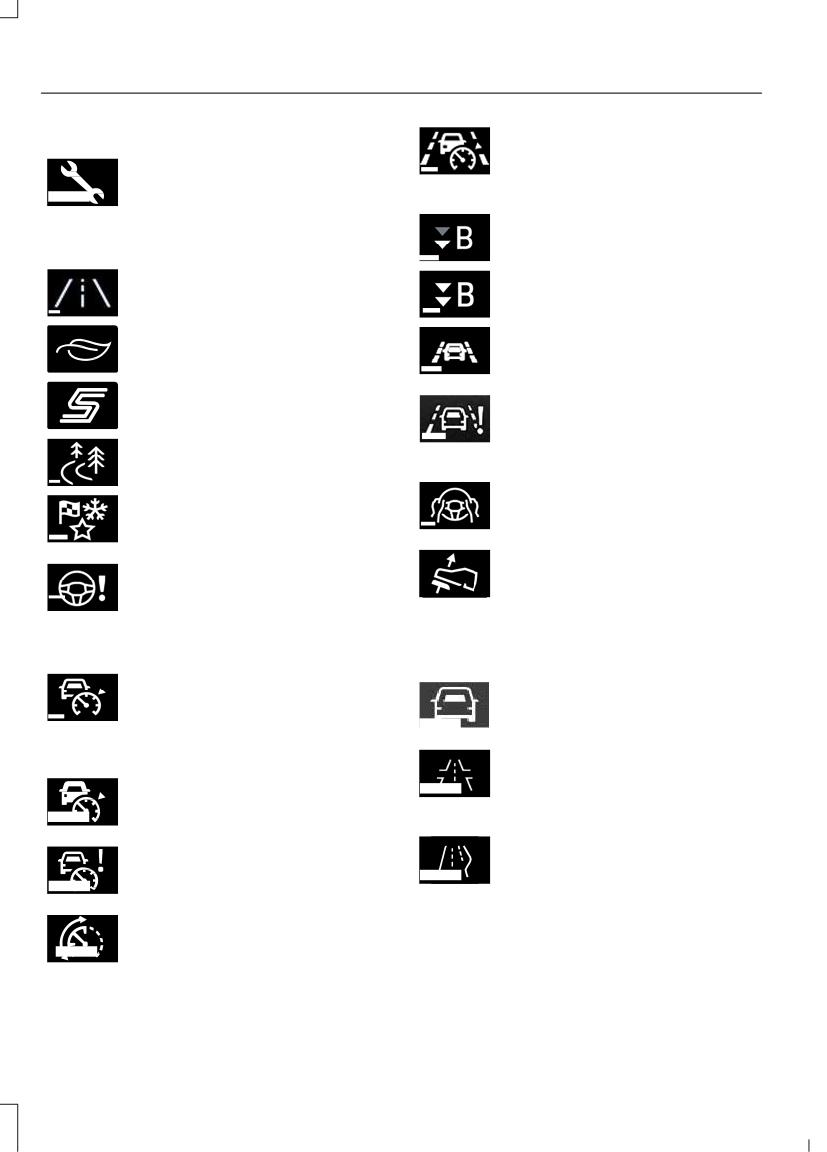
Symbols Glossary
Transmission
Lanecentering assist. See
Switching Lane Centering On
Powertrain fault. See High
E405179
and Off (page 227). See Lane
Voltage Battery - Warning
Centering Indicators (page 229).
E415072
Lamps(page146).
Onepedaldrive. SeeOnePedal
Vehicle Handling
Drive Indicators (page 187).
E458372
Selectable drive mode - normal.
Onepedaldrive. SeeOnePedal
See Normal (page 182).
Drive Indicators (page 187).
E412962
E458377
Selectable drive mode - ECO.
Lane keeping aid. See Lane
See Eco (page 182).
Keeping System Indicators
E295413
E411369
(page 241).
Selectable drive mode - sport.
Lane keeping aid malfunction.
See Sport (page 182).
E246593
See Lane Keeping System -
E465437
Information Messages (page
Selectable drive mode - traction.
246).
SeeTraction (page 182).
E406240
Handsonwheel. SeeHowDoes
Selectable drive mode -
Driver State Assist Work
individual. See Individual (page
E408425
(page 46).
E406239
182).
Efficient drive mode. See How
Steering system fault. See
Does Efficient Drive Mode
Steering - Warning Lamps
Work (page 184).
E408238
(page 203).
Take your foot off the accelerator. See
Efficient Drive Mode Indicators (page
DriverAssistance
185).
Adaptive cruise control. See
Vehicle ahead. See Efficient
Switching Adaptive Cruise
E402315
Drive Mode Indicators (page
Control On and Off (page 223).
E406650
185).
SeeAdaptive Cruise Control Indicators
(page 226).
Junction ahead. See Eff
(page
Drive Mode Indicators
Adaptive cruise control. See
E406651
Adaptive Cruise Control
185). See Predictive Speed
E413928
Assist Indicators (page 231).
Indicators (page 226).
Adaptive cruise control failure.
Highway exit ahead. See
Efficient Drive Mode
See Adaptive Cruise Control
E406652
E415119
- Warning Lamps (page 232).
Indicators (page 185). See
Predictive Speed Assist Indicators
(page 231).
Speed limiter. See Switching
the Intelligent Speed Limiter
E415123
On and Off (page 237). See
Intelligent Speed Limiter Indicators
(page 239).
18
Explorer (CFU) 5-Door SUV, CG3968en enGBR, Edition date: 202603, First-Printing
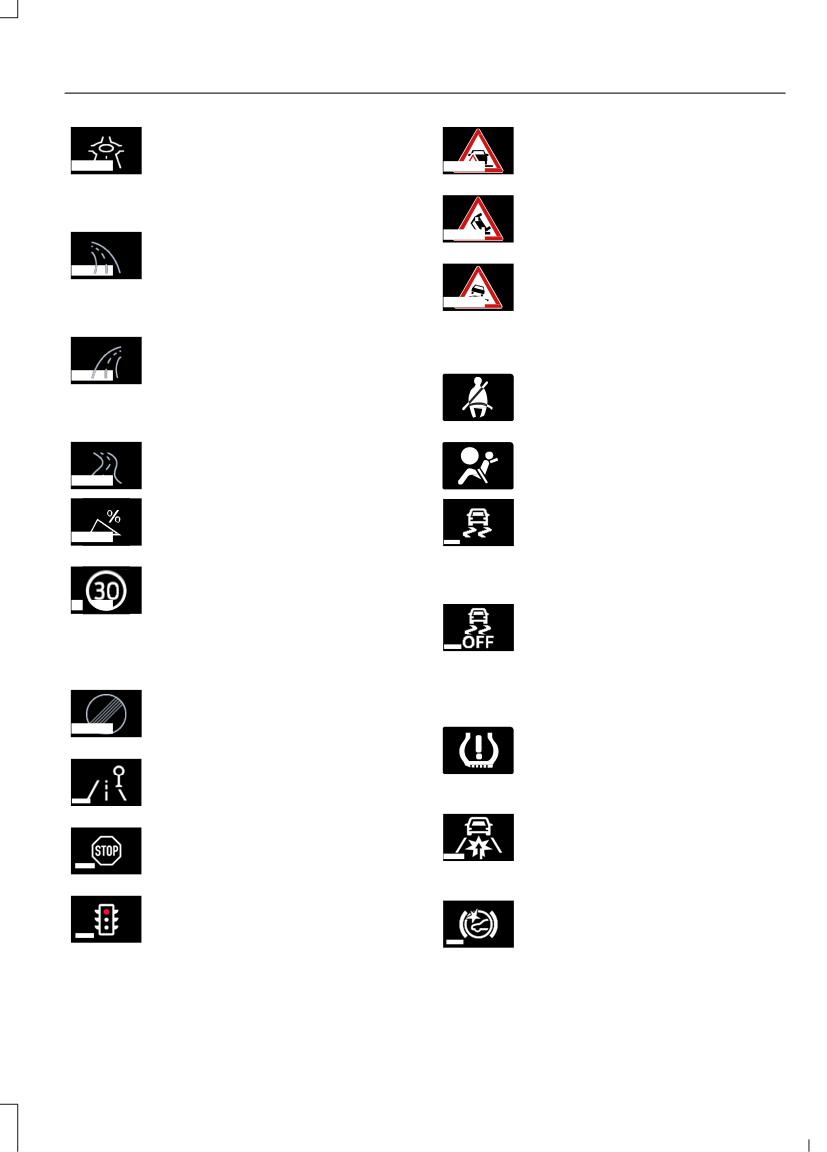
Symbols Glossary
Roundabout ahead. See
Brokendownvehicle.SeeLocal
Efficient Drive Mode
Hazard Information
E406653
E413107
Indicators (page 185). See
Indicators (page 236).
Predictive Speed Assist Indicators
(page 231).
Accident. See Local Hazard
Information Indicators (page
E413105
Bend to the left ahead. See
236).
Efficient Drive Mode
E406654
Slippery road. See Local
Indicators (page 185). See
(page
Predictive Speed Assist Indicators
Information Indicators
E413106
236).
(page 231).
Bend to the right ahead. See
Safety
Efficient Drive Mode
E406655
Indicators (page 185). See
Seatbelt. See Seatbelt
Predictive Speed Assist Indicators
Reminder Indicators (page
(page 231).
E71880
40).
Curve. See Predictive Speed
Airbag. See Airbags -Warning
Assist Indicators (page 231).
Lamps (page 44).
E414102
E67017
Slope ahead. See Efficient
Stability control system active
Drive Mode Indicators (page
or not available. See Traction
E406656
E411393
185).
Control Indicator (page 200).
See Stability Control Indicator (page
Speed limit ahead. See
201).
Efficient Drive Mode
E406657
Indicators (page 185). See
Stability control system off. See
Predictive Speed Assist Indicators
Switching Stability Control
E411501
(page231). SeeTrafficSignRecognition
On and Off (page 201). See
Indicators (page 263).
Switching Stability Control On and Off
(page 201). See Traction Control -
End of speed limit. See
Warning Lamps (page 200).
Predictive Speed Assist
E414101
Indicators (page 231).
Tire failure/Low tire pressure.
E139232
See Tire Pressure Monitoring
Traffic sign recognition. See
System - Warning Lamps
Traffic Sign Recognition
(page 344).
E413813
Indicators (page 263).
Pre-collision assistsystem
Stop sign recognition. See
warning. See Pre-Collision
Predictive Speed Assist
E406050
Assist - Warning Lamps (page
E462068
Indicators (page 231).
257).
Traffic light recognition. See
Pre-collision assistsystem
Predictive Speed Assist
disabled. See Pre-Collision
E462064
Indicators (page 231).
E408335
Assist - Warning Lamps (page
257).
19
Explorer (CFU) 5-Door SUV, CG3968en enGBR, Edition date: 202603, First-Printing
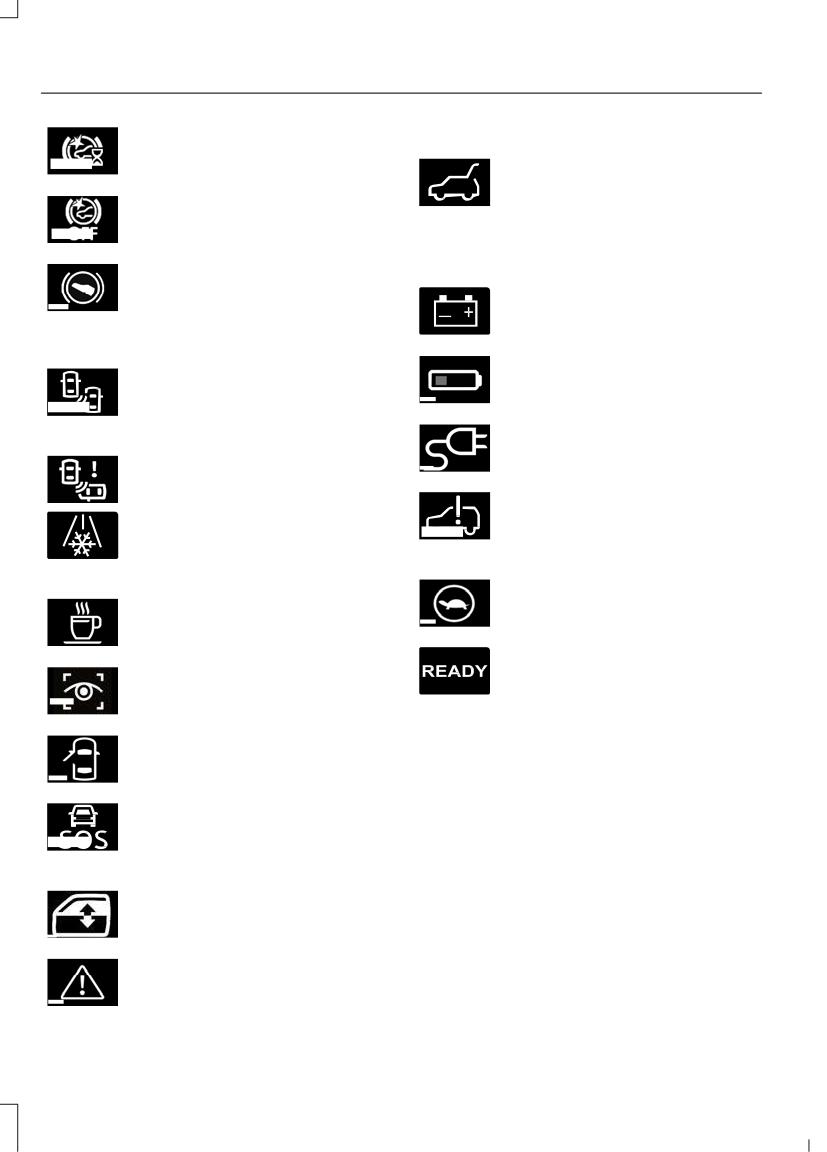
Symbols Glossary
Pre-collision system unavailable.
Security
See Pre-Collision Assist -
E413548
Liftgate release/ajar. See
Warning Lamps (page 257).
Liftgate - Warning Lamps
Pre-collision assist system off.
(page 65). See Liftgate -
See Pre-Collision Assist -
Warning Lamps (page 68).
E413547
Warning Lamps (page 257).
Electrical Systems
Reverse brake assist. See
Reverse Brake Assist
Battery charge level. See 12V
E446076
Indicators (page 195). See
Battery - Warning Lamps
Adaptive Cruise Control - Warning
(page 311).
Lamps (page 232).
Propulsion battery charging. See
Blind spot information system.
High Voltage Battery Gauge
See Blind Spot Assist
E407724
E416370
(page 103).
Indicators (page 244). See Exit
Warning Indicators (page 248).
External cord connected. See
Charging Your Vehicle -
Cross traffic alert. See What Is
E406052
Warning Lamps (page 173).
Cross Traffic Alert (page 250).
Electric system failure. See
Icy road conditions. See Cold
Coolant - Warning Lamps
E389521
Weather Precautions (page
(page 308). See Emergency
281). See Driving on Snow and
Towing(page 291).
Ice (page 281).
Limitedperformancemode. See
Driver alert system off or
Electric Motor Precautions
E375575
unavailable. See Driver Alert
(page 176).
Indicators (page 261).
Ready to drive. See Starting
Driver alert system off or
the Vehicle (page 140).
E224090
unavailable. See Driver Alert
E462810
Indicators (page 261).
Door(s) ajar. See Doors and
Locks- Warning Lamps (page
E406036
57).
Driver state assist. See How
Does Driver State Assist Work
E412868
(page 46). See Driver State
Assist - Warning Lamps (page 47).
Health risk. See Opening and
Closing the Windows (page
96).
Safety alert.
E385031
20
Explorer (CFU) 5-Door SUV, CG3968en enGBR, Edition date: 202603, First-Printing
Data Privacy
•
Vehicle and component status, for
example wheel speed, deceleration,
WARNING: Do not connect
lateral acceleration and seatbelt
wireless plug-in devices to the data link
status.
connector. Unauthorized third parties
could gain access to vehicle data and
•
Events or errors in essential systems,
impair the performance of safety related
for example headlamps and brakes.
systems. Only allow repair facilities that
•
System responses to driving situations,
follow our service and repair instructions
for example airbag deployment and
to connect their equipment to the data
stability control.
link connector.
•
Environmental conditions, for example
temperature.
We respect your privacy and are
committed to protecting it. The
Some of this data, when used in
information contained in this publication
combination with other information, for
was correct at the time of release, but as
example an accident report, damage to a
technologyrapidly changes, we
vehicle or eyewitness statements, could
recommend that you visit the local Ford
be associated with a specific person.
website for the latest information.
Services That We Provide
Your vehicle has electronic control units
that have data recording functionality and
If you use our services, we collect and use
the ability to permanently or temporarily
data, for example account information,
store data. This data could include
vehicle location and driving characteristics,
information on the condition and status of
that could identify you. We transmit this
your vehicle, vehicle maintenance
data through a dedicated, protected
requirements, events and malfunctions.
connection. We only collect and use data
The types of data that can be recorded are
to enable your use of our services to which
described in this section. Some of the data
you have subscribed, with your consent or
recorded is stored in event logs or error
where permitted by law. For additional
logs.
information, see the terms and conditions
of the services to which you have
Note: Error logs are reset following a service
subscribed.
or repair.
For additional information about our
Note: We may provide information in
privacy policy, refer to the local Ford
response to requests from law enforcement,
website.
other government authorities and third
parties acting with lawful authority or
Services That Third Parties
through a legal process. Such information
Provide
could be used by them in legal proceedings.
We recommend that you review the terms
Data recorded includes, for example:
and conditions and data privacy
•
For vehicles equipped with a driver
information for any services equipped with
facing camera, driver engagement
your vehicle or to which you subscribe. We
including eye and head position
take no responsibility for services that third
processed by the camera.
parties provide.
•
Operating states of system
components, for example battery
chargelevel and tire pressure.
21
Explorer (CFU) 5-Door SUV, CG3968en enGBR, Edition date: 202603, First-Printing
Data Privacy
SERVICE DATA
The event data recorder in this vehicle is
designed to record such data as:
Our dealers collect service data through
•
How various systems in your vehicle
the data link connector in your vehicle.
were operating.
They use service data, for example error
•
Whether or not the occupant seatbelts
logs, to help them if you take your vehicle
were buckled/fastened.
for repair. They share this data with our
•
How far (if at all) the driver was
technical team, if required, to help with
depressing the accelerator and/or the
diagnosis. In addition to using the
brake pedal.
information for diagnosis and repair, we
useandshareservicedatawithourservice
•
How fast the vehicle was traveling.
providers, for example parts suppliers,
•
Where the driver was positioning the
where required and where permitted by
steering wheel.
law, for continuous improvement or with
other information that we have about you,
This data can help provide a better
for example your contact information, to
understanding of the circumstances in
which crashes and injuries occur.
offer you products and services that may
be of interest to you according to your
Note: Event data recorder data is recorded
preferences and where allowed by law.
by your vehicle only if a non-trivial crash
Our service providers are equally required
situation occurs; no data is recorded by the
by law to protect your data and retain it in
event data recorder under normal driving
accordance with data retention policies.
conditions and no personal data or
Note: Third party repair facilities can also
information (for example name, gender,
collect service data through the data link
age, and crash location) is recorded.
connector.
However, parties, such as law enforcement,
could combine the event data recorder data
with the type of personally identifying data
EVENT DATA
routinely acquired during a crash
investigation.
European regulations mandate this vehicle
To read data recorded by an event data
to be equipped with an Event Data
recorder, special equipment is required,
Recorder. The main purpose of an event
and access to the vehicle or the event data
data recorder is to record, in certain crash
recorder is needed. In addition to the
or near crash-like situations, such as an
vehicle manufacturer, other parties, such
airbag deployment or hitting a road
aslaw enforcement, that have such special
obstacle; this data will assist in
equipment, can read the information if they
understanding how a vehicle’s systems
have access to the vehicle or the event
performed. The event data recorder is
data recorder.
designed to record data related to vehicle
dynamics and safety systems for a short
period of time, typically 5 seconds or less.
22
Explorer (CFU) 5-Door SUV, CG3968en enGBR, Edition date: 202603, First-Printing
Data Privacy
SETTINGSDATA
Note: The modem continues to send
information unless you disable the modem
Your vehicle has electronic control units
or stop the modem from sharing data by
that have the ability to store data based
changing the modem settings. See
Connected Vehicle (page 352).
on your personalized settings. The data is
stored locally in the vehicle or on devices
Note: The service can be unavailable or
that you connect to it, for example, a USB
interrupted for a number of reasons, for
drive or digital music player. You can delete
example environmental or topographical
some of this data and also choose whether
conditions and data plan coverage.
to share it through the services to which
Note: To find out if your vehicle has a
you subscribe.
modem, visit www.FordConnected.com.
Comfort and Convenience Data
MOBILE DEVICE DATA
Data recorded includes, for example:
•
Seat and steering wheel position.
If you connect a mobile device to your
•
Climate control settings.
vehicle, you can display data from your
•
Radio presets.
device on the touchscreen for example,
music and album art. You can share your
Entertainment Data
vehicle data with mobile apps on your
device through the system. See App
Data recorded includes, for example:
Requirements (page 369).
•
Music, videos or album art.
If you connect a cell phone to the system,
•
Contacts and corresponding address
the system creates a profile that links to
book entries.
that cell phone. The cell phone profile
•
Navigation destinations.
enables more mobile features and efficient
operation. The profile contains, for
example data from your phonebook, read
CONNECTED VEHICLE DATA
and unread text messages and call history,
including history of calls when your cell
The modem has a SIM. The
phone was not connected to the system.
modem was enabled when your
If you connect a media device, the system
vehicle was built and periodically
creates and retains a media device index
sends messages to stay connected to the
of supported media content.
cell phone network. Subject to your
consent, the vehicle may send vehicle,
The cell phone profile and media device
driving and location data. These messages
index remain in your vehicle unless you
could include information that identifies
delete them and are generally accessible
your vehicle, the SIM and the electronic
onlyin your vehicle when you connect your
serial number of the modem. Cell phone
cell phone or media device. If you nolonger
network service providers could have
plan to use the system or your vehicle, we
access to additional information, for
recommend you use the system reset
example cell phone network tower
function to erase the stored information.
identification. For additional information
See Performing a System Reset (page
about our privacy policy, visit
377).
local Ford website.
23
Explorer (CFU) 5-Door SUV, CG3968en enGBR, Edition date: 202603, First-Printing
Data Privacy
For additional information about our
privacy policy, refer to the local Ford
website.
EMERGENCY CALL SYSTEM
DATA
Whentheemergency call systemis active,
itmay disclose to emergency services that
your vehicle has been in a crash involving
the deployment of an airbag or activation
of the battery shut-off or that a system
intervention by the Driver State Assist has
been executed. See Driver State Assist
(page 46). Certain versions or updates to
the emergency call system may also be
capable of electronically or verbally
disclosing to emergency services operators
your vehicle location or other details about
your vehicle or crash to assist emergency
services operators to provide the most
appropriate emergency services. If you do
not want to disclose this information, do
not activate the emergency call system.
Examples of data that the system could
transmit are:
•
Vehicle identification number.
•
Vehicle propulsion storage type.
•
Current time.
•
Vehicle location and direction.
•
Accident direction.
•
Change in velocity of the vehicle.
•
Whether the call was automatically or
manually initiated.
•
Vehicle category.
•
Number of occupants in the vehicle.
Note: You cannot deactivate emergency
call systems that are required by law.
24
Explorer (CFU) 5-Door SUV, CG3968en enGBR, Edition date: 202603, First-Printing
Environment
PROTECTING THE
RECYCLING AND DISPOSING
ENVIRONMENT
OF BATTERIES
Sustainability is a priority at Ford. We are
Make sure that you dispose of
constantly looking for ways to reduce our
E1
07998
old batteries in an
impact on the planet while providing
environmentally friendly way.
customers with great products and
Seek advice from your local authority
delivering a strong business. You should
about recycling old batteries.
play your part in protecting the
environment.Correctvehicleusageand
Batteries contain toxic metals such as
the authorized disposal of waste, cleaning
cadmium, mercury and lead along with
and lubrication materials are significant
other hazardous materials like lithium,
steps toward this aim.
posing a significant environmental hazard
if not disposed of properly.
For additional information about our
sustainability progress and initiatives, visit
Chemical symbols of metals concerned
www.sustainability.ford.com.
Cd
Cadmium.
RECYCLING AND DISPOSING
Pb
Lead.
LABELS
Li
Lithium.
France Only
Li-Ion
Lithium-Ion.
E387562
E440174
25
Explorer (CFU) 5-Door SUV, CG3968en enGBR, Edition date: 202603, First-Printing
Visual Search
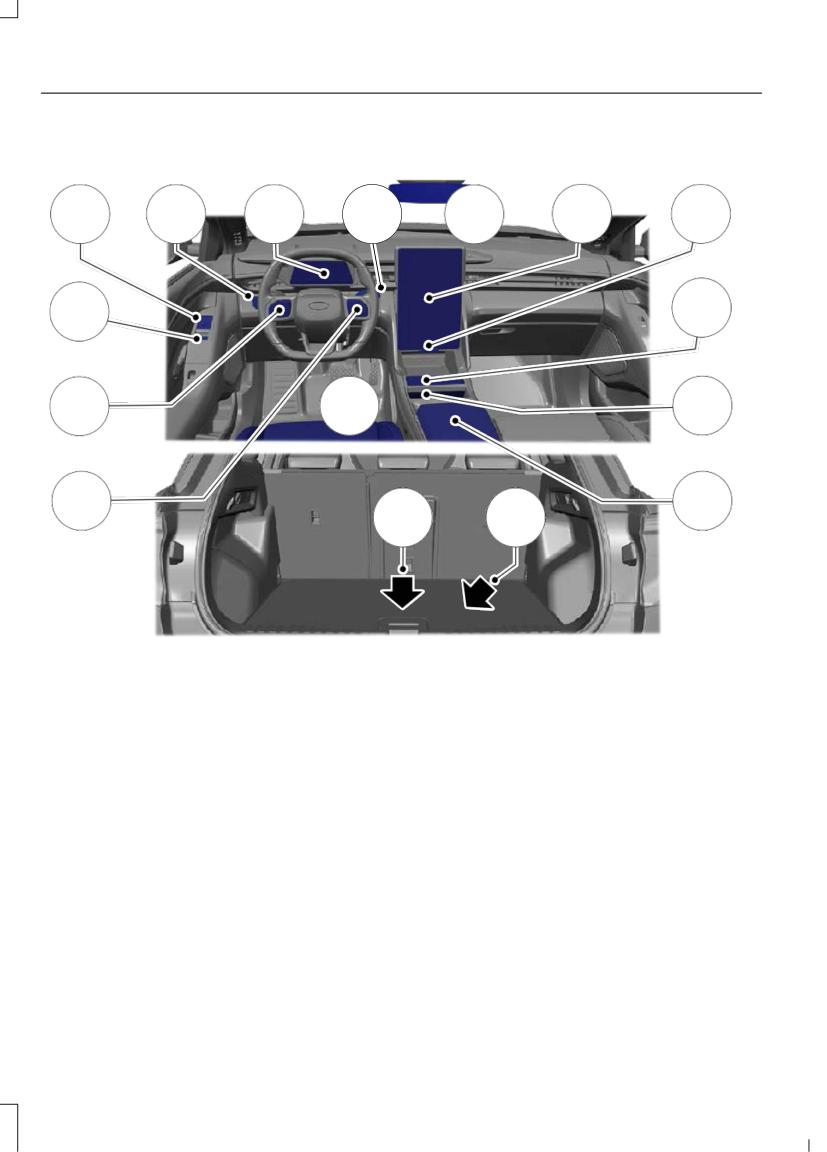
INTERIOR OVERVIEW - LHD
A
B
C
D
E
F
G
P
H
O
M
I
N
J
L
K
E463989
A
See Adjusting the Exterior Mirrors (page 100).
B
See Exterior Lighting Control (page 82).
C
See Instrument Cluster Overview (page 102).
D
See Shifting Your Vehicle Into Gear (page 177).
E
See How Does Driver Alert Work (page 259).
F
See Center Display Precautions (page 360).
G
See Using the Movable Screen (page 359).
H
See Switching Active Park Assist On and Off (page 214).
I
See Charging a Wireless Device (page 136).
J
See Adjusting the Center Console (page 138).
K
See Charging Equipment Precautions (page 147).
L
See Adjusting the Luggage Compartment Load Floor (page 272).
26
Explorer (CFU) 5-Door SUV, CG3968en enGBR, Edition date: 202603, First-Printing
Visual Search
M
See Front Seat Precautions (page 119).
N
See Using the Instrument Cluster Display Controls (page 105).
O See Switching Adaptive Cruise Control On and Off (page 223).
P See Opening and Closing the Windows (page 96).
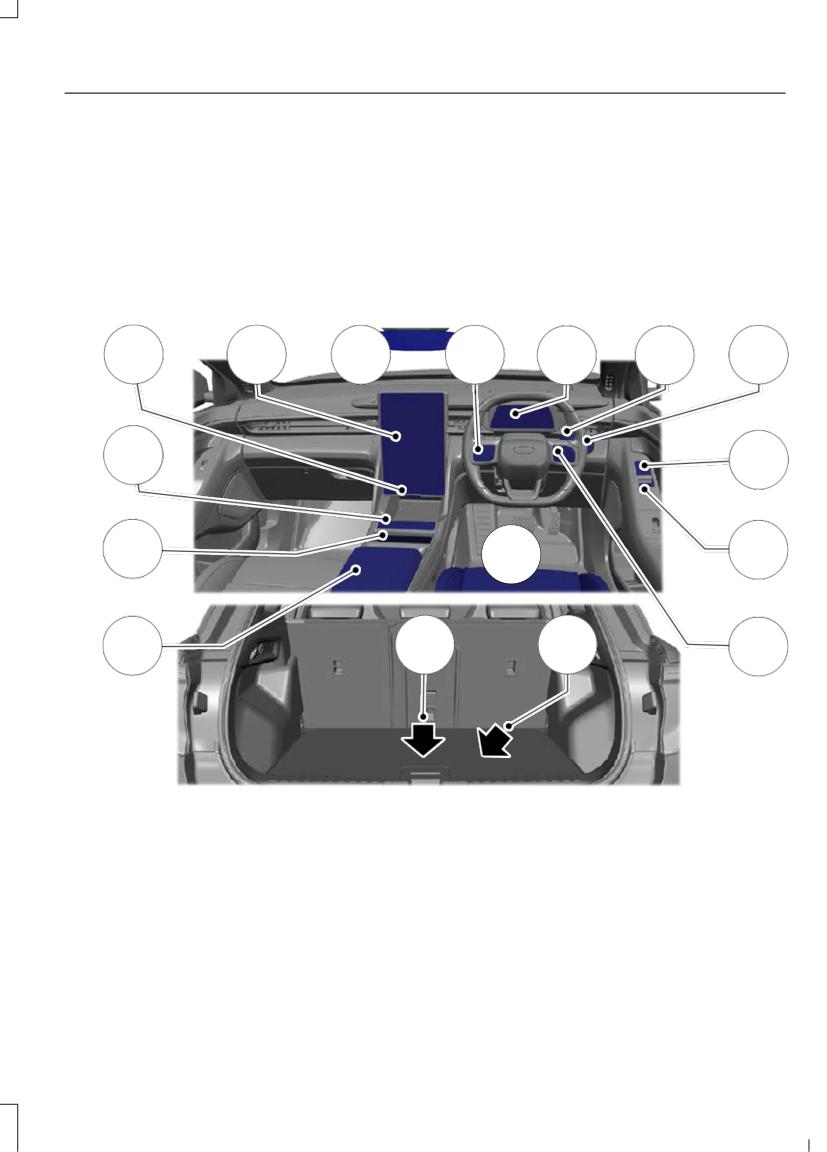
INTERIOR OVERVIEW - RHD
G
F
E
D
C
B
A
H
P
I
O
L
J
K
M
N
E463997
A
See Exterior Lighting Control (page 82).
B
See Shifting Your Vehicle Into Gear (page 177).
C
See Instrument Cluster Overview (page 102).
D
See Switching Adaptive Cruise Control On and Off (page 223).
E
See How Does Driver Alert Work (page 259).
F
See Center Display Precautions (page 360).
G
See Using the Movable Screen (page 359).
27
Explorer (CFU) 5-Door SUV, CG3968en enGBR, Edition date: 202603, First-Printing
Visual Search
H
See Switching Active Park Assist On and Off (page 214).
I
See Charging a Wireless Device (page 136).
J
See Adjusting the Center Console (page 138).
K
See Adjusting the Luggage Compartment Load Floor (page 272).
L
See Charging Equipment Precautions (page 147).
M
See Front Seat Precautions (page 119).
N
See Using the Instrument Cluster Display Controls (page 105).
O
See Opening and Closing the Windows (page 96).
P
See Adjusting the Exterior Mirrors (page 100).
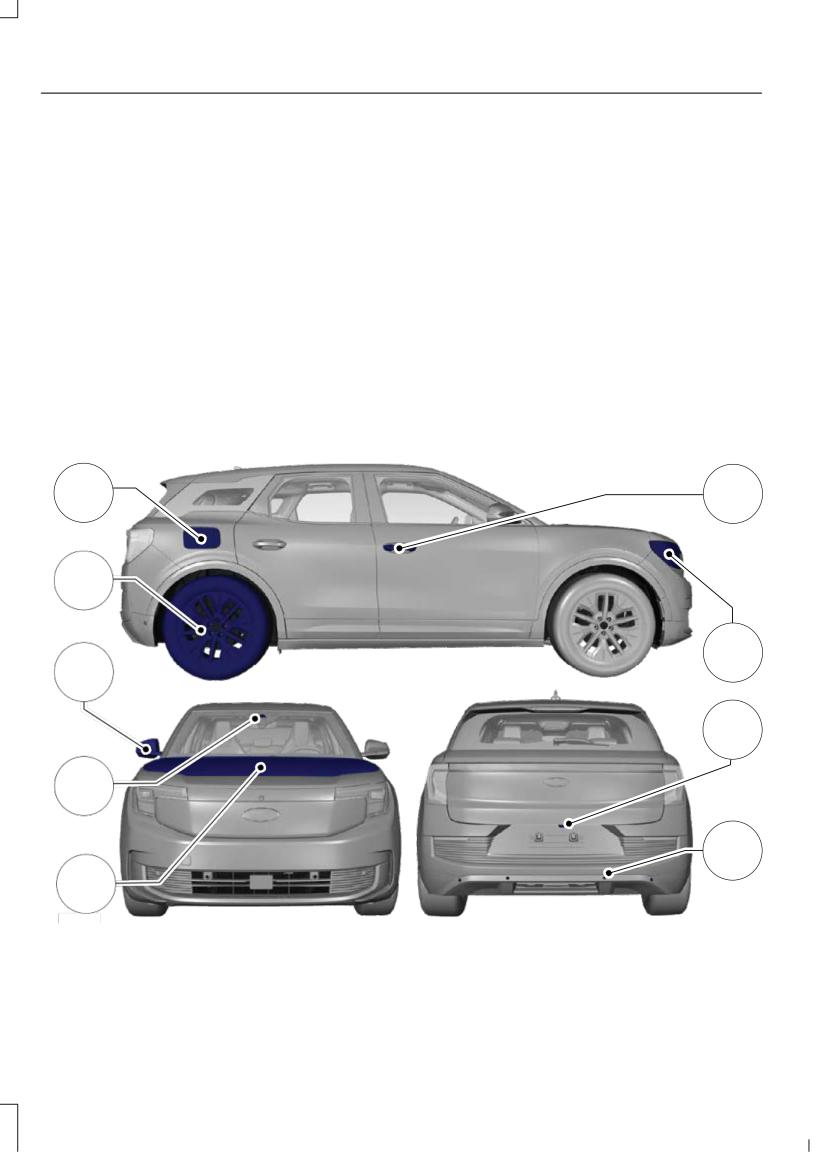
EXTERIOR OVERVIEW
A
B
I
C
H
D
G
E
F
E452893
28
Explorer (CFU) 5-Door SUV, CG3968en enGBR, Edition date: 202603, First-Printing
Visual Search
A
See Charging Equipment Precautions (page 147).
B
See Unlocking and Locking the Doors Using the Remote Control (page
54).
C
See Exterior Lighting Control (page 82).
D
See Rear View Camera Guidelines (page 210).
E
See Parking Aid Precautions (page 205).
F
See Using the Tire Sealant and Inflator Kit (page 338).
G
See What Is Pre-Collision Assist (page 253).
H
See Adjusting the Exterior Mirrors (page 100).
I
See Tire Pressure Specifications (page 329).
29
Explorer (CFU) 5-Door SUV, CG3968en enGBR, Edition date: 202603, First-Printing
Child Safety
CHILD SAFETY PRECAUTIONS
WARNING: Following the removal
of the child restraint, you must check the
activation of the passenger airbag.
WARNING: Do not modify child
restraints in any way.
WARNING: Do not hold a child on
your lap when your vehicle is moving.
E161855
WARNING: Do not leave children
or pets unattended in your vehicle.
Failure to follow this instruction could
result in personal injury or death.
WARNING: If your vehicle has been
involved in a crash, have the child
restraints checked.
WARNING:Do notput the shoulder
section of the seatbelt or allow the child
to put the shoulder section of the
seatbelt under their arm or behind their
back. Failure to follow this instruction
could reduce the effectiveness of the
seatbelt and increase the risk of injury or
death in a crash.
E68916
WARNING: Do not use pillows,
Only child restraints certified to ECE-R129
books or towels to boost your child's
or ECE-R44.03 (or later) have been tested
height. Failure to follow this instruction
and approved for use in your vehicle.
could result in personal injury or death.
Note: Mandatory use of child restraints
varies from country to country.
WARNING: You must reinstall the
head restraint following the removal of
the child restraint.
WARNING: Extreme Hazard! Never
use a rearward facing child restraint on
WARNING: Always make sure your
a seat protected by an active airbag in
child is secured properly in a device that
front of it. Death or serious injury to the
is appropriate for their height, age and
child can occur.
weight. Child safety restraints must be
bought separately from your vehicle.
WARNING: The passenger airbag
Failure to follow these instructions and
must be deactivated when using a
guidelinesmayresultinanincreasedrisk
rearward facing child restraint on the
of serious injury or death to your child.
front seat.
30
Explorer (CFU) 5-Door SUV, CG3968en enGBR, Edition date: 202603, First-Printing
Child Safety
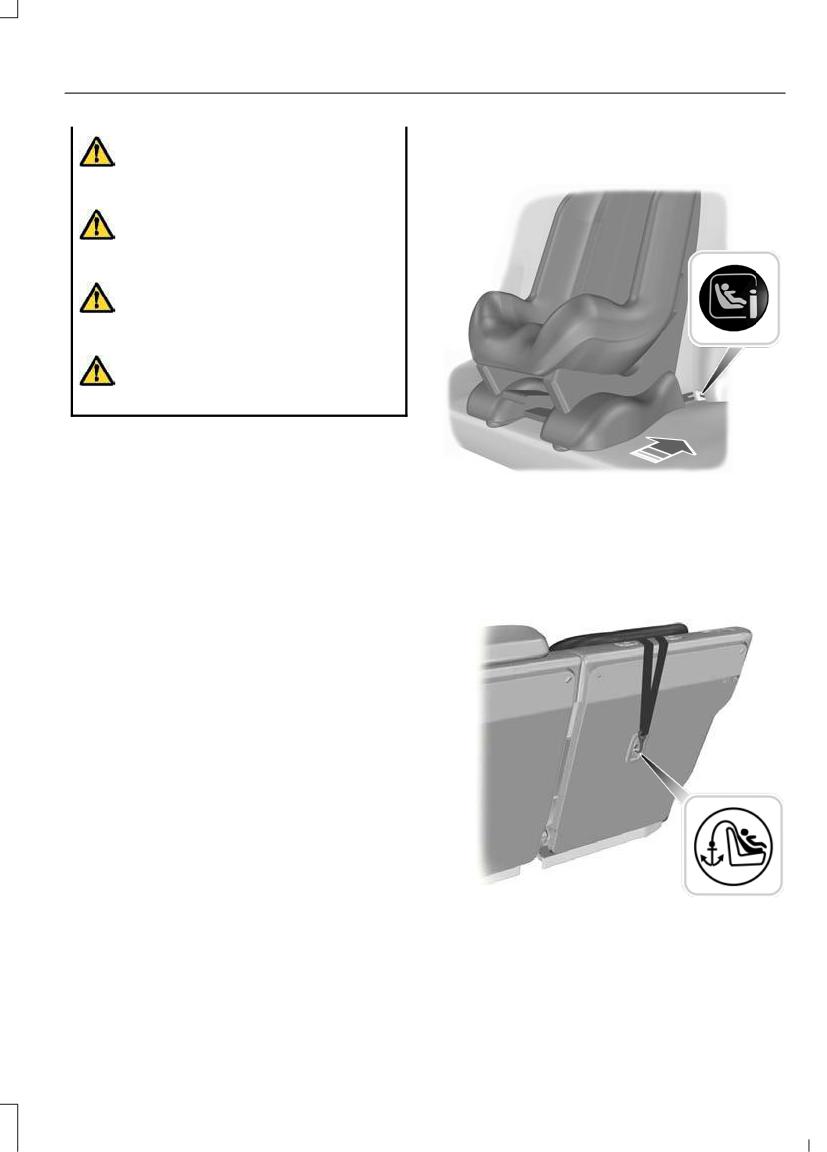
LOCATING THE CHILD RESTRAINT
LOWER ANCHOR POINTS
WARNING: If you use a child
restraint and a seatbelt, make sure that
the seatbelt is not slack or twisted.
WARNING:Do not install a booster
seat or a booster cushion with only the
lap strap of the seatbelt.
WARNING: Do not install a booster
seat or a booster cushion with a seatbelt
that is slack or twisted.
WARNING: Make sure that your
children sit in an upright position.
CHILD RESTRAINT ANCHOR
E174928
POINTS
Lower anchor points are on the rear
outermost seats.
WHAT ARE THE CHILD RESTRAINT
ANCHORPOINTS
LOCATING THE CHILD RESTRAINT
Anchor points are designed to allow you
TOP TETHER ANCHOR POINTS
to quickly and safely install a child
restraint.
E87146
Top tether anchor points are on the back
of the rear seat.
31
Explorer (CFU) 5-Door SUV, CG3968en enGBR, Edition date: 202603, First-Printing
Child Safety
CHILD RESTRAINTS
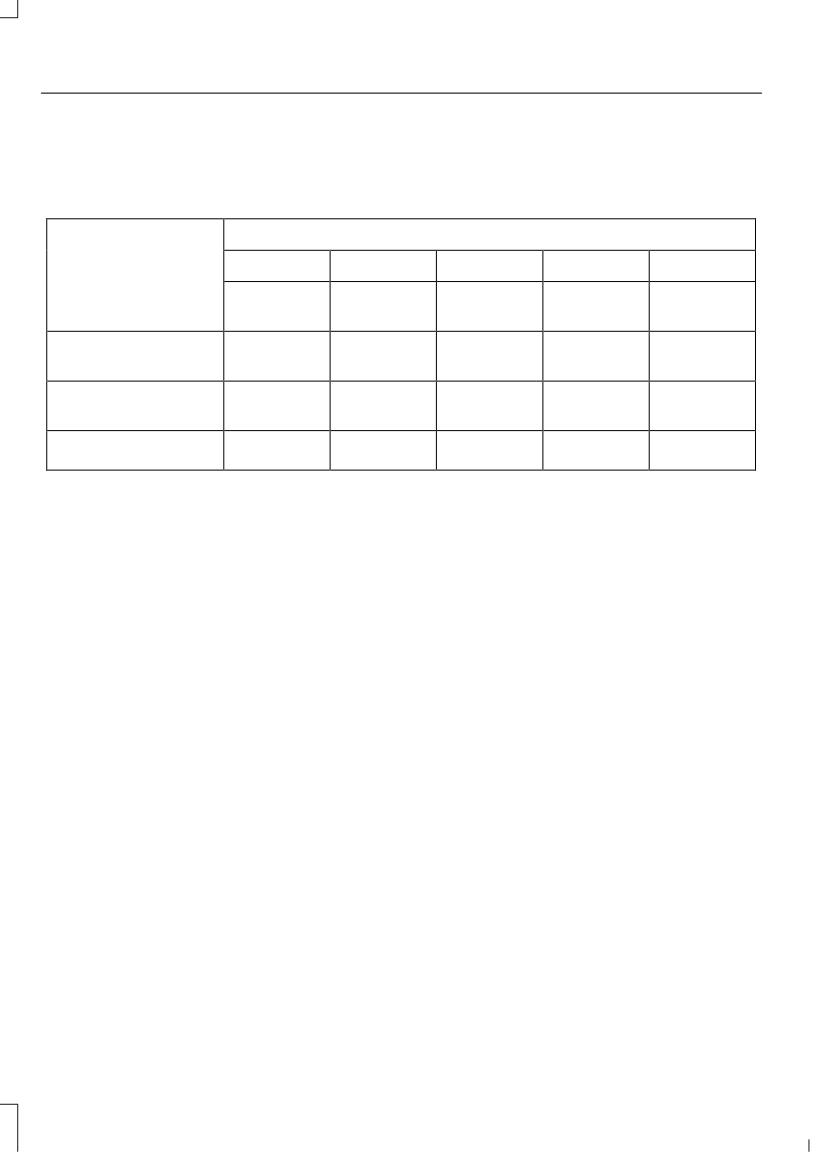
CHILD RESTRAINT POSITION INFORMATION
Mass Group Categories
0
0+
1
2
3
Seating Positions
0-10 kg
0-13 kg
9-18 kg
15-25 kg
22-36 kg
(0-22 lb)
(0-29 lb)
(20-40lb)
(33-55lb)
(49-79 lb)
Front passenger seat
1
1
1
X
X
with airbag ON.
UF
UF
UF
Front passenger seat
1
1
1
1
1
with airbag OFF.
U
U
U
U
U
2
Rear seats.
U
U
U
U
U
1 We recommend that you secure children in a government approved child restraint, on
the rear seat.
2 Do not use a child restraint with a support leg on the rear center seat unless stated as
suitable in the child restraint manufacturer's product information.
X Not suitable for children in this mass group.
U Suitable for universal category child restraints approved for use in this mass group.
UF Suitable for universal category forward facing child restraints approved for use in this
mass group.
Note: If it proves difficult to tighten the lap section of the seatbelt without slack remaining,
adjust the seat backrest to the fully upright position and raise the height of the seat.
Note: No lower tether anchorage points are available on any seating positions.
32
Explorer (CFU) 5-Door SUV, CG3968en enGBR, Edition date: 202603, First-Printing
Child Safety
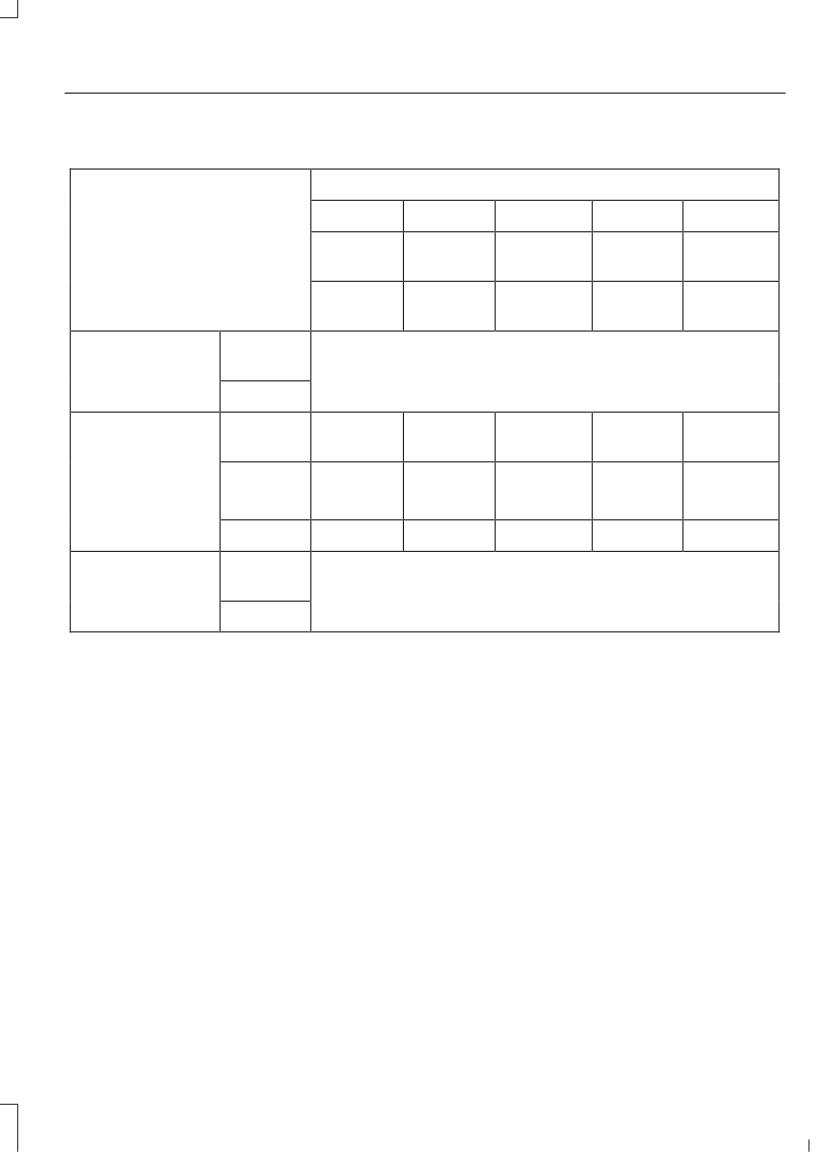
ISOFIX Child Restraints
Mass Group Categories
0
0
0+
1
1
Seating Positions
Lateral
Rearward
Rearward
Forward
Rearward
Facing
Facing
Facing
Facing
Facing
0-10kg
0-10kg
0-13 kg
9-18 kg
9-18 kg
(0-22lb)
(0-22lb)
(0-29lb)
(20-40lb)
(20-40lb)
Front passenger
Size
seat.
class.
No ISOFIX
Size type.
Rear outermost
Size
1
1
1
1
1
seat ISOFIX.
class.
F, G
E
C, D, E
A, B, B1
C, D
Fixture.
1
1
R1, R2X,
F2, F2X,
R2X, R2,
1
1
1
L1, L2
R1
R2, R3
F3
R3
Size type.
IL
IL
IL
IL, IUF
IL
Rear center seat.
Size
class.
No ISOFIX
Size type.
1 The size class and fixture are defined for both universal and semi-universal child restraint
systems. You can see the identification letters on ISOFIX child restraints.
IL Suitable for use with particular ISOFIX child restraint systems in the semi-universal
category. Refer to the child restraint system manufacturer vehicle recommendation list
for additional information.
IUF Suitable for use with forward facing ISOFIX child restraint systems in the universal
category.
Note: No lower tether anchorage points are available on any seating positions.
33
Explorer (CFU) 5-Door SUV, CG3968en enGBR, Edition date: 202603, First-Printing
Child Safety
i-Size Child Restraints
Front Passenger
Rear Outermost
RearCenter
Seat
Seats
Seat
Rearward facing child restraint
X
-
-
systems on front passenger seat
with airbag ON.
i-Size child restraint systems.
X
i-U
X
1
1
1
Suitable booster fixture.
B2, B3
B2, B3
B2, B3
1 The fixture is defined for booster child restraint systems. You can see the identification
letters on i-Size boosters.
i-U Suitable for use with forward and rearward facing i-Size child restraint systems.
X Not suitable for use with i-Size child restraint systems.
Note: No lower tether anchorage points are available on any seating positions.
34
Explorer (CFU) 5-Door SUV, CG3968en enGBR, Edition date: 202603, First-Printing
Child Safety
CHILD RESTRAINTS RECOMMENDATION
Size Class
Manufacturer
Model
Attachment
Categories
40-83 cm
Maxi-Cosi.
Pebble 360 and
ISOFIX and support leg
(15-35 in)
(base) or seatbelt only.
FamilyFix 360 base.1
0-13 kg
(0-29 lb)
40-105 cm
Maxi-Cosi.
Pearl 360 and FamilyFix
ISOFIX and support leg
(15-40 in)
(base).
360 base.1
0-17.5 kg
(0-39 lb)
100-150 cm
Britax Römer.
ISOFIX and seatbelt or
KIDFIX OEM i-Size.1,2
(40-60 in)
seatbelt only.
15-36 kg
(33-79 lb)
1We recommend that you secure children using an ISOFIX child restraint on the rear
outermost seats.
2We recommend that you use a booster seat that combines a cushion with a backrest
instead of a booster cushion only.
See an authorized dealer for the latest details relating to our recommended child restraints.
35
Explorer (CFU) 5-Door SUV, CG3968en enGBR, Edition date: 202603, First-Printing
Child Safety
INSTALLING CHILD RESTRAINTS
Note: When using a child restraint on a rear
seat, adjust the front seat to a position to
prevent contact with the child's feet or legs.
WARNING: Read and follow the
manufacturer's instructions when you
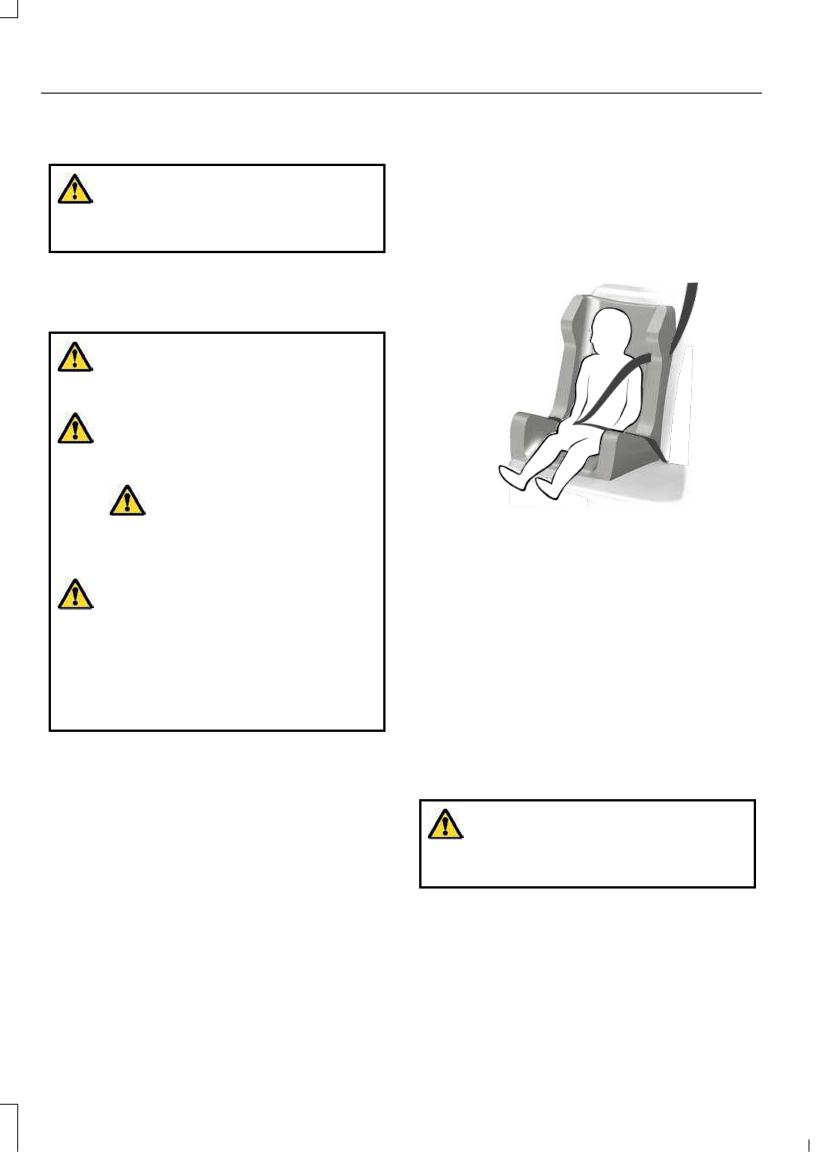
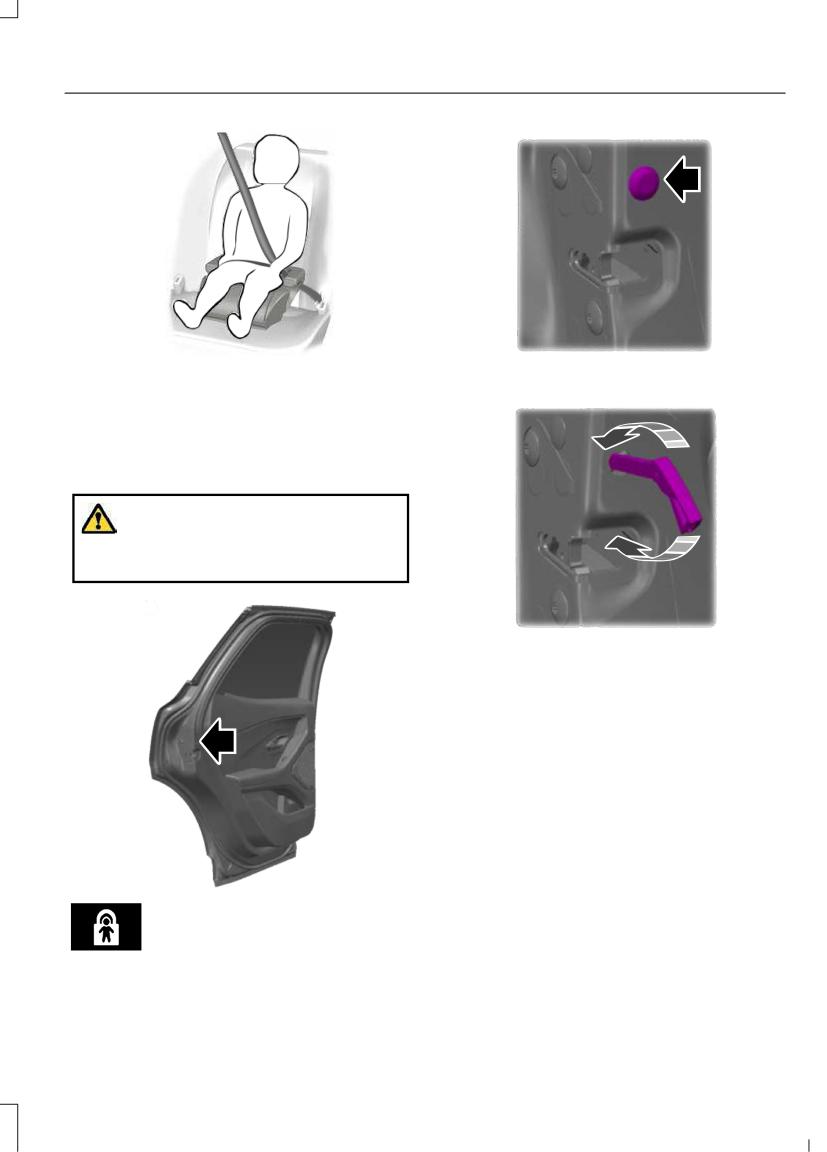
BOOSTER SEATS
are installing a child restraint.
Booster Seat
Note: Always follow the manufacturer's
instructions for installing a child restraint
with a top tether.
WARNING: Do not attach the top
tether strap to anything other than the
correct top tether strap anchor point.
WARNING: Make sure that the
top tether strap is not slack or twisted
and is properly located on the anchor
E70710
point.
WARNING: If you use a
child restraint that has a support leg,
Secure children that weigh greater than
make sure the support leg rests
15 kg (33 lb) but are less than 150 cm
securely on the floor.
(60 in) tall in a booster seat or on a
booster cushion.
WARNING: Make sure the child
We recommend that you use a booster
restraint rests tightly against the vehicle
seat that combines a cushion with a
seat. You may need to adjust the seats
backrestinstead of a boostercushion only.
to properly secure the child restraint.
The raised seating position will allow you
Make sure that the seat backrest is in an
to position the shoulder strap of the adult
upright position. It may also be necessary
seatbelt over the center of your child's
to lift or remove the head restraint.
shoulder and the lap strap tightly across
their hips.
When using a child restraint on a front seat,
follow these seat positioning guidelines:
Booster Cushion
•
The child restraint must not be in
contact with the instrument panel.
•
Position the passenger seat as far
WARNING: When using a booster
cushion, make sure you adjust the vehicle
rearward as possible and route the
head restraint on that seating position.
seatbelt forward and downward from
the B-pillar ring to the child restraint.
•
If it proves difficult to tighten the lap
section of the seatbelt without slack
remaining, adjust the seat backrest to
the fully upright position and raise the
height of the seat.
36
Explorer (CFU) 5-Door SUV, CG3968en enGBR, Edition date: 202603, First-Printing
Child Safety
E462612
E68924
Secure children that weigh greater than
1.
Carefully remove the cover.
22 kg (49 lb) but are less than 150 cm
(60 in) tall on a booster cushion.
CHILD SAFETY LOCKS
WARNING: You cannot open the
rear doors from inside if you have put the
child safety locks on.
E462613
2.
Activate or deactivate the feature with
the key blade on the key fob. See
Removing the Key Blade (page 51).
Left-Hand Side
Turn the key clockwise to switch the child
lock on and counterclockwise to switch it
off.
Right-Hand Side
Turn the key counterclockwise to switch
E462611
the child lock on and clockwise to switch
it off.
A child safety lock is on the rear
Note: Make sure you replace the cover.
edge of each rear door. You
must switch the child safety lock
separately on each door.
37
Explorer (CFU) 5-Door SUV, CG3968en enGBR, Edition date: 202603, First-Printing
Child Safety
Note: To make sure the child safety lock is
CHILD SAFETY LOCK
on, pull the inside door handle twice to verify
INDICATOR
the door does not open. Lower the rear
window or open the front door to gain
access to the rear inside door handle.
Note: To open the rear doors when the child
lock is engaged, have someone outside the
A LED on the child safety lock control
vehicle open the door.
illuminates when you switch them on. If
the LED flashes, try to switch the child
safety locks on again. If the LED continues
to flash, haveyourvehiclecheckedassoon
as possible.
CHILD SAFETY LOCKS - TROUBLESHOOTING
CHILD SAFETY LOCKS - INFORMATION MESSAGES
Message
Details
Electronic childproof lock. Activateit again.
Try to switch the child safety locks on again.
Owner's Manual!
If the message continues to appear, have
your vehicle checked as soon as possible.
38
Explorer (CFU) 5-Door SUV, CG3968en enGBR, Edition date: 202603, First-Printing
Seatbelts
SEATBELT PRECAUTIONS
WARNING: Make sure that the
seatbelts are securely stowed away
when not in use and not outside your
vehicle when closing the doors.
WARNING: Accessory seat covers
not released by the manufacturer of your
vehicle could prevent the seatbelt from
retracting correctly. This could cause the
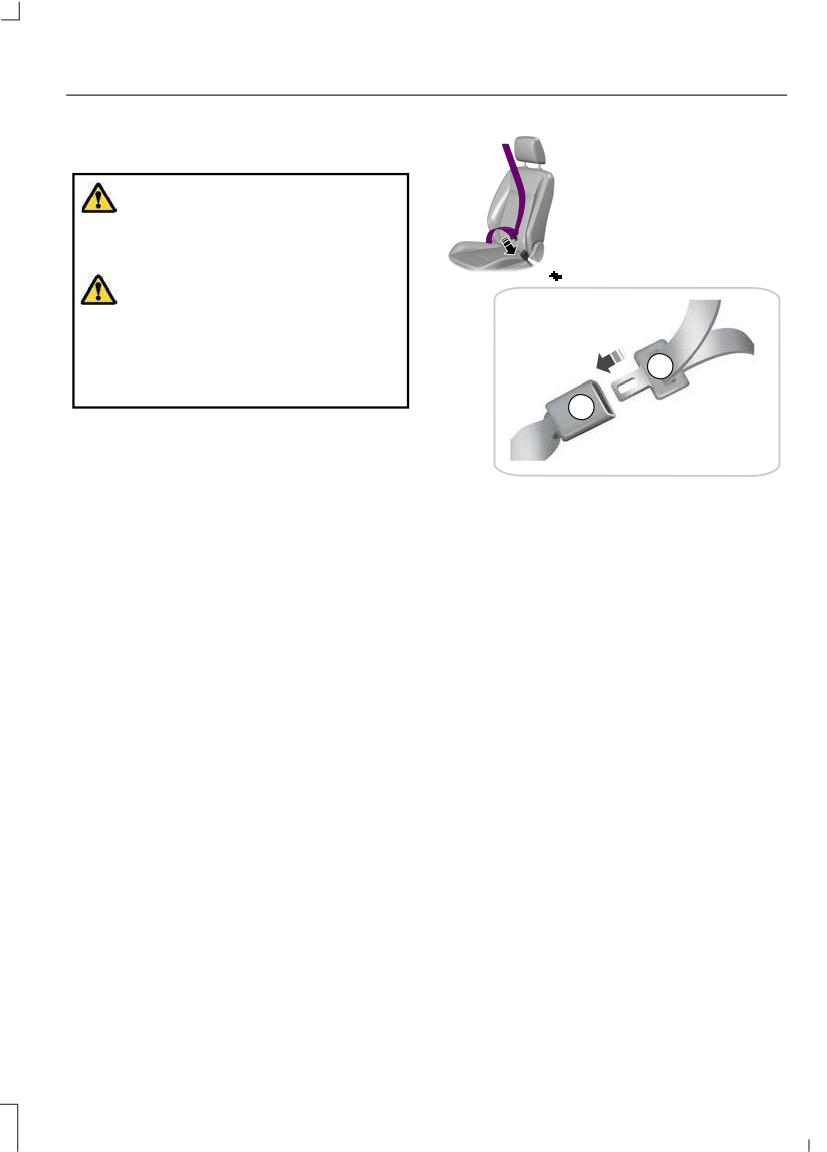
A
seatbelt to become slack which could
increase the risk of injuries in a crash.
B
FASTENINGAND
UNFASTENINGTHE
E338014
SEATBELTS
A
Seatbelt tongue.
Fastening the Seatbelts
B
Seatbelt buckle.
All seatbelts in your vehicle are a
1.
Pull the seatbelt out steadily.
three-point combination lap and shoulder
seatbelt.
Note: It may lock if you pull it sharply or if
the vehicle is on a slope.
2.
Insert the tongue into the buckle.
3.
Pull the seatbelt tight to remove any
slack.
UnfasteningtheSeatbelts
1.
Press the red button on the buckle to
release the seatbelt.
2.
Hold the seatbelt tongue and let it
retract completely and smoothly to its
stowed position.
39
Explorer (CFU) 5-Door SUV, CG3968en enGBR, Edition date: 202603, First-Printing
Seatbelts
ADJUSTING THE SEATBELTS
The warning lamp illuminates
until you fasten your seatbelt.
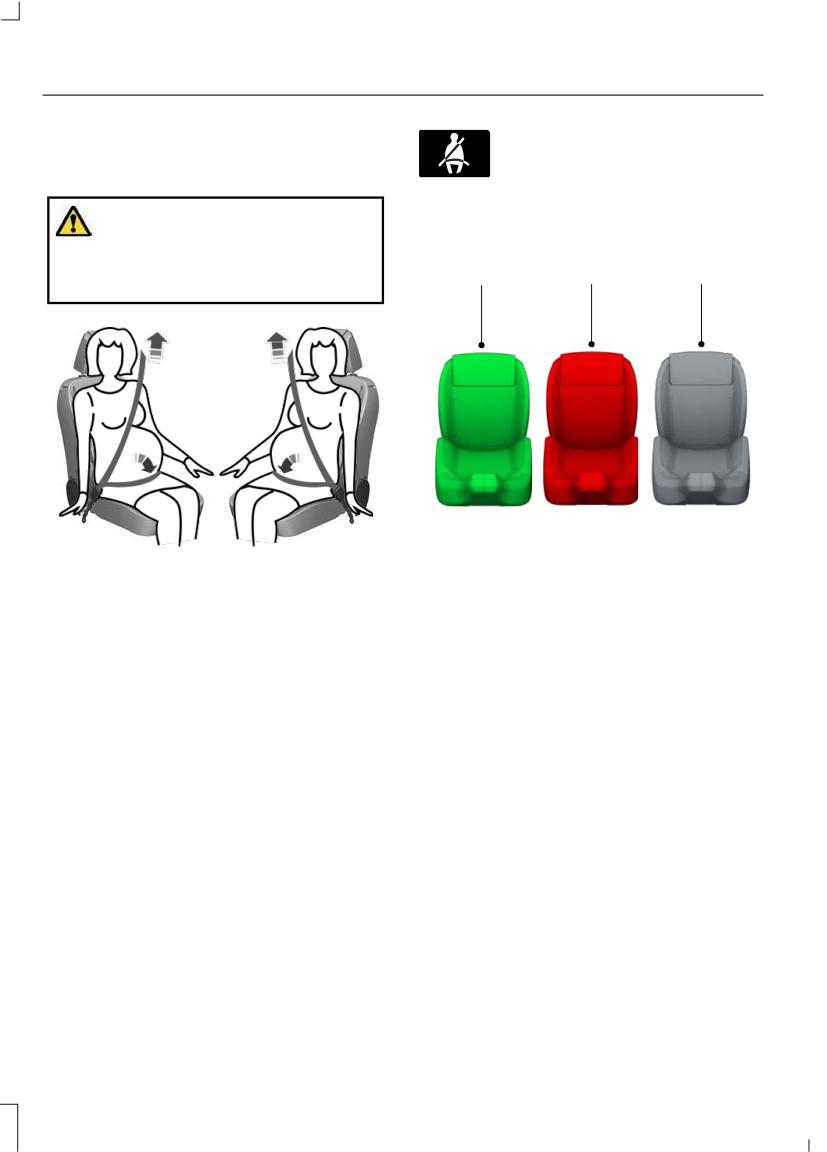
DURING PREGNANCY
E71880
Rear Seats
WARNING: Position the seatbelt
correctly for your safety and that of your
unborn child. Do not use only the lap
A
B
C
strap or the shoulder strap.
E393066
E170730
A
Rear seatbelt fastened.
Pregnant women should always wear their
B
Rear seatbelt unfastened.
seatbelt. The lap belt portion of a
combination lap and shoulder belt should
C
Empty seat.
be positioned low across the hips below
the belly and worn as tight as comfort will
allow. The shoulder belt portion of a
SEATBELT REMINDER AUDIBLE
combination lap and shoulder belt should
WARNINGS
be positioned to cross the middle of the
shoulder and the center of the chest.
A warning tone sounds and the warning
lamp illuminates if you are not wearing
your seatbelt when your vehicle exceeds
SEATBELT REMINDER
a relatively low speed.
The warning tone sounds for a short period
SEATBELT REMINDER
of time or until you fasten your seatbelt.
INDICATORS
Front Seats
A warning lamp illuminates if the vehicle
is on and any of the following occur:
•
A front seat is occupied and the
seatbelt has not been fastened.
•
A front seatbelt has been recently
unfastened.
40
Explorer (CFU) 5-Door SUV, CG3968en enGBR, Edition date: 202603, First-Printing
Airbags
HOW DOTHEFRONTAIRBAGS
WORK
WARNING: Accessory seat covers
not released by the manufacturer of your
vehicle could prevent the deployment of
the airbags and increase the risk of
injuriesin a crash.
WARNING: Do not attempt to
service, repair, or modify the
supplementary restraint system or
associated components. Failure to
follow this instruction could result in
personalinjury or death.
WARNING: If a supplementary
E151127
restraint system component has
deployed, it will not function again. Have
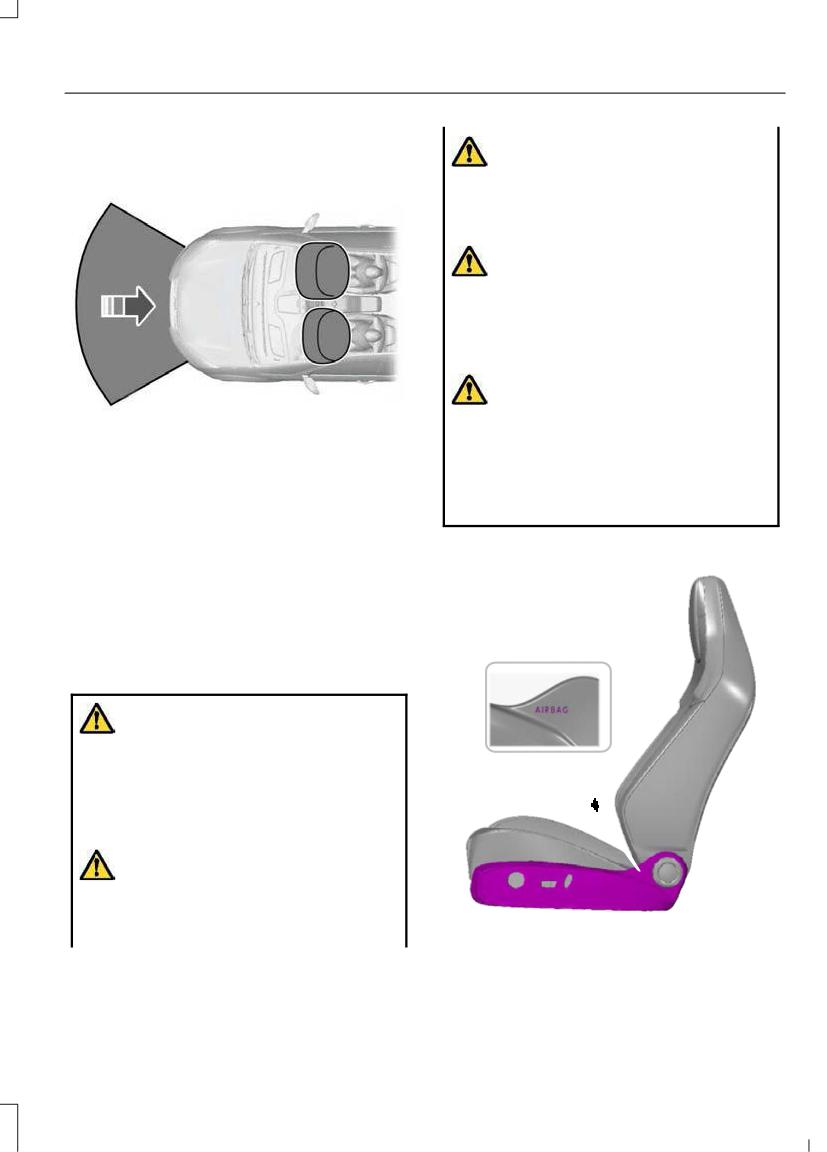
The front airbags are designed to deploy
the system and associated components
during a significant frontal or near-frontal
inspected as soon as possible. Failure to
crash. The airbags inflate within a few
follow this instruction could result in
thousandths of a second cushioning
personalinjury or death.
forward body movement and deflate on
contact with the occupant. The front
airbags are not designed to deploy during
aminorfrontalcrash,rearcrash,sidecrash
or a vehicle rollover.
HOW DO THE SIDE AIRBAGS
WORK
WARNING: Do not place objects
or mount equipment on or near the
airbag cover, on the side of the front seat
backrests, orin areas that may comeinto
contact with a deploying airbag. Failure
to follow this instruction could result in
personalinjury or death.
WARNING: Do not lean your head
on the door. The side airbag could injure
you as it deploys from the side of the
seatback.
E458200
41
Explorer (CFU) 5-Door SUV, CG3968en enGBR, Edition date: 202603, First-Printing
Airbags
The side airbags are on the outermost side
This airbag is designed to deploy during a
of each front seat. There is a sign engraved
significant lateral or frontal angled crash.
into the seat side trim to indicate this.
The airbag reduces contact between the
driver and the front seat passenger during
The side airbags are designed to inflate
side impacts. The airbag is not designed
between the door panel and the occupant
to deploy during a minor lateral or frontal
to enhance the protection in certain
crash, a rear crash or a rollover.
crashes.
The side airbags are designed to deploy
HOW DO THE SIDE CURTAIN
during a significant lateral crash. They
could also deploy during a significant
AIRBAGS WORK
frontal crash. The side airbags are not
designed to deploy during a minor lateral
or frontal crash, rear crash or a vehicle
WARNING: Do not place objects
rollover.
or mount equipment on or near the
headliner at the siderail that may come
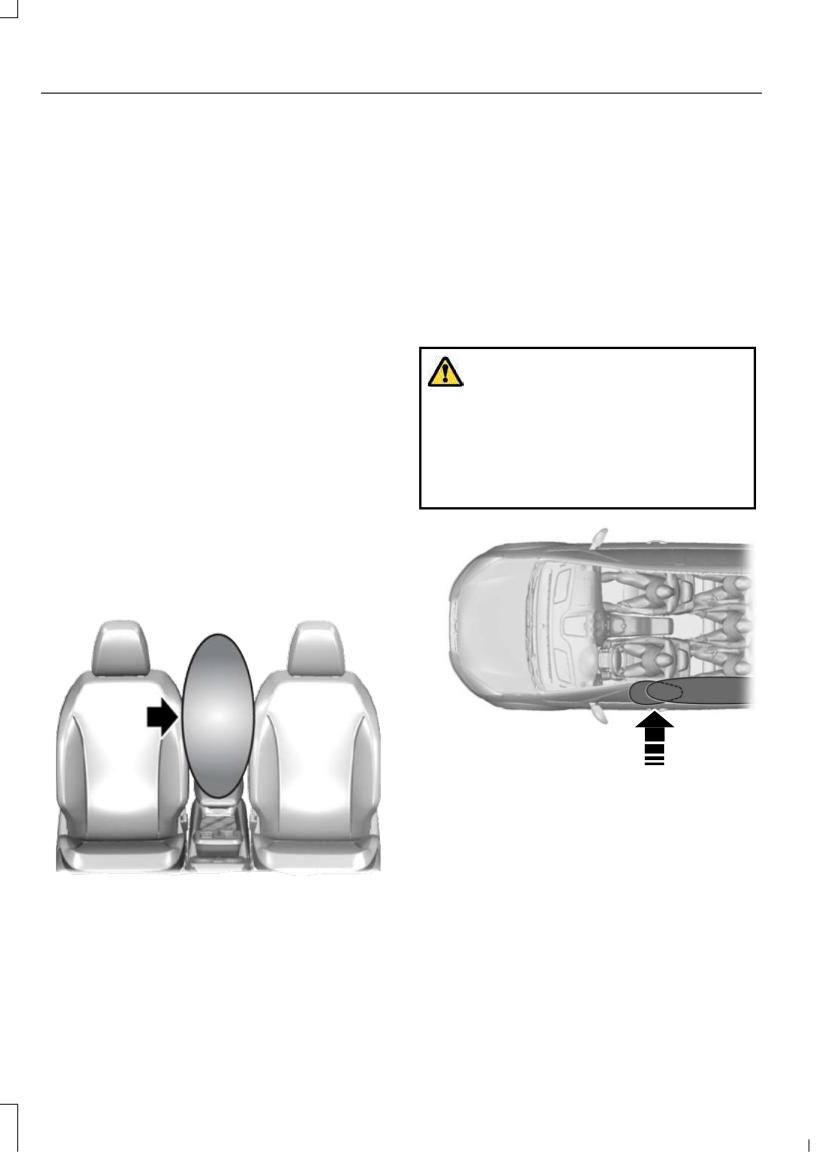
HOW DOES THE CENTER
into contact with a deploying curtain
airbag. Failure to follow these
MOUNTED SIDE AIRBAG
instructions may increase the risk of
WORK
personal injury in the event of a crash.
The center mounted side airbag is on the
innermost side of the driver seat. There is
a label attached to the side of the backrest
to indicate this.
E75004
The airbags are designed to deploy during
a significant lateral or frontal angled crash.
The airbags are not designed to deploy
during a minor lateral and frontal crash,
rear crash or a vehicle rollover.
E408739
The center mounted side airbag is
designed to inflate between the driver seat
and the passenger seat to enhance the
protection in certain crashes.
42
Explorer (CFU) 5-Door SUV, CG3968en enGBR, Edition date: 202603, First-Printing
Airbags
AIRBAG PRECAUTIONS
WARNING: Accessory seat covers
not released by Ford Motor Company
could prevent the deployment of the
WARNING: Extreme Hazard! Never
airbags and increase the risk of injuries
use a rearward facing child restraint on
a seat protected by an active airbag in
in a crash.
front of it. Death or serious injury to the
WARNING: Do not attempt to
child can occur.
service, repair, or modify the
WARNING: Do not modify the front
supplementary restraint system or
of your vehicle in any way. This could
associated components. Failure to
adversely affect deployment of the
follow this instruction could result in
personalinjury or death.
airbags. Failure to adhere to thiswarning
could result in serious personal injury or
death.
WARNING: If a supplementary
restraint system component has
WARNING: Wear a seatbelt and
deployed, it will not function again. Have
the system and associated components
keep sufficient distance between
inspected as soon as possible. Failure to
yourself and the steering wheel. Only
when you use the seatbelt correctly, can
follow this instruction could result in
it hold you in a position that allows the
personalinjury or death.
airbag to achieve its optimum effect.
Failure to adhere to this warning could
Note: A loud bang sounds and there is a
result in serious personal injury or death.
cloud of harmless powdery residue if an
airbag deploys. This is normal.
WARNING: Repairs to the steering
wheel, steering column, seats, airbags
PASSENGER AIRBAG
and seatbelts must be carried out by an
authorized dealer. Failure to adhere to
INDICATORS
this warning could result in serious
personal injury or death.
WARNING: Keep the areas in front
of the airbags free from obstruction. Do
not affix anything to or over the airbag
covers. Objects could become projectiles
during airbag deployment. Failure to
follow this instruction could result in
personalinjury or death.
WARNING: Do not poke sharp
objects into areas where airbags are
fitted. This could damage and adversely
affect deployment of the airbags. Failure
to follow this instruction could result in
personalinjury or death.
E411445
43
Explorer (CFU) 5-Door SUV, CG3968en enGBR, Edition date: 202603, First-Printing
Airbags
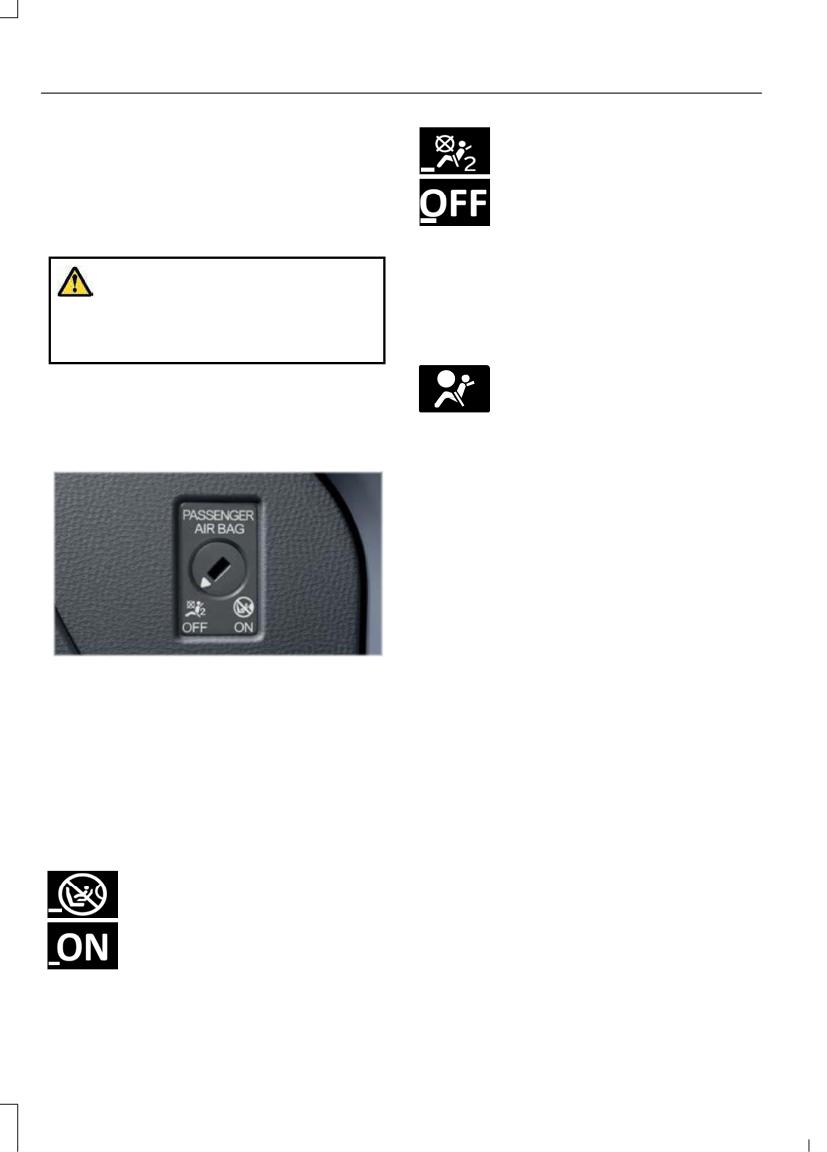
Thepassengerairbagonandoffindicators
It illuminates when the airbag is
are on the overhead console.
off.
E417433
SWITCHING THE PASSENGER
E417605
AIRBAG ON AND OFF
AIRBAGS -
WARNING: You must switch the
TROUBLESHOOTING
passenger airbag off when using a
rearward facing child restraint on the
AIRBAGS - WARNING LAMPS
front seat.
If it does not illuminate when you
The switch is on the side of the glove
switch your vehicle on, continues
compartment.
E67017
to flash or remains on or the
1.
Insert the key blade into the switch.
Safety Alert Warning Lamp illuminates this
indicates a malfunction. Have your vehicle
checked as soon as possible.
E411389
2.
Turn the key to the ON or OFF position.
3.
Whenyourvehicleison,thepassenger
airbag status indicator lamps
illuminate for a short period to confirm
they are functional. If the indicator
lamps do not illuminate when you
switch your vehicle on, this indicates a
malfunction. Have your vehicle
checked as soon as possible.
It illuminates when the airbag is
on.
E417432
E417604
44
Explorer (CFU) 5-Door SUV, CG3968en enGBR, Edition date: 202603, First-Printing
Pedestrian Alert System
WHAT IS THE PEDESTRIAN
ALERT SYSTEM
Due to the quiet operation of hybrid and
electric vehicles at low speeds, the system
creates a subtle sound to alert pedestrians.
The system is on when your vehicle is
running and not in park (P). Some sound
may be audible in the passenger
compartment.
PEDESTRIANALERTSYSTEM
PRECAUTIONS
WARNING: The system is not
designed to detect cyclists,
motorcyclists, pedestrians or animals.
Apply the brakes when necessary. Failure
to follow this instruction could result
personalinjury or death.
45
Explorer (CFU) 5-Door SUV, CG3968en enGBR, Edition date: 202603, First-Printing
Driver State Assist
HOWDOESDRIVERSTATE
•
It switches on the interior lighting.
•
It initiates an emergency call (eCall).
ASSIST WORK
See How Does eCall Work (page 48).
Driver state assist detects a lack of driver
activity, keeps the vehicle in the lane
DRIVER STATE ASSIST
automatically, and brakes the vehicle to a
PRECAUTIONS
complete stop if required, when the lane
keeping system orlane centering is active.
The system uses the vehicle's front radar
WARNING: You are responsible for
sensor and front windshield camera
controlling your vehicle at all times. The
sensor, together with the steering wheel
system is designed to be an aid and does
sensor to operate.
not relieve you of your responsibility to
When the system detects no steering
drive with due care and attention. Failure
activity it prompts you to take control of
to follow this instruction could result in
the steering wheel.
the loss of control of your vehicle,
This symbol illuminates and a
personal injury or death.
message appears in the
E408425
WARNING: Adapt your speed and
instrument cluster display,
prompting you to take control of the
distance from the vehicles ahead to suit
steering wheel.
visibility, weather, road and traffic
conditions.
If you fail to do so, the system activates
and takes control of the vehicle.
WARNING: The system cannot
help prevent all crashes. Do not rely on
When the system activates, it
this system to replace driver judgment
illuminates red in the instrument
E412868
and the need to maintain a safe distance
cluster display and starts to slow
and speed.
the vehicle down to a complete stop while
maintaining steering control.
WARNING: The system does not
Note: You can override the system at any
detect vehicles that are driving in a
time by strongly accelerating, braking or
different direction, cyclists or animals.
steering.
Applythebrakesandsteerasnecessary.
Failure to follow this instruction could
The system attempts to warn you with
result in the loss of control of your
short brake activations, and turns on the
vehicle, personalinjury or death.
hazard lights, while decelerating.
Note: If your vehicle's speed is below
See Adaptive Cruise Control
50 km/h (31 mph) the system sounds the
Precautions (page 220).
horn to warn other road users.
See Lane Centering Precautions (page
When your vehicle is stationary, the system
226).
takes the following actions:
•
It applies the electric parking brake.
•
It unlocks the doors.
46
Explorer (CFU) 5-Door SUV, CG3968en enGBR, Edition date: 202603, First-Printing
Driver State Assist
DRIVER STATE ASSIST
DRIVER STATE ASSIST -
LIMITATIONS
TROUBLESHOOTING
The system detects driving situations using
DRIVER STATE ASSIST -
the radar sensors and the camera. The
WARNINGLAMPS
system only activates in the following
situations:
If the system detects a fault, a
•
Adaptive cruise control with lane
symbol illuminates yellow and a
E412868
centering is active.
message appears in the
instrument cluster display.
•
Lane keeping system is active.
Switch your vehicle off and on again.
If the problem persists, switch off lane
keeping system and do not use adaptive
cruise control with lane centering.
Have your vehicle checked as soon as
possible.
DRIVER STATE ASSIST - INFORMATION MESSAGES
Message
Description
Driver State Assist: Take over steering!
The system activates and starts deceler-
ating the vehicle, while maintaining steering
control. You can override the system by
strongly accelerating, braking or steering.
47
Explorer (CFU) 5-Door SUV, CG3968en enGBR, Edition date: 202603, First-Printing