Acura RDX (2019 year). Manual - part 7
 

  Index      Acura     Acura RDX (2019 year) - manual in english


Search            copyright infringement  


Content      ..     5      6      7      8     ..


Acura RDX (2019 year). Manual - part 7


101

uu

Indicators

u

Multi-Information Display Warning and Information Messages

Continued

In

strum

e

nt Pa

nel

Message

Condition

Explanation

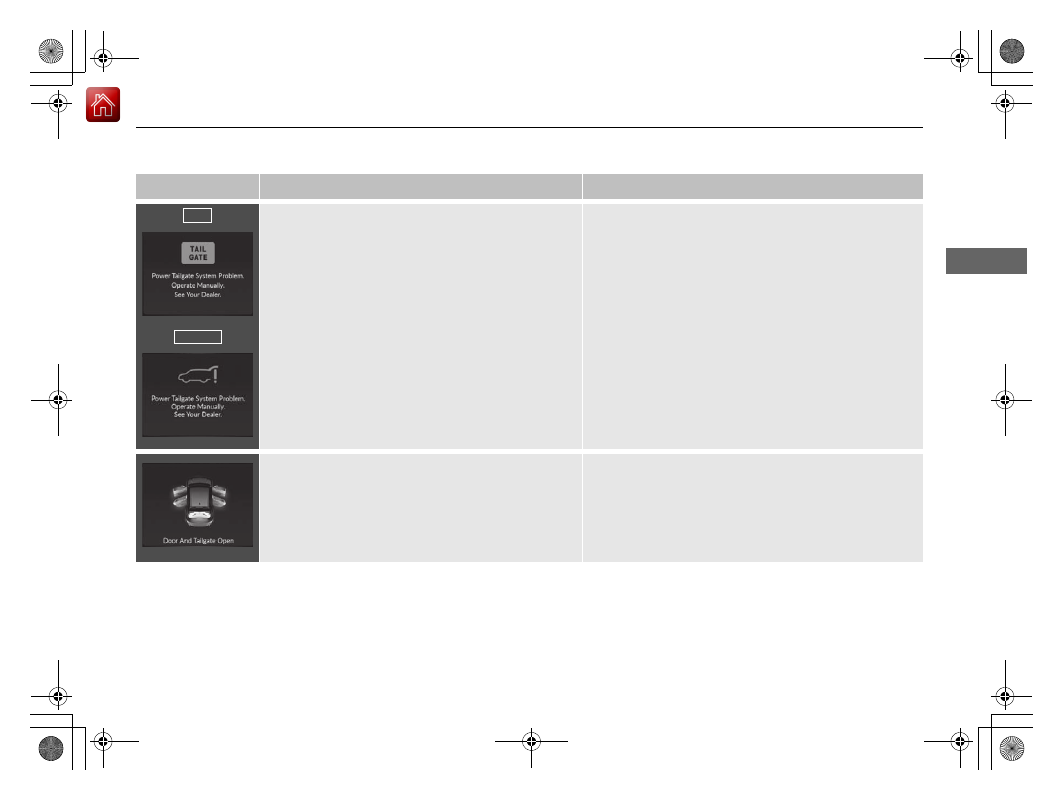
• Appears when there is a problem with the power 

tailgate system.

• Manually open or close the power tailgate.
• Have the vehicle checked by a dealer.

• Appears if any door or the tailgate is not completely 

closed.

• Appears if any door or the tailgate is opened while 

driving. The beeper sounds.

• Disappears when all doors and the tailgate are closed.

U.S.

Canada

19 ACURA RDX-31TJB6000.book  101 ページ  2018年4月26日 木曜日 午後4時51分

-------------------------------------------------------------------------------------------------------------------------------------------------------------

102

uu

Indicators

u

Multi-Information Display Warning and Information Messages

In

strum

e

nt Pa

nel

Message

Condition

Explanation

• Appears if there is a problem with the automatic 

lighting control system.

• Appears while driving - Manually turn the lights on, 

and have your vehicle checked by a dealer.

• Appears if there is a problem with the headlights.

• Appears while driving - The headlights may not be 

on. When conditions allow you to drive safety, have 
your vehicle checked by a dealer as soon as possible.

●

Appears when there is a problem with the sensor on 
the battery.

●

Have your vehicle checked by a dealer.

2 Checking the Battery P. 563

●

Appears along with the battery charging system 
indicator when the battery is not charging.

●

Turn off the climate control system and rear defogger to 
reduce electricity consumption.

2 If the Charging System Indicator Comes On P. 609

●

Appears if the dynamic mode cannot be changed 
due to certain situations, such as a system error or 
adverse driving conditions.

2 Integrated Dynamics System P. 426

19 ACURA RDX-31TJB6000.book  102 ページ  2018年4月26日 木曜日 午後4時51分

-------------------------------------------------------------------------------------------------------------------------------------------------------------

103

uu

Indicators

u

Multi-Information Display Warning and Information Messages

Continued

In

strum

e

nt Pa

nel

Message

Condition

Explanation

●

Appears when the automatic brake hold system is 
turned off.

2 Automatic Brake Hold P. 491

●

Appears when the automatic brake hold button is 
pressed without wearing the driver’s seat belt.

●

Fasten the driver’s seat belt.

2 Automatic Brake Hold P. 491

●

Appears when the automatic brake hold button is 
pressed without depressing the brake pedal while 
the automatic brake hold is in operation.

●

Press the automatic brake hold button with the brake 
pedal depressed.

2 Automatic Brake Hold P. 491

●

Appears when the parking brake is applied 
automatically while it is in operation.

2 Automatic Brake Hold P. 491
2 Parking Brake P. 486

19 ACURA RDX-31TJB6000.book  103 ページ  2018年4月26日 木曜日 午後4時51分

-------------------------------------------------------------------------------------------------------------------------------------------------------------

104

uu

Indicators

u

Multi-Information Display Warning and Information Messages

In

strum

e

nt Pa

nel

Message

Condition

Explanation

●

Appears if the automatic brake hold is automatically 
canceled while it is in operation.

●

Immediately depress the brake pedal.

●

Appears when the electric parking brake switch is 
pulled without depressing the brake pedal while the 
electric parking brake is in operation.

●

Pull the electric parking brake switch with the brake 
pedal depressed.

2 Parking Brake P. 486

19 ACURA RDX-31TJB6000.book  104 ページ  2018年4月26日 木曜日 午後4時51分

-------------------------------------------------------------------------------------------------------------------------------------------------------------

105

uu

Indicators

u

Multi-Information Display Warning and Information Messages

Continued

In

strum

e

nt Pa

nel

Message

Condition

Explanation

●

Appears as soon as a problem is detected in the 
keyless access system or push button starting system.

●

Appears constantly - Have your vehicle checked by a 
dealer.

●

Appears when you close the door with the power 
mode in ON without the keyless access remote inside 
the vehicle.

●

Disappears when you bring the keyless access remote 
back inside the vehicle and close the door.

2 Keyless Access Remote Reminder P. 184

●

Appears when the keyless access remote battery 
becomes weak.

2 Replacing the Button Battery P. 565

19 ACURA RDX-31TJB6000.book  105 ページ  2018年4月26日 木曜日 午後4時51分

-------------------------------------------------------------------------------------------------------------------------------------------------------------

106

uu

Indicators

u

Multi-Information Display Warning and Information Messages

In

strum

e

nt Pa

nel

Message

Condition

Explanation

●

Appears after you set the power mode to 
ACCESSORY or ON.

2 Starting the Engine P. 411

• Appears when the engine does not restart 

automatically due to the following reasons:

- The hood is open.
- There is a problem in the system that disables Auto 

Idle Stop.

●

Follow the normal procedure to start the engine.

2 Starting the Engine P. 411

●

Appears when the steering wheel is locked.

●

Move the steering wheel left and right while pressing the 
ENGINE START/STOP button.

●

Appears after the driver’s door is opened when the 
power mode is in ACCESSORY.

●

Change the power mode to VEHICLE OFF.

2 ENGINE START/STOP Button P. 182

Canadian models

19 ACURA RDX-31TJB6000.book  106 ページ  2018年4月26日 木曜日 午後4時51分

-------------------------------------------------------------------------------------------------------------------------------------------------------------

107

uu

Indicators

u

Multi-Information Display Warning and Information Messages

Continued

In

strum

e

nt Pa

nel

Message

Condition

Explanation

●

Appears when the power mode is in ACCESSORY.

—

●

Appears if the keyless access remote battery is too 
weak to start the engine or the key is not within 
operating range to start the engine.
A beeper sounds six times.

●

Bring the back of the keyless access remote into contact 
with the ENGINE START/STOP button.

2 If the Keyless Access Remote Battery is Weak P. 602

19 ACURA RDX-31TJB6000.book  107 ページ  2018年4月26日 木曜日 午後4時51分

-------------------------------------------------------------------------------------------------------------------------------------------------------------

108

uu

Indicators

u

Multi-Information Display Warning and Information Messages

In

strum

e

nt Pa

nel

Message

Condition

Explanation

• Appears if you press the ENGINE START/STOP 

button while the vehicle is moving.

• The message will disappear after six seconds or when 

the power mode is set to VEHICLE OFF.

●

Appears after the driver’s door is opened when the 
power mode is in ACCESSORY.

●

Press and hold the ENGINE START/STOP button with 
your foot off the brake pedal to change the power 
mode to VEHICLE OFF.

●

Appears if you try to start the engine when the 
transmission is in 

(

N and the parking brake is 

disengaged.

●

Put the transmission into 

(

P, then start the engine in 

the normal procedure.

2 Starting the Engine P. 411

19 ACURA RDX-31TJB6000.book  108 ページ  2018年4月26日 木曜日 午後4時51分

-------------------------------------------------------------------------------------------------------------------------------------------------------------

109

uu

Indicators

u

Multi-Information Display Warning and Information Messages

Continued

In

strum

e

nt Pa

nel

Message

Condition

Explanation

• Appears when you turn the Auto Idle Stop system 

on.

2 Auto Idle Stop P. 428

• Appears when Auto Idle Stop Display On has 

been selected from the customization menu.

2 Customized Features P. 332

2 Auto Idle Stop P. 428

• Appears when Auto Idle Stop does not activate for 

some reason.

• Appears when the engine restarts automatically.
• Appears when the battery temperature is around 

14°F (−10°C) or lower.

• Appears when Auto Idle Stop does not activate 

because the climate control system is in use, and the 
difference between the set temperature and actual 
interior temperature becomes significant.

• Appears when Auto Idle Stop does not activate 

because the engine coolant temperature is too low 
or high.

• Appears when Auto Idle Stop does not activate 

because the battery charge level is low.

• Appears when the battery is low performance.

19 ACURA RDX-31TJB6000.book  109 ページ  2018年4月26日 木曜日 午後4時51分

-------------------------------------------------------------------------------------------------------------------------------------------------------------

110

uu

Indicators

u

Multi-Information Display Warning and Information Messages

In

strum

e

nt Pa

nel

Message

Condition

Explanation

• Appears when the hood is opened.

●

Close the hood.

• Appears when Auto Idle Stop does not activate 

because the pressure to the brake pedal is not 
enough.

●

Depress the brake pedal firmly.

• Appears when Auto Engine Idle Stop Display On 

has been selected from the customization menu.

• Appears when the system is under the following 

conditions while Auto Idle Stop activates:

- The climate control system is in use, and the 

difference between the set temperature and actual 
interior temperature becomes significant.

- The humidity in the interior is high.
- The battery charge level is low.

●

The engine restarts automatically in a few seconds.

2 Starting the Engine P. 411

19 ACURA RDX-31TJB6000.book  110 ページ  2018年4月26日 木曜日 午後4時51分

-------------------------------------------------------------------------------------------------------------------------------------------------------------

111

uu

Indicators

u

Multi-Information Display Warning and Information Messages

Continued

In

strum

e

nt Pa

nel

Message

Condition

Explanation

• Appears when you try to change the gear position 

without depressing the brake pedal.

• Depress the brake pedal, then select a shift button.

• Appears when you try to change the gear position 

without releasing your foot off the accelerator pedal.

• Release your foot off the accelerator pedal, then select 

a shift button.

• Appears when you try to change the shift position 

after the position has automatically been changed to 

(

P with the driver’s door open and the driver’s seat 

belt unfastened.

●

Press the 

(

P button if you leave the vehicle.

U.S.

Canada

19 ACURA RDX-31TJB6000.book  111 ページ  2018年4月26日 木曜日 午後4時51分

-------------------------------------------------------------------------------------------------------------------------------------------------------------

112

uu

Indicators

u

Multi-Information Display Warning and Information Messages

In

strum

e

nt Pa

nel

Message

Condition

Explanation

• Appears when the 

(

P button is pressed while the 

vehicle is moving.

• Appears if you put the transmission into 

(

R while 

the vehicle is moving forward, or into 

(

D while the 

vehicle is reversing.

• Make sure that the vehicle comes to a stop before 

operating the select button.

• Appears when you set the power mode to OFF while 

driving.

• Immediately stop in a safe place, set the parking brake, 

then restart the engine. If the message disappears, 
continue driving.

• Appears if the vehicle is stopped and the driver’s seat 

belt is unfastened, as there is a possibility that the 
vehicle may roll.

• When the vehicle is idling or when you are parking or 

exiting the vehicle, put the transmission into 

(

P before 

releasing the brake pedal.

2 Shift Operation P. 420

●

Appears when you attempt to change to another 
gear position with the transmission in 

(

P and the 

engine OFF.

●

To select another gear position while in 

(

P, the engine 

must be ON.

19 ACURA RDX-31TJB6000.book  112 ページ  2018年4月26日 木曜日 午後4時51分

-------------------------------------------------------------------------------------------------------------------------------------------------------------

113

uu

Indicators

u

Multi-Information Display Warning and Information Messages

Continued

In

strum

e

nt Pa

nel

Message

Condition

Explanation

• Appears when you press the 

(

P button but it is not 

engaged due to low ATF temperature.

●

Depress the brake pedal until this message disappear.

• Appears when the temperature of the transmission 

is starting to get too hot.

• The performance of the vehicle may be reduced.

• Until the message disappears, reduce your speed and 

allow the system to cool down.

• Appears if you depress the accelerator pedal when 

the transmission is in 

(

N.

• Release the accelerator pedal. After that, depress the 

brake pedal and change the transmission position.

19 ACURA RDX-31TJB6000.book  113 ページ  2018年4月26日 木曜日 午後4時51分

-------------------------------------------------------------------------------------------------------------------------------------------------------------

114

uu

Indicators

u

Multi-Information Display Warning and Information Messages

In

strum

e

nt Pa

nel

Message

Condition

Explanation

• Appears when you press and hold 

(

N button for 

more than two seconds.

• Disappears when you set the gear position to a gear 

other than 

(

N.

2 If you want to keep the transmission in 

(

N


position [car wash mode] P. 422

• Appears for a few seconds if you have not pressed 

the 

(

N button long enough to initiate Neutral-Hold 

mode.

2 If you want to keep the transmission in 

(

N


position [car wash mode] P. 422

• Appears when you set the power mode to ON 

without fastening the driver’s seat belt.

• Appears when you change the gear position after 

(

P has been automatically selected with the driver’s 

door open, the driver’s seat belt unfastened, then 
the brake pedal is released.

• Fasten the seat belt properly before you start to drive.

2 Shift Operation P. 420

19 ACURA RDX-31TJB6000.book  114 ページ  2018年4月26日 木曜日 午後4時51分

-------------------------------------------------------------------------------------------------------------------------------------------------------------

115

uu

Indicators

u

Multi-Information Display Warning and Information Messages

Continued

In

strum

e

nt Pa

nel

Message

Condition

Explanation

• Appears if there is a problem with the auto high-

beam.

• Manually operate the headlight switch.
• If you are driving with the high-beam headlights when 

this happens, the headlights are changed to low beams.

●

Appears when ACC with LSF has been automatically 
canceled.

●

You can resume the set speed after the condition that 
caused ACC with LSF to cancel improves. Press the 
RES/+ button.

2 Adaptive Cruise Control (ACC) with Low Speed 

Follow (LSF) P. 455

●

Flashes when the system senses a likely collision with 
a vehicle in front of you.

●

Take the appropriate means to prevent a collision (apply 
the brakes, change lanes, etc.)

2 Collision Mitigation Braking System

TM

 (CMBS

TM

) 

P. 446

2 Adaptive Cruise Control (ACC) with Low Speed 

Follow (LSF) P. 455

19 ACURA RDX-31TJB6000.book  115 ページ  2018年4月26日 木曜日 午後4時51分

-------------------------------------------------------------------------------------------------------------------------------------------------------------

116

uu

Indicators

u

Multi-Information Display Warning and Information Messages

In

strum

e

nt Pa

nel

Message

Condition

Explanation

●

Appears when ACC with LSF is canceled due to 
excessive high vehicle speed.

●

Reduce the speed, then reset ACC with LSF.

2 Adaptive Cruise Control (ACC) with Low Speed 

Follow (LSF) P. 455

●

Appears when the speed of the vehicle is too high for 
you to set ACC with LSF.

●

Reduce the speed, then set ACC with LSF.

2 Adaptive Cruise Control (ACC) with Low Speed 

Follow (LSF) P. 455

19 ACURA RDX-31TJB6000.book  116 ページ  2018年4月26日 木曜日 午後4時51分

-------------------------------------------------------------------------------------------------------------------------------------------------------------


Content      ..     5      6      7      8     ..