Acura RLX (2018 year). Manual - part 6
 

  Index      Acura     Acura RLX (2018 year) - manual in english


Search            copyright infringement  


Content      ..     4      5      6      7     ..


Acura RLX (2018 year). Manual - part 6


87

uu

Indicators

u

Continued

In

strum

e

nt Pa

nel

Indicator

Name

On/Blinking

Explanation

Message

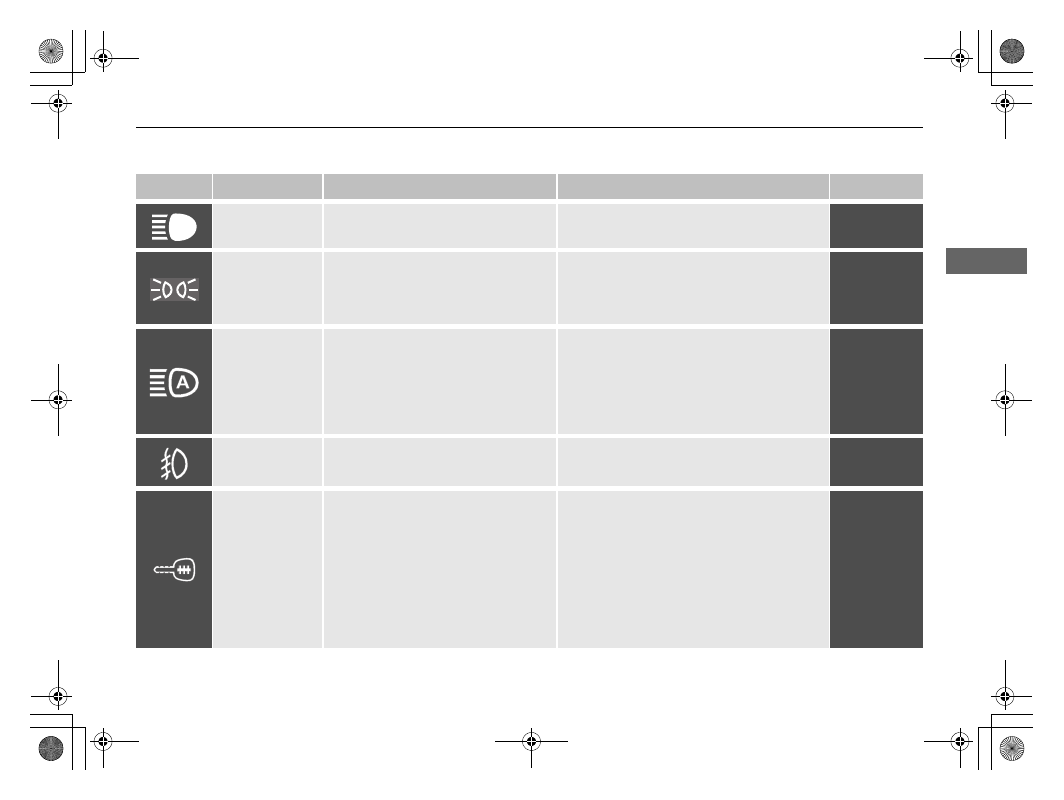
High Beam 
Indicator

• Comes on when the high beam 

headlights are on.

—

—

Lights On 
Indicator

●

Comes on whenever the light switch 
is on, or in AUTO when the exterior 
lights are on.

●

If you set the power mode to ACCESSORY 
or VEHICLE OFF while the exterior lights are 
on, a chime sounds when the driver’s door 
is opened.

—

Auto-High Beam 
Indicator

• Comes on for a few seconds when 

you set the power mode to ON, then 
goes off.

• Comes on when all the operating 

conditions of the auto high-beam 
are met.

2 Auto High-Beam P. 160

—

Fog Light 
Indicator

*

• Comes on when the fog lights are 

on.

—

—

Immobilizer 
System Indicator

• Comes on briefly when you set the 

power mode to ON, then goes off.

• Blinks if the immobilizer system 

cannot recognize the key 
information.

• Blinks - You cannot start the power 

system. Set the power mode to VEHICLE 
OFF, then select the ON mode again.

• Repeatedly blinks - The system may be 

malfunctioning. Have your vehicle checked 
by a dealer.

• Do not attempt to alter this system or add 

other devices to it. Electrical problems can 
occur.

—

* Not available on all models

18 ACURA RLX E-AWD-31TY36400.book  87 ページ  2017年7月20日 木曜日 午後6時8分

-------------------------------------------------------------------------------------------------------------------------------------------------------------

88

uu

Indicators

u

In

strum

e

nt Pa

nel

Indicator

Name

On/Blinking

Explanation

Message

Security System 
Alarm Indicator

●

Blinks when the security system 
alarm has been set.

2 Security System Alarm P. 146

—

Keyless Access 
System Indicator

●

Comes on for a few seconds when 
you set the power mode to ON, then 
goes off.

●

Comes on as soon as a problem is 
detected in the keyless access system 
or keyless starting system.

●

Have your vehicle checked by a dealer.

SPORT Mode 
Indicator

●

Comes on for a few seconds when 
you set the power mode to ON, then 
goes off.

●

Comes on when you press the 
SPORT button.

2 SPORT Mode P. 395

Indicator

18 ACURA RLX E-AWD-31TY36400.book  88 ページ  2017年7月20日 木曜日 午後6時8分

-------------------------------------------------------------------------------------------------------------------------------------------------------------

89

uu

Indicators

u

Continued

In

strum

e

nt Pa

nel

Indicator

Name

On/Blinking

Explanation

Message

Road Departure 
Mitigation (RDM) 
Indicator

●

Comes on for a few seconds when 
you change the power mode to ON, 
then goes off.

●

Comes on if there is a problem with 
the RDM system.

●

Stays on constantly - Have your vehicle 
checked by a dealer.

●

Comes on when the RDM system 
shuts itself off.

●

Stays on - The temperature inside the 
camera is too high.
Use the climate control system to cool down 
the camera.
The system activates when the temperature 
inside the camera cools down.

2 Front Sensor Camera P. 402

●

Stays on - The area around the camera is 
blocked by dirt, mud, etc. Stop your vehicle 
in a safe place, and wipe it off with a soft 
cloth.

●

Have your vehicle checked by a dealer if the 
indicator and message come back on after 
you cleaned the area around the camera.

2 Front Sensor Camera P. 402

18 ACURA RLX E-AWD-31TY36400.book  89 ページ  2017年7月20日 木曜日 午後6時8分

-------------------------------------------------------------------------------------------------------------------------------------------------------------

90

uu

Indicators

u

In

strum

e

nt Pa

nel

Indicator

Name

On/Blinking

Explanation

Message

Adaptive Cruise 
Control (ACC) 
with Low Speed 
Follow (LSF) 
Indicator (Amber)

• Comes on for a few seconds when 

you set the power mode to ON, then 
goes off.

• Comes on if there is a problem with 

ACC with LSF.

• Comes on while driving - Have your 

vehicle checked by a dealer.

●

Comes on if anything covers the 
radar sensor cover and prevents the 
sensor from detecting a vehicle in 
front.

●

May come on when driving in bad 
weather (rain, snow, fog, etc.)

●

ACC with LSF has been automatically 
canceled.

• When the radar sensor gets dirty, stop your 

vehicle in a safe place, and wipe off dirt 
using a soft cloth.

• Have your vehicle checked by a dealer if the 

indicator does not go off even after you 
clean the sensor cover.

Adaptive Cruise 
Control (ACC) 
with Low Speed 
Follow (LSF) 
Indicator (Green)

• Comes on when you press the MAIN 

button.

2 Adaptive Cruise Control (ACC) with 

Low Speed Follow (LSF) P. 404

—

18 ACURA RLX E-AWD-31TY36400.book  90 ページ  2017年7月20日 木曜日 午後6時8分

-------------------------------------------------------------------------------------------------------------------------------------------------------------

91

uu

Indicators

u

Continued

In

strum

e

nt Pa

nel

Indicator

Name

On/Blinking

Explanation

Message

Lane Keeping 
Assist System 
(LKAS) Indicator 
(Amber)

• Comes on for a few seconds when 

you change the power mode to ON, 
then goes off.

• Comes on if there is a problem with 

the LKAS.

●

Stays on constantly - Have your vehicle 
checked by a dealer.

Lane Keeping 
Assist System 
(LKAS) Indicator 
(Green)

• Comes on when you press the MAIN 

button.

2 Lane Keeping Assist System (LKAS) 

P. 423

2 Traffic Jam Assist P. 430

—

18 ACURA RLX E-AWD-31TY36400.book  91 ページ  2017年7月20日 木曜日 午後6時8分

-------------------------------------------------------------------------------------------------------------------------------------------------------------

92

uu

Indicators

u

In

strum

e

nt Pa

nel

Indicator

Name

On/Blinking

Explanation

Message

Blind Spot 
Information (BSI) 
Indicator

• Comes on for a few seconds when 

you change the power mode to ON, 
then goes off.

• Stays on while BSI is turned off.

—

• Comes on when mud, snow, or ice 

accumulates in the vicinity of sensor.

• Comes on while driving - Remove the 

obstacle in the vicinity of sensor.

2 Blind spot information (BSI) System 

P. 445

• Comes on if there is a problem with 

the system.

• Comes on while driving - Have your 

vehicle checked by a dealer.

Collision 
Mitigation 
Braking System

TM


(CMBS

TM

) 

Indicator

• Comes on for a few seconds when 

you change the power mode to ON, 
then goes off.

• Comes on when you deactivate the 

CMBS

TM

. A multi-information display 

message appears for five seconds.

• Comes on if there is a problem with 

the CMBS

TM

.

• Stays on constantly without the 

CMBS

TM

 off - Have your vehicle checked by 

a dealer.

2 Collision Mitigation Braking System

TM


(CMBS

TM

) P. 460

18 ACURA RLX E-AWD-31TY36400.book  92 ページ  2017年7月20日 木曜日 午後6時8分

-------------------------------------------------------------------------------------------------------------------------------------------------------------

93

uu

Indicators

u

In

strum

e

nt Pa

nel

Indicator

Name

On/Blinking

Explanation

Message

Collision 
Mitigation 
Braking System

TM


(CMBS

TM

) 

Indicator

• Comes on when the CMBS

TM

 shuts 

itself off.

• Stays on - The area around the camera is 

blocked by dirt, mud, etc. Stop your vehicle 
in a safe place, and wipe it off with a soft 
cloth.

2 Front Sensor Camera P. 402

• When the radar sensor gets dirty, stop your 

vehicle in a safe place, and wipe off dirt 
using a soft cloth.

• Have your vehicle checked by a dealer if the 

indicator does not go off even after you 
clean the sensor cover.

2 Collision Mitigation Braking System

TM


(CMBS

TM

) P. 460

• Stays on - The temperature inside the 

camera is too high. Use the climate control 
system to cool down the camera. The 
system activates when the temperature 
inside the camera cools down.

2 Front Sensor Camera P. 402

18 ACURA RLX E-AWD-31TY36400.book  93 ページ  2017年7月20日 木曜日 午後6時8分

-------------------------------------------------------------------------------------------------------------------------------------------------------------

94

uu

Indicators

u

Multi-Information Display Warning and Information Messages

In

strum

e

nt Pa

nel

Multi-Information Display Warning and Information Messages

The following messages appear only on the multi-information display. Roll the right selector wheel to see the message again with the 
system message indicator on.

Message

Condition

Explanation

• Appears when the vehicle is no longer able to run due 

to its malfunction.

• Immediately stop in a safe place.
• Have your vehicle checked by a dealer immediately.

• Appears if you cannot select 

(

P due to a malfunction.

• While the vehicle is stopped, apply the parking brake.
• Depending on the circumstances, you can set the 

power system to ON as an emergency measure.

2 If the Transmission System Indicator Blinks along 

with the Warning Message P. 573

• Have your vehicle checked by a dealer.

• Appears if the transmission is in a position other than 

(

N and a malfunction is preventing the system from 

starting.

• Depending on the circumstances, you can set the 

power system to ON as an emergency measure.

2 If the Transmission System Indicator Blinks along 

with the Warning Message P. 573

• Have your vehicle checked by a dealer.

• Appears when you set the power mode to ON again 

and the vehicle is able to run.

2 Turning on the Power P. 380

18 ACURA RLX E-AWD-31TY36400.book  94 ページ  2017年7月20日 木曜日 午後6時8分

-------------------------------------------------------------------------------------------------------------------------------------------------------------

95

uu

Indicators

u

Multi-Information Display Warning and Information Messages

Continued

In

strum

e

nt Pa

nel

Message

Condition

Explanation

• Appears when the washer fluid is low.

• Refill the washer fluid.

2 Refilling Window Washer Fluid P. 514

• Appears if there is a problem with e-pretensioner 

system.

• Have your vehicle checked by a dealer.

• Appears when the scheduled maintenance is due soon.
• Consequently, Maintenance Due Now and 

Maintenance Past Due follow.

2 Maintenance Minder Messages on the Multi-

Information Display P. 499

• Appears if the temperature of the transmission is too 

high and the vehicle cannot drive normally.

• It may be difficult to accelerate or start uphill.
• Immediately stop in a safe place.
• Until the message goes off, allow the engine to idle so 

that the transmission can cool down.

• Immediately after the message goes off, have your 

vehicle checked by a dealer.

• Appears when you attempt to change to another gear 

position with the transmission in 

(

P and the power 

system OFF.

• To select another gear position while in 

(

P, the power 

system must be ON.

18 ACURA RLX E-AWD-31TY36400.book  95 ページ  2017年7月20日 木曜日 午後6時8分

-------------------------------------------------------------------------------------------------------------------------------------------------------------

96

uu

Indicators

u

Multi-Information Display Warning and Information Messages

In

strum

e

nt Pa

nel

Message

Condition

Explanation

• Appears if there is a problem with transmission and it is 

not possible to select 

(

R.

• Have your vehicle checked by a dealer.

• Appears if you depress the accelerator pedal when the 

transmission is in 

(

N.

• Release the accelerator pedal. After that, depress the 

brake pedal and change the transmission position.

• Appears when you press and hold the 

(

N button for 

more than two seconds.

• Disappears when you set the gear position to other 

than 

(

N.

2 If you want to keep the transmission in 

(

N


position (car wash mode) P. 391

• Appears when you change to 

(

N, then release the 

(

N 

button.

2 If you want to keep the transmission in 

(

N


position (car wash mode) P. 391

• All gear positions come on when the transmission is 

operated.

• Acceleration is not possible while the indicator is on.
• Goes off a few seconds later if there is no problem.
• After the indicator goes off, you can drive normally.

18 ACURA RLX E-AWD-31TY36400.book  96 ページ  2017年7月20日 木曜日 午後6時8分

-------------------------------------------------------------------------------------------------------------------------------------------------------------

97

uu

Indicators

u

Multi-Information Display Warning and Information Messages

Continued

In

strum

e

nt Pa

nel

Message

Condition

Explanation

●

Appears when there is a problem with the sensor on the 
12-volt battery.

●

Have your vehicle checked by a dealer.

2 Checking the 12-Volt Battery P. 530

●

Appears when the starter system has a problem.

●

As a temporary measure, press and hold the POWER 
button for up to 15 seconds while depressing the brake 
pedal and manually turn on the power system.
Have your vehicle checked by a dealer.

●

Appears after the driver’s door is opened when the 
power mode is in ACCESSORY.

●

Press the POWER button twice with your foot off the 
brake pedal to change the power mode to VEHICLE 
OFF.

●

Appears when the power mode is in ACCESSORY.

—

U.S.

Canada

18 ACURA RLX E-AWD-31TY36400.book  97 ページ  2017年7月20日 木曜日 午後6時8分

-------------------------------------------------------------------------------------------------------------------------------------------------------------

98

uu

Indicators

u

Multi-Information Display Warning and Information Messages

In

strum

e

nt Pa

nel

Message

Condition

Explanation

●

Appears when you close the door with the power mode 
in ON without the keyless access remote inside the 
vehicle.

●

Disappears when you bring the keyless access remote 
back inside the vehicle and close the door.

2 Keyless Access Remote Reminder P. 154

●

Appears when the keyless access remote battery 
becomes weak.

●

Replace the battery as soon as possible.

2 Replacing the Button Battery P. 531

●

Appears if the keyless access remote battery is too weak 
to turn on the power system or the key is not within 
operating range to turn on the power system.
A beeper sounds six times.

●

Bring the keyless access remote in front of the POWER 
button to be touched with.

2 If the Keyless Access Remote Battery is Weak P. 562

●

Appears three seconds after you bring the keyless 
access remote in front of the POWER button when To 
Start, Hold Remote Near Start Button
 appears. To 
Start Vehicle: Brake + Push
 appears sequentially.

●

Unless you bring the keyless access remote in front of 
the POWER button, this message does not appear.

2 If the Keyless Access Remote Battery is Weak P. 562

●

Appears when you set the power mode to ACCESSORY 
or ON.

2 Turning on the Power P. 380

●

Appears if you press the POWER button while the 
vehicle is moving.

●

The message will disappear after six seconds or when 
the power mode is set to VEHICLE OFF.

18 ACURA RLX E-AWD-31TY36400.book  98 ページ  2017年7月20日 木曜日 午後6時8分

-------------------------------------------------------------------------------------------------------------------------------------------------------------

99

uu

Indicators

u

Multi-Information Display Warning and Information Messages

Continued

In

strum

e

nt Pa

nel

Message

Condition

Explanation

• Appears when you set the power mode to ON without 

fastening the driver’s seat belt.

• Appears when you change the gear position after 

(

P 

has been automatically selected with the driver’s door 
open, the driver’s seat belt unfastened, then the brake 
pedal is released.

• Fasten the seat belt properly before you start to drive.

2 Shift Operation P. 389

• Appears when you try to change the gear position 

without depressing the brake pedal.

• Depress the brake pedal, then select a shift button.

• Appears when you try to change the gear position 

without releasing your foot off the accelerator pedal.

• Release your foot off the accelerator pedal, then select 

a shift button.

• Appears when the parking button is pressed while the 

vehicle is moving.

• Appears if you change the gear position to 

(

R while the 

vehicle is moving forward, or to 

(

D while the vehicle is 

reversing.

• Make sure that the vehicle comes to a stop before 

operating the select button.

18 ACURA RLX E-AWD-31TY36400.book  99 ページ  2017年7月20日 木曜日 午後6時8分

-------------------------------------------------------------------------------------------------------------------------------------------------------------

100

uu

Indicators

u

Multi-Information Display Warning and Information Messages

In

strum

e

nt Pa

nel

Message

Condition

Explanation

• Appears if there is a problem with the electric system.
• Appears when you set the power mode to OFF while 

driving.

• Immediately stop in a safe place and set the parking 

brake.

• Continue driving if the message goes off soon after.
• If there is a problem with the transmission system, the 

transmission system indicator comes on.

2 Transmission System Indicator P. 82

• Appears if you press the POWER button within five 

seconds of putting the transmission into 

(

N.

• The transmission remains in 

(

N for 15 minutes, then 

automatically switches to 

(

P.

2 If you want to keep the transmission in 

(

N


position (car wash mode) P. 391

• Appears if the vehicle is stopped and the driver’s seat 

belt is unfastened, as there is a possibility that the 
vehicle may roll.

• When the vehicle is idling or when you are parking or 

exiting the vehicle, put the transmission into 

(

P before 

releasing the brake pedal.

2 Shift Operation P. 389

• Appears if any door or the trunk is not completely 

closed.

• Appears if any door or the trunk is opened while 

driving. The beeper sounds.

• Goes off when all doors and the trunk are closed.

• Appears if there is a problem with the acoustic vehicle 

alerting system.

• Have your vehicle checked by a dealer immediately.

18 ACURA RLX E-AWD-31TY36400.book  100 ページ  2017年7月20日 木曜日 午後6時8分

-------------------------------------------------------------------------------------------------------------------------------------------------------------

101

uu

Indicators

u

Multi-Information Display Warning and Information Messages

Continued

In

strum

e

nt Pa

nel

Message

Condition

Explanation

• Appears if there is a problem with the radiator system. • Drive slowly to prevent overheating and have your 

vehicle checked by a dealer as soon as possible.

• Appears when there is a problem with the headlights.

• Appears while driving - The low beam headlights 

may not be on. When conditions allow you to drive 
safely, have your vehicle checked by a dealer as soon as 
possible.

• Appears if there is a problem with the parking sensor 

system.

• Check if the area around the sensor(s) is covered with 

mud, ice, snow, etc. If the indicator(s) stays on even 
after you clean the area, have the system checked by a 
dealer.

• Appears if the automatic brake hold is automatically 

canceled while it is in operation.

• Immediately depress the brake pedal.

• Appears when the automatic brake hold system is 

turned off.

2 Automatic Brake Hold P. 456

Models with 
parking sensor 
system

18 ACURA RLX E-AWD-31TY36400.book  101 ページ  2017年7月20日 木曜日 午後6時8分

-------------------------------------------------------------------------------------------------------------------------------------------------------------

102

uu

Indicators

u

Multi-Information Display Warning and Information Messages

In

strum

e

nt Pa

nel

Message

Condition

Explanation

• Appears when the automatic brake hold button is 

pressed without wearing the driver’s seat belt.

• Fasten the driver’s seat belt.

2 Automatic Brake Hold P. 456

• Appears when the automatic brake hold button is 

pressed without depressing the brake pedal while the 
automatic brake hold is in operation.

• Press the automatic brake hold button with the brake 

pedal depressed.

2 Automatic Brake Hold P. 456

• Appears when the parking brake is applied 

automatically while it is in operation.

2 Automatic Brake Hold P. 456
2 Parking Brake P. 452

• Appears if there is a problem with the auto high-beam. • Manually operate the headlight switch.

• If you are driving with the high-beam headlights when 

this happens, the headlights are changed to low beams.

• Appears when the area around the camera on the 

windshield is blocked by dirt, mud, etc.

• Stop your vehicle in a safe place, and wipe it off with a 

soft cloth.

• If the message does not disappear after cleaning the 

lens, have your vehicle checked by a dealer.

18 ACURA RLX E-AWD-31TY36400.book  102 ページ  2017年7月20日 木曜日 午後6時8分

-------------------------------------------------------------------------------------------------------------------------------------------------------------


Content      ..     4      5      6      7     ..