FANUC Series 0i-MODEL F. For Lathe System OPERATOR'S MANUAL (B-64604EN-1/01) - page 23
B-64604EN-1/01
OPERATION
2.SETTING AND DISPLAYING DATA
- 347 -
Setting tool offset values (for 15-inch display unit)
A tool offset value can be set or modified by using the procedure below.
Procedure
1
To set a tool offset value, move the cursor to the tool offset value position. Next, type the desired
offset value then press MDI key
.
2
To set a tool offset value, move the cursor to the tool offset value position. Next, type the desired
offset value then press horizontal soft key [INPUT].
3
To modify a tool offset value, type a desired incremental or decremental value then press horizontal
soft key [+INPUT].
Erasing all tool offset values in a batch (for 8.4/10.4-inch display unit)
By pressing soft key [ERASE], all tool offset values can be erased in a batch. The term "erase" means the
setting of tool offset values to 0. So, when erasing tool offset values not in a batch but on a one-by-one
basis, set an individual tool offset value to 0 in tool offset value setting operation.
Procedure
1
Pressing soft key [(OPRT)] on the 4th/5th axis offset screen displays soft keys [NO.SRH],
[+INPUT], [INPUT], [ERASE], [F INPUT], and [F OUTPUT].
2
Press soft key [ERASE].
3
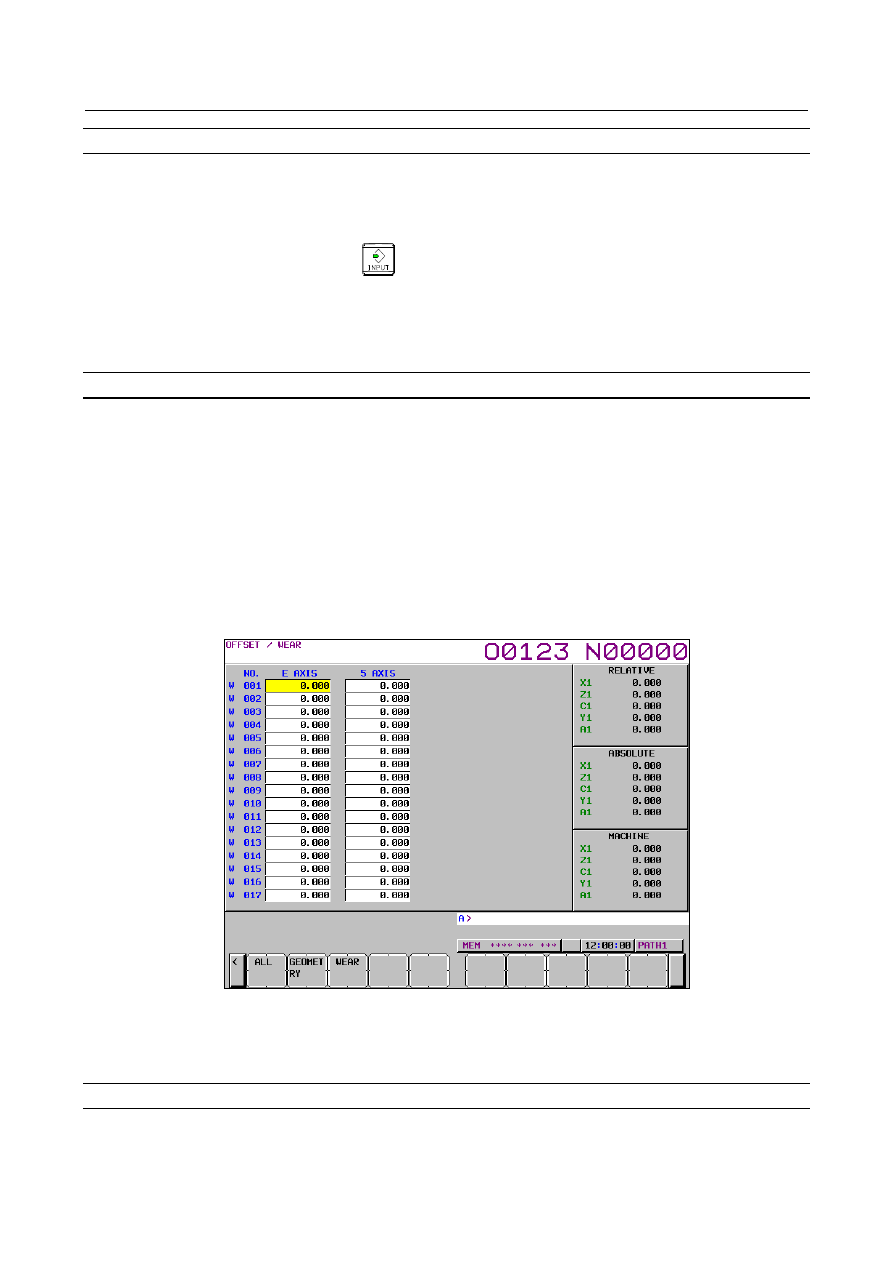
Soft key [ALL] is displayed.
If the tool geometry/wear compensation is enabled (bit 6 (NGW) of parameter No.8136 is 0), soft
keys [GEOMETRY] and [WEAR] are displayed in addition to soft key [ALL].
Fig. 2.1.8 (f) 4th/5th axis offset screen (erase operation) (10.4inch)
4
Pressing soft key [ALL] clears all tool offset values. Pressing soft key [WEAR] clears all wear offset
values. Pressing soft key [GEOMETRY] clears all geometry offset values.
Erasing all tool offset values in a batch (for 15-inch display unit)
By pressing horizontal soft key [ERASE], all tool offset values can be erased in a batch. The term "erase"
means the setting of tool offset values to 0. So, when erasing tool offset values not in a batch but on a
one-by-one basis, set an individual tool offset value to 0 in tool offset value setting operation.