FANUC Series 30i/300i/300is-MODEL A. Machining Center System. User's manual - page 60
 

  Index      Manuals     FANUC Series 30i/300i/300is-MODEL A. Machining Center System. User's manual (B-63944EN/03)


Search            copyright infringement  


Content      ..     58      59      60      61     ..


FANUC Series 30i/300i/300is-MODEL A. Machining Center System. User's manual - page 60


15.COMPENSATION FUNCTION

 PROGRAMMING 

B-63944EN/03


- 436 - 

  - Combination with tool center point control 

If bit 5 (WKP) of parameter No. 19696 = 0 (table coordinate system 
command), starting tool center point control with the table rotation 
axis position not set at 0 usually causes the workpiece coordinate 
system to be fixed at the table with it in the startup state, thus making 
it the table coordinate system. 
If tool center point control is carried out in the workpiece setting error 
compensation mode, this specification becomes ineffective, and the 
table coordinate system is set up on the assumption that the workpiece 
coordinate system is fixed at the table with the table rotation axis 
position being at 0. 
 

  - Speed in the workpiece setting error compensation mode 

When workpiece setting error compensation is performed in a 
machine of table rotation or composite type, processing equivalent to 
tool center point control is carried out so that tool movement as 
viewed from the table can be controlled. 
In this case, control point movement is calculated by assuming that the 
tool tip moves at the specified speed.    If the resulting control point 
speed exceeds the specified speed, the feedrate is clamped at the 
specified speed. 


Conversely, if the control point speed is lower than the specified speed, 
it is likely that the tool may move at a speed lower than the specified 
speed.


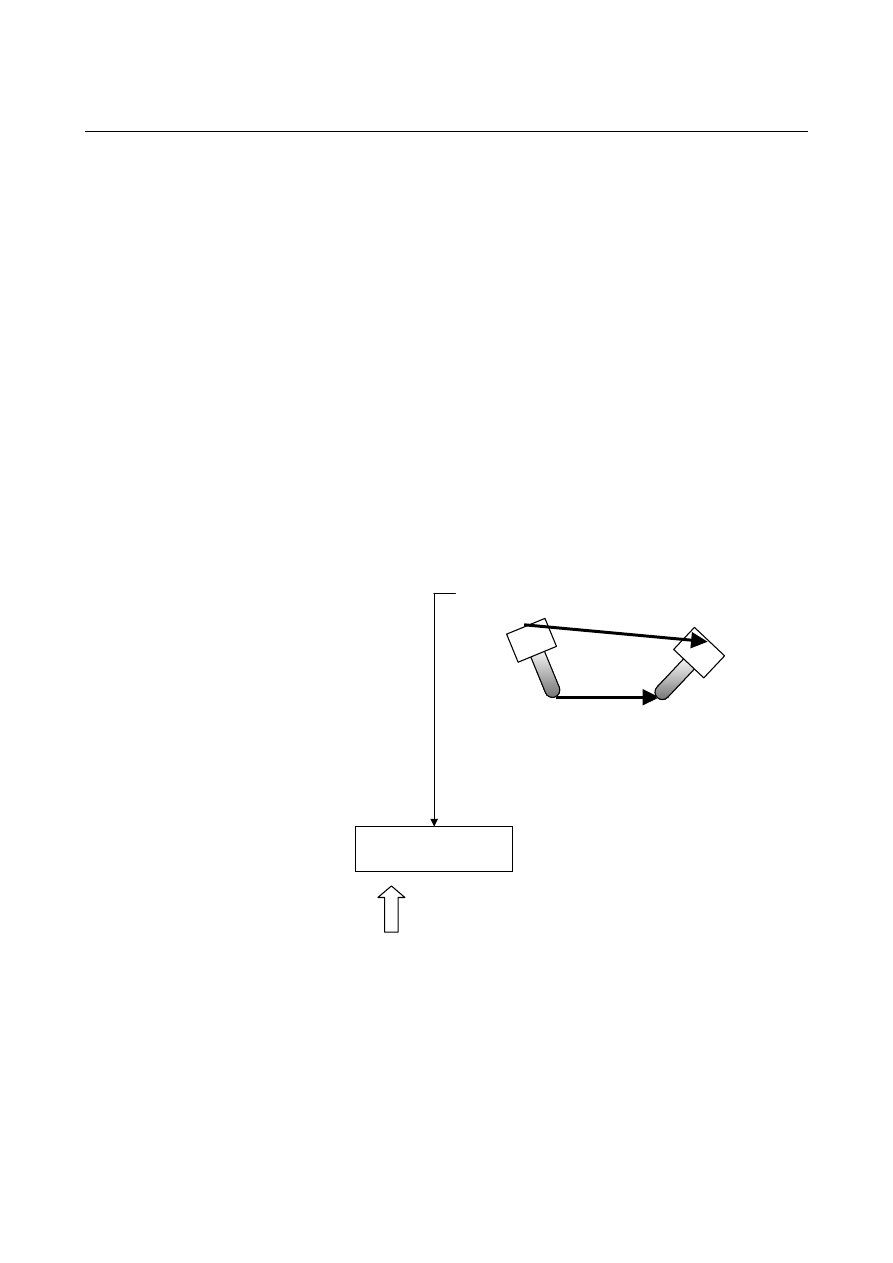
Center point movement (at specified speed F) viewed 
from the table 

Control point movement as viewed from the table 

Workpiece setting error 
compensation 
(Rotation axis position 
is also compensated) 
 
Table rotation 

Actual control point 
movement

If this speed is about to exceed the specified speed, 
the feedrate is clamped at the specified speed. 

B-63944EN/03

 PROGRAMMING 

16.CUSTOM MACRO


- 437 - 

16 

CUSTOM MACRO 

 
Although subprograms are useful for repeating the same operation, the 
custom macro function also allows use of variables, arithmetic and 
logic operations, and conditional branches for easy development of 
general programs such as pocketing and user-defined canned cycles. 
A machining program can call a custom macro with a simple 
command, just like a subprogram. 
 

O0001 ;
    :
    :
    :
G65 P9010 R50.0 L2 ;
    :
    :
M30 ;

Machining program

Custom macro

O9010 ;
#1=#18/2 ;
G01 G42 X#1 Y#1 F300 ;
02 X#1 Y-#1 R#1 ;
    :
    :
    :
M99 ;


16.CUSTOM MACRO

 PROGRAMMING 

B-63944EN/03


- 438 - 

16.1 

VARIABLES 

 
An ordinary machining program specifies a G code and the travel 
distance directly with a numeric value; examples are G100 and 
X100.0. 
With a custom macro, numeric values can be specified directly or 
using a variable number.  When a variable number is used, the 
variable value can be changed by a program or using operations on the 
MDI panel. 
 

#1=#2+100 ;


G01 X#1 F300 ; 


Explanation 
 - Variable representation 

When specifying a variable, specify a number sign (#) followed by a 
variable number. 

#i (i = 1, 2, 3, 4, .....) 
[Example] #5 
 #109 
 #1005


A variable can also be represented as follows using <expression> 
described in the section about arithmetic and logic operation 
commands. 

#[<expression>] 
[Example] #[#100] 
 #[#1001-1] 
 #[#6/2]


Variable #i shown in the following can be replaced with a variable of 
#[<expression>]. 
 

  - Types of variables 

Variables can be classified as local variables, common variables, and 
system variables according to the variable number.  Each of those 
variables has its own usage and characteristics.  Read-only system 
constants are also provided. 
 

  - Range of variable values 

Local and common variables can have a value in the following ranges.   
If the result of calculation exceeds the range, an alarm PS0111 is 
issued. 
When bit 0 (F16) of parameter No.6008 = 0 
 

Maximum value:  approx. 

±

10

308


Minimum value:  approx. 

±

10

-308


Numeric data handled by a custom macro conforms to the IEEE 
standard and is handled as a double-precision real number.    An 
error resulting from operation depends on the precision. 

When bit 0 (F16) of parameter No.6008 = 1 
 

Maximum value:  approx. 

±

10

47


Minimum value:  approx. 

±

10

-29


B-63944EN/03

 PROGRAMMING 

16.CUSTOM MACRO


- 439 - 


  - Local variable (#1-#33) 

A local variable is a variable that is used locally in a macro.    That is, 
local variable #i used by a macro called at a certain time is different 
from that used by a macro called at another time, regardless of 
whether the two macros are the same.    Therefore, for example, when 
macro A calls macro B during multiple calls or the like, it is 
impossible for macro B to corrupt a local variable used by macro A by 
erroneously using the variable. 
A local variable is used to pass arguments.  For information on 
correspondence between arguments and addresses, see the section 
about macro calling commands.    The initial state of a local variable 
to which no arguments are passed is <null> and the user can freely use 
the variable.  The attribute of a local variable is READ/WRITE 
enabled. 
 

  - Common variable (#100-#199, #500-#999) 

A common variable is shared among the main program, subprograms 
called by the main program, and macros while a local variable is used 
locally in a macro.    That is, #i used by a macro is the same as that used 
by another macro.    Therefore, a resultant common variable obtained by 
using a macro can be used by another macro.  The attribute of a 
common variable is basically READ/WRITE enabled.  However, the 
common variable can be protected (its attribute is set to READ only) by 
specifying its variable number using parameters No.6031 and No.6032.   
A common variable can be freely used by the user even when its usage 
is not defined by the system.    The number of common variables can be 
specified by selecting one of the following options. 

(a)  100 common variables (specified only with the custom macro 

option) 


The common variables #100 to #149 and #500 to #549 can be 
used.  The variables #100 to #149 are cleared during 
power-down, but the variables #500 to #549 are retained during 
power-down. 

(b)  600 common variables (specified with the custom macro 

option or custom macro common variable addition option) 


The common variables #100 to #199 and #500 to #999 can be 
used.  The variables #100 to #199 are cleared during 
power-down, but the variables #500 to #999 are retained during 
power-down. 


  - Write protection of a common variable 

Multiple common variables (#500 to #999) can be protected (their 
attributes are set to READ only) by setting variable numbers in 
parameters No.6031 and No.6032.  This protection is enabled for 
both Input/All Clear by MDI on the macro screen and write operation 
by a macro program.    If the NC program specifies WRITE operation 
(used in the left side) for a common program in the set range, an alarm 
PS0116 is issued. 
 

16.CUSTOM MACRO

 PROGRAMMING 

B-63944EN/03


- 440 - 

 - System variable 

A variable whose usage does not vary in the system.    The attribute of 
a system variable is READ only, WRITE only, or READ/WRITE 
enabled depending on the nature of a system variable. 
 

 - System constant 

A system constant can be referenced as with a variable even though its 
value is fixed.    The attribute of a system constant is READ only. 
 

  - Omission of the decimal point   

When a variable value is defined in a program, the decimal point can 
be omitted. 

[Example] 


When #1 = 123; is defined, the actual value of variable #1 is 123.000. 


 - Referencing variables 

The value following an address can be replaced with a variable.  
When programming as <address>#i or <address>-#i, the variable 
value or the complement of it is used as the specified value of the 
address. 

[Example]  F#33 is the same as F1.5 when #33 = 1.5. 
 

Z-#18 is the same as Z-20.0 when #18 = 20.0. 


G#130 is the same as G3 when #130 = 3.0. 

A variable cannot be referenced using address/, :, or O and N. 

[Example]  Programming such as O#27 or N#1 is not allowed.


n (n = 1 to 9) in the optional block skip /n cannot be a variable.


A variable number cannot be specified by a direct variable. 

[Example]  When replacing 5 in #5 with #30, specify #[#30] instead of ##30.   

No values exceeding the maximum allowable value for each 
address can be specified. 

[Example]  When #140 = 120, G#140 exceeds the maximum allowable 

value. 


When a variable is used as address data, the variable is 
automatically rounded off to the number of significant figures of 
each address or less. 

[Example]  For a machine with an increment system of 1/1000 mm (IS-B), 

when #1 = 12.3456, G00 X#1; becomes G00 X12.346;.


If <expression>, described later, is used, the value following an 
address can be replaced with <expression>. 
 

<address>[<expression>] or <address>-[<expression>]


The program code shown above indicates the value of <expression> or 
the complement of the value is used as an address value.    Note that a 
constant with no decimal point, enclosed in brackets ([ ]), is assumed 
to have a decimal point at the end. 

[Example] X[#24+#18*COS[#1]] 

 Z-[#18+#26]


B-63944EN/03

 PROGRAMMING 

16.CUSTOM MACRO


- 441 - 

 - Undefined variable 

When the value of a variable is not defined, such a variable is referred 
to as a "null" variable.  Variables #0 and #3100 are always null 
variables.    They cannot be written to, but they can be read. 
 
(a) Quotation 
 

When an undefined variable is quotated, the address itself is also   
ignored. 


Original command 

G90 X100 Y#1 

Equivalent command when #1 = <null> 

G90 X100 

Equivalent command when #1 = 0 

G90 X100 Y0 

 
(b)  Definition/replacement, addition, multiplication 
 

When a local variable or common variable is directly replaced 
with <null>, the result is <null>.  When a system variable is 
directly replaced with <null> or the result of calculation 
including <null> is replaced, a variable value of 0 is assumed. 


Original expression 

(local variable) 

#2=#1 #2=#1*5 #2=#1+#1 

Replacement result 

(when #1 = <null>)


<null> 0 

Replacement result (when #1 = 0)


Original expression 

(common variable) 

#100=#1

#100=#1*5 #100=#1+#1

Replacement result 

(when #1 = <null>)


<null> 0 

Replacement result (when #1 = 0)


Original expression 

(system variable) 

#2001=#1 #2001=#1*5 #2001=#1+#1

Replacement result 

(when #1 = <null>)


0 0  0 

Replacement result (when #1 = 0)

 
(c) Comparison 
 

<null> differs from 0 only for EQ and NE. 


<null> is equal to 0 for GE, GT, LE, and LT. 


When <null> is assigned to #1 

Conditional 

expression 

#1 EQ #0 

#1 NE 0 

#1 GE #0 

#1 GT 0 

#1 LE #0 

#1 LT 0 

Evaluation 

result 

Established 

(true) 

Established 

(true) 

Established 

(true) 

Not 

established 

(false) 

Established 

(true) 

Not 

established 

(false) 


16.CUSTOM MACRO

 PROGRAMMING 

B-63944EN/03


- 442 - 


When 0 is assigned to #1 

Conditional 

expression 

#1 EQ #0 

#1 NE 0 

#1 GE #0 

#1 GT 0 

#1 LE #0 

#1 LT 0 

Evaluation 

result 

Not 

established 

(false) 

Not 

established 

(false) 

Established 

(true) 

Not 

established 

(false) 

Established 

(true) 

Not 

established 

(false) 


  - Specifying a system variable (constant) by its name 

A system variable (constant) is specified by its variable number, but it 
can also be specified by its predetermined system variable (constant) 
name.    A system variable (constant) name begins with an underscore 
(_), followed by up to seven uppercase letters, numerics, or 
underscores.  For axis-dependent variables (such as coordinates) or 
variables having a lot of data of similar types (such as tool 
compensation), subscript [n] (n: integer) can be used to specify values.   
In this case, n can be specified in <expression> format (calculation 
format).   
The command format must be specified in [#system-variable-name] 
format, as shown below. 
 

[#_DATE] 

[Example] 

  [#_DATE]=20040117 ; 

:  2004.01.17 is assigned to #3011 (year 

month date). 

 [#_TIME]=161705 

16:17:05 

is assigned to #3012 (time 

minute second). 

  #101=[#_ABSMT[1]] ; 

: #5021 (machine coordinate value of 

the 1st axis) is read off and assigned 
to #101. 

 #102=[#_ABSKP[#500*2]] 

#506x 

(skip 

position of [#500*2]th axis) 

is read off and assigned to #102. 

If a value other than an integer is specified for subscript n, a variable 
value is referenced, assuming that the fractional portion is rounded 
off. 

[Example] 

 [#_ABSIO[1.4999999]] 

: This 

value 

is assumed to be [#_ABSIO[1]], 

that is, #5001. 

 [#_ABSIO[1.5000000]] 

: This 

value 

is assumed to be [#_ABSIO[2]], 

that is, #5002.


NOTE 

1  When the specified variable name is not registered, 

an alarm PS1098 is issued. 

2  When a negative or other invalid subscript is 

specified, an alarm PS1099 is issued. 


B-63944EN/03

 PROGRAMMING 

16.CUSTOM MACRO


- 443 - 

  - System constant #0, #3100-#3102 (Attribute:    R) 

Constants used as fixed values in the system can be used as system 
variables.    Such constants are called system constants.    The system 
constants provided are shown below. 
 

Constant 

number 

Constant 

name 

Description 

 #0, #3100 

 [#_EMPTY] Null 

 #3101 

 [#_PI] 

Circular constant 

π


= 3.14159265358979323846

 #3102 

 [#_E] 

Base of natural logarithm e 

= 2.71828182845904523536


  - Specifying a common variable by its name 

Specifying a variable name set by the SETVN command described 
later allows reading from or writing to a common variable. 
The command must be specified in the form 
[#common-variable-name] such as [#VAR500]. 

[Example] 


X[#POS1] Y[#POS2] ; 

:  Specifying a position by the variable 

name 


[#POS1] = #100+#101 ; 

:  Executing a assignment statement 

by the variable name 


#[100+[#ABS]] = 500 ; 

:  Same  as  above  (by  a  variable 

number) 

  #500 = [1000+[#POS2]*10] ; : Reading a variable by a variable 

name


  - Setting and specifying the name of a common variable (SETVN) 

For the 50 common variables, #500 to #549, a name of up to eight 
characters can be specified by using a command as shown below. 


SETVN n [VAR500, VAR501, VAR502,......] ;


n represents the starting number of a common variable for which the 
name is specified. 
VAR500 is the variable name of variable n, VAR501 is the variable 
name of variable n+1, and VAR502 is the variable name of variable 
number n+2, and so on.  Each string is delimited by a comma (,).  
All codes that can be used as meaningful information in a program 
except control in, control out, [, ], EOB, EOR, and : (colon in a 
program number) can be used.    However, each name must begin with 
an alphabetical character.  Variable names are not cleared on 
switch-off. 
Specifying a set variable name allows reading from or writing to the 
common variable.  The command must be specified in the form 
[#common-variable-name] such as [#VAR500]. 


Content      ..     58      59      60      61     ..