FANUC Series 0i-MODEL F Plus. CONNECTION MANUAL (FUNCTION) - page 118
 

  Index      Manuals     FANUC Series 0i-MODEL F Plus. CONNECTION MANUAL (FUNCTION) B-64693EN-1/01


Search            copyright infringement  


Content      ..     116      117      118      119     ..


FANUC Series 0i-MODEL F Plus. CONNECTION MANUAL (FUNCTION) - page 118


5. AUTOMATIC OPERATION


B-64693EN-1/01


- 898 - 

5.7 

QUICK PROGRAM RESTART 

Overview 

Generally, the following operations are required when machining is interrupted due to a reason such as a 
damaged tool and is restarted: 
1. 

Removes the cause which interrupted the machining. 

2. 

Locates the interrupted point in the program. 

3. 

Restores the machine to the suitable status (including the auxiliary function status and spindle 
status). 

4. 

Moves the tool to the position suitable for restarting the machining. 

5. 

Resumes automatic operation from the interrupted block or before several blocks. 

This function helps to perform the above operations from 2 to 5 more easily. 


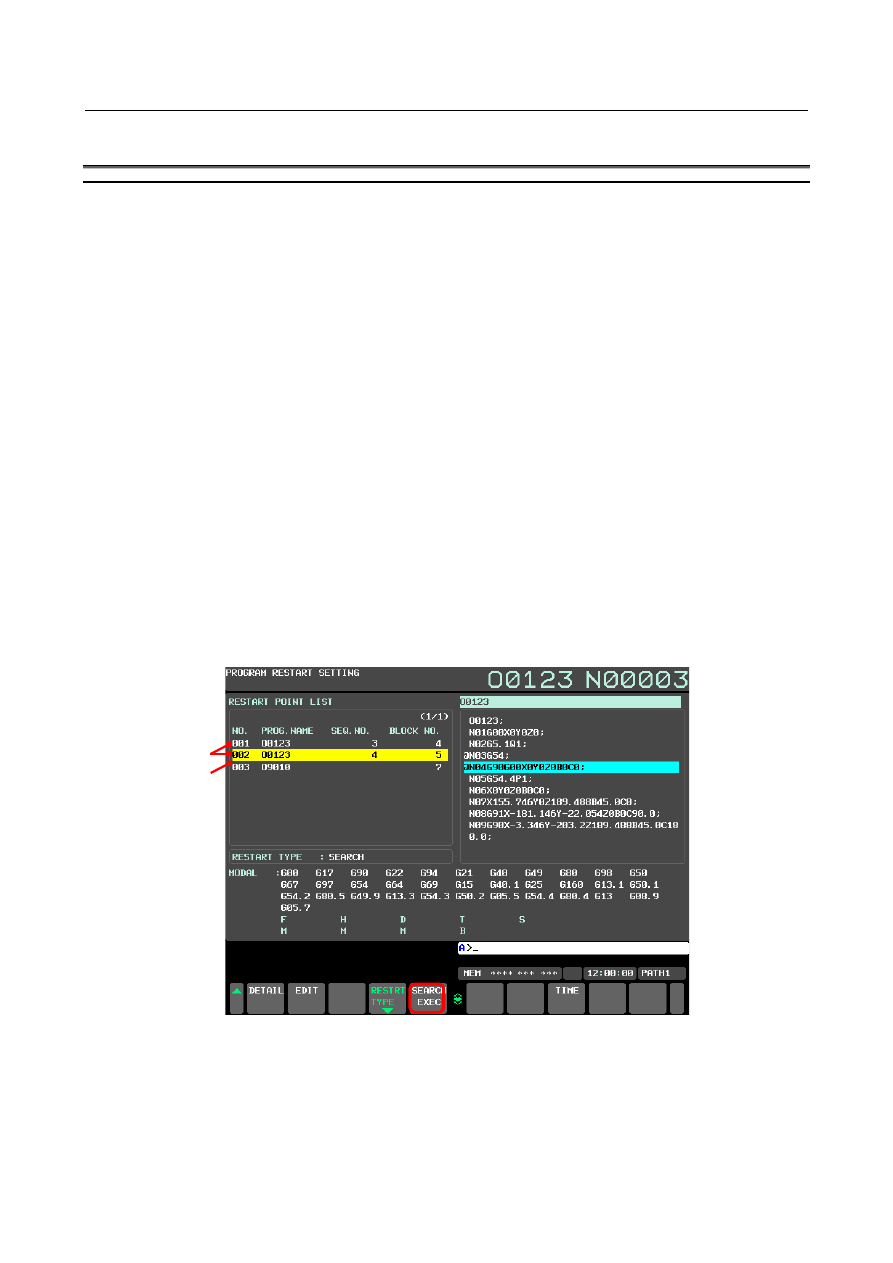
For this function, a screen for restart operation is available. This screen is called “program restart 
setting screen”. To perform program restart, first specify a target block on the program restart setting 
screen, next press soft key [SEARCH EXEC]. Then, program restart is executed. 


The program restart setting screen is also used to locate the interrupted point in the program. On the 
program restart setting screen, information (including the program name and sequence number) on 
the last executed block is displayed as primary information. This information can be checked to 
locate the interrupted point in the program. 


On the program restart setting screen, in addition to the information on the last executed block, 
information on some blocks executed before that can be displayed. This information is automatically 
stored in CNC memory during the operation of a program. This memory is called “program restart 
memory”. 
Block information stored in program restart memory is called “restart block information”. 


You can select an arbitrary block in restart block information and press soft key [SEARCH EXEC] 
to restart automatic operation from that block. 


                  Fig. 5.7 (a) Program restart setting screen 


By changing a displayed block number or sequence number using the MDI unit and pressing 
[SEARCH EXEC] on the program restart setting screen, the program is restarted according to the 
data after change. With this operation, the program can be restarted from a position shifted relatively 
from the block stored in the program restart memory. 


To restore the machine to the suitable status (including the auxiliary function status and spindle 
status), use the “auxiliary function output in program restart” function. By using this function, any 

Last executed block 

Executed blocks 

B-64693EN-1/01


5. AUTOMATIC OPERATION


- 899 - 

auxiliary function found during search is output to the MDI program. This MDI program can be 
executed to restore the machine status easily. 


For this function, either of the following two types of restart methods can be selected. 
<1>  Search method 

Use this type when it is difficult to restore the status of modal information and auxiliary 
functions manually. This type can be selected to restart a program not only from the block 
stored in the program restart memory, but also from another block. When this method is 
selected, the modal information and position information of the block from which to restart the 
program can be restored automatically. 

Application cases  :  When the power is turned off after machining is interrupted 

When another workpiece is machined after machining is interrupted, and 
the restart block information on the previous workpiece is not stored 
When the program is to be restarted from a block which is not stored in the 
program restart memory 

Function 

:  By using the “auxiliary function output in program restart”  function, the 

auxiliary function status can be restored. 
The tool automatically moves to the restart position along each axis when 
the program is restarted. 

Operation 

:  Restores modal information and coordinate values while performing the 

simulated execution of the program until the block specified in the program 
restart setting screen is found. (Updates modal information and coordinate 
values without moving the tool along any axis.) 
Mainly updates the following data: 

Modal information including G, F, D, and H codes 

Absolute coordinate values 

Auxiliary function output in the program restart 

<2>  Direct jump method 

Use this type when the operator restores the status of modal information and auxiliary 
functions manually and restarts the machining. This method can be selected only when the 
program is to be restarted from the block stored in the program restart memory. 
When this method is selected, program restart is performed at high speed, though the modal 
information and position information of the restart block are not restored. Restart operation will 
be completed in a short time compared with the search method, in particular, when the restart 
block is in the middle of a long program. 

Application cases  :  When the operator can easily restore the machine status because changes in 

the machine status are few when, for example, machining is interrupted, 
and is to be restarted immediately) 
When a program is to be restarted from a block where operation can be 
started without restoring the machine status, such as a block on a 
machining process boundary 

Function 

:  The “auxiliary function output in program restart” function cannot be used. 

The operator must determine whether to specify required auxiliary 
functions and specify them. 
The machine must be positioned at the restart position manually before 
operation is restarted because the tool does not move to the restart position 
along any axis when the program is restarted. 
Modal G codes and other modal information must be set to the suitable 
status by MDI operation before operation is restarted. 

Operation 

:  Moves only the program cursor to the specified block at high speed without 

restoring modal information or coordinate values. 


Executing cycle start after the block specified in the program restart setting screen is found restarts 
operation from that block. When the search method is selected, the auxiliary function status is 
restored by the “auxiliary function output in program restart” function and the tool is moved to the 
restart position before operation is restarted. 
 

5. AUTOMATIC OPERATION


B-64693EN-1/01


- 900 - 

Notes 

  - 

Program restart memory 

1. 

The following blocks are stored in the program restart memory: 
a. 

Last executed block 

b. 

Blocks of positioning (When some blocks are consecutive, the first block is stored) 

c. 

Blocks of subprogram calls (including M98, M198, G65, G, and M code macro calls and 
subprogram calls) 

d. 

Other blocks judged to be suitable for restarting a program (blocks for turning each mode on or 
off and others that function as a breakpoint in a program) 

2. 

If the program restart memory becomes full, block information is deleted from the older one and the 
information on a new block is overwritten. 

3. 

The program restart memory is cleared when operation is started in the MEM or RMT mode after a 
reset. 
The memory is also cleared when the program is changed and restart operation using the search 
method starts. 

4. 

When a program is restarted with specifying a new restart point, the information on the blocks stored 
before restart operation is not cleared. After the program is restarted, block information after restart 
is added following the block information stored before restart. 


  - 

Search method 

1. 

Any sequence number in the programmable parameter input (G10L52 or G10L50) mode is not 
searched for when a search is executed with specifying a sequence number. 

2. 

When a short cut is specified for a rotary axis, the tool also uses a short cut to the machining restart 
position. 

3. 

If the single-block operation is enabled when the tool moves to the restart position, a single-block 
stop occurs each time the tool moves along an axis. During this operation, however, no MDI 
operation is allowed.   

4. 

While the tool is moving to the restart position, manual intervention is allowed for an axis along 
which the tool does not move to the restart position. The tool does not move manually along any 
axis along which it has moved to the restart position, however.   

5. 

During movement to the machining restart position at a dry run feedrate, no interruption type custom 
macro can be started. If an attempt is made to start an interruption type custom macro, alarm 
DS0024 "UINT SIGNAL WAS ILLEGALLY INPUT" occurs.   


  - 

Direct jump method 

There are the following limitations. 
1. 

A direct jump may not be able to be selected depending on the block. (Example: Block in the cutter 
or tool nose radius compensation mode) 
If an attempt is made to select “JUMP”  as the restart type for such a block, the warning message, 
“ILLEGAL DATA”, is displayed and the setting is not accepted. 

2. 

A direct jump can be selected to restart a program from a block stored in the program restart 
memory. It cannot be used to restart a program from a block which is not stored in the program 
restart memory. If an attempt is made to use a direct jump for the above block, the warning message, 
“ILLEGAL DATA”, is displayed. 

3. 

When a direct jump is selected, the status of items including position information, modal 
information, and macro variables is not restored. The “auxiliary function output in program restart” 
function is not also executed. For this reason, the operator must restore the status manually with 
considering the status of the restart block. 

4. 

In the following cases, a direct jump can be selected for a block in a subprogram or external 
subprogram call: 
a. 

Subprogram call using M98 

b. 

Subprogram call using G65 

c. 

Block in a subprogram on the Data Server operating by M198 

d. 

Block in a program on the Data Server operating in the RMT mode 

B-64693EN-1/01


5. AUTOMATIC OPERATION


- 901 - 

In other cases, a direct jump cannot be selected for a block in a subprogram or external subprogram 
call. 
That is, a direct jump cannot be selected for the following blocks: 

e. 

Block in a subprogram specified by an M or G code or a program called by a macro call 

f. 

Block operating in the RMT mode (other than the Data Server) 

g. 

Block in an execution macro 

5. 

Note that there are the following limitations for blocks described in c. and d. above: 

(1)  It is not possible to jump to the right position when there is a branch instruction of the custom 

macro. 

(2)  It may take 1 to a few minutes to move the cursor to the restart block in a long program longer 

than 20 MB. 

6. 

The jump position is shifted if the number of lines in the program is changed by editing the program 
after interrupted. 

7. 

When a direct jump is selected, the auxiliary function status is not restored by the “auxiliary function 
output in program restart” function. Restore the status of auxiliary functions by MDI operation 
before starting subsequent machining if necessary. 

8. 

When a direct jump is selected, modal information is not restored and the tool does not move to the 
restart position. The status must be restored by MDI operation or manual operation before starting 
subsequent machining. 


  - 

Stop at the restart position 

Change single block operation to stop at the restart position. Setting the bit 1 (RPS) of parameter No.7331 
to 1 enables to stop at the restart position even for continuous operation. 


Fig. 5.7 (b) Operation in setting bit 1 (RPS) of parameter No.7331 to 1 


  - 

Execution macro (macro executor) 

A program cannot be restarted from a block in an execution macro. 

Cycle start signal 
ST<Gn007.2> 

Single block signal 
SBK<Gn046.1> 

Feed hold lamp signal 
SPL<Fn000.4> 

Cycle start lamp signal 
STL<Fn000.5> 

Automatic operation signal 
OP<Fn000.7> 

Program restart under 
way signal 
SRNMV<Fn002.4> 

Movement to restart position 
by dry run 

Stop at restart position 

5. AUTOMATIC OPERATION


B-64693EN-1/01


- 902 - 

  - 

Modal display on the program restart setting screen 

The modal display on the program restart setting screen indicates the status before the execution of the 
stored block. That is, data specified in the stored block is not displayed. 
 

  - 

Reset 

Do not perform reset operation from the start of a search for restart to the restart of machining. 
If reset operation is performed, perform restart operation from the beginning again. 
 

  - 

Feed hold 

If performing feed hold operation during search, perform restart operation from the beginning again. 
 

  - 

Manual absolute 

Perform every manual operation with the manual absolute mode turned on regardless of whether the 
manual operation is performed before or after machining. 
 

  - 

Reference position return 

When no absolute position detector (absolute pulse coder) is provided, be sure to perform reference 
position return after power-on, then perform restart operation. 
 

  - 

System variable 

With a custom macro made by a machine tool builder, different operations between normal operation and 
program restart operation may be required. For this case, the operator can check the running state of 
program restart with system variable #3008. 

#3008 = 0  : Normal operation 
#3008 

 0  : Program restart operation 


  - 

Relation to other functions 

The symbols in the table are described below: 

:  Can restart a program from a block in the mode of each function. 

NA  :  Cannot restart a program from a block in the mode of each function. Also cannot restart a program 

when any of these commands is specified in the first block of the program to the restart block. 

*1  :  There are some limitations. See Remarks. 
*2  :  Can restart a program after the status of items including modal information, macro variables, and 

auxiliary functions is restored by MDI operation or manual operation. 

*3  :  May restart a program using the “auxiliary function output in program restart”  function in some 

cases. 

*4  :  Cannot restart a program from a block in the mode of each function. 

Can restart a program from a block in which the mode is off when the program contains a block for 
turning the mode on or off. 

*5  :  Coordinate values are calculated on the assumption that the block is executed to the end point. 

Therefore, if the program is restarted from a block without specifying an absolute command at least 
once following this command, the positioned coordinate values may be different from those 
actually executed. 


Function name 

Search 

method 

Direct 

jump 

method 

Remarks 

Automatic operation (Memory operation) 


DNC operation 

*1 

Only the DNC operation of the Data Server is 
available on the direct jump method. When the 
program restart is executed excluding the Data 
Server, the warning of "ILLEGAL DATA" is 
displayed and the restart is not started. 

B-64693EN-1/01


5. AUTOMATIC OPERATION


- 903 - 

Function name 

Search 

method 

Direct 

jump 

method 

Remarks 

DNC operation with memory card 

NA 

In the direct jump method, the warning of 
"ILLEGAL DATA" is displayed and the restart is 
not started. 

Schedule function 

NA 

NA 

In the search method, alarm SR1968 is 
generated. 
In the direct jump method, the warning of 
"ILLEGAL DATA" is displayed and the restart is 
not started. 

Optional block skip 

*1 

*1 

The optional block skip signal cannot be 
changed while executing the program restart. 
The program restart cannot be correctly 
executed, and restarts in a wrong block when 
the signal is changed. 

Positioning 


Single direction positioning (G60) 


Linear interpolation 


Circular interpolation 


Helical interpolation 


Dwell 


Thread cutting, synchronous cutting 

*4 

*4 

The thread shifts when restarting on the way of 
the threading blocks continuously commanded. 

Multi threading 

*4 

*4 

Same as the above-mentioned 

Continuous threading 

*4 

*4 

Same as the above-mentioned 

Variable lead thread cutting 

*4 

*4 

Same as the above-mentioned 

Circular thread cutting 

*4 

*4 

Same as the above-mentioned 

Skip 

*5 

*2 


High-speed skip 

*5 

*2 


Multi-step skip 

*5 

*2 


Continuous high-speed skip 

*5 

*2 


Torque limit skip 

*5 

*2 


Polar coordinate interpolation 

*4 

*4 

In the search method, tool position might shift 
by operating after the program restarts. 
In the direct jump method, the warning of 
"ILLEGAL DATA" is displayed and the restart is 
not started. 

Cylindrical interpolation 

*4 

*4 

Alarm PS176 is generated and restart is not 
available in both search methods and the direct 
jump methods. 

Polar coordinate command 

*4 

In the direct jump method, the warning of 
"ILLEGAL DATA" is displayed and the restart is 
not started. 

Normal direction control 

*4 

In the direct jump method, the warning of 
"ILLEGAL DATA" is displayed and the restart is 
not started. 

Mirror image 

NA 

*2 

In the search method, tool position might shift 
by operating after the program restarts. 

Programmable mirror image 

*4 

In the direct jump method, the warning of 
"ILLEGAL DATA" is displayed and the restart is 
not started. 

Mirror image for double turret 

*4 

In the direct jump method, the warning of 
"ILLEGAL DATA" is displayed and the restart is 
not started. 

Figure copying 

*4 

In the direct jump method, the tool path might 
shift by operating after the program restarts. 

5. AUTOMATIC OPERATION


B-64693EN-1/01


- 904 - 

Function name 

Search 

method 

Direct 

jump 

method 

Remarks 

Coordinate system rotation 

*4 

In the direct jump method, the tool path might 
shift by operating after the program restarts. 

3-dimensional coordinate system 
conversion 

*2 

If G68(G68.1) is commanded with MDI 
operation and 3-dimensional coordinate system 
conversion mode is restored, the direct jump 
method is available. 

Tilted working plane indexing 

*2 

See item “Tilted working plane indexing” for 
details when a direct jump is selected. 
See item “Workpiece setting error 
compensation (or tilted working plane indexing 
+ tool center point control)” to use tool center 
point control simultaneously. 

Workpiece coordinate system 

*2 


Workpiece coordinate system preset 
(G92.1/G50.3) 

NA 

*2 

In the search method, tool position might shift 
by operating after the program restarts. 

Coordinate system setting (G92/G50) 

*2 


Reference position return 


Reference position return check 


2nd reference position return 


3rd/4th reference position return 


Tool length offset 

*2 


Tool offset (G45 to G48) 

*2 


Tool functions (T code on lathe system) 

*2 


Tool radius / Tool nose radius 
compensation 

*4 

In the direct jump method, the warning of 
"ILLEGAL DATA" is displayed and the restart is 
not started. 

Tool offset for Milling and Turning function 

*2 


Automatic tool length measurement (M 
series) / Automatic tool offset (T series) 

*5 

*2 


Plane selection 

*2 


Balanced cutting 

*4 

*4 

Synchronization between paths might shift by 
operating after the program restarts. 
In the direct jump method, the warning of 
"ILLEGAL DATA" is displayed and the restart is 
not started. 

Programmable data input 


Programmable parameter input 

For the blocks between G10L52 and G11, 
program restart with specifying a sequence 
number is disabled. 

Sub program call (M98) 


Sub program call (M198) 

*1 

Only a program call on the Data Server is 
available for a direct jump. 

Inch/metric conversion 

*2 


Direct drawing dimension programming 

*4 


Chamfering/Corner R 

*4 


Optional chamfering corner R 

*4 


Custom macro 

*2 


Interruption type custom macro 

*2 


Canned cycle 

*4 

*4 

Tool path might shift by operating after the 
program restarts. 

Multiple repetitive canned cycles 

*4 

*4 

Tool path might shift by operating after the 
program restarts. 

B-64693EN-1/01


5. AUTOMATIC OPERATION


- 905 - 

Function name 

Search 

method 

Direct 

jump 

method 

Remarks 

Multiple repetitive canned cycles II 

*4 

*4 

Tool path might shift by operating after the 
program restarts. 

Canned cycles for grinding 

*4,*5 

*4 

Tool path might shift by operating after the 
program restarts. 

Canned cycle for drilling (except rigid 
tapping) 

*4 

In the direct jump method, the warning of 
"ILLEGAL DATA" is displayed and the restart is 
not started. 

Small-hole peck drilling cycle 

*4 

*4 

In the search method, operation is restarted 
from the beginning of the hole machining. 
In the direct jump method, the warning of 
"ILLEGAL DATA" is displayed and the restart is 
not started. 

Rigid tapping 

*4 

*4 

In the search method, an alarm PS0200 is 
generated after restart. 
In the direct jump method, the warning of 
"ILLEGAL DATA" is displayed and the restart is 
not started. 

PMC axis control 

*3 

*2 


Real time custom macro 

NA 

*4 

The real time custom macro is not executed 
while restarting. Therefore, the real time 
custom macro might not operate correctly after 
the program restarts. (both search methods 
and the direct jump methods) 

Polygon turning 

*4 

*4 


Polygon turning by Cs contour control 

*4 

*4 


Polygon machining with two spindles 

*4 

*4 


High-speed HRV3 control (G5.4) 

*4 

*2 

On/off of this function is not restored as for the 
search method either. 
If G05.4Q1 or Q0 is commanded by MDI 
operation and the state is restored after 
restarted, operation can be restarted. (both 
search methods and the direct jump methods) 

Optimum torque acceleration/deceleration 


Jerk control 


AI contour control I 


AI contour control II 


Exact stop mode 

*2 


Tapping mode 

*2 


Cutting mode 

*2 


Automatic corner override 

*2 


Auxiliary function 

*3 

*2 


2nd auxiliary function 

*3 

*2 


M code group check 

*3 

*2 


Tool management function 

*3 

*2 

When the search method is selected and a tool 
exchange macro is executed after search, the 
amount of tool offset may be incorrect. (For a 
macro using a command such as 
H#8409D#8410) 

Tool life management 

*3 


Embedded macro 


Arbitrary angular axis control 


Content      ..     116      117      118      119     ..