Boeing 737 - 600/700/800/900. Operations Manual (1997 year) - page 55
Flight Management, Navigation -
Table of Contents
Boeing 737 Operations Manual
Inertial Reference System
11.20.5
Inertial System Display Unit (ISDU)
11.20.7
Mode Select Unit (MSU)
11.20.7
IRS Transfer Switch
11.20.7
IRS Instrument Transfer Switch Schematic
11.20.8
Radio Navigation Systems
11.20.8
Automatic Direction Finding (ADF)
11.20.8
Distance Measuring Equipment (DME)
11.20.9
Instrument Landing System (ILS)
11.20.9
Navaid Identifier Decoding
11.20.9
Marker Beacon
11.20.10
Very High Frequency Omni Range (VOR)
11.20.10
VHF NAV Transfer Switch
11.20.10
ATC Transponder
11.20.10
Weather Radar
11.20.11
Flight Management System Description
11.30.1
Introduction
11.30.1
Flight Management Computer (FMC)
11.30.1
Control Display Units (CDUs)
11.30.3
Flight Management System Operation
11.31.1
Introduction
11.31.1
Preflight
11.31.1
Takeoff
11.31.2
Climb
11.31.2
Cruise
11.31.2
Descent
11.31.2
Approach
11.31.2
Flight Complete
11.31.2
FMC and CDU Terminology
11.31.2
Maintenance Index Page
11.31.4
Navigation Position
11.31.4
11.TOC.0.2
Flight Management, Navigation -
Table of Contents
Boeing 737 Operations Manual
FMC Position Update
11.31.5
Navigation Performance
11.31.6
Actual Navigation Performance
11.31.8
Lateral Navigation (LNAV)
11.31.10
Waypoints
11.31.10
Navigation Displays
11.31.16
Vertical Navigation (VNAV)
11.31.16
Speed/Altitude Restrictions
11.31.17
Takeoff and Climb
11.31.18
MCP Altitude Intervention
11.31.20
Cruise
11.31.21
MCP Speed Intervention
11.31.22
Descent
11.31.23
Early Descent
11.31.33
Approach
11.31.34
Go-Around
11.31.35
VNAV Cruise (Engine Out Above Eng Out Max
Alt)
11.31.37
Required Time of Arrival (RTA)
11.31.38
Data Entry Rules
11.31.38
Altitude Entry
11.31.38
Airspeed Entry
11.31.39
Data Pairs
11.31.40
Bearing Entry
11.31.40
Plus/Minus Signs
11.31.40
Flight Management Computer
11.32.1
FMC Databases
11.32.1
Thrust Management
11.32.2
Reduced Thrust Takeoff
11.32.3
Takeoff Bump Thrust
11.32.4
Derated Thrust Climb
11.32.4
Fuel Monitoring
11.32.5
Loss of FMC Electrical Power
11.32.5
11.TOC.0.3
Flight Management, Navigation -
Table of Contents
Boeing 737 Operations Manual
FMC Failure
11.32.6
Single FMC Failure
11.32.6
Dual FMC Failure
11.32.7
FMC Failure
11.32.7
Company Data Link
11.33.1
Company Data Link
11.33.1
Data Link
11.33.2
Manual Downlinks
11.33.2
Automatic Downlinks
11.33.3
Uplinks
11.33.3
Long Delete Function
11.33.4
Requests
11.33.4
Request Status
11.33.5
FMC Data Link Uplinks (Accept/Reject)
11.33.6
FMC Data Link Uplinks (Load/Activate/Exec)
11.33.7
FMC Data Link Uplinks (Load/Exec-Erase)
11.33.8
FMC Data Link Uplinks (Request)
11.33.9
FMC Data Link Uplinks (Automatic)
11.33.10
Data Link Management
11.33.10
CDU Data Link Status Displays
11.33.11
FMC Communications Page
11.33.12
FMC Preflight
11.40.1
Introduction
11.40.1
Preflight Page Sequence
11.40.1
Minimum Preflight Sequence
11.40.2
Supplementary Pages
11.40.2
Preflight Pages
11.40.4
Initialization/Reference Index Page
11.40.4
Identification Page
11.40.7
Position Initialization Page 1/3
11.40.9
Position Reference Page 2/3
11.40.12
Route Page 1/X
11.40.14
11.TOC.0.4
Flight Management, Navigation -
Table of Contents
Boeing 737 Operations Manual
Additional Route Page Prompts for an Activated
Route
11.40.21
Departure/Arrival Index Page
11.40.23
Departures Page
11.40.25
Performance Initialization Page
11.40.27
Performance Limits Page
11.40.33
N1 LIMIT Page - Preflight
11.40.36
Takeoff Reference Page 1/2
11.40.42
Takeoff Reference Page 2/2
11.40.58
Menu Page
11.40.65
FMC Takeoff and Climb
11.41.1
Introduction
11.41.1
Takeoff Phase
11.41.1
Climb Phase
11.41.2
Climb Page
11.41.3
RTA Climb Page
11.41.8
RTE LEGS Page
11.41.9
Progress Page 1/X
11.41.13
RTA Progress Page 2/3
11.41.16
Progress Page 3/3
11.41.21
Progress Page 2/4
11.41.24
RTA Progress Page 3/4
11.41.26
RNP Progress Page 4/4
11.41.31
N1 Limit Page
11.41.33
Engine Out Climb
11.41.35
Engine Out Climb Page
11.41.35
Air Turnback
11.41.37
Arrivals Page
11.41.37
FMC Cruise
11.42.1
Introduction
11.42.1
LNAV Modifications
11.42.1
11.TOC.0.5
Flight Management, Navigation -
Table of Contents
Boeing 737 Operations Manual
RTE LEGS Page Modifications
11.42.2
Progress Page
11.42.4
Deleting Waypoints
11.42.4
Resequencing Waypoints
11.42.6
Leg Bypass
11.42.7
Removing Discontinuities
11.42.7
Direct To and Intercept Course
11.42.9
Abeam Points
11.42.13
Select Desired Waypoint Page
11.42.15
Lateral Offset
11.42.16
VNAV Modifications
11.42.18
Cruise Page
11.42.18
RTA Cruise
11.42.21
Cruise with Step Climb
11.42.22
Cruise Climb
11.42.24
RTA Cruise Climb
11.42.26
Cruise Descent
11.42.27
RTA Cruise Descent
11.42.29
Engine Out Cruise
11.42.30
Early Descent
11.42.32
Route and Waypoint Data
11.42.33
Route Data (RTE DATA) Page
11.42.33
Position Shift Page 3/3
11.42.36
Inflight Position Update
11.42.39
Navigation Data
11.42.41
Reference Navigation Data (REF NAV DATA)
Page
11.42.41
Waypoint Data Display
11.42.43
Navigation Aid Data Display
11.42.44
Airport Data Display
11.42.45
Runway Data Display
11.42.46
Navigation Summary (NAV SUMMARY)
11.42.47
Supplemental Nav Data
11.42.48
Navigation Status Display
11.42.51
11.TOC.0.6
Flight Management, Navigation -
Table of Contents
Boeing 737 Operations Manual
Navigation Options (NAV OPTIONS)
11.42.53
Fix Information Page
11.42.54
FMC Descent and Approach
11.43.1
Introduction
11.43.1
Early Descent
11.43.1
Descent
11.43.1
Descent Page (During Cruise)
11.43.1
Descent Page (During Descent)
11.43.6
RTA Descent Page
11.43.9
Descent Forecast Page
11.43.10
Engine Out Descent
11.43.12
Approach
11.43.13
Arrivals Page - IFR Approaches
11.43.13
Approach Reference Page
11.43.20
Alternate Airport Diversions
11.43.26
Alternate Dests Page 1/X
11.43.26
Alternate Dests Page X/X
11.43.28
HOLD Page
11.43.31
RTE LEGS HOLD At (Fix in Route)
11.43.37
RTE LEGS HOLD AT (Fix not in Route)
11.43.39
FMC Messages
11.60.1
Introduction
11.60.1
FMC Alerting Messages
11.60.2
FMC Entry Error Messages
11.60.10
FMC Advisory Messages
11.60.12
FMC Data Link Messages
11.60.17
FMC Data Link Alerting Messages
11.60.17
FMC Data Link Advisory Messages
11.60.22
11.TOC.0.7
Flight Management, Navigation -
Table of Contents
Boeing 737 Operations Manual
Intentionally
Blank
11.TOC.0.8
Boeing 737 Operations Manual
Flight Management, Navigation
Chapter 11
Controls and Indicators
Section 10
Flight Management System
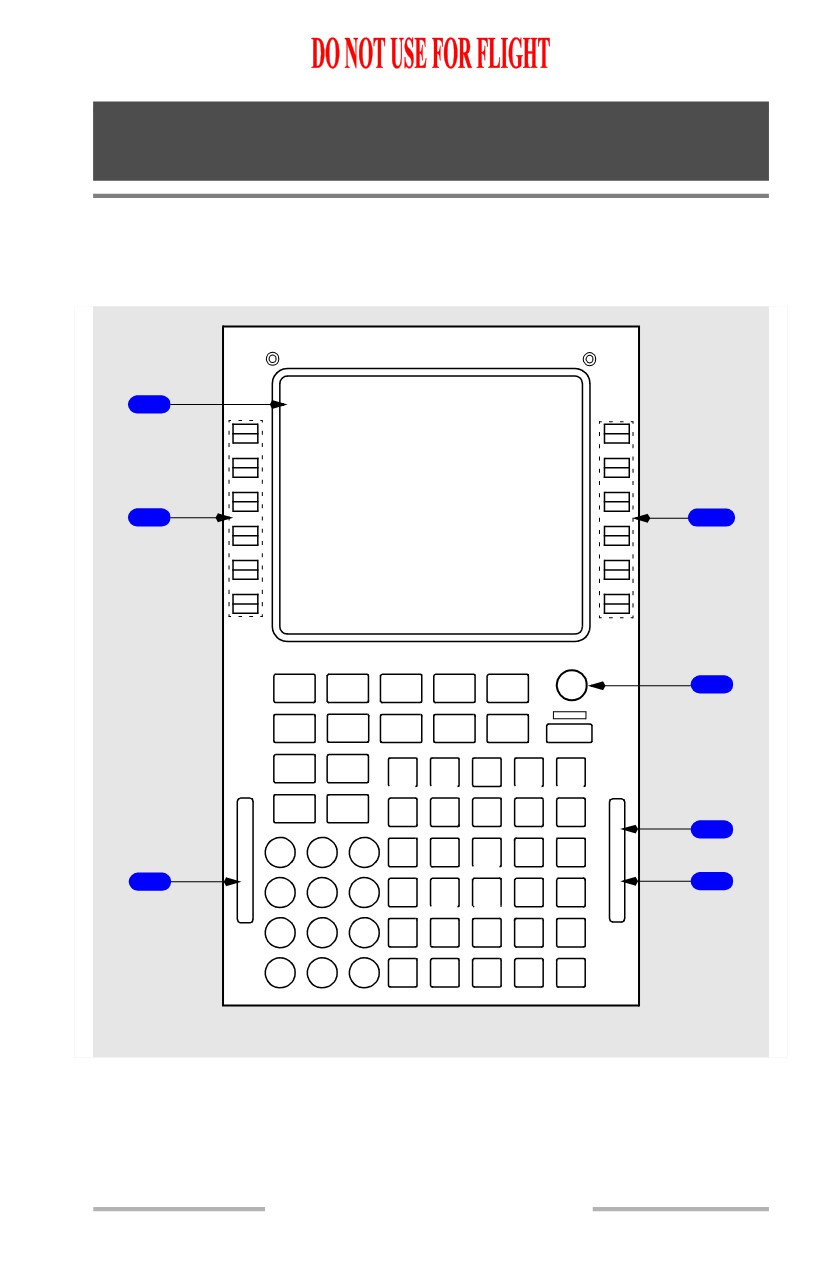
Control Display Unit (CDU)
[Option - Liquid crystal display CDU]
1
2
2
BRT
INIT
RTE
CLB
CRZ
DES
3
REF
DIR
DEP
LEGS
HOLD
PROG
INTC
ARR
EXEC
N1
FIX
LIMIT
A B
C D E
PREV NEXT
PAGE
PAGE
F G
H
I
J
M
S
4
G
1
2
3
K L M
N
O
O
F
F
6
A
S
5
I
4
5
6
P Q
R
S T
T
L
7
8
9
U
V W
X
Y
0
+/- Z
D
EL
/
CLR
FORWARD ELECTRONIC PANEL
11.10.1
Flight Management, Navigation -
Controls and Indicators
Boeing 737 Operations Manual
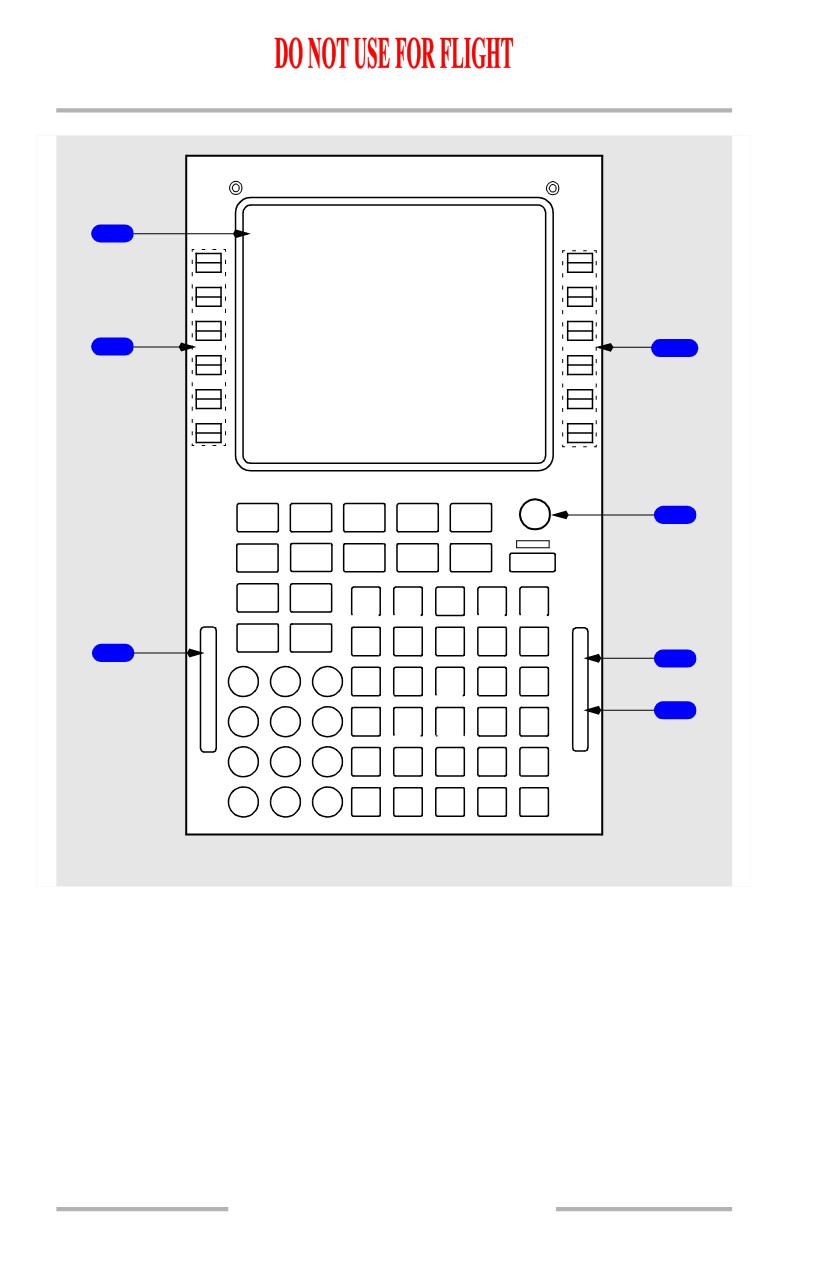
[Option - Liquid crystal display MCDU]
1
2
2
BRT
INIT
RTE
CLB
CRZ
DES
3
REF
DEP
HOLD
MENU LEGS
ARR
PROG
EXEC
N1
FIX
LIMIT
A
B
C D E
PREV NEXT
C
PAGE
PAGE
F
G
H
I
J
M
6
A
S
4
L
G
L
1
2
3
K
L M
N
O
O
F
S
5
4
5
6
P Q
R
S T
T
7
8
9
U
V W
X
Y
0
+/- Z
SP
D
EL
/
CLR
FORWARD ELECTRONIC PANEL
11.10.2
October 15, 2001
Flight Management, Navigation -
Controls and Indicators
Boeing 737 Operations Manual
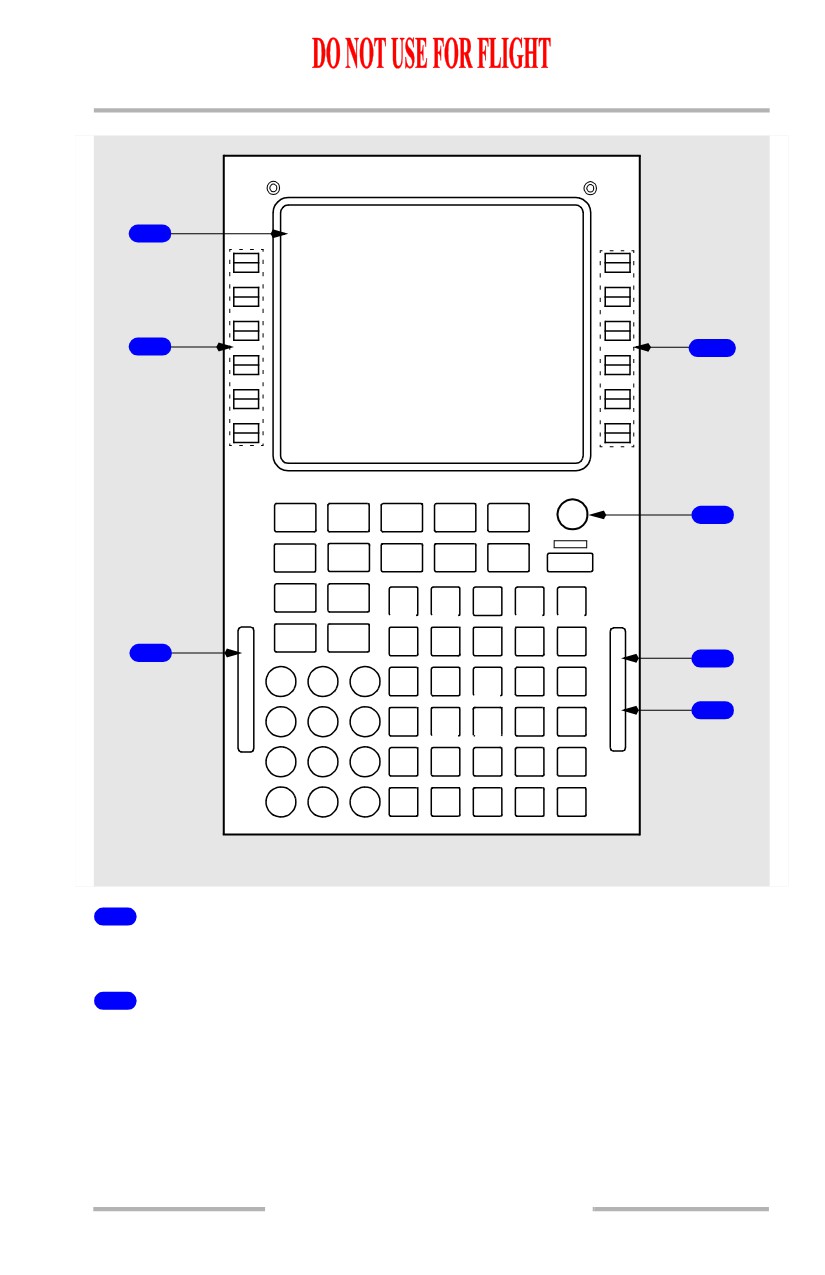
[Option - Liquid crystal display FANS MCDU]
1
2
2
BRT
INIT
DEP
RTE
ATC
VNAV
3
REF
ARR
FIX
LEGS
HOLD
FMC
PROG
COMM
EXEC
N1
MENU
LIMIT
A
B
C D E
PREV NEXT
C
PAGE
PAGE
F
G
H
I
J
M
6
A
S
4
L
G
L
1
2
3
K
L M
N
O
O
F
S
5
4
5
6
P Q
R
S T
T
7
8
9
U
V W
X
Y
0
+/- Z
SP
D
EL
/
CLR
FORWARD ELECTRONIC PANEL
1
Control Display Unit (CDU) Display
Shows FMS data pages.
2
Line Select Keys
Push -
• moves data from scratchpad to selected line
• moves data from selected line to scratchpad
• selects page, procedure, or performance mode as applicable
• deletes data from selected line when DELETE is shown in scratchpad.
October 15, 2001
11.10.3
Flight Management, Navigation -
Controls and Indicators
Boeing 737 Operations Manual
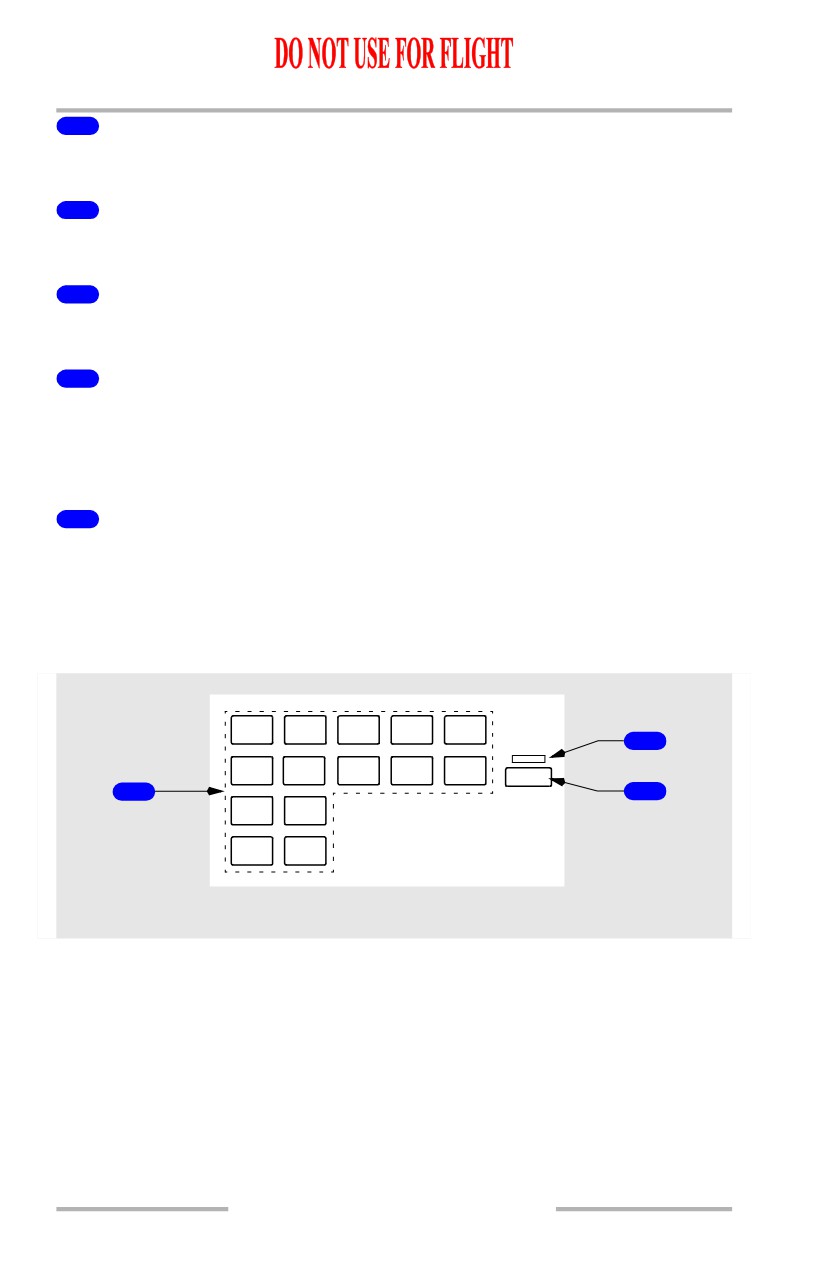
3
Brightness Control
Rotate - controls display brightness.
4
Message (MSG) Light
Illuminated (white) - scratchpad message is shown.
5
Offset (OFST) Light
Illuminated (white) - LNAV gives guidance for lateral route offset.
6
Call (CALL) Light
[Option - MCDU]
Illuminated (white) - a subsystem other than the FMC is requesting control of the
CDU.
6
Fail (FAIL) Light
[Option - CDU with single FMC]
Illuminated (amber) - the FMC has failed.
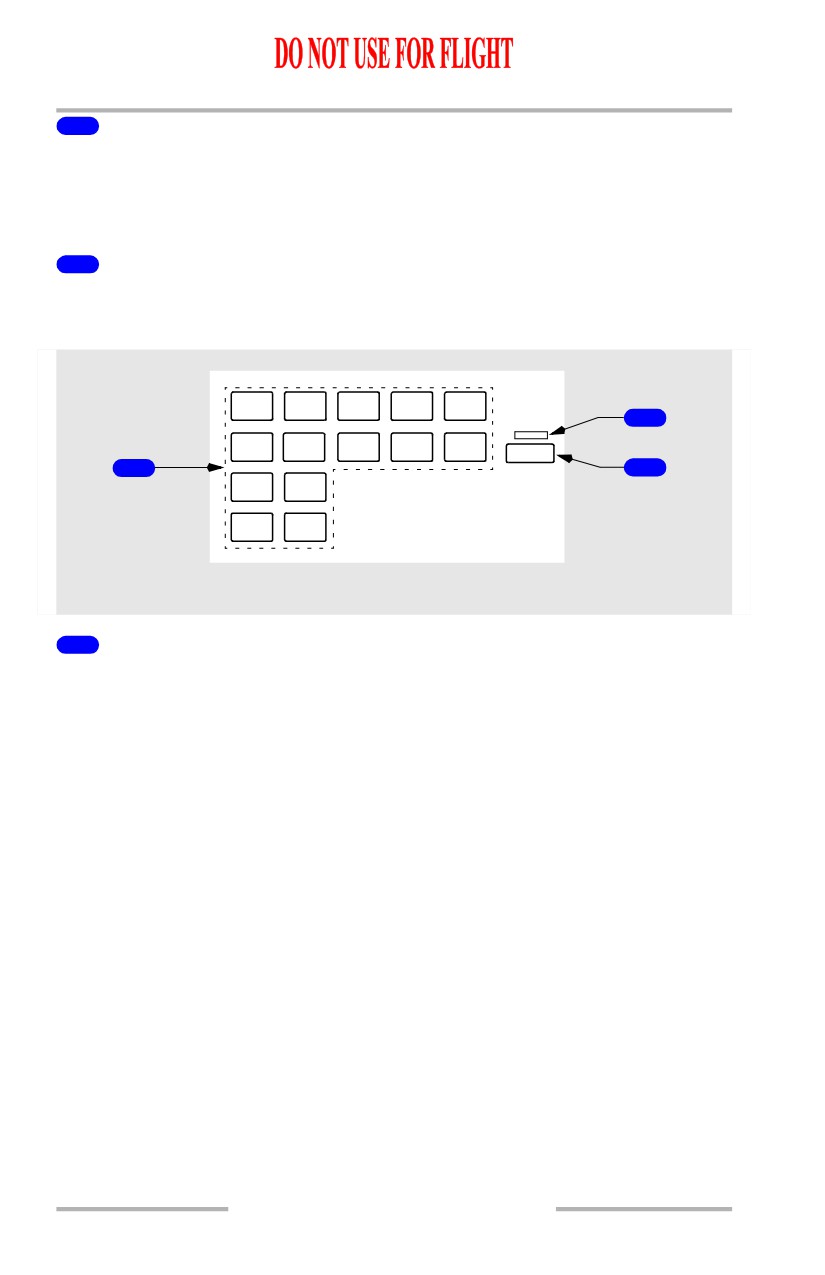
Function and Execute Keys
[Option - Liquid crystal display CDU]
INIT
REF
RTE
CLB
CRZ
DES
3
DIR
DEP
LEGS
HOLD
PROG
INTC
ARR
EXEC
1
2
N1
FIX
LIMIT
PREV NEXT
PAGE
PAGE
CDU
11.10.4
October 15, 2001

Flight Management, Navigation -
Controls and Indicators
Boeing 737 Operations Manual
[Option - Liquid crystal display MCDU]
INIT
REF
RTE
CLB
CRZ
DES
3
DEP
MENU
LEGS
HOLD
PROG
ARR
EXEC
1
2
N1
FIX
LIMIT
PREV NEXT
PAGE
PAGE
CDU
1
CDU Function Keys
Push -
• INIT REF - shows page for data initialization or for reference data
• RTE - shows page to input or change origin, destination, or route
• CLB - shows page to view or change climb data
• CRZ - shows page to view or change cruise data
• DES - shows page to view or change descent data
[Option - CDU]
• DIR INTC - shows page to modify route to fly directly from present
position to any waypoint or to intercept any course to any waypoint
[Option - MCDU]
• MENU - shows page to choose subsystems controlled by CDU
• LEGS -
• shows page to evaluate or modify lateral and vertical data
• shows page to control PLAN mode display
• DEP ARR - shows page to input or change departure and arrival
procedures
• HOLD - shows page to create holding patterns and show holding pattern
data
• PROG - shows page to view dynamic flight and navigation data,
including waypoint and destination ETAs, fuel remaining, and arrival
estimates
• N1 LIMIT - shows page to view or change N1 thrust limits
• FIX - shows page to create reference points on map display
• PREV PAGE - shows previous page of related pages (for example, LEGS
pages)
• NEXT PAGE - shows next page of related pages.
October 15, 2001
11.10.5
Flight Management, Navigation -
Controls and Indicators
Boeing 737 Operations Manual
2
Execute (EXEC) Key
Push -
• makes data modification(s) active
• extinguishes execute light.
3
Execute Light
Illuminated (white) - active data is modified but not executed.
[Option - Liquid crystal display FANS MCDU]
INIT
DEP
VNAV
REF
RTE
ARR
ATC
3
FMC
FIX
LEGS
HOLD
PROG
COMM
EXEC
1
2
MENU
N1
LIMIT
PREV NEXT
PAGE
PAGE
CDU
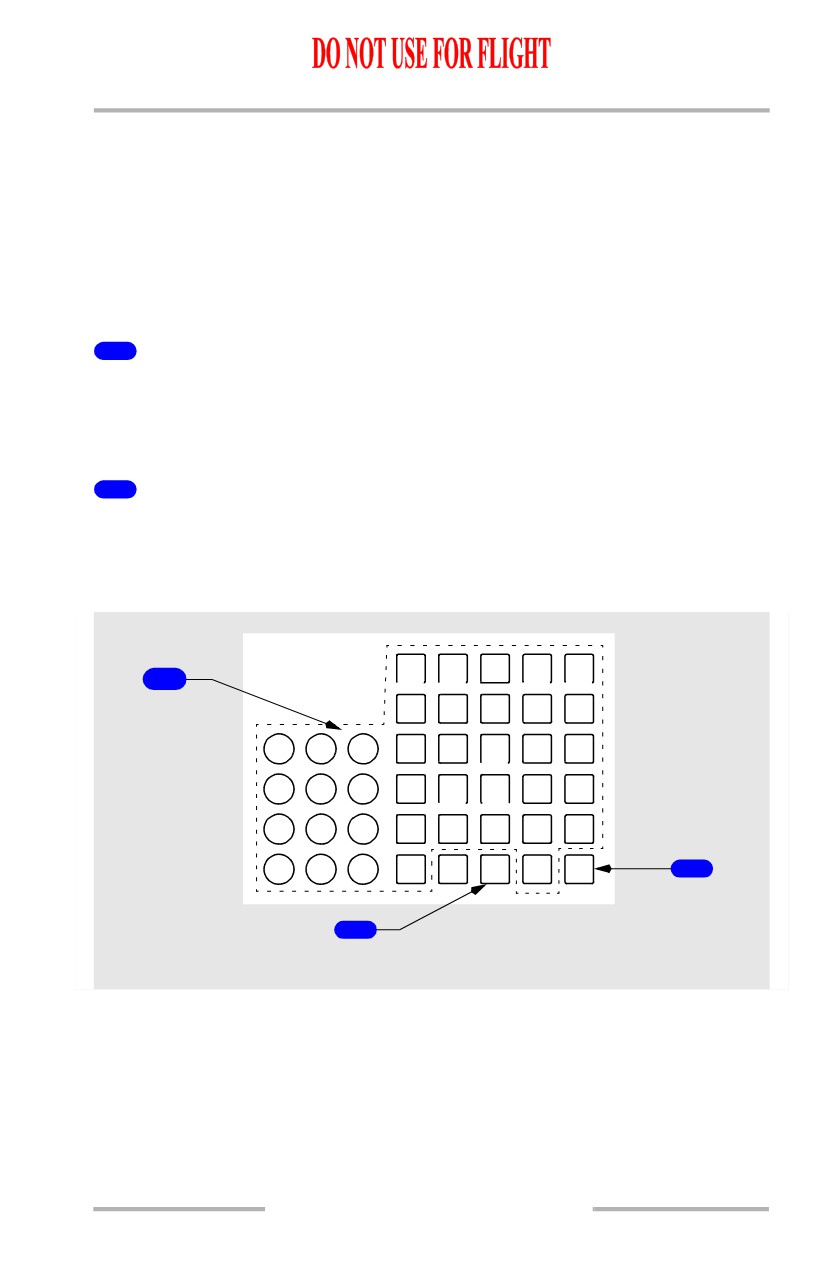
1
CDU Function Keys
Push -
• INIT REF - shows page for data initialization or for reference data
• RTE - shows page to input or change origin, destination, or route
• DEP ARR - shows page to input or change departure and arrival
procedures
• ATC - inoperative (scratchpad message KEY/FUNCTION INOP
displayed)
• VNAV -
• shows currently active performance page (CLB, CRZ, DES)
• CLB page is displayed if no active phase exists
• FIX - shows page to create reference points on map display
• LEGS -
• shows page to evaluate or modify lateral and vertical route data
• shows page to control PLAN mode display
• HOLD - shows page to create holding patterns and show holding pattern
data
[Option - With AOC data link]
• FMC COMM - displays FMC COMM status page.
11.10.6
October 15, 2001
Flight Management, Navigation -
Controls and Indicators
Boeing 737 Operations Manual
• PROG - shows page to view dynamic flight and navigation data,
including waypoint and destination ETAs, fuel remaining, and arrival
estimates
• MENU - shows page to choose subsystems controlled by CDU
• N1 LIMIT - shows page to view or change N1 thrust limits
• PREV PAGE - shows previous page of related pages (for example, LEGS
pages)
• NEXT PAGE - shows next page of related pages.
2
Execute (EXEC) Key
Push -
• makes data modification(s) active
• extinguishes execute light.
3
Execute Light
Illuminated (white) - active data is modified but not executed.
Alpha/Numeric and Miscellaneous Keys
[Option - CDU]
A B
C D E
1
F G
H
I
J
1
2
3
K L M
N
O
4
5
6
P Q
R
S T
7
8
9
U
V W
X
Y
0
+/-
Z
D
EL
/
CLR
3
2
CDU
October 15, 2001
11.10.7
Flight Management, Navigation -
Controls and Indicators
Boeing 737 Operations Manual
[Option - MCDU]
A B
C D E
1
F G
H
I
J
1
2
3
K L M
N
O
4
5
6
P Q
R
S T
7
8
9
U
V W
X
Y
0
+/-
Z SP D
EL
/
CLR
3
4
2
CDU
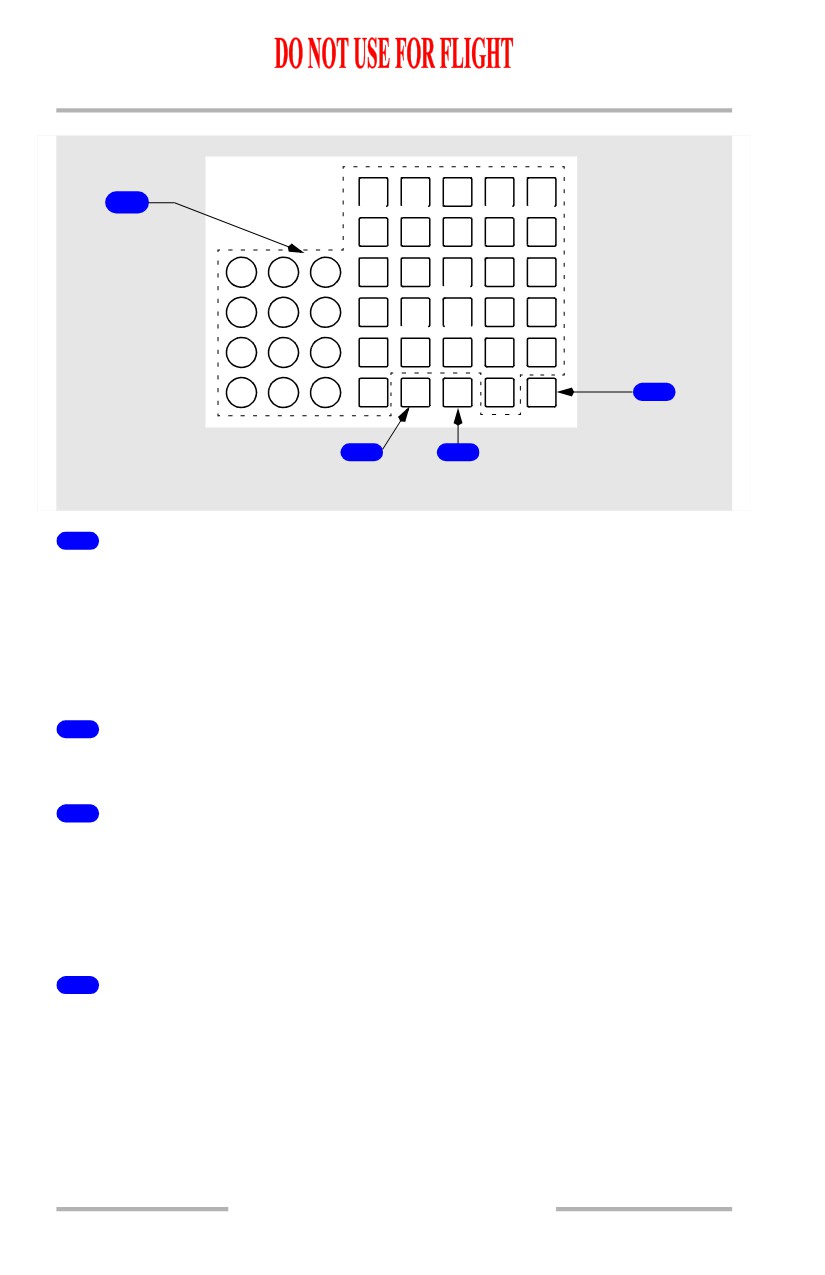
1
Alpha/Numeric Keys
Push -
• puts selected character in scratchpad
• Slash (/) key - puts “/” in scratchpad
• Plus Minus (+/-) key - first push puts “-” in scratchpad. Subsequent
pushes alternate between “+” and “-”.
2
Delete (DEL) Key
Push - puts DELETE in scratchpad.
3
Clear (CLR) Key
Push -
• clears the last scratchpad character
• clears scratchpad message.
Push and hold - clears all scratchpad data.
4
Space (SP) Key
[Option - MCDU]
Push - puts space in scratchpad.
11.10.8
October 15, 2001
Flight Management, Navigation -
Controls and Indicators
Boeing 737 Operations Manual
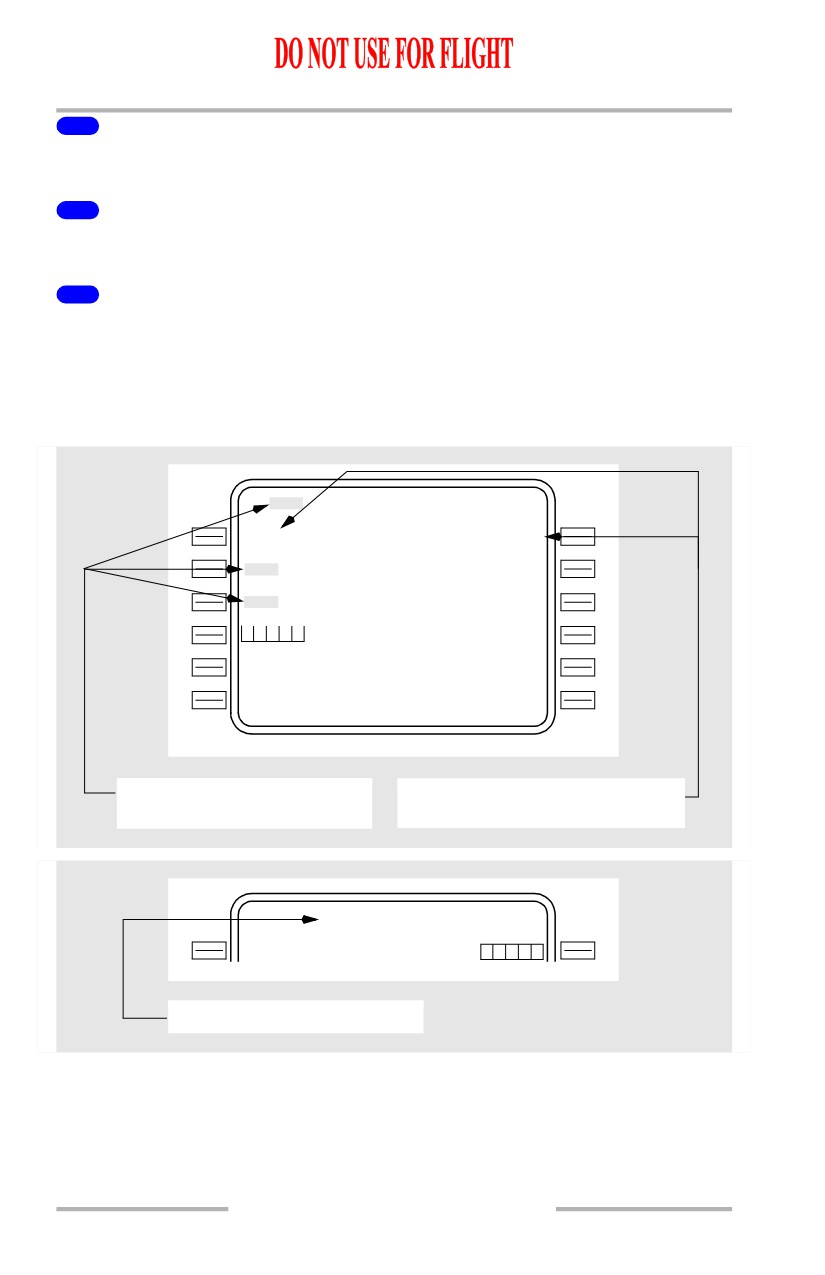
CDU Page Components
[Option - FMC U10.3 and later with flight number entry]
1
RT E
1 / X X
5
O R I G I N
D E S T
K
BF
I
6
2
C O R O U T E
F L T N O .
----
-
-
--------
7
R U N W A Y
3
1
3
R
- - - - - - - -
-
-
- - - - - - - - - - - - - -
ACTI VATE>
8
4
KMW H
CDU
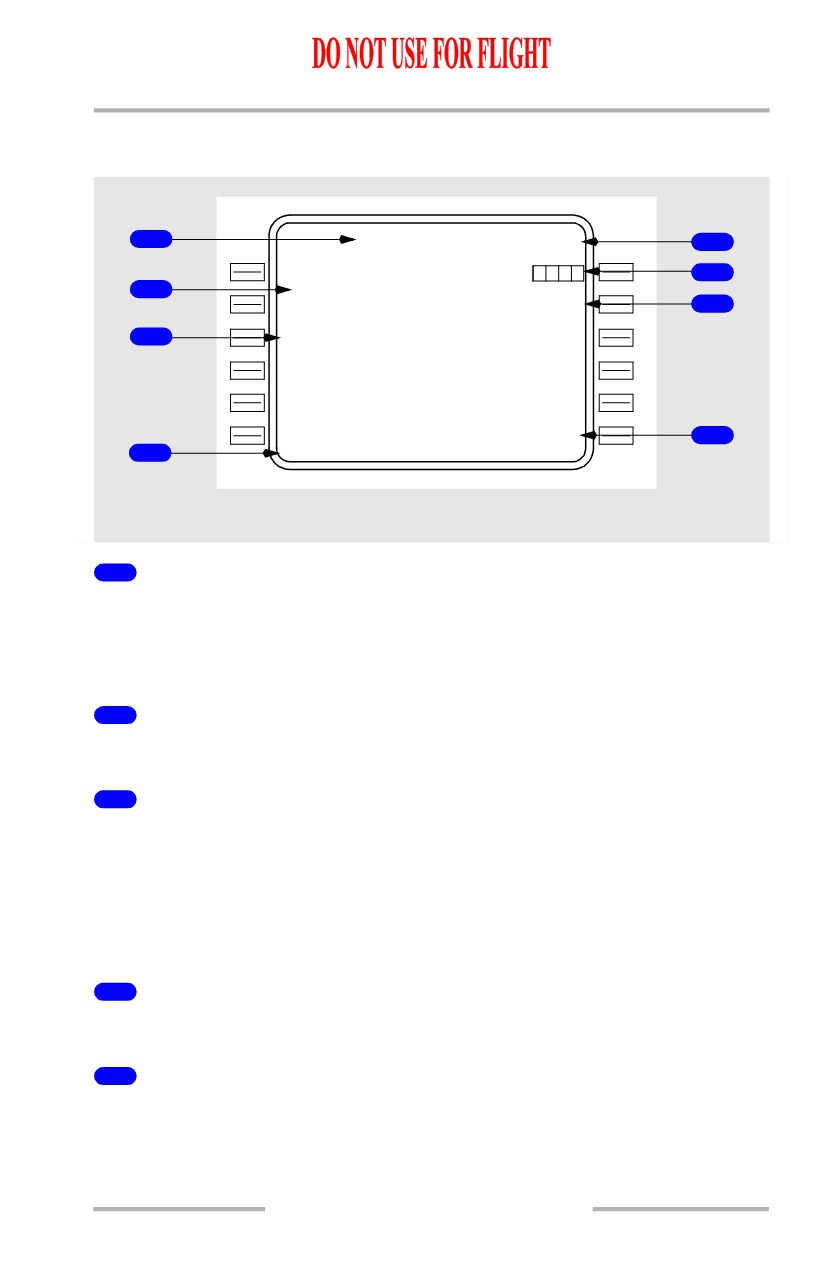
1
Page Title
Subject or name of data shown on page.
ACT (active) or MOD (modified) shows whether page contains active or modified
data.
2
Line Title
Title of data on line below.
3
Line
Shows -
• prompts
• selections
• options
• data.
4
Scratchpad
Shows messages, alpha-numeric entries or line selected data.
5
Page Number
Left number is page number. Right number is total number of related pages.
11.10.9
Flight Management, Navigation -
Controls and Indicators
Boeing 737 Operations Manual
6
Boxes
Data input is mandatory.
7
Dashes
Data input is optional. The data is not mandatory.
8
Prompts
Show pages, select modes, and control displays. Caret “<” or “>” is before or after
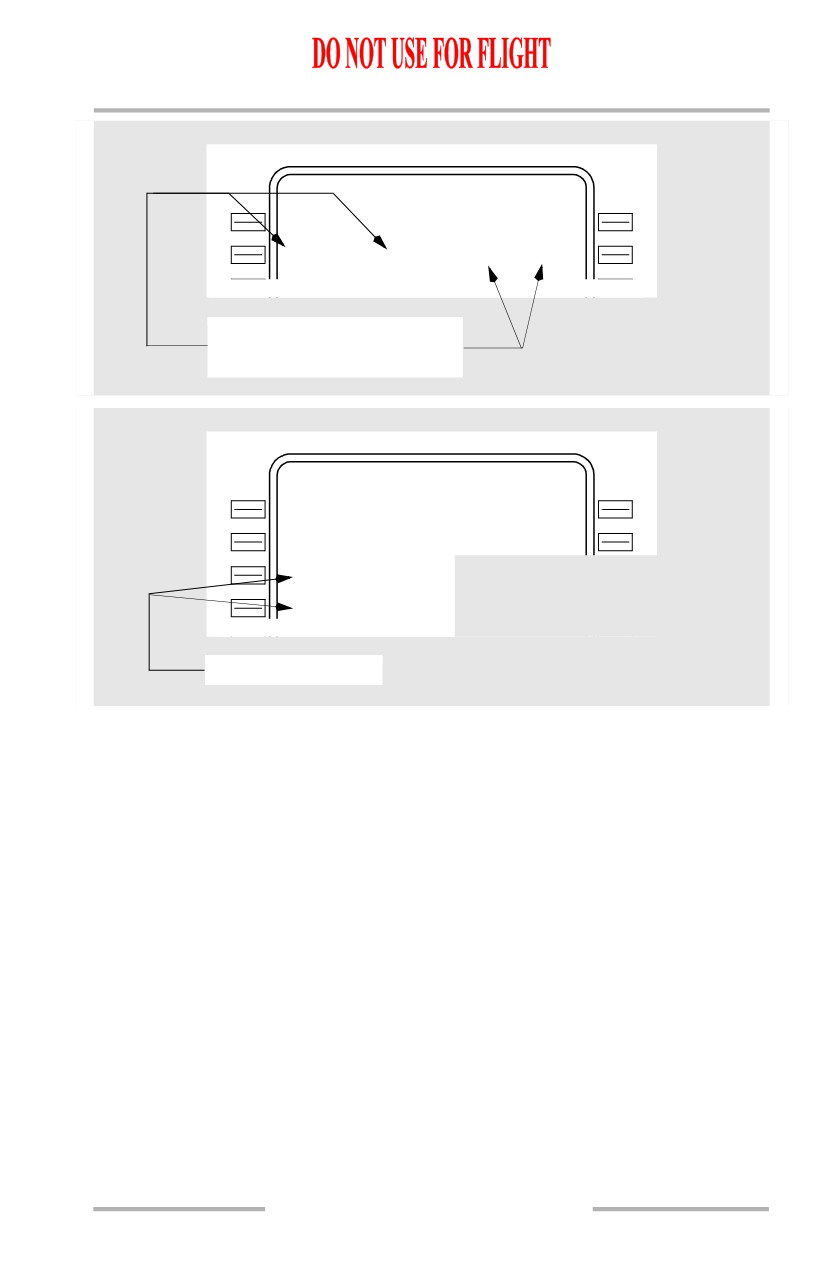
prompt.
CDU Page Color
[Option]
MOD RT E
1
LEGS
1 / 4
0
8
8
19 N M
EL N
270/12492
1
2
3
40 N M
YK M
270 / 1 5 0 0 0
1
0
8
82 N M
PD T
. 636 / F L 1 9 0
T H E N
- - - R O U T
E
D
I S C O N T I N U I T Y - -
QUIN T
. 636 / F L 1 9 0
- - - - - - - -
-
-
- - - - - - - - - - - - - -
<ERAS E
RTE DATA>
Flight plan modification not
Active airspeed, altitude,
yet executed (shaded white)
waypoint name (magenta)
RT E
1 / 1
O R I G I N
D E S T
---
-
-
YK M
270 / 1 5 0 0 0
Inactive RTE page title (cyan)
11.10.10
Flight Management, Navigation -
Controls and Indicators
Boeing 737 Operations Manual
NA V STATUS
1 / 2
V O R - L
I L S - R
I
B
FIM 110.90
D M E - L
D M E - R
SEA
116
80
IBFI
110.90
E P H
112
8
0
Navaids being used in
navigation solution (green)
NA V OPTIONS
2 / 2
D M E I N H I B I T
--
-
-
----
V O R I N H I B I T
--
-
-
----
D M E U P D A T E
<ON/O F F
V O R U P D A T E
<ON/O F F
Active state (green)
Color is used as follows:
• black - background color of page
• cyan -
• inactive RTE page title
• green -
• actively tuned VOR, ILS, or DME data (frequency, station ID, course)
• active state of two-position and three-position selectors.
• magenta - data used by FMC for lateral and vertical flight commands
• active waypoint
• active airspeed
• active altitude
• shaded white -
• modifications
• MOD precedes page titles of modified pages
• white - most data.
11.10.11
Flight Management, Navigation -
Controls and Indicators
Boeing 737 Operations Manual
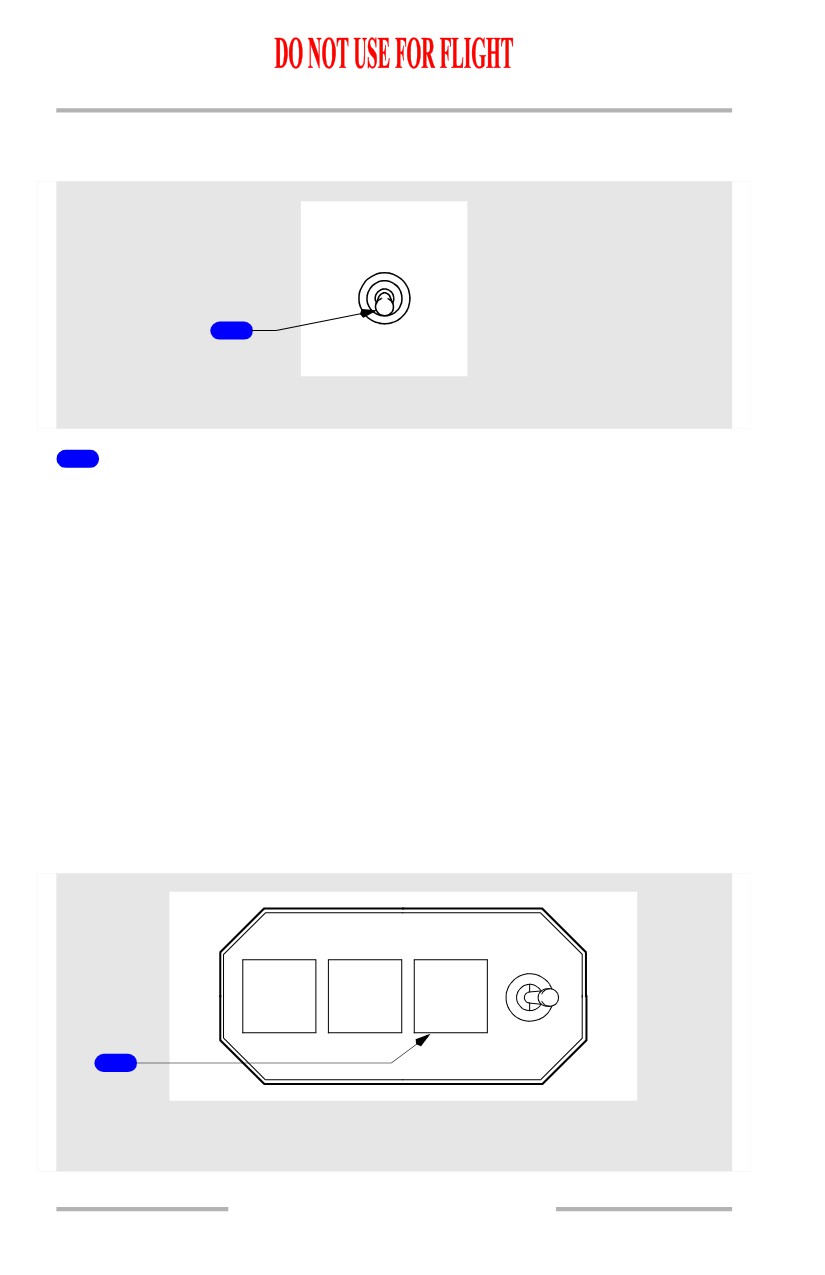
FMC Source Select Switch
[Option - Dual FMC]
FMC
BOTH
BOTH
ON L
ON R
1
NORMAL
FORWARD OVERHEAD PANEL
1
FMC Source Select Switch
BOTH ON L -
• selects left FMC for all FMC operations
• right map will annunciate “FMC L.”
NORMAL -
• left FMC controls CDUs and provides input to the autothrottle system
• right FMC operates in synchronization with left FMC
• maps display composite information from both FMCs
BOTH ON R -
• selects right FMC for all FMC operations
• left map will annunciate “FMC R.”
Note: Moving the source select switch will cause LNAV and VNAV to
disengage.
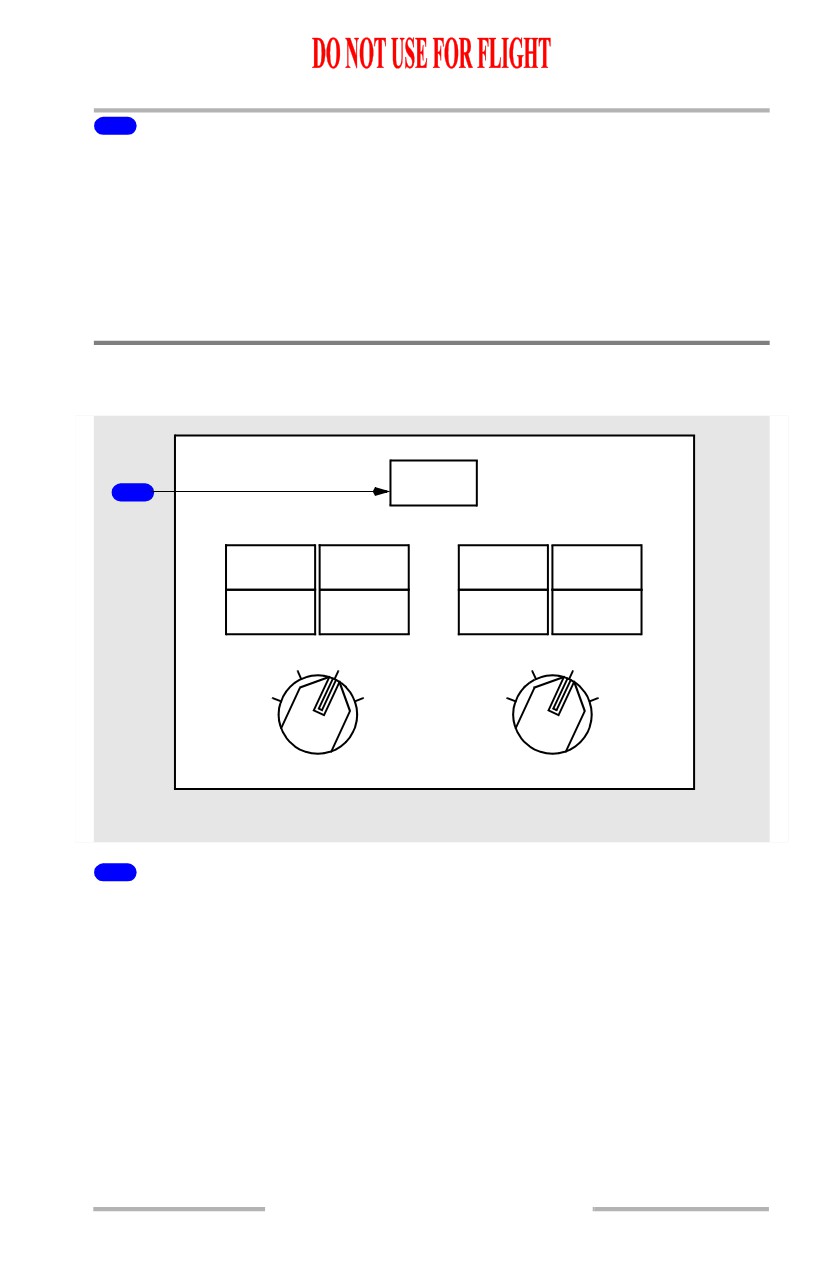
FMC Alert Light
1
A/P
A/T
FMC
P/RST
P/RST
P/RST
2
TEST
1
LEFT FORWARD PANEL
RIGHT FORWARD PANEL
11.10.12
Flight Management, Navigation -
Controls and Indicators
Boeing 737 Operations Manual
1
FMC Alert Light
Illuminated (amber) -
[Option - CDU]
• the FAIL light on CDU(s) is illuminated, or
• an alerting message exists for both CDUs, or
• test switch is in position 1 or 2.
Push - both pilots’ FMC alert lights extinguish.
Global Positioning System (GPS) Light
[Option]
GPS
1
ALIGN
ON DC
ALIGN
ON DC
FAULT
DC FAIL
FAULT
DC FAIL
ALIGN
NAV
ALIGN
NAV
OFF
ATT
OFF
ATT
L IRS R
AFT OVERHEAD PANEL
1
Global Positioning System (GPS) Light
Illuminated (amber) -
• indicates failure of both GPS sensor units
• indicates failure of a single GPS sensor unit when either system
annunciator panel is pushed.
11.10.13